
RCS Business Messaging for Real Estate
RCS Business Messaging for Real Estate has been emerging as a significant tool to streamline the communication process and reduce delays. In today’s volatile real-estate market, property dealings require a prompt and quick support. Here, RCS Messaging comes into play. In this blog post, we will dig deep into what is RCS Messaging and how to deploy it in Real Estate business to improve customer engagement and enhance the communication experience.

What is RCS Business Messaging?
RCS stands for Rich Communication Service. It uses advanced messaging technology that allows brands to converse with their audience through attractive features beyond traditional messages. Examples include sending high quality visuals, videos, carousels, call to action buttons, URLs, etc.
Why Real Estate Business should use RCS Business Messaging?
Some major reasons of incorporating RCS into the Real Estate Business are:
- RCS has higher open rates
- Fastest response rates
- Best way to retain clients
- Direct and instant reach
- Stand out from competitors
- Provides a great user experience
- Send attractive rich-media content
- Make buying experience interactive and engaging
- Budget-friendly option to connect with clients
- Create customised communication
- Send crucial alerts in seconds
Difference between RCS Messaging and Traditional Messaging for Real Estate
| Feature | RCS Messaging | Traditional SMS |
| Brand name | √ Verified brand name and logo | ×Plain text only |
| Images | √High resolution images | ×Text only |
| Location maps | √ Interactive maps with features | ×Not available |
| Carousels | √ Multiple carousel cards | ×Not available |
| Engagement rate | √ 35% higher than SMS | Standard only |
| Two way communication | √ Available | ×Not available |
| Read receipts | √ Visible | ×Not visible |
| Call to action buttons | √ Available | ×Not available |
Benefits of RCS Business Messaging for Real Estate
Easy appointment scheduling: Switch to RCS business messaging for scheduling appointments and coordinate directly through text messages. Say goodbye to emails and phone calls and adopt RCS business messaging in your real estate business for a smooth and seamless customer experience.
Send multimedia via RCS: Increase your brand’s visibility and allure your clients with captivating videos and visuals. Your prospective buyers can view the enchanting deals without even visiting the site. Start incorporating RCS messaging and give your real estate business an edge over competition.
Send timely alerts and updates: Now with the use of RCS messaging, you can bridge the communication gap between the brand and the clients by sending real-time notifications for every alert and update. Whether you wish to convey about a price drop, new property listing or an availability alert, you can reach your clients in the fastest possible manner.
Sending reminders and followups: You can create a trustworthy and personalised connection with your target buyers by sending reminders and followups in just a click of a button. Property dealers can send reminders about scheduled visits, property updates, details about financing options with dynamic media rich messages for every step of the buyer’s journey.
Event invitations: Instead of using phone calls for inviting people for property visits, integrate RCS messaging. RCS messaging serves as a boon for real-estate owners as it a personalised, interactive and dynamic medium to stay connected with the client base in a streamlined manner.
Why use Fast2SMS RCS Business Messaging for Real Estate?
Fast2SMS is a one stop solution for all your business communication needs. Let us look into the reasons of using Fast2SMS RCS Business Messaging for Real Estate:
- Fastest delivery rates
- Lowest message prices
- Versatile features
- User-friendly interface
- Complete customer support at every step
- Innovative features in RCS messaging
- Auto refund of failed messages
- 100% transparency
- Secure and reliable servers
- Chat support
- Call support
- Email support
- Enhanced engagement
- Real time feedback
- Instant delivery report status
How to send RCS Business Message via Fast2SMS?
1. Click on the Quick RCS feature on the left side of the panel.
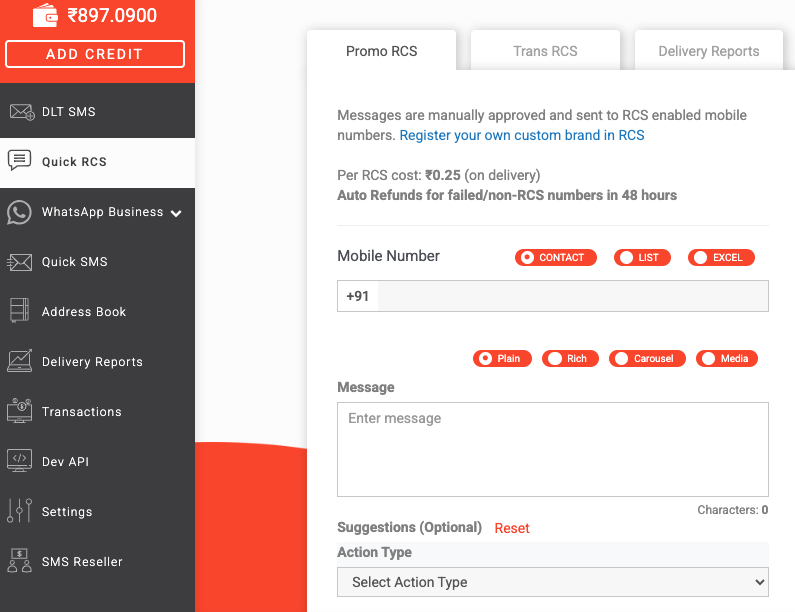
2. Select tab Promo RCS if you want to send promotional and marketing SMS, else select Trans RCS tab for sending informative SMS.
Note: For sending Promo RCS message, you can send maximum 4 messages to a single number in one month. In Trans RCS message, there is no limit, but the content must be informative and not promotional.
3. Enter the details of the contact to whom you wish to send the message. You can even select excel to upload contacts using a CSV file.
4. For sending messages, you have four options – Plain, Rich, Carousel, Media.
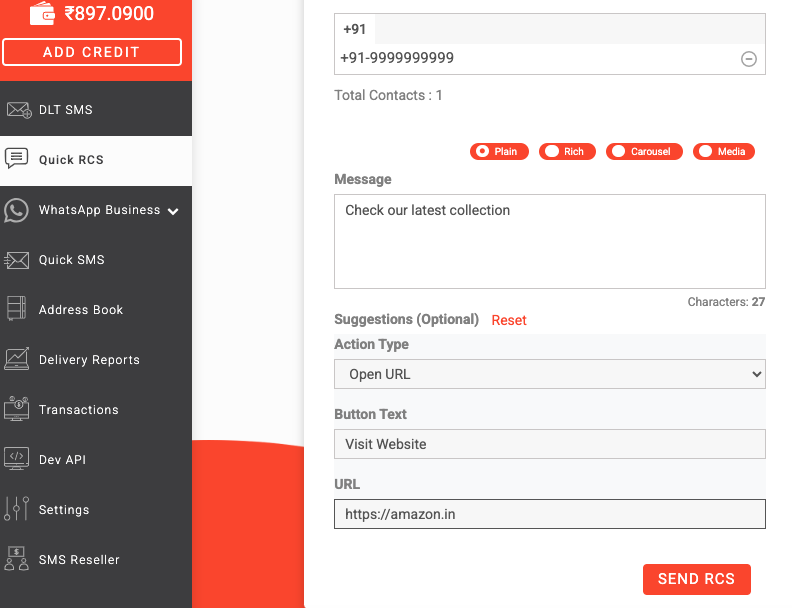
A. Plain: Here, you can send plain message text which can be previewed on the right side of the panel. There is an Action Type drop down menu where you get three options to choose from.
- Open URL
- Dial a number
- View location
When you select the Open URL option, you get to add a website link on the URL box. Make sure to add https:// before entering the website link.
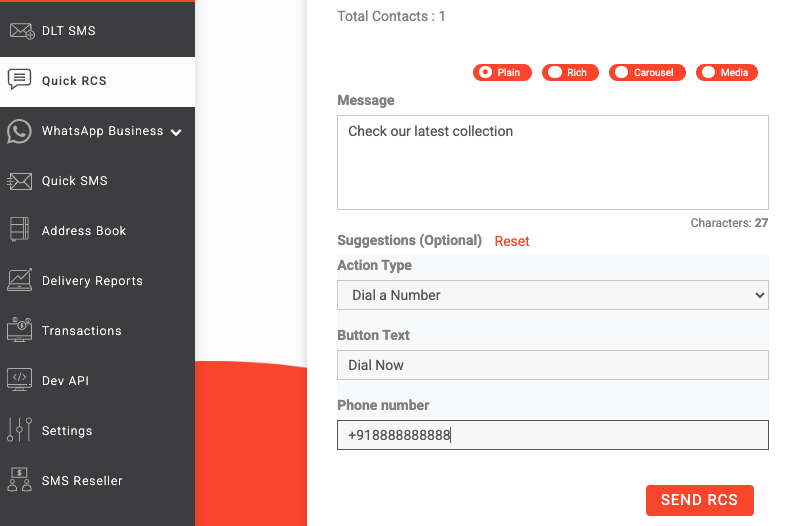
Dial a number
In the next option, you can enter a mobile number beneath the text that the customer can contact. Always add the country code +91 before entering the 10 digit number.
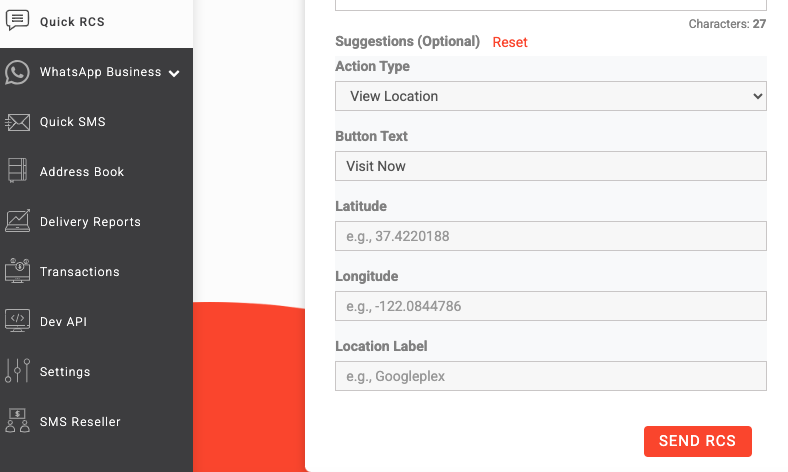
In the third option View location, you can add the location details that will be shown below the message text. You can enter the latitude, longitude and the location label.
B. Rich
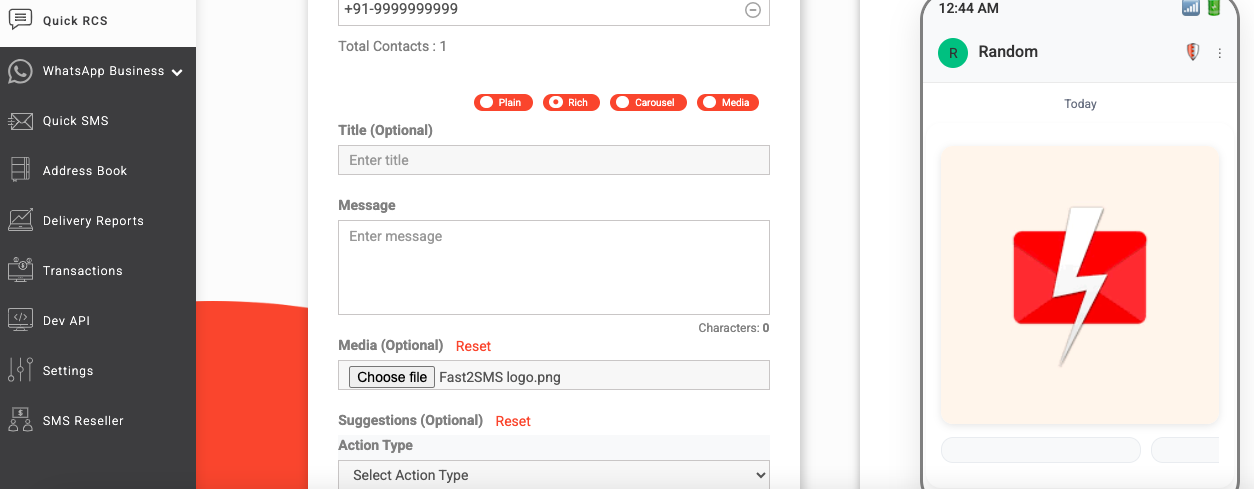
When you select the second tab Rich, you can send visual message template and upload media files such as audio, video, template files, image, etc. Once the file is chosen, the preview of the message will be visible on the right side of the panel.
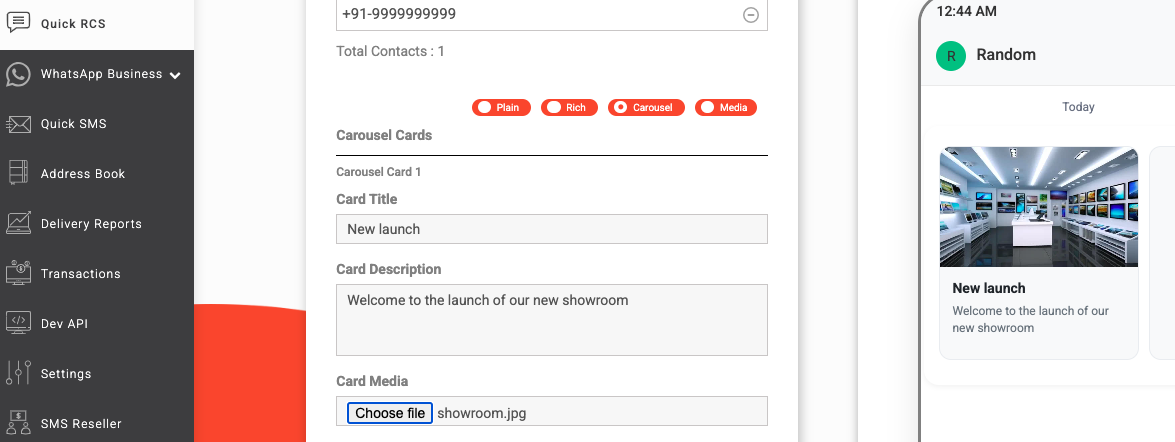
C. Carousel
In this feature, you can send 10 cards in a single message template. The preview of the uploaded file will be visible in the right side of the panel.
D. Media
Here, In this feature, you can send multimedia files upto 100 MB.
5. Click on Send RCS tab to send message after selecting the desired options. Once it is done, a message preview and confirmation box will appear on your screen. Click on Confirm to send the message.
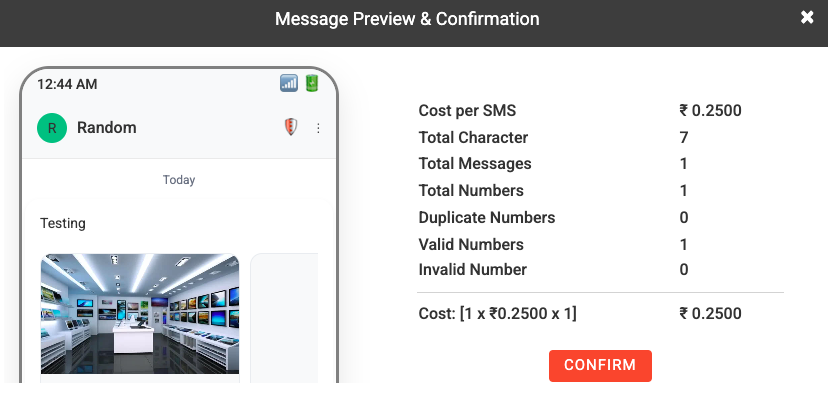
A message will then appear after confirmation, your message will be sent.
Note: Each message will be manually approved. Sending personal/spam/fraud messages is strictly prohibited. All messages will be delivered to RCS enabled phones only. Auto refund for all the failed or non RCS number will be provided within 48 hours.
You can even register your own custom brand in RCS and send SMS with that. Click here to know more about it.
Amplify your customer service experience and stay ahead of the competitors using the services of Fast2SMS. Choose RCS Business Messaging for Real Estate Business and thrive in the marketplace forever. Get started with Fast2SMS and elevate your business communication to the next level. Sign up now!