
How to Create a Meta Business Portfolio
If you want to start using WhatsApp services with Fast2SMS, the first thing you need is a “Meta Business Portfolio.” Earlier, this was called Facebook Business Manager.
This Meta Business Portfolio helps you manage all of your business assets in one place, such as:
- Facebook Pages
- Instagram accounts
- WhatsApp Business accounts
- Ad accounts
- Team access and permissions
Before starting, make sure your Facebook account is minimum 6 months old. New Facebook accounts sometimes face verification issues in WhatsApp onboarding.
Step 1: Open Meta Business Suite
Go to the official Meta Business Suite website by clicking on the below link:
Once the page opens, click on Create Account.
Step 2: Log In with Your Facebook Account
Now log in using your personal Facebook account.
A lot of users worry that their personal Facebook details will become public after creating a Business Portfolio, but that’s a myth only. Meta only uses your Facebook profile for identity verification, ownership confirmation & security purposes. Your personal posts, friends, and profile activity remain private.
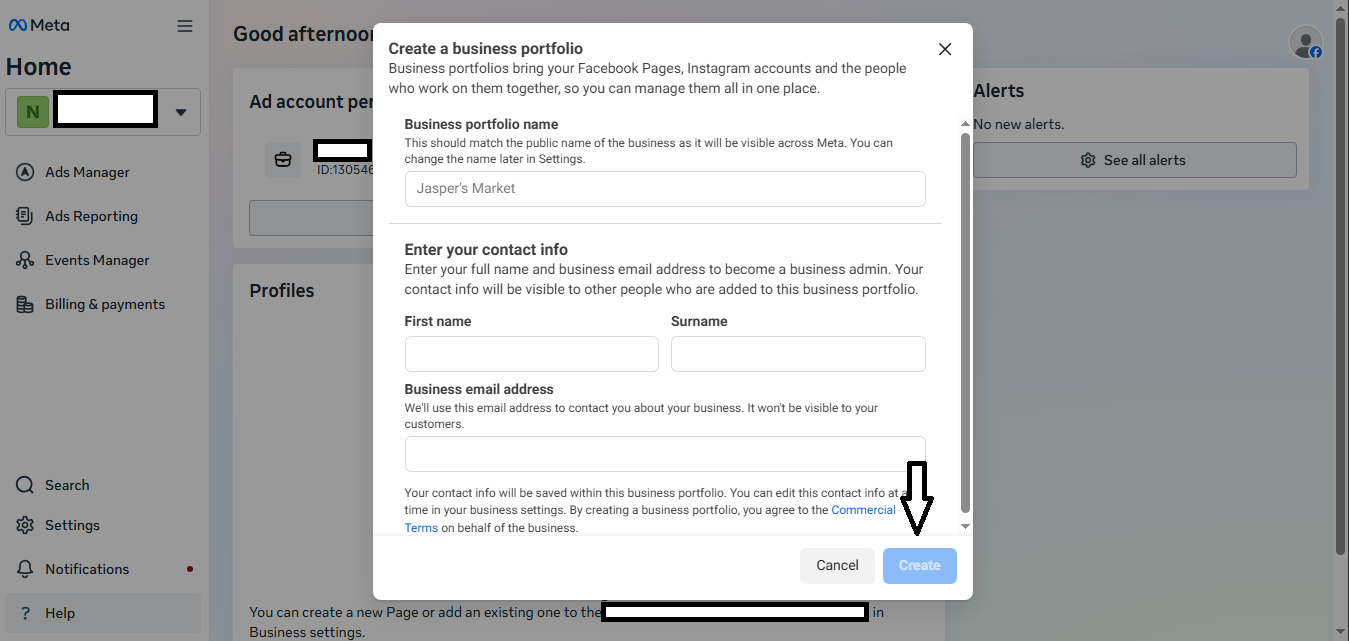
Step 3: Add Your Business Details
After logging in, Meta will ask for some basic business information.
Business Portfolio Name
Enter your business or organization name here. It’s always better to use your actual business name because later, during verification, Meta verifies whether your documents match the business details entered by you.
For example:
- “Company name”
- “Brand name”
- “Organization name”
Note: Avoid using random or temporary names.
Important Points to Remember
- Enter your first and last name correctly.
- Try to keep the name same as your Facebook profile name.
- Add an active email address that you regularly use.
- Meta will send important updates and verification emails to this address, so make sure it is accessible.
- After filling in all details, click on Create or Submit.
Step 4: Verify Your Email Address
Once the form is submitted, Meta will send a verification email to the email address you provided.
To complete verification:
- Open your email inbox
- Find the email from Meta
- Click on the verification link
After verification, your Meta Business Portfolio will be created successfully. If you don’t see the email immediately, check spam folder, promotions folder, updates folder.
Step 5: If You Already Have a Portfolio
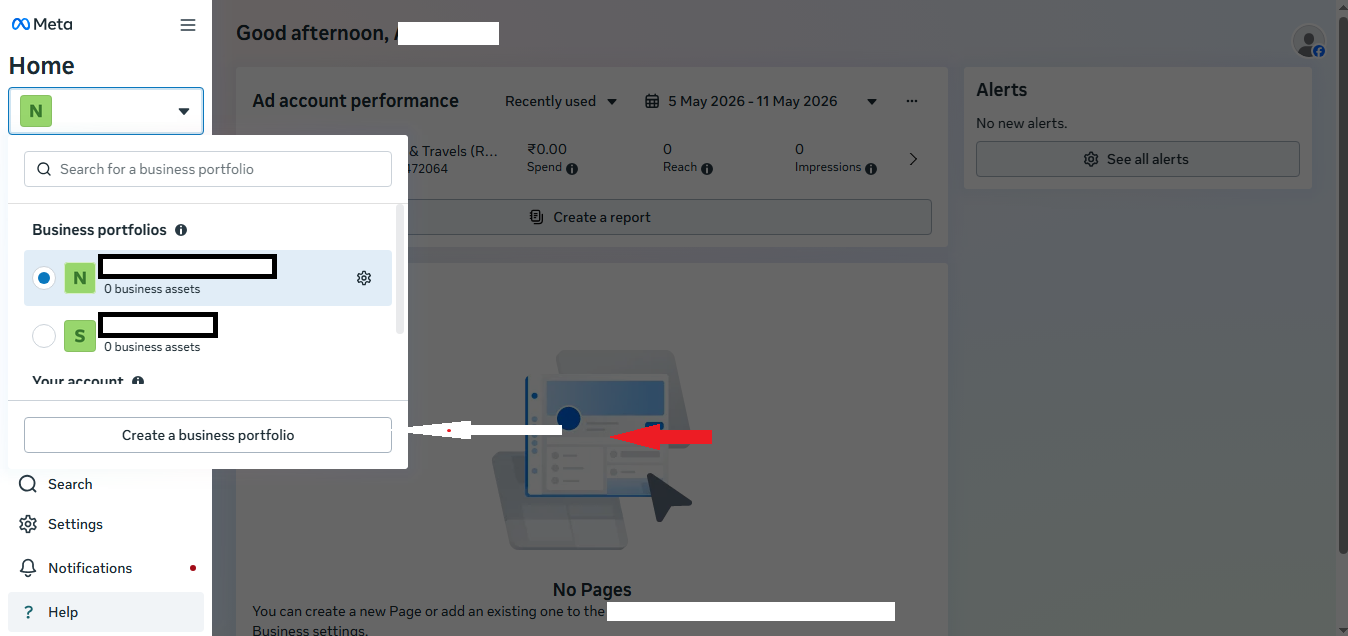
If you already have a Meta Business Portfolio and want to create another one, you can do that as well. Follow the below process:
- Open Meta Business Suite
- Click on Create New Portfolio
- Follow the same process again
This is useful if you manage multiple businesses, different brands, separate client accounts.
Why This Setup Is Important?
Your Meta Business Portfolio is required for:
- WhatsApp onboarding
- Display name approval
- Business verification
- Messaging limit increase
- Template approvals
- Managing WhatsApp numbers
Without a proper portfolio setup, many WhatsApp API features may not work correctly.
Common Mistakes to Avoid
Here are a few mistakes users commonly make during setup:
- Using a New Facebook Account: Try to use an older Facebook account that has normal activity history.
- Entering Wrong Business Details: Your business name should match your official documents.
- Using an Inactive Email Address: Always use an email that you can access easily.
- Skipping Email Verification: Your portfolio setup remains incomplete until the email is verified.
Important Note Before WhatsApp Onboarding
After creating your Meta Business Portfolio, it is recommended to wait for around 24 hours before starting WhatsApp onboarding in Fast2SMS. This waiting period helps Meta properly sync and activate your business portfolio in their system. Starting onboarding immediately after creation may sometimes cause:
- Signup issues
- Verification errors
- Permission problems
- Unknown API errors
Conclusion
Creating a Meta Business Portfolio is a simple but important step for using WhatsApp services through Fast2SMS. Once your setup is completed properly, the rest of the onboarding process becomes much smoother. Take your time while entering business details and make sure everything is accurate. A properly configured portfolio helps avoid most verification and onboarding problems later.