
WooCommerce Order Status SMS and WhatsApp Notifications: Every Status Explained
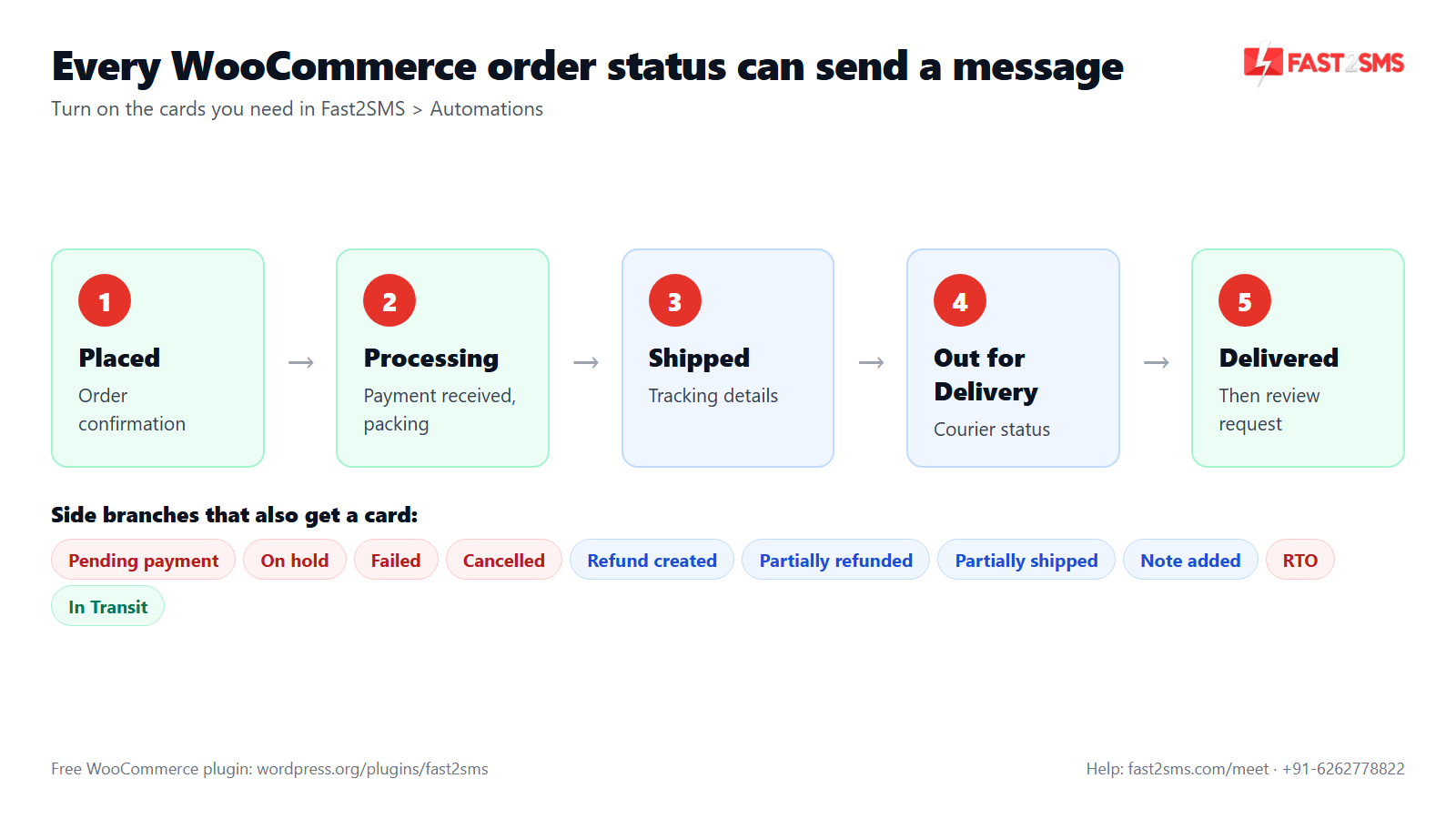
Every time a WooCommerce order changes status, your buyer wonders what is happening. A WooCommerce order status plugin answers that before they call you. The free Fast2SMS plugin sends a WooCommerce order SMS or WhatsApp message on every status: the eleven built-in order events, shipped and delivered, and even custom statuses like In Transit, Out for Delivery and RTO that your courier plugin adds.
This guide goes status by status. For each WooCommerce order status notification you will see when it fires, which channel suits it, and which variables make it useful. It ends with the manual slugs card for statuses the plugin does not pick up on its own, and 30 answers to questions store owners ask us.
How WooCommerce order status notifications work in the plugin
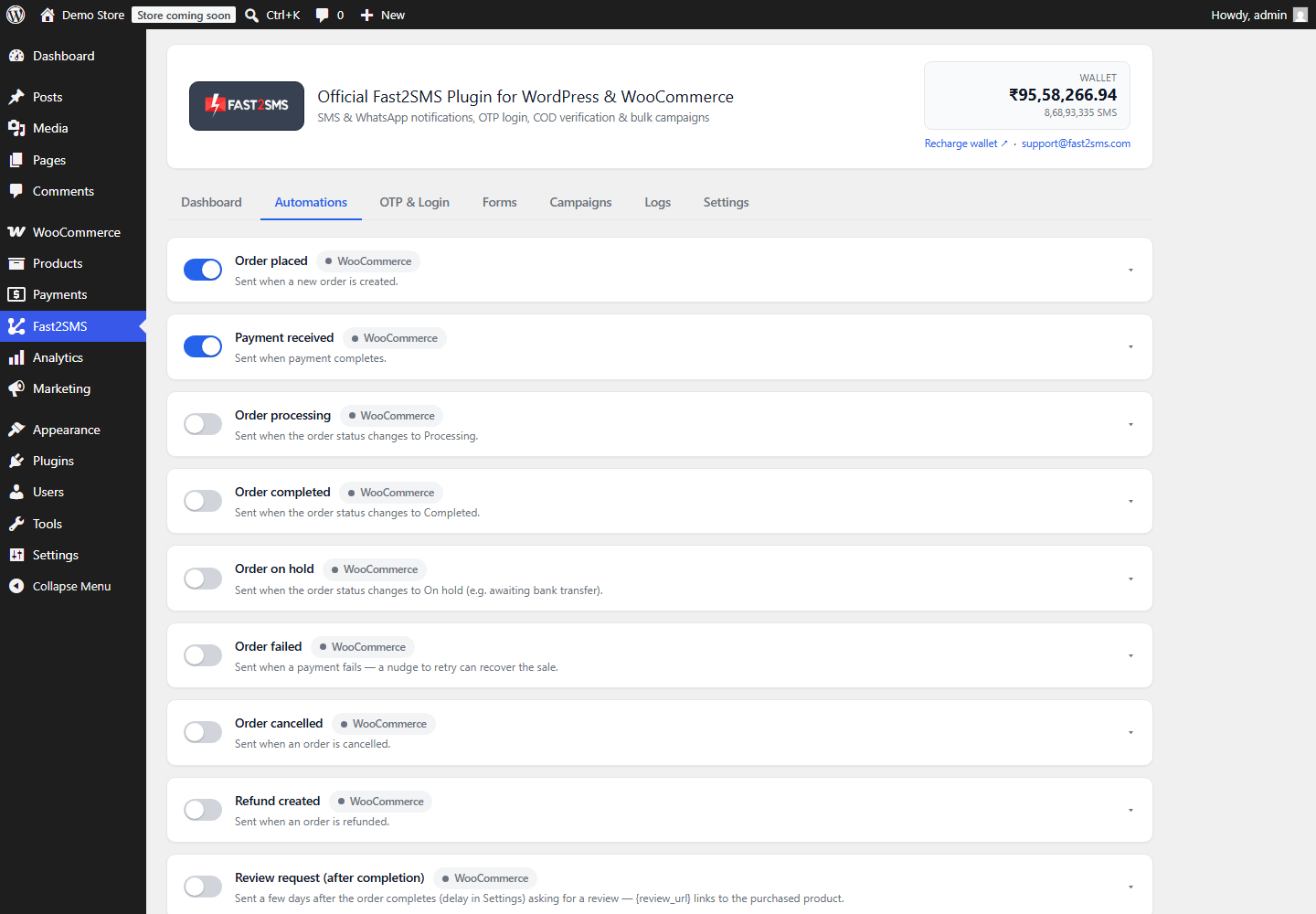
The plugin is “Fast2SMS – OTP Login & SMS Notifications”, free on WordPress.org. It is a WooCommerce SMS plugin and WooCommerce WhatsApp plugin in one, and also an OTP plugin for WooCommerce. You connect it with your own Fast2SMS API key and pay only for the messages you send. Once WooCommerce is active, the Automations tab (WP Admin > Fast2SMS > Automations) shows one card per event.
Every card works the same way:
- On/off switch. Only the cards you turn on send anything.
- Channel: SMS, WhatsApp or both.
- “Also alert admin”: sends a copy to your admin numbers, which is handy for statuses your team must act on.
- Template picker: a searchable list of your approved DLT SMS templates and WhatsApp templates.
- Variable mapping: a dropdown for each blank in the template.
- Live phone preview and a Send test button that shows a request_id.
Messages go through a queue. Set up the server cron from the Dashboard checklist (a ready cron URL or wp fast2sms worker with WP-CLI) so status messages leave on time. If you are new to the plugin, start with the plugin setup guide.
WooCommerce order status SMS and WhatsApp: every status in one table
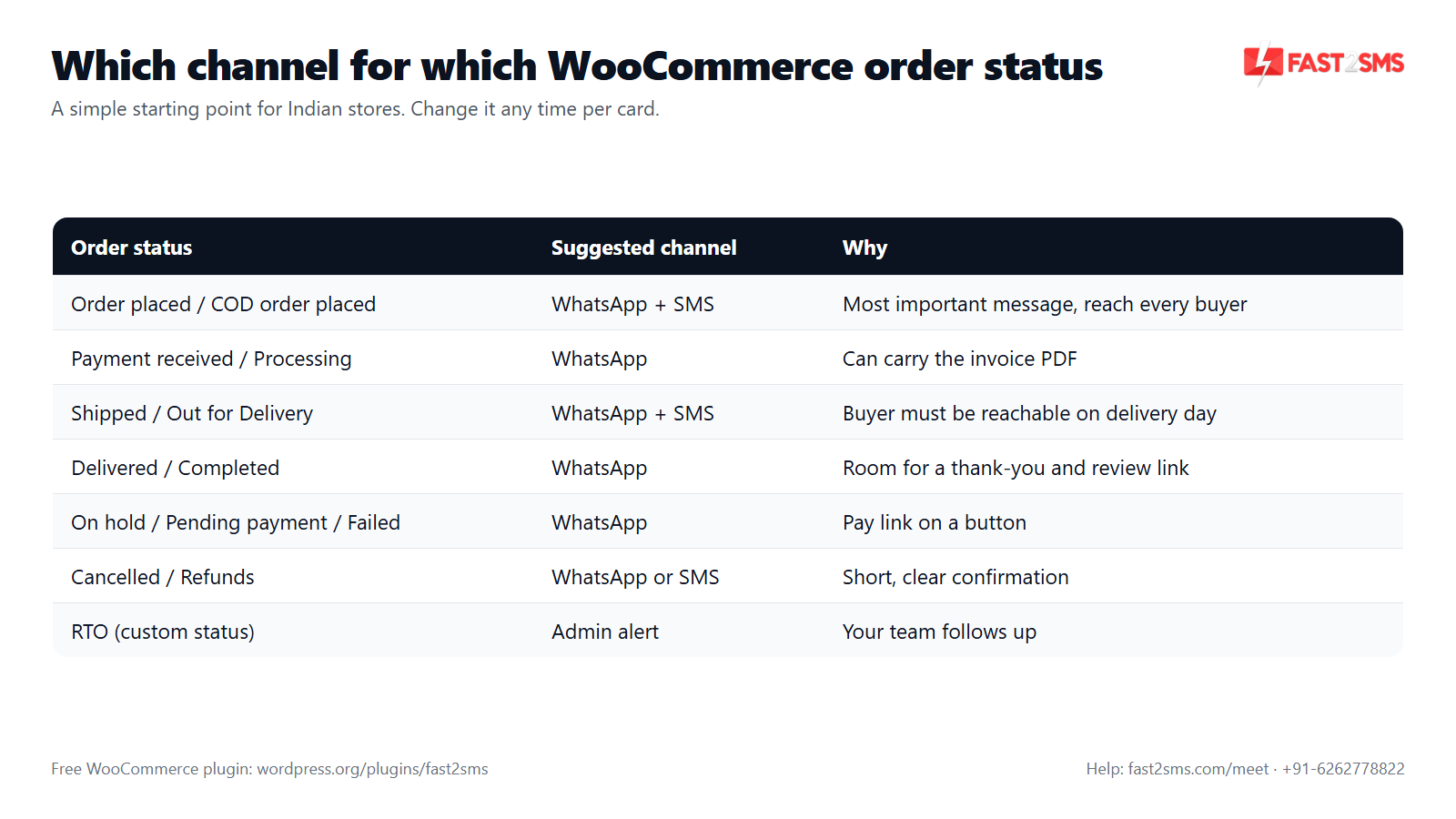
Here is every order status card, when it fires, the channel we usually suggest for Indian stores, and the variables that make the message useful. Treat the channel column as a starting point. You can change it on any card at any time.
| Status (card) | When it fires | Suggested channel | Useful variables |
|---|---|---|---|
| Order placed | A new order is created at checkout | WhatsApp + SMS | Name, order ID, amount, items, order-status link |
| Order pending payment | An order stays unpaid; sent once after the delay (hours) in Settings, cancelled if paid | Name, order ID, amount, pay link | |
| Payment received | Payment for the order is completed | Name, order ID, amount, {invoice_url} | |
| Order processing | Order moves to Processing (paid, or COD, and ready to pack) | Name, order ID, items, shipping method | |
| Order completed | You mark the order Completed | Name, order ID, {invoice_url} | |
| Order on hold | Order waits for payment confirmation, like a bank transfer, or you put it on hold | Name, order ID, amount | |
| Order failed | Payment fails or is declined | Name, order ID, amount, pay link | |
| Order cancelled | Order is cancelled by you, the buyer, or WooCommerce for an unpaid order | WhatsApp or SMS | Name, order ID, amount |
| Refund created | You issue a refund on the order | WhatsApp or SMS | Name, order ID, refund amount |
| Order partially refunded | You refund part of the order | WhatsApp or SMS | Name, order ID, refund amount |
| Note added to order | A note is added to the order | Name, order ID, order-status link | |
| Order shipped | Your shipment-tracking plugin sets the shipped status | WhatsApp + SMS | Name, order ID, tracking number (custom variable), {invoice_url} |
| Order partially shipped | Your shipment-tracking plugin marks part of the order shipped | Name, order ID, items, tracking number | |
| Order delivered | Your shipment-tracking plugin sets the delivered status | Name, order ID, order-status link | |
| Auto-detected custom status (In Transit, Out for Delivery, RTO) | The order moves into that status, set by your courier or workflow plugin | WhatsApp + SMS for Out for Delivery; admin alert for RTO | Name, order ID, city, pincode, tracking number |
| Custom order status (manual slugs) | The order moves into a status slug you typed in | Depends on the status | Any order variable or custom variable |
| COD order placed | A cash on delivery order comes in | WhatsApp + SMS | Name, order ID, amount, COD link |
| COD to Prepaid nudge | Set minutes after a COD order; cancels itself once paid | Name, order ID, amount, pay link |
WooCommerce order SMS for the core customer events
WooCommerce has a few statuses that confuse new store owners, and they matter because they decide which message your buyer gets.
Order placed, payment received and processing are three different moments. Order placed fires when the order is created. Payment received fires when the payment is completed. Processing is the status WooCommerce uses for orders that are paid (or COD) and ready to pack. If you turn on all three, a prepaid buyer can get three messages within a minute. Most stores keep order placed, and pick either payment received or processing, not both.
On hold usually means “waiting for money to arrive”. Bank transfer and cheque orders often sit on hold until you confirm payment. A short message that says “we will ship as soon as your payment reaches us” saves a lot of worried calls.
Pending payment and failed are recovery chances. The pending payment message is a one-time reminder sent after the delay you set in Settings (hours), and it cancels itself if the order is paid. Put the pay link on a WhatsApp button and many buyers simply finish the payment.
Cancelled can come from three places: you, the buyer, or WooCommerce itself when an unpaid order passes your hold stock time. Keep the message neutral so it reads well in all three cases.
Refunds deserve their own message. Refund created and Order partially refunded both offer the refund amount as a variable. “₹450 refunded for order #10482” is the one message a buyer reads twice.
WooCommerce order status notification for shipping events
WooCommerce on its own does not have shipped or delivered statuses. They come from shipment-tracking plugins. When such a plugin sets the status, the plugin’s Order shipped, Order delivered or Order partially shipped card fires.
The shipped message is the one buyers wait for, so make it complete:
- Tracking number and courier name. Your tracking plugin saves these as order meta. Add those meta keys as custom variables in Settings (up to 20), and they appear in the variable dropdown.
- A Track order button. Use a WhatsApp template with a dynamic URL button and fill the “Button variable” row on the card. The preview shows the button.
- The invoice PDF. A template with a document header plus the {invoice_url} variable attaches the auto-generated PDF invoice.
Partially shipped is useful when one item ships before the rest. Mention which items went out, so the buyer does not think the rest is lost.
Custom and courier order statuses: In Transit, Out for Delivery, RTO
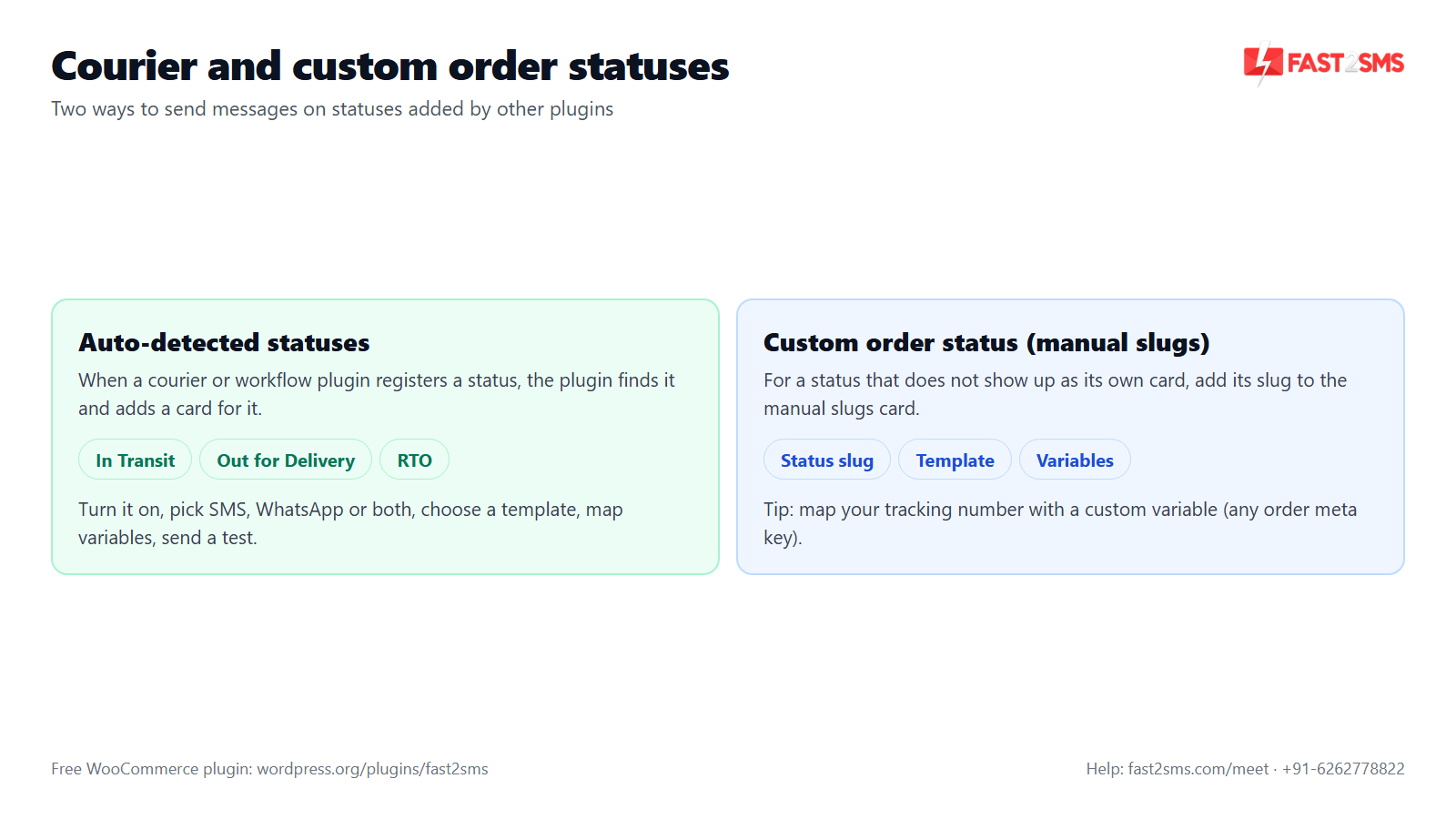
Indian courier and shipping plugins often add their own WooCommerce statuses, like In Transit, Out for Delivery or RTO. Workflow plugins add others, like Packed or Ready to Ship. The plugin handles them in two ways.
1. Auto-detected statuses. The plugin detects custom order statuses registered by your courier or workflow plugins, and each one gets its own card in Automations. It works exactly like a built-in card: switch it on, choose SMS, WhatsApp or both, pick a template, map variables and send a test.
2. “Custom order status (manual slugs)”. Some plugins set statuses in ways that do not show up as their own card. For those, use the manual slugs card and enter the status slug, the short internal name of the status. Your courier plugin’s settings or documentation usually shows it. If you are not sure, our support team can find it with you.
How to use the common courier statuses:
- In Transit: optional. A short WhatsApp update is enough, and some stores skip it to avoid too many messages.
- Out for Delivery: worth sending on WhatsApp and SMS. It is the best moment to make sure the buyer is home and, for COD, has cash or UPI ready.
- RTO: use the “Also alert admin” option so your team knows at once and can call the buyer. Whether you message the buyer too is your call.
Choosing SMS or WhatsApp for each WooCommerce order status
WhatsApp is the better main channel for most statuses. It carries the invoice PDF, images and buttons, and utility messages cost ₹0.25 per delivered message. SMS is the backup that reaches every phone, including buyers without WhatsApp. Choose both only for the few statuses that really matter.
If you send any WooCommerce order SMS, it must follow DLT rules. Order updates usually go under the Service Implicit category, with typed tags like {#numeric#}, {#alphanumeric#} and {#url#} in place of plain {#var#}. Our DLT SMS templates for WooCommerce page has ready samples, and DLT variable tagging explains which tag fits which value. WhatsApp templates need no DLT, only Meta approval.
Pricing: free WooCommerce plugin, pay only per message
- The plugin is free: no licence, no monthly fee, no setup fee.
- WhatsApp OTP and order updates: ₹0.25 per delivered message; failed WhatsApp messages are refunded within 48 hours.
- SMS: your DLT SMS rate per message.
- High volume? Rates are negotiable: call +91-6262778811, email [email protected] or book a free meeting.
- Free signup with ₹50 test credit.
Settings that shape your WooCommerce order status messages
A few settings in the Settings tab change how status messages behave:
- Consent checkbox at checkout (“Send me order updates on SMS/WhatsApp”) so buyers opt in while ordering.
- Admin numbers: up to 10, for new order, stock and form alerts, and for every card where “Also alert admin” is on.
- Custom variables: up to 20 order meta keys, such as a tracking number, courier name or delivery slot.
- Delays: pending-payment reminder (hours), COD-to-Prepaid (minutes), review request (days) and abandoned cart.
- Do-not-send list: marketing-type messages (abandoned cart, welcome, review, campaigns, back in stock, COD to Prepaid) are never sent to these numbers.
- Low wallet email alert: so status messages never stop because the balance ran out.
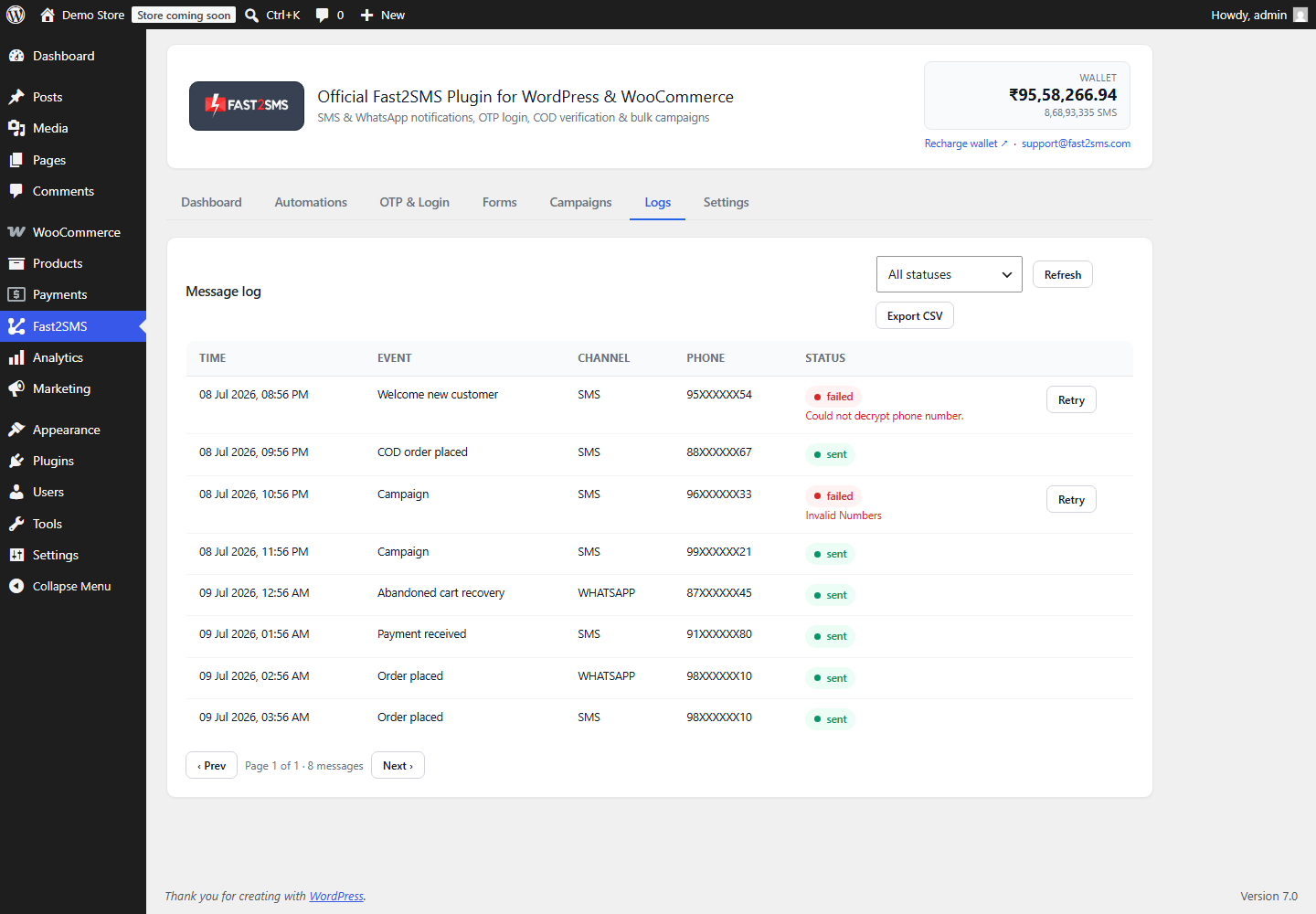
Then keep an eye on the Logs tab. It shows each message’s event, channel, masked number, status, error and time, with one-click retry and CSV export.
Want your WooCommerce order status messages set up for you? Our team will do it with you, free.
We can find your courier plugin’s statuses, map tracking numbers as variables, and get your SMS and WhatsApp templates ready on one call. Schedule a free meeting, call +91-6262778822 or email [email protected].
Frequently asked questions
What is the best free WooCommerce order status plugin for SMS and WhatsApp in India?
The Fast2SMS plugin is a free WooCommerce order status plugin on WordPress.org that sends SMS, WhatsApp or both on every order status, including shipping and custom courier statuses. There is no plugin fee or licence; you pay Fast2SMS only per message, and it works with 10-digit Indian numbers.
How do I send an SMS when a WooCommerce order status changes?
Install the Fast2SMS plugin, add your API key, open Fast2SMS > Automations, switch on the card for that status, choose SMS, pick your approved DLT template and map the variables. Send a test to your own phone, and from then on the status change sends the SMS automatically.
Which WooCommerce order statuses can send notifications?
Order placed, pending payment, payment received, processing, completed, on hold, failed, cancelled, refund created, partially refunded and note added to order all have cards. So do shipped, delivered and partially shipped, auto-detected custom statuses, the manual slugs card, COD order placed and COD to Prepaid.
Can I send different messages for each WooCommerce order status?
Yes, every status has its own card with its own template, channel choice and variable mapping, so each status can send a message written for that moment. A processing message can say you are packing, while a shipped message carries the tracking number and invoice.
Should I turn on every WooCommerce order status notification?
No, most WooCommerce stores do better with fewer, clearer messages, usually order placed, shipped, out for delivery or delivered, and refunds, rather than a message on every single status change. Add processing or payment received only if buyers ask about them, because too many messages in a short time can make buyers mute or block your number.
What is the difference between order placed, payment received and processing?
Order placed fires when the order is created, payment received fires when payment is completed, and processing fires when WooCommerce moves the order to Processing, meaning it is ready to pack. A prepaid order can hit all three within a minute, so pick one or two of them.
Why do WooCommerce orders go on hold?
WooCommerce usually puts an order on hold while it waits for payment to be confirmed, which is common with bank transfer and cheque payments, and you can also put orders on hold yourself. An on hold message that explains the wait prevents worried buyers from calling or placing a second order.
Can I send a WhatsApp message when a WooCommerce order is cancelled?
Yes, the Order cancelled card sends SMS or WhatsApp whenever an order is cancelled, whether you cancel it, the buyer cancels it, or WooCommerce cancels an unpaid order after the hold stock time. Keep the wording neutral so it fits all three cases.
Does the plugin send refund notifications on SMS and WhatsApp?
Yes, the Refund created and Order partially refunded cards send a message when you refund an order, and both can include the refund amount as a variable. A clear message showing the amount and order ID answers the most common post-refund question before the buyer asks it.
How do I send order shipped SMS from WooCommerce?
Turn on the Order shipped card, choose SMS or WhatsApp, pick your template and map the tracking number as a custom variable; the card fires when your shipment-tracking plugin sets the shipped status. Without a tracking plugin, WooCommerce has no shipped status, so you would use processing or completed instead.
Does WooCommerce have a shipped or delivered status by default?
No, core WooCommerce has no shipped or delivered order status out of the box, so those statuses come from shipment-tracking or courier plugins that you install alongside it. When such a plugin sets them, the Fast2SMS plugin’s Order shipped, Order delivered and Order partially shipped cards fire and send your message.
How do I add the tracking number to a WooCommerce order SMS?
Add the order meta key where your tracking plugin saves the tracking number as a custom variable in Settings, which allows up to 20 order meta keys. It then shows up in the variable dropdown on the Order shipped card, and you map it to the right blank in your template.
Can the plugin send notifications for courier statuses like In Transit and Out for Delivery?
Yes, custom order statuses registered by courier or workflow plugins, such as In Transit, Out for Delivery or RTO, are detected automatically and each gets its own card. You set it up like any other card: channel, template, variables and a test message.
What is the “Custom order status (manual slugs)” card?
It is a card for custom statuses that do not appear as their own card, where you enter the status slug so the plugin can send a message when an order moves into it. The slug is the short internal name of the status, usually shown in your courier or status plugin’s settings or documentation.
How do I find the slug of a custom WooCommerce order status?
The slug is usually listed in the settings or documentation of the plugin that created the status, often as a lowercase name with hyphens. If you cannot find it, book a free call with our support team and we will look it up with you on your store.
Should I send a message to the customer when an order goes RTO?
That depends on your process, but most stores use the “Also alert admin” option on the RTO card so their team hears about it at once and can call the buyer. A buyer message can help if you offer to reship, but keep it polite, since RTO often happens because the buyer was not reachable.
Can my team get WhatsApp alerts for certain order statuses?
Yes, every customer card has an “Also alert admin” option that sends a copy to your admin numbers, and you can add up to 10 admin numbers in Settings. There are also separate admin alerts for new order, low stock, out of stock and form submitted.
Can I send the WooCommerce invoice with an order status message?
Yes, on WhatsApp you can attach the auto-generated PDF invoice by using a template with a document header and the {invoice_url} variable. It fits best on payment received, completed or shipped, where buyers expect a bill. SMS cannot carry attachments, so it only suits a link.
What variables can I use in WooCommerce order status messages?
The plugin offers more than 25 order variables, such as name, order ID, amount, items, city, pincode, discount, coupon, shipping method, order-status link and pay link. Some events add extras like refund amount or COD link, and you can add up to 20 order meta keys as custom variables.
Do I need DLT templates for WooCommerce order SMS?
Yes, every order SMS sent in India needs a DLT approved template, a registered header and a correct PE-TM chain, and order updates usually go under the Service Implicit category. Use typed tags like {#numeric#} and {#url#}. From 30th September, SMS with mismatched PE-TM chains are blocked.
Why did my WooCommerce order status SMS not deliver?
The usual reasons are a template that does not match the approved DLT text, a wrong header, a variable that is too long for its tag, or a PE-TM chain problem. Check the error in the Logs tab first. Our SMS not delivered guide explains each DLT error and its fix.
Why is my order status message stuck in queue?
Messages usually sit in the queue when the plugin’s worker is not running often enough, which happens when you rely on WP-Cron and the store has few visits. Set up the server cron from the Dashboard checklist, using the ready cron URL or wp fast2sms worker with WP-CLI, and the queue clears on schedule.
Can I retry failed order status messages?
Yes, the Logs tab lets you retry a single failed message or retry all failed messages in one click, after you fix the cause shown in the error column. You can also export the logs to CSV if you want to check failures by event or channel.
How do I send a payment reminder for a WooCommerce pending payment order?
Turn on the Order pending payment card and set the pending-payment reminder delay in hours in Settings; the plugin sends one reminder and cancels it if the order gets paid first. Map the pay link to a WhatsApp button so paying takes one tap. See the COD to prepaid and pending payment guide.
Will a COD buyer get both the order placed and COD order placed messages?
They are separate cards, so the safest way to know what your buyers will see is to place a test COD order with both cards on and check your own phone. Many stores keep the COD order placed card for COD-specific wording and the one-tap confirmation link, and adjust the general card to match.
How does COD order verification work with order status messages?
After a COD order, the COD order placed message can include a one-tap link where the buyer confirms with an OTP, and the plugin then marks the order verified and adds an order note. Your team checks that note before shipping. The COD OTP verification guide covers the setup.
Is COD verification the same as WooCommerce checkout OTP?
No, COD verification happens after the order through a one-tap link, while checkout OTP verifies the billing mobile before the order is placed. Checkout OTP works with the classic (shortcode) checkout only, not the block checkout, so check which checkout your store uses before planning around it.
Does the plugin work with WooCommerce HPOS for order status notifications?
Yes, the plugin is compatible with WooCommerce High-Performance Order Storage, so order status cards keep firing whether your store uses HPOS or the older order storage. You do not need to change any storage setting to use it.
How much does each WooCommerce order status notification cost?
A WhatsApp utility order update costs ₹0.25 per delivered message, failed WhatsApp messages are refunded within 48 hours, and SMS costs your DLT SMS rate per message. The plugin is free, so sending both channels on one status simply means paying for two messages.
Is there a WooCommerce order status plugin with both SMS and WhatsApp in one place?
Yes, the Fast2SMS plugin handles SMS and WhatsApp in the same cards, so you choose SMS, WhatsApp or both per status instead of running two plugins. The same plugin also covers OTP login, abandoned cart, back in stock and campaigns. Our WooCommerce WhatsApp plugin FAQ covers all of it.
Set up your WooCommerce order status messages today
Start with three cards: order placed, shipped and delivered (or your courier’s Out for Delivery status). Add refunds and pending payment next, then the custom statuses your courier plugin brings in. For the wider picture of order notifications across SMS and WhatsApp, read WooCommerce SMS and WhatsApp order notifications.
Need help? Schedule a free meeting · [email protected] · +91-6262778822 · Sales and volume pricing: +91-6262778811