
The two letters in front of an SMS sender ID, like the AD in AD-DEMOTR-S, are added by the telecom network, not by the business. The first letter tells you which operator sent the message into the network and the second letter tells you that operator’s telecom circle. This page explains the meaning of the prefix in a sender ID, gives TRAI’s full list of operator and circle codes, and explains the letter that now comes at the end (-P, -S, -T or -G).
The short answer
A business SMS in India shows up on the phone in this format:
- First letter of the prefix: the telecom operator that sent the message into the network. TRAI calls it the originating access provider.
- Second letter of the prefix: the licensed service area (telecom circle) of that operator.
- The middle part: the header, also called the sender ID. This is the only part the business chooses, and it must be approved on a DLT portal.
- The last letter (suffix): the type of message. P = promotional, S = service, T = transactional, G = government.
So AD-DEMOTR-S means: a service message from the business whose header is DEMOTR, sent through Airtel’s Delhi circle.
How the prefix looks on a phone
In the SMS inbox the full sender, prefix and suffix included, is shown as the name of the chat. Here is how messages from a few dummy senders look. The business in all of them is our sample business, Demo Traders.
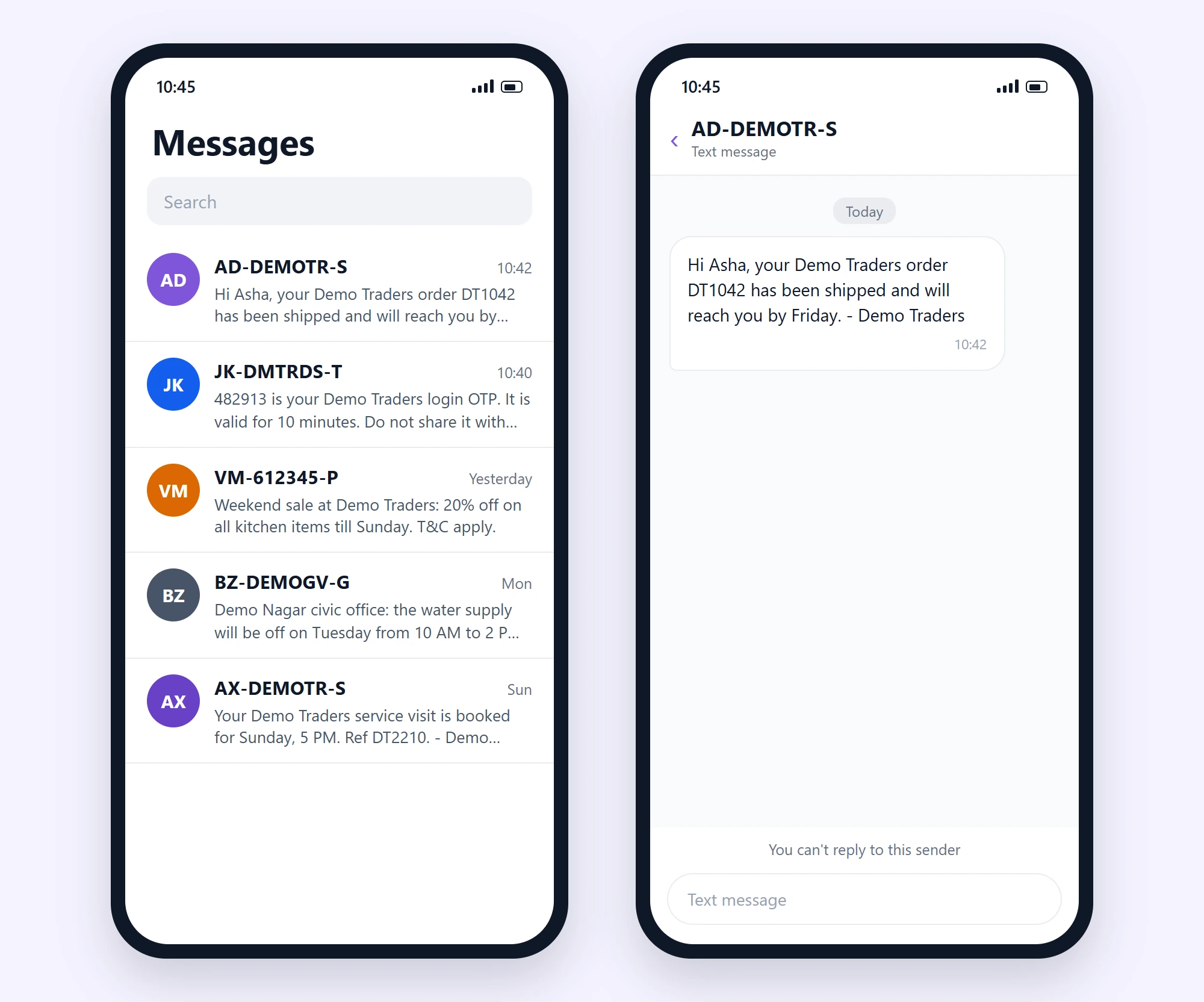
Reading the inbox above with the code tables below:
| Sender on the phone | Operator (1st letter) | Circle (2nd letter) | Header | Message type |
|---|---|---|---|---|
AD-DEMOTR-S |
A = Airtel | D = Delhi | DEMOTR | S = Service |
JK-DMTRDS-T |
J = Jio | K = Kolkata | DMTRDS | T = Transactional |
VM-612345-P |
V = Vodafone Idea (Vi) | M = Mumbai | 612345 (numeric) | P = Promotional |
BZ-DEMOGV-G |
B = BSNL | Z = Maharashtra | DEMOGV | G = Government |
AX-DEMOTR-S |
A = Airtel | X = Karnataka | DEMOTR | S = Service |
Operator codes: the first letter of the prefix
TRAI publishes the letters given to each telecom operator for this purpose. This is TRAI’s list as published under the TCCCPR 2018 regulations (list dated 16 June 2020). Some of these companies have since merged or closed. Most messages you get today start with A, J, V or B.
| Code | Telecom operator (as listed by TRAI) |
|---|---|
| A | Bharti Airtel Ltd / Bharti Hexacom Ltd (Airtel) |
| B | Bharat Sanchar Nigam Ltd (BSNL) |
| C | V-CON Mobile & Infra Private Ltd |
| D | Aircel Ltd / Dishnet Wireless Ltd |
| E | Reliance Telecom Ltd |
| J | Reliance Jio Infocomm Ltd (Jio) |
| M | Mahanagar Telephone Nigam Ltd (MTNL) |
| Q | Quadrant Televentures Ltd |
| R | Reliance Communications Ltd |
| T | Tata Teleservices Ltd / Tata Teleservices (Maharashtra) Ltd |
| V | Vodafone Idea Ltd (Vi) |
You may find older lists online with extra letters for brands that existed before mergers (for example, separate letters for Vodafone and Idea). In TRAI’s current list, Vodafone Idea uses V.
Circle codes: the second letter of the prefix
The second letter is the licensed service area, which most people call the telecom circle. Here is TRAI’s list.
| Code | Circle (service area) | Code | Circle (service area) |
|---|---|---|---|
| A | Andhra Pradesh | M | Mumbai |
| B | Bihar | N | North East |
| D | Delhi | O | Orissa (Odisha) |
| E | UP East | P | Punjab |
| G | Gujarat | R | Rajasthan |
| H | Haryana | S | Assam |
| I | Himachal Pradesh | T | Tamil Nadu (including Chennai) |
| J | Jammu & Kashmir | V | West Bengal |
| K | Kolkata | W | UP West |
| L | Kerala | X | Karnataka |
| Y | Madhya Pradesh | Z | Maharashtra |
The suffix: -P, -S, -T and -G at the end
On 12 February 2025 TRAI amended the TCCCPR 2018 rules so that people can tell the type of a business message just by looking at the sender. Operators now add one letter after the header:
| Suffix | Message type | Typical messages | Example on the phone |
|---|---|---|---|
| -P | Promotional | Offers, sales, discounts and other marketing | VM-612345-P |
| -S | Service | Order and delivery updates, appointment reminders, account alerts | AD-DEMOTR-S |
| -T | Transactional | OTPs and alerts for a transaction the customer just started | JK-DMTRDS-T |
| -G | Government | Messages sent by government bodies | BZ-DEMOGV-G |
The business does not type the suffix. It comes from the category of the DLT content template that the message matched. If your SMS shows the wrong letter, the template is registered under the wrong category on the DLT portal. Our guide on header suffixes -P, -S, -T and -G covers this in more detail, and DLT template types explains which category to pick.
With the suffix, a sender like AD-DEMOTR-S uses 11 characters: 2 for the prefix, 6 for the header, 1 for the suffix and 2 hyphens.
Why does the same business show different prefixes?
Customers sometimes see the same brand as AD-DEMOTR-S one day and JK-DEMOTR-S or AX-DEMOTR-S another day, and think one of them is fake. Both can be real. The prefix only shows which operator and circle carried the message into the network, and that can change from message to message. The part that stays the same is the header (DEMOTR) because it is registered to the business on DLT.
To check whether a message is genuine, look at the header in the middle and the content, not the prefix. A real business can only send from headers approved for it on a DLT portal.
Where the business sets its part of the sender
As a business you control only the header in the middle. In Fast2SMS you add the headers approved for your entity in DLT Manager > Sender ID. Fast2SMS cannot change the prefix or the suffix, since the network adds them.
-
Get your header approved on a DLT portal
Register your business (entity) on any one DLT portal and apply for a header. Service and transactional headers are normally 6 letters, such as DEMOTR for Demo Traders. Promotional SMS have traditionally used a 6-digit numeric header. See the DLT header rules before you apply.
-
Add the header in DLT Manager
Open DLT Manager > Sender ID and click Add New Sender ID. Select your entity, type the header exactly as approved and upload a DLT screenshot that shows it as approved. The list shows each header with its entity and status (Approved, Pending or Rejected with the reason).
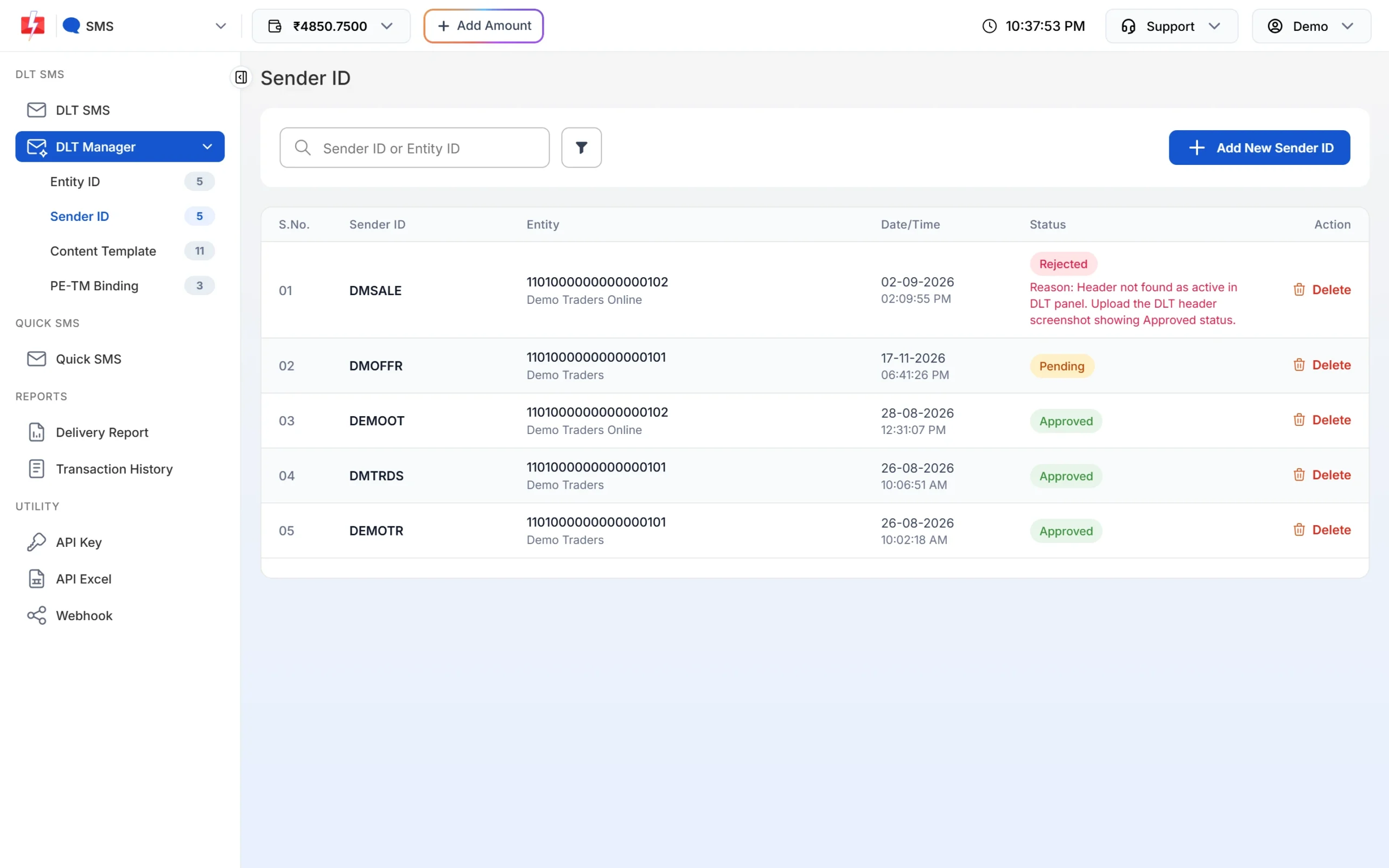
DLT Manager > Sender ID: your approved headers and their status. -
Check the preview of each template
In DLT Manager > Content Template, every template card shows a phone preview with the sender as XY-DEMOTR. XY stands for the operator and circle letters that the network adds when the message is delivered.
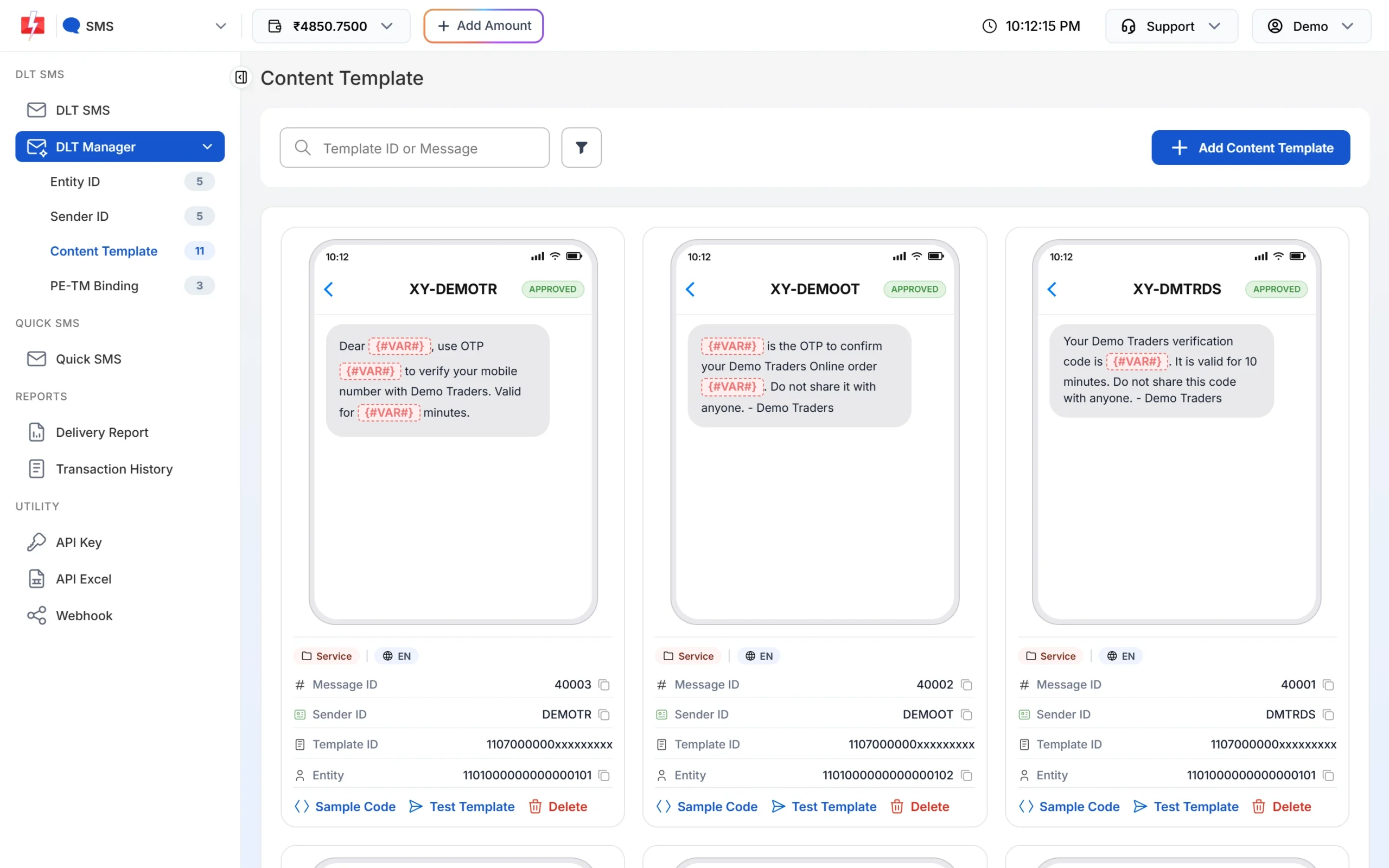
Template cards show the sender as XY-HEADER. The network fills in the real prefix.
For the full setup, see DLT Manager: add Entity ID, Sender ID and templates and how to send DLT SMS from the Fast2SMS panel.
Common questions from businesses
| What you see | What it means | What to do |
|---|---|---|
| Customers see a different prefix every time | Different operators or circles carried the messages. | Nothing. Your header is the same. |
| Your service message shows -P at the end | The template is registered as promotional on DLT. | Register the template under the right category on your DLT portal and add it again in Fast2SMS. |
| Customers see numbers, not your brand header | The message went out from a numeric (promotional) header. | Send service and transactional messages from your approved letter header. |
| You want to remove the prefix | The prefix is added by the network under TRAI rules. | It cannot be removed by any SMS provider. |
Frequently asked questions
What is the meaning of prefix in a sender ID?
The prefix is the two letters before the hyphen, like AD in AD-DEMOTR-S. The first letter is the operator that sent the message into the network and the second is that operator’s telecom circle, as per TRAI’s code list.
What does AD, JK or VM mean in an SMS?
AD means Airtel, Delhi circle. JK means Jio, Kolkata circle. VM means Vodafone Idea (Vi), Mumbai circle. Use the two tables above to read any prefix.
Does the prefix show the location of the sender or of the receiver?
Neither. It shows the circle of the operator that carried the message into the network. The business and the customer can be in any other state.
What do -P, -S, -T and -G mean at the end of an SMS sender?
They show the message type: P promotional, S service, T transactional and G government. TRAI added this rule in its February 2025 amendment to the TCCCPR 2018 regulations.
Can I choose or remove the prefix for my business SMS?
No. The operator adds the prefix and the suffix. You only choose the header (sender ID) in the middle, and it must be approved on a DLT portal.
Is an SMS with a different prefix fake?
Not by itself. The same header can come with different prefixes. Check the header in the middle and the content of the message. Never share an OTP or bank details because of an SMS, even if the sender looks real.
How many characters is an SMS sender ID?
The header is usually 6 characters. With the 2-letter prefix, the 1-letter suffix and two hyphens, the full sender on the phone is 11 characters, for example AD-DEMOTR-S.
Why does a promotional SMS show numbers instead of a name?
Promotional SMS have traditionally gone out from a 6-digit numeric header, so you see something like VM-612345-P. Service and transactional messages use the business’s letter header.