
Shopify COD Verification: OTP vs WhatsApp Confirmation vs Calls
Cash on delivery is still how a large share of Indian shoppers like to pay. It helps first-time buyers trust a new brand. But every COD order is also a promise with no money behind it. Some customers change their mind, some typed a wrong number, and some never meant to buy at all. When that parcel comes back, you pay for shipping twice and your stock sits stuck in transit.
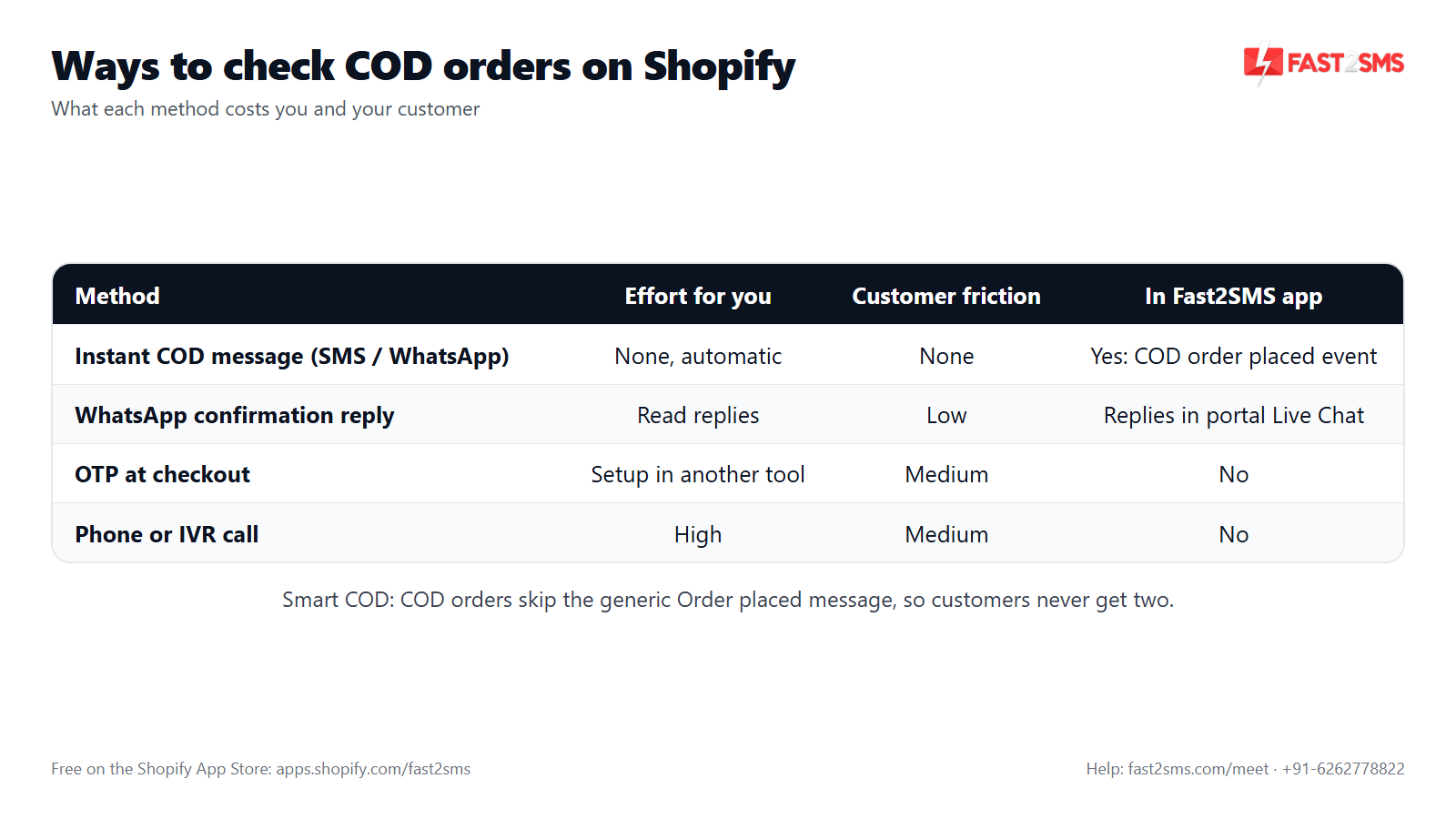
This guide compares the four common ways to handle Shopify COD verification: an instant COD message by SMS or WhatsApp, a WhatsApp confirmation that asks for a reply, OTP at checkout, and manual or IVR calls. You will see what each one costs, how much it annoys the customer, and what it actually proves. We will also be clear about which parts the free Fast2SMS Shopify app handles and which parts need another tool or your own team.
Why COD orders go wrong for Indian Shopify stores
If you run a D2C store in India, you already know the pattern. Prepaid orders mostly behave. COD orders are where the surprises come from. Here are the usual reasons a COD order fails:
- Fake or prank orders. Someone places an order with a random name and a number that is not theirs. Nobody is waiting for the parcel.
- Wrong or mistyped phone numbers. The buyer is real, but one digit is off. The courier cannot reach them and the parcel comes back.
- Impulse orders. The customer ordered late at night, forgot about it, or bought the same thing elsewhere. At the door, they refuse.
- Incomplete addresses. Missing landmark, wrong pincode, or just a village name. The delivery partner gives up.
- Customer not reachable. Phone switched off or busy on every attempt, so the courier marks it undelivered.
Each failed COD order is a return to origin (RTO). You pay forward shipping, you often pay return shipping, the product may come back damaged, and your inventory is locked up for days.
COD verification is simply a way to catch the bad orders early, before you pack and ship. For a wider plan that also covers address checks, prepaid nudges and courier choices, read our guide on how to reduce COD RTO on Shopify.
What “COD verification” actually means
It helps to split the phrase into four levels. Each proves a little more than the one before.
- Inform: you tell the customer, right away, that their COD order is placed, what they ordered and how much cash to keep ready.
- Confirm: you ask the customer to reply and say yes, they want it.
- Prove the number: the customer types a one-time code, which shows the phone number belongs to the person placing the order.
- Talk: a person or an automated call speaks to the customer, confirms the order and can fix the address.
Higher levels catch more bad orders, but they also add effort for you and friction for the buyer. The right mix depends on your order value, your volume and how much RTO is hurting you.
Four ways to verify Shopify COD orders
1. Instant COD message by SMS or WhatsApp
The moment a COD order comes in, the customer gets a message: order ID, product, amount payable in cash, and a link to check the order. This is the lightest method. The customer does nothing extra.
It does more than it looks. A genuine buyer knows the parcel is real. A mistaken buyer often replies to cancel. And a failed delivery status in your logs is an early warning of a wrong number.
This is exactly what the Fast2SMS app’s COD order placed event does. More on that below.
2. WhatsApp confirmation with a reply
Here the WhatsApp message asks the customer to confirm, for example “Reply YES to confirm your order or NO to cancel.” Customers who reply yes have shown they hold the phone and still want the product. Customers who say no save you a shipment. Customers who say nothing go on your call list.
With Fast2SMS, you can write your approved WhatsApp template to ask for a reply. Customer replies arrive in the Live Chat inside your fast2sms.com portal, where your team reads them and answers. The Shopify app itself does not read replies or change the order; you mark or cancel the order in Shopify admin after checking the chat.
3. OTP at checkout
The customer must enter a one-time code sent to their phone before the COD order is accepted. This proves the number is real and in the buyer’s hand at that moment. It is the strongest filter against fake numbers.
The cost is friction. Every extra step at checkout loses some genuine buyers, especially on slow mobile networks or when the OTP takes a while to arrive. Many stores use it only for COD, or only above a certain order value. The Fast2SMS Shopify app does not add an OTP step to COD checkout. Some COD-focused Shopify apps and checkout tools offer this, so you would use one of those if you want it.
4. Manual calls or IVR calls
Your team calls each COD customer, or an automated IVR call asks them to press 1 to confirm. A live call is the only method that can also fix a wrong address or answer a question about size or colour. It is also the most work. Manual calling needs people and hours. IVR needs a calling provider and a per-call or per-minute charge.
The Fast2SMS Shopify app does not make calls or IVR calls. If you want automated calling, that comes from other tools. Many stores keep calling for just the orders that did not reply to WhatsApp, which keeps the call list short.
COD verification methods compared
| Method | Effort for you | Customer friction | Cost | What it proves |
|---|---|---|---|---|
| Instant COD message (SMS / WhatsApp) | Set up once, then fully automatic | None. Customer just receives it | One message per COD order. With Fast2SMS: ₹0.25 per delivered WhatsApp utility message, or your DLT SMS rate | Customer is informed; delivery status hints whether the number works |
| WhatsApp confirmation with reply | Message is automatic; someone reads replies and updates orders | Low. One tap or a short reply | Same message cost; your answers inside the chat window are session replies (₹0.13 on Fast2SMS) | Customer has the phone and still wants the order |
| OTP at checkout | Automatic once a tool is installed | Highest online. An extra step before the order is placed | One OTP message per attempt plus whatever the checkout or COD tool charges | The number is real and in the buyer’s hand |
| Manual or IVR calls | High for manual calls; medium for IVR setup | Medium. Some people do not pick up unknown numbers | Staff time, or call charges from an IVR provider | Live confirmation; manual calls can also fix the address |
Most Indian stores do not pick just one. A common mix is: instant WhatsApp message on every COD order, ask for a reply, then call only the ones who stayed silent.
How the Fast2SMS Shopify app handles COD orders
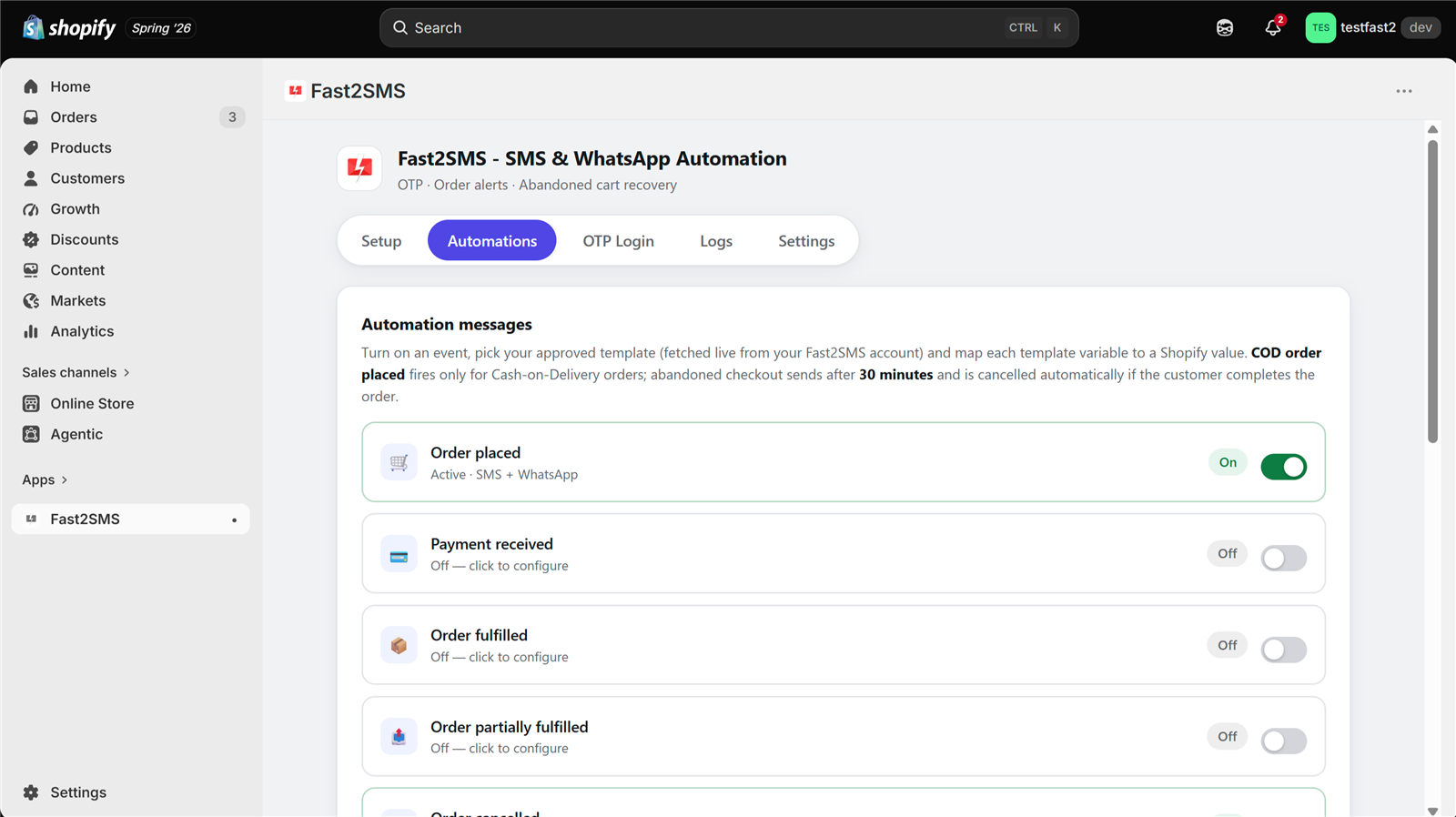
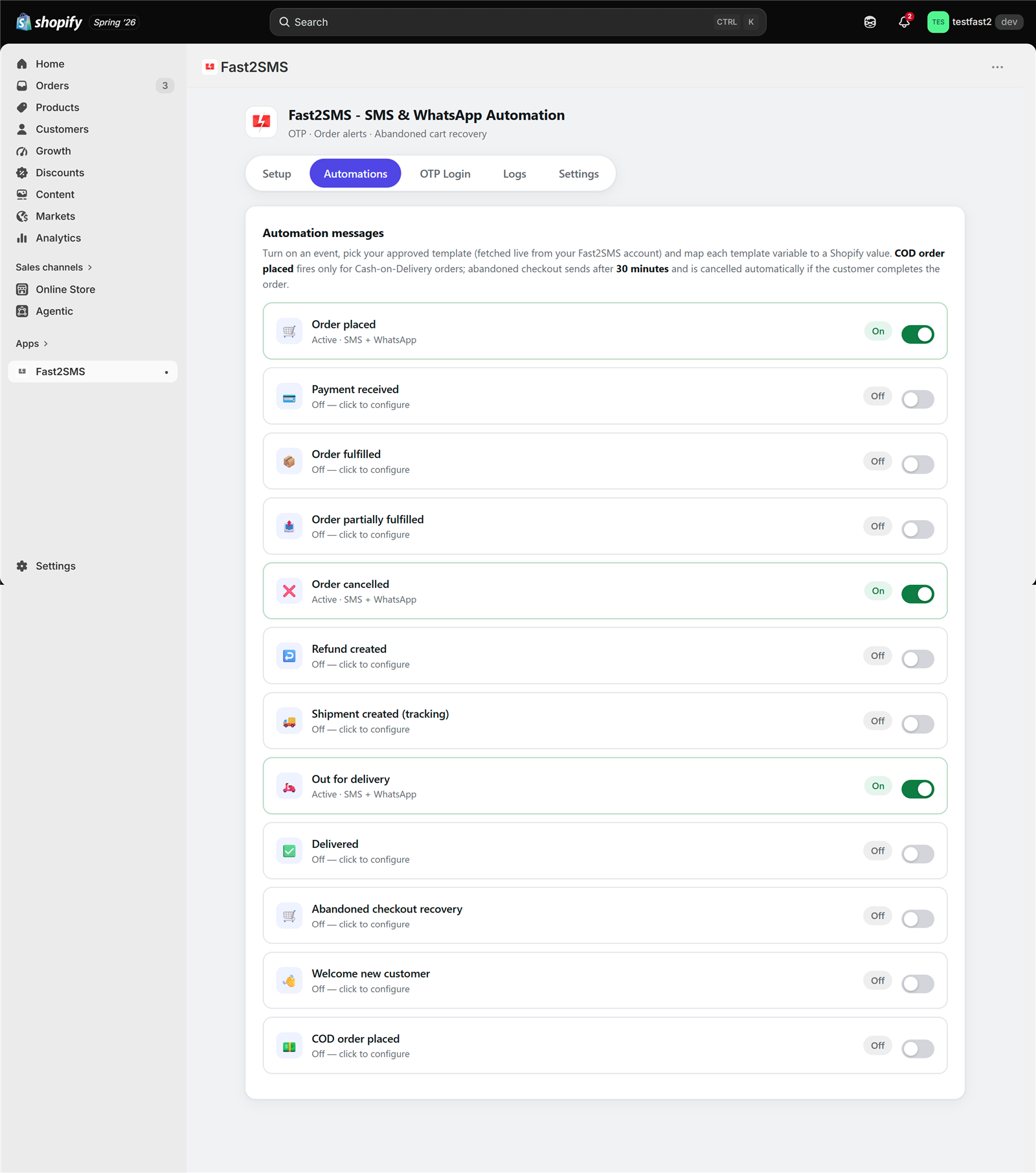
The Fast2SMS Shopify app is free. You connect your own Fast2SMS account, and you pay only per message from your own wallet. Inside the Automations tab there are 12 events, each with its own on/off toggle. One of them is built for cash on delivery.
The COD order placed event
The COD order placed event fires only for COD orders. For each event you choose the channel: SMS, WhatsApp or Both. You pick an approved template from a searchable list that the app fetches from your Fast2SMS account, then map the template variables using dropdowns. Useful variables for a COD message include customer name, order ID, amount, payment method, product name, items count, city, pincode and order status URL.
Messages go out within seconds of Shopify telling the app about the order. That timing matters for COD. The best moment to catch a mistaken order is while the customer still has your store open in their mind.
Smart COD: no duplicate messages
A common worry: “If I turn on both Order placed and COD order placed, will COD customers get two messages?” No. When the COD event is on, the app’s Smart COD logic makes COD orders skip the generic Order placed message. Order placed then covers prepaid orders only. Each customer gets one message that fits how they paid.
Where customer replies go
If your WhatsApp template asks the customer to reply, the reply lands in the Live Chat inside your fast2sms.com portal. Live Chat and the WhatsApp chatbot builder are free in the portal. You can also set up a simple free WhatsApp chatbot to send an automatic “Thanks, your order is confirmed” when someone replies YES.
The Shopify app asks for minimal permissions. It reads customers and orders only and never edits orders. So when a customer says NO, you cancel the order yourself in Shopify admin. If you have the Order cancelled event on, the customer then gets a cancellation message automatically.
What the app does not do for COD
| COD task | Fast2SMS Shopify app | Where it happens instead |
|---|---|---|
| Instant COD message by SMS / WhatsApp | Yes, the COD order placed event | Automations tab |
| No duplicate “order placed” message for COD | Yes, Smart COD | Automatic when the COD event is on |
| Copy of each COD order to the owner | Yes, “Also alert admin” | Per event, plus admin numbers in Settings |
| Reading customer replies | Not inside the app | Live Chat in the fast2sms.com portal |
| Auto-cancelling or tagging orders from replies | No, the app never edits orders | You, in Shopify admin |
| OTP at checkout for COD | No | Other COD or checkout apps |
| Manual or IVR confirmation calls | No | Your team, or a calling provider |
One more thing to avoid confusion: the app has an OTP Login tab, but that is for passwordless storefront login, not COD checkout. It works only on stores using legacy (classic) customer accounts. Shopify removed legacy accounts for new stores, so OTP login suits existing classic-account stores, while all the notification features, including the COD event, work on every store. Details are in our guide to OTP login on Shopify.
How to set up the COD message in Fast2SMS
This takes about as long as making a cup of chai, once your templates are approved.
- Create a free Fast2SMS account at fast2sms.com. You get ₹50 test credit.
- Get your templates approved. For WhatsApp, create a utility template in the portal for Meta approval. For SMS, you need DLT registration: your entity, a 6-letter header for transactional or service messages, an approved template and a correct PE-TM chain binding. Fast2SMS helps with DLT for free. See our Shopify DLT SMS templates and Shopify WhatsApp message templates for ready samples.
- Install the app from the Shopify App Store.
- Setup tab: paste your Fast2SMS API key and click Validate & Save. You will see a Connected badge.
- Automations tab: turn on COD order placed, choose WhatsApp, SMS or Both, and fetch your templates in one click.
- Map variables: pick customer name, order ID, amount, product name and order status URL from the dropdowns. Check the live phone preview.
- Test send to your own admin number. The app shows a request ID so you can trace it.
- Optional: tick “Also alert admin” so you or your packing team get a copy of each COD order.
Here is a sample WhatsApp utility template body for a COD confirmation. Adjust the wording to your brand before you submit it:
COD order placed · WhatsApp utility
Hi {{1}}, your cash on delivery order {{2}} for {{3}} is placed. Please keep ₹{{4}} ready at delivery. Reply YES to confirm or NO to cancel. Track your order here: {{5}} Thank you for shopping with us.
Map {{1}} to customer name, {{2}} to order ID, {{3}} to product name, {{4}} to amount and {{5}} to order status URL. For the full list of events and what to send at each one, see Shopify order events for SMS and WhatsApp.
A simple daily routine to cut fake COD orders on Shopify
This is the routine we suggest to most small and mid-size stores:
- Morning: open Live Chat in the fast2sms.com portal. Go through the replies to your COD messages. YES replies are ready to pack.
- NO replies: cancel those orders in Shopify admin. The customer gets your Order cancelled message if that event is on.
- No reply: call these customers, or send them a short follow-up in Live Chat if they are inside the 24-hour window.
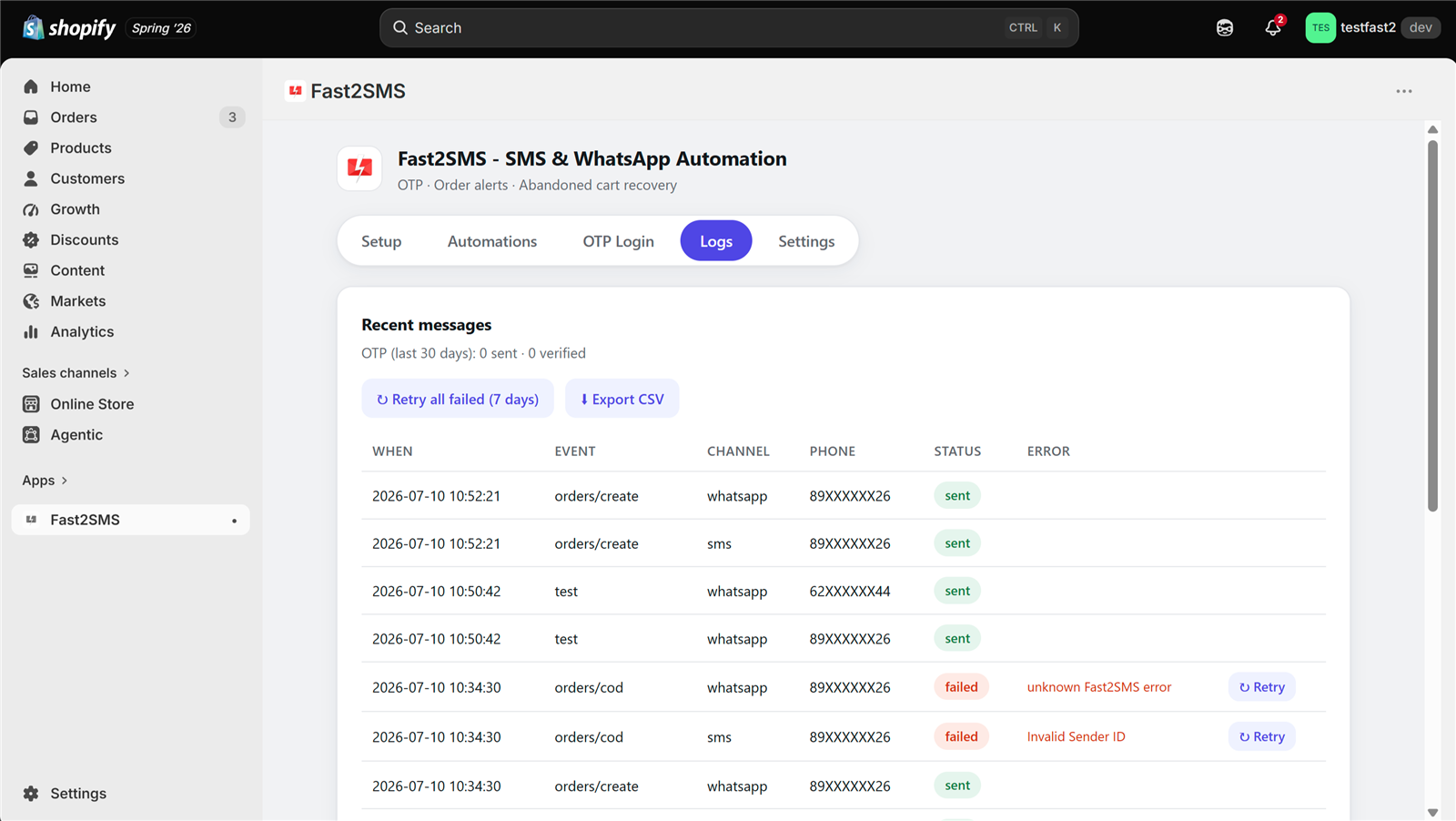
- Logs tab: filter for failed messages. A failed COD message can mean a wrong or inactive number. Hover to see the reason. Treat these orders with extra care before shipping.
- Before dispatch: make sure the Shipment created and Out for delivery events are on, so the customer knows the parcel is coming and keeps cash ready.
Which COD verification method should you use?
- Low order value, high volume: instant COD message plus a reply request is usually enough. Calls do not pay for themselves on small orders.
- High order value: add a call for orders that did not reply. One saved RTO on an expensive order covers a lot of calling time.
- Lots of fake numbers or prank orders: OTP at checkout from a COD-focused tool can filter these before they become orders. Watch whether genuine buyers drop off.
- Customers who often refuse at the door: focus on reminders. The COD message, Shipment created and Out for delivery events keep the order fresh in their mind.
If you are still choosing between apps, our comparison of the best SMS and WhatsApp apps for Shopify India lists which apps offer OTP-at-checkout, calls and other COD features.
How pricing works: free app, pay only per message
- The Fast2SMS Shopify app is free: no subscription, no monthly fee, no setup fee, no commission.
- Messages are billed by Fast2SMS from your own wallet, never through Shopify billing.
- WhatsApp order updates: ₹0.25 per delivered message; failed WhatsApp messages are refunded within 48 hours.
- SMS: your DLT SMS rate per message.
- Free signup with ₹50 test credit.
For a full breakdown of what a typical order costs across all events, see Shopify SMS and WhatsApp cost.
Want help setting up COD messages on your Shopify store? Our team will do it with you, free.
We can help you get your COD WhatsApp template approved, set up DLT for SMS, and switch on the right events in the app. Schedule a free meeting, call +91-6262778822 or email [email protected].
Frequently asked questions
What is COD verification on Shopify?
COD verification on Shopify is any step that checks a cash on delivery order is genuine before you ship it. Common methods are an instant SMS or WhatsApp message, a WhatsApp reply confirmation, OTP at checkout and confirmation calls.
How do I stop fake COD orders on Shopify?
You stop most fake COD orders on Shopify by messaging every COD customer right away, asking them to confirm by reply, and calling or holding orders that stay silent. For heavy prank-order problems, some stores add OTP at checkout through a COD-focused tool.
Does the Fast2SMS Shopify app send COD confirmation messages?
Yes, the Fast2SMS app has a COD order placed event that sends an instant message by SMS, WhatsApp or both whenever a cash on delivery order comes in. You choose the approved template and map variables like order ID and amount.
Does Fast2SMS do OTP verification at checkout for COD orders?
No, the Fast2SMS Shopify app does not add an OTP step to COD checkout; it sends an instant COD message by SMS or WhatsApp as soon as the order is placed instead. If you need OTP at checkout for COD, that is offered by some other COD verification and checkout apps.
Can the Fast2SMS app make IVR or confirmation calls?
No, the Fast2SMS Shopify app does not make manual or IVR calls, because it sends SMS and WhatsApp messages only, triggered by your Shopify order events. Stores that want calls either use their own team or a separate calling provider for orders that did not reply.
Will COD customers get two messages if both Order placed and COD order placed are on?
No, COD customers get only one message, because Smart COD makes COD orders skip the generic Order placed message whenever the COD order placed event is switched on. Order placed then covers prepaid orders only, so nobody gets a duplicate.
Where do I see customer replies to my COD WhatsApp message?
Customer replies to your COD WhatsApp message appear in the Live Chat inside your fast2sms.com portal, not inside the Shopify app. Live Chat is free, and your team can read replies and answer customers from there.
Can the app cancel a COD order automatically when the customer replies NO?
No, the Fast2SMS app never edits or cancels orders, because it only has permission to read your Shopify orders and customers. When a customer replies NO in Live Chat, you cancel the order in Shopify admin, and the Order cancelled event can then notify the customer.
Is WhatsApp or SMS better for COD confirmation in India?
WhatsApp is usually better for COD confirmation because customers can reply easily and you can add buttons and a tracking link. SMS works as a backup for customers not on WhatsApp. Many stores choose Both in the app’s channel setting.
How much does a COD confirmation message cost with Fast2SMS?
A COD confirmation on WhatsApp costs ₹0.25 per delivered utility message with Fast2SMS, and failed WhatsApp messages are refunded within 48 hours. An SMS costs your DLT SMS rate per message. The Shopify app itself is free.
Do I need DLT registration for COD SMS on Shopify?
Yes, any business SMS in India, including COD SMS from Shopify, needs DLT registration: your entity, a 6-letter header for transactional or service messages, an approved template and correct PE-TM chain binding. Fast2SMS offers free DLT support. WhatsApp does not need DLT.
What should a COD confirmation message say?
A good COD confirmation message says the order ID, the product, the cash amount to keep ready, and a clear way to confirm or cancel. Add a tracking or order status link. Keep it short so it reads well on a phone lock screen.
Which variables can I use in a Shopify COD message?
You can map 18+ variables in the Fast2SMS app, including customer name, order ID, amount, payment method, product name, items count, city, pincode, order date and order status URL. You pick them from dropdowns, with a live phone preview.
Is OTP at checkout better than a WhatsApp confirmation?
OTP at checkout proves the phone number is real and in the buyer’s hand, which is stronger than a reply. But it adds a step before the order and some genuine buyers drop off. WhatsApp confirmation is lighter and happens after the order is placed.
How fast does the COD message go out after an order?
The Fast2SMS app sends the COD message within seconds of Shopify notifying the app about a new cash on delivery order, so the customer usually hears from you while still on your site. Delivery to the phone then depends on the operator or WhatsApp, so no provider can promise an exact delivery time.
Can I get a copy of every COD order on my own phone?
Yes, turn on “Also alert admin” for the COD order placed event and you, or your team, get a copy of each COD order message. The Settings tab lets you add one primary admin number plus up to 10 more.
What does a failed COD message in the Logs tab mean?
A failed COD message in the Logs tab often points to a wrong, inactive or unreachable number, though other reasons are possible. Hover over the failed entry to see the reason, retry it with one click, and treat that order with extra care before shipping.
Can I reply to COD customers on WhatsApp for free?
Receiving customer replies on WhatsApp is free, and the Live Chat inside the Fast2SMS portal where you read and answer them is also free to use. Your own replies inside the 24-hour customer service window are billed as session replies at ₹0.13 each from your wallet.
Does COD verification reduce RTO on Shopify?
COD verification helps reduce RTO on Shopify by catching mistaken, fake and unreachable cash on delivery orders before you pack and ship them. It works best combined with shipment and out-for-delivery updates, address checks and prepaid nudges. Results vary by store, product and customer base.
Is the Fast2SMS Shopify app really free?
Yes, the Fast2SMS Shopify app is a free Shopify SMS app with no subscription, monthly fee, setup fee or per-message commission charged by the app. You pay only for messages you send, from your own Fast2SMS wallet, billed by Fast2SMS directly and never through Shopify billing.
Does the COD order placed event work for prepaid orders?
No, the COD order placed event fires only for cash on delivery orders, so prepaid customers never receive your COD wording or the request to keep cash ready. Prepaid orders are covered by the Order placed event and the Payment received event, so you can send different wording to each type of customer.
Can I send COD messages in Hindi?
Yes, you can send COD messages in Hindi if your approved WhatsApp template or DLT SMS template is written in Hindi. The app fetches whatever templates are approved in your Fast2SMS account, so the language is up to you.
What other Shopify events help with COD delivery?
Shipment created, Out for delivery and Delivered are the Shopify events that help most with COD, after the COD order placed message itself. They keep the customer informed so they are home with cash when the courier arrives. Order cancelled confirms cancellations after a customer says no to the COD order.
Is the OTP Login feature the same as COD OTP?
No, the OTP Login tab in the Fast2SMS app is for passwordless storefront login with a mobile number, not for verifying COD orders at checkout. It works only on stores using legacy (classic) customer accounts, and Shopify removed legacy accounts for new stores. The COD order placed event works on every store.
Can I add WhatsApp buttons to the COD message?
Yes, if your Meta-approved WhatsApp template has buttons, the app shows them in the preview and detects dynamic URL button variables, such as a Track Order button, so you can map them to the order status or tracking URL.
Is customer data safe in the Fast2SMS Shopify app?
Yes, the app encrypts secrets and customer phone numbers at rest with AES-256-GCM, masks numbers in the interface and asks only to read orders and customers. Fast2SMS holds ISO 27001, SOC 2 and CERT-In VAPT certifications.
Start verifying COD orders today
Start simple. Turn on the COD order placed event, ask customers to reply, read replies in Live Chat, and call the silent ones. Add OTP or IVR tools later only if your numbers show you need them. The app is free, and you pay only for the messages you send.
Need help? Schedule a free meeting · [email protected] · +91-6262778822 · Sales: +91-6262778811