
Tally SMS Templates for DLT Approval: Copy, Paste & Get Message IDs
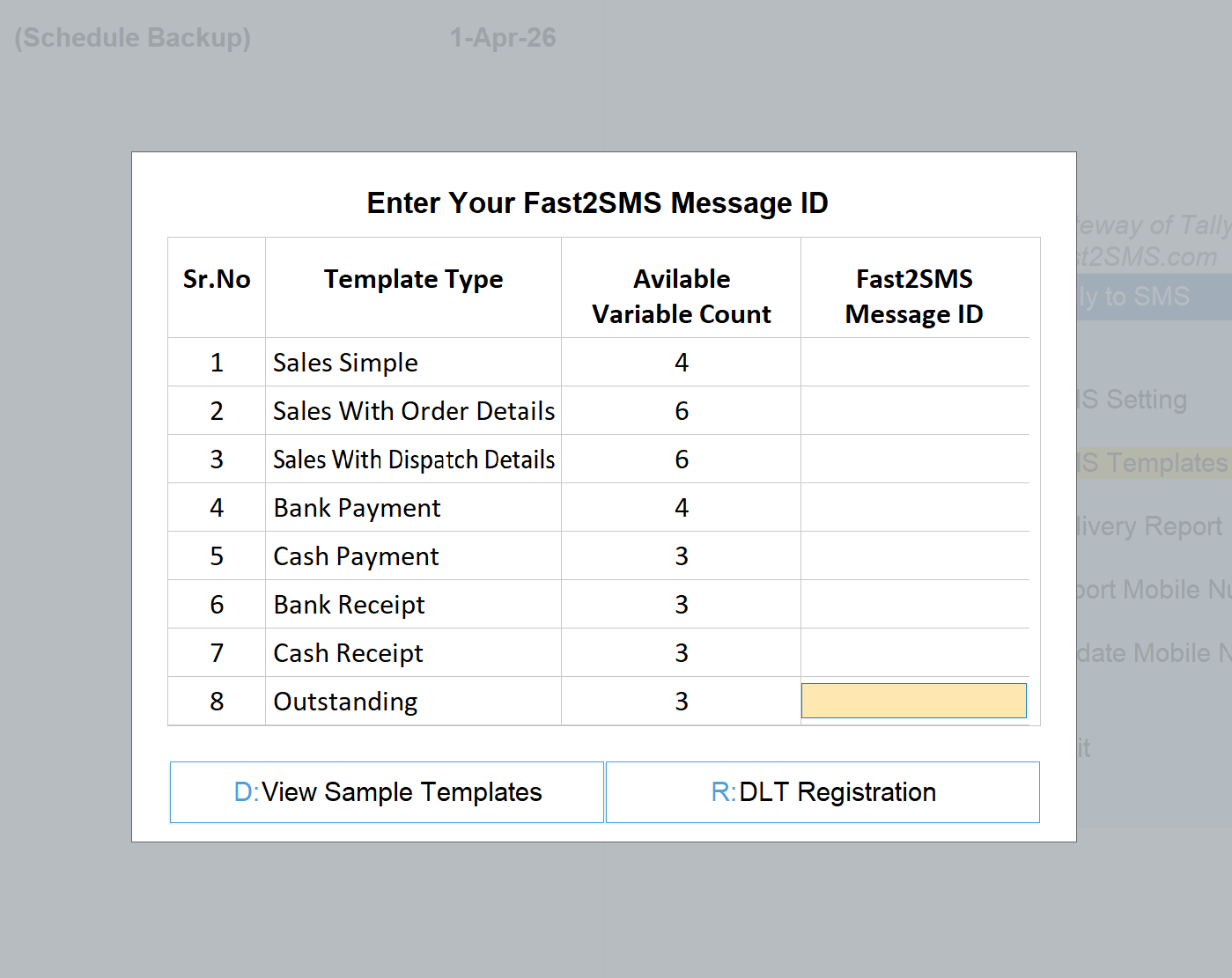
The SMS Templates screen in the Tally plugin asks for one thing per template type: your Fast2SMS Message ID. To get those IDs, your SMS wording must first be approved on DLT, the registration system TRAI mandates for business SMS in India. This page gives you ready template text for all 8 Tally SMS types, written with the correct DLT variable tags, so you can copy, paste and submit them on your DLT portal without drafting anything yourself. Then add the approved templates in your Fast2SMS panel, collect the message IDs, and type them into Tally.
Download Tally Plugin
Signup Now
The DLT process in 6 steps
- Register on DLT (one-time). Register your business as an entity on any operator DLT portal and get your sender ID (header) approved. Fast2SMS gives free DLT support end to end, and the plugin’s R: DLT Registration button opens the shortcut.
- Whitelist the Fast2SMS short URL. In your DLT portal, open CTA Whitelisting and add
https://fi2.in/?as a Dynamic URL. Invoice links in Tally SMS go out on this short URL, so do this before you send. Steps and screenshots below. - Submit the templates below. Copy each template, replace Brand Name with your business name, and submit on the DLT portal as Service Implicit content templates against your approved header. Fill a sample message with real-looking values where the portal asks; a sample is mandatory. For every {#url#} variable, give
https://fi2.in/sample.pdfas the sample URL. - Wait for approval. Content templates typically approve quickly when tags and category are correct.
- Add approved templates in Fast2SMS. In your panel’s DLT manager, add each approved template with its DLT template ID. Fast2SMS generates your Message ID for each one.
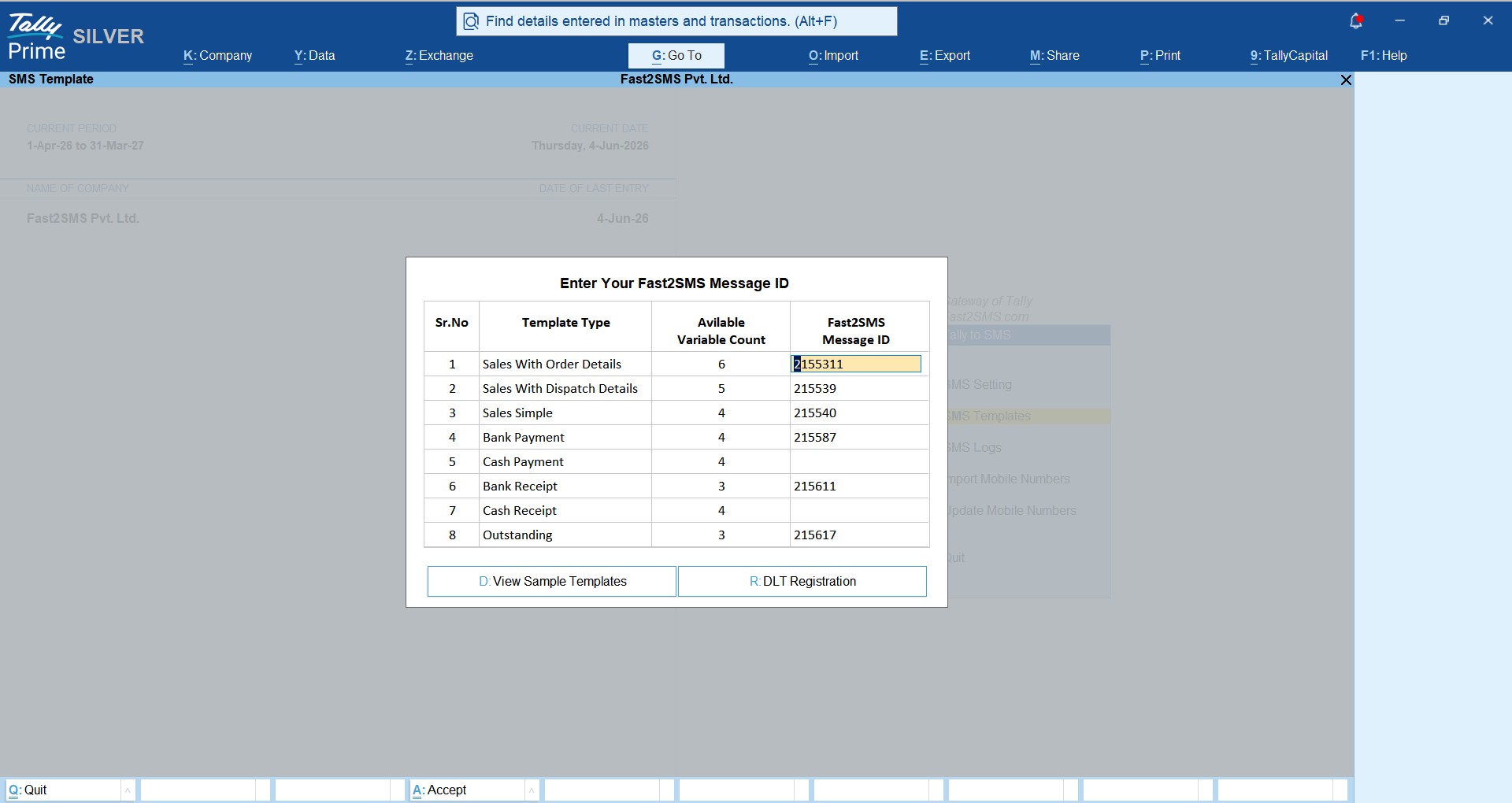
- Enter the Message IDs in Tally. Open Tally to SMS > SMS Templates and type each message ID against its template type. SMS sending is live.
Know the DLT variable tags first
DLT no longer accepts one generic variable for everything. Each blank in your template must use the tag matching what will fill it, with length limits enforced at send time:
| Tag | Fills with | Limit | In these templates |
|---|---|---|---|
| {#numeric#} | Numbers only: amounts | 40 digits | Invoice and payment amounts |
| {#alphanumeric#} | Letters + numbers: invoice numbers, dates, cheque numbers | 40 chars, must not start with www or http | Invoice No., dates, order/tracking/LR/vehicle numbers |
| {#url#} | Web links | 120 chars | The invoice PDF short link Fast2SMS auto-creates. Sample URL to give on DLT: https://fi2.in/sample.pdf |
Full explanation of all six tags and every new DLT rule: DLT sample templates guide and the plain-English DLT guide.
The 8 Tally templates, ready to copy
Each template below matches its Tally template type and variable count exactly. The grey box under each card holds the plain text: tap inside it, select all (Ctrl+A on desktop, long-press on mobile) and copy. Replace Brand Name with your business name and submit as-is. Do not add or remove variables, or the count will no longer match what Tally sends. Templates 1, 2 and 3 carry a {#url#} variable: when the DLT portal asks for a sample URL, give https://fi2.in/sample.pdf.
1. Sales Simple (4 variables)
SALES SIMPLE SERVICE IMPLICIT 4 VARIABLES
Dear Customer,
Your Invoice No. {#alphanumeric#} dated {#alphanumeric#} for Rs. {#numeric#} has been generated for your recent purchase/order.
Download invoice: {#url#}
– Brand Name
Variables Tally fills: invoice number, invoice date, amount, PDF short link.
Sample URL for {#url#} on DLT: https://fi2.in/sample.pdf · Fast2SMS adds your real Tally invoice link as a short URL when the SMS is sent. Whitelist https://fi2.in/? as a Dynamic URL first.
2. Sales With Order Details (6 variables)
SALES WITH ORDER DETAILS SERVICE IMPLICIT 6 VARIABLES
Invoice No. {#alphanumeric#} dated {#alphanumeric#} for Rs. {#numeric#} has been generated for Order No. {#alphanumeric#} dated {#alphanumeric#}.
Download here: {#url#}
– Brand Name
Variables Tally fills: invoice number, invoice date, amount, order number, order date, PDF short link.
Sample URL for {#url#} on DLT: https://fi2.in/sample.pdf · Fast2SMS adds your real Tally invoice link as a short URL when the SMS is sent. Whitelist https://fi2.in/? as a Dynamic URL first.
3. Sales With Dispatch Details (6 variables)
SALES WITH DISPATCH DETAILS SERVICE IMPLICIT 6 VARIABLES
Dear Customer,
Material against Invoice No. {#alphanumeric#} for your order has been dispatched via {#alphanumeric#}.
Tracking No: {#alphanumeric#}, LR No: {#alphanumeric#}, Vehicle No: {#alphanumeric#}.
Download here: {#url#}
– Brand Name
Variables Tally fills: invoice number, transporter/courier, tracking number, LR number, vehicle number, PDF short link.
Sample URL for {#url#} on DLT: https://fi2.in/sample.pdf · Fast2SMS adds your real Tally invoice link as a short URL when the SMS is sent. Whitelist https://fi2.in/? as a Dynamic URL first.
4. Bank Payment (4 variables)
BANK PAYMENT SERVICE IMPLICIT 4 VARIABLES
Dear user,
Your Payment Rs. {#numeric#} for Bill No {#alphanumeric#} has been issued vide Cheque/NEFT No – {#alphanumeric#} Dated – {#alphanumeric#}.
– Brand Name
Variables Tally fills: amount, bill number, cheque/NEFT number, date.
5. Cash Payment (3 variables)
CASH PAYMENT SERVICE IMPLICIT 3 VARIABLES
Dear user,
Your Payment for Rs. {#numeric#} towards Bill/Ref No. {#alphanumeric#} has been paid via cash dated {#alphanumeric#}.
– Brand Name
Variables Tally fills: amount, bill/reference number, date.
6. Bank Receipt (3 variables)
BANK RECEIPT SERVICE IMPLICIT 3 VARIABLES
Dear user,
Your payment has been received for Rs. {#numeric#} dated – {#alphanumeric#} via Inst No. {#alphanumeric#} and the same will be credited in your ledger, subject to realization.
– Brand Name
Variables Tally fills: amount, date, instrument number.
7. Cash Receipt (3 variables)
CASH RECEIPT SERVICE IMPLICIT 3 VARIABLES
Dear user,
We have received your Cash payment of Rs. {#numeric#} for Bill No. {#alphanumeric#} Dated {#alphanumeric#}.
– Brand Name
Variables Tally fills: amount, bill number, date.
8. Outstanding (3 variables)
OUTSTANDING SERVICE IMPLICIT 3 VARIABLES
Dear Customer,
Your total outstanding of Rs. {#numeric#} is pending as on {#alphanumeric#} against your account {#alphanumeric#}. Kindly arrange payment at the earliest.
– Brand Name
Variables Tally fills: outstanding amount, as-on date, account/ledger name.
Before you send: whitelist https://fi2.in/? on DLT
Do this once, or invoice SMS can fail with a “CTA not whitelisted” error
DLT rules say every link inside an SMS must be whitelisted by the sender. Fast2SMS turns your Tally invoice PDF into a short link that starts with https://fi2.in/?, so you must whitelist this URL under your own entity on the DLT portal.
- URL to whitelist (CTA Whitelisting, Dynamic URL): https://fi2.in/?
- Sample URL to give for every {#url#} variable while creating a template: https://fi2.in/sample.pdf
Tap inside a box to select and copy.
Steps to whitelist the URL
- Log in to your DLT portal (the same one where your entity and header are registered).
- Open CTA Whitelisting and choose to add a new CTA.
- CTA Name: any name you will recognise, for example
tallyurl. - CTA Type: select URL.
- CTA Sub-Type: select Dynamic URL.
- CTA Input: type
https://fi2.in/?exactly as shown, with the question mark at the end. - Tick the declaration box and click Submit.
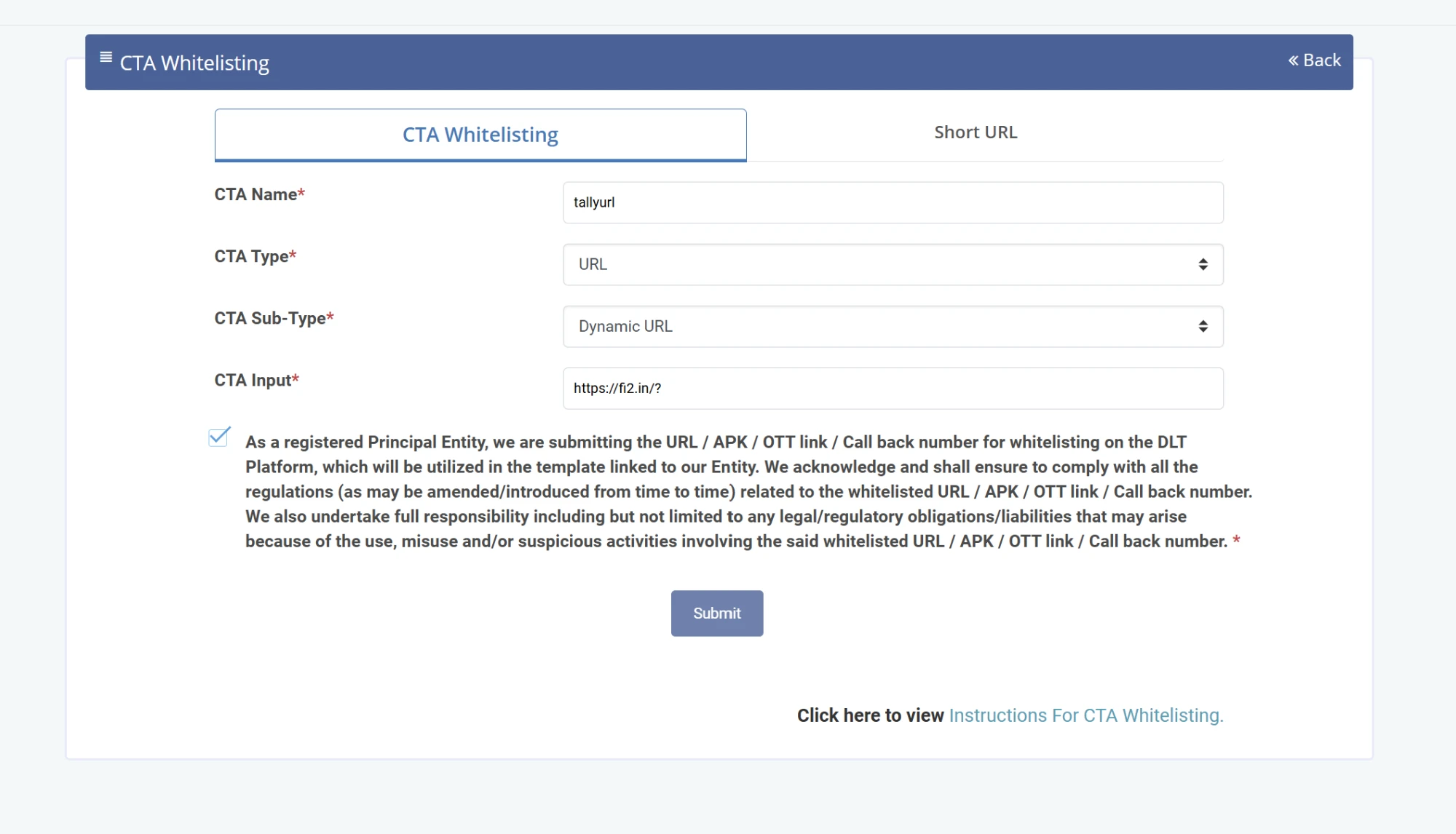
Once it is saved, the URL appears in your CTA list with the status Active. You only do this once for your entity, and it covers every Tally SMS template that carries an invoice link.

Why Dynamic URL? Every invoice gets its own short link, so the part after https://fi2.in/? changes in each SMS. A Dynamic URL whitelists the fixed start of the link and lets the rest change. Menu names differ a little from one DLT portal to another. If you cannot find CTA Whitelisting on yours, book a free meeting or call +91-6262778822 and our team will do it with you.
Rules that make approval smooth
- Replace Brand Name everywhere with your registered business or brand name before submitting; keep everything else unchanged.
- Category: submit as Service Implicit; these are transaction updates to your own customers, not promotions.
- One template, one header: submit each template against the specific sender ID you will send from.
- Sample message is mandatory: fill realistic values (an invoice number, a date, an amount) where the portal asks for a sample.
- Sample URL for {#url#}: give
https://fi2.in/sample.pdfin every template that has a link. Fast2SMS puts your real Tally invoice in the SMS as a short URL, which keeps the message within DLT rules. - Whitelist the URL before sending: add
https://fi2.in/?as a Dynamic URL in CTA Whitelisting on your DLT portal. Without it, SMS with an invoice link can fail with a “CTA not whitelisted” error. See the steps. - Do not change tags: amounts stay {#numeric#}, references and dates stay {#alphanumeric#}, links stay {#url#}. A value longer than the tag’s limit, or an alphanumeric value starting with www or http, fails at send time.
- Keep the variable count intact: Tally sends exactly the number of values shown against each template type; adding or removing a variable breaks the match.
After approval: from DLT to Tally in two minutes
- Open your Fast2SMS panel’s DLT manager and add each approved template with its DLT template ID and content. Each gets a Fast2SMS Message ID.
- In Tally: Tally to SMS > SMS Templates, type each message ID against its template type (the screen at the top of this page).
- Set your DLT sender ID once in SMS Setting, and send your first SMS from a sales voucher: full walkthrough in the Tally SMS plugin guide.
Download Tally Plugin
Signup Now
Frequently asked questions
Can I use these templates word for word?
Yes, that is the point: copy, replace Brand Name with your business name, submit. The tags are already the correct DLT types for what Tally fills in.
Why not one generic {#var#} everywhere?
Newer DLT rules require typed tags with length limits: numeric for amounts, alphanumeric for references and dates, url for links. Generic single-type variables are the main reason templates get rejected or fail at send time.
Which DLT category do I pick?
Service Implicit: these are transaction updates to your existing customers. Promotional category would restrict delivery and is wrong for invoice alerts.
Do I need all 8 approved before starting?
No. Approve the ones you need first (most businesses start with Sales Simple and Outstanding); Tally shows send buttons only for template types that have a message ID.
Where does the {#url#} value come from?
Tally uploads the invoice PDF and Fast2SMS auto-creates a short link that starts with https://fi2.in/?; that link fills the url variable. The customer taps it and the invoice opens in the browser.
What sample URL do I give on DLT for the {#url#} variable?
Give https://fi2.in/sample.pdf as the sample URL in every Tally template that has a {#url#} variable (Sales Simple, Sales With Order Details and Sales With Dispatch Details). It is only a sample for approval; in the real SMS, Fast2SMS replaces it with the short link of that customer’s invoice.
Which URL do I whitelist for Tally SMS?
Whitelist https://fi2.in/? on your DLT portal under CTA Whitelisting, with CTA Type as URL and CTA Sub-Type as Dynamic URL. You do it once for your entity, and it covers all Tally SMS templates that carry an invoice link.
Why did my Tally SMS fail with a CTA not whitelisted error?
The SMS had an invoice link, and the short URL https://fi2.in/? is not whitelisted under your entity on DLT yet. Log in to your DLT portal, add it in CTA Whitelisting as a Dynamic URL, wait for the status to show Active, then send the SMS again.
Do templates without a link need the URL whitelisted?
No. Payment, receipt and outstanding templates have no {#url#} variable, so they send without any CTA whitelisting. Only the three sales templates with an invoice link need it.
My template got rejected. Now what?
Usually a tag or category mismatch. Send the rejection to [email protected]; free DLT support reviews and fixes the wording with you.
Does WhatsApp need any of this?
No. DLT applies to SMS only; WhatsApp sending in the same plugin uses ready Meta templates (T101 to T120) with no DLT at all: complete plugin guide.
Where do I get help with any step?
Email [email protected] or call +91-6262778822.
Copy, submit, and go live
Eight copies and pastes on your DLT portal, message IDs into Tally, and your invoices, receipts and reminders start reaching customers by SMS.
Download Tally Plugin
Signup Now
Questions? Write to [email protected] or call +91-6262778822.