
Tally WhatsApp Templates for Meta Approval: All 20 with Copy-Paste Text
The Tally plugin’s ready templates (message IDs T101 to T120) send from the Fast2SMS default WhatsApp sender. To send the same messages from your own brand name, the 20 templates must exist as approved templates on your own WhatsApp Business account. This page gives all 20 exactly as approved on the default sender: a WhatsApp preview, the body text to copy into Meta, and the sample values approval asks for. Approve them, copy your own message IDs from WhatsApp Manager, swap them into Tally, and every invoice goes out under your brand.
Download Tally PluginSignup Now
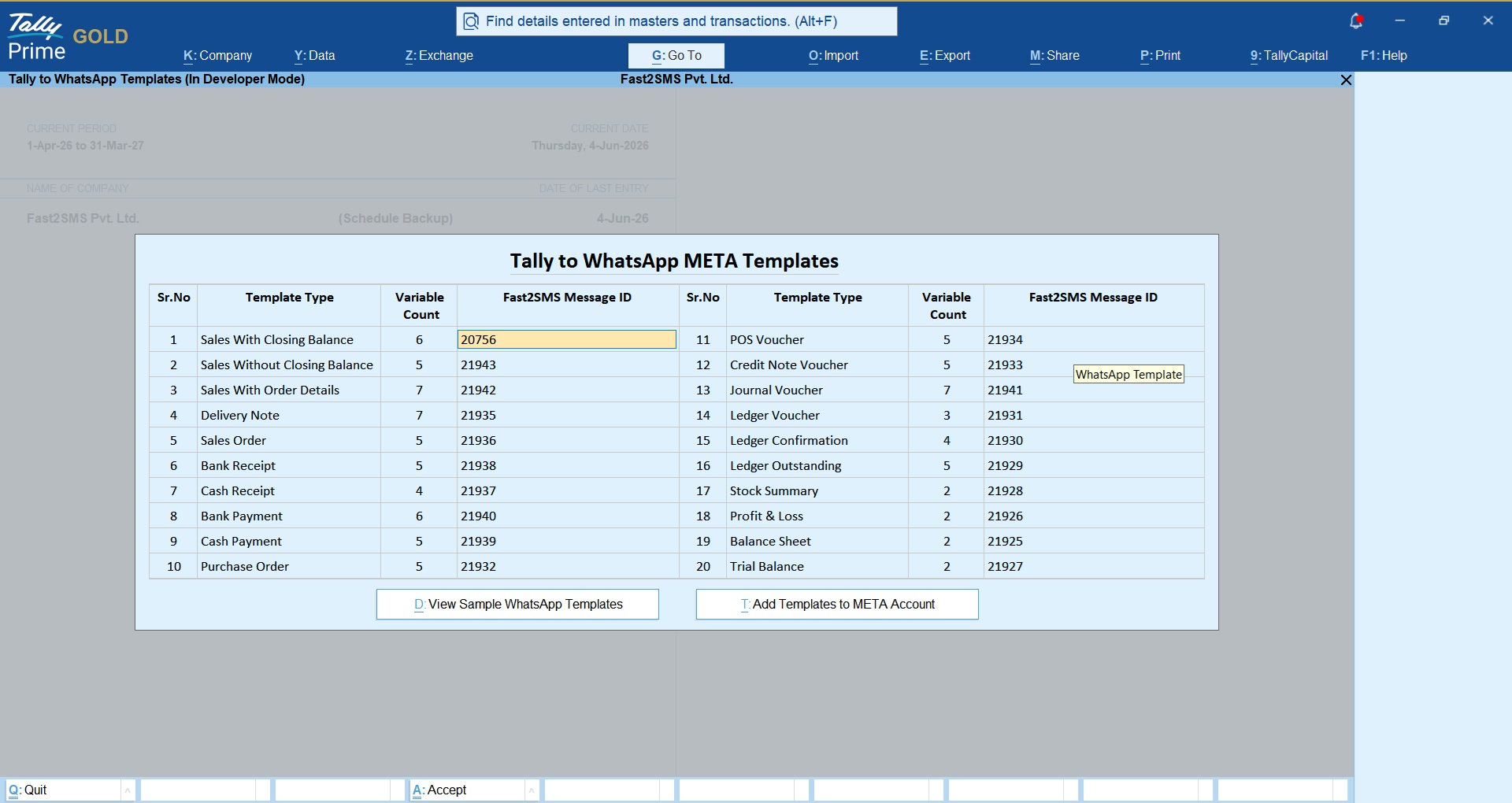
Before either path: connect your WhatsApp Business number free via Meta embedded signup from your Fast2SMS panel; no monthly fee, no setup fee. Walkthrough: free WhatsApp Cloud API access.
One rule you cannot break: you may edit the static wording of any template, but the number of variables and their sequence must stay exactly the same. Tally fills {{1}}, {{2}}, {{3}}… in a fixed order per template type; add, remove or reorder a variable and Tally cannot send that message.
All 20 templates, ready to approve
1. Sales With Closing Balance (replaces default T101)
Suggested template name: invoice_message · Category: Utility · Language: English · Variables: 6. Header: Document. While creating in Meta, choose header type Document and upload any sample PDF; when sending, Tally attaches the real voucher PDF automatically.
Body text to paste in Meta (tap the box, select all, copy):
Sample values for approval (Meta asks for one example per variable):
| {{1}} | Rahul |
| {{2}} | LG Microwave |
| {{3}} | 11556 |
| {{4}} | 18/05/2026 |
| {{5}} | 1552.500 |
| {{6}} | Virat Electronics |
2. Sales Without Closing Balance (replaces default T102)
Suggested template name: invoicetype2 · Category: Utility · Language: English · Variables: 5. Header: Document. While creating in Meta, choose header type Document and upload any sample PDF; when sending, Tally attaches the real voucher PDF automatically.
Body text to paste in Meta (tap the box, select all, copy):
Sample values for approval (Meta asks for one example per variable):
| {{1}} | Rahul |
| {{2}} | Rs.1500.00 |
| {{3}} | INV101 |
| {{4}} | 22-05-2026 |
| {{5}} | Atharv IT Solutions |
3. Sales With Order Details (replaces default T103)
Suggested template name: invoicetype3 · Category: Utility · Language: English · Variables: 7. Header: Document. While creating in Meta, choose header type Document and upload any sample PDF; when sending, Tally attaches the real voucher PDF automatically.
Body text to paste in Meta (tap the box, select all, copy):
Sample values for approval (Meta asks for one example per variable):
| {{1}} | Dhaval |
| {{2}} | 258896 |
| {{3}} | 29/05/2026 |
| {{4}} | Fridge |
| {{5}} | INV1001 |
| {{6}} | 29/05/2026 |
| {{7}} | Atharv IT Solutions |
4. Delivery Note (replaces default T104)
Suggested template name: delivery_note · Category: Utility · Language: English · Variables: 7. Header: Document. While creating in Meta, choose header type Document and upload any sample PDF; when sending, Tally attaches the real voucher PDF automatically.
Body text to paste in Meta (tap the box, select all, copy):
Sample values for approval (Meta asks for one example per variable):
| {{1}} | Rahul Sharma |
| {{2}} | ORD-2026-4589 |
| {{3}} | 29/05/2026 |
| {{4}} | LR987654 |
| {{5}} | DN-2026-7788 |
| {{6}} | 29/05/2026 |
| {{7}} | Vias IT Solutions |
5. Sales Order (replaces default T105)
Suggested template name: saleorder · Category: Utility · Language: English · Variables: 5. Header: Document. While creating in Meta, choose header type Document and upload any sample PDF; when sending, Tally attaches the real voucher PDF automatically.
Body text to paste in Meta (tap the box, select all, copy):
Sample values for approval (Meta asks for one example per variable):
| {{1}} | Rahul Sharma |
| {{2}} | ORD-2026-4589 |
| {{3}} | 29/05/2026 |
| {{4}} | Laptop Accessories – 2 Units (Rs.3,500) |
| {{5}} | Vias IT Solutions |
6. Bank Receipt (replaces default T106)
Suggested template name: reciepttally · Category: Utility · Language: English · Variables: 5. Header: none. This is a text-only template, no document header.
Body text to paste in Meta (tap the box, select all, copy):
Sample values for approval (Meta asks for one example per variable):
| {{1}} | Rahul Sharma |
| {{2}} | Rs.25,000 |
| {{3}} | NEFT987654321 |
| {{4}} | Rs.5,750 |
| {{5}} | Vias IT Solutions |
7. Cash Receipt (replaces default T107)
Suggested template name: paymenttally · Category: Utility · Language: English · Variables: 4. Header: none. This is a text-only template, no document header.
Body text to paste in Meta (tap the box, select all, copy):
Sample values for approval (Meta asks for one example per variable):
| {{1}} | Rahul Sharma |
| {{2}} | Rs.25,000 |
| {{3}} | Rs.5,750 |
| {{4}} | Vias IT Solutions |
8. Bank Payment (replaces default T108)
Suggested template name: bankpayment · Category: Utility · Language: English · Variables: 6. Header: none. This is a text-only template, no document header.
Body text to paste in Meta (tap the box, select all, copy):
Sample values for approval (Meta asks for one example per variable):
| {{1}} | Rahul Sharma |
| {{2}} | Rs.25,000 |
| {{3}} | INV-2026-1045 |
| {{4}} | NEFT987654321 |
| {{5}} | 29/05/2026 |
| {{6}} | Vias IT Solutions |
9. Cash Payment (replaces default T109)
Suggested template name: cash_payment · Category: Utility · Language: English · Variables: 5. Header: none. This is a text-only template, no document header.
Body text to paste in Meta (tap the box, select all, copy):
Sample values for approval (Meta asks for one example per variable):
| {{1}} | Rahul Sharma |
| {{2}} | Rs.25,000 |
| {{3}} | INV-2026-1045 |
| {{4}} | 29/05/2026 |
| {{5}} | Vias IT Solutions |
10. Purchase Order (replaces default T110)
Suggested template name: purchase_order · Category: Utility · Language: English · Variables: 5. Header: Document. While creating in Meta, choose header type Document and upload any sample PDF; when sending, Tally attaches the real voucher PDF automatically.
Body text to paste in Meta (tap the box, select all, copy):
Sample values for approval (Meta asks for one example per variable):
| {{1}} | Rahul Sharma |
| {{2}} | ORD-2026-4589 |
| {{3}} | 29/05/2026 |
| {{4}} | Laptop Accessories – 2 Units (Rs.3,500) |
| {{5}} | Vias IT Solutions |
11. POS Voucher (replaces default T111)
Suggested template name: tallypos · Category: Utility · Language: English · Variables: 5. Header: Document. While creating in Meta, choose header type Document and upload any sample PDF; when sending, Tally attaches the real voucher PDF automatically.
Body text to paste in Meta (tap the box, select all, copy):
Sample values for approval (Meta asks for one example per variable):
| {{1}} | Rahul Sharma |
| {{2}} | BILL-2026-1123 |
| {{3}} | 29/05/2026 |
| {{4}} | Laptop Accessories – 2 Units (Rs.3,500) |
| {{5}} | Vias IT Solutions |
12. Credit Note (replaces default T112)
Suggested template name: creditnote · Category: Utility · Language: English · Variables: 5. Header: Document. While creating in Meta, choose header type Document and upload any sample PDF; when sending, Tally attaches the real voucher PDF automatically.
Body text to paste in Meta (tap the box, select all, copy):
Sample values for approval (Meta asks for one example per variable):
| {{1}} | Rahul Sharma |
| {{2}} | CN-2026-0098 |
| {{3}} | 29/05/2026 |
| {{4}} | Rs.1,250 Adjustment (Return of goods) |
| {{5}} | Vias IT Solutions |
13. Journal Voucher (replaces default T113)
Suggested template name: journal · Category: Utility · Language: English · Variables: 7. Header: Document. While creating in Meta, choose header type Document and upload any sample PDF; when sending, Tally attaches the real voucher PDF automatically.
Body text to paste in Meta (tap the box, select all, copy):
Sample values for approval (Meta asks for one example per variable):
| {{1}} | Rahul Sharma |
| {{2}} | Invoice |
| {{3}} | INV-2026-1045 |
| {{4}} | ABC Traders |
| {{5}} | Rs.15,750 |
| {{6}} | 29/05/2026 |
| {{7}} | Atharv IT Solutions |
14. Ledger Voucher (replaces default T114)
Suggested template name: ledger_voucher · Category: Utility · Language: English · Variables: 3. Header: Document. While creating in Meta, choose header type Document and upload any sample PDF; when sending, Tally attaches the real voucher PDF automatically.
Body text to paste in Meta (tap the box, select all, copy):
Sample values for approval (Meta asks for one example per variable):
| {{1}} | Rahul Sharma |
| {{2}} | 01/04/2026 to 29/05/2026 |
| {{3}} | Vias IT Solutions |
15. Ledger Confirmation (replaces default T115)
Suggested template name: ledger_confirmation · Category: Utility · Language: English · Variables: 4. Header: Document. While creating in Meta, choose header type Document and upload any sample PDF; when sending, Tally attaches the real voucher PDF automatically.
Body text to paste in Meta (tap the box, select all, copy):
Sample values for approval (Meta asks for one example per variable):
| {{1}} | Rahul Sharma |
| {{2}} | 29/05/2026 |
| {{3}} | 01/04/2026 to 29/05/2026 |
| {{4}} | Vias IT Solutions |
16. Ledger Outstanding (replaces default T116)
Suggested template name: ledger_outstanding · Category: Utility · Language: English · Variables: 5. Header: Document. While creating in Meta, choose header type Document and upload any sample PDF; when sending, Tally attaches the real voucher PDF automatically.
Body text to paste in Meta (tap the box, select all, copy):
Sample values for approval (Meta asks for one example per variable):
| {{1}} | Rahul Sharma |
| {{2}} | 01/04/2026 to 29/05/2026 |
| {{3}} | Rs.12,500 |
| {{4}} | 29/05/2026 |
| {{5}} | Vias IT Solutions |
17. Stock Summary (replaces default T117)
Suggested template name: stock_summary · Category: Utility · Language: English · Variables: 3. Header: Document. While creating in Meta, choose header type Document and upload any sample PDF; when sending, Tally attaches the real voucher PDF automatically.
Body text to paste in Meta (tap the box, select all, copy):
Sample values for approval (Meta asks for one example per variable):
| {{1}} | Rahul Sharma |
| {{2}} | 01/04/2026 to 29/05/2026 |
| {{3}} | Vias IT Solutions |
18. Profit & Loss (replaces default T118)
Suggested template name: profit_loss · Category: Utility · Language: English · Variables: 3. Header: Document. While creating in Meta, choose header type Document and upload any sample PDF; when sending, Tally attaches the real voucher PDF automatically.
Body text to paste in Meta (tap the box, select all, copy):
Sample values for approval (Meta asks for one example per variable):
| {{1}} | Rahul Sharma |
| {{2}} | 01/04/2026 to 29/05/2026 |
| {{3}} | Vias IT Solutions |
19. Balance Sheet (replaces default T119)
Suggested template name: balance_sheet · Category: Utility · Language: English · Variables: 3. Header: Document. While creating in Meta, choose header type Document and upload any sample PDF; when sending, Tally attaches the real voucher PDF automatically.
Body text to paste in Meta (tap the box, select all, copy):
Sample values for approval (Meta asks for one example per variable):
| {{1}} | Rahul Sharma |
| {{2}} | 01/04/2026 to 29/05/2026 |
| {{3}} | Vias IT Solutions |
20. Trial Balance (replaces default T120)
Suggested template name: trial_balance · Category: Utility · Language: English · Variables: 3. Header: Document. While creating in Meta, choose header type Document and upload any sample PDF; when sending, Tally attaches the real voucher PDF automatically.
Body text to paste in Meta (tap the box, select all, copy):
Sample values for approval (Meta asks for one example per variable):
| {{1}} | Rahul Sharma |
| {{2}} | 01/04/2026 to 29/05/2026 |
| {{3}} | Vias IT Solutions |
After approval: copy your message IDs from WhatsApp Manager
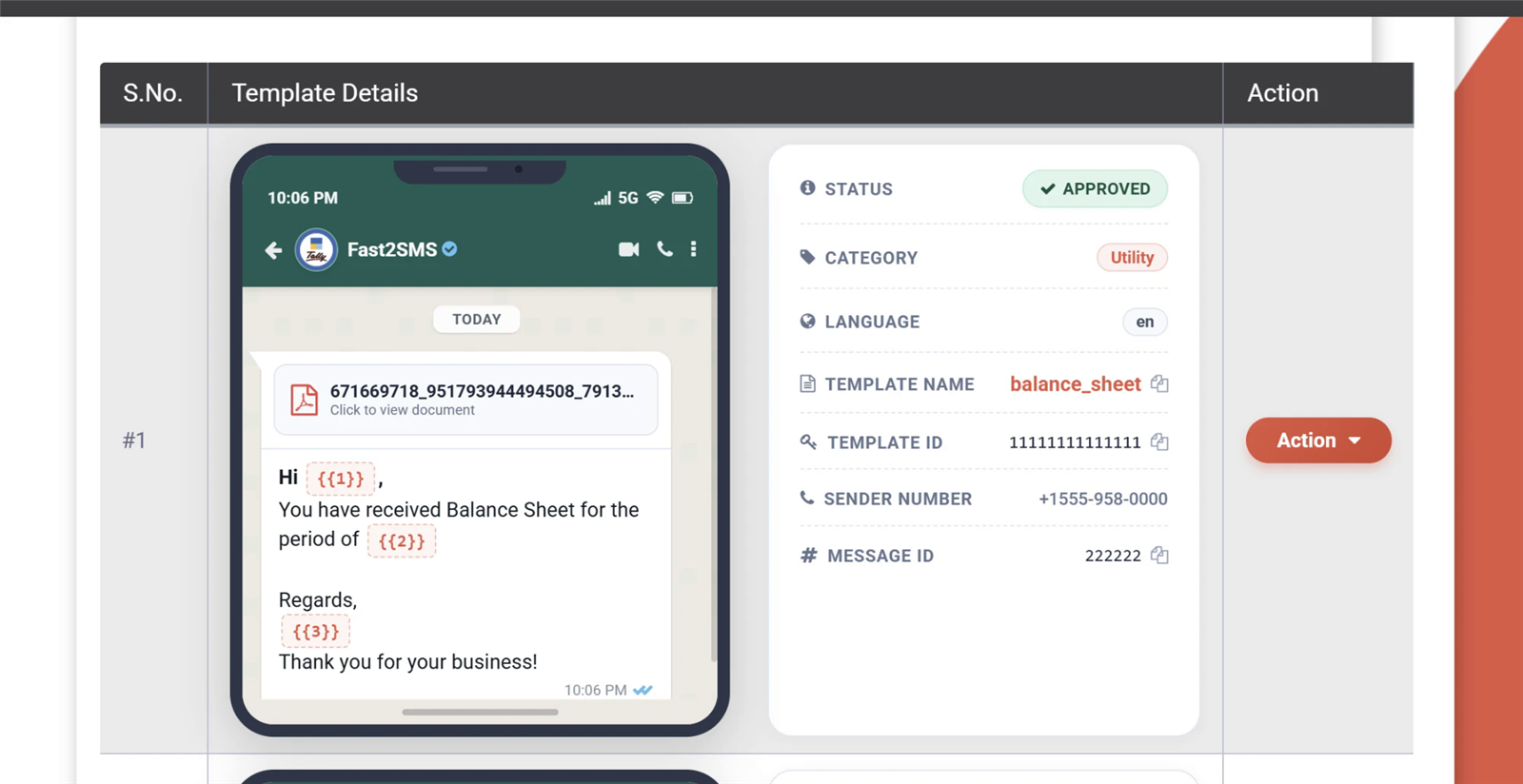
Once Meta approves the templates (usually within minutes to a day for Utility), open WhatsApp Manager > Templates in your Fast2SMS panel. Every approved template shows its details with a Message ID; use the copy icon next to it:
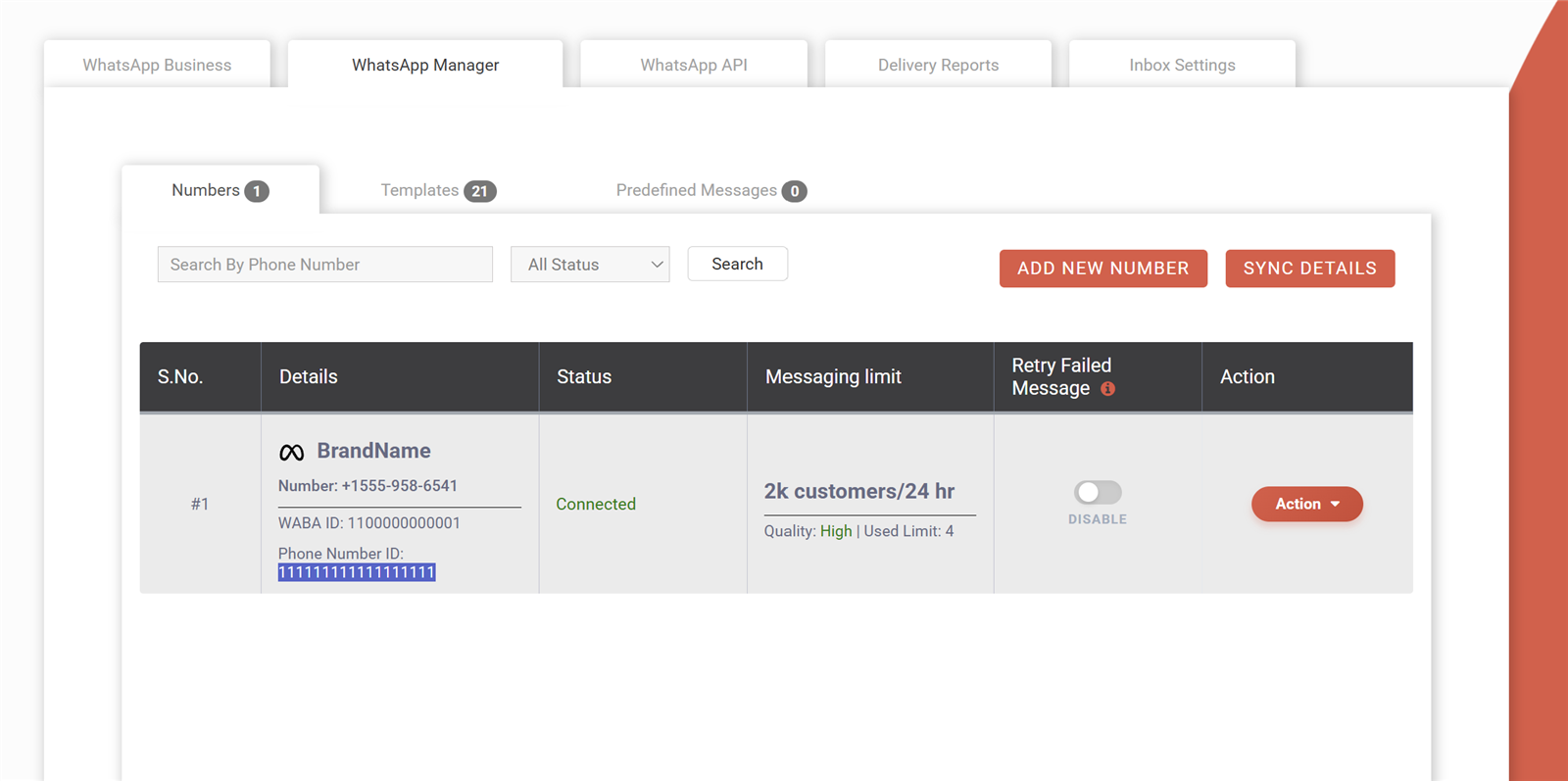
Also copy your Phone Number ID from the Numbers tab of WhatsApp Manager:
Swap the IDs in Tally
- Tally to WhatsApp > WhatsApp API Settings: replace 123456789 with your own phone number ID.
- Tally to WhatsApp > WhatsApp Template Settings: replace each default T-ID with your own message ID, row by row using this map:
| Tally template type | Default ID | Replace with your message ID of |
|---|---|---|
| 1. Sales With Closing Balance | T101 | invoice_message |
| 2. Sales Without Closing Balance | T102 | invoicetype2 |
| 3. Sales With Order Details | T103 | invoicetype3 |
| 4. Delivery Note | T104 | delivery_note |
| 5. Sales Order | T105 | saleorder |
| 6. Bank Receipt | T106 | reciepttally |
| 7. Cash Receipt | T107 | paymenttally |
| 8. Bank Payment | T108 | bankpayment |
| 9. Cash Payment | T109 | cash_payment |
| 10. Purchase Order | T110 | purchase_order |
| 11. POS Voucher | T111 | tallypos |
| 12. Credit Note | T112 | creditnote |
| 13. Journal Voucher | T113 | journal |
| 14. Ledger Voucher | T114 | ledger_voucher |
| 15. Ledger Confirmation | T115 | ledger_confirmation |
| 16. Ledger Outstanding | T116 | ledger_outstanding |
| 17. Stock Summary | T117 | stock_summary |
| 18. Profit & Loss | T118 | profit_loss |
| 19. Balance Sheet | T119 | balance_sheet |
| 20. Trial Balance | T120 | trial_balance |
Save, send a test voucher, and the message arrives from your brand name with your logo. Full plugin walkthrough: complete Tally plugin guide; sender options explained: Tally WhatsApp sender.
Download Tally PluginSignup Now
Frequently asked questions
Do I have to approve all 20 templates?
No. Approve the ones you use; Tally sends only for template types that have a message ID. Most businesses start with the three sales invoices and outstanding.
Can I change the wording?
Yes, the static text is yours to edit, in any language Meta supports. Only the variable count and sequence are fixed per template type; that is what Tally fills.
Which category should the templates use?
Utility, for all 20. They are transaction updates to your own customers. Marketing category would cost more per message and can be filtered by user settings.
Why do some templates have a document header?
Those templates carry the voucher PDF as an attachment. During approval you upload any sample PDF; at send time Tally attaches the real invoice, report or note.
What if a template gets rejected?
Utility templates with this wording approve routinely. If one bounces, check the category is Utility and every variable has a sample value, or write [email protected] with the rejection reason.
What does sending from my own number cost?
No monthly fee, no setup fee, no per-number fee. You pay the same per-message rate as the default sender, on delivery basis with auto refund for failed messages.
Can I go back to the default sender?
Yes, any time: re-enter 123456789 and T101 to T120 and the defaults are live again.
Where do I get help?
Email [email protected] or call +91-6262778822.
Your brand on every invoice
Approve the set, swap two settings, and every message your Tally sends carries your business name at the top of the chat.
Download Tally PluginSignup Now
Questions? Write to [email protected] or call +91-6262778822.