
WooCommerce COD OTP Verification: Confirm Cash on Delivery Orders and Cut RTO
WooCommerce COD OTP verification is the simplest way to check that a cash on delivery order is real before you pack it. After the customer places a COD order, your store sends them a message with a one-tap link. They tap it, enter an OTP, and the order is marked verified. You ship the confirmed orders and call only the ones that stay quiet. Fast2SMS, a free WooCommerce COD plugin and OTP plugin for WooCommerce, does this for you, and you pay only for the messages you send.
If most of your orders come on COD, you already know the pain. Parcels come back. Numbers turn out to be wrong. Customers say they never ordered. This guide shows you how to set up WooCommerce COD verification step by step, what happens after the customer confirms, when checkout OTP is the better choice, and a simple daily routine for the orders that never get confirmed.
Why COD orders hurt Indian WooCommerce stores
Many Indian buyers do not trust a new store with their card or UPI. COD lets them see the parcel first. That is why most Indian D2C brands and small shops keep COD on, even when it hurts.
Here is what goes wrong with COD, in plain terms:
- Fake or joke orders. Someone places an order with a made-up name and number. There is nobody to deliver to.
- Wrong numbers. A real buyer types one digit wrong. The courier cannot reach them, and the parcel comes back.
- Impulse orders. The customer ordered late at night and changed their mind by morning. They refuse the parcel at the door.
- Nobody at home. The courier tries, fails, and marks the parcel for return.
- Duplicate orders. The same person orders twice by mistake and accepts only one.
Every one of these ends the same way: return to origin, or RTO. You pay to ship the parcel out and often pay again to get it back. The packaging is wasted, the stock sits in a courier hub instead of on your shelf, and the cash never arrives.
You cannot stop every RTO. But you can stop shipping to numbers that were never real, and find out who is serious before the parcel leaves. That is the job of a WooCommerce COD plugin with OTP confirmation.
How WooCommerce COD OTP verification works in the Fast2SMS plugin
The plugin is called “Fast2SMS – OTP Login & SMS Notifications”. It is free on WordPress.org. It works as a WooCommerce SMS plugin and a WooCommerce WhatsApp plugin at the same time, so you can pick SMS, WhatsApp or both for each message.
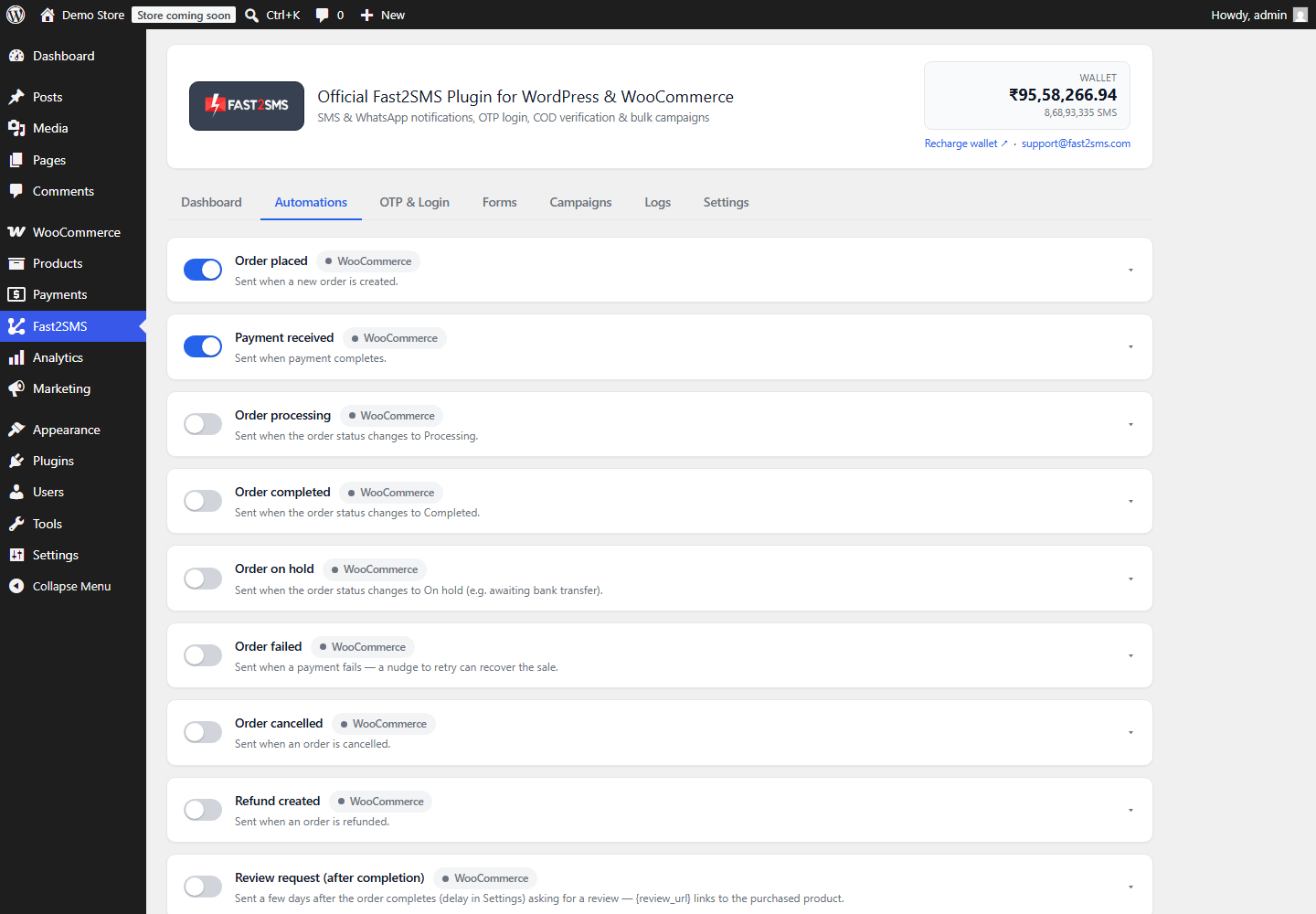
COD verification lives in the Automations tab. Among the order events there is a COD section with a card called COD order placed. When a customer places an order with cash on delivery, this card sends them a message. On that card you can switch on the optional one-tap COD OTP confirmation link.
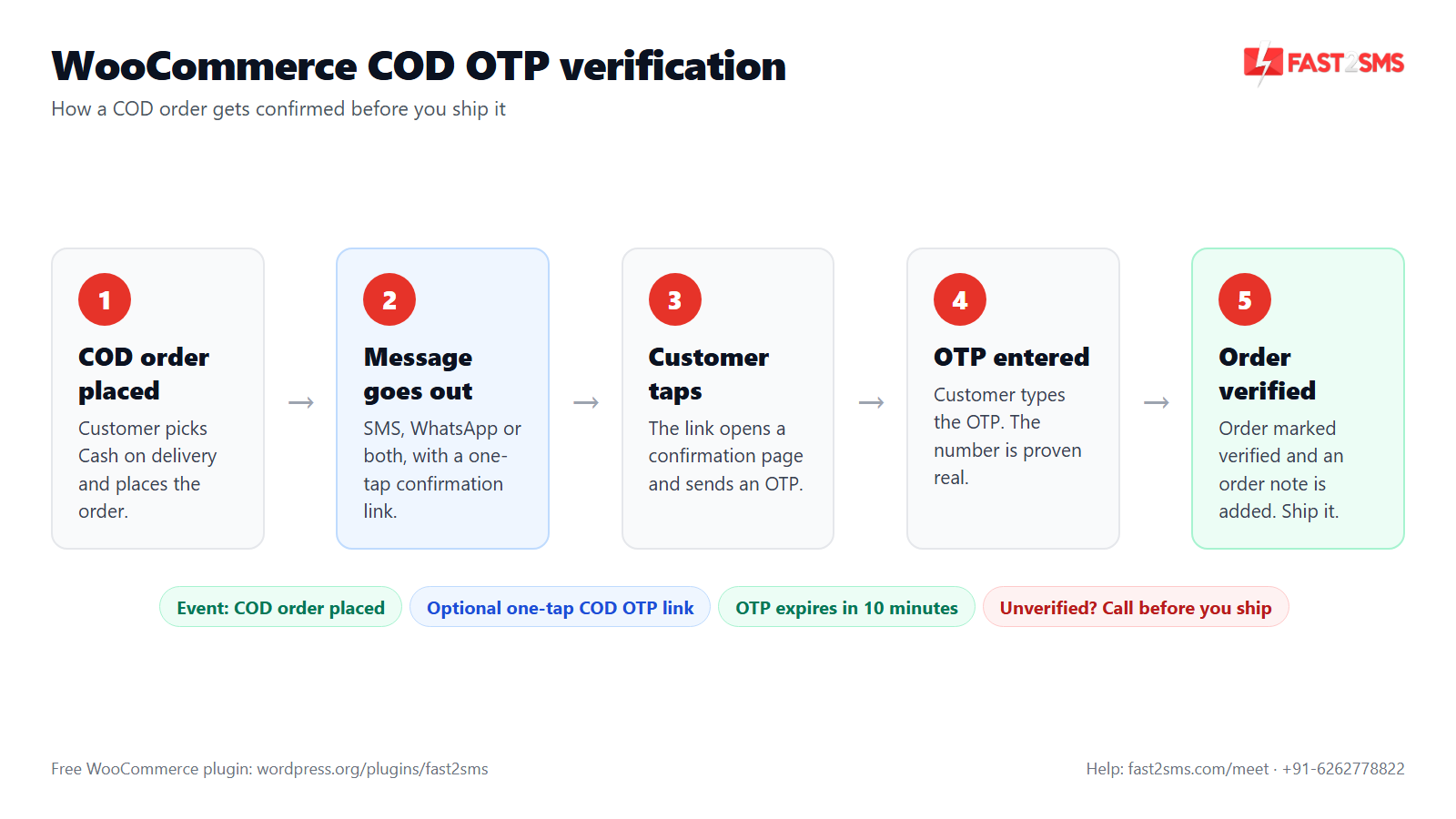
Here is the full flow:
- The customer places an order and picks Cash on delivery.
- The COD order placed message goes out on SMS, WhatsApp or both, with the confirmation link inside it.
- The customer taps the link. It opens a one-tap COD confirmation page on your store.
- An OTP is sent to the order’s phone number. The customer types it on that page.
- The order is marked verified and an order note is added. You know the number is real and the buyer still wants the parcel.
The OTP itself goes through Smart OTP, the same system the plugin uses for login and checkout OTP. You enter your OTP ID in the OTP & Login tab. At Fast2SMS, you choose whether that OTP goes on WhatsApp first with automatic SMS fallback, or the other way round. If you are new to this, read how Smart OTP works.
Set up WooCommerce COD verification step by step
- Install the plugin. In WP Admin go to Plugins > Add New, search “Fast2SMS”, install and activate. The WooCommerce features switch on by themselves when WooCommerce is active.
- Add your API key. Create a free account at fast2sms.com (you get ₹50 test credit), copy your API key and paste it on the plugin Dashboard. The key is checked live and stored encrypted.
- Add your OTP ID. Open the OTP & Login tab and enter your Smart OTP ID. Use the Test OTP button to send and verify a real OTP to your own phone.
- Open the COD order placed card. In Automations, switch the card on and pick SMS, WhatsApp or both.
- Choose a template. The searchable template picker shows your approved DLT and WhatsApp templates. Pick one that has a slot for the link.
- Map the variables. Use the variable dropdown to fill the customer name, order ID, amount and the COD link. The live phone preview shows what the customer will see.
- Switch on the one-tap COD OTP confirmation link.
- Send a test. The Send test button sends the message to you and shows the request_id.
- Place a real test COD order. Use your own number, tap the link, enter the OTP and check that the order note appears.
For the full first-time setup, including the server cron for reliable delivery, see the Fast2SMS WordPress plugin setup guide.
What a good COD confirmation message looks like
Keep it short: who you are, which order, and what to do. For example:
Hi Priya, thanks for your order #1042 of ₹1,299 on Cash on delivery at YourStore. Please confirm your order here so we can ship it: [COD link]
On WhatsApp, this is an order update, so it fits a utility template. You can put the link in the text, or use a dynamic URL button and fill it through the “Button variable” row on the card. The preview shows the button. On SMS, you need a DLT-approved template, and the link slot must use the typed {#url#} tag, not a plain variable. Our guide on DLT variable tagging covers this, and DLT SMS templates for WooCommerce has ready wording.
What happens after the customer confirms the COD OTP
Once the customer enters the right OTP on the confirmation page, the order is marked verified and an order note is added. Anyone on your team who opens the order can see it was confirmed by OTP.
That is your green light to pack and ship. Shipping updates through the Order shipped or Order delivered cards keep the customer informed until the parcel arrives. See WooCommerce order status SMS and WhatsApp for those events.
The OTP on the confirmation page follows the same server-side rules as every other OTP in the plugin:
- The OTP expires in 10 minutes.
- The customer gets 5 attempts to enter it.
- A number can request at most 3 OTPs in 10 minutes, and one IP address at most 10.
These limits are enforced on the server, so nobody can drain your wallet by pressing resend again and again.
Checkout OTP: the before-order alternative for WooCommerce COD
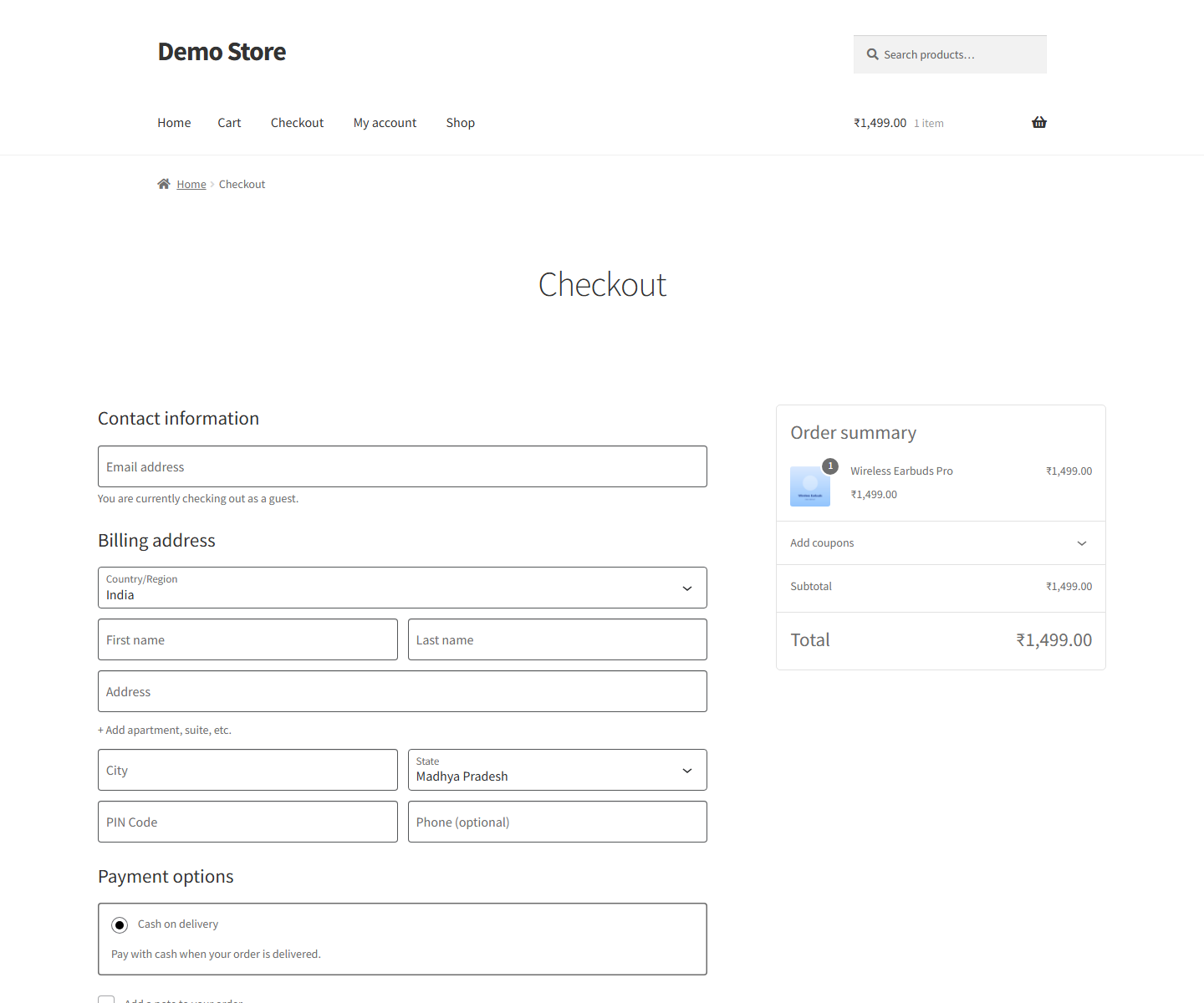
COD OTP confirmation checks the order after it is placed. There is a second way: check the number before the order exists. That is checkout OTP verification, also in the OTP & Login tab.
With checkout OTP on, the customer must verify their billing mobile number with an OTP before they can place the order. The check runs before payment, so it works with every payment gateway, COD included. The billing number is pre-filled, and there is a “Verify a different number” option. You can skip the check for logged-in customers, set a custom title, and choose where the box sits: below billing details, above payment options, above the order summary, at the top of checkout, or anywhere with the [fast2sms_checkout_otp] shortcode.
One important limit: checkout OTP works only with the classic (shortcode) WooCommerce checkout. It does not work with the block checkout. If your checkout page is built with the Checkout block, use the COD order placed confirmation link instead, or switch that page back to the classic checkout shortcode. Our WooCommerce checkout OTP verification guide walks through it.
COD confirmation link or checkout OTP: which one?
| Question | COD order placed + OTP link | Checkout OTP |
|---|---|---|
| When does it check? | After the order is placed | Before the order is placed |
| Which orders? | COD orders only | Every order, all payment methods |
| Block checkout? | Not tied to the checkout form, since it runs on the order | No, classic (shortcode) checkout only |
| Can a fake number place an order? | Yes, but it never gets verified, so you do not ship it | No, the order cannot be placed without the OTP |
| Friction at checkout | None | One OTP step before placing the order |
| Also confirms the buyer still wants it | Yes, they confirm after ordering | Only at the moment of ordering |
A simple rule: if fake numbers are your biggest problem and you use the classic checkout, checkout OTP stops them at the door. If real buyers change their mind, or you run the block checkout, the COD confirmation link fits better. Most stores pick one, so buyers do not enter two OTPs.
A daily routine for unverified WooCommerce COD orders
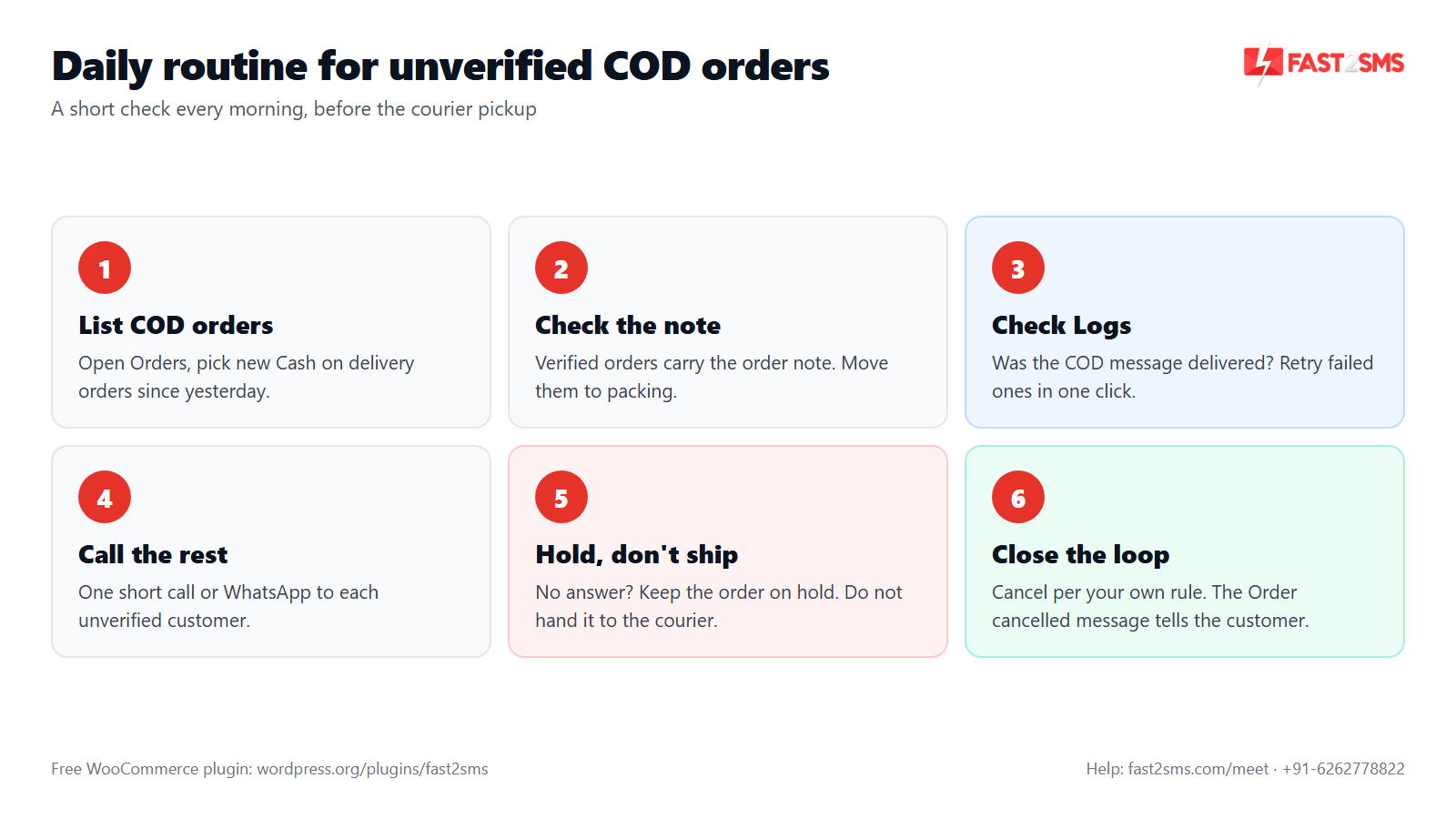
The confirmation link only helps if you act on the result. Some customers will not tap it. Maybe they missed the message, or the order was fake. Here is a routine that works for most small teams, done once a day before courier pickup.
- List the new COD orders. In WooCommerce > Orders, look at orders paid by Cash on delivery since your last check.
- Check each order for the verified note. Orders with the COD verification note go straight to packing.
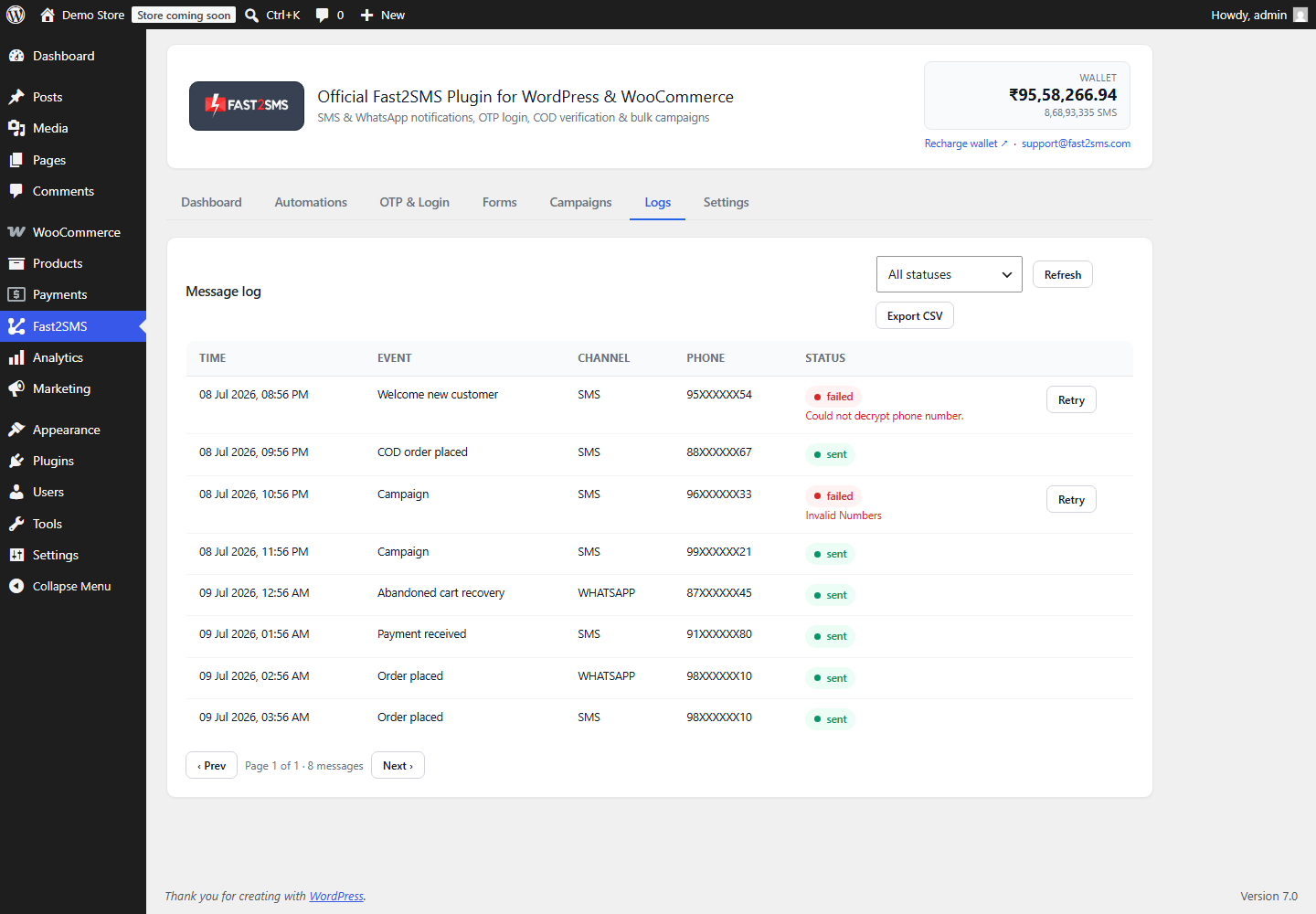
- Open the Logs tab for the rest. Logs show the event, channel, masked number (like 98XXXXXX10), status and any error. If the COD message failed, fix the cause and use one-click retry, or retry all failed.
- Contact the unverified customers. A short call or a WhatsApp message usually settles it. Many are happy to confirm once they hear from a real person.
- Hold what you cannot confirm. Do not hand unconfirmed parcels to the courier. Put the order on hold if you want time to reach them.
- Close the loop. Decide your own cut-off for cancelling. If the Order cancelled card is on, the customer gets a message when you cancel.
The plugin marks confirmed orders for you. You decide what happens to the rest. A loyal customer who never taps links is not the same as a brand-new number that does not answer calls.
WooCommerce COD verification approaches compared
Here is how the common ways to handle COD risk compare, so you can pick what fits your store and team size.
| Approach | How it works | Good at | Weak at |
|---|---|---|---|
| Accept all COD, no check | Ship every COD order as it comes | No work up front | Fake and wrong numbers ship too |
| Call every COD customer | Someone on your team calls each buyer | Personal touch, catches doubts | Slow, and the workload grows with every order |
| COD OTP confirmation link | COD order placed message with one-tap link and OTP | Proves the number and intent, you call only the unverified | Some buyers ignore links, so you still need a routine |
| Checkout OTP | Billing mobile verified before the order is placed | Fake numbers cannot place orders at all | Classic (shortcode) checkout only, adds a step for every buyer |
| COD to Prepaid nudge | Message asking COD buyers to pay online with a pay link | A paid order is a committed order | Does not verify the number by itself |
| Prepaid only | Switch off COD | No COD returns at all | Buyers who want COD may leave |
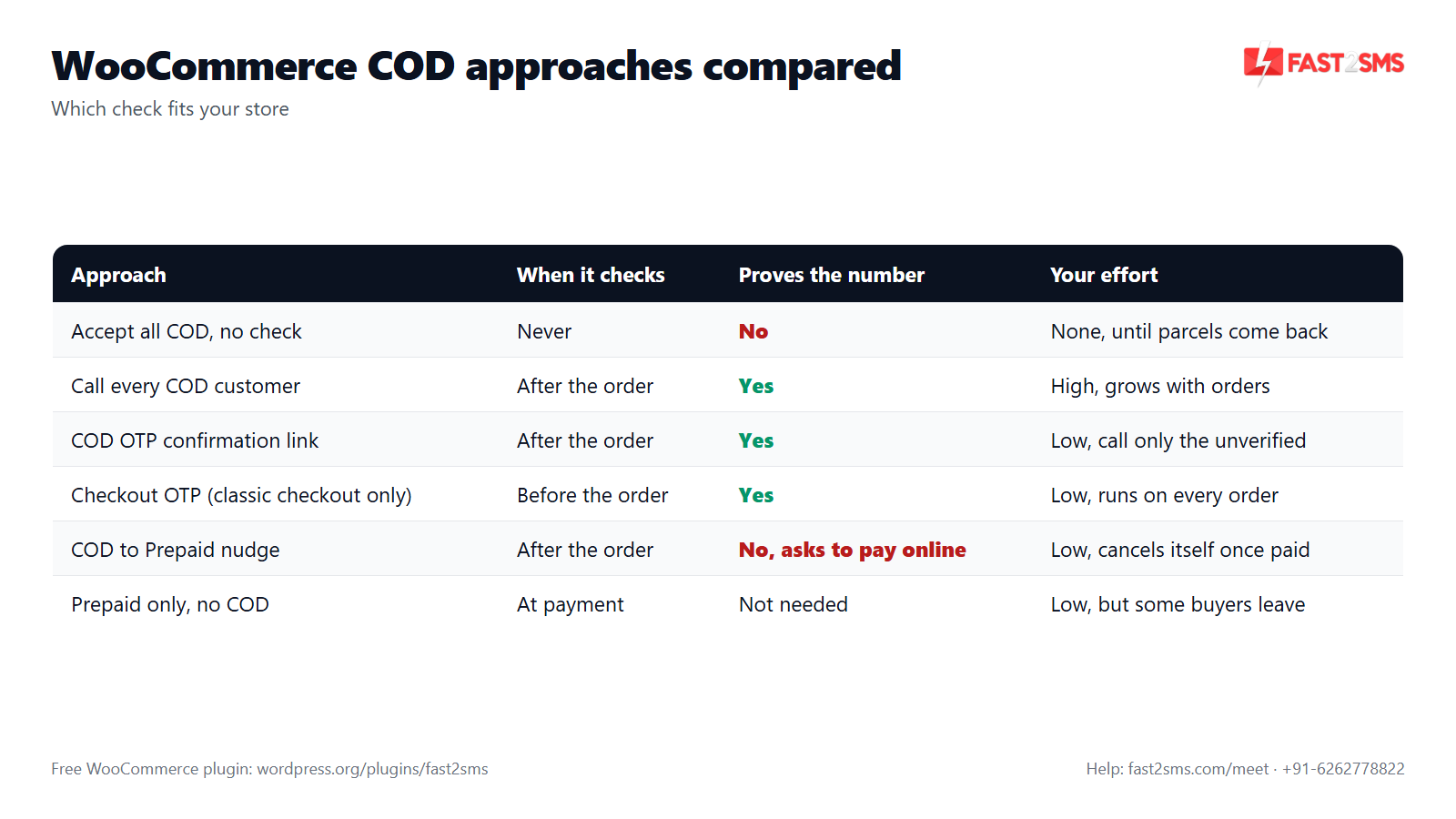
Many Indian stores combine two of these: the COD OTP confirmation link to catch bad numbers, and the COD to Prepaid nudge to move some buyers to online payment. The nudge cancels itself once the order is paid, so a customer who pays does not keep getting asked. Read more in WooCommerce COD to Prepaid and pending payment reminders.
What WooCommerce COD OTP costs
The plugin itself costs nothing. There is no licence and no monthly fee. You pay Fast2SMS per message from your own wallet. For one COD order that gets verified, you usually send two messages: the COD order placed message with the link, and the OTP. If both go on WhatsApp, that is ₹0.25 for the utility message plus ₹0.25 for the authentication OTP. If a WhatsApp message fails, it is refunded within 48 hours. On SMS, you pay your DLT SMS rate. For a full breakdown, see WooCommerce OTP cost.
Pricing: free WooCommerce plugin, pay only per message
- The plugin is free: no licence, no monthly fee, no setup fee.
- WhatsApp OTP and order updates: ₹0.25 per delivered message; failed WhatsApp messages are refunded within 48 hours.
- SMS: your DLT SMS rate per message.
- High volume? Rates are negotiable: call +91-6262778811, email [email protected] or book a free meeting.
- Free signup with ₹50 test credit.
Compare that with one parcel coming back, where you have paid shipping both ways plus packing. A couple of messages per COD order is small next to that.
SMS or WhatsApp for COD OTP on WooCommerce?
Both work, and every Automations card lets you pick SMS, WhatsApp or both. WhatsApp needs no DLT for OTP, and links are easy to tap. SMS also reaches basic phones, but needs DLT: a registered entity, a 6-letter header, an approved template and a correct PE-TM chain. From 30th September, mismatched chains are blocked. Fast2SMS is a registered TMD (SID GROUPS PRIVATE LIMITED, TMD ID 1702178720558766591). For the OTP, Smart OTP can try WhatsApp first and fall back to SMS. See our WooCommerce WhatsApp notifications guide.
Want help setting up COD OTP on your WooCommerce store? Our team will do it with you, free.
We can help with templates, DLT, the COD order placed card and a test order on your own store. Schedule a free meeting, call +91-6262778822 or email [email protected].
Frequently asked questions
What is WooCommerce COD OTP verification?
WooCommerce COD OTP verification is a check where a customer who places a cash on delivery order confirms it by entering an OTP, which proves the phone number is real and the buyer still wants the order before you ship.
How do I verify COD orders in WooCommerce?
Install the free Fast2SMS plugin, add your API key and OTP ID, then switch on the COD order placed card in Automations with the one-tap COD OTP confirmation link, so customers confirm by OTP and the order is marked verified.
Is there a free WooCommerce COD plugin with OTP?
Yes, the Fast2SMS plugin is free on WordPress.org with no licence or monthly fee, and it includes COD order verification with a one-tap OTP link, while you pay Fast2SMS only for the messages you actually send.
How does COD OTP WooCommerce confirmation work for the customer?
The customer gets an SMS or WhatsApp message after placing a COD order, taps the link, sees a confirmation page on your store, and enters the OTP sent to their number to confirm the order.
What happens to the order after the customer confirms?
The order is marked verified and an order note is added in WooCommerce, so anyone on your team who opens the order can see it was confirmed by OTP and move it to packing.
What if the customer never taps the COD confirmation link?
The order stays unverified and you decide what to do, and most stores check the Logs tab to see if the message was delivered, then call or WhatsApp the customer once before shipping anything.
Does WooCommerce COD verification reduce RTO?
It helps you avoid shipping to fake numbers and to buyers who have changed their mind, which are common causes of RTO, though it cannot stop every return because some people still refuse parcels at the door.
Can I send the COD confirmation on WhatsApp instead of SMS?
Yes, every Automations card lets you pick SMS, WhatsApp or both, and the OTP itself can go on WhatsApp first with automatic SMS fallback through Smart OTP, set at Fast2SMS by OTP ID.
Do I need DLT for WooCommerce COD OTP?
You need DLT only for SMS, because WhatsApp OTP and WhatsApp order messages need no DLT, while SMS needs a registered entity, a 6-letter header, an approved template and a correct PE-TM chain. See our DLT registration FAQ.
Which DLT variable should I use for the COD link in SMS?
Use the typed {#url#} tag for the link slot in your DLT template, and typed tags like {#numeric#} or {#alphanumeric#} for things like the order ID and amount, instead of the old plain {#var#} style.
How much does COD OTP verification cost per order?
On WhatsApp, a verified COD order usually costs two messages, ₹0.25 for the COD message and ₹0.25 for the OTP, while on SMS you pay your DLT rate per message and the plugin itself stays free.
Is checkout OTP better than COD OTP confirmation?
Neither is always better, because checkout OTP stops fake numbers before the order exists but works only with the classic (shortcode) checkout, while the COD confirmation link runs after the order and also confirms the buyer still wants it.
Does checkout OTP work with the WooCommerce block checkout?
No, checkout OTP works only with the classic (shortcode) WooCommerce checkout and not with the block checkout, so block checkout stores should rely on the COD order placed confirmation link or switch to the classic checkout shortcode.
Does the COD confirmation link work with the block checkout?
The COD order placed message is sent after the order is created, so it is not tied to the checkout form, and the classic-checkout limit applies only to checkout OTP. Place a test COD order on your store to confirm.
Can I use checkout OTP only for COD orders?
Checkout OTP runs before payment, so it applies to the order whatever payment method the customer chooses, and if you want a check only on COD orders, use the COD order placed card with the confirmation link.
Can I use both checkout OTP and the COD confirmation link?
You can switch on both, but a COD buyer would then enter one OTP at checkout and another after ordering, so most stores choose one of the two to keep things simple for customers.
How long is the COD OTP valid?
The COD OTP expires in 10 minutes and the customer gets 5 attempts to enter it, and if it expires they can request a new one within the limit of 3 sends per number in 10 minutes.
Can someone misuse the COD OTP to waste my credit?
The plugin limits sends on the server to at most 3 OTPs per number and 10 per IP address in 10 minutes, with 5 verify attempts per OTP, and these rules cannot be switched off in the browser.
Will guest customers get the COD confirmation?
Yes, the message goes to the phone number on the order, so guests who checked out without an account can confirm too, and they do not need to log in to use the one-tap confirmation page.
Does the WooCommerce COD plugin work outside India?
No, the Fast2SMS plugin is built for India only and works with 10-digit Indian mobile numbers, so international numbers are not supported for COD confirmation, OTP or order messages.
How do I know if the COD message was delivered?
Open the Logs tab, which shows the event, channel, masked number, status, error and time for each message, and lets you retry one message or all failed messages in one click or export the log as CSV.
Why did my customer not receive the COD OTP?
The usual causes are a wrong number, a DLT template or header problem on SMS, or a low wallet balance, so check the Logs tab for the error first. Our OTP not received guide lists the fixes.
Can I add the order amount and items to the COD message?
Yes, the plugin has 25+ order variables including name, order ID, amount, items, city, pincode and shipping method, which you pick from the variable dropdown on the COD order placed card and check in the live preview.
Can I put the COD link on a WhatsApp button?
Yes, if your WhatsApp template has a dynamic URL button you can map the link in the “Button variable” row on the card, and the live preview shows the button before you send a test.
Should I cancel unverified COD orders automatically?
Many store owners prefer one quick call first, because some genuine buyers simply miss the message, so set your own rule, such as holding the order for a day and then cancelling. The Order cancelled card can tell the customer.
Can my team see which COD orders are verified?
Yes, a verified order is marked verified and carries an order note saying it was confirmed, so anyone with access to WooCommerce orders can open it and see the status before packing.
Is the Fast2SMS COD verification HPOS compatible?
Yes, the plugin is compatible with WooCommerce High-Performance Order Storage (HPOS), so COD verification and all the order events keep working on stores that have HPOS switched on.
How long are COD verification records stored?
You choose the period, because data retention in Settings can auto-purge logs, OTP sessions and COD records after a number of days you set, and phone numbers are stored with AES-256-GCM encryption.
Can I test the COD OTP flow before going live?
Yes, use Send test on the COD order placed card, then place a real COD order with your own number, tap the link, enter the OTP and check that the order note appears in WooCommerce.
Does COD OTP verification slow down my checkout?
No, the COD confirmation happens after the order is placed, so your checkout stays exactly as it is, and only checkout OTP adds a step, which is optional and works on the classic checkout only.
What is the best WooCommerce COD verification method for a small store?
For most small Indian stores, the COD order placed message with the one-tap OTP link is the easiest start, because checkout does not change, the cost per order is low, and you call only the few unverified buyers.
Can I also get an admin alert for new COD orders?
Yes, each Automations card has an “Also alert admin” option, and the New order admin alert can go to up to 10 admin numbers set in Settings, so your team hears about new COD orders quickly.
What is the difference between a WooCommerce SMS plugin and a COD verification plugin?
A WooCommerce SMS plugin sends order messages, while a COD verification plugin also confirms the buyer by OTP, and the free Fast2SMS plugin does both along with login OTP and checkout OTP.
Start confirming your WooCommerce COD orders
Install the free plugin, switch on the COD order placed card with the one-tap confirmation link, and place one test order today. Then add the short daily check for unverified orders. You will ship fewer parcels to numbers that were never real. For more on the free WooCommerce OTP plugin, see our WooCommerce OTP plugin FAQ.
Need help? Schedule a free meeting · [email protected] · +91-6262778822 · Sales and volume pricing: +91-6262778811