
Bulk SMS and WhatsApp Campaigns for Your Shopify Customers
You have a few thousand customers in Shopify, and a festive sale starts next week. You want to reach them all by SMS or WhatsApp. Here is the honest part first: the free Fast2SMS Shopify app sends only automatic messages for order events. It does not send campaigns. Bulk SMS and bulk WhatsApp campaigns go out from your fast2sms.com portal, using the same account and wallet.
This guide shows the full process we use with Indian D2C stores: export customers from Shopify, respect consent and opt-outs, clean the numbers, then send bulk SMS or bulk WhatsApp from the portal. You also get campaign ideas with sample messages you can adapt.
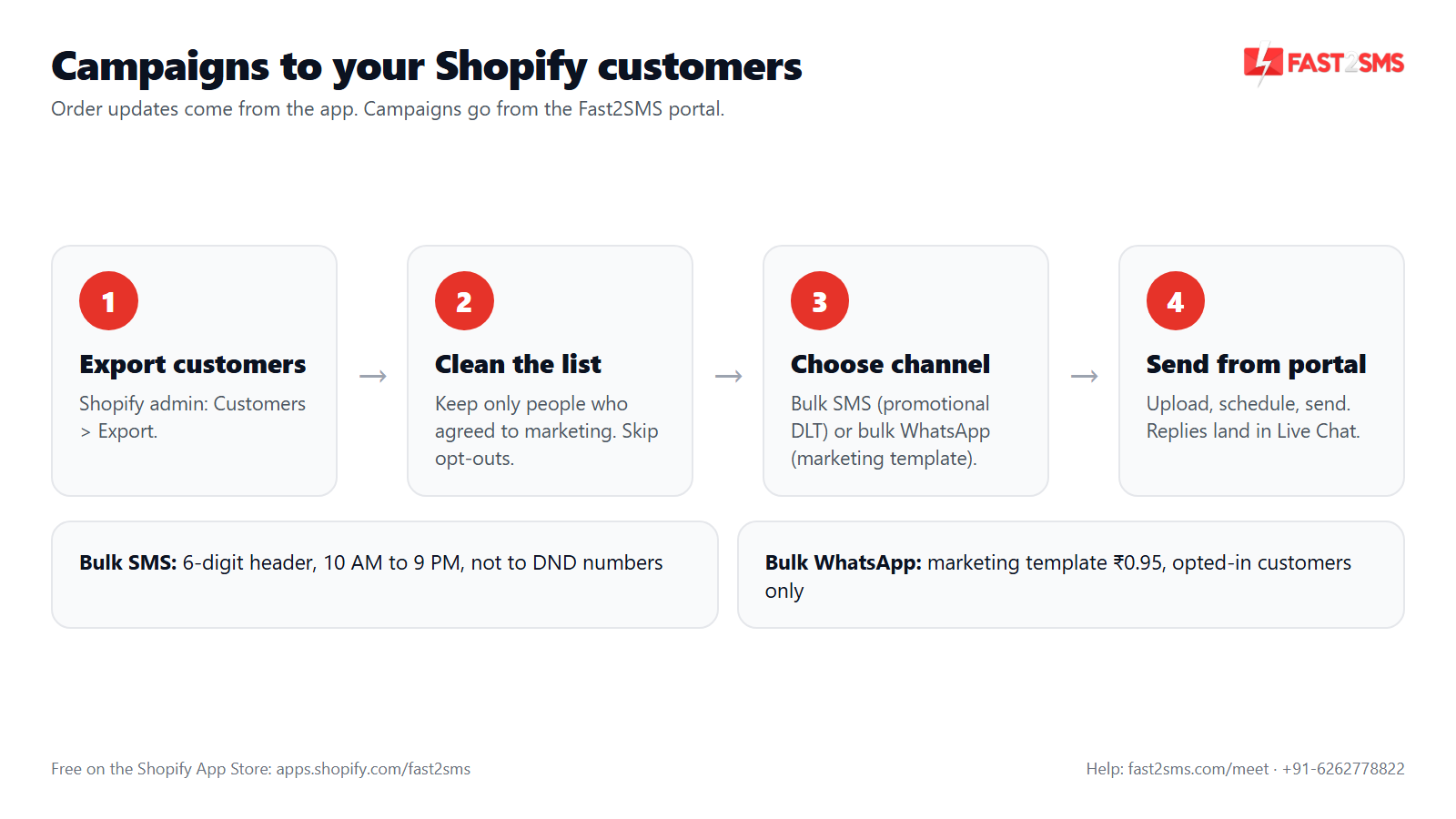
What the Shopify app does, and where campaigns go
The app and the portal do different jobs. Keeping them apart avoids confusion later.
| Task | Where you do it |
|---|---|
| Order confirmation, shipping, delivery, refund, COD and 8 more order events | Fast2SMS Shopify app, Automations tab (automatic) |
| Abandoned checkout reminder and welcome message | Fast2SMS Shopify app (automatic, per customer) |
| Festive sale, restock or new collection blast to many customers | fast2sms.com portal: Bulk SMS or bulk WhatsApp |
| Reading and answering customer replies on WhatsApp | fast2sms.com portal: Live Chat and chatbot |
| Creating DLT SMS templates and WhatsApp templates | fast2sms.com portal (the app fetches approved ones automatically) |
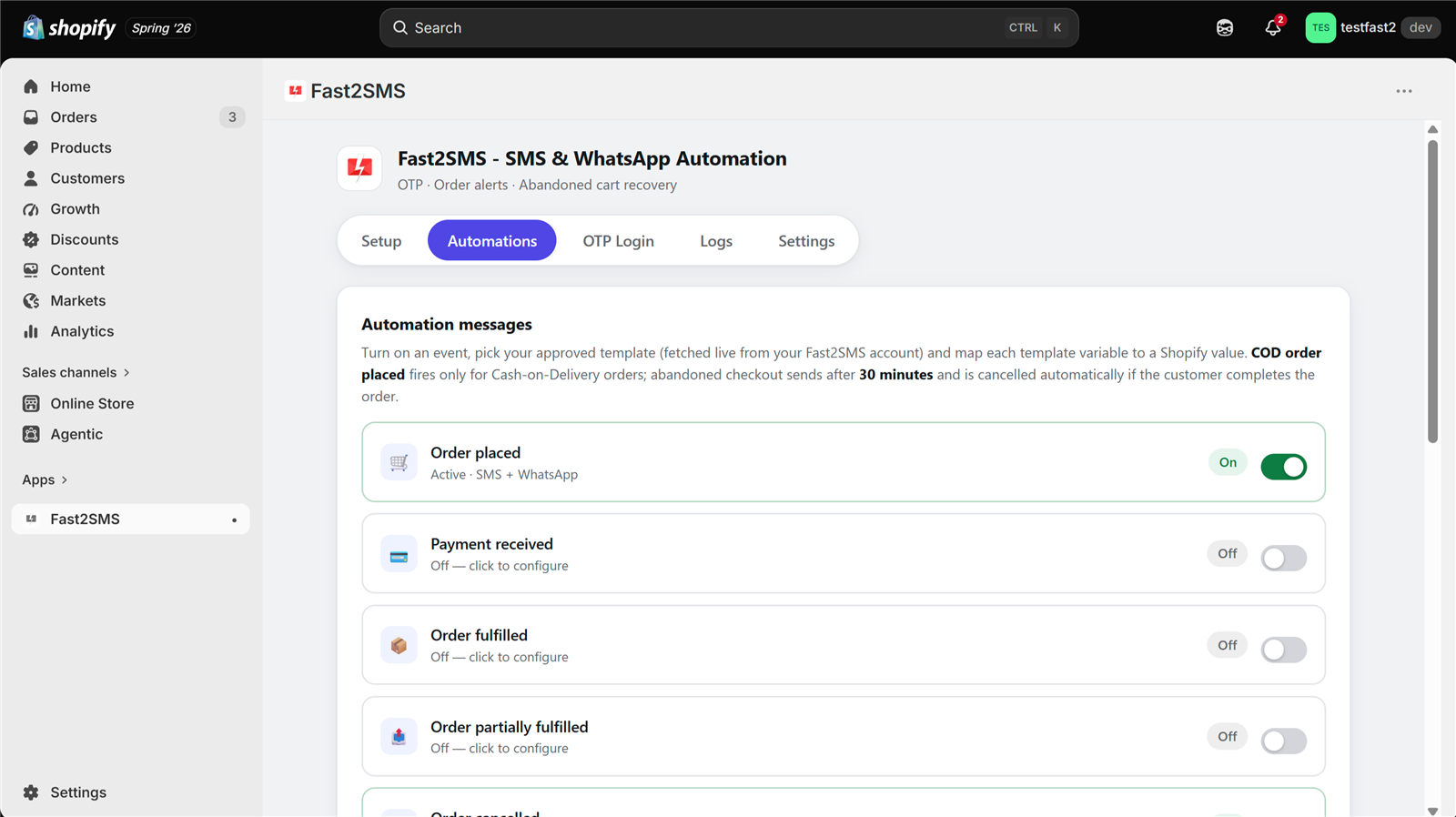
New to the app? Read the Fast2SMS Shopify app guide for the order event side. The rest of this page is about campaigns.
Step 1: Export your customers from Shopify
- In your Shopify admin, go to Customers.
- If you want a smaller group, filter or pick a segment first, such as customers in one city, customers with a tag, or customers who accept marketing.
- Click Export, choose all customers or only the current filtered list, and pick the CSV format.
- Shopify downloads the file, or emails it to you if the list is large.
The file has columns for name, email, phone, address, tags, order count and marketing consent. Shopify updates its export from time to time, so check the column names in your own file. You need three things from it: the first name, a phone number, and the consent status.
Step 2: Respect consent and your opt-out list
Only send promotions to customers who agreed to hear from you. This is both the right thing and the practical thing: people who did not ask for your messages report and block them, and that hurts your delivery and your WhatsApp quality rating.
- Use the consent column. Keep customers who accept SMS or marketing messages, and remove the rest from promotional lists.
- WhatsApp needs opt-in. Meta requires that customers have agreed to get WhatsApp messages from your business before you send marketing templates.
- Check your opt-out list. In the app’s Settings tab you keep an opt-out list. It stops the app’s own marketing-type messages (abandoned cart and welcome) while order updates still go out. Portal campaigns are a separate send, so remove those numbers from your campaign file too.
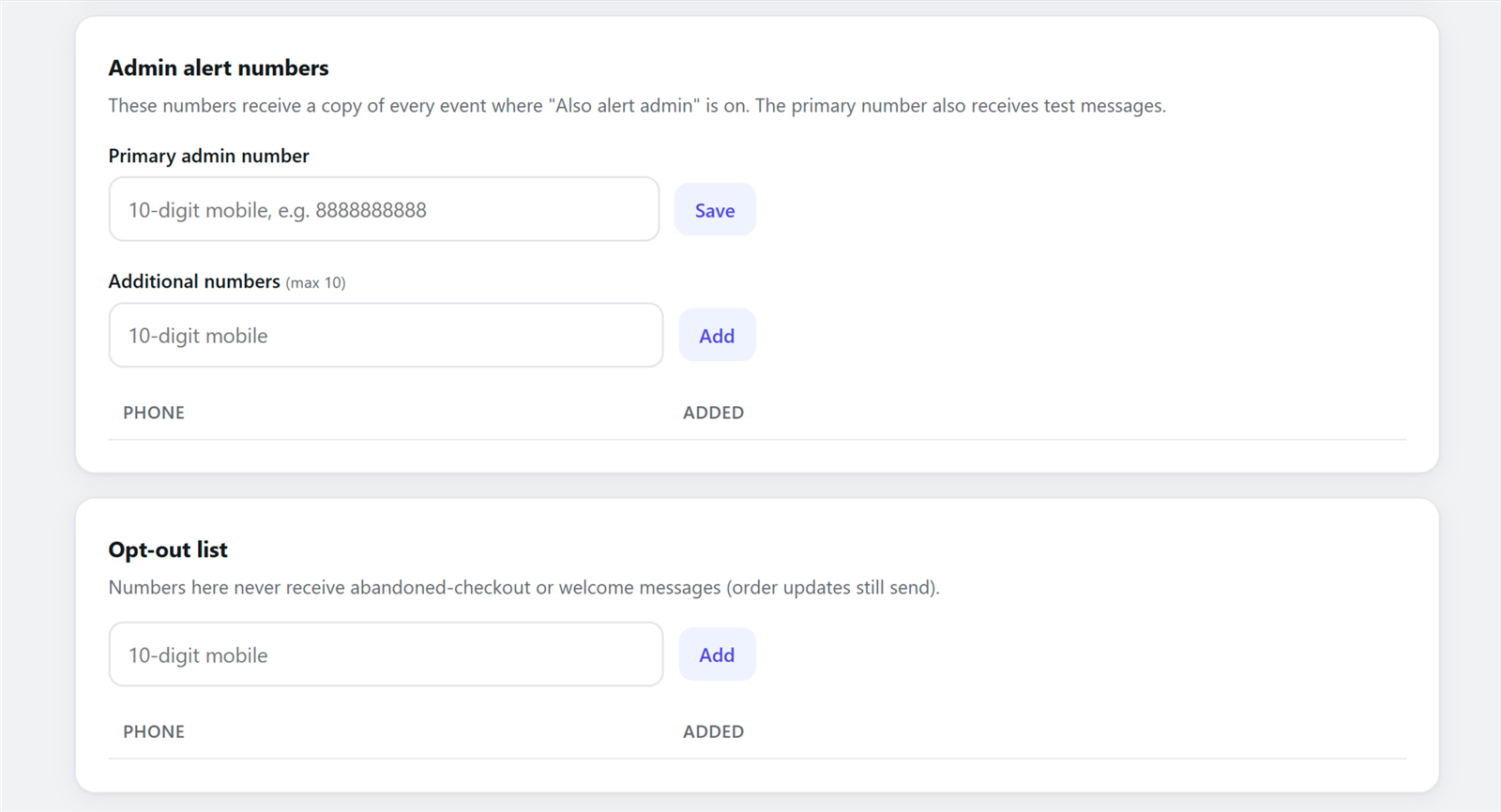
The app’s Settings also has an option to respect Shopify marketing consent for abandoned cart messages, which is on by default. Use the same thinking for your campaigns.
Step 3: Clean the phone numbers
Shopify stores numbers the way customers typed them. Some have +91, some have a 0 in front, some have spaces. Clean them in Excel or Google Sheets before you upload:
- Use the customer phone column. If it is empty, use the address phone column.
- Remove +91, spaces, dashes and a leading 0 so every number is 10 digits. In Google Sheets,
=RIGHT(REGEXREPLACE(A2,"\D",""),10)keeps the last 10 digits. - Keep only numbers that start with 6, 7, 8 or 9. Delete landlines and blanks.
- Remove duplicates, so no customer gets the same message twice.
- Keep a first name column if you want to use the name in the message.
Save the result as CSV or Excel. That file is what you upload in the portal.
Step 4: Send bulk SMS from the fast2sms.com portal
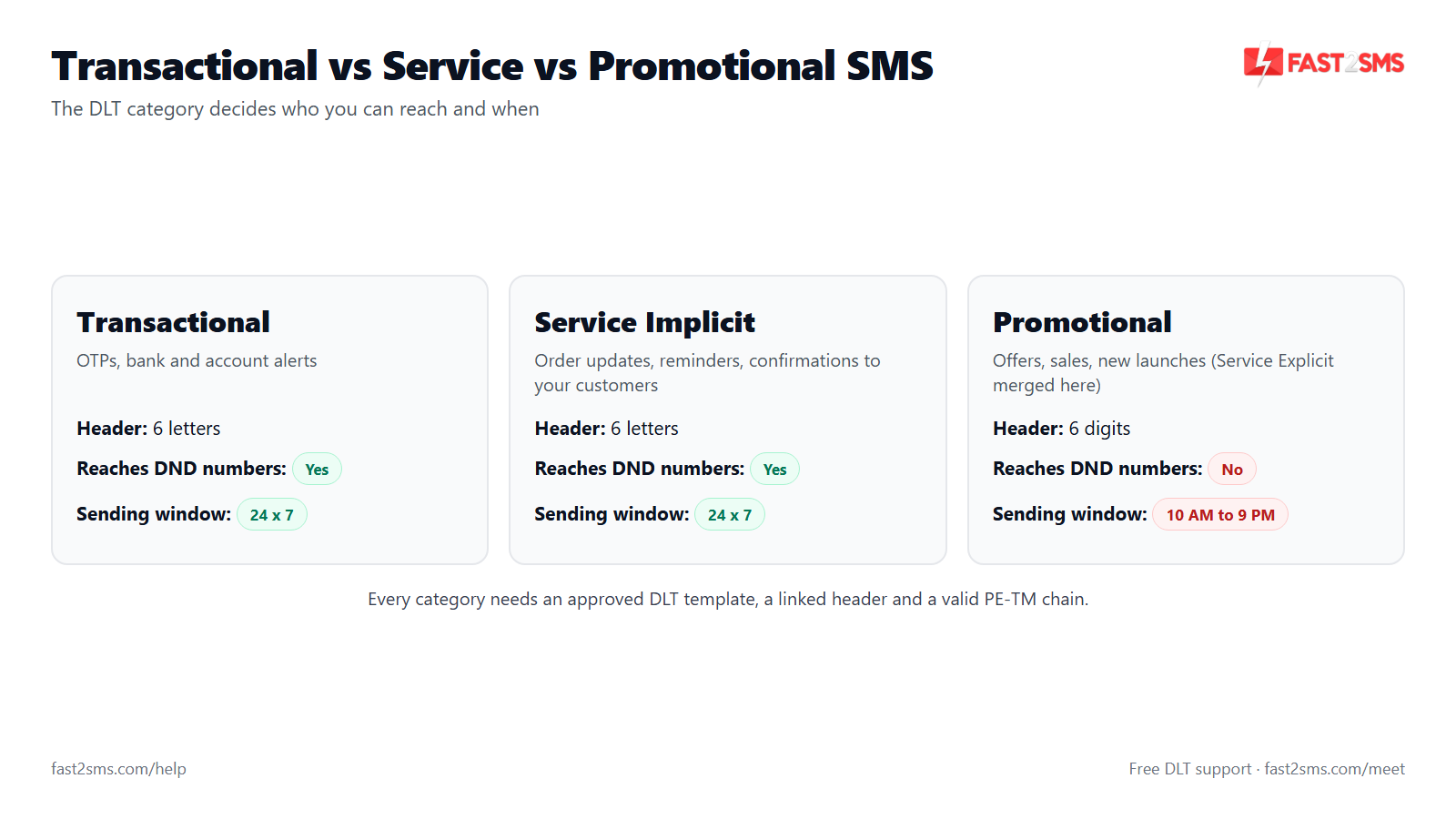
Every promotional SMS in India follows TRAI DLT rules. These are the ones that matter for a Shopify sale blast:
- Promotional DLT template. Register the exact message on DLT as a promotional template, with variables for the parts that change. Our team helps with DLT for free. See DLT registration A to Z.
- 6-digit numeric header. Promotional SMS go from a 6-digit number header, not the 6-letter brand header you use for order updates.
- 10 AM to 9 PM only. Promotional SMS cannot be sent outside this window. Scheduled sends should fall inside it.
- No DND numbers. Promotional SMS do not reach numbers on the DND list.
- Unicode for Hindi and regional languages. Unicode SMS fit fewer characters per part, roughly 70 against 160 for English, so a long Hindi message uses more SMS parts.
In the portal, open Bulk SMS, upload your cleaned file or paste the numbers, pick your approved promotional template, fill the variables, and preview. Send now, or schedule it for the time you want. You are billed per SMS at your DLT SMS rate from your wallet. More answers are in the bulk SMS India FAQ, and ready wording in sample DLT SMS templates.
Step 5: Send bulk WhatsApp from the portal
WhatsApp campaigns can carry an image, a longer message and a button that opens your store. The rules are different from SMS:
- Marketing template. Create a Marketing category template in your Fast2SMS panel and get it approved by Meta. Add an image header and a Shop now button if you like.
- ₹0.95 per delivered message. Charged on delivery; failed WhatsApp messages are refunded within 48 hours.
- Opt-in only. Send to customers who agreed to hear from you on WhatsApp.
- Watch your quality rating. Meta rates your number based on how customers react. Many blocks and reports lower it, and a low rating can limit your sending.
- Daily limits. Meta caps how many different customers you can start conversations with per day. The cap rises as you keep sending good-quality messages.
In the portal, choose bulk WhatsApp, upload your file, pick the approved template, map the name column to {{1}}, add the image, and send or schedule. The step-by-step guide is how to send bulk WhatsApp messages, and the rules for staying safe are in WhatsApp marketing without a ban.
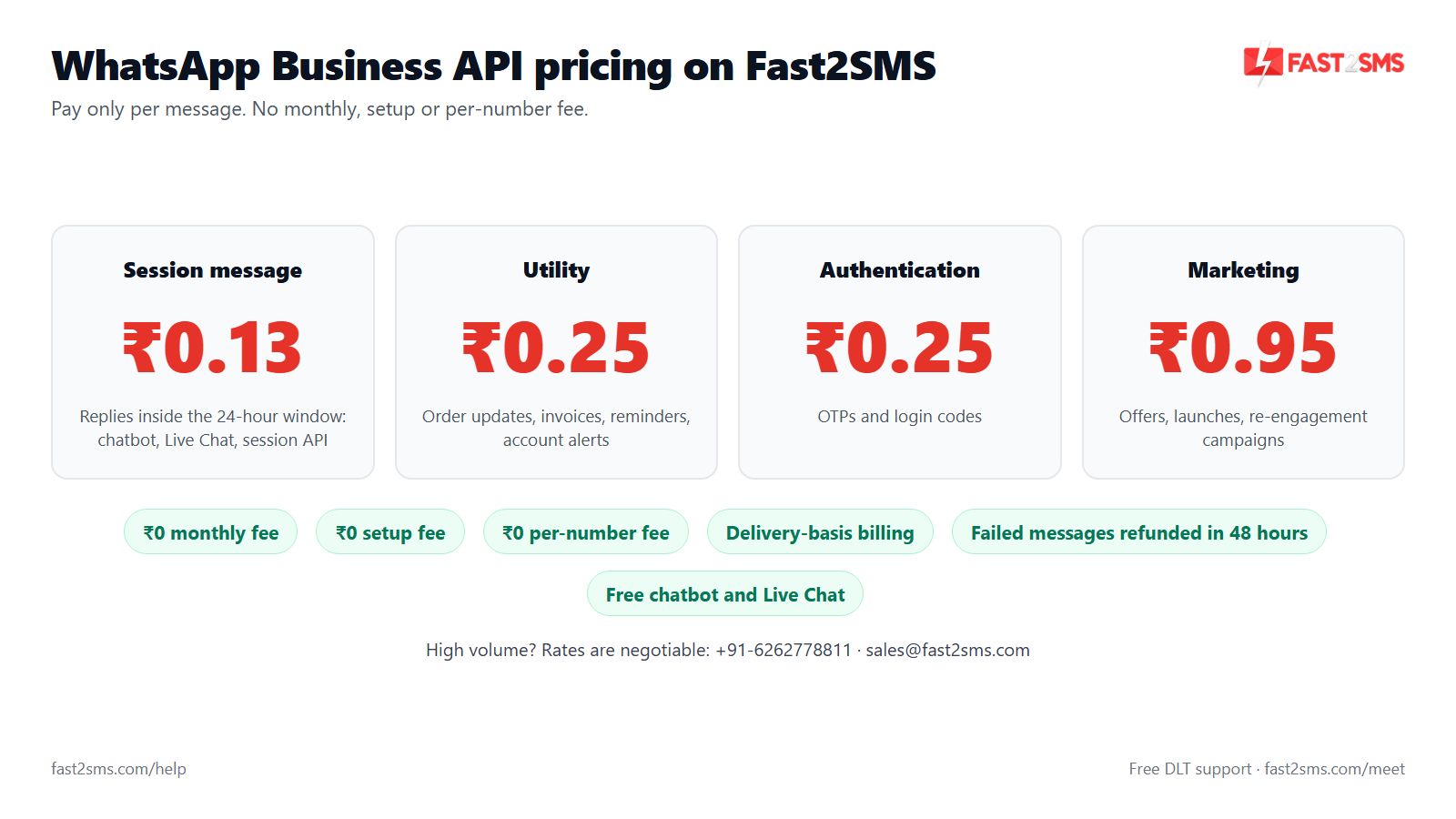
How pricing works: free app, pay only per message
- The Fast2SMS Shopify app is free: no subscription, no monthly fee, no setup fee, no commission.
- Messages are billed by Fast2SMS from your own wallet, never through Shopify billing. Portal campaigns use the same wallet.
- WhatsApp: order updates ₹0.25 and marketing campaigns ₹0.95 per delivered message; session replies ₹0.13; failed WhatsApp messages are refunded within 48 hours.
- SMS: your DLT SMS rate per message.
- Free signup with ₹50 test credit.
Step 6: Handle replies in Live Chat and the chatbot
A good WhatsApp campaign gets replies: “Is this in size M?”, “Do you ship to Guwahati?”. These land in the Live Chat inside your fast2sms.com portal, not in Shopify. Your team can answer there. Replies you send within 24 hours of the customer’s message are session messages at ₹0.13 each. See session message pricing.
If replies pile up during a sale, set up the free WhatsApp chatbot to answer common questions like delivery time, sizes and return policy, and hand the rest to a person.
Bulk SMS vs bulk WhatsApp for Shopify customers
| Bulk SMS | Bulk WhatsApp | |
|---|---|---|
| Approval needed | DLT entity and promotional DLT template | Meta-approved Marketing template |
| Sender shown | 6-digit numeric header | Your verified business name and number |
| Sending hours | 10 AM to 9 PM only | No TRAI time window; send at sensible hours |
| DND numbers | Not delivered | DND does not apply, but opt-in is required |
| Content | Text only, Unicode for regional languages | Text, image, video or document, plus buttons |
| Customer replies | Not possible from a promotional header | Yes, into portal Live Chat |
| Cost | Your DLT SMS rate per SMS | ₹0.95 per delivered message |
| Failed messages | Shown in the delivery report in the portal | Refunded within 48 hours |
| Reaches customers without WhatsApp | Yes | No |
Many stores use both: WhatsApp for customers who opted in, with an image and a button, and SMS as a short nudge for the rest.
Campaign ideas for Indian D2C stores
These are starting points. Test a small batch first and judge by your own sales and replies.
Festive sale
Send a day or two before the sale starts, and a short reminder on the last day. Use segments: repeat buyers first, then everyone who opted in.
Festive sale · promotional SMS
Festive Sale at YourBrand: flat {#numeric#}% off on all kurtas and sarees. Shop now: {#url#} -YourBrand
Festive sale · WhatsApp marketing
Hi {{1}}, our Festive Sale is live. Enjoy flat {{2}}% off on the whole collection, only for a few days. Tap Shop now to see the offers.
Back in stock
If a best-seller sold out, message customers who bought it before or asked for it. Use a Shopify tag or a product filter when you export, so only interested customers get it.
Restock · promotional SMS
Back in stock at YourBrand: {#var#} is available again in limited sizes. Order here: {#url#} -YourBrand
Restock · WhatsApp marketing
Hi {{1}}, good news. {{2}} is back in stock. Sizes go fast, so tap below to order yours.
New collection
WhatsApp works well here because the image header shows the product. Send to recent buyers first.
New collection · WhatsApp marketing
Hi {{1}}, our new {{2}} collection has just dropped. Tap Shop now to be among the first to see it.
The WhatsApp examples end with fixed text on purpose: Meta rejects templates that end with a variable. For the order event side of WhatsApp, use our Shopify WhatsApp message templates.
Running your first campaign? Our team will set it up with you, free.
We can help you clean your Shopify export, get your promotional DLT template and WhatsApp marketing template approved, and send a small test batch together on a screen-share call. Schedule a free meeting, call +91-6262778822 or email [email protected].
Frequently asked questions
Can I send bulk SMS from the Fast2SMS Shopify app?
No, the Fast2SMS Shopify app sends only automatic messages for 12 order events, abandoned checkouts and welcome messages, not bulk campaigns. You send bulk SMS to your Shopify customers from the Bulk SMS option in your fast2sms.com portal.
How do I send bulk WhatsApp messages to my Shopify customers?
Export your customers from Shopify, keep only those who opted in, clean the numbers, then upload the file in the bulk WhatsApp option of your fast2sms.com portal and send an approved Marketing template. Each delivered message costs ₹0.95.
How do I export customers from Shopify for an SMS campaign?
In your Shopify admin, go to Customers, filter the list if you want a smaller group, click Export and choose the CSV format. Shopify downloads the file, or emails it to you when the list is large.
Does the Shopify customer export include phone numbers?
Yes, the Shopify customer export includes a phone column and an address phone column, along with name, email, tags and marketing consent. Some customers leave the phone blank, so check both columns while cleaning your list.
Do I need customer consent to send promotional SMS or WhatsApp?
Yes, you should send promotions only to customers who agreed to receive them, and WhatsApp requires opt-in under Meta’s rules. Use the marketing consent column in your Shopify export to filter your list before every campaign.
Does the app’s opt-out list apply to portal campaigns?
The opt-out list in the app’s Settings tab controls the app’s own marketing-type messages, such as abandoned cart and welcome, while order updates still go out. Portal campaigns are a separate send, so remove those numbers from your campaign file yourself.
What is a promotional SMS header in India?
A promotional SMS header is the 6-digit numeric sender ID that all promotional messages, including sale blasts to your Shopify customers, come from under TRAI DLT rules. Your 6-letter brand header is for transactional and service messages like order updates, not for sale blasts.
What time can I send promotional SMS to Shopify customers?
You can send promotional SMS to your Shopify customers in India only between 10 AM and 9 PM, as per TRAI DLT rules, whether you send them right away or schedule them. If you schedule a campaign in the fast2sms.com portal, pick a time inside this window.
Will promotional SMS reach customers who are on DND?
No, promotional SMS are not delivered to numbers registered on the DND list, even if they bought from your store. For those customers, WhatsApp with their opt-in is often the better way to share offers.
Do I need DLT registration for bulk SMS to Shopify customers?
Yes, every business SMS in India needs DLT registration, including an entity, an approved promotional template for campaigns and a linked telemarketer chain. Fast2SMS helps with DLT registration for free, so ask our team if you are starting out.
Can I send bulk SMS in Hindi to my Shopify customers?
Yes, you can send Hindi and other regional language SMS as Unicode, as long as the exact text is registered as a DLT template. Unicode fits about 70 characters per SMS part, so longer Hindi messages use more parts.
Can I schedule a bulk SMS or WhatsApp campaign in advance?
Yes, the fast2sms.com portal lets you schedule campaigns for a later time, so you can prepare a festive sale blast in advance. For promotional SMS, keep the scheduled time between 10 AM and 9 PM.
How much does a bulk WhatsApp marketing message cost with Fast2SMS?
A bulk WhatsApp marketing message costs ₹0.95 per delivered message with Fast2SMS, paid from your own wallet, and you are charged on delivery, and failed WhatsApp messages are refunded to your wallet within 48 hours.
How much does bulk SMS cost for a Shopify store?
Bulk SMS is billed per SMS at your DLT SMS rate from your Fast2SMS wallet, and long or Unicode messages count as more than one SMS. The Shopify app is free, so campaigns and order messages use the same wallet.
Is bulk WhatsApp better than bulk SMS for a Shopify store?
Neither is always better: WhatsApp allows images, buttons and replies but needs opt-in and costs ₹0.95 per delivered message, while SMS reaches customers without WhatsApp but has DND and time limits. Many stores use both.
Can I send images or videos in a Shopify WhatsApp campaign?
Yes, a WhatsApp Marketing template can have an image, video or document header along with the message text and buttons such as Shop now. Add the media when you create the template in your Fast2SMS panel and choose it when you send the campaign.
What is WhatsApp quality rating and why does it matter for campaigns?
WhatsApp quality rating is Meta’s score for your number based on how customers react to your messages, including blocks and reports. A low rating can limit your sending, so message only opted-in customers with relevant offers.
Is there a limit on how many customers I can message on WhatsApp per day?
Yes, Meta sets a daily limit on how many different customers your number can start conversations with, and the limit goes up as you keep sending good-quality messages. Plan big festive campaigns with this limit in mind.
Where do customer replies to my WhatsApp campaign go?
Customer replies to your WhatsApp campaign go to the Live Chat inside your fast2sms.com portal, not to Shopify or to the Fast2SMS Shopify app. Your team can read and answer them there, and the free chatbot can handle common questions.
Can a chatbot answer replies to my Shopify campaigns?
Yes, you can build a free WhatsApp chatbot in your fast2sms.com portal to answer common campaign questions like delivery time, sizes and returns. Anything the bot cannot answer can go to a person in Live Chat.
How much do I pay when I reply to a customer on WhatsApp?
Replies you send within 24 hours of a customer’s message are session messages, charged at ₹0.13 per delivered message with Fast2SMS. After 24 hours, you need an approved template to message that customer again.
How do I clean phone numbers from a Shopify customer export?
Remove +91, spaces, dashes and any leading 0 so each number is 10 digits, keep only numbers starting with 6 to 9, and delete duplicates and blanks. In Google Sheets, a RIGHT and REGEXREPLACE formula does most of the work.
Can I personalise bulk messages with the customer’s first name?
Yes, keep the first name column in your file and map it to a variable, {{1}} in a WhatsApp template or a variable in your DLT SMS template. Check a few rows first, because some Shopify names are blank or in capitals.
Can I send a campaign only to repeat buyers on Shopify?
Yes, filter your Shopify customers by order count or a tag before you export, then send the campaign to that smaller file from the portal. Repeat buyers already know your brand, so they are a sensible first group.
Can I send a campaign to Shopify customers in one city?
Yes, filter your customers by location in the Shopify admin before exporting, or filter the city column in your spreadsheet after you export the full list. This is useful for a store launch, a local delivery offer or a city-specific sale.
Can I use my brand name as the sender for promotional SMS?
No, promotional SMS in India go from a 6-digit numeric header, not a 6-letter brand name, under DLT rules, even when your order updates use your brand header. Write your brand name inside the message text instead, so customers know who it is from.
What happens if a WhatsApp campaign message fails?
If a WhatsApp campaign message fails to deliver, Fast2SMS refunds the charge to your wallet within 48 hours, because WhatsApp is billed on delivery. The delivery report in your portal shows which numbers failed.
Will bulk WhatsApp messages get my number banned?
Sending to customers who opted in, with relevant offers and not too often, keeps your number healthy, while cold lists and frequent blasts lead to blocks and a lower quality rating. Our WhatsApp marketing without ban guide covers the rules.
Should I use SMS or WhatsApp for a festive sale?
Use WhatsApp for opted-in customers when you want to show the product with an image and a Shop now button, and SMS as a short reminder for everyone else who consented. Test a small batch of each first.
Is the Fast2SMS Shopify app still free if I also run campaigns?
Yes, the Fast2SMS Shopify app stays free with no subscription, setup fee or commission, whether or not you run campaigns. Campaign messages from the portal and order messages from the app are billed per message from the same Fast2SMS wallet.
Can Fast2SMS help me set up my first Shopify campaign?
Yes, our team can help you clean your export, get your DLT and WhatsApp templates approved and send a test batch, free of charge. Schedule a free meeting at fast2sms.com/meet or call +91-6262778822.
Start with a small, clean list
Export your customers, keep only those who agreed, clean the numbers, and send your first campaign to a small group from the fast2sms.com portal. Let the Shopify app keep handling order updates on its own.
Need help? Schedule a free meeting · [email protected] · +91-6262778822 · Sales: +91-6262778811