
WhatsApp Marketing Without Getting Banned: 100+ Questions Answered
This guide is for Indian businesses that want to send WhatsApp marketing messages to customers without losing their number: shop owners, D2C brands, schools and coaching centres, clinics, real estate teams and agencies. If your number has been banned or restricted, or you are worried that bulk WhatsApp messages will get you blocked, you are in the right place.
You will get plain answers to more than 100 real questions: why numbers get banned, how opt-in works, which templates get approved, how quality rating and messaging limits behave, what a campaign costs, and how to measure it. Each answer starts with the direct reply, then adds the detail a support engineer would tell you on a call.
Signup NowSchedule Free Meeting
Quick answers
- Most bans come from messaging people who never opted in, using unofficial bulk tools, and getting blocked or reported by recipients.
- For bulk WhatsApp marketing, use the official WhatsApp Business API with Meta-approved templates, not the phone app or browser extensions.
- Opt-in is required before you send any business message on WhatsApp. Keep a record of how and when each person agreed.
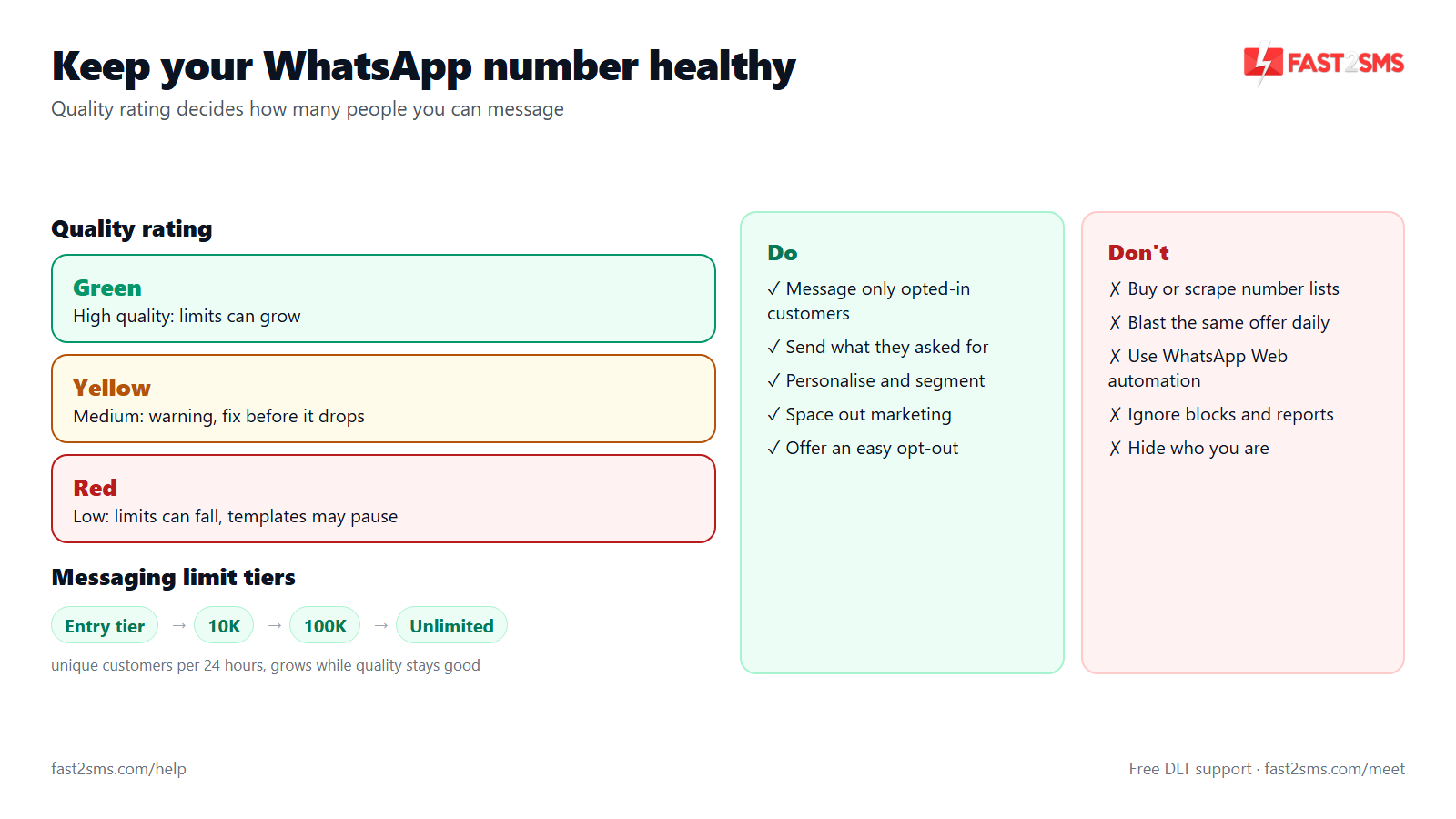
- Your quality rating (Green, Yellow, Red) is driven by how recipients react. Good quality lets your messaging limit grow.
- Meta applies per-user limits on marketing messages, so some messages can fail even when your account is healthy.
- On Fast2SMS: marketing ₹0.95, utility and authentication ₹0.25, session replies ₹0.13 per message. No setup, monthly or per-number fee.
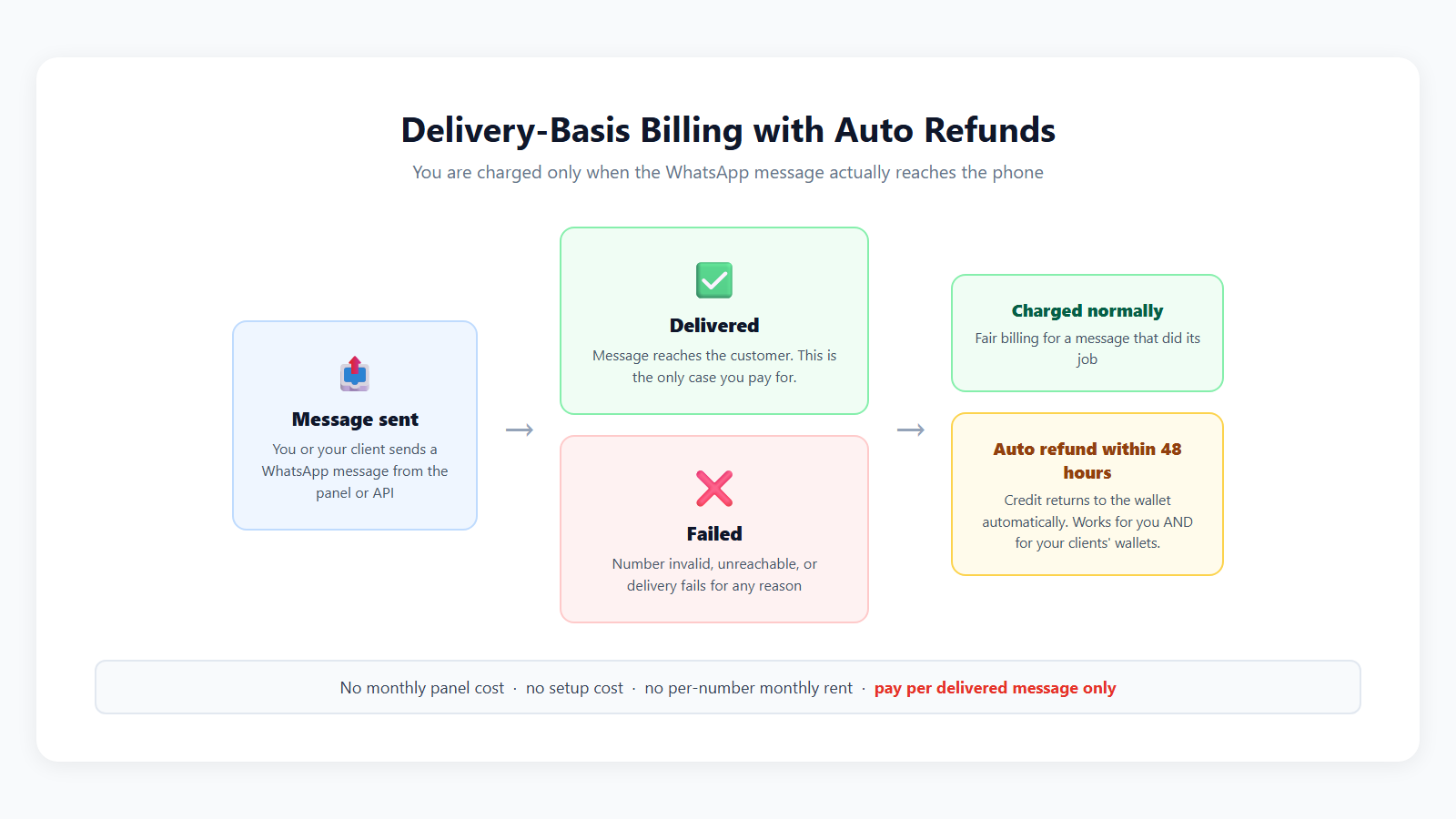
- Fast2SMS bills on delivery. Failed WhatsApp messages are refunded to your wallet automatically within 48 hours.
Table of contents
- Why WhatsApp numbers get banned or restricted
- WhatsApp Business app broadcast vs WhatsApp Business API
- Opt-in and building a contact list
- Marketing templates that get approved and read
- Frequency, timing and Meta’s per-user marketing limits
- Quality rating, messaging limits and recovery
- Segmentation, personalisation and campaigns
- Measuring results: delivery, read, clicks, replies and webhooks
- Costs of WhatsApp marketing in India
- Tools and industry playbooks
- Wrap-up
Why WhatsApp numbers get banned or restricted
WhatsApp protects its users first. When a number sends messages that people did not ask for, those people block it, report it, or ignore it, and WhatsApp’s systems treat that as a spam signal. Unofficial tools that automate the phone app add another red flag, because they break WhatsApp’s terms on their own.
Almost every ban we see traces back to one of three things: no opt-in, the wrong tool, or content Meta does not allow. Fix those three and most of the risk goes away.
Why did my WhatsApp number get banned after sending bulk messages?
Your number was most likely banned because many recipients blocked or reported it, or because you sent bulk messages through the phone app or an unofficial tool, which WhatsApp detects as automated spam. The two causes often happen together. People who did not expect a message from you tap “Block” or “Report”, and a sudden burst of identical messages from a normal app account looks like a spam bot.
What is the difference between a WhatsApp ban and a restriction?
A ban removes the number’s ability to use WhatsApp altogether, while a restriction is a temporary limit, for example blocking you from starting new conversations or lowering how many people you can message. Restrictions are usually a warning stage. On the Business API you will see the status in WhatsApp Manager, and your number can often keep replying to customers who write to you while the restriction lasts.
Can using WhatsApp automation tools or Chrome extensions get my number banned?
Yes, browser extensions, “WhatsApp sender” desktop tools and scripts that control WhatsApp Web or the phone app break WhatsApp’s terms, and numbers using them are a common target for bans. These tools are cheap because they skip Meta’s approval and billing, but you pay for it with your number. If you need to send to hundreds or thousands of people, move to the official API.
Do GB WhatsApp or other modded apps get business numbers banned?
Yes, modded apps such as GB WhatsApp are unofficial clients, and WhatsApp can ban numbers that use them, whether or not you send marketing messages. Many sellers install them for features like bulk sending or auto-reply, which makes things worse. Use only the official WhatsApp or WhatsApp Business app on your phone, and use the Business API for automation. You get auto-replies and chatbots legally through the API.
How many blocks or reports will get my number banned?
WhatsApp does not publish a fixed number of blocks or reports that triggers a ban, and the effect depends on how many people you messaged, how recently they reacted and why they blocked you. What we can say from experience is that the ratio matters more than the raw count. A campaign where a noticeable share of recipients block you hurts far more than a few blocks spread across a large, engaged list.
Does WhatsApp ban numbers for sending the same message to many people?
Sending the same message to many people is not a problem on the Business API, because that is what approved templates are for, but it is risky on the phone app, where identical forwards to strangers look like spam. On the API, Meta has already reviewed your template, and you are sending to people who opted in. The risk shifts from “same text” to “unwanted text”. If the content is relevant and the list is clean, repeated use of one template is normal.
Can a new WhatsApp number get banned quickly?
Yes, a brand new number with no history is watched more closely, so blasting a large list from it on day one is one of the fastest ways to get it restricted or banned. New numbers have no track record, so every block counts heavily. On the Business API a new number also starts on a lower messaging limit. Begin with customers who know you, such as recent buyers or people who messaged you, and grow volume as your quality rating stays green.
Which products and businesses are not allowed to market on WhatsApp?
Meta’s WhatsApp Business and Commerce policies do not allow selling things like illegal drugs, weapons, adult content, gambling and real-money games, tobacco and alcohol, and some other restricted goods and services through WhatsApp. Some categories, like certain financial or health products, have extra conditions. If your business sits near any of these lines, read the policies before you start, because a policy violation can restrict your whole business account, not just one number.
Can my whole WhatsApp Business account be banned, or only the number?
Both can happen: Meta can restrict or ban a single phone number for spam signals, or restrict the whole WhatsApp Business account and business portfolio for serious or repeated policy violations. A number-level problem usually comes from poor quality and blocks. An account-level problem usually comes from prohibited content, fake business details or repeated violations across numbers. That is why moving to a new number is not a real fix if the underlying behaviour stays the same.
How do I get my banned WhatsApp number back?
For the WhatsApp Business app, use the review request option shown in the app after the ban; for the Business API, request a review through the account quality section of Meta Business Suite. Explain honestly what your business does and how you collect opt-ins. There is no guaranteed outcome and no fixed timeline. While you wait, fix the cause: clean your list, stop unofficial tools and review your content.
What are the most common mistakes that lead to a WhatsApp ban?
The most common mistakes are messaging bought or scraped lists, using unofficial bulk tools, sending too often, hiding who you are, and making it hard for people to stop your messages. Almost all of them come down to treating WhatsApp like an old SMS blast. The table below sums up what to do and what to avoid.
| Do | Don’t |
|---|---|
| Send only to people who opted in to hear from you on WhatsApp | Buy, rent or scrape number databases |
| Use the official WhatsApp Business API for bulk messages | Use Chrome extensions, modded apps or “WhatsApp sender” software |
| Use Meta-approved templates in the correct category | Hide offers inside utility templates |
| Put your business name in the message and profile | Send vague messages that look like they came from a stranger |
| Offer a clear way to stop, such as a “Stop promotions” button | Ignore STOP replies or keep messaging people who opted out |
| Segment by interest and purchase history | Send every offer to your entire list |
| Start a new number with warm contacts and grow slowly | Blast a large list from a brand new number |
| Watch quality rating after every campaign | Keep sending when the rating turns yellow or red |
| Answer replies quickly with a chatbot or Live Chat | Send campaigns from a number nobody monitors |
WhatsApp Business app broadcast vs WhatsApp Business API
The WhatsApp Business app on your phone is built for one person or a small team talking to customers. Its broadcast feature is limited and was never meant for large campaigns. The WhatsApp Business API (also called the WhatsApp Cloud API when hosted by Meta) is the official route for sending to large opted-in lists, with templates, reports, chatbots and a shared inbox.
If you are sending to more than a handful of people at a time, the API is the safer choice. It costs money per message, but it is the only method WhatsApp designs for bulk business messaging.
What is the difference between WhatsApp Business app and WhatsApp Business API?
The WhatsApp Business app is a free phone app for manual chats, while the WhatsApp Business API is an official interface for sending approved template messages at scale, connecting software, chatbots and a team inbox. The API has no phone app of its own. You use it through a provider dashboard, a plugin or your own code. You pay per message on the API, and in return you get approved templates, delivery and read reports, webhooks and messaging limits that grow with good quality.
Why do my WhatsApp broadcast messages not reach everyone?
Broadcast messages in the WhatsApp Business app are delivered only to contacts who have saved your number in their phone, so anyone who has not saved you simply never receives the broadcast. This is WhatsApp’s own anti-spam design. It is the main reason app broadcasts feel unreliable for marketing. With the API, saving your number is not required, because the customer has opted in and Meta has approved the template. That is one of the biggest practical differences between the two.
Is there a limit on broadcast lists in the WhatsApp Business app?
Yes, the WhatsApp Business app caps how many contacts one broadcast list can hold, and on top of that only people who saved your number receive it, so the app is not suited to large campaigns. Some businesses try to get around the cap by creating many lists and sending repeatedly. That creates exactly the burst pattern that triggers spam detection. If your list has outgrown one broadcast, it is time for the API.
Can I send bulk WhatsApp messages without the API safely?
Not really: small broadcasts to people who saved your number are fine in the app, but any real bulk sending without the API means unofficial tools or mass forwarding, which is the fastest route to a banned number. The app is safe for replying to customers, sharing a catalogue with people who ask, and small broadcasts to regulars. For anything bigger, use the API with approved templates. You can see how that works in our guide to sending bulk WhatsApp messages.
Do I need a website or GST to get WhatsApp Business API?
You can usually start with a Meta business portfolio, a working phone number and a clear business name, while Meta’s business verification, which uses documents such as GST or incorporation papers, helps you reach higher limits and apply for extras like the green tick. A simple website that matches your business name makes verification smoother.
Can I connect my existing WhatsApp Business app number to the API?
Yes, an existing WhatsApp Business app number can be connected to the WhatsApp Business API, so customers keep messaging the same number they already know. This matters for marketing, because customers are less likely to block a number they recognise. During connection, follow your provider’s steps carefully and check what happens to chat history on your phone before you start. With Meta’s embedded signup, the connection takes minutes.
How long does it take to start with WhatsApp Business API?
With embedded signup, connecting your number to the WhatsApp Business API takes minutes, and your first marketing template is typically reviewed by Meta within minutes, though it can take up to 24 hours. The slower parts are usually on your side: preparing a clean contact list, writing templates and deciding who handles replies. You can often connect, get a template approved and send a small test campaign the same day. See how to get WhatsApp Cloud API access without a setup or monthly fee.
Is WhatsApp Business API free to use?
Access to the WhatsApp Business API itself can be free of setup and monthly charges, but messages are paid: Meta charges per message by category, and providers add their rate on top. On Fast2SMS you pay only per message from a prepaid wallet, with no setup fee, no monthly fee and no per-number fee. Marketing templates cost ₹0.95, utility and authentication templates ₹0.25, and session replies ₹0.13. New accounts get a free ₹50 test credit after signup.
Do I get a green tick with WhatsApp Business API?
No, the green tick is not included automatically: it marks an Official Business Account, which Meta grants only to businesses that meet its notability criteria, and approval is never guaranteed. Notability is usually shown through independent press coverage and a recognisable brand. You do not need a green tick to run safe, effective campaigns. What customers notice more is a clear display name, a proper profile photo and messages that are clearly from you.
Which is better for a small shop, the Business app or the API?
For a small shop that chats with a few regulars, the Business app is enough, but once you want to send offers to hundreds of customers or automate replies, the API is safer and gives you reports and a chatbot. Many shops start in the app, then connect the same number to the API once the list grows. With a provider that charges no monthly fee, a small list does not mean a big bill.
Is WhatsApp marketing legal in India, and does it need DLT?
Yes, WhatsApp marketing is allowed in India when you have the user’s opt-in and follow Meta’s policies, and it does not need DLT registration, which applies only to business SMS. The rules you must follow on WhatsApp are set by Meta: opt-in, approved templates, the right category and respect for opt-outs. General consumer and data protection laws still apply to how you collect and store customer data. If you also send SMS, that channel follows TRAI’s DLT system, explained in our beginner’s guide to DLT.
Opt-in and building a contact list
Opt-in is the single biggest factor in whether you get banned. A person who agreed to hear from you on WhatsApp is far less likely to block you, and every message they do not block helps your quality rating. Meta requires opt-in before you message users, and it expects the opt-in to name your business and the WhatsApp channel.
The good news is that most businesses already have plenty of chances to collect opt-ins: checkout pages, forms, billing counters, reception desks and ads.
What counts as a valid opt-in for WhatsApp marketing?
A valid opt-in is a clear, active agreement from the person to receive messages from your business on WhatsApp, collected before you message them, stating your business name and what kind of messages to expect. A ticked checkbox with the words “Send me offers and updates from Sharma Electronics on WhatsApp” works. A pre-ticked box hidden in terms and conditions does not really count, and it will not stop people from blocking you.
Can I message customers who gave me their number at the billing counter?
Only if they agreed to receive WhatsApp messages from you: giving a number for a bill or delivery is not the same as agreeing to marketing messages on WhatsApp. Ask a simple question at the counter, such as “Can we send you offers on WhatsApp?”, and mark yes or no in your billing software. You can also print a QR code that opens a chat with your number.
Can I buy a WhatsApp number database for marketing?
No, bought or rented number databases have no valid opt-in for your business, and messaging them is one of the fastest ways to get blocked, reported and banned. Those people have never heard of you. A small list of real customers will beat a huge bought list every time, both in sales and in account safety.
How do I collect WhatsApp opt-ins on my website?
Add a separate, unticked checkbox next to the phone field on your signup, checkout or enquiry form that says the customer agrees to receive WhatsApp messages from your business, and store that choice with the contact. A “Chat with us on WhatsApp” button or a click-to-chat link also works, because the customer starts the conversation. If you run WordPress or WooCommerce, the free Fast2SMS plugin can handle WhatsApp messaging from your site, described in our WhatsApp Business API for WordPress guide.
Do I need a separate opt-in for marketing and for order updates?
It is best to treat them separately: customers expect order and delivery updates once they buy, but promotional messages need a clear agreement to receive offers, and many businesses use two checkboxes for this. Keeping them apart helps you in two ways. Customers who only want updates will not block you over offers. And if someone opts out of marketing, you can still send the order updates they need through utility templates.
How do I collect WhatsApp opt-ins offline in a shop or clinic?
Put a QR code at the counter or reception that opens WhatsApp with a pre-filled message like “Yes, send me updates”, so the customer opts in by sending it from their own phone. This gives you proof of consent and an open 24-hour service window at the same time. Staff can also ask verbally and note it in the register or software, but a message from the customer’s own number is the strongest record.
Is a customer messaging me first an opt-in?
A customer messaging you first opens a 24-hour window for replies about their question, but it is safer not to treat it as permission for ongoing marketing unless they clearly asked for offers or updates. For example, someone asking “Is this shoe available in size 9?” wants an answer, not a weekly offer list. At the end of the chat you can ask, “Would you like us to send you new arrivals on WhatsApp?” A “yes” in the chat is a clean opt-in.
How do I handle opt-outs or STOP replies on WhatsApp?
Remove the person from all marketing lists as soon as they reply STOP, tap a “Stop promotions” button or ask not to be messaged, and never send them marketing again unless they opt back in. Automate it if you can, with a chatbot keyword rule or a webhook that updates your CRM. Ignoring opt-outs turns a person who politely asked to stop into a person who blocks and reports you.
Should I keep proof of opt-in?
Yes, keep a record of when, where and how each contact opted in, such as the form name and time, the checkbox text or the message they sent, so you can show it if Meta or a customer asks. It also helps you clean your list. If a segment of contacts has no opt-in record, leave them out of marketing campaigns. Store the record with the contact in your CRM, spreadsheet or e-commerce platform, not in someone’s phone.
Can I import my old SMS list into WhatsApp marketing?
Only the contacts who agreed to WhatsApp messages should be imported for marketing; an SMS list collected for promotional SMS does not automatically give you WhatsApp opt-in. A good way to convert them is to send an SMS or email invitation with a click-to-chat link, so interested customers opt in themselves. Your existing SMS campaigns can keep running separately, since SMS follows DLT rules, not Meta’s.
Marketing templates that get approved and read
On the WhatsApp Business API, any message you start (outside the 24-hour customer window) must use a template that Meta has approved. Templates fall into three categories: Marketing, Utility and Authentication.
Approval is only half the job. A template that gets approved but annoys people will still cost you quality. The best templates are short, clearly from you, relevant to the reader and easy to act on or stop.
What is a WhatsApp marketing template?
A WhatsApp marketing template is a pre-approved message format that businesses use to send promotional content, such as offers, new arrivals, event invites or re-engagement messages, to opted-in customers outside the 24-hour customer service window. It can include a header (text, image, video or document), a body with variables, a footer and buttons. You submit it once, Meta reviews it, and then you can reuse it with different variable values for each customer.
How long does Meta take to approve a WhatsApp template?
Meta usually reviews WhatsApp templates within minutes, and in some cases it can take up to 24 hours, especially for new accounts or templates that need a closer look. If a template is still pending after a day, check that its content and category are correct, then edit and resubmit if needed. Our guide on WhatsApp templates and Meta approval shows the review flow with examples.
Why was my WhatsApp marketing template rejected?
Templates are usually rejected for policy reasons such as prohibited products, misleading or threatening wording, the wrong category, badly formatted variables, or a message that is too vague for Meta to understand its purpose. Common formatting problems include variables placed at the very start or end of the message, variables next to each other with no text between them, and sample values missing.
Can I put a discount inside a utility template to pay less?
No, utility templates are for updates about an existing order, account or transaction, and adding a promotion, discount or upsell makes it a marketing message, which Meta can reject or recategorise as Marketing. Meta checks categories during review and afterwards. Trying to save money this way can lead to rejections and hurts trust in your account. Send your order update as utility, and send the offer separately as marketing to people who opted in to offers.
Why did Meta change my template category from utility to marketing?
Meta changes a template’s category when its content does not match the chosen category, most often when a utility template includes promotional wording, a coupon, a “shop now” button or a general announcement not tied to a specific transaction. The template then bills at the marketing rate. To keep a message as utility, make it about one specific order, booking or account event, like “Your order #1234 has shipped”, with no promotional language.
How do I use variables in WhatsApp templates?
Variables are placeholders like {{1}} and {{2}} in the template body that you replace with customer-specific values, such as a name, order number or date, each time you send the message. Give Meta a realistic sample value for each variable when you submit. Keep variables inside full sentences, for example “Hi {{1}}, your points balance is {{2}}”, not “{{1}} {{2}}”. Most bulk tools let you map variables to columns in your contact file, so each person gets their own values.
What buttons can I add to a WhatsApp marketing template?
Marketing templates can include quick reply buttons, such as “Interested” or “Stop promotions”, and call-to-action buttons that open a website link or dial a phone number, with Meta setting a limit on how many you can add. Quick replies are useful because a tap opens the 24-hour window and can trigger a chatbot flow. A website button with a tracked link lets you measure clicks. One clear action plus one opt-out button is usually enough.
Should I add an image or video to marketing templates?
Yes, a clear product image or short video header usually makes a marketing message easier to understand at a glance, as long as the file is light, relevant and shows exactly what the text is offering. A photo of the actual sale item works better than a generic banner.
How long should a WhatsApp marketing message be?
Keep a WhatsApp marketing message short enough to read in a few seconds: one line that says who you are and what the offer is, one or two lines of detail, and one clear action. Long paragraphs get skimmed or ignored on a phone screen. If you need more detail, put it behind a button, link or chatbot reply.
How do I write a WhatsApp marketing message people actually read?
Write like a message from a shop you know: start with your business name and the customer’s name, state one specific benefit, add a deadline if there is one, and end with a single button to act. For example: “Hi Priya, Anand Sarees here. Our Diwali silk collection is in, with 20% off for regular customers till Sunday. Tap below to see the designs.” Avoid all caps, lots of symbols and pressure phrases. People block messages that feel like spam.
Can I send WhatsApp marketing messages in Hindi or regional languages?
Yes, WhatsApp templates support many languages, including Hindi and major Indian regional languages, and you submit a separate template or language version for each language you want to use. Messages in the customer’s own language often feel more personal. Pick the language based on what you know about the customer, such as their store location or past chats.
Should I add a “Stop promotions” button to marketing templates?
Yes, adding a quick reply like “Stop promotions” gives people an easy way out, and a customer who taps stop is far better for your account than one who blocks or reports you. Connect that button to an automatic opt-out in your chatbot or CRM, so the person is removed from marketing lists at once.
Frequency, timing and Meta’s per-user marketing limits
How often you send matters as much as what you send. Even customers who opted in will start blocking you if every day brings another offer. Meta also applies its own per-user limits on marketing messages, which means a person who has received a lot of marketing messages recently may not get yours, regardless of your own account health.
Meta does not publish the exact thresholds for these limits, and they can change. So plan your calendar around what customers find useful, not around the maximum you think you can send.
How many marketing messages can I send to one customer per week?
There is no official number of marketing messages you are allowed per customer per week, but most businesses stay safe with a few well-spaced, relevant messages rather than daily blasts, and adjust based on blocks and replies. A grocery store with weekly offers can send more often than a furniture shop, because the customer buys more often.
What are Meta’s per-user marketing message limits?
Meta’s per-user marketing limits cap how many marketing template messages one WhatsApp user can receive from businesses in a period, so a message may not be delivered if that person has already received many marketing messages recently. The limit is about the recipient, not just your account, so it can include messages from other businesses. Meta does not publish fixed numbers for it. Utility and authentication templates, and replies inside the 24-hour window, are not affected in the same way.
Why did my marketing message fail for some users but not for others?
Marketing messages can fail for some users because of Meta’s per-user marketing limits, numbers that are not on WhatsApp, wrong country codes, users who blocked you, or temporary issues on the recipient’s side. The failure reason is returned in the delivery report and webhook. If failures cluster around per-user limits, it usually means those people are receiving a lot of marketing overall. Try again later for the most engaged ones, or reach them with a relevant utility message if you have one.
Am I charged for marketing messages that fail because of per-user limits?
On Fast2SMS you are not charged for failed WhatsApp messages: billing is on a delivery basis, and any message that fails, including those blocked by Meta’s per-user marketing limits, is refunded to your wallet automatically within 48 hours. You can see the refund in your wallet history. This makes it easier to test campaigns, because you pay only for messages that actually reach people.
What is the best time to send WhatsApp marketing messages in India?
The best time is when your customers are free to read and act, which for many Indian consumer businesses means late morning, lunch hours or early evening, but your own read and reply data will show the right slot for your audience. Office-goers read in the evening. Parents of school students may read in the morning after drop-off. Avoid late night and very early morning, as messages then feel intrusive and are more likely to be blocked.
Does WhatsApp have a time restriction like promotional SMS?
WhatsApp has no DLT-style rule like the promotional SMS window of 10 AM to 9 PM, but sending marketing messages at night is still a bad idea because people are more likely to block or report messages that wake them up. Treat the SMS window as a sensible default for WhatsApp too. Service messages, like replies to a customer who just messaged you, are different: answer them whenever the customer writes. If you also send SMS, the DLT timing rules are explained in our DLT SMS FAQ.
Should I send WhatsApp campaigns during festivals and sale seasons?
Yes, festivals like Diwali, Eid, Christmas, Onam or Pongal are good moments for offers, but every business sends more then, so send fewer, sharper messages and target customers who actually buy in that season. Because people receive more marketing around festivals, Meta’s per-user limits are more likely to affect delivery. Send a little earlier than the rush, keep the message specific, and use your most engaged segment first.
How do I stop different teams from over-messaging the same customers?
Keep one shared campaign calendar and one master contact list with tags, so every team can see who was messaged recently and a customer does not get three offers from sales, marketing and a branch office in one week. Set a simple rule, such as “no more than one marketing message per contact per few days”, and check it before each campaign.
Does sending too many messages at once hurt my number?
Sending many messages at once is normal on the Business API within your messaging limit, but a large send to a cold or poorly targeted list can bring many blocks in a short time, which lowers your quality rating quickly. The volume itself is not the problem; the reaction is. Split big campaigns into batches, start with your most engaged segment, and check quality and replies before sending the next batch.
Want a second pair of eyes on your WhatsApp campaign plan?
Our team can review your templates, opt-in flow and sending plan before you go live, or help you recover a restricted number. Schedule a free meeting, call +91-6262778811 or email [email protected].
Quality rating, messaging limits and recovery
Every WhatsApp Business API number has a quality rating (Green, Yellow or Red) based on how recipients have reacted to your recent messages. Blocks and reports pull it down. It works together with your messaging limit, which is the number of unique customers you can start conversations with in a rolling 24 hours.
When quality stays good and you use your limit, Meta raises the limit through tiers: entry tiers in the low thousands of unique customers per 24 hours, then 10K, 100K and unlimited. When quality drops, you can be flagged and later lose a tier. Recovery is possible, but only by changing what caused the drop.
What is WhatsApp quality rating?
WhatsApp quality rating is Meta’s score for your business phone number, shown as Green (high), Yellow (medium) or Red (low), based on how people reacted to the messages you sent them recently, especially blocks and reports. It reflects recent behaviour, so it can change quickly after a good or bad campaign. The reasons people give when blocking, such as “no longer needed” or “didn’t sign up”, also feed into it. It is the best early warning you have before a restriction.
Where do I check my WhatsApp quality rating?
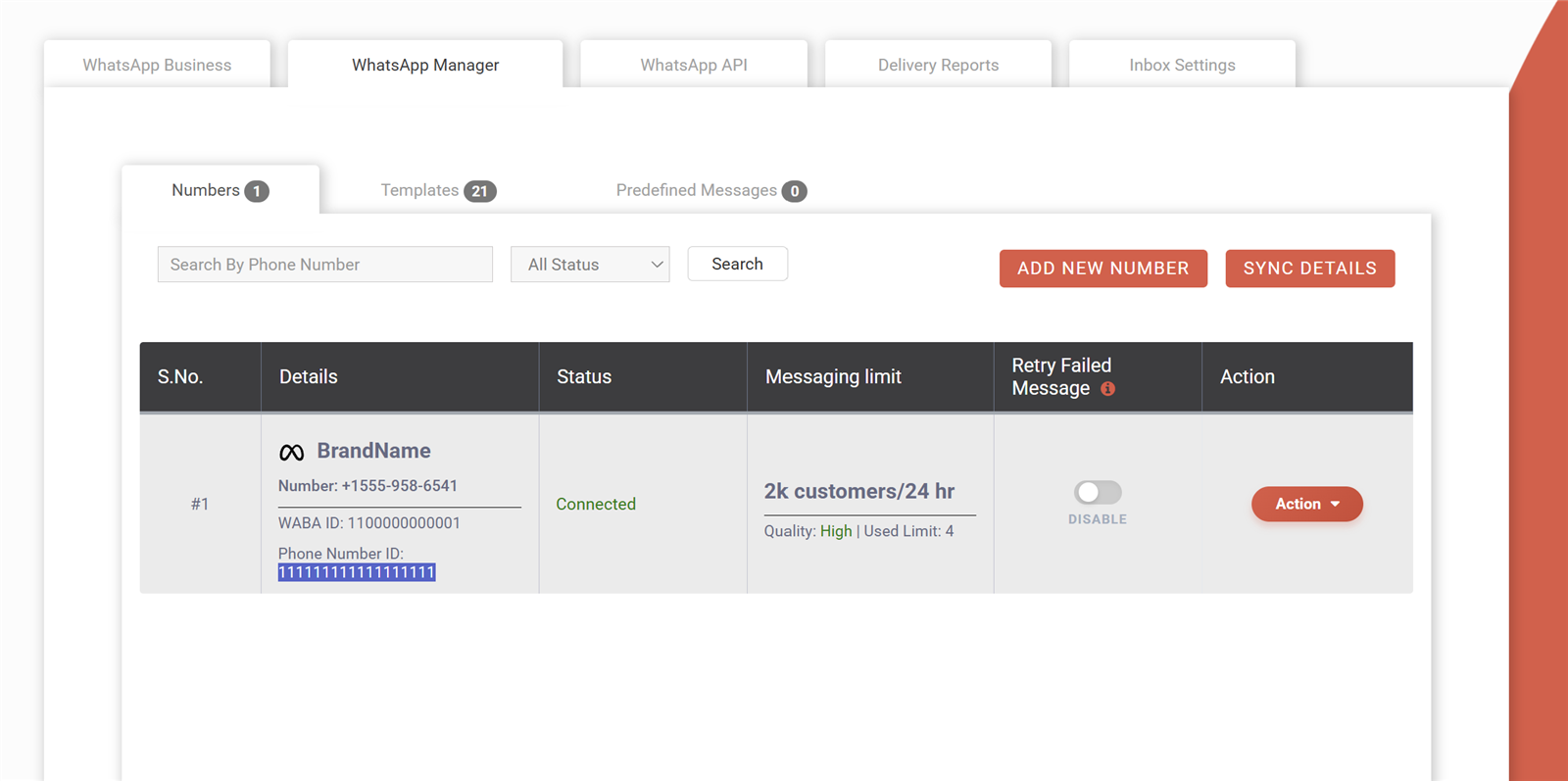
You can check your quality rating in WhatsApp Manager inside Meta Business Suite, under your phone numbers, where each number shows its status, quality rating and messaging limit. Many providers also show it in their dashboard. Check it after every large campaign, not just when something goes wrong. A drop from green to yellow a day after a campaign tells you exactly which send caused it.
What is a WhatsApp messaging limit?
A messaging limit is the maximum number of unique customers your business can start conversations with using templates in a rolling 24-hour period, and it grows through tiers as long as your quality stays good. It does not limit replies to customers who message you first. New numbers start at an entry tier in the low thousands. From there, the tiers go to 10K, 100K and finally unlimited unique customers per 24 hours.
How do I increase my WhatsApp messaging limit?
Your messaging limit increases automatically when you keep a good quality rating and regularly send to a good share of your current limit, after which Meta moves you to the next tier. Completing Meta business verification also helps. There is no form to request an upgrade on demand. The practical approach is steady, clean campaigns to opted-in customers, spread over days rather than one huge blast, while keeping blocks low.
What happens when my WhatsApp quality rating turns yellow?
A yellow quality rating means medium quality: your number still works, but recipients are showing more negative signals, and if it keeps falling toward red your number can be flagged and your messaging limit reduced. Treat yellow as a warning to slow down. Pause marketing to cold segments, review your last few templates, and send only to your most engaged customers until the rating recovers.
What happens when my rating turns red?
A red quality rating means low quality, and if it does not improve your number may be flagged, your messaging limit can drop to a lower tier, and repeated problems can lead to restrictions on your account. Stop all marketing campaigns immediately. Keep answering customers who write to you, because those conversations are wanted. Then find out which campaign caused the drop and fix the list, the content or the frequency before you send again.
What does “Flagged” status mean on my WhatsApp number?
A “Flagged” status means your number’s quality has dropped to low, and Meta is giving you a period to improve before it lowers your messaging limit; if quality recovers, the flag is removed and your limit stays. During this period, do not run large campaigns. Focus on replying to customers and sending only messages people clearly want, such as order updates. The status is shown in WhatsApp Manager next to your number.
How long does it take to recover from a low quality rating?
There is no fixed recovery time, because the rating is based on your recent messages and reactions: if you stop sending unwanted messages and your next sends get good responses, it usually recovers over a period of days. Sending nothing does not always fix it fast either. Small, well-targeted sends to engaged customers that get replies and few blocks show Meta that your recent messages are wanted.
My WhatsApp Business number is restricted. What should I do first?
First, stop all outgoing campaigns and check the exact restriction and reason in WhatsApp Manager or Meta Business Suite’s account quality section, because the right fix depends on whether it is a quality issue or a policy issue. For a quality issue, clean your list and improve targeting. For a policy issue, remove the content or product that broke the rules. Then request a review if the option is shown, and explain what you changed.
Can I appeal a WhatsApp Business account restriction?
Yes, if Meta has restricted your WhatsApp Business account for a policy reason, you can usually request a review from the account quality section in Meta Business Suite, explaining your business and why you believe the decision should change. Be factual and short. Mention how you collect opt-ins and what you have changed.
Should I switch to a new number if my quality rating is low?
Switching to a new number rarely helps, because the new number starts at the lowest messaging limit with no history, and if you repeat the same behaviour it will drop just as fast, while serious violations can affect the whole business account. Fix the cause first and let the rating recover. A second number makes sense only for a genuinely separate brand or use case.
Why was my WhatsApp template paused?
Meta pauses a template when it receives a lot of negative feedback, such as blocks or reports, so that it stops hurting users and your number while you fix it. A paused template cannot be sent until the pause ends. Repeated pauses can lead to the template being disabled. Use the pause as a free lesson: check who you sent it to and what it said, then edit the content or send it only to a more interested segment.
Segmentation, personalisation and campaigns
Segmentation means sending each message only to the people it fits. It is the simplest way to cut blocks, because a customer who gets an offer for something they actually buy has no reason to block you. It also keeps you under Meta’s per-user marketing limits for the people who matter most.
You do not need fancy software to start. Tags in a spreadsheet, such as city, last purchase date and product interest, are enough for most small businesses.
How should I segment my WhatsApp contact list?
Start by segmenting on what you already know: opt-in type, last purchase or visit date, product or course interest, city or branch, and how the customer engaged with your recent messages. For example, “bought in the last 30 days”, “bought 3 to 12 months ago” and “enquired but never bought” need very different messages. Keep a tag for people who replied or clicked recently, because they are your safest audience for new offers.
Does adding the customer’s name to a WhatsApp message help?
Yes, using the customer’s name through a template variable makes the message feel personal and shows it was meant for them, but it only helps if the rest of the message is relevant too. “Hi Rahul” followed by an offer for a product Rahul never buys still feels like spam. Personalise the content as well: mention the last item bought, the course they asked about or the branch they visit. Make sure your name data is clean, because “Hi 9876543210” looks careless.
What is a good first campaign to test on a new WhatsApp number?
A good first campaign is a small, useful message to your warmest contacts, such as recent buyers or people who messaged you recently, for example a thank-you with a simple offer or a new arrivals update with a “Stop promotions” button. Start with a few hundred people, not your whole list. Check read rate, replies, blocks and quality rating over the next day. If things look good, widen the audience in steps.
How do I run a WhatsApp campaign for abandoned carts?
Send a short, personalised reminder a little while after the customer leaves the cart, naming the product and linking back to the cart, but only if the customer opted in to WhatsApp messages at checkout or signup. Abandoned cart reminders are usually marketing templates, so they bill at the marketing rate. One reminder, possibly followed by a second with a small incentive, is plenty. Stores on WooCommerce or Shopify can automate this with the free Fast2SMS plugins or the WhatsApp message API.
How do I re-engage customers who have not bought in months?
Send inactive customers a short, low-pressure message that reminds them who you are and gives a reason to come back, such as a new collection, a service reminder or a returning-customer offer, and remove those who never respond after a couple of tries. Inactive contacts are more likely to block, so send to them in smaller batches and not too often.
Can I A/B test WhatsApp marketing messages?
Yes, you can A/B test by creating two approved templates that differ in one thing, such as the headline, image or button text, and sending each to a similar, randomly split part of the same segment. Compare read rate, button clicks, replies and blocks. Change only one element per test, otherwise you cannot tell what made the difference.
How do I combine WhatsApp with SMS and RCS in one campaign?
Use WhatsApp for opted-in customers who are active on it, SMS for reach and critical alerts to anyone with a phone, and RCS for rich branded messages in the default messaging app, so each customer gets the channel that fits them best. For example, send a WhatsApp offer first and follow up by SMS only to those it failed for. SMS must follow DLT rules. You can read more about bulk RCS messages and the bulk SMS API on our help centre.
How do I upload contacts for a bulk WhatsApp campaign?
Prepare an Excel or CSV file with one row per contact, a mobile number column with the country code (91 for India), and extra columns for any template variables like name or order number, then upload it in your provider’s campaign screen. Remove duplicates and numbers without opt-in before you upload. Then map each column to a template variable, preview the message and send or schedule it. The full steps are in our guide to sending bulk WhatsApp messages.
Measuring results: delivery, read, clicks, replies and webhooks
You cannot improve what you do not measure. WhatsApp gives you message statuses (sent, delivered, read, failed), and your campaign adds its own signals: button taps, link clicks, replies, opt-outs and sales. Together they tell you whether a campaign worked and whether it hurt your quality.
For small teams, the dashboard reports are enough. For larger setups, webhooks push every status change into your own system or CRM in real time.
What metrics should I track for WhatsApp marketing?
Track delivery rate, read rate, button taps or link clicks, reply rate, opt-outs, quality rating after each campaign, and the orders, bookings or enquiries that came from it. Delivery and read tell you whether the message arrived and was seen. Clicks and replies tell you whether it interested people. Opt-outs and quality tell you whether it annoyed them. Revenue or leads tell you whether it paid off.
What is the difference between sent, delivered and read on WhatsApp?
“Sent” means WhatsApp accepted the message from your business, “delivered” means it reached the customer’s phone, and “read” means the customer opened the chat and saw it, when their read receipts allow it. A message can stay at sent if the phone is off or offline, then move to delivered later. “Failed” means it could not be delivered, with a reason attached.
Why is my read rate lower than my delivery rate?
Read rate is lower than delivery rate because not everyone opens every message, and customers who have turned off read receipts may read your message without it being reported as read. So your real read rate is usually a bit higher than what you see. Still, a low read rate compared with your earlier campaigns is a sign that your audience, timing or opening line needs work. Compare campaigns against each other rather than against an outside benchmark.
How do I track clicks on WhatsApp campaign links?
Add UTM parameters or a unique tracked link to the URL button in your template, so every click shows up in your website analytics with the campaign name, and you can tie clicks to sales. Use dynamic URL buttons if you want a different link per customer, such as a personal cart or order link.
How do I get WhatsApp delivery reports through webhooks?
Set a webhook URL in your provider’s dashboard, and each time a message status changes (sent, delivered, read or failed) or a customer replies, the provider sends that event to your server as an HTTP request you can store or act on. This lets you update your CRM, trigger follow-ups and build your own reports without checking the dashboard. Our explainer on how webhooks work covers the setup.
Why did my WhatsApp messages fail to deliver?
WhatsApp messages usually fail because the number is not on WhatsApp, the country code or format is wrong, the user blocked you, Meta’s per-user marketing limit was reached, the template was paused, or your messaging limit was used up. The delivery report shows the reason for each failed message. Group failures by reason: many “not on WhatsApp” failures mean your list is old, while many limit-related failures mean you are sending too much marketing to the same people.
How do I measure revenue from a WhatsApp campaign?
Measure revenue by tagging every campaign link with UTM parameters or a campaign-specific coupon code, then counting orders or bookings that used that link or code within a few days of the send. For walk-in businesses, ask customers to show the WhatsApp message or mention the code at the counter. Compare the revenue with what the campaign cost, which on the API is simply the number of delivered messages multiplied by the rate.
What is a good reply rate for WhatsApp marketing?
There is no single good reply rate, because it depends on your industry, offer and whether the template invites a reply, so the most useful benchmark is your own past campaigns to similar segments. A message with quick reply buttons like “Interested” or “Call me” will naturally get more replies than a plain announcement. Track reply rate over time: if it drops while blocks rise, the audience is getting tired of your messages.
How do I send WhatsApp campaign data to my CRM?
Connect your CRM to your provider through webhooks or the API, so message statuses, button replies and opt-outs are written to each contact automatically, or export campaign reports and import them if your CRM has no integration. Marketing platforms such as CleverTap can also be connected. See our CleverTap webhook integration guide for an example. The important part is that opt-outs reach your CRM, so no team messages those people again.
Costs of WhatsApp marketing in India
WhatsApp Business API pricing is per message and depends on the category. Marketing templates cost the most, utility and authentication templates cost less, and session messages (your replies inside the 24-hour window after a customer messages you) cost the least. Meta changed session or service messages from free to paid, so replies also have a small cost now.
On Fast2SMS there is no setup fee, no monthly fee and no per-number fee. You recharge a prepaid wallet and pay only for delivered messages.
| Message type | Used for | Fast2SMS rate per message |
|---|---|---|
| Marketing template | Offers, launches, re-engagement, abandoned cart reminders | ₹0.95 |
| Utility template | Order updates, bookings, payment confirmations, reminders about an existing transaction | ₹0.25 |
| Authentication template | OTPs and login verification codes | ₹0.25 |
| Session message | Replies inside the 24-hour customer window: chatbot, Live Chat, session API | ₹0.13 |
| Setup, monthly and per-number fees | Account, dashboard, chatbot builder, Live Chat | None |
How much does WhatsApp marketing cost per message in India?
WhatsApp marketing is charged per delivered message, and the price depends on category and provider; on Fast2SMS a marketing template costs ₹0.95 per message, with no setup fee, monthly fee or per-number fee added on top. When comparing providers, look at the total cost: some add platform subscriptions or per-agent charges on top of a low per-message rate. Our comparison of WhatsApp API pricing in India explains what to check.
How much do replies to customers cost on WhatsApp API?
Replies inside the 24-hour customer window, sent through a chatbot, Live Chat or the session API, are session messages and cost ₹0.13 each on Fast2SMS, because Meta changed these service messages from free to paid. That is why campaigns with quick reply buttons are good value: once a customer taps a button, your follow-up replies in that window cost the session rate, not the marketing rate. Details are in our WhatsApp session message pricing guide.
What do utility and authentication messages cost?
On Fast2SMS, utility templates (order, booking and account updates) and authentication templates (OTPs) both cost ₹0.25 per delivered message, much less than marketing templates. This is another reason to keep categories honest: a real order update belongs in utility and costs less, while a message with an offer belongs in marketing. For login codes, WhatsApp OTP with SMS fallback is covered in our Smart OTP guide.
Is there a monthly fee or setup fee for WhatsApp marketing on Fast2SMS?
No, Fast2SMS charges no setup fee, no monthly fee and no per-number fee for WhatsApp, and the chatbot builder and Live Chat inbox are free, so you pay only for the messages you send from your prepaid wallet. This suits seasonal businesses well. A coaching centre that sends heavily during admissions and lightly the rest of the year pays nothing in quiet months. New accounts get a free ₹50 test credit after signup.
Am I charged for WhatsApp messages that fail?
No, on Fast2SMS WhatsApp billing is on a delivery basis, so you pay only for delivered messages, and failed messages are refunded to your wallet automatically within 48 hours without you raising a ticket. This covers failures like numbers not on WhatsApp, blocked users and messages stopped by Meta’s per-user marketing limits. It also means an old list costs you less to clean: invalid numbers fail and the money comes back.
How do I estimate the budget for a WhatsApp marketing campaign?
Multiply the number of opted-in contacts you plan to message by the marketing rate, then add a small amount for session replies if you expect customers to respond; for example, 10,000 contacts at ₹0.95 comes to ₹9,500 at most. Because billing is on delivery, the actual cost is usually lower, as failed messages are refunded. If each interested customer has a short chat with your chatbot, add their replies at ₹0.13 each.
Is WhatsApp marketing cheaper than SMS marketing?
A WhatsApp marketing message usually costs more per message than a promotional SMS, but it can carry images, buttons and two-way replies, so the cost per sale or enquiry is often what you should compare rather than the cost per message. SMS still has wider reach, since it works on every phone without an app. Many businesses use WhatsApp for their engaged opted-in customers and SMS for reach and alerts. Test both on the same offer and compare results per rupee spent.
Can I get lower WhatsApp rates for high volume?
Yes, Fast2SMS offers negotiable rates for high-volume WhatsApp senders, so if you send large campaigns every month, talk to the sales team about your expected volume and use case. Share your monthly volume split by marketing, utility and session messages, since each category is priced differently. You can reach sales on +91-6262778811, at [email protected], or book a free meeting.
Tools and industry playbooks
A safe WhatsApp marketing setup needs three tools: a way to send approved templates in bulk, a chatbot to handle the replies that campaigns create, and a shared inbox so people can take over when a customer needs a human. Without the last two, a successful campaign turns into a pile of unanswered messages, and customers who feel ignored start blocking.
Below are the tools, followed by practical playbooks for common Indian business types.
What tools do I need to run WhatsApp marketing without getting banned?
You need an official WhatsApp Business API provider with template management, a bulk campaign tool that uses your opted-in list, a chatbot for instant replies, a Live Chat inbox for your team, and delivery reports or webhooks to measure results. Everything should run on the official API, not on phone automation. Fast2SMS includes all of these: bulk campaigns, a free chatbot builder, a free Live Chat inbox, reports, webhooks and the REST API, with no monthly fee.
How do I send bulk WhatsApp campaigns on Fast2SMS?
Connect your number through embedded signup, create and submit a marketing template for Meta approval, upload your opted-in contacts as Excel or CSV, map the variables, preview, and then send or schedule the campaign from the dashboard. After sending, check delivery and read reports and your quality rating. Start with a small segment on a new number. The step-by-step version is in our bulk WhatsApp guide.
How does a WhatsApp chatbot help after a campaign?
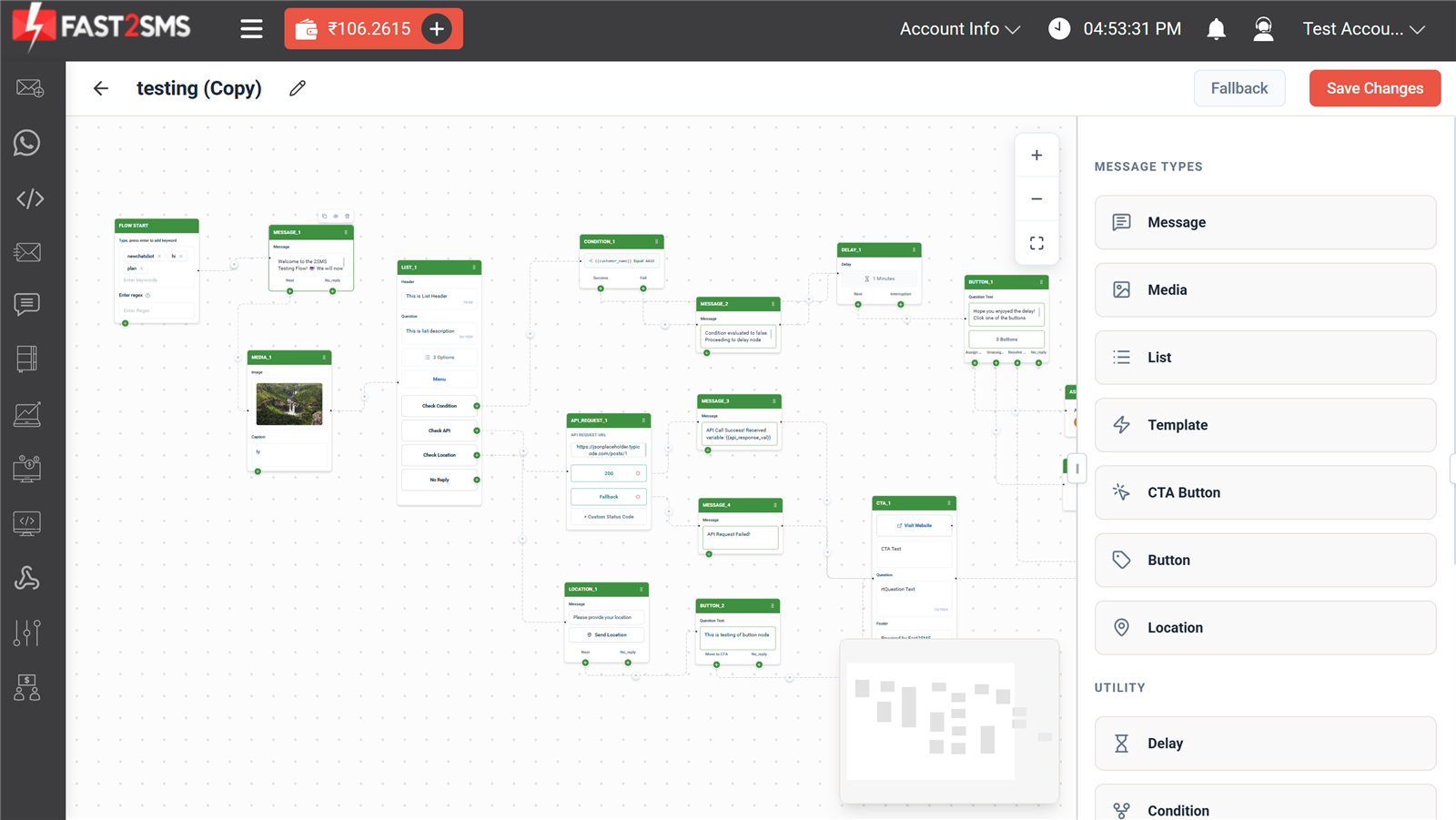
A chatbot answers the replies and button taps that a campaign creates instantly, day or night, by sharing prices, catalogues, locations or booking slots, and it can hand the chat to a human when needed. Quick answers keep interested customers engaged instead of letting them go cold. Chatbot replies inside the 24-hour window are session messages at ₹0.13 each. A free WhatsApp chatbot builder lets you design these flows without code.
What is WhatsApp Live Chat and why use it with campaigns?
WhatsApp Live Chat is a shared team inbox where your staff can read and reply to customer chats on your business number from a browser, with contact details and notes, so no reply from a campaign goes unanswered. It is useful when a customer asks something the chatbot cannot handle, like a custom order or a price negotiation. Notes on each contact help the next team member pick up where the last one left off.
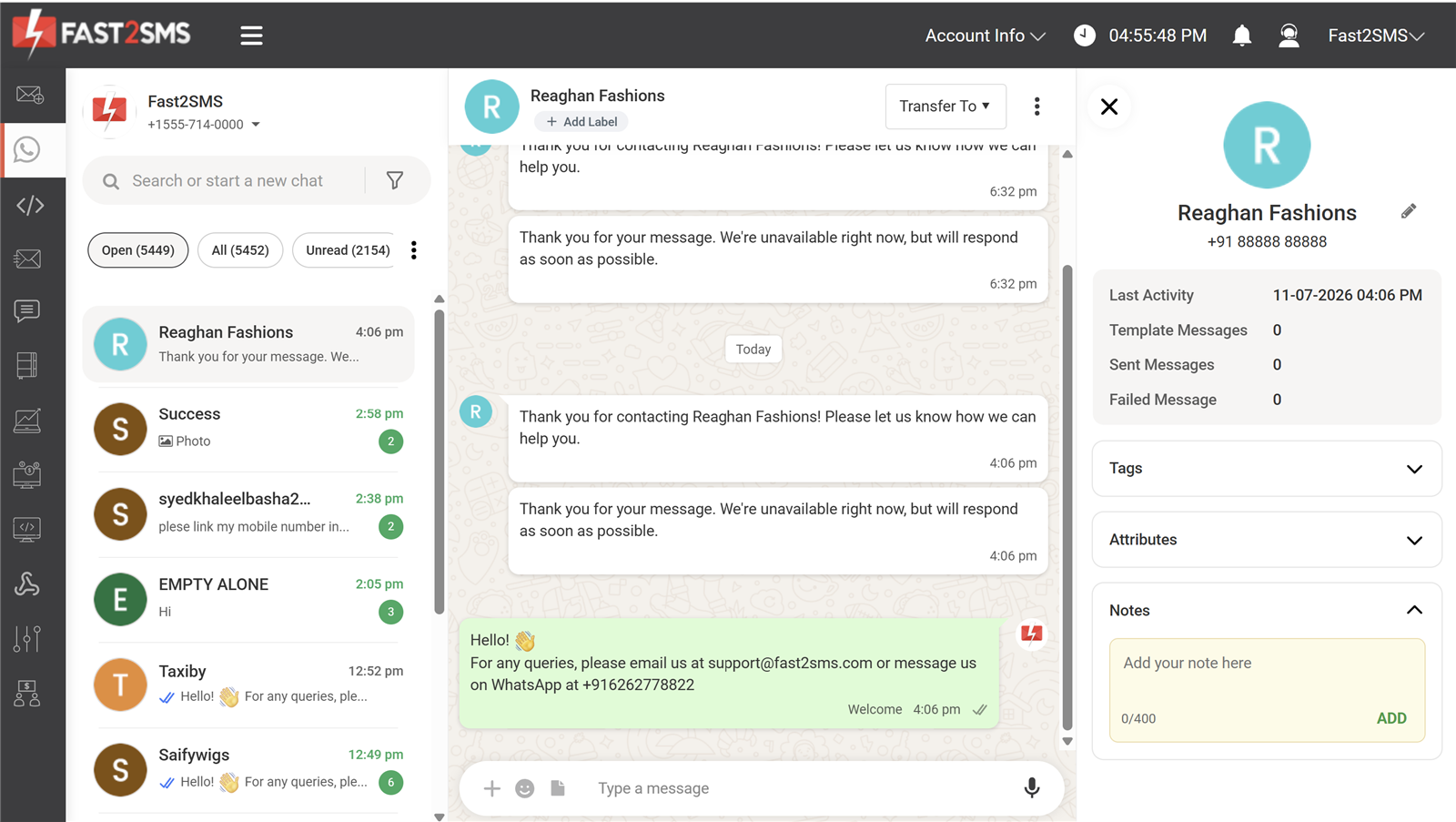
Can I send WhatsApp marketing messages from WordPress, Shopify or Tally?
Yes, Fast2SMS has free plugins for WordPress and WooCommerce, Shopify and TallyPrime, so you can send WhatsApp messages from the platform you already use, such as order updates, invoices or campaign messages to opted-in customers. Tally users can send invoices and reminders with approved templates straight from their accounting data.
Can developers send WhatsApp campaigns through an API?
Yes, developers can send template and session messages through a REST API, trigger campaigns from their own app or CRM, and receive delivery and reply events through webhooks. This is useful for event-based marketing, such as a message when a trial ends or a cart is left. The full reference is at docs.fast2sms.com, and chatbot automation over the API is covered in our WhatsApp chatbot API guide.
How should a retail shop use WhatsApp marketing?
A retail shop should collect opt-ins at the billing counter with a QR code, then send occasional messages about new stock, festival offers and loyalty rewards to customers segmented by what they buy, with a chatbot to share prices and store location. Keep messages local and personal: “New cotton kurtas in size M just arrived at our Indiranagar store.” Use utility templates for bills and delivery updates, and marketing templates only for offers.
How should a D2C brand use WhatsApp marketing?
A D2C brand should collect WhatsApp opt-in at checkout, send order and shipping updates as utility messages, and use marketing templates for abandoned carts, launches, restock alerts and win-back offers to clearly defined segments. Personalise with the product viewed or bought. Use quick reply buttons and a chatbot to handle size questions and returns, which keeps conversations cheap at the session rate.
How can schools and coaching institutes use WhatsApp marketing?
Schools and coaching institutes can send admission updates, demo class invites, batch launches and result-day offers to parents and students who enquired or opted in, while using utility templates for fee reminders and class schedules. Enquiry forms and walk-in registers are good places to collect opt-in. A chatbot can answer course fees, timings and branch locations instantly during admission season, when enquiries peak. Do not keep sending admission offers to families who have already enrolled.
How can clinics use WhatsApp marketing without breaking rules?
Clinics should use WhatsApp mainly for appointment reminders, follow-up checks and health camp announcements to patients who opted in, and keep promotional messages general and respectful, never sharing a patient’s medical details in a marketing message. Appointment reminders tied to a real booking are utility messages. Health camp or new service announcements are marketing. Health-related products and claims have extra conditions in Meta’s policies, so review them before building templates, and keep medical conversations in private chats with the patient.
How do real estate businesses use WhatsApp marketing without spamming?
Real estate teams should message only leads who enquired or opted in, send project details that match the buyer’s budget, location and property type, and use a chatbot to share brochures and book site visits instead of blasting every launch to every lead. Bought property-buyer lists are a common cause of bans in this sector, so avoid them completely. Leads from your ads or website forms should opt in on the form.
Can agencies manage WhatsApp marketing for multiple clients?
Yes, agencies can manage WhatsApp marketing for many clients, but each client should have its own WhatsApp Business account and number, with its own opt-ins and templates, so one client’s mistakes do not affect another’s quality rating. Agencies that want to resell the service under their own brand can look at the WhatsApp Business API reseller programme.
More 100-question guides
- DLT registration A to Z
- SMS not delivered: every DLT and delivery error
- Bulk SMS in India: 100+ questions
- OTP via SMS and WhatsApp
- WhatsApp Business API in India
- WhatsApp template rejected? Approval FAQ
- RCS business messaging in India
Wrap-up
Getting banned on WhatsApp is rarely bad luck. It almost always comes from messaging people who did not ask for it, using unofficial tools, or sending too much of the wrong thing. Use the official API, collect clear opt-ins, pick the right template category, segment your list, give people an easy way to stop, and check your quality rating after every campaign. Do that consistently and your messaging limit grows while your number stays safe. If you want help setting it up, or you are dealing with a restricted number right now, our team is happy to look at it with you.
Signup NowSchedule Free Meeting
Sales: +91-6262778811 · [email protected] | Support: [email protected]