
How Webhooks Work: Real-Time Delivery Reports for SMS, WhatsApp, OTP and RCS
Your website sends an OTP. Did it arrive? Your store sends an order update on WhatsApp. Was it read? You could keep asking the API every few seconds, or you could have the answer pushed to your server the moment it exists. That push is a webhook. This guide explains how webhooks work on Fast2SMS, step by step, with every available variable for SMS, OTP, WhatsApp and RCS, and real payload examples you can copy.
What a webhook is, in plain words
A webhook is simply a URL on your server that Fast2SMS calls when something happens to your message: it gets delivered, it fails, it gets read, or a customer replies. Think of it like a courier who rings your bell when the parcel arrives, instead of you refreshing the tracking page all day.
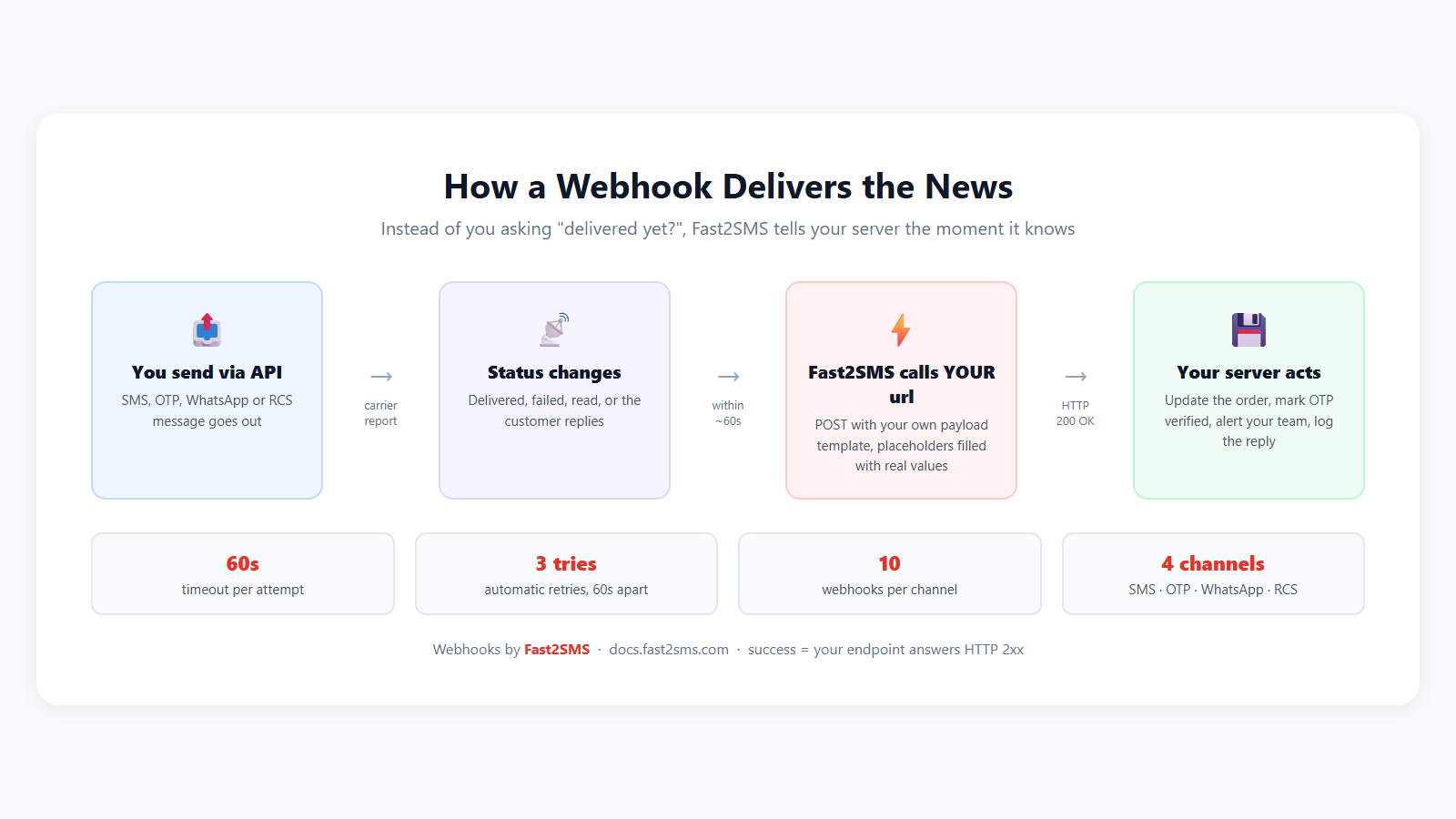
Why this beats polling the API:
- Real time. Delivery reports reach your server within about a minute of the event.
- No wasted calls. Polling asks a thousand times to learn one thing. A webhook speaks once, when there is news.
- Two-way. On WhatsApp and RCS, webhooks also carry incoming replies from customers, so your system can react to a “Yes, confirm my order”.
Which events you can receive, per channel
| Channel | Events | Arrives as |
|---|---|---|
| SMS | delivered, failed | status_update |
| OTP | delivered, failed | status_update |
| sent, delivered, read, failed, received (inbound reply) | status_update / incoming_message | |
| RCS | sent, delivered, read, failed, received (inbound reply) | status_update / incoming_message |
Two notes worth knowing before setup: webhooks fire for messages sent through the developer API (dashboard-sent messages are not pushed), and you can create up to 10 webhooks per channel.
Step 1: Build a tiny endpoint on your server
Your endpoint only has to do two things: read the request, and answer HTTP 200 quickly.
<?php
// https://yourdomain.com/fast2sms-webhook.php
$raw  = file_get_contents('php://input');   // the JSON body
$data = json_decode($raw, true);

file_put_contents('webhook.log', $raw . PHP_EOL, FILE_APPEND);

http_response_code(200);   // always answer 200 on success
echo 'OK';
The same thing in Node/Express:
app.post('/fast2sms-webhook', express.json(), (req, res) => {
  console.log(req.body);          // the event payload
  res.status(200).send('OK');     // acknowledge fast
});
Step 2: Add the webhook in your dashboard
Open the Webhooks section of your Fast2SMS dashboard. Each channel has its own tab, plus a logs tab:
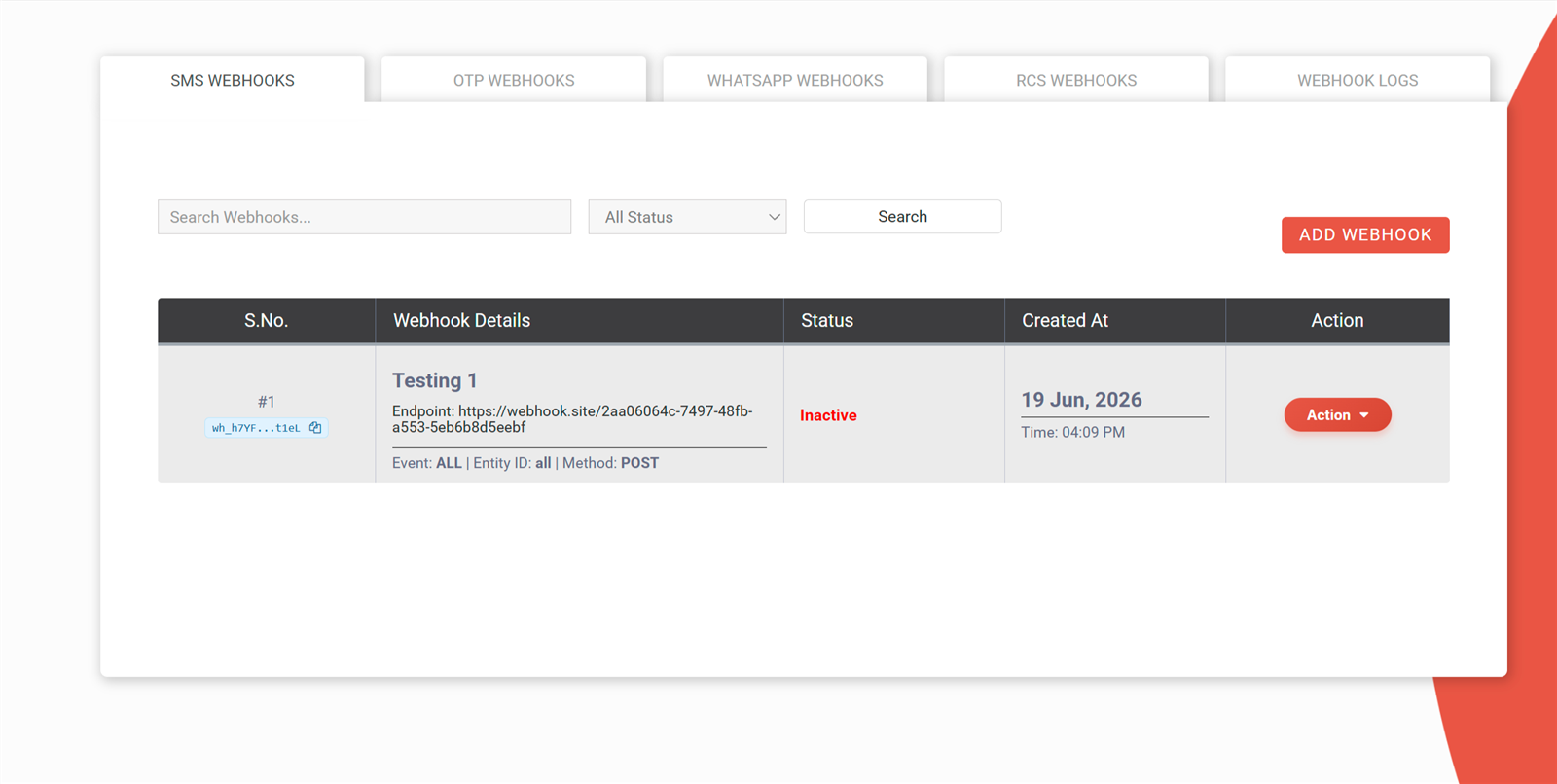
Click ADD WEBHOOK and fill the form:
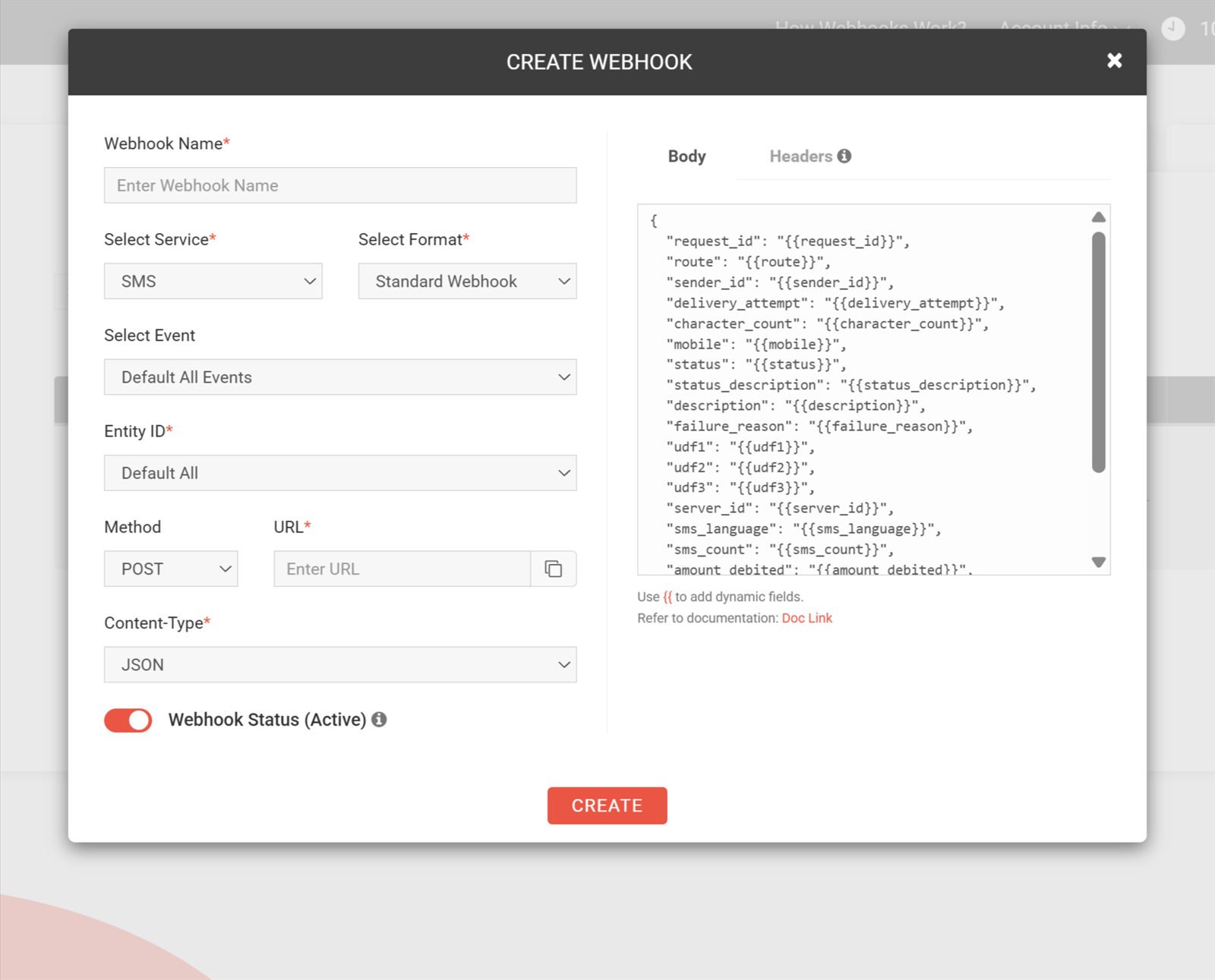
- Name: any label, like Order-SMS-DLR.
- Service: the channel (sms, otp, whatsapp, rcs).
- Event: All, or one specific event like delivered.
- Entity / Identity: restrict to one sender ID, WhatsApp number or RCS bot, or leave All.
- URL: your endpoint from Step 1.
- Method and Content-Type: POST with JSON is the recommended pair.
- Status: Active. Inactive webhooks never fire.
Step 3: Design your payload with placeholders
Here is the part developers love: you decide the body. Write your own JSON and drop in placeholders wrapped in double curly braces. Fast2SMS fills them with real values on every event, and unmatched placeholders simply become empty strings.
Template you save:
{
  "request_id": "{{request_id}}",
  "mobile": "{{mobile}}",
  "status": "{{status}}",
  "delivery_time": "{{delivery_time}}",
  "udf1": "{{udf1}}"
}
What your server receives:
{
  "request_id": "Sx8Kd93jfhWq2P",
  "mobile": "9999999999",
  "status": "delivered",
  "delivery_time": "27-07-2026 10:00:02 AM",
  "udf1": "ORDER-12345"
}
That udf1 field deserves a highlight: pass udf1, udf2 or udf3 in your original send request (like your internal order ID), and it comes straight back in the webhook, so matching the report to your records takes zero lookups.
All available variables, channel by channel
Common placeholders (every channel)
| Placeholder | Meaning |
|---|---|
{{request_id}} |
Fast2SMS message ID for this send |
{{status}} |
Event status (delivered, failed, read…) |
{{status_description}} |
Human-readable status text |
{{mobile}} |
Recipient mobile number |
{{sender_id}} |
Sender ID or header used |
{{webhook_type}} |
status_update or incoming_message |
{{delivery_attempt}} |
Current webhook attempt number (1 to 3) |
{{timestamp}} |
Event unix timestamp |
{{failure_reason}} |
Failure detail, empty on success |
SMS and OTP delivery reports
| Placeholder | Meaning | Sample |
|---|---|---|
{{route}} |
Route used | dlt |
{{character_count}} |
Message length | 120 |
{{sms_count}} |
SMS segments billed | 1 |
{{sms_language}} |
english or unicode | english |
{{amount_debited}} |
Cost charged | 0.2000 |
{{sent_time}} / {{sent_timestamp}} |
When sent (formatted / unix) | 27-07-2026 10:00:00 AM |
{{delivery_time}} / {{delivery_timestamp}} |
When delivered, empty if not | 27-07-2026 10:00:02 AM |
{{udf1}} {{udf2}} {{udf3}} |
Your own fields from the send request | ORDER-12345 |
SMS/OTP status values: delivered, failed (with a carrier reason like Absent Subscriber), rejected, sent.
WhatsApp and RCS
| Placeholder | Meaning |
|---|---|
{{status}} |
sent, delivered, read, failed, received |
{{message_id}} |
Provider message ID |
{{phone_number_id}} / {{waba_id}} / {{display_phone_number}} |
Your WhatsApp number identity |
{{recipient_id}} / {{from}} |
The customer’s number |
{{category}} |
Template category: marketing, utility, authentication |
{{message_type}} |
text, image, document, location… |
{{body}} |
Inbound message text (incoming_message) |
{{media_url}} / {{mime_type}} / {{caption}} |
Inbound media details (incoming_message) |
{{amount_debited}} |
Cost charged |
{{error_message}} |
Failure reason on failed |
A WhatsApp inbound reply, for example, reaches you like this:
{
  "webhook_type": "incoming_message",
  "status": "received",
  "from": "919999999999",
  "message_type": "text",
  "body": "Yes, confirm my order",
  "message_id": "wamid.HBgMOTE5..."
}
What the pushed webhook actually looks like: full samples per channel
One thing to remember while reading these: the body of your webhook is whatever template you define. The samples below use a template containing every available field for that channel, so you can see the complete picture and delete what you do not need.
SMS: delivered (all fields)
{
  "webhook_type": "status_update",
  "request_id": "Sx8Kd93jfhWq2P",
  "route": "dlt",
  "sender_id": "FSTSMS",
  "mobile": "9999999999",
  "status": "delivered",
  "status_description": "Delivered successfully",
  "character_count": "120",
  "sms_count": "1",
  "sms_language": "english",
  "amount_debited": "0.2000",
  "server_id": "12345",
  "sent_timestamp": "1753603200",
  "sent_time": "27-07-2026 10:00:00 AM",
  "delivery_timestamp": "1753603202",
  "delivery_time": "27-07-2026 10:00:02 AM",
  "failure_reason": "",
  "delivery_attempt": "1",
  "udf1": "ORDER-12345",
  "udf2": "[email protected]",
  "udf3": "campaign-diwali"
}
OTP: failed (all fields, failure filled)
{
  "webhook_type": "status_update",
  "request_id": "Ot4Pq82kdhXr7M",
  "route": "otp",
  "sender_id": "FSTSMS",
  "mobile": "8888888888",
  "status": "failed",
  "status_description": "Absent Subscriber",
  "failure_reason": "Absent Subscriber",
  "character_count": "78",
  "sms_count": "1",
  "sms_language": "english",
  "amount_debited": "0.2000",
  "server_id": "12345",
  "sent_timestamp": "1753603500",
  "sent_time": "27-07-2026 10:05:00 AM",
  "delivery_timestamp": "",
  "delivery_time": "",
  "delivery_attempt": "1",
  "udf1": "login-attempt-8842",
  "udf2": "",
  "udf3": ""
}
Note the pattern on failure: delivery_time stays empty and failure_reason carries the carrier’s reason. This is exactly the trigger to fire your fallback, or let Smart OTP retry on WhatsApp automatically.
WhatsApp: status update, read (all fields)
{
  "webhook_type": "status_update",
  "status": "read",
  "status_description": "Read successfully",
  "message_id": "wamid.HBgMOTE5OTk5OTk5OTk5FQIAERgS0A5B3C2D1E==",
  "waba_id": "1029384756",
  "phone_number_id": "1122334455",
  "display_phone_number": "+91 98765 43210",
  "recipient_id": "919999999999",
  "category": "utility",
  "message_type": "text",
  "amount_debited": "0.2500",
  "error_message": "",
  "timestamp": "1753603800",
  "delivery_attempt": "1"
}
WhatsApp: incoming customer reply with media (all fields)
{
  "webhook_type": "incoming_message",
  "status": "received",
  "status_description": "Message Received",
  "waba_id": "1029384756",
  "phone_number_id": "1122334455",
  "display_phone_number": "+91 98765 43210",
  "from": "919999999999",
  "message_id": "wamid.HBgMOTE5OTk5OTk5OTk5FQIAEhgUM0E5RkY3==",
  "message_type": "image",
  "body": "Here is the payment screenshot",
  "media_url": "https://media.example.com/wa/img_8f3a2c.jpg",
  "mime_type": "image/jpeg",
  "caption": "Paid via UPI",
  "timestamp": "1753604100",
  "delivery_attempt": "1"
}
For a plain text reply, message_type is text, body carries the words, and the three media fields arrive empty.
RCS: status update, delivered (all fields)
{
  "webhook_type": "status_update",
  "request_id": "Rk2Lm93jfhWq2P",
  "sender_id": "MyBrand",
  "mobile": "9999999999",
  "status": "delivered",
  "status_description": "Delivered successfully",
  "message_type": "text",
  "amount_debited": "0.1500",
  "error_message": "",
  "timestamp": "1753604400",
  "delivery_attempt": "1"
}
A read receipt looks identical with status as read and status_description as Read successfully.
RCS: incoming customer reply (all fields)
{
  "webhook_type": "incoming_message",
  "status": "received",
  "status_description": "Message Received",
  "sender_id": "MyBrand",
  "from": "919999999999",
  "message_type": "text",
  "body": "Show me the new collection",
  "timestamp": "1753604700",
  "delivery_attempt": "1"
}
Values shown are realistic samples; your actual IDs, numbers and amounts will differ. Empty strings mean the field has no value for that event, never an error.
Step 4: Test it before real traffic
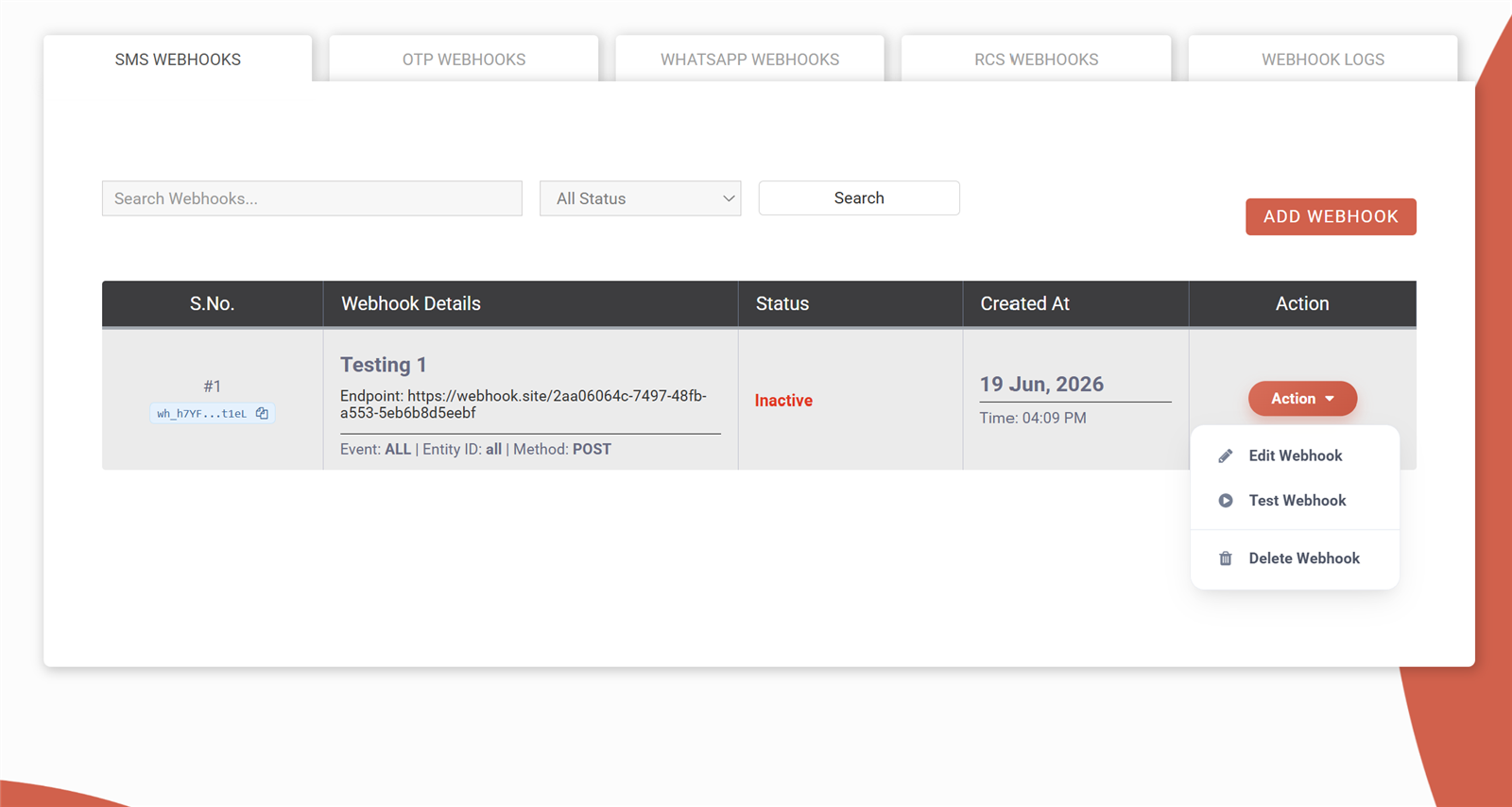
Every webhook row has an Action menu with Test Webhook: Fast2SMS calls your URL with mock data and shows you the HTTP response it got. Green means your endpoint answered 2xx and you are live.
Step 5: Verify requests really come from Fast2SMS
Enable webhook signing in your Dev API settings. Every webhook request then carries a header called webhook_secret_key with a fixed 40-character secret shown in your dashboard. Compare it on your side and reject anything else:
$expected = 'YOUR_40_CHAR_SECRET';
$received = $_SERVER['HTTP_WEBHOOK_SECRET_KEY'] ?? '';

if (!hash_equals($expected, $received)) {
    http_response_code(401);
    exit('Invalid signature');
}
Retries, timeouts and the logs
| Behaviour | Value |
|---|---|
| Request timeout | 60 seconds |
| Automatic retries | Up to 3 attempts, 60 seconds apart |
| Success means | Your endpoint returned HTTP 200 to 299 |
| Delivery latency | Near real-time (events picked up about every 60 seconds) |
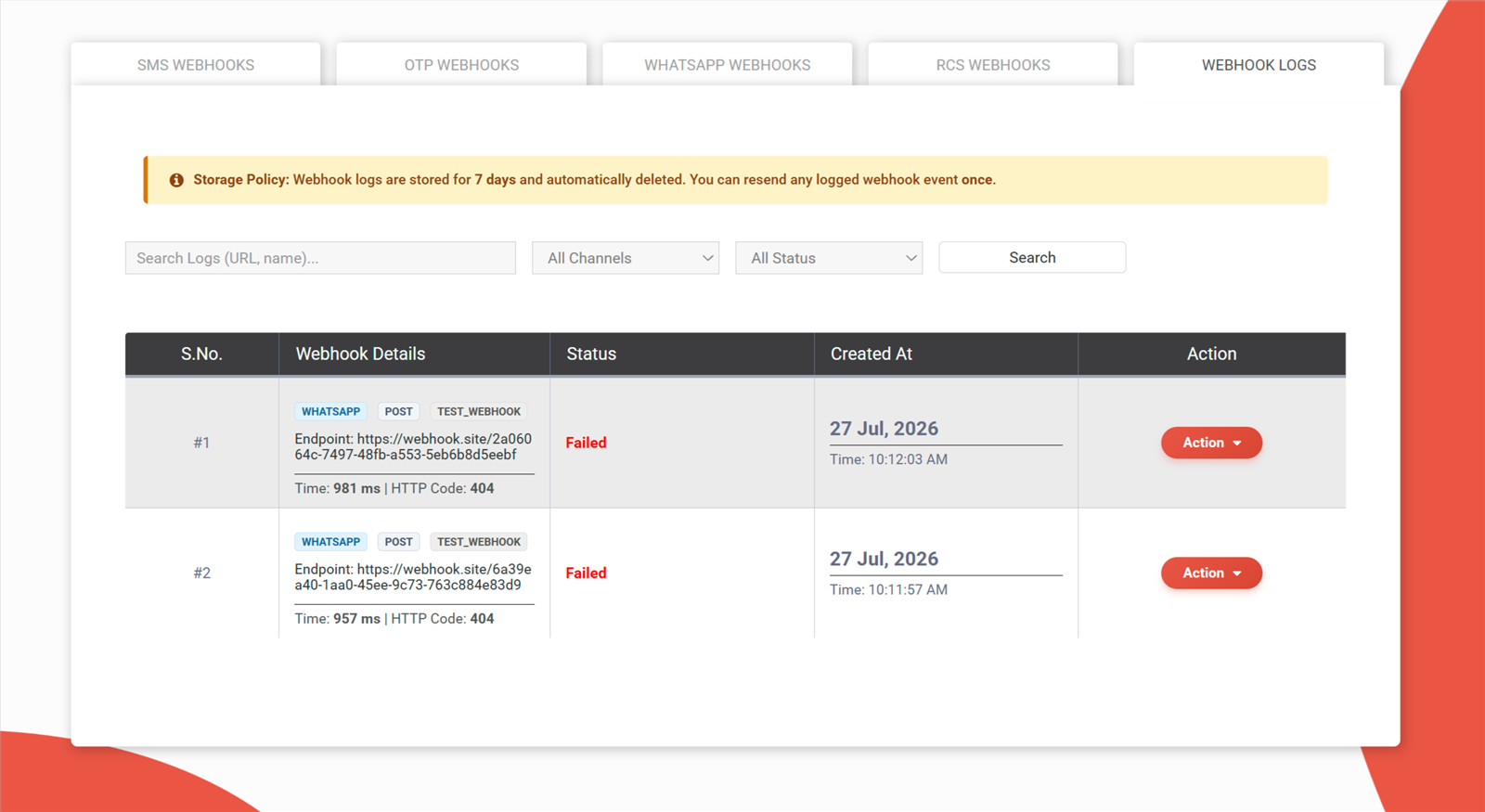
| Log storage | 7 days, with one-time manual resend per event |
Because retries exist, your endpoint may see the same event twice. De-duplicate on request_id plus status, answer 200 fast, and do heavy processing after acknowledging.
Manage webhooks from code
Everything above can also be done through the developer API, with full CRUD per channel:
curl -X POST "https://www.fast2sms.com/dev/webhook/v2/sms" \
  -H "authorization: YOUR_API_KEY" \
  -H "Content-Type: application/json" \
  -d '{
    "name": "Order-SMS-DLR",
    "url": "https://yourdomain.com/fast2sms-webhook",
    "method": "POST",
    "content_type": "application/json",
    "event": "all",
    "status": "active",
    "payload": {
      "request_id": "{{request_id}}",
      "mobile": "{{mobile}}",
      "status": "{{status}}"
    }
  }'
GET lists, PUT updates and DELETE removes, using the same path with the webhook ID. Swap sms for otp, whatsapp or rcs. Full reference: docs.fast2sms.com/reference/sms-webhook.
What to build with webhooks
- Order tracking that updates itself: mark orders delivered in your database the second the SMS or WhatsApp report lands. Pairs perfectly with the bulk SMS API and WhatsApp message API.
- OTP flows that react to failures: if the OTP report says failed, trigger your fallback immediately. Smart OTP handles channel fallback automatically; webhooks tell your app about it.
- Reply handling: route incoming WhatsApp and RCS replies into your CRM or support system with the incoming_message events.
- Spend tracking: the amount_debited field gives you per-message cost data straight into your own reports.
Frequently asked questions
What is a webhook in simple words?
A URL on your server that Fast2SMS calls automatically when something happens to your message: delivered, failed, read, or replied to. News comes to you instead of you asking for it.
Which channels support webhooks?
SMS, OTP, WhatsApp and RCS, each with its own tab and up to 10 webhooks per channel.
Do webhooks work for messages sent from the dashboard?
No. Webhooks fire for messages sent through the developer API. Dashboard sends show their reports in the panel instead.
Can I choose what the payload looks like?
Yes, fully. You write the body template with placeholders in double curly braces, and Fast2SMS fills them per event. Any format your system expects, JSON or form-encoded.
How fast do events arrive?
Near real-time: new reports are picked up about every 60 seconds and pushed to your URL immediately after.
What if my server is down when the webhook fires?
Fast2SMS retries up to 3 times, 60 seconds apart. Every attempt is logged for 7 days, and any logged event can be manually resent once from the logs screen.
How do I secure my endpoint?
Enable signing, then verify the webhook_secret_key header against the 40-character secret from your dashboard, use HTTPS, and reject anything that does not match.
Why am I seeing duplicate events?
Retries can repeat an event. Make your endpoint idempotent by de-duplicating on request_id plus status.
Get real-time delivery reports today
Create your free account, add your first webhook, and your server knows about every delivered, failed and read message the moment it happens.
Questions? Write to [email protected].