
WhatsApp Message API: Send Messages from Your App with REST and Webhooks
You want your website or app to send WhatsApp messages: order updates, OTPs, reminders. This guide shows the Fast2SMS WhatsApp message API with real requests you can copy. Free API access, no monthly fee, pay per message.
Full reference lives at docs.fast2sms.com. This is the quick version to get you sending in minutes.
Before you start
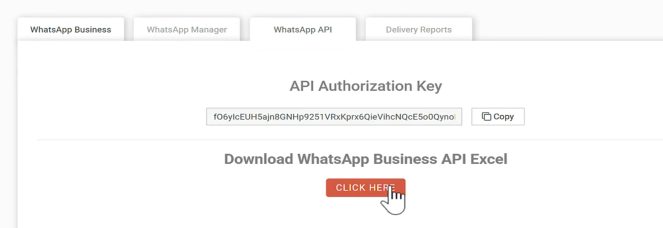
- Create a free account at fast2sms.com and copy your API key from the Dev API section.
- Connect a WhatsApp Business number (new, or your existing app number). Free, no setup fee. Steps in the Cloud API guide.
- Get a template approved (marketing, utility, or authentication). Every approved template gets its own ready-made API.
Send a template message
One GET request sends an approved template to any WhatsApp number:
curl "https://www.fast2sms.com/dev/whatsapp?message_id=9&phone_number_id=579519398574288&numbers=9999999999&variables_values=Rahul|1234" \
  -H "Authorization: YOUR_API_KEY"
The parameters:
message_id— the ID of your approved template (shown in your panel).phone_number_id— your WhatsApp Business number’s ID.numbers— recipient’s 10-digit Indian mobile number.variables_values— values for template variables, separated by a pipe, likeRahul|1234.media_url— optional, for templates with an image or PDF header.document_filename— optional, the file name the customer sees on a PDF.
Success response:
{
  "status": true,
  "message": "Message sent successfully",
  "request_id": "6a3b2c1d"
}
Keep the request_id. It traces the message in delivery reports.
Every template comes with a ready API
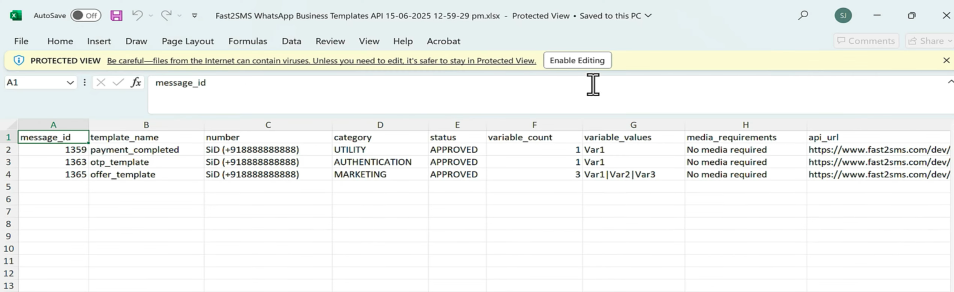
You do not have to build requests by hand. The panel generates the exact API call for each approved template, and you can download all of them as a sheet.
More than templates
- Session messages. Reply free-form within the 24-hour customer service window.
- Authentication templates. Purpose-built OTP messages. Pair with Smart OTP for SMS fallback.
- Media, carousel and flows templates. Rich formats for offers and forms.
- Template management by API. Create, edit, delete and list templates programmatically.
Webhooks: know what happened
Create a WhatsApp webhook and Fast2SMS calls your URL with delivery events, so your database always knows if a message was sent, delivered or failed. Webhook endpoints exist for SMS and OTP events too, plus a logs API for pulling history. All documented at docs.fast2sms.com.
Frequently asked questions
What does the WhatsApp API cost?
Access is free with no monthly fee. Messages are billed per delivered message: INR 0.25 for utility and authentication, INR 0.95 for marketing. Failed messages are refunded automatically.
Which numbers can receive messages?
Any WhatsApp user. Sending is set up for Indian businesses, and recipient numbers are Indian 10-digit numbers.
Do I need Meta developer approval myself?
No. Connect your number through the Fast2SMS panel with Facebook login, get templates approved there, and use the simple REST API above. Fast2SMS handles the Meta side.
Can I send bulk campaigns through the API?
Yes, loop your list with one request per number, or use the panel broadcast. See how to send bulk WhatsApp messages.
Is there an SMS API too?
Yes, same account and same key. See the bulk SMS API guide.
Where are the full docs?
docs.fast2sms.com covers every endpoint: messages, templates, webhooks, logs and wallet balance.
Get your API key
Create your free account, connect your WhatsApp number, and send your first API message today.
Questions? Write to [email protected].