
Send Tally Invoices Instantly on WhatsApp: Auto-Send on Voucher Save
Instantly means this: you press Ctrl+A to save the sales voucher in TallyPrime, and before you open the next entry, the customer’s phone buzzes with the invoice PDF on WhatsApp. No export, no attach, no forward, no “send it later” pile at the end of the day. The free Fast2SMS plugin does exactly that with its auto-send setting, and this guide takes you from download to your first instant invoice, including bulk sending for the backlog.
What “instant” looks like for the customer
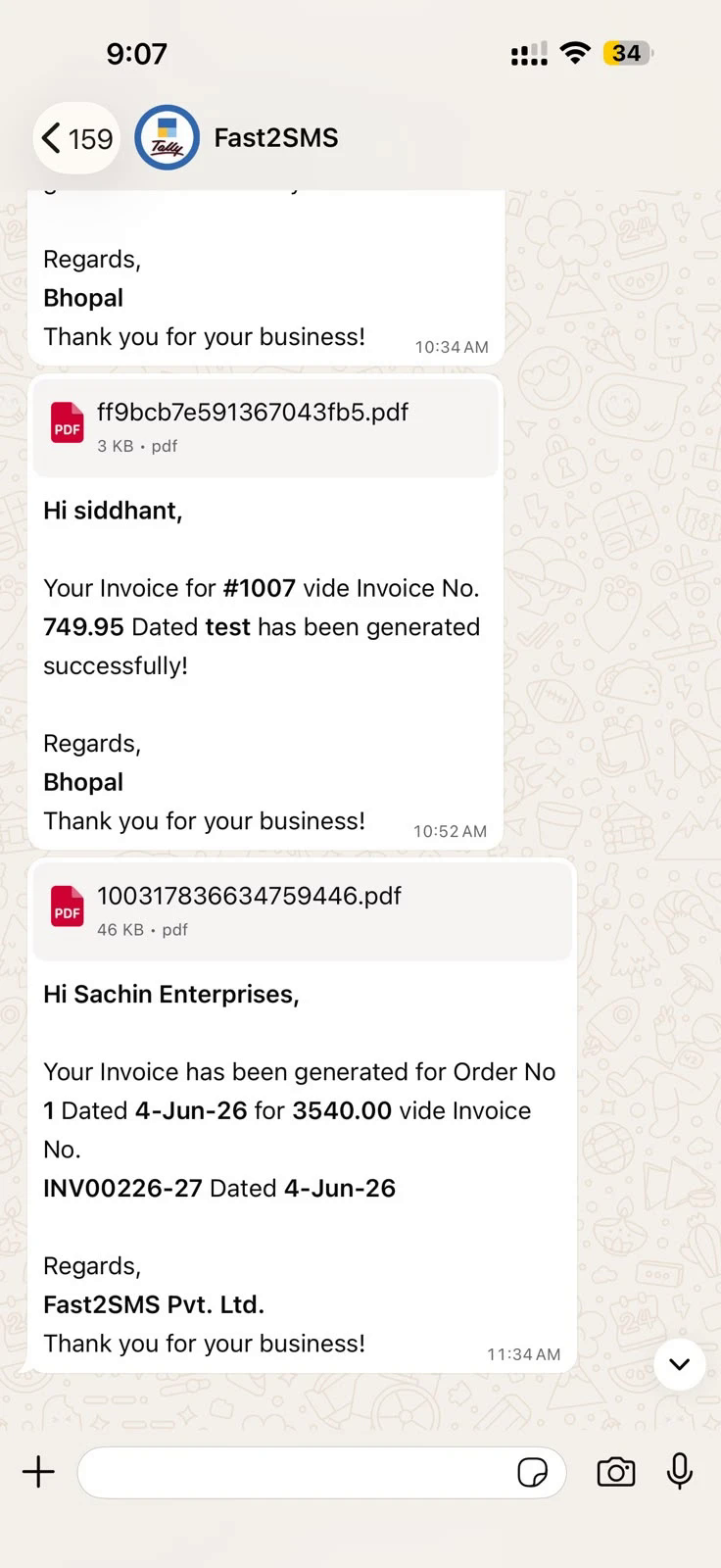
The message goes through the official WhatsApp Business API, so it arrives as a proper business template with a delivery report behind it, not a forwarded file from someone’s personal number.
One-time setup (about ten minutes)
- Install: download the plugin, load the .TCP file in TallyPrime (Local TDL or Account TDL), enable the WhatsApp module under F1 > TDLs & Add-ons > F6. Full TDL install detail: TDL for Tally to WhatsApp.
- Connect: paste your API key from your free Fast2SMS account.
- Two defaults: type 123456789 as WABA Phone Number ID in WhatsApp API Settings, and message IDs T101 to T120 in Template Settings. Twenty pre-approved templates, nothing to wait for. Mapping table: complete plugin guide.
- Numbers: customer mobiles in ledger masters, bulk update, or Excel import.
Turn on instant sending
This is the setting that makes it automatic: open the voucher type (for example Sales), find the plugin’s WhatsApp options, and enable send on voucher creation (and on alteration if you want corrections re-sent). From that moment:
- Operator saves the invoice → WhatsApp goes out. Zero extra keystrokes.
- Works per voucher type, so you can auto-send sales invoices but keep payments manual, or any mix.
- Each send is logged in the Delivery Report inside Tally and in your panel.
Prefer a human check before each send? Leave auto-send off and use the send button on the voucher screen; a preview shows the message and the customer’s number, one confirmation and it is gone.
Clear the backlog in bulk
Instant covers new invoices; the sales register covers old ones. Open the register, select any set of invoices, and send them all on WhatsApp in one action. The same works for bulk outstanding reminders from Statement of Account.
What it costs
The plugin is free, with no licence and no renewal, while comparable paid Tally WhatsApp modules sell for ₹3,000–₹6,000 plus GST (see the price comparison). You pay per message only, on delivery basis; failed WhatsApp messages auto-refund to your wallet within 48 hours. The same plugin also sends every voucher as DLT SMS with the invoice PDF as a short link, covered in the Tally SMS plugin guide.
Frequently asked questions
How fast does the invoice reach the customer?
Within seconds of saving the voucher when auto-send is on. The plugin generates the PDF, fills the template and sends through the API immediately.
Does instant sending need my computer to keep WhatsApp open?
No. Sending happens through the official WhatsApp Business API from the server side; no WhatsApp Web, no QR scan, no phone dependency.
Can I choose which vouchers send instantly?
Yes, auto-send is set per voucher type: sales instant, receipts instant, payments manual, any combination.
What if the operator makes a mistake on the invoice?
Enable send on alteration and the corrected invoice re-sends when saved again, or keep alteration sends manual and use the voucher button.
Do I need my own WhatsApp number for instant sending?
No, the default sender (123456789 + T101 to T120) works instantly. Your own brand sender is a free switch later: Tally WhatsApp sender guide.
Is there proof the customer got it?
Yes, delivery reports inside Tally and in your Fast2SMS panel, message by message.
Where do I get help?
Email [email protected] or call +91-6262778822.
Save a voucher, buzz a phone
Ten minutes of setup, one auto-send switch, and every invoice you save in TallyPrime delivers itself on WhatsApp.
Download Tally Plugin
Signup Now
Questions? Write to [email protected] or call +91-6262778822.