
TDL for Tally to WhatsApp: Free Download, Install & Full Setup
Searching for a TDL for Tally to WhatsApp usually ends two ways: a “free download” that turns out to be a trial, or a paid module costing thousands of rupees per licence. There is a third way. Fast2SMS gives a full TDL for TallyPrime completely free, running on the official WhatsApp Business API, with ready-approved templates so invoices start reaching customers the same day. You pay per message only, nothing for the TDL itself. Here is what a TDL is, how to install this one, and how to set it up end to end.
What is a TDL, in plain words
TDL (Tally Definition Language) is how TallyPrime gets extended. A TDL add-on ships as a .TCP file you load into Tally, and it adds new menus, buttons and features inside the software you already use. No separate app, no bridge software running in the tray. The Fast2SMS TDL adds WhatsApp and SMS sending to TallyPrime: send buttons on voucher screens, template settings, delivery reports, and a wallet view, all inside the Gateway of Tally.
What this free TDL sends on WhatsApp
- Sales invoices with the PDF attached as a document, in three formats (with closing balance, without, with order details).
- Delivery notes, sales orders, purchase orders, POS vouchers and credit notes.
- Bank and cash receipts and payments.
- Outstanding payment reminders, single or bulk, and ledger confirmations.
- Reports: stock summary, profit and loss, balance sheet, trial balance.
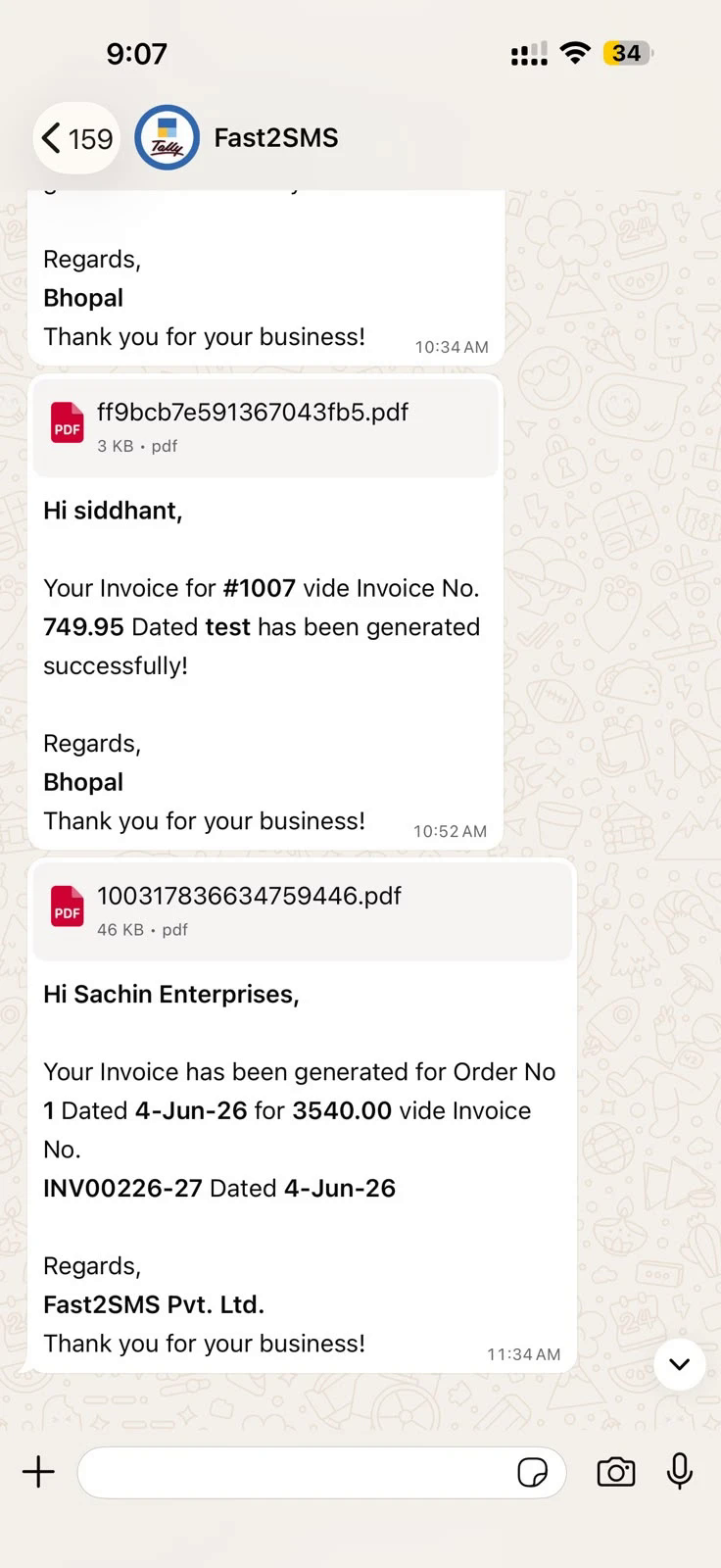
This is what arrives in the customer’s chat:
Install the TDL in TallyPrime
- Download the .TCP file and copy it into your TallyPrime folder as a Local TDL, or upload it in your Tally.NET account as an Account TDL.
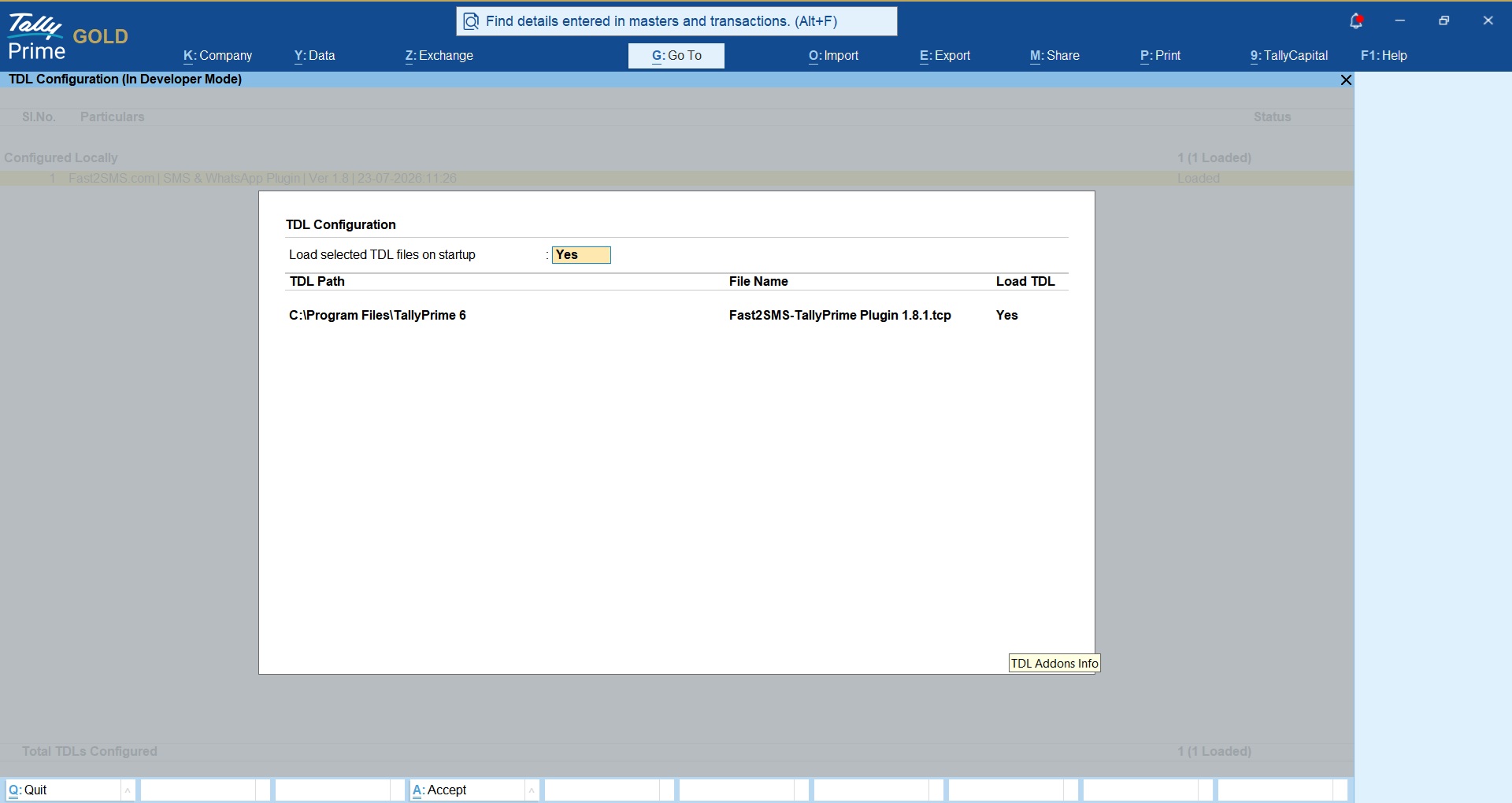
- Open your company, press F1: Help > TDLs & Add-ons and confirm the TDL shows as loaded.
- Press F6: Add-On Features and enable the WhatsApp module (and SMS if you want that channel too). Only the company administrator sees this switch.
Connect and configure in minutes
- API key: create your free account at fast2sms.com, copy the API key from the Dev API section, paste it into the TDL’s API Key Update screen.
- Phone number ID: in Tally to WhatsApp > WhatsApp API Settings, type 123456789, the ready default.
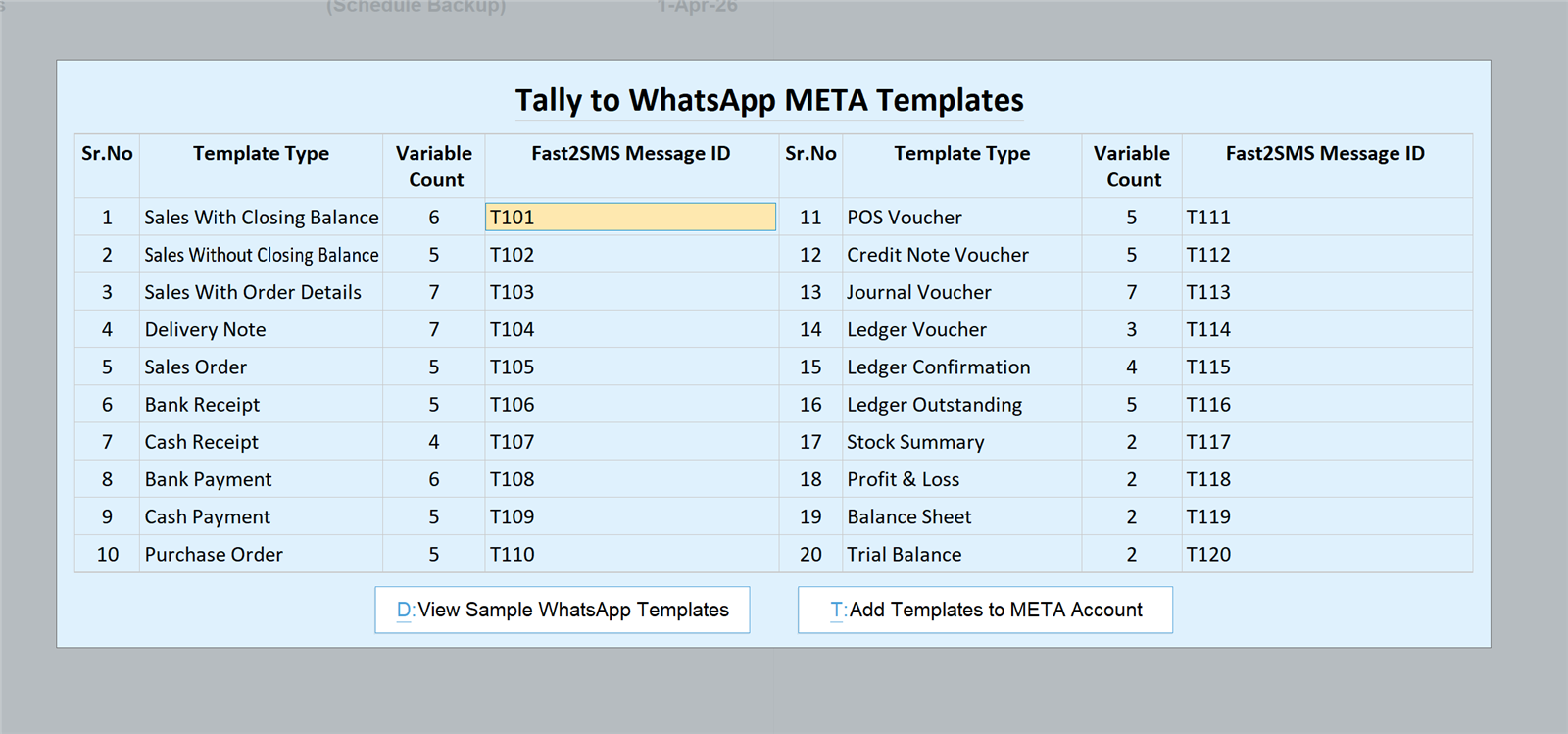
- Templates: in WhatsApp Template Settings, fill message IDs T101 to T120, twenty pre-approved templates covering every voucher and report type. The full mapping table is in the complete plugin guide.
No Meta account, no template approval wait, no website requirement, no new SIM. When you later want your own brand name as sender, the Tally WhatsApp sender guide shows the free upgrade path.
Why this TDL is different from others you will find
- Actually free. Most “free TDL download” pages give a limited trial; the full versions sell for thousands of rupees. This TDL has no licence, no activation key, no renewal. Full comparison with paid modules: free vs paid Tally WhatsApp TDL.
- Official API, not WhatsApp Web tricks. Some TDLs drive WhatsApp Web or a QR-scanned session in the background. Those break when the phone goes offline and risk the number getting banned. This TDL sends through the official WhatsApp Business API with delivery reports.
- SMS included. The same TCP file carries a full DLT SMS module with the invoice PDF as an auto-shortened link; see the Tally SMS plugin guide.
- Auto-send built in. Fire the WhatsApp on voucher creation or alteration, per voucher type, plus bulk sending from registers.
Frequently asked questions
Is this TDL for Tally to WhatsApp really free?
Yes. The TCP file is free with no licence key, no activation, no yearly renewal. You pay only the per-message WhatsApp or SMS rate from your Fast2SMS wallet.
Which Tally versions does the TDL support?
TallyPrime, loaded as a Local TDL or an Account TDL through Tally.NET, single-user or multi-user.
Do I need a website or a new mobile number?
No. The default sender needs neither. Even connecting your own brand number later uses the free Meta embedded signup from your Fast2SMS panel, and you can keep an existing WhatsApp Business app number.
Does the TDL slow Tally down?
No. It is a standard TDL add-on; sending happens through the API in the background, and a preview screen confirms before each send.
Can it auto-send invoices when a voucher is saved?
Yes, per voucher type, on creation or alteration. Details: send Tally invoices instantly on WhatsApp.
Is DLT needed?
Only for the SMS side, as TRAI requires; WhatsApp needs no DLT. Free DLT support is included and the TDL has a DLT registration shortcut.
Who helps if I get stuck?
Email [email protected] or call +91-6262778822.
Load the TDL and send your first invoice
Download the TCP file, load it in TallyPrime, paste your API key, type the two defaults, and your next voucher can reach the customer on WhatsApp.
Questions? Write to [email protected] or call +91-6262778822.