
Send Purchase Orders and Payment Advice to Suppliers on WhatsApp from Tally
Most Tally WhatsApp guides talk about customers. But half your business runs on suppliers, and they want paperwork too: a clear purchase order before they dispatch, and proof of payment after you pay. With the free Fast2SMS plugin you can send a purchase order on WhatsApp from Tally, send payment advice to the supplier the moment you record a bank payment, and share ledger confirmations when it is time to match balances.
This guide is for distributors, traders, manufacturers and retailers who buy regularly from the same vendors. It covers purchase orders (T110), bank payment advice (T108), cash payments (T109), ledger vouchers (T114), ledger confirmations (T115) and how to add supplier mobile numbers in Tally. The plugin is a free WhatsApp plugin for Tally, and you pay only per message sent.
Download Tally PluginSignup Now
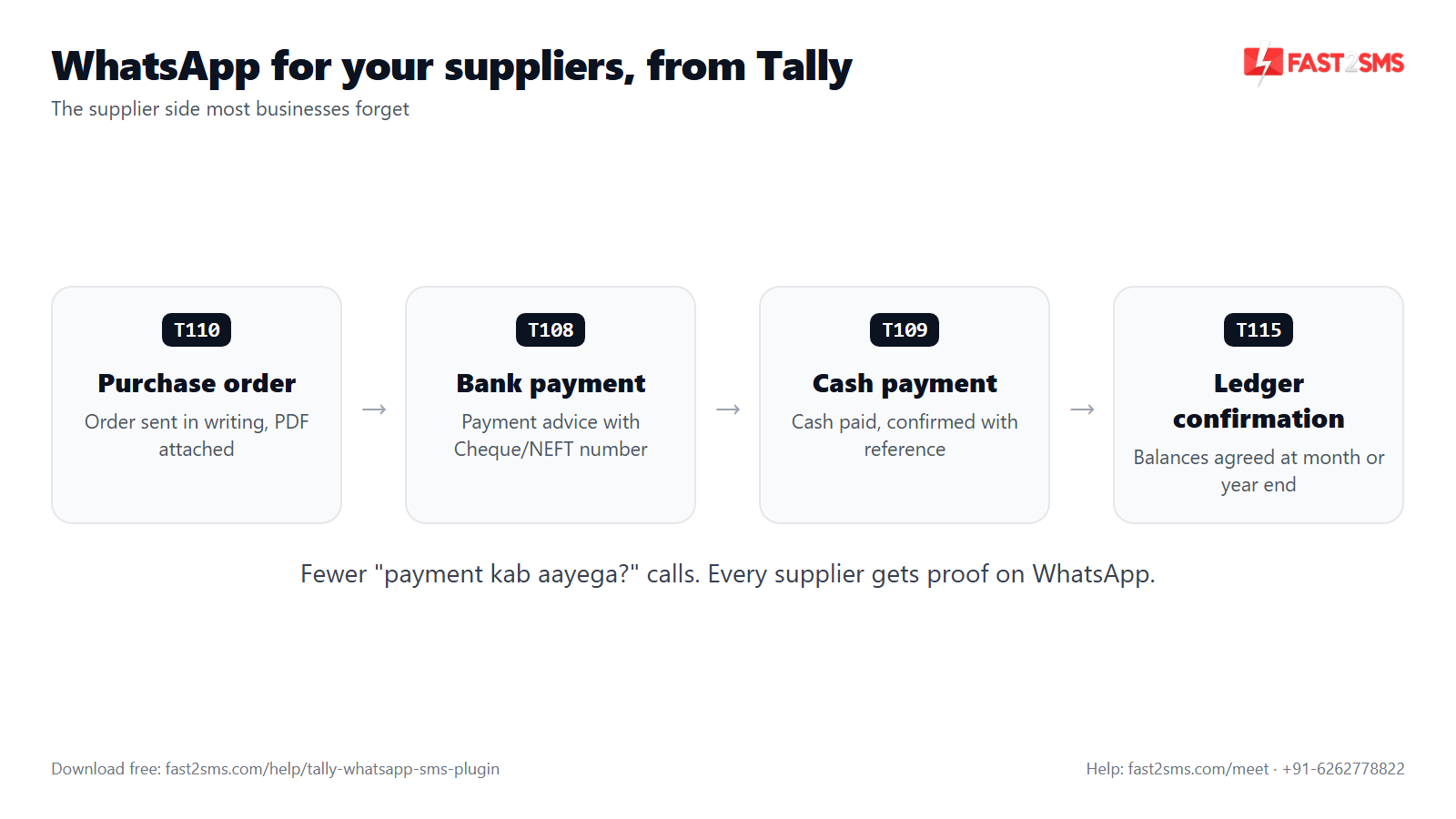
Why suppliers like written confirmation on WhatsApp
Ask any supplier what slows them down, and you will hear the same things. Orders placed over a phone call with no record. Payments that “have been sent” but cannot be traced. Balance mismatches found months later. A written message from your Tally fixes each of these:
- A purchase order in writing. The supplier sees the order number, date and items or value, with the PO PDF attached. Nobody has to remember what was said on the call.
- Proof of payment with a reference. A bank payment advice carries the amount, your reference number and the cheque or NEFT number. The supplier’s accountant can match it to their bank statement without calling you.
- Fewer follow-up calls. When the supplier already has the details, your accounts team spends less time answering “did you pay?” and “which bill was that for?”.
- Easy reconciliation. A ledger report or ledger confirmation from your books lets the supplier compare balances and point out differences early.
- Trust. A buyer who confirms everything in writing is easier to extend credit to. Clear paperwork helps the relationship.
The best part is that nothing changes in how you work. You still create the purchase order and payment vouchers in TallyPrime. The plugin only adds the send step.
Setting up the free WhatsApp plugin for Tally
The Fast2SMS plugin is a free .TCP add-on for TallyPrime with no licence fee, renewal or setup charge. The full walkthrough is in the main Tally WhatsApp and SMS plugin guide. In short:
- Download Tally WhatsApp plugin files using the button on this page, then copy the .TCP file into your TallyPrime folder as a Local TDL, or upload it in your Tally.NET account as an Account TDL.
- Open your company and press F1: Help > TDLs & Add-ons to confirm the plugin is loaded.
- Press F6: Add-On Features and set the WhatsApp module to Yes (and the SMS module, if you want SMS too). This option is visible only to the company administrator.
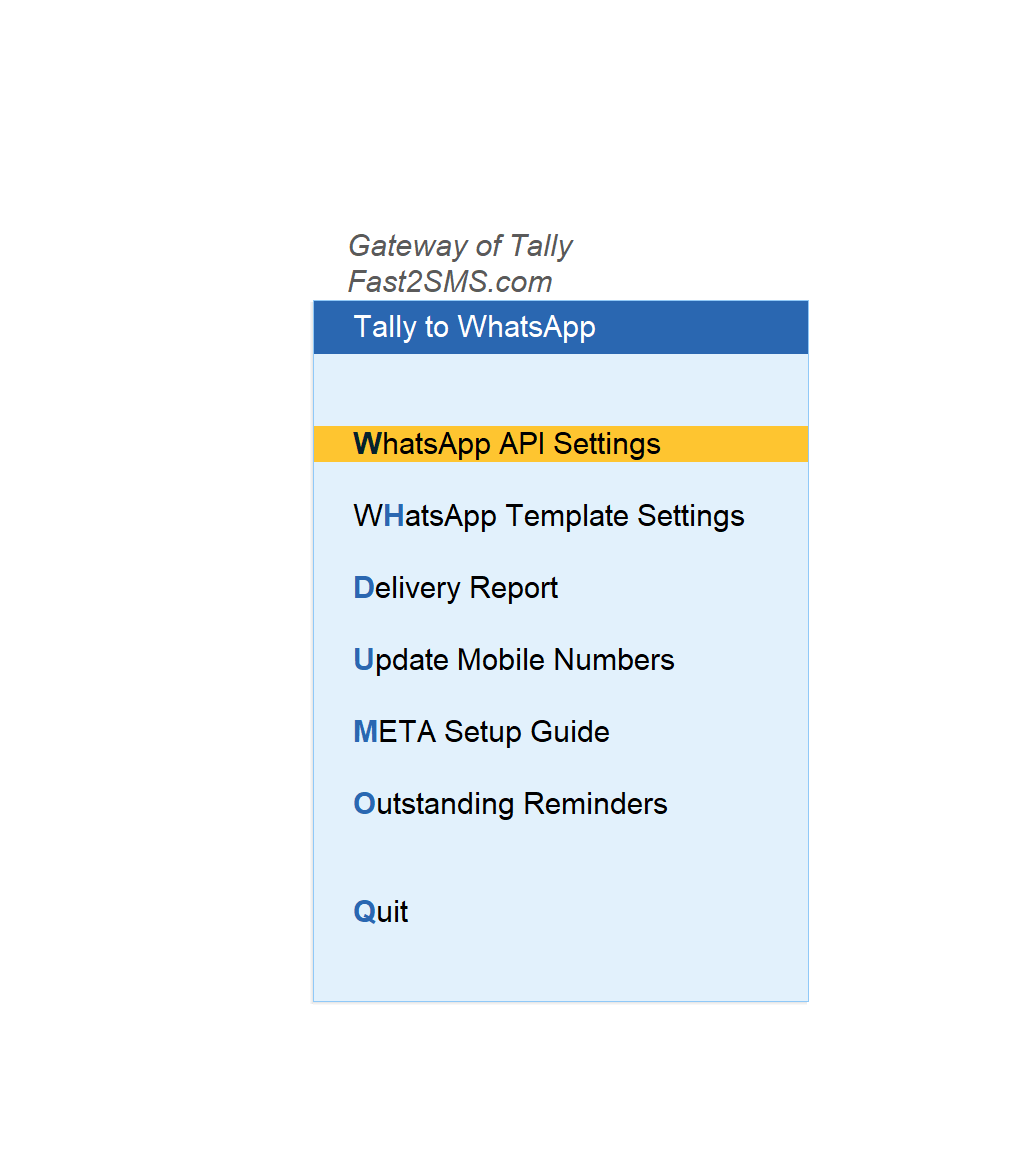
- A Fast2SMS.com menu appears on the Gateway of Tally.
- Sign up free at fast2sms.com, copy your API key from the Dev API section and paste it in the plugin. The account is mandatory, and you get ₹50 free test credit after signup.
After that, open Tally to WhatsApp from the Fast2SMS.com menu. This is where the WhatsApp API Settings, WhatsApp Template Settings, delivery report, mobile number tools and the META setup guide live.
Supplier-side templates at a glance
The plugin has 20 ready WhatsApp templates. Five of them are the ones you will use with vendors. Here is what each one sends:
| Message ID | Tally voucher or report | What the supplier receives | PDF attached? |
|---|---|---|---|
| T110 | Purchase order | Order number, order date and the items or value ordered | Yes, the purchase order PDF |
| T108 | Bank payment | Amount paid, your reference number, cheque or NEFT number and date | No, text message |
| T109 | Cash payment | Amount paid in cash, your reference number and date | No, text message |
| T114 | Ledger voucher | A ledger report from your books for the period you choose | Yes, the ledger PDF |
| T115 | Ledger confirmation | A ledger confirmation as on a date, for a period | Yes, the confirmation PDF |
Tally sends only for template types that have a message ID filled in. If you only want purchase orders and bank payment advice, those two are enough to start.
Adding supplier mobile numbers in ledger masters
The plugin sends to the mobile number stored in the ledger master. For customers that is the debtor ledger. For vendors it is the supplier’s ledger, usually under Sundry Creditors. Before you send your first purchase order, make sure the right number is saved.
Which number should you save? Think about who acts on each message:
- Purchase orders are read by the person who dispatches, often the supplier’s sales or order desk.
- Payment advice and ledger confirmations are read by the supplier’s accounts person.
Each ledger holds one mobile number, so pick the one your supplier prefers for business paperwork. Ask them. Many suppliers have a dedicated WhatsApp number for orders and accounts, and will happily share it.
Ways to get numbers into Tally:
| Method | Where | Best for |
|---|---|---|
| Single ledger | The mobile number field in the supplier’s ledger master | Adding or correcting one vendor |
| Excel import | Gateway of Tally > Fast2SMS > WhatsApp Module > Import Mobile Numbers | Importing numbers into many existing ledgers using the sample Excel file |
The plugin’s Update Mobile Numbers screen is set up for Sundry Debtors, so for vendors use the ledger master or the Excel import. Most businesses buy from far fewer suppliers than they sell to, so typing numbers into each ledger master is usually a one-afternoon job.
Always check the number twice. A payment advice sent to the wrong person shares your payment details with a stranger.
Sending a purchase order on WhatsApp (T110)
A purchase order is the first document a supplier sees from you on any deal. Sending it on WhatsApp means it reaches the person who dispatches within seconds of you saving it, with the PDF they can print or forward to their warehouse.
How it works in TallyPrime:
- Create the purchase order voucher as usual and select the supplier’s ledger.
- Use the WhatsApp send button on the voucher screen.
- Check the preview: the plugin shows the message and the mobile number before sending.
- Send. The supplier receives the order number, the order date and the items or value, with the purchase order PDF attached as a document.
A few habits make purchase orders on WhatsApp work better:
- Put clear item names and rates in the order. The PDF is what the supplier works from, so the details you enter in Tally are what they see.
- Send a fresh PO when the order changes. If you alter the purchase order, send it again so the supplier has the latest version in the chat.
- Ask the supplier to reply on the same chat when they dispatch, so the order and the dispatch confirmation sit together.
If you raise many POs a day, turn on auto-send for the purchase order voucher type. The plugin has a WhatsApp setting under the voucher type that sends the message the moment the voucher is created or altered.
Sending payment advice to a supplier after a bank payment (T108)
This is the message suppliers value most. When you record a bank payment voucher in Tally for an NEFT, RTGS, UPI or cheque payment, send it with template T108. The supplier receives a short text message that says the payment has been issued, with:
- the amount paid,
- your reference number for the payment,
- the cheque or NEFT number, and
- the date.
That is everything the supplier’s accountant needs to match the credit in their bank statement. No screenshot of your banking app, no forwarded SMS from the bank, no phone call.
Bank payment advice is a text-only template. It does not carry a PDF. The reference and transaction number in the message do the job.
Tip: enter the cheque or UTR number in the bank payment voucher consistently. The message can only show what the voucher holds, and a clean reference saves the supplier a follow-up call.
Confirming cash payments to suppliers (T109)
Some vendors still take cash: local transporters, labour contractors, small job workers, a vegetable or dairy supplier for a restaurant. Cash payments cause the most disputes, because there is no bank trail. Send the cash payment voucher with template T109, and the supplier gets a written confirmation with the amount, your reference number and the date.
That message becomes the record both sides can point to later. It is far better than a signature on a loose slip that nobody can find at month end.
Ledger reports and ledger confirmations for suppliers (T114 and T115)
Balances between you and a supplier drift apart for ordinary reasons: a missed debit note, a rate difference, a payment posted to the wrong bill. The earlier you spot the gap, the easier it is to fix.
- T114, ledger voucher: sends a ledger report from your books for a period, with the ledger PDF attached. Use it when a supplier asks for a statement of account.
- T115, ledger confirmation: sends a ledger confirmation as on a date for a period, with the PDF attached. Use it for balance confirmation at year end or before an audit.
Both are sent from the ledger screen, the same place the plugin offers ledger reports and confirmations for customers. The supplier can open the PDF, compare it with their books and reply on the same chat with any difference.
Accountants and CA firms who handle many clients will find more on this in the Tally WhatsApp guide for accountants, and the guide to sending Tally reports on WhatsApp covers the other report templates.
A simple routine for your purchase and accounts desk
Here is a routine a trading or distribution business can follow from the first week:
- Once: collect each regular supplier’s WhatsApp number and save it in their ledger master.
- Every order: create the purchase order in Tally and send it with T110. Turn on auto-send for the purchase order voucher type if you raise many orders.
- Every payment: record the bank or cash payment voucher and send the advice with T108 or T109.
- Every month or quarter: send a ledger report with T114 to suppliers where the balance looks off.
- At year end: send ledger confirmations with T115 to all major suppliers and follow up on any differences.
- Anytime: check the Delivery Report screen in the Tally to WhatsApp menu to see what was delivered.
This routine gives each supplier a full written record of your dealings, sent straight from your books.
What it costs
The plugin is free: no licence, no renewal, no monthly fee and no setup charge. You pay only per message from your Fast2SMS wallet:
- All supplier templates are utility messages at ₹0.25 per message, charged on delivery.
- Failed messages are refunded to your wallet automatically within 48 hours.
- Your wallet balance and a recharge option are visible inside Tally.
Paid third-party Tally WhatsApp TDLs commonly cost ₹3,000 to ₹6,000 plus GST, and some charge a yearly renewal for their panel on top. The Tally WhatsApp TDL price comparison has the details. For how WhatsApp pricing works in general, see WhatsApp session message pricing.
Messages go through the official WhatsApp Business API. There is no QR scan, your phone does not need to stay on, and there is no ban risk from WhatsApp Web automation. The Tally to WhatsApp without QR guide explains the difference.
Sending payment advice by SMS
If a supplier does not use WhatsApp, the plugin’s SMS module has templates for bank and cash payments and receipts, alongside three sales formats and outstanding. Payment vouchers show an SMS send button once the SMS module is set up. SMS needs DLT registration of your sender ID and templates first. Purchase orders and ledger confirmations are WhatsApp templates. See the Tally SMS plugin guide for the SMS setup.
Start in two minutes with the ready default templates
The purchase order (T110), payment (T108, T109) and ledger templates (T114, T115) you need for suppliers are all part of this ready set, so you can send your first vendor message today.
You do not need your own WhatsApp Business number or any Meta approval to start. Fast2SMS gives 20 ready, pre-approved templates on a default sender. After you paste your API key, make two entries:
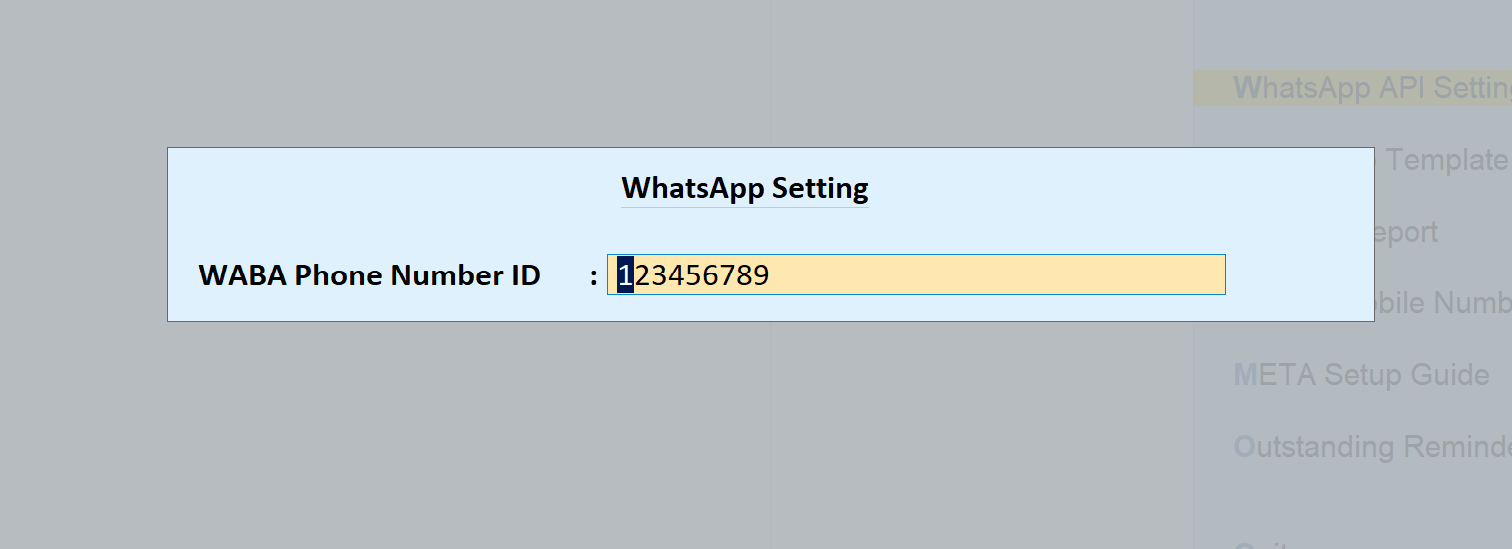
- Tally to WhatsApp > WhatsApp API Settings: type 123456789 as the WABA Phone Number ID.
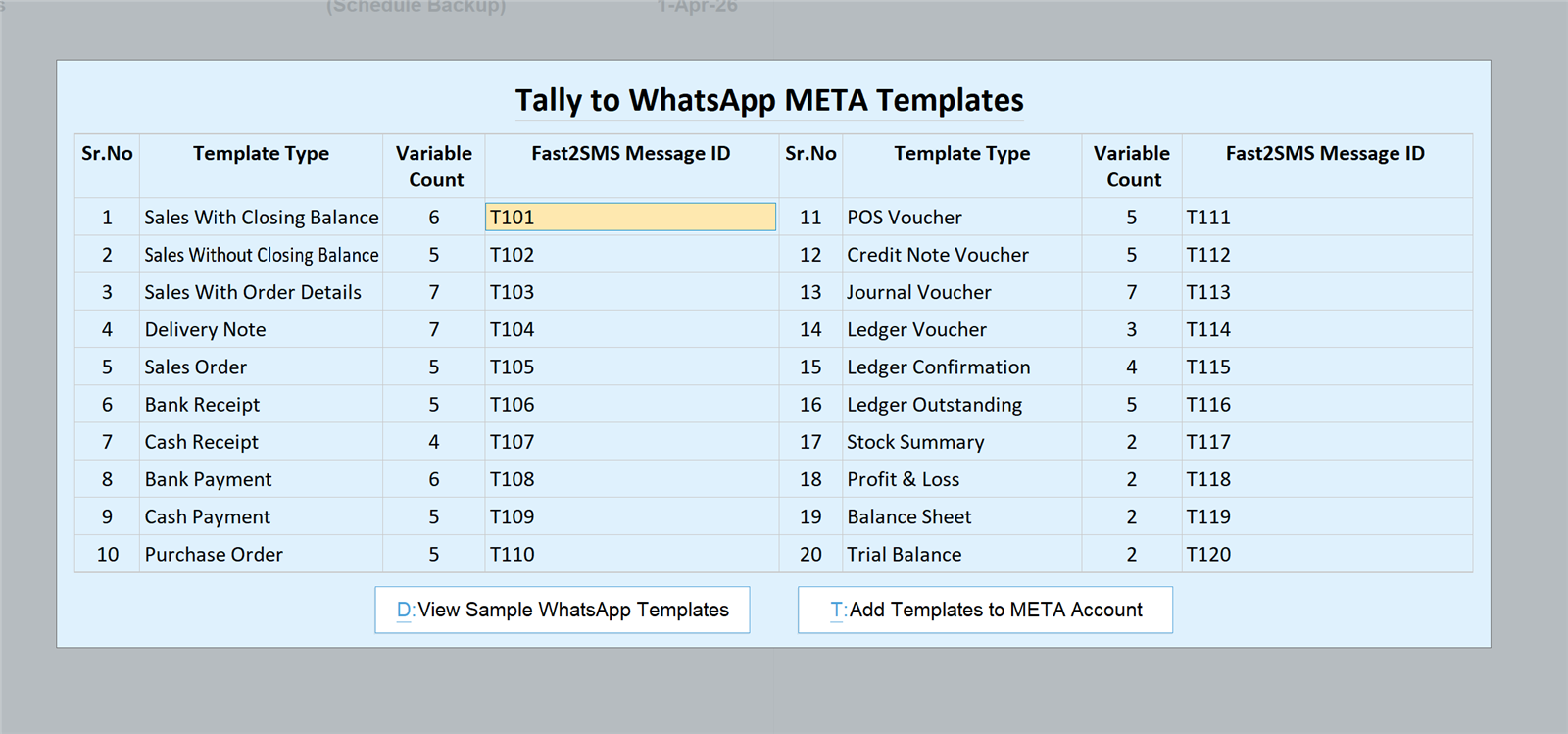
- Tally to WhatsApp > WhatsApp Template Settings: enter the message IDs T101 to T120 exactly as in the table below.
| Message ID | Use it for |
|---|---|
| T101 | Sales with closing balance |
| T102 | Sales without closing balance |
| T103 | Sales with order details |
| T104 | Delivery note |
| T105 | Sales order |
| T106 | Bank receipt |
| T107 | Cash receipt |
| T108 | Bank payment |
| T109 | Cash payment |
| T110 | Purchase order |
| T111 | POS voucher |
| T112 | Credit note |
| T113 | Journal voucher |
| T114 | Ledger voucher |
| T115 | Ledger confirmation |
| T116 | Ledger outstanding |
| T117 | Stock summary |
| T118 | Profit and loss |
| T119 | Balance sheet |
| T120 | Trial balance |
Save, and WhatsApp sending is live from the Fast2SMS default sender. Your business name appears inside every message.
Send from your own business number
Suppliers recognise a message faster when it comes from your own business name and number. To switch, complete the free Meta embedded signup from your Fast2SMS panel, then press Add Templates to META Account in the plugin’s WhatsApp Template Settings to send all 20 templates for approval at once. After approval, replace 123456789 with your own phone number ID and T101 to T120 with your own approved message IDs. The Tally WhatsApp templates for Meta approval guide has the text of every template, including the purchase order and payment templates.
Need help installing the Tally plugin? Our team will do it with you, free.
We can install the plugin, fill the default templates and send a test purchase order and payment advice to your own phone so you see exactly what your suppliers will get. Schedule a free meeting, call +91-6262778822 or email [email protected].
Frequently asked questions
How do I send a purchase order on WhatsApp from Tally?
Install the free Fast2SMS plugin, save the supplier’s mobile in their ledger, fill the default templates, then use the WhatsApp send button on the purchase order voucher. The supplier gets the PO details with the PDF attached.
Which template sends a purchase order?
Template T110 sends purchase orders. The supplier receives the order number, order date and the items or value ordered, with the purchase order PDF attached as a document.
How do I send payment advice to a supplier from Tally?
Record the bank payment voucher and send it with template T108. The supplier receives the amount, your reference number, the cheque or NEFT number and the date as a WhatsApp text message.
Does the bank payment advice include a PDF?
No, T108 bank payment and T109 cash payment are text-only templates. The message itself carries the amount, reference and transaction details, which is what the supplier needs to match the payment.
Can I confirm a cash payment to a supplier on WhatsApp?
Yes, send the cash payment voucher with template T109. The supplier gets a written confirmation of the amount, your reference number and the date, which helps avoid disputes later.
Where do I save the supplier’s mobile number in Tally?
Save it in the mobile number field of the supplier’s ledger master, usually under Sundry Creditors. The plugin sends every purchase order, payment advice and ledger message to that number.
Can I import supplier mobile numbers from Excel?
Yes, go to Gateway of Tally > Fast2SMS > WhatsApp Module > Import Mobile Numbers. The screen offers a sample Excel file for importing numbers into your existing ledgers.
Can I send a ledger confirmation to a supplier?
Yes, template T115 sends a ledger confirmation as on a date for a period, with the PDF attached. It is useful for year-end balance confirmation and before audits.
What is the difference between T114 and T115?
T114 sends a ledger report for a period, like a statement of account. T115 sends a formal ledger confirmation as on a date, which the supplier uses to confirm the balance matches.
Can purchase orders go out automatically when I save them?
Yes, turn on the WhatsApp setting under the purchase order voucher type to send on creation or alteration. Every saved PO then goes to the supplier without pressing a button.
If I change a purchase order, does the supplier get the new version?
If auto-send on alteration is on, the altered PO is sent again automatically. Otherwise, press the send button after you alter it so the latest version reaches the supplier.
Can I check the message before it goes to the supplier?
Yes, the send button shows a preview with the message and the supplier’s mobile number first. Check both, then send.
Is the Tally WhatsApp plugin free for sending to suppliers?
Yes, the plugin is free with no licence, renewal, setup or monthly fee. You pay only ₹0.25 per delivered WhatsApp utility message from your Fast2SMS wallet.
Where do I get the Tally WhatsApp plugin free download?
Use the Download Tally Plugin button on this page, which opens the official Google Drive folder with the .TCP file. You also need a free Fast2SMS account for the API key.
Do I need a Fast2SMS account to use the plugin?
Yes, the account is mandatory because the plugin needs the API key from the Dev API section. Signup is free and comes with ₹50 test credit.
Does the supplier need any app to receive the purchase order?
No, the supplier only needs WhatsApp. The purchase order PDF opens inside the chat, and they can print or forward it to their warehouse from there.
Can I send purchase orders without my own WhatsApp Business number?
Yes, start on the Fast2SMS default sender by entering 123456789 as the phone number ID and T101 to T120 as message IDs. Your business name still appears inside every message.
Which Tally WhatsApp vendor messages can I send?
You can send five vendor messages: purchase orders (T110), bank payment advice (T108), cash payment confirmations (T109), ledger reports (T114) and ledger confirmations (T115). Each goes to the mobile number in the supplier’s ledger. If the ledger send option does not show on a supplier ledger in your Tally, book a free meeting and the team will check it with you.
Can I send payment advice to suppliers by SMS?
Yes, the SMS module has bank and cash payment templates, and payment vouchers show an SMS send button once it is set up. SMS needs DLT registration of your sender ID and templates first.
Can I send a purchase order by SMS?
No, purchase orders are a WhatsApp template in the plugin. The SMS side covers sales formats, bank and cash receipts and payments, and outstanding.
How do I know the supplier received the payment advice?
Open the Delivery Report screen in the Tally to WhatsApp menu. Full delivery logs are also kept in your Fast2SMS panel.
Does the plugin need my phone to stay connected?
No, it uses the official WhatsApp Business API, so there is no QR scan and no phone needs to stay on. Messages go out from Tally directly.
Does the plugin work with Tally ERP 9?
The plugin works only in TallyPrime, and every step here is a TallyPrime screen. It does not work in Tally ERP 9, so if you are still on ERP 9, upgrade to TallyPrime first.
Can I use the same plugin for customers and suppliers?
Yes, one plugin covers both. If you already send invoice on WhatsApp from Tally to customers, the same 20 templates also cover purchase orders, payments and ledger confirmations for suppliers.
Can I change the wording of the purchase order template?
On your own WhatsApp Business account, yes, you can edit the static text when approving the templates. The number and order of variables must stay the same, because Tally fills them.
Is a Tally WhatsApp TDL safe for sending payment details?
The Fast2SMS plugin sends through the official WhatsApp Business API, not WhatsApp Web tricks. Still, check each supplier’s number carefully, because payment details go to whoever owns that number.
Give every supplier a written record
Download the plugin, add your suppliers’ WhatsApp numbers, type 123456789 and T101 to T120, and send your next purchase order straight from Tally. For more on how the plugin fits into your books, read the Tally WhatsApp integration guide, the TDL for Tally to WhatsApp guide or the Hindi Tally WhatsApp TDL free download guide.
Download Tally PluginSignup Now
Help with the Tally plugin: schedule a free meeting · [email protected] · +91-6262778822