
Shopify DLT SMS Templates: Copy-Paste Templates for All 12 Order Events
Every SMS your Shopify store sends in India needs a DLT-approved template. Most store owners get stuck right here: which category to pick, how to tag the variables, and why the operator rejected a template that looked fine. This page gives you one ready Shopify DLT template for each of the 12 order events in the free Fast2SMS app, so you can copy, add your brand name and submit.
Each template comes with its DLT category, its variable tags and what each tag maps to in the app. After the templates, we cover how to submit them, what sample message to give, and how to connect them to your Shopify SMS alerts in a few clicks.
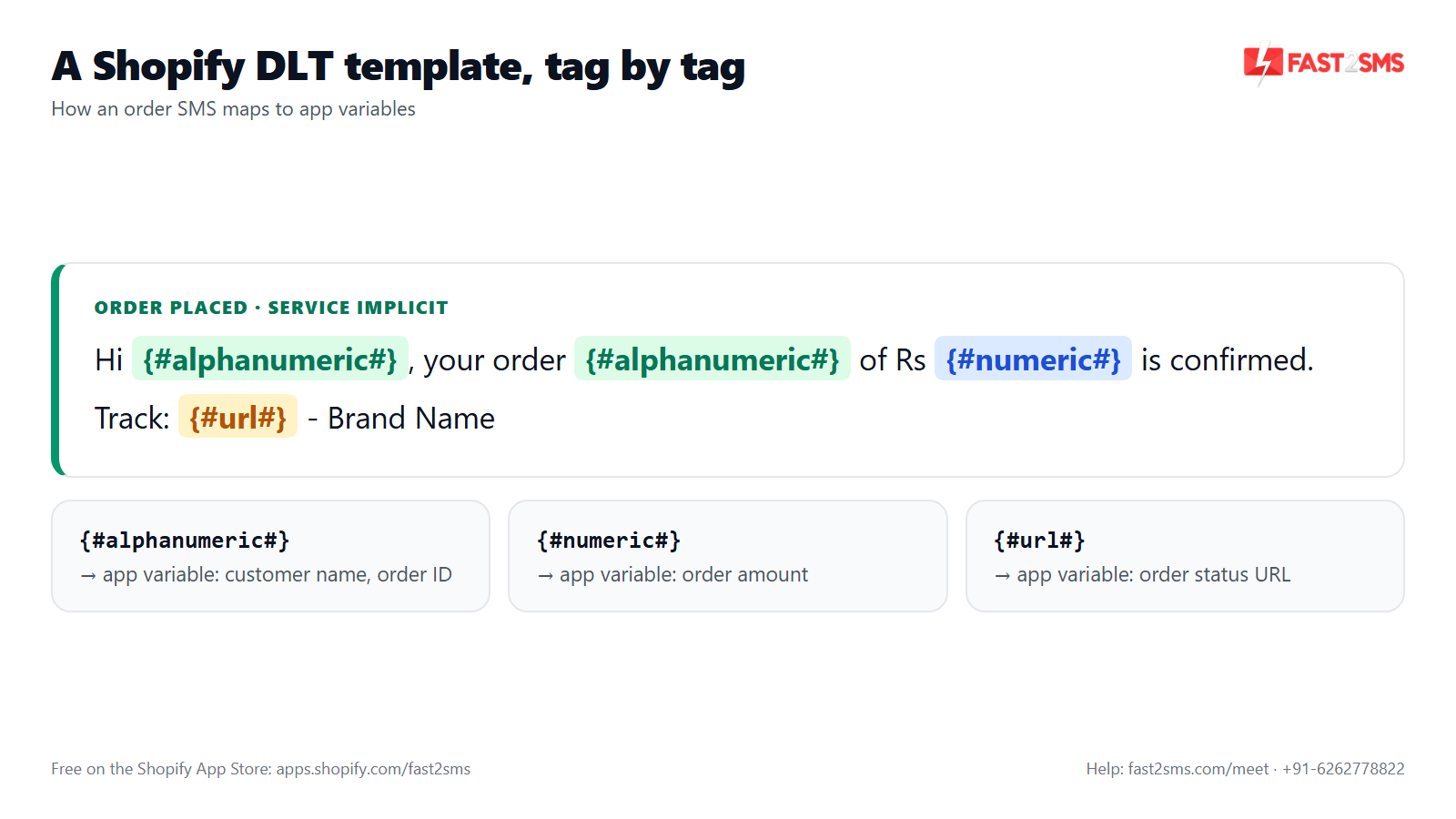
How to read these templates
Each template is shown as a card, followed by a plain copy box you can paste straight into your DLT portal.
- Left border colour shows the DLT category: green for Service Implicit, red for Promotional and blue for Transactional. None of the 12 order events needs Transactional.
- Coloured chips are the variable tags: {#numeric#} for amounts, {#alphanumeric#} for names, order IDs, dates and tracking numbers, and {#url#} for links.
- The dashed footer tells you which app variable to pick for each tag, in the order the tags appear.
Three house rules in every template:
- “Rs.” instead of the ₹ symbol. The ₹ sign turns the SMS into Unicode, which fits fewer characters per SMS and can double the cost of a longer message.
- End with “- Brand Name”. Replace it with your own brand, so the sender is clear.
- Keep the line break before the brand name. What you submit is what must go out, character for character.
New to tags? Our guide on DLT variable tagging explains each one.
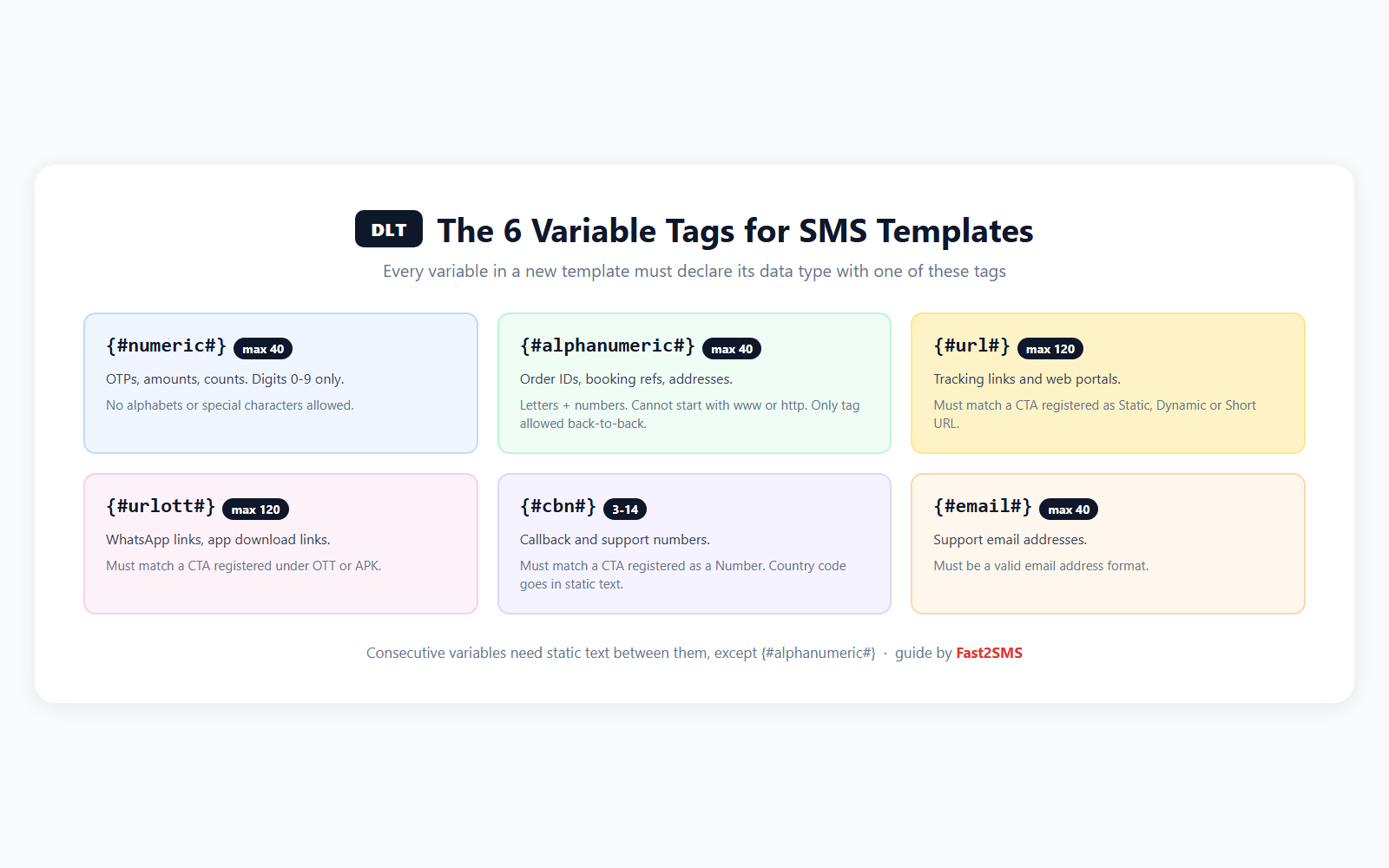
Which DLT category for each Shopify event
Most rejections start here, so here is the honest version.
Service Implicit is for messages about something the customer already did with you: ordered, paid, got a shipment, asked for a refund. Ten of the 12 events are clearly this. These templates use your 6-letter alphabetic header, can reach DND numbers, and are not limited to the 10 AM to 9 PM window.
Promotional is for anything that tries to get a sale. An abandoned checkout reminder asks the customer to come back and buy. A welcome message usually carries a first-order code. Both are marketing in nature, even though they are automatic, and filing them as Service Implicit is a quick way to get a template or header flagged. Promotional SMS uses a 6-digit numeric header, is delivered only between 10 AM and 9 PM, and does not reach DND numbers.
The older consent-based marketing category has been merged into Promotional, so every marketing-type message now goes under Promotional (see what changed). Transactional is the category for OTPs, and it now covers OTPs for any business, not only banks. Order updates are not OTPs, so they don’t belong there.
| Shopify event | DLT category | Header | Tags used |
|---|---|---|---|
| Order placed | Service Implicit | 6-letter | alphanumeric x2, numeric, url |
| Payment received | Service Implicit | 6-letter | alphanumeric x2, numeric, url |
| Order fulfilled | Service Implicit | 6-letter | alphanumeric x2, url |
| Order partially fulfilled | Service Implicit | 6-letter | alphanumeric x2, url |
| Order cancelled | Service Implicit | 6-letter | alphanumeric x2, url |
| Refund created | Service Implicit | 6-letter | alphanumeric x2 |
| Shipment created | Service Implicit | 6-letter | alphanumeric x3, url |
| Out for delivery | Service Implicit | 6-letter | alphanumeric x2 |
| Delivered | Service Implicit | 6-letter | alphanumeric x2, url |
| Abandoned checkout recovery | Promotional | 6-digit | alphanumeric, url |
| Welcome message for new customers | Promotional | 6-digit | alphanumeric x2 |
| COD order placed | Service Implicit | 6-letter | alphanumeric x2, numeric, url |
DLT templates for order confirmation, COD and payment
If you are looking for a DLT template for order confirmation, start here.
1. Order placed
ORDER PLACED · SERVICE IMPLICIT
Hi {#alphanumeric#}, thank you for shopping with us. Your order {#alphanumeric#} of Rs.{#numeric#} is confirmed. We will update you when it ships. View order: {#url#}
– Brand Name
1st {#alphanumeric#} → Customer name · 2nd {#alphanumeric#} → Order ID · {#numeric#} → Amount · {#url#} → Order status URL
With Smart COD on in the app, this goes to prepaid orders only, because COD orders get their own message below.
2. COD order placed
COD ORDER PLACED · SERVICE IMPLICIT
Hi {#alphanumeric#}, your Cash on Delivery order {#alphanumeric#} of Rs.{#numeric#} is confirmed. Please keep the amount ready at delivery. View order: {#url#}
– Brand Name
1st {#alphanumeric#} → Customer name · 2nd {#alphanumeric#} → Order ID · {#numeric#} → Amount · {#url#} → Order status URL
This event fires for Cash on Delivery orders only. The “keep the amount ready” line reminds the buyer that money is due at the door.
3. Payment received
PAYMENT RECEIVED · SERVICE IMPLICIT
Hi {#alphanumeric#}, we have received your payment of Rs.{#numeric#} for order {#alphanumeric#}. Thank you for shopping with us. View order: {#url#}
– Brand Name
1st {#alphanumeric#} → Customer name · {#numeric#} → Amount · 2nd {#alphanumeric#} → Order ID · {#url#} → Order status URL
On prepaid orders this can arrive seconds after Order placed, so many stores keep only one of the two on. For COD, it works when you mark the order paid after collection.
DLT templates for shipping and delivery
Customers read these the most, so keep them short.
4. Shipment created
SHIPMENT CREATED · SERVICE IMPLICIT
Hi {#alphanumeric#}, your order {#alphanumeric#} has shipped. Tracking number: {#alphanumeric#}. Track your parcel here: {#url#}
– Brand Name
1st {#alphanumeric#} → Customer name · 2nd {#alphanumeric#} → Order ID · 3rd {#alphanumeric#} → Tracking number · {#url#} → Tracking URL
Tracking numbers often mix letters and digits, which is why this uses {#alphanumeric#} and not {#numeric#}.
5. Order fulfilled
ORDER FULFILLED · SERVICE IMPLICIT
Hi {#alphanumeric#}, all items in your order {#alphanumeric#} are packed and on the way. Track your order: {#url#}
– Brand Name
1st {#alphanumeric#} → Customer name · 2nd {#alphanumeric#} → Order ID · {#url#} → Tracking URL
If you add tracking while fulfilling, this and Shipment created can both fire. Register both, but switch on only one.
6. Order partially fulfilled
ORDER PARTIALLY FULFILLED · SERVICE IMPLICIT
Hi {#alphanumeric#}, some items from your order {#alphanumeric#} have shipped. The remaining items will ship separately and we will keep you updated. Details: {#url#}
– Brand Name
1st {#alphanumeric#} → Customer name · 2nd {#alphanumeric#} → Order ID · {#url#} → Order status URL
7. Out for delivery
OUT FOR DELIVERY · SERVICE IMPLICIT
Hi {#alphanumeric#}, your order {#alphanumeric#} is out for delivery today. Please keep your phone reachable. If you chose Cash on Delivery, please keep the amount ready.
– Brand Name
1st {#alphanumeric#} → Customer name · 2nd {#alphanumeric#} → Order ID
One event covers prepaid and COD orders, so the cash line says “if you chose Cash on Delivery”. This event and Delivered need your courier or shipping app to update shipment status in Shopify.
8. Delivered
DELIVERED · SERVICE IMPLICIT
Hi {#alphanumeric#}, your order {#alphanumeric#} has been delivered. We hope you like it. For any help with this order, visit {#url#}
– Brand Name
1st {#alphanumeric#} → Customer name · 2nd {#alphanumeric#} → Order ID · {#url#} → Order status URL
DLT templates for cancellations and refunds
9. Order cancelled
ORDER CANCELLED · SERVICE IMPLICIT
Hi {#alphanumeric#}, your order {#alphanumeric#} has been cancelled. If you paid online, the refund will go back to your original payment method. Details: {#url#}
– Brand Name
1st {#alphanumeric#} → Customer name · 2nd {#alphanumeric#} → Order ID · {#url#} → Order status URL
10. Refund created
REFUND CREATED · SERVICE IMPLICIT
Hi {#alphanumeric#}, the refund for your order {#alphanumeric#} has been processed. It may take a few working days to reflect in your account, depending on your bank.
– Brand Name
1st {#alphanumeric#} → Customer name · 2nd {#alphanumeric#} → Order ID
We left the amount out on purpose, because an order-level amount can confuse customers after a partial refund. If you add “of Rs.{#numeric#}”, check the value with a test send first.
DLT templates for abandoned checkout and welcome (Promotional)
These two are not order updates. They ask the customer to buy, so we register them as Promotional: 6-digit numeric header, delivery only between 10 AM and 9 PM, and no delivery to DND numbers. That is why many stores send these two on WhatsApp and keep SMS for order updates.
11. Abandoned checkout recovery
ABANDONED CHECKOUT RECOVERY · PROMOTIONAL
Hi {#alphanumeric#}, you left some items in your cart. Your cart is saved. Complete your order here: {#url#}
– Brand Name
{#alphanumeric#} → Customer name · {#url#} → Checkout recovery URL
Offering a recovery code? Add “Use code {#alphanumeric#} at checkout.” and map it to Coupon code. The app cancels the reminder if the customer orders first. See our abandoned cart on WhatsApp guide for timing.
12. Welcome message for new customers
WELCOME MESSAGE · PROMOTIONAL
Hi {#alphanumeric#}, welcome to our store. Thank you for joining us. Use code {#alphanumeric#} on your first order at www.yourstore.com
– Brand Name
1st {#alphanumeric#} → Customer name · 2nd {#alphanumeric#} → Coupon code
The app has no store-link variable, so your store URL is fixed text. Replace www.yourstore.com with your own domain. In the Settings tab, “Respect Shopify marketing consent” is on by default, and the opt-out list skips abandoned cart and welcome messages while order updates still deliver.
How to submit these templates on your DLT portal
Submit on the DLT portal where your entity is registered, such as Jio, Airtel, Vi or BSNL. Screens differ a little, but the steps are the same. Not registered yet? Start with our DLT registration A to Z guide.
- Register your headers: 6-letter alphabetic for Service Implicit, and 6-digit numeric if you will send the two Promotional templates.
- Add a new content template and choose the type shown on each card.
- Pick the content category closest to your business, and link the right header.
- Name it clearly, like “shopify_order_placed”, so it is easy to find in the app later.
- Paste the text from the copy box, with your brand in place of “Brand Name”.
- Add a sample message if asked (see below), then submit.
Submit all 12 in one sitting. For more examples beyond Shopify, see our sample SMS templates for DLT.
What to write as the sample message
The sample is your template with realistic values in place of the tags, so the reviewer sees how it reads:
- Order placed: Hi Priya, thank you for shopping with us. Your order #1042 of Rs.1499 is confirmed. We will update you when it ships. View order: https://yourstore.com/orders/1042 – Brand Name
- Shipment created: Hi Priya, your order #1042 has shipped. Tracking number: AWB7845123690. Track your parcel here: https://yourstore.com/track – Brand Name
Use your own domain in sample links. Operators check links in SMS, so the domains you send should be registered against your DLT entity. If unsure, ask Fast2SMS support before going live.
Connect approved templates in the Shopify app
Once approved, add the template and its header to your Fast2SMS account. Our free DLT support can help. Then:
- Setup tab: paste your Fast2SMS API key and click Validate & Save to see the “Connected” badge.
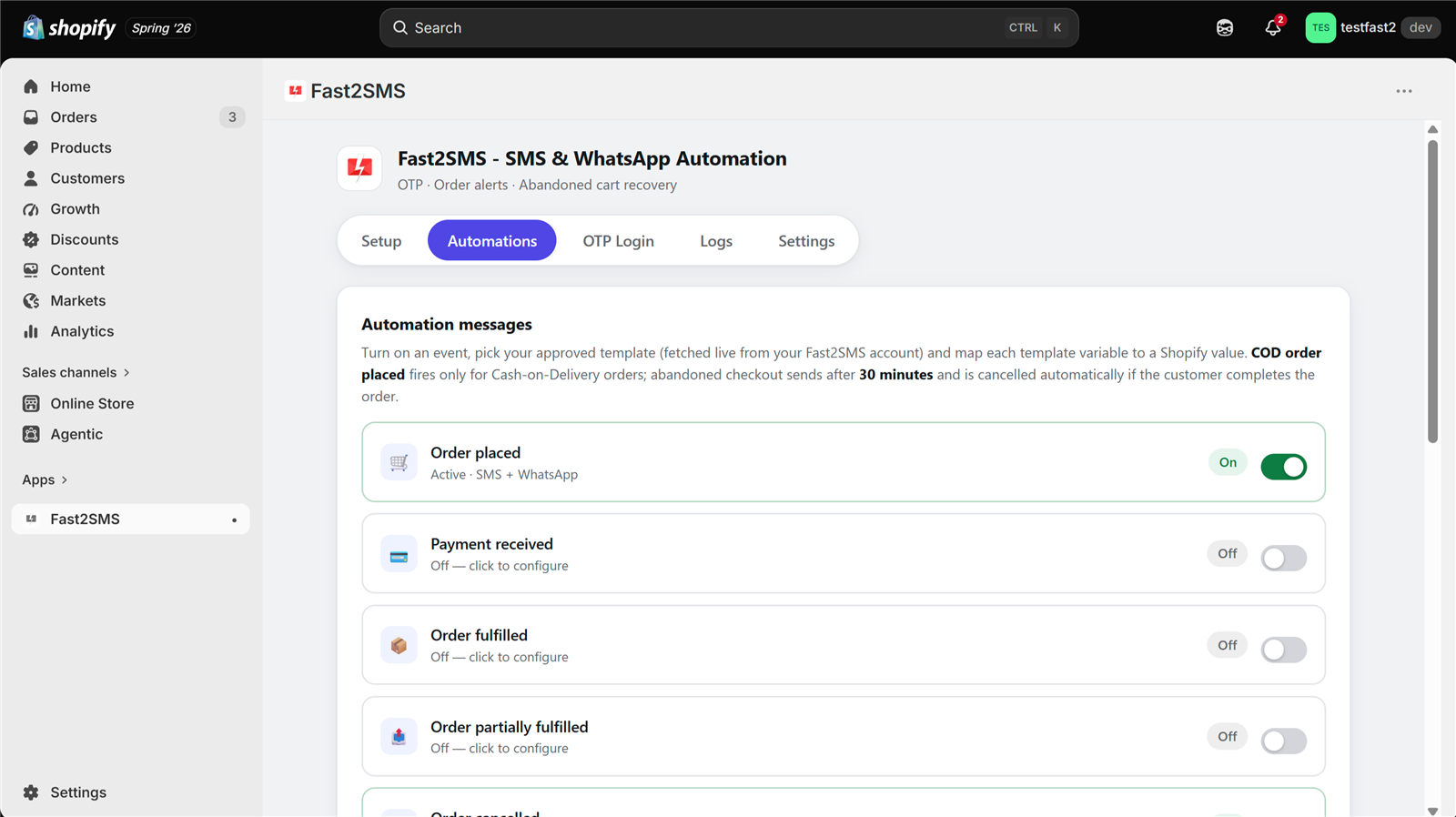
- Automations tab: open the event and set the channel to SMS or Both.
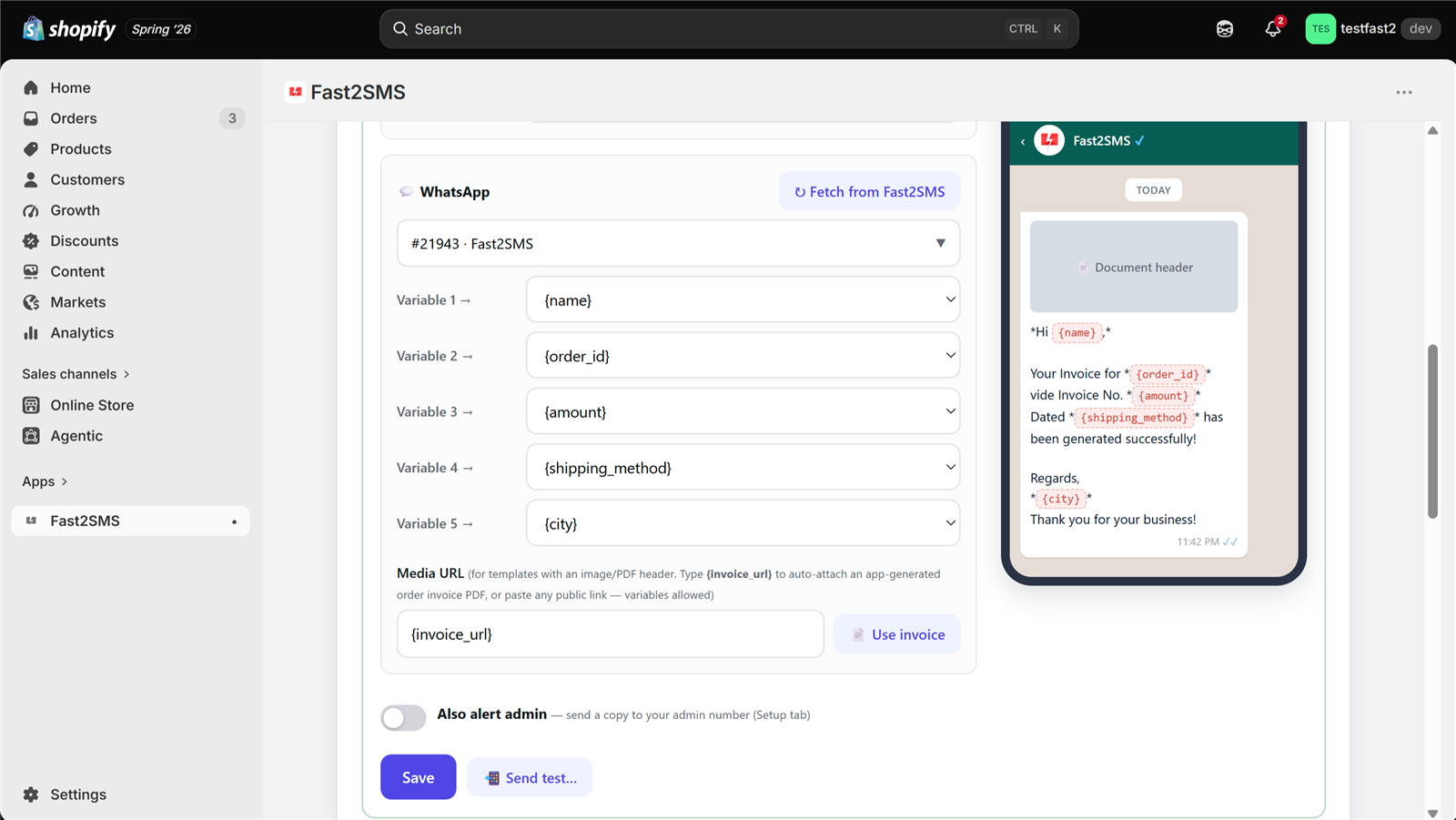
- Fetch templates in one click and search by name, ID or text. No template IDs to copy.
- Map each tag to the app variable shown in the card’s footer, in the same order.
- Check the preview, then Test send to your admin number. The app shows the request ID.
- Turn the event on.
WhatsApp uses Meta-approved templates instead of DLT. See our Shopify WhatsApp message templates and 12 Shopify order events on SMS and WhatsApp.
If an approved template still fails
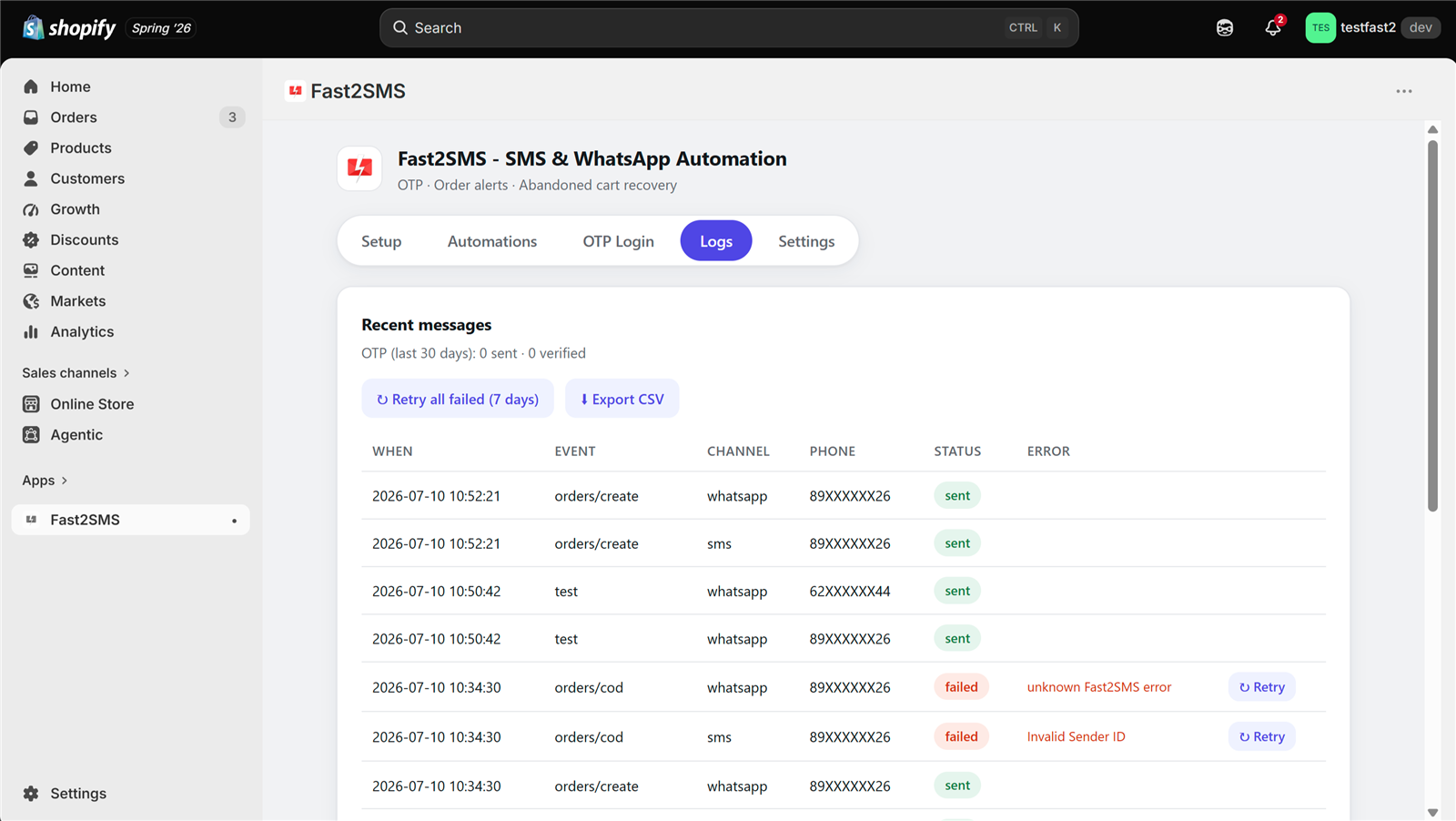
When an SMS fails, the Logs tab shows the reason on hover, and you can retry one message or use “Retry all failed (7 days)”. The usual causes:
- Text mismatch: a changed word, space or line break versus the approved template.
- Wrong header linked to the template.
- PE-TM chain mismatch: operators block traffic when the chain doesn’t match. Fast2SMS is a registered TMD (SID GROUPS PRIVATE LIMITED, TMD ID 1702178720558766591) with direct connectivity to Airtel, Jio, BSNL, Tata, Vi and Smartping. See PE-TM chain mismatch detected.
- Promotional timing: sent outside 10 AM to 9 PM, or to a DND number.
Our SMS not delivered guide covers the error codes.
How pricing works: free app, pay only per message
- The Fast2SMS Shopify app is free: no subscription, no monthly fee, no setup fee, no commission.
- Messages are billed by Fast2SMS from your own wallet, never through Shopify billing.
- WhatsApp order updates: ₹0.25 per delivered message; failed WhatsApp messages are refunded within 48 hours.
- SMS: your DLT SMS rate per message.
- Free signup with ₹50 test credit.
Stuck on DLT? Our team will help you get your templates approved, free.
We help Shopify stores with DLT headers, templates, PE-TM binding and mapping the templates in the app. Schedule a free meeting, call +91-6262778822 or email [email protected].
Frequently asked questions
What is a DLT template for Shopify SMS?
A DLT template is the fixed text of an SMS, with variable tags, that you register on your operator’s DLT portal. In India, every Shopify SMS must match an approved template, or operators will not deliver it.
Which DLT category should I use for Shopify order updates?
Use Service Implicit for Shopify order updates such as order placed, payment received, shipped, out for delivery, delivered, cancelled and refund, because they are about something the customer already did with your store.
What is a good DLT template for order confirmation?
A good DLT template for order confirmation greets the customer by name, confirms the order ID and amount, adds an order link and ends with your brand name, registered under Service Implicit. Copy the Order placed template above.
Can I register Shopify order updates as Transactional?
No, Transactional is the DLT category for OTPs, now open to any business and not only banks, so Shopify order confirmations and shipping updates should be registered under Service Implicit instead.
Why is the abandoned cart SMS template Promotional?
Because an abandoned cart message asks the customer to come back and buy, it is marketing in nature even though it is triggered automatically, so Promotional is the honest and safe category for it.
Can abandoned cart SMS reach customers on DND?
No, abandoned cart SMS is registered as Promotional, so it does not reach numbers on DND and is delivered only between 10 AM and 9 PM, which is why many stores send these reminders on WhatsApp instead.
Is a welcome SMS promotional under DLT?
Yes, in most cases a welcome SMS is promotional, because it invites the customer to shop or offers a first-order code, so register it as Promotional with your 6-digit numeric header.
What sender ID do I need for Shopify SMS?
You need a 6-letter alphabetic header for Service Implicit order updates, plus a 6-digit numeric header if you also send abandoned cart or welcome SMS as Promotional templates.
What do {#numeric#}, {#alphanumeric#} and {#url#} mean?
These are DLT variable tags: {#numeric#} holds numbers such as amounts, {#alphanumeric#} holds names, order IDs and tracking numbers, and {#url#} holds links such as tracking or order pages.
Why are order IDs tagged as {#alphanumeric#}?
Shopify order IDs usually include a # sign and can carry letters if you set a prefix or suffix, and {#alphanumeric#} accepts letters, digits and symbols, so it won’t break when your format changes.
Can I just use {#var#} for every variable?
No. Under the current DLT rules each blank needs a typed tag: {#numeric#} for amounts, {#alphanumeric#} for names, order IDs, dates and tracking numbers, and {#url#} for links. The old single {#var#} tag is being replaced, so templates written with typed tags approve faster and fail less. See the DLT variable tagging guide.
Why use “Rs.” instead of the ₹ symbol in SMS?
The ₹ symbol turns the SMS into Unicode, which fits fewer characters per SMS, so a longer message can become two SMS instead of one, while “Rs.” keeps the message in plain text.
Do I have to put my brand name in every DLT template?
Yes, you should end every template with your brand name, because it makes the sender clear to the customer and to the DLT reviewer, so replace “Brand Name” in our templates before submitting.
Can I edit a DLT template after it is approved?
No, any change to the fixed text of an approved DLT template, even one word or a line break, means submitting a new template, because messages must match the approved text exactly.
How long does DLT template approval take?
Approval time depends on your operator’s DLT portal and how clean your template is, so submit all 12 together with correct categories and clear samples to avoid back-and-forth.
What should I write as the sample message on the DLT portal?
Write the template with realistic values in place of the tags, such as a real-looking customer name, order number, amount and your own store link, so the reviewer sees exactly how it reads.
Why was my Shopify DLT template rejected?
Common reasons are the wrong category, such as a promotional message filed as Service Implicit, a missing brand name, unclear variables, or a sample that doesn’t match the template text.
How do I add approved DLT templates to the Shopify app?
Add the approved template and its header to your Fast2SMS account, then open the event in the app’s Automations tab and click fetch to load your templates in a searchable picker.
Do I need to copy template IDs or entity IDs into the app?
No, once your API key is connected in the Setup tab, the app fetches approved templates from your Fast2SMS account, so you pick them from a list instead of copying any IDs.
How do I map DLT variables to Shopify order data?
In the Automations tab each tag in your template gets a dropdown, where you pick the matching variable, such as Customer name, Order ID, Amount or Tracking URL, in the order the tags appear.
Why does my approved template still fail to deliver?
An approved template usually fails because of a text mismatch, a wrong header, a PE-TM chain mismatch or promotional timing rules, and the Logs tab shows the reason so you can fix it and retry.
What is PE-TM chain binding for Shopify SMS?
PE-TM chain binding is the declared path from your business, the principal entity, to the telemarketer sending your SMS, and operators block traffic when the chain doesn’t match what is declared.
Can Service Implicit SMS be sent at night or to DND numbers?
Yes, Service Implicit SMS can reach DND numbers and is not limited to the 10 AM to 9 PM window, unlike Promotional SMS such as abandoned cart, which follows both limits.
Do WhatsApp order messages need DLT templates?
No, DLT applies only to SMS, while WhatsApp messages use templates approved by Meta, which the app also fetches from your Fast2SMS account for each event you set up.
Do I need a DLT template for Shopify OTP login?
OTP login does not use the 12 order templates on this page, because it runs on your Smart OTP configuration in Fast2SMS, which decides whether OTPs go by SMS or WhatsApp and which template they use. It works only on classic customer accounts; Shopify removed legacy accounts for new stores, so it suits existing classic-account stores.
Does Fast2SMS help with DLT registration?
Yes, Fast2SMS gives free DLT support, and the team can help with entity registration, headers, template categories, PE-TM binding and adding approved templates to your account.
How much does a Shopify SMS cost with DLT templates?
The app is free, and each SMS is billed at your DLT SMS rate from your own Fast2SMS wallet, never through Shopify, with a free signup that includes ₹50 test credit.
Get your 12 templates approved and live
Copy the templates, add your brand name, submit them and connect them in the app. After that, your Shopify order notifications run on their own. For the rest of the setup, read the Shopify SMS alerts and DLT FAQ or the Fast2SMS Shopify app guide. Our security certificates are on the certificates page.
Need help? Schedule a free meeting · [email protected] · +91-6262778822 · Sales: +91-6262778811