
WooCommerce WhatsApp OTP Login: Free Plugin with SMS Fallback
A WooCommerce WhatsApp OTP login plugin sends the login code to your customer’s WhatsApp instead of a plain SMS. Fast2SMS – OTP Login & SMS Notifications is a free plugin that does exactly this for Indian WooCommerce stores. It sends WhatsApp OTP for WooCommerce login, signup and checkout, and it can fall back to SMS automatically through Smart OTP.
Why WhatsApp? Three reasons we hear from store owners every week. WhatsApp OTP needs no DLT registration, so you can go live the same day. The code comes from your business with your brand name, not from a random header. And it costs ₹0.25 per message, charged only when it is delivered. This guide covers the setup, where the login box appears, the security limits and the costs, followed by 30 FAQs.
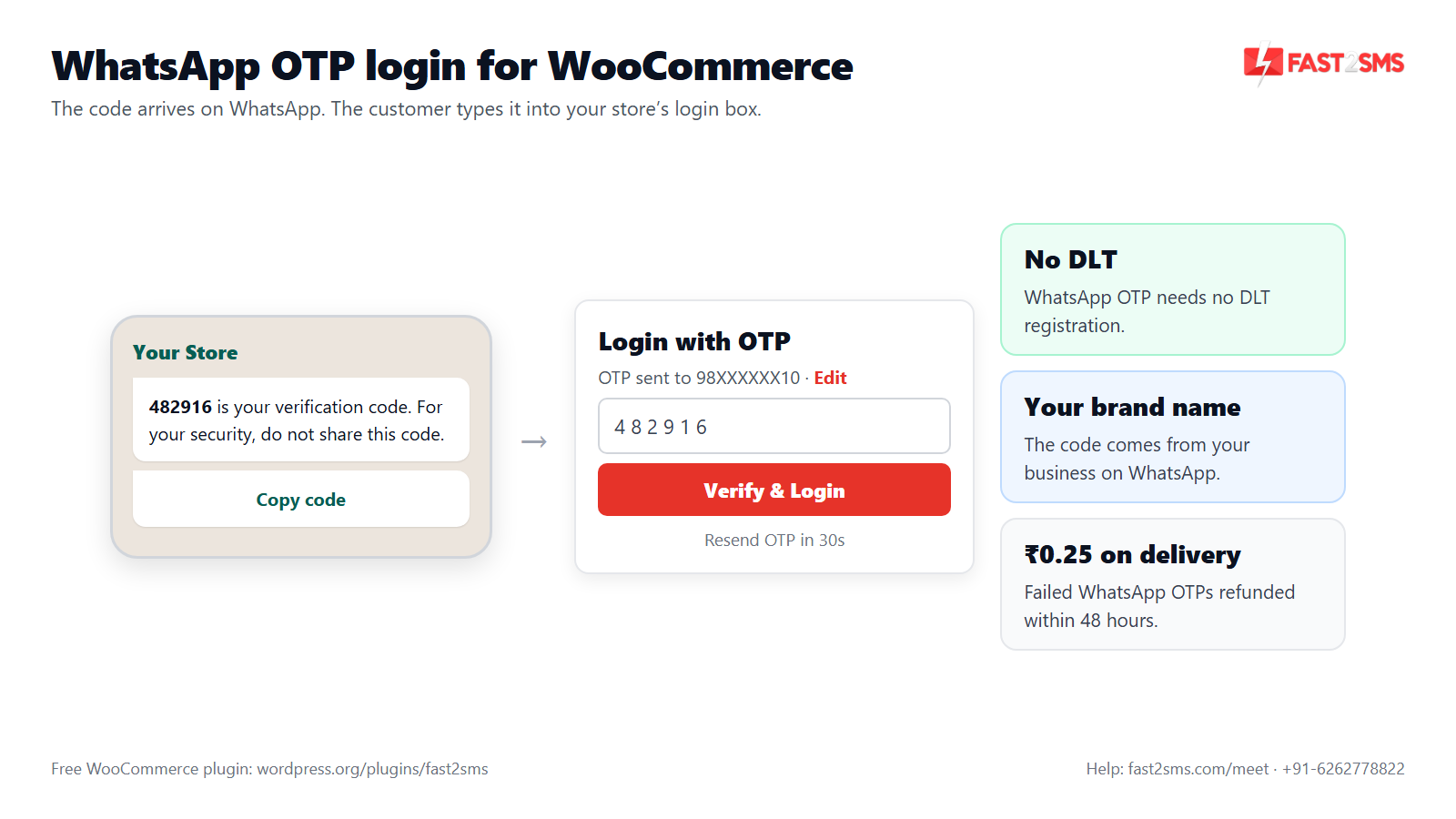
Why WhatsApp OTP login works well for WooCommerce stores in India
No DLT paperwork. SMS in India needs a registered entity, a 6-letter header, an approved template and a correct PE-TM chain. WhatsApp OTP needs none of that. For a new store, or a store stuck waiting on DLT approvals, this is the fastest way to get OTP login live.
Your brand name on the message. The OTP arrives on WhatsApp from your business with your brand name, in the same app your customers already open all day. A familiar sender makes people more comfortable typing the code, and it is easy to find in their chat list.
You pay on delivery. A WhatsApp authentication OTP costs ₹0.25 through Fast2SMS and is billed only when it is delivered. If a WhatsApp message fails, the charge is refunded to your wallet within 48 hours. The plugin itself is free.
A safety net. Not every customer uses WhatsApp on the number they type. With Smart OTP you can add automatic SMS fallback, so those customers still get the code. For a deeper look at the WhatsApp side, see our WhatsApp OTP for WordPress guide.
| WhatsApp OTP | SMS OTP | |
|---|---|---|
| DLT registration | Not needed | Needed: entity, 6-letter header, OTP template, PE-TM chain |
| Sender the customer sees | Your brand name on WhatsApp | Your 6-letter header |
| Price | ₹0.25 per delivered message | Your DLT SMS rate |
| Failed messages | Refunded within 48 hours | As per your SMS plan |
| Customer needs | WhatsApp on that number | Any mobile phone |
| Role in Smart OTP | Usually the first channel | Usually the fallback |
Smart OTP: WhatsApp OTP first, SMS fallback for WooCommerce
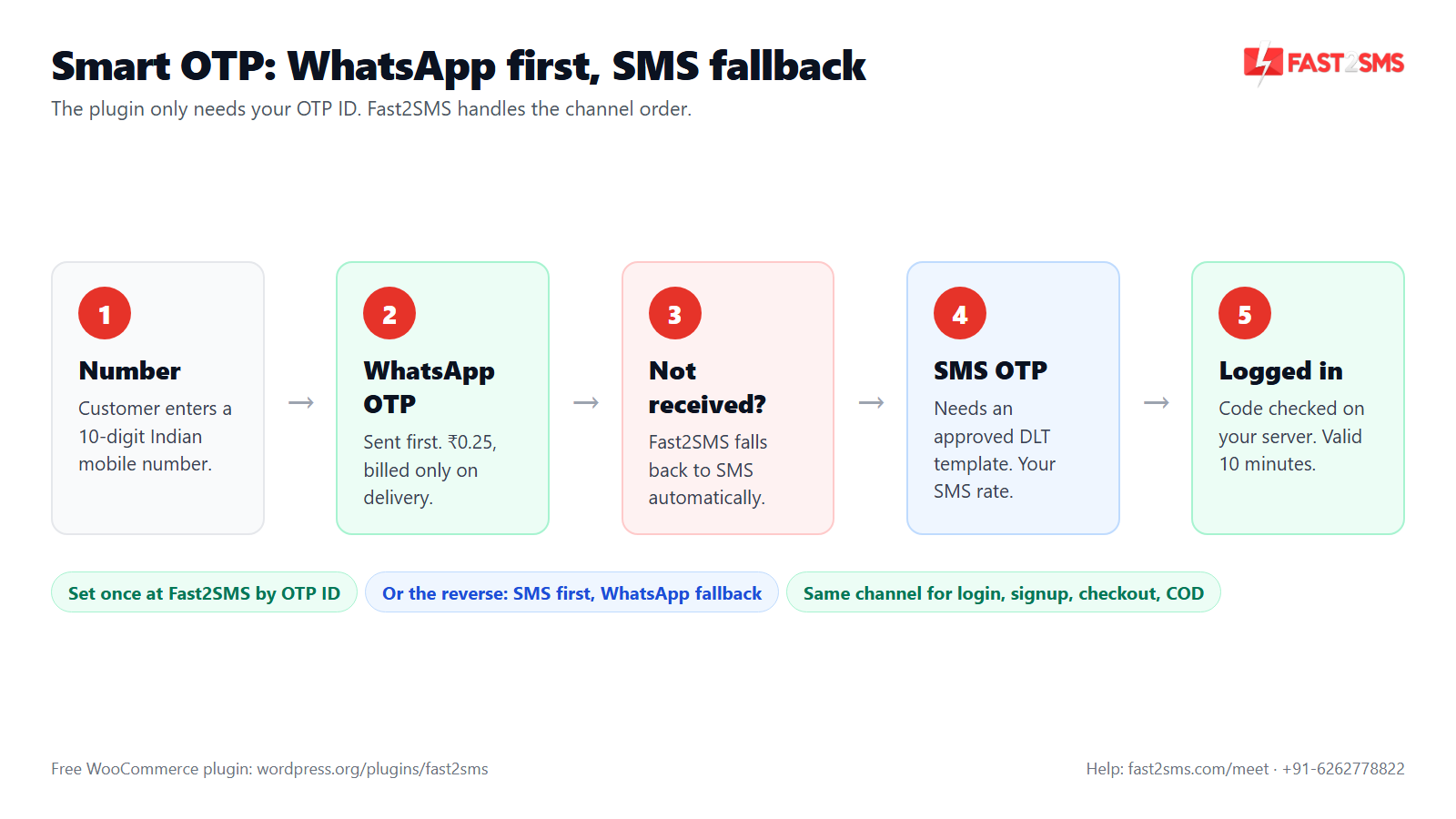
Smart OTP is how Fast2SMS decides which channel carries each code. You set it up once in your Fast2SMS account and get an OTP ID. The plugin only needs that ID. It does not need separate WhatsApp and SMS settings.
The common setup for WooCommerce is WhatsApp first with automatic SMS fallback. The customer gets the code on WhatsApp, and if that does not work out, Fast2SMS sends it by SMS instead. You can also set it the other way round: SMS first with WhatsApp as the fallback. That suits stores whose DLT setup is already solid. Keep in mind that the SMS side, whichever order you choose, still needs an approved DLT template. Our Smart OTP guide shows the setup screens.
How to set up the WooCommerce WhatsApp OTP login plugin
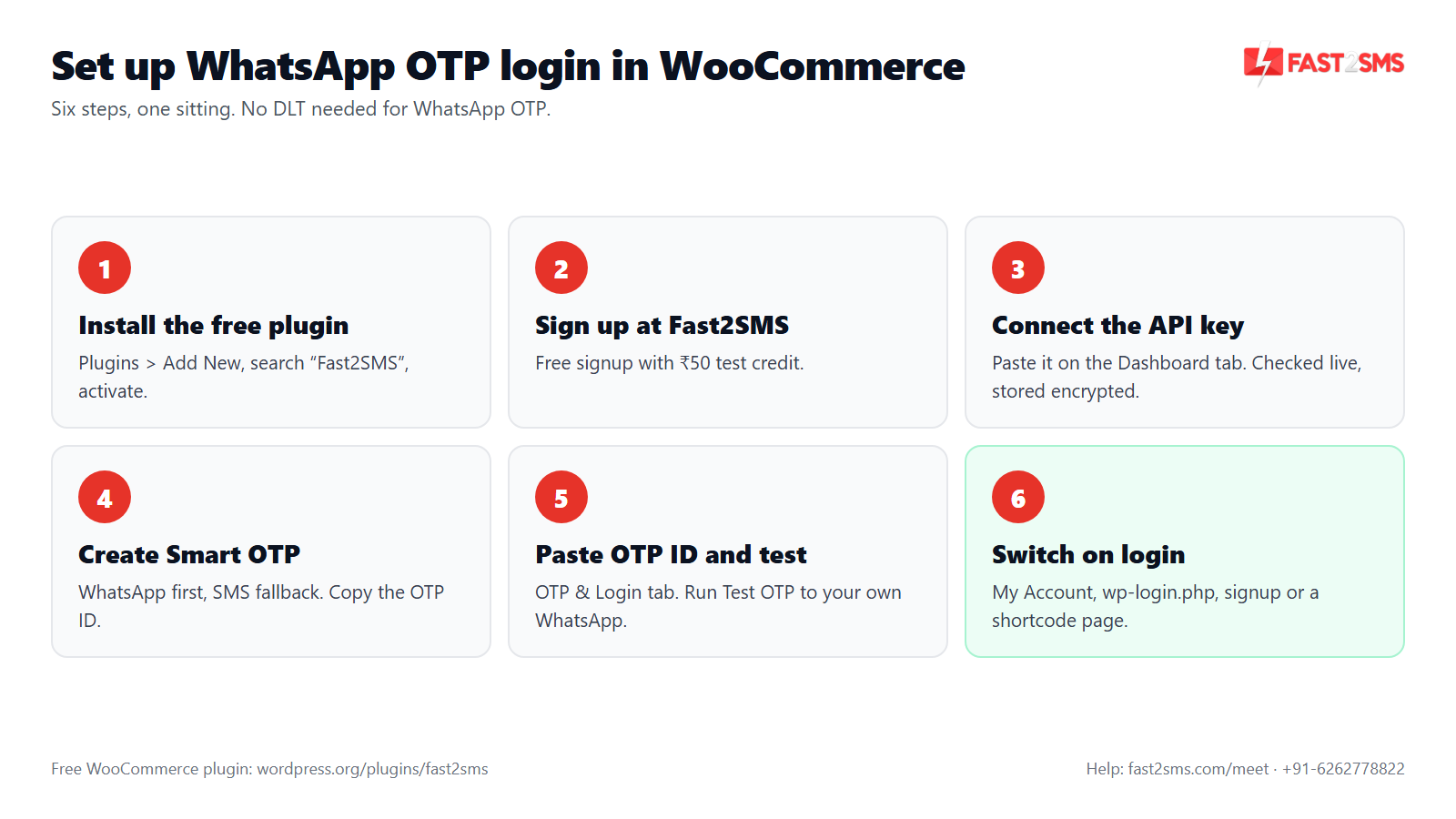
Here is the order we follow when we set this up with store owners. It usually takes one sitting.
- Install the free plugin. In WordPress go to Plugins > Add New, search “Fast2SMS”, then install and activate Fast2SMS – OTP Login & SMS Notifications.
- Create your Fast2SMS account. Signup is free and comes with ₹50 test credit.
- Connect the API key. Copy your API key from Fast2SMS and paste it on the plugin’s Dashboard tab. The plugin checks it live, stores it encrypted and shows your wallet balance.
- Set up Smart OTP. In your Fast2SMS account, create a Smart OTP with WhatsApp first and SMS fallback, and copy the OTP ID. The Fast2SMS docs have the details.
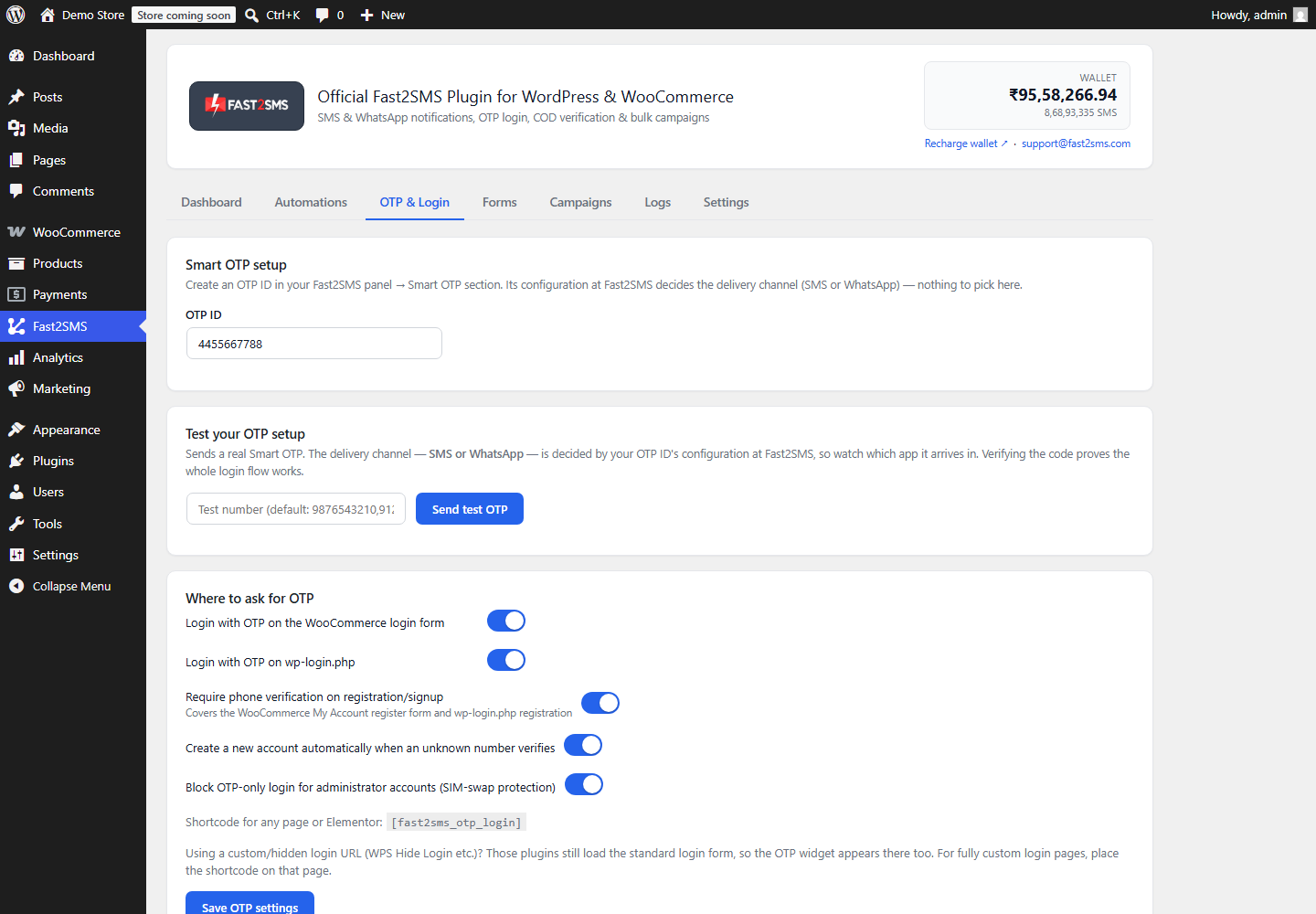
- Paste the OTP ID. Go to WP Admin > Fast2SMS > OTP & Login and enter the OTP ID.
- Run Test OTP. Send a real code to your own WhatsApp and verify it from the admin.
- Switch on the login spots. Turn on Login with OTP for the WooCommerce login form, and any other places you want, like registration or wp-login.php.
Where the WhatsApp OTP login box appears in WooCommerce
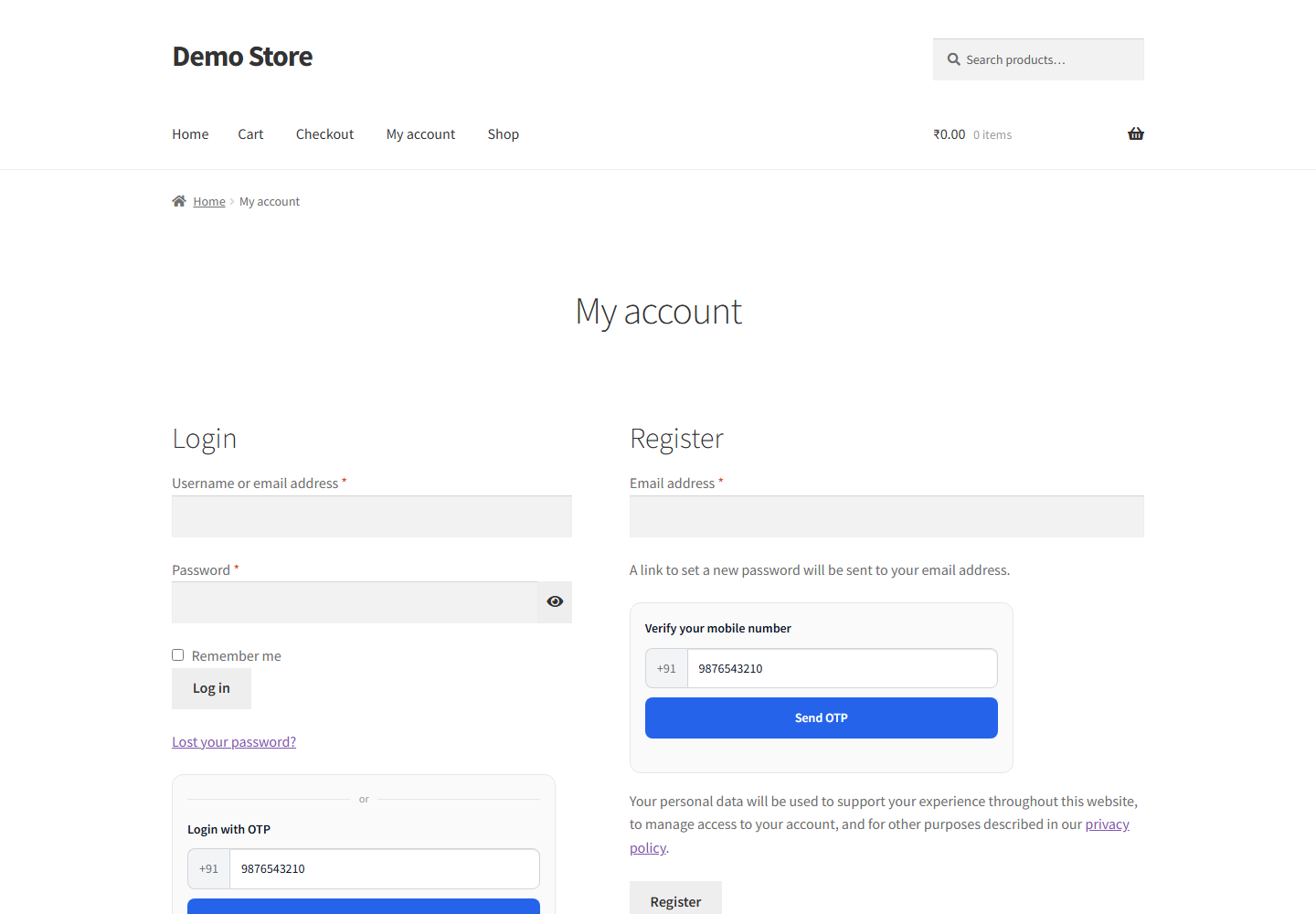
Once your OTP ID is in, you choose where customers see the OTP box. Every spot uses the same Smart OTP channel, so WhatsApp first applies everywhere.
- WooCommerce My Account login. Login with OTP on the standard WooCommerce login form.
- wp-login.php. Login with OTP on the default WordPress login page, if your store uses it.
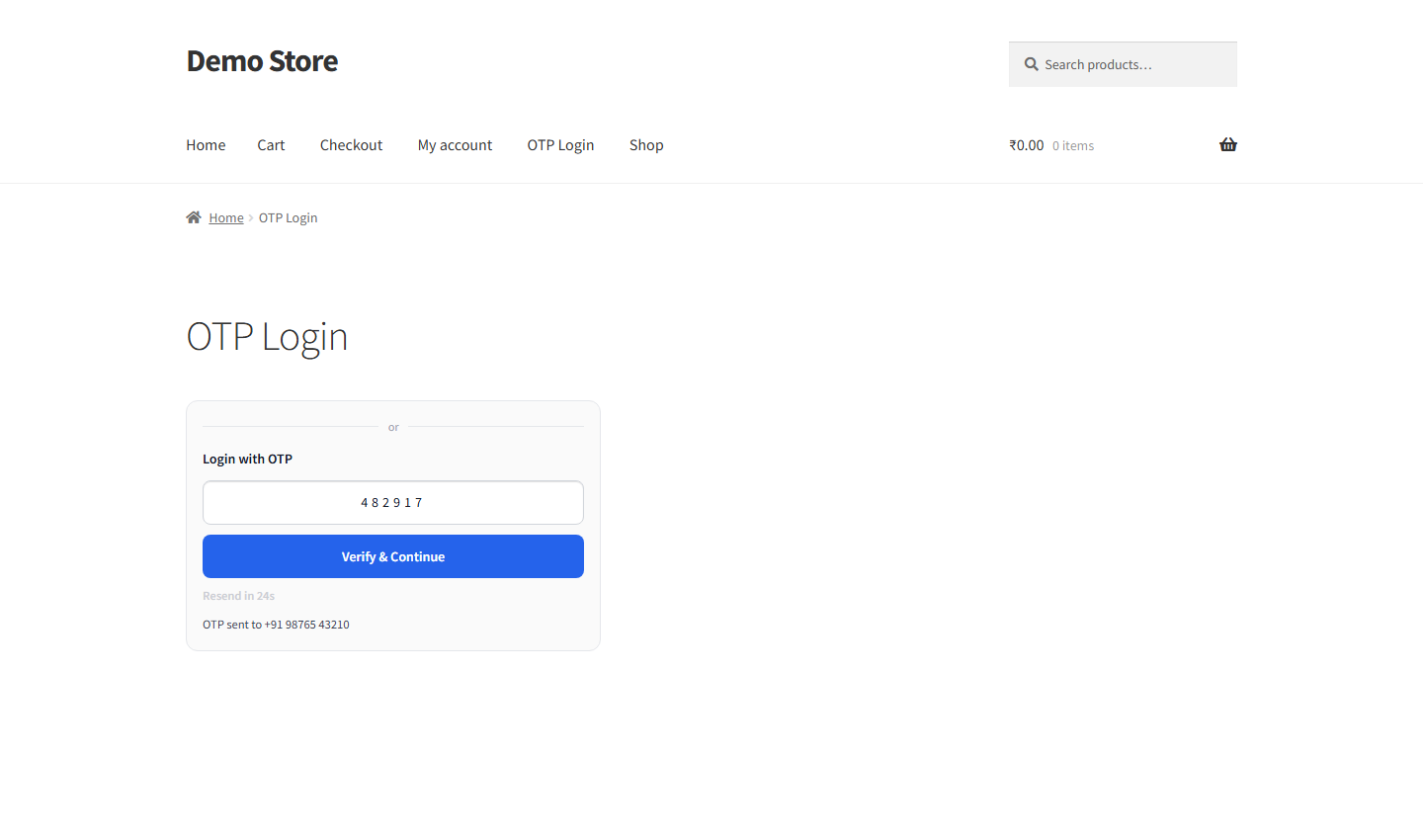
- Any page. Add
[fast2sms_otp_login]to show the OTP login box on a custom page. - Registration. Phone verification on signup, plus auto account creation for new numbers.
- Checkout. Checkout OTP verification of the billing mobile, on the classic (shortcode) checkout only, not the block checkout.
- COD confirmation. A one-tap link after a COD order where the buyer confirms with OTP.
The customer types a 10-digit mobile number and sees “OTP sent to 98XXXXXX10”, an Edit link to fix the number, and a resend countdown. You can style the box with a light or dark theme, an accent colour, a corner style and a custom title, with a live preview. Our WooCommerce OTP login guide shows each screen in more detail.
WhatsApp OTP login security in WooCommerce
WhatsApp or SMS, the same server-side limits apply to every OTP the plugin sends. You do not configure them, and they cannot be bypassed from the browser.
- Up to 3 OTP sends per mobile number in 10 minutes.
- Up to 10 OTP sends per IP address in 10 minutes.
- Up to 5 verify attempts per OTP.
- Each OTP expires in 10 minutes.
- After a correct OTP, a single-use verification token is valid for 15 minutes.
- Optional block on OTP-only login for administrators, to protect against SIM swap.
- API key, phone numbers and message variables encrypted with AES-256-GCM; numbers masked in the admin.
What WooCommerce WhatsApp OTP login costs
The plugin is free. You pay Fast2SMS per message from your wallet. A WhatsApp OTP costs ₹0.25 and is billed only on delivery. So 1,000 delivered WhatsApp OTPs cost ₹250, and a failed WhatsApp OTP is refunded within 48 hours. If SMS fallback sends the code, that SMS is charged at your DLT SMS rate. For more examples, read our WooCommerce OTP cost guide.
Pricing: free WooCommerce plugin, pay only per message
- The plugin is free: no licence, no monthly fee, no setup fee.
- WhatsApp OTP and order updates: ₹0.25 per delivered message; failed WhatsApp messages are refunded within 48 hours.
- SMS: your DLT SMS rate per message.
- High volume? Rates are negotiable: call +91-6262778811, email [email protected] or book a free meeting.
- Free signup with ₹50 test credit.
Want WhatsApp OTP login live on your WooCommerce store today? Our team will set it up with you, free.
We will connect your API key, create Smart OTP with WhatsApp first and SMS fallback, and test login on your store with you. Schedule a free meeting, call +91-6262778822 or email [email protected].
Frequently asked questions
What is a WooCommerce WhatsApp OTP login plugin?
A WooCommerce WhatsApp OTP login plugin lets customers log in by typing their mobile number and a one-time code that arrives on WhatsApp, instead of using a password or waiting for an SMS. The Fast2SMS plugin does this for Indian stores. It also covers signup, checkout and COD confirmation with the same code flow.
Is there a free WhatsApp OTP plugin for WooCommerce?
Yes, Fast2SMS – OTP Login & SMS Notifications is free on WordPress.org, with no licence, setup fee or monthly fee, and it sends WhatsApp OTP for WooCommerce login through your own Fast2SMS account. You only pay ₹0.25 per delivered WhatsApp OTP from your wallet. Install it from Plugins > Add New.
How does WhatsApp OTP login work in WooCommerce?
The customer types their 10-digit mobile number on your login form, the plugin asks Fast2SMS to send a code, the code arrives on WhatsApp, and the customer types it back to log in. The whole check happens on your server. If you set SMS fallback, the code can come by SMS instead.
Does WhatsApp OTP for WooCommerce need DLT registration?
No, WhatsApp OTP does not need DLT registration, because DLT rules apply to SMS in India and not to WhatsApp messages, so you can start without a header or template approval. If you add SMS fallback, the SMS side does need DLT. Our DLT templates for WooCommerce guide helps there.
Will customers see my brand name on the WhatsApp OTP?
Yes, the WhatsApp OTP comes from your business with your brand name, so customers see a named sender in their WhatsApp instead of a short SMS header. That makes the code easy to trust and easy to find. To learn more about the WhatsApp Business side, read our WhatsApp Business API India FAQ.
How much does a WhatsApp OTP cost in WooCommerce?
A WhatsApp authentication OTP costs ₹0.25 per delivered message through Fast2SMS, and the plugin adds no fee on top, so 1,000 delivered OTPs cost ₹250 in total. You pay from your prepaid wallet. Resends are separate messages, so they are charged too.
Do I pay for WhatsApp OTPs that are not delivered?
No, WhatsApp messages are billed on delivery, and failed WhatsApp messages are refunded to your Fast2SMS wallet within 48 hours, so an OTP that never reached the customer does not cost you. If SMS fallback then sends the code, that SMS is charged at your DLT SMS rate.
What happens if the customer doesn’t have WhatsApp?
If your Smart OTP is set to WhatsApp first with automatic SMS fallback, a customer who does not get the WhatsApp message receives the code by SMS instead, without doing anything extra. Without fallback, they would not get a code. That is why we set up fallback on most stores.
How do I set WhatsApp first and SMS fallback for WooCommerce OTP?
You set the channel order in your Fast2SMS account when you create the Smart OTP, choosing WhatsApp as the first channel and SMS as the fallback, and then paste its OTP ID into the plugin. The plugin follows that order everywhere. Our Smart OTP guide shows the screens.
Can I use SMS first and WhatsApp as the fallback instead?
Yes, Smart OTP also works the other way round, with SMS as the first channel and WhatsApp as the automatic fallback, which suits stores whose DLT template, header and PE-TM chain are already approved and working. You change the order at Fast2SMS. The plugin setting stays the same OTP ID.
Do I need a DLT template if I use SMS fallback?
Yes, the SMS part of Smart OTP needs a registered entity, a 6-letter header, an approved OTP template in the Transactional category, and a PE-TM chain bound to a registered TMD. From 30th September, mismatched chains are blocked. WhatsApp OTP keeps working while you sort out DLT.
Where do I paste the OTP ID for WhatsApp OTP in WooCommerce?
Paste the OTP ID in WP Admin > Fast2SMS > OTP & Login, the tab that holds every OTP setting, including Test OTP, login spots, checkout OTP and the login box design. Most settings save automatically. Run Test OTP right after pasting to confirm the ID works.
How do I test WhatsApp OTP login before going live?
Use Test OTP in the OTP & Login tab, which sends a real OTP to the number you enter and lets you verify it from the admin, so you can check WhatsApp delivery before customers use it. Then log out and try the My Account login yourself. The ₹50 signup credit covers these tests.
Where does the WhatsApp OTP login box appear on my store?
You can show the OTP login box on the WooCommerce My Account login, on wp-login.php, on any page with the [fast2sms_otp_login] shortcode, and at registration for phone verification. Checkout OTP also works, on the classic (shortcode) checkout only. Each spot has its own switch in the OTP & Login tab.
Can I add WhatsApp OTP login to any page with a shortcode?
Yes, place the [fast2sms_otp_login] shortcode on any page or post, and the plugin shows its OTP login box there, sending codes through your Smart OTP with WhatsApp first. It uses the theme, colour and corner style you set. This is handy for a custom login or landing page.
Can new customers sign up with WhatsApp OTP?
Yes, turn on auto account creation for new numbers, and a first-time customer who verifies a WhatsApp OTP gets an account created for them automatically, with no separate signup form. You can also require phone verification on the registration form. Both use the same WhatsApp-first channel.
Can I use WhatsApp OTP at WooCommerce checkout?
Yes, checkout OTP verification sends the code through your Smart OTP, so WhatsApp first applies at checkout too, but it works only with the classic (shortcode) WooCommerce checkout, not the block checkout. It checks the billing mobile before payment. See our checkout OTP guide.
Can I confirm COD orders with WhatsApp OTP?
Yes, turn on COD order verification and send the “COD order placed” message on WhatsApp with the one-tap confirmation link, and the buyer confirms the order with an OTP on that page. The order is marked verified with a note. Our COD OTP verification guide has the full flow.
How long is a WhatsApp OTP valid on WooCommerce?
Each OTP expires 10 minutes after it is sent and allows up to 5 verify attempts, whether it went out on WhatsApp or SMS, and these limits run on the server. After a correct code, a single-use verification token stays valid for 15 minutes. After expiry, the customer simply requests a new code.
How many WhatsApp OTPs can one number request?
One mobile number can receive up to 3 OTPs in 10 minutes, and one IP address up to 10 OTPs in 10 minutes, which stops bots from draining your wallet with repeat requests. The resend countdown, set between 10 and 300 seconds, spaces requests further. Real customers rarely hit these limits.
Should WooCommerce admins log in with WhatsApp OTP?
We suggest not, and the plugin lets you block OTP-only login for administrators, so a SIM swap on an admin’s number cannot hand over your store. Admins keep their password login. Customers still use WhatsApp OTP login as normal.
Can I change the look of the WhatsApp OTP login box?
Yes, the OTP & Login tab lets you choose a light or dark theme, an accent colour, a corner style (sharp, rounded, soft or pill) and a custom title, with a live preview. Match it to your store’s colours. The checkout OTP box can have its own checkout-only style as well.
Can the customer change the number if they typed it wrong?
Yes, the OTP step shows the number masked, like “OTP sent to 98XXXXXX10”, with an Edit link right next to it, so the customer can correct the number and request a fresh code. Resend limits still apply. This one link saves a lot of “OTP not received” complaints.
Does WhatsApp OTP login work for customers outside India?
No, the plugin supports 10-digit Indian mobile numbers only, so customers with foreign numbers cannot get a WhatsApp or SMS OTP through it. It is built for Indian stores sending through Fast2SMS. If you sell mainly abroad, you will need another option for those buyers.
Can I also send WooCommerce order updates on WhatsApp with this plugin?
Yes, the same plugin works as a WooCommerce WhatsApp plugin for order updates, with automations for order placed, shipped, delivered, cancelled, refunds, abandoned cart and more, each on SMS, WhatsApp or both. WhatsApp utility messages cost ₹0.25 per delivered message. One wallet covers OTP and updates.
Is WhatsApp OTP delivery guaranteed?
No, no provider can guarantee OTP delivery, because it depends on the customer’s phone, internet and WhatsApp account, but you only pay for delivered WhatsApp messages and failed ones are refunded within 48 hours. SMS fallback gives a second route. The Logs tab shows the status of each message.
Why is my WooCommerce WhatsApp OTP not received?
Check the basics first: the OTP ID in the plugin, your wallet balance, the number the customer typed, and whether that number actually uses WhatsApp, since a number without WhatsApp is a common gap. SMS fallback covers that case. Our OTP not received guide goes through every cause.
Can I get a lower WhatsApp OTP rate for high volume?
Yes, rates are negotiable for high volume, so if your store sends many OTPs and order messages each month, contact Fast2SMS sales at +91-6262778811 or [email protected]. You can also book a free meeting. Bring your monthly OTP numbers from the Dashboard for a quicker quote.
Does WhatsApp OTP login work on a plain WordPress site too?
Yes, WhatsApp OTP login works on a plain WordPress site through wp-login.php, the [fast2sms_otp_login] shortcode and registration phone verification, even without WooCommerce installed. The WooCommerce parts, like checkout OTP and COD confirmation, switch on once WooCommerce is active. The settings stay the same.
Who can help me set up WhatsApp OTP on my WooCommerce store?
The Fast2SMS team can set it up with you for free on a call, and you can reach support at [email protected] or +91-6262778822. Book a slot at the free meeting link. For all other OTP questions, see our WooCommerce OTP plugin FAQ hub.
Start WhatsApp OTP login on your WooCommerce store
Install the free plugin, create a Smart OTP with WhatsApp first and SMS fallback, paste the OTP ID and run Test OTP. Then switch on Login with OTP on your My Account page. You can usually go live the same day, because WhatsApp OTP needs no DLT and you only pay ₹0.25 when a code is delivered.
Need help? Schedule a free meeting · [email protected] · +91-6262778822 · Sales and volume pricing: +91-6262778811