
Send Invoice PDFs on WhatsApp Automatically with Every Shopify Order
Customers ask for invoices. Marketplaces attach them automatically, and buyers expect the same from your Shopify store. Here is a feature no other Shopify SMS app offers: the free Fast2SMS app generates a clean PDF invoice for every order and attaches it to the customer’s WhatsApp message automatically. No invoice app, no extra cost, no manual work.
How it looks to your customer
The order confirmation arrives on WhatsApp with a document attached. They tap it and see a professional invoice: items, quantities, prices, discounts, taxes, totals, and the billing address. Saved in their WhatsApp forever, easy to find, easy to forward.
How to turn it on
- Install the free app and connect your Fast2SMS API key (full steps in the Fast2SMS Shopify app guide).
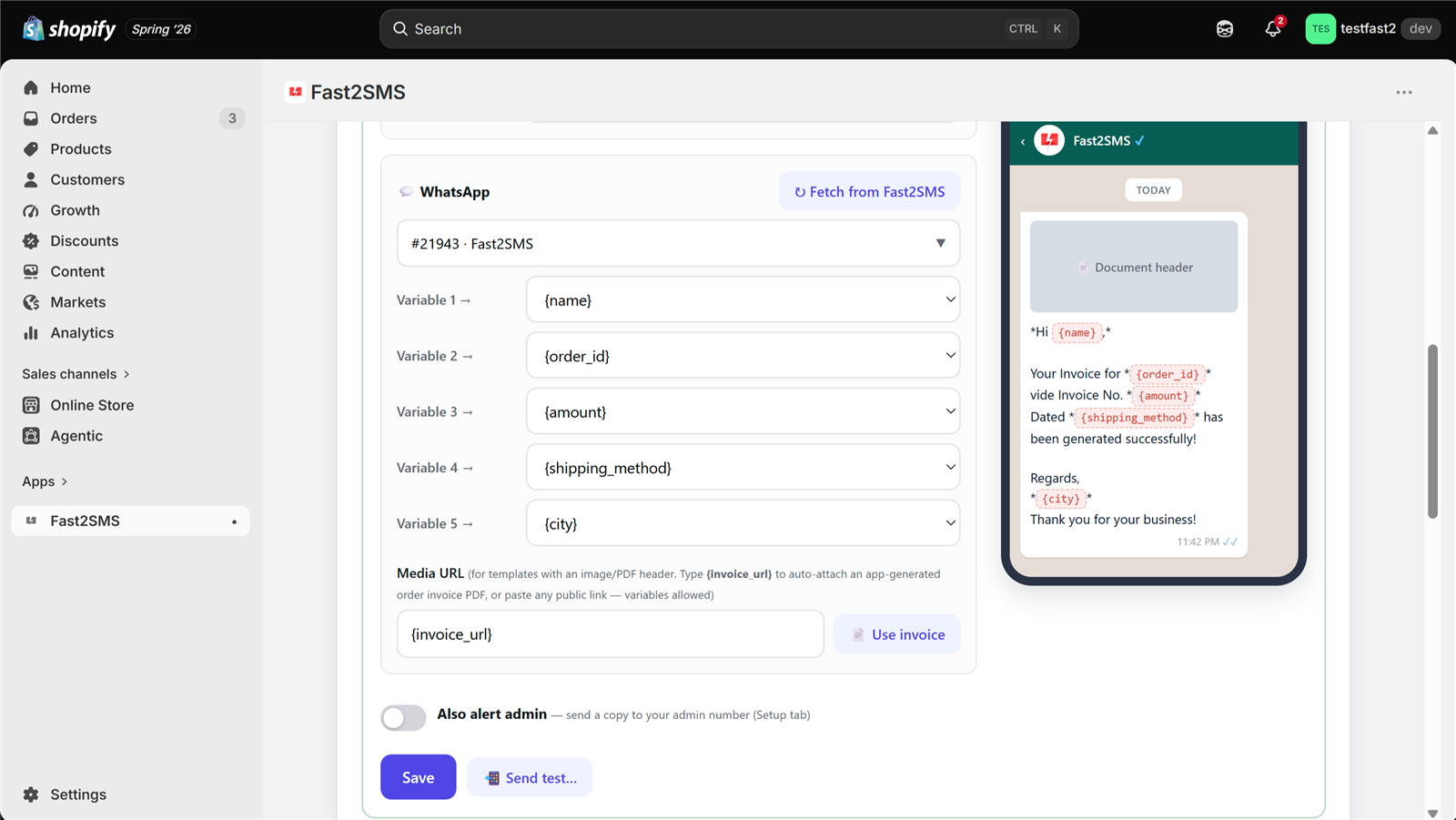
- Get a WhatsApp template with a document header approved in your Fast2SMS panel. Utility category fits order messages and costs INR 0.25 per message.
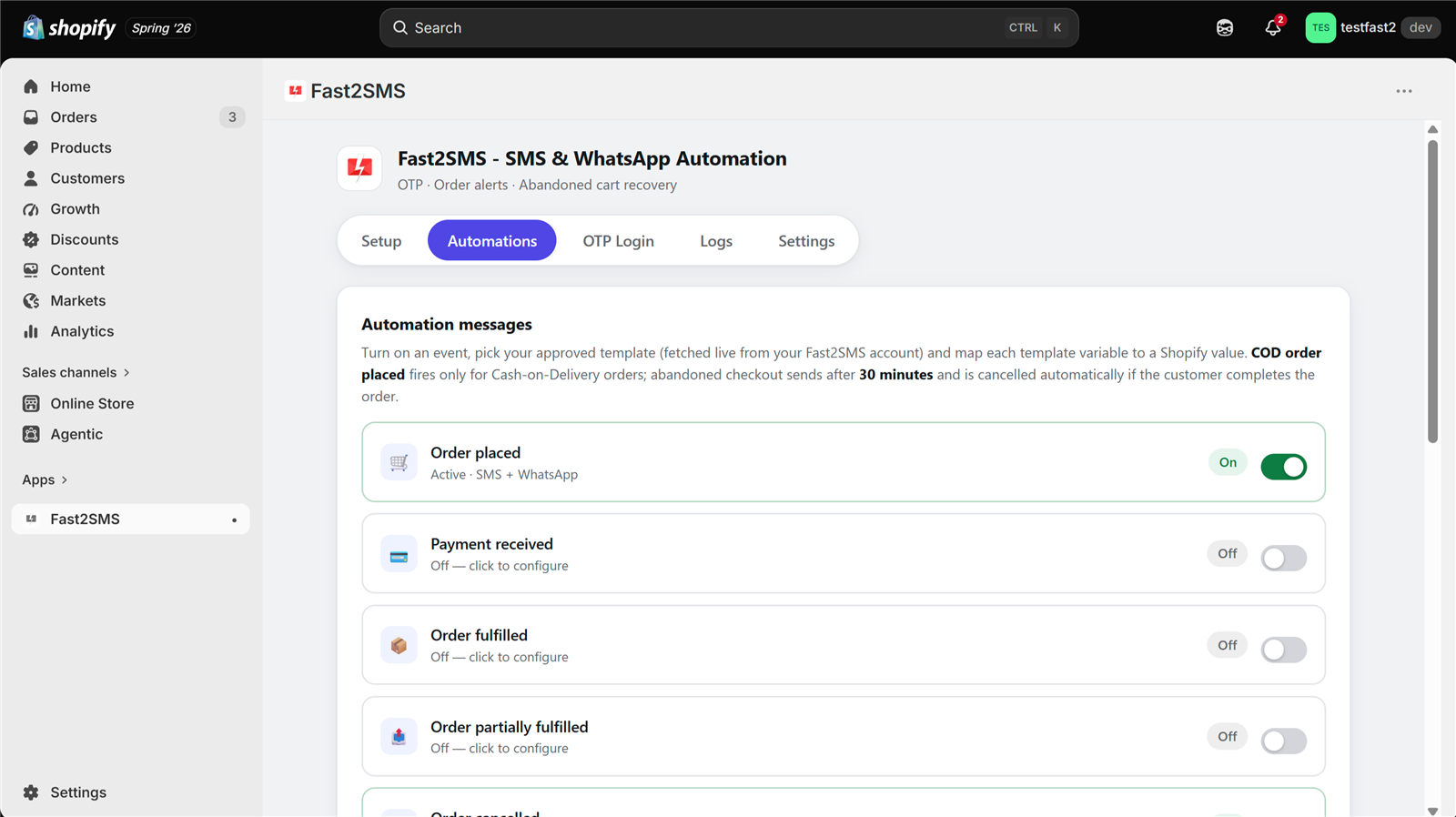
- Open the order event in the Automations tab, select your template, and type
{invoice_url}in the Media URL field. There is even a “Use invoice” button that fills it for you. - Send a test to your own number, check the PDF, save. Every order now carries its invoice.
What the PDF contains
- Order number and date
- Every item with quantity and price
- Discounts, taxes and totals
- Billing address
The app renders the PDF on the fly when the customer opens it. Nothing is stored as loose files on a server.
Private and self-cleaning
Each invoice link carries a secret token, so only the person with the message can open it. Links expire automatically after 90 days. Customer data in the app is encrypted at rest, and phone numbers are always masked in the interface.
Where invoice PDFs work
Any automation event with a WhatsApp document-header template can attach the invoice: order placed, payment received, fulfilled, delivered. Most stores attach it to Order placed or Payment received. It also pairs well with WhatsApp order notifications and COD confirmations, where a proper invoice adds trust to Cash on Delivery orders.
Frequently asked questions
Do I need a separate invoice app?
No. The Fast2SMS app generates the PDF itself. That is the point: one free app, no extra subscription.
What does it cost?
The app and the PDF generation are free. You pay only the normal WhatsApp message cost, INR 0.25 for a utility template, from your own wallet.
Can I change the file name the customer sees?
Yes. The document filename field supports variables, so the file can be named Invoice-{order_id}.pdf.
How long do invoice links work?
90 days. After that they expire automatically, which keeps customer data from living forever on the internet.
Does this work on SMS too?
SMS cannot carry attachments, so the PDF rides on WhatsApp templates with a document header. You can still send the same event on SMS as plain text alongside.
Which stores can use it?
Shopify stores with Indian (+91) customer numbers, like every Fast2SMS feature.
More Shopify SMS and WhatsApp guides
- Free SMS and WhatsApp app for Shopify: 100+ FAQs
- Shopify SMS alerts with DLT: 100+ FAQs
- 12 Shopify order events: what to send at each step
- Shopify DLT SMS templates (copy-paste)
- Shopify WhatsApp message templates (copy-paste)
- Bulk SMS and WhatsApp campaigns for Shopify customers
- Shopify COD verification methods compared
- Best SMS and WhatsApp apps for Shopify India
- Shopify SMS and WhatsApp cost
- Shopify app FAQ in Hindi
Attach your first invoice today
Install the free app, approve one document-header template, type {invoice_url}, and every order from today carries a professional invoice on WhatsApp.
Questions? Write to [email protected].