
Shopify WhatsApp Order Notifications for India: Complete Free Setup
Your customer just ordered. An email confirmation might get read tomorrow. A WhatsApp message gets read now. This guide sets up automatic WhatsApp order notifications on your Shopify store with the free Fast2SMS app, made for Indian stores and Indian numbers.
What your customers will receive
- Order confirmation the moment checkout completes, with your verified business name.
- Payment received, fulfilled, out for delivery, and delivered updates.
- Shipment messages with a live tracking link.
- Optional extras: refund updates, welcome messages, COD confirmations and abandoned cart reminders.
- Even the order invoice as a PDF, attached automatically.
What it costs
The app is free. There is no monthly fee for WhatsApp API access on Fast2SMS either. Order updates use utility templates at INR 0.25 per message, billed to your own Fast2SMS wallet. Failed messages are refunded automatically. No markup, because the app developer is Fast2SMS itself.
Step 1: Install the app and connect your key
Install from the Shopify App Store, then paste your Fast2SMS API key on the Setup tab. Need the key? It is in the Dev API section of your free Fast2SMS account.
Step 2: Connect WhatsApp on Fast2SMS
In your Fast2SMS panel, connect your WhatsApp Business number. Use a new number, or keep your existing WhatsApp Business app number working alongside the API. Free, no setup fee. Then get a utility template approved for order updates. The WhatsApp Business API guide walks through both.
Step 3: Turn on the events you want
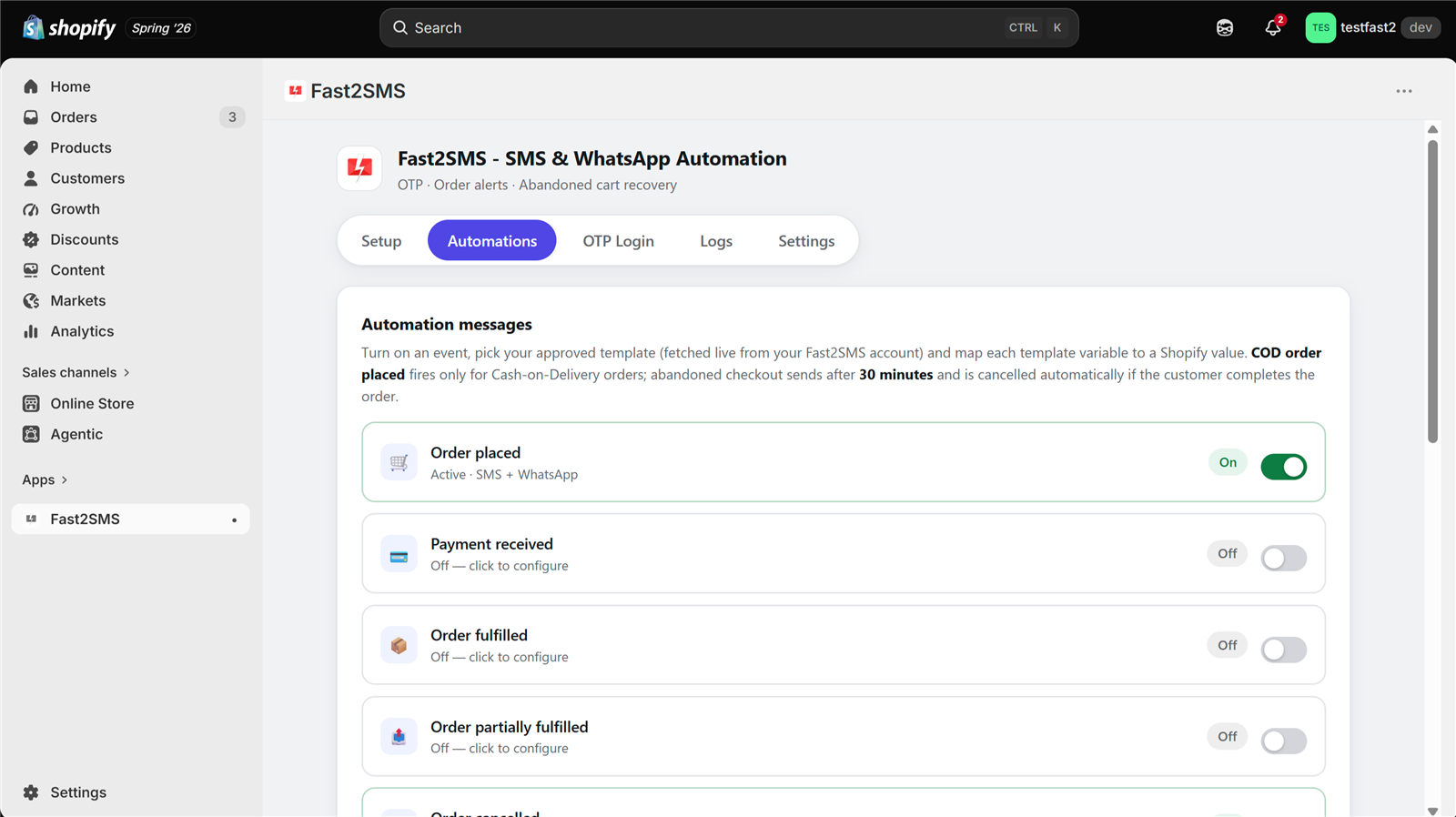
Open the Automations tab in the app. Each event has a switch. Start with Order placed, then add Out for delivery and Delivered, the two updates customers value most.
Step 4: Pick your template and preview
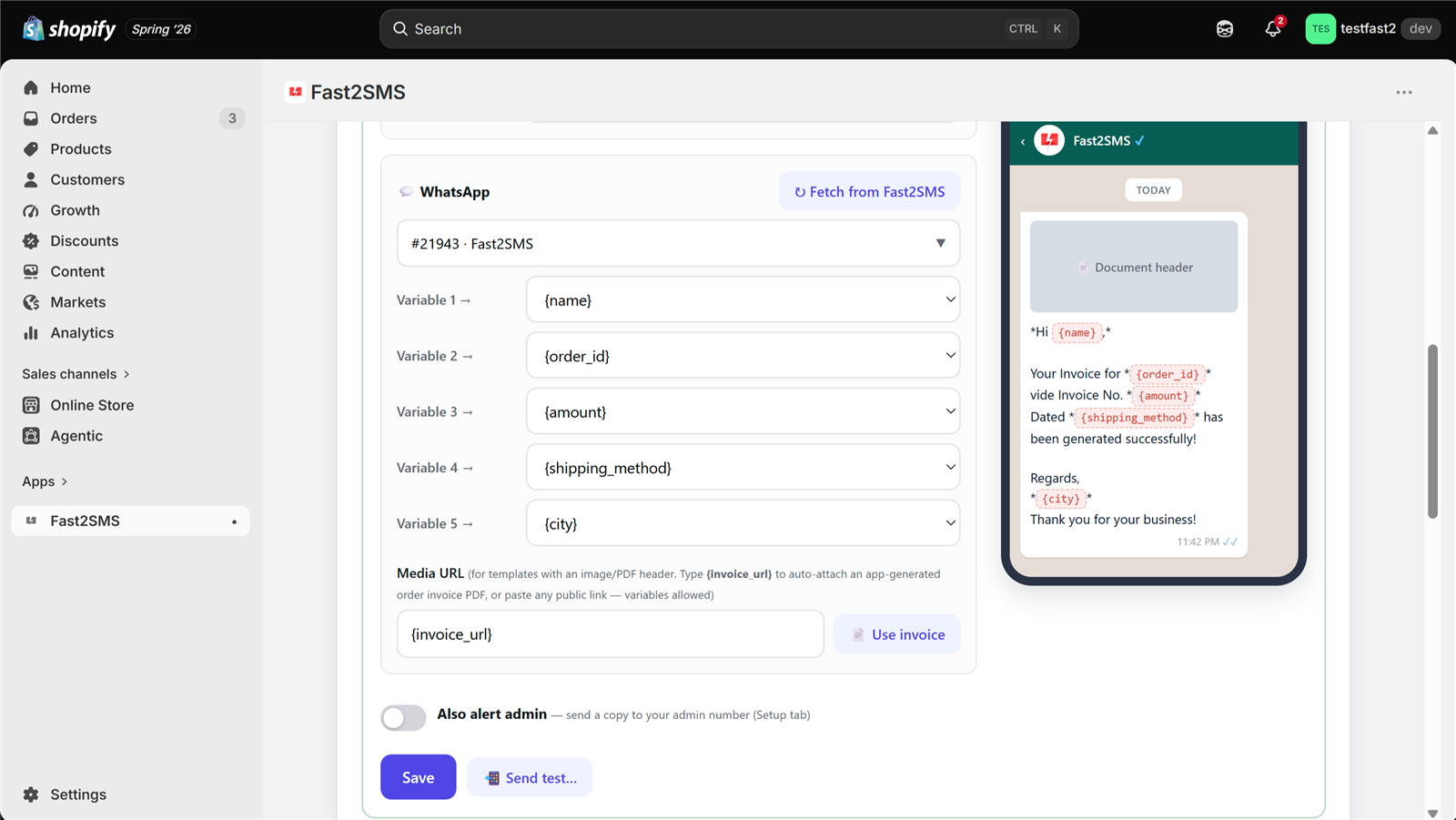
Click Fetch from Fast2SMS and your approved WhatsApp templates appear in a searchable picker. Map each variable with a dropdown: {name}, {order_id}, {amount} and 15 more. The live phone preview shows the exact message, with your verified WhatsApp business name, as you build it. Then hit Send test and check it on your own phone.
Step 5: Watch the logs
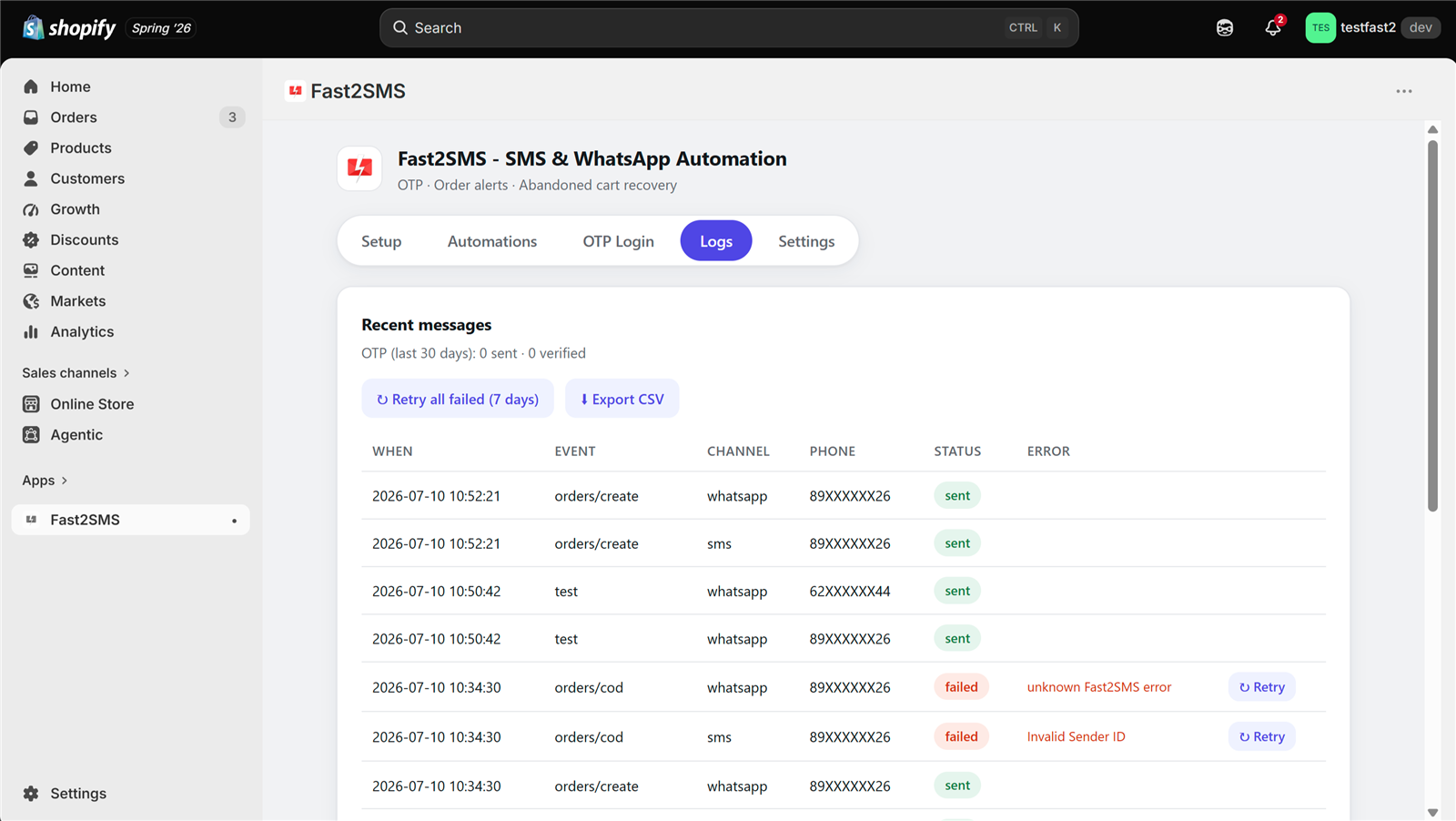
Orders start flowing and the Logs tab records every message: event, channel, masked number, status. Failed messages show the reason and retry with one click. Messages send within seconds of each order event.
Frequently asked questions
Is this free?
The app is free and WhatsApp API access has no monthly fee. You pay INR 0.25 per utility message from your own wallet, with automatic refunds for failed messages.
Do customers need to save my number?
No. Template messages reach any WhatsApp user, and your verified business name shows on every message.
Can I send SMS as well?
Yes. Every event can send SMS, WhatsApp, or both. SMS uses your approved DLT templates.
How fast do messages go out?
Within seconds of the order event.
Can I get a copy of each order on my own phone?
Yes. Turn on “Also alert admin” per event and add up to 10 team numbers in Settings.
Which stores can use this?
Shopify stores with Indian (+91) customer numbers. The complete feature tour is in the Fast2SMS Shopify app guide.
More Shopify SMS and WhatsApp guides
- Free SMS and WhatsApp app for Shopify: 100+ FAQs
- Shopify SMS alerts with DLT: 100+ FAQs
- 12 Shopify order events: what to send at each step
- Shopify DLT SMS templates (copy-paste)
- Shopify WhatsApp message templates (copy-paste)
- Bulk SMS and WhatsApp campaigns for Shopify customers
- Shopify COD verification methods compared
- Best SMS and WhatsApp apps for Shopify India
- Shopify SMS and WhatsApp cost
- Shopify app FAQ in Hindi
Send your first WhatsApp order update today
Install the free app, connect your account, flip one switch. Your next order confirms itself on WhatsApp.
Questions? Write to [email protected].