
Tally WhatsApp for Distributors and Wholesalers: Orders, Dispatch, Invoices and Collections
If you run a distribution or wholesale business on TallyPrime, most of your day goes into talking to dealers. Did the order reach? When will the goods come? Please send the bill again. How much do I owe? Tally WhatsApp for distributors answers all of these from inside Tally, using the free Fast2SMS plugin. You send dealer invoices on WhatsApp from Tally, along with order confirmations, dispatch updates, payment reminders, receipts and ledger confirmations.
This guide walks the full order-to-cash cycle the way a distributor or wholesaler actually works it: order, dispatch, invoice, credit follow-up, collection and month-end confirmation. For each step you will see which Tally voucher or report to use, which ready template it sends, and whether to send it one by one, in bulk or automatically.
Download Tally PluginSignup Now
Why WhatsApp from Tally fits distribution work
A retailer sends one bill to one walk-in customer. A distributor is different. You may have a few hundred dealers, retailers and sub-stockists, each on credit terms, each ordering several times a month, and each with a salesman who promises things on the phone. The paperwork is heavy and most of the follow-up happens on WhatsApp anyway, from someone’s personal phone.
Moving that follow-up into Tally fixes three problems at once:
- Every message matches your books. The amount, bill number and balance come straight from the voucher, so there is no typing mistake between Tally and the phone.
- Nothing depends on one person’s phone. The plugin sends through the official WhatsApp Business API. There is no QR code to scan, no phone that must stay on, and no ban risk from WhatsApp Web automation. If your accountant is on leave, anyone with Tally access can send.
- Dealers get proof. Invoices go as a PDF document inside the message. Receipts confirm payments. Ledger confirmations close the month with a record both sides can see.
The free WhatsApp plugin for Tally has no licence fee, no renewal and no monthly charge. You pay only ₹0.25 per delivered WhatsApp utility message from your Fast2SMS wallet. The main Tally WhatsApp and SMS plugin guide covers the full feature list.
The full order-to-cash flow on WhatsApp
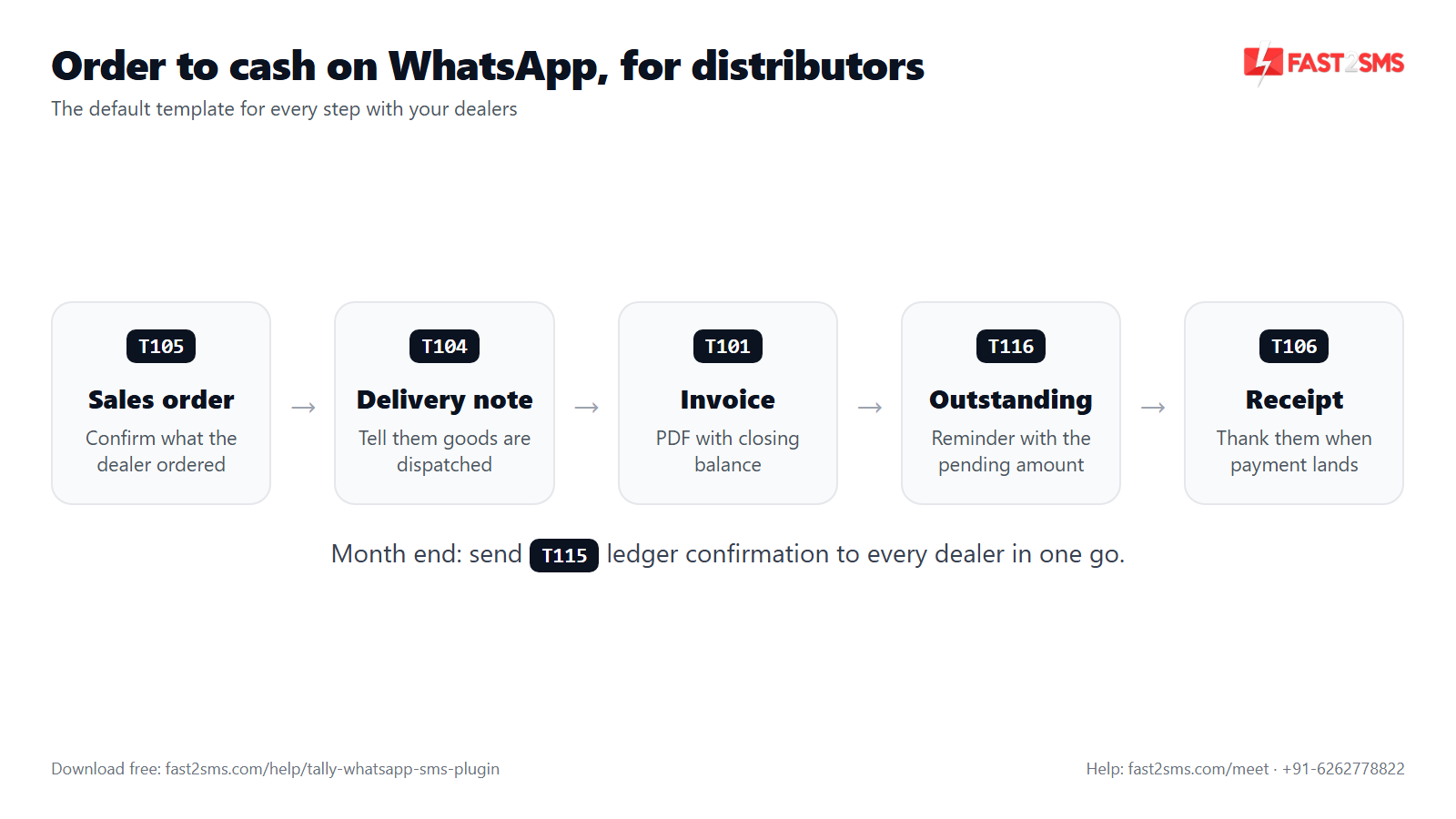
Here is the whole cycle in one table. Each row is a stage your dealer cares about, the Tally screen you use, and the default template that goes out.
| Stage | Where in Tally | Default template | Best way to send |
|---|---|---|---|
| 1. Order confirmed | Sales Order voucher | T105 Sales order | Auto-send on save |
| 2. Goods dispatched | Delivery Note voucher | T104 Delivery note | Auto-send on save |
| 3. Invoice raised | Sales voucher or sales register | T101 Sales with closing balance or T103 Sales with order details | Auto-send, button, or bulk at day end |
| 4. Payment due | Ledger outstanding, or Statement of Account > Outstanding > Group > Debtors | T116 Ledger outstanding | Bulk, weekly or on a fixed day |
| 5. Payment received | Receipt voucher | T106 Bank receipt or T107 Cash receipt | Auto-send on save |
| 6. Month or quarter closed | Ledger vouchers of the dealer | T115 Ledger confirmation (T114 for the full ledger) | Manual per dealer at period end |
Two more templates are handy on the side: T112 for credit notes (returns, expiry, rate difference, scheme discounts) and T110 for purchase orders you place with the company or principal you distribute for.
Set up once for all your dealers
The setup is the same as for any business. What changes for a distributor is scale, mostly the number of dealer mobile numbers you need in Tally.
- Load the plugin. Use the Tally WhatsApp plugin free download folder to get the .TCP file (the tally whatsapp tdl). Copy it into the TallyPrime folder as a Local TDL, or upload it to Tally.NET as an Account TDL if several branches share the data.
- Enable the modules. Press F1: Help > TDLs & Add-ons > F6: Add-On Features and set WhatsApp (and SMS if you like) to Yes. Only the administrator can do this. The Fast2SMS.com menu then appears on the Gateway of Tally.
- Paste the API key. Sign up free on Fast2SMS, copy the API key from the Dev API section and paste it into the plugin. You get ₹50 free test credit to try it.
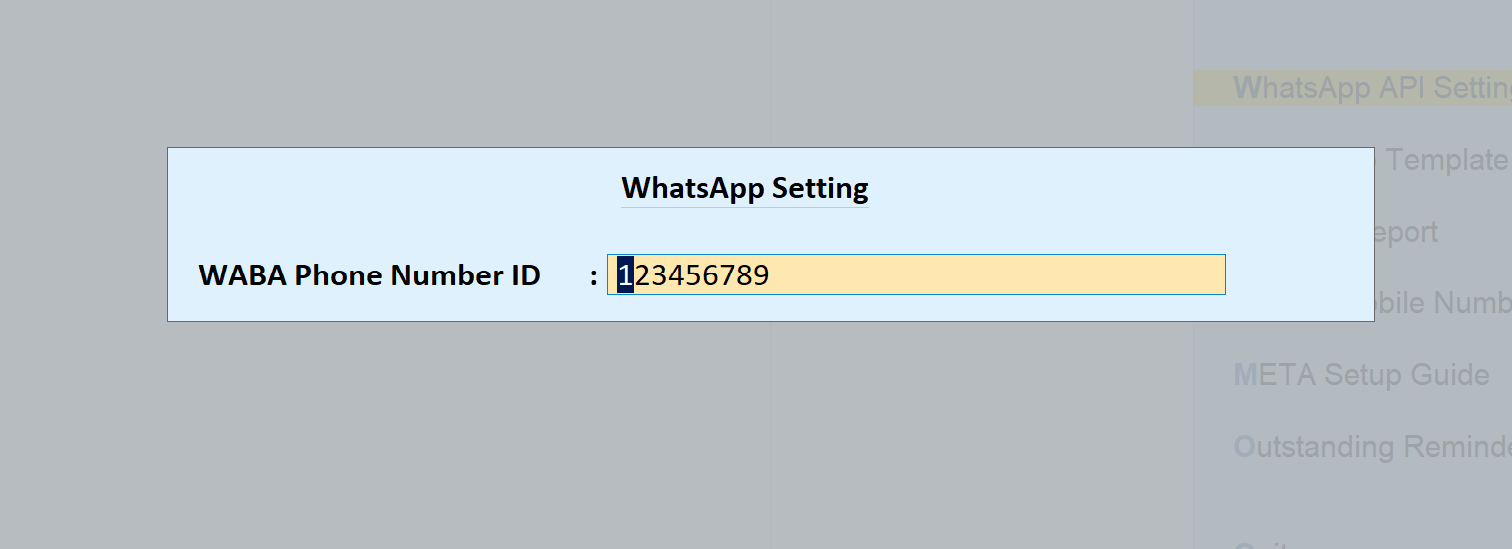
- Fill the default templates. Enter 123456789 and T101 to T120 as shown later in this article.
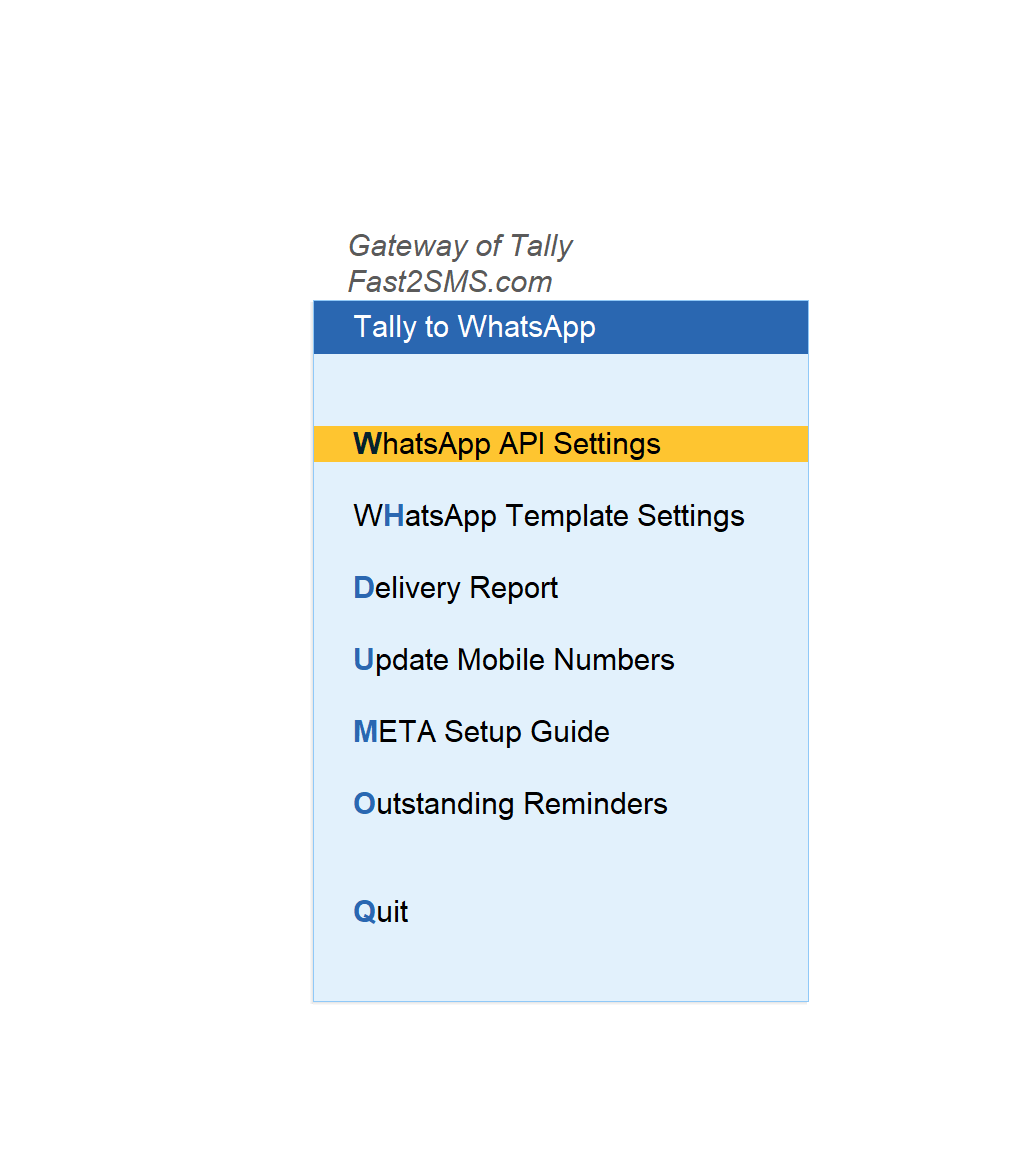
- Load dealer mobile numbers in bulk. Typing hundreds of numbers one ledger at a time is not practical. Go to Gateway of Tally > Fast2SMS.com > WhatsApp Module > Update Mobile Numbers > Sundry Debtors to fill them in a list, or use Import Mobile Numbers and the sample Excel file the plugin gives you.
Clean the dealer list while you import. Use the number the dealer actually reads on WhatsApp, usually the owner’s or the purchase person’s mobile, not the shop landline. For a detailed install walk-through, read Tally WhatsApp integration step by step.
Step 1: Confirm the order on WhatsApp (T105)
Orders reach a distributor from everywhere: salesman visits, phone calls, dealer WhatsApp messages. When the order is entered in Tally as a Sales Order, the dealer should know you have it. That one message saves a surprising number of follow-up calls.
Open Gateway of Tally > Alter > Voucher Types > Sales Order and look for the Fast2SMS – WhatsApp Settings block. Set Send WhatsApp after Voucher Save to Yes. From then on, every sales order you save sends the T105 sales order template to the dealer’s number.
Keep Send WhatsApp after Alter Voucher at No for sales orders. Orders get edited often (a quantity cut, an item out of stock), and you do not want the dealer getting a new message for every small change. If the change matters, send the updated order once with the button on the voucher.
Step 2: Send the dispatch update with the delivery note (T104)
“When will the goods reach?” is the second most common dealer call. If your godown makes a Delivery Note when the vehicle is loaded, that is the perfect trigger for a dispatch message.
Switch on Send WhatsApp after Voucher Save in the Delivery Note voucher type, the same way as the sales order. The T104 delivery note template goes out when the delivery note is saved, so the dealer knows the goods are on the way and can plan to receive them.
If you do not use delivery notes and bill directly, skip this step. The sales invoice can go with T103 Sales with order details, which links the bill to the order the dealer placed.
Step 3: Send the dealer invoice on WhatsApp from Tally (T101 / T103)
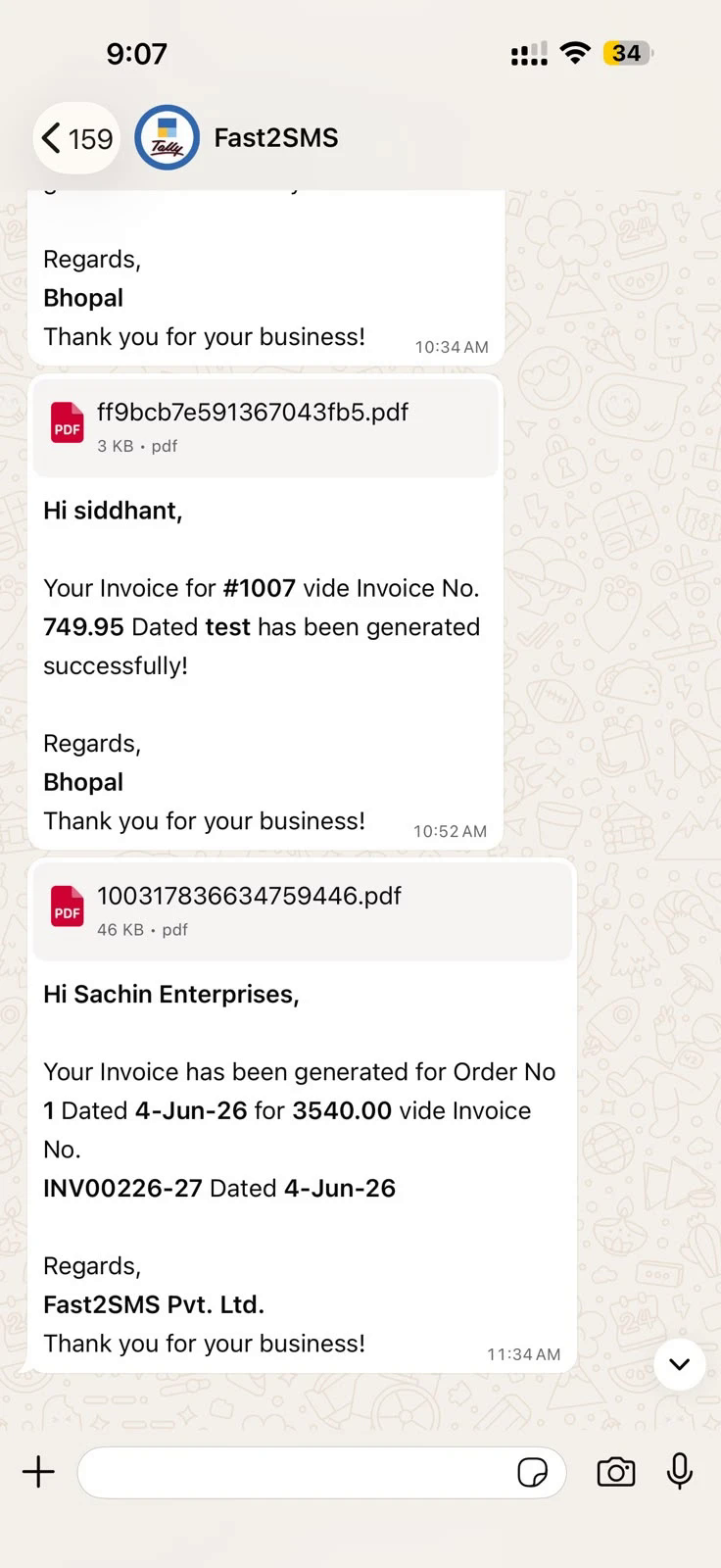
This is the step most people start with, and the reason they search for how to send invoice on WhatsApp from Tally. The dealer receives an approved template message with the bill number, date and amount, and the invoice PDF attached as a document.
Which template to use:
- T101 Sales with closing balance is the best default for credit dealers. Every bill also reminds them of their total dues, which quietly helps collection.
- T103 Sales with order details suits bills raised against a sales order. On the sales voucher it is the L: WhatsApp With Order Details button.
- T102 Sales without closing balance is for cash dealers or cases where you do not want the balance shown. In the voucher type you can also set Exclude Closing Balance in WhatsApp to Yes.
Three ways to send:
- Button on the voucher: press W: WhatsApp Simple Sales or L: WhatsApp With Order Details. The Message Details window shows the mobile number, the values and the full preview, and asks Accept? before sending.
- Auto-send on save: set Send WhatsApp after Voucher Save to Yes in the Sales voucher type. Good when your billing team is reliable and bills are final when saved.
- Bulk at day end: open the sales register, select the day’s invoices with Space and press W: Send Multiple WhatsApp. Popular with distributors who bill fast all day and check the bills once in the evening before sending.
Pick one main method per voucher type. If auto-send is on and someone also runs the evening bulk send over the same bills, dealers get every bill twice. More on invoice sending in send Tally invoices instantly on WhatsApp and, for GST bill details, Tally GST invoice on WhatsApp.
Step 4: Follow up credit with outstanding reminders (T116)
Credit is where a distributor’s money gets stuck. Dealers on 15, 30 or 45 day terms rarely pay on the due date unless someone reminds them, and your salesmen would rather sell than chase payments. WhatsApp reminders from Tally do the polite chasing for you, with the exact pending bills from your books.
One dealer at a time: open the dealer’s outstanding (the Ledger Voucher Outstanding screen with pending bills) and press W: Send WhatsApp Message. The dealer gets the T116 ledger outstanding template with their pending amount. Use this after a salesman visit or when a dealer says “send me my dues”.
All dealers at once: go to Gateway of Tally > Statement of Account > Outstanding > Group > Debtors. You see every dealer with their pending bills. Select the ones you want with Space (or select all) and press W: Send Multiple WhatsApp. This is your weekly or month-end collection run in one keystroke.
Practical tips from distributors who do this well:
- Pick a fixed day for bulk reminders, for example every Monday morning. Dealers get used to it and plan payments.
- Do not remind dealers whose bills are not yet due. Select only overdue parties from the list.
The Tally payment reminder guide goes deeper into reminder timing, including SMS reminders for dealers who are not on WhatsApp.
Step 5: Confirm every payment with a receipt (T106 / T107)
When a dealer pays by NEFT, cheque or UPI, they want to know you have booked it. When a salesman collects cash, the dealer wants proof that the money reached your office. A WhatsApp receipt from Tally gives both.
- T106 Bank receipt for payments into your bank account.
- T107 Cash receipt for cash collections.
Switch on Send WhatsApp after Voucher Save in the Receipt voucher type so the receipt goes out as soon as your accountant books the payment. For cash collection by salesmen, this is also a simple control: if the dealer paid cash and did not get a receipt message, they will call you, and you find out quickly that the cash has not reached the office.
Step 6: Close the month with ledger confirmation (T115)
Disputes with dealers usually come down to one thing: their books and yours do not match. A missed credit note, a scheme discount, a return not adjusted. The earlier you find the difference, the easier it is to fix.
Open the dealer’s ledger (the Ledger Vouchers screen) and you will see two buttons:
- J: Send Confirmation On WA sends the T115 ledger confirmation, asking the dealer to confirm the balance.
- L: Send Ledger On WA sends the T114 ledger voucher, the full account statement.
Send the ledger confirmation to your large dealers at month end and to all dealers at quarter end or year end. See sending Tally reports on WhatsApp for the other reports the plugin can send.
Three real distributor scenarios
FMCG distributor with a large retailer base
An FMCG distributor serves a few hundred kirana stores through five salesmen. Orders come in as sales orders every morning, bills are made in the afternoon and vans go out the next day. The owner sets auto-send on Sales Order and Receipt. Invoices go out in bulk from the sales register every evening, after the billing supervisor checks the day’s bills. Every Monday, the accountant runs Send Multiple WhatsApp on overdue debtors only. Dealers stop calling the office for bill copies because every bill is already in their WhatsApp.
Pharma stockist with chemists on short credit
A pharma stockist supplies chemists and small hospitals on short credit. Bills change often because of batch and expiry corrections. The stockist keeps sales invoice sending manual with the preview, so every bill is checked before it leaves. Returns and expiry adjustments go as credit notes with T112, so chemists see the adjustment the same day. Outstanding reminders go twice a month. Ledger confirmations go to every chemist at quarter end, which settles most small differences before they grow.
Hardware and building material wholesaler with big-ticket credit
A hardware wholesaler sells to contractors and retail shops with large bills and longer credit. Each bill is big, so the owner wants the dealer to see the running balance every time: T101 on auto-send for Sales. Delivery notes with T104 go as trucks leave, because contractors need to plan labour at the site. Reminders are sent dealer by dealer from the ledger outstanding screen after the owner reviews each account, not in one big batch. Month-end ledger confirmations go to the top dealers.
The common thread: automate the messages that are always correct when saved (orders, dispatch, receipts), and keep a human check on the ones that often change (invoices in some businesses, credit notes, reminders).
A simple month-end routine for distributors
- Check Tally to WhatsApp > Delivery Report for failed messages during the month and fix wrong dealer numbers in the ledgers.
- Run the bulk outstanding reminder from Statement of Account > Outstanding > Group > Debtors for all overdue dealers.
- Book the payments that come in, with receipts going out on auto-send.
- Send Send Confirmation On WA to your top dealers from their ledgers.
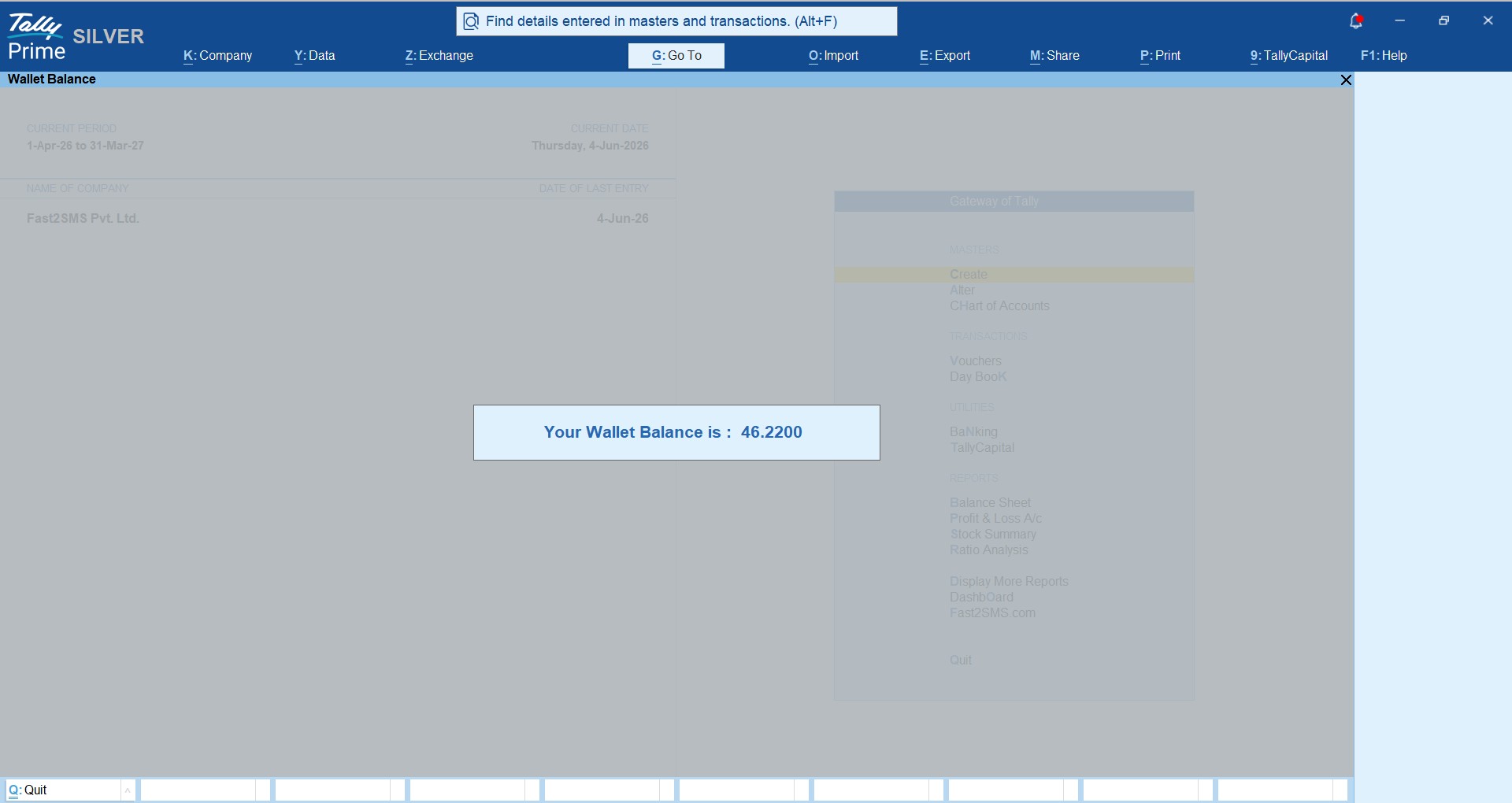
- Check your Fast2SMS wallet balance inside Tally and recharge before the next month’s billing starts.
What it costs a distributor
The plugin is free: no licence, no renewal, no setup fee, no monthly fee. You pay per delivered message at ₹0.25 for WhatsApp utility messages, and failed messages are refunded to your wallet within 48 hours.
Work out your own cost with simple maths. Say you have 200 active dealers and each gets one order confirmation, one invoice, one receipt and one reminder in a month. That is 800 messages, or ₹200 for the month. Your real number depends on how many bills and reminders you send.
For comparison, Tally’s own “TallyPrime with WhatsApp” is a paid subscription service, and paid third-party Tally WhatsApp TDLs commonly cost ₹3,000 to ₹6,000 plus GST, some with a yearly panel renewal. The Tally WhatsApp TDL price comparison has the full picture.
Start in two minutes with the ready default templates
Every stage of the dealer flow above, from T105 sales orders to T115 ledger confirmations, runs on these ready templates, so you can start sending to dealers the same day.
You do not need your own WhatsApp Business number or any Meta approval to start. Fast2SMS gives 20 ready, pre-approved templates on a default sender. After you paste your API key, make two entries:
- Tally to WhatsApp > WhatsApp API Settings: type 123456789 as the WABA Phone Number ID.
- Tally to WhatsApp > WhatsApp Template Settings: enter the message IDs T101 to T120 exactly as in the table below.
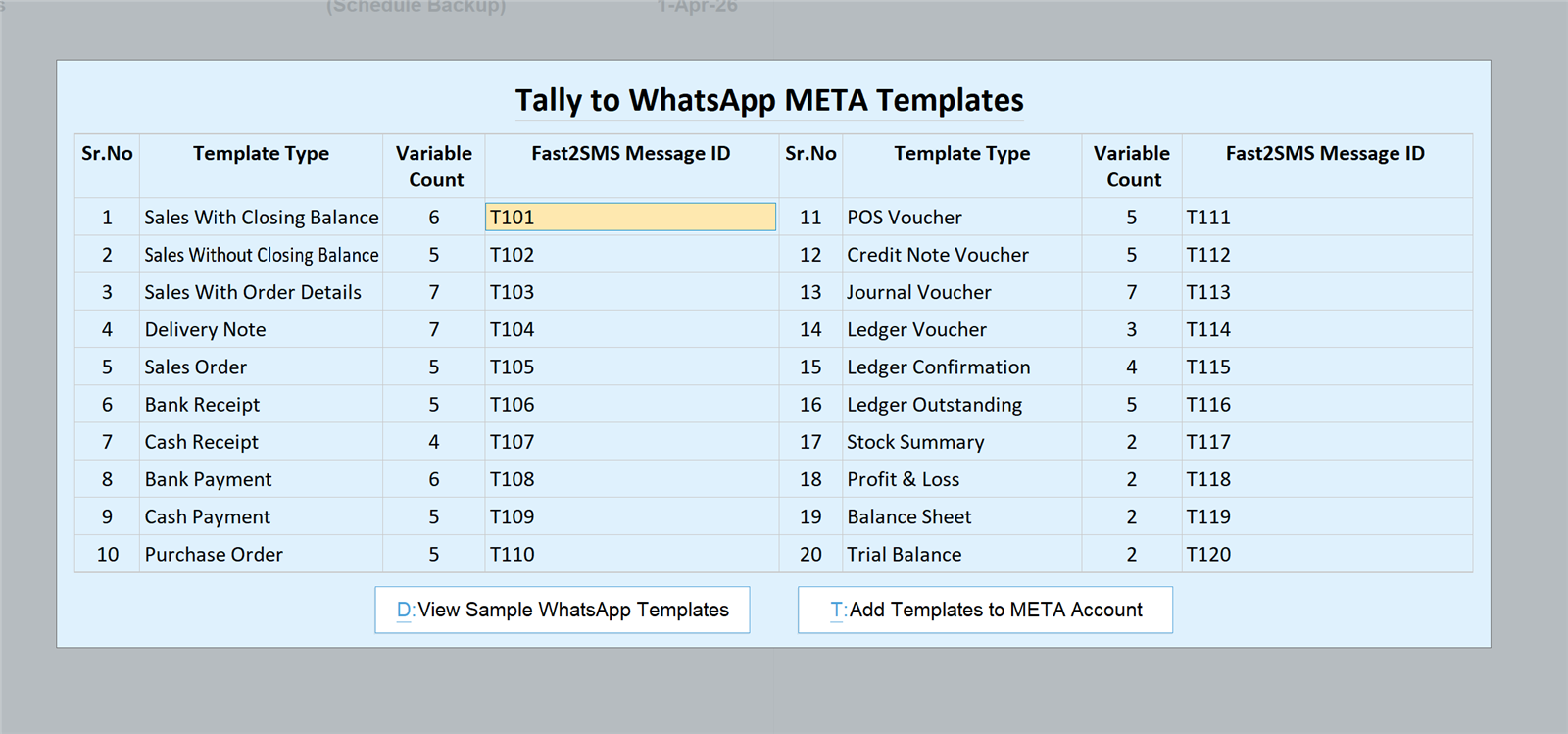
| Message ID | Use it for |
|---|---|
| T101 | Sales with closing balance |
| T102 | Sales without closing balance |
| T103 | Sales with order details |
| T104 | Delivery note |
| T105 | Sales order |
| T106 | Bank receipt |
| T107 | Cash receipt |
| T108 | Bank payment |
| T109 | Cash payment |
| T110 | Purchase order |
| T111 | POS voucher |
| T112 | Credit note |
| T113 | Journal voucher |
| T114 | Ledger voucher |
| T115 | Ledger confirmation |
| T116 | Ledger outstanding |
| T117 | Stock summary |
| T118 | Profit and loss |
| T119 | Balance sheet |
| T120 | Trial balance |
Save, and WhatsApp sending is live from the Fast2SMS default sender. Your business name appears inside every message.
Send from your own business number later
Many distributors later want dealers to see their own company number and name on every message. Connect your number to Meta through the embedded signup in the Fast2SMS panel, then press Add Templates to META Account in the plugin’s WhatsApp Template Settings to submit the same 20 templates on your account. Once they are approved, replace 123456789 with your own Phone Number ID and T101 to T120 with your approved message IDs. The full steps are in the Tally WhatsApp templates Meta approval guide.
Need help installing the Tally plugin? Our team will do it with you, free.
We can load the plugin, import your dealer mobile numbers from Excel and set up auto-send for sales orders, delivery notes and receipts with you on one call. Schedule a free meeting, call +91-6262778822 or email [email protected].
Frequently asked questions
Can distributors send dealer invoices on WhatsApp from Tally?
Yes, with the free Fast2SMS plugin you send dealer invoices on WhatsApp straight from TallyPrime, with the PDF attached. You can send one by one, auto-send on save, or send many at once from the sales register.
Is the Tally WhatsApp plugin free for wholesalers?
Yes, the plugin is free for every business, including wholesalers and distributors, with no licence, renewal or monthly fee. You only pay ₹0.25 per delivered WhatsApp utility message from your Fast2SMS wallet.
How do I send invoices to many dealers at once from Tally?
Open the sales register, select the invoices with Space and press W: Send Multiple WhatsApp. Each dealer gets their own invoice on their own number, taken from their ledger master.
How do I send payment reminders to all dealers from Tally?
Go to Gateway of Tally > Statement of Account > Outstanding > Group > Debtors, select the dealers or select all, and press W: Send Multiple WhatsApp. Each dealer receives their own pending amount on the T116 template.
Can I send an outstanding reminder to just one dealer?
Yes, open that dealer’s outstanding screen with pending bills and press W: Send WhatsApp Message. This is useful after a salesman visit or when a dealer asks for their dues.
Can Tally send a sales order confirmation on WhatsApp?
Yes, the T105 sales order template confirms the order to the dealer. Switch on Send WhatsApp after Voucher Save in the Sales Order voucher type so it goes out as soon as the order is saved.
Can I send a dispatch message when goods leave the godown?
Yes, use the Delivery Note voucher with the T104 delivery note template. Turn on auto-send in the Delivery Note voucher type and dealers get the update when the delivery note is saved.
Which template should a distributor use for invoices?
Use T101 sales with closing balance for credit dealers, because every bill also shows their total dues. Use T103 for bills against an order and T102 when you do not want the balance shown.
How do I send a ledger confirmation to a dealer on WhatsApp?
Open the dealer’s ledger in Ledger Vouchers and press J: Send Confirmation On WA. The dealer gets the T115 ledger confirmation template asking them to confirm the balance.
Can I send the full ledger statement to a dealer?
Yes, from the same Ledger Vouchers screen press L: Send Ledger On WA. It sends the T114 ledger voucher template, which gives the dealer their account statement.
Can dealers get a WhatsApp receipt when they pay?
Yes, receipts use T106 for bank receipts and T107 for cash receipts. Switch on auto-send in the Receipt voucher type so dealers get confirmation as soon as your accountant books the payment.
How do I add mobile numbers for hundreds of dealers?
Use Import Mobile Numbers with the sample Excel file, or Update Mobile Numbers > Sundry Debtors to fill numbers in a list. Both are in the Fast2SMS.com menu on the Gateway of Tally.
What if a dealer is not on WhatsApp?
Send them SMS from the same plugin instead. SMS needs DLT registration of your sender ID and templates, and the invoice goes as a short link. See the Tally SMS plugin guide.
Do I need a separate phone for sending dealer messages?
No, you do not need any phone to stay on or be connected. The plugin uses the official WhatsApp Business API, so there is no QR scan and no WhatsApp Web session to keep alive.
Can my number be banned for sending many dealer invoices?
No, there is no ban risk of the kind WhatsApp Web automation tools carry. Messages go on Meta-approved templates through the official API, which is the allowed way to send business messages at volume.
How much does it cost to send WhatsApp to 200 dealers?
At ₹0.25 per delivered utility message, 200 messages cost ₹50. If each dealer gets four messages a month, that is 800 messages or ₹200. Failed messages are refunded within 48 hours.
Will dealers see my company name in the messages?
Yes, your business name appears inside every message even on the default sender. To send from your own number, connect it through Meta embedded signup and use your own approved templates.
Can I send credit notes for returns and schemes on WhatsApp?
Yes, the T112 credit note template covers returns, expiry, rate difference and scheme adjustments. Most distributors send credit notes manually so they can check the amount before the dealer sees it.
Can I send purchase orders to my principal company from Tally?
Yes, the T110 purchase order template lets you send purchase orders to your supplier or principal. The supplier’s ledger needs a mobile number, just like a dealer ledger.
Should I auto-send invoices or send them in bulk at day end?
Auto-send suits businesses where bills are final when saved. Bulk sending at day end suits busy billing counters that want to check the day’s bills first. Pick one per voucher type to avoid duplicate messages.
How do I stop dealers getting the same bill twice?
Keep Send WhatsApp after Alter Voucher at No, and do not bulk send bills that already went on auto-send. Resend a corrected bill once with the button on the voucher instead.
How do I check which dealer messages failed?
Open Gateway of Tally > Fast2SMS.com > Tally to WhatsApp > Delivery Report. You can also see delivery reports in your Fast2SMS panel. Most failures come from wrong or missing dealer numbers.
Can several branches or billing users send from the same Tally data?
Yes, load the plugin as an Account TDL through Tally.NET, or as a Local TDL on each machine. Auto-send settings live in the voucher type, so they apply to every user who saves that voucher type.
Does the plugin work with Tally ERP 9?
The plugin works only in TallyPrime, and these steps are TallyPrime screens. It does not work in Tally ERP 9, so if your business is still on ERP 9, upgrade to TallyPrime first.
Where do I download the Tally WhatsApp plugin?
You can download the Tally WhatsApp plugin free from the Fast2SMS Google Drive folder linked on this page. You also need a free Fast2SMS account, because the plugin needs your API key.
Put your dealer follow-up inside Tally
A distributor’s cash depends on orders reaching, goods reaching, bills reaching and payments coming back. Tally WhatsApp for distributors covers every one of those steps with ready templates: T105 orders, T104 dispatch, T101 and T103 invoices, T116 reminders, T106 and T107 receipts, and T115 ledger confirmations. Load the free plugin, import your dealer numbers and start with invoices and reminders this week.
Download Tally PluginSignup Now
Help with the Tally plugin: schedule a free meeting · [email protected] · +91-6262778822