
WhatsApp Chatbot API: Build Your Own Bot with Webhooks and Session Messages
A chatbot is not magic. It is a loop: a customer’s message triggers a webhook to your server, your code decides the answer, and an API call sends the reply into the same chat. If you can receive an HTTP request and send one back, you can build a bot. This guide shows the whole loop on Fast2SMS with the WhatsApp chatbot API pattern, plus how the same webhooks automate DLT SMS, bulk SMS and RCS flows.
Want a bot without writing code? The drag-and-drop free WhatsApp chatbot builder does that. This article is for developers who want full control.
The loop, in one picture
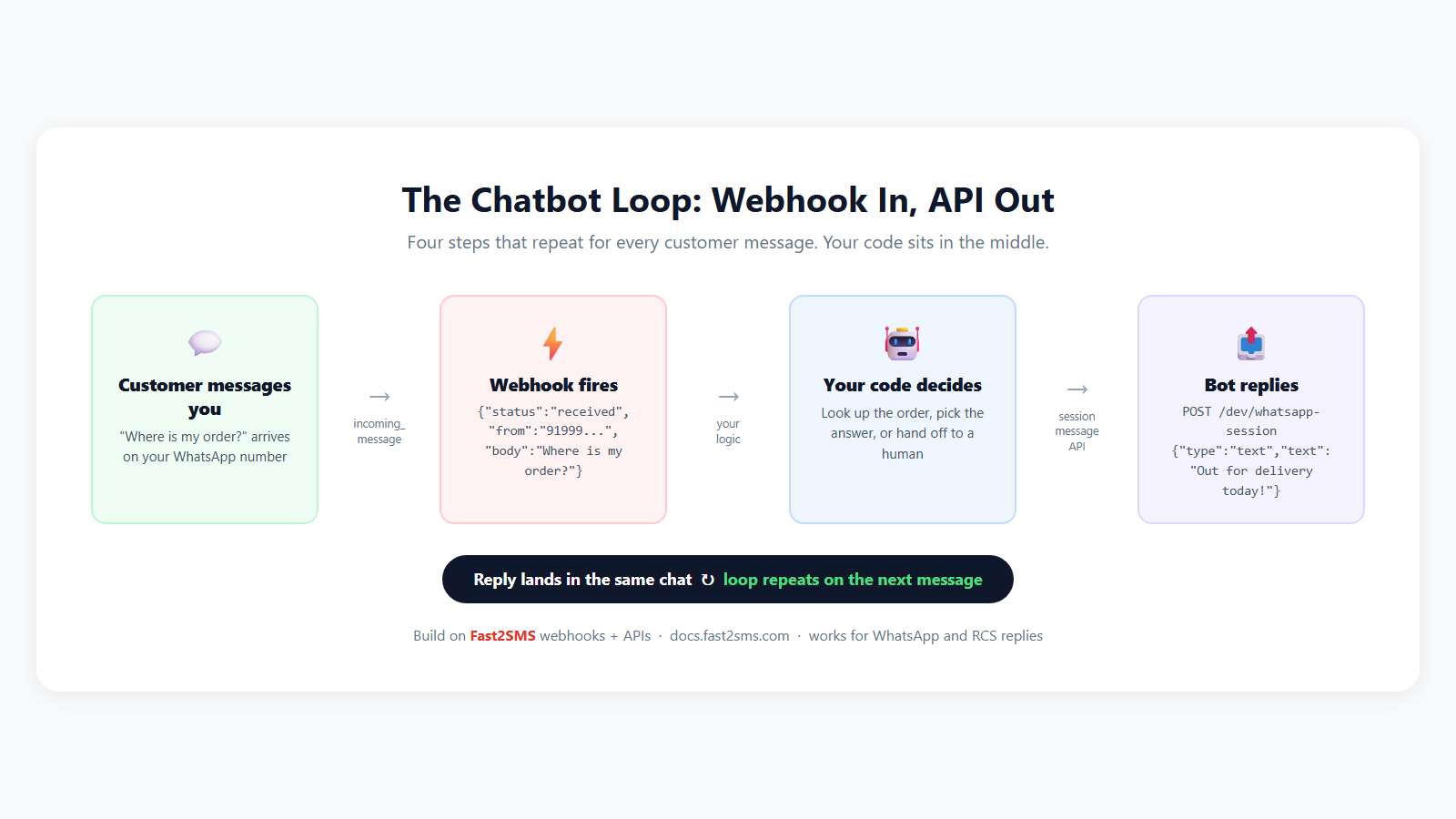
What you need
- A free Fast2SMS account with your API key.
- A connected WhatsApp Business number (free, no monthly fee).
- A public HTTPS endpoint on your server. New to webhooks? Read how webhooks work first; it covers setup, retries, testing and security.
Step 1: Catch incoming messages with a webhook
In your dashboard’s Webhooks section, create a WhatsApp webhook with the event set to received (or All). Give it a payload template with the inbound fields:
{
  "webhook_type": "{{webhook_type}}",
  "from": "{{from}}",
  "message_type": "{{message_type}}",
  "body": "{{body}}",
  "message_id": "{{message_id}}",
  "phone_number_id": "{{phone_number_id}}"
}
When a customer writes to your number, your endpoint receives:
{
  "webhook_type": "incoming_message",
  "from": "919999999999",
  "message_type": "text",
  "body": "Where is my order?",
  "message_id": "wamid.HBgMOTE5...",
  "phone_number_id": "1122334455"
}
Step 2: Reply with the session message API
Because the customer messaged you, a conversation window is open, and you can answer free-form with a session message: no template approval needed for the reply. One POST does it:
curl -X POST "https://www.fast2sms.com/dev/whatsapp-session?phone_number_id=1122334455&to=919999999999" \
  -H "Authorization: YOUR_API_KEY" \
  -H "Content-Type: application/json" \
  -d '{ "type": "text", "text": "Your order ORD4821 is out for delivery today!" }'

{ "status": "success" }
Session messages support eight types: text, image, document, audio, video, location, sticker and reaction, so your bot can answer with an invoice PDF or a location pin, not just words. Full reference: session message API docs.
One distinction to keep straight: session messages are replies inside an open conversation. To message someone who has not written to you first, use an approved template through the WhatsApp message API.
Step 3: Put your logic in the middle
Here is a complete minimal bot in PHP: it reads the webhook, routes on keywords, and replies in the same chat:
<?php
// https://yourdomain.com/whatsapp-bot.php
$event = json_decode(file_get_contents('php://input'), true);

if (($event['webhook_type'] ?? '') === 'incoming_message') {
    $from = $event['from'];
    $text = strtolower($event['body'] ?? '');

    if (str_contains($text, 'order')) {
        $reply = 'Please share your order ID and we will check it right away.';
    } elseif (str_contains($text, 'price')) {
        $reply = 'Our latest price list: https://yourbrand.com/prices';
    } else {
        $reply = 'Hi! Type ORDER for order status or PRICE for our price list.';
    }

    $ch = curl_init('https://www.fast2sms.com/dev/whatsapp-session'
        . '?phone_number_id=' . $event['phone_number_id']
        . '&to=' . $from);
    curl_setopt_array($ch, array(
        CURLOPT_RETURNTRANSFER => true,
        CURLOPT_POST           => true,
        CURLOPT_HTTPHEADER     => array(
            'Authorization: YOUR_API_KEY',
            'Content-Type: application/json',
        ),
        CURLOPT_POSTFIELDS     => json_encode(array(
            'type' => 'text',
            'text' => $reply,
        )),
    ));
    curl_exec($ch);
    curl_close($ch);
}

http_response_code(200);
echo 'OK';
That is a working chatbot in about thirty lines. From here you grow it: look up real orders in your database, hand off to a human when the customer types AGENT, or plug the text into an AI model and let it draft replies.
The same pattern on RCS
RCS webhooks emit the same incoming_message events when customers reply to your RCS campaigns, with from, body and message_type fields. Catch them on an RCS webhook and respond through your RCS sending flow; rich cards and buttons make the bot feel app-like inside the default SMS app. Background: RCS messaging and creating an RCS bot.
What SMS webhooks automate (no inbound, still powerful)
DLT SMS and bulk SMS have no customer replies, so no chat loop, but their delivered and failed events drive serious automation:
- Failure-triggered fallback: an OTP or alert reports failed, your code immediately resends on WhatsApp, or lets Smart OTP handle the switch automatically.
- List hygiene: numbers that consistently fail get flagged in your database, so bulk SMS campaigns stop paying for dead numbers.
- Live campaign dashboards: delivered counts and per-message cost (amount_debited) stream into your own reporting as each event lands.
- Order flow sync: mark the order timeline “SMS delivered” the moment the DLT report arrives, using udf1 to carry your order ID through the loop.
Every payload and placeholder for these events is documented with full samples in how webhooks work.
Bot ideas worth stealing
- Order status bot: customer sends an order ID, your code queries the database and replies with live status.
- Support triage: keyword menu first, human handoff on request, ticket created via your helpdesk API.
- Lead qualifier: three questions, answers saved to your CRM, hot leads pinged to sales on their own WhatsApp.
- Feedback collector: after the delivered webhook fires for an order SMS, wait a day and ask for a rating.
Frequently asked questions
Do I need template approval for bot replies?
No. Replies to an incoming customer message go as session messages, free-form, in eight content types. Templates are only for starting conversations.
Which channels can run a two-way bot?
WhatsApp and RCS, since both deliver incoming replies to your webhook. SMS is one-way in India, so SMS webhooks power delivery-driven automation instead.
What does the session message API cost?
Session messages are billed per WhatsApp conversation rules to your own wallet, with no monthly platform fee. Delivery-basis billing and auto refunds apply as usual.
How fast does the loop run?
Incoming messages reach your webhook near real-time, and your session reply sends immediately, so a well-hosted bot answers within seconds.
Can I connect an AI model?
Yes. Your code sits in the middle of the loop, so passing the body to any AI API and sending its answer back as the session message is exactly the same pattern.
How do I keep the endpoint secure?
Enable webhook signing and verify the webhook_secret_key header, use HTTPS, and de-duplicate events. All covered in the webhooks guide.
Is there a no-code alternative?
Yes, the free drag-and-drop chatbot builder in your Fast2SMS panel, including an API-request block that can call your systems mid-flow.
Build your first loop today
Create your free account, connect your WhatsApp number, add one webhook and one endpoint, and your bot answers its first customer this afternoon.
Questions? Write to [email protected].