
OTP via SMS and WhatsApp: The Complete FAQ (100+ Answers)
This guide is for anyone who sends or plans to send one-time passwords in India: developers building login screens, D2C brands confirming cash on delivery orders, clinics and schools verifying parents, CA firms protecting client portals, and app teams fighting fake signups. If you have ever searched “OTP not received” at midnight while customers complained, this page is for you.
You will get more than 100 short, direct answers on OTP SMS, WhatsApp OTP and Smart OTP: how they work, the DLT rules that apply to SMS, why OTPs fail and how to fix them, security basics, fraud such as SMS pumping, integration with WordPress, WooCommerce, Shopify and apps, costs, testing, and what the PE-TM binding rules mean for your OTP traffic. Each answer starts with the direct answer first, so you can skim.
Signup NowSchedule Free Meeting
Quick answers
- OTP SMS in India needs DLT registration: an approved entity, a 6-letter sender ID and an approved OTP template.
- WhatsApp OTP needs no DLT and uses Meta’s authentication template category, priced at ₹0.25 per message on Fast2SMS.
- Smart OTP sends on WhatsApp first and falls back to SMS automatically, or the reverse, so the code still reaches the user.
- Keep OTPs short-lived, limit wrong attempts and resends, and never store the code in plain text in your database.
- Most “OTP not received” cases come from a template mismatch, a wrong number format, a PE-TM chain problem or the phone itself.
- From 30th September, operators block SMS that does not match the approved PE-TM chain, and that includes OTPs.
- Fast2SMS gives free signup with ₹50 test credit, and no setup or monthly fee.
Table of contents
- OTP basics
- SMS OTP vs WhatsApp OTP
- DLT rules for OTP SMS
- Speed and delivery
- OTP not received: causes and fixes
- Security best practice
- OTP fraud and SMS pumping
- Integrating OTP: API, WordPress, WooCommerce, Shopify and apps
- Costs, billing, testing and going live
- PE-TM compliance impact on OTPs
- Wrap-up
OTP basics
An OTP is a short code that proves a person has the phone number they typed. You send the code, the user types it back, and your system checks that it matches. It is simple, which is why almost every Indian app, website and payment flow uses it. The answers below cover the words and ideas you will see in the rest of this guide.
What is an OTP?
An OTP, or one-time password, is a short code, usually 4 to 6 digits, that is sent to a user’s phone and can be used only once, for a short time, to prove they control that number. Once it is used or expires, it is useless. That is what makes it safer than a fixed password for things like login and order confirmation.
What does OTP verification mean?
OTP verification means checking that the code a user types into your app or website is the same code you sent to their phone, and that it has not expired or already been used. If it matches, you treat the phone number as verified. Businesses use it to confirm signups, logins, password resets and cash on delivery orders.
What is an OTP SMS API?
An OTP SMS API is a web service your website or app calls to send a one-time code to a mobile number by SMS, and often to verify the code the user types back. Your code makes an HTTP request with the mobile number, and the provider handles delivery through the telecom operators. You can read how this works in the OTP SMS API guide.
How does OTP verification work step by step?
The user enters their mobile number, your server asks the OTP provider to send a code, the user receives it by SMS or WhatsApp, types it into your form, and your server checks it before letting them continue. A good flow also sets an expiry time, limits wrong attempts and allows a resend after a short wait. Everything that matters happens on the server, not in the browser.
What is the difference between an OTP and a password?
A password is fixed and chosen by the user, while an OTP is generated fresh each time, sent to the user’s phone, and expires after a few minutes or one use. If someone steals an old OTP, it is already useless. Many businesses now use OTP alone for login because customers forget passwords, especially on mobile.
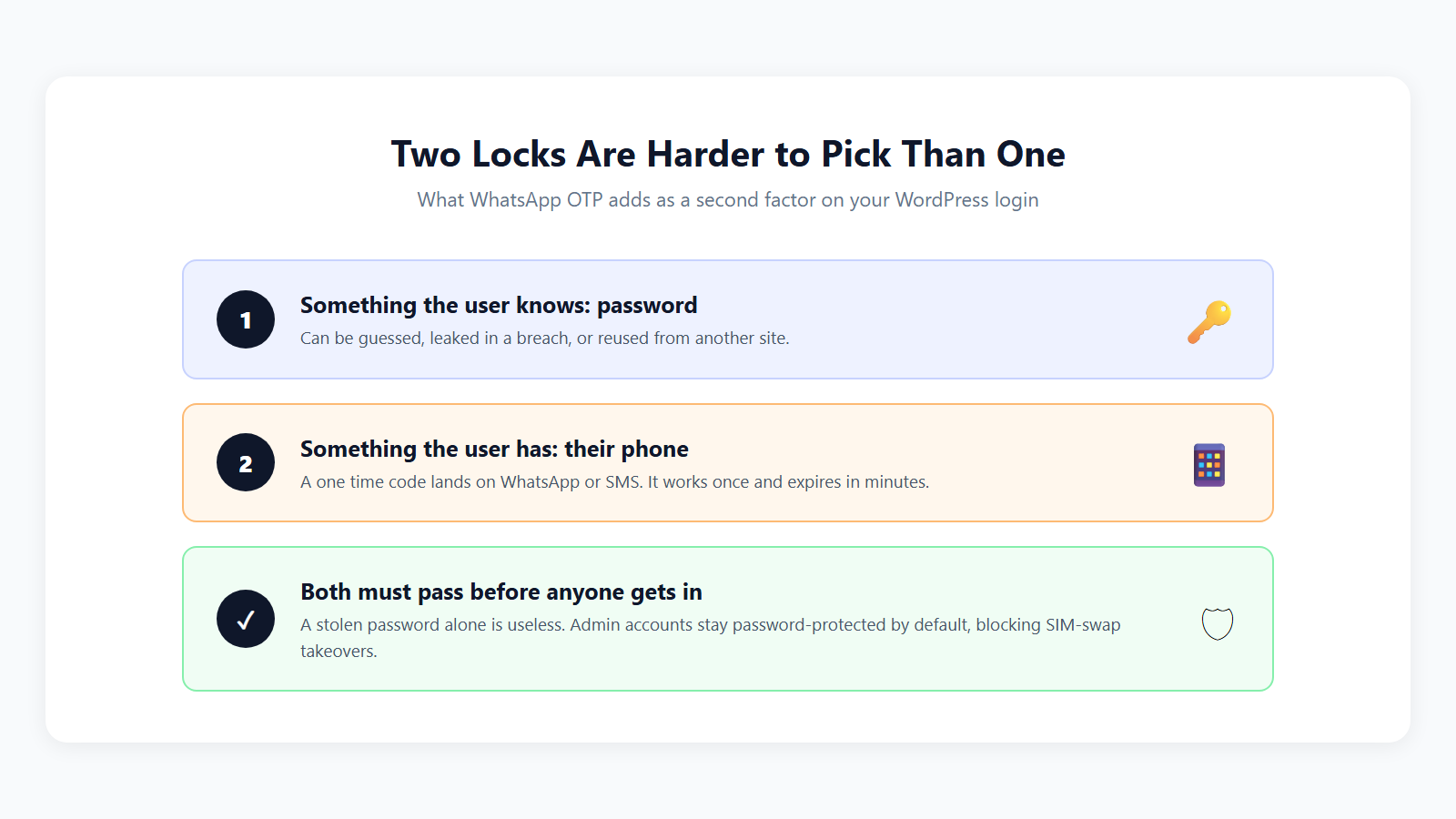
Is OTP the same as two-factor authentication?
OTP is one common way to do two-factor authentication, but they are not the same thing: two-factor means asking for two different proofs, such as a password plus a code sent to the phone. If you only ask for the OTP, it is single-factor login, just a passwordless one. Both are valid; the right choice depends on how sensitive the account is.
How many digits should an OTP have?
Most businesses use 4 or 6 digits; 6 digits is the safer default because it gives a million possible codes, which makes guessing much harder when you also limit attempts. Four digits is easier to type and fine for low-risk actions like confirming a delivery slot. For logins, payments and account changes, use 6.
Should an OTP be numeric or alphanumeric?
Use a numeric OTP in almost every case, because numbers are faster to type on a phone keypad, work with autofill, and match what Indian users expect. Alphanumeric codes add confusion between letters like O and digits like 0. If you do use letters, your DLT template needs the {#alphanumeric#} tag instead of {#numeric#}.
What is Smart OTP?
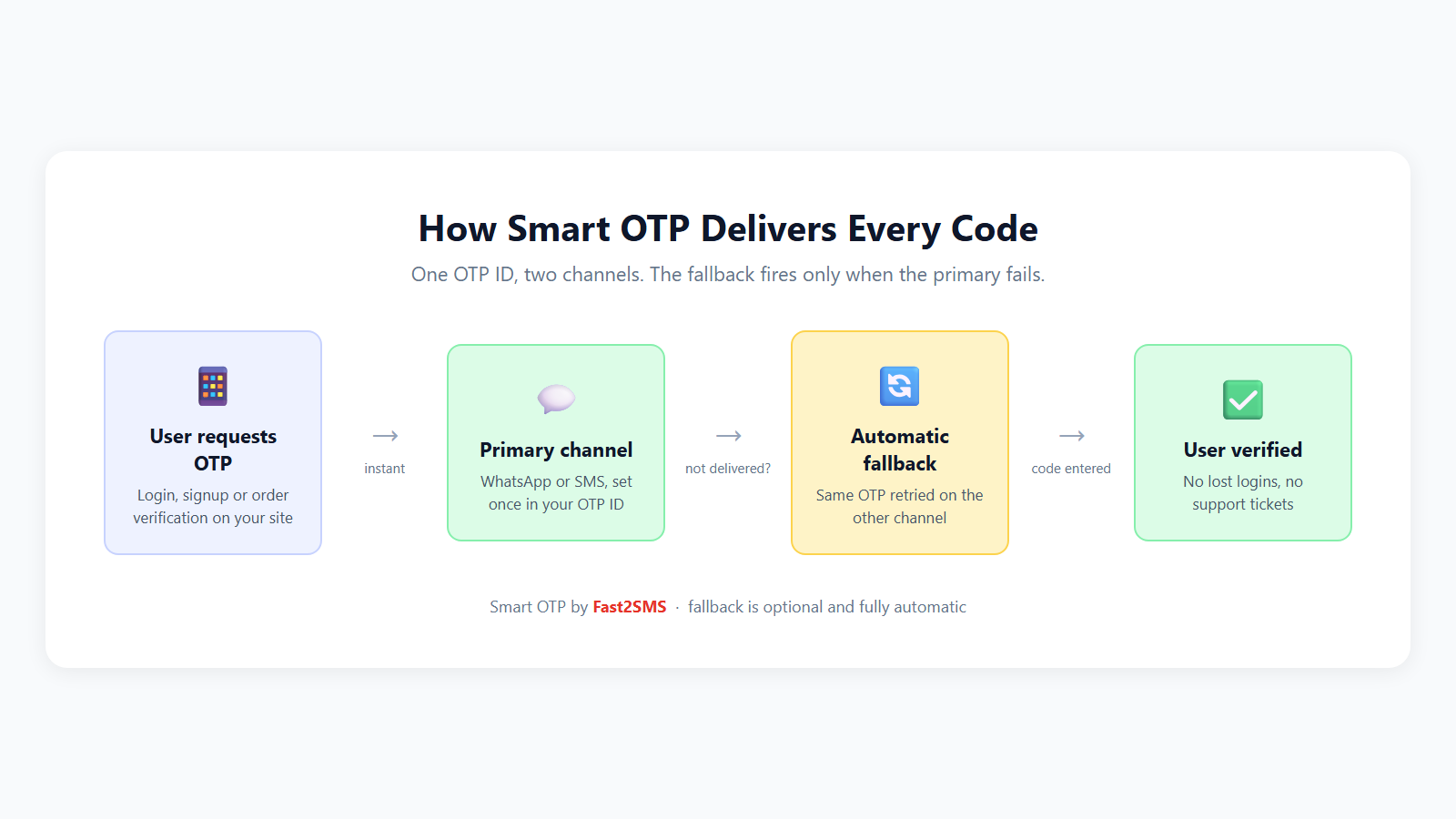
Smart OTP is a Fast2SMS feature that sends the OTP on WhatsApp first and automatically falls back to SMS if WhatsApp does not deliver, or works the other way round, SMS first and WhatsApp second. You make one API call and the fallback happens on its own. The Smart OTP guide explains the setup.
How do I choose an OTP service provider in India?
Choose an OTP service provider in India that has direct operator connectivity, handles DLT for you, offers both SMS and WhatsApp OTP, gives delivery reports or webhooks, and bills from a prepaid wallet without monthly fees. Also check how their support responds when OTPs fail, because that is when you need them. Ask whether they are a registered TMD, since that now affects whether your SMS gets through.
Where do Indian businesses use OTP?
Indian businesses use OTP for login and signup, password reset, cash on delivery confirmation, checkout verification, lead form validation, appointment booking, account changes and payment approval. A clinic might verify a patient’s number before sharing reports; a school might verify a parent before showing fees. Any time a wrong or fake phone number would cost you money, OTP helps.
SMS OTP vs WhatsApp OTP
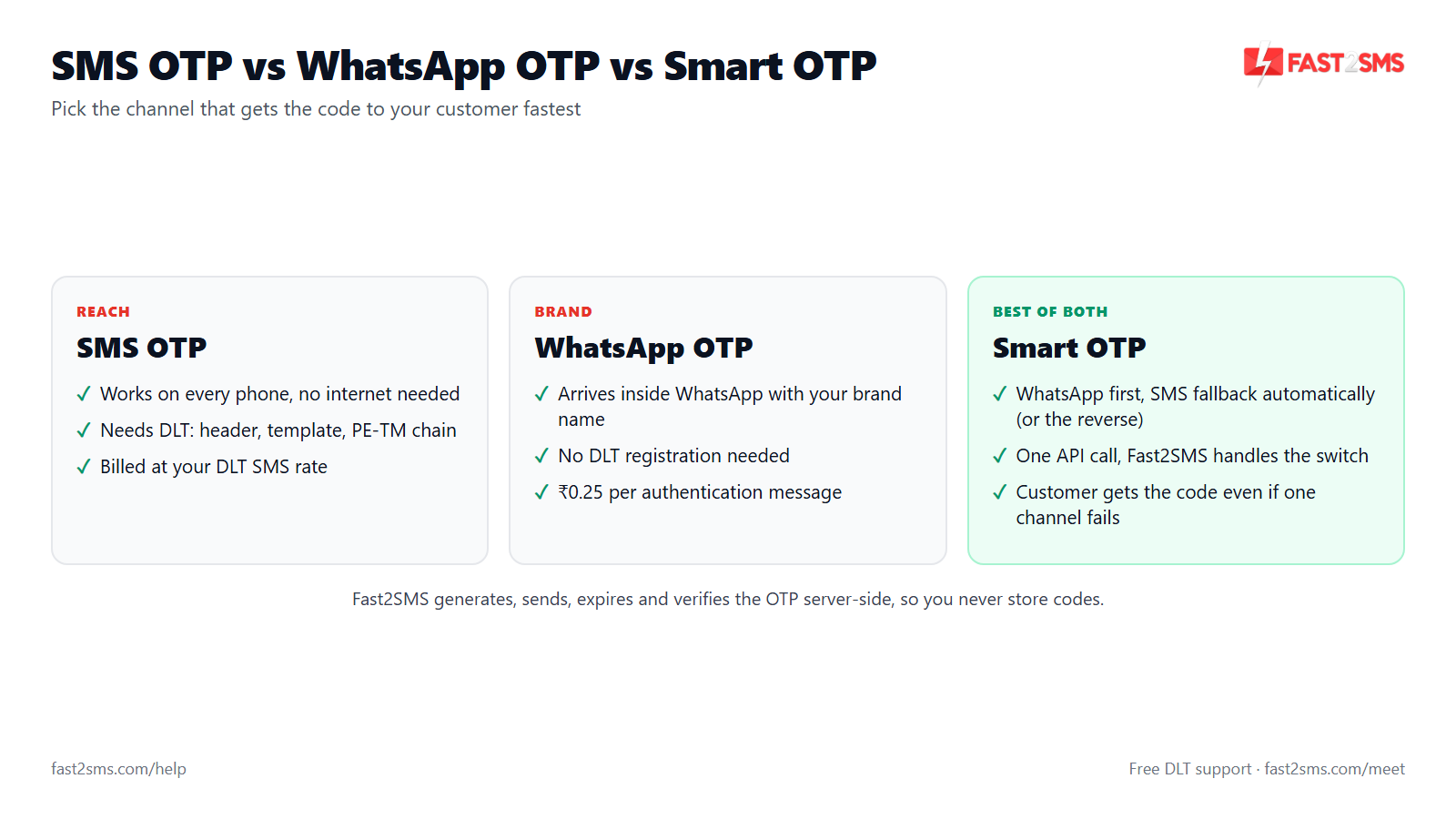
You can send an OTP by SMS, by WhatsApp, or use both with a fallback. SMS works on every phone, even without internet, but in India it needs DLT registration. WhatsApp needs no DLT and shows your brand name, but the user must have WhatsApp and data. Smart OTP combines both.
| Point | SMS OTP | WhatsApp OTP | Smart OTP |
|---|---|---|---|
| Works without internet | Yes | No, needs data or Wi-Fi | Yes, through the SMS leg |
| DLT registration | Required (entity, header, template) | Not required | Required for the SMS leg only |
| Template approval | DLT portal | Meta, authentication category | Both |
| Sender shown to user | 6-letter header, e.g. XX-SHOPIN | Your business name and profile | Depends on the channel that delivers |
| Affected by PE-TM blocking | Yes | No | WhatsApp leg is not |
| Price on Fast2SMS | Pay per SMS from wallet | ₹0.25 per authentication message | Pay for the channel used |
| Best for | Every user, feature phones, no data | Smartphone users, brand trust | Highest reach with one API call |
What is WhatsApp OTP?
WhatsApp OTP is a one-time code sent to the user’s WhatsApp account through the WhatsApp Business API, using an approved authentication template instead of an SMS. The user sees the message from your verified business profile, often with a copy-code button. Fast2SMS sends WhatsApp OTPs at ₹0.25 per authentication message.
Is WhatsApp OTP better than SMS OTP?
WhatsApp OTP is better for smartphone users who are online, because it needs no DLT, shows your brand name, and avoids SMS-side problems like template mismatches; SMS OTP is better for reach, since it works on any phone without data. Neither wins everywhere. That is why many businesses use both with automatic fallback.
Does WhatsApp OTP need DLT registration?
No, WhatsApp OTP does not need DLT registration, because DLT rules in India apply to SMS sent through telecom operators, not to WhatsApp messages. You still need a WhatsApp Business API number and an authentication template approved by Meta. This makes WhatsApp a quick way to start sending OTPs while your SMS DLT setup is still in progress.
What happens if the user does not have WhatsApp?
If the user does not have WhatsApp, a WhatsApp-only OTP will not reach them, so you should either offer SMS as an option or use a fallback that sends SMS automatically. With Fast2SMS Smart OTP, the SMS goes out on its own when WhatsApp cannot deliver. The user just sees the code arrive, without choosing anything.
How does Smart OTP fallback work?
Smart OTP sends the code on your first chosen channel, checks whether it was delivered, and if not, sends it on the second channel automatically, all from one API request. You set the order: WhatsApp first then SMS, or SMS first then WhatsApp. You need an approved WhatsApp authentication template and an approved DLT SMS template for this to work.
Can I send SMS first and WhatsApp second?
Yes, Smart OTP can run in reverse, sending the OTP by SMS first and falling back to WhatsApp if the SMS does not deliver. This suits businesses whose customers are mostly on basic phones or who prefer SMS as the default. Pick the order based on who your users are, and review delivery reports after a few weeks to see if the order should change.
Which is faster, SMS OTP or WhatsApp OTP?
Both usually arrive within seconds when everything is set up correctly; WhatsApp tends to be quick for online users, while SMS depends on operator routing and the phone’s network signal. The bigger speed issue is usually not the channel but a setup problem, such as a wrong template or poor route. A fallback helps because the second channel covers delays on the first.
What is a WhatsApp authentication template?
A WhatsApp authentication template is a Meta-approved message format made only for one-time codes, with a fixed layout: the code, an optional security note, an optional expiry note, and a copy-code or autofill button. You cannot add marketing text to it. Meta reviews these templates, usually within minutes and at most within 24 hours.
Can I send WhatsApp OTP without the WhatsApp Business API?
No, you cannot send OTPs at scale from the normal WhatsApp or WhatsApp Business app; you need the WhatsApp Business API through a provider. Sending codes by hand, or through unofficial tools, risks getting your number banned. You can connect your existing WhatsApp Business app number through embedded signup in minutes, as explained in the free WhatsApp Cloud API access guide.
Does WhatsApp OTP work without internet?
No, WhatsApp OTP needs the user’s phone to be connected to mobile data or Wi-Fi, while SMS OTP arrives over the basic mobile network even with no data. This matters for users in low-signal areas, travellers and people who switch data off to save battery. If your users often face this, keep SMS as the fallback.
Should I use SMS OTP, WhatsApp OTP or both?
Use both with automatic fallback if you want the highest delivery, WhatsApp alone if your users are mostly smartphone users and you want to skip DLT, and SMS alone if many users have basic phones. A D2C brand selling to metro buyers may start with WhatsApp first. A rural cooperative or school may prefer SMS first.
DLT rules for OTP SMS
In India, every business SMS, including OTPs, must pass through the TRAI DLT system. You register your business as a Principal Entity, get a sender ID (header) approved, get your OTP template approved, and link your telemarketer in the PE-TM chain. If any part is missing or does not match, operators block the SMS.
Do I need DLT registration to send OTP SMS in India?
Yes, you need DLT registration to send OTP SMS in India, which means an approved Principal Entity, an approved sender ID, an approved OTP content template and a valid PE-TM chain with your provider. Without these, operators reject the message. The beginner’s guide to DLT walks you through each step.
Which DLT category should I choose for OTP templates?
Choose the Transactional category for OTP templates, because DLT rules now treat OTPs as transactional even for businesses that are not banks. Do not register OTPs as promotional, since promotional SMS cannot go to DND numbers and cannot be sent outside 10 AM to 9 PM. A login OTP at 11 PM must still arrive.
Can a non-bank business send OTP under the transactional category?
Yes, a non-bank business such as an e-commerce store, clinic, school or SaaS app can send OTPs under the transactional category, because transactional now covers OTPs for all businesses. Earlier, transactional was mostly for banks. Today your shop’s login code gets the same treatment, as long as the template is purely an OTP message.
What should an OTP SMS template look like?
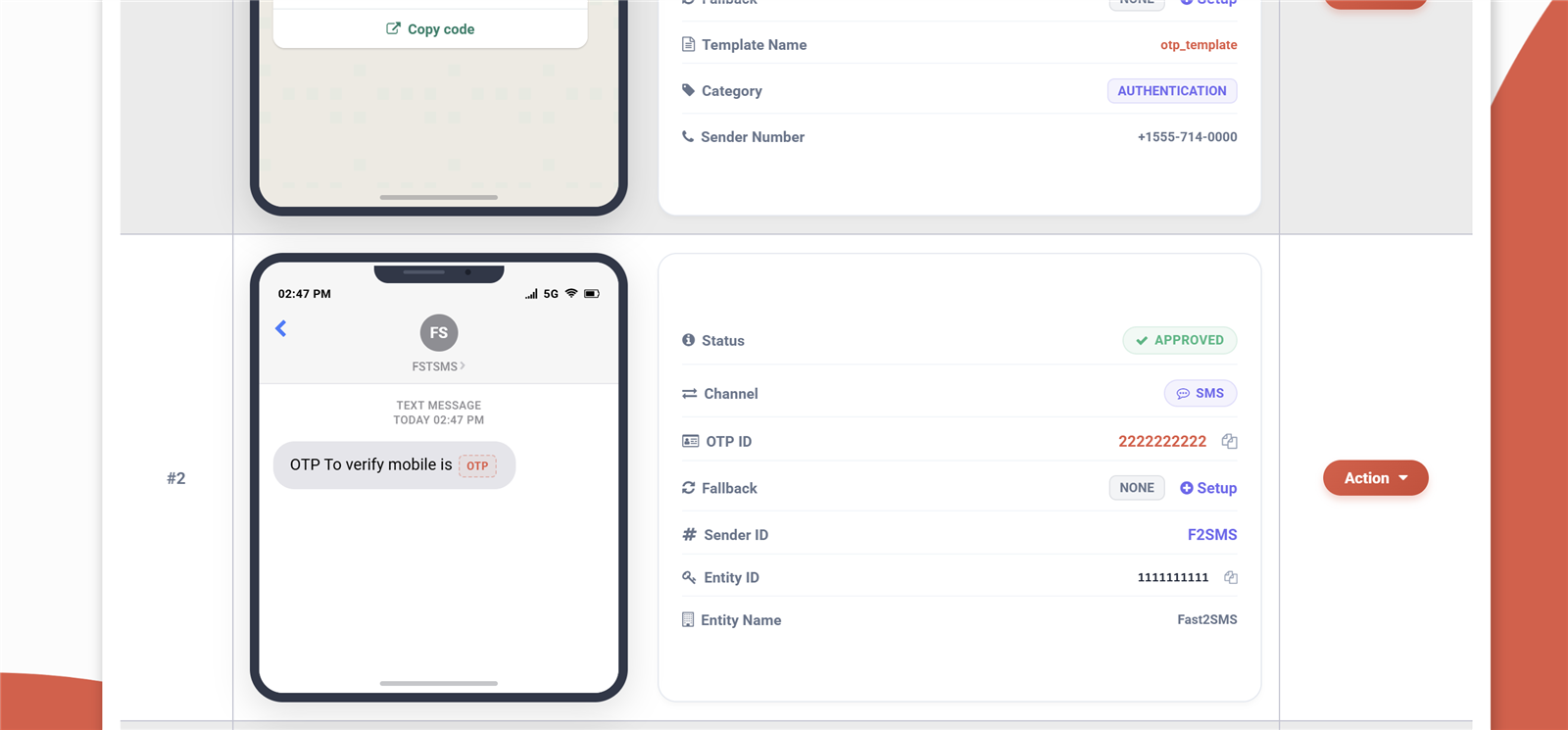
An OTP SMS template should be short and clear: your brand name, the purpose, the code as a variable, and a “do not share” line, for example “{#numeric#} is your OTP to log in to ShopName. Do not share it with anyone. – SHOPNM”. Keep it free of offers or links. You can find ready examples in sample DLT SMS templates.
Which variable tag should I use for the OTP code?
Use {#numeric#} for a number-only OTP, which accepts up to 40 digits, or {#alphanumeric#} if your code mixes letters and numbers, which accepts up to 40 characters. Using the wrong tag is a common reason OTPs get blocked after approval. The DLT variable tagging guide shows each tag with examples.
Can I add my app name or website link to an OTP SMS?
You can add your app or brand name as fixed text, and you can add a link only by using the {#url#} tag with a whitelisted URL, but most OTP templates are safer without any link. Links in OTP messages look like phishing to many users and invite extra checks. If you must add one, keep it to your own domain.
What sender ID format do OTP SMS need?
OTP SMS need a transactional or service sender ID, also called a header, made of exactly 6 alphabetic characters, such as SHOPNM or CLINIC. Numeric 6-digit headers are only for promotional SMS. Pick a header that looks like your brand so users recognise the OTP instantly, and remember that one template is linked to one header.
Why was my OTP template rejected on DLT?
OTP templates are usually rejected because they mix promotional text with the code, use the wrong variable tag, miss the sample message, do not mention the brand or purpose, or were submitted under the wrong category. Rejections can also happen when the header does not match the business name. Rewrite it as a plain OTP message and resubmit.
How do I get a DLT template ID for OTP SMS?
You get a DLT template ID for OTP SMS by submitting the template on your operator DLT portal under the Transactional category with a sample message; once approved, the portal shows a unique template ID you add to your SMS provider. With Fast2SMS, the automated DLT system handles approval tracking for you. The step-by-step is in how to get a DLT template ID for OTP.
Are OTP SMS allowed at night and to DND numbers?
Yes, OTP SMS registered under the transactional category can be sent at any hour and reach numbers on DND, because the 10 AM to 9 PM window and the DND block apply to promotional SMS. This is exactly why OTPs must not be registered as promotional. If your OTPs fail only at night, check the category first.
What happens if my OTP message does not match the approved template?
If your OTP message does not match the approved template exactly, apart from the variable parts, the operator’s DLT scrubbing blocks it and the user never receives the code. Even an extra space, a changed word or a missing full stop can cause this. Copy the approved text into your code exactly and change only the variable value.
Fast2SMS registered TMD: SID GROUPS PRIVATE LIMITED · TMD ID 1702178720558766591
When you add Fast2SMS to your PE-TM chain, use this TMD ID. Fast2SMS has direct connectivity with Airtel, Jio, BSNL, Tata, Vi and Smartping and never routes its TMD traffic through another TMD, so your OTP SMS match the chain operators check. Free DLT support is included with every account.
Speed and delivery
An OTP is only useful if it arrives while the user is still looking at your screen. If it takes too long, users tap resend, give up, or abandon their cart. Speed depends on your template, your route, the operator and the user’s phone. Here is how to think about each part.
How fast should an OTP SMS arrive?
An OTP SMS should arrive within a few seconds of the request, because users expect to type it straight away and most will tap resend or leave if nothing shows up quickly. If your codes regularly take longer, something in the setup needs fixing. Look at delivery reports to see whether the delay is on the send side or the phone side.
Why is my OTP SMS delayed?
OTP SMS delays usually come from routing through a non-direct or promotional route, operator network congestion, the user’s weak signal, or a phone that is switched off or out of coverage. Sending OTPs as promotional traffic is a common hidden cause. Use a transactional template and a provider with direct operator connectivity so there are fewer hops between you and the user.
What is an OTP delivery report?
An OTP delivery report is the status the operator sends back after trying to deliver your message, such as delivered, failed or pending, along with the time. It tells you whether a problem is on your side or the user’s side. On Fast2SMS you can see reports in the panel or receive them automatically through webhooks.
What does the “delivered” status actually mean?
A “delivered” status means the operator network confirmed the SMS reached the user’s handset, not that the user has read it or that it landed in the main inbox. Some phones filter messages into spam or a separate folder. So a delivered OTP that the user cannot find is usually a phone-side issue, not a sending issue.
Does OTP delivery differ between Jio, Airtel, Vi and BSNL?
OTP delivery can differ slightly between Jio, Airtel, Vi and BSNL because each operator runs its own network and DLT scrubbing, and each binds your PE-TM chain on its own portal. A chain that is correct on one operator but missing on another will cause failures only for that operator’s users. If failures cluster on one network, check that operator’s chain first.
How do webhooks help track OTP delivery?
Webhooks send each OTP’s delivery status to your server automatically as soon as the operator reports it, so you do not have to keep polling for updates. You can use this to trigger an automatic retry on another channel, flag a wrong number, or alert your team when failures rise. The basics are covered in how webhooks work.
How can I improve my OTP delivery rate?
Improve your OTP delivery rate by using a transactional DLT template that matches your message exactly, a valid PE-TM chain on every operator, a provider with direct connectivity, correct 10-digit number formatting, and a WhatsApp or SMS fallback. Then watch delivery reports weekly. Most gains come from fixing setup, not from changing the message wording.
Does message length affect OTP delivery?
Message length does not usually stop delivery, but a long OTP SMS can split into more than one part, which costs more and gives more chance of delay or odd display. Keep OTPs well within a single SMS. Using Hindi or other Unicode characters shortens the length that fits in one part, so test regional-language templates carefully.
Can I send OTPs through a promotional route to save money?
No, you should never send OTPs through a promotional route, because promotional SMS is blocked for DND numbers, restricted to 10 AM to 9 PM, and shows a numeric header users do not trust. You will lose far more in failed logins and abandoned orders than you save. OTPs belong in the transactional category.
OTP not received: causes and fixes
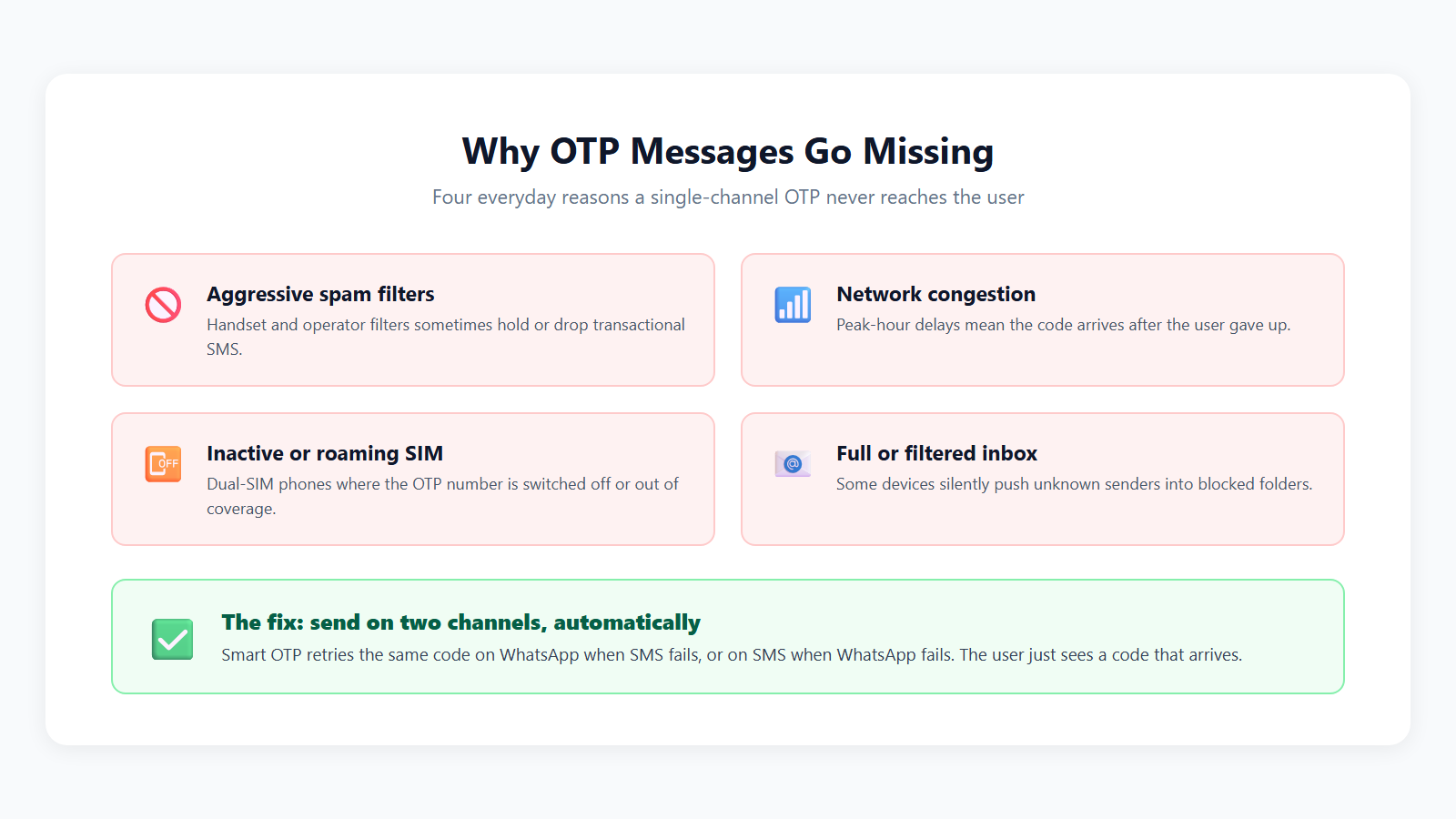
“OTP not received” is the most common OTP support ticket. The cause is almost always in one of four places: your template or DLT setup, your code, the operator route, or the user’s phone. Work through them in that order and you will find most problems within minutes.
Why am I not receiving OTP SMS?
You are usually not receiving OTP SMS because the message does not match the approved DLT template, the PE-TM chain is missing or wrong, the number is formatted wrongly, or the phone has no signal, is in flight mode or is filtering messages. Start by checking the delivery report. A “failed” status points to setup; a “delivered” status points to the phone.
Why is my OTP not received on Jio numbers only?
If OTPs fail only on Jio numbers, the most likely cause is that your PE-TM chain is not bound correctly on the Jio TrueConnect portal, even if it is fine on other operators. Jio also sends warning SMS from JIODLT-S when it detects a chain mismatch. Follow the Jio PE-TM binding guide to add your telemarketer.
Why do OTPs fail on dual SIM phones?
OTPs fail on dual SIM phones mostly because the user typed the number of one SIM while the other SIM is active, or because the SIM that should receive the code has no signal or is switched off in settings. The message is waiting on the wrong line. Ask the user which SIM matches the number and whether it is enabled.
Can DND block OTP messages?
No, DND does not block OTP messages sent under the transactional category, because DND and NCPR only block promotional SMS. If OTPs fail only for DND users, your template is probably registered as promotional by mistake. Register a new transactional OTP template and move your traffic to it.
Why does the OTP arrive after it has expired?
An OTP arrives after expiry when delivery is delayed by routing or network issues, or when your expiry window is too short for real-world conditions. Users in weak signal areas are hit hardest. Fix the route first, then consider a slightly longer validity, and always let the user request a fresh code easily.
Why is my WhatsApp OTP not received?
A WhatsApp OTP is usually not received because the number is not on WhatsApp, the phone is offline, the authentication template is not approved or was paused, or your WhatsApp number’s quality rating or messaging limit is restricting sends. Check the template status and number health in your panel. Smart OTP’s SMS fallback covers users who are offline or not on WhatsApp.
Why do some users receive the OTP and others do not?
When some users receive the OTP and others do not, the failures usually share a pattern: one operator, one number format, one region, or one type of phone. Group failed numbers by operator and status in your delivery report. A single-operator pattern points to PE-TM binding; a format pattern points to your code; random failures point to handsets.
The OTP shows delivered but the user says they did not get it. Why?
If the OTP shows delivered but the user cannot find it, the phone most likely moved it to a spam, promotions or unknown-sender folder, or an SMS filter app hid it. Some users also look in WhatsApp when the code came by SMS. Ask them to search their messages for your sender ID or brand name.
Do spam filter apps hide OTP messages?
Yes, some built-in spam filters and third-party SMS apps can move OTP messages into a separate folder, especially from unknown headers or messages containing links. The message is delivered but out of sight. A recognisable header, a clear brand name in the text and no links all reduce this.
What should I tell customers who say “OTP not received”?
Tell customers to check that the mobile number is correct, confirm they have signal and are not in flight mode, look in spam or filtered folders, wait a few seconds and then tap resend, and try WhatsApp if you offer it. Put these tips right under your OTP box. That alone cuts support tickets noticeably.
What should a developer check first when OTPs stop working?
A developer should first check the API response for errors, then the delivery report status, then whether the message text still matches the approved template exactly, then wallet balance and API key validity. Recent code changes that altered the message text are a common culprit. Compare one failed message against the approved template word by word.
Why did all my OTPs suddenly stop at once?
When all OTPs stop at once, the cause is usually an account-level issue: an empty wallet, an expired or changed API key, a template or header deactivated on DLT, or a PE-TM chain problem that operators started enforcing. Individual phone problems never cause a total stop. Check wallet, API key and DLT status in that order.
Does a wrong mobile number format cause OTP failures?
Yes, a wrong mobile number format is a frequent and silent cause of OTP failures, such as extra spaces, a leading zero, a +91 prefix where the API expects 10 digits, or a missing digit. Clean the number on your server before sending: strip spaces and symbols, and check it has 10 digits. Also validate it in the form so users fix typos early.
Security best practice
An OTP is only as safe as the rules around it. Short expiry, limited attempts, rate limits and careful handling of the code decide whether your OTP protects users or just slows them down. The safest approach is to not handle the code yourself at all and let your provider generate and verify it.
How long should an OTP be valid?
An OTP should be valid for only a few minutes, long enough for a slow SMS to arrive and be typed, but short enough that a stolen or leaked code quickly becomes useless. Many teams choose somewhere around 5 to 10 minutes for login codes. For high-risk actions like changing a bank account, go shorter.
How many wrong OTP attempts should I allow?
Allow only a small number of wrong OTP attempts, such as 3 to 5, before the code is cancelled and the user must request a new one. Without a limit, an attacker can simply try every possible code. Show the user how many attempts remain so genuine users are not surprised.
How often should users be able to resend an OTP?
Let users resend an OTP only after a short wait, such as 30 to 60 seconds, and cap the total resends per number per hour. A visible countdown on the resend button stops impatient tapping. Fast2SMS’s OTP API allows resend within a 10-minute window, which fits this pattern well.
Why should I never store OTPs in my database?
You should never store OTPs in plain text in your database because anyone who gets read access, through a leak, a backup or a curious staff member, could use live codes to take over accounts. If you must generate codes yourself, store only a hashed value with an expiry. The simpler option is to let your provider handle it entirely.
How can I verify OTPs without storing them myself?
You can verify OTPs without storing them by using a provider that generates, sends, expires and verifies the code on its own servers, so your app only sends the mobile number and later the code the user typed. Fast2SMS’s OTP API works this way: one call to send and one call to verify. Your database never holds a live code.
Should the OTP appear in API responses or logs?
No, the OTP should never appear in your API responses to the browser, your application logs, analytics events or error reports. Developers often log full request bodies while debugging and forget to remove it. Mask the code in logs, and never send it back to the front end for checking.
Should I add a “do not share” warning to OTP messages?
Yes, add a short “do not share this code with anyone” line to every OTP message, because many fraud cases start with a caller pretending to be your support team and asking for the code. The warning gives users a reason to refuse. Also say what the code is for, like “to log in” or “to confirm your order”.
Is SMS OTP secure enough for payments?
SMS OTP is widely used for payments and is reasonable for most businesses, but it is not perfect, because it depends on the security of the user’s SIM and phone. For very high-value actions, add another layer, such as a password, device check or confirmation on a trusted device. Match the strength of checks to the risk of the action.
What is SIM swap fraud and does it affect OTP?
SIM swap fraud is when a criminal convinces an operator to issue a new SIM for the victim’s number, so the OTPs start arriving on the criminal’s phone. It does affect SMS OTP. Watch for warning signs like a login from a new device right after a number went silent, and add extra checks for sensitive changes.
Can one OTP be used more than once?
No, an OTP should be usable only once; after a successful verification it must be cancelled immediately, even if its time has not run out. Reusable codes let an attacker who sees the code, say over someone’s shoulder, use it again. A good OTP service handles this automatically.
Should OTP verification happen on the client side or the server side?
OTP verification must always happen on the server side, because anything checked in the browser or app can be seen and bypassed by a user with basic developer tools. The front end should only collect the code and send it to your server. Your server then calls the verify endpoint and decides whether to let the user in.
Is WhatsApp OTP more secure than SMS OTP?
WhatsApp OTP is generally harder to intercept than SMS OTP, because WhatsApp messages are end-to-end encrypted and tied to the app on the device, while SMS depends on the telecom network and the SIM. It still needs the same rules: short expiry, attempt limits and a “do not share” warning. The weakest link is usually the user being tricked, not the channel.
OTP fraud and SMS pumping
Every OTP form that sends an SMS costs you money each time someone submits it. Fraudsters and bots know this. They abuse open OTP forms to burn your wallet, harass people with floods of codes, or trick users into reading codes aloud. A few simple controls stop most of it.
What is SMS pumping?
SMS pumping is a type of fraud where bots repeatedly submit your signup or login form with many phone numbers, making you send large numbers of OTP SMS that nobody will use, so your costs go up for nothing. It targets forms that send an OTP without any limit. It often shows up as a sudden spike at odd hours.
How do I know if my OTP form is being abused?
Your OTP form is probably being abused if OTP volume suddenly jumps without a matching rise in real signups, many requests come from the same IP or device, number patterns look sequential, or very few sent codes are ever verified. Compare “OTPs sent” against “OTPs verified” every day. A widening gap is the clearest signal.
How do I stop SMS pumping on my OTP form?
Stop SMS pumping by adding rate limits per IP, per device and per mobile number, a bot check on the form, a cooldown on resend, validation of the number format, and alerts when OTP volume jumps. Do not let a single visitor trigger unlimited codes. These steps cost little and protect your wallet every day.
Does a CAPTCHA help prevent OTP abuse?
Yes, a CAPTCHA or other bot check on the OTP request form helps prevent automated abuse, because it makes it harder for scripts to submit the form thousands of times. It works best combined with rate limits. Show it only when behaviour looks suspicious if you worry about slowing down genuine customers.
Can bots drain my SMS wallet?
Yes, bots can drain your SMS wallet quickly if your OTP endpoint has no rate limits, since every request sends a paid message. A prepaid wallet at least caps the damage to your balance, unlike post-paid billing. Keep your OTP send endpoint behind your own server, never call the provider directly from the browser.
What is OTP bombing?
OTP bombing is when someone uses your OTP form to flood a victim’s phone with dozens of codes, as harassment or to hide a genuine fraud alert among the noise. It hurts your brand, because the victim sees your name on every message. Per-number resend limits and cooldowns are the direct fix.
Should I block suspicious phone numbers from receiving OTPs?
Yes, you should temporarily block numbers that request many codes but never verify, and numbers that match patterns your team has seen in abuse. Keep the block time-limited so genuine users who made a mistake can try again later. Log the reason so support can explain it if the customer calls.
How do fraudsters trick users into sharing OTPs?
Fraudsters trick users into sharing OTPs by calling or messaging as a bank, delivery company or your support team, creating urgency such as “your order will be cancelled”, and asking the user to read out the code. Your OTP text should say clearly that your staff will never ask for it. Repeat this warning on your website and in order emails.
What should I do if my OTP API key is leaked?
If your OTP API key is leaked, regenerate it immediately in your provider panel, update it in your server settings, and check recent usage for messages you did not send. Never put the key in front-end JavaScript or a public code repository. Store it in server environment variables so it is not bundled with your app.
Want help setting up OTP the right way?
Our team can review your OTP flow, DLT templates, PE-TM chain and Smart OTP fallback on a short call, and suggest fixes for delivery or abuse problems. Schedule a free meeting, call +91-6262778811 or email [email protected].
Integrating OTP: API, WordPress, WooCommerce, Shopify and apps
You can add OTP to almost anything: a custom app through a REST API, a WordPress site or WooCommerce store through a plugin, a Shopify store through an app, or an Android and iOS app through your backend. The rule is the same everywhere: the send and verify calls happen on your server, never directly from the browser or the app.
How do I integrate an OTP SMS API?
To integrate an OTP SMS API, create an account, get your API key, set up your DLT sender ID and OTP template, then add two server calls: one to send the OTP when the user enters their number, and one to verify the code they type. Test with your own number first. Full parameters are in the Fast2SMS API docs.
What are the Fast2SMS OTP API endpoints?
The Fast2SMS OTP API has two endpoints: POST https://www.fast2sms.com/dev/otp/send with your otp_id and the mobile number to send a code, and POST https://www.fast2sms.com/dev/otp/verify with the mobile number and the otp the user entered to check it. A send request looks roughly like this, with exact headers and fields listed in the docs:
curl -X POST "https://www.fast2sms.com/dev/otp/send" \
  -H "authorization: YOUR_API_KEY" \
  -H "Content-Type: application/json" \
  -d '{"otp_id":"YOUR_OTP_ID","mobile":"9999999999"}'
The verify call follows the same pattern, sending mobile and otp to the verify endpoint. Your server reads the response and lets the user in only when it confirms a match.
Do I need to generate the OTP code myself?
No, with the Fast2SMS OTP API you do not generate the code yourself; Fast2SMS generates the code, sends it, handles expiry and verifies it on its servers. Your app only passes the mobile number to send and the typed code to verify. This removes a whole class of security mistakes, like weak random numbers or codes left in the database.
How does resend work with the Fast2SMS OTP API?
Resend with the Fast2SMS OTP API works within a 10-minute window, so if the user taps “resend” during that time, your server calls the send endpoint again for the same number and the user can verify with the code they receive. Add your own cooldown on the button so users cannot tap it repeatedly. After the window, simply start a fresh send.
How do I add OTP login to WordPress?
You can add OTP login to WordPress by installing the free Fast2SMS plugin from the WordPress plugin directory, connecting your API key, choosing your OTP template, and turning on OTP login for your login or registration form. No coding is needed. The free OTP login for WordPress guide covers the settings screen by screen.
How do I add OTP verification to WooCommerce checkout?
To add OTP verification to WooCommerce checkout, install the free Fast2SMS WordPress plugin, connect your account, and enable OTP on checkout so buyers verify their mobile number before the order is placed. This cuts fake orders and wrong numbers. See WooCommerce OTP verification for the steps; the plugin is free on wordpress.org.
Can I use OTP to confirm cash on delivery orders?
Yes, you can use OTP to confirm cash on delivery orders by asking the buyer to verify their mobile number before a COD order is accepted, which filters out fake orders and wrong numbers before you pay for shipping. D2C brands with high return-to-origin rates see the most benefit. You can apply it only to COD and skip it for prepaid orders.
How do I add OTP login to Shopify?
You can add OTP to Shopify by installing the free Fast2SMS app from the Shopify App Store, connecting your Fast2SMS account, and enabling OTP for the flows you want, such as customer verification. Your DLT template and sender ID are used as usual. The full walkthrough is in integrate OTP with Shopify.
How do I add WhatsApp OTP in WordPress?
You add WhatsApp OTP in WordPress by connecting your WhatsApp Business API number to Fast2SMS, getting an authentication template approved by Meta, and selecting WhatsApp as the OTP channel in the Fast2SMS plugin. This lets you verify users without waiting for SMS DLT approval. Steps are in WhatsApp OTP for WordPress.
How do I add OTP to an Android or iOS app?
To add OTP to an Android or iOS app, build a small endpoint on your backend that calls the OTP send and verify APIs, and have the app talk only to your backend, never to the OTP provider directly. This keeps your API key off the device. The app screens just collect the number, show a countdown, and submit the code.
Can OTP autofill work on Android and iPhone?
Yes, OTP autofill can work on both: iPhones suggest codes from recent messages above the keyboard when your input field is marked as a one-time code field, and Android apps can read OTPs using Google’s SMS APIs when the message format supports it. On WhatsApp, authentication templates offer a copy-code or autofill button. Autofill reduces typos and speeds up login noticeably.
Which programming languages can use an OTP API?
Any programming language that can make an HTTPS request can use an OTP API, including PHP, Python, Node.js, Java, C#, Go, Ruby and Kotlin, as well as low-code tools that support webhooks or HTTP calls. There is no special library needed. Start with the cURL example above and translate it to your language’s HTTP client.
Costs, billing, testing and going live
OTP costs are small per message but add up fast at scale, and abuse can multiply them. The good news is that you only pay for what you send, and you can test everything before going live. Here is what to check about pricing, billing and launch readiness.
How much does OTP SMS cost in India?
OTP SMS in India is charged per message sent, and the rate depends on your provider and your volume; with Fast2SMS you pay per message from a prepaid wallet with no setup fee, monthly fee or per-number fee. You can see current SMS rates in your panel after free signup. Large senders can ask sales for volume rates.
How much does WhatsApp OTP cost?
WhatsApp OTP on Fast2SMS costs ₹0.25 per message, because OTPs use Meta’s authentication template category, which Fast2SMS prices the same as utility templates. There is no setup or monthly fee on top. High-volume senders can discuss negotiated rates with the sales team.
Am I charged for failed WhatsApp OTPs?
No, WhatsApp messages on Fast2SMS are billed on a delivery basis, and failed WhatsApp messages are refunded to your wallet automatically within 48 hours. You do not need to raise a ticket for this. The refund appears in your wallet history, so you can match it against your delivery reports.
How does billing work for Smart OTP?
With Smart OTP you pay for the message on each channel that is actually used: if WhatsApp delivers, you pay the WhatsApp authentication rate; if WhatsApp fails and the SMS fallback goes out, the failed WhatsApp message is refunded and the SMS is charged. You never pay for both when only one is needed. Your wallet history shows each charge and refund.
Are there setup or monthly fees for an OTP service?
Many OTP providers charge setup or monthly fees, but Fast2SMS charges none: no setup fee, no monthly fee and no per-number fee on any channel, only pay per message from a prepaid wallet. This suits small shops and startups whose OTP volume changes month to month. Always ask any provider for their full fee list before signing up.
How can I reduce OTP costs?
Reduce OTP costs by stopping bots with rate limits and bot checks, adding a resend cooldown, keeping each SMS within one part, using a fallback instead of sending on two channels at once, and using autofill so fewer users need a second code. Abuse is usually the biggest avoidable cost. Track “OTPs sent” against “OTPs verified” to spot waste.
Can I test OTP for free?
Yes, you can test OTP for free on Fast2SMS, because every new account gets ₹50 of free test credit after signup, which is enough to try sending and verifying codes on your own numbers. Sign up and run a few tests before touching your live site.
How do I test my OTP flow before going live?
Test your OTP flow by sending codes to numbers on every major operator, typing wrong codes to check the attempt limit, waiting past expiry, tapping resend repeatedly to check the cooldown, and entering badly formatted numbers. Also turn off mobile data to test the SMS fallback. Fix anything confusing before real customers see it.
What should I check before going live with OTP?
Before going live with OTP, confirm your DLT header and template are approved and linked, your PE-TM chain is bound on every operator portal, your API key is stored only on the server, rate limits and attempt limits are on, and your wallet has enough balance. Set up a low-balance alert. Then do one last test from a real customer’s view.
How do I handle OTP traffic during a big sale?
Handle OTP traffic during a big sale by topping up your wallet in advance, testing the flow a day before, watching delivery reports live during the peak, and keeping a WhatsApp or SMS fallback switched on. Tell your provider about expected spikes. Keep rate limits on, because sale days also attract bots.
Can I get volume pricing for OTP messages?
Yes, high-volume senders can discuss negotiated rates with the Fast2SMS sales team based on their expected monthly volume. Share your current volume and growth plans so the team can suggest the right option. Call +91-6262778811, email [email protected] or book a free meeting.
PE-TM compliance impact on OTPs
The PE-TM Binding Framework links your business (the Principal Entity) to the telemarketers who deliver your SMS. From 30th September, operators validate every A2P SMS against the approved PE-TM chain, the authorized TM-D and the hash code. If they do not match, the SMS is blocked, and OTPs are not exempt. WhatsApp OTP is not affected because it does not go through DLT.
What is PE-TM binding and why does it matter for OTP?
PE-TM binding is the DLT rule that links your registered business to the exact telemarketers allowed to deliver your SMS, and it matters for OTP because operators now block any SMS, including OTPs, that arrives through a chain you have not approved. A broken chain means failed logins. The TRAI PE-TM binding framework guide explains it in plain words.
Will my OTPs be blocked if the PE-TM chain is wrong?
Yes, OTPs will be blocked if your PE-TM chain is wrong or incomplete, because operators check every A2P SMS against the approved chain, the authorized TM-D and the hash code, with no exception for OTPs. The user simply never gets the code. Fix the chain on each operator portal before the deadline.
What changes from 30th September for OTP SMS?
From 30th September, operators start validating every A2P SMS, OTPs included, against your approved PE-TM chain and blocking traffic that does not match. A mismatch is no longer just a warning: it means the OTP does not reach the user. Review the causes and fixes for chain mismatch now.
How do I check my PE-TM chain status?
You check your PE-TM chain status by logging in to each operator’s DLT portal where you are registered and reviewing the telemarketers bound to your entity, making sure your SMS provider’s TMD is listed and active. Remember that chains are bound per operator portal. The PE-TM chain status guide shows where to look.
What does a PE-TM chain mismatch warning look like?
A PE-TM chain mismatch warning usually arrives as an SMS from JIODLT-S or an email from [email protected], telling you that traffic under your entity came through a chain that is not approved. Treat it as urgent for OTP traffic. See PE-TM chain mismatch detected for what each message means and what to do.
How do I add Fast2SMS as a telemarketer on my DLT portal?
Add Fast2SMS as a telemarketer by logging in to your operator’s DLT portal, opening the telemarketer or PE-TM binding section, searching for SID GROUPS PRIVATE LIMITED or TMD ID 1702178720558766591, and submitting the binding. Repeat this on each operator portal you use. There are guides for Airtel, Vi, BSNL, Tata and Smartping.
Why does TMD connectivity matter for OTP delivery?
TMD connectivity matters because a common cause of chain mismatch is a provider delivering your SMS through another TMD’s connectivity, which puts an unapproved link in the chain and gets the OTP blocked. A provider with its own direct operator connections avoids this. Read why a registered TMD SMS provider matters before choosing a route.
Are WhatsApp OTPs affected by PE-TM rules?
No, WhatsApp OTPs are not affected by PE-TM rules, because PE-TM binding is part of the DLT system for SMS, and WhatsApp messages do not go through DLT at all. This makes WhatsApp a useful backup while you fix SMS chain problems. Smart OTP lets you keep SMS as a fallback once your chain is correct.
What is the DLT hash code in the PE-TM chain?
The DLT hash code is a unique value generated for your PE-TM chain that operators use to confirm each SMS came through the approved path of entity and telemarketers. If the hash in the traffic does not match the approved one, the message fails validation. Learn more in the DLT hash code guide.
Fast2SMS registered TMD: SID GROUPS PRIVATE LIMITED · TMD ID 1702178720558766591
Bind this TMD ID to your entity on each operator portal to keep OTP SMS flowing after 30th September. Fast2SMS connects directly with Airtel, Jio, BSNL, Tata, Vi and Smartping and never passes its TMD traffic through another TMD, so the chain operators see is the chain you approved.
More 100-question guides
- DLT registration A to Z
- SMS not delivered: every DLT and delivery error
- Bulk SMS in India: 100+ questions
- WhatsApp Business API in India
- WhatsApp template rejected? Approval FAQ
- WhatsApp marketing without getting banned
- RCS business messaging in India
Wrap-up
A reliable OTP setup comes down to a few habits: register a transactional DLT template and bind your PE-TM chain on every operator, keep codes short-lived with limited attempts and resends, never store or log live codes, rate-limit your forms against bots, and add a WhatsApp or SMS fallback so users still get the code when one channel fails. Fast2SMS gives you the OTP API that handles generation and verification for you, Smart OTP with automatic fallback, free WordPress, WooCommerce and Shopify plugins, and free DLT support, with no setup or monthly fee. Start with the free ₹50 test credit, or talk to the team if you want a second pair of eyes on your flow.
Signup NowSchedule Free Meeting
Sales: +91-6262778811 · [email protected] | Support: [email protected]