Trigger WhatsApp Messages on Signup by API: Campaign API for Developers
No monthly fee · Pay as you go from ₹100 · Free setup help on a call
To trigger a WhatsApp message on signup, your server calls POST https://www.fast2sms.com/dev/campaign/start with your Fast2SMS API key, a campaign ID and the customer's number. Fast2SMS then runs the whole journey you designed in Campaign: for example a WhatsApp welcome now, an offer after 6 hours and a reminder the next day, with SMS if WhatsApp fails. There is no API or monthly fee; each message is billed at its normal rate.
This developer guide covers what event-triggered messaging is, the Campaign API calls, a complete signup example with code in cURL, PHP, Node.js and Python, posting events, webhooks, same-day duplicate handling, rate limits, costs and the mistakes to avoid.
What is event-triggered messaging?
Event-triggered messaging means a message, or a series of messages, is sent because something happened in your system: a signup, an order, an invoice, a booking. The event is the trigger; the messages follow automatically.
With a single-message API you send one SMS or WhatsApp per call and write all the timing logic yourself. With the Fast2SMS Campaign API, one call starts a multi-step journey that you designed once in the panel. Waits, fallbacks, business-hour rules and "stop if they already bought" checks all run on Fast2SMS.
| Event in your system | Journey you start | Event you post later |
|---|---|---|
| User signs up | Welcome now, offer after 6 hours, reminder next day | purchased to skip the reminder |
| Invoice raised | WhatsApp reminder, SMS if it fails, voice call if still unpaid | payment_received to stop the chase |
| Order delivered | Thank-you, review request after 3 days | reviewed |
| Lead form submitted | WhatsApp reply, call if no reply in a day, SMS | qualified from your CRM |
| Cart left in your store backend | Reminder after 30 minutes, coupon after 6 hours | order_placed |
Campaign has no built-in Shopify, WooCommerce, cart, signup or keyword triggers and no incoming-webhook trigger. The trigger is always one API call from your website, app, CRM or store backend, which keeps it working with any stack. For single messages, the SMS API, the bulk SMS API and the WhatsApp API integration guide are the better fit.
How does the Campaign API work?
You design the journey once in the panel, your code adds people to it, posts events about them, and receives every result by webhook.
- Design: build the journey in the Campaign journey builder with SMS, WhatsApp, RCS and voice steps plus Wait, Condition and Frequency.
- Start: your code calls
/dev/campaign/startwith the campaign ID and one or more numbers. API numbers start immediately. - Run: each step sends, waits for a result (sent, delivered, read, failed, not delivered; for voice answered, not answered, failed) and follows the line you drew for that result.
- Events: your code calls
/dev/campaign/eventwhen the customer does something, and Condition steps branch on it. - Results: webhooks post every step result and run status to your URL; read calls return runs, reports and each number's journey.
What do you need before the first call?
An API key, the ID of a switched-on campaign, approved content for its steps and enough wallet balance for the first step.
| Item | Where | Notes |
|---|---|---|
| API key | Panel → Dev API | The same key as the other Fast2SMS APIs. Send it in the authorization header |
| Campaign ID | Campaign List → ⋮ → Get API code | Get API code also shows ready code in cURL, PHP, Node.js and Python |
| Campaign switched on | Campaign List | A switched-off campaign returns 422 |
| Approved content | WhatsApp templates, DLT sender and templates, RCS bot, voice file | Whatever the journey's steps use |
| Wallet balance | Recharge from ₹100 | The start is refused (422) if the wallet cannot cover the first step for every number |
| IP whitelist (optional) | Dev API page | If set, calls from other IPs are refused (401). The API on/off switch also applies |
Numbers must be Indian mobiles: 10 digits starting with 6 to 9. A 91 or 0 prefix is removed; invalid numbers are dropped.
Which API calls are available?
All calls live under https://www.fast2sms.com/dev/campaign/. Calls that change something are POST only, with the key in the header; read calls accept GET or POST. Bodies can be JSON or form fields.
| Call | Method | What it does | Limit per key |
|---|---|---|---|
start | POST | Put numbers into a journey (now), or start it for Address Book groups (now or scheduled) | 30 / min |
event | POST | Record what a customer did, for Condition steps | 30 / min |
pause, resume, stop | POST | Control one run | 30 / min |
list, info | GET / POST | Your campaigns, their steps and the variables each needs | 120 / min |
groups | GET / POST | Your Address Book groups | 120 / min |
runs, report | GET / POST | Runs of a campaign; totals and per-step table of one run | 120 / min |
numbers, journey | GET / POST | Per-number results; every step one number went through | 120 / min |
Every response is JSON with "return": true on success. On an error, return is false, the HTTP status is the error code and message says what to fix.
| HTTP | Meaning |
|---|---|
| 401 | Missing or wrong key, API switched off, IP not whitelisted, or a write call without the header |
| 403 | Campaign is not enabled for this account |
| 404 | Campaign, run or number not found |
| 405 | A write call opened with GET; use POST |
| 422 | Input problem, campaign switched off, or wallet too low; the message says which |
| 429 | Over the per-minute limit |
| 500 | Our side; retry |
How do you start a journey with /dev/campaign/start?
Send the campaign ID and either numbers, recipients or groups. For a signup, recipients is the simplest: one object per person with the mobile and the values your templates need.
| Field | Type | Description |
|---|---|---|
campaign | string | Required. The campaign ID from Get API code |
recipients | array | Objects with mobile plus variables, for example name. Up to 1,000 per call |
numbers | string | Comma list of numbers, up to 1,000 per call, as an alternative to recipients |
variables | object | With numbers: values for every number, or per number keyed by the number |
groups | string | Address Book group IDs or names. Starts a full run for those groups; cannot be mixed with numbers |
schedule_time | string | YYYY-MM-DD HH:MM:SS in IST, groups only. Numbers and recipients always start now |
Each number can carry up to 50 variables. Keys must match the variable names mapped in the journey; the info call returns exactly which ones a campaign expects. A missing variable renders as empty text, and a DLT SMS variable longer than 30 characters is rejected for that number.
A successful response:
{
  "return": true,
  "request_id": "CbjqlxWA7FCCoas",
  "run_id": 102,
  "campaign": "Signup welcome",
  "run": "Signup welcome · API",
  "status": "running",
  "added": 1,
  "skipped": 0,
  "message": "1 number(s) added to the campaign"
}
Store the request_id. It identifies the day's run in read calls and comes back in every webhook.
Example: signup, welcome now, offer after 6 hours, reminder next day
This is the most common journey developers build first. A user signs up on your website, your server makes one API call, and Fast2SMS takes care of the next 30 hours.
Step 1: build the journey in the panel
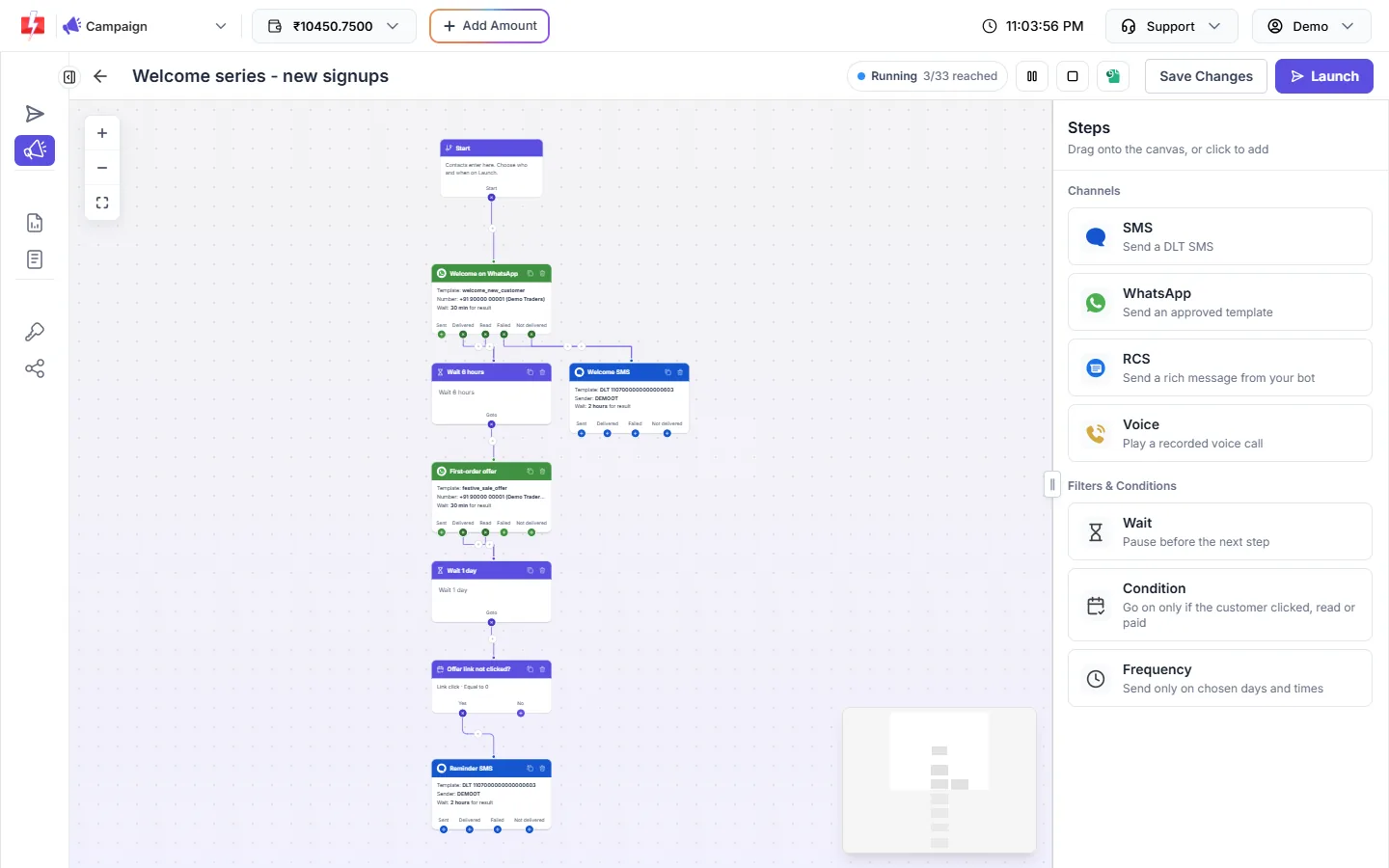
Open Campaign → Launch Campaign (or Campaign List → Create Campaign), start blank or use Start from a ready journey, and add these steps:
| Step | When | Channel | Message | If it fails |
|---|---|---|---|---|
| 1 | At signup (API call) | WhatsApp (utility) | Welcome, your account is ready | SMS welcome from a DLT template |
| 2 | Wait 6 hours, then Frequency 09:00 to 21:00 | WhatsApp (marketing) | 10% off your first order, code WELCOME10 | Failed or not delivered after 30 minutes: SMS with the code |
| 3 | Wait 1 day | Condition "Your event: purchased, at least 1 in the last 2 days" | Did your system post purchased? | Yes: journey ends. No: step 4 |
| 4 | Next day, 09:00 to 21:00 | WhatsApp (marketing) | Reminder: your code expires tomorrow | SMS reminder |
The Frequency step matters: a user who signs up at 11 pm would otherwise get the offer at 5 am. With it, the offer waits until 09:00.
Templates to submit to Meta (placeholders are mapped in the WhatsApp step; {{1}} to the name variable, {{2}} to fixed text):
- Welcome: Hi {{1}}, welcome to Demo Traders. Your account is ready. Reply here if you need any help.
- Offer: Hi {{1}}, as a new customer you get 10% off your first order with code {{2}}. Valid for 2 days.
- Reminder: Hi {{1}}, your welcome code {{2}} expires tomorrow. Use it on your first order today.
Step 2: copy the campaign ID
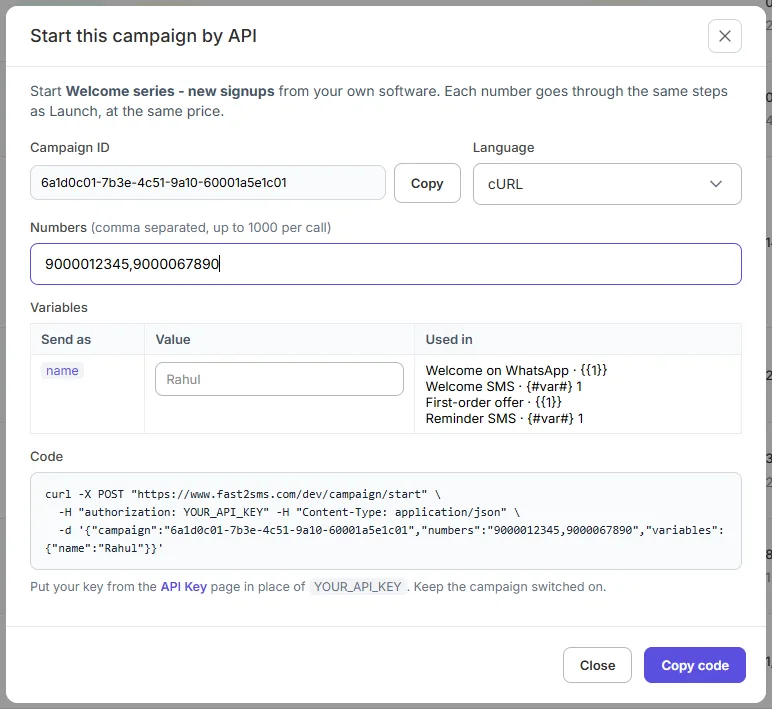
Save and switch on the campaign. In Campaign List, open ⋮ → Get API code and copy the ID. Send a test to up to 10 numbers first; test sends are charged like normal sends.
Step 3: call the API from your signup handler
Call start after the user is saved in your database, ideally from a background job so a slow network never delays your signup page. The code is in the next section.
Step 4: post the purchase event
When the user places their first order, post purchased for their number. The Condition in step 3 then sends them down the Yes path and they never get the reminder.
Step 5: receive the results
Set your webhook URL on Webhook → Campaign. Your server gets one POST per step result, so you can mark "welcome delivered" in your CRM or alert your team when the offer fails on both WhatsApp and SMS.
How to set it up in Fast2SMS
The same steps work for any event-triggered journey, not just signups.
- Create an account at fast2sms.com (₹50 free credit) and copy your API key from the Dev API page. Add your server IPs to the whitelist if you use it.
- Prepare the content: approved WhatsApp templates, a DLT sender and templates for SMS steps, an RCS bot or voice audio if the journey uses them.
- Open Campaign and choose Launch Campaign, or Campaign List → Create Campaign.
- Start from a ready journey or a blank canvas, and add your channel steps plus Wait, Condition and Frequency steps.
- Map the variables on each SMS and WhatsApp step to the keys your code will send, such as
name. - Wire the outputs: sent, delivered, read, failed and not delivered for WhatsApp and RCS; sent, delivered, failed and not delivered for SMS.
- Send test to up to 10 numbers and check every path, including the SMS backup.
- Switch the campaign on and copy the ID from ⋮ → Get API code. Send now, Schedule and Repeat are for panel lists; API numbers always start at once.
- Add the call to your code and set your webhook URL on Webhook → Campaign.
Code: cURL, PHP, Node.js and Python
All four examples send the same request. Replace YOUR_API_KEY and YOUR_CAMPAIGN_ID, and keep the key in an environment variable on your server.
cURL
curl -X POST "https://www.fast2sms.com/dev/campaign/start" \
  -H "authorization: YOUR_API_KEY" \
  -H "Content-Type: application/json" \
  -d '{"campaign": "YOUR_CAMPAIGN_ID",
       "recipients": [{"mobile": "9000012345", "name": "Rahul"}]}'
PHP
function startWelcomeJourney(string $mobile, string $name): ?array
{
    $ch = curl_init("https://www.fast2sms.com/dev/campaign/start");
    curl_setopt_array($ch, [
        CURLOPT_POST => true,
        CURLOPT_RETURNTRANSFER => true,
        CURLOPT_TIMEOUT => 15,
        CURLOPT_HTTPHEADER => [
            "authorization: " . getenv("FAST2SMS_API_KEY"),
            "Content-Type: application/json",
        ],
        CURLOPT_POSTFIELDS => json_encode([
            "campaign" => "YOUR_CAMPAIGN_ID",
            "recipients" => [["mobile" => $mobile, "name" => $name]],
        ]),
    ]);
    $body = curl_exec($ch);
    $status = curl_getinfo($ch, CURLINFO_HTTP_CODE);
    curl_close($ch);

    $json = json_decode((string) $body, true);
    if ($status !== 200 || empty($json["return"])) {
        error_log("Fast2SMS start failed: " . $body);
        return null;
    }
    return $json; // request_id, run, added, skipped
}

startWelcomeJourney("9000012345", "Rahul");
Node.js (18 or later)
async function startWelcomeJourney(mobile, name) {
  const res = await fetch("https://www.fast2sms.com/dev/campaign/start", {
    method: "POST",
    headers: {
      authorization: process.env.FAST2SMS_API_KEY,
      "Content-Type": "application/json",
    },
    body: JSON.stringify({
      campaign: "YOUR_CAMPAIGN_ID",
      recipients: [{ mobile, name }],
    }),
  });
  const data = await res.json();
  if (!res.ok || !data.return) {
    throw new Error(data.message || "Fast2SMS start failed");
  }
  return data; // request_id, run, added, skipped
}

startWelcomeJourney("9000012345", "Rahul").then(console.log);
Python
import os
import requests

def start_welcome_journey(mobile, name):
    resp = requests.post(
        "https://www.fast2sms.com/dev/campaign/start",
        headers={"authorization": os.environ["FAST2SMS_API_KEY"]},
        json={
            "campaign": "YOUR_CAMPAIGN_ID",
            "recipients": [{"mobile": mobile, "name": name}],
        },
        timeout=15,
    )
    data = resp.json()
    if resp.status_code != 200 or not data.get("return"):
        raise RuntimeError(data.get("message", "Fast2SMS start failed"))
    return data  # request_id, run, added, skipped

print(start_welcome_journey("9000012345", "Rahul"))
To add many people at once, send up to 1,000 objects in recipients in one call instead of one call per person.
How do you post events with /dev/campaign/event?
Post an event whenever a customer does something a journey should react to. A Condition step set to "Your event" then checks it.
| Field | Description |
|---|---|
number | One number, or a comma list of up to 1,000 |
event | Your event name: letters, digits and underscore (spaces become _), for example purchased or payment_received |
value | Optional text up to 500 characters, for example an order or invoice number |
curl -X POST "https://www.fast2sms.com/dev/campaign/event" \
  -H "authorization: YOUR_API_KEY" \
  -H "Content-Type: application/json" \
  -d '{"number": "9000012345", "event": "purchased", "value": "ORDER-1001"}'
{"return": true, "event": "purchased", "recorded": 1, "message": "Event recorded"}How Condition steps use events:
- Count and compare: operators =, !=, >, >=, <, <= on how many times the event was recorded, for example "purchased at least 1".
- Time windows: in the last N hours or days, or between two dates.
- AND / OR: combine several checks, such as an event and an earlier step's result.
- Link clicked: there is no automatic click tracking. If your link goes through your own redirect, post
clickedfrom that redirect and the "Link clicked" condition can use it. - Reply received: WhatsApp and RCS replies are recorded for you; you do not need to post them.
Post the event as soon as it happens. A Condition only sees events recorded before it runs.
How do webhooks report each step?
Set a URL on Webhook → Campaign (for all campaigns or one), on the campaign's Start step, or with the webhook API (GET|POST /dev/webhook/v2/campaign, PUT|DELETE /dev/webhook/v2/campaign/{id}). Fast2SMS then posts JSON to it.
| Type | Events |
|---|---|
| Step results | campaign.step.sent, .delivered, .read, .failed, .not_delivered, .answered, .not_answered |
| Run status | campaign.scheduled, .started, .paused, .paused_balance, .resumed, .stopped, .finished, .failed |
A step result looks like this (sample values):
{
  "event": "campaign.step.failed",
  "campaign_id": "12",
  "campaign_name": "Signup welcome",
  "request_id": "CbjqlxWA7FCCoas",
  "step_id": "wa_2",
  "step_name": "Offer",
  "channel": "whatsapp",
  "mobile": "9000012345",
  "status": "failed",
  "reason": "131049",
  "cost": "0",
  "sent_time": "2026-11-26 16:15:02",
  "result_time": "2026-11-26 16:15:04",
  "next_step": "Offer SMS"
}
The payload also carries channel_status, message_id and timestamp. Tips for your receiver:
- Answer fast with HTTP 200 and do the heavy work in a queue.
- De-duplicate on
request_id+step_id+mobile+event, because networks can deliver a POST twice. - Match to your start call with
request_id. - Watch
campaign.paused_balance: the run paused because the wallet ran low. It resumes on its own after you recharge (checked every 10 minutes) and stops after 3 days on low balance.
Delivery logs for these webhooks are on the Webhook page under channel CAMPAIGN.
What happens if the same number is sent twice?
All numbers you send to one campaign on the same day join one run, named "campaign name · API". A number that is already in that day's run is skipped, not sent twice, and the response counts it in skipped.
- Double clicks and retries are safe on the same day. If your signup form submits twice, or your code retries after a timeout, the user still gets one journey.
- A later day is a new run. A call for the same number tomorrow starts a fresh journey. If returning users should not get the welcome again, check on your side before calling.
- Different campaigns are separate. The same number can be in your welcome journey and your payment journey at the same time.
- Each step runs once per contact within a journey, and a journey lasts at most 30 days for one contact.
What are the rate limits?
Per API key: write calls (start, event, pause, resume, stop) 30 per minute, read calls 120 per minute. Over the limit you get HTTP 429.
- Batch. One
startcall takes up to 1,000 numbers. If you get more than a few signups a minute, queue them and send a batch every few seconds. - Back off on 429. Wait and retry; do not loop at full speed.
- Sending speed is separate. A run starts up to 5,000 contacts per minute, so 1 lakh contacts start in about 20 minutes. Optional limits per minute, hour or day on the campaign slow it further if your team needs to handle replies.
- Account limits: up to 200 campaigns per account; a journey can have up to 200 steps and 400 connections.
How do you read runs, reports and journeys?
Use the read calls to show campaign status in your own admin panel, or to pull failed numbers for a retry list.
curl "https://www.fast2sms.com/dev/campaign/report?request_id=CbjqlxWA7FCCoas" \
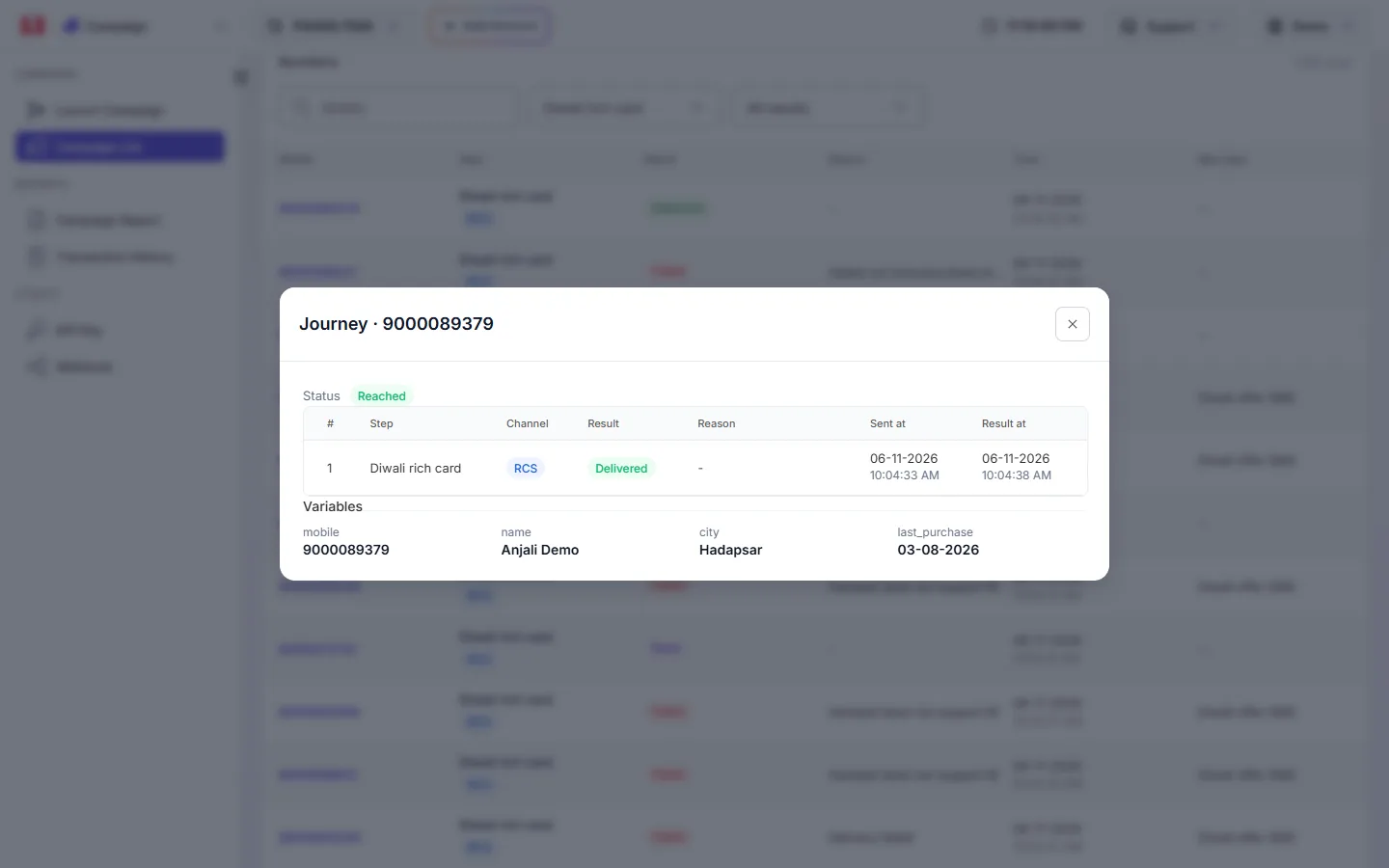
-H "authorization: YOUR_API_KEY"runs: the runs of a campaign with total, reached, unreached, in progress, cost, refund and net cost.report: the run summary plus a per-step table (entered, sent, delivered, read, answered, failed, not delivered, cost, average time, top failure reasons).numbers: one row per number per step, filtered by step, result or number.journey: every step one number went through, with results and times.pause,resume,stop: control a run byrequest_id. Contacts still waiting when you stop are not charged.
The same data is in the panel under Reports → Campaign Report, which refreshes every 15 seconds while a run is active.
How much does it cost?
The API, the journey builder and webhooks are free. You pay each message at the channel's normal rate from one wallet; Wait, Condition and Frequency steps cost nothing.
| Step | Price at the time of writing |
|---|---|
| WhatsApp utility / authentication | ₹0.25 per message |
| WhatsApp marketing | ₹0.95 per message |
| SMS (DLT) | ₹0.25 from a ₹100 recharge, down to ₹0.11 on bigger slabs |
| RCS | From ₹0.35 per message |
| Voice call | ₹0.25 per 15-second pulse, answered calls only |
Cost example: 3,000 signups a month
For the signup journey above, assuming as an example that 5% of WhatsApp messages need the SMS backup and 20% of users buy before the reminder:
| Step | Messages | Rate | Cost |
|---|---|---|---|
| WhatsApp welcome (utility) | 3,000 | ₹0.25 | ₹750 |
| WhatsApp offer (marketing) | 3,000 | ₹0.95 | ₹2,850 |
| WhatsApp reminder to the 2,400 who did not buy | 2,400 | ₹0.95 | ₹2,280 |
| SMS backups (5% of 8,400 WhatsApp sends) | 420 | ₹0.25 | ₹105 |
| Total | ₹5,985, about ₹2 per signup |
Failed WhatsApp and RCS messages are refunded under each channel's policy; SMS refunds apply only on On Delivery billing. Live rates: WhatsApp pricing and SMS pricing.
How do you keep the API key safe?
- Call from your server only. Never put the key in browser JavaScript or a mobile app, where anyone can read it.
- Header, not URL. Write calls take the key only in the
authorizationheader and only by POST, so a link preview or browser history can never start a charged journey. - Whitelist your server IPs on the Dev API page.
- Switch the API off on the same page if a key leaks, then create a new one.
- Validate input before you call: a real Indian mobile, and variable values that fit your templates.
Mistakes to avoid
- Calling from the browser. It exposes your key. Call from your backend.
- One call per user at high volume. You will hit 30 writes per minute. Batch up to 1,000 recipients per call.
- Variable keys that do not match. If the journey expects
nameand you sendfirst_name, the placeholder is empty. Check withinfo. - Forgetting the Frequency step. Night signups get offers at 5 am without it.
- Not posting events. Without
purchasedorpayment_received, the journey reminds people who already acted. - Expecting automatic click tracking. Post
clickedyourself if you want to branch on it. - Expecting per-customer dates. Waits are fixed. For "3 days before the due date", call
starton that day from your system. - Assuming a second call tomorrow is skipped. Only same-day repeats are skipped.
- Ignoring 422 messages. They tell you exactly what is wrong: campaign off, wallet low, bad number or variable.
- Webhook handlers that are slow. Reply 200 quickly and process in a queue.
Why use the Fast2SMS Campaign API?
- One call, many steps: no cron jobs or timers in your code for follow-ups and fallbacks.
- Four channels: SMS, WhatsApp, RCS and voice in one journey and one wallet. See the omnichannel marketing platform guide.
- Marketing teams can change messages in the panel without a code release; your call stays the same.
- Full visibility: webhooks, read calls and a per-number journey view.
Build the journey in the Fast2SMS campaign API and journey builder, copy the code from Get API code and send your first test. For the business side of the same journeys, read the welcome message automation, WhatsApp automation and SMS fallback guides.
Frequently asked questions
How do I trigger a WhatsApp message on signup using an API?
Build the journey once in Campaign, then have your server call POST https://www.fast2sms.com/dev/campaign/start with your API key in the authorization header, the campaign ID and the user's number. The journey starts at once.
What is event-triggered messaging?
It means messages are sent because something happened in your system, such as a signup, an order or an invoice. The event triggers a message or a whole series of messages automatically.
What is a journey API?
An API that starts a multi-step journey instead of a single message. With the Fast2SMS Campaign API one call can lead to a WhatsApp now, an offer later, an SMS backup and a reminder the next day.
What is transactional automation?
Automated messages tied to a customer's own action or account, such as a welcome, an order update or a payment reminder, rather than a marketing blast to a list.
What is an automated notification API?
An API your software calls to send notifications automatically when events happen. The Campaign API adds timing, fallback and conditions on top of a single send.
What is event-based SMS?
SMS sent because of an event in your system, for example an order shipped. With Campaign, the event can also lead to WhatsApp, RCS or a voice call.
When should I use the Campaign API instead of the SMS or WhatsApp API?
Use the Campaign API when one event should lead to several steps, waits or a backup channel. For single messages and OTPs, the SMS API or the WhatsApp API is simpler.
Does Fast2SMS have a built-in signup or Shopify trigger?
No. Campaign has no native signup, Shopify, WooCommerce, cart, keyword or incoming-webhook triggers. Your website, app, CRM or store backend makes one API call.
Which channels can an API-triggered journey use?
SMS, WhatsApp, RCS and voice calls, plus Wait, Condition and Frequency steps. Email, A/B split and code steps are not available.
Is there a WhatsApp API for my website?
Yes. Your website backend can start WhatsApp journeys with the Campaign API, or send single messages with the WhatsApp API. See the WhatsApp API integration guide.
Where do I get the API key?
On the Dev API page of the Fast2SMS panel. It is the same key as the other Fast2SMS APIs.
How do I send the API key?
In the authorization header. Write calls (start, event, pause, resume, stop) accept the key only in the header and only by POST.
Where do I find the campaign ID?
In Campaign List, open the three-dot menu of the campaign and click Get API code. It shows the ID and ready code in cURL, PHP, Node.js and Python.
Does the campaign need to be switched on?
Yes. A switched-off campaign returns HTTP 422 with a message telling you to turn it on.
Can I use the IP whitelist with the Campaign API?
Yes. The IP whitelist and the API on/off switch from the Dev API page apply to all Campaign API calls.
Can I call the Campaign API from browser JavaScript?
You should not. It exposes your API key. Call it from your server or a background job.
Can I send JSON to the Campaign API?
Yes. Send JSON with Content-Type: application/json, or form fields. Responses are always JSON.
What fields does /dev/campaign/start take?
campaign (required) plus one of recipients (objects with mobile and variables), numbers (comma list, with optional variables) or groups (Address Book groups, with optional schedule_time).
How many numbers can I send in one start call?
Up to 1,000 numbers or recipients per call.
How many variables can one number carry?
Up to 50 variables per number. Keys must match the variable names mapped in the journey.
How do I know which variables a campaign needs?
Call info or list. They return the variable names each campaign expects. mobile is always available.
What happens if I do not send a variable?
It renders as empty text in the message. Check the names with the info call before going live.
Can I schedule an API start for later?
Numbers and recipients always start now. schedule_time (IST) works only when you start Address Book groups.
What does the start response contain?
return, request_id, run_id, campaign, run (the day's run name), status, added, skipped and a message.
What is the request_id?
The ID of the run, 15 characters starting with C. Use it in read calls, pause, resume and stop, and match it in webhooks.
Why did my start call return 422?
The message says why: the campaign is switched off, the wallet cannot cover the first step, a number or variable is invalid, or numbers and groups were mixed in one call.
Can I start a journey for international numbers?
No. Only Indian mobile numbers (10 digits starting with 6 to 9) are accepted. A 91 or 0 prefix is removed.
What happens if I send the same number twice on the same day?
All numbers sent to one campaign on the same day join one run. A number already in that run is skipped, not sent twice, and counted in skipped.
Will a user who signs up again tomorrow get the journey again?
Yes. A call on a later day starts a fresh journey. If returning users should not get it, check on your side before calling.
Can the same number be in two campaigns at once?
Yes. Each campaign has its own runs, so a number can be in a welcome journey and a payment journey at the same time.
Is it safe to retry a start call after a timeout?
On the same day, yes. The number is skipped if it already joined the run.
What is /dev/campaign/event used for?
To record what a customer did, such as purchased or payment_received. Condition steps set to "Your event" branch on it.
What fields does the event call take?
number (one or a comma list up to 1,000), event (letters, digits, underscore) and an optional value up to 500 characters.
How do I stop a reminder when the customer buys?
Post purchased for their number, and put a Condition "Your event: purchased, at least 1 in the last 2 days" before the reminder. Buyers take the Yes path and the journey ends.
Does Fast2SMS track link clicks automatically?
No. If your link goes through your own redirect, post a clicked event from it. The "Link clicked" condition then works.
Do I need to post WhatsApp replies as events?
No. WhatsApp and RCS replies are recorded for you, and a Condition can check "Reply received (WhatsApp / RCS)".
Can Conditions use time windows?
Yes. Last N hours or days, or between two dates, with comparisons such as equal to, not equal to, more than, at least, less than or at most, and AND / OR.
Can a journey branch on SMS replies or specific buttons?
No. There is no SMS-reply or button-specific branching. Use events from your own system if you need finer logic.
How do I receive step results by webhook?
Set a URL under Webhook, Campaign, on the campaign's Start step, or with the webhook API at /dev/webhook/v2/campaign. Fast2SMS posts JSON for every step result and run status.
Which webhook events are sent?
Step results campaign.step.sent, delivered, read, failed, not_delivered, answered and not_answered, and run statuses scheduled, started, paused, paused_balance, resumed, stopped, finished and failed.
What fields does a campaign webhook carry?
Event, campaign ID and name, request_id, step ID and name, channel, mobile, status, channel status, reason, message ID, cost, sent and result times, next step and a timestamp.
How should I handle duplicate webhooks?
Reply 200 quickly and de-duplicate on request_id, step_id, mobile and event before processing.
What does campaign.paused_balance mean?
The run paused because the wallet ran low. It resumes on its own after recharge (checked every 10 minutes) and is stopped after 3 days on low balance.
Where can I see webhook delivery logs?
On the Webhook page, under channel CAMPAIGN.
What are the Campaign API rate limits?
Per API key: 30 write calls per minute (start, event, pause, resume, stop) and 120 read calls per minute. Over the limit you get HTTP 429.
How do I handle more than 30 signups a minute?
Queue them and send batches of up to 1,000 recipients per start call every few seconds, with back-off on 429.
How fast does a run send?
Up to 5,000 contacts per minute per run, so 1 lakh contacts start in about 20 minutes. Optional contact limits per minute, hour or day can slow it down.
Which read calls are available?
list, info, groups, runs, report, numbers and journey. They accept GET or POST and are limited to 120 per minute per key.
Can I see one customer's journey by API?
Yes. The journey call with request_id and number returns every step that number went through, with results and times.
Can I pause or stop a run by API?
Yes. POST pause, resume or stop with the request_id. Contacts still waiting when you stop are not charged.
How long can an API-triggered journey last?
Up to 30 days per contact, with up to 200 steps and 400 connections per journey.
Is the Campaign API free?
Yes. There is no API fee, builder fee or monthly fee. You pay each message at the channel's normal rate from one wallet.
How much does a WhatsApp message triggered by API cost?
At the time of writing ₹0.25 per utility or authentication message and ₹0.95 per marketing message. See WhatsApp pricing.
How much does an SMS step cost?
At the time of writing ₹0.25 per SMS from a ₹100 recharge, down to ₹0.11 on bigger recharges. See SMS pricing.
Are test sends free?
No. Test sends to up to 10 numbers are charged like normal sends.
Is there free credit to try the API?
Yes. New accounts get ₹50 free credit, with no setup or monthly fee.
Where can I read the business side of these journeys?
See the welcome message automation, WhatsApp automation and SMS fallback guides, and the omnichannel marketing platform guide.