DLT Support: Free DLT Registration Help from Fast2SMS
No monthly fee · Pay as you go from ₹100 · Free setup help on a call
Fast2SMS gives free DLT support to every user: help choosing a DLT portal, registering your entity, sender IDs and templates, a check of your template wording before you submit, adding your details in DLT Manager and completing the PE-TM chain. You can call +91-6262778822, chat in the panel, email the support team or book a free 30-minute meeting at fast2sms.com/meet. You pay only the DLT portal's own fee and the SMS you send.
This page explains exactly what the free DLT registration help covers, what it does not, how to book it, what to keep ready, and the DLT problems the team solves most often. For the full process itself, read our DLT registration guide.
What free DLT support includes
Free DLT support means the Fast2SMS team guides you through every DLT step, from your first signup on an operator portal to your first delivered SMS, without charging for it. The help is for all registered Fast2SMS users.
| Stage | What the team helps with | Fast2SMS charge |
|---|---|---|
| Before you start | Which DLT portal to pick, which documents you need, whether you can register without GST | ₹0 |
| Entity registration | Filling the Principal Entity form, matching business names across documents, the LOA, payment steps (for example the Jio Primary User rule) | ₹0 |
| Headers | Choosing a header that relates to your brand and is likely to be approved | ₹0 |
| Templates | Choosing the right category, typed variables, brand name, CTA whitelisting; a check of your wording before you submit | ₹0 |
| PE-TM chain | Adding SID GROUPS PRIVATE LIMITED (TM ID 1702178720558766591), the binding form in Fast2SMS, the final approval on your portal, chain mismatch and hash code problems | ₹0 |
| Fast2SMS DLT Manager | Adding your Entity ID, sender IDs and templates, Excel upload, Pending or Rejected items | ₹0 |
| After you go live | Failed SMS, DLT error codes, 2026 variable tagging migration, inactive headers | ₹0 |
The live pricing page lists "DLT registration help ₹0: entity, sender ID and template registration with our team; templates checked before you submit." The same team also handles general SMS, WhatsApp and API questions.
What we cannot do for you
DLT registration must be submitted by your business, in your own name, with your documents and the OTPs sent to your mobile. So the team guides you and checks your details, but does not submit the registration on your behalf. Some portals say this outright: Tata's DLT FAQ says the Principal Entity must start every registration request itself.
- We cannot pay the portal fee for you. The ₹5,900 yearly fee (including GST, at the time of writing) is paid by you to the operator portal.
- We cannot speed up a portal's approval. Each operator reviews in its own queue. What we can do is help you get the first submission right, because every rejection restarts the wait.
- We cannot bypass DLT scrubbing or DND. They are operator rules that apply to every provider.
- We cannot overrule a portal's rejection. We help you read the remark, fix it and resubmit, or raise a ticket with the portal.
How to get DLT help: call, chat, email or meeting
Pick the channel that suits you. For a quick question, chat or call. For a full walk-through of your portal and DLT Manager, book a meeting and share your screen.
| Channel | How | Best for |
|---|---|---|
| Call | +91-6262778822 for any DLT related help, 9 AM to 5 PM (as listed on our DLT registration page) | Quick answers, a stuck screen |
| +91-6262778822 | Sending screenshots of an error or rejection | |
| Chat | The chat box inside the Fast2SMS panel and on the website | Questions while you work in the panel |
| support@fast2sms.com | Documents, Excel files that will not upload, longer cases | |
| Free meeting | fast2sms.com/meet: a 30-minute Google Meet | Step-by-step help with your portal, templates and PE-TM chain |
| Contact form | Contact us, category "DLT Related" | When you want the team to get back to you |
How to book a free DLT meeting
- Open fast2sms.com/meet. Choose a meeting type and a date and time. Times are shown in India Standard Time.
- Enter your details. Name, email (the calendar invite goes there) and mobile number, verified by OTP. In "What do you need help with?" write something like "Jio DLT entity rejected" or "PE-TM binding pending".
- Click Schedule Meeting. The Google Meet link comes in your invite, and you can also check WhatsApp or email for it.
- Join with your portal open. Keep your DLT portal login and your Fast2SMS account ready so the team can guide you screen by screen.
Sending lakhs of SMS a month or need a volume rate? The sales team is at +91-6262778811 and sales@fast2sms.com.
What to keep ready
Having the right papers and IDs at hand turns a long back-and-forth into a single call.
For a new DLT registration
- Business PAN card (for a proprietorship, the proprietor's PAN).
- One business proof: GST certificate, Certificate of Incorporation, TAN, trade licence, Shop and Establishment certificate, MSME (Udyam) certificate, or FSSAI licence for food businesses.
- ID proof of the authorised person: PAN, Aadhaar, Voter ID, passport or driving licence.
- A letterhead for the Letter of Authorisation, with a stamp and the signatory.
- A working email and mobile number that the authorised person can access for OTPs.
- Two or three header ideas based on your brand, and the messages you want to send (OTP, order update, offer).
- Links and call-back numbers you will put in SMS, so they can be whitelisted first.
For a problem or rejection
- The name of your DLT portal.
- Your Entity ID, sender ID, Template ID and the exact template text.
- A screenshot of the error or the rejection remark.
- For failed SMS, the Request ID from your SMS report.
The full document list by business type is in documents required for DLT registration and DLT registration without GST.
Common DLT problems we solve
These are the DLT problems customers bring to us most often, with the fix the team walks you through.
| Problem | Usual cause | What we help you do |
|---|---|---|
| Jio payment option not showing | It opens about 6 hours after registering; only the Primary User can pay; GST or KYC needed first | Check the timing, the login and the KYC on TrueConnect |
| Entity rejected on the portal | Business name differs across form and documents, unclear scans, wrong LOA format | Match names exactly, redo the LOA, resubmit only what the remark mentions |
| "Organization with this POI is already registered" | Your PAN is already on DLT, often from an earlier provider or agency | Find the old Entity ID or contact the portal to recover access |
| Header rejected | Not linked to your brand, or a generic or restricted name | Pick a brand-based header and prepare proof |
| Template rejected | Wrong category, offer inside a service template, untagged variables, missing brand name | Rewrite the template and check it before you resubmit |
| Links blocked | URL or call-back number not whitelisted | Whitelist the CTA in the right format, then register the template |
| PE-TM binding rejected in Fast2SMS | Request not sent on the portal, or sent to another TM ID | Send to TM ID 1702178720558766591, then resubmit with the screenshot |
| Final PE Confirmation pending | Fast2SMS approved the chain; your final approval on the portal is missing | Show you where to approve on your portal |
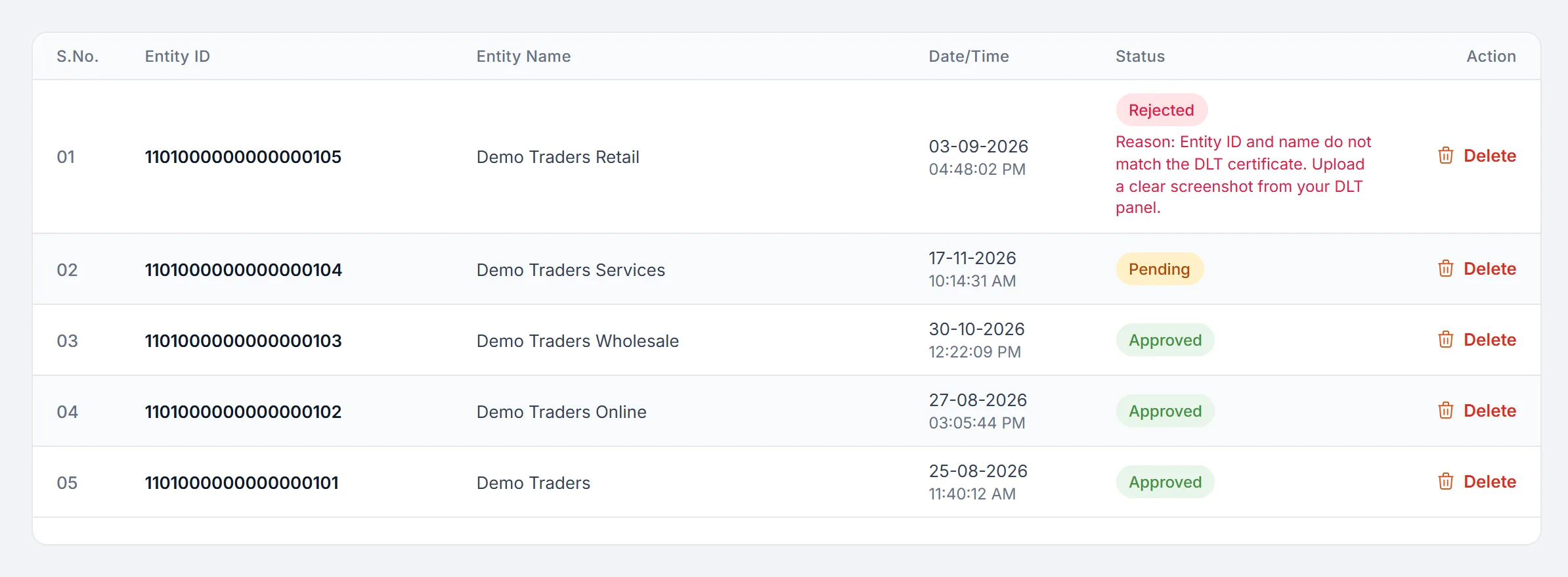
| Entity or sender ID pending in Fast2SMS | ID not confirmed automatically, or screenshot unclear | Upload a clear screenshot showing the ID and approved status |
| Template not showing when sending | Not approved, or not linked to the chosen sender ID | Fix the link in DLT Manager or on the portal |
| SMS failing with 633 or similar | Sent text differs from the template, or a variable is too long | Compare text character by character and test with Test Template |
| Header stopped working | Unused for 90 days and deactivated | Request reactivation on your portal |
| Everything failing after a year | Entity registration expired | Renew on the same portal; Entity ID stays the same |
More fixes in our help centre: entity rejected, header rejected, template rejected, PE-TM chain mismatch and DLT error codes.
DLT template approval help
Template rejections are the most common DLT delay, so the team checks your wording before you submit it on the portal. Send the draft and tell us what the message is for; we check it against the current rules.
- Category: OTPs as Transactional (or the category your portal suggests), order and appointment updates as Service Implicit, offers as Promotional. Service Explicit moved to Promotional from 10 March 2026.
- Typed variables (2026 rule): {#numeric#} for codes and amounts, {#alphanumeric#} for names and IDs, {#url#}, {#urlott#} and {#cbn#} for whitelisted links and numbers, {#email#} for email addresses.
- Limits: three variables or fewer and at least 30% fixed text, with no two variables side by side (except two {#alphanumeric#}).
- Brand name as fixed text, never inside a variable.
- No offers inside OTP or service messages.
- CTAs whitelisted before the template is submitted, in the right format (dynamic URLs end with ?, APK links end with .apk).
- Consent template ready before promotional templates.
Migrating old {#var#} templates to the new tags? The team can help you pick the right tag for each variable. Read DLT new rules 2026 and DLT template types.
Help after approval: DLT Manager and first SMS
Once your portal approves you, the team helps you get everything into Fast2SMS and send your first SMS. Adding your DLT details is free.
- Entity ID: DLT Manager > Entity ID > Add New Entity. IDs found on the DLT platform are approved at once; others wait as Pending for a check of your screenshot.
- Sender IDs: type each approved header (3 to 6 characters) with a screenshot, or upload your portal's header Excel.
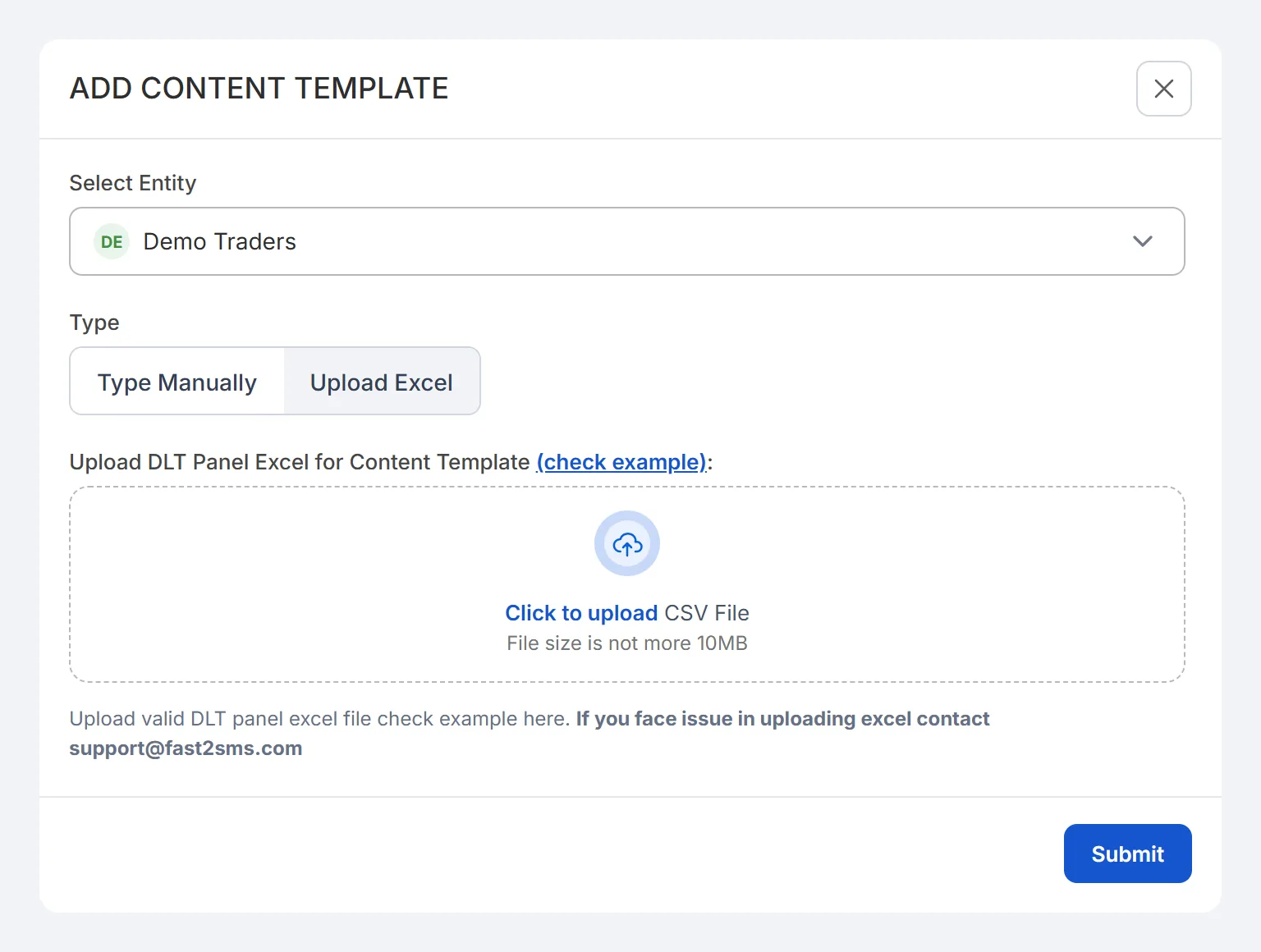
- Templates: paste the approved text exactly, choose the matching type and upload a screenshot, or upload the template Excel exported from your portal. Fast2SMS reads the export formats of Airtel, Jio, Vi, Tata and Smartping. If a file will not upload, email it to the support team.
- PE-TM Binding: upload the chain request screenshot and documents, then give the final approval on your portal.
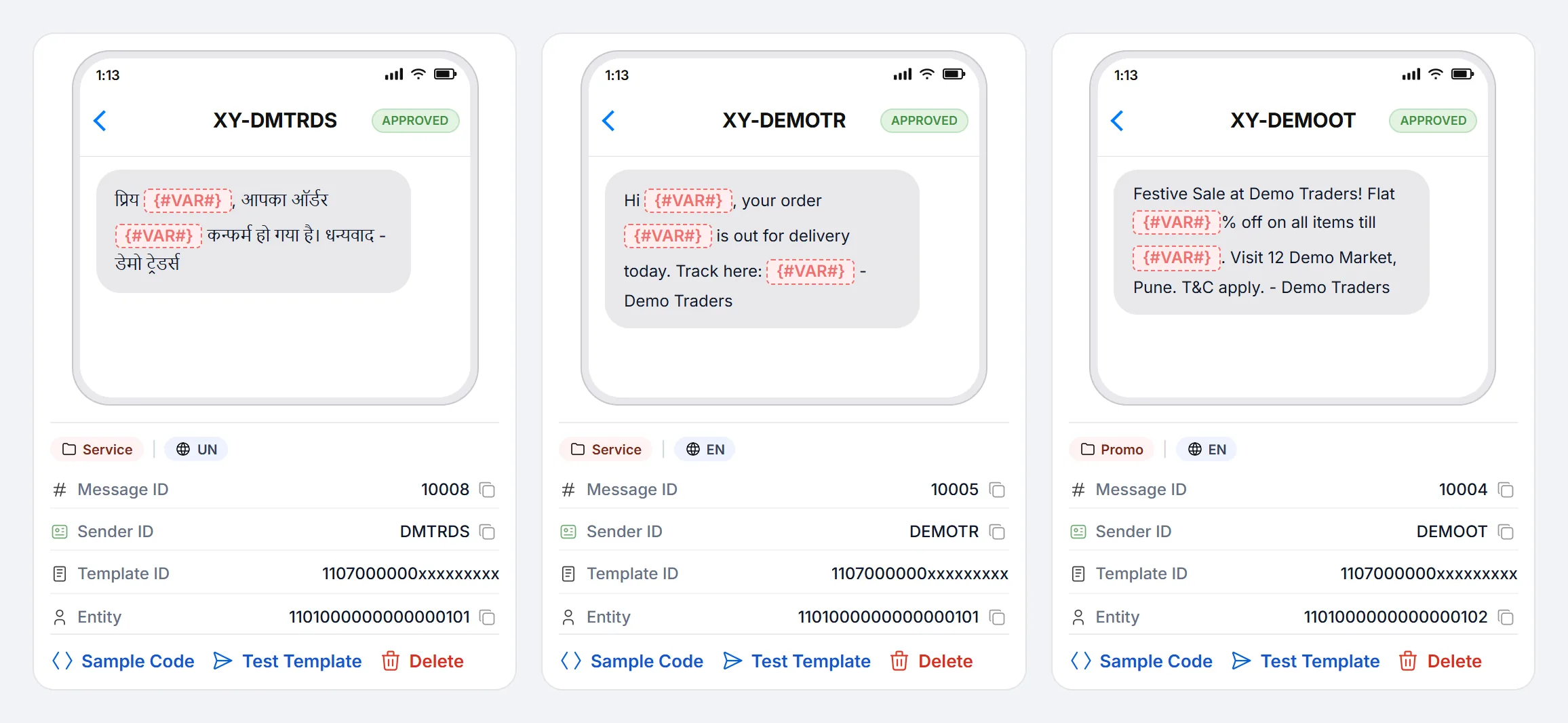
- Test and send: Test Template on your own number, then send from DLT SMS or the API with route=dlt.
The sending side is explained in how to send DLT SMS, with the API on the SMS API page and OTP sending on OTP SMS.
Do you need a paid DLT registration consultant?
For most businesses, no. DLT registration is an online form, a few documents, one portal fee and a few approvals. The parts that cause trouble (matching names, choosing headers, writing templates that pass, the PE-TM chain) are exactly what the free Fast2SMS DLT help covers.
Whoever helps you, keep these points in mind:
- Register in your own business name with your own email and mobile, so you always control the portal login. If an agency registered for you earlier, you may hit "POI already registered" later.
- Pay the fee only on the official portal. The fee is ₹5,900 a year including GST at the time of writing, the same on every portal.
- Register on one portal only. One registration works for all operators.
- Keep your Entity ID, headers and templates. They stay yours even if you change SMS provider; you only add the new provider's TM ID to your chain.
What it costs
| Item | Cost at the time of writing |
|---|---|
| DLT help from Fast2SMS (call, chat, email, meeting) | ₹0 |
| Adding entity, sender IDs, templates in DLT Manager; PE-TM binding | ₹0 |
| DLT entity registration on the operator portal | ₹5,900 per year incl. GST, paid to the portal |
| Each DLT SMS on Fast2SMS | ₹0.25 down to ₹0.11 by recharge slab, plus 18% GST on the recharge |
| Setup or monthly fee | ₹0 |
New accounts get ₹50 free credit and recharges start at ₹100. Fees and rules can change; check the operator portal before you pay. See bulk SMS pricing and the bulk SMS service. Ready to begin? Signup free and ask in chat, or book a meeting at fast2sms.com/meet.
DLT support: frequently asked questions
What is DLT support?
Help with every DLT step: choosing a portal, registering your entity, headers and templates, the PE-TM chain, adding your details in your SMS panel and fixing rejections or failed SMS. Fast2SMS gives it free to its users.
Is Fast2SMS DLT support really free?
Yes. There is no fee for help with registration, headers, templates or PE-TM binding. You pay only the DLT portal’s own fee and the SMS you send.
What does free DLT registration support include?
Portal choice, document guidance, entity form help, header advice, a check of your template wording before you submit, CTA whitelisting, PE-TM binding, DLT Manager setup and help with failed SMS.
Who can get free DLT help from Fast2SMS?
Every registered Fast2SMS user. Signup is free and new accounts get ₹50 test credit.
Can the Fast2SMS team register DLT on my behalf?
No. The registration must be in your business name, with your documents and the OTPs sent to your mobile, so you submit it. The team guides you through each screen and checks your details before you submit.
Can the team pay the DLT fee for me?
No. The fee, ₹5,900 per year including GST at the time of writing, is paid by you to the operator portal.
Can Fast2SMS speed up my DLT approval?
No one can speed up a portal’s queue. We help you get the first submission right, because every rejection restarts the wait.
Does the team help with all DLT portals?
Yes: Jio TrueConnect, Airtel DLT, Vi Vilpower, BSNL DLT, Tata DLT and Smartping (earlier Videocon DLT). Fast2SMS has step-by-step guides for each.
How do I contact Fast2SMS for DLT help?
Call or WhatsApp +91-6262778822, chat in the panel, email [email protected], use the contact form with category DLT Related, or book a meeting at fast2sms.com/meet.
What are the DLT helpline hours?
Our DLT registration page lists +91-6262778822 for any DLT related help from 9 AM to 5 PM.
How do I book a free DLT meeting?
Open fast2sms.com/meet, pick a meeting type, date and time, enter your name, email and OTP-verified mobile, and click Schedule Meeting. It is a 30-minute Google Meet.
Where do I get the meeting link?
In the calendar invite sent to your email. You can also check WhatsApp or email for the link after you schedule.
What should I write in “What do you need help with?”
A short line about your case, such as “Jio DLT entity rejected”, “Airtel template rejected” or “PE-TM final approval pending”, so the team can prepare.
Whom do I contact for volume pricing?
The sales team at +91-6262778811 or [email protected], or book a meeting.
What documents should I keep ready for DLT help?
Business PAN, one business proof (GST, incorporation, TAN, trade licence, Shop and Establishment, MSME or FSSAI), the authorised person’s ID, a letterhead for the LOA, and an email and mobile you can access.
What details help the team fix a DLT problem fast?
Your DLT portal name, Entity ID, sender ID, Template ID and exact template text, a screenshot of the error or rejection remark and, for failed SMS, the Request ID.
Can I get help without a GST certificate?
Yes. DLT registration works with other business proofs such as an MSME (Udyam) certificate, Shop and Establishment certificate or trade licence. See DLT without GST.
My DLT entity registration was rejected. Can you help?
Yes. Share the portal’s remark. Usually the business name differs across documents, a scan is unclear or the LOA is not in the portal’s format. We help you fix only that point and resubmit.
What if I get “Organization with this POI is already registered”?
Your PAN is already on DLT, often through an earlier provider or agency. We help you find the old Entity ID or contact the portal to recover access.
Can you help when my DLT header is rejected?
Yes. We help you choose a header that relates to your brand, avoid generic or restricted names and prepare any proof the portal asks for.
Do you give DLT template approval help?
Yes. Send your draft and its purpose. We check the category, typed variables, fixed text, brand name and links before you submit.
Can you help migrate my old {#var#} templates to the new variable tags?
Yes. We help you pick the right tag for each variable, such as {#numeric#} for codes and {#alphanumeric#} for names, and whitelist any links first.
Can you help with the PE-TM chain?
Yes. Add SID GROUPS PRIVATE LIMITED, TM ID 1702178720558766591, on your portal, submit the binding in Fast2SMS, then approve once more on your portal. We help with mismatch and hash code problems too.
Why is my PE-TM Final PE Confirmation pending?
Fast2SMS approved the chain and the final approval on your DLT portal is still to be done. The team shows you where to approve on your portal.
My entity or sender ID is Pending in Fast2SMS. What do I do?
It is waiting for a manual check of your screenshot. Upload a clear one showing the ID and its approved status; entities found on the DLT platform are approved instantly.
My DLT Excel will not upload in Fast2SMS. What now?
Add the items with Type Manually, or email the file to [email protected] and the team will help.
My DLT SMS are failing. Can support help?
Yes. Share the Request ID and the reason from the SMS report. Common causes are text not matching the template, long variables, non-whitelisted links, an inactive header or a missing PE-TM chain.
My header stopped working. Why?
Operators deactivate headers not used for 90 days. Ask for reactivation on your DLT portal; we can guide you.
Can you help renew my DLT registration?
Yes. Renew on the same portal every year. Your Entity ID, headers and templates stay the same, so nothing changes in Fast2SMS.
Do I need a paid DLT registration consultant?
For most businesses, no. The process is an online form, a few documents and one portal fee, and the free Fast2SMS help covers the tricky parts.
What should I watch out for with a DLT registration service?
Register in your own business name with your own email and mobile, pay the fee only on the official portal, and register on one portal only.
What does DLT registration cost in total?
₹5,900 per year including GST to the portal at the time of writing, ₹0 to Fast2SMS for DLT help and setup, and ₹0.25 down to ₹0.11 per SMS by recharge slab when you send.
Will I keep my DLT registration if I change SMS provider?
Yes. Your Entity ID, headers and templates are yours. You add the new provider’s TM ID to your PE-TM chain.
Can I send SMS while my DLT is pending?
Yes, with Fast2SMS Quick SMS: a random sender, a review before sending and a higher rate. Branded SMS and OTP templates need DLT.
Where is the full DLT registration process explained?
In our DLT registration guide, with every portal, fee, document and rule. Sending is covered in DLT SMS.