Welcome Message on Signup: WhatsApp Welcome Now, an Offer at 6 Hours and a Reminder Next Day
No monthly fee · Pay as you go from ₹100 · Free setup help on a call
A welcome message on signup is the first message a new customer gets after creating an account: a thank-you, the next step, and often a first-order offer. On Fast2SMS your website calls one API, and a Campaign journey sends a WhatsApp welcome at once, an offer 6 hours later (SMS if not delivered) and a reminder next day, from ₹0.25 per message at the time of writing.
This guide covers the full welcome journey step by step, ready API code in cURL, PHP and Node.js, welcome WhatsApp and SMS message samples, a longer onboarding sequence, what it costs per signup and the mistakes that turn a welcome into a block.
What is a welcome message on signup?
It is an automatic message sent the moment someone creates an account on your website or app, gives you their number on a form, or joins as a new customer. It confirms they are in, tells them the one next step that matters, and sets the tone for every message after it.
The first message is the one people are most likely to open. They have just signed up, your brand is fresh in their mind, and they are waiting for something to happen. A plain "Welcome" wastes that moment. A good welcome message does three jobs: it thanks them by name, it shows them the next step (complete the profile, browse the bestsellers, book a demo, finish KYC), and it gives them a reason to come back, often a first-order offer that arrives a little later.
That last part is where most businesses stop short. A single welcome is easy to forget. A short welcome journey of two or three messages over a day turns more new signups into active customers, and it switches to SMS when WhatsApp does not get through. On Fast2SMS you build it in Campaign, a journey builder for SMS, WhatsApp, RCS and voice, and start it from your signup code. For the API basics behind it, see the WhatsApp Business API page.
What does a signup welcome journey look like?
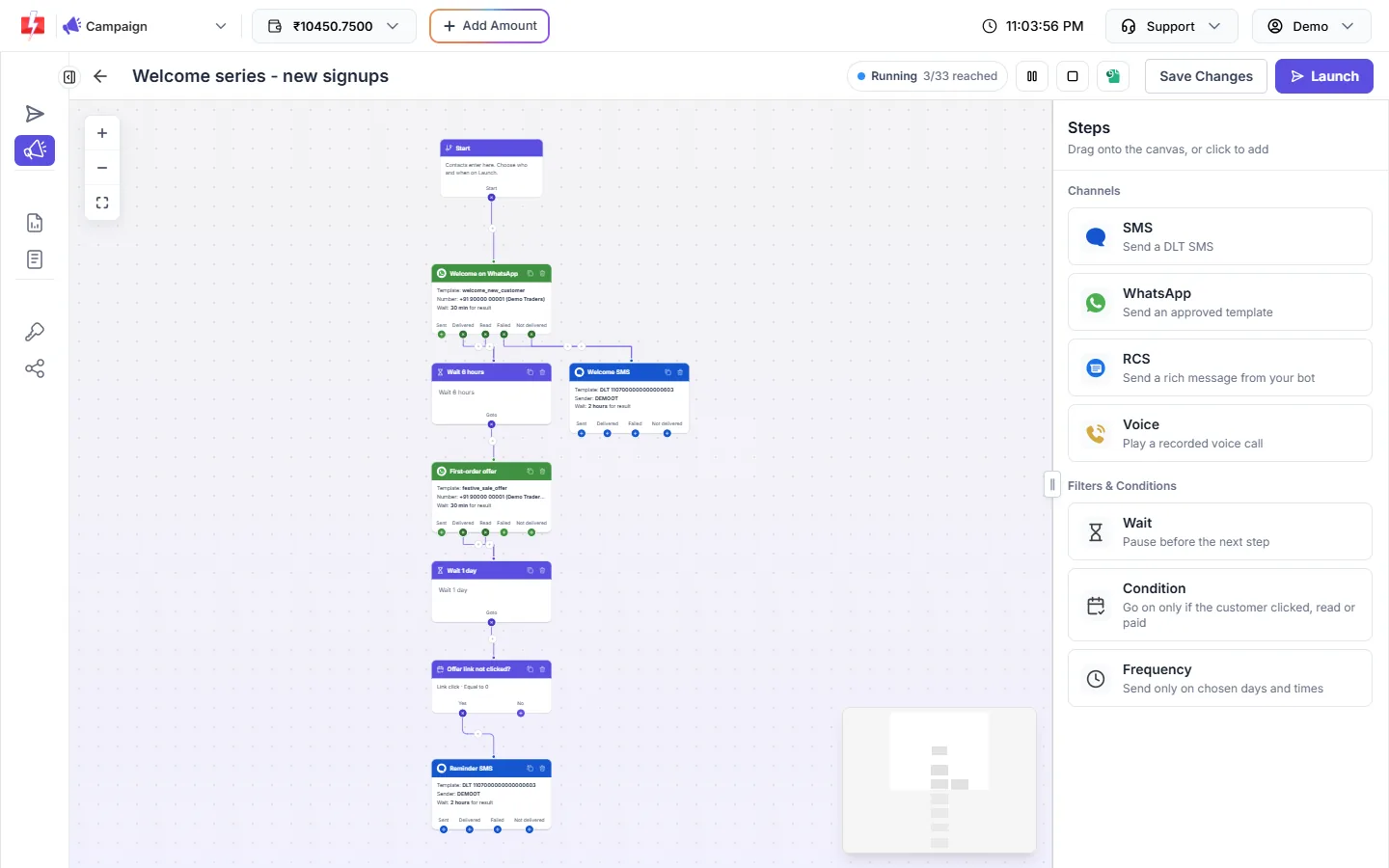
The journey Fast2SMS customers ask for most is simple: a WhatsApp welcome right after signup, an offer 6 hours later on WhatsApp with SMS if it is not delivered, and a reminder the next day. Each later step can check first whether the customer has already bought or activated, so they are not chased for something they already did.
| Step | When | Channel | Message | If it fails |
|---|---|---|---|---|
| 1. Signup | 0 min | Your server calls the API | The new number enters the journey | API returns an error; log it and retry |
| 2. Welcome | Right away | "Welcome to Demo Traders, Rahul" with a Get started button | Failed or not delivered: welcome SMS (DLT) | |
| 3. Wait | 6 hours | Wait + Frequency | Continue only between 09:00 and 21:00 | Not applicable |
| 4. Already bought? (optional) | About 6 hours | Condition | first_order in the last 1 day = 0? | Bought: journey ends |
| 5. Offer | About 6 hours | First-order coupon with image and Shop now button | Failed or not delivered: offer SMS (DLT) | |
| 6. Wait | 1 day | Wait + Frequency + Condition | Still no first_order? Daytime only | Bought: journey ends |
| 7. Reminder | About 30 hours after signup | WhatsApp (or RCS, or SMS) | "Your welcome offer ends tonight" | Not delivered: short SMS |
The times are approximate. A WhatsApp step waits for a final delivery result (30 minutes by default, settable from 1 minute to 24 hours) before it takes "not delivered", and a Frequency step holds the journey overnight, so a midnight signup gets the offer the next morning instead of at 6 am. Waits can be anything from 1 minute to 30 days, and the whole journey can last up to 30 days per contact.
How does the welcome journey start from my signup form?
Your server starts it. Right after a new account is saved, your signup code sends one request to POST https://www.fast2sms.com/dev/campaign/start with the customer's number and name. Fast2SMS puts that number into the journey immediately, and the welcome WhatsApp goes out within moments.
Campaign does not watch your website, app or CRM by itself; there is no built-in signup trigger. That is a good thing: you decide exactly when a person counts as "signed up" (after OTP verification, after email confirmation, after the first login) and only then call the API. The same call works from a website, a mobile app backend, a CRM, a lead form handler or a store backend.
To stop later steps for people who have already done what you wanted, your server posts an event, for example first_order, kyc_done or demo_booked, to POST /dev/campaign/event. A Condition step in the journey checks that event before the offer and the reminder.
Three helpful behaviours come built in:
- Starts right away. Numbers sent by API start immediately; there is no queue to wait for.
- No double welcomes. All API calls to one campaign on the same day join one run named "your campaign · API", and a number already in that run is skipped. If a customer signs up twice in a day, they get one welcome.
- One report per day. Because the day's signups share a run, the Campaign Report shows that day's welcome results in one place.
Developers who want the full picture (start, event, runs, report, numbers, journey, pause, resume, stop and webhooks) can read the event-triggered messaging API guide.
API code: start the welcome journey (cURL, PHP and Node.js)
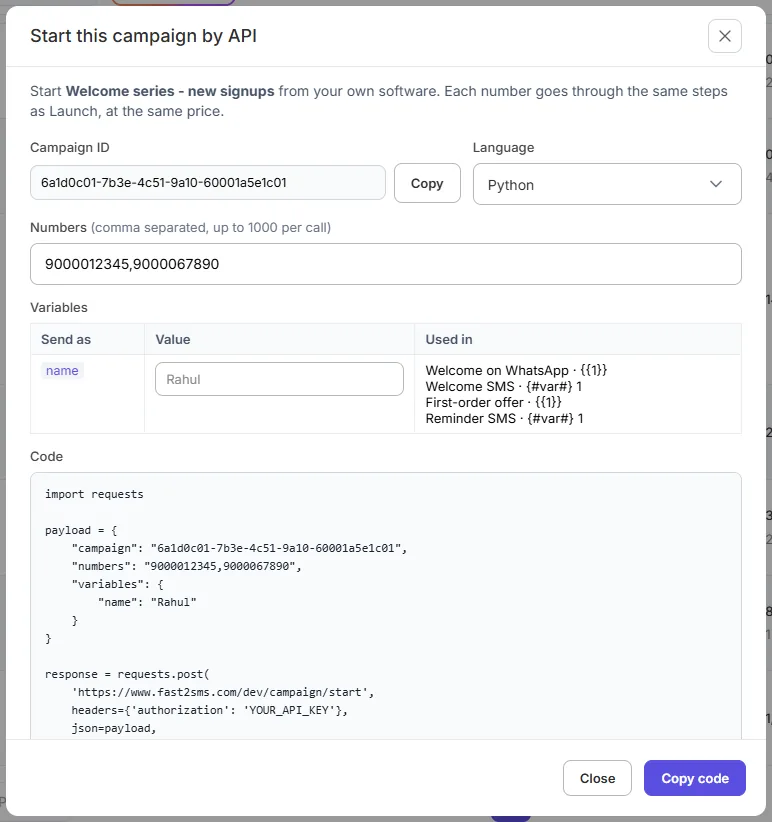
All examples use the same request. Put your Fast2SMS API key in the authorization header and the campaign ID from Campaign List > ⋮ > Get API code in campaign. That screen also gives you this code with your own campaign filled in.
cURL
curl -X POST https://www.fast2sms.com/dev/campaign/start \
  -H "authorization: YOUR_API_KEY" \
  -H "Content-Type: application/json" \
  -d '{
    "campaign": "YOUR_CAMPAIGN_ID",
    "recipients": [
      {"mobile": "9000012345", "name": "Rahul"}
    ]
  }'
A successful call returns JSON with "return": true, the run's request_id, the run name, and how many numbers were added or skipped.
PHP (call it right after the user is saved)
function startWelcomeJourney(string $mobile, string $name): array
{
    $ch = curl_init('https://www.fast2sms.com/dev/campaign/start');
    curl_setopt_array($ch, [
        CURLOPT_RETURNTRANSFER => true,
        CURLOPT_POST => true,
        CURLOPT_TIMEOUT => 10,
        CURLOPT_HTTPHEADER => [
            'authorization: ' . getenv('FAST2SMS_API_KEY'),
            'Content-Type: application/json',
        ],
        CURLOPT_POSTFIELDS => json_encode([
            'campaign'   => 'YOUR_CAMPAIGN_ID',
            'recipients' => [['mobile' => $mobile, 'name' => $name]],
        ]),
    ]);
    $response = json_decode((string) curl_exec($ch), true) ?: [];
    curl_close($ch);
    return $response; // ['return' => true, 'added' => 1, ...]
}

// after the new account is created:
startWelcomeJourney('9000012345', 'Rahul');
Node.js (Express signup route)
// Node 18+ (built-in fetch). Keep the key in an environment variable.
app.post('/signup', async (req, res) => {
  const user = await createUser(req.body);          // your own signup logic

  // start the welcome journey; do not block the signup if it fails
  fetch('https://www.fast2sms.com/dev/campaign/start', {
    method: 'POST',
    headers: {
      'authorization': process.env.FAST2SMS_API_KEY,
      'Content-Type': 'application/json'
    },
    body: JSON.stringify({
      campaign: 'YOUR_CAMPAIGN_ID',
      recipients: [{ mobile: user.mobile, name: user.firstName }]
    })
  }).then(r => r.json()).then(console.log).catch(console.error);

  res.json({ ok: true });
});
Skip the reminder when the customer orders
curl -X POST https://www.fast2sms.com/dev/campaign/event \
  -H "authorization: YOUR_API_KEY" \
  -H "Content-Type: application/json" \
  -d '{"number": "9000012345", "event": "first_order", "value": "ORDER-1001"}'
Practical notes:
- Do not block signup on the API. Call it after the account is saved, or from a background job, so a slow network never stops a customer from signing up.
- Rate limits. Write calls (start and event) are limited to 30 per minute per API key. If you get bursts of signups, collect them for a minute and send up to 1,000 numbers in one call.
- Variables. Every field next to
mobilebecomes a variable for your templates, up to 50 per number. Keep SMS variables to 30 characters or less, as longer DLT variables are rejected for that number. - Security. The Dev API page's IP whitelist and API on/off switch apply. Never put the API key in browser or app code; call Fast2SMS from your server.
- Indian numbers only. 10 digits starting 6 to 9; a 91 or 0 prefix is removed for you.
How to set up the welcome journey in Fast2SMS
- Prepare templates. Get two or three WhatsApp templates approved by Meta (welcome, offer, reminder) and register matching SMS templates on DLT with your sender for the fallback.
- Open Campaign. Go to Campaign > Launch Campaign, or Campaign List > Create Campaign.
- Start from a ready journey. Click Start from a ready journey and pick "WhatsApp offer, SMS if not delivered" from the Promotional goal as a base, or start on a blank canvas.
- Add the welcome step. Drag a WhatsApp step after Start. Pick your number and the welcome template, map
nameto the variable your server sends, and connect failed and not delivered to a welcome SMS step. - Add Wait 6 hours. Drag a Wait step (6 hours) after the welcome's sent, delivered and read outputs and after the SMS. Add a Frequency step set to every day, 09:00 to 21:00.
- Add the offer. Optionally a Condition on "Your event"
first_order= 0 in the last 1 day, then the offer WhatsApp with its SMS fallback. - Add Wait 1 day and the reminder. Wait 1 day, Frequency, the same Condition, then the reminder step (WhatsApp, RCS or SMS) with a fallback.
- Test. Send test runs the journey on up to 10 numbers. Test sends are charged like normal sends. For a quick test, set the waits to a few minutes and change them back afterwards.
- Switch on and connect. Turn the campaign on in Campaign List, open ⋮ > Get API code and add the call to your signup code.
Welcome WhatsApp message samples and welcome SMS for new customers
WhatsApp placeholders are shown as {{1}}, {{2}}; SMS variables use the DLT format. Replace "Demo Traders" with your brand.
Step 2: the welcome (right after signup)
| Business | Welcome WhatsApp | Button |
|---|---|---|
| Online store | Hi {{1}}, welcome to Demo Traders! Your account is ready. Explore our bestsellers and save your favourites. | Start shopping |
| SaaS or app | Welcome aboard, {{1}}! Your account is ready. The first thing most people do is {{2}}. It takes about two minutes. | Get started |
| Coaching or edtech | Hi {{1}}, thank you for registering with Demo Academy. Your free demo class details will reach you here. | Book demo |
| Fintech | Hi {{1}}, welcome to Demo Pay. Complete your KYC to start using your account. | Complete KYC |
| Restaurant or cafe | Hi {{1}}, thanks for joining Demo Cafe's club! Show this message at the counter on your next visit. | See menu |
| Hindi | नमस्ते {{1}}, Demo Traders में आपका स्वागत है! आपका अकाउंट तैयार है। | खरीदारी शुरू करें |
Welcome SMS (DLT) for the fallback
- "Hi {#var#}, welcome to Demo Traders! Your account is ready. Start here: {#var#} - Demo Traders"
- "Dear {#var#}, thank you for registering with Demo Academy. Demo class details will follow. - Demo Academy"
- "नमस्ते {#var#}, Demo Traders में आपका स्वागत है। शुरू करें: {#var#} - Demo Traders"
Step 5: the offer (about 6 hours later)
- "{{1}}, here is a welcome gift: {{2}}% off your first order with code {{3}}. Valid for 48 hours." (image header, Shop now button)
- "Hi {{1}}, new members get free delivery on their first order this week. Tap to pick yours."
- SMS: "Hi {#var#}, welcome gift: {#var#} off your first order with code {#var#}. Shop: {#var#} - Demo Traders"
Step 7: the reminder (next day)
- "Hi {{1}}, your welcome offer ends tonight. Code {{2}} is still waiting for you."
- "{{1}}, need help getting started? Reply to this message and our team will guide you." (good for SaaS and fintech)
- Hindi: "{{1}}, आपका वेलकम ऑफ़र आज रात खत्म हो रहा है। कोड {{2}} अभी भी आपके लिए है।"
Write the welcome as if a person sent it: use the customer's name, one clear next step and a friendly tone. Keep the offer for step 5 so the welcome itself reads as a thank-you, not an advert.
A longer onboarding message sequence
For products that take a few days to learn, such as software, apps, courses and financial accounts, extend the welcome into a one-week onboarding sequence. The same journey can hold all of it, because a journey can run up to 30 days per contact.
| Day | Goal | Message idea | Skip if |
|---|---|---|---|
| Day 0 | Welcome | Account ready, one first step | Not applicable |
| Day 1 | First success | "Most people start with X. Here is a 2-minute guide." | activated posted |
| Day 3 | Show value | A tip or feature that saves time | activated posted |
| Day 5 | Human help | "Want a free call with our team?" (a voice step with call patch also works) | Demo booked |
| Day 7 | Check-in | "How is it going?" with a feedback link | Not applicable |
Each "skip if" is a Condition step on an event your software posts. Keep each message short and useful; a week of daily marketing is not onboarding. For more step-by-step sequences, see the WhatsApp drip campaign examples.
How much does a welcome message journey cost per signup?
You pay only for messages that are sent. There is no campaign fee, no builder fee and no monthly fee, and every step is charged at the channel's normal rate from your wallet. Steps skipped because the customer already ordered cost nothing.
At the time of writing: WhatsApp marketing message ₹0.95, WhatsApp utility ₹0.25, RCS from ₹0.35, and SMS ₹0.25 per SMS on a recharge from ₹100 (down to ₹0.11 on larger recharges). Meta decides each template's category; a welcome that carries an offer is marketing. See WhatsApp pricing and bulk SMS pricing.
Example: 3,000 signups a month, assuming all WhatsApp steps are marketing. How many order between steps is an assumption for the example.
| Step | Contacts (assumed) | Rate at the time of writing | Cost |
|---|---|---|---|
| WhatsApp welcome | 3,000 | ₹0.95 | ₹2,850 |
| Welcome SMS where WhatsApp not delivered | 300 | ₹0.25 | ₹75 |
| WhatsApp offer at 6 hours | 2,800 | ₹0.95 | ₹2,660 |
| Offer SMS where WhatsApp not delivered | 280 | ₹0.25 | ₹70 |
| Reminder next day by SMS (not yet ordered) | 2,400 | ₹0.25 | ₹600 |
| Total | ₹6,255 |
That is about ₹2.09 per signup. To spend less, send the reminder by RCS or SMS (as here), skip the offer for signups that already ordered, or send the welcome as SMS for low-value signups. If Meta approves your plain welcome as a utility message, that step costs ₹0.25 instead of ₹0.95. Before a panel launch you see a cost estimate; if the wallet runs low during a run, it pauses and resumes by itself after you recharge.
Welcome journeys by type of business
| Business | Welcome | 6 hours later | Next day | Stop event |
|---|---|---|---|---|
| D2C or online store | WhatsApp welcome | First-order coupon | Coupon reminder by SMS | first_order |
| SaaS or mobile app | WhatsApp welcome with first step | Short how-to | "Need help?" with reply | activated |
| Coaching, edtech | WhatsApp welcome | Demo class invite | Call with counsellor patch | demo_booked |
| Fintech, broking, insurance | WhatsApp welcome | KYC reminder | KYC reminder by SMS | kyc_done |
| Real estate lead form | WhatsApp thank-you with brochure | Site visit invite | Call from sales | visit_booked |
| Gym, salon, clinic membership | WhatsApp welcome | First-visit offer | Reminder | first_visit |
For store-specific journeys, see abandoned cart recovery and ecommerce marketing automation. For the bigger picture of journeys across all four channels, read the omnichannel marketing platform guide.
Consent, WhatsApp template category and DLT
- Ask for WhatsApp consent at signup. Add a clear line near the phone field, such as "Get updates and offers on WhatsApp and SMS". A welcome to someone who never agreed is a fast way to be blocked.
- Template category. Meta decides. A plain "your account is ready" message may qualify as utility; anything with an offer is marketing. Plan with the marketing rate unless your template is approved as utility.
- DLT for SMS. Register each fallback SMS on DLT with your sender. A welcome without an offer can be a service template; an offer SMS is promotional content. Promotional SMS on Fast2SMS go only to Non-DND numbers and are held outside promotional sending hours, so some DND signups will not get the SMS offer.
- RCS. If you use an RCS step, you need an approved, active RCS bot. Promotional RCS bots send between 7 AM and 10 PM. If RCS fails or the phone does not support RCS, the next step sends.
- Opt-outs. Numbers that blocked you on WhatsApp, unsubscribed on RCS, or are on the voice opt-out list leave the journey. There is no automatic STOP keyword, so handle "stop" replies in your own system.
- Content check. SMS, WhatsApp and RCS text in a journey goes through Fast2SMS's scam-content check. Plain, honest wording and links on your own domain pass easily.
How do I see who got the welcome message?
Open Reports > Campaign Report. Each day's API signups appear as one run with total, reached, unreached, opted out, in progress, cost, refund and net cost. Each step shows entered, sent, delivered, read, failed and not delivered, with cost, average time and top failure reasons, and the per-number view shows one customer's full journey. The report refreshes every 15 seconds while the run is live, and exports as CSV from Delivery Reports > Export > Campaign.
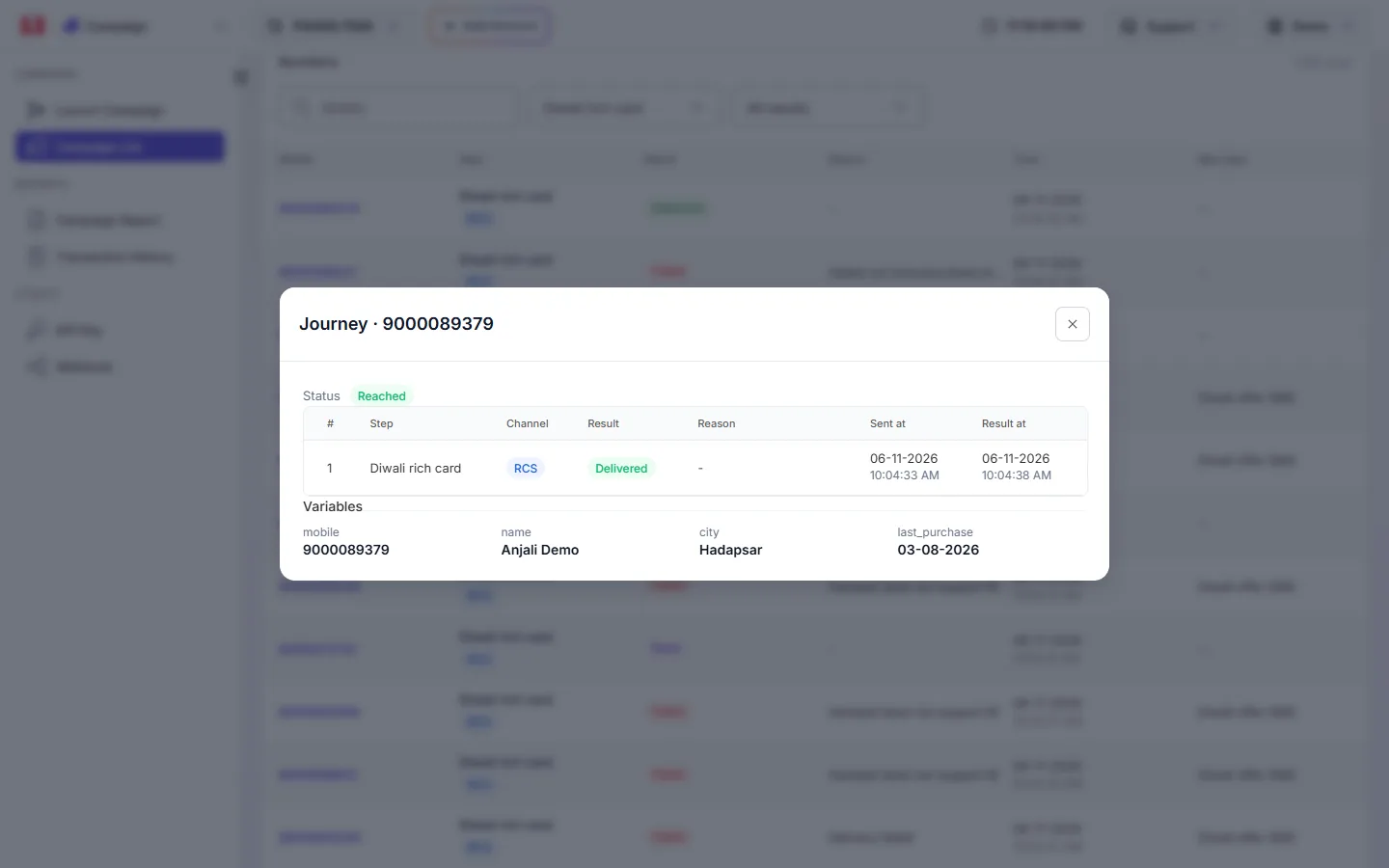
To store results in your own CRM, add a webhook under Webhook > Campaign. Fast2SMS posts every step result (for example campaign.step.delivered or campaign.step.failed) with the step name, channel, status, reason, cost and next step, and every payload carries the run's request_id so you can match it to your start call. You can also read runs, reports and one contact's journey by API.
Mistakes to avoid in welcome messages
- Waiting too long. The welcome should go within moments of signup. Call the API right after the account is saved.
- Leading with an advert. Thank first, offer later. The 6-hour offer step exists so the welcome can be a welcome.
- No fallback. Not every number is on WhatsApp. Wire failed and not delivered to SMS on every step.
- Chasing customers who already bought. Post
first_order(or your own event) and check it before the offer and reminder. - Messages at 2 am. Late-night signups are common. Put a Frequency step before the offer and reminder.
- The API key in the app. Call Fast2SMS from your server only, and use the IP whitelist.
- Blocking signup on the API call. Run it after the account is saved or in a background job.
- Untested variables. "Hi , welcome" looks broken. Use Send test with a real-looking name.
- Too many messages in week one. Two or three in the first day, then one every few days at most.
Build the welcome journey in Fast2SMS Campaign, test it with the ₹50 signup credit, and add one API call to your signup code. Your next new customer will hear from you in seconds.
Frequently asked questions
What is a welcome message on signup?
It is an automatic message sent right after someone creates an account or registers with your business. It thanks them, confirms the account and shows the next step.
Why send a welcome message to new customers?
The first message after signup is the one people are most likely to open. It sets the tone, helps them take the first step and brings them back if they leave.
What should a welcome message include?
The customer's name, a thank-you, one clear next step with a button or link, and how to get help. Keep any offer for a later message.
What is a welcome message journey?
It is a short series of messages after signup, such as a welcome now, an offer a few hours later and a reminder the next day, that stops when the customer does what you hoped.
What is an onboarding message sequence?
It is a set of messages over the first days or week that helps a new user get value from your product: a welcome, a first step, a tip, an offer of help and a check-in.
Can I send a welcome message on WhatsApp automatically?
Yes. Your server calls the Fast2SMS Campaign API at signup and the journey sends an approved WhatsApp welcome template at once, with SMS as the backup.
Can I send a welcome SMS instead of WhatsApp?
Yes. Use an SMS step with a DLT-registered template. Many businesses send WhatsApp first and use SMS only when WhatsApp is not delivered.
What is the best welcome journey after signup?
A simple, effective one is: WhatsApp welcome right away, Wait 6 hours, an offer on WhatsApp with SMS if not delivered, Wait 1 day, then a reminder. Each later step can be skipped if the customer already ordered.
Can I send the offer exactly 6 hours after signup?
Yes. Add a Wait step of 6 hours after the welcome. Waits can be 1 minute up to 30 days. A Frequency step can hold night-time offers until the morning.
What if the WhatsApp offer is not delivered?
Wire the WhatsApp step's failed and not delivered outputs to an SMS step. Failed moves on at once; "not delivered" waits for a final result, 30 minutes by default.
How do I avoid messages at night for late signups?
Add a Frequency step before the offer and reminder. It lets the journey continue only between the times you choose, 09:00 to 21:00 by default.
Can I skip the reminder if the customer already bought?
Yes. Post an event such as first_order to POST /dev/campaign/event and add a Condition before the reminder that checks it.
How long can a welcome journey run?
Up to 30 days per contact, so a full one-week onboarding sequence fits in one journey.
Can the welcome journey include a call?
Yes. A Voice step can play a recorded welcome or use call patch to connect the customer to your team when they press a key. The recording is the same for everyone.
Can I send an RCS welcome card?
Yes, with an approved, active RCS bot. If RCS fails or the phone does not support RCS, the next step, such as WhatsApp or SMS, sends.
How do I trigger a WhatsApp message on signup by API?
Call POST https://www.fast2sms.com/dev/campaign/start with header authorization: YOUR_API_KEY and JSON {"campaign": "YOUR_CAMPAIGN_ID", "recipients": [{"mobile": "9000012345", "name": "Rahul"}]}.
Is there a built-in signup trigger in Campaign?
No. Campaign does not watch your website by itself. Your website, app, CRM or store backend starts the journey with one API call, so you choose exactly when a person counts as signed up.
Where do I find the campaign ID and code?
In Campaign List > ⋮ > Get API code, with ready code in cURL, PHP, Node.js and Python.
How fast does the welcome go after the API call?
Numbers sent by API start immediately, so the welcome WhatsApp goes out within moments.
What if a customer signs up twice on the same day?
All API calls to one campaign on the same day join one run, and a number already in it is skipped. The customer gets one welcome, not two.
Can I pass more details than name?
Yes. Every field next to mobile in a recipient becomes a variable, up to 50 per number, such as city, plan or coupon code.
What are the API rate limits?
Write calls such as start and event are limited to 30 per minute per API key, and one call can carry up to 1,000 numbers. For bursts, batch signups for a minute.
Should I call the API from the browser?
No. Call it from your server so the API key stays secret. The IP whitelist and API on/off switch on the Dev API page apply.
What does the API return?
JSON with "return": true, the run's request_id, the run name and how many numbers were added or skipped. Errors return "return": false with a message.
Can I see welcome delivery results on my server?
Yes. Add a webhook under Webhook > Campaign. Every step result is posted with step name, channel, status, reason, cost and next step.
Can I start a welcome journey from a lead form?
Yes. Any form handler on your server can call the API the same way, for example after a lead fills in a contact or enquiry form.
What is a good welcome WhatsApp message sample?
For example: "Hi Rahul, welcome to Demo Traders! Your account is ready. Explore our bestsellers and save your favourites." with a Start shopping button.
What is a good welcome SMS for new customers?
For example: "Hi Rahul, welcome to Demo Traders! Your account is ready. Start here: yourstore.in/start - Demo Traders". Register it on DLT first.
Can I send a welcome message in Hindi?
Yes. Approve a Hindi WhatsApp template and register a Unicode Hindi SMS on DLT. This guide includes Hindi welcome and reminder samples.
Should the welcome message include a discount?
Usually not in the first message. Thank the customer first and send the offer a few hours later, so the welcome reads as a welcome.
What should a SaaS welcome message say?
Welcome them by name and point to the one first action that shows value, such as "connect your account" or "send your first message", with a Get started button.
Can I add an image to the welcome message?
Yes, if your approved WhatsApp template has an image, video or document header. Campaign supports these templates with buttons.
How much does a WhatsApp welcome message cost?
At the time of writing, ₹0.95 for a marketing message and ₹0.25 for a utility message on Fast2SMS. Meta decides the category. See WhatsApp pricing.
Is a welcome message marketing or utility?
Meta decides. A plain "your account is ready" message may be utility; a welcome with an offer is marketing.
How much does a welcome SMS cost?
At the time of writing, ₹0.25 per SMS on a recharge from ₹100, down to ₹0.11 on larger recharges. See bulk SMS pricing.
What does the full welcome journey cost per signup?
In this guide's example of 3,000 signups, about ₹6,255 a month, roughly ₹2.09 per signup, with WhatsApp welcome and offer and an SMS reminder.
Is there a monthly fee for welcome automation?
No. There is no campaign fee, builder fee or monthly fee. Every step is charged at the channel's normal per-message rate.
Do I pay for steps that are skipped?
No. A step a contact never reaches is not sent and not charged.
What if my wallet runs out during the journey?
The run pauses and resumes by itself after recharge (checked every 10 minutes), and stops after 3 days on low balance.
Can I test the welcome journey for free?
New accounts get ₹50 free credit. Use Send test to run the journey on up to 10 numbers; test sends are charged like normal sends.
Do I need consent to send a WhatsApp welcome message?
Yes. Ask for permission on the signup form, for example a line near the phone field saying you will send updates and offers on WhatsApp and SMS.
Do welcome SMS need DLT?
Yes. Register each SMS on DLT with your sender. An offer SMS is promotional content and goes only to Non-DND numbers within promotional hours.
How do customers opt out?
Numbers that blocked you on WhatsApp, unsubscribed on RCS or are on the voice opt-out list leave the journey. There is no automatic STOP keyword, so handle such replies in your system.
Can I send welcome messages to international numbers?
No. Campaign supports Indian mobile numbers only (10 digits starting 6 to 9).
How do I set up the welcome journey?
Open Campaign > Launch Campaign, start from a ready journey or a blank canvas, add WhatsApp welcome with SMS fallback, Wait 6 hours, Frequency, the offer, Wait 1 day and the reminder, test, switch on and add the API call to your signup.
How can I test the waits quickly?
Set the waits to a few minutes, run Send test on your own number, then set them back to 6 hours and 1 day before going live.
Can I change the welcome message later?
Yes. The messages and waits live in the campaign. Your code only sends the API call, so you can edit the journey in the panel any time.
How do I see who received the welcome?
The Campaign Report shows each day's API run with sent, delivered, read and failed per step and every contact's journey. Export it as CSV from Delivery Reports > Export > Campaign.
Can I pause the welcome journey?
Yes. Pause, resume or stop a run, or switch the campaign off. These controls are also available by API.
Is there a guide for developers?
Yes. The event-triggered messaging API guide covers start, event, reports and webhooks.
Where can I learn more about WhatsApp automation?
See WhatsApp automation, the WhatsApp Business API and the omnichannel marketing platform guide.