
DLT Registration in India: Complete Process for Jio, Airtel, Vi, BSNL and Tata
No monthly fee · Pay as you go from ₹100 · Free setup help on a call
DLT registration is the TRAI process every business must finish before it sends SMS in India under its own sender name. DLT stands for Distributed Ledger Technology. You register your business (entity), your sender IDs (headers) and your message templates once, on any one operator portal: Jio, Airtel, Vi, BSNL, Tata or Smartping. At the time of writing every portal charges ₹5,900 a year including GST. Then you add Fast2SMS as your telemarketer and copy your IDs into the free DLT Manager. One registration works for every network in India, and the Fast2SMS team helps with each step at no charge.
This guide covers the full DLT registration process: what DLT means, every operator portal with its fee and published approval time, the documents you need, header and template rules, the 2026 variable tagging rules, CTA whitelisting, PE-TM chain binding, the common rejection reasons with fixes, and what to do in Fast2SMS once you are approved. There is a short Hindi section near the end.
What is DLT? Full form and meaning
DLT is the register that Indian telecom operators use to check every business SMS before it reaches a phone. The DLT full form is Distributed Ledger Technology, the blockchain-based technology the register is built on.
Think of DLT as one shared record book kept by all the mobile operators: Jio, Airtel, Vi, BSNL and the rest. Any business that wants to send SMS to its customers first writes its name, its sender IDs and the wording of each message into this book. When an SMS is sent, the operator opens the book and compares. If the business, the sender ID and the text all match what was registered, the SMS is delivered. If something does not match, the SMS is stopped. This check is called DLT scrubbing and it takes a fraction of a second.
The rule comes from TRAI (the Telecom Regulatory Authority of India) and its Telecom Commercial Communications Customer Preference Regulations, known as TCCCPR 2018, with further amendments in February 2025. The aim is simple: stop spam and fraud SMS, and respect each customer's choices, such as blocking promotions through DND.
DLT full form in SMS
In SMS, DLT means the same thing: Distributed Ledger Technology. When people say "DLT SMS", they mean a business SMS sent with a registered entity, a registered header and an approved template, so that it passes the operator's DLT check. Our guide to DLT SMS: meaning and how to send it explains the sending side in detail.
Why DLT matters to a business
- No DLT, no delivery. A business SMS without a registered entity, header and template is blocked by the operator. This includes OTPs.
- Your brand name shows as the sender. Customers see your header, such as DEMOTR, instead of a random number.
- Customers trust it more. Every registered sender can be traced, so scam messages are harder to send in your name.
- It is a one-time setup with a yearly renewal. Once your entity, headers and templates are approved, you only add new templates as your needs grow.
Who needs DLT registration?
Every business, shop, school, clinic, app or government office that sends commercial SMS to Indian numbers under its own sender ID needs DLT registration. That covers OTPs, order and delivery updates, payment alerts, reminders and promotional offers.
| You want to send | DLT needed? | What to know |
|---|---|---|
| OTP SMS with your brand name | Yes | Needs an approved entity, header and an OTP template. See OTP SMS. |
| Order, payment, delivery or appointment SMS | Yes | Registered as Service Implicit or Transactional, so they reach DND numbers at any hour. |
| Offers, sales and festive greetings with an offer | Yes | Promotional template. Only 10 AM to 9 PM and only to numbers that have not blocked promotions. |
| WhatsApp Business API messages | No | WhatsApp templates are approved by Meta, not DLT. |
| Bulk voice calls | No | Fast2SMS's help guides state that voice calls do not need DLT. |
| Personal SMS from your own phone | No | DLT applies to business (commercial) SMS. |
| A few SMS before your DLT is approved | No, with Quick SMS | Random sender, a higher per-SMS rate and a manual review. See below. |
Sole proprietors and individuals can register too. Vi's DLT FAQ lists individual, sole proprietor, partnership firm, company, LLP, trust, society, club and government entity as Principal Entity types. GST is not compulsory; see documents.
DLT terms in one table
DLT has its own words. These are the ones you will see on every portal and in Fast2SMS.
| Term | What it means | Example |
|---|---|---|
| Principal Entity (PE) | Your business, registered on a DLT portal. You get an Entity ID, also called PE ID or DLT registration number. | Demo Traders |
| Header / Sender ID | The short name customers see as the sender. Portals say header; SMS providers say sender ID. Same thing. | DEMOTR |
| Content template | The approved message text. Parts that change are variables. Each template gets a long Template ID. | Dear {#alphanumeric#}, your order {#alphanumeric#} is confirmed. - Demo Traders |
| Consent template | A statement of what a customer agrees to receive. Needed for promotional and Service Explicit templates only. | Demo Traders would like to send you offers by SMS. |
| Telemarketer (TM) | The registered SMS company that delivers your messages to the operators. | Fast2SMS: SID GROUPS PRIVATE LIMITED |
| PE-TM chain | The approved link on DLT between your entity and your telemarketer. Operators check every SMS against it. | Demo Traders to TM ID 1702178720558766591 |
| CTA | Call to action: links, app links and call-back numbers inside an SMS. They must be whitelisted on DLT. | Your website link |
| Message ID | A short Fast2SMS number for each approved template, used as message in the API. | 40001 |
More background: what Entity ID, Sender ID and Content Template ID mean and the common DLT terms.
DLT registration process in 9 steps
The DLT registration process has two parts. Steps 1 to 6 happen on one operator's DLT portal. Steps 7 to 9 happen in your Fast2SMS account. The DLT portal is only for registration; you send the SMS from Fast2SMS, from the panel or the API.
- Choose one DLT portal. Jio TrueConnect, Airtel DLT, Vi Vilpower, BSNL DLT, Tata DLT or Smartping. They share one ledger, so one is enough. See the portal table.
- Register your business as a Principal Entity. Sign up as an Enterprise or Principal Entity, not as a telemarketer. Fill in your business details, upload the documents and pay the yearly fee. When the portal approves you, note your Entity ID.
- Register your headers (sender IDs). Apply for the sender names your customers will see. Each must relate to your business or brand.
- Register a consent template if you will send promotions. Not needed for OTPs and service updates.
- Whitelist your links and call-back numbers (CTAs), then register your content templates. Choose the right type, link each template to a header and use typed variables such as {#numeric#} and {#url#}.
- Send the PE-TM chain request to Fast2SMS. Add SID GROUPS PRIVATE LIMITED, TM ID 1702178720558766591, and take a screenshot of the pending request.
- Add your DLT details in Fast2SMS DLT Manager. Entity ID first, then sender IDs, then content templates. Typing or Excel upload both work.
- Complete PE-TM binding. Upload the chain screenshot and documents on the PE-TM Binding page. After Fast2SMS approves, approve the chain once more on your DLT portal.
- Send your DLT SMS. Pick the sender ID and template, add numbers and send, or call the API with route=dlt.
Every step is explained below. If you get stuck at any point, the Fast2SMS team helps for free on chat, phone or a free meeting; see free DLT support.
DLT portal list: all six operators
India has six DLT portals, one per operator group. All of them follow the same TRAI rules and read the same shared ledger, so a registration on any one lets your SMS reach every network. The fee is the same on all of them. Approval times are the ones each operator publishes, where it publishes one.
| DLT portal | Portal link | Who should pick it | Entity fee (at the time of writing) | Approval time as published | Our guide |
|---|---|---|---|---|---|
| Jio TrueConnect (Reliance Jio) | trueconnect.jio.com | First-time registrants; our DLT page usually suggests Jio because its portal is easy to use. Needs an active GST number or another KYC document before payment. | ₹5,900 per year incl. GST | Not published on its public pages | Jio DLT guide |
| Airtel DLT (Bharti Airtel) | airtel.in/business/commercial-communication | Businesses that choose Airtel or are already registered there. The fee is paid after KYC approval. | ₹5,900 per year incl. GST | Not published on its public pages | Airtel DLT guide |
| Vilpower (Vodafone Idea, Vi) | vilpower.in | Businesses that want published approval times. Non-refundable fee, 30-day renewal grace. | ₹5,900 per year incl. GST | Entity within 72 working hours; headers and templates within 60 minutes | Vi Vilpower guide |
| BSNL DLT | ucc-bsnl.co.in | Businesses and public bodies that want to pay online or by NEFT. Non-refundable fee, 30-day renewal grace. | ₹5,900 per year incl. GST | Entity within 72 working hours; headers and templates within 60 minutes | BSNL DLT guide |
| Tata DLT (Tata Teleservices) | telemarketer.tatateleservices.com | Businesses already on Tata, or that choose it. The entity must start every request itself. | ₹5,900 per year incl. GST | Entity 3 to 7 working days; headers, content and consent templates 2 working days each | Tata DLT guide |
| Smartping (earlier Videocon DLT, also called Pingconnect) | smartping.live/entity | Businesses registered earlier on Videocon DLT, or new ones that choose it. Payment link comes after KYC approval. Non-refundable fee. | ₹5,900 per year incl. GST | Not published on its public pages | Smartping DLT guide |
Fees and rules can change; check the operator portal before you pay. The fee is ₹5,000 plus 18% GST (₹900). The full comparison is in different DLT operators in India and DLT fees and validity on each portal.
Which DLT portal should you choose?
Choose the portal whose screens and support you find easiest. No portal gives better delivery, because all of them share one ledger and follow the same rules, and the fee is the same everywhere.
- Already registered somewhere? Stay there. Add new headers and templates under the same entity. A second registration creates a duplicate Entity ID and a second yearly fee for nothing.
- Registering for the first time? Our DLT registration page usually suggests Jio TrueConnect because its portal is easy to use. Vi and BSNL publish clear approval times. Tata publishes its own timelines too.
- Think about support. You will raise tickets for rejections and reactivations, so a portal whose support you can reach easily saves time.
- Use your provider's guides. Fast2SMS has step-by-step guides for every portal, linked in the table above.
The PE-TM chain is also set up only once, on the portal where your business is registered. Read which DLT portal to choose for the longer comparison.
Airtel DLT registration
Airtel DLT registration is done on Airtel's commercial communication portal at airtel.in/business/commercial-communication. You register once as an entity for your own organisation, pay after your KYC is approved, and then add headers, templates and your telemarketer.
- Open the Airtel commercial communication portal and start a new entity registration. Choose to register for your own organisation. The other option, on behalf of another organisation, is for telemarketers.
- Enter your business name, organisation type, address and authorised person, and upload your KYC documents. The name must match your PAN and certificates exactly.
- Once your KYC registration is approved, pay the registration charges shown on the portal (₹5,900 a year including GST at the time of writing). Note your Entity ID.
- Register your headers and content templates, plus a consent template if you will send promotions.
- Send the PE-TM chain request to TM ID 1702178720558766591. After Fast2SMS accepts it, Airtel asks you to approve the chain once more.
Airtel does not publish a fixed approval time on its public pages; you are told about approval or missing documents on your registered email. Airtel also uses its own LOA and header CLI letter formats, explained in what LOA and CLI mean for Airtel DLT. Airtel now asks existing users to tag variables in old templates; see Airtel DLT variable pre-tagging. Full steps: Airtel DLT registration guide, Airtel signup screens and how to complete the Airtel PE-TM chain.
Jio DLT registration (TrueConnect)
Jio DLT registration is done on Jio TrueConnect at trueconnect.jio.com. You register as a Principal Entity, pay the fee as the Primary User, wait for your Entity ID, and then add headers, templates and Fast2SMS as telemarketer.
- Open trueconnect.jio.com and choose Principal Entity. If this is your first DLT registration, answer No when asked whether you are already registered.
- Pick your organisation type, enter the KYC document type and number, and upload the KYC document and PAN or TAN. Each file must be under 5 MB.
- Enter your email, password, mobile number and address, submit, and verify the mobile OTP.
- The payment option opens about 6 hours after registration. Only the Primary User can pay, and TrueConnect needs an active GST number or another KYC document first. Do not leave the payment half done: an incomplete payment cancels the registration.
- After approval, Jio emails your login details and Entity Number. Register headers, templates and, if needed, consent templates.
- In the telemarketer section, find SID GROUPS PRIVATE LIMITED (TM ID 1702178720558766591), add it to your telemarketers, apply, and take a screenshot.
Jio does not publish a fixed approval time, so watch your registered email, including the spam folder. TrueConnect says it sends a renewal reminder one month before expiry. Step-by-step: Jio DLT registration on TrueConnect, Jio signup screens, add a header in Jio DLT, add a content template in Jio DLT and add a telemarketer in Jio DLT.
Vi DLT registration (Vilpower)
Vi DLT registration is done on Vilpower (vilpower.in), the portal of Vodafone Idea. Vi publishes clear timelines in its DLT FAQ: entity details are verified within 72 working hours, and headers, content templates and consent templates within 60 minutes.
- Sign up as an Enterprise and choose your line of business carefully. Vi's rules say you cannot send messages about a different line of business.
- Upload documents and pay online. Vi's FAQ also lists NEFT. The fee is non-refundable.
- Answer the registrar within 15 working days if it asks for anything, or the account is deleted and you must sign up again.
- Brand name in every template. Vi asks for your business name, brand or trademark in each template. Unicode languages are allowed.
- Consent templates on Vi are English only and each one is tied to a single header.
- Every entity must select at least one telemarketer. Select Fast2SMS with TM ID 1702178720558766591 in the Telemarketer section.
- Keep headers in use. Vi's FAQ says a header inactive for more than 90 days goes back to the pool.
Vi's FAQ also says there is no extra fee to register or update CTAs. Guides: Vi DLT registration on Vilpower, header registration at Vilpower, template approval at Vilpower and add a telemarketer in Vilpower.
BSNL DLT registration
BSNL DLT registration is done on BSNL's UCC DLT portal at ucc-bsnl.co.in. BSNL's FAQ gives the same timelines as Vi: entity within 72 working hours, headers and templates within 60 minutes.
- Sign up as an Enterprise (Principal Entity) and pick your line of business.
- Pay online by card, net banking or wallet, or offline by NEFT bank transfer. The fee is non-refundable, with a 30-day grace period to renew.
- Reply to any registrar query within 15 working days, or the account is deleted.
- Consent templates are English only and tied to one header. A header unused for more than 90 days returns to the pool.
- Select Fast2SMS from the list of registered telemarketers using TM ID 1702178720558766591.
The BSNL DLT site lists a contact person (SPOC) for each circle. Guides: BSNL DLT registration and add a telemarketer in BSNL DLT.
Tata DLT registration
Tata DLT registration is done on the Tata Teleservices portal at telemarketer.tatateleservices.com. Tata's DLT FAQ says details and proofs are validated within 3 to 7 working days, and headers, content templates and consent templates within 2 working days each.
- Sign up as a Principal Entity with a corporate email ID, business PAN, full address and the authorised person's mobile and email.
- Tata's FAQ says the entity must start every registration request itself. A telemarketer cannot register the entity, headers or templates on your behalf.
- Up to 10 headers can go in one bulk request.
- For templates with more than 2 variables, add a justification and a sample SMS. Two variables next to each other are allowed only for name and address on Tata.
- Under TRAI's directions of 16 February 2023, entities verify their headers and templates every quarter and mark unused ones, which are then blocked.
Guides: Tata DLT registration and add a telemarketer in Tata DLT.
Videocon / Smartping DLT registration
The portal older guides call Videocon DLT is now the Smartping portal at smartping.live, also known as Pingconnect. Entities log in at smartping.live/entity. Registrations made earlier on Videocon DLT continue under Smartping.
- Sign up as an enterprise (Principal Entity), enter your business and authorised person details, and upload your KYC.
- After Smartping approves your KYC, you receive a payment link on your registered email and mobile. Pay the fee through that link. The fee is non-refundable.
- Register headers and templates, whitelist your links and numbers, and send the PE-TM chain request to TM ID 1702178720558766591.
Smartping does not publish an approval time on its public pages. Guides: Smartping DLT registration, Videocon signup process, header registration on Videocon DLT and add a telemarketer in Smartping.
DLT registration charges and fees
DLT registration charges are ₹5,900 per year including GST at the time of writing, the same on Jio, Airtel, Vi, BSNL, Tata and Smartping. You pay it once a year to the one portal you register on. Fast2SMS charges nothing for DLT help or for adding your DLT details.
| Item | Who you pay | Cost at the time of writing |
|---|---|---|
| DLT entity registration | The operator portal you choose | ₹5,900 per year incl. GST (₹5,000 + ₹900 GST) |
| Renewal | The same portal | Same fee every year |
| Headers and templates on the portal | Portal | Most businesses pay only the entity fee. If a portal asks for any other payment, the amount is shown before you pay. |
| CTA whitelisting | Portal | Vi's FAQ says no extra fee |
| DLT help from Fast2SMS | Fast2SMS | ₹0 |
| Adding entity, sender IDs, templates; PE-TM binding | Fast2SMS | ₹0 |
| Each DLT SMS | Fast2SMS wallet | ₹0.25 down to ₹0.11 per SMS by recharge slab; 18% GST on the recharge |
Points people often get wrong:
- It is not free. No DLT portal offers free entity registration at the time of writing. Fast2SMS's DLT notice page also lists the one-year charge as 5,900 INR including GST.
- It is not per operator. You pay one portal, not each operator.
- It is not one-time. The entity registration is valid for one year and has to be renewed.
- It is usually non-refundable. Vi, BSNL and Smartping describe the fee as non-refundable, so check your details before paying.
- There is no DLT charge per SMS on Fast2SMS. The slab rate is the whole per-SMS price. See the bulk SMS pricing page and DLT SMS charges per SMS and per year.
First-year cost example for a new business at the time of writing: ₹5,900 to the DLT portal, plus a ₹2,500 Fast2SMS recharge (plus 18% GST) that covers 10,000 single-part SMS at ₹0.25 each. Fees and rules can change; check the operator portal before you pay.
Documents required for DLT registration
You need a business PAN, one business proof, the ID proof of the authorised person and a Letter of Authorisation on your letterhead. Each portal has its own list and format, so check it at the time of registration.
- Business PAN card. For a firm, LLP or company, the PAN of the business. For a proprietorship, the proprietor's own PAN.
- One business proof. GST certificate, Certificate of Incorporation, TAN, trade licence, Shop and Establishment certificate, MSME (Udyam) certificate, or an FSSAI licence for food businesses.
- Address proof of the business, if the portal asks for it separately.
- ID proof of the authorised person: PAN, Aadhaar, Voter ID, passport or driving licence.
- Letter of Authorisation (LOA) on company letterhead, signed and stamped, in the portal's own format. Read what an LOA is.
- A working email and mobile number for the portal login and OTPs. Tata asks for a corporate email ID.
- Government bodies: letter of intent or agreement from the central or state government. SEBI-registered businesses: SEBI registration certificate.
| Business type | PAN to use | Business proof that works |
|---|---|---|
| Private or public limited company, LLP | Company or LLP PAN | Certificate of Incorporation, GST certificate |
| Partnership firm | Firm PAN | GST certificate, trade licence, Shop and Establishment certificate |
| Sole proprietor or shop, no GST | Proprietor's own PAN | MSME (Udyam) certificate, Shop and Establishment certificate, trade licence |
| Trust, society, NGO | Trust or society PAN | Its registration certificate |
| Government body | PAN or TAN | Letter of intent or agreement from the government |
Can you do DLT registration without GST? Yes. GST is one accepted business proof, not the only one. On Jio TrueConnect you need an active GST number or another KYC document before the portal lets you pay. See DLT registration without GST for proprietors.
Use the same business name on every document and in the form, including "Pvt Ltd" versus "Private Limited". A name mismatch is the most common reason for entity rejection. Since TRAI's February 2025 amendment, sender registration is also to include physical verification of the business, biometric authentication of the authorised person and linking the entity to a unique mobile number, in the manner TRAI specifies, so keep the authorised person available. Full list: documents required for DLT registration.
How to do DLT registration online (on the portal)
DLT registration is fully online. You sign up as a Principal Entity on the portal's website, upload scans, pay online (BSNL and Vi also list NEFT) and get your Entity ID by email. The flow is the same on every portal, with different screens.
- Open the portal and choose Enterprise or Principal Entity. Do not pick telemarketer; that is for SMS companies.
- Pick your entity type and line of business. Proprietorship, partnership, company, trust and so on. Some portals, such as Vi and BSNL, only let you send messages about the line of business you choose.
- Enter business details and the authorised person. Legal name exactly as on your PAN, address, email and mobile. Verify the OTPs.
- Upload documents. Clear colour scans of the full page, within the portal's size limit (Jio asks for files under 5 MB).
- Pay the fee. Jio: about 6 hours after registering, as the Primary User. Airtel and Smartping: after KYC approval. Save the receipt and invoice.
- Wait for approval and note your Entity ID. It is a long number, in the approval email and on your portal profile.
Then continue with headers, templates and the PE-TM chain, described next. Not sure about a field? Ask the Fast2SMS team before you submit, because every rejection restarts the wait.
Header (sender ID) rules
A header is the short sender name customers see, such as DMTRDS for Demo Traders. Service and transactional headers are normally 6 letters. Promotional headers have traditionally been 6 digits, and the TCCCPR amendment now also allows brand-name (alphabetic or alphanumeric) headers for promotional templates.
| Rule | What it means |
|---|---|
| Length | Up to 6 characters on the phone. Fast2SMS accepts approved headers of 3 to 6 characters. |
| Letters or digits only | No spaces, dots, hyphens or special characters. |
| Must relate to your business | Match your registered business or brand name. Reviewers may ask for proof such as a trademark certificate or your website. |
| Unique | Once one entity has a header, no one else can register it on any portal. |
| Restricted names | No celebrity or politician names, other companies' brands or trademarks, generic words, or government-style headers. |
| Keep it in use | Operators deactivate headers not used for 90 days. You can ask for reactivation. |
On the phone your header appears with an operator prefix and a type suffix, for example XY-DEMOTR-S. Under the February 2025 amendment the suffix shows the message type: -P promotional, -S service, -T transactional, -G government. Read what the prefix in a sender ID means and the -P, -S, -T and -G suffix.
Tips: shorten your brand so people still recognise it (Demo Traders becomes DMTRDS or DEMOTR), avoid generic words like OFFERS or ALERTS, keep two or three options ready, and give a short honest reason for each new header, because a separate reviewer now looks at how many headers you already hold. More: DLT header rules.
Content templates and template types
A content template is the approved text of a message. Every SMS you send must match it word for word; only the variable parts can change. The template type decides when the SMS can go out and whether it reaches DND numbers.
| Type | Use it for | Consent needed | DND numbers | Sending time |
|---|---|---|---|---|
| Transactional | OTPs and alerts right after a transaction the customer started (banks and non-bank businesses) | No | Delivered | Any time |
| Service Implicit | Order and delivery updates, appointment reminders, bill and balance alerts to existing customers | No (inferred) | Delivered | Any time |
| Service Explicit | Messages to people who gave explicit consent | Yes | Depends on consent | Being merged into Promotional |
| Promotional | Offers, sales, discounts, launches, ads | Number not on DND for that category, or consent | Not delivered without consent | 10 AM to 9 PM only |
Two recent changes matter. First, the 2025 TCCCPR amendment redefined transactional messages (sent within thirty minutes of a transaction the customer started, OTPs included, from banks and non-bank businesses) and says a message that mixes promotion with service is treated as promotional. Second, Service Explicit templates moved to Promotional from 10 March 2026, and new ones are registered as Promotional. Portals differ in the options they show, so pick the category your portal suggests for your message at the time of registration.
In Fast2SMS you choose between two options when you add a template: Service Implicit (for templates registered as Transactional or Service Implicit) and Service Explicit or Promotional. If the first sender ID you tick is a numeric header, the template is saved as Service Explicit or Promotional automatically, and Hindi or other non-English text is saved as Unicode.
How to write a template that gets approved
- Put your brand or business name in the fixed text, never inside a variable.
- Use variables only for values that change: name, OTP, amount, order ID, link.
- Keep at least 30% of the template as fixed text and use three variables or fewer.
- Never add an offer line to an OTP or order update. Register it as a separate promotional template.
- Link each new template to one header. Register a copy for a second header.
- Whitelist every link and call-back number first.
Sample templates (2026 tagged format)
| Use | Type | Template |
|---|---|---|
| Login OTP | Transactional | {#numeric#} is your OTP to log in to Demo Traders. Valid for 10 minutes. Do not share it with anyone. - Demo Traders |
| Order shipped | Service Implicit | Dear {#alphanumeric#}, your Demo Traders order {#alphanumeric#} has been shipped. Track it here: {#url#} - Demo Traders |
| Support call-back | Service Implicit | Thank you for contacting Demo Traders. For help with ticket {#alphanumeric#}, call {#cbn#}. - Demo Traders |
| Festive offer | Promotional | Festive Sale at Demo Traders. Flat {#numeric#}% off on all items till {#alphanumeric#}. Visit 12 Demo Market, Pune. T&C apply. - Demo Traders |
More examples: sample DLT templates, DLT template types, how to get a DLT template ID for OTP SMS and the Service Explicit to Promotional change.
Consent templates
A consent template is a short fixed statement of what a customer agrees to receive from your brand, for example "Demo Traders would like to send you offers and new product updates by SMS." You need one before you can register Service Explicit or Promotional content templates. OTPs and service updates do not need one.
- Register it first, then pick it when you register the promotional content template.
- No variables, prices or offer text. Use a clear name, not "Test".
- Your brand name must match your entity.
- Consent recorded on DLT, through the operators' Digital Consent Acquisition system and its 127xxx short code, is what counts during scrubbing. A ticked box on your website alone does not.
- Under the 2025 amendments every promotional message must give a way to opt out, and after an opt-out you cannot ask that customer for consent again for 90 days.
You do not add consent templates in Fast2SMS; they stay on your portal. Read the DLT consent template guide.
2026 rule: variable tagging in content templates
The main DLT rule change of 2026 is variable tagging. Every variable must now say what kind of value it holds. The old open {#var#} is replaced by six typed tags, and new templates without them are rejected.
| Tag | Holds | Use it for | Max length |
|---|---|---|---|
| {#numeric#} | Digits only | OTP, amount, quantity | 40 |
| {#alphanumeric#} | Letters and numbers; cannot start with www or http | Name, order ID, date | 40 |
| {#url#} | Web link matching a whitelisted CTA | Tracking pages, invoices | 120 |
| {#urlott#} | App or OTT link matching a whitelisted CTA | App download, WhatsApp chat link | 120 |
| {#cbn#} | Call-back number matching a whitelisted CTA | Support numbers | 3 to 14 |
| {#email#} | Email address | Support email | 40 |
Some portals show short forms: {#num#}, {#alp#}, {#urg#}, {#uro#}, {#cbn#} and {#eml#}. They follow the same rules. Two variables cannot sit side by side except two {#alphanumeric#} (Tata allows consecutive variables only for name and address). Operators first run the new checks in logger mode, then reject messages that do not match their tags; the dates come from the operators, so migrate old {#var#} templates early.
In Fast2SMS DLT Manager all typed variables show as {#VAR#} and you fill them the same way when you send. Read DLT new rules 2026 and the full variable tagging guide.
CTA and URL whitelisting
CTA whitelisting means registering every link, app link, WhatsApp link and phone number you put in an SMS on your DLT portal before you send it. An SMS with a link or number that is not whitelisted is blocked by the operator.
| CTA type | Rule |
|---|---|
| Static URL | Starts with http, https or www. No question mark. |
| Dynamic URL | Starts with http, https or www and must end with a question mark (?). |
| APK URL | Starts with http, https or www and ends with .apk. |
| WhatsApp URL | For example https://wa.me/ followed by an Indian mobile number starting 6 to 9, with or without 91. |
| Mobile number | Indian series starting 6 to 9, with or without 91. |
| Toll-free number | Starts with 1800 or 1860; 8 to 11 digits. |
| Landline | 10 digits, with or without 0. |
| 140 and 160 series | 10 digits. |
Short links work only when the short-link domain itself is whitelisted. A plain OTP with no link or number has no CTA to whitelist. Each portal puts the option in its own place, usually near content templates. Guides: what CTA whitelisting is, how to whitelist URLs and call-back numbers and CTA whitelisting on Jio.
PE-TM chain binding with Fast2SMS
The PE-TM chain is the approved link on DLT between your business (Principal Entity) and the telemarketer that delivers your SMS. TRAI requires it, and operators check every SMS against it. If the chain to Fast2SMS is missing or not approved, your SMS can be blocked even when your entity, header and template are approved.
| Detail to add on your DLT portal | Value |
|---|---|
| Telemarketer name | SID GROUPS PRIVATE LIMITED |
| Telemarketer ID (TM ID) | 1702178720558766591 |
| Type | Registered delivery telemarketer (TM-D) |
On your DLT portal
- Log in to the portal where your business is registered.
- Open the PE-TM Chain or Manage Telemarketer section and start a new chain.
- Enter TM ID 1702178720558766591 (SID GROUPS PRIVATE LIMITED) and submit. The status shows Pending.
- Take a screenshot of the pending request. You upload it in Fast2SMS next.
In Fast2SMS
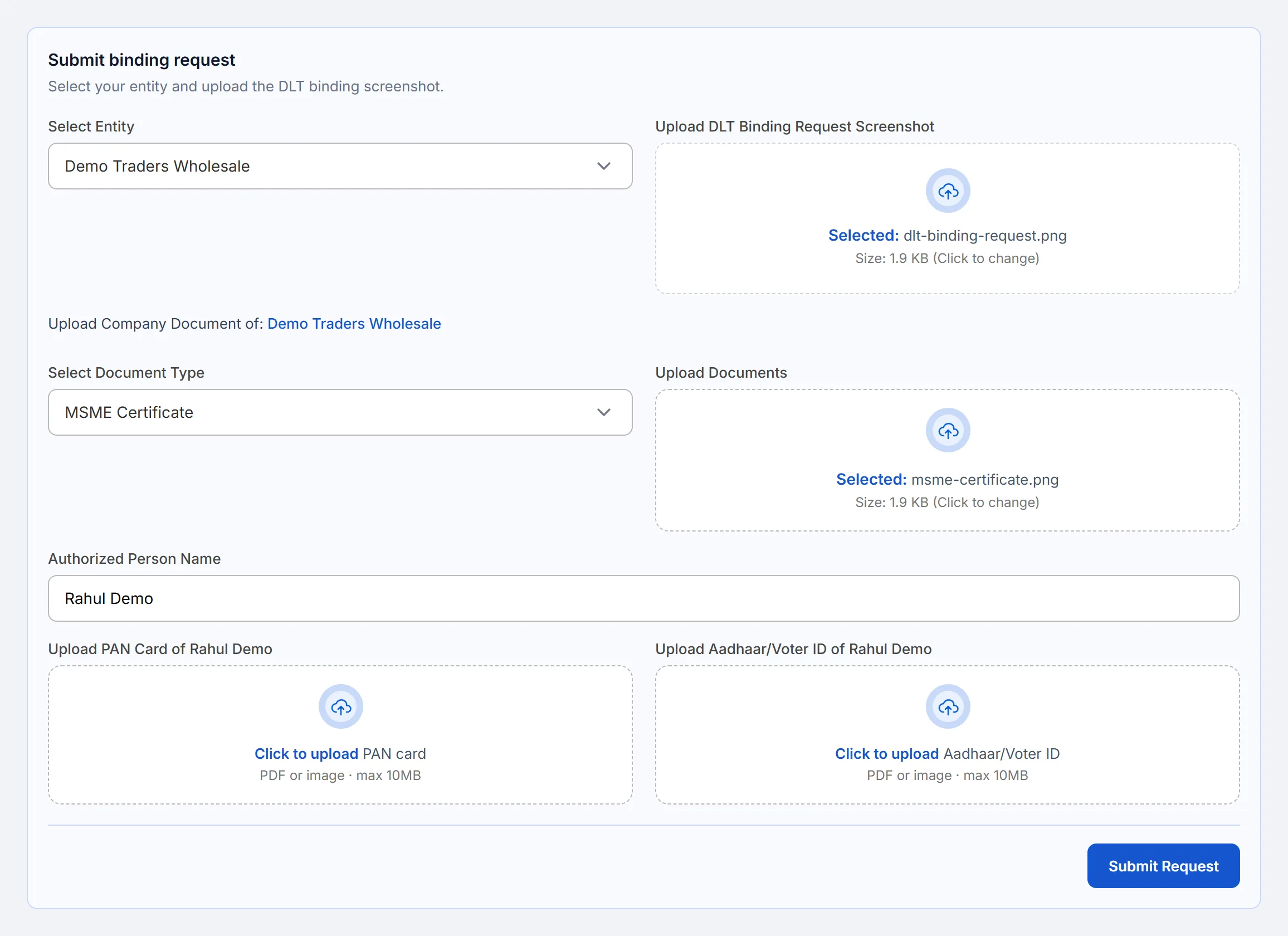
- Open SMS app > DLT Manager > PE-TM Binding. Copy the TM ID from the top if you need it.
- Tick I've sent the request to TM ID 1702178720558766591 from DLT Panel to open the form.
- Select the entity (only approved entities without a binding are listed), upload the DLT binding request screenshot (image, up to 10 MB), pick a document type and upload one company document. Accepted types: PAN, TAN, GST Certificate, Trade License, Shop & Establishment Certificate, MSME Certificate, Certificate of Incorporation or Other.
- Add the authorised person's name and upload their PAN card and Aadhaar or Voter ID. Click Submit Request.
Final approval on your portal
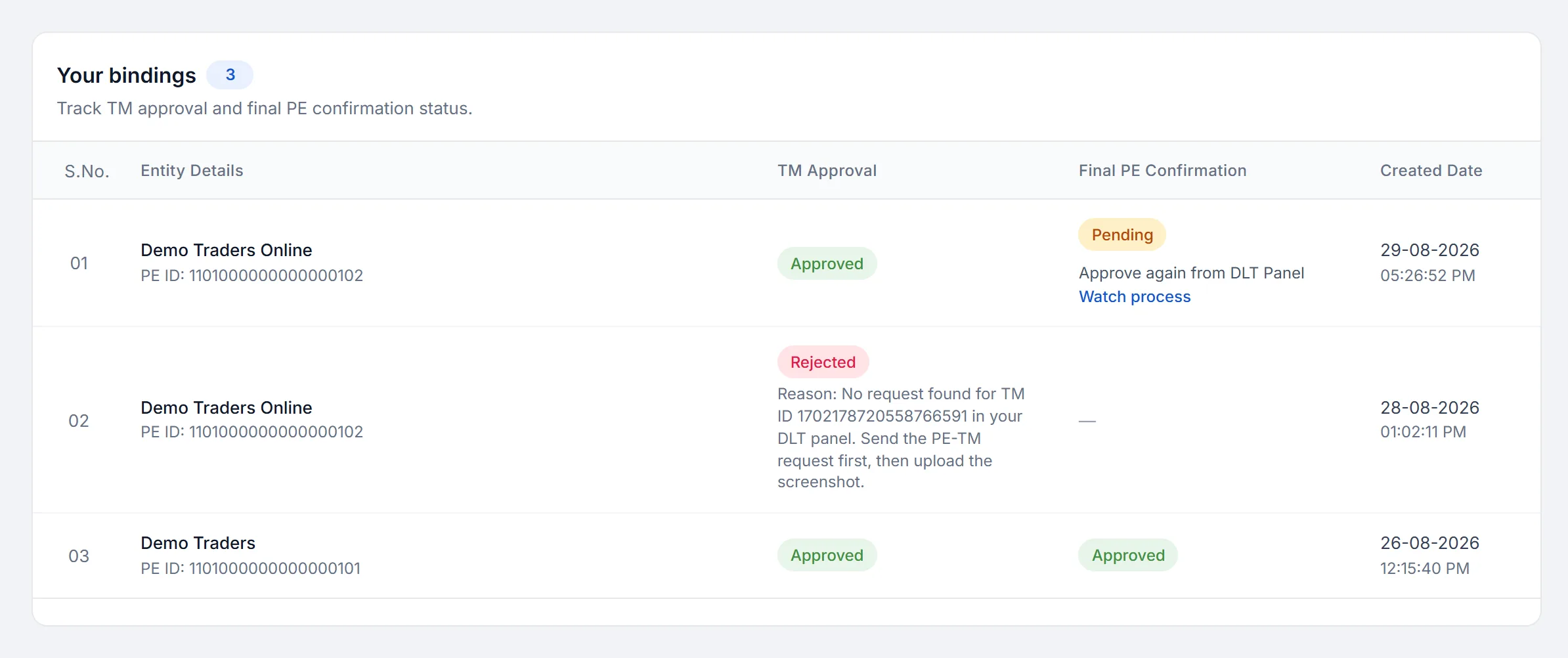
When Fast2SMS accepts the request, TM Approval turns Approved. Then log in to your DLT portal and approve the chain once more. Until you do, Final PE Confirmation shows Pending with "Approve again from DLT Panel" and a Watch process link. When both columns say Approved, the chain is complete.
You set the chain up only once, on your own portal, and it works for all operators. If you send through more than one provider, add each provider's TM ID. Guides: what the PE-TM chain process is, PE-TM binding in Fast2SMS, PE-TM chain status and PE-TM chain mismatch: causes and fixes.
How long DLT approval takes
Approval time depends on the portal. Vi and BSNL publish 72 working hours for the entity and 60 minutes for headers and templates. Tata publishes 3 to 7 working days for the entity and 2 working days for templates. Jio, Airtel and Smartping do not publish a fixed time.
| Step | Where | Time as published (at the time of writing) |
|---|---|---|
| Entity approval | Vi, BSNL | Within 72 working hours |
| Entity approval | Tata | 3 to 7 working days |
| Entity approval | Jio, Airtel, Smartping | Not published. Fast2SMS help guides say entity approval usually takes a few working days. |
| Header and template approval | Vi, BSNL | Within 60 minutes |
| Header and template approval | Tata | 2 working days each |
| Jio payment option | Jio | About 6 hours after registration |
| Entity in Fast2SMS | DLT Manager | Instant when the ID is found on the DLT platform |
| Sender IDs and templates in Fast2SMS | DLT Manager | Pending until our team checks your screenshot |
Every rejection and resubmission restarts the wait, so getting the first submission right is the fastest route. Watch your registered email, including spam, and reply to registrar queries quickly; Vi and BSNL delete applications after 15 working days without a reply.
Rejection reasons and fixes
Most DLT rejections come from a name mismatch, an unclear document, the wrong template category, too many variables, a missing brand name, or a link that is not whitelisted. Read the remark, fix only that point and resubmit.
| Where | Common reason | Fix |
|---|---|---|
| Entity (portal) | Business name differs between the form and documents | Copy the legal name exactly from your PAN or certificate. |
| Entity (portal) | Unclear, cut-off or wrong scans | Upload clear colour scans of the full document. |
| Entity (portal) | LOA not in the portal's format, unsigned or unstamped | Download the portal's LOA, print on letterhead, sign and stamp. |
| Entity (portal) | "Organization with this POI is already registered" | Your PAN is already on DLT. Find the old account or ask the portal's support to recover it. |
| Entity (Jio) | Registration cancelled | The payment was not completed. Register again and pay as the Primary User. |
| Header (portal) | Does not match your brand, or a restricted or generic name | Pick a header based on your own brand and attach proof if asked. |
| Template (portal) | Offer text inside a service or transactional template | Remove the offer and register it separately as Promotional. |
| Template (portal) | Too many variables or too little fixed text | Three variables or fewer, at least 30% fixed text. |
| Template (portal) | Old {#var#} or a link inside {#alphanumeric#} | Use the typed tags, with {#url#} for links. |
| Template (portal) | Brand name missing, or link or number not whitelisted | Add the brand as fixed text. Whitelist the CTA first. |
| Entity (Fast2SMS) | Entity ID or name does not match your DLT record | Copy the ID and name from the portal and upload a clear screenshot. |
| Sender ID (Fast2SMS) | Header not yet approved or not active on DLT | Wait for portal approval, then upload a screenshot showing Approved. |
| Template (Fast2SMS) | Text does not match the DLT-approved text | Copy and paste the approved text exactly, every space and tag included. |
| PE-TM (Fast2SMS) | No chain request to TM ID 1702178720558766591 on your portal | Send the request from your portal first, then submit the binding again with its screenshot. |
In Fast2SMS, the reason our team gives is shown in red under Rejected. More fixes: entity registration rejected, header rejected and template rejected. Our team will also check your template wording for free before you submit.
After approval: add your DLT details in Fast2SMS
Once your portal approves your entity, headers and templates, copy them into Fast2SMS. Everything lives in the SMS app under DLT Manager, which has four tabs: Entity ID, Sender ID, Content Template and PE-TM Binding. Add them in that order, because a sender ID needs an approved entity and a template needs the sender IDs of that entity. All of it is free.
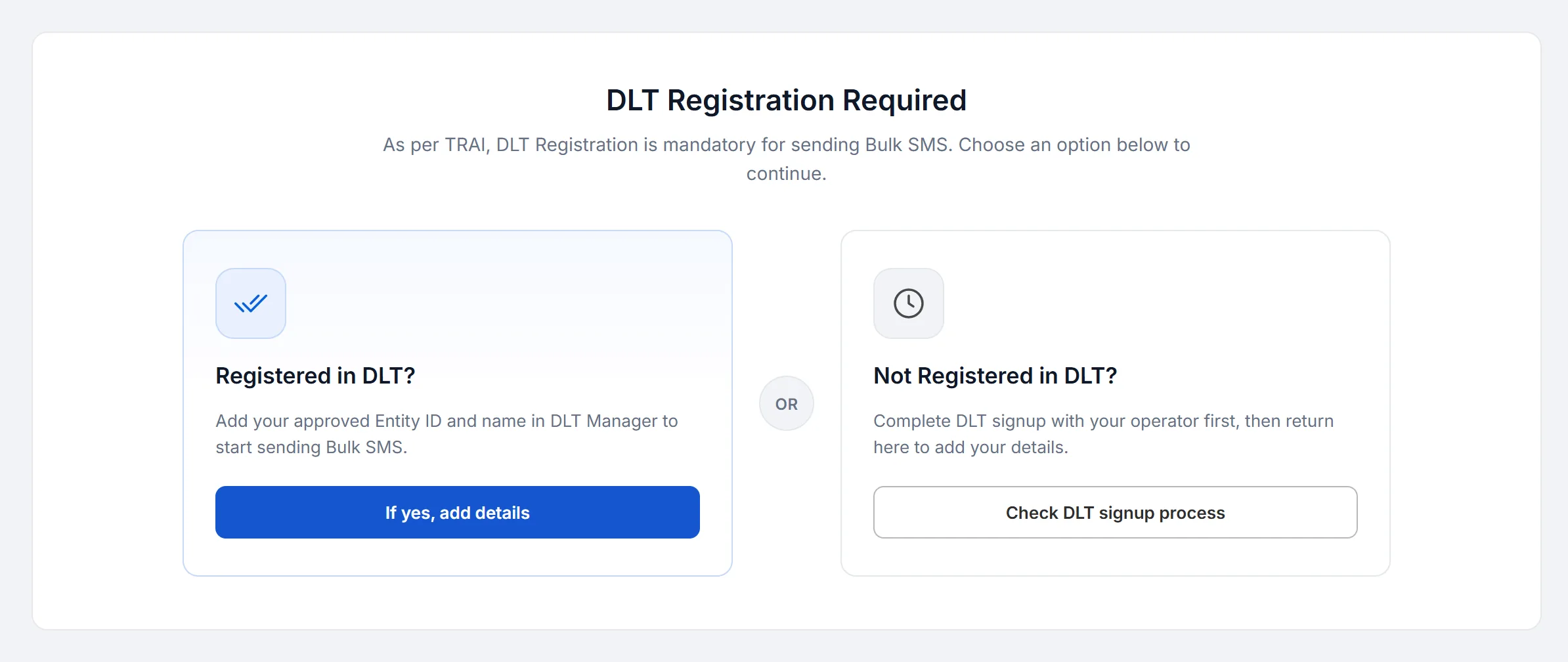
When you open DLT SMS in a new account, you first see the DLT Registration Required screen. Click If yes, add details if you are registered, or Check DLT signup process if not.
1. Add your Entity ID
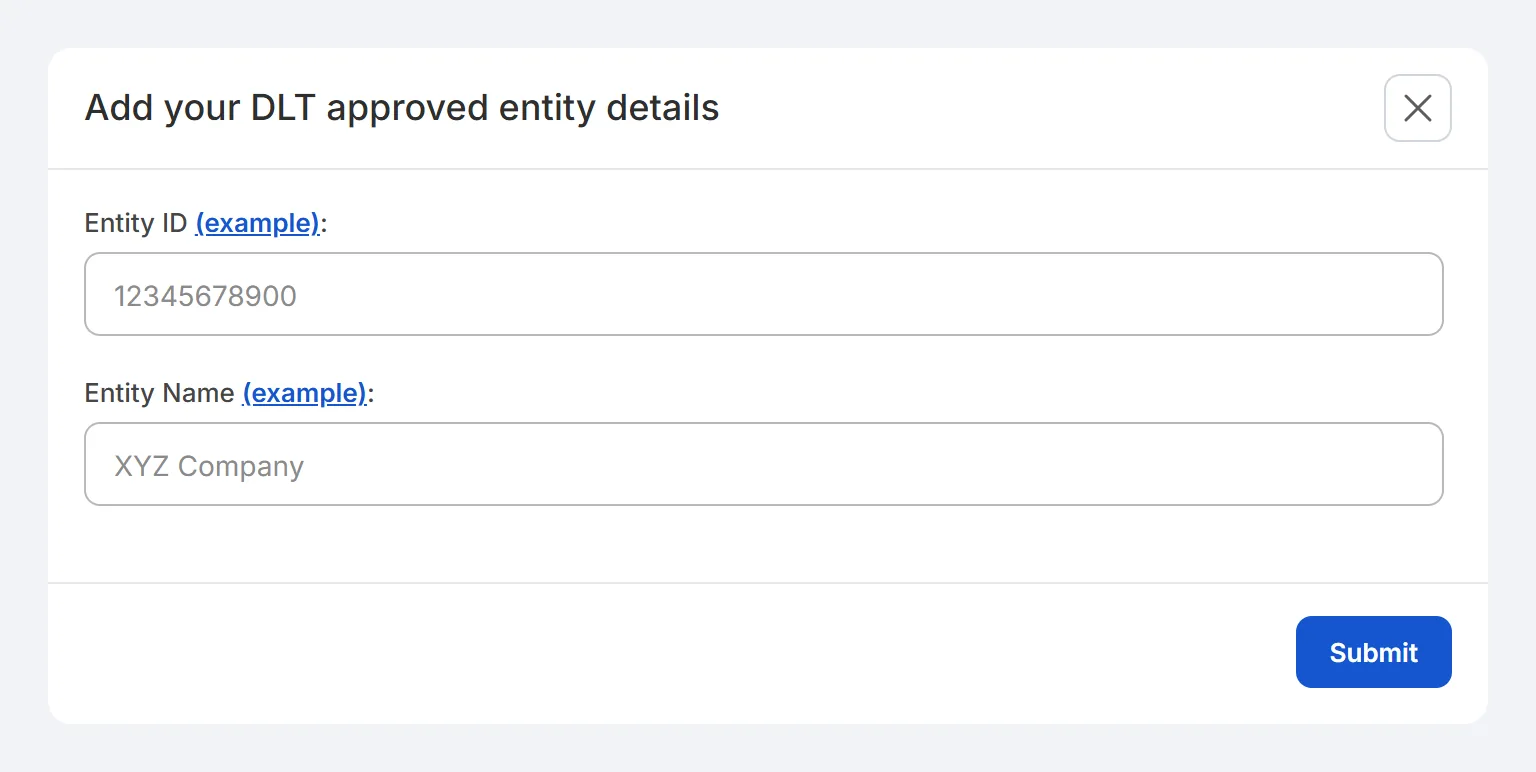
Go to DLT Manager > Entity ID > Add New Entity. Type your Entity ID and Entity Name exactly as on DLT and click Submit. The panel checks the ID on the DLT platform. If it is found, the name fills in and the entity is approved straight away. If not, upload a clear screenshot from your portal and the entity is saved as Pending for our team to check. The Entity ID must be digits only and longer than 11 digits.
2. Add your sender IDs
Go to Sender ID > Add New Sender ID. Select the entity, keep Type Manually, enter the header exactly as approved (3 to 6 characters, same capital letters) and upload a screenshot showing the header with its approved status. With many headers, choose Upload Excel and upload the header list exported from your portal (.csv or .xlsx); only rows with an approved, active, live or verified status are imported. New sender IDs stay Pending until our team checks them.
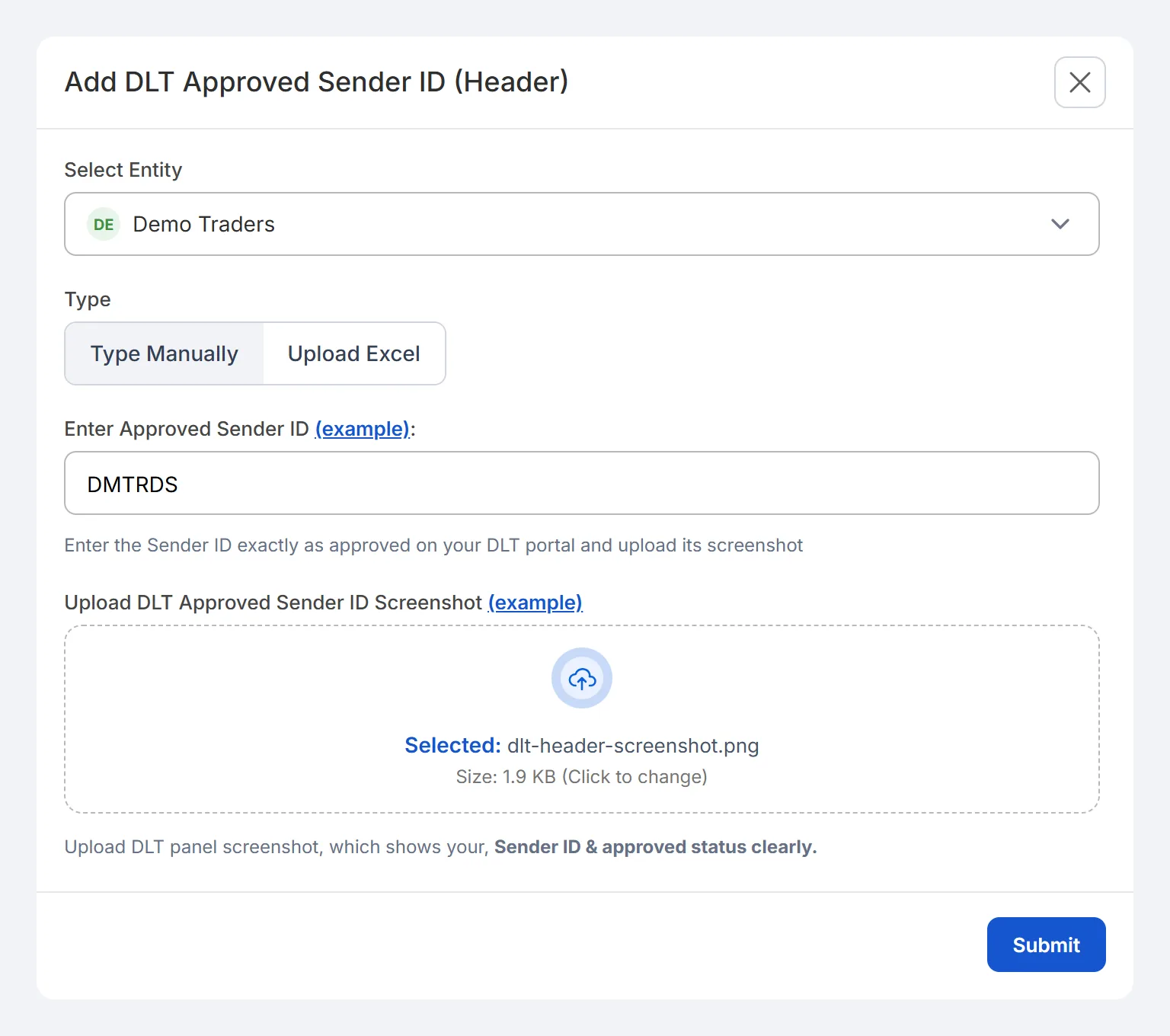
3. Add your content templates
Go to Content Template > Add Content Template. Select the entity, tick the sender IDs the template is approved for, enter the Content Template ID, choose Service Implicit or Service Explicit or Promotional (same category as on DLT), paste the approved text exactly as it is, variables included, and upload a DLT screenshot. You can also upload the template Excel exported from your portal; Fast2SMS reads the export formats of Airtel, Jio, Vi, Tata and Smartping (Videocon) and imports the approved rows as Pending for a check.
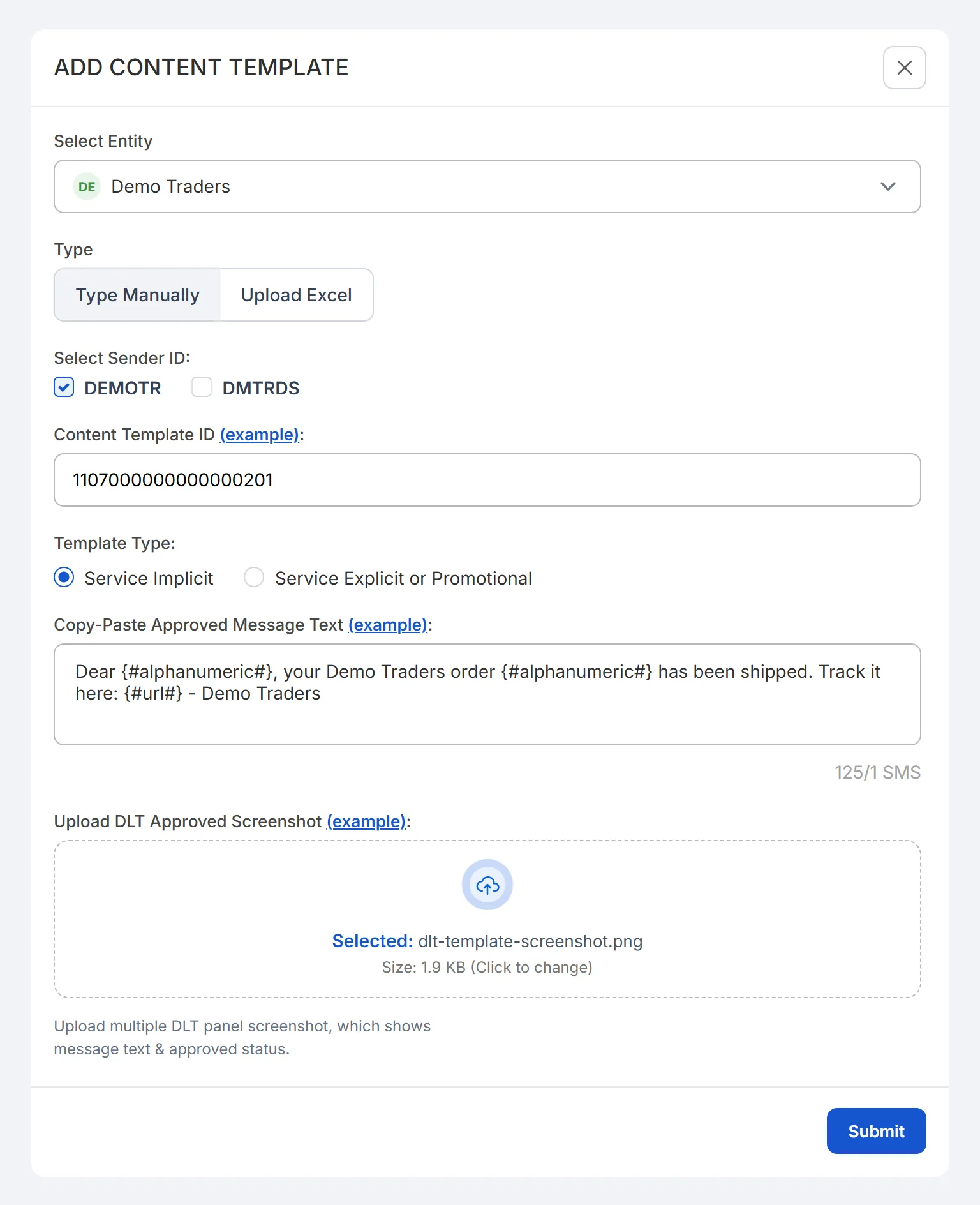
Each template then shows as a card with its status, category (Service or Promo), language (EN or UN), a short Message ID, the linked sender IDs and your DLT Template ID. Approved cards have Sample Code and Test Template buttons, so you can send one test SMS to your own number before a campaign.
4. Bind PE-TM and send your first DLT SMS
Complete the PE-TM binding described above. Then open DLT SMS, choose your sender ID, add numbers (type a list, pick from your address book or upload a CSV), click Select DLT Template, fill in the variables and click Send or Schedule. The confirmation window shows the cost per SMS, duplicates and invalid numbers (not charged) and the total before anything is sent. Developers can use the API with route=dlt. The full sending guide is on how to send DLT SMS, and every SMS feature is on the bulk SMS service page. For developers, see the SMS API and how to send DLT SMS via API.
Status check, renewal and expiry
Check your DLT status on the portal where you registered; it is the source of truth. Fast2SMS shows the status of the records you added in your account, and adding an Entity ID in DLT Manager tells you at once whether the ID exists on the DLT platform.
| Status in Fast2SMS | Meaning | What to do |
|---|---|---|
| Approved | Checked and ready to use | Nothing. Keep it active on DLT too. |
| Pending | Waiting for a check by our team | Wait. A clear screenshot speeds it up. |
| Rejected | The check failed; the reason is shown in red | Fix the reason, delete the row and add it again. |
Your Entity ID is your DLT registration number. Find it in the portal's approval email or your portal profile. The entity registration is valid for one year. Vi and BSNL mention a 30-day grace period after expiry, and Jio sends a reminder a month before. If you do not renew, the portal disables your DLT services and operators reject your SMS, OTPs included. Renewal does not change your Entity ID, headers or templates, so nothing needs to be re-added in Fast2SMS. On Jio only the Primary User can pay, so keep that login email and mobile current. More: how to check DLT registration status.
DLT errors after approval
An approved setup can still fail when the sent text does not match the template, a variable value is too long or the wrong type, a link is not whitelisted, the header was deactivated, or the PE-TM chain is incomplete. The operator returns an error code, and Fast2SMS shows a plain reason for each number in the SMS report.
| Code | Meaning | Fix |
|---|---|---|
| 630 | Jio and SmartPing: Template ID not found on DLT | Copy the Template ID from your portal again. |
| 633 | Jio and SmartPing: text does not match the template (Airtel uses 666) | Send the approved text exactly; change only variables. |
| 634 | Jio and SmartPing: sender ID not linked to this template (Airtel uses 614) | Send from the linked header, or link it on DLT. |
| 650 | Number on DND, promotional SMS blocked | Do not send offers to this number by SMS. |
| 651 | Promotional SMS outside 10 AM to 9 PM | Send promotions inside the window. |
| 700 / 701 | Airtel and SmartPing: link not whitelisted or does not match | Whitelist the exact link on your portal. |
The same number can mean different things at different operators. See the DLT error codes list and SMS not delivered: DLT errors and fixes. On standard billing, DLT SMS are charged when the campaign is created and failed numbers are not refunded, so test each new template first.
Sending SMS before your DLT is approved
While your DLT registration is pending, Fast2SMS Quick SMS can send to DND and non-DND numbers without DLT approval. The sender is a random number, not your brand; each message can be reviewed before it goes out; personal or spam content is not allowed; you need one recharge of ₹100 or more first; and it has its own higher per-SMS rate, shown before you confirm. For OTPs and regular customer alerts, DLT SMS is the better long-term choice. See bulk SMS without DLT registration and OTP SMS without DLT.
Free DLT support from Fast2SMS
Fast2SMS helps with DLT registration at no charge: choosing a portal, entity, sender ID and template registration, checking your template wording before you submit, adding your details in DLT Manager and PE-TM binding. You pay only the portal's own fee and the SMS you send.
- Call: +91-6262778822 for any DLT related help (9 AM to 5 PM, as listed on our DLT page).
- Chat: in the Fast2SMS panel and on the website.
- Email: support@fast2sms.com.
- Meeting: book a free 30-minute Google Meet at fast2sms.com/meet.
The registration itself must be in your business name, with your documents and the OTPs sent to your mobile, so you submit it; the team guides you through every screen. What we offer and how to prepare is on the free DLT support page.
DLT registration kaise kare (हिंदी में)
DLT का पूरा नाम Distributed Ledger Technology है। TRAI के नियम के अनुसार अपने brand के sender ID से business SMS भेजने से पहले DLT registration ज़रूरी है।
- Jio, Airtel, Vi, BSNL, Tata या Smartping में से किसी एक DLT portal पर Principal Entity के रूप में sign up करें। एक registration सभी networks के लिए काफी है।
- Business PAN, एक business proof (GST, MSME, Shop and Establishment आदि), authorised person का ID proof और letterhead पर LOA upload करें।
- लिखते समय फीस ₹5,900 प्रति वर्ष (GST सहित) है, हर portal पर एक जैसी। Approve होने पर आपको Entity ID मिलेगी।
- उसी portal पर header (sender ID) और content template रजिस्टर करें। Links और call-back नंबर पहले whitelist करें।
- PE-TM chain में Fast2SMS का TM ID 1702178720558766591 (SID GROUPS PRIVATE LIMITED) डालें और screenshot लें।
- Fast2SMS के DLT Manager में Entity ID, sender ID और template जोड़ें, PE-TM binding पूरी करें और DLT SMS भेजें। यह सब free है।
कोई दिक्कत हो तो +91-6262778822 पर call करें या free meeting बुक करें। पूरी हिंदी गाइड: DLT रजिस्ट्रेशन कैसे करें और DLT क्या है।
Mistakes to avoid
- Registering on two portals. It creates two Entity IDs and a second fee that is not refunded.
- Choosing telemarketer instead of Principal Entity on the signup screen.
- Different spellings of your business name across the form, PAN, certificates and LOA.
- Leaving the Jio payment half done. It cancels the registration.
- Ignoring registrar emails. Vi and BSNL delete applications after 15 working days.
- Putting an offer line in an OTP or order template. The whole message becomes promotional.
- Using old {#var#} tags or putting a link inside {#alphanumeric#}.
- Sending a link or number that is not whitelisted.
- Forgetting the final PE approval on your portal after Fast2SMS approves the chain.
- Retyping the template in Fast2SMS. Copy and paste it; one extra space breaks the match.
- Letting headers sit unused for 90 days or letting the yearly registration lapse.
- Sending a big campaign without a test. Use Test Template on your own number first.
DLT registration checklist
- One portal chosen; signed up as Principal Entity.
- Business PAN, business proof, authorised person ID and LOA uploaded with matching names.
- ₹5,900 yearly fee paid (at the time of writing) and Entity ID noted.
- Headers approved; consent template approved if you send promotions.
- Links and call-back numbers whitelisted; templates approved with typed variables and your brand name.
- PE-TM request sent to TM ID 1702178720558766591 and screenshot saved.
- Entity ID, sender IDs and templates added in Fast2SMS DLT Manager.
- PE-TM binding submitted; TM Approval and Final PE Confirmation both Approved.
- Test Template sent to your own number and delivered.
- Renewal date in your calendar a month ahead.
Ready to start? Signup free on Fast2SMS, add your DLT details at no charge and use the ₹50 free credit to test. Questions can go to the team through the contact page or a free meeting at fast2sms.com/meet.
DLT registration: frequently asked questions
What is DLT?
DLT is the shared register Indian telecom operators use to check every business SMS. A business registers its entity, sender IDs (headers) and message templates on it, and operators deliver only SMS that match those records.
What is the full form of DLT?
DLT stands for Distributed Ledger Technology. It is the blockchain-based technology behind the operators’ register of businesses, headers and templates.
What is the DLT full form in SMS?
In SMS, DLT also means Distributed Ledger Technology. A “DLT SMS” is a business SMS sent with a registered entity, header and template, so it passes the operator’s check. See DLT SMS meaning.
What is DLT registration?
DLT registration is the TRAI process in which a business registers itself as a Principal Entity, plus its headers and content templates, on one telecom operator’s DLT portal before it sends commercial SMS in India.
Is DLT registration mandatory?
Yes, for every business SMS sent to Indian numbers with your own sender ID: OTPs, alerts, updates and offers. Without it the operator blocks the message.
Is DLT registration mandatory for OTP SMS?
Yes. OTP SMS sent under your brand need an approved entity, header and OTP template. If you need OTPs before approval, see OTP SMS without DLT.
Who introduced DLT in India?
TRAI, the Telecom Regulatory Authority of India, through its commercial communication regulations known as TCCCPR 2018, later amended, including in February 2025.
Why did TRAI bring DLT?
To stop spam and fraud SMS, make every business sender traceable and respect customer choices such as DND. Operators check each SMS against the DLT records before delivery.
What is DLT scrubbing?
Scrubbing is the operator’s automatic check of each SMS against your DLT records: entity, header, template, links, PE-TM chain and the customer’s DND preference. It takes a fraction of a second. Read DLT scrubbing explained.
Does DLT apply to WhatsApp messages?
No. WhatsApp Business API templates are approved by Meta. DLT applies to SMS only.
Do bulk voice calls need DLT registration?
No. Fast2SMS’s help guides state that DLT registration is not required for voice calls.
Can an individual or a small shop do DLT registration?
Yes. Vi’s DLT FAQ lists individual and sole proprietor among Principal Entity types, along with partnership firms, companies, LLPs, trusts, societies and government bodies.
What is the DLT registration process?
Choose one DLT portal, register your business as a Principal Entity and pay the fee, register headers and templates (plus a consent template for promotions), send the PE-TM request to your SMS provider, then add the details in your provider’s panel and send.
How do I do DLT registration online?
Open any operator’s DLT portal, choose Enterprise or Principal Entity, enter your business and authorised person details, upload the documents, pay online and wait for your Entity ID by email. The whole process is online.
Can Fast2SMS do my DLT registration for me?
The registration has to be in your business name with your documents and the OTPs sent to your mobile, so you submit it yourself. The Fast2SMS team guides you through each screen and checks your details for free.
Should I register as Enterprise or Telemarketer?
As Enterprise (Principal Entity). The telemarketer option is for SMS companies that deliver messages, such as Fast2SMS.
What do I do after DLT registration is approved?
Register headers and templates, complete the PE-TM chain to Fast2SMS, add your Entity ID, sender IDs and templates in Fast2SMS DLT Manager, finish PE-TM binding and send your first DLT SMS.
What is the DLT portal?
A DLT portal is an operator’s website where businesses register for commercial SMS. India has six: Jio TrueConnect, Airtel DLT, Vi Vilpower, BSNL DLT, Tata DLT and Smartping.
How many DLT portals are there in India?
Six: Jio, Airtel, Vi (Vodafone Idea), BSNL, Tata Teleservices and Smartping, the portal earlier known as Videocon DLT.
Which DLT portal is best?
None is better for delivery, because all share one ledger and the same rules, and the fee is the same. Choose the one whose screens and support you find easiest. Our DLT page usually suggests Jio TrueConnect for its easy portal.
Do I need to register on every operator’s DLT portal?
No. Register on one portal. Your entity, headers and templates are shared with every operator, so your SMS reach Jio, Airtel, Vi and BSNL numbers.
Can I send SMS to Airtel numbers if I registered on Jio DLT?
Yes. One registration works for all networks, as long as your PE-TM chain is approved on your Jio account.
What is Airtel DLT?
Airtel DLT is Bharti Airtel’s portal for TRAI’s commercial SMS rules, at airtel.in/business/commercial-communication. See the Airtel DLT registration guide.
How do I do Airtel DLT registration?
Start a new entity registration on Airtel’s commercial communication portal, choose to register for your own organisation, upload KYC, pay after KYC approval, then add headers, templates and Fast2SMS as telemarketer.
When do I pay the Airtel DLT fee?
After your KYC registration is approved, according to Airtel’s registration page. At the time of writing the fee is ₹5,900 per year including GST.
Why is my Airtel PE-TM chain still pending after Fast2SMS approved it?
Airtel needs your final approval on the portal. Follow how to complete the Airtel DLT PE-TM chain.
What is Jio TrueConnect?
Jio TrueConnect is Jio’s DLT portal at trueconnect.jio.com, where businesses register their entity, headers and templates. See the Jio DLT guide.
How do I do Jio DLT registration?
On trueconnect.jio.com choose Principal Entity, upload your KYC document and PAN or TAN (each under 5 MB), verify your mobile, pay as the Primary User when the payment option opens, then wait for your Entity ID.
Why can’t I see the payment option on Jio DLT?
It opens about 6 hours after registration, only the Primary User can pay, and TrueConnect needs an active GST number or another KYC document first.
What happens if my Jio DLT payment is incomplete?
TrueConnect says an incomplete payment cancels the registration and the documents you submitted. Finish the payment in one go.
What is Vilpower?
Vilpower (vilpower.in) is Vodafone Idea’s DLT portal. See Vi DLT registration on Vilpower.
How long does Vi DLT approval take?
Vi’s FAQ says entity details are verified within 72 working hours, and headers, content templates and consent templates within 60 minutes, at the time of writing.
What is the BSNL DLT portal?
BSNL’s UCC DLT portal is at ucc-bsnl.co.in. It accepts online payment and NEFT. See the BSNL DLT guide.
How long does BSNL DLT approval take?
BSNL’s FAQ says the entity is verified within 72 working hours and headers and templates within 60 minutes.
What is the Tata DLT portal?
Tata Teleservices runs its DLT portal at telemarketer.tatateleservices.com. See the Tata DLT guide.
How long does Tata DLT approval take?
Tata’s FAQ says 3 to 7 working days for the entity and 2 working days each for headers, content templates and consent templates.
Is Smartping the same as Videocon DLT?
Yes. The portal older guides call Videocon DLT is now Smartping (smartping.live, also called Pingconnect). Entities log in at smartping.live/entity, and registrations made earlier continue there.
How do I pay on Smartping DLT?
After Smartping approves your KYC, you get a payment link on your registered email and mobile. Pay through that link.
What are the DLT registration charges?
At the time of writing, ₹5,900 per year including GST for entity registration, the same on Jio, Airtel, Vi, BSNL, Tata and Smartping. Fees and rules can change; check the operator portal before you pay.
Is DLT registration free?
No. No DLT portal offers free entity registration at the time of writing. Fast2SMS’s help with DLT is free.
Is the DLT fee one-time or yearly?
Yearly. The entity registration is valid for one year and you renew it on the same portal.
Do I pay DLT fees to every operator?
No. You pay only the one portal where you register.
Is the DLT registration fee refundable?
Portals that state a policy, such as Vi, BSNL and Smartping, describe it as non-refundable. Check your details before paying.
Does Fast2SMS charge for DLT registration?
No. Fast2SMS charges nothing for DLT help, adding your entity, sender IDs and templates, or PE-TM binding. You pay only for the SMS you send, as on the bulk SMS pricing page.
Is there a DLT charge on every SMS?
Not on Fast2SMS. The per-SMS slab rate, ₹0.25 down to ₹0.11 at the time of writing, is the whole price. No separate DLT or scrubbing line is added.
What documents are required for DLT registration?
A business PAN, one business proof (GST, Certificate of Incorporation, TAN, trade licence, Shop and Establishment or MSME certificate), ID proof of the authorised person and a signed, stamped Letter of Authorisation in the portal’s format.
Can I do DLT registration without GST?
Yes. Use another business proof such as an MSME (Udyam) certificate, Shop and Establishment certificate or trade licence. See DLT without GST.
Which PAN does a proprietor use for DLT?
The proprietor’s own PAN, because a proprietorship has no separate PAN.
Is Aadhaar enough for DLT registration?
No. Aadhaar can be the authorised person’s ID proof, but you also need a PAN and a business proof.
What is an LOA in DLT registration?
A Letter of Authorisation on your letterhead naming the person who handles DLT for your business, signed and stamped, in the portal’s own format.
What new checks did the February 2025 TRAI amendment add?
Sender registration is to include physical verification of the business, biometric authentication of the authorised person and linking the entity to a unique mobile number, in the manner TRAI specifies.
What is a DLT header?
The short sender name customers see, also called a sender ID, for example DEMOTR. Read the DLT header rules.
How many characters can a DLT sender ID have?
Up to 6 on the phone. Service and transactional headers are normally 6 letters. Fast2SMS accepts approved headers of 3 to 6 characters.
Can promotional SMS use a brand-name header?
Yes. Promotional headers were traditionally 6 digits, and the TCCCPR amendment now allows alphabetic or alphanumeric headers for promotional templates too. Follow what your portal allows.
Why was my DLT header rejected?
Usually because it does not relate to your business or brand, or it is a restricted name: a celebrity or politician, another company’s brand or trademark, a generic word or a government-style header.
What do -P, -S, -T and -G after my sender ID mean?
They show the message type under TRAI’s February 2025 amendment: promotional, service, transactional and government. See the suffix explained.
What happens if I do not use a header for 90 days?
Operators deactivate headers not used for 90 days. You can ask for reactivation on your portal.
What is a DLT content template?
The approved text of a message, with variables for parts that change. Every SMS must match it word for word.
Which DLT template type should I use for OTP?
Transactional, where your portal offers it; otherwise the category your portal suggests for OTPs. In Fast2SMS you add it as Service Implicit.
What is the difference between Service Implicit and Service Explicit?
Service Implicit goes to existing customers without separate consent and reaches DND numbers at any time. Service Explicit needs explicit consent and has been merged into Promotional on DLT portals.
What happened to Service Explicit templates?
From 10 March 2026 existing Service Explicit templates moved to Promotional, and new ones are registered as Promotional.
What time can promotional SMS be sent?
Only between 10 AM and 9 PM. Fast2SMS holds promotional campaigns sent at night and sends them the next morning.
Can I edit an approved DLT template?
No. Only the variable parts change at send time. To change the fixed text, register a new template.
How many variables can a DLT template have?
Normally three or fewer. More need written reasons and separate approval, and at least 30% of the template must be fixed text.
Can I register a DLT template in Hindi?
Yes. Register it in Hindi on DLT and paste the same text in Fast2SMS; it is saved as Unicode. One Unicode SMS part holds up to 70 characters.
What is a consent template in DLT?
A fixed statement of what a customer agrees to receive from your brand. It is needed before Service Explicit or Promotional content templates. See the consent template guide.
Do OTP templates need a consent template?
No. OTPs and service updates (Transactional and Service Implicit) do not need one.
What is variable tagging in DLT?
The 2026 rule that each variable declares its type with one of six tags: {#numeric#}, {#alphanumeric#}, {#url#}, {#urlott#}, {#cbn#} and {#email#}. See DLT new rules 2026.
Is {#var#} still allowed in DLT templates?
New templates must use the typed tags. Old {#var#} templates need to be migrated before operators fully enforce the new checks.
What is CTA whitelisting in DLT?
Registering every link, app link, WhatsApp link and phone number used in your SMS on your DLT portal. Messages with non-whitelisted CTAs are blocked. Read CTA whitelisting.
Can I use a URL shortener in DLT SMS?
Only if the short-link domain is whitelisted on your DLT portal. Public short links that are not whitelisted are blocked.
Is CTA whitelisting free?
Most businesses pay nothing extra. Vi’s FAQ says CTA registration and updates have no extra fee.
What is PE-TM chain binding?
The approved link on DLT between your business (Principal Entity) and the telemarketer that delivers your SMS. Operators check every SMS against it, so a missing chain can block delivery.
What is the Fast2SMS telemarketer ID?
Telemarketer name: SID GROUPS PRIVATE LIMITED. TM ID: 1702178720558766591. Use these on any DLT portal.
Do I set up the PE-TM chain on every portal?
No. Only on the one portal where your business is registered. It works for all operators.
What documents do I need for PE-TM binding in Fast2SMS?
The DLT chain request screenshot, one company document (PAN, TAN, GST, trade licence, Shop and Establishment, MSME, incorporation certificate or other), and the authorised person’s name, PAN and Aadhaar or Voter ID. Each file up to 10 MB.
Why does Final PE Confirmation say pending?
Fast2SMS has approved the chain, and you now need to approve it once more on your DLT portal. Use the Watch process link if you are unsure where.
Can I add more than one telemarketer to my chain?
Yes. If you use more than one provider, add each provider’s TM ID. Each approves its part, then you give the final approval.
How long does DLT registration take?
It depends on the portal. Vi and BSNL publish 72 working hours for the entity; Tata publishes 3 to 7 working days; Jio, Airtel and Smartping do not publish a fixed time. Headers and templates follow.
Why was my DLT entity registration rejected?
Mostly a business name that differs from the documents, unclear scans, the wrong entity type, or an LOA that is missing or not in the portal’s format. See entity rejected: fixes.
What does “Organization with this POI is already registered” mean?
Your proof of identity (usually the PAN) is already linked to an entity on that DLT platform. Find the old account or ask the portal’s support to recover it.
Why was my DLT template rejected?
Wrong category, an offer inside a service message, too many or untagged variables, too little fixed text, a missing brand name or a non-whitelisted link. See template rejected: fixes.
Where do I find my DLT registration number?
Your DLT registration number is your Entity ID (PE ID). It is in the portal’s approval email and on your portal profile.
How do I check my DLT registration status?
Log in to your DLT portal. You can also add the Entity ID in Fast2SMS DLT Manager, which checks it against the DLT platform at once. See check DLT status.
What happens if I do not renew DLT registration?
The portal disables your DLT services and operators reject your SMS, OTPs included. Vi and BSNL mention a 30-day grace period. Renew on the same portal.
Does my Entity ID change when I renew?
No. Your Entity ID, headers and templates stay the same, so nothing has to be re-added in Fast2SMS.
How do I add my DLT details in Fast2SMS?
In the SMS app open DLT Manager. Add your Entity ID, then sender IDs, then content templates, typed in or uploaded from your portal’s Excel export, and complete PE-TM Binding.
Why is my entity pending in Fast2SMS?
The Entity ID could not be confirmed on the DLT platform automatically, so our team checks your screenshot. IDs found on the platform are approved instantly.
Can I upload my DLT Excel export into Fast2SMS?
Yes. Sender ID and Content Template both have an Upload Excel option. Fast2SMS reads the common export formats of the DLT portals and imports approved rows as Pending for a check.
What is the Message ID in Fast2SMS?
A short Fast2SMS number for each approved template, shown on the template card. You use it as message in the DLT SMS API. The long Template ID comes from DLT.
Why is my template not showing on the DLT SMS page?
Only approved templates linked to the selected sender ID appear. Check that the template card says APPROVED and lists that sender ID, and that the sender ID is approved.
What do SMS error codes 633 and 650 mean?
633 (Jio and SmartPing) means the text did not match the template. 650 means the number is on DND and blocked a promotional SMS. See the DLT error codes list.
Can I send bulk SMS without DLT registration?
Yes, with Fast2SMS Quick SMS: a random sender, a higher per-SMS rate and a review before sending. Branded SMS and OTP templates need DLT.
How do I get free DLT registration help?
Call +91-6262778822 (9 AM to 5 PM), chat in the panel, email [email protected] or book a free meeting at fast2sms.com/meet. See free DLT support.
DLT का full form क्या है?
DLT का पूरा नाम Distributed Ledger Technology है। यह telecom operators का blockchain आधारित रजिस्टर है जिसमें business SMS की जानकारी दर्ज रहती है।
DLT registration kaise kare?
किसी एक DLT portal (Jio, Airtel, Vi, BSNL, Tata या Smartping) पर Principal Entity के रूप में sign up करें, documents upload करें, फीस भरें, Entity ID मिलने के बाद header, template और PE-TM chain जोड़ें। फिर details Fast2SMS के DLT Manager में डालें।
DLT registration की फीस कितनी है?
लिखते समय ₹5,900 प्रति वर्ष, GST सहित, हर portal पर एक जैसी। फीस बदल सकती है, payment से पहले portal पर देखें।
क्या DLT registration free है?
नहीं। कोई भी portal entity registration free नहीं करता। Fast2SMS की DLT मदद free है।
DLT registration के लिए कौन से documents चाहिए?
Business PAN, एक business proof (GST, MSME, Shop and Establishment, trade licence आदि), authorised person का ID proof और letterhead पर signed और stamped LOA।
क्या GST के बिना DLT registration हो सकता है?
हां। GST की जगह MSME (Udyam), Shop and Establishment certificate या trade licence जैसे दूसरे business proof चल जाते हैं।
क्या हर operator पर अलग DLT registration करना होगा?
नहीं। एक portal पर registration सभी networks के लिए काफी है।
Jio DLT registration कहां करें?
Jio TrueConnect पर, trueconnect.jio.com। Payment का विकल्प registration के लगभग 6 घंटे बाद आता है और सिर्फ Primary User payment कर सकता है।
Airtel DLT registration में फीस कब भरनी होती है?
KYC approve होने के बाद, जैसा Airtel के registration पेज पर लिखा है।
Fast2SMS का TM ID क्या है?
Telemarketer का नाम SID GROUPS PRIVATE LIMITED और TM ID 1702178720558766591 है। PE-TM chain में यही डालें।
PE-TM chain क्या है?
आपके business और आपके SMS provider (telemarketer) के बीच DLT पर दर्ज link। इसके बिना SMS block हो सकते हैं।
Entity ID क्या होती है?
DLT portal पर business approve होने के बाद मिलने वाला लंबा नंबर, जिसे PE ID भी कहते हैं। इसे Fast2SMS में DLT Manager > Entity ID में जोड़ते हैं।
DLT approval में कितना समय लगता है?
Portal पर निर्भर करता है। Vi और BSNL entity के लिए 72 working hours और header व template के लिए 60 मिनट बताते हैं। Tata entity के लिए 3 से 7 working days बताता है।
क्या DLT हर साल renew करना होता है?
हां। Entity registration एक साल के लिए valid होता है। Renewal पर Entity ID नहीं बदलती।
क्या Fast2SMS DLT में मदद के पैसे लेता है?
नहीं। DLT मदद, Entity ID, sender ID, template जोड़ना और PE-TM binding free है। आप सिर्फ भेजे गए SMS का पैसा देते हैं।