EMI Reminder Message: Automate Day -3, Due-Day and Day +1 Reminders on WhatsApp, SMS and Calls
No monthly fee · Pay as you go from ₹100 · Free setup help on a call
An EMI reminder message tells a borrower that a loan instalment is due, how much, and how to pay. In Fast2SMS Campaign, lenders and NBFCs automate it: WhatsApp with a pay link three days before, SMS on the due day, and a recorded call on Day +1 if still unpaid. Your LMS starts it with one API call, and messages cost from ₹0.25 at the time of writing.
This guide covers the Day -3 / Day 0 / Day +1 reminder plan, two ways to run it from your loan management system, copy-ready EMI reminder templates in English and Hindi, the API code, costs for 10,000 borrowers, compliance points and the mistakes that cost lenders trust.
What is an EMI reminder message?
It is a short service message from a lender to a borrower about an upcoming or missed instalment (EMI) on a loan. It states the loan account (usually masked), the EMI amount, the due date and the way to pay: a payment link, UPI, the app, a branch, or keeping enough balance in the bank account for the auto-debit (NACH or eNACH mandate).
EMI reminders are used by banks, NBFCs, microfinance lenders, gold loan companies, two-wheeler and consumer durable financiers, digital lending apps, housing finance companies and even schools or hospitals that offer instalment plans. The message is the same idea in each case: remind politely before the date, confirm on the day, follow up quickly if it is missed.
A single SMS used to be enough. Today many lenders run a short EMI reminder journey across channels: WhatsApp first because it can carry a Pay now button, SMS because it reaches every phone, and a voice call for borrowers who do not read texts. On Fast2SMS this journey is built in Campaign, a journey builder for SMS, WhatsApp, RCS and voice, and started from your loan management system (LMS) by API.
Why should lenders automate EMI reminders?
Because most missed EMIs in the first few days are not refusals. The borrower forgot, the salary came late, or there was not enough balance on the auto-debit date. A well-timed reminder fixes these cases at a tiny cost, and your collections team can focus on the few accounts that really need a conversation.
- Fewer bounces. A Day -3 reminder to keep the balance ready gives the borrower time to move money before the auto-debit is presented.
- Lower cost than tele-calling. A WhatsApp or SMS reminder costs paise; a manual call costs an agent's time.
- Consistent tone. Every borrower gets the same polite, approved wording, which is easier to review than hundreds of individual calls.
- A clear record. Campaign keeps each borrower's full journey: what was sent, when, and whether it was delivered, read or answered.
- Reach in every language. Templates in Hindi and regional languages, and recorded calls in any dialect, reach borrowers who are not comfortable reading English.
For broader collections work, the same tool also runs payment reminders for invoices, fees and subscriptions.
What is the best Day -3, Day 0 and Day +1 EMI reminder plan?
A simple, widely used plan is: WhatsApp with a pay link three days before the due date, an SMS with the link on the due date, and a recorded voice call the day after if the EMI is still unpaid. Each step checks first whether the borrower has paid, so paid borrowers are left alone.
| Step | When | Channel | Message | If it fails |
|---|---|---|---|---|
| 1. Pre-due reminder | Day -3 (journey starts) | WhatsApp (utility) | EMI amount, due date, Pay now button, "keep balance for auto-debit" | Failed or not delivered: SMS with the same details |
| 2. Wait | 3 days | Wait + Frequency | Continue on the due day, within your allowed hours | Not applicable |
| 3. Paid? | Day 0 | Condition | payment_received in the last 3 days = 0? | Paid: journey ends |
| 4. Due-day reminder | Day 0 | SMS (DLT service template) | "EMI due today", amount, short pay link | Failed or not delivered: WhatsApp due-day template |
| 5. Wait and check | 1 day | Wait + Condition + Frequency | Still unpaid? Continue only within your allowed calling hours | Paid: journey ends |
| 6. Reminder call | Day +1 | Voice (recorded) | General reminder; press 1 to reach the collections team (call patch) | Not answered or failed: WhatsApp or SMS follow-up |
| 7. Follow-up | Day +1 | WhatsApp (utility) | "Your EMI is pending", pay link, help line | Not delivered: SMS |
This journey lasts about five days, well inside the 30-day limit per contact. You can add steps for Day +3 and Day +7, but remember that an EMI reminder journey is a service, not a pressure campaign. One reminder per stage is plenty.
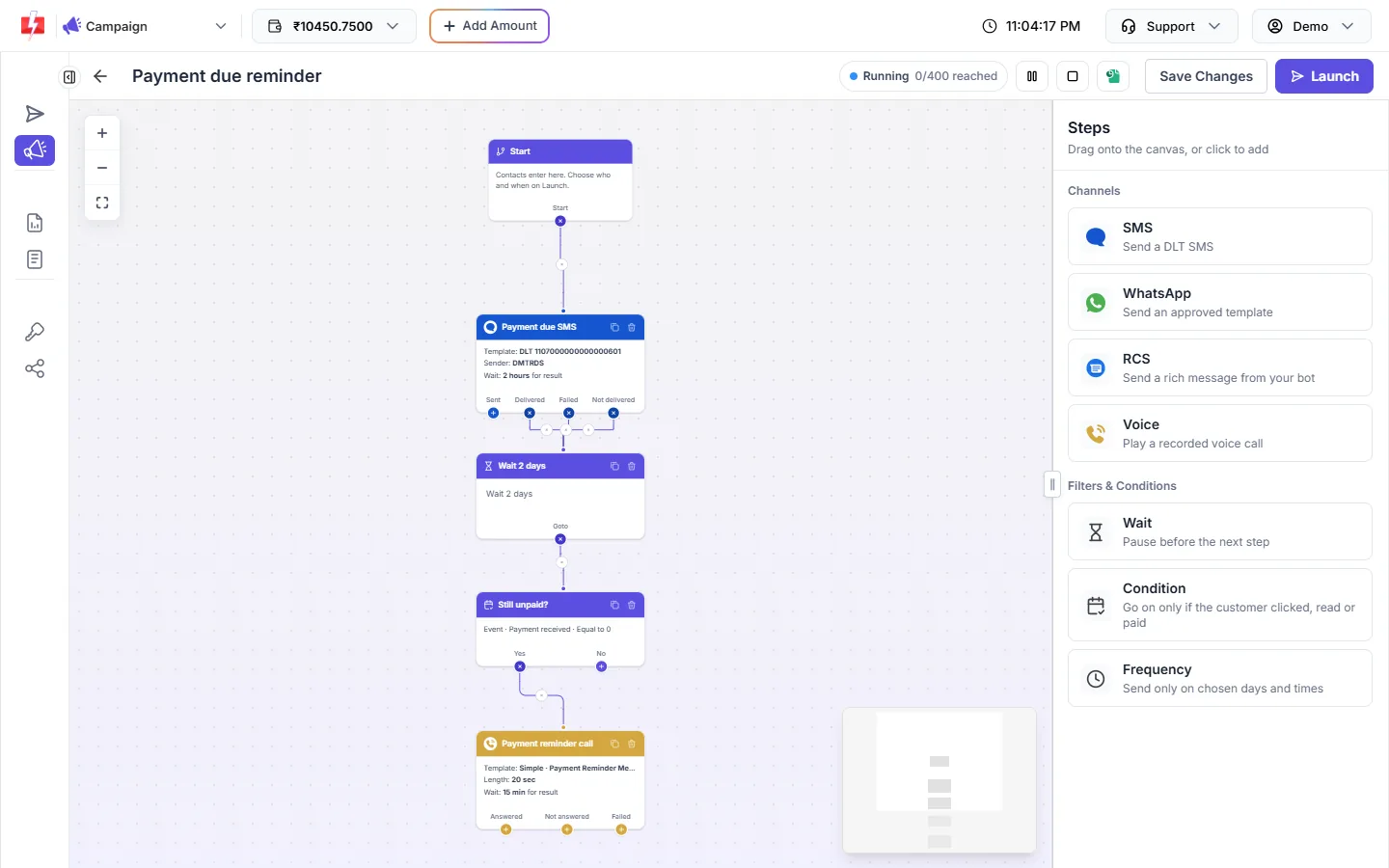
The panel has a ready journey for this under the Payment reminder goal: "EMI due: WhatsApp pay link, SMS, then a call". It starts with WhatsApp, waits 1 day, checks "Still unpaid?", sends an SMS, waits 2 days, checks again and then calls. Change the waits to match your own Day -3 / Day 0 / Day +1 plan.
How do I run Day -3, Day 0 and Day +1 reminders from my LMS?
There are two ways. Either your LMS calls the API on each of those days for the borrowers due, or it calls once on Day -3 and fixed Wait steps in the journey handle Day 0 and Day +1. Campaign does not read each borrower's due date from a file and schedule around it, so the start day always comes from your side.
Option A: one campaign per stage, called on each day
Build three small campaigns: "EMI pre-due" (WhatsApp with SMS fallback), "EMI due today" (SMS with WhatsApp fallback) and "EMI missed" (voice call, then WhatsApp). Every morning your LMS runs three queries and calls the API:
- Borrowers with an EMI due in 3 days go to "EMI pre-due".
- Borrowers with an EMI due today who have not paid go to "EMI due today".
- Borrowers whose EMI was due yesterday and is still unpaid, or whose auto-debit bounced, go to "EMI missed".
This is the most accurate option, because your LMS knows the real status of every account, including partial payments and mandate bounces, and only the right borrowers enter each stage. You do not need the event API at all.
Option B: one journey started on Day -3, stopped by events
Build the single journey from the timing table above. Your LMS calls the API once, three days before the due date, and posts payment_received to /dev/campaign/event when the EMI is paid. The Condition steps skip later reminders for paid borrowers. This is simpler to connect but depends on your LMS posting payments promptly.
Either way, the journey design lives in Fast2SMS, so your operations team can change a message or the call recording without a code release. For the developer view of start, event, runs, reports and webhooks, see the event-triggered messaging API guide.
API code: start EMI reminders from your LMS
Use POST https://www.fast2sms.com/dev/campaign/start with your Fast2SMS API key in the authorization header. Find the campaign ID and your own ready code in Campaign List > ⋮ > Get API code.
cURL
curl -X POST https://www.fast2sms.com/dev/campaign/start \
  -H "authorization: YOUR_API_KEY" \
  -H "Content-Type: application/json" \
  -d '{
    "campaign": "YOUR_CAMPAIGN_ID",
    "recipients": [
      {"mobile": "9000012345", "name": "Rahul", "loan": "XXXX4821", "emi": "3500", "due_date": "05 Dec", "pay_link": "pay.demo.in/x4821"},
      {"mobile": "9000012346", "name": "Priya", "loan": "XXXX7310", "emi": "2150", "due_date": "05 Dec", "pay_link": "pay.demo.in/x7310"}
    ]
  }'
Python (daily job in your LMS)
import os, requests

API = "https://www.fast2sms.com/dev/campaign/start"
HEADERS = {"authorization": os.environ["FAST2SMS_API_KEY"], "Content-Type": "application/json"}

def start_emi_reminders(campaign_id, borrowers):
    """borrowers: list of dicts from your LMS query, e.g. EMIs due in 3 days."""
    for i in range(0, len(borrowers), 1000):          # up to 1,000 numbers per call
        batch = [{
            "mobile": b["mobile"],                     # "9000012345"
            "name": b["first_name"],                   # "Rahul"
            "loan": "XXXX" + b["loan_no"][-4:],        # masked loan number
            "emi": str(b["emi_amount"]),               # "3500"
            "due_date": b["due_label"],                # "05 Dec"
            "pay_link": b["short_pay_link"],           # keep under 30 characters for SMS
        } for b in borrowers[i:i + 1000]]
        r = requests.post(API, headers=HEADERS, json={"campaign": campaign_id, "recipients": batch}, timeout=30)
        print(r.json())  # {"return": true, "added": ..., "skipped": ...}
Post a payment (Option B)
curl -X POST https://www.fast2sms.com/dev/campaign/event \
  -H "authorization: YOUR_API_KEY" \
  -H "Content-Type: application/json" \
  -d '{"number": "9000012345", "event": "payment_received", "value": "XXXX4821"}'
Limits to plan around: write calls (start and event) are limited to 30 per minute per API key, and one call can carry up to 1,000 numbers with up to 50 variables each. API numbers start immediately. Calls to one campaign on the same day join one run, and a number already in that run is skipped, so a borrower with two loans due the same day gets one journey from that campaign. Mention both loans in one message, or use a separate campaign for the second loan. The IP whitelist and API on/off switch on the Dev API page apply, which is useful for a lender's security review.
Large books are fine: a run sends to up to 5,000 contacts per minute, and 1 lakh contacts start in about 20 minutes. If your collections team takes the "press 1" calls, set optional contact limits per minute, hour or day so the calls arrive at a pace your agents can handle.
EMI reminder message templates in English
WhatsApp placeholders appear as {{1}}, {{2}} and so on; SMS variables use the DLT format. Always mask the loan number, and never include anything that sounds like a threat.
| Stage | Channel | Template |
|---|---|---|
| Day -3 | Dear {{1}}, your EMI of ₹{{2}} for loan {{3}} is due on {{4}}. Please keep sufficient balance in your bank account for auto-debit, or pay now using the button below. - Demo Finance | |
| Day -3 | SMS (DLT) | Dear {#var#}, EMI of Rs {#var#} for loan {#var#} is due on {#var#}. Keep balance ready or pay: {#var#} - Demo Finance |
| Day 0 | SMS (DLT) | Dear {#var#}, your EMI of Rs {#var#} is due today. Pay now: {#var#} Ignore if already paid. - Demo Finance |
| Day 0 | Dear {{1}}, your EMI of ₹{{2}} for loan {{3}} is due today. If you have already paid, thank you. Otherwise, pay in one tap below. | |
| Day +1 | Dear {{1}}, we have not received your EMI of ₹{{2}} for loan {{3}}, due on {{4}}. Please pay today to keep your account regular. Reply here if you need help. | |
| Day +1 | SMS (DLT) | Dear {#var#}, EMI of Rs {#var#} due on {#var#} is pending. Pay: {#var#} For help call our branch. - Demo Finance |
| Auto-debit bounce | Dear {{1}}, the auto-debit for your EMI of ₹{{2}} on loan {{3}} could not be completed. Please pay using the button below to avoid charges as per your loan terms. | |
| Paid | Thank you, {{1}}. We have received your EMI of ₹{{2}} for loan {{3}}. |
Only mention charges that are actually in the borrower's loan agreement, and use the same wording your compliance team has approved for other channels.
EMI reminder message in Hindi
Many borrowers, especially in microfinance, two-wheeler and gold loans, prefer Hindi or a regional language. Get each language approved as its own WhatsApp template and register Hindi SMS templates on DLT as Unicode.
| Stage | Channel | Hindi template |
|---|---|---|
| Day -3 | प्रिय {{1}}, आपके लोन {{2}} की ₹{{3}} की EMI {{4}} को देय है। कृपया ऑटो-डेबिट के लिए अपने बैंक खाते में पर्याप्त बैलेंस रखें या नीचे दिए बटन से अभी भुगतान करें। - Demo Finance | |
| Day 0 | SMS (DLT) | प्रिय {#var#}, आपकी Rs {#var#} की EMI आज देय है। भुगतान करें: {#var#} - Demo Finance |
| Day +1 | प्रिय {{1}}, आपके लोन {{2}} की ₹{{3}} की EMI अभी तक प्राप्त नहीं हुई है। कृपया आज भुगतान करें। मदद के लिए इस संदेश का जवाब दें। | |
| Bounce | प्रिय {{1}}, आपकी ₹{{2}} की EMI का ऑटो-डेबिट पूरा नहीं हो सका। कृपया नीचे दिए बटन से भुगतान करें। | |
| Paid | धन्यवाद {{1}}, आपकी ₹{{2}} की EMI प्राप्त हो गई है। |
A Unicode SMS fits fewer characters per part than an English one, so keep Hindi SMS short and put the full details in WhatsApp.
Should I use an EMI reminder call?
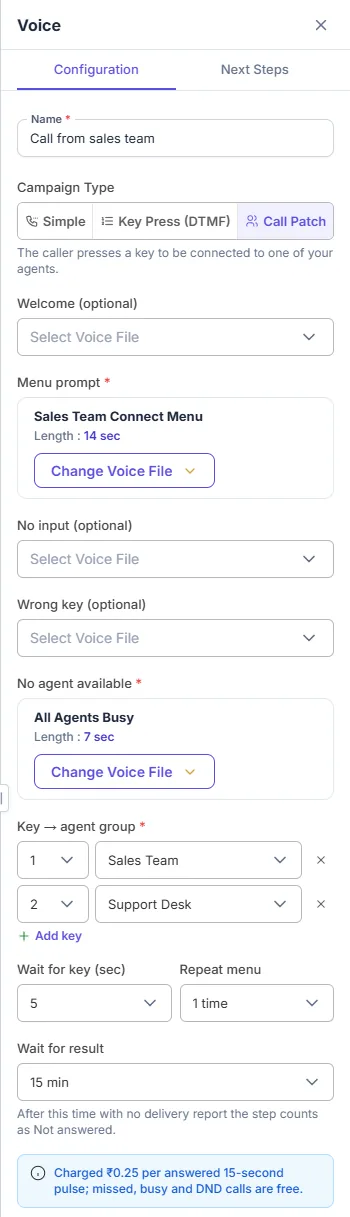
Yes, for the borrowers who do not respond to text. A short recorded call on Day +1 reaches feature phones and people who rarely read messages. Keep it general, because a voice step plays the same recording to every borrower: it cannot read out a name, loan number or amount.
Voice steps in Campaign support three types: a simple recorded message, a DTMF message (press a key), and call patch, which connects the borrower to an agent group when they press a key. You set retries and the retry interval. The recording must be an approved voice file (MP3 or WAV, up to 5 MB), and voice must be enabled on your account. The step reports answered, not answered or failed, so you can send a WhatsApp or SMS to those who did not pick up.
Sample scripts:
- English, Day +1: "Namaste, this is Demo Finance. An EMI payment on your loan account is pending. Please pay today using the link in our WhatsApp or SMS message. To speak to our team, press 1. Thank you."
- Hindi, Day +1: "नमस्ते, Demo Finance से बात कर रहे हैं। आपके लोन खाते की एक EMI बाकी है। कृपया WhatsApp या SMS में भेजे गए लिंक से आज ही भुगतान करें। हमारी टीम से बात करने के लिए 1 दबाएँ। धन्यवाद।"
- Pre-due (optional): "Namaste, this is Demo Finance. Your EMI is due in three days. Please keep enough balance in your bank account for the auto-debit. Thank you."
Keep the recording under 15 to 20 seconds. At the time of writing a call costs ₹0.25 per 15-second pulse, only when answered, so a 15-second recording costs one pulse per answered call. Read more in the bulk voice call guide.
How to set up EMI reminder automation in Fast2SMS
- Prepare channels. Get WhatsApp EMI templates approved (usually utility), register DLT service templates for SMS with your sender, and upload the voice recording. Ask for voice to be enabled on your account if it is not.
- Open Campaign. Go to Campaign > Launch Campaign, or Campaign List > Create Campaign.
- Start from a ready journey. Click Start from a ready journey, choose the Payment reminder goal and pick "EMI due: WhatsApp pay link, SMS, then a call".
- Set the waits. Change the first Wait to 3 days (Day -3 to Day 0) and the second to 1 day (Day 0 to Day +1). Each "Still unpaid?" Condition checks
payment_received; keep the time window short, such as the last 3 days. - Add Frequency before the call. Choose the weekdays and the time range your contact policy allows. The journey waits until the next allowed slot.
- Pick senders and templates. In each step choose your WhatsApp number, DLT sender, templates and voice file, and map placeholders to the variables your LMS sends (name, loan, emi, due_date, pay_link).
- Wire every fallback. WhatsApp failed / not delivered to SMS; SMS failed / not delivered to WhatsApp; voice not answered / failed to a WhatsApp follow-up.
- Test on staff numbers. Send test runs the journey on up to 10 numbers. Test sends are charged like normal sends.
- Switch on, copy the API code and connect the LMS. Use Campaign List > ⋮ > Get API code. If you prefer Option A, repeat for your three stage campaigns.
If your loan book is in a sheet rather than an LMS with an API, you can still run Option A from the panel: upload each day's list (CSV, TXT, XLSX or XLS up to 20 MB and 10 lakh rows) to the right stage campaign and click Send now, or Schedule it for the morning. Sheet columns become the variables.
How much does EMI reminder automation cost?
There is no campaign fee, builder fee or monthly fee. Each step is charged at the channel's normal per-message rate from your Fast2SMS wallet, and borrowers who pay early never reach the later, costlier steps.
At the time of writing: WhatsApp utility message ₹0.25; SMS ₹0.25 per SMS on a recharge from ₹100, falling to ₹0.17 per SMS on a recharge of ₹14,000 or more and ₹0.11 at the highest slab; voice ₹0.25 per 15-second pulse, answered calls only. Check WhatsApp pricing and bulk SMS pricing for current rates.
Example for 10,000 borrowers in a month, at the ₹0.25 SMS rate. How many pay at each stage is an assumption for the example.
| Step | Borrowers (assumed) | Rate at the time of writing | Cost |
|---|---|---|---|
| Day -3 WhatsApp | 10,000 | ₹0.25 | ₹2,500 |
| SMS where WhatsApp failed | 1,500 | ₹0.25 | ₹375 |
| Day 0 SMS to those not yet paid | 4,000 | ₹0.25 | ₹1,000 |
| Day +1 call: 900 of 1,500 answered, 15-second recording | 1,500 dialled | ₹0.25 per pulse, answered only | ₹225 |
| Day +1 WhatsApp follow-up | 1,500 | ₹0.25 | ₹375 |
| Total | ₹4,475 |
That is under 45 paise per borrower per month. On a larger recharge the SMS steps cost less. A launch is refused if the wallet cannot cover the first step, and a run pauses on low balance and resumes by itself after recharge, so keep a buffer before your busy due dates.
Compliance, calling hours and tone for EMI reminders
EMI reminders are service messages, but lenders work under strict conduct rules. Fast2SMS gives you the controls; your compliance team decides how to use them.
- Follow the conduct rules that apply to you. Regulated lenders in India have rules on how, when and how often borrowers may be contacted about repayment, including fair practices and recovery guidelines. Check the current rules and your board-approved policy with your compliance team before you set the timings. This guide does not replace that advice.
- Use Frequency to enforce your hours. A Frequency step lets the journey continue only on the weekdays and between the times you choose (09:00 to 21:00 by default). Put one before every call and every overdue message, set to your policy's limits.
- Contact only the borrower. Send reminders to the borrower's own registered number. Do not message references, family members or contacts.
- No threats, no shaming. Keep every template factual and polite, mention only charges that are in the loan agreement, and give a help line.
- Mask account details. Show only the last four digits of the loan number.
- DLT for SMS. Use a DLT-registered sender and service templates linked to it. Service messages with no promotional content reach DND numbers; see the transactional SMS guide.
- WhatsApp category. Meta decides it. An EMI reminder about an existing loan with no offer is usually utility. Do not add loan top-up offers to reminders.
- Opt-outs. Numbers that blocked you on WhatsApp, unsubscribed on RCS, or are on the voice opt-out list leave the journey. There is no automatic STOP keyword, so handle such requests in your own system.
| Control | Where in Fast2SMS | Use for |
|---|---|---|
| Frequency step | Journey builder | Allowed days and hours for calls and messages |
| Contact limits per minute / hour / day | Campaign launch settings | Pace calls so your collections team can take "press 1" transfers |
Condition on payment_received | Journey builder + event API | No reminders after payment |
| IP whitelist and API on/off | Dev API page | Only your LMS servers can start journeys |
| Per-number journey view and CSV export | Campaign Report | What each borrower received, when, and the result |
| Webhooks | Webhook > Campaign | Write every step result back to the loan account in your LMS |
Reports and audit trail for EMI reminders
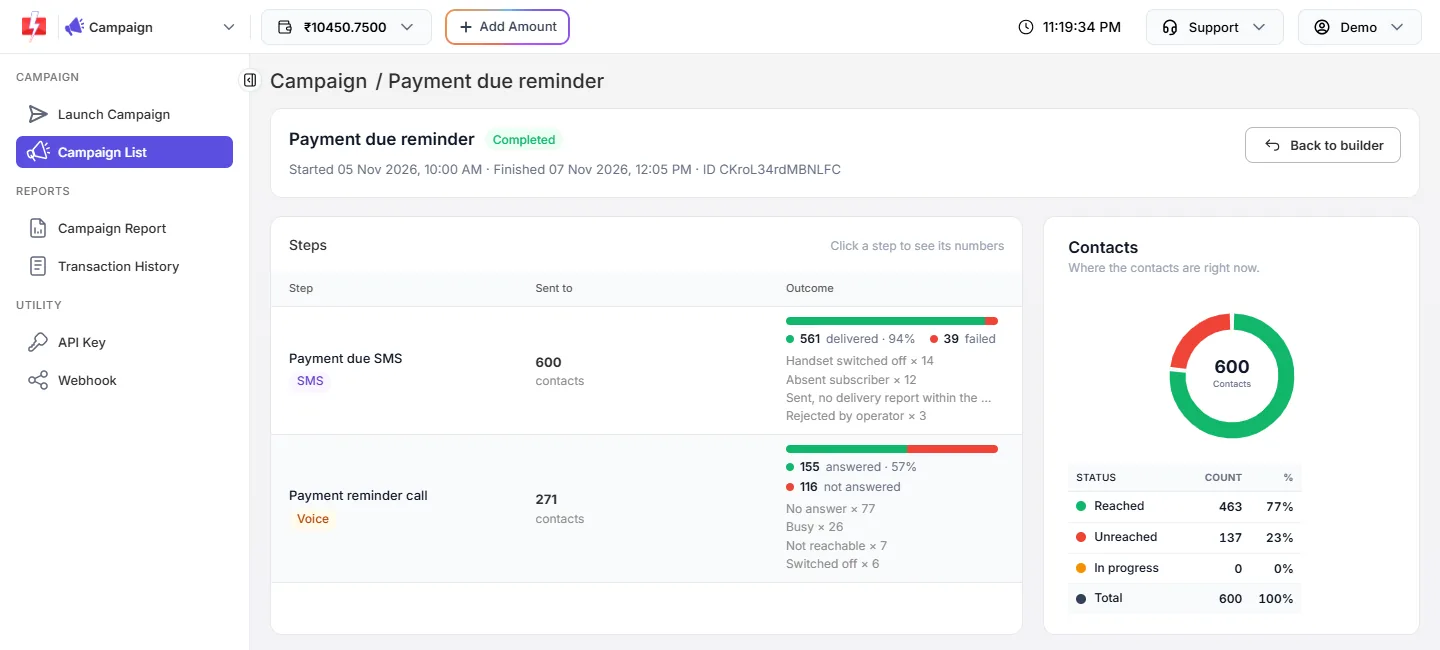
Every run has a summary: total, reached, unreached, opted out, stopped, in progress, cost, refund and net cost. Every step shows entered, sent, delivered, read, answered, not answered, failed and not delivered, with cost, average time and top failure reasons. The per-number view shows each borrower's full journey, which helps when a borrower says they were never told.
For a permanent record in your own system, add a webhook under Webhook > Campaign. Fast2SMS posts each step result (for example campaign.step.answered or campaign.step.failed) with the step name, channel, status, reason, cost and next step, and run changes such as started, paused, paused for balance and finished. You can also export reports as CSV from Delivery Reports > Export > Campaign.
Mistakes to avoid in EMI reminders
- Reminding borrowers who have paid. Use Option A queries or post
payment_received, and add "ignore if already paid" to due-day messages. - Calling outside your allowed hours. Put a Frequency step before every call, set to your policy.
- Expecting the call to say the amount. Voice steps play one recording for everyone. Keep personal details in WhatsApp or SMS.
- Threatening language. It damages trust and can break conduct rules. Stay factual and offer help.
- Long pay links in SMS. A DLT variable over 30 characters is rejected for that number. Use a short link.
- Offers inside reminders. A top-up loan offer turns a utility reminder into marketing and confuses the borrower.
- Showing the full loan number. Mask it.
- No pacing for call patch. If thousands press 1 at once, your agents cannot answer. Set contact limits.
- Skipping the test. Run Send test on staff numbers with sample data before every new template goes live.
Start with the ready "EMI due" journey in Fast2SMS Campaign, test it with the ₹50 signup credit and connect your LMS when the messages are approved. To see how WhatsApp, SMS, RCS and voice work together in other journeys, read the omnichannel marketing platform guide.
Frequently asked questions
What is an EMI reminder message?
It is a service message from a lender telling a borrower that a loan instalment is due, how much it is, when, and how to pay or keep the balance ready for auto-debit.
What should an EMI reminder message include?
The lender's name, a masked loan number, the EMI amount, the due date and a way to pay, such as a short link, the app or a branch. Add "ignore if already paid" on the due day.
Can I send an EMI reminder message on WhatsApp?
Yes. Use a Meta-approved template, usually in the utility category, with the EMI details and a Pay now button. On Fast2SMS it can be the first step of an automated journey with SMS as backup.
What is a loan repayment reminder?
It is another name for an EMI reminder: a message or call before or after a repayment date that helps the borrower pay on time.
Who uses EMI reminder automation?
Banks, NBFCs, microfinance lenders, gold loan, vehicle and consumer durable financiers, housing finance companies, digital lending apps, and businesses that offer instalment plans.
What is NBFC collections automation?
It means sending reminders and follow-ups automatically from your loan system instead of by hand, so agents focus on the accounts that need a conversation. Fast2SMS runs these as journeys in Campaign.
Why send a reminder before the auto-debit date?
A reminder three days before the due date gives the borrower time to keep enough balance in the bank account, which helps avoid a bounced auto-debit.
When should EMI reminders be sent?
A common plan is WhatsApp three days before (Day -3), SMS on the due day (Day 0), and a recorded call on the day after (Day +1) if still unpaid.
How does the journey know each borrower's due date?
It does not read due dates. Your LMS either calls the API on each reminder day for the right borrowers, or starts the journey on Day -3 and fixed Wait steps move it to Day 0 and Day +1.
Can Campaign schedule a reminder 3 days before each borrower's due date by itself?
No. There is no per-contact due-date scheduling. Send the API call on that day from your LMS, or upload that day's list from the panel.
Which option is better: one journey or one campaign per day?
One campaign per stage, called by your LMS each day, is the most accurate because your LMS knows partial payments and bounces. One journey started on Day -3 and stopped by the payment event is simpler to connect.
How long can an EMI reminder journey run?
Up to 30 days per contact. A Wait step can be 1 minute up to 30 days.
Can I keep EMI calls within certain hours?
Yes. A Frequency step lets the journey continue only on chosen weekdays and between chosen times. Set it to the hours your contact policy allows.
What calling hours should lenders follow?
Follow the conduct and recovery rules that apply to your institution and your board-approved policy. Check the current rules with your compliance team, then set the Frequency step to match.
Is there a ready-made EMI reminder journey?
Yes. Under Start from a ready journey > Payment reminder, pick "EMI due: WhatsApp pay link, SMS, then a call" and adjust the waits.
How do I start EMI reminders from my LMS?
Call POST https://www.fast2sms.com/dev/campaign/start with header authorization: YOUR_API_KEY and JSON with campaign and recipients, each with mobile and variables such as name, loan, emi, due_date and pay_link.
How do I stop reminders after the EMI is paid?
Post POST /dev/campaign/event with {"number": "9000012345", "event": "payment_received", "value": "XXXX4821"}. Condition steps check it before each reminder.
How many borrowers can I add per API call?
Up to 1,000 numbers per call, each with up to 50 variables. Start and event calls are limited to 30 per minute per API key.
How fast can a large EMI list be sent?
A run sends to up to 5,000 contacts per minute; 1 lakh contacts start in about 20 minutes. You can set lower contact limits per minute, hour or day.
What if a borrower has two loans due on the same day?
Calls to one campaign on the same day join one run, and a number already in it is skipped. Mention both loans in one message or use a separate campaign for the second loan.
Can only our servers start EMI journeys?
Yes. The IP whitelist and API on/off switch on the Dev API page apply to the Campaign API.
Can I get every reminder result back into my LMS?
Yes. Set a webhook under Webhook > Campaign. Each step result is posted with the step name, channel, status, reason, cost and next step.
Where is the ready API code?
In Campaign List > ⋮ > Get API code, in cURL, PHP, Node.js and Python, with the campaign ID.
Can I run EMI reminders without an API?
Yes. Upload each day's list to a stage campaign (CSV, TXT, XLSX or XLS up to 20 MB and 10 lakh rows) and send it, or schedule it for the morning.
Can I send an EMI reminder message in Hindi?
Yes. Approve a Hindi WhatsApp template and register a Unicode Hindi SMS on DLT. This guide includes Hindi templates for Day -3, Day 0, Day +1, a bounce and a thank-you.
What is a good EMI reminder message for an auto-debit bounce?
For example: "Dear Rahul, the auto-debit for your EMI of ₹3,500 on loan XXXX4821 could not be completed. Please pay using the button below." Mention charges only if they are in the loan terms.
What is an EMI reminder call?
It is a short recorded call that reminds the borrower about a pending EMI, often with "press 1 to speak to our team". On Fast2SMS it is a Voice step in the journey.
Can the EMI call say the borrower's name or amount?
No. A voice step plays the same recording to everyone. Keep the name, loan and amount in WhatsApp or SMS.
Can the call connect the borrower to our collections team?
Yes. Use the call patch type, which connects the borrower to an agent group when they press a key.
Can I retry unanswered EMI calls?
Yes. A voice step has retries and a retry interval. After that, wire the not answered output to a WhatsApp or SMS follow-up.
What audio format is needed for the call?
An approved voice file in MP3 or WAV, up to 5 MB. Voice must be enabled on your account.
How long should the EMI reminder recording be?
15 to 20 seconds. At the time of writing, calls cost ₹0.25 per 15-second pulse, answered only, so a 15-second recording is one pulse.
Can I mask the loan number?
Yes. Send a masked value such as XXXX4821 as the variable from your LMS. Never show the full number.
How long can an SMS variable be?
A DLT variable longer than 30 characters is rejected for that number, so send a short pay link.
Can I branch on what the borrower replied on WhatsApp?
No. A Condition can check whether a reply was received, not what it said or which button was tapped. Use replies to route to an agent and the payment event to stop reminders.
How much does an EMI reminder on WhatsApp cost?
At the time of writing, a WhatsApp utility message costs ₹0.25 on Fast2SMS. See WhatsApp pricing.
How much does an EMI reminder SMS cost?
At the time of writing, ₹0.25 per SMS on a recharge from ₹100, ₹0.17 on a recharge of ₹14,000 or more, and down to ₹0.11 at the highest slab. See bulk SMS pricing.
How much does an EMI reminder call cost?
At the time of writing, ₹0.25 per 15-second pulse, charged only for answered calls. Unanswered calls cost nothing.
What does EMI reminder automation cost for 10,000 borrowers?
In this guide's example, about ₹4,475 a month at the ₹0.25 SMS rate, under 45 paise per borrower, because later steps run only for unpaid borrowers.
Is there a monthly fee for EMI reminder automation?
No. There is no campaign fee, builder fee or monthly fee. Each step is charged at the channel's normal rate from your wallet.
What happens if the wallet runs out on a busy due date?
The run pauses and resumes by itself after you recharge (checked every 10 minutes), and is stopped after 3 days on low balance. A launch is refused if the wallet cannot cover the first step.
Are failed reminders refunded?
Refunds follow each channel's rules: WhatsApp and RCS per channel policy, SMS only on On Delivery billing accounts, and voice is charged only for answered pulses.
Is an EMI reminder utility or marketing on WhatsApp?
Meta decides. A reminder about an existing loan with no offer is usually utility. Adding a top-up loan offer can make it marketing.
Do EMI reminder SMS need DLT?
Yes. Use a DLT-registered sender and service templates linked to it. Genuine service messages with no offer reach DND numbers.
Can I message a borrower's family or references?
Do not. Send reminders only to the borrower's own registered number, and follow the conduct rules that apply to you.
How do borrowers opt out of calls?
Numbers on the voice opt-out list leave the journey, as do numbers that blocked you on WhatsApp or unsubscribed on RCS. There is no automatic STOP keyword, so handle requests in your own system.
Is there a record of what each borrower received?
Yes. The per-number view in the Campaign Report shows each borrower's full journey, and you can export reports as CSV or store webhook events in your LMS.
Can EMI reminders go to international numbers?
No. Campaign sends to Indian mobile numbers only.
How do I set up EMI reminders in Fast2SMS?
Open Campaign > Launch Campaign, choose Start from a ready journey > Payment reminder > EMI due, set waits and Frequency, pick templates and voice file, wire fallbacks, use Send test, switch on and connect your LMS.
Can I test EMI reminders before going live?
Yes. Send test runs the journey on up to 10 numbers. Test sends are charged like normal sends.
What reports do I get for EMI reminders?
A run summary with reached, unreached, opted out, cost, refund and net cost; per-step counts for sent, delivered, read, answered, not answered and failed; and each borrower's journey.
Can I pace calls for my collections team?
Yes. Set optional contact limits per minute, hour or day so "press 1" transfers arrive at a pace your agents can answer.
Can I pause EMI reminders?
Yes. Pause, resume or stop a run from the panel or by API, or switch the campaign off.
Is there a guide for invoice and fee reminders?
Yes. See payment reminder automation for 15+ templates and the before-due, due-day and overdue journey.
Where can I learn more about voice calls?
Read the bulk voice call guide for pricing, recording tips and use cases.