Payment Reminder WhatsApp Message: 15+ Templates and an Automated Reminder Journey
No monthly fee · Pay as you go from ₹100 · Free setup help on a call
A payment reminder WhatsApp message tells a customer how much is due, by when, and how to pay, usually with a Pay now button. In Fast2SMS Campaign you automate it: WhatsApp three days before the due date, SMS on the due day, then WhatsApp and a short call when overdue. Reminders stop when your system posts payment_received, and messages cost from ₹0.25 at the time of writing.
This guide covers 15+ copy-ready payment reminder templates in English and Hindi for WhatsApp, SMS and voice, the full reminder journey with timings, how to start and stop it from your billing software, a cost example and the mistakes that annoy good customers.
What is a payment reminder message?
It is a short message that reminds a customer about a payment they owe you: an invoice, a school fee, a subscription renewal, rent, a maintenance charge or a bill. A good reminder says four things clearly: who it is from, how much, the due date and how to pay.
Most late payments in small businesses are not refusals. The customer forgot, lost the invoice, or meant to pay "tomorrow". A reminder that arrives at the right time, with a one-tap payment link, fixes most of those cases without a single phone call from your team.
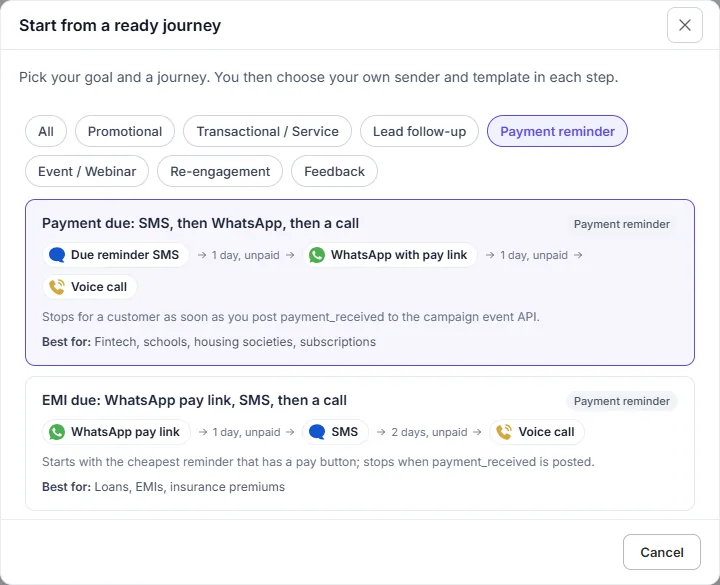
Automated payment reminders go one step further. Instead of someone in accounts sending messages by hand every morning, a journey sends the right message on the right day and stops for each customer as soon as they pay. On Fast2SMS this is built in Campaign, the journey builder for SMS, WhatsApp, RCS and voice. The panel even has two ready journeys for it under the Payment reminder goal: "Payment due: SMS, then WhatsApp, then a call" and "EMI due: WhatsApp pay link, SMS, then a call".
WhatsApp works well for reminders because the customer sees your verified business name, the amount, and a Pay now button in one place. SMS reaches every phone, including feature phones and phones without data. A short recorded call gets attention when text messages are being ignored. One journey can use all three.
15+ payment reminder templates you can copy
Copy these and adjust the words to your business. WhatsApp templates use numbered placeholders that Meta approves once (shown here as {{1}}, {{2}} and so on). SMS templates use the DLT variable format of your operator portal. Keep each one polite; firmness comes from the timing, not from harsh words.
Before the due date (friendly)
| # | Use | WhatsApp template text |
|---|---|---|
| 1 | Invoice due in 3 days | Hi {{1}}, this is a friendly reminder that invoice {{2}} for ₹{{3}} from Demo Traders is due on {{4}}. You can pay in one tap using the button below. Thank you! |
| 2 | Subscription renewal | Hi {{1}}, your {{2}} plan renews on {{3}}. Amount: ₹{{4}}. Pay before the date to keep your service running without a break. |
| 3 | School or coaching fee | Dear parent, the {{1}} fee of ₹{{2}} for {{3}} is due on {{4}}. Please pay online using the link below or at the school office. Thank you. |
| 4 | Rent | Hi {{1}}, a reminder that rent of ₹{{2}} for {{3}} is due on {{4}}. Tap below to pay by UPI. |
| 5 | Society maintenance | Dear resident of flat {{1}}, maintenance of ₹{{2}} for {{3}} is due on {{4}}. Please pay through the link below. Thank you, Society Office. |
On the due date (clear)
| # | Channel | Template text |
|---|---|---|
| 6 | Hi {{1}}, invoice {{2}} for ₹{{3}} is due today. If you have already paid, please ignore this message. Otherwise, pay here in one tap. | |
| 7 | SMS (DLT) | Dear {#var#}, your payment of Rs {#var#} is due today. Pay here: {#var#} Ignore if already paid. - Demo Traders |
| 8 | SMS (DLT), fee | Dear parent, fee of Rs {#var#} for {#var#} is due today. Pay online: {#var#} - Demo School |
| 9 | WhatsApp, bill | Hi {{1}}, your bill for {{2}} of ₹{{3}} is due today. Pay now to avoid a late fee of ₹{{4}}. |
Overdue (polite but firm)
| # | Stage | Template text |
|---|---|---|
| 10 | 1 to 3 days late | Hi {{1}}, we have not yet received ₹{{2}} for invoice {{3}}, which was due on {{4}}. It may have slipped your mind. You can pay here, or reply if you need any help. |
| 11 | 7 days late | Hi {{1}}, invoice {{2}} for ₹{{3}} is now 7 days overdue. Please pay today to avoid a late fee. If there is a problem with the invoice, reply to this message and our team will help. |
| 12 | SMS, overdue | Dear {#var#}, payment of Rs {#var#} due on {#var#} is pending. Please pay: {#var#} Call us for help. - Demo Traders |
| 13 | Final notice | Hi {{1}}, this is a final reminder for ₹{{2}} pending since {{3}}. Your service will be paused on {{4}} if the payment is not received. Pay here to continue. |
After payment and voice scripts
| # | Use | Text or script |
|---|---|---|
| 14 | Payment received (WhatsApp) | Thank you, {{1}}! We have received ₹{{2}} for invoice {{3}}. You can download your receipt from the link below. |
| 15 | Partial payment (WhatsApp) | Hi {{1}}, we received ₹{{2}}. A balance of ₹{{3}} is still due on invoice {{4}}. Pay the balance here. |
| 16 | Voice call, due (recorded) | "Namaste, this is Demo Traders. This is a reminder that a payment on your account is due. Please check the message we sent on WhatsApp or SMS and pay today. Thank you." |
| 17 | Voice call, overdue (recorded) | "Namaste, this is Demo Traders accounts team. A payment on your account is overdue. Please pay using the link in our message, or press 1 to speak to our team." |
The voice scripts do not say the customer's name or amount on purpose. A voice step plays the same recording to everyone; it cannot read out a personal amount. Keep the details in the WhatsApp or SMS, and use the call to make sure the message is noticed. "Press 1 to speak to our team" uses the call patch option, which connects the customer to an agent group when they press the key.
Payment reminder message in Hindi
Many customers read Hindi faster than English, and a reminder in their own language feels more personal. Get Hindi WhatsApp templates approved separately, and register Hindi SMS templates on DLT as Unicode. A Unicode SMS fits fewer characters per part, so keep it short.
| Stage | Channel | Hindi template |
|---|---|---|
| 3 दिन पहले | नमस्ते {{1}}, Demo Traders की ओर से याद दिला रहे हैं कि बिल {{2}} के ₹{{3}} की आख़िरी तारीख़ {{4}} है। नीचे दिए बटन से एक क्लिक में भुगतान करें। धन्यवाद! | |
| आज देय | नमस्ते {{1}}, आपका ₹{{2}} का भुगतान आज देय है। अगर आप भुगतान कर चुके हैं तो इस संदेश को अनदेखा करें। | |
| आज देय | SMS (DLT) | प्रिय {#var#}, आपका Rs {#var#} का भुगतान आज देय है। यहाँ भुगतान करें: {#var#} - Demo Traders |
| बकाया | नमस्ते {{1}}, बिल {{2}} के ₹{{3}} अभी तक प्राप्त नहीं हुए हैं, जिसकी तारीख़ {{4}} थी। कृपया आज भुगतान करें या मदद के लिए जवाब दें। | |
| फ़ीस | आदरणीय अभिभावक, {{1}} की {{2}} फ़ीस ₹{{3}} {{4}} तक जमा करनी है। कृपया नीचे दिए लिंक से ऑनलाइन भुगतान करें। | |
| भुगतान मिला | धन्यवाद {{1}}! हमें बिल {{2}} के ₹{{3}} प्राप्त हो गए हैं। | |
| कॉल | Voice (recorded) | "नमस्ते, Demo Traders से बात कर रहे हैं। आपके खाते का एक भुगतान बाकी है। कृपया WhatsApp या SMS पर भेजे गए लिंक से आज ही भुगतान करें। धन्यवाद।" |
If your customers are spread across states, run one journey per language and send each customer to the right one from your system. Voice calls work well for regional languages because you record the audio yourself.
What does an automated payment reminder journey look like?
A good journey has three stages: a friendly reminder before the due date, a clear one on the due day, and polite follow-ups once it is overdue. Each stage checks first whether the customer has paid, so paid customers never get another message.
Because every customer has a different due date, the journey is started by your billing system on the right day for each customer, here three days before the due date. After that, fixed Wait steps move it to the due day and beyond. Campaign does not read a due date from your sheet and schedule around it; the day the journey starts is what sets the timing.
| Step | When | Channel | Message | If it fails |
|---|---|---|---|---|
| 1. Before-due reminder | Day -3 (journey starts) | WhatsApp (utility) | Template 1 with Pay now button | Failed or not delivered: SMS with the pay link |
| 2. Wait | 3 days | Wait + Frequency | Continue on the due day between 10:00 and 19:00 | Not applicable |
| 3. Paid? | Day 0 | Condition | payment_received in the last 3 days = 0? | Paid: journey ends |
| 4. Due-day reminder | Day 0 | SMS (DLT) | Template 7 with the pay link | Failed or not delivered: WhatsApp template 6 |
| 5. Wait and check | 3 days | Wait + Condition | Still no payment_received? | Paid: journey ends |
| 6. Overdue reminder | Day +3 | WhatsApp (utility) | Template 10, with a reply option | Not delivered: SMS template 12 |
| 7. Wait and check | 1 day | Wait + Condition + Frequency | Still unpaid? Weekdays, daytime only | Paid: journey ends |
| 8. Reminder call | Day +4 | Voice | Recorded script 17, press 1 for your team | Not answered or failed: SMS template 12 |
The whole journey lasts eight days, well within the 30-day limit per contact. You can stretch it: add a Day +7 WhatsApp with template 11 and a final notice with template 13. Each step runs only once per contact, so nobody receives the same step twice in one journey.
How do the reminders stop when the customer pays?
Your billing or payment system sends one API call, POST /dev/campaign/event, with the customer's number and the event payment_received. Every Condition step in the journey checks for that event before the next reminder. If it is there, the journey ends for that customer.
The Condition step is set like this in the panel: Your event, event name payment_received, operator =, count 0, time window last 3 days. "Yes" (still unpaid) goes to the next reminder; "No" (paid) has nothing connected, so the journey simply ends. You can combine checks with AND / OR, for example "payment_received = 0 AND reply received = 0" to skip the call for customers who already replied on WhatsApp.
Most payment gateways can call your server when a payment succeeds. Your server then forwards one line to Fast2SMS. If you record payments by hand, your accounts team can post the event from a small internal page, or you can use the simpler panel method described below.
Two details matter:
- Pick the time window carefully. Events are stored per number. A window of "last 3 days" means a payment for last month's invoice will not stop this month's reminders.
- A reply is not a payment. A Condition can check "Reply received (WhatsApp / RCS)", but it cannot tell what the reply said or which button was tapped. Use replies to route a customer to a person, and use
payment_receivedto stop the chase.
API code: start reminders from your billing software
Your software calls POST https://www.fast2sms.com/dev/campaign/start once per customer (or in batches of up to 1,000) on the day the journey should begin. Copy the campaign ID and your own ready code from Campaign List > ⋮ > Get API code.
Start the journey (cURL)
curl -X POST https://www.fast2sms.com/dev/campaign/start \
  -H "authorization: YOUR_API_KEY" \
  -H "Content-Type: application/json" \
  -d '{
    "campaign": "YOUR_CAMPAIGN_ID",
    "recipients": [
      {"mobile": "9000012345", "name": "Rahul", "invoice": "INV-4821", "amount": "2500", "due_date": "30 Nov", "pay_link": "pay.demo.in/4821"},
      {"mobile": "9000012346", "name": "Priya", "invoice": "INV-4822", "amount": "1200", "due_date": "30 Nov", "pay_link": "pay.demo.in/4822"}
    ]
  }'
The same call in PHP (for example, a daily cron job)
// Runs every morning: customers whose invoice is due in 3 days.
$recipients = [];
foreach ($invoicesDueInThreeDays as $inv) {
    $recipients[] = [
        'mobile'   => $inv['mobile'],      // "9000012345"
        'name'     => $inv['first_name'],  // "Rahul"
        'invoice'  => $inv['number'],      // "INV-4821"
        'amount'   => $inv['amount'],      // "2500"
        'due_date' => $inv['due_label'],   // "30 Nov"
        'pay_link' => $inv['short_link'],  // keep under 30 characters for SMS
    ];
}
foreach (array_chunk($recipients, 1000) as $batch) {
    $ch = curl_init('https://www.fast2sms.com/dev/campaign/start');
    curl_setopt_array($ch, [
        CURLOPT_RETURNTRANSFER => true,
        CURLOPT_POST => true,
        CURLOPT_HTTPHEADER => ['authorization: ' . getenv('FAST2SMS_API_KEY'), 'Content-Type: application/json'],
        CURLOPT_POSTFIELDS => json_encode(['campaign' => 'YOUR_CAMPAIGN_ID', 'recipients' => $batch]),
    ]);
    $result = json_decode(curl_exec($ch), true); // ["return" => true, "added" => ..., "skipped" => ...]
    curl_close($ch);
}
Stop the reminders when paid
curl -X POST https://www.fast2sms.com/dev/campaign/event \
  -H "authorization: YOUR_API_KEY" \
  -H "Content-Type: application/json" \
  -d '{"number": "9000012345", "event": "payment_received", "value": "INV-4821"}'
Good to know: write calls are limited to 30 per minute per API key, so send batches rather than one call per customer when you have many. Numbers sent by API start immediately. All calls to one campaign on the same day join one run named "your campaign · API", and a number already in that day's run is skipped, so a customer with two invoices due the same day gets one journey. If that matters, list both invoices in one message or use a second campaign. For webhooks and the full API, see the event-triggered messaging guide.
How to set up payment reminder automation in Fast2SMS
- Prepare templates. Get your WhatsApp reminder templates approved by Meta (they are usually utility), register your SMS reminder templates on DLT with an approved sender, and upload a short voice recording (MP3 or WAV up to 5 MB) if you want the call step. Voice must be enabled on your account.
- Open Campaign. Go to Campaign > Launch Campaign, or Campaign List > Create Campaign.
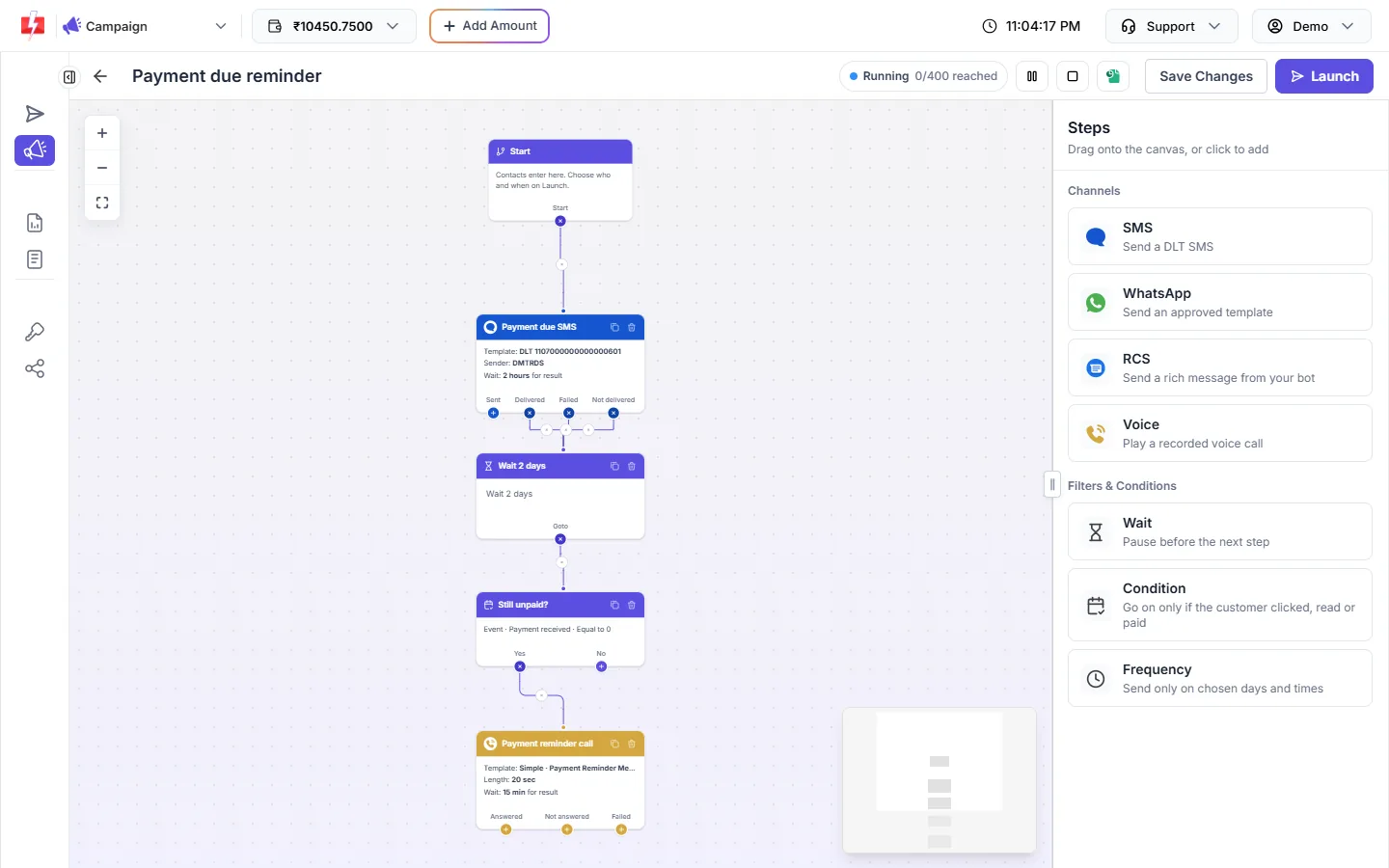
- Pick a ready journey. Click Start from a ready journey, choose the Payment reminder goal and pick "Payment due: SMS, then WhatsApp, then a call". It already has Wait steps and "Still unpaid?" Condition steps that check
payment_received. - Reorder to match your plan. For the journey in this guide, make WhatsApp the first step, then Wait 3 days, the Condition, the SMS step, and so on. Drag steps and connect outputs on the canvas.
- Choose sender and template in each step. Map each placeholder to a variable your system sends (name, invoice, amount, due_date, pay_link) or to fixed text.
- Wire the fallbacks. Connect each WhatsApp step's failed and not delivered outputs to an SMS step. Connect the voice step's not answered and failed outputs to a final SMS.
- Add Frequency before calls. A Frequency step lets the journey continue only on the weekdays and between the times you pick, so calls and messages do not go at odd hours.
- Test. Click Send test and run the journey on up to 10 numbers. Test sends are charged like normal sends.
- Switch on and connect. Turn the campaign on in Campaign List, open ⋮ > Get API code, and add the start and event calls to your billing system.
No developer? The simple panel method
If your invoices sit in Excel or your accounting software and you do not have a developer, you can still automate most of the work from the panel. Instead of one long journey stopped by events, run a short campaign for each stage with a fresh list of unpaid customers.
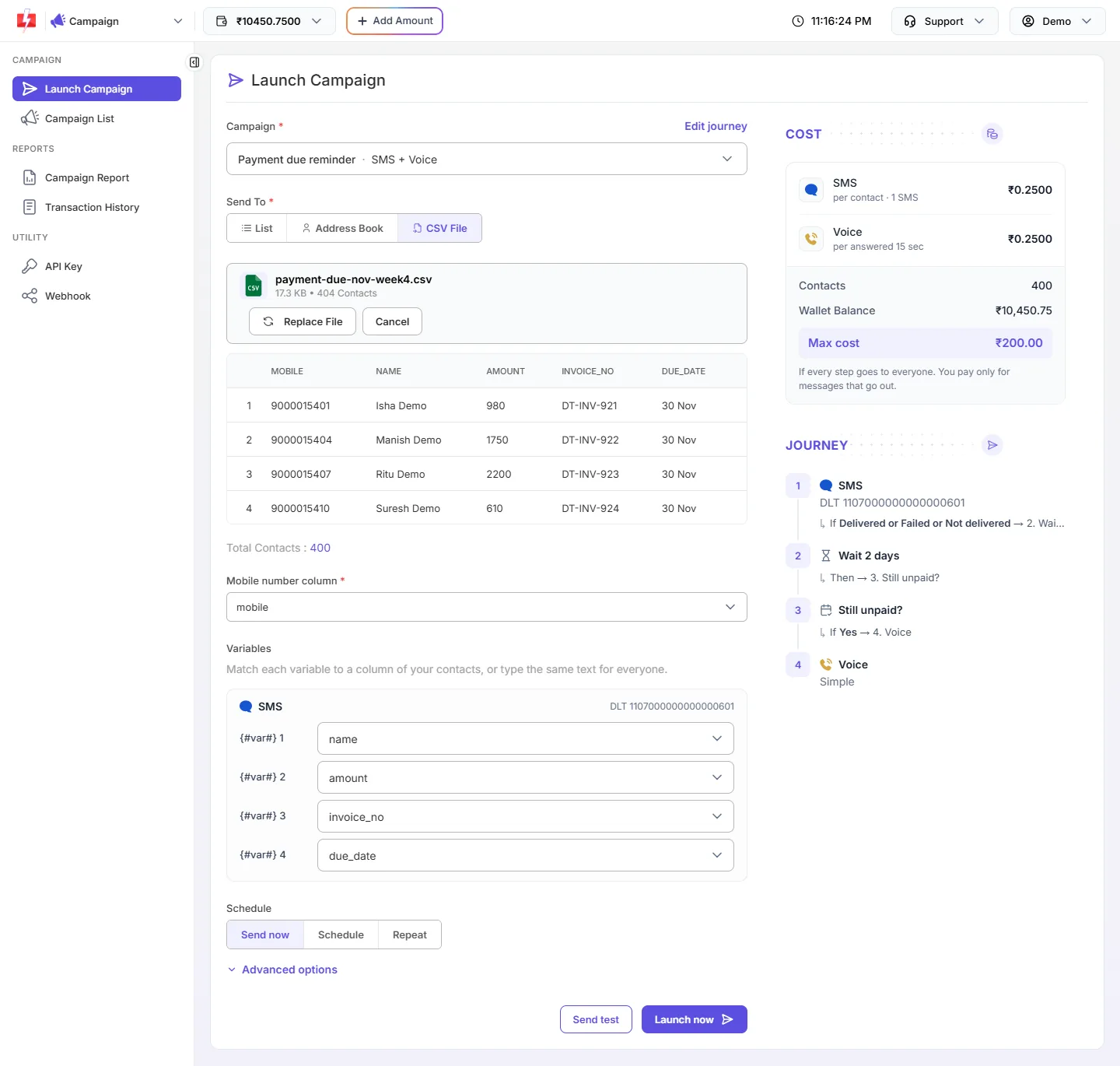
- Before-due campaign. Each morning, export customers whose payment is due in three days, upload the sheet (CSV, TXT, XLSX or XLS, up to 20 MB and 10 lakh rows) and send a WhatsApp reminder with SMS fallback. Sheet columns become variables.
- Due-day campaign. On the due day, upload only those still unpaid and send the SMS reminder.
- Overdue campaign. Three days later, upload the overdue list for a WhatsApp reminder followed by a call if not read.
Because you upload a fresh list each time, paid customers simply drop off. Duplicates and invalid numbers are removed and counted for you. You can also keep customers in an Address Book group and use Repeat to run a campaign on chosen weekdays at a set time, or Schedule it up to 90 days ahead, for example a monthly fee reminder to all parents on the 1st.
How much do automated payment reminders cost?
You pay only for the messages and calls that are actually sent. There is no campaign fee, no builder fee and no monthly fee, and every step is charged at the channel's normal rate from the same Fast2SMS wallet.
At the time of writing: WhatsApp utility message ₹0.25, SMS ₹0.25 per SMS on a recharge from ₹100 (down to ₹0.11 on larger recharges), and voice ₹0.25 per 15-second pulse for answered calls only. See WhatsApp pricing, SMS pricing and the bulk voice call guide for current rates.
Example: 2,000 invoices a month. How many customers pay at each stage is an assumption for the example.
| Step | Customers (assumed) | Rate at the time of writing | Cost |
|---|---|---|---|
| Day -3 WhatsApp utility reminder | 2,000 | ₹0.25 | ₹500.00 |
| SMS fallback where WhatsApp failed | 200 | ₹0.25 | ₹50.00 |
| Due-day SMS to those still unpaid | 1,200 | ₹0.25 | ₹300.00 |
| Day +3 WhatsApp overdue reminder | 600 | ₹0.25 | ₹150.00 |
| Day +4 call: 250 of 400 answered, 20-second recording (2 pulses) | 400 dialled | ₹0.25 per pulse, answered only | ₹125.00 |
| Total | ₹1,125.00 |
That is about 56 paise per invoice, and the later, costlier steps run only for customers who have not paid. Compare it with one staff member spending two hours a day on reminder calls. Before every panel launch you see a cost estimate; if the wallet cannot cover the first step, the launch is refused. During a run, low balance pauses it and it resumes on its own after you recharge.
Payment reminder use cases: fees, invoices, rent and subscriptions
Fee payment reminders for schools and coaching
Send the fee reminder to parents a week before the due date, again on the day, and a call in the regional language when it is late. Many schools keep parents in Address Book groups by class and use Repeat for the monthly fee cycle. More ideas are in the education marketing automation guide.
Invoice reminders on WhatsApp for B2B
Distributors, agencies and wholesalers can send the invoice number, amount and a link to the invoice with a Pay now button, and use the reply option for disputes. WhatsApp templates can also carry a document header if you send the same file to everyone, such as your payment terms. A short call on Day +4 reaches the owner who never checks email.
Subscriptions, renewals and memberships
Gyms, software products, internet providers and newspapers remind customers before a plan renews, so the service does not stop. A "payment received" thank-you message (template 14) closes the loop.
Rent and society maintenance
Landlords, PG owners and housing societies send rent and maintenance reminders with a UPI link. A friendly reminder in Hindi and a firm overdue note usually work better than calls from the office.
Loan EMIs
For lenders and NBFCs the timing and tone are stricter. See the separate EMI reminder automation guide.
WhatsApp template category, DLT and tone
| Channel | What you need | Category / type | Watch out for |
|---|---|---|---|
| Approved Meta template | Usually utility: it is about an existing bill | No offers or upsell lines, or Meta may treat it as marketing | |
| SMS | DLT sender + DLT template linked to it | Service / transactional | Each variable 30 characters or less; short links |
| Voice | Approved voice file, voice enabled on account | Recorded message, DTMF or call patch | No names or amounts read out; say who is calling |
| RCS (optional) | Approved, active RCS bot | Text, rich card or buttons | Android phones with RCS only; SMS backup needed |
Tone matters as much as timing. Before the due date, be friendly. On the day, be clear. When it is late, be polite but firm, and always give an easy way to ask for help. Never threaten, never shame and never message family members or contacts. For transactional SMS rules, see the transactional SMS guide.
Fast2SMS checks SMS, WhatsApp and RCS text for scam-like content, handles DND for SMS and voice according to the route, and removes numbers that blocked you on WhatsApp, unsubscribed on RCS or are on the voice opt-out list. Do not rely on an automatic STOP keyword; if a customer asks you to stop messaging, remove them on your side.
Mistakes to avoid in payment reminders
- Reminding people who already paid. Post
payment_receivedand check it before every step. Add "ignore if already paid" to due-day messages as a safety net. - Missing details. Every reminder needs the amount, the due date and a way to pay. A reminder without a link creates work instead of payments.
- Long payment links in SMS. A DLT variable longer than 30 characters is rejected for that number. Use a short link.
- Marketing inside a utility reminder. Adding an offer can change the WhatsApp category and the price, and it confuses the message.
- Calls at odd hours. Put a Frequency step before the voice call and any late reminders.
- Expecting the call to read the amount. Voice steps play one recording for everyone. Put personal details in text.
- Harsh first messages. Most late payers forgot. Start friendly and become firmer only with time.
- Too many reminders. One message per stage is enough. Daily reminders feel like harassment.
- No test run. Use Send test with sample data like "Rahul" and "₹2,500" so you see exactly what customers will see.
Start with the ready "Payment due" journey in Fast2SMS Campaign, test it on your own number with the ₹50 signup credit, and connect your billing system when it looks right. For other automated journeys across channels, see the omnichannel marketing platform guide and SMS automation.
Frequently asked questions
What is a payment reminder WhatsApp message?
It is a short WhatsApp message that tells a customer how much they owe, the due date and how to pay, usually with a Pay now button. It is sent from your business number using a Meta-approved template.
What are automated payment reminders?
Automated payment reminders are messages sent by software on a set schedule, before, on and after the due date, that stop for each customer once they pay. On Fast2SMS they are built in Campaign.
What should a payment reminder message include?
Who it is from, the amount, the due date or how late it is, and an easy way to pay, such as a link or button. Add "ignore if already paid" on due-day messages.
How do I write a polite payment reminder?
Start friendly, assume the customer forgot, give the amount, date and a payment link, and offer help. For example: "Hi Rahul, a friendly reminder that invoice INV-4821 for ₹2,500 is due on 30 Nov. Pay in one tap below."
How do I write an overdue payment reminder message?
Be polite but clear: say the payment is pending since a date, give the amount and the link, mention any late fee honestly and invite the customer to reply if there is a problem. Avoid threats.
What is a final payment reminder?
It is the last notice before an action such as pausing a service. State the amount, the date it was due and the date the action will happen, and give a clear way to pay.
Is WhatsApp better than SMS for payment reminders?
WhatsApp shows your business name, the details and a Pay now button, so it works well as the first reminder. SMS reaches every phone, so it is the best backup and due-day message. Using both covers more customers.
Where can I find payment reminder SMS templates?
This guide has SMS templates for the due day and overdue stage. Register them on DLT with your sender before use, keeping each variable to 30 characters or less.
Can I send a payment reminder message in Hindi?
Yes. Get a Hindi WhatsApp template approved and register a Hindi SMS template on DLT as Unicode. This guide includes Hindi templates for each stage and a Hindi voice script.
What is a good fee payment reminder for parents?
For example: "Dear parent, the term fee of ₹12,000 for Priya is due on 10 Dec. Please pay online using the link below or at the school office." Send it a week before, on the day and once when late.
Can I send an invoice reminder on WhatsApp?
Yes. Use a utility template with the invoice number, amount, due date and a link to the invoice or payment page. Each customer's details come from the variables your system sends.
Can I thank the customer after payment?
Yes. A "payment received" WhatsApp or SMS confirms the amount and builds trust. Send it from your billing system when the payment succeeds, or as a separate short campaign.
Can the voice call say the customer's name and amount?
No. A voice step plays the same recording to everyone. Keep personal details in WhatsApp or SMS and use the call as a general reminder, for example "a payment on your account is due".
Can a reminder call connect the customer to my team?
Yes. A voice step can use call patch, which connects the customer to an agent group when they press a key, such as "press 1 to speak to our team".
When should I send payment reminders?
A simple plan is three days before the due date, on the due date, three days after, and a call a day later if still unpaid. Adjust to your payment terms.
How does the journey know each customer's due date?
It does not read due dates. Your billing system starts each customer's journey on the right day, for example three days before their due date, and fixed Wait steps move it to the due day and after.
Can I schedule a reminder for a specific date per customer?
Not inside one campaign. Campaign uses fixed waits, not per-contact due dates. Start the journey from your system on the right day for each customer, or upload a fresh list on each reminder day.
How long can the reminder journey run?
Up to 30 days per contact. A Wait step can be 1 minute up to 30 days, so a before-due to overdue journey of one or two weeks fits easily.
Can I avoid sending reminders on Sundays or at night?
Yes. Add a Frequency step. It lets the journey continue only on chosen weekdays and between chosen times, 09:00 to 21:00 by default, with presets for every day, weekdays or weekends.
What if the WhatsApp reminder is not delivered?
Wire the WhatsApp step's failed and not delivered outputs to an SMS step. A failed message moves on at once; for "not delivered" the step waits for a final result, 30 minutes by default.
Can I stop the call if the customer replied on WhatsApp?
Yes. Add "Reply received (WhatsApp / RCS)" to the Condition before the call. The journey cannot tell what the reply said, only that there was one.
Is there a ready-made payment reminder journey?
Yes. Under Start from a ready journey > Payment reminder you will find "Payment due: SMS, then WhatsApp, then a call" and "EMI due: WhatsApp pay link, SMS, then a call".
How do reminders stop when the customer pays?
Your system posts POST /dev/campaign/event with {"number": "9000012345", "event": "payment_received", "value": "INV-4821"}. Condition steps check for it before each reminder and end the journey if found.
What time window should the paid check use?
A short window such as the last 3 days. Events are stored per number, so a short window stops an old payment from cancelling a new invoice's reminders.
How do I start reminders from my billing software?
Call POST https://www.fast2sms.com/dev/campaign/start with header authorization: YOUR_API_KEY and JSON with campaign and recipients, each with mobile, name, amount, due date and pay link.
Where do I get the API code?
Open Campaign List > ⋮ > Get API code. It shows the campaign ID and ready code in cURL, PHP, Node.js and Python.
How many customers can I add in one API call?
Up to 1,000 numbers per call, each with up to 50 variables. Write calls are limited to 30 per minute per API key.
What if I call the API twice for the same customer on one day?
All calls to one campaign on the same day join one run, and a number already in it is skipped. For two invoices due on one day, list both in one message or use a second campaign.
Can I get reminder delivery status on my server?
Yes. Add a webhook under Webhook > Campaign. Every step result, such as delivered, read, answered or failed, is posted with the step, channel, reason and cost.
Can I automate payment reminders without coding?
Yes. Upload a fresh list of unpaid customers for each stage (before due, due day, overdue) and send a short campaign each time. Paid customers drop off because they are not in the new list.
Can I send a monthly fee reminder automatically?
Yes. Keep parents or members in an Address Book group and use Repeat to run the campaign on a chosen day and time, or Schedule it up to 90 days ahead.
How much does a WhatsApp payment reminder cost?
Payment reminders are usually utility messages. At the time of writing a WhatsApp utility message costs ₹0.25 on Fast2SMS. See WhatsApp pricing.
How much does a payment reminder SMS cost?
At the time of writing, ₹0.25 per SMS on a recharge from ₹100, down to ₹0.11 on larger recharges. See bulk SMS pricing.
How much does a reminder call cost?
At the time of writing, ₹0.25 per 15-second pulse, charged only for answered calls. A 20-second recording is two pulses, ₹0.50 per answered call.
What does a full reminder journey cost per invoice?
In this guide's example of 2,000 invoices, the full journey costs about ₹1,125, roughly 56 paise per invoice, because later steps run only for unpaid customers.
Is there a fee for using Campaign?
No. There is no campaign fee, builder fee or monthly fee. You pay each channel's normal per-message rate from one wallet.
Do I pay for reminders that are skipped because the customer paid?
No. Steps a customer never reaches are never sent or charged. Contacts still waiting when you stop a run are not charged either.
What if my balance runs out during the reminder journey?
The run pauses and resumes by itself after you recharge (checked every 10 minutes). It is stopped if the balance stays low for 3 days.
Do I get a refund for failed reminders?
Refunds follow each channel's rules: failed WhatsApp and RCS messages per channel policy, SMS only on On Delivery billing accounts, and voice is charged only for answered pulses.
Is a payment reminder a utility or marketing WhatsApp template?
Meta decides, but a reminder about an existing bill with no promotional content is usually utility. Adding an offer can make it marketing.
Do I need DLT for payment reminder SMS?
Yes. Business SMS in India need a DLT-registered sender and a DLT template linked to it. Payment reminders are service messages.
Do payment reminder SMS reach DND numbers?
Yes, when the reminder is a genuine service message with no offer in it, sent on a transactional or service DLT template. DND blocks promotional SMS only. See the transactional SMS guide.
Can customers opt out of reminders?
Numbers that blocked you on WhatsApp, unsubscribed on RCS or are on the voice opt-out list leave the journey. There is no automatic STOP keyword, so remove customers who ask on your side.
Can I send payment reminders to international numbers?
No. Campaign supports Indian mobile numbers only.
What tone should overdue reminders use?
Polite and factual. Never threaten, shame or contact family members. Give the amount, the date and a way to get help.
How do I set up payment reminders in Fast2SMS?
Go to Campaign > Launch Campaign, choose Start from a ready journey > Payment reminder, pick sender and template in each step, wire fallbacks, add Frequency, use Send test, then switch on and connect your billing system.
Can I test the reminders first?
Yes. Send test runs the journey on up to 10 numbers. Test sends are charged like normal sends.
How do I know who received and read the reminder?
The Campaign Report shows sent, delivered, read, failed and not delivered per step, and each customer's full journey. Export it as CSV from Delivery Reports > Export > Campaign.
Can I see the cost of reminders per run?
Yes. The run summary shows cost, refund and net cost, and each step shows its own cost.
Can I pause reminders during a holiday?
Yes. You can pause and resume a run, switch the campaign off, or use a Frequency step to skip chosen days.
Can I use RCS for payment reminders?
Yes, if you have an approved, active RCS bot. If RCS fails or the phone does not support RCS, the next step you wire, usually SMS, sends.
Is there a separate guide for EMI reminders?
Yes. Lenders and NBFCs should read the EMI reminder automation guide for Day -3, Day 0 and Day +1 journeys.