Automated SMS Service: Reminders, Alerts and Journeys with DLT
No monthly fee · Pay as you go from ₹100 · Free setup help on a call
An automated SMS service sends your business SMS on its own: reminders before a due date, alerts when something happens, and follow-ups when a customer has not acted. On Fast2SMS you build it in Campaign with your DLT-approved templates, then run it on a schedule, on repeat or from your software by API. At the time of writing SMS costs ₹0.25 down to ₹0.11 each, with no monthly fee. Because SMS works on every phone, it is also the step that reaches customers whom WhatsApp or RCS missed.
This guide covers the types of automated SMS, how DLT fits in, ten copy-ready DLT templates, a timing table for a reminder journey, the setup steps in the panel, an API example, prices with a worked cost example, the sending rules and the mistakes to avoid.
What is an automated SMS service?
It is a service that sends SMS for you based on a time, a rule or an event, so nobody has to send each message by hand. You set up the message and the rule once, and the system sends to every customer who matches it.
Automated SMS comes in four common forms. Most businesses use more than one.
| Type | What starts it | Example | How on Fast2SMS |
|---|---|---|---|
| Scheduled SMS | A date and time you pick | Exam timetable to all parents on Monday at 10 am | Campaign → Schedule (up to 90 days ahead) |
| Recurring SMS | A repeating time | Fee reminder on the 1st of every month; weekday stock update to dealers | Campaign → Repeat (daily or chosen weekdays) |
| Triggered SMS | Something in your software | Order shipped, appointment booked, invoice raised | Your system calls the Campaign API for that customer |
| Follow-up journey | The result of an earlier message | SMS, then a voice call if not delivered, then WhatsApp next day | Campaign steps with Wait and Condition |
If you only need to send single SMS from your code, such as OTPs or one-off alerts, the bulk SMS API is the simpler tool. If you need the rules of service and transactional SMS, read the transactional SMS page. This guide is about SMS that runs as part of a planned, automatic series, built in the Campaign journey builder.
Why is SMS still the step that reaches everyone?
Because SMS needs nothing from the customer: no app, no internet, no smartphone. If the phone is on and has signal, the SMS can arrive.
- Works on feature phones. Many customers, drivers, farmers, older parents and shop owners still use basic phones or keep mobile data off.
- No app to install. WhatsApp needs a WhatsApp account; RCS needs a supported Android phone. SMS needs neither.
- Service messages reach DND numbers. Transactional and service SMS go to DND and Non-DND numbers at any time of day.
- Hindi and regional languages work. Unicode SMS carries Hindi, Marathi, Gujarati, Tamil and other scripts.
That is why a good journey often puts WhatsApp or RCS first for rich content, and keeps SMS as the step that catches everyone else. The WhatsApp to SMS fallback guide shows that pattern in detail.
How does DLT work with automated SMS?
Every business SMS in India must match a template registered on a DLT portal, sent from a sender ID (header) linked to it. Automation does not change this. Each SMS step in a journey uses one approved DLT template.
| What you register on DLT | What it means for automation |
|---|---|
| Entity (your business) | Done once. Any portal fee is set and charged by the operator, not by Fast2SMS. |
| Sender ID (header) | The 6-letter name customers see, such as DEMOTR. Pick it on each SMS step. |
| Content template | The fixed text with variables, such as {#var#}. The SMS step sends only this text. |
| Template type | Promotional, transactional, service implicit or service explicit. It decides DND and time rules. |
| Consent template | Needed before promotional SMS. |
Two practical rules matter most when you automate:
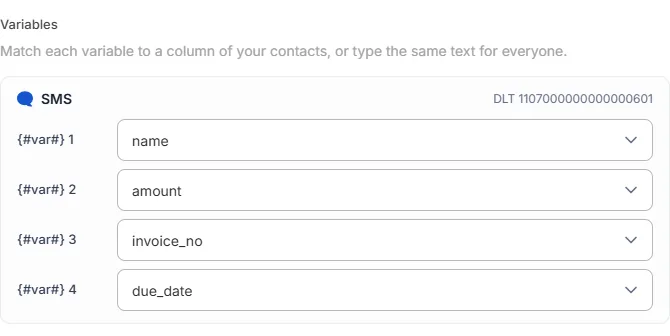
- Map every variable. On the SMS step, each {#var#} is mapped to a column of your sheet (such as name or amount), a key your software sends through the API, or fixed text.
- Keep each variable value to 30 characters or less. Operators reject a variable longer than that, and the SMS fails for that number. Long links and full addresses are the usual cause.
Fast2SMS helps with DLT registration free of charge, and you pay nothing extra for sender IDs or templates.
What can you automate with SMS?
Anything that repeats on a timetable or follows an event in your business. These are the most common automated SMS jobs:
- Reminders: payment and invoice due dates, school and coaching fees, EMI dates, insurance renewals, appointments, test bookings, service due dates.
- Notifications: order confirmed, shipped and delivered; account updates; report ready; ticket status.
- Follow-ups: enquiries that did not reply, quotes not accepted, carts not completed (triggered from your own store backend).
- Alerts: power or water cuts for a society, class cancellations, branch timings, weather or exam changes.
- Offers: festival sales, new arrivals and loyalty rewards on the promotional route.
For reminders that must go out a set number of days before each customer's own date (for example 3 days before an EMI), Campaign uses fixed waits, not per-customer dates. So your system calls the API on the right day for each customer, or you run a scheduled campaign every morning for that day's list.
Copy-ready automated SMS templates
Register these on your DLT portal with your own brand and sender. {#var#} marks a variable; keep each value under 30 characters.
| Use | Type | Template |
|---|---|---|
| Payment due | Service implicit | Dear {#var#}, your payment of Rs {#var#} for invoice {#var#} is due on {#var#}. Please ignore if already paid. - Demo Traders |
| Payment overdue | Service implicit | Dear {#var#}, Rs {#var#} for invoice {#var#} is now overdue. Please pay today to avoid late charges. Call {#var#} for help. - Demo Traders |
| Fee reminder | Service implicit | Dear Parent, fee of Rs {#var#} for {#var#} is due on {#var#}. Kindly pay at the office or online. - Demo School |
| Appointment | Service implicit | Hi {#var#}, your appointment at Demo Clinic is on {#var#} at {#var#}. Please arrive 10 minutes early. - Demo Clinic |
| Order shipped | Service implicit | Hi {#var#}, your order {#var#} has been shipped and will reach you by {#var#}. - your store |
| Order delivered | Service implicit | Hi {#var#}, your order {#var#} was delivered. Need help? Call {#var#}. - your store |
| Enquiry follow-up | Service implicit | Hi {#var#}, thanks for your enquiry about {#var#}. We tried to reach you. Call us on {#var#} at a time that suits you. - Demo Traders |
| Renewal due | Service implicit | Dear {#var#}, your {#var#} plan expires on {#var#}. Renew to continue without a break. - Demo Traders |
| Feedback | Service implicit | Hi {#var#}, how was your visit to Demo Clinic? Share your feedback here: {#var#} - Demo Clinic |
| Festival offer | Promotional | Diwali sale at Demo Traders: flat {#var#}% off till {#var#}. Visit our store or shop online. T&C apply. |
The template type you register decides the route. Keep offers out of service templates: an offer in a service template is a DLT rule breach and can get the template blocked.
How does an SMS automation journey work?
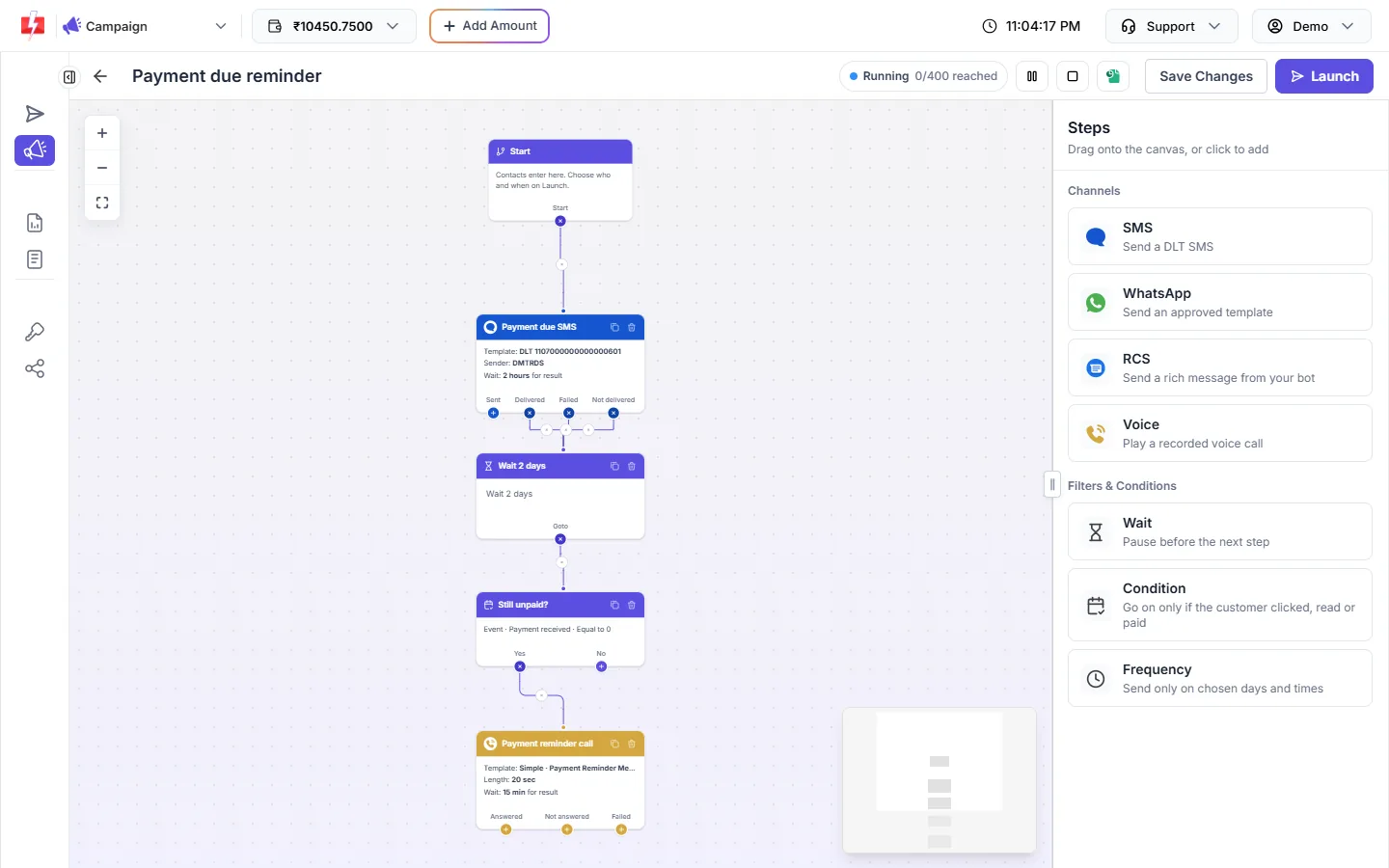
An SMS step sends one DLT template, waits for the delivery report, and then sends each customer down the path that matches the result.
Step by step, for each customer:
- The SMS step sends your DLT template with the variables filled from your sheet or API values.
- It waits for the operator's delivery report. The SMS step ends as sent, delivered, failed or not delivered. By default it waits up to 120 minutes for a final report; you can set this from 1 minute to 24 hours.
- You connect each result to the next step. Delivered goes to a Wait; failed and not delivered can go to WhatsApp or a voice call.
- Wait steps hold the customer for 1 minute to 30 days. Frequency steps make sure the next message goes out only on the days and hours you allow.
- Condition steps check an earlier step's result, a WhatsApp or RCS reply, or an event your software posted, such as
payment_received.
Ready journeys in the automated SMS journey builder that start with SMS include "SMS, WhatsApp if it fails, call if nothing lands", "SMS then voice call if not delivered" and the payment reminder "SMS, then WhatsApp, then call".
Timing table: an automated payment reminder
This journey is for a business that sends invoices with a due date. Your billing software calls the API 3 days before the due date for each customer, and posts payment_received when money comes in.
| Step | When | Channel | Message | If it fails |
|---|---|---|---|---|
| 1 | Day -3 (API call from your system) | SMS (service implicit) | Payment of Rs {#var#} is due on {#var#} | WhatsApp utility template with the same details |
| 2 | Wait 3 days, weekdays 10:00 to 19:00 only | Condition | Has your system posted payment_received? | Yes: journey ends. No: step 3 |
| 3 | Due day | SMS | Payment due today; pay link or office details | Voice call |
| 4 | Wait 1 day, then check payment again | Condition | Still unpaid? | Paid: end |
| 5 | Day +1 | Voice call | Short recorded reminder with your callback number | Not answered: overdue SMS |
Every customer who pays drops out at the next check, so you never remind someone who has already paid, as long as your system posts the event. The payment reminder automation guide has more templates, including Hindi versions.
Schedule, repeat or API: which one do you need?
Use Schedule or Repeat when the same list gets the same journey at the same time. Use the API when each customer's journey depends on something that happened to them.
| You want to | Use | Why |
|---|---|---|
| Send a notice to all customers next Monday | Schedule | One run, up to 90 days ahead |
| Remind all students on the 1st of every month | Repeat | Runs daily or on chosen weekdays at a set time, with optional start and end dates |
| Send an SMS the moment an order ships | API | Your store backend calls the API for that one order |
| Remind each borrower 3 days before their own date | API (or a daily scheduled list) | Waits are fixed, so the start must come on the right day |
| Follow up only people who did not respond | Any of the above, plus Condition steps | The journey decides who gets the next message |
Lists for Schedule and Repeat can be a CSV, TXT, XLSX or XLS file up to 20 MB and 10 lakh rows, an Address Book group, or pasted numbers. Only Indian mobile numbers are accepted; duplicates and invalid numbers are removed and counted before sending.
How to set it up in Fast2SMS
- Create your account and add DLT details. Sign up free at fast2sms.com (₹50 credit is added). Add your DLT sender ID and the templates you will use.
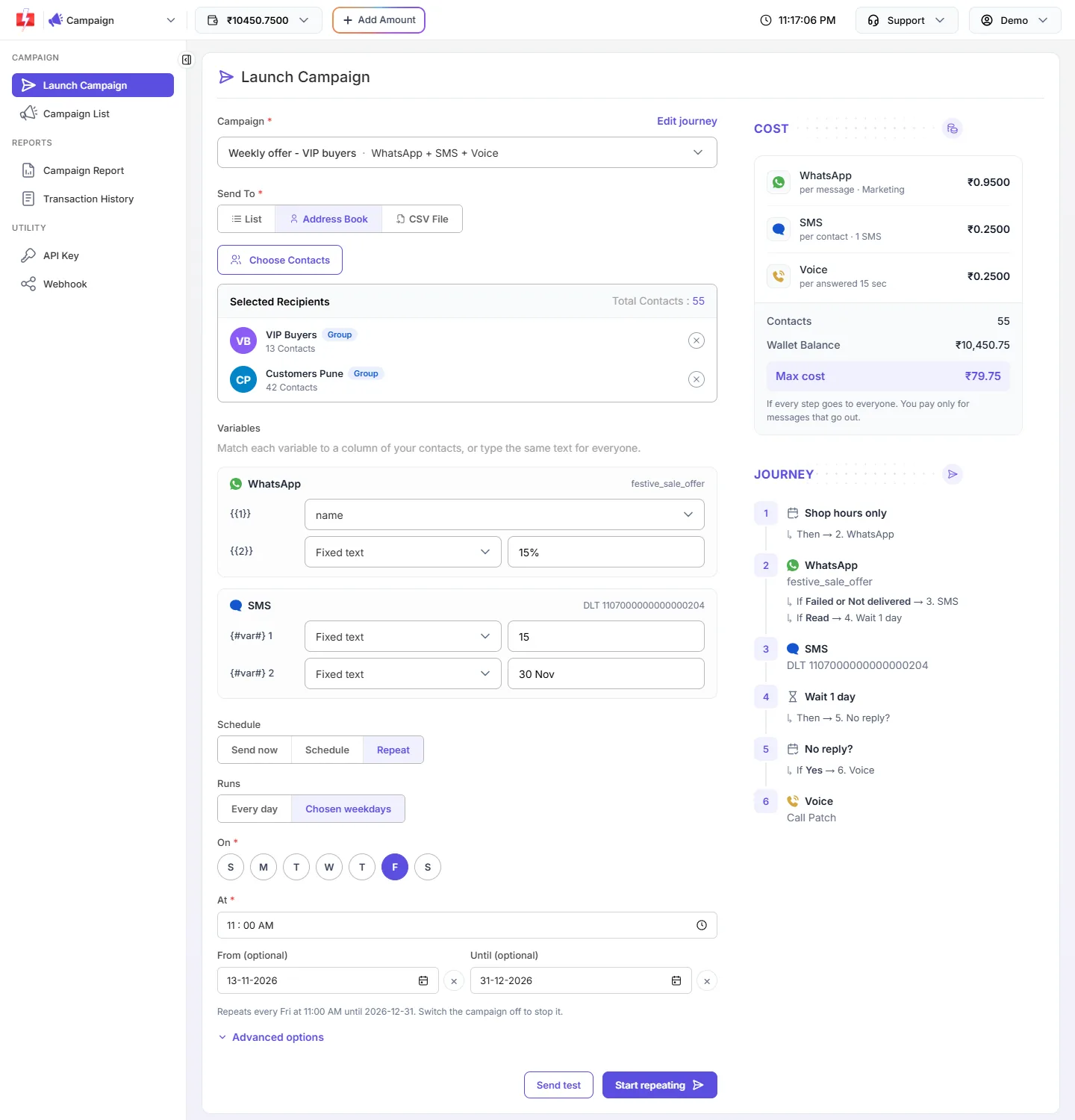
- Open Campaign. Click the Campaign app in the header, then Launch Campaign, or open Campaign List and click Create Campaign.
- Choose a starting point. Pick Start from a ready journey, for example a payment reminder, or start blank.
- Set the audience. On the Start step, upload your sheet, pick an Address Book group or paste numbers. Sheet columns become variables.
- Configure the SMS step. Choose the sender and the DLT template linked to it. Map each variable to a column or to fixed text.
- Add Wait, Condition and Frequency steps. For example Wait 3 days, a Condition on your
payment_receivedevent, and a Frequency step for weekdays 10:00 to 19:00. - Wire the outputs. Connect the SMS step's failed and not delivered outputs to a WhatsApp or voice step, and delivered to the next Wait.
- Send a test. Send test goes to up to 10 numbers. Test sends are charged like normal sends.
- Pick Send now, Schedule or Repeat. Check the cost estimate. Optionally set limits per minute, hour or day.
- Launch and follow the report in Reports → Campaign Report.
How to send automated SMS from your software
Your website, app or CRM starts the journey for a customer with one request. Copy the campaign ID from Campaign List → ⋮ → Get API code.
curl -X POST "https://www.fast2sms.com/dev/campaign/start" \
  -H "authorization: YOUR_API_KEY" \
  -H "Content-Type: application/json" \
  -d '{"campaign": "YOUR_CAMPAIGN_ID",
       "recipients": [{"mobile": "9000012345", "name": "Rahul", "amount": "1200", "due": "10 Dec"}]}'
The same request in PHP:
$payload = [
    "campaign" => "YOUR_CAMPAIGN_ID",
    "recipients" => [
        ["mobile" => "9000012345", "name" => "Rahul", "amount" => "1200", "due" => "10 Dec"],
    ],
];
$ch = curl_init("https://www.fast2sms.com/dev/campaign/start");
curl_setopt_array($ch, [
    CURLOPT_POST => true,
    CURLOPT_RETURNTRANSFER => true,
    CURLOPT_HTTPHEADER => ["authorization: YOUR_API_KEY", "Content-Type: application/json"],
    CURLOPT_POSTFIELDS => json_encode($payload),
]);
echo curl_exec($ch);
curl_close($ch);- Each key you send (name, amount, due) fills the variable you mapped to it on the SMS step.
- Up to 1,000 numbers per call and up to 50 variables per number. API numbers start immediately.
- Numbers sent to the same campaign on the same day join one run, and a number already in it is skipped.
- Post
payment_receivedor any event of your own toPOST /dev/campaign/eventso Condition steps can stop the reminders. - Write calls are limited to 30 per minute per key; read calls to 120 per minute.
Node.js and Python versions, events and webhooks are in the event-triggered messaging guide.
How much does an automated SMS service cost?
Automation adds nothing to the SMS price on Fast2SMS: no campaign fee, builder fee or monthly fee. Each SMS step costs your normal SMS rate, which depends on your recharge.
| Recharge amount | Price per SMS at the time of writing | Rate validity |
|---|---|---|
| ₹100 to ₹3,999 | ₹0.25 | Unlimited |
| ₹4,000 to ₹7,999 | ₹0.21 | 6 months |
| ₹8,000 to ₹13,999 | ₹0.19 | 6 months |
| ₹14,000 to ₹59,999 | ₹0.17 | 12 months |
| ₹60,000 to ₹1,29,999 | ₹0.15 | 12 months |
| ₹1,30,000 to ₹5,99,999 | ₹0.13 | 12 months |
| ₹6,00,000 or more | ₹0.11 | 24 months |
One rate covers promotional, transactional and service SMS. A long or Unicode (Hindi) SMS uses more than one SMS part. Other steps: WhatsApp utility ₹0.25, WhatsApp marketing ₹0.95, voice call ₹0.25 per 15-second pulse for answered calls. Wait, Condition and Frequency steps are free. See SMS pricing for the live rates.
Cost example: monthly fee reminders for 2,400 students
Say a coaching institute recharges ₹4,000 (₹0.21 per SMS) and runs the journey from the scene above on the 1st of every month. As an example, assume 3% of SMS fail, 70% pay within 3 days, and half of the remaining calls are answered in one pulse.
| Step | Contacts | Rate | Cost |
|---|---|---|---|
| SMS reminder | 2,400 | ₹0.21 | ₹504 |
| WhatsApp utility for the 3% failed | 72 | ₹0.25 | ₹18 |
| Voice call to the 30% unpaid (360 answered) | 720 | ₹0.25 per answered pulse | ₹90 |
| Total per month | ₹612 |
Unanswered calls cost nothing. SMS refunds for failed messages apply only to accounts on On Delivery billing; failed WhatsApp messages follow the WhatsApp refund policy. The launch screen shows the estimate, and the Campaign Report shows the real cost, refund and net cost.
Which rules apply to automated SMS?
The same rules as any business SMS. Campaign applies them to each SMS step automatically.
- Promotional SMS reach Non-DND numbers only, between 10 am and 9 pm. A promotional step that falls outside the window is held until the window opens.
- Transactional and service SMS reach DND and Non-DND numbers at any time of day. Still, use a Frequency step so reminders arrive at sensible hours.
- DND handling applies to SMS and voice steps; DND numbers on promotional steps are not sent.
- Exact template match. The text must match the DLT template; only the variables change.
- Scam content check. SMS, WhatsApp and RCS text is checked before sending.
- Opt-outs. There is no automatic STOP keyword handling in Campaign. Remove people who ask to stop from your lists. Numbers on the voice opt-out list leave voice steps.
Other channels in the same journey keep their own rules; for example promotional RCS bots send between 7 AM and 10 PM. There is no single sending window for every channel.
How do you track automated SMS?
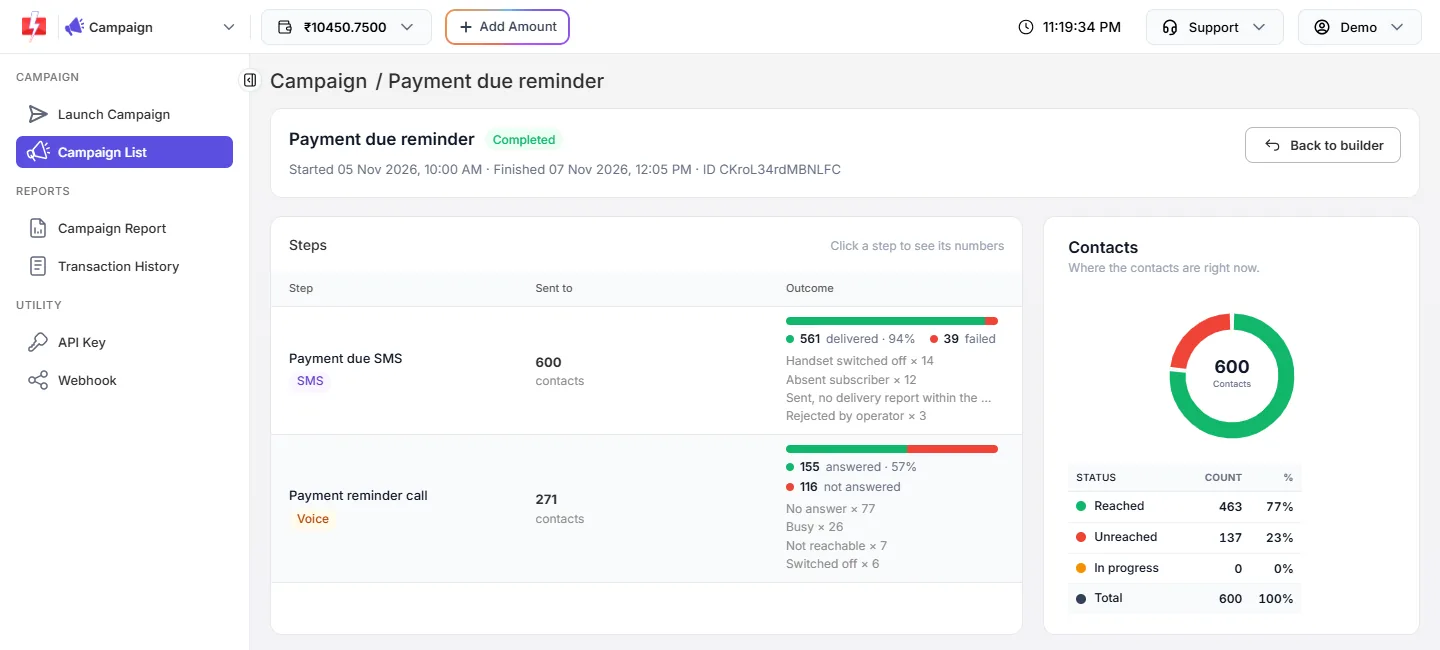
Open Reports → Campaign Report. For every run you see total, reached, unreached, opted out, stopped and in progress contacts, with cost, refund and net cost.
- Per step: entered, sent, delivered, failed and not delivered, average time and the top failure reasons, such as DND numbers.
- Per number: each customer's full journey, so you can answer "did Rahul get the reminder?" in seconds.
- Live: the report refreshes every 15 seconds while the run is active.
- Export: Delivery Reports → Export → Campaign for a CSV.
- Webhooks: set Webhook → Campaign to receive every step result on your server.
Mistakes to avoid
- Variables longer than 30 characters. The SMS fails for that number. Shorten links and names.
- Offers in a service template. Keep promotional text on promotional templates, or the template can be blocked.
- Reminders to people who paid. Post
payment_receivedfrom your system and add a Condition before every reminder. - No backup step. Connect the SMS step's failed and not delivered outputs to WhatsApp or a voice call.
- A result wait that is too short. SMS delivery reports can take time. Keep the default 120 minutes unless the message is urgent.
- Expecting per-customer dates. Waits are fixed. Start each customer's journey on the right day from your system.
- Night-time reminders. Service SMS can go at any time, but customers do not like 2 am messages. Add a Frequency step.
- Testing on the full list. Send the journey to up to 10 test numbers first.
- Ignoring failure reasons. The report lists the top reasons per step. Clean numbers that fail every month.
Why use Fast2SMS for automated SMS?
- DLT SMS plus three other channels in one journey: WhatsApp, RCS and voice can catch what SMS misses. The omnichannel marketing platform guide explains how they fit together.
- No monthly fee and one SMS rate for every route, from ₹0.25 down to ₹0.11 at the time of writing.
- Panel or API: schedule and repeat from the panel, or start journeys from your own software.
- Free DLT help and no charge for sender IDs or templates.
Open the Fast2SMS campaign builder, start from a ready SMS journey and test it with the ₹50 signup credit. For SMS together with WhatsApp in timed series, see the WhatsApp automation guide.
Frequently asked questions
What is an automated SMS service?
It is a service that sends your business SMS on its own, based on a time, a rule or an event in your software. On Fast2SMS you build automated SMS journeys in Campaign with your DLT-approved templates.
What are automated SMS messages?
They are SMS that go out without someone pressing Send each time: reminders, order updates, alerts and follow-ups that are triggered by a schedule, a repeat rule or an API call.
What is SMS automation software?
Software that lets you set up SMS rules once and then sends them for you. Fast2SMS Campaign is a journey builder for SMS, WhatsApp, RCS and voice calls, with Wait, Condition and Frequency steps.
What is an automated SMS notification system?
A setup where your website, app or CRM tells the SMS platform when something happens, and the platform sends the right SMS. With Fast2SMS your system calls POST /dev/campaign/start for each customer.
What is the difference between scheduled SMS and automated SMS?
Scheduled SMS goes out once at a chosen time. Automated SMS also includes recurring sends, sends triggered by your software and follow-ups that depend on whether the earlier message was delivered.
Can I send recurring SMS automatically?
Yes. Use Repeat on the launch screen to run a campaign daily or on chosen weekdays at a set time, with optional from and until dates.
How far in advance can I schedule an SMS campaign?
Up to 90 days ahead, in IST (your account time zone).
Do I need coding skills for SMS automation?
No. You can upload a sheet or pick an Address Book group and use Schedule or Repeat from the panel. Code is only needed if your own software should start a journey for each customer.
Is automated SMS the same as bulk SMS?
Bulk SMS sends one message to a list. Automated SMS adds timing and rules: when to send, what to send next and who should get it. Both use the same DLT templates and the same SMS rate.
When should I use the SMS API instead of Campaign?
Use the bulk SMS API for single messages such as OTPs and one-off alerts. Use Campaign when one event should lead to several steps, waits or a backup channel.
Do automated SMS need DLT registration?
Yes. Every business SMS in India, automated or not, must use a DLT-approved template linked to your DLT sender ID.
Can I change the SMS text inside an automation?
Only the variables change. The rest of the text must match your DLT template exactly. To change the wording, register a new template.
How do variables work in automated SMS?
Each {#var#} in your DLT template is mapped on the SMS step to a sheet column, an API value such as name or amount, or fixed text.
What is the maximum length of a DLT variable?
Keep each variable value to 30 characters or less. A longer value is rejected and the SMS fails for that number.
Does Fast2SMS charge for sender IDs or templates?
No. There is no charge for sender IDs or templates. Any DLT portal fee is set and charged by the operator.
Which DLT template type should I use for reminders?
Reminders and updates for existing customers usually go on service implicit templates. Offers go on promotional templates. Keep offers out of service templates.
Can automated SMS be sent in Hindi?
Yes. Register a Unicode template in Hindi or any Indian language. A Unicode SMS holds fewer characters per part, so a long message may use more than one SMS.
What results does an SMS step give in a journey?
Sent, delivered, failed and not delivered. Each result can lead to a different next step.
How long does the SMS step wait for a delivery report?
By default up to 120 minutes. You can set it from 1 minute to 24 hours. If no final report arrives in that time, the step takes the not delivered path.
Can an SMS journey send WhatsApp if the SMS fails?
Yes. Connect the SMS step's failed and not delivered outputs to a WhatsApp step with an approved template.
Can an SMS journey place a voice call?
Yes. Add a voice step with a recorded audio file. It can play a message, ask the customer to press a key or connect them to an agent group. Voice cannot read out names or amounts.
Can an SMS journey stop when the customer pays?
Yes. Your software posts payment_received to POST /dev/campaign/event, and a Condition step checks it before the next reminder.
Can the journey react to an SMS reply?
No. Campaign does not branch on SMS replies. Reply checks work for WhatsApp and RCS replies.
Does Fast2SMS track clicks on links in automated SMS?
Not automatically. A Link clicked condition works only if your own website posts the click to the event API.
Can I send an SMS 3 days before each customer's due date?
Waits are fixed, not per-customer dates. Your system calls the API 3 days before each customer's date, or you run a scheduled campaign every morning for that day's list.
How long can an SMS journey last?
One customer can stay in a journey for up to 30 days. A Wait step can be from 1 minute to 30 days.
How do I stop reminders going out at night?
Add a Frequency step. It lets the journey continue only on chosen days between set times, by default 09:00 to 21:00.
Are there ready-made SMS journeys?
Yes. Ready journeys include "SMS, WhatsApp if it fails, call if nothing lands", "SMS then voice call if not delivered" and the payment reminder "SMS, then WhatsApp, then call".
How many steps can an automated SMS journey have?
Up to 200 steps and 400 connections. Each step runs once per customer.
What file formats can I upload for automated SMS?
CSV, TXT, XLSX and XLS files up to 20 MB and 10 lakh rows. You can also use an Address Book group or paste numbers.
Are duplicate numbers removed?
Yes. Duplicates and invalid numbers are removed and counted before sending, so you do not pay for them.
Can I send automated SMS to international numbers?
No. Campaign accepts Indian mobile numbers only: 10 digits starting with 6 to 9. A 91 or 0 prefix is removed.
How do I trigger an automated SMS from my website?
Your server sends POST https://www.fast2sms.com/dev/campaign/start with your API key, the campaign ID and the customer's number and variables. See the event-triggered messaging guide.
How many numbers can I send per API call?
Up to 1,000 numbers per call, each with up to 50 variables.
What happens if the same number is sent twice in a day?
All numbers sent to one campaign on the same day join one run, and a number already in that run is skipped, so it does not get the journey twice that day.
Is there a rate limit on the Campaign API?
Yes, per API key: 30 write calls per minute (start, event, pause, resume, stop) and 120 read calls per minute.
Can I receive SMS delivery results on my server?
Yes. Set a webhook under Webhook, Campaign. Each step result is posted with the step name, channel, status, reason, cost and next step.
How fast are automated SMS sent?
Up to 5,000 contacts per minute per run, so 1 lakh contacts start in about 20 minutes. You can set lower limits per minute, hour or day.
How much does an automated SMS service cost?
On Fast2SMS there is no automation or monthly fee. At the time of writing each SMS costs ₹0.25 from a ₹100 recharge, down to ₹0.11 on bigger recharges. See SMS pricing.
Is there a monthly fee for SMS automation software?
No. Fast2SMS has no campaign fee, builder fee or monthly fee. You pay only for the messages each step sends.
Do Wait and Condition steps cost anything?
No. Only SMS, WhatsApp, RCS and voice steps are charged.
Is the promotional SMS price different from transactional?
No. One rate applies to promotional, transactional and service SMS. The rate depends on your recharge amount.
Am I refunded for failed automated SMS?
SMS refunds apply only to accounts on On Delivery billing. Failed WhatsApp and RCS steps follow their own channel refund rules.
Will I see the cost before launching?
Yes. The launch screen shows a cost estimate, and launch is refused if the wallet cannot cover the first step.
What happens if my wallet runs out during an automated run?
The run pauses and resumes on its own after recharge (checked every 10 minutes). After 3 days on low balance it is stopped.
Is there a free trial for automated SMS?
New accounts get ₹50 free credit, with no setup or monthly fee, so you can build and test a journey first.
What time can automated promotional SMS be sent?
Promotional SMS reach Non-DND numbers between 10 am and 9 pm. A promotional step outside that window is held until it opens.
Can automated reminders reach DND numbers?
Yes, on transactional and service templates. They reach DND and Non-DND numbers at any time.
Does Campaign handle STOP replies automatically?
No. There is no automatic STOP handling. Remove people who ask to stop from your lists.
Is SMS content checked before sending?
Yes. SMS, WhatsApp and RCS text is checked for scam content before sending.
How do I see if an automated SMS was delivered?
Open Reports, Campaign Report. You see per-step delivered, failed and not delivered counts and each customer's full journey.
Can I export the automated SMS report?
Yes. Delivery Reports, Export, Campaign gives you a CSV.
Can I pause an automated SMS campaign?
Yes. You can pause, resume and stop runs from the panel or the API. Contacts still waiting when you stop are not charged.
Where can I read more about SMS with WhatsApp backup?
See the WhatsApp to SMS fallback guide, the WhatsApp automation guide and the omnichannel marketing platform guide.