Official WhatsApp Business API in India: Price, Setup and Free Access
The official WhatsApp Business API is Meta’s platform that lets a business send approved template messages to any number of customers, reply from a shared team inbox, automate chats with a chatbot and connect WhatsApp to its own software, all from a verified business number. Access to the API itself is free on Fast2SMS: there is no monthly fee, no setup fee and no per-number fee, and you pay only per message. At the time of writing that is ₹0.25 for utility and authentication messages, ₹0.95 for marketing and ₹0.13 for service replies in India. Onboarding takes a few minutes through Meta’s embedded signup with your Facebook login, and you can keep your existing WhatsApp Business app number.
What is the official WhatsApp Business API?
The WhatsApp Business API is not an app you download from the Play Store. It is an interface that Meta (then Facebook) launched in 2018 for medium and large businesses, and today it runs as the WhatsApp Cloud API on Meta’s servers. A business connects its phone number to the API through a provider such as Fast2SMS, and from then on it can talk to thousands of customers with the feel of a one-to-one chat.
In simple words, the official API lets you:
- Send ready, pre-approved updates such as order confirmations, delivery alerts, payment receipts and reminders.
- Run marketing campaigns to opted-in customers with images, videos, PDFs and clickable buttons.
- Deliver OTPs and login codes with a copy-code button.
- Give one WhatsApp number to a whole support team through a shared inbox.
- Automate replies with a chatbot or AI agent, and hand over to a human when needed.
- Connect WhatsApp to your website, app, CRM, store or accounting software through a REST API and webhooks.
"Official" matters because WhatsApp only allows business messaging at scale through this route. Tools that automate a normal WhatsApp or WhatsApp Business app number are not official, break WhatsApp’s terms and put the number at risk of a ban.
WhatsApp vs WhatsApp Business app vs official API vs unofficial tools
Four things often get mixed up. Here is how they differ:
| Feature | WhatsApp Business app | Official WhatsApp Business API | Unofficial bulk tools |
|---|---|---|---|
| Who it is for | Small businesses, one owner replying by hand | Growing and large businesses, teams and developers | Not allowed by WhatsApp |
| Where it runs | One phone (plus linked devices) | Meta’s cloud, managed through a provider’s panel and API | Automated WhatsApp Web or phone app |
| Bulk messaging | Broadcast lists of up to 256 contacts | Approved templates to your full list, within your daily limit | Mass sending that gets numbers banned |
| Automation | Greeting message, quick replies, labels | Chatbots, AI agent, scheduled campaigns, API triggers | Scripts with no support |
| Team access | Limited to the owner’s devices | Shared inbox with many agents | No |
| Integration | None | REST API and webhooks for CRM, ERP, store | Unstable |
| Reports | Ticks on one phone | Sent, delivered, read and failed per number | Unreliable |
| Cost | Free | Pay per message (Fast2SMS: no monthly or setup fee) | The real cost is a banned number |
The free WhatsApp Business app is a good starting point for a small shop. When you need to message more customers than one phone can handle, share chats across a team or connect WhatsApp with your software, the official API is the next step. The help article WhatsApp Business app vs API covers this in more detail.
How the official API works (Cloud API and providers)
Meta runs the WhatsApp Cloud API, but most businesses do not connect to it directly. They use a provider (often called a Business Solution Provider, or BSP) that handles onboarding, template management, the team inbox, billing and a simpler API. With Fast2SMS you do not need your own Meta developer app: you connect the number through Facebook login in the panel, get templates approved there and call one REST endpoint.
Two kinds of conversations happen on the API:
- Business-initiated: you message the customer first, for example an order update, a reminder or an offer. These always use a template that Meta has approved.
- User-initiated: the customer messages you first. You can then reply freely, without a template, within 24 hours of their last message. This is called the customer service window.
Is WhatsApp Business API free?
The honest answer is: access can be free, messages are not. On Fast2SMS, the API access, number onboarding, panel, live chat inbox, agents, chatbot builder, AI agent, API and webhooks all cost nothing. There is no monthly fee and no setup fee. What you pay for is each message you send, at the rate for its category. Incoming customer messages are free.
So "free WhatsApp Business API" on Fast2SMS means you never pay rent for the platform; a business that sends nothing in a month pays nothing that month. New accounts also get ₹50 free credit after signup to test real messages. Many other platforms charge a monthly plan on top of the per-message cost, which is why total cost differs so much between providers. The help article on the free WhatsApp Business API walks through the setup with screenshots.
WhatsApp Business API price in India (2026)
These are Fast2SMS’s published India rates per message at the time of writing, excluding 18% GST:
| Category | Price per message | Example |
|---|---|---|
| Utility | ₹0.25 | "Your order #4821 has shipped" |
| Authentication | ₹0.25 | "Your OTP is 482913" |
| Marketing | ₹0.95 | "Diwali sale: flat 30% off" |
| Service | ₹0.13 | An agent’s reply inside a live chat within 24 hours |
| Monthly fee, setup fee, per-number fee | ₹0 | Not charged |
How billing works
- Prepaid wallet. Recharge from ₹100 by UPI, card or net banking; ₹50 free credit is added after signup. The balance has unlimited validity and works for SMS, RCS and Smart OTP too.
- Delivery-basis billing. If a message fails, for example because the number is not on WhatsApp, or is still undelivered after 48 hours, the amount is refunded to your wallet automatically and listed in the refund report.
- Full transparency. Every recharge, debit and refund appears in transaction history with date, campaign and category, and a GST invoice is generated for every payment. Add your GSTIN in Settings to have it printed.
- High volume. Rates go down to ₹0.11 per message on high-volume plans. Share your monthly volume with sales for a custom rate.
- Other countries. The rates above are for Indian numbers; international rates show in the panel when you choose the destination.
A quick way to estimate your monthly bill: multiply expected messages in each category by its rate. For example, 20,000 order updates (₹5,000) plus 4,000 marketing messages (₹3,800) plus 3,000 agent replies (₹390) comes to ₹9,190 plus GST, with nothing added for agents, the chatbot or the API. See the WhatsApp pricing page for current rates.
Message categories: marketing, utility, authentication and service
Meta assigns a category to each template when it approves it, and the category decides the price. Choosing the right one helps approval and keeps your costs down.
Utility
Transactional or service updates the customer expects after an action: order confirmations, shipping updates, payment receipts, appointment reminders, subscription reminders and account alerts. Utility templates can have variables, a header, URLs and buttons such as "Call now" or "Book now", but no promotional content.
Authentication
Security messages only: OTPs and verification codes for login, signup, password reset, two-factor authentication or a new device. They have a copy-code button, can mention an expiry time, and must not contain links or promotional text. The WhatsApp OTP API guide covers this category in depth, including Smart OTP fallback to SMS.
Marketing
Anything promotional: offers, launches, festival campaigns, coupon codes and re-engagement messages, usually with an image or video header and buttons. This is the category used for bulk WhatsApp campaigns.
Service
Free-form replies you send within 24 hours of the customer’s last message, for example an agent answering a question in the inbox. No template is needed, and you can send text, images, documents, audio, video, location, stickers and reactions.
What you need to get the official WhatsApp Business API
- A Fast2SMS account, free at fast2sms.com.
- A genuine, older Facebook account. Meta can block or blacklist brand-new accounts during onboarding.
- A business portfolio in Facebook Business Manager. If you do not have one, you can create it during onboarding.
- A working website with your business name, logo and terms and conditions. Meta may review it manually, and a broken site can get the account suspended. You can use your website name as the business name.
- A phone number: a number that is not registered on WhatsApp yet (a landline that can receive a call works too), or your existing WhatsApp Business app number through coexistence.
- Business documents for verification later. You can start sending within the starting limit and submit documents to Meta, with help from Fast2SMS support, to raise it.
How to get the official WhatsApp Business API on Fast2SMS
- Sign up and log in. Create a free account with your mobile number at fast2sms.com. ₹50 credit is added for testing.
- Open WhatsApp Business and click Login with Facebook. Your number is first connected with Meta and then linked to Fast2SMS. Click Continue on the screens that confirm your Facebook profile.
- Fill in your business information. Select your business portfolio or create one, enter the business name and your working website, then click Next.
- Choose your number option. Pick "Connect your existing WhatsApp Business app" to keep using the app (coexistence), or "Start with a new WhatsApp phone number" for a number that will be managed only from Fast2SMS.
- Verify the number. Enter the number, select India, and verify the OTP. Confirm the business name and time zone, review the details and continue.
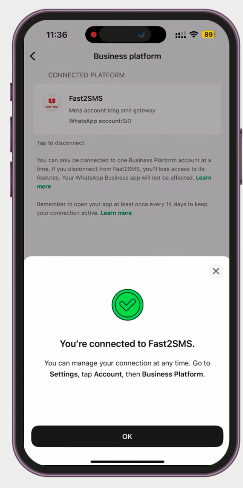
- For an existing app number, scan the QR code. WhatsApp asks you to connect to the business platform and whether to share chat history. Confirm, scan, and tap OK when it says you are connected to Fast2SMS.
- Click Finish. This step is mandatory. If you close the browser before clicking Finish, the account is not created and embedded signup must be repeated from the start.
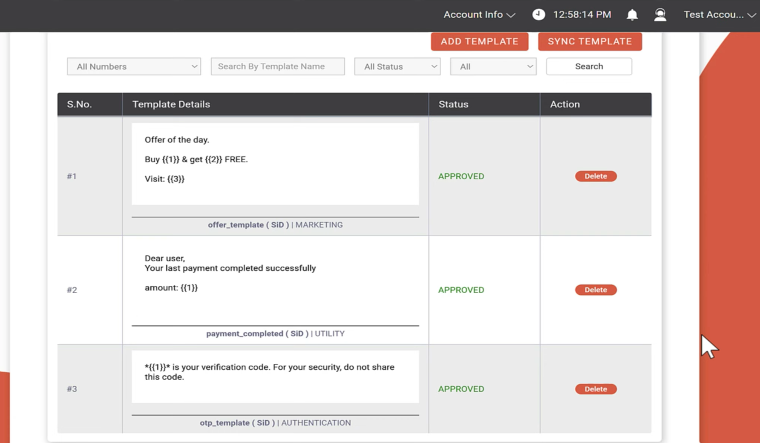
- Check WhatsApp Manager. Select your number to see the business name, status and quality rating. Three pre-approved test templates (marketing, utility and authentication) are ready so you can send a test right away.
- Create your own templates and start sending. Click Add Template, pick the category, submit to Meta, and send from the panel or the API once approved.
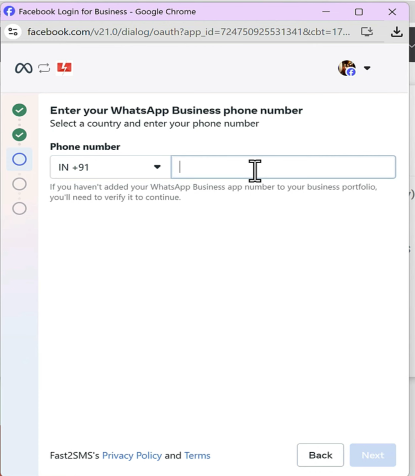
Prefer not to do it alone? Onboarding support is free. The Fast2SMS team can join you on a call to set up Facebook Business Manager, connect the number, set the display name and submit the green-tick request. Book a slot at fast2sms.com/meet. Most businesses are live within a day of connecting their number. The full screen-by-screen walk-through is in the onboarding guide.
Keep your WhatsApp Business app number (coexistence)
Many businesses worry that moving to the API means giving up the number customers already know. With WhatsApp coexistence, a Meta update, you do not have to. The same number works in the WhatsApp Business app on your phone and on the official Cloud API at the same time.
- You keep the app, your manual chats and status updates as before.
- You can choose to share past chat history with the platform, or only new chats.
- The account stays synced across the business platform, Fast2SMS and WhatsApp Web.
- You add bulk campaigns, the team inbox, chatbot and API on top.
If you connect a brand-new number instead, it is managed only from Fast2SMS and cannot also be used in the mobile app. Read what WhatsApp coexistence is for the full steps.
Display name, verification and green tick
Every template message shows your business display name, so customers know who is writing even if they never saved your number. Business verification by Meta, done by submitting company documents, is also what raises your daily messaging limit beyond the starting level.
The green tick is a separate badge that marks a business as verified and trusted. Fast2SMS guides the green-tick request from the panel and handles the paperwork with you for free. Approval of the tick is Meta’s decision, so no provider can guarantee it, but a complete website, consistent business name and verified documents give you the best chance.
Messaging limits, the 24-hour window and WhatsApp policy
Daily limit
A new number can start 250 business-initiated conversations per day. The limit rises as your number keeps a good quality rating, and rises faster after Meta verifies your business documents. Fast2SMS support helps you submit them.
Quality rating
WhatsApp Manager in your panel shows the quality rating of each number. It reflects how customers react to what you send. Blocks and reports pull it down, and a poor rating can hold back your limit or restrict the number. Send only to opted-in customers, keep marketing relevant and not too frequent, and give a clear opt-out such as "Reply STOP to opt out".
The 24-hour customer service window
When a customer messages you, a 24-hour window opens in which you can reply freely without a template; these replies are billed as service messages. Outside that window, or when you message first, you must use an approved template.
Policy basics
- Get opt-in before you message customers, and honour opt-outs.
- Use templates for anything you send first, in the correct category.
- Do not send spam, bought lists or content WhatsApp does not allow.
- Keep the business behind the number real and reachable: working website, correct business details.
Template approval tips
Templates are created in the panel with a live preview. You pick the category, add a header (image, video, document or location), write the body with numbered variables like {{1}} and {{2}}, add a footer and up to three buttons (quick reply, URL, call or copy code), then submit to Meta. Approval usually takes from a few minutes to a few hours, and an approval badge appears on the template when it is ready.
- Match content and category. The most common reason for trouble is a mis-categorised template.
- Add sample values for every variable so reviewers can read the final message.
- Be clear about who you are. Mention your business name and why the customer is receiving the message.
- No links in authentication templates, and no promotional lines in utility templates.
- Get a second look. The Fast2SMS team reviews templates before you submit them to Meta, at no cost.
Richer formats are available too: media templates, carousel templates for several products, and flows templates for forms. Templates can also be created, edited, deleted and listed through the API.
Features included free on Fast2SMS
Panel rental, agent seats, onboarding, chatbots and API access are where WhatsApp bills usually grow. On Fast2SMS they are part of every account:
- Live chat inbox: a WhatsApp Web style team inbox with assignment, labels, notes and full chat history.
- Unlimited agents with no per-seat fee, plus the Fast2SMS Agent app on Android.
- Flow Builder chatbot: drag-and-drop keyword triggers, menus, buttons, media, conditions, delays and an API-request block, with human handoff.
- AI agent: trained on your website, PDFs or FAQ to answer routine questions first.
- Bulk and scheduled campaigns: send to address-book groups, Excel or CSV uploads, or pasted numbers, with the cost shown before you confirm.
- Address book and groups reusable across WhatsApp, SMS and RCS.
- Delivery and read reports: sent, delivered, read and failed per number with the reason, a daily chart and Excel export.
- Template management and WhatsApp Manager: numbers, templates, message IDs and quality rating in one place.
- Media: images, videos and PDFs such as invoices inside template messages, with a custom file name.
- API and webhooks for every send and every event.
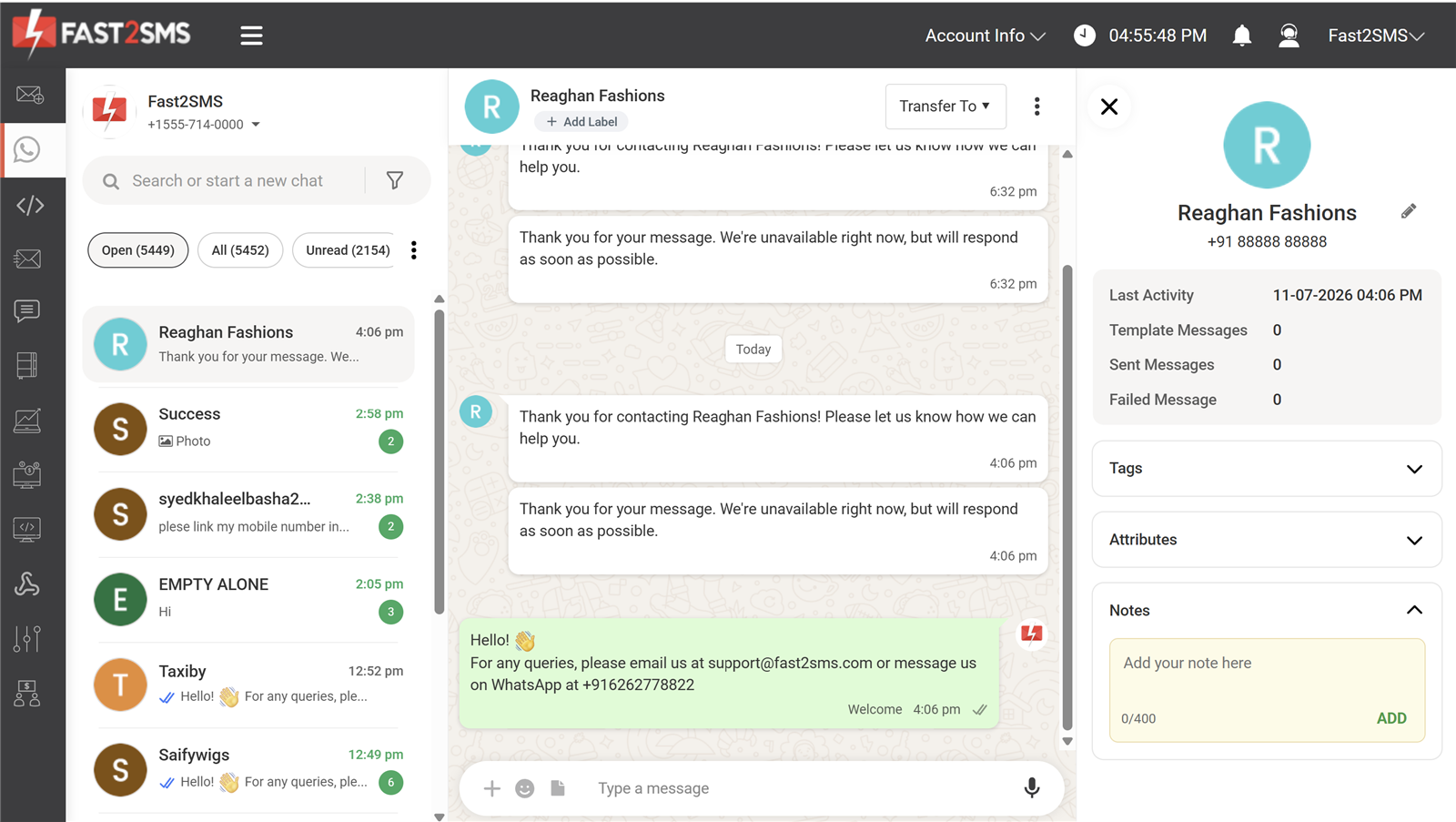
Want to automate without code? The free WhatsApp chatbot guide shows how to build a first bot in five steps.
WhatsApp Business API for developers
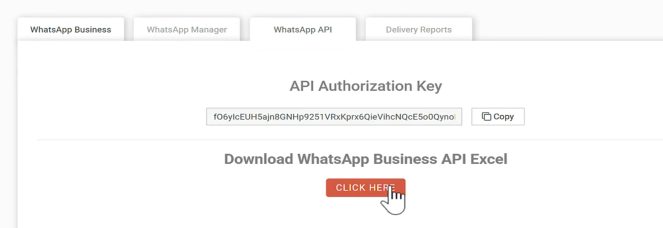
Fast2SMS uses one API key for SMS and WhatsApp, sent in the Authorization header. Full documentation is at docs.fast2sms.com.
Send a template message
curl "https://www.fast2sms.com/dev/whatsapp?message_id=9&phone_number_id=579519398574288&numbers=9999999999&variables_values=Rahul|1234" \
  -H "Authorization: YOUR_API_KEY"

{
  "status": true,
  "message": "Message sent successfully",
  "request_id": "6a3b2c1d"
}message_id: the ID of your approved template, shown in the panel.phone_number_id: your WhatsApp Business number’s ID.numbers: the recipient’s 10-digit Indian mobile number.variables_values: template variable values separated by a pipe.media_urlanddocument_filename: optional, for image or PDF headers and the file name the customer sees.
You do not have to build these calls by hand. Under WhatsApp API in the panel you will see your authorization key, and one click downloads a sheet with a ready API for every approved template.
Session messages and template management
Inside the 24-hour window, free-form replies go through POST /dev/whatsapp-session with text, image, document, audio, video, location, sticker and reaction types. Templates can be created, edited, deleted and listed through the API, and the docs also include a full Meta-format API.
Webhooks
Create a WhatsApp webhook and Fast2SMS calls your URL with the events you choose: sent, delivered, read, failed or incoming messages. A delivered event looks like this:
{
  "request_id": "Wabcdef12345678",
  "mobile": "9999999999",
  "status": "delivered",
  "status_description": "Delivered successfully",
  "category": "UTILITY",
  "webhook_type": "status_update"
}
Incoming customer messages arrive with "webhook_type": "incoming_message", which is how custom chatbots are built. You can add up to 10 webhooks per channel with your own JSON payload template; each call has a 60-second timeout with 3 retries, logs are kept for 7 days with one-click resend, and requests can be signed with a shared secret header. Read how webhooks work and the WhatsApp chatbot API guide for complete examples.
Plugins and integrations
If you would rather not code, free plugins connect WhatsApp to WordPress and WooCommerce, Shopify and TallyPrime, and Zapier, Pabbly and CleverTap are supported. See the integrations page. For OTPs, Smart OTP sends on WhatsApp first and falls back to OTP SMS automatically from one API call.
How to choose an official WhatsApp Business API provider in India
Every official provider sends through the same Meta Cloud API, so the message reaches the customer the same way. What differs is what you pay on top and what you get around the API. Ask these questions before you sign up anywhere:
- Is there a monthly or setup fee? A platform fee is paid even in months you send little.
- Are agents, the inbox and the chatbot included, or sold as add-ons and higher plans?
- Are failed messages refunded? Without refunds you pay for numbers that are not on WhatsApp.
- Is onboarding help free, and will someone help with templates, verification and the green tick?
- Is the API simple, with webhooks and clear documentation?
- Can you keep your existing number through coexistence?
- What support do you get: only email tickets, or chat, phone and meetings?
- Can you use other channels such as SMS, RCS and voice from the same wallet?
| Item | Fast2SMS | Many providers |
|---|---|---|
| Monthly panel fee | ₹0 | Often ₹1,000 to ₹5,000 a month |
| Setup charge | ₹0 | Often a one-time setup fee |
| Onboarding support | Free, on a call | Self-serve or paid |
| Agent seats and inbox | Unlimited, free | Per-agent charge or paid plan |
| Android app for agents | Yes | Rarely |
| Chatbot builder | Free flow builder and AI agent | Paid add-on |
| API and webhooks | Included | Often a higher plan |
| Failed message refund | Automatic, to wallet | Often not refunded |
| Incoming messages | Free | Free |
Based on publicly listed plans of common WhatsApp Business API providers in India; details vary by provider.
Industries using the WhatsApp Business API
- Online stores: order and shipping updates from the order system, abandoned-cart recovery, COD confirmation to reduce RTO, invoice PDFs.
- Clinics and hospitals: appointment reminders the evening before with a confirm button, reports and follow-ups.
- Education: fee reminders, exam updates, results and admission campaigns.
- Banks, NBFCs and fintech: payment receipts and EMI reminders with the PDF attached, login OTPs.
- Real estate: project brochures, site-visit bookings and buyer updates.
- Apps and SaaS: signup and login OTPs with SMS fallback, account alerts, onboarding nudges.
- Accountants and distributors: invoices, receipts, ledgers and payment reminders from TallyPrime.
- Support teams: one number shared by many agents, with a chatbot answering first.
Most of these combine utility messages for updates (cheaper and expected) with a few well-targeted marketing campaigns. For the campaign side, read the bulk WhatsApp message guide.
Security, reliability and support
Fast2SMS has provided business messaging in India since 2011, more than 15 years, with 99.9% uptime. WhatsApp access is through Meta’s official Cloud API, with no unofficial WhatsApp Web automation. Contacts, chats and templates are stored encrypted, every panel page and API call runs over HTTPS, agents only see the chats assigned to them, and Fast2SMS is ISO 27001 and SOC 2 Type 2 certified and VAPT tested; see the certificates page.
Support is free and handled by people: chat inside the panel, phone at +91-6262778822, email at [email protected], or a free meeting for onboarding, template help or volume pricing at fast2sms.com/meet. You can also reach the team from the contact page.
Agencies that want to offer WhatsApp under their own brand can use the white-label reseller panel, which covers WhatsApp Business API, bulk SMS and RCS together; see the white label WhatsApp Business API guide.
Ready to start? Signup free on Fast2SMS, connect your number with free onboarding help and send your first template with the ₹50 free credit. Product details are on the WhatsApp Business API page, and RCS options are on the RCS message page.
Frequently asked questions
What is the official WhatsApp Business API?
It is Meta’s platform for businesses to send approved template messages at scale, reply from a team inbox, automate chats and connect WhatsApp to their own software. It runs as the WhatsApp Cloud API and is accessed through providers such as Fast2SMS.
Who provides the official WhatsApp Business API?
Meta runs the API, and businesses usually access it through a provider that handles onboarding, templates, the inbox, billing and a simpler API. Fast2SMS gives access through Meta’s official Cloud API with free embedded signup.
Is Fast2SMS an official WhatsApp Business API provider?
Yes. WhatsApp access on Fast2SMS is through Meta’s official Cloud API with free embedded signup onboarding, and no unofficial WhatsApp Web automation is used.
What is the WhatsApp Cloud API?
It is the version of the WhatsApp Business API hosted by Meta on its own servers. Fast2SMS connects your number to the Cloud API, so you do not host or maintain anything yourself.
What does WABA stand for?
WABA stands for WhatsApp Business API, and is also used for a WhatsApp Business Account on that API. Read more in the free WhatsApp Business API (WABA) guide.
WhatsApp Business API kya hai?
It is Meta’s official system that lets a business send WhatsApp messages to many customers from one verified number, with templates, a team inbox, chatbots and an API. In short: WhatsApp for businesses at scale, not a phone app.
When was the WhatsApp Business API launched?
Facebook (now Meta) launched the WhatsApp Business API in 2018 for medium and large businesses.
How is the WhatsApp Business API different from the WhatsApp Business app?
The free app runs on one phone and one person replies by hand, with broadcast lists of up to 256 contacts. The API connects your number to a platform for approved templates to large lists, a shared team inbox, chatbots and software integration.
Can a small business use the WhatsApp Business API?
Yes. On Fast2SMS there is no monthly or setup fee, so a small business pays only for the messages it sends and can start with a ₹100 recharge.
Is there a WhatsApp Business API download or APK?
No. The API is not an app to install. You use it through the Fast2SMS web panel or REST API; agents can also reply from the Fast2SMS Agent app on Android.
Can I use the WhatsApp Business API on a PC?
Yes. Everything runs in the browser through the Fast2SMS panel, so there is nothing to download for PC.
Are free WhatsApp API scripts on GitHub official?
Scripts that automate WhatsApp Web or the phone app are not the official API and break WhatsApp’s terms, which can get the number banned. The official route is Meta’s Cloud API through a provider.
Can I use the WhatsApp API for personal use?
The WhatsApp Business API is built for businesses messaging their customers. For personal chats, the regular WhatsApp app is the right tool.
What is a WhatsApp Business Solution Provider (BSP)?
A BSP is a company that gives businesses access to the WhatsApp Business API and manages onboarding, templates and messaging. Fast2SMS provides this with free onboarding and no monthly fee.
Is WhatsApp Business API free?
Access is free on Fast2SMS: no monthly fee, no setup fee and free onboarding, inbox, chatbot and API. Messages you send are charged per message by category, and incoming messages are free.
Is WhatsApp Business API free or paid?
Both, in a way. The platform costs nothing on Fast2SMS, but each business message is paid, from ₹0.13 to ₹0.95 depending on the category, excluding GST.
What is the WhatsApp Business API price in India?
At the time of writing on Fast2SMS: utility ₹0.25, authentication ₹0.25, marketing ₹0.95 and service ₹0.13 per message, excluding 18% GST, with no monthly or setup fee. See WhatsApp pricing.
What is the WhatsApp Business API cost per message?
It depends on the category Meta assigns to the template: ₹0.25 for utility and authentication, ₹0.95 for marketing and ₹0.13 for service replies on Fast2SMS.
Is there a WhatsApp Business API price per month?
Not on Fast2SMS. There is no monthly plan or rental; your monthly cost is simply the messages you sent that month.
How much does a WhatsApp utility message cost?
₹0.25 per message on Fast2SMS, excluding GST. Utility covers order, payment and booking updates and other transaction messages.
How much does a WhatsApp authentication message cost?
₹0.25 per message on Fast2SMS, excluding GST. Authentication templates are used only for OTPs and login codes.
How much does a WhatsApp marketing message cost?
₹0.95 per message on Fast2SMS, excluding GST. Marketing covers offers, launches, festival campaigns and re-engagement messages.
What is a WhatsApp service message and what does it cost?
A service message is a free-form reply you send within 24 hours of the customer’s last message, usually from the live chat inbox. It costs ₹0.13 on Fast2SMS and needs no template.
Are incoming WhatsApp messages charged?
No. Messages customers send to your business are free.
Is there a free trial of the WhatsApp Business API?
Yes. Fast2SMS adds ₹50 free credit after signup so you can test real messages, and three pre-approved test templates are ready after onboarding.
Do WhatsApp API prices include GST?
No. Published rates exclude 18% GST, which applies on the recharge amount. A GST invoice is generated for every payment.
Are WhatsApp API rates the same for international numbers?
No. The published rates are for Indian numbers. For other countries, the rate is shown in the panel when you select the destination.
Which is the cheapest WhatsApp Business API in India?
Compare total cost, not just the message rate. Fast2SMS charges no monthly, setup, per-number or per-agent fee, refunds failed messages, and offers high-volume rates down to ₹0.11 per message.
How can I calculate my WhatsApp Business API cost?
Multiply your expected messages in each category by its rate and add 18% GST. For example, 10,000 utility messages at ₹0.25 cost ₹2,500 plus GST. The panel also shows the cost before you send a campaign.
What hidden charges should I check with a WhatsApp API provider?
Check for monthly platform fees, setup fees, per-agent or per-number charges, paid chatbot or API add-ons, and whether failed messages are refunded. Fast2SMS charges none of these fees and refunds failed messages.
What is the WhatsApp Business API free message limit?
Business messages are paid per message; there is no free monthly quota. On Fast2SMS you get ₹50 signup credit for tests, incoming messages are free and the platform has no monthly fee.
How do I get the official WhatsApp Business API?
Sign up on Fast2SMS, open the WhatsApp Business tab, click Login with Facebook and complete Meta’s embedded signup with your business details and phone number. Click Finish at the end.
How do I buy WhatsApp API access?
There is nothing to buy upfront on Fast2SMS. Create a free account, connect your number, recharge your wallet from ₹100 and pay only for messages you send.
What documents are needed for the WhatsApp Business API?
You can connect your number with a Facebook account, business portfolio and working website. Business documents are submitted to Meta for verification to raise your messaging limit, and Fast2SMS support helps with that.
Do I need Facebook Business Manager for the WhatsApp API?
Yes, you need a business portfolio in Facebook Business Manager. If you do not have one, you can create it during onboarding.
Can I use a new Facebook account for WhatsApp API onboarding?
Avoid it. Meta can block or blacklist new Facebook accounts, so log in with a genuine, older account.
Why does Meta check my website during onboarding?
Meta may review your business manually. Keep your website working with your business name, logo and terms and conditions, or the account can get stuck or suspended.
Which phone number can I connect to the WhatsApp API?
A number that is not registered on WhatsApp yet, including a landline that can receive a call, or your existing WhatsApp Business app number through coexistence.
Can I connect a number that already uses WhatsApp?
If it runs the WhatsApp Business app, yes, through coexistence, and the app keeps working. Otherwise, use a number that is not registered on WhatsApp.
Can I get the WhatsApp Business API on a landline number?
Yes. A landline that can receive a verification call can be connected.
How long does WhatsApp Business API onboarding take?
The embedded signup takes a few minutes. With template approval included, most businesses are live within a day of connecting their number.
Is WhatsApp API onboarding free on Fast2SMS?
Yes. Onboarding is free, and the team can do it with you on a call, including Facebook Business Manager, number registration, display name and the green-tick request.
What is Meta embedded signup?
It is Meta’s guided signup window that opens inside the Fast2SMS panel when you click Login with Facebook. It creates or selects your business portfolio and connects your number to the Cloud API.
Why is clicking Finish important in WhatsApp onboarding?
Without clicking Finish the account is not linked to Fast2SMS, and embedded signup has to be repeated from the beginning.
What do I get right after WhatsApp API onboarding?
Your number appears in WhatsApp Manager with its business name, status and quality rating, and three pre-approved test templates are ready in marketing, utility and authentication.
Can someone from Fast2SMS do the onboarding with me?
Yes. Book a free meeting at fast2sms.com/meet and the team will set up the account with you.
What is a business portfolio in WhatsApp onboarding?
It is your business profile in Facebook Business Manager that owns the WhatsApp account. You select an existing one or create one during embedded signup.
What is WhatsApp coexistence?
It is a Meta feature that lets the same number work in the WhatsApp Business app and on the official Cloud API at the same time. Read the coexistence guide.
Can one number run on both the WhatsApp Business app and the API?
Yes, through coexistence. Choose "Connect your existing WhatsApp Business app" during onboarding and scan the QR code from your phone.
Will my old WhatsApp chats show in the Fast2SMS panel?
You decide. During coexistence setup you can share all chats, including history, or share only new chats.
Do chats sync between my phone and the panel with coexistence?
Yes. The account stays synced across the business platform, Fast2SMS and WhatsApp Web.
Can I use a newly connected API number in the WhatsApp app?
No. A new number connected to the API is managed only from Fast2SMS and cannot also be used in the mobile app. Use coexistence if you want to keep the app.
Why do I scan a QR code during WhatsApp API setup?
When you connect an existing WhatsApp Business app number, the QR scan links the app to the business platform session so the number works in both places.
How do I get the WhatsApp green tick?
Fast2SMS guides the green-tick request from the panel and handles the paperwork with you for free. A complete website, consistent business name and verified documents give the best chance.
Is the WhatsApp green tick guaranteed with the API?
No. Approval of the green tick is Meta’s decision, so no provider can guarantee it.
What is the WhatsApp display name?
It is the business name customers see on your messages. It is set during onboarding and appears even if the customer has not saved your number.
Why should I verify my business with Meta?
Business verification raises your daily messaging limit beyond the starting level and supports the green-tick request. Fast2SMS support helps you submit the documents.
What is WhatsApp Manager in Fast2SMS?
It is the panel section that shows your numbers, business name, status and quality rating, along with your templates and message IDs.
What is the WhatsApp Business API message limit per day?
A new number can start 250 business-initiated conversations per day. The limit rises with a good quality rating and after Meta verifies your business.
Is there a rate limit on the WhatsApp Business API?
The main limit is the daily number of business-initiated conversations, which starts at 250 and grows. For very high volumes, talk to the Fast2SMS team about your needs.
Can a business message any customer at any time on the API?
Yes, with an approved template, as long as the customer opted in. Free-form messages are only allowed within 24 hours of the customer’s last message.
What is the 24-hour customer service window?
When a customer messages you, you can reply without a template for 24 hours after their last message. Outside the window you need an approved template.
What is the difference between user-initiated and business-initiated conversations?
A user-initiated conversation starts when the customer messages you first, and you can reply freely for 24 hours. A business-initiated conversation starts when you message first, always with an approved template.
What is the quality rating of a WhatsApp API number?
It reflects how customers respond to your messages. Blocks and reports lower it, and a poor rating can hold back your limit or restrict the number.
Can an official WhatsApp API number get blocked?
Yes, if it collects many blocks and reports or breaks WhatsApp policy. Sending relevant templates to opted-in customers with a clear opt-out keeps the risk low.
Are promotional messages allowed on the WhatsApp Business API?
Yes, through approved marketing templates sent to customers who opted in. Keep promotions out of utility and authentication templates.
Is customer opt-in required for the WhatsApp API?
Yes. Get the customer’s agreement before messaging them, for example through a consent checkbox or when they message you first, and honour opt-out requests.
What is a WhatsApp message template?
It is a pre-written message, with optional header, variables, footer and buttons, that Meta approves before you can send it to customers first.
Who approves WhatsApp templates?
Meta reviews and approves every template and assigns its category. The Fast2SMS team can review your template before you submit it.
How long does Meta take to approve a template?
Usually from a few minutes to a few hours. The approval badge appears on the template in the panel when it is ready.
What is the difference between utility and authentication templates?
Utility templates inform customers about a transaction or service, like an order update. Authentication templates carry only OTPs or verification codes, with a copy-code button and no links. See utility vs authentication.
Can I add a link to an authentication template?
No. Authentication templates are for verification codes only and must not contain links or promotional content.
What can a WhatsApp template header contain?
An image, a video, a document such as a PDF, or a location.
What is a copy-code button?
It is a button on authentication templates that lets the customer copy the OTP with one tap instead of typing it.
How do I avoid WhatsApp template rejection?
Match the category to the content, add sample values for every variable, state your business name and purpose clearly, and keep promotions out of utility templates.
Can I create and edit templates through the API?
Yes. Templates can be created, edited, deleted and listed programmatically. Details are in the API docs.
What are carousel and flows templates?
They are richer template formats: carousels show several cards, useful for offers on multiple products, and flows templates are used for forms.
What features come free with the Fast2SMS WhatsApp API?
Live chat inbox, unlimited agents, Android agent app, Flow Builder chatbot, AI agent, bulk and scheduled campaigns, address book, delivery and read reports, template management, API and webhooks.
Is there a free shared inbox for WhatsApp?
Yes. Every account gets a WhatsApp Web style live chat inbox with assignment, labels, notes and full chat history.
How many users can work on one WhatsApp API number?
As many as you need. Fast2SMS has unlimited agents with no per-seat fee.
Is there an Android app for the WhatsApp Business API?
Yes. The Fast2SMS Agent app on Android lets agents reply to customers on the move.
Is there a free WhatsApp chatbot with the API?
Yes. The drag-and-drop Flow Builder is free and supports keyword triggers, menus, buttons, media, conditions, delays and human handoff. See the chatbot guide.
Can the WhatsApp chatbot fetch data from my system?
Yes. The API-request block calls your website’s API mid-conversation, for example to reply with live order status or stock.
What does the AI agent do on WhatsApp?
You train it on your website, PDFs or FAQ, and it answers routine questions before a human takes over. It is included at no extra cost.
Are bulk campaigns included with the official API?
Yes. Send templates to groups, Excel or CSV uploads or pasted numbers, now or scheduled, with the cost shown before you confirm. See the bulk WhatsApp guide.
Does the WhatsApp API include delivery and read reports?
Yes. Reports show sent, delivered, read and failed per number with the reason, a daily chart and Excel export.
Can I send invoices as PDF on the WhatsApp Business API?
Yes. PDFs attach as the document header of a template, and you can set the file name the customer sees, such as the invoice number.
Which message types can I send in a live chat reply?
Within the 24-hour window you can send text, image, document, audio, video, location, sticker and reaction messages.
Does WhatsApp have an API for developers?
Yes. Fast2SMS offers a REST API for WhatsApp template messages, session messages, template management and webhooks, documented at docs.fast2sms.com.
How do I send a WhatsApp template message with the API?
Send a GET request to https://www.fast2sms.com/dev/whatsapp with your API key in the Authorization header and the message_id, phone_number_id, numbers and variables_values parameters.
Which parameters does the Fast2SMS WhatsApp API need?
message_id (approved template), phone_number_id (your number), numbers (10-digit Indian mobile number) and variables_values (pipe-separated values). media_url and document_filename are optional.
Where do I find message_id and phone_number_id?
Both are in the panel. Under WhatsApp API, one click downloads a sheet with a ready API, including these IDs, for every approved template.
How are WhatsApp API requests authenticated?
With your Fast2SMS API key sent in the Authorization header. The same key works for SMS and WhatsApp.
Can I send free-form WhatsApp messages through the API?
Yes, within the 24-hour window, using POST /dev/whatsapp-session with text, media, location, sticker or reaction types.
How do WhatsApp webhooks work on Fast2SMS?
Fast2SMS calls your URL with the events you choose: sent, delivered, read, failed or incoming messages, using a JSON payload template you can customise. See how webhooks work.
How many webhooks can I add and are failed calls retried?
Up to 10 webhooks per channel. Each call has a 60-second timeout with 3 retries, logs are kept for 7 days with one-click resend, and requests can be signed with a shared secret.
Can I receive incoming customer messages by webhook?
Yes. Incoming messages arrive with "webhook_type": "incoming_message", including the sender and the text or button pressed.
Can I build my own WhatsApp chatbot on the API?
Yes. Receive incoming messages by webhook and answer with session messages. The WhatsApp chatbot API guide explains the loop.
Is a Meta-format WhatsApp API available?
Yes. Alongside the simple Fast2SMS endpoints, the docs include a full Meta-format API.
Which platforms integrate with the Fast2SMS WhatsApp API?
Free plugins exist for WordPress and WooCommerce, Shopify and TallyPrime, plus Zapier, Pabbly and CleverTap. See the integrations page.
Can I send OTPs on WhatsApp with SMS fallback?
Yes. Smart OTP sends on WhatsApp first and falls back to SMS automatically, or the reverse, from one API call. See the WhatsApp OTP API guide.
How do I choose the best WhatsApp Business API provider in India?
All official providers use Meta’s Cloud API, so compare what surrounds it: monthly and setup fees, agent and chatbot charges, failed-message refunds, onboarding help, API quality, coexistence support and how you reach support.
Why choose Fast2SMS for the WhatsApp Business API?
No monthly, setup or per-number fee, delivery-basis billing with auto refunds, free inbox, agents, chatbot, AI agent and API, free onboarding, and 15+ years of messaging experience in India.
Is Fast2SMS a Meta Business Partner?
Fast2SMS is shown as a Meta Business Partner on its WhatsApp API page, and all WhatsApp access runs through Meta’s official Cloud API.
Which security certifications does Fast2SMS have?
Fast2SMS is ISO 27001 and SOC 2 Type 2 certified and VAPT tested. See the certificates page.
What support comes with the WhatsApp API on Fast2SMS?
Chat inside the panel, phone at +91-6262778822, email at [email protected], and free meetings at fast2sms.com/meet. All support is free.
Can I become a WhatsApp Business API reseller?
Yes. The white-label panel lets you sell WhatsApp Business API, bulk SMS and RCS under your own brand and domain with no monthly panel cost. See white label WhatsApp Business API.
Since when has Fast2SMS provided messaging services?
Since 2011, more than 15 years, with 99.9% uptime.
How do I sign up for the official WhatsApp Business API on Fast2SMS?
Signup free with your mobile number, open the WhatsApp Business tab, connect your number with Facebook login and send your first template with the ₹50 free credit.