Send Bulk WhatsApp Messages With the Official API
To send bulk WhatsApp messages safely in India, use the official WhatsApp Business API through a provider such as Fast2SMS: connect your business number with Meta, get a message template approved, upload your contacts from Excel or CSV and send the campaign from the panel or the API. Fast2SMS charges no monthly fee, no setup fee and no per-number fee. At the time of writing a marketing message costs ₹0.95 and a utility message ₹0.25, and failed messages are refunded to your wallet automatically. Unofficial bulk sender apps and Chrome extensions break WhatsApp’s terms, and they are the most common reason business numbers get banned.
What is a bulk WhatsApp message?
A bulk WhatsApp message is one message sent to many customers at the same time: a festival offer, a fee reminder, a new product launch, an order update or a payment receipt. Each customer receives it as a private one-to-one chat from your business, not in a group, so nobody can see who else got it. Customers can reply, tap a button or open an attachment, and the conversation stays between your business and that customer.
People also call it a WhatsApp broadcast, bulk WhatsApp SMS or a WhatsApp campaign. Whatever the name, the goal is the same: reach hundreds or thousands of customers on the app they open many times a day, with a message that looks rich and personal instead of plain text.
What decides whether bulk WhatsApp works for your business is how you send it. There are three common methods, and only one of them is built by Meta for businesses that send at scale.
Three ways to send bulk WhatsApp (and which one is safe)
1. Broadcast lists in the WhatsApp Business app
The free WhatsApp Business app on your phone lets you create a broadcast list and send one message to everyone on it. It needs no setup and costs nothing, which makes it fine for a small shop with a few regular customers. The limits show up fast: a broadcast list holds up to 256 contacts, every list is built by hand, there is no Excel upload, no personalisation per customer, no proper delivery report and only one phone to answer replies. If many people report your message, the number can still be restricted.
2. Unofficial bulk sender software and Chrome extensions
Search for "bulk WhatsApp sender free" and you will find desktop software, APKs and browser extensions that promise unlimited messages from your normal number. They work by automating WhatsApp Web or the phone app, which is not allowed by WhatsApp’s terms. They may run for a few days, but Meta detects the pattern, messages stop delivering and the number is banned. If that number is your main business number, you lose your chats and your customers’ trust on the same day.
3. The official WhatsApp Business API
The WhatsApp Business API (also called the WhatsApp Cloud API) is Meta’s official platform for businesses that message customers at scale. You connect a number through a provider such as Fast2SMS, send pre-approved templates to any WhatsApp user, show your business name on every message and get a delivery report for each number. This is the method this guide covers. For the full background on the platform, read the official WhatsApp Business API guide.
| What matters | WhatsApp Business app broadcast | Unofficial bulk sender tools | Official API on Fast2SMS |
|---|---|---|---|
| Allowed by WhatsApp | Yes | No, breaks the terms | Yes, Meta’s official platform |
| Recipients per send | Up to 256 per broadcast list | Claims unlimited | Your full list, within your daily limit |
| Excel or CSV upload | No | Sometimes | Yes, plus groups and pasted numbers |
| Personal name or order ID per customer | No | Varies | Yes, template variables per row |
| Image, video, PDF header and buttons | Basic media only | Varies | Yes, with up to three buttons |
| Delivery report | Ticks on one phone | Unreliable | Sent, delivered, read and failed per number |
| Team replies | One phone | No | Shared inbox with unlimited free agents |
| Ban risk | Possible if users report you | High | Low when you follow template rules and send to opted-in customers |
Why unofficial bulk senders get numbers banned
WhatsApp is designed so that a normal account talks to people who know it. When one number suddenly sends the same text to thousands of strangers through an automated WhatsApp Web session, it looks exactly like spam. Meta’s systems spot this quickly. The usual sequence is: messages start failing silently, then the number is temporarily restricted, then it is banned.
There are other costs that the "free" tools do not mention:
- No proof of delivery. You cannot tell who actually received the message, so you cannot plan follow-ups.
- No business identity. Messages come from an unknown number with no verified business name, which makes customers suspicious.
- Security risk. Some tools ask you to log in your WhatsApp inside their software, which gives a third party access to your chats.
- No recovery path. When a number is banned for breaking the terms, there is no provider to help you.
Bulk WhatsApp message price in India
On Fast2SMS the platform itself is free. There is no monthly panel fee, no setup fee, no per-number fee and no per-agent fee. You only pay per message, from a prepaid wallet, by the category Meta assigns to your template. These are the published India rates at the time of writing (excluding 18% GST):
| Category | Rate per message | Typical bulk use |
|---|---|---|
| Marketing | ₹0.95 | Festival offers, launches, discount codes, re-engagement |
| Utility | ₹0.25 | Order and shipping updates, payment receipts, fee and EMI reminders |
| Authentication | ₹0.25 | OTPs and login codes |
| Service | ₹0.13 | Your replies inside a live chat, within 24 hours of the customer’s last message |
Incoming messages from customers are free. For high volumes, rates go down to ₹0.11 per message; share your monthly volume with the sales team for a custom plan. Full details are on the WhatsApp pricing page.
Example campaign costs
- Festival offer to 5,000 customers (marketing): 5,000 × ₹0.95 = ₹4,750 plus GST.
- Fee reminder to 1,200 parents (utility): 1,200 × ₹0.25 = ₹300 plus GST.
- Replies to 300 customers who answered your campaign (service): 300 × ₹0.13 = ₹39 plus GST.
If 200 of the 5,000 numbers in the first example are not on WhatsApp, those messages fail and the amount is credited back to your wallet. WhatsApp messages bill on delivery basis: failed messages, and messages still undelivered after 48 hours, are refunded automatically and listed in the refund report and your transaction history.
New accounts get ₹50 free credit after signup for test messages. After that you recharge from ₹100 by UPI, card or net banking. There is no plan to choose, the WhatsApp balance has unlimited validity, and the same wallet works for SMS, RCS and Smart OTP. A GST invoice is generated for every payment.
What you need before your first campaign
- A free Fast2SMS account. Signup takes a minute with your mobile number at fast2sms.com.
- A Facebook account that is genuine and not brand new. Meta can block or blacklist new Facebook accounts during onboarding, so use an older personal account.
- A business portfolio (Facebook Business Manager). You can create it during onboarding if you do not have one.
- A working website. Meta may review it manually, so make sure it shows your business name, logo and terms and conditions.
- A phone number. Either a number that is not on WhatsApp yet (a landline that can receive a call also works), or your existing WhatsApp Business app number through coexistence, which keeps your app working.
- Your contact list in Excel or CSV, with only customers who agreed to hear from you.
Onboarding is free, and the Fast2SMS team can do it with you on a call. Most businesses are live within a day of connecting their number.
How to send bulk WhatsApp messages from Excel, step by step
- Create your free account. Go to fast2sms.com, sign up with your mobile number and log in. ₹50 credit is added so you can send test messages straight away.
- Connect your WhatsApp number. Open the WhatsApp Business tab in the left menu and click Login with Facebook. Fill in your business details, choose a new number or "Connect your existing WhatsApp Business app", verify the number with the OTP and pick your time zone. Always click Finish at the end; if you close the window before that, the account is not created and you have to start again. The onboarding guide shows every screen.
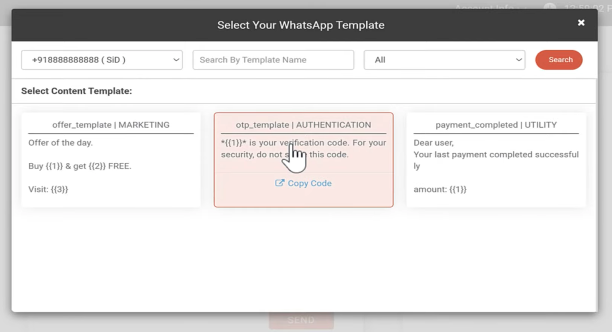
- Create a marketing template. In WhatsApp Manager, open the template section and click Add Template. Choose the Marketing category for offers, add a header (image, video or PDF), write the body with variables such as the customer name, add a footer and up to three buttons. Submit it for approval, which usually takes from a few minutes to a few hours. The Fast2SMS team can review it before you submit.
- Prepare your Excel or CSV file. Keep one customer per row: a column for the mobile number and one column for each template variable (for example name and coupon code). Remove duplicates and anyone who asked not to be contacted.
- Create the campaign. Pick your sender number and the approved template, then choose a saved group, upload the sheet or paste numbers. Map each variable to its column, check the preview and the cost shown before sending, and send now or schedule it for later.
- Track results and answer replies. Open delivery reports to see sent, delivered, read and failed per number. Customer replies land in the free live chat inbox, where your team or a chatbot can respond.
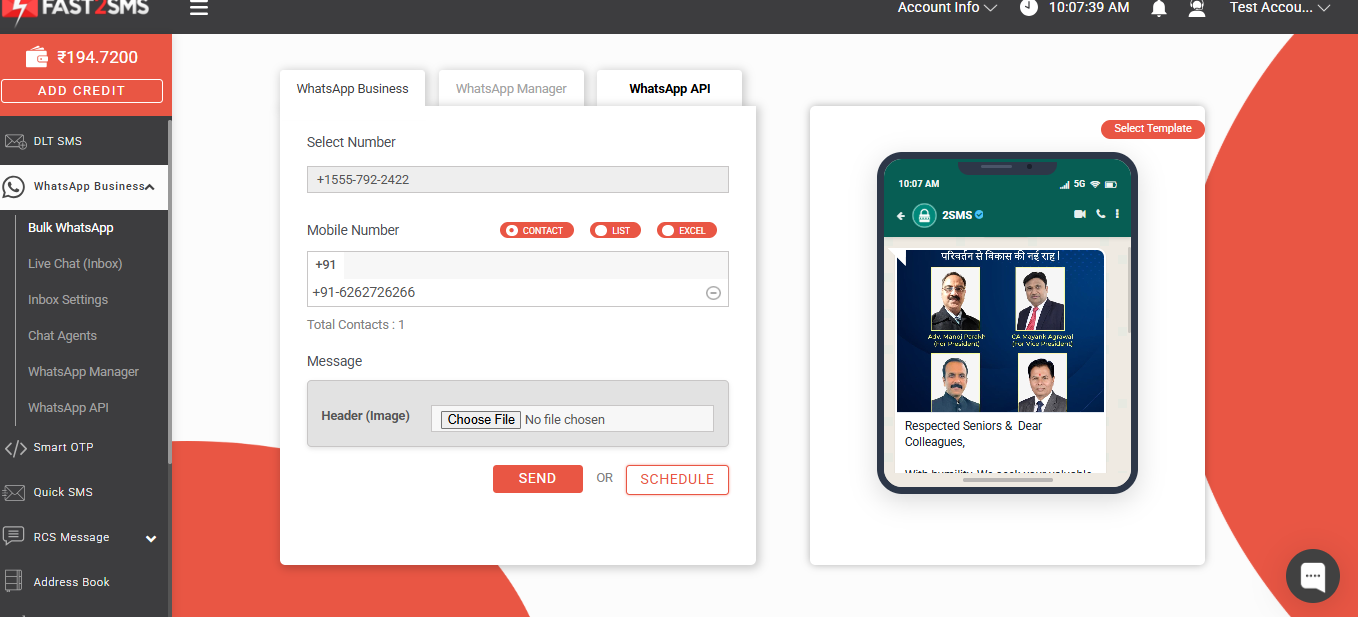
Sample Excel format for a bulk WhatsApp campaign
Suppose your approved template body reads: "Hi {{1}}, our festive collection is live. Use code {{2}} till Sunday." Your sheet then needs the number plus two variable columns:
| mobile | name (variable 1) | code (variable 2) |
|---|---|---|
| 98765XXXXX | Priya | FEST40 |
| 91234XXXXX | Rahul | FEST40 |
| 99887XXXXX | Anita | VIP50 |
Each customer receives the same approved template with their own name and code filled in. That small touch is what makes a bulk message feel personal. Different codes per row also let you see which customer group actually bought.
Writing templates that get approved and get clicks
Every bulk WhatsApp message starts from a template that Meta has approved. Meta checks two things: that the content follows WhatsApp’s policies, and that the category matches the content. Getting both right means faster approval and lower cost.
Choose the right category
- Marketing: anything promotional, such as offers, launches, discount codes, event invitations or "we miss you" messages.
- Utility: updates about a transaction or service the customer already has: order confirmed, shipped, payment received, appointment tomorrow, fee due. No promotional lines.
- Authentication: only OTPs and verification codes, with a copy-code button and no links. See the WhatsApp OTP API guide for this case.
Putting a discount line inside a utility template is a common reason for rejection or re-categorisation. Keep utility messages purely informational. The help article on utility vs authentication messages explains the difference with examples.
Template writing tips
- Lead with the benefit. "Flat 40% off till Sunday" works better than "Greetings from our store".
- Personalise. Use the customer’s name and, where it fits, their last order, city or plan.
- Keep it short. A few lines and one clear call to action. Long paragraphs get skipped.
- Avoid ALL CAPS and too many emojis. They look spammy and lower trust.
- Use buttons. A "Shop now" URL button or "Call us" button gets more action than a link inside the text.
- Add an opt-out line such as "Reply STOP to opt out". It reduces blocks and reports, which protects your number.
- Give sample values for variables when you submit, so the reviewer can see how the final message reads.
Templates can carry an image, video, document or location header, numbered variables in the body, a footer and up to three buttons: quick reply, URL, call or copy code. Invoices and brochures attach as PDFs, and the file name the customer sees can be set, for example an invoice number.
Daily limits, quality rating and how to avoid a ban
Even on the official API, WhatsApp controls how many business-initiated conversations a number can start each day. A new number starts with 250 per day. The limit rises as your number builds a good quality rating, and it rises faster once your business documents are verified by Meta. Fast2SMS support helps you submit those documents.
The quality rating is visible in WhatsApp Manager inside your Fast2SMS panel, next to your number, business name and status. It reflects how customers react to your messages. When many recipients block or report you, the rating drops, and a low rating can hold back your limit or restrict the number. In practice, bulk WhatsApp without a ban comes down to habits:
- Use only the official API. Never run an unofficial sender or extension on the same number.
- Send only to people who opted in. Never buy or scrape number lists.
- Start small and grow. Begin with your most engaged customers, then widen the audience as your limit increases.
- Segment your list. Send each group the offer that fits it rather than one message to everyone.
- Watch frequency. Too many marketing messages in a short time is the fastest way to collect blocks.
- Make opting out easy and honour every request quickly.
- Pick the correct category and keep promotional content out of utility templates.
- Keep your business details real. Use a working website, a consistent display name and an older Facebook account during onboarding.
Opt-in and opt-out: build a list people want
Opt-in means the customer agreed to receive WhatsApp messages from your business. It is the single biggest factor behind good delivery and a healthy quality rating, because people who expect your messages rarely block them. Good ways to collect it:
- A WhatsApp consent checkbox on your website signup, checkout or enquiry form.
- A QR code or click-to-chat link in your shop, on invoices or on packaging. When a customer messages you first, they have already started the conversation.
- Consent at the time of billing, admission, appointment booking or site visit.
- A WordPress form that collects mobile numbers, as shown in the help guide on collecting visitor mobile numbers in WordPress.
For opt-out, add a footer like "Reply STOP to opt out", keep an opt-out list, and remove those numbers from every future upload. Saving contacts as groups in the Fast2SMS address book makes this easier, because you clean the group once and reuse it across WhatsApp, SMS and RCS campaigns.
Handling replies: live chat inbox, chatbot and AI agent
A good bulk campaign starts conversations. Customers ask about sizes, prices, delivery or availability, and slow answers lose sales. On Fast2SMS, replies to your campaign arrive in the free live chat inbox, a WhatsApp Web style team inbox.
- Unlimited agents, free. Add your whole team to one number with no per-seat charge.
- Assignment, labels and notes. Route each chat to the right person and keep the full history.
- Android agent app. Agents can reply from their phones as well as the web.
- Free-form replies. Within 24 hours of the customer’s last message you can reply without a template, with text, images, documents, audio, video, location, stickers or reactions. These service replies cost ₹0.13 each.
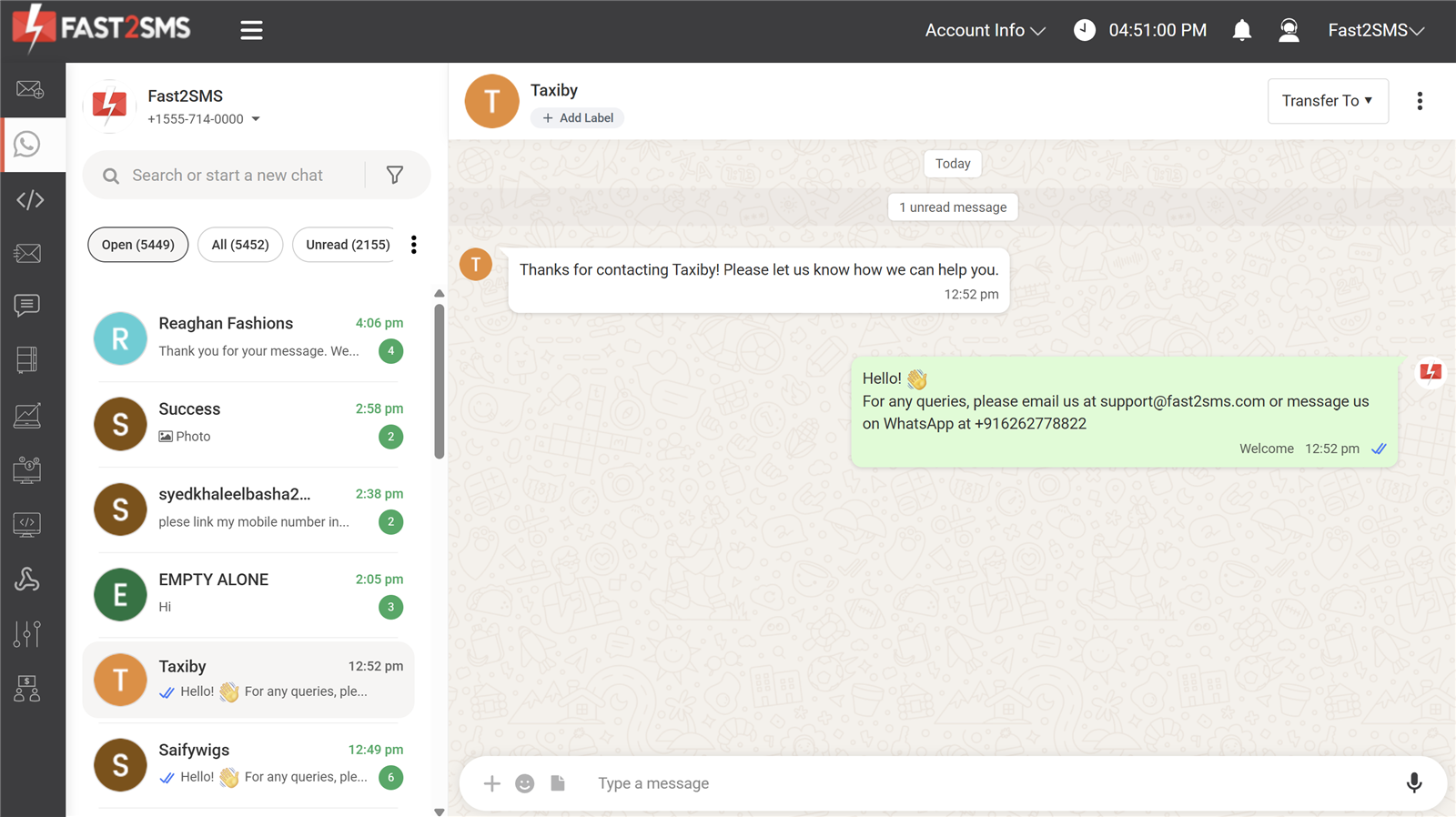
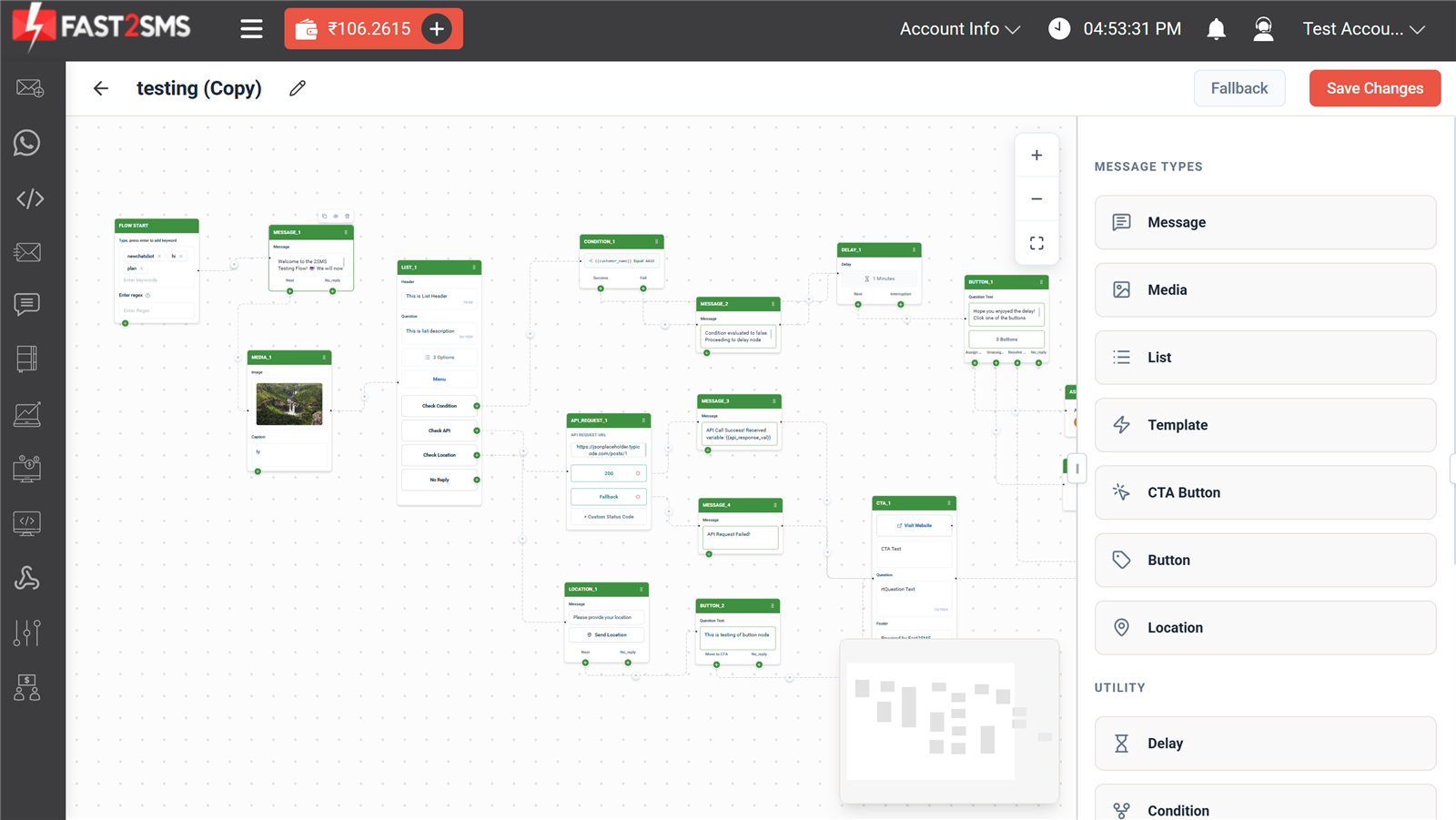
For common questions, the free drag-and-drop chatbot builder answers automatically, at midnight too. Keyword triggers such as "hi" or "price" start a flow; list menus, buttons, images and documents give answers; conditions branch the flow; an API-request block can fetch live data such as order status from your website; and a "Talk to an agent" option hands the chat to a human. You can also train an AI agent on your website, PDFs or FAQ so it handles routine questions before a person steps in. None of this is an add-on. Read the free WhatsApp chatbot guide to build your first flow.
Delivery reports and measuring results
Every campaign gets a per-number report: sent, delivered, read (with time) and failed with the reason, for example "not on WhatsApp", along with a day-by-day chart and Excel export. Failed messages are refunded automatically, and each refund is visible in the refund report and your transaction history.
The numbers worth watching after each campaign:
- Delivery rate: delivered divided by sent. A low figure usually means an old or unclean list.
- Read rate: read divided by delivered. It tells you whether your header and first line work.
- Replies and chats: how many customers started a conversation in the inbox.
- Sales or bookings: track them with a unique coupon code or a tagged link per campaign on your own website.
- Blocks and opt-outs: if these rise, send less often or segment better.
Developers can also receive every status (sent, delivered, read, failed) and every incoming message on their own server through webhooks, so a CRM or order system always knows what happened. The help article on how webhooks work includes sample payloads.
Sending bulk WhatsApp through the API
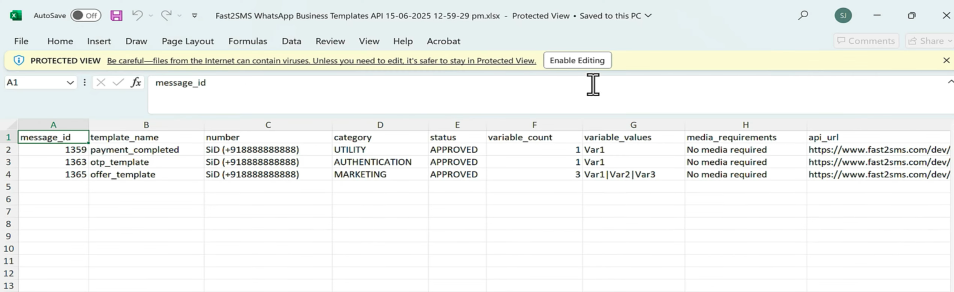
If your customers live in a CRM, an ERP or an online store, you can skip the Excel step and send from your own software. Every approved template gets a ready-made API in the Fast2SMS panel, and you can download the full list as a sheet. One GET request sends one template to one number; for bulk, your code loops over the list with one request per customer.
curl "https://www.fast2sms.com/dev/whatsapp?message_id=9&phone_number_id=579519398574288&numbers=9999999999&variables_values=Priya|FEST40&media_url=https://example.com/festive-banner.jpg" \
  -H "Authorization: YOUR_API_KEY"
message_id is your approved template, phone_number_id is your WhatsApp number’s ID, numbers is the customer’s 10-digit Indian mobile number and variables_values holds the variable values separated by a pipe. A successful call returns a request_id that you can match with delivery reports and webhooks. The WhatsApp message API guide and the full reference at docs.fast2sms.com cover session messages, media, template management and webhooks.
No-code options exist too. The free plugins for WooCommerce and Shopify send order notifications and abandoned-cart reminders on WhatsApp automatically, the Tally plugin sends invoices and payment reminders, and Zapier, Pabbly and CleverTap connect other tools. See all options on the integrations page. For journeys across channels, the Campaign flow builder can send WhatsApp, SMS, RCS or a voice call in sequence based on delivery, with delays between steps.
Bulk WhatsApp use cases by industry
| Industry | Bulk message example | Category |
|---|---|---|
| E-commerce and D2C | Festival sale with product image and "Shop now" button; abandoned-cart reminder; COD order confirmation | Marketing / Utility |
| Local retail | New stock arrived, weekend offer with store location | Marketing |
| Education and coaching | Fee due reminder, exam schedule, results day notice, admission open for new batch | Utility / Marketing |
| Clinics and hospitals | Appointment reminder the evening before with a confirm button, health camp invite | Utility / Marketing |
| Real estate | Project launch with brochure PDF, site visit booking, possession updates to buyers | Marketing / Utility |
| Restaurants and cafes | Festive menu with image, table booking confirmation | Marketing / Utility |
| Finance and NBFC | EMI reminder, payment receipt with PDF attached | Utility |
| Travel and events | Ticket confirmation, departure reminder, early-bird offer | Utility / Marketing |
| Distributors and B2B | Invoice and outstanding statement from Tally, new price list PDF to dealers | Utility / Marketing |
A pattern works across industries: use utility messages for everything a customer expects after an action (they cost less and get read), and keep marketing messages for well-targeted offers to opted-in customers. Online stores can go deeper with the guides on Shopify abandoned cart WhatsApp and WooCommerce WhatsApp notifications, and accountants on the Tally WhatsApp and SMS plugin.
When SMS or RCS fits better
WhatsApp is not the only bulk channel. Bulk SMS reaches every mobile number, including customers who do not use WhatsApp, and needs DLT registration in India; see the bulk SMS guide. RCS sends branded rich cards inside the default Android messages app; see the RCS business messaging guide. For reminders where people must hear the message, there is bulk voice call. All of them run from the same Fast2SMS wallet.
Fast2SMS compared with typical bulk WhatsApp providers
Many WhatsApp API platforms charge a monthly plan before you send a single message, then add fees for agents, chatbots or API access. Here is what a free Fast2SMS account includes, against what many providers in India put behind a paid plan:
| Item | Fast2SMS | Many providers |
|---|---|---|
| Monthly panel fee | ₹0 | Often ₹1,000 to ₹5,000 a month |
| Setup charge | ₹0 | Often a one-time setup fee |
| Onboarding support | Free, on a call | Self-serve or paid |
| Live chat inbox | Included | Paid add-on or separate plan |
| Agent seats | Unlimited, free | Per-agent charge |
| Chatbot builder | Free flow builder and AI agent | Paid add-on |
| API and webhooks | Included | Often a higher plan |
| Failed message refund | Automatic, to wallet | Often not refunded |
| Support | Chat, phone, email and meeting | Email ticket |
Based on publicly listed plans of common WhatsApp Business API providers in India; details vary by provider.
Why businesses choose Fast2SMS for bulk WhatsApp
- Official Meta API. Access is through Meta’s official Cloud API with free embedded signup; no WhatsApp Web automation is used.
- No monthly, setup or per-number fee. Pay only per message from a prepaid wallet, with recharges from ₹100.
- Delivery-basis billing. Failed WhatsApp messages are refunded to your wallet automatically within 48 hours.
- Everything included. Live chat inbox, unlimited agents, Android agent app, chatbot builder, AI agent, bulk campaigns, API and webhooks at no extra cost.
- Template help. The team reviews your templates before you submit them to Meta.
- One wallet, every channel. WhatsApp, bulk SMS, RCS, voice and OTP SMS with Smart OTP fallback.
- 15+ years of experience. Fast2SMS has served Indian businesses since 2011, with 99.9% uptime and published security certificates.
- Real support. Chat in the panel, phone +91-6262778822, email [email protected], or book a free meeting at fast2sms.com/meet.
Agencies and resellers can also offer bulk WhatsApp under their own brand through the white-label panel; see the WhatsApp Business API reseller guide.
Bulk WhatsApp campaign checklist
- Number connected through the official API and onboarding finished.
- Template approved in the correct category, with sample values checked.
- Header image or PDF ready, buttons tested, opt-out line in the footer.
- Contact list contains opted-in customers only, with duplicates and opt-outs removed.
- Variables mapped to the right Excel columns and the preview checked.
- Test message sent to your own number first.
- Audience size fits your current daily limit.
- Team or chatbot ready to answer replies in the inbox.
- Coupon code or tagged link in place to measure sales.
- Delivery report reviewed after the campaign, with refunds visible in transaction history.
Ready to send your first campaign? Signup free on Fast2SMS, connect your number and use the ₹50 free credit to test. Questions about onboarding or volume pricing can go to the team through the contact page or a free meeting at fast2sms.com/meet. Product details are on the WhatsApp Business API page.
Frequently asked questions
What is a bulk WhatsApp message?
It is one message sent to many customers at once, such as an offer, a reminder or an order update. Each customer receives it as a private one-to-one chat from your business, not in a group.
Is sending bulk WhatsApp messages legal in India?
Yes, when you use the official WhatsApp Business API with approved templates and send to customers who agreed to hear from you. Blasting messages through the normal app with unofficial tools breaks WhatsApp’s terms.
What is the safest way to send bulk WhatsApp messages?
Use the official WhatsApp Business API through a provider like Fast2SMS, send approved templates, and message only opted-in customers. This is the method Meta built for businesses that send at scale.
What is the difference between a WhatsApp broadcast list and a bulk WhatsApp campaign?
A broadcast list in the WhatsApp Business app holds up to 256 contacts and is built by hand on one phone. A bulk campaign on the official API sends an approved template to your whole list from Excel, groups or the API, with personal variables and a per-number delivery report.
Do customers need to save my number to get bulk WhatsApp messages?
No. Template messages sent through the official API reach any WhatsApp user, and your business name shows on the message.
Can I send bulk WhatsApp messages from my personal WhatsApp number?
You should not. Mass sending from a personal number with automation tools gets the number banned. Use a business number connected to the official API instead.
Can I use my WhatsApp Business app number for bulk campaigns?
Yes. Through WhatsApp coexistence you connect your existing WhatsApp Business app number to the official API and keep using the app on your phone at the same time.
What is a bulk WhatsApp message sender?
It is any tool used to send one message to many WhatsApp users. The safe kind is a panel on the official WhatsApp Business API, such as Fast2SMS; unofficial sender software and extensions put your number at risk.
Which businesses should use bulk WhatsApp messaging?
Any business that has customers who opted in: online stores, retailers, schools and coaching centres, clinics, real estate firms, restaurants, finance companies, travel agents and distributors. See the use-case table in this guide for examples.
Is bulk WhatsApp better than bulk SMS?
They do different jobs. WhatsApp supports images, PDFs, buttons and two-way chat; SMS reaches every mobile number, including people without WhatsApp. Many businesses use both from one Fast2SMS wallet; see the bulk SMS guide.
How is bulk WhatsApp different from RCS messaging?
WhatsApp messages arrive in the WhatsApp app, while RCS messages arrive as branded rich cards in the default Android messages app. Both are available on Fast2SMS; read the RCS business messaging guide.
What does WhatsApp bulk SMS mean?
It is another name for a bulk WhatsApp campaign: the same message, usually a template, sent to many customers on WhatsApp instead of as a text SMS.
Can I send bulk WhatsApp messages for free?
The platform is free on Fast2SMS, with no monthly or setup fee, and you get ₹50 free credit after signup for tests. Business messages themselves are charged per message, at rates set by category.
What is the bulk WhatsApp message price in India?
On Fast2SMS at the time of writing: ₹0.95 per marketing message, ₹0.25 per utility or authentication message and ₹0.13 per service reply, excluding 18% GST. See WhatsApp pricing.
How much does it cost to send 1,000 marketing messages on WhatsApp?
At ₹0.95 per marketing message, 1,000 messages cost ₹950 plus GST on Fast2SMS. Messages that fail are refunded to your wallet.
How much do 10,000 bulk WhatsApp messages cost?
About ₹9,500 for marketing, ₹2,500 for utility or authentication and ₹1,300 for service replies, all plus GST, at current Fast2SMS rates. There is no platform fee on top.
Does Fast2SMS charge a monthly fee for bulk WhatsApp?
No. There is no monthly panel fee, no setup fee and no per-number fee. You pay only for the messages you send.
Is there a one-time setup charge for WhatsApp campaigns?
No. Number onboarding and the panel are free, and the Fast2SMS team can do the onboarding with you on a call at no cost.
Do I pay for bulk WhatsApp messages that fail?
No. WhatsApp messages bill on delivery basis. If a message fails, for example because the number is not on WhatsApp, the amount is refunded to your wallet automatically.
How quickly are failed WhatsApp messages refunded?
Failed messages are refunded automatically within 48 hours, and a message still undelivered after 48 hours is refunded too. Every refund shows in the refund report and transaction history.
Is GST added to WhatsApp recharges?
Yes, 18% GST applies on the recharge amount, and a GST invoice is generated for every payment. Add your GSTIN in Settings to have it printed on the invoice.
What is the minimum recharge to start bulk WhatsApp?
You can recharge from ₹100 by UPI, card or net banking. New accounts also get ₹50 free credit after signup.
Does my WhatsApp wallet balance expire?
No. WhatsApp rates have unlimited validity and your wallet balance never expires.
Am I charged when customers reply to my campaign?
No. Incoming messages are free. Only your replies are charged, at the service rate of ₹0.13 when sent within 24 hours of the customer’s last message.
Can I get a lower rate for lakhs of WhatsApp messages?
Yes. High-volume plans go down to ₹0.11 per message. Share your monthly volume with the sales team through the pricing page or a free meeting.
Why do marketing messages cost more than utility messages?
Pricing follows the category Meta assigns to each template. Promotional content is marketing and is priced at ₹0.95, while transaction updates are utility at ₹0.25 on Fast2SMS.
Can I see the campaign cost before sending?
Yes. The panel shows the cost of the campaign before you confirm, so you know exactly what will be deducted from your wallet.
How do I pay for WhatsApp credits on Fast2SMS?
Recharge your prepaid wallet by UPI, card or net banking from the panel. The same wallet works for WhatsApp, SMS, RCS and Smart OTP.
What do I need to start sending bulk WhatsApp messages?
A free Fast2SMS account, a genuine older Facebook account, a business portfolio, a working website and a phone number that is not on WhatsApp yet (or your WhatsApp Business app number through coexistence).
How soon can I send my first bulk WhatsApp campaign?
Connecting the number takes a few minutes and template approval usually takes minutes to a few hours. Most businesses are live within a day of connecting their number.
Can I use a brand-new number for bulk WhatsApp?
Yes, any number that is not registered on WhatsApp yet can be connected. A new number connected to the API is managed from Fast2SMS and cannot also be used in the mobile app.
Can a landline number send WhatsApp campaigns?
Yes. A landline that can receive a call for verification can be connected to the WhatsApp Business API.
Will I lose the WhatsApp Business app on my phone after connecting?
Not if you choose "Connect your existing WhatsApp Business app" during onboarding. With coexistence the number keeps working in the app, on WhatsApp Web and in Fast2SMS together.
Do I need a website to send bulk WhatsApp?
Yes. Meta may review your website during onboarding, so keep it working with your business name, logo and terms and conditions. A missing or broken site can get the account suspended.
Why do I need a Facebook account for WhatsApp campaigns?
Your WhatsApp number is connected to Meta through Facebook login during embedded signup. Use a genuine older account, because Meta can block new accounts during onboarding.
What happens if I close the browser before clicking Finish during onboarding?
The account is not created and you have to repeat the whole process from the start. Always click Finish at the end.
Do I need company documents to start bulk WhatsApp?
You can connect a number and send within the starting daily limit. To raise the limit, business documents are submitted to Meta for verification, and Fast2SMS support helps you with that.
Will Fast2SMS help me set up WhatsApp campaigns?
Yes, for free. The team can join you on a call for onboarding, template review and your first campaign. Book a slot at fast2sms.com/meet.
Can I connect more than one WhatsApp number to one account?
Yes. Fast2SMS charges no per-number fee, so you pay only for the messages each number sends.
How do I send bulk WhatsApp messages from Excel?
Create an approved template, prepare an Excel sheet with one customer per row (mobile number plus a column for each variable), upload it in the campaign screen, map the variables, check the cost and send or schedule.
What format should my Excel file have for WhatsApp campaigns?
One customer per row, a column for the mobile number and one column for each template variable, such as name or coupon code. Remove duplicates and opted-out numbers before uploading.
Can I upload a CSV instead of an Excel file?
Yes. Contacts can be uploaded as an Excel or CSV sheet, picked from a saved group, or pasted as numbers.
Can I paste numbers instead of uploading a sheet?
Yes. For quick campaigns you can paste numbers directly in the campaign screen.
How do I add each customer’s name to a bulk WhatsApp message?
Put a variable such as {{1}} in your template body, add a name column to your sheet and map that column to the variable. Every customer then sees their own name.
Which number format should I use in my contact sheet?
For Indian customers use the 10-digit mobile number, the same format the Fast2SMS WhatsApp API uses, and keep the column clean of spaces and duplicates.
Can I save contacts as groups for future campaigns?
Yes. The address book lets you save contacts and build groups, which you can reuse across WhatsApp, SMS and RCS campaigns.
What happens if a number in my list is not on WhatsApp?
That message fails with the reason "not on WhatsApp" in the delivery report, and the amount is refunded to your wallet automatically.
Can I send bulk WhatsApp from Zoho CRM or another CRM?
Yes, through the Fast2SMS REST API or connectors such as Zapier and Pabbly. Developers can trigger a template for each contact with one API request. See integrations.
Can I send WhatsApp messages to a list kept in Google Sheets?
Download the sheet as Excel or CSV and upload it in the campaign screen, or connect your workflow through the API or Zapier and Pabbly.
Why do I need an approved template for bulk WhatsApp?
WhatsApp requires a Meta-approved template for any message your business sends first. It protects users from spam and is the reason official bulk messages do not get numbers banned.
How long does WhatsApp template approval take?
Usually from a few minutes to a few hours. An approval badge appears on the template in the panel when it is ready to send.
Which template category should I pick for a discount offer?
Marketing. Offers, launches, coupon codes and festival campaigns are promotional and belong in the marketing category.
Can I send order and shipping updates as utility messages?
Yes. Updates about a transaction the customer already made, like order confirmed or shipped, are utility messages at ₹0.25 each, as long as they contain no promotional lines.
Can bulk WhatsApp messages include images, videos or PDFs?
Yes. Templates can carry an image, video, document or location header. PDFs such as brochures or invoices can show a custom file name to the customer.
How many buttons can I add to a WhatsApp template?
Up to three buttons per template.
What kinds of buttons can a bulk WhatsApp message have?
Quick reply buttons, URL buttons that open a link, call buttons and copy-code buttons (used for OTPs).
Why was my WhatsApp marketing template rejected?
Common reasons are a category that does not match the content, unclear variables without sample values, or content WhatsApp does not allow. Fix the issue and resubmit; the Fast2SMS team can review it first.
Can Fast2SMS review my template before I submit it to Meta?
Yes. The team reviews templates before you submit them to Meta, at no cost, which helps avoid rejections.
Can I use emojis in bulk WhatsApp messages?
Yes, a few emojis are fine. Avoid ALL CAPS and excessive emojis, because they look spammy and lower trust.
What is a good bulk WhatsApp message format?
A rich header image, a short personal body that leads with the benefit, a footer like "Reply STOP to opt out" and one or two clear buttons such as "Shop now".
Do I get sample templates to test with?
Yes. After onboarding, three pre-approved test templates (marketing, utility and authentication) are available so you can send a test right away.
Should I add an opt-out line to marketing templates?
Yes. A footer such as "Reply STOP to opt out" gives customers an easy exit, which reduces blocks and reports and protects your quality rating.
Can I schedule a bulk WhatsApp campaign for later?
Yes. When you create the campaign you can send it immediately or schedule it for a set date and time.
How many contacts can I add to one WhatsApp campaign?
You can upload your full list, but the number of business-initiated conversations per day depends on your number’s current limit, which starts at 250 for new numbers and rises over time.
What is the best time to send bulk WhatsApp messages?
Send when your customers are most likely to read, usually during normal business hours. Test a few time slots and compare read rates in the delivery report.
How often can I send WhatsApp marketing messages?
There is no fixed rule, but frequent marketing messages lead to blocks, which hurt your quality rating. Send relevant offers to segmented lists and watch opt-outs after each campaign.
Can I send different offers to different customer groups?
Yes. Save customers into groups and send each group its own template or variables, for example a VIP code for repeat buyers.
How do I test a campaign before sending to everyone?
Send the template to your own number first, using the ₹50 signup credit if you are new, and check the header, variables and buttons.
Will bulk WhatsApp messages show my business name?
Yes. Messages from the official API show your business display name, so customers know who is writing even if they never saved your number.
Can customers reply to a bulk WhatsApp message?
Yes. Replies arrive in the Fast2SMS live chat inbox, where your team or a chatbot can answer.
What is the 24-hour window in WhatsApp campaigns?
When a customer messages you, you can reply freely without a template for 24 hours after their last message. These replies are service messages at ₹0.13 each.
How many bulk WhatsApp messages can I send per day?
A new number can start 250 business-initiated conversations per day. The limit rises as your quality rating grows and after Meta verifies your business.
How can I increase my WhatsApp daily messaging limit?
Keep a good quality rating by sending relevant messages to opted-in customers, and get your business documents verified by Meta. Fast2SMS support helps you submit the documents.
How do I send bulk WhatsApp without getting banned?
Use only the official API, send approved templates, message only opted-in customers, segment your list, avoid sending too often, add an opt-out line and never run unofficial tools on the same number.
Why do bulk WhatsApp sender extensions get numbers banned?
They automate WhatsApp Web or the app to mass-send, which breaks WhatsApp’s terms. Meta detects the pattern, messages stop delivering and the number gets banned.
Are free bulk WhatsApp sender apps and APKs safe?
No. They are not the official API, they can expose your chats to a third party, and they put your number at high risk of a ban.
Can a number be banned on the official WhatsApp API?
The risk is low when you follow the rules. Numbers that collect many blocks and reports can still be restricted, so send only wanted messages to opted-in customers.
What is the WhatsApp quality rating?
It is a score that reflects how customers react to your messages. You can see it next to your number in WhatsApp Manager inside the Fast2SMS panel.
How do blocks and reports affect my WhatsApp number?
They lower your quality rating. A low rating can hold back your daily limit or restrict the number, so act quickly if opt-outs and blocks rise.
Can I buy a contact list for bulk WhatsApp marketing?
No. Bought or scraped lists cause blocks and reports that damage your number. Send only to customers who agreed to hear from you.
What does opt-in mean for WhatsApp marketing?
It means the customer agreed to receive WhatsApp messages from your business, for example by ticking a consent box or messaging you first.
How can I collect WhatsApp opt-ins from customers?
Add a WhatsApp consent checkbox to website and checkout forms, use QR codes or click-to-chat links in your shop and on invoices, and ask at billing, admission or booking time.
What should I do when a customer replies STOP?
Add them to your opt-out list and remove the number from every future upload or group. Honouring opt-outs quickly protects your quality rating.
Which kind of number is best for long-term bulk WhatsApp?
A number your business owns and will keep, because it becomes your WhatsApp identity with customers. It must not already be on WhatsApp, unless you connect your WhatsApp Business app number through coexistence.
Where do replies to my WhatsApp campaign go?
Into the free Fast2SMS live chat inbox, a WhatsApp Web style team inbox where agents see the full history.
Is the WhatsApp live chat inbox free on Fast2SMS?
Yes. The live chat inbox is included with every account at no extra cost.
How many agents can answer WhatsApp replies?
As many as you need. Fast2SMS has no per-seat fee, so you can add your whole team.
Is there a mobile app for agents to reply to WhatsApp chats?
Yes. Agents can reply from the web panel or the Fast2SMS Agent app on Android.
Can a chatbot answer replies to my bulk campaign automatically?
Yes. The free drag-and-drop chatbot builder starts flows on keywords like "hi" or "price" and replies with menus, buttons, images and documents. See the free WhatsApp chatbot guide.
Can the WhatsApp chatbot hand a chat to a human?
Yes. A "Talk to an agent" option moves the conversation into the live chat inbox, where a team member takes over with the full history.
What is the AI agent in Fast2SMS WhatsApp?
It is an assistant you train on your website, PDFs or FAQ. It answers routine questions first and lets a human step in when needed, at no extra cost.
Can I add labels and notes to WhatsApp chats?
Yes. In the inbox you can assign chats, add labels and notes, and transfer chats between agents.
Can I send a catalogue PDF when a customer replies?
Yes. Within the 24-hour window you can reply with documents, images, videos, audio, location, stickers or reactions, and a chatbot can send a PDF from a menu option.
Can I see who read my bulk WhatsApp message?
Yes. The delivery report shows sent, delivered, read (with the time) and failed status for each number.
Can I download the WhatsApp delivery report in Excel?
Yes. Reports include a day-by-day chart and can be exported to Excel.
Why does a WhatsApp message show as failed?
The report gives the reason, such as the number not being on WhatsApp. Failed messages are refunded to your wallet automatically.
Where can I check WhatsApp refunds?
In the refund report and in transaction history, which lists every recharge, debit and refund with date, campaign and category.
Can my CRM receive WhatsApp delivery status automatically?
Yes. Webhooks push sent, delivered, read, failed and incoming-message events to your server. See how webhooks work.
How do I measure sales from a bulk WhatsApp campaign?
Use a unique coupon code or a tagged link per campaign, then compare sales on your website or billing system with the delivered and read counts from the report.
Is there a bulk WhatsApp API?
Yes. Every approved template gets a ready-made API in the Fast2SMS panel. Your software sends one request per customer, and statuses come back by webhook.
How do I send bulk WhatsApp messages through the API?
Call GET https://www.fast2sms.com/dev/whatsapp with your API key, the template message_id, your phone_number_id, the recipient number and variables_values, looping over your list. See the WhatsApp message API guide.
Where do I find my WhatsApp API key in Fast2SMS?
Open the WhatsApp API section of the panel. Your authorization key is shown there, and one click downloads a sheet with a ready API for every approved template.
Do I need my own Meta developer account to use the bulk API?
No. You connect the number with Facebook login in the Fast2SMS panel and use the simple Fast2SMS REST API; Fast2SMS handles the Meta side.
Where is the bulk WhatsApp API documentation?
At docs.fast2sms.com, covering template messages, session messages, media, template management, webhooks and delivery reports.
Can Shopify or WooCommerce send WhatsApp messages automatically?
Yes. Free official plugins send order notifications, COD confirmations and abandoned-cart reminders on WhatsApp. See the Shopify and WooCommerce guides.
Can I send invoices and payment reminders on WhatsApp from Tally?
Yes. The free Fast2SMS plugin for TallyPrime sends invoices, receipts and payment reminders on WhatsApp with the PDF attached. See the Tally WhatsApp guide.
Can WhatsApp and SMS work together in one customer journey?
Yes. The Campaign flow builder can send SMS, WhatsApp, RCS or a voice call in sequence based on delivery, and Smart OTP falls back between WhatsApp and SMS for OTPs.
How do I contact Fast2SMS about bulk WhatsApp?
Chat inside the panel, call +91-6262778822, email [email protected], or use the contact page.
Can I book a meeting to plan my WhatsApp campaigns?
Yes. Schedule a free meeting at fast2sms.com/meet for onboarding, template help or volume pricing.
How long has Fast2SMS been in business?
Fast2SMS has served Indian businesses since 2011, more than 15 years, with 99.9% uptime.
Is my contact list safe on Fast2SMS?
Contacts, chats and templates are stored encrypted, and every panel page and API call runs over HTTPS. Fast2SMS is ISO 27001 and SOC 2 Type 2 certified and VAPT tested; see the certificates.
Can agencies resell bulk WhatsApp under their own brand?
Yes. The white-label reseller panel covers WhatsApp Business API, bulk SMS and RCS on your own domain and branding. See the WhatsApp reseller guide.
How do I start sending bulk WhatsApp messages today?
Signup free on Fast2SMS, connect your number from the WhatsApp Business tab, get a template approved and send your first campaign using the ₹50 free credit.