How to Send Bulk SMS in India: Step-by-Step Guide With Free DLT Support
To send bulk SMS in India, create a free account on Fast2SMS (₹50 test credit is added at signup), register your business, sender ID and message templates on a DLT portal with Fast2SMS's free DLT support, then upload your numbers from Excel or CSV and send or schedule the campaign from the panel or the API. OTPs and service updates reach every number at any time, while promotional SMS reach only Non-DND numbers between 10 am and 9 pm. If you have to send before your DLT approval arrives, Quick SMS works without DLT.
This guide walks you through the whole process in plain words, from the first click to reading your delivery report. It is written for shop owners, schools, clinics, online stores, startups and developers who want to get it right the first time.
What bulk SMS is and what you need before you start
Bulk SMS means sending one message, or one personalised template, to hundreds or lakhs of mobile numbers at once from a web panel or an API instead of typing on a phone. Businesses use it for login OTPs, order and delivery updates, fee and EMI reminders, appointment alerts, attendance notices and festival offers. An SMS needs no internet connection and no app on the customer's phone, so it reaches every handset in India, from the newest smartphone to a basic feature phone.
In India every business SMS passes through a system called DLT, which TRAI (the Telecom Regulatory Authority of India) made compulsory to cut down spam and fraud. That changes how you start. Before your first campaign, three things must be registered: your business, the sender name customers will see, and the exact wording of each message. It sounds like paperwork, and it is, but it is done once, and Fast2SMS helps you through it without any charge.
Your checklist
- A mobile number and email address for your Fast2SMS account.
- Business documents for DLT: a PAN card, a GST certificate or another business proof, an address proof and an authorisation letter on your company letterhead.
- An idea for a six-character sender name (called a header) that clearly matches your brand.
- The messages you plan to send, written once as templates, with the changing parts (name, amount, date) marked as variables.
- Your customers' numbers in an Excel or CSV sheet.
- A small recharge, from ₹100, when you are ready to send beyond the free test credit.
The five steps at a glance
The order matters. Many first-time senders recharge, upload a list and only then discover that nothing can go out without an approved template. Follow the steps in sequence and you will usually be sending within a few working days of signing up, with Quick SMS available in between if something cannot wait.
Step 1: Create your free Fast2SMS account
- Open the signup form. Go to fast2sms.com and choose Signup. You register with your mobile number, which is verified with an OTP.
- Add your basic details. Your name and email are enough to begin. You can add your GSTIN later in Settings so it is printed on recharge invoices.
- Collect the free credit. ₹50 is added to your wallet automatically. No card is needed, and there is no time limit on the test credit. At the default rate of ₹0.25 per SMS, that covers about 200 test messages.
- Look around the panel. You will find DLT SMS, Quick SMS, Dev API, Delivery Reports and Transaction History, along with WhatsApp, RCS and Voice in the same account and the same wallet.
The account itself costs nothing. There is no setup fee, no monthly rental and no minimum commitment. You recharge only when you want to send more than the test credit allows, starting from ₹100.
Step 2: Register on DLT with free help from Fast2SMS
DLT in plain words
DLT stands for Distributed Ledger Technology. In practice it is a shared, blockchain-based register run by the telecom operators under TRAI's rules. Your business registers on it once as a Principal Entity. You then register your headers (sender IDs) and your content templates (message wording). Every time you send, the operator checks that the header and the text match what you registered. A message that does not match is blocked.
All operator portals share the same data, so you register on any one of them and your entity ID works everywhere. You do not send SMS from the DLT portal; you only register there. Sending still happens from your Fast2SMS panel or API.
| DLT term | What it means for you |
|---|---|
| Principal Entity (PE) | Your business: a proprietorship, partnership, company, school, trust, NGO, government body or other organisation. |
| Telemarketer (TM) | The SMS provider that delivers your messages. For Fast2SMS this is listed under SID Groups. |
| Header | The six-character sender name customers see, such as FSTSMS. It was earlier called the sender ID. |
| Consent template | The wording you show customers when you ask permission to send promotional messages. |
| Content template | The exact message text, with variables for the parts that change. |
| Access provider | The telecom operator that runs the DLT portal, such as Jio, Airtel, Vi or BSNL. |
This guide keeps DLT short on purpose. For the full walkthrough with portal screenshots, read Fast2SMS's DLT registration guide.
Which portal to use, and what it costs
The DLT portals are run by Jio (TrueConnect), Vi (Vilpower), Airtel, BSNL, Videocon (Smartping) and Tata Teleservices. Fast2SMS's DLT guide recommends Jio because registration there is free, and its DLT FAQ also lists BSNL and Videocon as free portals, while the Vi portal charges ₹5,900. These fees belong to the operators and can change, so confirm the amount on the portal when you register. Fast2SMS does not charge anything for helping you.
Documents you will need
- Identity proof: PAN card.
- Address proof: passport, voter ID or driving licence.
- Business proof: GST registration, certificate of incorporation, TAN, trade licence or company PAN card.
- Letter of authorisation: on your company letterhead, signed by the owner, naming the person who registers on the company's behalf.
On the Jio portal each uploaded file must be smaller than 5 MB. Make sure the business name, address and signatory details are identical across all documents. Mismatched details are the most common reason an entity application is rejected.
How long it takes
After you submit, the operator verifies your details and emails you the entity ID. Fast2SMS's Jio guide mentions about two to three days for entity approval, and its DLT FAQ says three to five working days. Header approval can take a few more working days on top of that. While you wait, you can draft your templates and prepare your contact list, so nothing is wasted.
Link Fast2SMS as your telemarketer
Once your entity is active, log in to the DLT portal and bind Fast2SMS to your entity, which the portals call PE-TM binding. On Jio, open Campaign, then My Telemarketer, then Manage Telemarketer, search for SID GROUPS, drag that row into your telemarketer table and click Apply. The telemarketer name and ID for each portal are listed on the DLT registration page, and the telemarketer guide for Jio shows each click.
What free DLT support covers
The Fast2SMS team walks you through entity, header and template registration on the operator portal and reviews your template wording before you submit it, which avoids most rejections. You can ask in the panel chat, call +91 6262778822, email [email protected] or book a free call at fast2sms.com/meet. Many senders simply send their draft templates to support first and submit only after the review.
Choose the right SMS route before you register templates
When you register a template you pick a category, and that category decides who receives the message and when. Choose wrongly and an important message will quietly fail to reach customers who have DND switched on. Decide the route first, then write the template.
| Route | Use it for | DND numbers | Sending time | Example |
|---|---|---|---|---|
| Transactional | One-time passwords. Older rules kept this category for banks; Fast2SMS's current template library registers OTPs from apps, websites and online stores here too. | Delivered | Any time | "Your OTP to log in to BRAND is 482917. It is valid for 10 minutes." |
| Service Implicit | Information linked to a purchase or an ongoing service: order, payment, delivery, appointment, fee and attendance messages. | Delivered | Any time | "Your order ORD4821 is out for delivery today." |
| Service Explicit | Marketing-style messages to customers who gave consent through a registered consent template. | Not delivered in the Fast2SMS panel | 10 am to 9 pm | "Renew your policy before 15 September and save 15%." |
| Promotional | Offers, sales, new arrivals, events and anything selling. | Not delivered | 10 am to 9 pm | "Diwali sale: flat 40% off till Sunday." |
OTPs deserve a special mention. On Fast2SMS they travel on priority routes and usually reach the handset in one to two seconds. If you send OTPs from an app or website, look at Smart OTP, which can fall back to WhatsApp automatically when an SMS is not delivered.
Step 3: Get your sender ID and templates approved
Sender ID (header) rules
- A header has exactly six characters and must represent your brand or company name.
- Headers for informative routes (Transactional, Service Implicit, Service Explicit) use six letters only, with no numbers, for example FSTSMS.
- Promotional headers have traditionally been six digits, with the first digit set by your business category (for example 3 for education and 4 for healthcare). Fast2SMS's newest template library notes that promotional templates can now use your alphanumeric brand header, so ask DLT support which rule your portal applies today.
- Headers are case-sensitive: FSTSMP, fstsmp and Fstsmp are three different headers.
- Names of celebrities, politicians, other companies' trademarks or government bodies are refused. If your header does not resemble your entity name, keep documents ready that show the connection.
- A registered header has lifetime validity, but it is cancelled if it stays unused for more than 90 days.
Step-by-step screens are in the header registration guide for Jio.
Writing a content template
A content template is your message with fixed text plus placeholders (variables) for the parts that change for each customer. The operator compares every outgoing SMS with the approved template, so the fixed words must stay exactly the same each time.
Good templates follow a few simple habits:
- End the message with your company or brand name. Templates without it may be rejected.
- Keep one clear purpose per template. A school might register separate templates for attendance, fee reminders and exam dates.
- Stay within 160 characters for English (70 for Hindi and other Unicode scripts) where possible, because longer messages are sent and charged as multiple parts.
- Prepare a sample message with realistic values for every variable. New registrations ask for one, and it must mirror the template exactly.
The variable tags required since January 2026
Templates used to mark every variable with a single generic tag, {#var#}, which let anything be inserted. Under the newer rule, templates created after 14 January 2026 must use typed tags, and a value that does not fit its tag can make delivery fail. Fast2SMS's article on the 2026 variable tagging rules explains the change, including the 60-day window given to older templates.
| Tag | What goes in it | Maximum length |
|---|---|---|
| {#numeric#} | Digits only: OTPs, amounts, account numbers | 40 digits |
| {#alphanumeric#} | Letters and numbers: names, order IDs, ticket numbers (must not start with www or http) | 40 characters |
| {#url#} | A web link registered as a call-to-action | 120 characters |
| {#urlott#} | An app download or OTT link | 120 characters |
| {#cbn#} | A callback or support phone number | 3 to 14 characters |
| {#email#} | An email address | 40 characters |
Two rules catch many people out. First, links and phone numbers used in {#url#}, {#urlott#} or {#cbn#} must be registered as call-to-actions for the template, otherwise they fail even on an approved template. Second, only {#alphanumeric#} variables may sit next to each other; every other tag needs fixed text between variables. The variable tagging reference has the details, and the sample SMS templates library has ready wording for OTPs, stores, schools, appointments and offers.
Example templates by business
| Business | Category | Template |
|---|---|---|
| App or website | Transactional | Use {#numeric#} as your BRAND login code. It expires in 10 minutes. Please do not share it. - BRAND |
| Online store | Service Implicit | Hi {#alphanumeric#}, payment of Rs {#numeric#} for order {#alphanumeric#} is received. Thank you for shopping. - BRAND |
| Coaching class | Service Implicit | Dear parent, the fee of Rs {#numeric#} for {#alphanumeric#} is due this week. Pay online: {#url#} - BRAND |
| Clinic | Service Implicit | Your visit to BRAND is booked for {#alphanumeric#}. To change it, call {#cbn#}. - BRAND |
| Retail shop | Promotional | Festive week at BRAND: get {#numeric#}% off on all items till Sunday. See offers: {#url#} - BRAND |
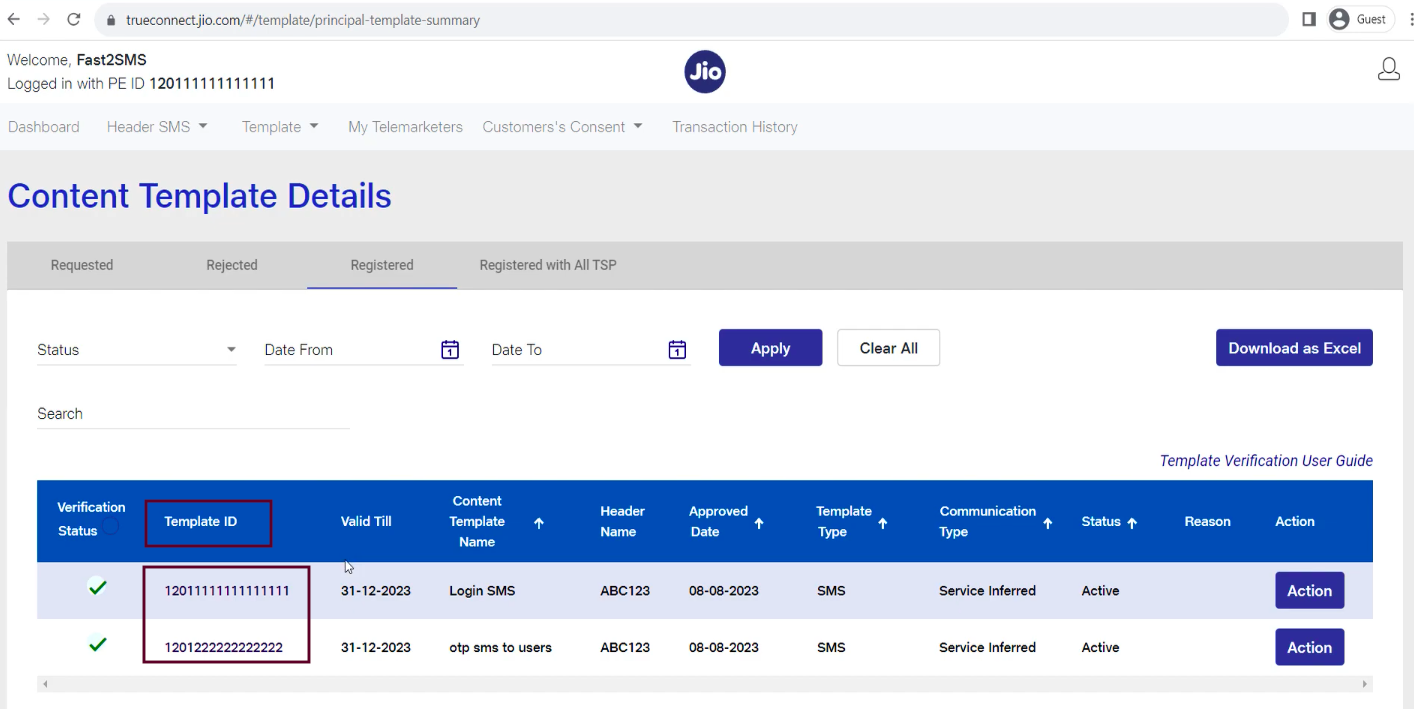
Replace BRAND with your own name, then submit each template on the portal under Template, Content Template Registration. Once approved, it moves to the Registered tab with its template ID. The guide on getting a DLT template ID shows exactly where that ID appears.
Add your approved details to Fast2SMS
- Entity. In the DLT SMS section of your panel, add your entity name and entity ID exactly as shown on the DLT portal, with a screenshot. Copy and paste instead of typing to avoid errors.
- Sender IDs. Add only headers that are already approved and active on the portal, with a screenshot of the Registered tab. Pending headers are not accepted.
- Templates. Add each approved template ID, its category and the exact text, again with a screenshot.
- Verification. The Fast2SMS team matches your entries against the screenshots. Once activated, each template appears under the sender IDs it was registered with, ready to pick when you compose.
Step 4: Prepare and upload your contact list
With templates approved, the remaining work is the same for every campaign. Start with a clean list:
- One number per row, as a 10-digit Indian mobile number, in an Excel or CSV sheet.
- Extra columns for variables. Add columns for the values your template needs, such as customer name, order number or amount. In the panel you map each column to a template variable, and every row gets its own personalised message.
- Remove duplicates and wrong numbers before uploading, so you do not pay for messages that cannot be delivered.
- Use groups. Save regular lists (all parents, all members, Mumbai customers) in the address book. Groups can be reused across SMS, WhatsApp and RCS campaigns.
- Message only people who know you. For promotional campaigns, consent matters under DLT, and a relevant list also gives better results.
For a handful of numbers you can simply paste them into the number field. For thousands, upload the sheet.
Step 5: Send now or schedule, then track delivery
- Open DLT SMS in the panel and choose your approved sender ID.
- Pick the template. Only templates mapped to that sender ID are listed.
- Add the numbers by pasting them, uploading your sheet or choosing a saved group, and map the sheet's columns to the template variables.
- Check the live preview. It shows the final SMS exactly as a customer will see it, with the character count and the number of parts.
- Send now or schedule. To schedule, pick a date and time; the campaign goes out then. Pending scheduled campaigns can be cancelled from the panel before they start.
- Confirm and watch the delivery report fill in.
Message length and languages
A standard English SMS holds 160 characters. Hindi, Marathi, Gujarati, Tamil, Telugu, Kannada, Bengali, Malayalam, Punjabi, Odia and other scripts are sent as Unicode SMS, where one part holds 70 characters. Longer messages are split into parts, and each part counts as one SMS, so a 200-character English message costs two SMS per number. The live counter in the panel shows this before you send.
Reading delivery reports
Every campaign shows each number with its status (sent, delivered or failed) and the time the message reached the handset. Failed messages carry the reason the operator returned, so you can act instead of guessing. You can search a number, filter by status and export the report to Excel. If you use the API, the same data can be pushed to your server by webhook, and every debit appears in Transaction History with the campaign and amount.
| Failure reason | What it usually means | What to do |
|---|---|---|
| DND number | A promotional message reached a customer who blocks promotions. | Use a Service Implicit template if the message is informative, or leave DND numbers out of promotional lists. |
| Handset switched off | The phone was off or out of coverage when delivery was tried. | Resend later or reach the customer on another channel. |
| Invalid number | The number does not exist or was typed wrongly. | Correct or remove it from your list. |
| Not reachable | A temporary network problem on the customer's side. | Retry after some time. |
Sending bulk SMS from your website, app or CRM (API)
If your messages are triggered by software, such as an order system, a billing tool or a login screen, use the API instead of the panel. Your API key is in the Dev API section of the panel. That page also builds a ready request URL for each approved template: you only change the numbers and variable values.
curl -X POST "https://www.fast2sms.com/dev/bulkV2" \
  -H "Authorization: YOUR_API_KEY" \
  -H "Content-Type: application/json" \
  -d '{"route":"dlt","sender_id":"FSTSMS","message":"111111",
       "variables_values":"Rahul|4821|1299",
"numbers":"9999999999,8888888888"}'- route: dlt for DLT SMS, or q for Quick SMS.
- sender_id: your approved six-letter header.
- message: the message ID of your approved template, shown in Dev API.
- variables_values: the values for the template's variables, separated by a pipe (|).
- numbers: a comma-separated list; hundreds per call is fine for bulk sends.
- schedule_time: optional, to send later, in DD-MM-YYYY-HH-MM format.
The API costs the same per SMS as the panel, and there is no API fee or monthly charge. Delivery status reaches your server through webhooks, or you can fetch it by request ID with the delivery report API. Full reference and code samples for PHP, Node, Python, Java and .NET are at docs.fast2sms.com, and the bulk SMS API guide walks through real requests. For OTPs, the dedicated send and verify endpoints generate and check the code for you, so your app never stores OTPs.
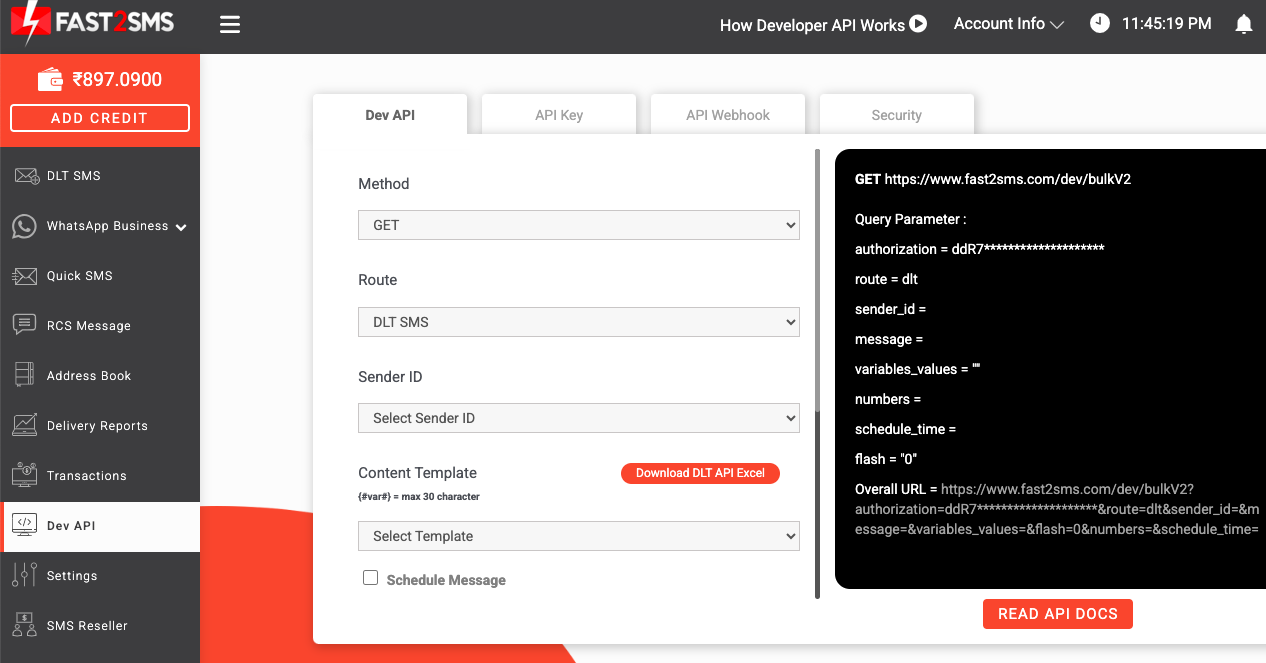
Not a developer? Free plugins connect Fast2SMS to WordPress and WooCommerce, Shopify and TallyPrime, and connectors exist for Zapier, Pabbly and many CRMs. Your approved templates appear inside them as dropdowns.
No DLT yet? Send with Quick SMS
DLT approval takes days, but sometimes a message must go out today. Quick SMS fills that gap. It delivers to Indian mobile numbers through an international gateway instead of the domestic DLT system, so you need no registered entity, header or template.
- Open text. Write the message you need; there is no pre-approved wording.
- DND and Non-DND. Quick SMS reaches every Indian number on all operators, including DND numbers.
- Any hour. There is no 9 pm cut-off on this route.
- Numeric sender. Customers see a numeric international sender, not your six-letter brand header.
- Reviewed before release. The Fast2SMS team checks each campaign for spam and fraud. Up to three campaigns can wait for review at a time, and accounts whose campaigns are repeatedly rejected lose the route for 15 days.
- Unlocked after one recharge. The route opens after your first recharge of ₹100 or more. Its flat per-SMS rate is higher than DLT SMS and is shown in the panel before you confirm.
- Same API. Use the same bulkV2 endpoint with route=q. See also API SMS without DLT registration.
Quick SMS is meant for urgent, one-off and pre-DLT sending. Personal messages, spam, prize or loan bait and impersonation are not allowed. For regular sending, finish DLT and move to DLT SMS for a much lower price and your own brand name.
DND, consent and timing rules for promotional SMS
DND (Do Not Disturb) lets mobile users block promotional messages. Under TRAI's rules, customers control their own preferences: they can give or withdraw consent and complain about unwanted messages, and operators act against senders who break the rules. In practice:
- Promotional SMS go only to Non-DND numbers and only between 10 am and 9 pm. A consent template must be registered before sending promotional or Service Explicit messages.
- Transactional and Service Implicit SMS reach DND numbers too, at any hour, and need no consent template. They must stay informative; sneaking an offer into an order update breaks the rules and risks rejection.
- Timing still matters for informative messages. A fee reminder at 7 am annoys parents even though it is allowed.
- Always identify yourself with your brand name, and give opt-out instructions in marketing messages.
Learn more on Fast2SMS's DND page. If your offers keep hitting the DND wall, consider WhatsApp Business API or RCS messages for marketing, and keep SMS for OTPs and updates.
What bulk SMS costs on Fast2SMS
Pricing is prepaid and simple. At the time of writing, the default rate is ₹0.25 per SMS for recharges between ₹100 and ₹3,999, and the per-SMS rate falls as the recharge grows, down to ₹0.11 per SMS on the largest slab. The full slab table, with how long each discounted rate stays valid, is on the bulk SMS pricing page. A few points to plan your budget:
- One rate for every DLT category. Promotional, transactional, Service Implicit, Service Explicit and OTP SMS cost the same, from the panel, a plugin or the API.
- The wallet never expires. Validity applies only to a discounted rate; after it ends, the default rate applies to the remaining balance.
- GST. 18% GST is added on the recharge amount, and a GST invoice is generated for every payment.
- Parts count. A message longer than one part is charged per part.
- No other fees. No setup fee, no monthly rental and no charge for DLT help. Operator DLT portal fees, where any apply, are paid to the operator.
- High volume. If you send lakhs of SMS a month, contact sales through the pricing page or contact us for a custom rate.
A quick example: 10,000 single-part SMS at the default ₹0.25 rate cost ₹2,500 plus GST. A ₹4,000 recharge at ₹0.21 per SMS buys about 19,047 SMS.
Common mistakes that stop bulk SMS from delivering
- Informative messages registered as Service Explicit or Promotional. They then miss every DND number. Register OTPs as Transactional and other updates as Service Implicit.
- Sent text that does not match the template. An extra word, a changed spelling or a missing full stop is enough for the operator to block it. Copy the approved text; never retype it.
- Wrong variable tags or values that are too long. A link in an {#alphanumeric#} slot, or an unregistered link in {#url#}, fails under the new rules.
- Header not matching the brand. Unrelated or famous names are rejected; keep your header close to your business name.
- Missing brand name at the end of the template. Add it to every template before submitting.
- Promotions after 9 pm or to DND lists. They will not be delivered. Schedule offers inside the window and accept that DND numbers are out of reach on this route.
- Letting a header go unused for 90 days. It gets cancelled. Send at least occasionally, or register again when needed.
- Typing entity or template IDs by hand in the Fast2SMS panel. One wrong digit holds up approval. Copy and paste.
- Ignoring failure reasons. Keep cleaning invalid numbers from your lists after each campaign.
- Buying a big pack before testing. Use the ₹50 credit and a ₹100 recharge first; there is no pack to buy here anyway.
Tips for bulk SMS campaigns that get results
- Segment your list. Group customers by purchase history, location or interest and send each group a message that fits it.
- Send at sensible hours. Working hours get attention; very early or very late messages push people to opt out.
- Give one clear action. A link, a phone number or a store address tells the customer exactly what to do next.
- Keep it short. Simple words and one idea per message. One part is cheaper and easier to read.
- Personalise with variables. A name and an order number make a message feel written for the reader.
- Measure and adjust. Compare delivery and response across campaigns and reuse what worked.
- Ask for feedback after a purchase or visit, and include opt-out directions in marketing messages.
- Combine channels. The Campaign flow builder can send SMS first, then WhatsApp, RCS or a voice call depending on delivery, with delays between steps.
Fast2SMS's article with bulk SMS marketing tips for beginners adds a checklist of do's and don'ts.
Why businesses choose Fast2SMS for bulk SMS
- Since 2011. More than 15 years in Indian business messaging, with over 5 million registered users according to Fast2SMS.
- Free DLT support. Help with entity, header and template registration, including a review of your template wording before you submit.
- Reports you can act on. Per-number status with delivery time and the operator's reason for every failed SMS, exportable to Excel and available by webhook.
- An easy panel. Sender IDs and templates mapped automatically, a live preview, Excel and CSV upload, groups and scheduling.
- A simple API. One request to send, webhooks for status, and code samples in every major language.
- Fair pricing. Recharge from ₹100, no monthly fee, rates down to ₹0.11 per SMS on volume, and ₹50 free credit to test.
- Quick SMS for the days before DLT approval, from the same account and wallet.
- One account, every channel. Bulk SMS, OTP, WhatsApp Business API, RCS and voice calls share one balance and one address book.
- Security and uptime. ISO 27001, SOC 2 Type 2 and regular VAPT, with 99.9% uptime.
- Real people for support on chat, phone (+91 6262778822), email and free scheduled meetings at fast2sms.com/meet.
Ready to start? Create your free account at fast2sms.com, send your draft templates to DLT support, and your first campaign can go out as soon as the approvals land.
Frequently asked questions
How do I send bulk SMS in India?
Create a free Fast2SMS account, register your business, sender ID and templates on a DLT portal with free help from the Fast2SMS team, add the approved details to your panel, then upload your numbers from Excel or CSV and send or schedule. If DLT is still pending, Quick SMS lets you send without it.
Can I send bulk SMS for free?
Every new account gets ₹50 free credit after signup, which is about 200 SMS at the default ₹0.25 rate. No card is needed and the test credit has no time limit. After that you recharge from ₹100.
How long does it take to start sending bulk SMS?
The account takes a few minutes. DLT approval of your entity, sender ID and templates usually takes a few working days. If something cannot wait, Quick SMS can go out the same day after a ₹100 recharge.
What do I need before sending my first bulk SMS?
A Fast2SMS account, an approved DLT entity, at least one approved sender ID and template, and a list of mobile numbers in Excel or CSV. A recharge from ₹100 covers sending beyond the free credit.
Which documents are required to send bulk SMS?
DLT portals ask for a PAN card as identity proof, a passport, voter ID or driving licence as address proof, a business proof such as GST registration, certificate of incorporation, TAN or trade licence, and a letter of authorisation on your letterhead.
Can I send bulk SMS without a GST number?
Yes. You can sign up and test without GST, and DLT portals accept other business proofs such as a certificate of incorporation, TAN or trade licence. Quick SMS needs no DLT at all. Details are in send bulk SMS without GST number.
Is there a monthly fee for bulk SMS on Fast2SMS?
No. There is no setup fee, no monthly rental and no minimum commitment. You pay per SMS from a prepaid wallet that you top up when needed.
Do I need to install any software to send bulk SMS?
No. The Fast2SMS panel works in your browser. Developers can use the REST API, and free plugins are available for WordPress, WooCommerce, Shopify and TallyPrime.
Can I send bulk SMS from an Excel sheet?
Yes. Upload an Excel or CSV file, map its columns to the variables in your template, and every row receives its own personalised message.
Who can register to send business SMS?
Any organisation can register as a Principal Entity on DLT, including sole proprietorships, partnership firms, private and public companies, trusts, NGOs, cooperative societies, educational institutions, banks, government bodies and political parties.
What is DLT registration for SMS?
DLT registration is the one-time process of registering your business, sender IDs and message templates on a telecom operator’s DLT portal. TRAI made it compulsory for business SMS in India, and operators block messages that do not match a registered template. The full process is on the DLT registration page.
What is the full form of DLT?
DLT stands for Distributed Ledger Technology, a blockchain-based shared register used by Indian telecom operators to record entities, headers and templates.
Is DLT registration mandatory for bulk SMS?
Yes. Under TRAI rules every business that sends commercial SMS must register on a DLT platform, and providers cannot process SMS for unregistered entities. The only exception route at Fast2SMS is Quick SMS, which uses an international gateway.
What are the DLT registration charges?
The fee is set by each operator. Fast2SMS’s DLT guide recommends Jio because registration there is free, its DLT FAQ lists BSNL and Videocon as free too, and the Vi portal charges ₹5,900. Confirm the current amount on the portal. Fast2SMS’s DLT help costs nothing.
Is DLT registration free on Jio?
Yes, according to Fast2SMS’s DLT guide, registration on the Jio TrueConnect portal is free, which is why it is the portal Fast2SMS recommends.
How do I do DLT registration for SMS on Jio?
Open trueconnect.jio.com, click Register Now, choose Principal Entity, select No if it is your first registration, fill in your organisation type and KYC details, upload documents under 5 MB, verify your mobile number with an OTP and submit. Approval typically takes two to three days.
What is the DLT registration fee on Vi (Vodafone Idea)?
Fast2SMS’s DLT guide lists ₹5,900 for registering on the Vi (Vilpower) portal. Since the operators share data, many businesses register on a free portal instead.
Can I do DLT registration for SMS on Airtel?
Yes, Airtel runs its own DLT portal. Because all portals share data, you only need to register on one of them. Check the Airtel portal for its current fee; Fast2SMS recommends Jio, where registration is free.
Do I need to register on every operator’s DLT portal?
No. Operator data is synced, so registering on any one portal is enough. Your entity ID is unique and valid across all of them.
How long does DLT approval take?
Fast2SMS’s guides give about two to three days for entity approval on Jio and three to five working days in general. Headers and templates are approved after that, and header approval can take several more working days.
Why was my DLT entity registration rejected?
The usual reasons are documents in the wrong format, details that do not match the documents, or an invalid email or phone number. Correct the mismatch and apply again, or ask Fast2SMS support to check your documents first.
I applied for DLT but did not get my entity ID. What should I do?
First confirm that you completed the mobile OTP and email verification. If days have passed, email your DLT operator with your application number, registered email and company name. Contact details are linked from the DLT SMS FAQ.
What is a Principal Entity in DLT?
The Principal Entity is the business or organisation that sends SMS to its customers. It registers once on DLT and then owns its headers and templates.
What is a telemarketer in DLT?
A telemarketer is the SMS provider that delivers your messages. Your entity has to be linked to the telemarketer on the DLT portal before you can send through it.
What is the telemarketer name of Fast2SMS on DLT?
Fast2SMS is listed as SID GROUPS on the DLT portals. The exact telemarketer ID for each portal is given on the DLT registration page.
What is PE-TM binding?
PE-TM binding links your Principal Entity (PE) to your telemarketer (TM). On Jio you open Campaign, My Telemarketer, Manage Telemarketer, search SID GROUPS, drag the row into your table and click Apply.
What is a letter of authorisation for DLT?
It is a letter on your company letterhead in which the owner authorises the person who registers on the DLT portal on the company’s behalf. It is mandatory and is uploaded in the authorisation document field.
Does Fast2SMS help with DLT registration for free?
Yes. The team guides you through entity, sender ID and template registration and reviews your template wording before you submit, at no charge. Reach them by chat, on +91 6262778822 or through a free meeting at fast2sms.com/meet.
Is DLT needed for OTP SMS?
Yes, OTP SMS also need a registered entity, header and template. WhatsApp OTPs do not need DLT, which is one reason businesses use WhatsApp OTP alongside SMS.
Can I send bulk SMS without DLT registration?
Yes, through Quick SMS. It goes through an international gateway with a numeric sender, so no entity, header or template is required. Each campaign is reviewed by the Fast2SMS team before release.
What is a header or sender ID in DLT SMS?
A header is the six-character name shown as the sender of your SMS, such as FSTSMS. Header is the DLT term for what used to be called a sender ID.
How many characters can a sender ID have?
Exactly six. For informative routes the six characters must all be letters.
What are the rules for a promotional header?
Promotional headers have traditionally been six digits, with the first digit set by the business category, for example 3 for education and 4 for healthcare. Fast2SMS’s newest template library says promotional templates can now use an alphanumeric brand header, so check the current rule with DLT support.
Can a transactional sender ID contain numbers?
No. Headers for Transactional, Service Implicit and Service Explicit messages must be six letters with no digits.
Are DLT headers case-sensitive?
Yes. FSTSMP, fstsmp and Fstsmp count as three different headers.
How many sender IDs can one business register?
There is no fixed limit, but the recommended number is up to 20 headers per Principal Entity.
Does a DLT sender ID expire?
A registered header has lifetime validity, but it is cancelled if it is not used for more than 90 days and may then be given to another entity.
Which sender ID names are not allowed?
Names unrelated to your business, and names of celebrities, politicians, trademarks, other registered companies or government organisations are not accepted.
What if my sender ID does not match my company name?
Keep documents that show the link between your company and the header name, such as a brand registration. If the operator is not satisfied, the header may be rejected.
How do I add my approved sender ID in Fast2SMS?
In the DLT SMS section, add the header with a screenshot of the portal showing it as approved and active. Pending headers are not accepted. The team verifies it and it appears in your panel.
What is a DLT content template?
A content template is the exact text of a message, registered on the DLT portal with placeholders for the parts that change. It is required for every SMS category.
What is a consent template in DLT?
A consent template is the wording shown to a customer when you ask permission to send them promotional messages. It records the purpose and the sender details.
Do all SMS need a consent template?
No. A consent template is required before Promotional and Service Explicit messages. Service Implicit and Transactional messages do not need one.
How do I get a DLT template ID?
After approval, the template moves to the Registered tab of the portal, where its template ID is shown in the first column. The guide on getting a DLT template ID shows where to look.
Can I edit a DLT template after it is approved?
No. A registered template cannot be edited. Create a new template with the changes and submit it for approval.
What are variables in a DLT template?
Variables are placeholders for values that change from customer to customer, such as a name, an amount, a date or an OTP. The rest of the text stays exactly the same in every message.
What changed in the DLT variable rules in 2026?
Templates created after 14 January 2026 must use typed tags instead of the old generic tag, so each variable only accepts a certain kind of value. Older templates were given 60 days to update. See DLT new rules 2026.
Which variable tags can I use in a DLT template?
The approved tags are {#numeric#} for digits, {#alphanumeric#} for names and IDs, {#url#} for web links, {#urlott#} for app or OTT links, {#cbn#} for callback numbers and {#email#} for email addresses.
How long can a DLT variable value be?
Up to 40 characters for numeric, alphanumeric and email tags, 120 characters for url and urlott, and 3 to 14 characters for a callback number.
Why does my link fail when the template is approved?
Under the new rules, links and phone numbers in {#url#}, {#urlott#} and {#cbn#} must match call-to-actions registered for that template. An unregistered link fails even on an approved template.
Can two variables be placed next to each other?
Only {#alphanumeric#} variables may sit back to back. Every other tag needs some fixed text between variables.
Why do I need to add my company name to an SMS template?
TRAI rules expect the company or brand name in the message, and templates submitted without it may be rejected. Most businesses end every template with a dash and the brand name.
Where can I find sample DLT SMS templates?
Fast2SMS keeps a copy-paste sample SMS templates library for OTPs, online stores, schools, appointments and promotions, already written with the new variable tags.
How many DLT templates should a small business register?
Most need six to ten: one or two OTP templates, three or four order or service updates, a welcome message and one or two promotional templates. Add more as needs appear.
Why do DLT templates get rejected?
Common reasons are the wrong category, a missing brand name, generic or wrong variable tags, links not registered as call-to-actions and a sample message that does not mirror the template. Ask DLT support to review drafts before you submit.
Can I use my DLT SMS template on WhatsApp?
No. WhatsApp templates are approved by Meta separately, from the same Fast2SMS panel, and need no DLT. See the WhatsApp Business API guide.
What is the difference between transactional and promotional SMS?
Transactional SMS carry essential information such as OTPs and reach every number, DND included, at any time. Promotional SMS carry offers and reach only Non-DND numbers between 10 am and 9 pm, and they need a consent template.
What is a transactional SMS?
A transactional SMS is a one-time password or similar authentication message. Older rules kept this category for banks; Fast2SMS’s current template library registers OTPs from apps, websites and online stores as Transactional too.
What is a service implicit SMS?
Service Implicit covers informative messages linked to a purchase or ongoing service, such as order, payment, delivery, appointment and fee updates. They reach DND numbers at any time, but promotions are not allowed on this route.
What is a service explicit SMS?
Service Explicit is for marketing-style messages to customers who gave consent through a registered consent template. In the Fast2SMS panel these go to Non-DND numbers between 10 am and 9 pm.
What is a promotional SMS?
A promotional SMS advertises a product or service, such as a sale, a discount or a new arrival. It is delivered only to Non-DND numbers between 10 am and 9 pm.
Which route should I use for OTP SMS?
Register OTP templates as Transactional. On Fast2SMS, OTPs use priority routes and usually reach the handset in one to two seconds. Smart OTP can add automatic WhatsApp fallback.
Can transactional SMS be sent to DND numbers?
Yes. Transactional and Service Implicit messages reach DND and Non-DND numbers, at any time of day.
Can I add an offer to a transactional or service message?
No. Informative routes must carry only information. Marketing content belongs in a Promotional template, and mixing the two can get templates rejected.
Which SMS category should a school use for fee reminders?
Fee, attendance and exam messages to parents of enrolled students are Service Implicit. Admission marketing to new prospects is Promotional.
What is the most common SMS route mistake?
Registering an informative message as Service Explicit or Promotional. It then never reaches DND numbers. Register OTPs as Transactional and other updates as Service Implicit.
What is DND in SMS?
DND (Do Not Disturb) lets mobile users block promotional messages. Promotional SMS are not delivered to DND numbers, while OTPs and service messages still are. Read more on the DND page.
Can I send promotional SMS to DND numbers?
No. Under TRAI rules promotional SMS reach only Non-DND numbers. Quick SMS reaches DND numbers, but it is for genuine business notices, not spam.
What time can promotional SMS be sent in India?
Promotional SMS are delivered between 10 am and 9 pm. Transactional and Service Implicit SMS have no time limit.
Can I send SMS at night?
OTPs and service updates can be sent at any hour. Promotional SMS cannot go out after 9 pm. Quick SMS has no sending window, so urgent notices can be released late in the evening.
Do I need customer consent for promotional SMS?
Yes. A consent template must be registered on DLT before sending Promotional or Service Explicit SMS, and customers can give or withdraw consent at any time.
Can customers complain about unwanted SMS?
Yes. Under the DLT framework customers set their own preferences, revoke consent and register complaints about unsolicited messages, and action is taken against violators.
How do I upload contacts for a bulk SMS campaign?
Paste numbers for small lists, or upload an Excel or CSV file with one 10-digit Indian mobile number per row. Extra columns can hold names or amounts that fill your template variables.
Can I send personalised bulk SMS with each customer’s name?
Yes. Add a column for each variable in your sheet, map the columns in the panel, and each row gets its own values in the message.
Can I save contact groups for repeat campaigns?
Yes. The address book stores contacts and groups, which you can reuse across SMS, WhatsApp and RCS campaigns.
Can I schedule bulk SMS for later?
Yes. Pick a date and time while composing and the campaign goes out then. Through the API, add the schedule_time parameter.
Can I cancel a scheduled SMS campaign?
Yes. Scheduled campaigns can be viewed and cancelled from the panel before they start.
Can I see my SMS before it is sent?
Yes. The live preview shows the final message as the customer will see it, with the character count and the number of parts.
Can I send bulk SMS in Hindi and other Indian languages?
Yes. Unicode SMS work in Hindi, Marathi, Gujarati, Tamil, Telugu, Kannada, Bengali, Malayalam, Punjabi and Odia. The panel counts Unicode parts for you.
How many characters fit in one SMS?
One English SMS holds 160 characters. A Unicode SMS, used for Hindi and regional scripts, holds 70 characters per part.
How is a long SMS charged?
Messages longer than one part are sent as multi-part SMS, and each part is charged as one SMS. A 200-character English message costs two SMS per number.
How fast is bulk SMS delivered?
OTPs and transactional messages on direct operator routes usually arrive in one to two seconds. Large campaigns are queued and finish within minutes, with each number’s status appearing as the operator confirms it.
Does Fast2SMS have a bulk SMS API?
Yes. One GET or POST request to https://www.fast2sms.com/dev/bulkV2 sends a DLT SMS or a Quick SMS to one or many numbers. Documentation and code samples are at docs.fast2sms.com.
Where do I find my Fast2SMS API key?
Your API key is in the Dev API section of the panel. The same page builds a ready request for each approved template.
What parameters does the bulk SMS API need?
For DLT SMS: route=dlt, your sender_id, the template’s message ID in message, variables_values separated by a pipe, and comma-separated numbers. The API key goes in the Authorization header.
How many numbers can I send to in one API call?
You can pass hundreds of numbers as a comma-separated list in one call. For very large campaigns, split the list into batches and loop.
Can I schedule SMS through the API?
Yes. Add schedule_time in DD-MM-YYYY-HH-MM format and the message is sent at that time.
How do I get SMS delivery status into my own system?
Create an SMS webhook and Fast2SMS posts status updates to your URL as they happen, with the reason for failures. You can also fetch statuses by request ID. See how webhooks work.
Is there an extra charge for the SMS API?
No. The API costs the same per SMS as the panel, with no API plan, key fee or monthly charge.
Does Fast2SMS have an OTP API?
Yes. POST /dev/otp/send and /dev/otp/verify handle the whole flow: Fast2SMS generates, delivers and checks the code, and resend works within a 10-minute window.
Which plugins can send bulk SMS through Fast2SMS?
Free plugins exist for WordPress and WooCommerce, Shopify and TallyPrime, with connectors for Zapier, Pabbly and many CRMs.
What is Quick SMS?
Quick SMS is a Fast2SMS route that delivers to Indian numbers through an international gateway, so no DLT entity, header or template is needed. You write the message, upload numbers and send after a quick review.
Does Quick SMS reach DND numbers?
Yes. Quick SMS is delivered to both DND and Non-DND numbers on all Indian operators, at any time of day.
Why do I need to recharge before using Quick SMS?
The route opens after one recharge of ₹100 or more. This keeps throwaway accounts and spam away from the route; the ₹50 signup credit is meant for testing.
What does Quick SMS cost?
Quick SMS has a flat per-SMS rate that is higher than DLT SMS, because it is a premium route with DND delivery and manual review. The current rate and the exact campaign cost are shown in the panel before you confirm.
Which sender name appears on Quick SMS?
Customers see a numeric international sender, not your six-letter brand header. To send under your brand name, complete DLT and use DLT SMS.
What messages are not allowed on Quick SMS?
Personal messages, spam, lottery or prize bait, loan or investment fraud, impersonation of banks, government or brands, adult content and anything unlawful. Repeated rejections remove access to the route for 15 days.
What is the bulk SMS cost in India on Fast2SMS?
At the time of writing the default rate is ₹0.25 per SMS for recharges from ₹100 to ₹3,999, falling with bigger recharges down to ₹0.11 per SMS. All slabs are on the bulk SMS pricing page.
What is the minimum recharge for bulk SMS?
The minimum recharge is ₹100, and new accounts also receive ₹50 free credit on signup.
Is GST charged on SMS recharges?
Yes, 18% GST is added to the recharge amount and a GST invoice is created for every payment. Add your GSTIN in Settings to have it printed.
Does my SMS wallet balance expire?
No. Only a discounted per-SMS rate has a validity period. After it ends, the default rate applies to the remaining balance, which stays in your wallet.
Do promotional and transactional SMS cost different amounts?
No. Promotional, transactional, service and OTP SMS all cost the same per SMS, whether sent from the panel, a plugin or the API. Quick SMS has its own rate.
How much do 10,000 SMS cost?
At the default ₹0.25 rate, 10,000 single-part SMS cost ₹2,500 plus GST. A larger recharge lowers the rate; for example a ₹4,000 recharge at ₹0.21 buys about 19,047 SMS.
How can I get a lower bulk SMS rate?
Recharge a larger amount to move into a cheaper slab, or, if you send lakhs of SMS a month, ask sales for a custom rate through the pricing page or contact us.
How do I check bulk SMS delivery reports?
Open the campaign in Delivery Reports to see every number as sent, delivered or failed, with the delivery time. You can search, filter and export to Excel.
Why did my SMS fail?
Each failed SMS shows the reason returned by the operator, such as a DND number, a switched-off handset, an unreachable network or an invalid number. A message that does not match its approved template is also blocked.
Where can I see how my SMS balance was spent?
Transaction History lists every recharge and every debit with the date, campaign and amount.
Can I use bulk SMS for an election campaign?
Political parties can register as a Principal Entity on DLT. Campaign appeals are marketing-style messages, so plan them under promotional rules: Non-DND numbers between 10 am and 9 pm. For large campaigns, talk to the team at fast2sms.com/meet first, and consider bulk voice calls too.
Is SMS or WhatsApp better for marketing?
For offers, WhatsApp often performs better than promotional SMS in India because there is no DND wall and you can use images and buttons. Many businesses use WhatsApp for marketing and SMS for OTPs and updates. See the bulk WhatsApp guide.
Can a bulk SMS campaign fall back to WhatsApp or a voice call?
Yes. The Campaign flow builder can send SMS first and then WhatsApp, RCS or a voice call depending on delivery, with delays between steps.
Is my contact list safe with Fast2SMS?
Traffic is encrypted with TLS, contact lists and message content are encrypted at rest, internal access is role-based, and the platform is covered by ISO 27001, SOC 2 Type 2 and regular VAPT.
Can I resell bulk SMS under my own brand?
Yes. The white-label Bulk9 reseller panel runs on your own subdomain with your branding, with no hosting or monthly panel cost. Details are on the reseller page at fast2sms.com/reseller.
How do I reach Fast2SMS for help with bulk SMS?
Use the chat inside the panel, call +91 6262778822, email [email protected] or book a free call at fast2sms.com/meet for onboarding, DLT help or volume pricing.
Why choose Fast2SMS as your bulk SMS provider?
Fast2SMS has served Indian businesses since 2011 with free DLT support, delivery reports that show the operator’s failure reason, an easy panel, a simple API, Quick SMS for pre-DLT sending, and prepaid pricing from ₹100 with no monthly fee. Start at fast2sms.com.