Shopify SMS and WhatsApp Notifications App for Indian Stores
The free Fast2SMS app for Shopify sends order updates, COD alerts, abandoned checkout reminders and OTP login codes to your customers on SMS and WhatsApp, straight from your store. You install it from the Shopify App Store, paste your Fast2SMS API key, switch on the events you want and pay only per message from your own Fast2SMS wallet. There is no monthly fee, no trial that runs out and no developer needed.
This guide is written for Indian Shopify store owners. It covers every screen of the setup with real screenshots, the DLT and WhatsApp template rules you must follow in India, what each message costs, message examples you can copy, and fixes for the problems store owners ask us about most.
What the Fast2SMS Shopify app does
Shopify gives you a great storefront, but Indian shoppers live on their phones. They want an order confirmation the moment they pay, a message when the parcel ships and a heads-up before the delivery rider arrives. Email alone does not do that job in India. The Fast2SMS app connects your store to the bulk SMS and WhatsApp Business API services of your Fast2SMS account, so these messages go out on their own.
In one app you get:
- OTP login for your storefront. Customers sign in with their mobile number and a one time password instead of a password they keep forgetting. The code can go on SMS or WhatsApp, with automatic fallback to the other channel.
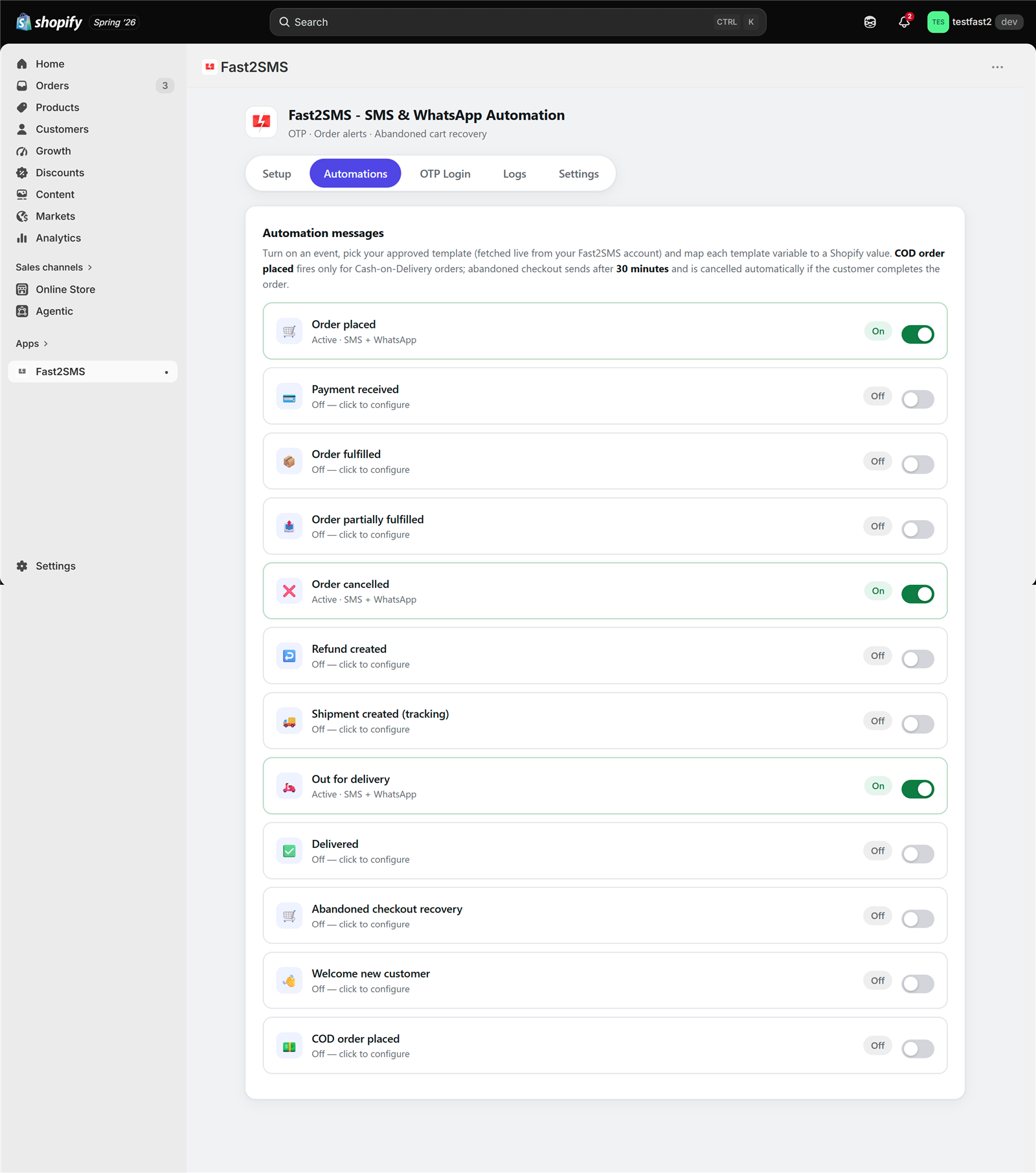
- Automatic order notifications. Twelve order and customer events, including order placed, payment, fulfillment, out for delivery, delivered, refunds, COD orders, abandoned checkout and a welcome message. For each event you choose SMS, WhatsApp or both.
- Invoice PDF on WhatsApp. The app generates an invoice for every order and can attach it to your WhatsApp message.
- COD alerts. A separate event fires only for Cash on Delivery orders, and copies can reach up to 10 team numbers instantly, so you can check doubtful orders before shipping.
- Abandoned checkout reminders. A reminder with the cart link after a delay you set, cancelled automatically if the customer completes the order in the meantime.
- Manual and bulk messages. Send a message to a single customer from the Customers page, or message many customers at once, using your approved templates.
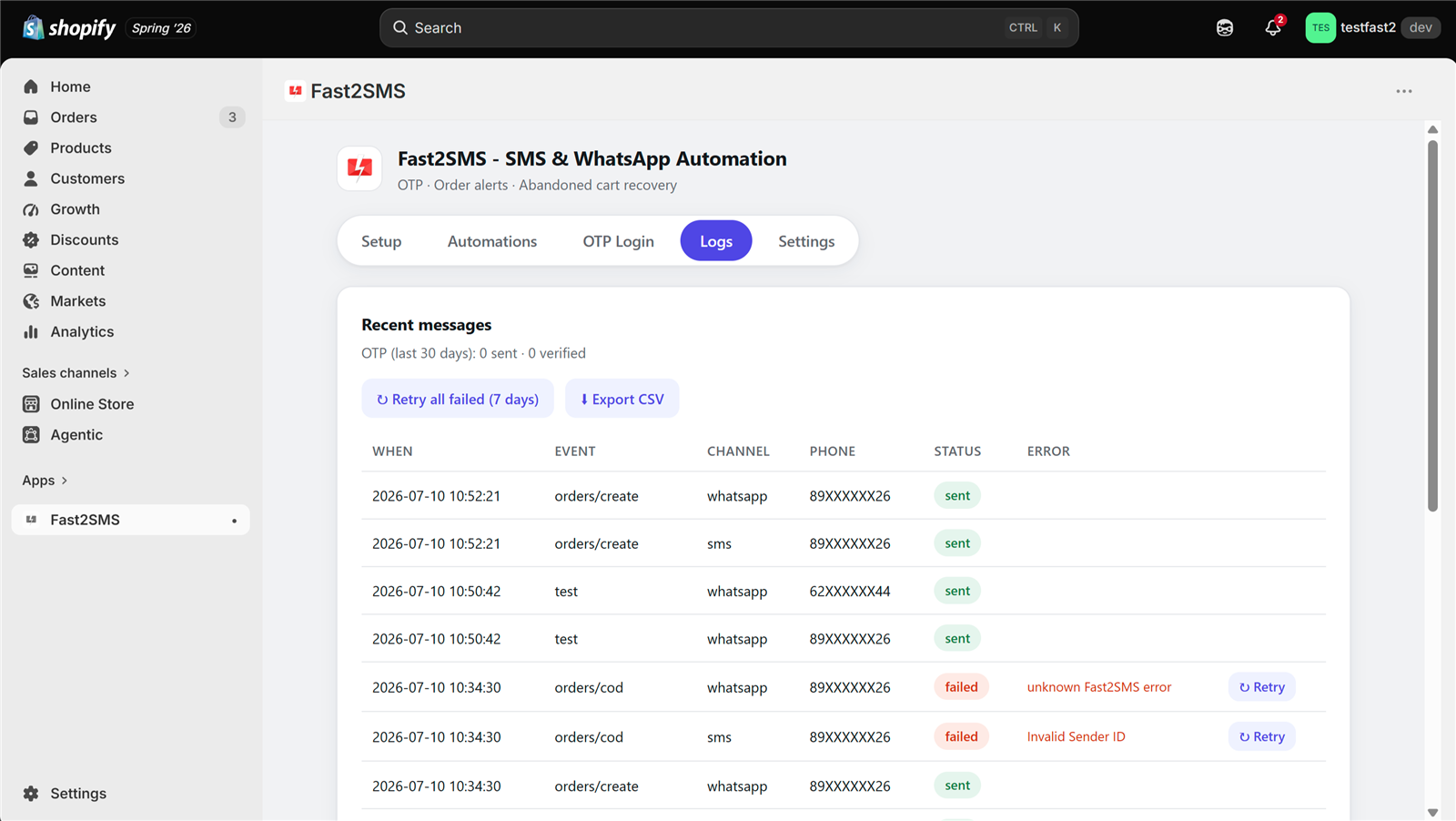
- Logs. Every OTP and alert is recorded with its delivery status, and failed messages can be retried with one click.
The app is built by Fast2SMS itself, not by a third party reselling message routes. Messages go through your own Fast2SMS account, which is why the app has no platform markup and why full delivery reports stay in your own panel. You can see the whole list of free plugins on the Fast2SMS integrations page.
What you need before you start
Setup takes about fifteen minutes once these are ready:
- A Shopify store with Indian (+91) customers.
- A free Fast2SMS account. Signup at fast2sms.com. New accounts get ₹50 free credit, enough to test the whole setup.
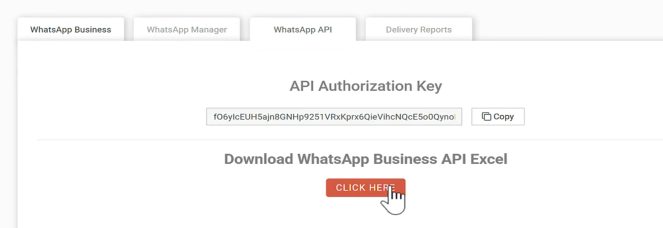
- Your API key. It is in the Dev API section of the Fast2SMS panel. One key works for every integration and for the REST API.
- For SMS: approved DLT templates. Indian rules need every business SMS to match a DLT-approved template. Fast2SMS gives free DLT support for entity, sender ID and template approval.
- For WhatsApp: a connected WhatsApp Business number with approved templates. Connecting a number is free with no monthly or setup fee, and you can keep using your existing WhatsApp Business app number.
- For OTP login: an OTP ID created in the Smart OTP section of your Fast2SMS panel. We cover this in Step 2.
You do not need SMS and WhatsApp both on day one. WhatsApp templates need Meta approval but no DLT registration, so you can start with WhatsApp order updates and add SMS once your DLT templates are approved.
Step 1: Install the app and connect your API key
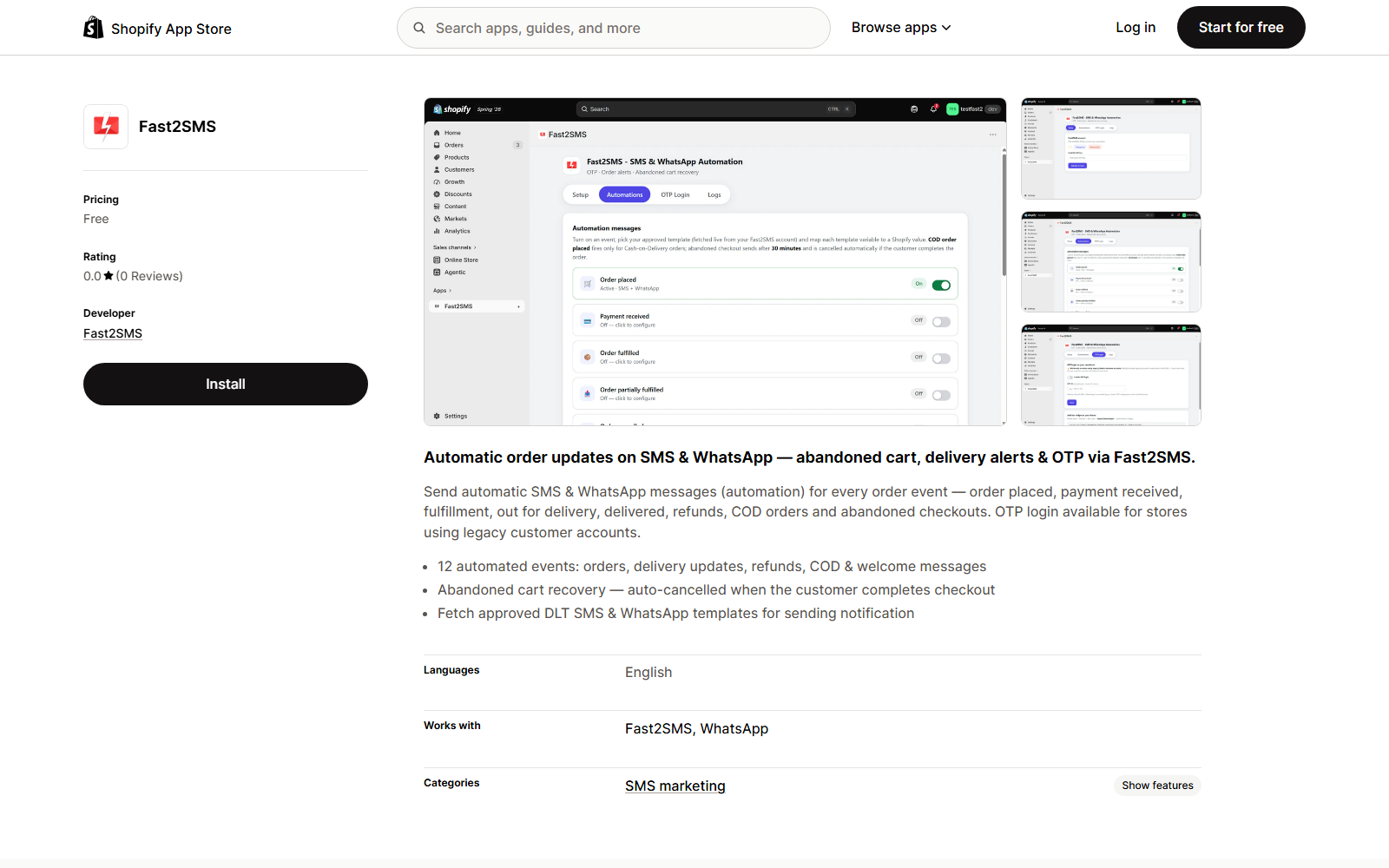
- Open the app listing. Go to apps.shopify.com/fast2sms while logged in to your Shopify admin and click install. The app itself is free; you pay only per message.
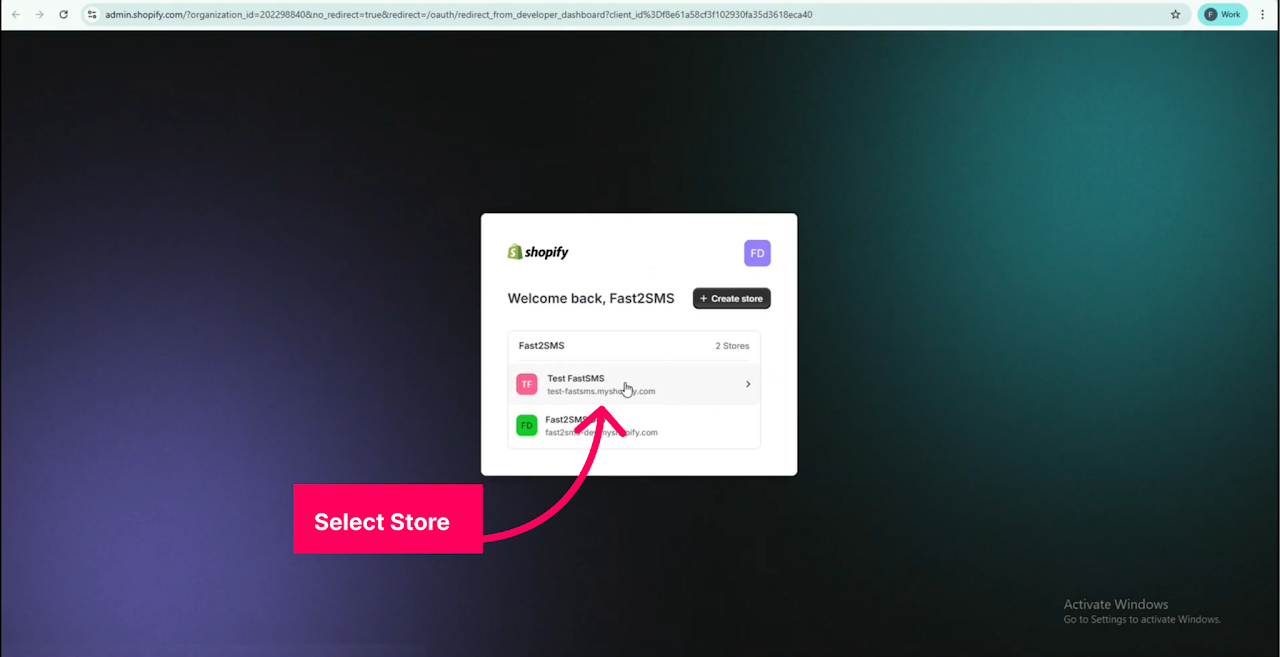
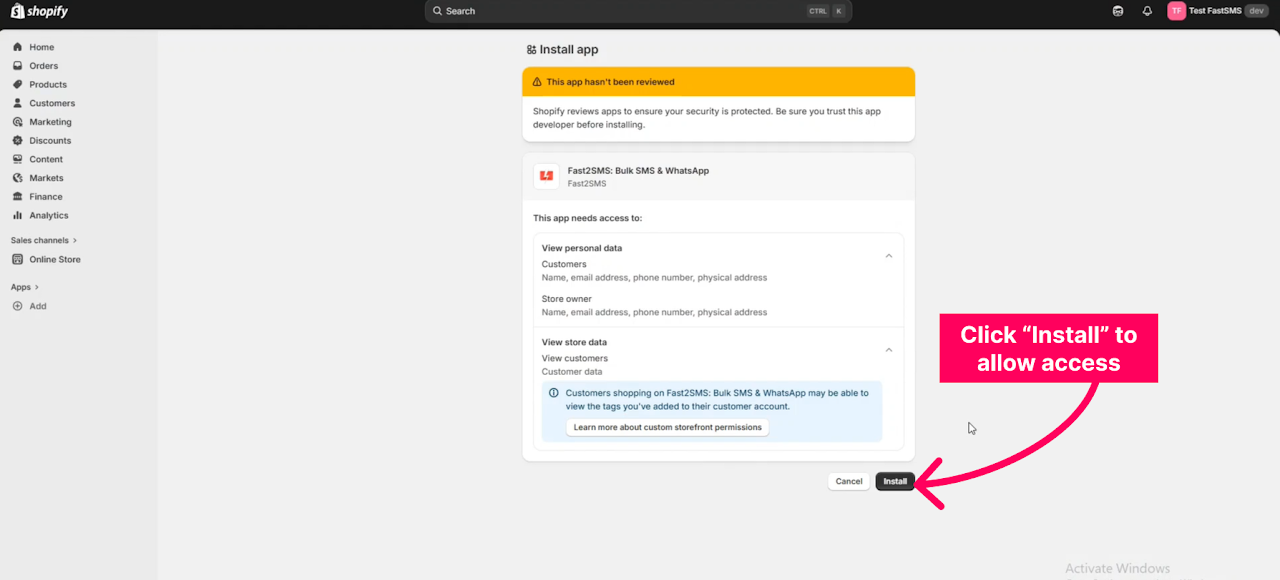
- Approve the permissions. Shopify asks you to choose the store (if you run more than one) and to allow the app to access your store data so it can send messages.
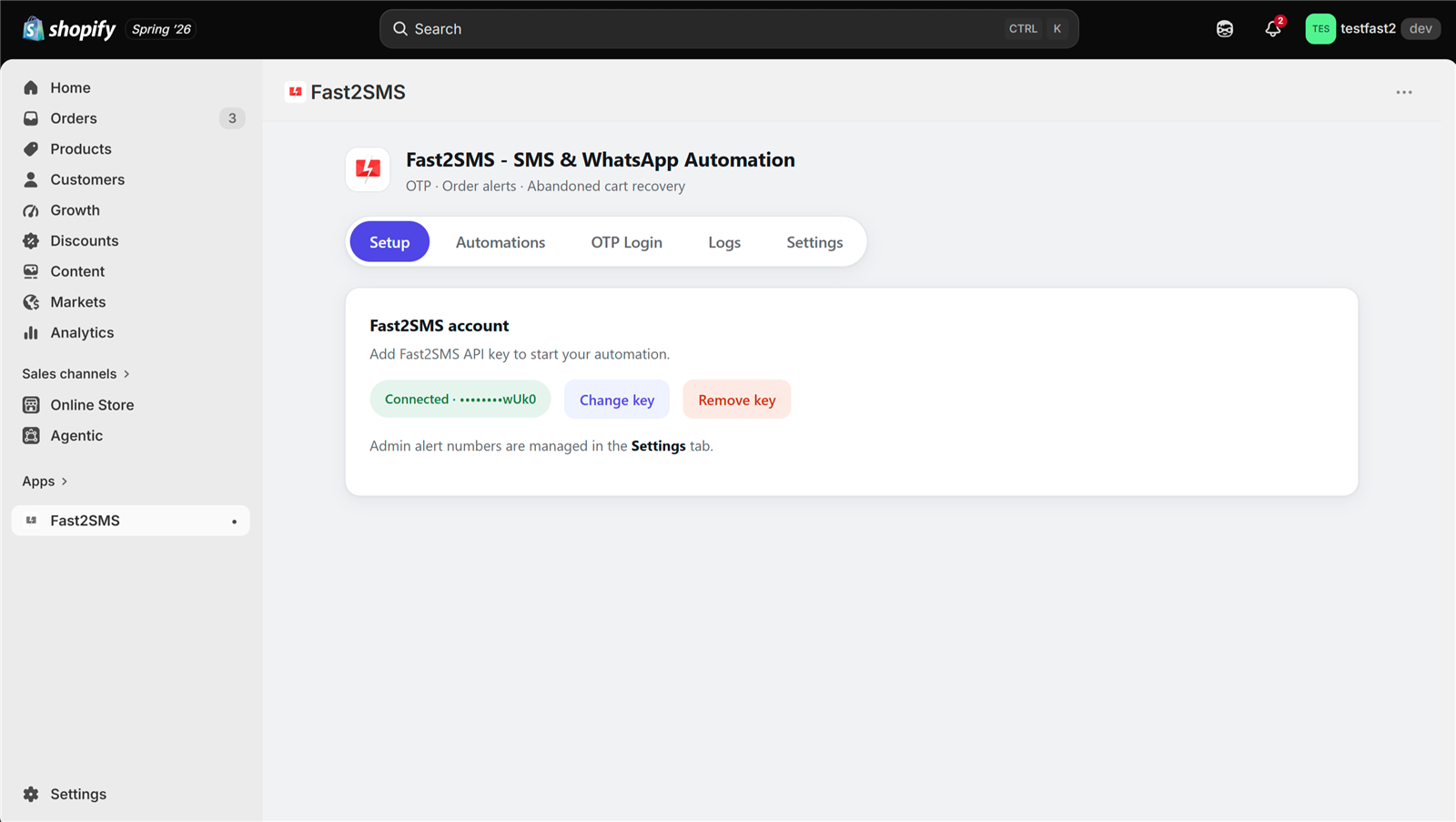
- Open the Setup tab. Once installed, open Fast2SMS from the Apps section of your Shopify admin.
- Paste your API key and click Validate & Save. The key is checked live against your Fast2SMS account and stored encrypted. After this, everything else in the app is switches and dropdowns.
Step 2: Set up OTP login on your storefront
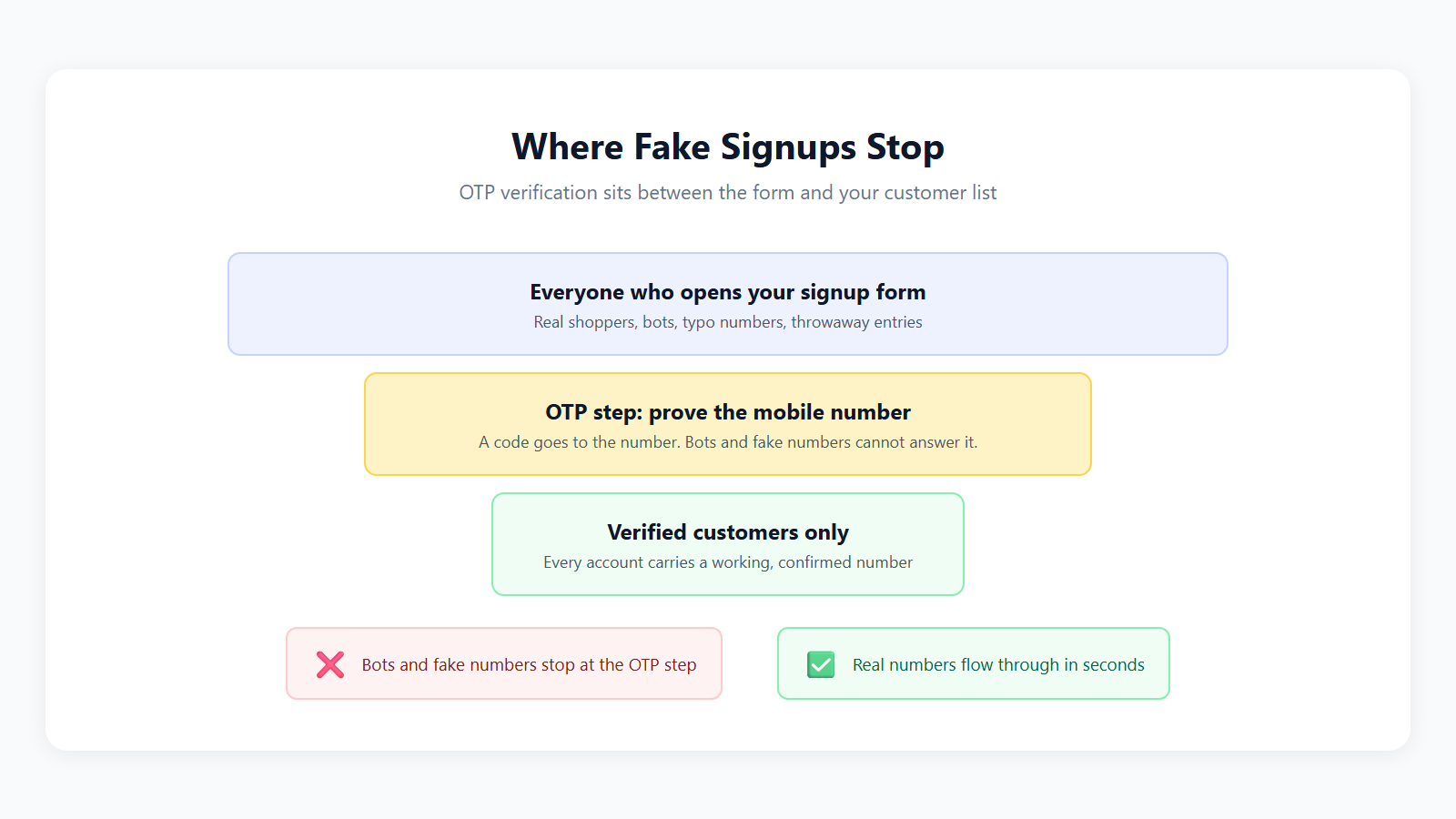
OTP login lets customers sign in with their 10-digit mobile number and a code, with no password to remember and no reset emails for your support team.
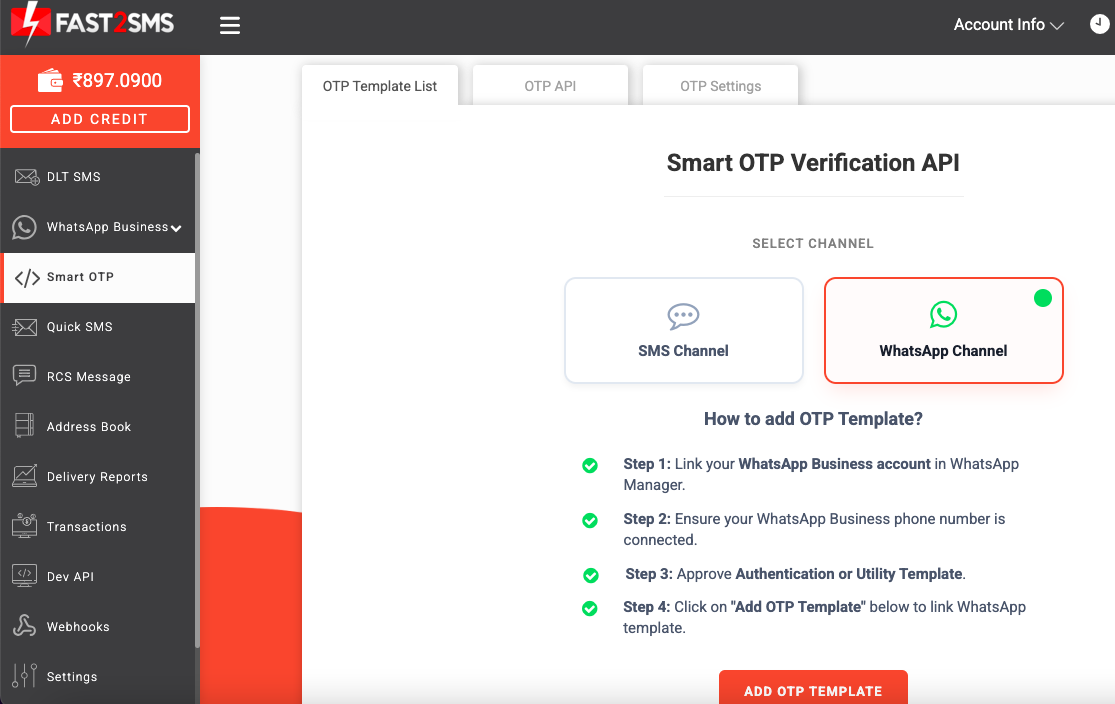
- Create an OTP ID in Fast2SMS. In your Fast2SMS panel, open the Smart OTP section and add an OTP template. Choose the primary channel, SMS or WhatsApp, and optionally a fallback on the other channel. This one setting decides how your Shopify OTPs are delivered. The Smart OTP walkthrough shows every screen.
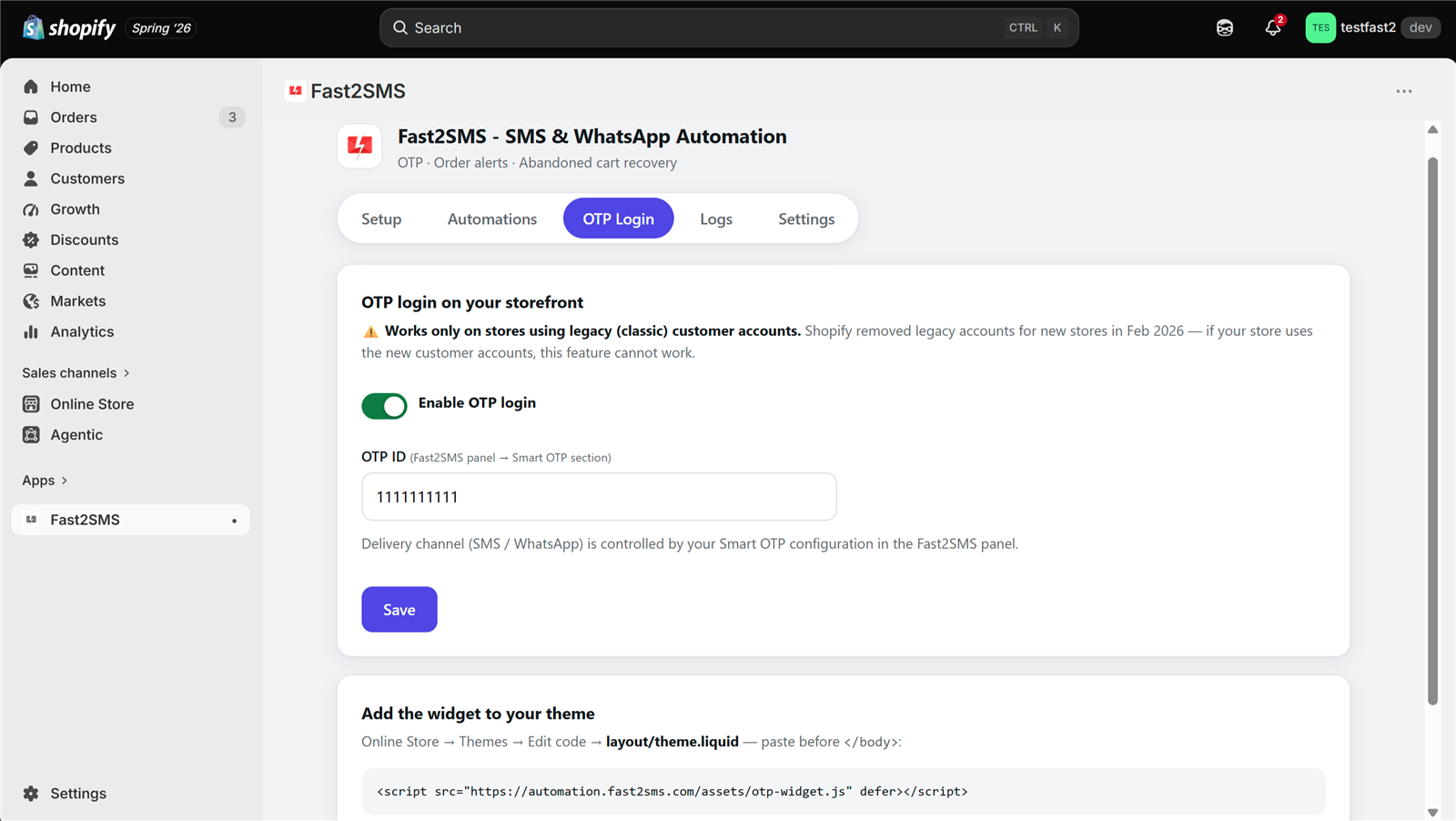
- Enable OTP login in the app. Open the OTP Login tab in the Shopify app, switch on Enable OTP login and paste your OTP ID.
- Add the widget to your theme. Copy the one-line snippet shown in the app. In Shopify go to Online Store → Themes → Edit code, open
theme.liquidand paste the line just before the closing</body>tag. This is copy and paste, not coding. - Save and test. Open your store’s login page in a private window. You should now see Login with OTP.
What your customer sees
On the login page the customer types their mobile number and taps Send OTP. The code arrives on SMS or WhatsApp, whichever your OTP ID is set to. If the first channel fails, the same code goes out on the second channel automatically, so nobody is left waiting. They type the code and they are logged in. On WhatsApp, authentication templates show your verified business name and a Copy code button, which makes the code easy to enter.
Fast2SMS generates, sends, expires and checks every code on its servers, and a customer can request a resend within a 10 minute window. Your store never stores OTPs. If you run a custom storefront or app outside Shopify, the same OTP ID works with the OTP SMS API; see the WhatsApp OTP API guide for the details.
Step 3: Turn on order notifications (SMS and WhatsApp)
OTP login is optional. Order notifications are where most stores see value first, and they work whether or not you use OTP login. Open the Automations tab:
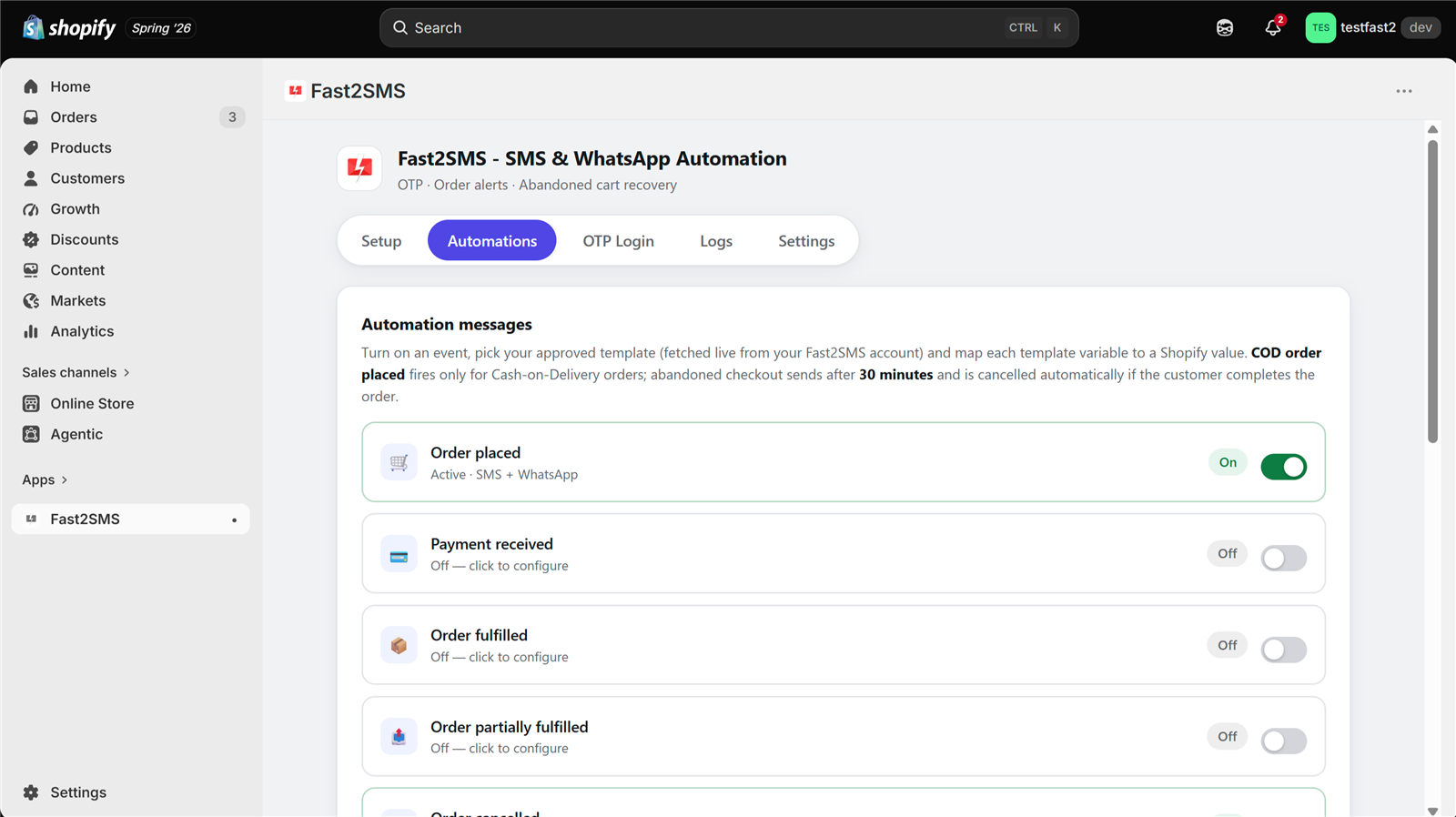
For each event you switch on:
- Pick the channel: SMS, WhatsApp or both.
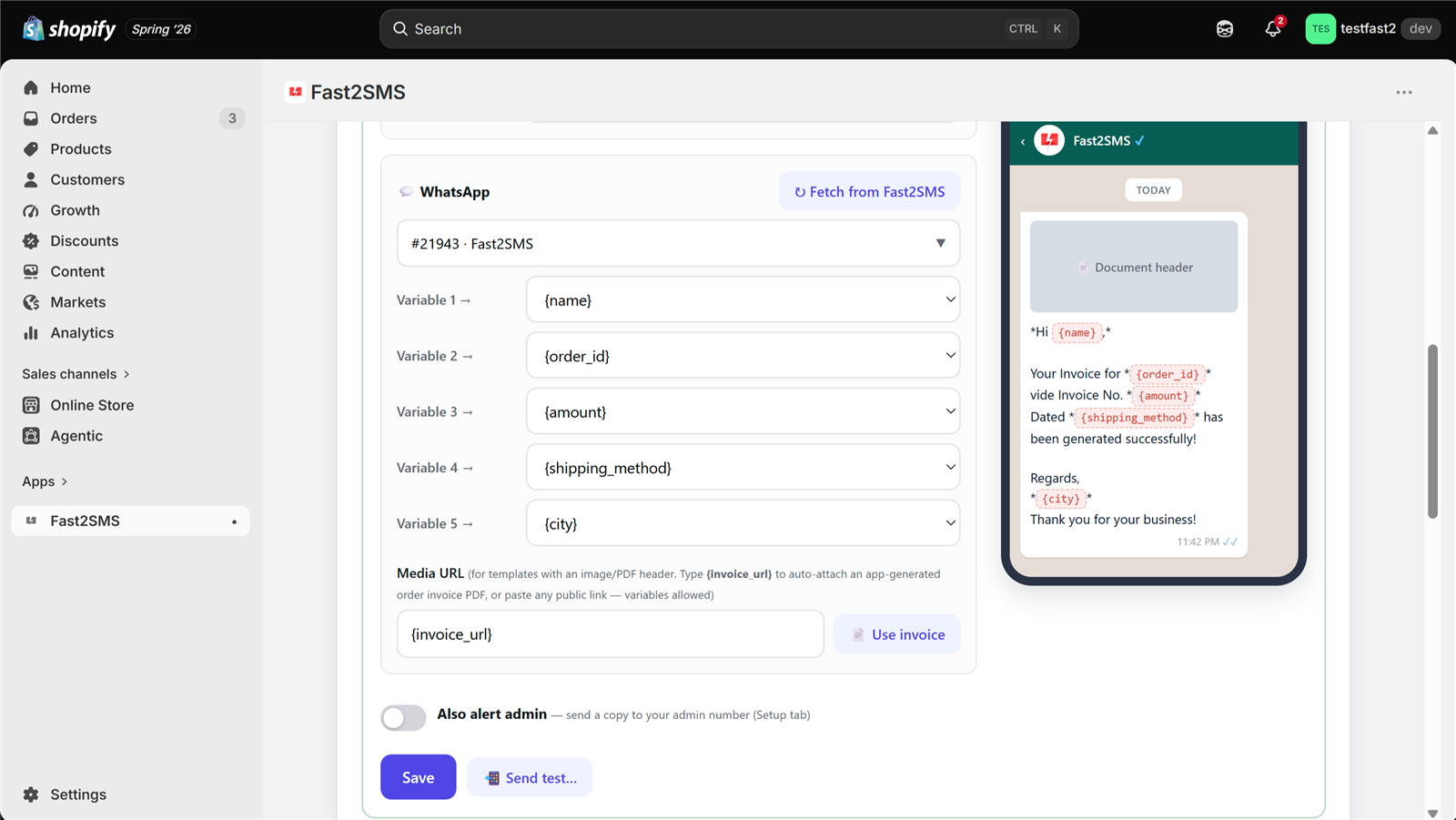
- Click Fetch from Fast2SMS to load your approved templates from your account.
- Map each variable to Shopify order data with a dropdown, for example customer name, order number or amount.
- Check the live phone preview to see exactly what the customer will receive.
- Send a test to your own number, then save.
Which event should send what
The app has twelve events. This table covers the ones most Indian stores switch on first and the job each message does.
| Event | What the message should do | Good channel |
|---|---|---|
| Order placed | Confirm the order number and amount, attach the invoice | WhatsApp (with invoice PDF), SMS as backup |
| Payment | Confirm that payment was received | WhatsApp or SMS |
| Fulfillment | Tell the customer the parcel has shipped | WhatsApp or SMS |
| Out for delivery | Ask the customer to keep the phone and cash ready | SMS reaches every phone; WhatsApp works well too |
| Delivered | Thank the customer and invite a reorder or review | |
| Refunds | Confirm the refund so the customer does not call support | WhatsApp or SMS |
| COD order | Confirm the COD order and alert your team | WhatsApp or SMS, plus admin alert |
| Abandoned checkout | Remind the shopper with the cart link | |
| Welcome | Greet a new customer |
Invoice PDF on WhatsApp
The app auto-generates a professional invoice for every order. When you map variables for a WhatsApp template that has a document header, type {invoice_url} and the order’s invoice PDF attaches itself. Customers keep the invoice in their chat, and your team stops answering “please send my bill” messages. The invoice PDF guide has the details.
For ready wording for each event, see 12 Shopify order events: what to send at each step and the Shopify WhatsApp order notifications guide.
COD alerts, admin numbers and lower RTO
Cash on Delivery is still how a large share of Indian shoppers pay, and it is where stores lose the most money. A fake number or a customer who forgot they ordered means a parcel that comes back, and you pay shipping both ways. The app gives COD orders their own event, so you can send a COD-specific message that asks the customer to keep cash ready and confirms the order is genuine.
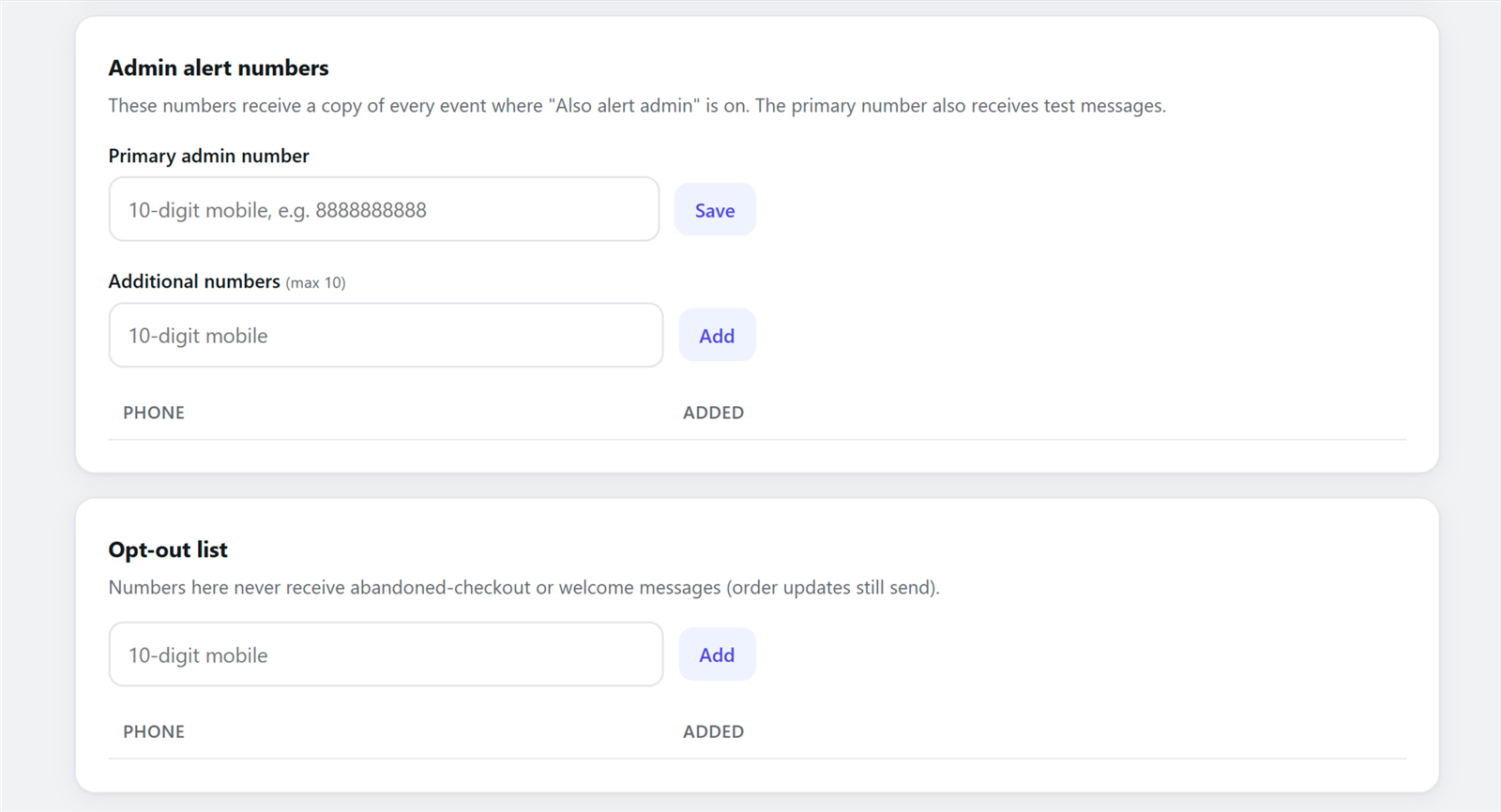
In Settings you can add up to 10 admin numbers. Any automation with Also alert admin switched on sends a copy to all of them, so your team hears about every new order and every COD order the moment it happens. Your packing team can then call doubtful COD orders before the parcel leaves.
Two more habits help: verify numbers at the start with OTP login, so accounts carry working numbers, and send the out-for-delivery message so the customer expects the rider. Read how Shopify stores cut COD RTO and Shopify COD verification methods compared for more ideas.
Abandoned checkout recovery on WhatsApp
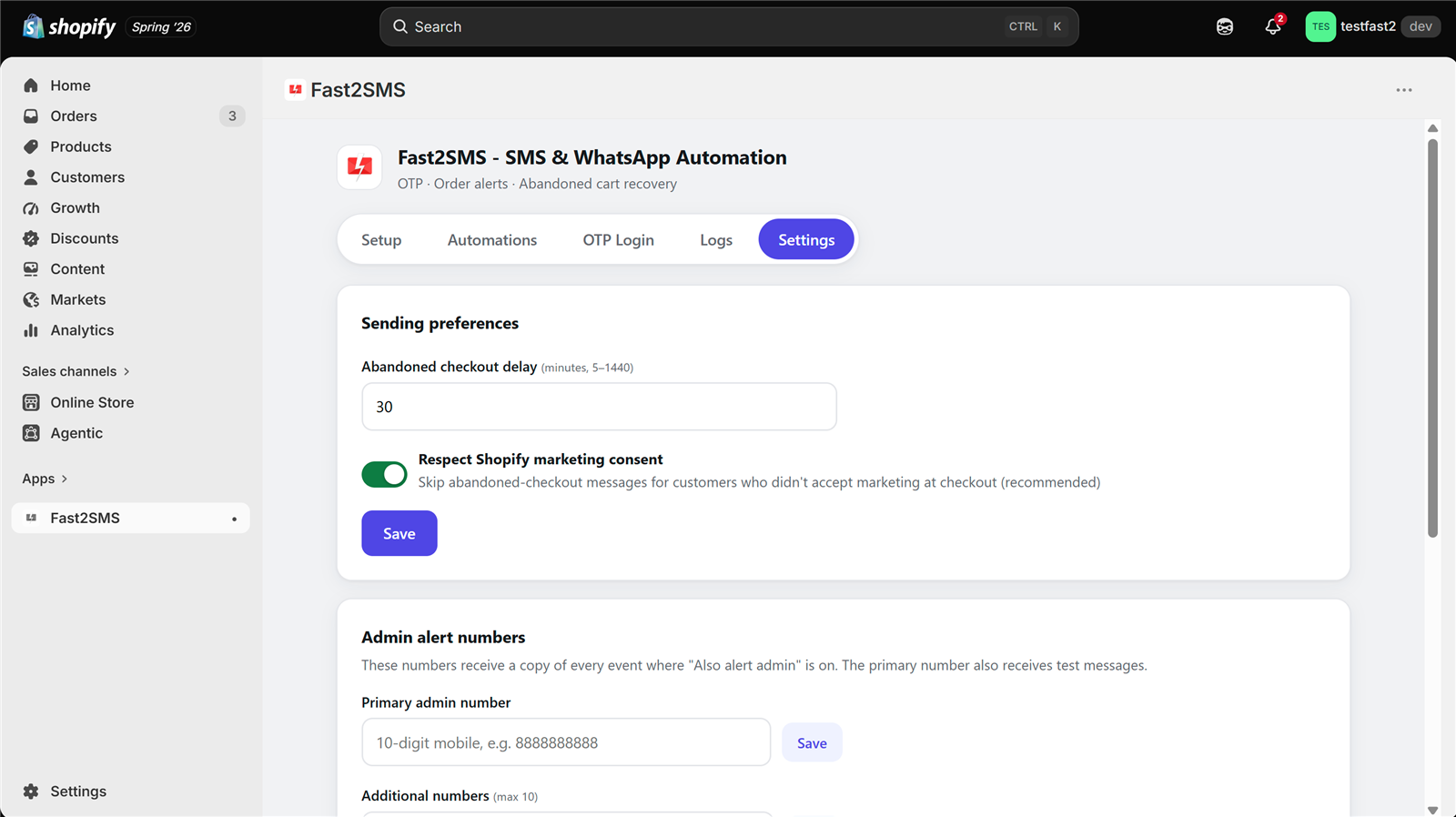
Many shoppers reach checkout, get distracted and leave. If they entered a mobile number, the abandoned checkout event can send them a reminder with a link straight back to their cart. You set the delay in Settings. If the customer completes the order before the reminder is due, the reminder is cancelled automatically, so nobody gets a “you forgot something” message after paying.
The same Settings page holds a marketing consent option and a data retention setting next to the abandoned checkout delay. Keep the reminder short, mention the product, and include the cart link. Do not send several reminders for the same cart; one well-timed message works better than three. The full walkthrough is in the Shopify abandoned cart WhatsApp guide.
Logs, opt-outs and settings
The Logs tab records every OTP and alert with the time, event, channel, masked mobile number and delivery status. Failed messages show the reason and can be retried with one click. Because messages go through your own Fast2SMS account, full delivery reports also stay in your Fast2SMS panel, and can also be pushed to your own server through webhooks.
The opt-out list in Settings matters for trust and for compliance. Numbers on it never receive marketing messages from the app. When a customer asks you to stop promotional messages, add their number here.
Manual messages and custom workflows
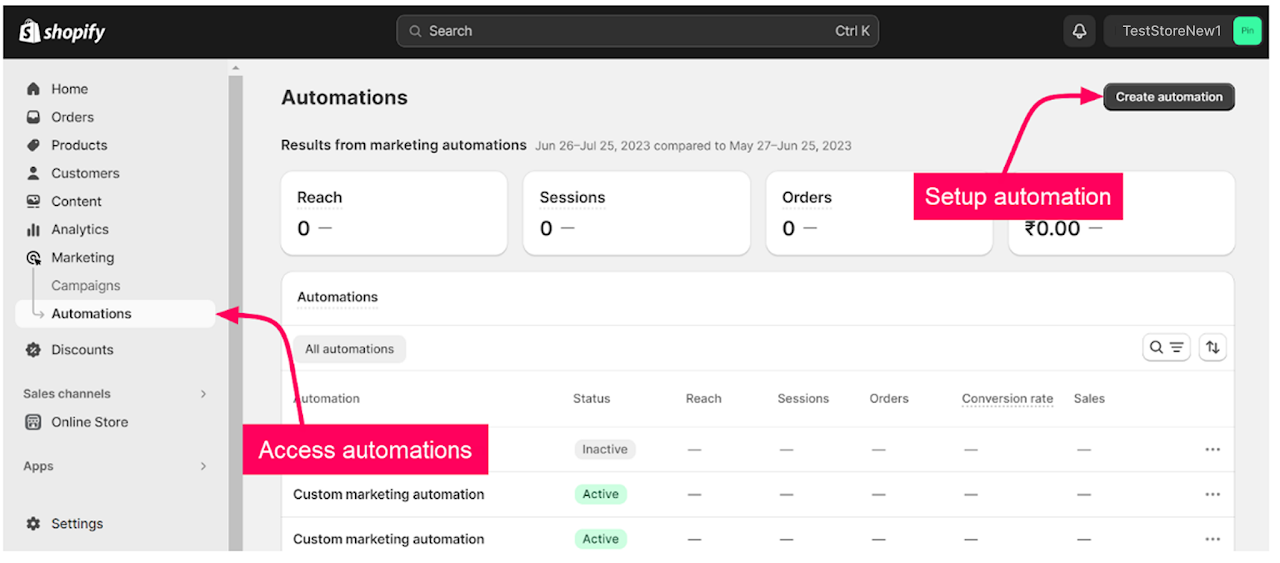
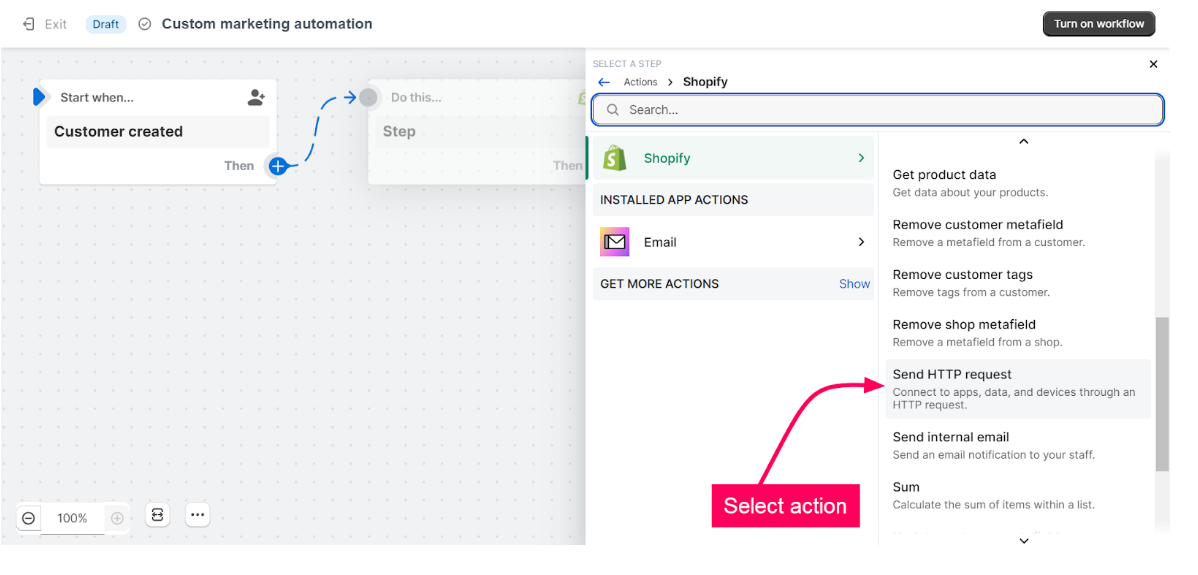
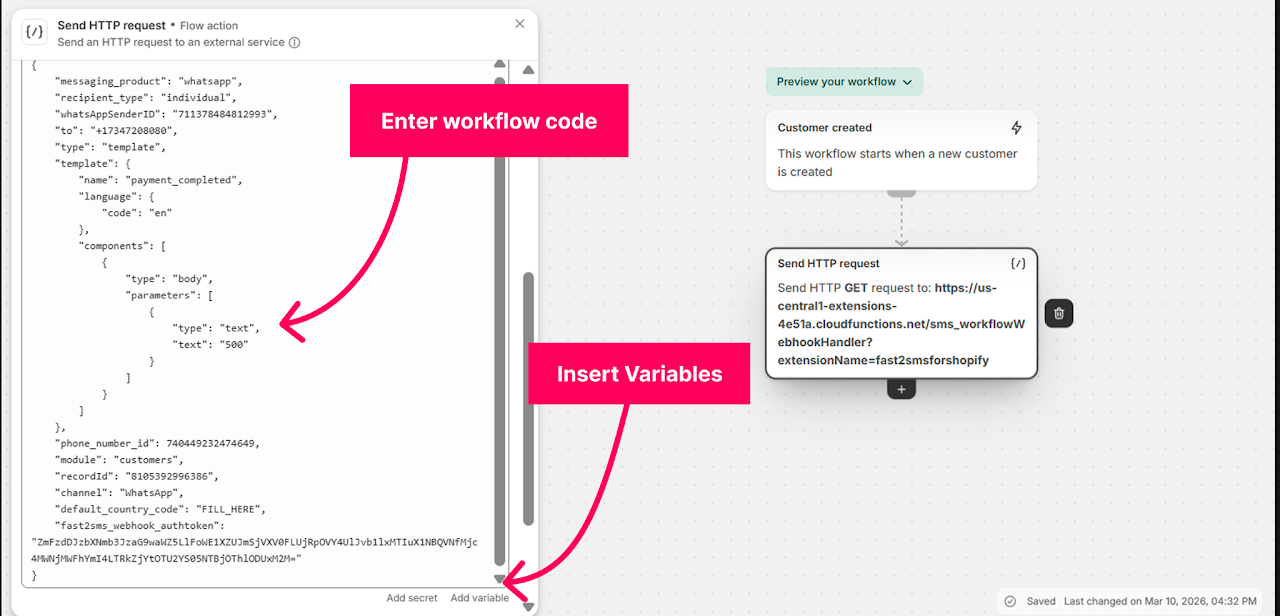
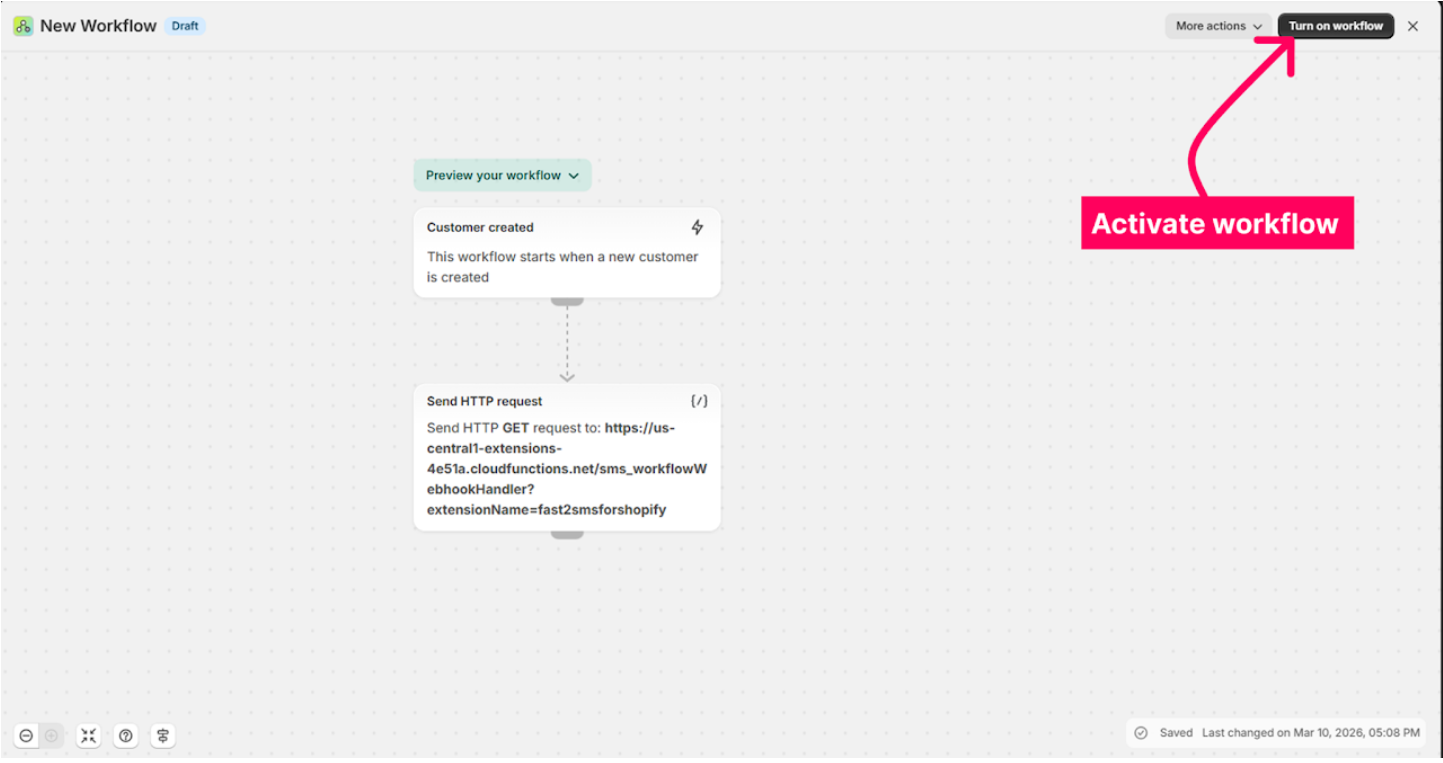
Besides automatic events, the app lets you message customers by hand and build your own automations with Shopify’s workflow tools. The screenshots in this section come from the Fast2SMS for Shopify integration guide. Your screens may look a little different after app updates, but the steps are the same in spirit.
Install screens and authorisation
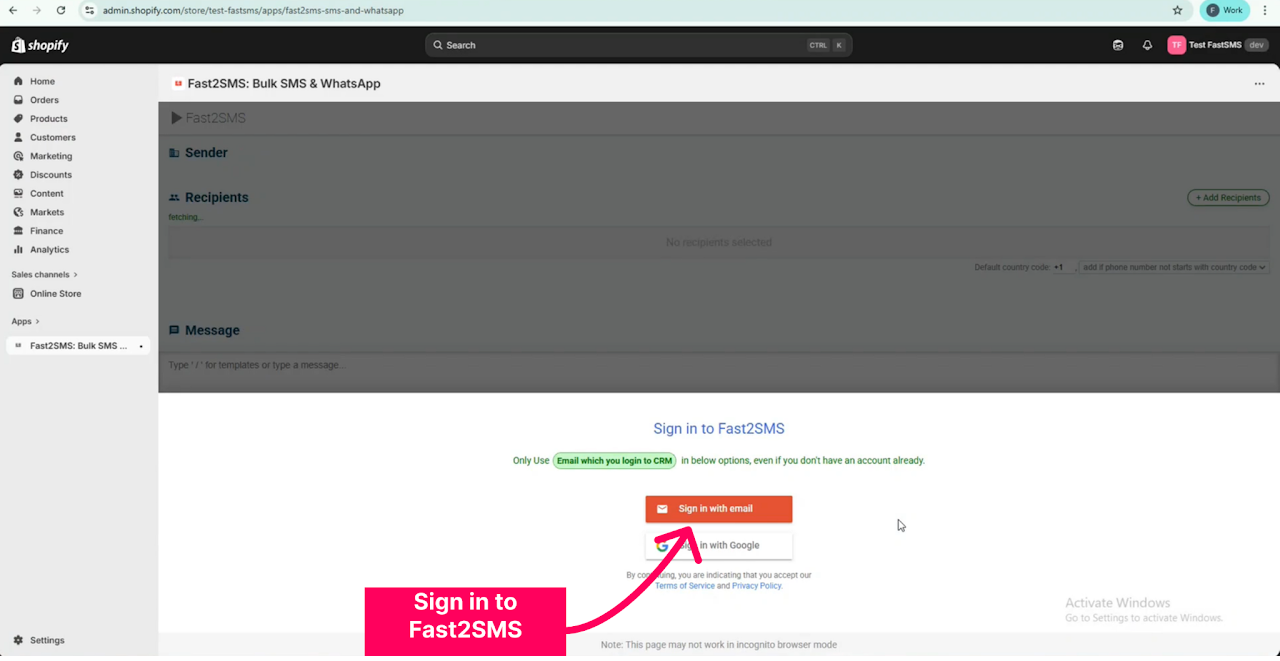
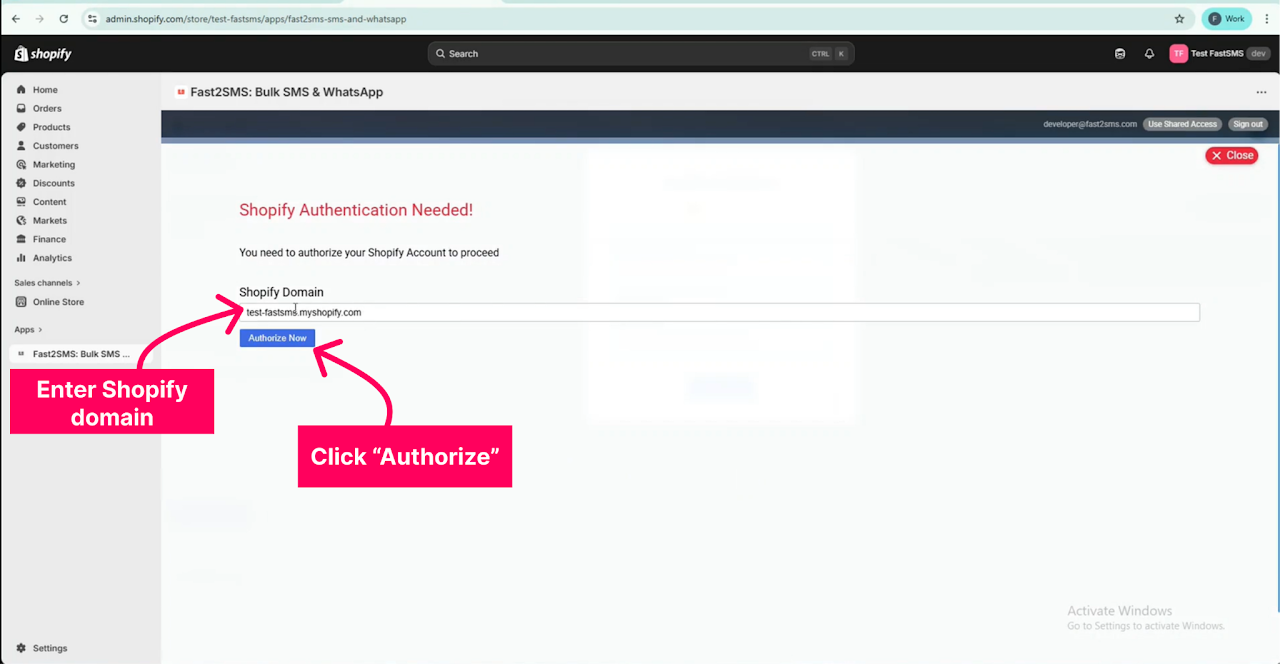
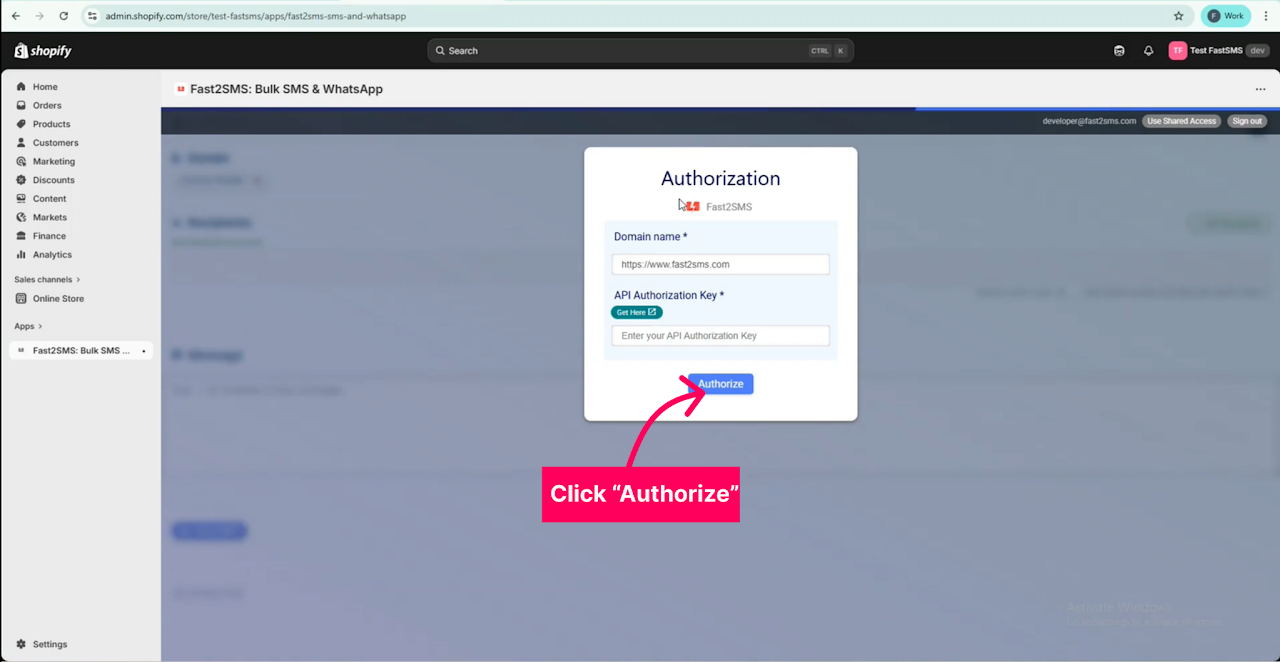
When you install, Shopify first asks which store to connect, then asks you to allow the app to access your store data. The guide then shows signing in to Fast2SMS (with email or Google), authorising your Shopify domain and connecting Fast2SMS with your domain and API key.
Send a message to one customer
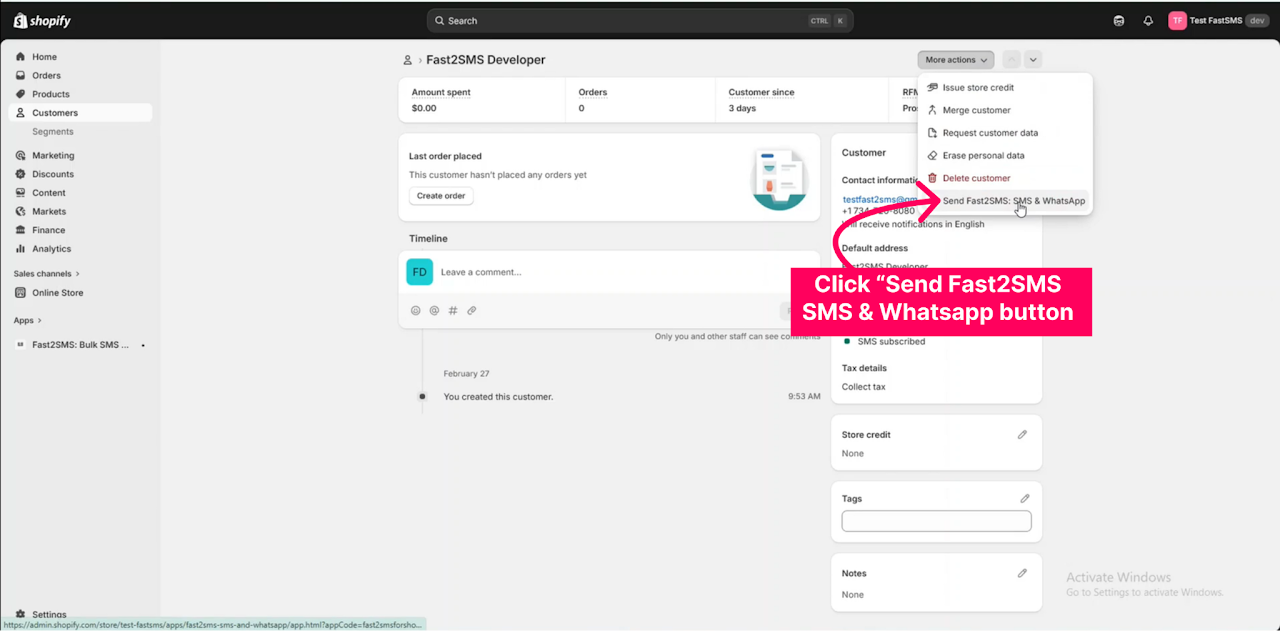
- In Shopify admin, open Customers and click the customer you want to message.
- Click More actions and choose Send Fast2SMS SMS & WhatsApp Message.
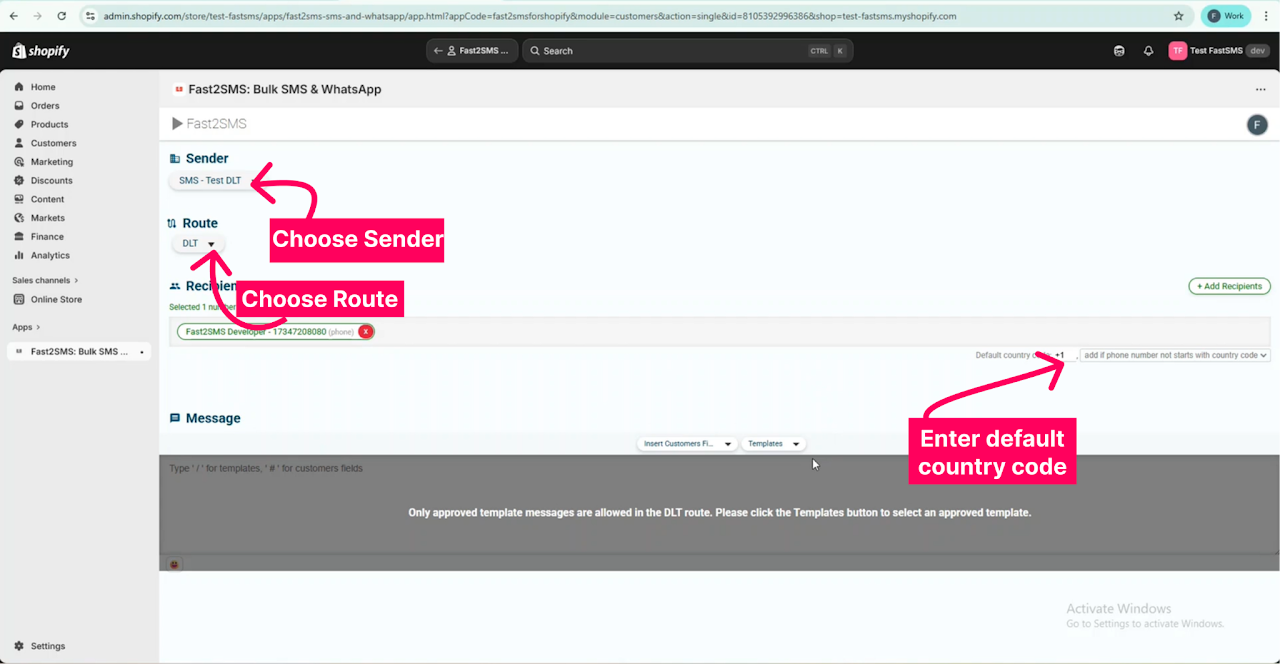
- Select your Sender ID and route. The customer’s phone and mobile fields are fetched automatically; pick the number to use. Enter a default country code for numbers saved without one.
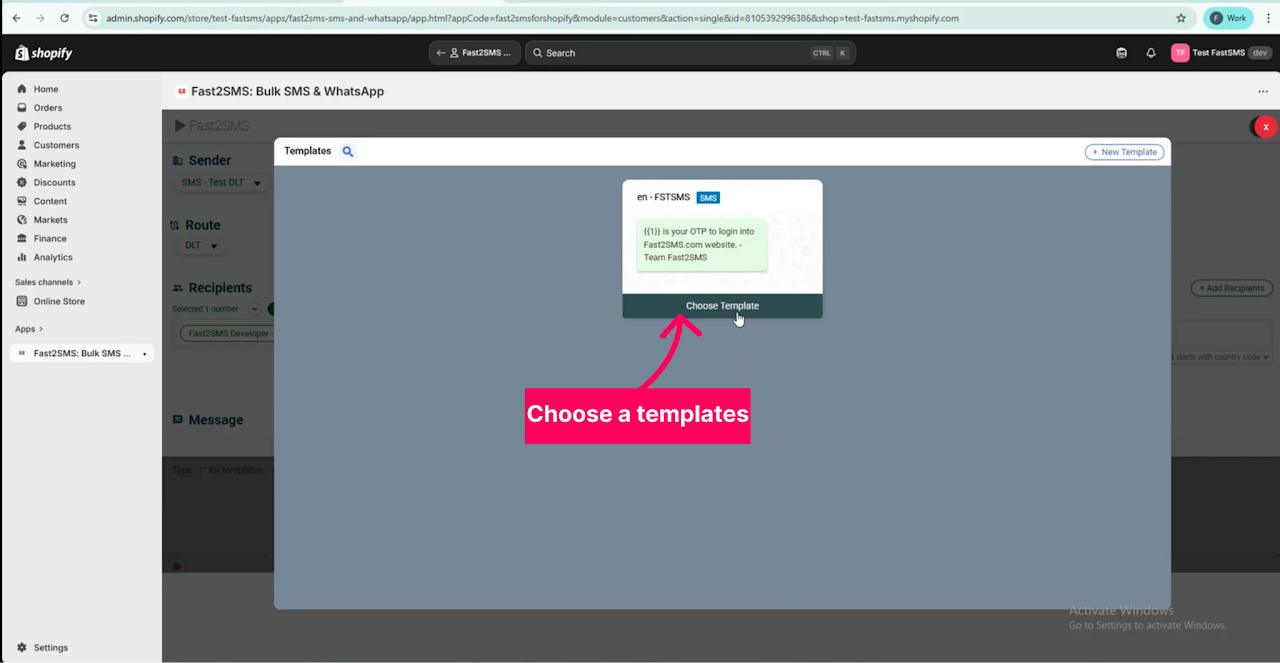
- Click Templates to see your approved templates and choose one. Only approved templates can be sent on the DLT route.
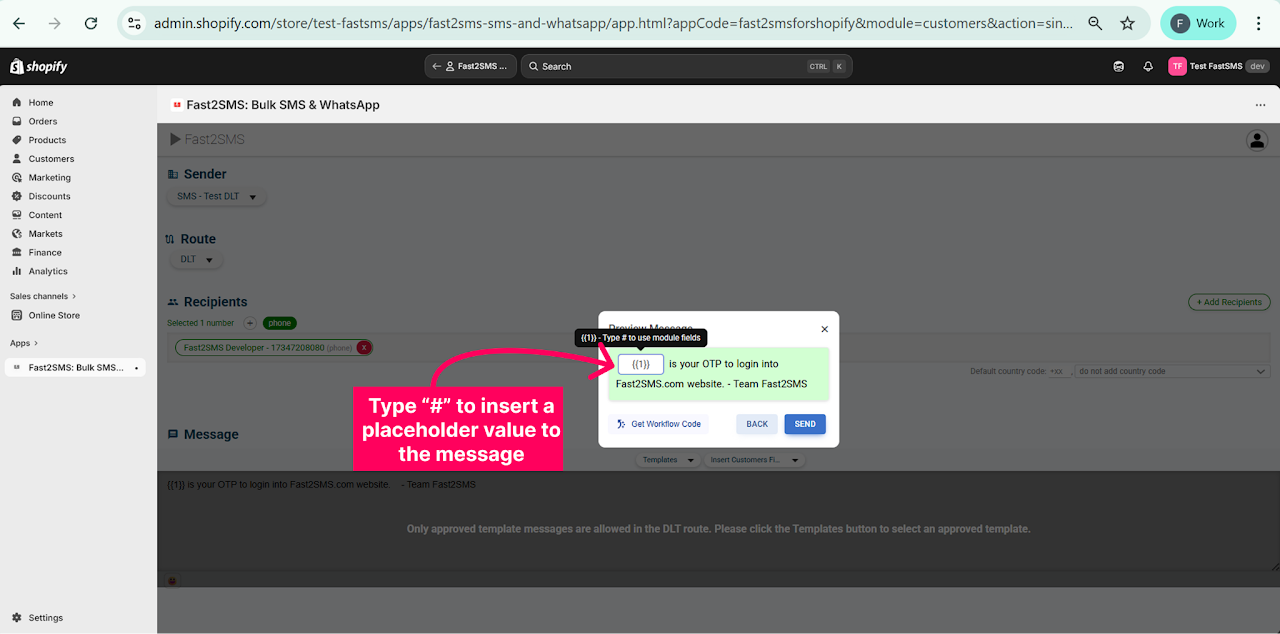
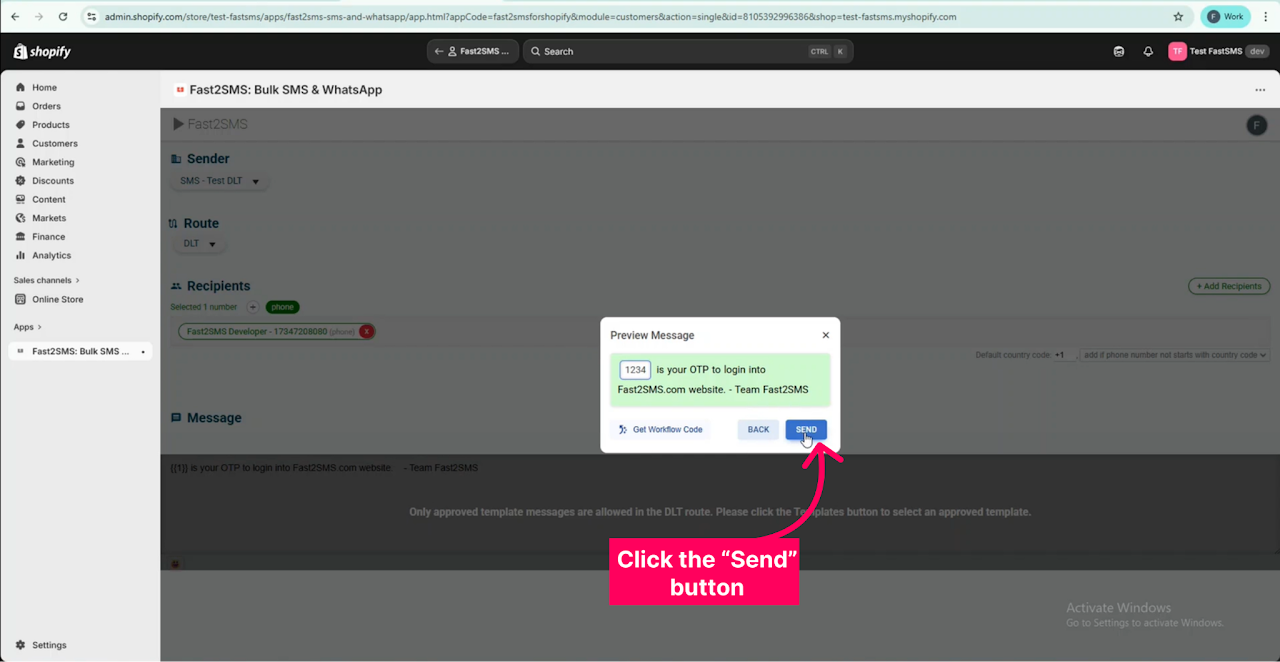
- Check the preview, click # to fill placeholder values for a personal message, then click Send. A pop-up confirms the message was sent.
To message many customers at once, the app supports bulk messages to Shopify customers, and you can also run bigger campaigns from the Fast2SMS panel with Excel upload and scheduling. See bulk SMS and WhatsApp campaigns for Shopify customers and our bulk WhatsApp message guide.
Build a custom automation with a workflow code
If you need a trigger that the built-in events do not cover, the app can give you a workflow code to use in a Shopify automation:
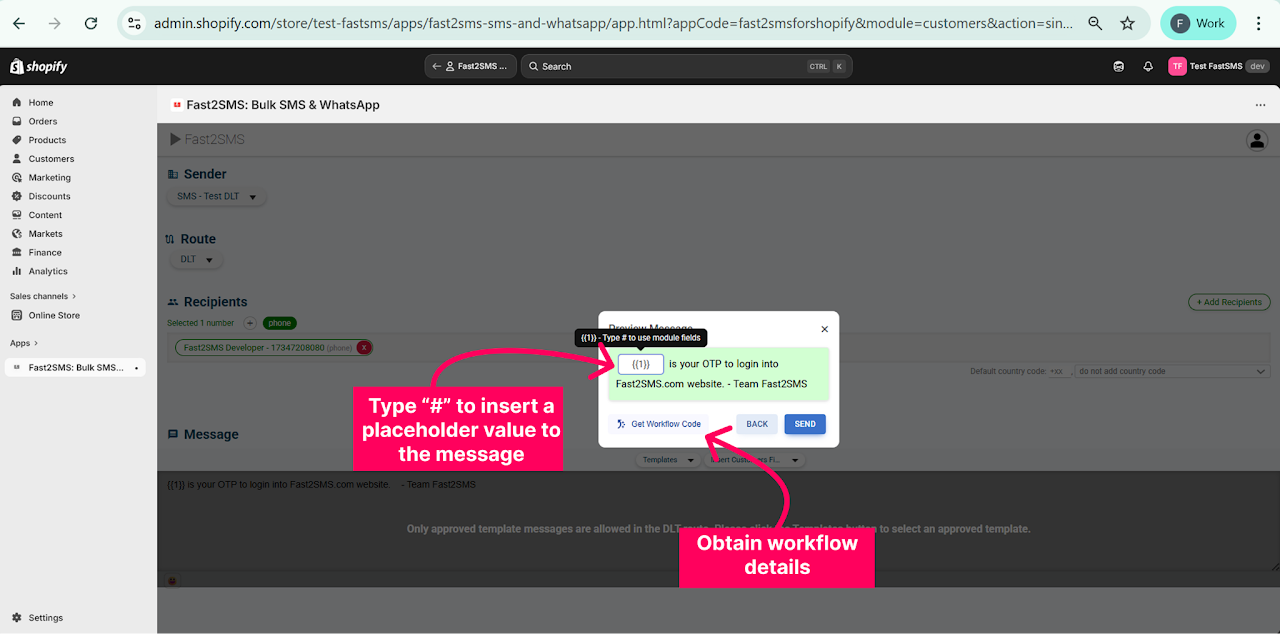
- Open a customer, open the Fast2SMS app, pick the sender, route and template, fill the placeholders and click Get Workflow code. You get a Webhook URL and a workflow code.
- In Shopify go to Marketing → Automations → Create Automation. Choose a template or a custom automation and set the trigger.
- Click + to add an action and choose Send HTTP request. Paste the Webhook URL into the URL field and set the method and header as the help guide shows.
- Paste the workflow code into the Body. Replace the value of the “number” or “to” parameter with the customer’s phone field (Add a variable → Customers → phone), and the “record Id” value with the customer Id. Fill any template variables the same way.
- Set the default_country_code value for numbers saved without a country code, then click Turn on workflow.
DLT and WhatsApp templates for Shopify stores
Every message the app sends uses an approved template. The rules differ by channel, and getting this right is the single biggest reason setups go smoothly or get stuck.
SMS: DLT registration
In India, TRAI rules require every business sending SMS to register on a DLT portal. You register your business as an entity, get a sender ID (the 6-character header customers see) approved, and get each message template approved. A Shopify SMS that does not match an approved template will not be delivered. Fast2SMS helps you with all three steps for free; start on the DLT registration page.
Newer DLT rules use typed variable tags with length limits. The ones Shopify stores use most:
| Tag | Use it for | Limit |
|---|---|---|
{#numeric#} | Order numbers, amounts, OTP codes | Numbers, up to 40 digits |
{#alphanumeric#} | Customer names, AWB or tracking IDs | Letters and numbers, 40 characters; must not start with www or http |
{#url#} | Tracking links, cart links, invoice links | Web links, 120 characters |
{#cbn#} | Your callback number | Phone number |
Copy-paste examples are in Shopify DLT SMS templates, and common questions are answered in Shopify SMS alerts with DLT.
WhatsApp: Meta template approval
WhatsApp does not use DLT. Instead, each template is approved by Meta in one of the categories: utility (order and delivery updates), authentication (OTPs), or marketing (offers and campaigns). Meta decides the final category when it approves the template, and the category sets the price. Fast2SMS reviews your templates before you submit them to Meta, which helps avoid rejections. Ready wording is in Shopify WhatsApp message templates.
Message examples that work
Good store messages are short, name the order, and tell the customer what happens next. Here are examples you can adapt. On SMS the variables become DLT tags; on WhatsApp they become template variables mapped in the app.
| Event | Example SMS (DLT style) |
|---|---|
| Order placed | Hi {#alphanumeric#}, your order {#numeric#} for Rs {#numeric#} is confirmed. We will update you when it ships. - YourBrand |
| Shipped | Your order {#numeric#} has shipped. Track it here: {#url#} - YourBrand |
| Out for delivery | Your order {#numeric#} is out for delivery today. Please keep Rs {#numeric#} ready for COD. - YourBrand |
| Delivered | Your order {#numeric#} has been delivered. Thank you for shopping with YourBrand. |
| OTP login | {#numeric#} is your OTP to log in to YourBrand. Do not share it with anyone. |
A WhatsApp order confirmation can carry more: the order summary, the invoice PDF and a button to your store. Keep it under five short lines so it reads well on a phone.
Five habits of good store messages
- Brand name in every message. Customers should never wonder who is texting them.
- One purpose per message. A delivery update should not also sell a new collection.
- Time campaigns well. Order updates go out when the event happens; schedule offers and campaigns for daytime hours.
- Use the customer’s language. Unicode SMS in Hindi and other Indian languages is supported, but note that one Unicode SMS holds 70 characters instead of 160.
- Respect opt-outs. Add anyone who asks to stop to the opt-out list straight away.
What it costs
The Fast2SMS Shopify app is free to install and use. There is no monthly fee, no setup fee and no trial that expires. You pay only for messages, from the prepaid wallet in your Fast2SMS account. New accounts get ₹50 free credit, and you can recharge from ₹100 whenever you need.
WhatsApp rates (India)
| Category | Typical Shopify use | Per message |
|---|---|---|
| Utility | Order confirmation, shipping, delivery, refund updates | ₹0.25 |
| Authentication | OTP login codes | ₹0.25 |
| Marketing | Offers, sale announcements, win-back campaigns | ₹0.95 |
| Service | Replies inside a live chat within 24 hours of the customer’s last message | ₹0.13 |
WhatsApp is billed on delivery. If a message fails, for example because the number is not on WhatsApp, the amount is refunded to your wallet automatically within 48 hours. High-volume plans go down to ₹0.11 per message; talk to sales for those. Full details are on the WhatsApp pricing page.
SMS rates
SMS uses one per-SMS rate for all DLT SMS, including OTP and transactional, and the rate falls as your recharge grows:
| Recharge | Per SMS | Rate valid for |
|---|---|---|
| ₹100 to ₹3,999 | ₹0.25 | Unlimited |
| ₹4,000 to ₹7,999 | ₹0.21 | 6 months |
| ₹8,000 to ₹13,999 | ₹0.19 | 6 months |
| ₹14,000 to ₹59,999 | ₹0.17 | 12 months |
| ₹60,000 to ₹1,29,999 | ₹0.15 | 12 months |
| ₹1,30,000 to ₹5,99,999 | ₹0.13 | 12 months |
| ₹6,00,000 or more | ₹0.11 | 24 months |
Validity applies only to the discounted rate, never to your money: the wallet balance does not expire. 18% GST is added on the recharge amount and a GST invoice is generated for every payment. A standard SMS is 160 characters; longer messages count as more than one SMS. See the bulk SMS pricing page for the live slabs.
A quick monthly estimate
Say your store ships 1,000 orders a month and sends three WhatsApp utility updates per order (confirmation, shipped, delivered). That is 3,000 messages at ₹0.25, or ₹750 a month plus GST, and failed messages are refunded. Add OTP logins at the same ₹0.25 rate on WhatsApp, or at your SMS slab rate. Your exact bill depends on the events you switch on, so start with the essentials and add more once you see the results. For a deeper breakdown, read Shopify SMS and WhatsApp cost.
How to compare Shopify SMS and WhatsApp apps
There are many messaging apps in the Shopify App Store, and some are built for other countries. Instead of comparing logos, ask every app the same questions. This table shows the questions and how the Fast2SMS app answers them.
| Question to ask | Why it matters | Fast2SMS app |
|---|---|---|
| Is there a monthly fee on top of messages? | A fixed fee hurts small stores in slow months | No monthly fee, no trial that expires |
| Who sends the messages? | A reseller in the middle can add a markup | Built by Fast2SMS; messages go through your own account, no platform markup |
| Does it support Indian DLT SMS? | SMS without DLT templates is not delivered in India | Yes, with free DLT support |
| Is WhatsApp official? | Official access means approved templates under your verified business name | Official Meta WhatsApp Business API |
| Can OTP fall back to another channel? | A failed OTP is a lost login or sale | Smart OTP: SMS or WhatsApp with automatic fallback |
| Are failed messages charged? | You should not pay for undelivered WhatsApp messages | WhatsApp billed on delivery; failures refunded within 48 hours |
| Where are delivery reports? | You need proof when a customer says “I never got it” | In-app logs plus full reports in your Fast2SMS panel |
| Is local support available? | Setup questions need quick answers | Free support by email, phone and free meetings |
Also see best SMS and WhatsApp apps for Shopify India and, if you are still choosing a platform, Shopify vs WooCommerce. Running WooCommerce instead? Read our WooCommerce SMS and WhatsApp plugin guide.
Troubleshooting
The API key does not validate
Copy the key again from the Dev API section, making sure no space is added at the start or end. If you regenerated the key in the panel, paste the newest one.
Fetch from Fast2SMS shows no templates
Templates appear only after they are approved: DLT templates added to your Fast2SMS account for SMS, and Meta-approved templates for WhatsApp. Also check that the API key belongs to the same account that holds those templates.
Login with OTP does not appear on the store
Check three things: your store uses legacy customer accounts, Enable OTP login is switched on with a valid OTP ID, and the widget line is saved in theme.liquid of the theme that is actually published. If you changed themes, paste the snippet into the new theme too.
Customers say the OTP is not arriving
Open the Logs tab to see the status and reason. Add a fallback channel to your OTP ID so a code that fails on one channel goes out on the other. For SMS, make sure your DLT OTP template is approved and your wallet has balance. The Smart OTP guide explains why codes go missing and how fallback fixes it.
WhatsApp messages fail for some customers
Usually the number is not on WhatsApp or was saved without the right country code. Set the default country code, send SMS as well for critical updates, and remember that failed WhatsApp messages are refunded automatically.
SMS is rejected
The text sent must match the approved DLT template exactly, with variables in the right places and within their length limits. A mapped variable that is longer than its tag allows, such as a long URL in an alphanumeric tag, can cause rejection.
Still stuck? Write to [email protected], call +91-6262778822, use the contact page, or book a free meeting with the team. All support is free.
Why Indian Shopify stores choose Fast2SMS
- Since 2011. Fast2SMS has run business messaging in India for more than 15 years, on infrastructure with 99.9% uptime.
- One account, every channel. SMS, WhatsApp, RCS and OTP from the same wallet and API key, with the same key working in Shopify, WooCommerce and your own code through the REST API.
- Free extras with WhatsApp. A WhatsApp Live Chat team inbox and a drag-and-drop chatbot builder come free with every account, so customers who reply to an order update can be answered quickly. Learn more in the official WhatsApp Business API guide.
- Free DLT help for entity, sender ID and template approval.
- Pay per message only, with delivery-basis billing and automatic refunds on failed WhatsApp messages.
If you want to see it working before you commit, signup at fast2sms.com, use the ₹50 free credit, install the app and send test messages to your own phone. Setup takes about fifteen minutes. There is also a 100+ question FAQ on the Shopify app and a Hindi FAQ, plus the complete Fast2SMS Shopify app guide and the OTP integration walkthrough.
Frequently asked questions
What is the Fast2SMS app for Shopify?
It is the official free Fast2SMS app on the Shopify App Store. It sends OTP login codes, order notifications, COD alerts and abandoned checkout reminders to your customers on SMS and WhatsApp, using your own Fast2SMS account.
Where do I download the Fast2SMS Shopify app?
Install it from the Shopify App Store at apps.shopify.com/fast2sms while you are logged in to your Shopify admin.
How do I add SMS notifications to my Shopify store?
Install the Fast2SMS app, paste your API key on the Setup tab, then open Automations and switch on the events you want. For SMS in India you also need approved DLT templates, which the app fetches from your Fast2SMS account.
How do I add WhatsApp to Shopify?
Connect a WhatsApp Business number in your Fast2SMS panel, get your templates approved by Meta, then install the Fast2SMS app and choose WhatsApp as the channel for each event. Connecting the number is free with no monthly fee.
How long does the Shopify app setup take?
About fifteen minutes once your Fast2SMS account, API key and approved templates are ready. Everything is self-serve; there is no email to support to activate the integration.
Do I need a developer to set up SMS and WhatsApp on Shopify?
No. The only technical step is pasting one line into theme.liquid for the OTP login widget, and the app shows you exactly what to copy. Order alerts need no code at all.
What do I need before installing the Shopify app?
A Shopify store, a free Fast2SMS account with its API key, approved DLT templates for SMS and a connected WhatsApp Business number with approved templates for WhatsApp. For OTP login you also need an OTP ID from the Smart OTP section.
Where do I find my Fast2SMS API key for Shopify?
Log in to the Fast2SMS panel and open the Dev API section. Copy the key and paste it on the Setup tab of the Shopify app, then click Validate & Save.
Is my API key safe inside the Shopify app?
The key is checked live against your Fast2SMS account when you click Validate & Save, and it is stored encrypted. Treat it like a password and do not share it in screenshots or chats.
Can I use one Fast2SMS account for several Shopify stores?
Every integration works with your single Fast2SMS account, wallet and API key, so the same key can be used wherever you install the app. Reports for all messages stay in one panel.
Does the Shopify app work for stores outside India?
The app is set up for Indian stores with +91 customers. SMS follows Indian DLT rules and WhatsApp rates shown on our pricing page are for Indian numbers.
Is Fast2SMS an official Shopify app?
Yes. It is listed on the Shopify App Store and is built by Fast2SMS itself, not by a third party reselling message routes.
Is Shopify SMS free?
The Fast2SMS app is free to install and use, with no monthly fee. Each SMS is charged from your Fast2SMS wallet at your slab rate, from ₹0.25 down to ₹0.11 per SMS. See bulk SMS pricing.
Is there a free WhatsApp integration for Shopify?
Yes. The app, WhatsApp Business API access and number onboarding are free. You pay only per WhatsApp message: ₹0.25 for utility and authentication, ₹0.95 for marketing.
Does the Fast2SMS Shopify app have a monthly plan?
No. There is no monthly plan, no setup fee and no trial that expires. You recharge your wallet and pay only for messages sent.
How much does a WhatsApp order confirmation cost on Shopify?
An order confirmation is normally a utility template, which costs ₹0.25 per message in India. Meta decides the final category when it approves your template.
How much does a Shopify OTP cost?
A WhatsApp OTP uses an authentication template at ₹0.25. An SMS OTP is charged at your DLT SMS slab rate, which starts at ₹0.25 and falls with larger recharges.
What is the Shopify SMS marketing cost with Fast2SMS?
SMS campaigns use the same per-SMS slab rate as other DLT SMS. WhatsApp marketing templates cost ₹0.95 per message. There is no extra fee for the app itself.
Do I pay for WhatsApp messages that fail?
No. WhatsApp is billed on delivery, and if a message fails the amount goes back to your wallet automatically within 48 hours.
Is there a markup when sending through the Shopify app?
No. The app is made by Fast2SMS and messages go through your own account, so you pay the same rate as sending from the panel or the API.
What is the minimum recharge to use the Shopify app?
You can recharge from ₹100. New accounts also get ₹50 free credit, which is enough to test OTP login and a few order alerts.
Is GST charged on Fast2SMS recharges?
Yes, 18% GST is added on the recharge amount and a GST invoice is created for every payment. Add your GSTIN in Settings to show it on the invoice.
Does my Fast2SMS wallet balance expire?
No. The wallet balance never expires. Only discounted SMS slab rates have a validity period, after which the default rate applies to the balance left.
Can I get cheaper rates for a high-volume Shopify store?
Yes. WhatsApp high-volume plans go down to ₹0.11 per message and SMS slabs reach ₹0.11 per SMS. Talk to the team through a free meeting for custom rates.
How can I estimate my monthly Shopify messaging bill?
Multiply your monthly orders by the number of updates per order and the rate. For example, 1,000 orders with three WhatsApp utility updates each is 3,000 messages at ₹0.25, or ₹750 plus GST.
How do I add OTP login to Shopify?
Create an OTP ID in the Smart OTP section of Fast2SMS, switch on Enable OTP login in the app’s OTP Login tab, paste the OTP ID, and paste the one-line widget snippet into theme.liquid. Your login page then shows Login with OTP.
Does Shopify OTP login work with the new customer accounts?
No. Shopify’s newer customer accounts do not let any app change the login form, so OTP login needs legacy (classic) customer accounts. You can switch under Settings → Customer accounts.
Can customers log in to my Shopify store with a mobile number?
Yes. With OTP login on, customers enter their 10-digit mobile number, receive a code on SMS or WhatsApp and log in without a password.
What is an OTP ID?
An OTP ID is created in the Smart OTP section of your Fast2SMS panel. It holds the channel, template and fallback for your OTPs, and it is the only OTP setting the Shopify app needs.
Can Shopify OTPs go on WhatsApp?
Yes. Set WhatsApp as the primary channel of your OTP ID. You can add SMS as an automatic fallback in case WhatsApp delivery fails.
What happens if the OTP fails on the first channel?
If you set a fallback on your OTP ID, the same code is sent on the other channel automatically. The customer does not have to tap resend.
Where do I paste the OTP widget code in Shopify?
Go to Online Store → Themes → Edit code, open theme.liquid and paste the line just before the closing body tag. Save, then test the login page.
Do I have to paste the OTP snippet again after changing my theme?
Yes. The snippet lives in the theme file, so paste it into the theme.liquid of your new published theme as well.
Does my Shopify store store the OTP codes?
No. Fast2SMS generates, sends, expires and verifies the codes on its own servers, so your store never holds an OTP.
Can customers resend the Shopify login OTP?
Yes. A resend works within a 10 minute window, handled by Fast2SMS.
Does a WhatsApp OTP have a copy button?
Yes. WhatsApp authentication templates show a Copy code button, so customers can paste the code instead of typing it.
Can I change the OTP channel later without editing my theme?
Yes. Change the channel or fallback on the OTP ID in your Fast2SMS panel and the store follows instantly. The theme snippet stays the same.
Do I need OTP login to use Shopify order alerts?
No. OTP login and order alerts are independent. You can skip OTP login and still use all the alert events, COD messages, abandoned checkout recovery and invoice PDFs.
Can I use the same OTP ID on my own app or website?
Yes. The same OTP ID works with the Fast2SMS OTP send and verify APIs, documented at docs.fast2sms.com. See the WhatsApp OTP API guide.
Which Shopify events can send SMS or WhatsApp?
The app has twelve events, including order placed, payment, fulfillment, out for delivery, delivered, refunds, COD orders, abandoned checkout and a welcome message. Each one has its own switch.
How do I send a WhatsApp order confirmation on Shopify?
Open the Automations tab, switch on the order placed event, choose WhatsApp, click Fetch from Fast2SMS to load your approved template, map the variables and send a test before saving.
Can I send both SMS and WhatsApp for the same Shopify event?
Yes. For each event you can pick SMS, WhatsApp or both.
What does Fetch from Fast2SMS do?
It loads the approved templates from your Fast2SMS account into the app, so you can pick one for the event instead of typing message text.
How do I put the customer name and order number in a Shopify message?
After choosing a template, map each variable to Shopify order data using the dropdown. The live phone preview shows the final message.
Can I preview a Shopify notification before customers get it?
Yes. Each event shows a live phone preview, and you can send a test message to your own number before saving.
Can Shopify send the invoice PDF on WhatsApp?
Yes. The app generates an invoice for every order. Type {invoice_url} while mapping a WhatsApp template and the order’s invoice PDF attaches itself. See the invoice PDF guide.
Can I send shipping and delivery updates from Shopify on SMS?
Yes. Switch on the fulfillment, out for delivery and delivered events and choose SMS with an approved DLT template for each.
Can Shopify send a refund confirmation by SMS or WhatsApp?
Yes. The refunds event can notify the customer on SMS, WhatsApp or both, which saves your team from “where is my refund” calls.
Is there a welcome message for new Shopify customers?
Yes. A welcome event is part of the app’s automations, and you choose the channel and template for it.
Can I get new order alerts on my own phone?
Yes. Add up to 10 admin numbers in Settings and switch on Also alert admin for the events you want. Each new order then pings your team instantly.
What wording should I use for Shopify order messages?
Keep it short, name the order and say what happens next. Ready examples are in 12 Shopify order events and Shopify WhatsApp message templates.
Is the Shopify WhatsApp integration official?
Yes. Fast2SMS uses Meta’s official WhatsApp Business API (Cloud API) with free embedded signup. No unofficial WhatsApp Web automation is used.
Can I use my existing WhatsApp Business number with Shopify?
Yes. Fast2SMS lets you connect a new number or keep using your existing WhatsApp Business app number with the official API.
Do I need a Meta developer account for Shopify WhatsApp?
No. You connect your number through the Fast2SMS panel with Facebook login and get templates approved there. Fast2SMS handles the Meta side.
Do WhatsApp messages from Shopify need DLT?
No. DLT applies only to SMS. WhatsApp templates are approved by Meta instead.
What WhatsApp template categories will my Shopify store use?
Utility for order and delivery updates, authentication for OTPs and marketing for offers. Meta confirms the category when it approves the template, and each category has its own rate.
Can customers reply to my Shopify WhatsApp messages?
Yes. Replies reach the free WhatsApp Live Chat inbox in your Fast2SMS account, where your team can answer. Replies inside the 24-hour window are service messages at ₹0.13.
Is a WhatsApp chatbot included for my Shopify store?
A drag-and-drop WhatsApp chatbot builder comes free with every Fast2SMS account, so you can automate common replies such as order queries.
Can I send WhatsApp marketing campaigns to Shopify customers?
Yes, with approved marketing templates at ₹0.95 per message. Respect the opt-out list and send only to customers who agreed to hear from you. See our bulk WhatsApp guide.
Does Fast2SMS help get WhatsApp templates approved?
Yes. The team reviews your templates before you submit them to Meta, which helps avoid rejections.
Is DLT registration required for Shopify SMS in India?
Yes. TRAI rules require every business SMS to come from a registered entity with an approved sender ID and template. Fast2SMS helps with all of it for free; start at DLT registration.
What is a sender ID for Shopify SMS?
It is the 6-character header customers see as the sender, such as your brand short name. It must be approved on the DLT portal before you use it.
How do I write DLT templates for Shopify order SMS?
Write the fixed text with variable tags such as {#numeric#} for order numbers, {#alphanumeric#} for names and {#url#} for links. Copy-paste examples are in Shopify DLT SMS templates.
What are the DLT variable limits for Shopify SMS?
Numeric takes up to 40 digits, alphanumeric up to 40 characters and must not start with www or http, and url takes links up to 120 characters.
Can I send Shopify SMS without DLT?
Not from your own sender ID. Business SMS in India must match an approved DLT template. WhatsApp is the channel that does not need DLT.
Does Fast2SMS charge for DLT support?
No. Help with entity registration, sender ID approval and template approval is free.
Can Shopify SMS be sent in Hindi?
Yes, as Unicode SMS with an approved Hindi template. One Unicode SMS holds 70 characters instead of 160, so keep regional language messages short.
How many characters can a Shopify SMS have?
A standard SMS is 160 characters. Longer messages go as multi-part SMS and each part is counted as one SMS.
How can Shopify stores reduce COD RTO?
Send a COD-specific message on every Cash on Delivery order, alert your team so doubtful orders get a call before shipping, and send the out-for-delivery update. Read how stores cut COD RTO.
Is there a separate COD event in the Shopify app?
Yes. A COD event fires only for Cash on Delivery orders, so you can send different wording from prepaid orders.
Can my team get an alert for every COD order?
Yes. Switch on Also alert admin for the COD event, and all admin numbers in Settings (up to 10) get a copy instantly.
What should a Shopify COD message say?
Confirm the order number and amount, ask the customer to keep cash ready and give a way to reach you. Keep it informational so it stays a utility message on WhatsApp.
Which Shopify COD verification method is best?
It depends on your order volume and team. Our Shopify COD verification guide compares the methods side by side.
Can Fast2SMS send abandoned cart reminders on WhatsApp for Shopify?
Yes. The abandoned checkout event sends a reminder with the cart link to shoppers who left checkout after entering their number.
When is the Shopify abandoned checkout reminder sent?
After the delay you set in the app’s Settings. You choose how long to wait before the reminder goes out.
Will a customer who already paid get an abandoned cart message?
No. If the customer completes the order before the reminder is due, the reminder is cancelled automatically.
Is there a consent setting for abandoned checkout messages?
Yes. Settings holds a marketing consent option and a data retention setting next to the abandoned checkout delay.
How do I write a good abandoned cart WhatsApp message?
Name the product, keep it to a few lines and include the cart link. One well-timed reminder works better than several. See the abandoned cart guide.
Can I send an SMS to a single Shopify customer?
Yes. Open the customer in Shopify admin, click More actions and choose Send Fast2SMS SMS & WhatsApp Message. Pick the sender ID, route and template, then send.
Can I send bulk SMS or WhatsApp to all my Shopify customers?
Yes. The app supports bulk messages to Shopify customers, and bigger campaigns can run from the Fast2SMS panel with Excel upload and scheduling. See bulk campaigns for Shopify customers.
What is the default country code setting for?
It is added to customer numbers saved without a country code, so messages still reach them. Set it to 91 for Indian customers.
How do I personalise a manual Shopify message?
After choosing the template, click # to add placeholder values, such as the customer name, before you press Send.
Can I trigger Fast2SMS messages from Shopify automations?
Yes. Click Get Workflow code in the app to get a Webhook URL and workflow code, then add a Send HTTP request action in Marketing → Automations and paste them in. Map the customer phone and Id with Add a variable.
Can I view the message history in the Shopify app?
Yes. The Logs tab shows each message, and the full history and delivery reports are also in your Fast2SMS panel.
Why is the Shopify SMS code not sending?
Check the Logs tab for the reason. Common causes are an unapproved DLT OTP template, low wallet balance or an OTP ID without a fallback; adding WhatsApp or SMS as fallback fixes most single-channel failures.
Why does Login with OTP not show on my Shopify store?
Make sure the store uses legacy customer accounts, Enable OTP login is on with a valid OTP ID, and the snippet is saved in theme.liquid of the published theme.
Why does Fetch from Fast2SMS show no templates?
Only approved templates appear. Check that your DLT or Meta templates are approved and that the API key belongs to the account that holds them.
Why does my API key fail to validate in Shopify?
Copy it again from the Dev API section without extra spaces. If you regenerated the key, paste the newest one.
Why are some WhatsApp order updates failing?
Usually the number is not on WhatsApp or is missing the country code. Set the default country code, consider SMS for critical updates, and note that failed WhatsApp messages are refunded.
Why was my Shopify SMS rejected?
The text must match the approved DLT template, and each mapped value must fit its tag type and length. A long link in an alphanumeric tag, for example, can cause rejection.
How do I retry a failed Shopify notification?
Open the Logs tab, check the failure reason and use the one-click retry.
How do I test the Shopify app without disturbing customers?
Use the send test option on each event to message your own number, and test OTP login in a private browser window with your own mobile.
How do Shopify customers opt out of marketing messages?
Add their number to the opt-out list in the app’s Settings. Numbers on that list never receive marketing messages.
Are customer numbers masked in the Shopify app logs?
Yes. The Logs tab shows the time, event, channel, masked number and delivery status for each message.
Can I control how long abandoned checkout data is kept?
Yes. The app’s Settings include a data retention option alongside the abandoned checkout settings.
Where are delivery reports for Shopify messages kept?
In the app’s Logs tab and in your own Fast2SMS panel, because the messages go through your account. Webhooks can also push delivery events to your server.
Does Fast2SMS publish security certificates?
Yes. Data security certificates are listed at fast2sms.com/certificates.
What should I compare when choosing a Shopify SMS app in India?
Ask about monthly fees, who actually sends the messages, Indian DLT support, official WhatsApp access, OTP fallback, refunds on failed messages and where delivery reports live. Our Shopify apps comparison goes deeper.
Is Fast2SMS a good Shopify SMS app for India?
It is built for Indian stores: DLT SMS with free DLT help, official WhatsApp, Smart OTP with fallback and pay-per-message billing with no monthly fee. Fast2SMS has served Indian businesses since 2011.
Can I send RCS messages to Shopify customers?
RCS campaigns with rich cards and buttons are available from your Fast2SMS account, though the Shopify app itself focuses on SMS and WhatsApp. Read the RCS business messaging guide.
Is there a Fast2SMS plugin for WooCommerce too?
Yes, a free plugin on WordPress.org. If you are choosing a platform, read Shopify vs WooCommerce and our WooCommerce guide.
Can I connect Fast2SMS to my Shopify store through the API instead?
Yes. Any system that can make an HTTP request can use the REST API at docs.fast2sms.com, but the free app covers most store needs without code.
Is there a Hindi guide for the Fast2SMS Shopify app?
Yes. See the Shopify app FAQ in Hindi.
Where can I read the full Shopify app guide?
The complete walkthrough is in the Fast2SMS Shopify app guide, and OTP setup is covered in integrate OTP with Shopify.
How do I get help setting up the Shopify app?
Email [email protected], call +91-6262778822, use the contact page or book a free meeting. Support, DLT help and WhatsApp help are all free.