
WhatsApp OTP API: Send OTP on WhatsApp With SMS Fallback
A WhatsApp OTP API lets your website or app send a one-time password to a customer’s WhatsApp number using an approved Meta authentication template, then check the code the customer types. On Fast2SMS a WhatsApp OTP costs ₹0.25 per delivered message at the time of writing, with no setup fee, no monthly fee and no DLT registration, and failed messages are refunded automatically. With Smart OTP, the same API call can send the code on WhatsApp first and fall back to DLT SMS automatically if WhatsApp delivery fails, or the other way round.
What is a WhatsApp OTP API?
An OTP (one-time password) is a short code that proves a person really controls a mobile number. For years Indian businesses sent these codes only by SMS. Today most of your customers keep WhatsApp open all day, so sending the same code inside WhatsApp is often faster to notice, easier to copy and carries your verified business name instead of a six-letter sender ID.
A WhatsApp OTP API is the bridge between your software and WhatsApp. Your server makes an HTTPS request with the customer’s mobile number. The provider sends an authentication template message through the official WhatsApp Business API (Meta’s Cloud API), and your server later checks whether the code the customer typed is correct. Fast2SMS is an official WhatsApp Business API provider: numbers are onboarded through Meta’s embedded signup, and no unofficial WhatsApp Web automation is used.
How a WhatsApp OTP reaches your customer
- The customer enters their mobile number on your login, signup or checkout page.
- Your server calls the Fast2SMS OTP API with that number and your OTP ID.
- Fast2SMS generates the code, sends it as a WhatsApp authentication template from your business number, and stores it with an expiry time.
- The message arrives in WhatsApp with your verified business name and a Copy code button.
- The customer pastes the code on your page, your server calls the verify API, and you get a simple true or false.
Because Fast2SMS generates, stores, expires and checks the code on its side, your database never holds an OTP. There is nothing to leak and no expiry cron job to maintain.
A note on “free WhatsApp OTP number” searches
Many people search for “WhatsApp OTP free number” or “WhatsApp OTP apk”. Those searches are about receiving codes on borrowed numbers, which is a different thing. This guide is for businesses that need to send verification codes to their own customers through the official WhatsApp Business API. What Fast2SMS gives free is the API access itself: there is no setup fee, no monthly fee and no per-number fee. You pay only for the OTP messages that are delivered.
Authentication templates and the copy-code button
Every business-initiated WhatsApp message must use a template that Meta has approved. Templates fall into categories, and the category decides both what you are allowed to write and what you pay. On Fast2SMS the India rates per message are, at the time of writing:
| Category | What it is for | Example | Fast2SMS price (India) |
|---|---|---|---|
| Authentication | One-time passwords and login codes | “482913 is your verification code.” | ₹0.25 |
| Utility | Order updates, delivery alerts, payment confirmations | “Your order #4821 has shipped.” | ₹0.25 |
| Marketing | Offers, launches, festival campaigns | “Diwali sale: flat 30% off.” | ₹0.95 |
| Service | Replies inside an open 24-hour chat window | An agent reply from the inbox | ₹0.13 |
High-volume plans bring the per-message rate down to ₹0.11; share your monthly volume with the sales team through contact us for a custom rate. Full rates are on the WhatsApp pricing page.
What an authentication template looks like
Authentication templates are deliberately strict. Meta fixes most of the wording so that customers learn to recognise a genuine code. A typical message reads “701284 is your verification code. For your security, do not share this code.”, can carry an optional expiry line, and shows a Copy code button. The customer taps the button and pastes the code into your app without switching back and forth or typing digits by hand.
Rules that get authentication templates approved
- Security only. The template must carry an OTP or verification code and nothing else. No offers, no product promotion.
- No links. URLs are not allowed in authentication templates. If you need a link (for example a tracking page), that is a utility template.
- Say what the code is for in simple, direct words, and mention a validity period when it helps.
- Pick the right category. A common reason for rejection is filing an order update as authentication, or an OTP as utility. Fast2SMS explains the difference in utility vs authentication messages.
Meta’s authentication category also describes one-tap and zero-tap autofill for Android apps, which need extra work inside the mobile app itself. For most websites and apps in India, the copy-code button is what customers see and use. Fast2SMS also reviews your templates before you submit them to Meta, and template approval usually comes within 24 hours.
Sample authentication templates by situation
| Situation | Sample wording |
|---|---|
| Login | 482913 is your verification code. For your security, do not share this code. |
| Password reset | Use 342978 to reset your password. Do not share it with anyone. |
| Two-factor authentication | Your two-factor authentication code is 423765. Valid for 5 minutes. |
| New device | A login attempt was made from a new device. Use 095436 to verify your identity. |
| Delivery at the door | Share OTP 5520 with the delivery partner to receive order #4821. |
More examples are in what are WhatsApp authentication category messages.
WhatsApp OTP price vs SMS OTP
Fast2SMS has no separate OTP tariff. You pay the rate of the channel that actually carried the code:
- WhatsApp OTP: ₹0.25 per delivered authentication message, ₹0.11 on high-volume plans. Billing is on delivery basis, and failed WhatsApp messages are refunded to your wallet automatically within 48 hours.
- SMS OTP: your bulk SMS slab rate, from ₹0.25 down to ₹0.11 per SMS as your recharge grows. See bulk SMS pricing.
- No platform charges: no setup fee, no monthly fee, no per-number fee. You recharge a prepaid wallet from ₹100 (18% GST applies on the recharge, with a GST invoice), and new accounts get ₹50 free credit to send test OTPs.
Is WhatsApp OTP free?
The API access is free on Fast2SMS: connecting your WhatsApp Business number, the panel, the OTP endpoints, webhooks and reports cost nothing. The OTP messages themselves are paid per delivery, at the authentication rate above. Your wallet balance does not expire, so a slow month costs nothing.
What actually changes your OTP bill
Per-message price is only half the story. The other half is how many OTPs you pay for that never help a customer log in. The chart below compares three ways of sending 10,000 OTP requests, using entry-level rates and assuming 8% of numbers cannot receive the WhatsApp message (no WhatsApp account, phone offline, and so on). The 8% is an example for illustration, not a measured Fast2SMS figure.
The takeaway is honest and simple: at entry rates a WhatsApp OTP and an SMS OTP cost about the same on Fast2SMS. You choose WhatsApp for the experience (verified name, copy-code button, no DLT paperwork, refunds for failures) and you add SMS fallback so that no customer is left without a code. Since OTP volumes are high, even small per-message differences add up; that is why volume pricing exists for both channels.
| Cost factor | SMS OTP | WhatsApp OTP |
|---|---|---|
| Price per message | ₹0.25, lower with higher recharge (down to ₹0.11) | ₹0.25 (₹0.11 on high-volume plans) |
| Setup | DLT entity, sender ID and template registration (free help from Fast2SMS) | No setup cost; connect your number free |
| Template approval time | Up to 3 to 5 days on the DLT portal | Usually within 24 hours |
| Failed messages | Charged at your SMS rate | Delivery-basis billing, auto refund within 48 hours |
| Customer effort | Reads and types the code | Taps Copy code |
| Works without internet | Yes | No, needs WhatsApp and data or Wi-Fi |
For a deeper cost discussion, read OTP pricing in India: SMS vs WhatsApp.
Smart OTP: WhatsApp first, SMS fallback
Any single channel fails sometimes. A customer may not have WhatsApp on that number, a phone may be out of data, or an operator may reject an SMS. Smart OTP is the OTP engine inside Fast2SMS that handles this for you. You create an OTP template, choose a primary channel (SMS or WhatsApp) and optionally attach the other channel as fallback. The result is one OTP ID that your code uses for every send.
How the fallback decides
- Each OTP template has a primary channel and an optional fallback channel with its own approved template.
- If WhatsApp or the operator reports the first attempt as failed, Fast2SMS sends the same code on the fallback channel automatically, within about a minute, and only for attempts less than two minutes old.
- Your code does not change and makes no second request. The customer verifies the same OTP, whichever channel delivered it.
- You can change the channel or fallback in the panel at any time. Every website and app that uses that OTP ID follows instantly, with no deployment.
- Both attempts appear as separate lines in the OTP report and in your transaction history, and both reach your webhook.
Which order fits which OTP?
Pick the channel your users already have open, and let the other channel catch the misses.
| Scenario | Suggested order | Why |
|---|---|---|
| Account signup | WhatsApp first, SMS fallback | Users who found you on WhatsApp verify without leaving the chat; numbers without WhatsApp get SMS. |
| Delivery at the door | WhatsApp first, SMS fallback | Customers already chat with the store on WhatsApp, so the code lands in that thread with a copy button. |
| App login | SMS first, WhatsApp fallback | SMS lands on every handset, with or without data; WhatsApp catches numbers an operator rejects. |
| Payment confirmation | SMS first, WhatsApp fallback | The buyer is mid-checkout; a failed attempt is retried on WhatsApp before they give up. |
| Banking transaction | SMS first, WhatsApp fallback | Regulated flows usually want the SMS trail with a DLT sender ID. |
| Password reset | SMS first, WhatsApp fallback | Use a short expiry (for example 5 minutes) and a low attempt limit. |
Audience matters too. If many of your users are in areas with weak mobile data, SMS-first is safer. If your customers are smartphone users who chat with brands on WhatsApp, WhatsApp-first gives a smoother, branded experience. Read the full Smart OTP guide or see the OTP SMS product page.
Step-by-step setup on Fast2SMS
Before you start, keep three things ready, because Meta reviews them during WhatsApp onboarding and the process can get stuck without them:
- A genuine, established Facebook account (new accounts may be blocked by Meta).
- A working business website with your logo, business name, and terms and privacy pages.
- A phone number for WhatsApp: either a new number, or your existing WhatsApp Business app number.
- Create your free account. Signup at fast2sms.com with your mobile number. ₹50 credit is added so you can send test OTPs straight away.
- Connect WhatsApp with Facebook login. In the WhatsApp section, click “Login with Facebook”, continue on the “connect your account to Fast2SMS” window and fill in your business information. This is Meta’s embedded signup and it is free.
- Choose your number. Pick “Start with a new WhatsApp phone number”, or “Connect your existing WhatsApp Business app” to keep using the app on your phone alongside the API (WhatsApp coexistence). Verify the number with the code Meta sends, select your business and time zone, and review.
- Finish the signup. For an existing app number, scan the QR code from your phone and choose whether to share old chats. Then click Finish. This click is mandatory; without it you have to restart the embedded signup.
- Get an authentication template approved. Create a template in the authentication category. Fast2SMS reviews it before submission, and Meta approval usually comes within 24 hours.
- Create a Smart OTP template. Open Smart OTP, click Add OTP Template, choose WhatsApp as the channel and select your approved authentication template. Optionally open Configure Channel Fallback and attach an SMS template from your DLT-approved content. Copy the OTP ID.
- Copy your API key. The API authorization key is in the Dev API section. It goes in the Authorization header of every request.
- Test, then integrate. Use the Test OTP button on the template row to send a code to your own number and watch the status. Then call the send and verify endpoints from your code, as shown below.
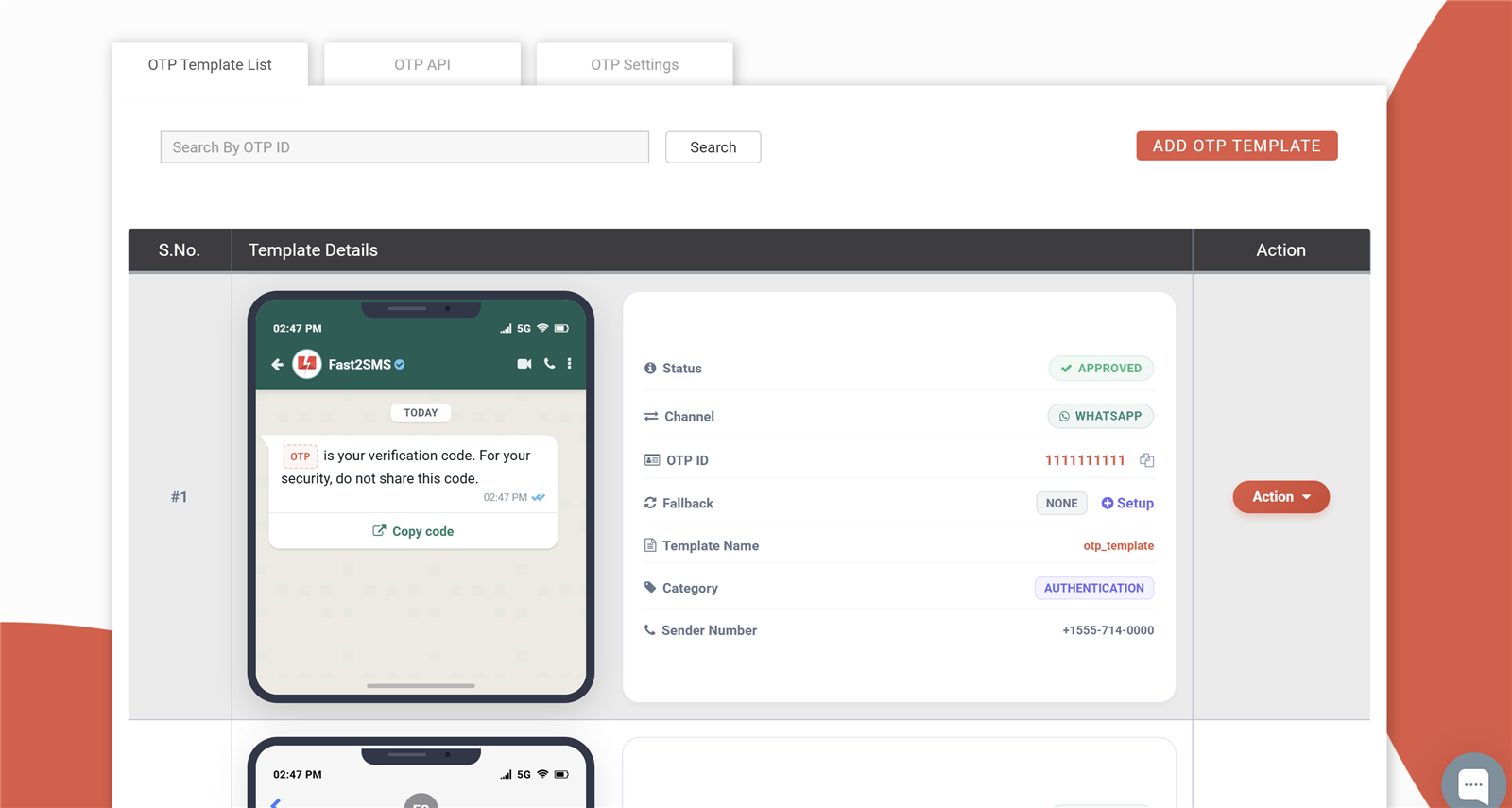
A step-by-step walkthrough of the WhatsApp onboarding screens, with screenshots of every window, is in how to get free WhatsApp OTP API. If you plan to keep using the WhatsApp Business app on the same number, read what is WhatsApp coexistence first.
Send and verify: code samples
Two REST endpoints do the whole job. Fast2SMS generates the code, sends it on the channel set in your OTP ID, and checks it on verify. Authentication is your API key in the Authorization header. The full reference is at send OTP and verify OTP on docs.fast2sms.com.
1. Send the OTP
curl --request POST \
  --url https://www.fast2sms.com/dev/otp/send \
  --header 'Authorization: YOUR_API_KEY' \
  --header 'accept: application/json' \
  --header 'content-type: application/json' \
  --data '{
    "otp_id": "11111111",
    "mobile": "8888888888"
  }'
Success response:
{
  "return": true,
  "status_code": 200,
  "request_id": "lwdtp7cjyqxvfe9",
  "message": "OTP sent successfully"
}
Keep the request_id. It traces the OTP in reports and webhook events.
2. Verify what the customer typed
curl --request POST \
  --url https://www.fast2sms.com/dev/otp/verify \
  --header 'Authorization: YOUR_API_KEY' \
  --header 'accept: application/json' \
  --header 'content-type: application/json' \
  --data '{
    "mobile": "8888888888",
    "otp": "123456"
  }'
{
"return": true,
"status_code": 200,
"message": "OTP verified successfully"
}A wrong, expired or exhausted code returns "return": false, so one if-check gates your signup, login or COD confirmation.
The same flow in Node.js
// Node 18+ (built-in fetch). Keep the key in an environment variable.
const API_KEY = process.env.FAST2SMS_API_KEY;
const HEADERS = {
  'Authorization': API_KEY,
  'Content-Type': 'application/json',
  'Accept': 'application/json'
};

async function sendOtp(mobile) {
  const res = await fetch('https://www.fast2sms.com/dev/otp/send', {
    method: 'POST',
    headers: HEADERS,
    body: JSON.stringify({ otp_id: '11111111', mobile: mobile })
  });
  return res.json(); // keep data.request_id for tracing
}

async function verifyOtp(mobile, otp) {
  const res = await fetch('https://www.fast2sms.com/dev/otp/verify', {
    method: 'POST',
    headers: HEADERS,
    body: JSON.stringify({ mobile: mobile, otp: otp })
  });
  const data = await res.json();
  return data.return === true; // true = log the user in
}
The same flow in Python
import os
import requests

API_KEY = os.environ["FAST2SMS_API_KEY"]
HEADERS = {"Authorization": API_KEY, "Content-Type": "application/json", "Accept": "application/json"}

def send_otp(mobile):
    r = requests.post("https://www.fast2sms.com/dev/otp/send",
                      json={"otp_id": "11111111", "mobile": mobile},
                      headers=HEADERS, timeout=10)
    return r.json()

def verify_otp(mobile, otp):
    r = requests.post("https://www.fast2sms.com/dev/otp/verify",
                      json={"mobile": mobile, "otp": otp},
                      headers=HEADERS, timeout=10)
    return r.json().get("return") is True
The verify step in PHP
$ch = curl_init('https://www.fast2sms.com/dev/otp/verify');
curl_setopt_array($ch, array(
    CURLOPT_RETURNTRANSFER => true,
    CURLOPT_POST => true,
    CURLOPT_HTTPHEADER => array(
        'Authorization: YOUR_API_KEY',
        'Content-Type: application/json',
        'Accept: application/json',
    ),
    CURLOPT_POSTFIELDS => json_encode(array(
        'mobile' => $customerMobile,
        'otp' => $enteredOtp,
    )),
));
$verify = json_decode(curl_exec($ch), true);
curl_close($ch);

if (!empty($verify['return'])) {
    // Verified: create the account, log in, or confirm the COD order
} else {
    // Wrong or expired OTP: show the error and offer resend
}
A complete PHP example with the send step is in the OTP SMS API guide.
Options you control
| Setting | Where | Range |
|---|---|---|
| Your own code instead of a generated one | otp on the send request | Any code you pass |
| Generated code length | otp_length on the send request | 4 to 10 digits |
| Code validity | otp_expiry on the send request, in minutes | 1 minute to 7 days (10,080 minutes); default 15 minutes |
| Wrong guesses allowed per code | OTP Settings in the panel | 1 to 100 |
| Resend the same code | Resend endpoint (/dev/otp/resend) | Up to 5 times within 10 minutes of the first send |
| Wait between resends to one number | OTP Settings in the panel | 0 to 3,600 seconds (default 10) |
Check the exact parameter formats for these options, and the resend request, in the API documentation before going live.
Errors you should handle
- 400 Invalid OTP ID on send: the
otp_iddoes not exist in your panel. Copy it from the OTP template list. - 401 Invalid Authorization key: wrong or revoked API key.
- 400 Invalid OTP on verify: the customer typed the wrong code. Let them retry or resend.
- Maximum verification attempts reached: the attempt limit is used up and the code is dead. Ask for a fresh OTP.
- 404 OTP not found or already verified: each code verifies once.
Prefer to manage the code yourself?
You can also send an approved authentication template directly through the WhatsApp message API and generate and check codes in your own system. Every approved template gets a ready-made API URL in the panel (you can download them all as a sheet). A template send is a single GET request:
curl "https://www.fast2sms.com/dev/whatsapp?message_id=YOUR_TEMPLATE_ID&phone_number_id=YOUR_PHONE_NUMBER_ID&numbers=9999999999&variables_values=482913" \
  -H "Authorization: YOUR_API_KEY"
Here message_id is your approved template, phone_number_id is your WhatsApp Business number’s ID, numbers is the 10-digit Indian mobile number and variables_values carries the OTP. This route gives you no automatic SMS fallback and no verify endpoint, so most teams use Smart OTP instead. Details: WhatsApp message API.
Delivery reports and webhooks
You do not have to poll the API to learn whether an OTP arrived. Fast2SMS gives you two views:
- OTP report in the panel: sent, delivered, failed and pending per attempt, with the channel that carried it and the time it landed. A fallback shows as its own line next to the primary attempt. Filter by date, search a number and export to Excel.
- OTP webhooks: Fast2SMS calls a URL on your server with delivered or failed events, including the request ID, mobile number, channel, status, timestamps, failure reason and your own
udf1toudf3values. You design the JSON body yourself using placeholders.
Useful webhook facts: webhooks fire for messages sent through the developer API (not dashboard sends); you can create up to 10 webhooks per channel; each request times out after 60 seconds and is retried up to 3 times, 60 seconds apart; logs are kept for 7 days with a one-time manual resend. Because retries exist, de-duplicate on request ID plus status and answer HTTP 200 quickly. The full payload list is in how webhooks work.
Security best practices
An OTP flow is only as safe as the code around it. These practices apply whichever channel you use:
- Keep the API key on the server. Never put it in a mobile app, browser JavaScript or a public repository. Call Fast2SMS from your backend only.
- Do not store OTPs. Let the verify endpoint check codes server-side. Your database should only ever know “verified” or “not verified”.
- Use short expiry for sensitive actions. For password reset or payments, 5 minutes is plenty. Longer windows suit low-risk cases like delivery codes.
- Limit wrong guesses. Set a low attempt limit in OTP Settings (for example 3 for password reset) so codes cannot be brute-forced.
- Throttle resends. Use the resend wait in OTP Settings and add your own per-number and per-IP limits on the page that triggers OTPs. This stops abuse and protects your wallet from bots.
- Verify webhook requests. Enable webhook signing in Dev API settings; every request then carries a
webhook_secret_keyheader with a 40-character secret. Reject anything that does not match, and use HTTPS. - Never ask customers to share codes. Keep the security line in your template and train support staff never to request an OTP on calls or chats.
- Pick the right channel for the risk. WhatsApp messages are end-to-end encrypted and go to the customer’s WhatsApp account; SMS gives a DLT-registered trail that regulated businesses often prefer. Smart OTP lets you use both.
On the platform side, Fast2SMS has run business messaging in India since 2011 with 99.9% uptime, and its data-security certificates are published on the certificates page.
WhatsApp OTP not received: causes and fixes
When a customer says “I did not get the code”, the reason is usually one of these:
| Cause | What happens | Fix |
|---|---|---|
| No WhatsApp on that number | The WhatsApp attempt fails and is refunded | Set SMS as fallback in Smart OTP |
| Phone has no data or Wi-Fi | Message waits until the phone is online | SMS-first order for audiences with weak data |
| Customer blocked your business | WhatsApp cannot deliver | SMS fallback reaches them on the SMS channel |
| Wrong or mistyped number | Code goes nowhere useful | Show the number on the OTP screen with an “edit number” link |
| Template not approved yet | Send request fails | Check template status in the panel; keep authentication content strictly OTP-only |
| Customer requested many times | Resend wait or limit blocks new sends | Show a visible countdown before the resend button |
Two habits remove most complaints: show a resend timer instead of letting users tap repeatedly, and let customers see and correct the number they typed. The OTP report then tells you exactly which attempt failed and which channel delivered.
Use cases: login, signup, COD, payments
Passwordless login
Customers reuse weak passwords and then forget them. OTP login removes the password: the phone becomes the key. A WhatsApp OTP with a copy-code button makes this a two-tap login, and support stops answering reset requests all day.
Signup verification
Verifying the mobile number at signup keeps fake and mistyped numbers out of your database, so order updates, delivery calls and marketing all reach real people later. It also makes coupon abuse expensive: a “first order discount” cannot be claimed ten times when every account needs a real, reachable number.
Cash-on-delivery confirmation
Indian ecommerce runs heavily on COD, and fake COD orders cost shipping both ways plus packaging and blocked stock. An OTP at checkout confirms a real, reachable customer before the parcel leaves. Fast2SMS plugins for WooCommerce OTP verification and Shopify OTP include COD confirmation.
Payments and transactions
For payment approval and high-value actions, use a short expiry and a low attempt limit. Many businesses keep SMS first here for the DLT trail and add WhatsApp as fallback so a customer out of coverage can still finish.
Delivery and doorstep handover
A delivery OTP lands in the same WhatsApp thread where the customer already gets order updates. They read it out to the delivery partner, and you have proof of handover.
Two-factor authentication on WordPress
The free Fast2SMS WordPress plugin adds WhatsApp two-factor authentication and WhatsApp OTP for WordPress login and registration, using the same OTP ID and the same fallback settings.
WhatsApp OTP vs SMS OTP vs Smart OTP
| Feature | SMS OTP | WhatsApp OTP | Smart OTP (both) |
|---|---|---|---|
| Regulated by | TRAI (DLT) | Meta policies | Both, per channel |
| Registration | DLT entity, sender ID, template | WhatsApp Business account + authentication template | Both templates in one OTP ID |
| Sender shown | 6-letter DLT sender ID | Verified business name | Depends on the delivering channel |
| Works on feature phones | Yes | No | Yes, through SMS |
| Needs internet | No | Yes | No, if SMS is the fallback |
| Copy-code button | No | Yes | Yes, on WhatsApp |
| Read receipts | No | Yes | On WhatsApp |
| Failed message billing | Charged | Refunded within 48 hours | Per channel |
| Automatic fallback | No | No | Yes, both directions |
| Price on Fast2SMS | ₹0.25 to ₹0.11 | ₹0.25 (₹0.11 high volume) | Rate of the channel used |
Fast2SMS Smart OTP vs a typical OTP provider
| What you need | Fast2SMS Smart OTP | Many providers |
|---|---|---|
| SMS and WhatsApp from one OTP API | Both, same key and OTP ID | Usually SMS only |
| Automatic fallback between channels | SMS to WhatsApp or WhatsApp to SMS | No, or a second API call from you |
| Verify and resend endpoints | Included | Verify often left to you |
| Per-attempt logs | Every attempt, both channels | Summary counts |
| Setup or monthly fee | None | Often a platform fee |
| Minimum recharge | ₹100 | ₹1,000 to ₹5,000 packs |
| DLT help for OTP templates | Free | Paid or not offered |
The comparison reflects publicly listed plans of common OTP and SMS providers in India; details vary by provider.
Why businesses pick Fast2SMS for OTP
- Official WhatsApp Business API with free embedded signup; keep your existing WhatsApp Business app number if you want.
- One API for WhatsApp and SMS OTP, with automatic fallback both ways and a verify endpoint, so you never build OTP storage yourself.
- Pay per message only: ₹0.25 per WhatsApp OTP, SMS from ₹0.11, no setup or monthly fee, recharge from ₹100, ₹50 free credit to test.
- Failed WhatsApp messages refunded automatically within 48 hours, and every attempt itemised in transaction history.
- Free DLT support for your SMS sender ID and OTP template, and template review before Meta submission.
- Free plugins for WordPress, WooCommerce and Shopify, plus webhooks and reports for custom apps. See all integrations.
- Real support: chat, phone (+91-6262778822), email ([email protected]) or a free meeting at fast2sms.com/meet.
The same account also runs WhatsApp Business API campaigns, bulk SMS, RCS messages and campaigns from one wallet. Developers can start with the API documentation, and everyone else can create a free account and send a test OTP in a few minutes.
Frequently asked questions
What is a WhatsApp OTP API?
It is an API that sends a one-time password to a customer’s WhatsApp number using an approved Meta authentication template, and lets your server verify the code the customer types. On Fast2SMS it works through the official WhatsApp Business API.
How does WhatsApp OTP verification work?
Your server calls the send endpoint with the mobile number and your OTP ID. Fast2SMS generates the code, sends it on WhatsApp and stores it; when the customer types it, your server calls the verify endpoint and gets true or false.
Can I send OTP on WhatsApp instead of SMS?
Yes. Create a Smart OTP template with WhatsApp as its channel and an approved authentication template. You can also keep SMS as an automatic fallback for numbers that cannot receive WhatsApp.
What is a WhatsApp authentication message?
It is the Meta template category meant only for one-time passwords and verification codes. It cannot contain promotions or links, can carry an expiry line and shows a Copy code button.
Is the Fast2SMS WhatsApp OTP API official?
Yes. Fast2SMS gives access to Meta’s official WhatsApp Business API (Cloud API) with free embedded signup onboarding. No unofficial WhatsApp Web automation is used.
What does a WhatsApp OTP message look like?
It arrives from your verified business name with text such as “701284 is your verification code. For your security, do not share this code.”, an optional expiry line and a Copy code button.
What is the WhatsApp OTP format?
Authentication templates follow a fixed format set by Meta: the code, a security line asking the user not to share it, an optional validity line and a copy-code button. You choose the language and the expiry, not free-form marketing text.
Who should use a WhatsApp OTP API?
Any business that verifies mobile numbers: apps, ecommerce stores, fintech, edtech, healthcare portals and SaaS products. It suits audiences who use WhatsApp daily on smartphones.
Does WhatsApp OTP need DLT registration?
No. WhatsApp OTPs are governed by Meta’s policies, not TRAI’s DLT system. You need only a connected WhatsApp Business number and an approved authentication template. DLT is still needed if you add SMS as fallback.
Is WhatsApp OTP better than SMS OTP?
It is better for user experience: verified business name, copy-code button, read receipts and end-to-end encryption. SMS is better for reach because it works on every phone without internet. Using both with Smart OTP gives you the strengths of each.
Can WhatsApp OTP reach feature phones?
No. The customer needs WhatsApp installed on a smartphone and an internet connection. For feature phones, add SMS as the fallback channel so they still get the code.
Do customers need to save my number to receive a WhatsApp OTP?
No. Authentication templates are business-initiated messages sent through the official API, so the customer receives the code from your business account without saving your number.
Is WhatsApp OTP secure?
WhatsApp messages are end-to-end encrypted and are shown with your verified business name, which helps customers spot fakes. On Fast2SMS the code is generated and checked server-side, so your database never stores OTPs.
What is the difference between WhatsApp OTP and WhatsApp utility messages?
Authentication messages carry only OTPs and verification codes. Utility messages carry order updates, reminders and alerts, can include links and buttons, and are not for codes. Read utility vs authentication.
Can I send OTP on WhatsApp to international numbers?
The rates on Fast2SMS pricing pages are for Indian numbers. For other countries the rate is shown in the panel when you select the destination, or you can ask the sales team.
Is WhatsApp OTP free?
The API access is free on Fast2SMS: no setup fee, no monthly fee and no per-number fee. The OTP messages are paid per delivery at the authentication rate, ₹0.25 per message at the time of writing.
How can I get a free WhatsApp OTP API?
Signup free at fast2sms.com, connect your WhatsApp Business number through Facebook login, get an authentication template approved and copy your API key. Steps: how to get free WhatsApp OTP API.
What is the WhatsApp OTP price in India?
On Fast2SMS a WhatsApp authentication (OTP) message costs ₹0.25 per delivered message at the time of writing, and ₹0.11 on high-volume plans. See WhatsApp pricing.
How much does one WhatsApp OTP cost compared to an SMS OTP?
A WhatsApp OTP is ₹0.25. An SMS OTP costs your bulk SMS slab rate, from ₹0.25 down to ₹0.11 as your recharge grows. At entry rates the two cost about the same.
Do I pay for WhatsApp OTPs that fail?
No. WhatsApp messages are billed on delivery basis, and failed messages are refunded to your wallet automatically within 48 hours.
Is there a monthly fee for the WhatsApp OTP API?
No. There is no monthly fee, no setup fee and no per-number fee. You recharge a prepaid wallet and pay only per message.
What is the minimum recharge to send WhatsApp OTPs?
The minimum recharge is ₹100, and new accounts get ₹50 free credit after signup to send test OTPs.
Is GST charged on WhatsApp OTP recharges?
Yes, 18% GST applies on the recharge amount, and a GST invoice is generated for every payment. You can add your GSTIN in Settings.
Does my wallet balance expire?
No. WhatsApp rates have unlimited validity and the wallet balance never expires, so a slow month costs nothing.
How is Smart OTP priced when the fallback fires?
You pay the rate of each channel that carried an attempt. If WhatsApp fails it is refunded, and the SMS fallback is charged at your SMS rate. Both attempts show as separate lines in transaction history.
Can I get a lower WhatsApp OTP rate for high volume?
Yes. High-volume plans go down to ₹0.11 per message. Share your monthly volume with the sales team through contact us for a custom rate.
Is there a separate OTP tariff on Fast2SMS?
No. An OTP sent by WhatsApp costs the WhatsApp authentication rate and one sent by SMS costs your bulk SMS rate. There is no extra OTP platform charge on top.
Which is cheaper for OTP in India, SMS or WhatsApp?
At Fast2SMS entry rates both are ₹0.25. SMS can drop to ₹0.11 with higher recharge, and WhatsApp to ₹0.11 on high-volume plans. WhatsApp adds refunds for failed messages, which lowers wasted spend.
Do I pay for the verify API call?
Fast2SMS bills per OTP message sent on a channel. The verify and resend endpoints are part of Smart OTP; a resend sends a message again, so it is charged like a send.
How do I create a WhatsApp OTP template?
Create a new template in the authentication category from your connected WhatsApp number in the Fast2SMS panel. Keep it strictly to the code and its purpose; Fast2SMS reviews it before submission to Meta.
How long does WhatsApp OTP template approval take?
Meta usually approves authentication templates within 24 hours, compared with up to 3 to 5 days for DLT SMS templates.
Why was my WhatsApp authentication template rejected?
Common reasons are promotional words, links, or content that is really an order update. Authentication templates must carry only a verification code and its purpose. Choose utility for transactional updates.
Can I add a link to a WhatsApp OTP message?
No. URLs are not allowed in authentication templates. If you need a link, send it in a separate utility template.
What is the copy-code button in WhatsApp OTP?
It is a button under the authentication message. One tap copies the OTP so the customer can paste it into your app or website without typing.
Does WhatsApp support one-tap or zero-tap OTP autofill?
Meta’s authentication category describes one-tap and zero-tap autofill for Android apps, which need extra work inside your mobile app. For most websites and apps, the copy-code button is what customers use.
Can I set an expiry time in a WhatsApp OTP template?
Yes. Authentication templates can carry an expiry line. On Fast2SMS the actual code validity is set with otp_expiry on the send request, from 1 minute up to 7 days, default 15 minutes.
Can I send WhatsApp OTP in Hindi or other languages?
Authentication templates are created per language, and Meta controls the fixed wording. Create the language versions you need in the panel and submit them for approval.
Can one template be used for login, signup and password reset?
Yes, one authentication template can serve several flows because the wording is generic. Many businesses still create separate Smart OTP IDs per flow to set different expiry, attempt limits and fallback order.
What sample text works for a WhatsApp OTP?
Examples: “482913 is your verification code. For your security, do not share this code.” or “Use 342978 to reset your password. Do not share it with anyone.” Keep it short and purpose-focused.
Does Fast2SMS help with WhatsApp template approval?
Yes. The team reviews your templates before you submit them to Meta, which reduces rejections caused by the wrong category or promotional wording.
What is Smart OTP?
Smart OTP is the OTP engine inside Fast2SMS. You create an OTP template with a primary channel (SMS or WhatsApp) and an optional fallback on the other channel, and your app uses one OTP ID for every send.
How does WhatsApp to SMS fallback work?
If the WhatsApp attempt is reported as failed, Fast2SMS sends the same code by DLT SMS automatically, within about a minute and only for attempts less than two minutes old. Your code makes no second request.
Can I send SMS first and use WhatsApp as fallback?
Yes. Fallback works both ways: SMS first then WhatsApp, or WhatsApp first then SMS. Set the order per OTP template in Configure Channel Fallback.
Does the customer get a different code on the fallback channel?
No. The fallback sends the same code, so the customer verifies the same OTP whichever channel delivered it.
Do I need to change my code to switch the OTP channel?
No. The channel and fallback live in the OTP ID settings in the panel. Change them there and every website or app using that OTP ID follows instantly.
Which channel should be primary for OTP?
WhatsApp first suits signups and delivery codes for smartphone users. SMS first suits app login, payments and banking, where every handset must be reached. Pick the channel your users already have open.
Can I use WhatsApp OTP without any SMS fallback?
Yes. Create the OTP template with WhatsApp as its channel and leave fallback empty. Numbers without WhatsApp will then not get a code, so most businesses add SMS fallback.
What do I need for the SMS fallback channel?
A DLT-registered sender ID and an approved OTP content template in the transactional category. Fast2SMS helps register both for free, and templates already approved on DLT appear in your panel.
Where can I see if the fallback was used?
The OTP report shows the primary and fallback attempts side by side with channel, status and time, and the same lines appear in transaction history and on your webhook.
Can I test Smart OTP fallback before going live?
Yes. Each OTP template row has a Test OTP button. Send to your own number, watch the delivery status and verify the code without writing code.
How do I set up WhatsApp OTP on Fast2SMS?
Signup, connect your WhatsApp number with Facebook login, get an authentication template approved, create a Smart OTP template, copy the OTP ID and API key, then call the send and verify endpoints.
What do I need before connecting WhatsApp for OTP?
A genuine, established Facebook account, a working business website with logo, name and terms pages, and a phone number for WhatsApp. Without these, Meta review can get stuck.
Can I use my existing WhatsApp Business app number for OTP?
Yes. During embedded signup choose “Connect your existing WhatsApp Business app”, verify the number and scan the QR code. Read WhatsApp coexistence first.
Can I get a new number for WhatsApp OTP?
Yes. Choose “Start with a new WhatsApp phone number” during embedded signup. Messages then go from your WhatsApp Business display name on that number.
Why must I click Finish at the end of WhatsApp signup?
Clicking Finish links your WhatsApp Business account to Fast2SMS. If you skip it, you have to start the embedded signup again from the beginning.
Do I need my own Meta developer account?
No. You connect your number through the Fast2SMS panel with Facebook login, get templates approved there and use a simple REST API. Fast2SMS handles the Meta side.
How long does WhatsApp OTP setup take?
Connecting the number takes a few minutes if your Facebook account and website are ready. Template approval usually comes within 24 hours, and the API integration itself is two calls.
Where do I find my Fast2SMS API key?
In the Dev API section of the panel. It goes in the Authorization header of every request; keep it on your server only.
Where do I find my OTP ID?
In the Smart OTP section, each OTP template in the list shows its OTP ID. Copy it into your code or plugin settings.
Can I send a test WhatsApp OTP for free?
Yes. New accounts get ₹50 credit after signup, which you can use to send test OTPs from the panel with the Test OTP button.
What is the WhatsApp OTP send endpoint?
POST https://www.fast2sms.com/dev/otp/send with a JSON body containing otp_id and mobile, and your API key in the Authorization header.
What is the OTP verify endpoint?
POST https://www.fast2sms.com/dev/otp/verify with mobile and otp in the JSON body. It returns return true with “OTP verified successfully” when the code matches and is still valid.
Is there a resend OTP endpoint?
Yes. The resend endpoint sends the same code to the same number again, up to 5 times within 10 minutes of the first send. See docs.fast2sms.com for the request format.
What does the send OTP API return?
A JSON object with return true, status_code 200, a request_id and the message “OTP sent successfully”. Keep the request_id to trace the OTP.
What does the verify API return for a wrong code?
It returns return false with status_code 400 and the reason, such as Invalid OTP. It returns 404 when there is no pending OTP for that number or it was already verified.
Can I use my own OTP code with the API?
Yes. Pass the otp parameter in the send request and Fast2SMS sends that code instead of generating one. You can still verify it with the verify endpoint.
How long can a generated OTP be?
Generated codes can be 4 to 10 digits long. Set otp_length on the send request.
How long is an OTP valid by default?
By default a code is valid for 15 minutes. Set otp_expiry in minutes on each request, from 1 up to 10,080 (7 days).
How many wrong attempts are allowed per OTP?
You set it in OTP Settings, from 1 to 100. After the limit, verify returns “Maximum verification attempts reached” and the code is no longer valid.
Do I have to store OTPs in my database?
No, and you should not. Fast2SMS generates, stores, expires and checks the code; your system only sees verified or not verified.
Which programming languages can use the WhatsApp OTP API?
Any language that can make an HTTPS request: PHP, Node.js, Python, Java, .NET, Go, mobile backends and no-code tools. The endpoints accept and return JSON.
Can I send a WhatsApp OTP with the WhatsApp message API instead?
Yes. Send your approved authentication template with GET /dev/whatsapp using message_id, phone_number_id, numbers and variables_values (the OTP). You then generate and check codes yourself and get no automatic fallback.
What does the 401 Invalid Authorization key error mean?
The API key in the Authorization header is wrong or revoked. Copy the current key from the Dev API section.
What does 400 Invalid OTP ID mean?
The otp_id in your send request does not exist in your panel. Copy the correct OTP ID from the Smart OTP template list.
What mobile number format does the OTP API accept?
The samples use the 10-digit Indian mobile number, for example 8888888888. Check docs.fast2sms.com for other formats.
Where is the WhatsApp OTP API documentation?
At docs.fast2sms.com, including the send OTP, verify OTP and resend references, WhatsApp template messages and webhooks.
Can I get WhatsApp OTP delivery reports by webhook?
Yes. OTP webhooks post delivered and failed events to your URL with the request ID, mobile, channel, status, timestamps, failure reason and your udf1 to udf3 values.
How many webhooks can I create for OTP?
Up to 10 webhooks per channel. Webhooks fire for messages sent through the developer API, not for dashboard sends.
What happens if my webhook server is down?
Each request times out after 60 seconds and is retried up to 3 times, 60 seconds apart. Logs are kept for 7 days with a one-time manual resend per event.
How do I know a webhook really came from Fast2SMS?
Enable webhook signing in Dev API settings. Every request then carries a webhook_secret_key header with a 40-character secret; reject anything that does not match.
Can I export WhatsApp OTP reports?
Yes. The OTP report shows sent, delivered, failed and pending per attempt with a daily chart, and you can filter by date, search a number and export to Excel.
How fast is a WhatsApp OTP delivered?
WhatsApp OTPs arrive as soon as the customer’s phone is online. Each attempt in the OTP report shows the exact sent and delivered time.
Why is my WhatsApp OTP not received?
Usual reasons: the number has no WhatsApp, the phone has no internet, the customer blocked your business, or the number was mistyped. Adding SMS fallback in Smart OTP covers most of these cases.
What happens if the customer does not have WhatsApp?
The WhatsApp attempt fails and is refunded. If you set SMS as fallback, the same code goes out by SMS automatically.
Can WhatsApp OTP be delivered to a user who blocked my business?
No. WhatsApp cannot deliver to users who block your messages. An SMS fallback still reaches them through the SMS channel.
Does WhatsApp OTP work without internet?
No. The customer needs mobile data or Wi-Fi to receive WhatsApp messages. SMS OTP works without internet, which is why SMS fallback is useful.
How do I stop users from requesting too many OTPs?
Use the resend limits (5 times in 10 minutes) and set a wait between resends in OTP Settings, from 0 to 3,600 seconds. Also show a countdown before the resend button.
Can I see why a WhatsApp OTP failed?
Yes. The OTP report and webhook include the status and failure reason for each attempt, so you can tell a missing WhatsApp account from a mistyped number.
How do I keep my OTP API key safe?
Call Fast2SMS only from your backend. Never put the key in mobile apps, browser JavaScript or public code repositories, and replace it if it leaks.
What OTP expiry is best for password reset?
A short expiry such as 5 minutes with a low attempt limit, for example 3, is a sensible choice for password reset and payment confirmation.
Can WhatsApp OTP be used for two-factor authentication?
Yes. It is used for login 2FA, payment confirmation, password reset, signup verification and delivery codes. Short expiry, attempt limits and resend waits give you control.
Is WhatsApp OTP safe from SIM swap fraud?
No channel is perfect. WhatsApp ties the code to the customer’s WhatsApp account and encrypts it end to end, while SIM swap is a listed limitation of SMS OTP. For high-risk actions combine OTP with your own risk checks.
Does Fast2SMS have security certifications?
Yes. Fast2SMS publishes its data-security certificates at fast2sms.com/certificates, and has run business messaging in India since 2011 with 99.9% uptime.
Can I use WhatsApp OTP for login on my website?
Yes. Passwordless OTP login is a common use: the customer enters a mobile number, receives the code on WhatsApp, taps Copy code and is logged in.
Can WhatsApp OTP reduce fake COD orders?
Yes. An OTP at checkout confirms a real, reachable customer before the parcel ships, which cuts fake cash-on-delivery orders and return shipping costs.
Can I use WhatsApp OTP for payment confirmation?
Yes. Many businesses send payment OTPs on SMS first for the DLT trail with WhatsApp as fallback, or the reverse. Use a short expiry and low attempt limit.
Can I use WhatsApp OTP for delivery handover?
Yes. A delivery OTP such as “Share OTP 5520 with the delivery partner to receive order #4821” lands in the same WhatsApp thread as the order updates.
Is there a WhatsApp OTP plugin for WordPress?
Yes. The free Fast2SMS plugin on WordPress.org adds WhatsApp OTP login, registration and two-factor authentication. See WhatsApp OTP for WordPress.
Can I add WhatsApp OTP to WooCommerce checkout?
Yes. The same free plugin covers WooCommerce login, registration and COD confirmation with the Smart OTP ID. See the WooCommerce plugin guide.
Can I use WhatsApp OTP login on Shopify?
Yes. The official Fast2SMS Shopify app uses the same OTP ID for storefront login. See Shopify SMS and WhatsApp.
Can I verify leads from a website form with WhatsApp OTP?
Yes. The WordPress plugin supports form OTP for Contact Form 7, WPForms and Elementor, and custom sites can call the send and verify endpoints from the form handler.
Can WhatsApp OTP stop coupon and signup abuse?
Yes. When every account needs a verified, reachable mobile number, one person cannot easily create many fake accounts to claim first-order discounts.
Can I use the same Fast2SMS account for SMS, WhatsApp and OTP?
Yes. One account, one API key and one prepaid wallet cover bulk SMS, WhatsApp Business API, Smart OTP and RCS.
Does Fast2SMS give DLT support for OTP SMS fallback?
Yes. DLT support for entity registration, sender ID and OTP template approval is free, with ready sample templates.
Can resellers offer WhatsApp OTP to their clients?
Yes. The white-label Bulk9 reseller panel resells bulk SMS, WhatsApp Business API and RCS under your own brand. Details at fast2sms.com/reseller.
How do I contact Fast2SMS for WhatsApp OTP help?
Chat in the panel, call +91-6262778822, email [email protected] or book a free meeting at fast2sms.com/meet. All support is free.
How do I start sending WhatsApp OTPs today?
Create a free account at fast2sms.com, connect your WhatsApp number, add an authentication template, create a Smart OTP template with SMS fallback and call the send API with your OTP ID.