WhatsApp Marketing for Real Estate: Automate Lead Follow-up and Site Visit Reminders
No monthly fee · Pay as you go from ₹100 · Free setup help on a call
WhatsApp marketing for real estate works best as an automatic lead journey: reply to every enquiry within seconds with the brochure, call the lead if they do not reply, remind them 24 hours and 2 hours before a site visit, and follow up on day 3, 7 and 21. On Fast2SMS, your CRM starts this Campaign journey with one API call, with SMS and call fallback. No monthly fee; you pay per message.
This guide covers why speed matters for property leads, the four journeys a builder, broker or channel partner needs, timing tables for each, copy-ready WhatsApp, SMS and voice messages (with Hindi), the API call for your CRM, a cost example per lead in rupees and the setup steps.
What is WhatsApp marketing for real estate?
WhatsApp marketing for real estate means using WhatsApp, with SMS and calls alongside, to reply to property enquiries, share brochures and floor plans, book and remind site visits, and stay in touch with buyers until they decide. Done well, most of it runs on its own.
Property is a slow, high-value purchase. A buyer may enquire about five projects, visit two and take months to book. The builder or broker who replies first, stays helpful without being pushy, and makes the site visit easy usually wins. That is hard to do by hand when leads arrive at all hours from ads, portals and your website.
Automation does the routine part: the instant reply, the reminders, the timed follow-ups. Your sales team does the part only people can do: the conversation, the visit and the negotiation. In Fast2SMS this is a set of journeys in the multi-channel campaign builder, using four channels:
- WhatsApp: brochures as PDF, images of the project, video walkthroughs and buttons, using Meta-approved templates. Replies come to your WhatsApp inbox.
- SMS: reaches every phone and is the backup when WhatsApp does not deliver. Uses DLT-approved templates.
- RCS: rich cards and carousels in the Android Messages app, good for showing several unit types at once, from an approved RCS bot.
- Voice: a recorded call with a call patch, so a lead can press 1 and be connected straight to your sales team.
Why do the first five minutes matter for property leads?
Because the lead is thinking about property right now. A few minutes later they are on another call, another portal or another builder's site. A reply while they are still interested is far more likely to turn into a conversation than a call the next day.
Most real estate teams know this, but cannot do it at 11 PM on a Sunday, or when 80 leads arrive from a weekend ad campaign. An automatic first reply solves the speed problem: every lead gets the brochure, the location and a way to talk to you within seconds. A call patch a few minutes later solves the conversation problem: if the lead has not replied, they get a short call and can press 1 to reach a salesperson, whose phone rings only when a real, interested buyer is on the line.
How do property leads get into Fast2SMS?
Your CRM, website or a small script sends each new lead to Fast2SMS with one API call, and the enquiry journey starts at once. You can also upload lead lists from a sheet for older leads.
| Lead source | How it reaches Fast2SMS | Starts |
|---|---|---|
| Your website or landing page form | Your form handler calls the campaign start API | Instantly |
| Ad lead forms (social media, search) | Leads sync to your CRM; the CRM calls the API | As soon as the CRM receives the lead |
| Property portals | Portal leads come into your CRM or inbox; your CRM or a small script calls the API | As soon as your system has the lead |
| Walk-ins, events, call centre | Your team adds the lead in the CRM, which calls the API | When entered |
| Old leads and past enquiries | Upload a CSV, TXT, XLSX or XLS sheet up to 20 MB and 10 lakh rows, or use an Address Book group | Send now, Schedule or Repeat |
Fast2SMS does not connect to portals or ad platforms by itself, and it does not receive webhooks from them. Whatever system holds your leads makes one call to Fast2SMS. Here it is with cURL:
curl -X POST https://www.fast2sms.com/dev/campaign/start \
  -H "authorization: YOUR_API_KEY" \
  -H "Content-Type: application/json" \
  -d '{"campaign": "YOUR_ENQUIRY_CAMPAIGN_ID",
       "recipients": [
         {"mobile": "9000012345", "name": "Priya", "project": "Demo Heights", "bhk": "2 BHK"}
       ]}'
And in Node.js, for a form handler or CRM hook:
const res = await fetch('https://www.fast2sms.com/dev/campaign/start', {
  method: 'POST',
  headers: { 'authorization': 'YOUR_API_KEY', 'Content-Type': 'application/json' },
  body: JSON.stringify({
    campaign: 'YOUR_ENQUIRY_CAMPAIGN_ID',
    recipients: [{ mobile: '9000012345', name: 'Priya', project: 'Demo Heights', bhk: '2 BHK' }]
  })
});
const data = await res.json();
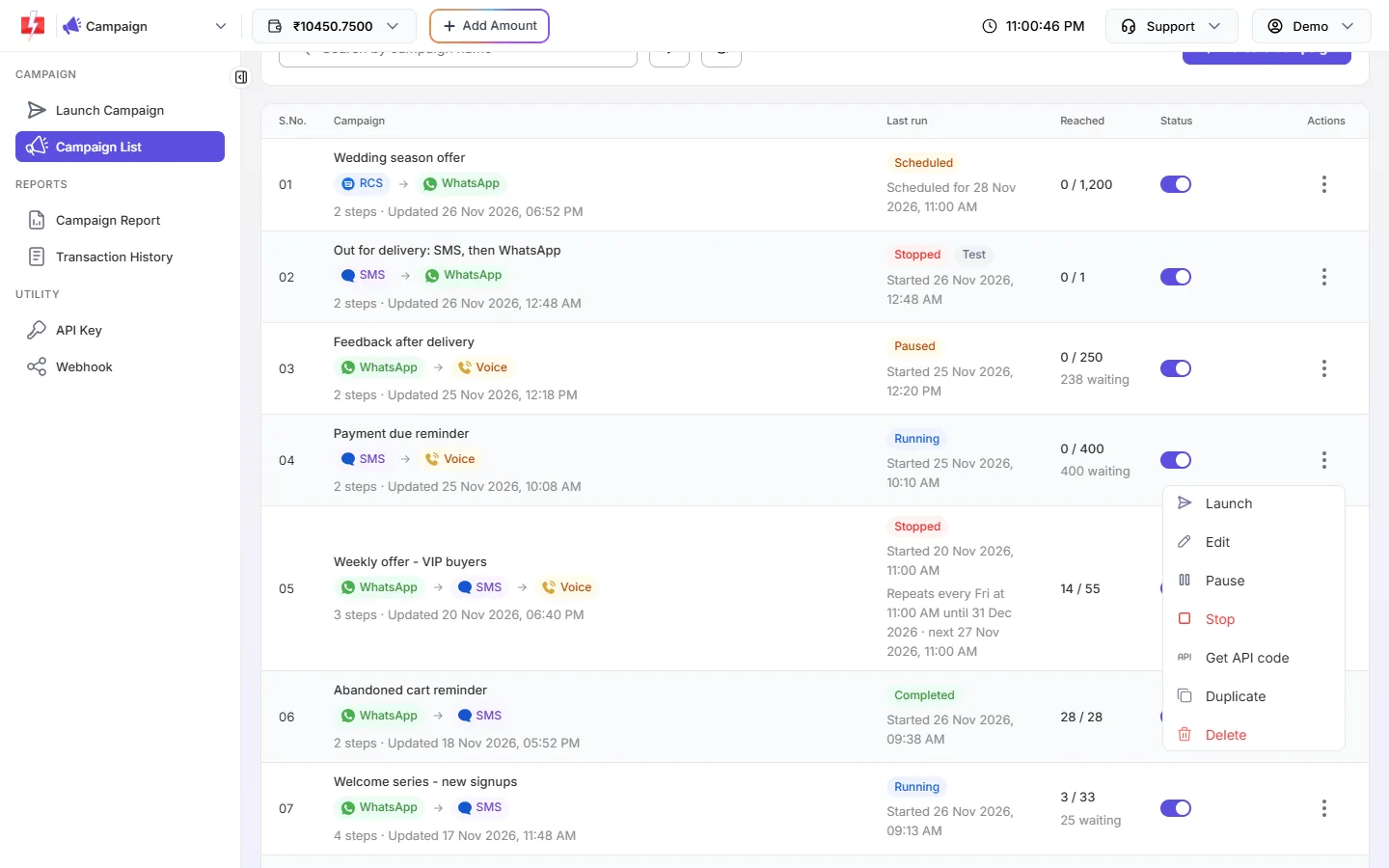
The campaign ID and ready code in cURL, PHP, Node.js and Python are in Campaign List, the ⋮ menu, "Get API code". Extra fields such as project and bhk become variables for your templates (up to 50 per number). Only Indian mobile numbers are accepted. If the same lead enquires twice on one day, the second call for that campaign is skipped, so nobody gets the brochure twice. More on the developer side is in the event-triggered messaging guide.
Journey 1: How do you reply to a property enquiry instantly?
Send a WhatsApp template with the brochure the moment the lead arrives, send an SMS if WhatsApp is not delivered, and place a call patch if the lead has not replied within about 10 minutes.
| Step | When | Channel | Message | If it fails |
|---|---|---|---|---|
| 1 | 0 min, lead arrives | WhatsApp template with PDF brochure | "Hi Priya, thanks for your interest in Demo Heights. Here is the brochure for 2 BHK homes." Buttons: "Book a site visit", "Call me" | Failed or not delivered (wait set to 5 minutes): step 2 |
| 2 | About 5 min | SMS | Short thanks, brochure link and your sales number | Shown as failed; continue to step 3 |
| 3 | 10 min | Condition | Reply received (WhatsApp) in the last 10 minutes? | Yes: leave, your team replies in the inbox. No: step 4. |
| 4 | 10 min, inside a 9 AM - 8 PM Frequency window | Voice, call patch | "Thank you for your enquiry about Demo Heights. Press 1 to speak to our property advisor now." | Not answered or failed: step 5 |
| 5 | After the call | SMS | "Sorry we missed you. Call our advisor on 90000 12399 or book a visit: link" | End; the lead moves to the nurture journey |
The Frequency step before the call matters. A lead who enquires at 11 PM gets the WhatsApp brochure at once, but the call waits until the next morning's window, which is far better than a late-night call. This journey is close to the ready-made "WhatsApp, no reply: call, then an SMS" under Lead follow-up. If your buyers prefer a call first, start from "Call first, WhatsApp if not answered" instead.
On the call patch, the lead presses 1 and is connected live to your sales agent group, on your agents' own phones. Call patch calls are charged on both legs, the lead's call and your agent's talk time, in 15-second pulses at ₹0.25 per pulse at the time of writing. The voice message is a recording, so it is the same for every lead; keep project names and prices in WhatsApp and SMS.
Journey 2: How do you automate site visit reminders?
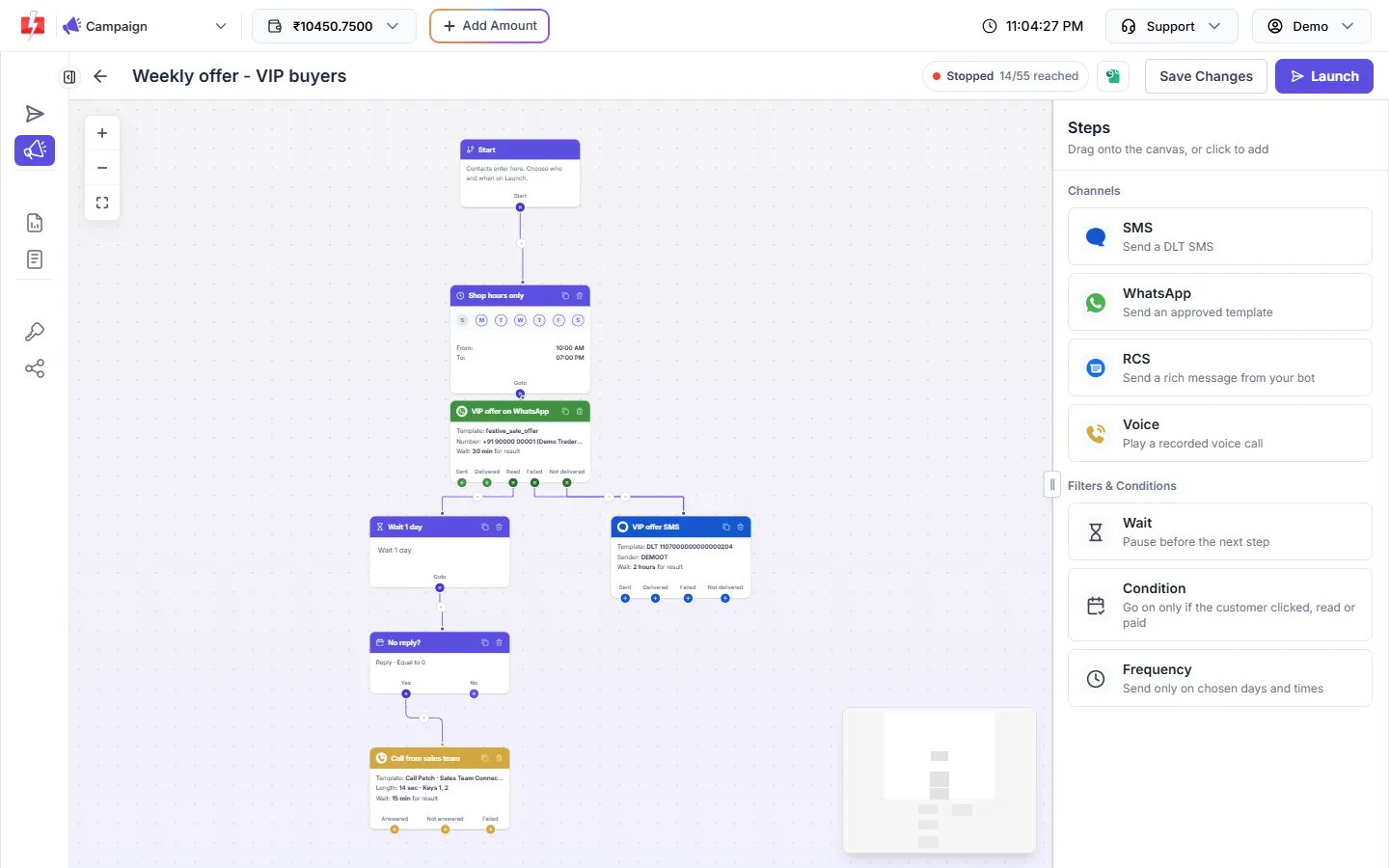
When a site visit is booked, your CRM starts a reminder journey 24 hours before the visit. It sends a WhatsApp reminder with the location link, waits 22 hours, and sends a "see you in 2 hours" message, with SMS if WhatsApp is not delivered.
One thing to understand: Fast2SMS waits are fixed lengths, counted from when the lead enters the step. It does not read each lead's visit date and schedule around it. So the reminder journey must start at the right moment: your CRM calls the API at T-24 hours (for example, a CRM job that runs every 15 minutes and starts the journey for visits due in 24 hours). For visits booked less than a day ahead, start a second, short "same-day" campaign with just the 2-hour reminder.
| Step | When | Channel | Message | If it fails |
|---|---|---|---|---|
| 1 | T-24h (CRM starts the journey) | WhatsApp utility | "Hi Priya, your site visit to Demo Heights is tomorrow at 11 AM. Location: map link. Reply to change the time." | Not delivered: step 2 |
| 2 | T-24h, a few minutes later | SMS (service template) | "Site visit: Demo Heights, tomorrow 11 AM. Map: link - Demo Realty" | Continue to step 3 |
| 3 | T-24h to T-2h | Wait | 22 hours | - |
| 4 | T-2h | Condition | visit_cancelled event from your CRM in the last 1 day? | Yes: leave. No: step 5. |
| 5 | T-2h | WhatsApp utility | "See you at 11 AM, Priya. Our advisor Rahul will meet you at the sales office gate." | Not delivered: step 6 |
| 6 | T-2h, a few minutes later | SMS or a short voice call | "Your Demo Heights visit is at 11 AM today." | End |
A booked visit reminder is information about something the buyer already arranged, so it suits a WhatsApp utility template and a service SMS template, which cost less than marketing. Keep offers out of it. For more reminder patterns, see the appointment reminder guide.
Journey 3: How should you follow up on day 3, 7 and 21?
Most buyers do not book after one conversation. A short nurture journey keeps your project in mind without daily messages: something useful on day 3, something visual on day 7, and a reason to visit on day 21. It stops as soon as the lead books a visit or replies.
| Step | When | Channel | Message | If it fails |
|---|---|---|---|---|
| 1 | Day 3, 11 AM window | WhatsApp marketing (image or PDF) | Floor plans and price sheet for the unit they asked about | Not delivered: SMS with link |
| 2 | Day 3 to 7 | Wait, then Condition | Booked event (site_visit_booked) or reply received? | Yes: leave. No: step 3. |
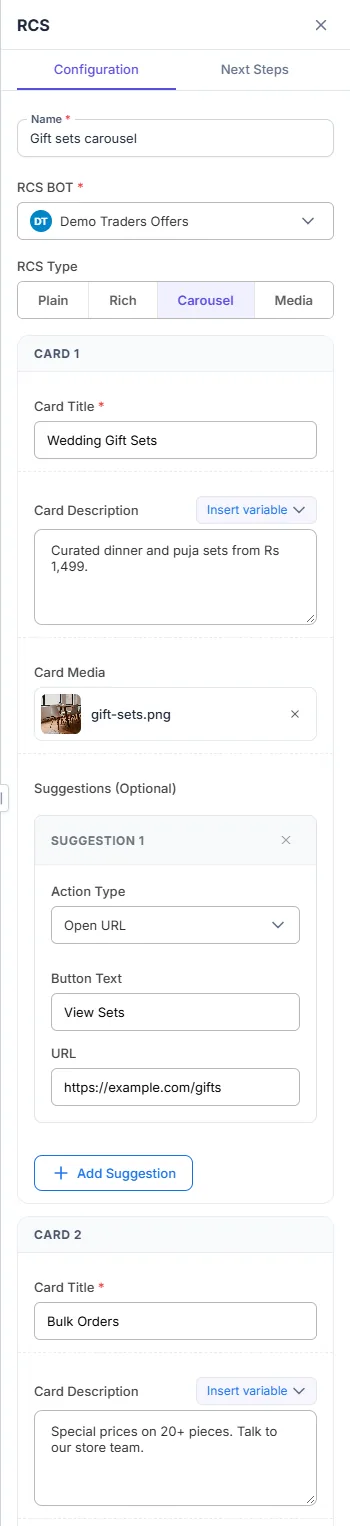
| 3 | Day 7 | RCS carousel | Cards for 2 BHK, 3 BHK, amenities and location, each with a "Book visit" button | Failed or phone without RCS: WhatsApp with a walkthrough video |
| 4 | Day 7 to 21 | Wait, then Condition | Booked or replied in the last 14 days? | Yes: leave. No: step 5. |
| 5 | Day 21, Saturday-friendly window | WhatsApp, then call patch if no reply | "Site visit weekend this Saturday and Sunday, with free pickup. Book your slot." | Not delivered: SMS invite |
The whole nurture journey fits inside 30 days, which is the longest a journey can run for one contact. For longer nurture, such as a monthly update for 6 months, use Repeat with an Address Book group of open leads that your CRM keeps up to date, or start a new campaign by API each month. Write the day 3, 7 and 21 messages so each one stands alone: some leads will only ever read one. More drip ideas are in the WhatsApp drip campaign guide.
To stop the nurture when a lead books, your CRM posts an event:
curl -X POST https://www.fast2sms.com/dev/campaign/event \
  -H "authorization: YOUR_API_KEY" \
  -H "Content-Type: application/json" \
  -d '{"number": "9000012345", "event": "site_visit_booked", "value": "Demo Heights, Sat 11 AM"}'
In each Condition step choose "Your event", site_visit_booked, at least 1, in the last N days. Fast2SMS does not track brochure or link clicks by itself; if you want to branch on clicks, your website posts a "clicked" event the same way.
Journey 4: How do you promote a project launch or a site visit weekend?
For a launch, send to your whole database of past enquiries and buyers with the ready journey "Rich RCS card first, then WhatsApp, then SMS". For a site visit weekend or open house, use the ready Event journey "WhatsApp invite, SMS if not delivered, call on the day".
- Launch announcement: an RCS rich card with the project image and "Register interest" button; WhatsApp if RCS fails or the phone does not support RCS; SMS if WhatsApp is not delivered. This is marketing, so use promotional templates and a promotional RCS bot, which sends between 7 AM and 10 PM.
- Site visit weekend: WhatsApp invite on Monday, SMS for anyone WhatsApp missed, then a short recorded call on Saturday morning with "press 1 to book a pickup" as a call patch to your site team.
- Past buyers and referrals: a soft "refer a friend" message to customers who already bought. Keep it rare.
Upload the list as a sheet or pick an Address Book group, and Schedule the launch up to 90 days ahead. Campaign starts up to 5,000 contacts per minute per run, so 1 lakh contacts start in about 20 minutes; set a contact limit per hour if your call centre needs to handle the replies. Promotional SMS and calls follow DND rules, and promotional SMS is held outside the promotional window when that rule applies. For SMS-only property promotions, see bulk SMS for real estate.
Real estate WhatsApp, SMS and voice templates
Keep property messages short, specific and easy to act on: one project, one unit type, one next step. WhatsApp templates need Meta approval and SMS templates need DLT registration before use. Each DLT variable holds up to 30 characters.
Enquiry reply
- WhatsApp: "Hi {{1}}, thank you for your interest in {{2}}. Here is the brochure for {{3}} homes. Tap below to book a site visit or ask us anything."
- SMS: "Thanks for your enquiry on {#var#}. Brochure: {#var#} Call us: {#var#} - Demo Realty"
Site visit reminders
- WhatsApp, T-24h: "Hi {{1}}, your site visit to {{2}} is on {{3}}. Location: {{4}}. Reply here if you need to change the time."
- WhatsApp, T-2h: "See you soon, {{1}}! Your {{2}} visit is at {{3}} today. Our advisor will meet you at the sales office."
- SMS: "Reminder: site visit at {#var#} on {#var#}. Map: {#var#} - Demo Realty"
Follow-ups
- Day 3: "Hi {{1}}, here are the floor plans and current prices for {{2}} at {{3}}. Happy to answer any questions."
- Day 7: "Still looking for a home in {{1}}? Here is a 2-minute video walkthrough of the {{2}} sample flat."
- Day 21: "Site visit weekend at {{1}} this Saturday and Sunday, with free pickup. Book your slot below."
Voice script for the call patch (about 15 seconds)
"Namaste, this is Demo Realty. Thank you for your enquiry about our new homes. To speak with our property advisor right now, please press 1. We have also sent the brochure on WhatsApp."
Hindi versions
- Enquiry reply: "नमस्ते {{1}}, {{2}} में रुचि दिखाने के लिए धन्यवाद। {{3}} घरों का ब्रोशर यहां है। साइट विज़िट बुक करने के लिए नीचे बटन दबाएं।"
- Site visit SMS: "याद दिलाना: {#var#} को {#var#} पर साइट विज़िट। नक्शा: {#var#} - Demo Realty"
- Voice: "नमस्ते, यह Demo Realty है। हमारे प्रॉपर्टी सलाहकार से अभी बात करने के लिए 1 दबाएं।"
What does real estate marketing automation cost per lead?
There is no campaign fee, builder fee or monthly fee. Each message is charged at its channel's normal rate, and fallback steps are charged only for leads who reach them.
At the time of writing: WhatsApp ₹0.95 per marketing message and ₹0.25 per utility message, SMS ₹0.25 per SMS from a ₹100 recharge down to ₹0.11 on bigger recharges, RCS ₹0.35 per message, and voice ₹0.25 per 15-second pulse for answered calls only. GST is extra. See WhatsApp pricing.
Example: 500 new leads in a month, with 100 site visits booked. Reach numbers are assumptions, and the enquiry reply is costed at the marketing rate (if Meta approves your template as utility, it costs ₹0.25).
| Message | Messages (assumed) | Rate | Monthly cost |
|---|---|---|---|
| Enquiry WhatsApp with brochure | 500 | ₹0.95 | ₹475 |
| Enquiry SMS fallback | 50 | ₹0.25 | ₹12.50 |
| Call patch, answered (lead about 4 pulses + agent about 8 pulses) | 200 calls, 12 pulses each | ₹0.25 per pulse | ₹600 |
| Missed-call SMS | 100 | ₹0.25 | ₹25 |
| Day 3 WhatsApp follow-up | 450 | ₹0.95 | ₹427.50 |
| Day 7 RCS carousel | 400 | ₹0.35 | ₹140 |
| Day 7 fallback (SMS) | 160 | ₹0.25 | ₹40 |
| Day 21 visit weekend WhatsApp | 350 | ₹0.95 | ₹332.50 |
| Site visit reminders, WhatsApp utility (2 per visit) | 200 | ₹0.25 | ₹50 |
| Reminder SMS fallback | 20 | ₹0.25 | ₹5 |
| Total | about ₹2,108 plus GST, about ₹4.20 per lead |
Compare that with what you pay to get each lead from ads or portals. Spending a few rupees more per lead so that every one gets an instant reply, a call and three follow-ups is usually the cheapest improvement a sales team can make.
A cost estimate shows before you launch a list, and every start needs enough balance for the first step. If the balance runs low mid-run, the run pauses and resumes on its own after you recharge (it checks every 10 minutes), and stops after 3 days on low balance. Refunds follow each channel's rules: failed WhatsApp and RCS messages under each channel's policy, SMS only on "On Delivery" billing accounts, and voice charges only answered pulses.
How to set up real estate journeys in Fast2SMS
- Get your senders and templates approved. A DLT sender with service templates (visit reminders) and promotional templates (follow-ups, launches). WhatsApp templates for the enquiry reply with a PDF header, visit reminders and follow-ups. An approved, active RCS bot for carousels. Voice enabled with an approved audio file (MP3 or WAV up to 5 MB) and an agent group of your sales team for call patch.
- Create the enquiry campaign. Go to Campaign, Campaign List, Create Campaign.
- Click "Start from a ready journey". Under Lead follow-up, pick "WhatsApp, no reply: call, then an SMS". The steps appear on the canvas.
- Fill each step with your sender and template, and map variables such as name, project and bhk to the fields your CRM sends.
- Add logic. Set the WhatsApp step's result wait to 5 minutes, add a Condition on "Reply received (WhatsApp / RCS)", and a Frequency step (for example 9 AM to 8 PM, every day) before the call.
- Repeat for the other journeys: a site visit campaign (WhatsApp, Wait 22 hours, Condition, WhatsApp) and a nurture campaign (Wait, Condition on site_visit_booked, day 3, 7 and 21 steps).
- Send a test to up to 10 numbers from Launch Campaign, using your own phones and a colleague's. Test sends are charged like normal sends. Check the brochure opens and the call patch reaches your team.
- Connect your CRM. From Campaign List, ⋮, "Get API code", give the code to whoever manages your CRM or website forms. Add the start call for new leads and for booked visits, and the event call for bookings and cancellations.
- For lists, use Launch Campaign with a sheet or Address Book group and choose Send now, Schedule or Repeat.
How do you track every lead's journey?
The Campaign Report shows each lead's full journey by number: which messages were sent, delivered and read, whether the call was answered, and where they left. For a sales team, that is the context to have before calling back.
- Run summary: total, reached, unreached, opted out, stopped, in progress, cost, refund and net cost. API-started leads for a campaign appear in one run per day named "campaign · API".
- Per step: entered, sent, delivered, read, answered, not answered, failed and not delivered, with average time and top failure reasons.
- Webhooks to your CRM: set up Webhook, Campaign, and every step result and run status is posted with step name, channel, status, reason, cost and next step. Your CRM can then show "WhatsApp read 9:42 PM, call answered" on the lead.
- Export: Delivery Reports, Export, Campaign, to match against site visits and bookings.
Fast2SMS does not split audiences for testing. To compare two follow-up styles, run two campaigns and have your CRM alternate which one each new lead goes to.
Mistakes to avoid in real estate automation
- Waiting for a salesperson to send the first message. The first reply should be automatic and instant; the salesperson takes over when the lead responds.
- Calling at night. Put a Frequency step before every call. The WhatsApp brochure can go any time; the call should not.
- Daily follow-ups. Day 3, 7 and 21 is plenty for most leads. More often feels like pressure.
- Not stopping after a booking. Post a site_visit_booked event and check it before every follow-up.
- Expecting automatic date-based reminders. Waits are fixed. Your CRM must start the reminder journey 24 hours before each visit.
- Prices and project names in the voice message. Voice is one recording for everyone; personal details go in WhatsApp and SMS.
- Offers inside visit reminders. Reminders are utility or service messages; offers make them marketing and change the rules and the price.
- Long links in SMS. DLT variables are limited to 30 characters; a longer value is rejected for that number.
- Buying property databases. Message people who enquired or bought from you. Respect people who ask to stop; Fast2SMS does not process a typed "STOP" automatically.
- Not testing the call patch. Make sure your agent group's phones actually ring and someone answers during the window.
The fastest win is the instant enquiry reply with a call patch; set it up first and add the other journeys over the next week. Build your property lead journeys in Fast2SMS Campaign, test them on your own number, and connect your CRM. For the wider strategy, read the omnichannel marketing platform guide, and for fallback rules in detail, the WhatsApp to SMS fallback guide.
Frequently asked questions
What is WhatsApp marketing for real estate?
It is the use of WhatsApp, with SMS and calls alongside, to reply to property enquiries, share brochures and floor plans, remind buyers of site visits and follow up until they decide. With automation, most of it runs on its own.
What is real estate lead nurturing?
Lead nurturing means staying helpfully in touch with a property enquiry until the buyer is ready: an instant reply, a call, useful follow-ups such as floor plans and videos, and an invitation to visit. It stops when the lead books or says no.
Why is speed important for property leads?
A buyer is most interested at the moment they enquire. A reply within minutes, while they are still looking, is far more likely to start a conversation than a call the next day.
Can WhatsApp replace calls in real estate sales?
No, the two work together. WhatsApp carries brochures, plans and reminders; calls handle the conversation. A call patch lets an interested lead press 1 and talk to your team straight away.
Who can use these journeys?
Builders and developers, brokers, channel partners, property consultants, co-working and rental operators. Anyone who gets property enquiries and books site visits.
Which channels does Fast2SMS use for real estate?
SMS, WhatsApp, RCS and voice calls, in one journey. Email is not part of Fast2SMS Campaign.
How do leads from my website reach Fast2SMS?
Your form handler calls POST https://www.fast2sms.com/dev/campaign/start with your API key in the authorization header and the lead’s mobile number, name and project. The enquiry journey starts immediately.
Can Fast2SMS pull leads from property portals automatically?
No. Fast2SMS does not connect to portals or ad platforms by itself. Portal and ad leads go into your CRM, and your CRM or a small script calls the Fast2SMS API for each one.
Where do I get the API code?
In Campaign List, open the ⋮ menu on your campaign and choose "Get API code". It shows the campaign ID and ready code in cURL, PHP, Node.js and Python.
Can I pass the project name and unit type to the messages?
Yes. Extra fields in each recipient, such as project or bhk, become variables you map in the WhatsApp and SMS steps. Each number can carry up to 50 variables.
What if the same person enquires twice in one day?
All API calls for one campaign on the same day join one run, and a number already in that run is skipped, so the lead does not get the brochure twice.
Can I upload my old enquiries?
Yes. Upload a CSV, TXT, XLSX or XLS file up to 20 MB and 10 lakh rows, or use an Address Book group, then Send now, Schedule or Repeat.
How many leads can my CRM send in one call?
Up to 1,000 numbers per call. Write calls are limited to 30 per minute per API key.
Can I send to NRI buyers on international numbers?
No. Campaign accepts Indian mobile numbers only: 10 digits starting with 6 to 9.
What should the first reply to a property enquiry say?
Thank the lead by name, attach or link the brochure for the project they asked about, and give one clear next step, such as a "Book a site visit" button. Keep it short.
Can I send a brochure PDF on WhatsApp automatically?
Yes. WhatsApp templates can have a document header, so the brochure PDF goes with the first reply. The template must be approved by Meta.
What happens if the lead does not have WhatsApp?
The WhatsApp step fails or is not delivered, and the next step, usually an SMS with a brochure link, sends instead. You can set the WhatsApp step to wait as little as 1 minute before taking "not delivered".
What is a call patch in real estate?
A voice call that plays your recording, such as "press 1 to speak to our property advisor", and connects the lead live to your sales agent group when they press the key, on your agents’ own phones.
How is a call patch charged?
Both legs are charged in 15-second pulses, at ₹0.25 per pulse at the time of writing: the lead’s call and your agent’s talk time. Unanswered calls are not charged.
Can the call say the lead’s name or the project price?
No. Voice steps play recorded audio, so every lead hears the same message. Put names, projects and prices in WhatsApp and SMS.
Will leads get calls at night?
Not if you add a Frequency step before the call. It lets contacts continue only on chosen days between set times, such as 9 AM to 8 PM; a late-night lead gets the WhatsApp at once and the call the next morning.
Is there a ready-made lead follow-up journey?
Yes. Under "Start from a ready journey", Lead follow-up has "WhatsApp, no reply: call, then an SMS" and "Call first, WhatsApp if not answered".
Can the journey stop when the lead replies on WhatsApp?
Yes. A Condition step can check "Reply received (WhatsApp / RCS)" and move people who replied out of the automatic steps, so your team answers in the inbox.
How do I send site visit reminders 24 hours and 2 hours before?
Your CRM starts a reminder journey 24 hours before each visit. The journey sends a WhatsApp reminder, waits 22 hours and sends a "see you in 2 hours" message, with SMS if WhatsApp is not delivered.
Can Fast2SMS schedule reminders from each visit date automatically?
No. Waits are fixed lengths counted from when the lead enters the step. Your CRM must start the reminder journey at the right time, for example with a job every 15 minutes that starts it for visits due in 24 hours.
What if a visit is booked for the same day?
Use a second, short campaign with only the 2-hour reminder, and have your CRM start that one for visits booked less than a day ahead.
What should a site visit reminder say?
"Hi Priya, your site visit to Demo Heights is tomorrow at 11 AM. Location: [map link]. Reply here if you need to change the time." Keep offers out of it.
Is a site visit reminder a utility or marketing message?
A reminder about a visit the buyer already booked is information, so it suits a WhatsApp utility template and a service SMS template, which cost less than marketing. Meta decides the final category when it reviews the template.
Can I cancel reminders if the visit is cancelled?
Yes. Your CRM posts a visit_cancelled event to POST https://www.fast2sms.com/dev/campaign/event, and a Condition before the 2-hour reminder sends those leads out of the journey.
Can I send a voice call reminder before the visit?
Yes. Add a voice step with a short recorded reminder, or use it as the fallback when the WhatsApp reminder is not delivered.
What is a real estate drip campaign?
A drip campaign sends a short series of timed messages, such as floor plans on day 3, a video or RCS carousel on day 7 and a site visit weekend invite on day 21, stopping when the lead books or replies.
How often should I follow up with property leads?
Day 3, day 7 and day 21 after the enquiry works for most leads. More often feels like pressure. See the WhatsApp drip campaign guide for more timing ideas.
How long can a nurture journey run?
Up to 30 days for each contact, with Wait steps from 1 minute to 30 days. For longer nurture, use Repeat with an Address Book group of open leads or start a new campaign by API each month.
How do I stop follow-ups when a lead books a visit?
Your CRM posts a site_visit_booked event, and a Condition step that checks "Your event" before each follow-up sends booked leads out of the journey.
Can I see if a lead opened the brochure link?
Fast2SMS does not track link clicks by itself. WhatsApp and RCS steps show "read". To branch on clicks, your website posts a click event to the event API.
Can I show several unit types in one message?
Yes, with an RCS carousel of two or more cards, for example 2 BHK, 3 BHK, amenities and location, each with a button. If RCS fails or the phone does not support RCS, the next step sends.
How do I announce a new project launch?
Send to your database of past enquiries with the ready "Rich RCS card first, then WhatsApp, then SMS" journey. It is a marketing message, so use promotional templates and a promotional RCS bot.
How do I invite leads to a site visit weekend?
Use the ready Event journey "WhatsApp invite, SMS if not delivered, call on the day", with a call patch on the day so leads can press 1 to book a pickup.
What time can I send promotional property messages?
Each channel has its own rules: promotional SMS is held outside the promotional window when that rule applies, and promotional RCS bots send between 7 AM and 10 PM. A Frequency step keeps every step in daytime hours.
How fast can I send a launch to a big database?
Up to 5,000 contacts per minute per run, so 1 lakh contacts start in about 20 minutes. Set a contact limit per hour if your team needs to handle replies.
Do property SMS need DLT registration?
Yes. You need an approved DLT sender and an approved template linked to it. Use service templates for reminders and promotional templates for offers and launches; DND rules apply to promotional SMS.
How much does real estate WhatsApp marketing cost?
There is no monthly or campaign fee. At the time of writing WhatsApp is ₹0.95 per marketing message and ₹0.25 per utility message, SMS from ₹0.25 down to ₹0.11, RCS ₹0.35 and voice ₹0.25 per 15-second answered pulse, plus GST. See WhatsApp pricing.
What does the full journey cost per lead?
In this guide’s example of 500 leads a month, the instant reply, call patch, three follow-ups and visit reminders come to about ₹2,108 plus GST, about ₹4.20 per lead.
Do I pay for fallback messages on every lead?
No. A fallback step is charged only for leads who reach it, such as those whose WhatsApp was not delivered.
Are failed messages refunded?
Refunds follow each channel’s rules: failed WhatsApp and RCS messages under each channel’s policy, SMS only on "On Delivery" billing accounts, and voice charges only answered pulses.
Is there free credit to try it?
Yes. New accounts get ₹50 free credit, and you can recharge from ₹100. Test sends to up to 10 numbers are charged like normal sends.
How do I set up real estate journeys in Fast2SMS?
Get templates approved, go to Campaign, Campaign List, Create Campaign, click "Start from a ready journey", pick a Lead follow-up journey, fill each step, add Condition and Frequency steps, send a test, then connect your CRM with the code from "Get API code". Start at fast2sms.com/campaign.
What do I need before I start?
An approved DLT sender and templates, approved WhatsApp templates, an active RCS bot if you use RCS, and for calls, voice enabled with an approved MP3 or WAV file up to 5 MB and an agent group of your sales team.
Can my sales team see each lead’s journey?
Yes. The Campaign Report shows each number’s full journey: what was sent, delivered and read, whether the call was answered, and where the lead left.
Can journey results go into my CRM?
Yes. Set up Campaign webhooks under Webhook, Campaign. Each step result and run status is posted with step name, channel, status, reason, cost and next step.
Can I A/B test two follow-up messages?
Fast2SMS does not split audiences for you. Run two campaigns and have your CRM alternate which one each new lead goes to, then compare bookings.
How are opt-outs handled?
Numbers that blocked you on WhatsApp, unsubscribed on RCS or are on the voice opt-out list leave the journey. A typed "STOP" is not processed automatically, so remove people who ask to stop from your lists.
Is message content checked before sending?
Yes. SMS, WhatsApp and RCS text goes through a scam-content check, on top of DLT and Meta template approval.
Can I pause a journey during a festive holiday?
Yes. Pause, resume or stop a run from the panel or the API. Contacts still waiting when you stop a run are not charged.