WhatsApp Drip Campaign: Meaning, 6 Copy-Ready Drips and Setup
No monthly fee · Pay as you go from ₹100 · Free setup help on a call
A WhatsApp drip campaign is a series of pre-written WhatsApp messages that go out automatically, one after another, over hours or days: for example a welcome today, a tip on day 2 and an offer on day 5. On Fast2SMS you build it in Campaign with Wait steps between approved templates, and an SMS step catches anyone WhatsApp does not reach. There is no monthly fee; each message is charged at its normal rate. At the time of writing that is ₹0.25 for a WhatsApp utility message and ₹0.95 for marketing.
This guide covers what drip marketing means, how a drip runs in the Fast2SMS journey builder, six copy-ready drips with a timing table each, copy rules, setup steps, a cost example, when to add SMS drip steps and the mistakes that kill drips.
What is a drip campaign?
A drip campaign is a planned sequence of messages sent automatically at fixed intervals after a starting point, such as a signup, an enquiry or a purchase. Instead of telling the customer everything at once, you "drip" one useful message at a time.
Drip marketing started with email, but the idea works on any channel. In India, WhatsApp is the natural home for it because customers already read it every day, and SMS is the backup that reaches every phone. The difference from a normal campaign is simple:
| Broadcast | Drip campaign | |
|---|---|---|
| Messages | One | A series, usually 3 to 6 |
| Timing | Everyone at the same moment | Spaced out: minutes, hours or days after the start |
| Starts when | You press Send | A list is scheduled, or your software adds each new customer |
| Follow-up logic | None | Skip people who replied; switch to SMS if WhatsApp fails |
| Best for | Announcements and sales | Nurturing leads, onboarding, reminders, win-back |
For one-off sends, see WhatsApp marketing. For journeys that react to events in your software, see WhatsApp automation. This page is about the drip sequence itself: what to send and when.
Why run drips on WhatsApp?
Because a drip only works if each message is seen, and WhatsApp messages are opened far more often than emails. A drip also needs room for more than plain text, which WhatsApp templates give you.
- Rich messages. Templates can carry an image, video or document header and buttons, so a brochure, a demo video or a price list fits in the drip.
- Read receipts. The WhatsApp step reports read, so you can see where people stop reading.
- Two-way. Customers can reply, and a Condition step can stop the drip for people who did.
- SMS for the rest. People without WhatsApp, or whose message Meta holds back, still get an SMS from your DLT template.
How does a WhatsApp drip work in Fast2SMS?
A drip is a journey of WhatsApp steps joined by Wait steps in the Campaign journey builder. Each WhatsApp step's failed and not delivered outputs can go to an SMS step, and a Condition step can end the drip for people who replied.
The building blocks:
| Block | What it does in a drip | Limits |
|---|---|---|
| WhatsApp step | Sends one approved template; reports sent, delivered, read, failed, not delivered | Waits 30 minutes for a result by default (1 minute to 24 hours) |
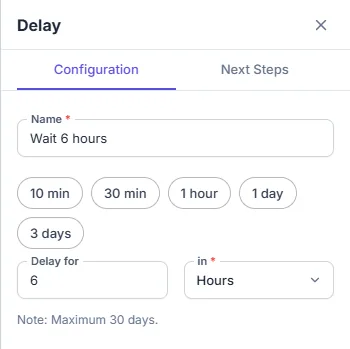
| Wait step | Spaces the messages | 1 minute to 30 days; presets 10 min, 30 min, 1 hour, 1 day, 3 days |
| Frequency step | Lets people continue only on chosen days and hours | Default 09:00 to 21:00; every day, weekdays or weekends |
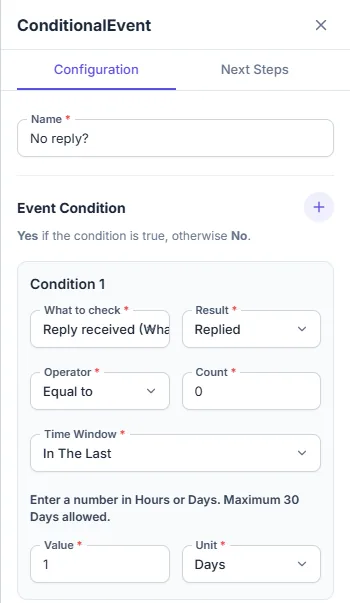
| Condition step | Stops or changes the drip, for example for people who replied | Checks step results, WhatsApp/RCS replies, or events your software posts |
| SMS step | Backup for each WhatsApp message | Needs a DLT sender and template |
| Journey | The whole drip | Up to 200 steps; each step runs once per customer; up to 30 days per customer |
Every customer moves on their own clock. If Rahul enters on Monday at 10:00 and Priya on Wednesday at 15:00, each gets message 2 exactly one day after their own message 1. Waits count from the real send time of the earlier step.
A drip starts in one of two ways: you launch it for a list (sheet, Address Book group or pasted numbers) with Send now, Schedule or Repeat, or your website or CRM adds each new person with one API call. The event-triggered messaging guide shows the API.
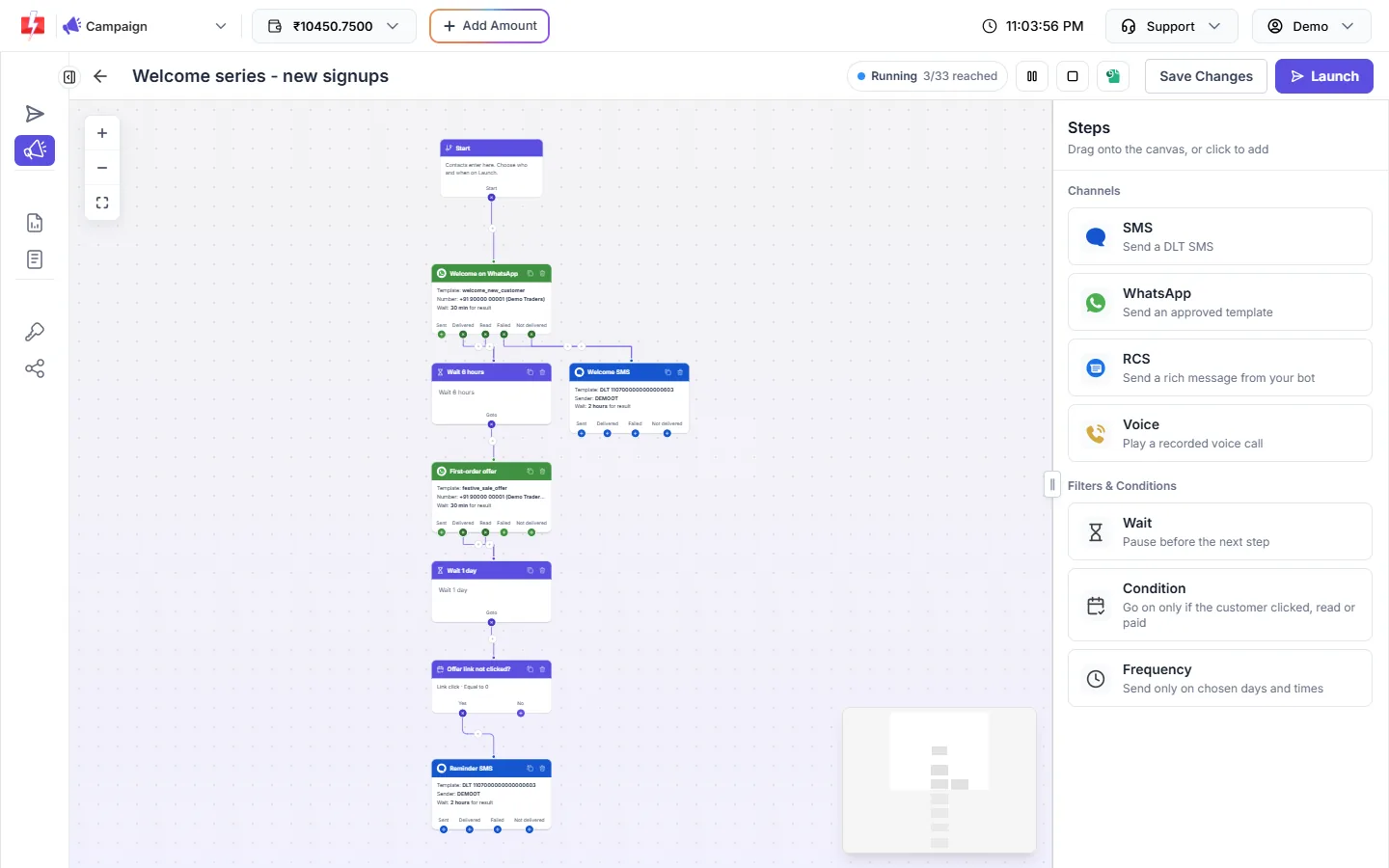
The six drips below are ready to copy. In the templates, {{1}}, {{2}} and so on are WhatsApp placeholders that you map to a sheet column or an API value. Submit each template to Meta first. Meta decides whether a template is marketing or utility, and that decides the price.
Drip 1: new lead nurture (7 days)
For enquiries from your website, ads or a walk-in register. Goal: turn an enquiry into a conversation in the first week, without chasing people who already replied.
| Step | When | Channel | Message | If it fails |
|---|---|---|---|---|
| 1 | Day 0, right after the enquiry | WhatsApp (utility) with a PDF brochure | Thanks for your enquiry, here is our brochure | SMS: thanks, we will call you |
| 2 | Wait 1 day, 09:00 to 21:00 | WhatsApp (marketing) | A short customer story or result | SMS with your number |
| 3 | Wait 2 days (day 3) | WhatsApp (marketing) | Answer to the most common doubt | SMS |
| 4 | Wait 4 days (day 7), then Condition "Reply received" | Condition | Did they reply at any point? | Yes: drip ends, your team takes over. No: step 5 |
| 5 | Day 7, only for people who did not reply | WhatsApp (marketing) | Offer valid for 3 days | SMS with the offer |
Templates:
- Day 0: Hi {{1}}, thanks for your enquiry about {{2}} at Demo Traders. Our brochure is attached. Reply here with any question and our team will answer.
- Day 1: Hi {{1}}, a customer in {{2}} faced the same question you have. Here is how we helped them, in 2 minutes. Reply YES if you want a call.
- Day 3: Hi {{1}}, the question we hear most is about price and delivery time. Short answer: {{2}}. Want details for your order? Just reply.
- Day 7: Hi {{1}}, for this week only, new customers get {{2}} off. Reply or call us to book. Offer ends {{3}}.
Drip 2: new customer welcome series (5 days)
For a new account, membership or first order. Goal: get the customer to use what they signed up for. Your app or website starts it with an API call at signup. The full welcome journey with code is in the welcome message automation guide.
| Step | When | Channel | Message | If it fails |
|---|---|---|---|---|
| 1 | Minute 0, at signup | WhatsApp (utility) | Welcome, your account is ready, here is how to log in | SMS with the login link |
| 2 | Wait 6 hours, then 09:00 to 21:00 | WhatsApp (marketing) with a video header | The one thing to do first | SMS |
| 3 | Wait 1 day | WhatsApp (marketing) | A tip most customers miss | Continue to step 4 |
| 4 | Wait 3 days (day 5) | WhatsApp (marketing) | First-order or upgrade offer | SMS with the code |
- Minute 0: Hi {{1}}, welcome to Demo Traders. Your account is ready. Log in with your mobile number any time. Reply here if you need help.
- 6 hours: Hi {{1}}, most new customers start by {{2}}. This 60-second video shows how.
- Day 1: Hi {{1}}, did you know you can {{2}}? It saves our customers time every week.
- Day 5: Hi {{1}}, here is {{2}} off your first order with code {{3}}. Valid for 48 hours.
Drip 3: webinar or event countdown (7 days)
For a webinar, demo day, open house or sale with one fixed date for everyone. Because Wait steps are fixed, you launch the whole list on a schedule exactly one week before the event, and the waits line up with the date.
| Step | When (event on Monday 11:00) | Channel | Message | If it fails |
|---|---|---|---|---|
| 1 | Previous Monday 10:00 (Schedule) | WhatsApp (marketing) with an image | Invite with date, time and how to join | SMS invite |
| 2 | Wait 3 days (Thursday 10:00) | WhatsApp (marketing) | What you will learn, speaker or agenda | Continue to step 3 |
| 3 | Wait 3 days (Sunday 10:00) | WhatsApp (utility, if approved as utility) | Reminder: tomorrow at 11 am, joining link | SMS reminder |
| 4 | Wait 1 day (Monday 10:00) | Starting in 1 hour, link | Voice call: short recorded reminder |
- Invite: Hi {{1}}, join our free session "{{2}}" on {{3}} at {{4}}. It takes 45 minutes. Tap the button to save your seat.
- Day 3: Hi {{1}}, in Monday's session you will learn {{2}}. Bring your questions, there is a live Q and A.
- Day 6: Hi {{1}}, reminder: "{{2}}" is tomorrow at {{3}}. Your joining link: {{4}}
- Day 7: Hi {{1}}, we start in 1 hour. Join here: {{2}}
A large list takes some minutes to start (up to 5,000 contacts per minute per run), and waits count from each person's real send time, so later steps shift by the same few minutes. This matches the ready journey "WhatsApp invite, SMS if not delivered, call on the day" in the Event/Webinar goal.
Drip 4: after-purchase series (21 days)
For shops, D2C brands and service businesses. Goal: a happy first experience, a review, and a second order. Your store backend calls the API when an order is delivered.
| Step | When | Channel | Message | If it fails |
|---|---|---|---|---|
| 1 | Day 0, on delivery | WhatsApp (utility) | Thank you, how to use or care for the product | SMS thank-you |
| 2 | Wait 3 days, 10:00 to 20:00 | WhatsApp (marketing) | Review request with a link | SMS with the review link |
| 3 | Wait 7 days (day 10) | WhatsApp (marketing) | Product that goes with what they bought | Continue to step 4 |
| 4 | Wait 11 days (day 21) | WhatsApp (marketing) | Reorder or refill reminder with a code | SMS with the code |
- Day 0: Hi {{1}}, your order {{2}} is delivered. Thank you for shopping with your store. Here are 3 quick tips to get the best from it.
- Day 3: Hi {{1}}, how is your {{2}}? Your review helps other buyers. It takes 30 seconds: {{3}}
- Day 10: Hi {{1}}, customers who bought {{2}} also love {{3}}. Take a look.
- Day 21: Hi {{1}}, running low on {{2}}? Reorder today with code {{3}} for {{4}} off.
Fast2SMS does not read your store's orders by itself; the trigger is one API call from your store backend. If you use a store plugin for order messages, see the Shopify guide.
Drip 5: trial or demo to paid (7 days)
For apps, software, gyms, coaching classes and any business with a free trial or demo class. Goal: get the trial user to the moment they see value, then ask for the payment.
| Step | When | Channel | Message | If it fails |
|---|---|---|---|---|
| 1 | Day 0, trial starts | WhatsApp (utility) | Your trial is active till a date; first step | SMS |
| 2 | Wait 2 days | WhatsApp (marketing) | A feature or class they have not tried | Continue to step 3 |
| 3 | Condition "Your event: paid" (posted by your system) | Condition | Already paid? | Yes: end the drip |
| 4 | Wait 3 days (day 5) | WhatsApp (marketing) | Trial ends in 2 days, plan price | SMS |
| 5 | Wait 2 days (day 7), check "paid" again | WhatsApp, then a voice call if not delivered | Last day of trial | Voice call with your callback number |
- Day 0: Hi {{1}}, your free trial is active till {{2}}. Start with {{3}} today, it takes 5 minutes.
- Day 2: Hi {{1}}, have you tried {{2}} yet? Most members say it is the best part.
- Day 5: Hi {{1}}, your trial ends on {{2}}. Continue with the {{3}} plan at {{4}}. Reply to ask us anything.
- Day 7: Hi {{1}}, today is the last day of your trial. Pay here to continue without a break: {{2}}
The "paid" check only works if your billing or membership software posts the event to POST /dev/campaign/event. Without it, the drip cannot know who paid.
Drip 6: win back inactive customers (10 days)
For customers who have not bought or visited in 60 to 90 days. Goal: one clear reason to come back. Run it monthly with Repeat on an Address Book group of inactive customers. The win-back campaign guide has more ideas.
| Step | When | Channel | Message | If it fails |
|---|---|---|---|---|
| 1 | Day 0 (Repeat: 1st of the month, 11:00) | WhatsApp (marketing) with an image | We miss you, here is an offer | RCS rich card; SMS if RCS also fails |
| 2 | Wait 3 days, Condition "Reply received" | Condition | Did they reply? | Yes: end |
| 3 | Day 3 | WhatsApp (marketing) | What is new since their last visit | Continue to step 4 |
| 4 | Wait 7 days (day 10) | WhatsApp (marketing) | Last chance: offer ends tomorrow | SMS with the code |
- Day 0: Hi {{1}}, it has been a while since your last visit to Demo Traders. Here is {{2}} off, just for you, till {{3}}.
- Day 3: Hi {{1}}, a lot has changed: {{2}}. Come and see.
- Day 10: Hi {{1}}, your {{2}} off ends tomorrow. Use code {{3}} before it expires.
If RCS is in the drip and the phone does not support RCS or the RCS message fails, the next step sends. RCS uses an approved, active RCS bot, and promotional RCS bots send between 7 AM and 10 PM.
How to write drip messages that get read
Each message must earn the next one. If message 2 is boring, people block you before message 3.
- One idea per message. A tip, a story, an answer or an offer, not all four.
- Give before you ask. Put useful messages first and the offer last.
- Use the name and context. Map the name, product or city to a sheet column or API value.
- One button or one link. Templates support buttons; one clear action works better than three.
- Keep updates and offers apart. A thank-you with a discount in it will be approved as marketing and charged ₹0.95 instead of ₹0.25.
- Short for SMS steps. The SMS backup uses your DLT template; keep each variable under 30 characters.
- Space them out. A day or more between marketing messages is kinder and also helps with Meta's per-person marketing limits.
How to set it up in Fast2SMS
- Get templates approved. Connect your WhatsApp Business API number in the panel and submit each drip message as a template. Add DLT templates for the SMS backups.
- Open Campaign. Use Campaign → Launch Campaign, or Campaign List → Create Campaign.
- Start blank or from a ready journey. Start from a ready journey has 16 journeys; the Lead follow-up and Event/Webinar goals are good starting points for drips.
- Set the audience. Upload a sheet, pick an Address Book group or paste numbers on the Start step, or plan to add people by API.
- Add the first WhatsApp step. Choose the template and map its placeholders.
- Add Wait steps between messages (for example 1 day, 2 days, 4 days) and a Frequency step so messages land between 09:00 and 21:00.
- Add a Condition step "Reply received (WhatsApp / RCS)" before later messages so repliers drop out.
- Connect failed and not delivered outputs of each WhatsApp step to an SMS step.
- Send test to up to 10 numbers. Set short waits for the test if you want to see the whole drip quickly, then set the real waits.
- Launch: Send now, Schedule or Repeat, after checking the cost estimate.
How much does a WhatsApp drip campaign cost?
On Fast2SMS a drip has no software fee: no campaign fee, no builder fee and no monthly fee. You pay each message at the channel's normal rate from one wallet.
| Message type | Price at the time of writing |
|---|---|
| WhatsApp marketing template | ₹0.95 |
| WhatsApp utility template | ₹0.25 |
| SMS backup (DLT) | ₹0.25 from a ₹100 recharge, down to ₹0.11 on bigger slabs |
| RCS message | From ₹0.35 |
| Voice call | ₹0.25 per 15-second pulse, answered calls only |
| Wait, Condition, Frequency | ₹0 |
Cost example: Drip 1 for 500 new leads a month
As an example only, assume 5% of each WhatsApp step goes to the SMS backup and 30% of leads reply before day 7 and drop out.
| Step | Messages | Rate | Cost |
|---|---|---|---|
| Day 0 utility | 500 | ₹0.25 | ₹125 |
| Day 1 marketing | 500 | ₹0.95 | ₹475 |
| Day 3 marketing | 500 | ₹0.95 | ₹475 |
| Day 7 offer to the 350 who did not reply | 350 | ₹0.95 | ₹332.50 |
| SMS backups (5% of the 1,850 WhatsApp sends) | about 93 | ₹0.25 | ₹23.25 |
| Total | about ₹1,431, under ₹3 per lead |
Failed WhatsApp messages are refunded under the WhatsApp refund policy, so the real total is often a little lower. Check live rates on WhatsApp pricing and SMS pricing.
When should a drip include SMS?
Add an SMS step behind every WhatsApp message that matters. You can also run a pure SMS drip when your customers mostly use basic phones.
- Behind WhatsApp: for numbers not on WhatsApp, and for marketing messages Meta holds back for people who got many offers recently (error 131049). The SMS fallback guide explains these cases.
- As the drip itself: fee, EMI and service reminders for rural or older customers often work best as an SMS drip with a voice call at the end. The automated SMS guide covers SMS-first journeys.
- Rules: each SMS uses a DLT template; promotional SMS reach Non-DND numbers between 10 am and 9 pm, while service SMS reach all numbers at any time.
How do you measure a drip?
Look at each step, not just the total. The Campaign Report shows, per step, how many entered, were sent, delivered, read, failed or not delivered, with average time and top failure reasons.
- Read rate per message: read divided by delivered. A drop at one step means that message needs a better first line.
- Drop-outs: how many people left at the "Reply received" Condition. Replies are the goal of a nurture drip.
- Backup share: how many went to the SMS step, and why.
- Cost and refund: per step and for the run, with net cost.
- One customer: open the number to see their whole path.
For business results such as purchases, compare the drip list with your own sales data, or post events like purchased from your system so a Condition can use them. Click tracking is not automatic.
Mistakes to avoid
- Too many messages too fast. Four useful messages over a week beat eight in three days.
- No stop for repliers. Without a "Reply received" Condition, people who are already talking to your team keep getting drip messages.
- No SMS step. People without WhatsApp drop out of the drip at message 1.
- A drip longer than 30 days. One customer can stay in a journey for at most 30 days. Split longer programmes into two campaigns.
- Per-person dates in a fixed drip. Waits are fixed. For "3 days before each customer's date", start the journey on the right day by API.
- Offers in utility templates. Meta will recategorise them as marketing.
- Night messages. Add a Frequency step so a wait that ends at 1 am waits till morning.
- Loose ends. An output with nothing connected ends the journey for that customer. If a failed tip message should not stop the drip, connect its failed output to the next Wait step.
- Forgetting to test every path. Test with a number that has WhatsApp and one that does not, so you see the SMS backup work.
Why build drips with Fast2SMS?
- WhatsApp, SMS, RCS and voice in one drip, so nobody falls out because one channel failed. Read the omnichannel marketing platform guide for the bigger picture.
- No monthly fee: pay each message at its normal rate.
- Panel or API: schedule drips for a list, or add each new lead from your website.
- Per-step reports with read, failed and cost for every message.
Open the WhatsApp drip campaign builder, copy one of the six drips above and send a test to your own phone. When you are ready to plan journeys across all four channels, the Campaign product page lists every step type.
Frequently asked questions
What is a WhatsApp drip campaign?
It is a series of pre-written WhatsApp messages sent automatically at set intervals after a starting point, such as an enquiry or a signup. On Fast2SMS you build it in Campaign with Wait steps between approved templates.
What is the meaning of drip campaign?
A drip campaign sends a planned sequence of messages over time instead of all at once. Each message "drips" in after a fixed gap, so the customer gets one useful message at a time.
What is drip marketing?
Drip marketing is the practice of nurturing customers with automated messages spaced over days or weeks: a welcome, tips, stories and finally an offer. It started with email and now works on WhatsApp and SMS too.
What is the difference between a drip campaign and a broadcast?
A broadcast is one message to a list at one moment. A drip is a series where each person moves on their own clock and can drop out, for example after replying.
What is the difference between a drip campaign and a nurture campaign?
They are close. A nurture campaign is the goal (warming up a lead); a drip is the method (spaced, automatic messages). Most nurture campaigns are run as drips.
What are some drip campaign examples?
New lead nurture, a new customer welcome series, a webinar countdown, an after-purchase series, trial-to-paid reminders and win-back offers. This guide has all six with timing tables and templates.
Is a drip campaign the same as WhatsApp automation?
A drip is one type of WhatsApp automation. Automation also covers single triggered messages and reminders. See the WhatsApp automation guide.
Is a WhatsApp drip campaign legal?
Yes, on the official WhatsApp Business API with approved templates and customers who agreed to hear from you. Unofficial tools that automate the phone app risk a ban.
How do I create a drip campaign on WhatsApp?
Get your templates approved, open Campaign, add WhatsApp steps joined by Wait steps, add an SMS step on each failed path and a "Reply received" Condition, send a test and launch.
How many messages should a WhatsApp drip have?
Usually 3 to 6. Fewer, more useful messages get better results and fewer blocks than long series.
How long should the gap be between drip messages?
For marketing messages, a day or more. Updates can be closer, for example a welcome now and a tip 6 hours later.
How long can a Wait step be?
From 1 minute to 30 days, in minutes, hours or days. Presets include 10 minutes, 30 minutes, 1 hour, 1 day and 3 days.
What is the longest drip I can build?
One customer can stay in a journey for up to 30 days. For longer programmes, use two campaigns, the second started by your system or a schedule.
Do all customers get the drip at the same time?
No. Each customer moves on their own clock, counted from when they entered and from the real send time of each step.
Can a drip stop when the customer replies?
Yes. Add a Condition step "Reply received (WhatsApp / RCS)". People who replied take the Yes path, where you can end the drip.
Can a drip branch on which button the customer tapped?
No. The Condition checks that a reply came in, not its exact text or button. For menu replies, use the WhatsApp chatbot.
Can a drip stop when the customer buys or pays?
Yes, if your software posts an event such as paid or purchased to POST /dev/campaign/event. A Condition step checks "Your event" before the next message.
Does Fast2SMS track link clicks in a drip?
Not automatically. A "Link clicked" condition works only when your own website posts the click to the event API.
How do I keep drip messages out of the night?
Add a Frequency step. It lets people continue only on chosen days between set hours, by default 09:00 to 21:00.
What happens if a WhatsApp message in the drip fails?
The step takes its failed or not delivered output. Connect that to an SMS step, or to the next Wait if the drip should simply carry on.
What happens if I leave a step output unconnected?
The journey ends there for that customer. Connect every output you want to continue from.
How long does a WhatsApp step wait before it counts as not delivered?
30 minutes by default. You can set the wait from 1 minute to 24 hours.
Can I add a voice call to a drip?
Yes. A voice step plays a recorded audio file and can connect the customer to an agent group on a key press. It cannot read out names or amounts.
Can I add RCS to a WhatsApp drip?
Yes, from an approved, active RCS bot. If RCS fails or the phone does not support RCS, the next step sends.
Are there ready-made drip journeys?
The "Start from a ready journey" picker has 16 journeys in 7 goals. Lead follow-up, Event/Webinar and Re-engagement are good starting points for drips.
How do I start a drip for a list of contacts?
On the Start step, upload a CSV, TXT, XLSX or XLS file (up to 20 MB, 10 lakh rows), pick an Address Book group or paste numbers. Then choose Send now, Schedule or Repeat.
How do I add each new lead to a drip automatically?
Your website or CRM calls POST https://www.fast2sms.com/dev/campaign/start with the campaign ID and the lead's number. The event-triggered messaging guide has code.
Can I run a drip every month automatically?
Yes. Use Repeat to run the campaign daily or on chosen weekdays at a set time, for example a monthly win-back drip on an inactive-customer group.
How do I time a drip around one fixed event date?
Schedule the launch for the whole list a fixed number of days before the event, and the Wait steps line up with the date. The webinar countdown drip in this guide shows how.
Can a drip send 3 days before each customer's own date?
Waits are fixed, not per-customer dates. Have your system start the journey on the right day for each customer.
What if the same lead is added twice on the same day?
All API numbers for one campaign on the same day join one run, and a number already in it is skipped, so the lead does not get the drip twice that day.
How many contacts can a drip handle?
A sheet can have up to 10 lakh rows. A run starts up to 5,000 contacts per minute, so 1 lakh contacts start in about 20 minutes.
Can I send a drip to international numbers?
No. Campaign accepts Indian mobile numbers only.
Do drip messages need template approval?
Yes. Every business-started WhatsApp message uses a template approved by Meta. SMS backups need DLT-approved templates.
Should drip templates be marketing or utility?
Updates about an account, order or booking can be utility. Tips, stories and offers are marketing. Meta decides the final category.
Can drip messages include images, videos or PDFs?
Yes. WhatsApp templates can have an image, video or document header and buttons, so you can send a brochure, a demo video or a price list.
How do I personalise drip messages?
Map each template placeholder to a sheet column or an API value such as name, product or city.
What makes a good drip message?
One idea, a clear first line, the customer's name or context, and one button or link. Put useful messages first and the offer last.
Can I write drip messages in Hindi?
Yes. Submit Hindi templates to Meta for WhatsApp and register Unicode DLT templates for the SMS backups.
How much does a WhatsApp drip campaign cost?
There is no drip software fee on Fast2SMS. At the time of writing a WhatsApp marketing message is ₹0.95 and a utility message ₹0.25. See WhatsApp pricing.
Is there a monthly fee for drip campaign software?
No. There is no campaign fee, builder fee or monthly fee. You pay only for the messages sent.
Do Wait steps cost money?
No. Wait, Condition and Frequency steps are free. Only channel steps are charged.
How much does the SMS backup cost in a drip?
At the time of writing ₹0.25 per SMS from a ₹100 recharge, down to ₹0.11 on bigger recharges. See SMS pricing.
Am I charged for failed WhatsApp messages in a drip?
Failed WhatsApp messages are refunded under the WhatsApp refund policy, and the refund shows in the Campaign Report.
Am I charged for people who left the drip early?
No. You pay only for messages actually sent. People who replied and left, or who were still waiting when you stopped the run, are not charged for later steps.
Will I see the drip cost before launching?
Yes. The launch screen shows a cost estimate. Launch is refused if the wallet cannot cover the first step.
What happens if my balance runs out mid-drip?
The run pauses and resumes on its own after recharge, checked every 10 minutes. After 3 days on low balance the run is stopped.
What is an SMS drip campaign?
A drip where the messages go by SMS from DLT templates. It suits customers on basic phones and reminders that must reach everyone. See the automated SMS guide.
Why add SMS to a WhatsApp drip?
To reach numbers not on WhatsApp and people whose marketing message Meta holds back (error 131049). The SMS fallback guide explains both.
What is WhatsApp error 131049 in a drip?
It means Meta did not deliver a marketing message because the person recently received many marketing messages. Space your drip messages and add an SMS backup.
Can promotional SMS drips run at any time?
No. Promotional SMS reach Non-DND numbers between 10 am and 9 pm. Service SMS reach all numbers at any time.
Does Campaign handle STOP or unsubscribe replies?
There is no automatic STOP handling. Numbers that block you on WhatsApp leave the journey; remove anyone who asks to stop from your lists.
How do I measure a WhatsApp drip campaign?
Open Reports, Campaign Report. Each step shows entered, sent, delivered, read, failed and not delivered, with cost and the top failure reasons.
Can I see one customer's path through the drip?
Yes. The per-number view shows each step the customer went through, with results and times.
Can I export drip results?
Yes. Delivery Reports, Export, Campaign gives you a CSV. You can also receive every step result on your server by webhook.
Can I pause or change a running drip?
You can pause, resume and stop a run, and duplicate, rename or switch off a campaign. Contacts still waiting when you stop a run are not charged.
Where can I learn about multi-channel journeys?
Read the omnichannel marketing platform guide or open the campaign builder.