Appointment Reminder SMS and WhatsApp: Templates and a No-Show Journey for Clinics, Labs and Salons
No monthly fee · Pay as you go from ₹100 · Free setup help on a call
An appointment reminder SMS or WhatsApp tells a patient or customer the date, time and place of their booking, so fewer people miss it. In Fast2SMS Campaign, clinics, labs and salons automate it: WhatsApp 24 hours before, SMS if WhatsApp is not delivered, and a short call 2 hours before for anyone who has not replied. Messages cost from ₹0.25 at the time of writing.
This guide covers the best timing, a ready reminder journey, copy-ready appointment reminder SMS and WhatsApp templates (including Hindi), how to start it from your booking software or a daily list, the cost per appointment and the mistakes that make reminders fail.
What is an appointment reminder SMS?
It is a short text message sent before a booked appointment with the name of the business, the date and time, the address or doctor's name, and what to do if the person cannot come. The same reminder on WhatsApp can add a map link and buttons such as "Confirm" or "Reschedule".
Appointment reminders are used by doctors and clinics, dental and eye clinics, hospitals, diagnostic labs, physiotherapists, salons and spas, vets, car service centres, coaching demos, property site visits and government or bank service counters. Anywhere a missed slot means lost time and lost money, a reminder pays for itself.
A single SMS the evening before is the classic version. An appointment reminder journey goes further: it uses WhatsApp first, moves to SMS when WhatsApp is not delivered, and places a short recorded call close to the time for people who did not respond. On Fast2SMS you build it in Campaign, the journey builder for SMS, WhatsApp, RCS and voice.
Why do appointment reminders reduce no-shows?
Most no-shows are not people who decided not to come. They forgot, mixed up the day, could not find the address, or could not come and did not know how to tell you. A reminder at the right time solves all four.
- Forgetting: a reminder the day before puts the appointment back in the person's mind.
- Wrong day or time: the reminder states both clearly.
- Directions: a map link or landmark helps first-time visitors.
- Cannot come: a "Reschedule" option or a number to call lets you fill the slot with someone else.
The last point is easy to miss. A cancelled slot you know about is far better than an empty chair you discover at 11 am. Every reminder should make it easy to cancel or move the booking.
When should an appointment reminder be sent?
A good pattern is a confirmation when the appointment is booked, a reminder about 24 hours before, and a short final nudge about 2 hours before for anyone who has not replied. For early-morning appointments, send the 24-hour reminder the previous evening instead.
| Step | When | Channel | Message | If it fails |
|---|---|---|---|---|
| 1. Day-before reminder | T-24 hours (journey starts) | WhatsApp (utility) | Date, time, doctor or stylist, address, Confirm / Reschedule buttons | Failed or not delivered: SMS with the same details |
| 2. Wait | 22 hours | Wait | Hold until about 2 hours before the slot | Not applicable |
| 3. Check | T-2 hours | Condition | Reply received on WhatsApp in the last 1 day = 0 AND appointment_cancelled = 0? | Replied or cancelled: journey ends |
| 4. Final nudge | T-2 hours | Voice (recorded) | "Your appointment at Demo Clinic is today. Please arrive 10 minutes early." | Not answered or failed: short SMS |
| 5. After the visit (optional) | Next day | Thank you and feedback link | Not delivered: SMS feedback link |
Why these times? A reminder 24 hours ahead gives people time to rearrange their day or tell you they cannot come, so you can offer the slot to someone else. A call 2 hours ahead catches the ones who have not looked at their messages. If your patients are mostly older people who prefer calls, swap the order: call first, WhatsApp if not answered, which is one of the ready journeys in the panel.
The WhatsApp step waits up to 30 minutes by default for a delivery result before it takes the "not delivered" path (you can set 1 minute to 24 hours), so the SMS backup arrives well before the appointment.
How does the reminder journey start: booking software or a daily list?
Campaign uses fixed waits; it does not read each appointment time from a sheet and schedule around it. So the start time comes from you, in one of two ways.
Option 1: your booking software calls the API at T-24h
Your clinic or salon software (or your website's booking system) runs a small job every 15 minutes that finds appointments starting in about 24 hours and calls POST /dev/campaign/start for them. The journey then sends WhatsApp right away, waits 22 hours and places the call at about T-2h. This gives every patient the right timing, whatever the slot.
When a booking is cancelled or moved, your software posts appointment_cancelled to /dev/campaign/event, and the Condition before the call ends the journey. For a moved booking, start the journey again when the new slot is 24 hours away.
Option 2: upload tomorrow's list every evening
No software? Every evening at, say, 6 pm, export tomorrow's appointments to Excel and upload the sheet to the campaign. Sheet columns (name, time, doctor, branch) become variables. The journey sends the WhatsApp reminder at once, then a Wait and a Frequency step hold the call until the morning, for example from 8:00. Everyone gets the call at the same morning time instead of exactly two hours before, which works well for clinics with a morning OPD.
Uploads can be CSV, TXT, XLSX or XLS, up to 20 MB and 10 lakh rows. Duplicates and invalid numbers are removed and counted. Use Schedule to set the upload to go at 6 pm even if you prepare it earlier.
Appointment reminder SMS and WhatsApp templates
Copy and adapt these. WhatsApp templates use numbered placeholders ({{1}}, {{2}}) approved by Meta; SMS templates use your DLT variable format. Keep them short, clear and free of medical details.
WhatsApp reminder templates
| Business | Template | Buttons |
|---|---|---|
| Clinic | Hi {{1}}, this is a reminder of your appointment with {{2}} at Demo Clinic on {{3}} at {{4}}. Please arrive 10 minutes early and bring your previous reports. | Confirm · Reschedule · Get directions |
| Dental clinic | Hi {{1}}, your dental appointment is on {{2}} at {{3}}. If you cannot come, please tap Reschedule so we can offer the slot to another patient. | Confirm · Reschedule |
| Diagnostic lab | Hi {{1}}, your test booking at Demo Labs is on {{2}} at {{3}}. Please follow the preparation instructions shared by the lab. Home collection agent: {{4}}. | Confirm · Call lab |
| Salon or spa | Hi {{1}}, see you on {{2}} at {{3}} for your {{4}} at Demo Salon. Running late or need to change? Tap below. | Confirm · Reschedule |
| Physiotherapy | Hi {{1}}, your session {{2}} with {{3}} is on {{4}}. Please wear comfortable clothes. | Confirm · Reschedule |
| Vet clinic | Hi {{1}}, a reminder that {{2}}'s appointment at Demo Pet Clinic is on {{3}} at {{4}}. | Confirm · Reschedule |
| Service centre | Hi {{1}}, your vehicle service is booked for {{2}} at {{3}}. Please bring the service book. | Confirm · Get directions |
Appointment reminder SMS templates (DLT)
- "Dear {#var#}, your appointment with {#var#} is on {#var#} at {#var#}. To reschedule call 9000012345. - Demo Clinic"
- "Reminder: {#var#}, your booking at Demo Salon is tomorrow at {#var#}. Reply on WhatsApp or call to change. - Demo Salon"
- "Dear {#var#}, your test at Demo Labs is on {#var#} at {#var#}. Please follow the lab's preparation advice. - Demo Labs"
- "Dear {#var#}, your appointment is today at {#var#}. Please arrive 10 minutes early. - Demo Clinic"
Hindi templates
- WhatsApp: "नमस्ते {{1}}, Demo Clinic में {{2}} के साथ आपकी अपॉइंटमेंट {{3}} को {{4}} बजे है। कृपया 10 मिनट पहले पहुँचें।"
- SMS (DLT): "प्रिय {#var#}, आपकी अपॉइंटमेंट {#var#} को {#var#} बजे है। बदलने के लिए 9000012345 पर कॉल करें। - Demo Clinic"
- Voice (recorded): "नमस्ते, Demo Clinic से बात कर रहे हैं। आज आपकी अपॉइंटमेंट है। कृपया समय पर पहुँचें। धन्यवाद।"
Voice scripts for the T-2h call
- "Namaste, this is Demo Clinic, MG Road. This is a reminder that your appointment is today. Please arrive 10 minutes early. If you cannot come, please call us on the number in our message. Thank you."
- "Hello, this is Demo Salon. We look forward to seeing you today. If you need to change your time, please message us on WhatsApp."
A voice step plays the same recording to everyone, so it cannot say the person's name, the doctor or the time. Keep the call general and put the details in WhatsApp and SMS. Keep it under 15 seconds so it fits in one pulse.
After the appointment
- Missed appointment: "Hi {{1}}, we missed you today at Demo Clinic. Would you like to book a new time? Tap below."
- Feedback: "Thank you for visiting Demo Salon, {{1}}. How was your experience? It takes 30 seconds."
- Follow-up visit: "Hi {{1}}, Dr. Mehta asked to see you again in two weeks. Tap below to choose a time."
Appointment reminders for clinics, labs, salons and more
| Business | Suggested journey | Tip |
|---|---|---|
| Doctor's clinic, hospital OPD | WhatsApp T-24h, SMS backup, call T-2h | Ask patients to bring old reports and prescriptions |
| Dental and eye clinics | WhatsApp T-48h and T-24h, call T-2h | Longer procedures need earlier reminders so you can refill the slot |
| Diagnostic labs, home collection | WhatsApp the evening before, SMS backup | Point to the lab's own preparation advice, and share the collection agent's name |
| Salons, spas, beauty clinics | WhatsApp T-24h, SMS backup, no call | Customers prefer a quiet reminder; a Reschedule button fills gaps |
| Physiotherapy, therapy sessions | WhatsApp per session, weekly series | Start each session's journey from your software |
| Coaching demos, property site visits | WhatsApp T-24h, call T-2h | See the real estate and education guides |
Hospitals and clinics that also send reports, OTPs and bulk health camp messages can read bulk SMS for hospitals.
How to set up appointment reminders in Fast2SMS
- Get templates approved. Submit your WhatsApp reminder template (usually utility) with quick-reply buttons, register the SMS reminder on DLT with your sender, and upload a short voice recording (MP3 or WAV up to 5 MB) if you want the call. Voice must be enabled on your account.
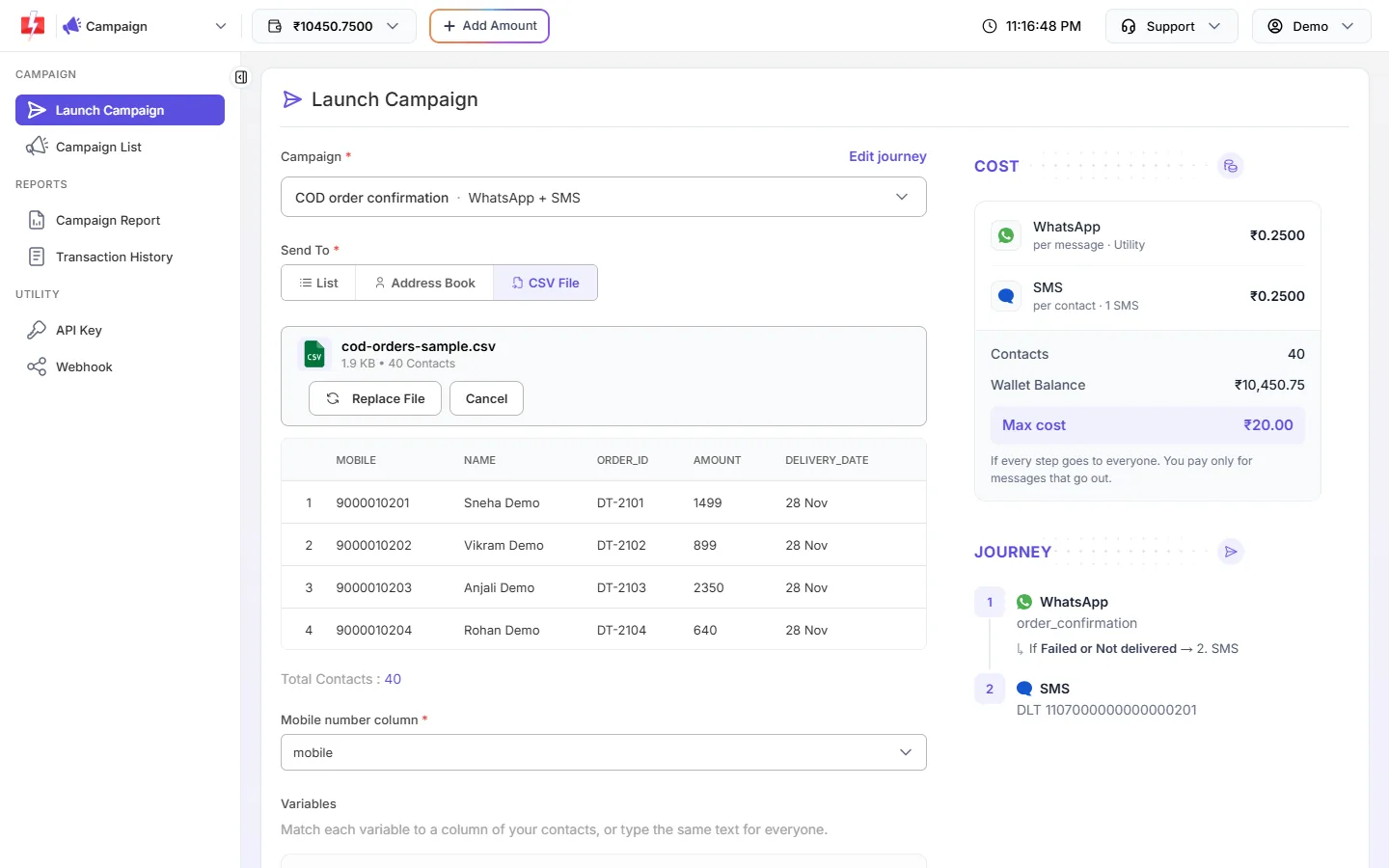
- Open Campaign. Go to Campaign > Launch Campaign, or Campaign List > Create Campaign.
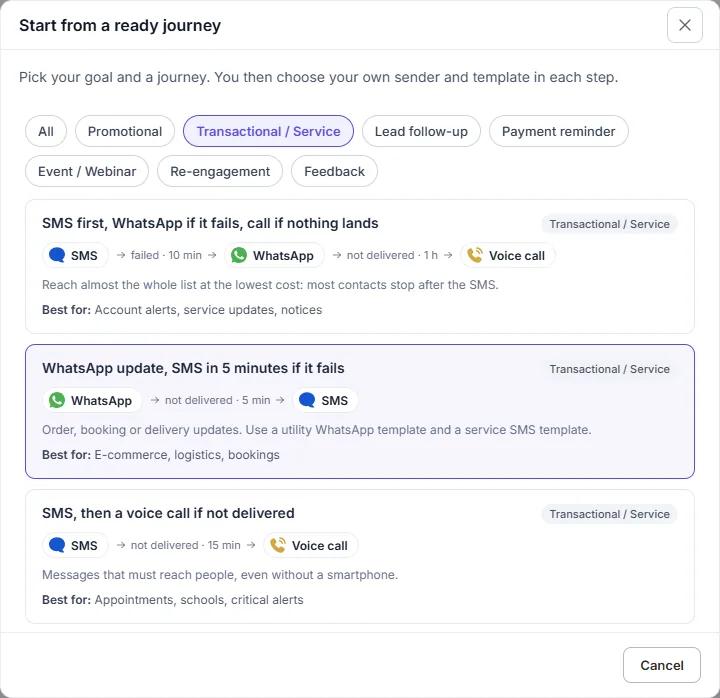
- Start from a ready journey. Click Start from a ready journey. Under Transactional / Service, "WhatsApp update, SMS in 5 minutes if it fails" is a good base. For patients who prefer calls, the Lead follow-up goal has "Call first, WhatsApp if not answered".
- Add the WhatsApp step. Pick your number and template, map placeholders to columns or API variables (name, doctor, date, time), and wire failed and not delivered to the SMS step.
- Add Wait and Condition. After WhatsApp (and the SMS), add a Wait of 22 hours, then a Condition: "Reply received (WhatsApp / RCS)" in the last 1 day = 0, AND "Your event"
appointment_cancelled= 0. Connect "Yes" to the voice step. - Add the Voice step. Choose your recording, set retries, and wire not answered and failed to a short SMS.
- Test. Use Send test on up to 10 numbers, such as the front desk and the doctor. Test sends are charged like normal sends.
- Go live. For Option 1, switch the campaign on and copy Campaign List > ⋮ > Get API code for your software. For Option 2, upload tomorrow's list and choose Send now or Schedule.
For a clinic with a weekly pattern, you can also keep regular patients in an Address Book group and use Repeat (daily or chosen weekdays at a set time). Repeat works well for fixed weekly sessions such as physiotherapy or tuition.
API code: start reminders from your booking software
Your software sends one call per batch of appointments about 24 hours ahead. Find the campaign ID and ready code in cURL, PHP, Node.js and Python under Campaign List > ⋮ > Get API code.
curl -X POST https://www.fast2sms.com/dev/campaign/start \
  -H "authorization: YOUR_API_KEY" \
  -H "Content-Type: application/json" \
  -d '{
    "campaign": "YOUR_CAMPAIGN_ID",
    "recipients": [
      {"mobile": "9000012345", "name": "Priya", "doctor": "Dr. Mehta", "date": "27 Nov", "time": "4:30 pm"}
    ]
  }'
// Node 18+: run every 15 minutes, for appointments starting in about 24 hours
async function sendReminders(appointments) {
const res = await fetch('https://www.fast2sms.com/dev/campaign/start', {
method: 'POST',
headers: { 'authorization': process.env.FAST2SMS_API_KEY, 'Content-Type': 'application/json' },
body: JSON.stringify({
campaign: 'YOUR_CAMPAIGN_ID',
recipients: appointments.slice(0, 1000).map(a => ({
mobile: a.mobile, name: a.firstName, doctor: a.doctorName, date: a.dateLabel, time: a.timeLabel
}))
})
});
return res.json();
}
// When a booking is cancelled:
// POST https://www.fast2sms.com/dev/campaign/event
// {"number": "9000012345", "event": "appointment_cancelled", "value": "BK-2201"}Numbers sent by API start straight away, up to 1,000 per call. Write calls are limited to 30 per minute per key, which is plenty for batches every 15 minutes. All calls to one campaign on the same day join one daily run, and a number already in that day's run is skipped, so a patient with two bookings tomorrow gets one reminder journey. If that matters, mention both slots in one message. Developers can read more in the event-triggered messaging API guide.
How much do appointment reminders cost?
There is no campaign fee and no monthly fee. Every message is charged at the channel's normal rate from your Fast2SMS wallet, and the call step runs only for people who did not reply, so most appointments cost one WhatsApp message.
At the time of writing: WhatsApp utility message ₹0.25, SMS ₹0.25 per SMS on a recharge from ₹100 (down to ₹0.11 on larger recharges), voice ₹0.25 per 15-second pulse, answered calls only. See WhatsApp pricing and bulk SMS pricing.
Example: a clinic with 600 appointments a month. The split is an assumption for the example.
| Step | Appointments (assumed) | Rate at the time of writing | Cost |
|---|---|---|---|
| WhatsApp reminder at T-24h | 600 | ₹0.25 | ₹150.00 |
| SMS where WhatsApp was not delivered | 90 | ₹0.25 | ₹22.50 |
| T-2h call for people who did not reply: 210 of 300 answered, 1 pulse | 300 dialled | ₹0.25 per pulse, answered only | ₹52.50 |
| SMS when the call was not answered | 90 | ₹0.25 | ₹22.50 |
| Total | ₹247.50 |
That is about 41 paise per appointment. If the reminders save even one missed consultation a month, they have paid for themselves many times. New accounts get ₹50 free credit, and recharges start at ₹100.
Which is better for appointment reminders: SMS, WhatsApp or a call?
WhatsApp is best for the main reminder because it can carry buttons and a map link and shows when it was read. SMS reaches every phone, so it is the backup. A call is the strongest nudge for people who ignore messages, and it is cheap because you pay only when answered.
| SMS | Voice call | ||
|---|---|---|---|
| Personal details (name, time) | Yes, from variables | Yes, from variables | No, one recording for all |
| Buttons and links | Quick replies and URL buttons | Short link | Press a key (DTMF) or call patch to your desk |
| Results in the journey | Sent, delivered, read, failed, not delivered | Sent, delivered, failed, not delivered | Answered, not answered, failed |
| Reaches feature phones | No | Yes | Yes |
| Price at the time of writing | ₹0.25 utility | ₹0.25 down to ₹0.11 | ₹0.25 per 15 s pulse, answered only |
The journey cannot tell which WhatsApp button was tapped, only whether a reply was received. That is enough to skip the call for people who confirmed. If someone taps Reschedule, your front desk sees it in the WhatsApp inbox and can call them back. For more on combining channels, read WhatsApp to SMS fallback and the omnichannel marketing platform guide.
DLT, WhatsApp templates and patient privacy
- DLT for SMS. Register the reminder as a service template linked to your DLT sender. Genuine service messages with no offer reach DND numbers.
- WhatsApp category. Meta decides it. A reminder about a booked appointment with no promotion is usually utility. A feedback or review request may be treated differently.
- Keep medical details out. Do not put diagnoses, test names or treatment details in a reminder. Phones are shared and notifications show on lock screens. "Your appointment with Dr. Mehta" is enough.
- Use the patient's own number. For children or elderly patients, use the number the family gave for reminders.
- Calling hours. Use a Frequency step so calls happen only in the hours you choose (09:00 to 21:00 by default), and never at night.
- Opt-outs. Numbers that blocked you on WhatsApp, unsubscribed on RCS or are on the voice opt-out list leave the journey. There is no automatic STOP keyword; remove people who ask on your side.
- India numbers only. Campaign sends to Indian mobile numbers (10 digits starting 6 to 9).
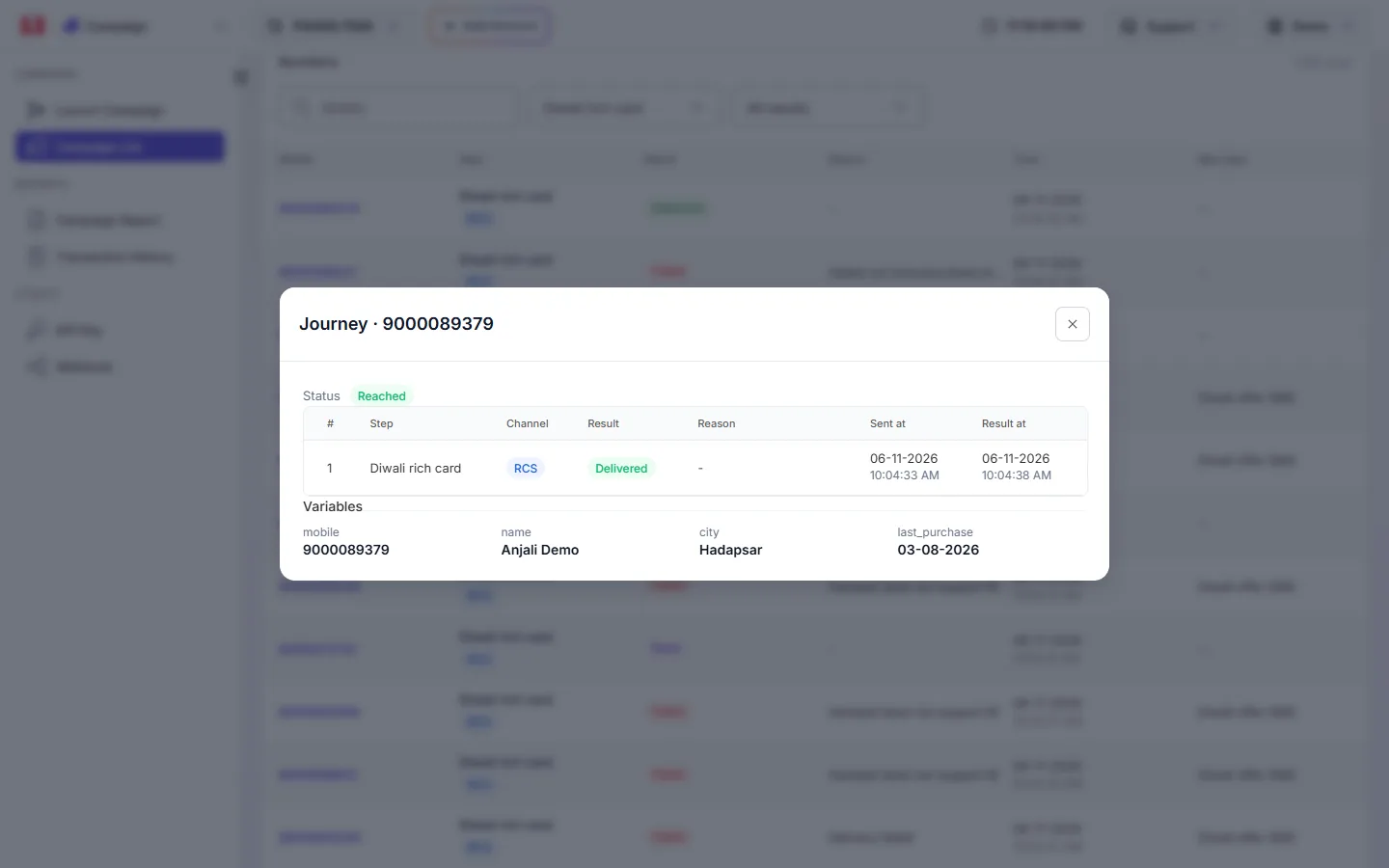
Reports help with all of this. The Campaign Report shows each step's sent, delivered, read, answered and failed counts, and each patient's full journey. It refreshes every 15 seconds while a run is live and exports to CSV from Delivery Reports > Export > Campaign.
Mistakes to avoid with appointment reminders
- No way to cancel. Always include Reschedule or a number to call. An early cancellation lets you fill the slot.
- Reminding cancelled bookings. Post
appointment_cancelledfrom your software, or remove the booking from the evening list. - Calling people who already confirmed. Check "Reply received" before the call step.
- Sending only one channel. Wire WhatsApp failures to SMS. Some patients are not on WhatsApp.
- Medical details in the message. Keep reminders neutral.
- A long recording. Under 15 seconds is one pulse and is more likely to be heard to the end.
- Missing same-day bookings. Use a separate short campaign for slots booked less than 24 hours ahead.
- Wrong time formats. "4:30 pm, Thu 27 Nov" is clearer than "16:30 27/11". Test with Send test first.
Build your reminder journey in Fast2SMS Campaign, test it with the ₹50 signup credit and start it tonight with tomorrow's list. For other service journeys see SMS automation and WhatsApp automation.
Frequently asked questions
What is an appointment reminder SMS?
It is a short text message sent before a booking with the business name, date, time, place and how to reschedule. It helps people remember and turn up on time.
What is an appointment reminder text message?
The same thing as an appointment reminder SMS: a text sent before a booking. Many businesses now send it on WhatsApp first and use SMS as the backup.
Can I send an appointment reminder on WhatsApp?
Yes. Use a Meta-approved template, usually utility, with the booking details and buttons such as Confirm and Reschedule. On Fast2SMS it can be the first step of a journey with SMS backup.
Do appointment reminders reduce no-shows?
They help with the most common causes: forgetting, mixing up the time, not knowing the way and not knowing how to cancel. Measure your own no-show rate before and after you start.
What should an appointment reminder include?
Your business name, the date and time, the doctor or stylist if relevant, the address or a map link, and a way to confirm or reschedule.
What is a doctor appointment reminder?
It is a reminder from a clinic or hospital about a consultation, usually sent the day before and sometimes again on the day, with the doctor's name and the time.
Which businesses use appointment reminders?
Clinics, hospitals, dentists, eye clinics, diagnostic labs, physiotherapists, salons, spas, vets, service centres, coaching demos, property site visits and service counters.
When should I send an appointment reminder?
About 24 hours before, with a short final nudge about 2 hours before for anyone who has not replied. For early-morning slots, send the main reminder the previous evening.
How many appointment reminders should I send?
Usually two: one the day before and one on the day. A confirmation at booking time and a thank-you after the visit are optional extras.
Can Campaign send each reminder exactly 24 hours before each appointment?
Yes, if your booking software starts the journey for each appointment about 24 hours ahead by API. Campaign itself uses fixed waits and does not read appointment times from a sheet.
I do not have booking software. Can I still automate reminders?
Yes. Upload tomorrow's appointments every evening. WhatsApp goes at once, and a Frequency step holds the call until a morning time you choose.
What about appointments booked for the same day?
Send them to a second, shorter campaign with a WhatsApp confirmation and SMS backup, since a 24-hour reminder is not possible.
How quickly does the SMS backup go?
A failed WhatsApp moves on at once. For "not delivered", the WhatsApp step waits for a final result, 30 minutes by default, settable from 1 minute to 24 hours.
Can I stop calls at night?
Yes. Add a Frequency step so the journey continues only between the times you choose, 09:00 to 21:00 by default, on the days you pick.
What is a good appointment reminder SMS template?
For example: "Dear Priya, your appointment with Dr. Mehta is on 27 Nov at 4:30 pm. To reschedule call 9000012345. - Demo Clinic". Register it on DLT with your sender.
What is a good WhatsApp appointment reminder?
For example: "Hi Priya, this is a reminder of your appointment with Dr. Mehta at Demo Clinic on 27 Nov at 4:30 pm. Please arrive 10 minutes early." Add Confirm and Reschedule buttons.
Can I send appointment reminders in Hindi?
Yes. Approve a Hindi WhatsApp template, register a Unicode Hindi SMS on DLT, and record the call in Hindi. This guide includes Hindi samples.
What should a salon appointment reminder say?
Name, day, time and service, plus an easy way to change: "Hi Priya, see you tomorrow at 11 am for your hair spa at Demo Salon. Need to change? Tap below."
What should a lab test reminder say?
The date and time of the test or home collection, the collection agent's name if relevant, and a pointer to the lab's own preparation instructions.
Should I include medical details in the reminder?
No. Avoid diagnoses, test names or treatments. Notifications show on lock screens and phones are often shared.
Can the reminder call say the patient's name and time?
No. A voice step plays the same recording to everyone. Keep the call general, such as "your appointment at Demo Clinic is today", and put details in WhatsApp or SMS.
Can the call connect the patient to our front desk?
Yes. A voice step can use call patch, which connects the caller to an agent group when they press a key.
Can I send a missed appointment message?
Yes. Send a short "we missed you today, would you like a new time?" message from your software or a daily list of no-shows.
Can the journey see when a patient taps Confirm?
It can see that a reply was received on WhatsApp, not which button was tapped. That is enough to skip the reminder call for people who responded.
How do I stop reminders for a cancelled appointment?
Post POST /dev/campaign/event with {"number": "9000012345", "event": "appointment_cancelled", "value": "BK-2201"}. A Condition before the call ends the journey.
What happens when a patient reschedules?
Post the cancelled event for the old slot, and start the journey again when the new slot is about 24 hours away.
Where do I see Reschedule replies?
Replies on WhatsApp arrive in your Fast2SMS WhatsApp inbox, where your front desk can answer. The journey only knows that a reply came.
What if a patient has two appointments tomorrow?
Calls to one campaign on the same day join one run, and a number already in it is skipped. Mention both slots in one message.
How do I start appointment reminders from my software?
Call POST https://www.fast2sms.com/dev/campaign/start with header authorization: YOUR_API_KEY and JSON with campaign and recipients, each with mobile, name, doctor, date and time.
Where do I get the API code for reminders?
Open Campaign List > ⋮ > Get API code. It shows ready code in cURL, PHP, Node.js and Python.
How many appointments can I send in one API call?
Up to 1,000 numbers per call, with up to 50 variables each. Write calls are limited to 30 per minute per key.
How do I set up appointment reminders in Fast2SMS?
Open Campaign > Launch Campaign, pick a base from Start from a ready journey, add WhatsApp with SMS fallback, Wait 22 hours, a reply/cancel Condition and a Voice step, test with Send test, then connect your software or upload a list.
Which ready journey suits appointment reminders?
"WhatsApp update, SMS in 5 minutes if it fails" is a good base. For patients who prefer calls, use "Call first, WhatsApp if not answered".
Can I upload appointments from Excel?
Yes. Upload CSV, TXT, XLSX or XLS files up to 20 MB and 10 lakh rows. Columns become variables you map to template placeholders.
Can I schedule tomorrow's reminders in advance?
Yes. Use Schedule to send a list at a set time, up to 90 days ahead, or Repeat for fixed weekly sessions with an Address Book group.
Can I test the reminders?
Yes. Send test runs the journey on up to 10 numbers. Test sends are charged like normal sends.
Can I get reminder results on my server?
Yes. Add a webhook under Webhook > Campaign to receive each step result with channel, status, reason and cost.
How much does an appointment reminder SMS cost?
At the time of writing, ₹0.25 per SMS on a recharge from ₹100, down to ₹0.11 on larger recharges. See bulk SMS pricing.
How much does a WhatsApp appointment reminder cost?
Appointment reminders are usually utility messages, ₹0.25 each on Fast2SMS at the time of writing. See WhatsApp pricing.
How much does a reminder call cost?
At the time of writing, ₹0.25 per 15-second pulse, charged only when answered. A 15-second recording is one pulse.
What does the full reminder journey cost per appointment?
In this guide's example of 600 appointments, about ₹247.50 a month, or roughly 41 paise per appointment.
Is there a monthly fee for appointment reminders?
No. There is no campaign fee, builder fee or monthly fee. You pay per message from your wallet.
Do I pay for calls to people who already replied?
No. The Condition skips the call for them, and skipped steps are not charged.
Can I try appointment reminders free?
Yes. New accounts get ₹50 free credit, enough to build the journey and test it.
Are failed reminders refunded?
Refunds follow each channel's rules: WhatsApp and RCS per channel policy, SMS only on On Delivery billing accounts, voice only charged for answered pulses.
Do appointment reminder SMS need DLT?
Yes. Register a service template linked to your DLT sender. Genuine service messages with no offer reach DND numbers.
Is an appointment reminder a utility WhatsApp template?
Usually, when it is about a booked appointment and has no promotion. Meta makes the final decision.
Is SMS or WhatsApp better for appointment reminders?
WhatsApp for the main reminder (buttons, map link, read status) and SMS as the backup for phones without WhatsApp. A call is the strongest final nudge.
Can I send appointment reminders by RCS?
Yes, with an approved, active RCS bot. If RCS fails or the phone does not support RCS, the next step you wire, usually SMS, sends.
How do patients stop reminders?
Numbers that blocked you on WhatsApp, unsubscribed on RCS or are on the voice opt-out list leave the journey. There is no automatic STOP keyword, so remove people who ask on your side.
Can I send reminders to international numbers?
No. Campaign sends to Indian mobile numbers only.
How do I see which patients got the reminder?
The Campaign Report shows sent, delivered, read, answered and failed per step, and each patient's full journey. Export it as CSV from Delivery Reports > Export > Campaign.
Is there a guide for hospital SMS?
Yes. See bulk SMS for hospitals for reports, OTPs and health camp messages.
Where can I learn about other automated journeys?
Read the omnichannel marketing platform guide and see Campaign.