Marketing Automation in India for Small Businesses: 6 Journeys That Pay for Themselves
No monthly fee · Pay as you go from ₹100 · Free setup help on a call
Marketing automation means your messages go out by themselves: a welcome when someone signs up, an offer a few hours later, a reminder if they do not act. On Fast2SMS you build these journeys once in Campaign across SMS, WhatsApp, RCS and voice calls. There is no monthly fee or builder fee; each step costs that channel's normal per-message rate, from ₹0.11 per SMS at the time of writing.
This guide is written for small and growing businesses in India. It explains what marketing automation is, which channels you can automate, six starter journeys with timings and copy-ready messages (some in Hindi), how to start a journey from your website with one API call, what it really costs, and how to set it up step by step.
What is marketing automation?
Marketing automation is software that sends the right message to each customer at the right time, without you sending it by hand. You decide the steps once: what to send first, how long to wait, what to do if the message fails, and when to stop. After that, every new customer goes through the same steps on their own.
Think of a sweet shop that takes orders on its website. Without automation, the owner sends a thank-you on WhatsApp in the evening, forgets the follow-up, and never asks for a review. With automation, the thank-you goes out the moment the order is placed, a festival offer follows a week later, and a feedback request goes out after delivery. Nobody has to remember anything.
Three ideas make up almost every automation:
- A start. A list you upload, a group in your address book, a schedule (daily, weekly), or an API call from your website, app, CRM or store backend when something happens, such as a signup.
- Steps. Messages on one or more channels, with waits between them.
- Rules. If the WhatsApp message is not delivered, send an SMS. If the customer replied, stop. Only send between 9 am and 9 pm.
In Fast2SMS this set of steps is called a journey, and the tool that runs it is the Campaign journey builder. If you want the bigger picture of how one journey can use four channels together, read the omnichannel marketing platform guide.
Is marketing automation worth it for a small business in India?
Yes, if you send the same kind of message again and again. Automation saves time, makes sure no customer is forgotten, and on Fast2SMS it costs nothing extra beyond the messages themselves.
Many marketing automation tools are built for large companies. They charge a monthly plan, ask for a yearly contract, and price by the number of contacts in your database. For a shop, clinic, coaching centre or small online store, that fixed cost is hard to justify. Fast2SMS works the other way round: you pay per message, from the same prepaid wallet you already use for SMS or WhatsApp.
| Doing it by hand | Automated journey on Fast2SMS | |
|---|---|---|
| Welcome message | Sent when someone remembers, often hours later | Sent within moments of signup, every time |
| Follow-up | Usually skipped | Goes out after the wait you chose, such as 6 hours or 3 days |
| Failed message | Nobody notices | Next step sends on another channel, such as SMS after WhatsApp |
| Timing | Whenever staff are free | Only on the days and hours you allow |
| Cost of the tool | Staff time | No campaign fee, no builder fee, no monthly fee |
| Reports | Guesswork | Sent, delivered, read and failed for every step and every number |
The best first automations are the ones that bring money back directly: an offer that reaches people who missed it on WhatsApp, a payment reminder that gets paid, a feedback request that brings reviews. The six starters below are picked for that reason.
Which channels can you automate?
Four: SMS, WhatsApp, RCS and voice calls. You can use one channel or mix them in a single journey, with one account and one wallet.
| Channel | What you need | Best step for | Price at the time of writing |
|---|---|---|---|
| SMS | Approved DLT sender ID and DLT template linked to it | Reaching every phone, as a backup step, short reminders with a link | ₹0.25 per SMS from a ₹100 recharge, down to ₹0.11 on bigger slabs |
| Official WhatsApp Business API number and approved Meta templates | Offers with images, buttons, welcome and payment messages | ₹0.95 marketing, ₹0.25 utility, ₹0.25 authentication, ₹0.13 service reply | |
| RCS | An approved, active RCS bot (agent) | Branded rich cards and carousels on Android | From ₹0.35 per message, same for text, media or rich card |
| Voice call | Voice enabled on your account and an approved recorded audio file | Urgent reminders, customers who do not read messages | ₹0.25 per 15-second pulse, answered calls only |
Check the latest rates on the SMS pricing, WhatsApp pricing and RCS pricing pages, and the bulk voice call guide for call pulses. Email is not part of Fast2SMS journeys; the four channels above all reach the customer's phone.
How does an automated journey work?
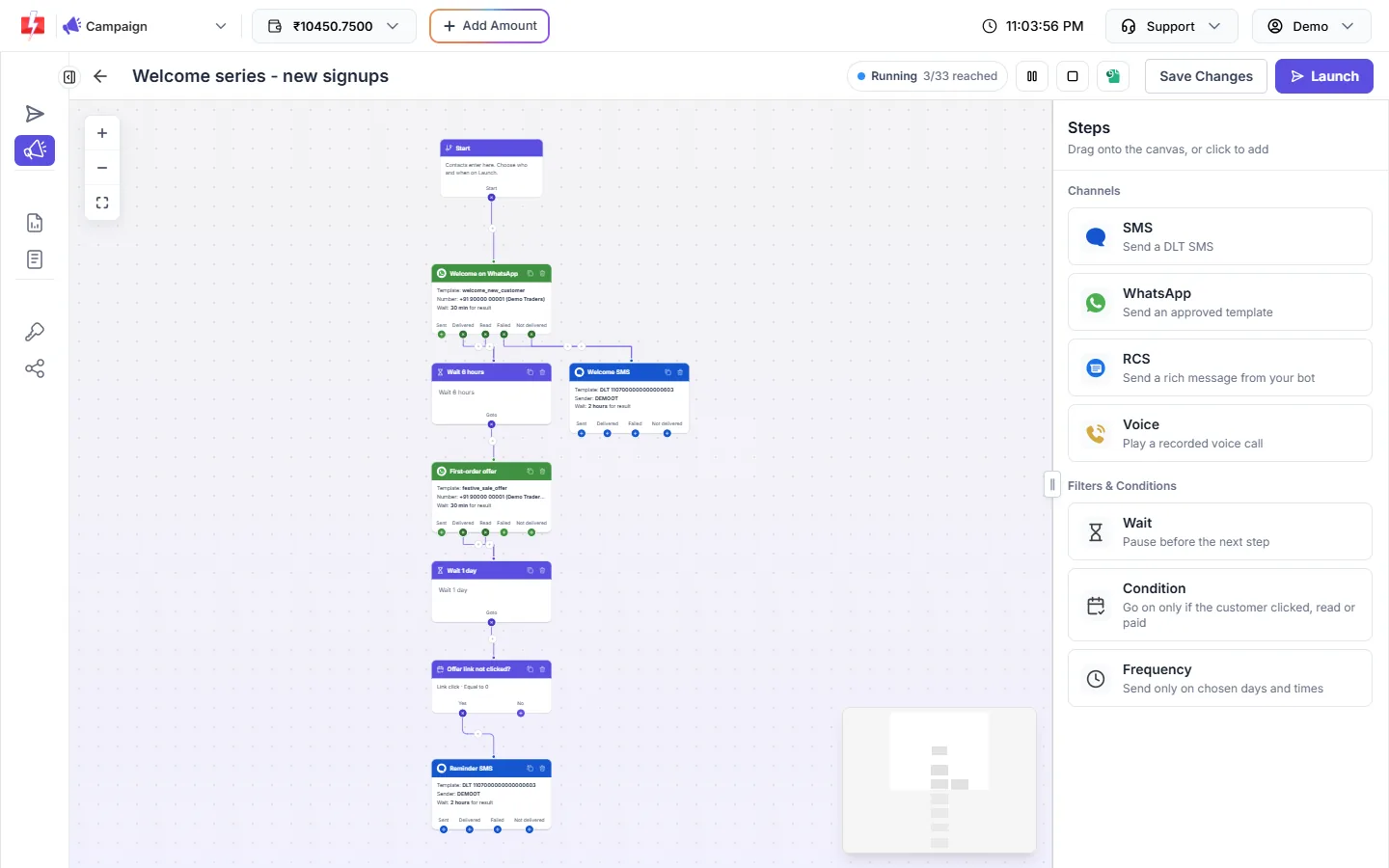
You place steps on a canvas and join them with lines. Each message step has outputs, and you decide where each output goes next.
The journey builder has four message steps (SMS, WhatsApp, RCS and Voice) and three control steps:
- Wait: pause for minutes, hours or days, from 1 minute up to 30 days. Ready presets are 10 minutes, 30 minutes, 1 hour, 1 day and 3 days.
- Condition: a Yes / No check. For example, was the WhatsApp step read, did the customer reply on WhatsApp or RCS, or did your software report an event such as a payment.
- Frequency: continue only on the weekdays and hours you choose. The default is 09:00 to 21:00 every day, with presets for weekdays and weekends.
Each message step has outputs. SMS gives sent, delivered, failed and not delivered. WhatsApp and RCS also give read. A voice call gives answered, not answered and failed. A step waits for the final result before it takes the "not delivered" path: 120 minutes for SMS, 30 minutes for WhatsApp and RCS, and 15 minutes for voice by default, and you can set anything from 1 minute to 24 hours.
Wiring the failed or not-delivered output of one step to another channel is called a fallback. It is the single most useful thing a small business can automate, because it turns "some customers never saw it" into "almost everyone got it on some channel". The WhatsApp to SMS fallback guide covers it in detail.
6 starter automations for small businesses
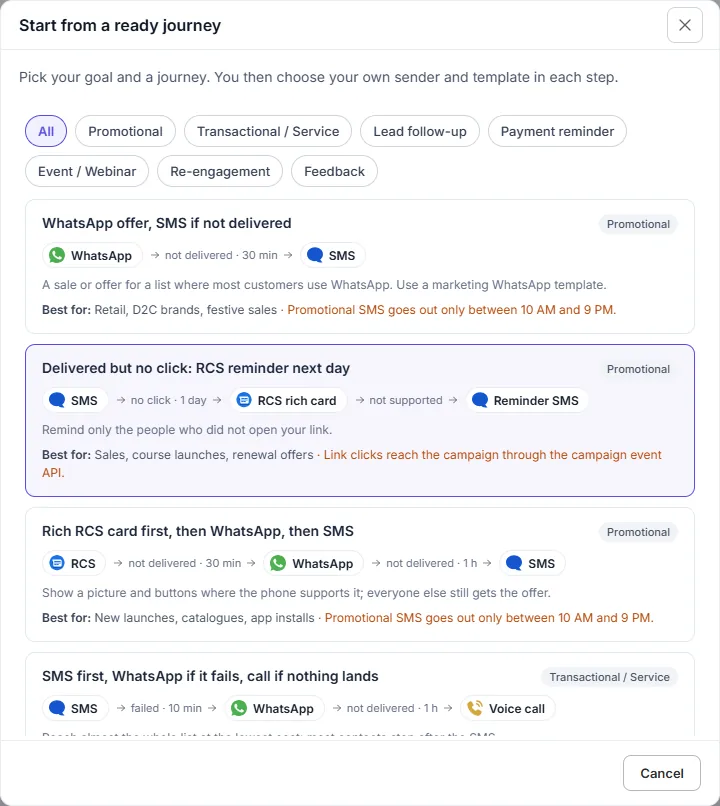
You do not have to design these from scratch. When you create a campaign, Fast2SMS offers "Start from a ready journey": 16 ready-made journeys in 7 goals. Pick one, then choose your own sender and template in each step. The six below are the ones most small businesses use first.
1. Welcome message on signup
Someone signs up on your website or app. Your server sends one API call, and the journey does the rest: a welcome now, an offer later the same day, and a reminder the next day. This is the most common journey started by API, and the code is in the API section below.
| Step | When | Channel | Message | If it fails |
|---|---|---|---|---|
| 1 | At signup (API call) | Welcome and what to do first | SMS with the same welcome and a link | |
| 2 | After 6 hours | First-order offer with a coupon code | SMS with the code | |
| 3 | After 1 more day | SMS | Short reminder that the offer ends soon | Journey ends for that number |
WhatsApp welcome (English): "Hi {{1}}, welcome to Demo Traders! Your account is ready. Browse today's best sellers and save your favourites. Reply here if you need any help."
WhatsApp welcome (Hindi): "नमस्ते {{1}}, Demo Traders में आपका स्वागत है! आपका अकाउंट तैयार है। आज के बेस्ट सेलर देखें। किसी भी मदद के लिए यहीं रिप्लाई करें।"
SMS offer (DLT template style): "Hi {#var#}, your welcome offer is ready: use code {#var#} for 10% off your first order at Demo Traders. Valid till {#var#}."
The full welcome sequence, with more samples, is in the welcome message automation guide.
2. Offer on WhatsApp, SMS if not delivered
Your festival or weekend offer goes on WhatsApp with an image and a button. Anyone who does not receive it gets the same offer by SMS. Start it by uploading your customer list or picking an Address Book group, and send now or schedule it.
- WhatsApp: marketing template with an image header and a "Shop now" button.
- Not delivered or failed output: a 30-minute wait, then an SMS with the offer and a short link.
- Optional Frequency step before the SMS, so backups only go out between 10:00 and 20:00.
WhatsApp offer (English): "Weekend sale at Demo Traders, {{1}}! Flat 20% off on all kitchenware till Sunday night. Tap below to shop."
SMS backup (Hindi): "{#var#} जी, Demo Traders वीकेंड सेल: सभी किचन आइटम पर 20% छूट, रविवार रात तक। अभी देखें: {#var#}"
Plain promotional SMS sending on its own is covered on the bulk SMS for marketing page, and broadcast-style WhatsApp campaigns on the WhatsApp marketing page. The point here is the automatic backup step.
3. Payment reminder: SMS, then WhatsApp, then a call
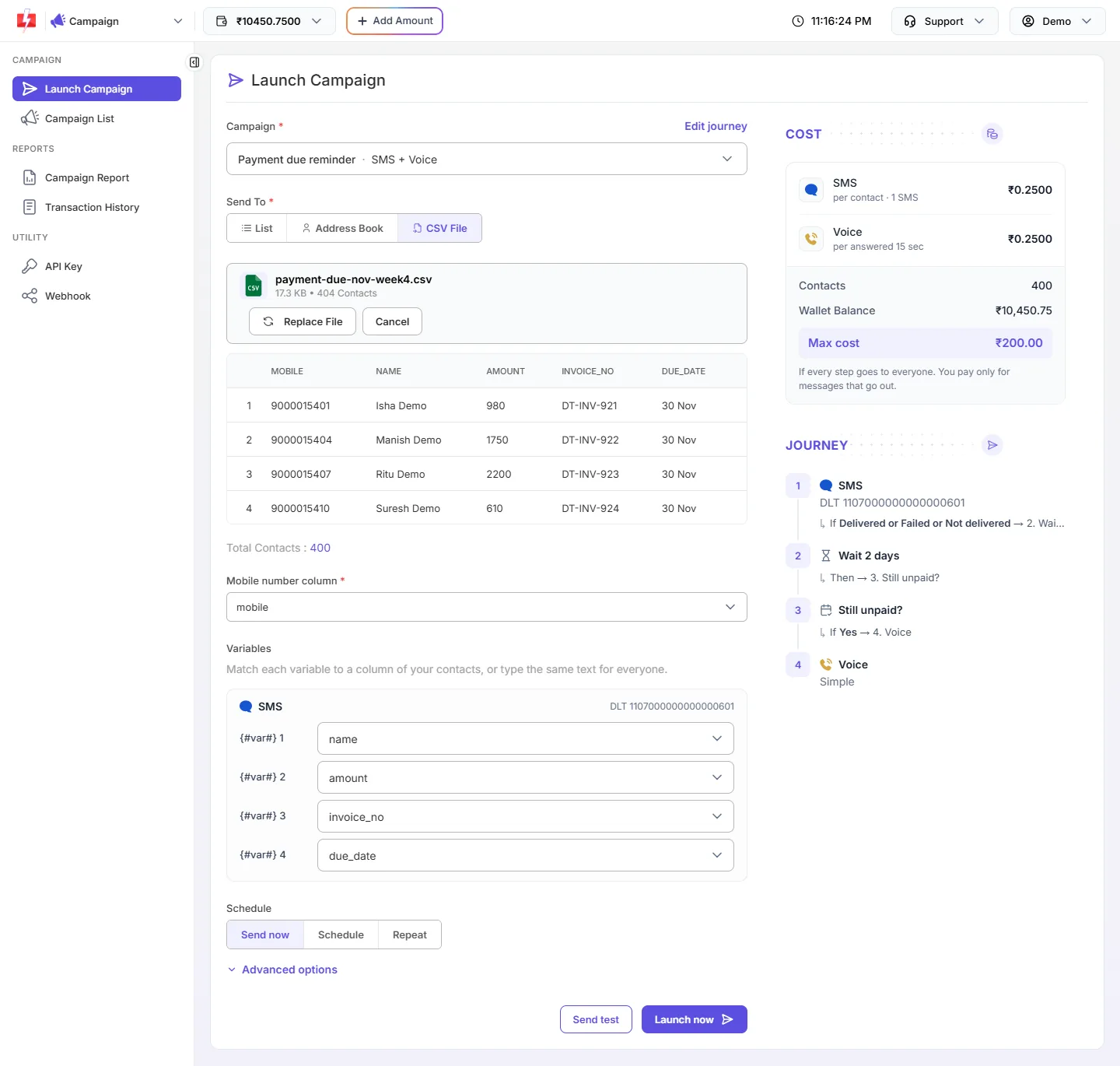
For fees, invoices, rent or subscriptions. The ready journey "Payment due: SMS, then WhatsApp, then a call" sends a reminder by SMS, a WhatsApp message with a pay link the next day if the customer is still unpaid, and finally a recorded call one day after that.
| Step | When | Channel | Message |
|---|---|---|---|
| 1 | Due date morning (list upload or API call) | SMS | Amount due and due date |
| 2 | After 1 day, if still unpaid | WhatsApp (utility) | Same details with a pay-now button |
| 3 | After 1 more day, if still unpaid | Voice call | Short recorded reminder in your voice |
Two things to know. First, waits are fixed times, not "3 days before each customer's due date". To remind people before their own due date, upload that day's list or send the API call from your billing software on that day. Second, the "still unpaid" checks are Condition steps that look for a payment_received event. Your billing software posts that event to Fast2SMS when a customer pays, and from then on that customer gets no more reminders.
SMS (English): "Dear {#var#}, your payment of Rs {#var#} to Demo Traders is due on {#var#}. Please pay on time to avoid late charges."
WhatsApp (Hindi): "नमस्ते {{1}}, Demo Traders का ₹{{2}} का भुगतान {{3}} को देय है। नीचे दिए बटन से अभी भुगतान करें। धन्यवाद।"
The voice call plays the same recorded audio to everyone; it cannot read out a name or an amount. Keep it general: "This is Demo Traders. Your payment is due today. Please check your SMS or WhatsApp for details." More templates are in the payment reminder automation guide.
4. Event, webinar or appointment reminder
The ready journey "WhatsApp invite, SMS if not delivered, call on the day" suits workshops, store launches, open days and webinars. Clinics and salons can use the same shape for appointments.
- WhatsApp invite with date, time, place or joining link.
- SMS invite after 30 minutes if WhatsApp is not delivered.
- Wait 1 day (set it to match your event date), and add a Frequency step if you want the call only in the morning.
- Reminder call with a short recorded message. A DTMF call can also ask the listener to press a key.
WhatsApp invite (English): "Hi {{1}}, you are invited to our free cooking workshop at Demo Traders, MG Road, on Saturday at 11 am. Reply YES to save your seat."
Replies to WhatsApp land in your inbox. A Condition step can check "Reply received" and skip the call for people who already replied.
5. Win back inactive customers
Customers who bought once and went quiet are cheaper to bring back than new ones are to find. The ready journey "Win back with an RCS card, then WhatsApp" sends a branded RCS rich card first. If RCS fails or the phone does not support RCS, the next step sends a WhatsApp offer an hour later, and an SMS an hour after that catches anyone WhatsApp did not reach.
| Step | Channel | Message | If it fails |
|---|---|---|---|
| 1 | RCS rich card | "We miss you" card with an image and a "See offer" button | WhatsApp offer |
| 2 | Same offer with a coupon | SMS with the coupon |
RCS card text: "We miss you, {{name}}! Here is 15% off your next order at Demo Traders. Valid for 7 days." (RCS uses sheet column names in double braces.)
SMS (Hindi): "{#var#} जी, बहुत दिन हो गए! Demo Traders पर अगली खरीद पर 15% छूट, कोड {#var#}, 7 दिन तक।"
Ideas for who to target and when are in the win-back campaign guide.
6. Feedback after a sale or visit
The ready journey "Feedback on WhatsApp, SMS link if no reply" asks for a rating on WhatsApp. If there is no reply, an SMS with a short feedback link follows.
- WhatsApp feedback request with quick-reply buttons.
- Wait 1 day.
- Condition: reply received on WhatsApp? If yes, end. If no, continue.
- SMS with your feedback form link.
WhatsApp (English): "Thank you for shopping at Demo Traders, {{1}}! How was your experience? Tap a button below to rate us."
There is also a voice version, "Feedback call, WhatsApp if not answered", where a DTMF call asks the customer to press a key to rate you.
How do you start a journey from your website or app?
With one API call. When something happens in your software, such as a signup, an order or an enquiry, your server calls POST https://www.fast2sms.com/dev/campaign/start with your campaign ID and the customer's number. That number starts the journey immediately.
Find the campaign ID in Campaign List, under the three-dot menu, "Get API code". That screen also shows ready code in cURL, PHP, Node.js and Python.
curl -X POST https://www.fast2sms.com/dev/campaign/start \
  -H "authorization: YOUR_API_KEY" \
  -H "Content-Type: application/json" \
  -d '{"campaign": "YOUR_CAMPAIGN_ID",
       "recipients": [{"mobile": "9000012345", "name": "Rahul"}]}'
The same call in PHP, for example inside your signup handler:
$payload = json_encode([
    'campaign'   => 'YOUR_CAMPAIGN_ID',
    'recipients' => [['mobile' => '9000012345', 'name' => 'Rahul']],
]);
$ch = curl_init('https://www.fast2sms.com/dev/campaign/start');
curl_setopt_array($ch, [
    CURLOPT_POST           => true,
    CURLOPT_RETURNTRANSFER => true,
    CURLOPT_HTTPHEADER     => ['authorization: ' . getenv('FAST2SMS_API_KEY'), 'Content-Type: application/json'],
    CURLOPT_POSTFIELDS     => $payload,
]);
$response = curl_exec($ch);
curl_close($ch);
Useful details for your developer:
- Fields like
namebecome variables you can map to template placeholders. Up to 50 variables per number, and up to 1,000 numbers per call. - All API calls for one campaign on the same day join one run, named "<campaign> · API". A number already in today's run is skipped, so a double click on your signup button does not send two welcomes.
- To branch on something that happens later, post an event with
POST /dev/campaign/event(number, event, value), for examplepayment_receivedorclicked. Link clicks are only known when your own software posts them this way. - Webhooks send every step result and run status back to your server. Set them up under Webhook, then Campaign.
There is no built-in Shopify, WooCommerce or cart trigger: you trigger from your website, app, CRM or store backend with this one API call. Developers can read more in the event-triggered messaging guide.
How much does marketing automation cost in India?
On Fast2SMS, only the messages cost money. There is no campaign fee, no builder fee and no monthly fee; every step is charged at that channel's normal rate from your prepaid wallet.
Cost example: welcome journey for 1,000 signups a month
Using the prices at the time of writing and the welcome journey above. We assume WhatsApp reaches 900 of the 1,000 people and SMS covers the other 100, and treat the welcome and offer as WhatsApp marketing messages. Real numbers depend on your list.
| Step | Messages | Rate | Cost |
|---|---|---|---|
| WhatsApp welcome | 1,000 sent, 900 delivered | ₹0.95 | up to ₹950 |
| SMS backup for welcome | 100 | ₹0.25 | ₹25 |
| WhatsApp offer after 6 hours | 900 | ₹0.95 | ₹855 |
| SMS offer for the rest | 100 | ₹0.25 | ₹25 |
| SMS reminder next day | 1,000 | ₹0.25 | ₹250 |
| Total | about ₹2,105, or ₹2.11 per signup |
A few notes. 18% GST is added on recharges. SMS drops to as low as ₹0.11 per SMS on bigger recharge slabs, which would cut the SMS part of this example by more than half. Failed WhatsApp and RCS messages are refunded under each channel's own policy, SMS refunds apply only on "On Delivery" billing accounts, and voice charges only answered pulses. Contacts still waiting when you stop a run are not charged at all.
Before you launch, the panel shows a cost estimate. Launch is refused if your wallet cannot cover the first step. If the balance runs low mid-run, the run pauses and resumes on its own after you recharge; it checks every 10 minutes, and it is stopped after 3 days on low balance.
Every new account gets ₹50 free credit and you recharge from ₹100, so you can test a full journey on your own phone before spending anything real.
How to set it up in Fast2SMS
Once your sender and templates are approved, the setup itself is short. These are the steps in the panel.
- Get your channels ready. For SMS, an approved DLT sender ID and template. For WhatsApp, a connected WhatsApp Business API number with approved templates. For RCS, an approved RCS bot. For voice, ask for voice to be enabled and upload an approved audio file (MP3 or WAV, up to 5 MB).
- Open Campaign. In the panel, go to Campaign, then Launch Campaign, or Campaign List, then Create Campaign.
- Start from a ready journey or a blank canvas. Pick a goal, such as Promotional or Payment reminder, and a journey.
- Fill each step. Choose the sender and template for SMS, WhatsApp or RCS, or the audio for voice. Map placeholders to a column of your sheet or to fixed text.
- Add Wait, Condition and Frequency steps where you need them, and connect each output (sent, delivered, read, failed, not delivered) to the next step.
- Choose the audience. Upload a CSV, TXT, XLSX or XLS file (up to 20 MB and 10 lakh rows), pick an Address Book group, or paste numbers. For a signup journey, use the API instead. Duplicates and invalid numbers are removed and counted.
- Send test to up to 10 numbers. Check each message on your own phone. Test sends are charged like normal sends.
- Launch. Choose Send now, Schedule (up to 90 days ahead) or Repeat (daily or on chosen weekdays at a set time). Optionally set a limit per minute, hour or day.
- Watch the report. The run report refreshes every 15 seconds while it runs. Pause, resume or stop it at any time.
A journey can have up to 200 steps, lasts at most 30 days per contact, and each step runs once per contact. One account can hold up to 200 campaigns.
How do you know if an automation is working?
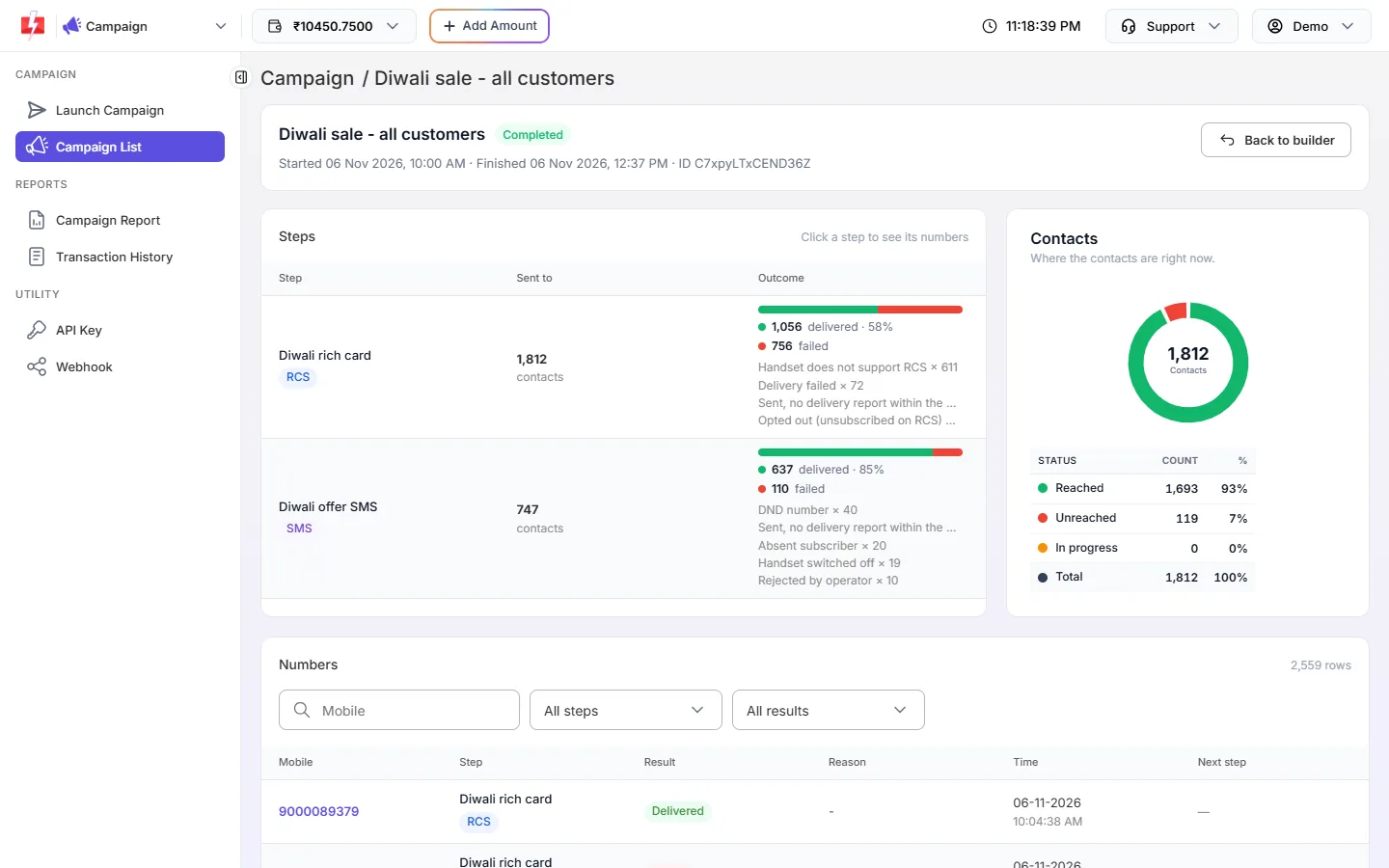
Open the Campaign Report. It shows the whole run, each step, and each number, so you can see exactly where people drop off.
- Run summary: total, reached, unreached, opted out, stopped, in progress, cost, refund and net cost.
- Per step: entered, sent, delivered, read, answered, not answered, failed and not delivered, with cost, refund, average time and the top failure reasons.
- Per number: the full journey of any one customer, step by step.
- Export: download the data as CSV from Delivery Reports, Export, Campaign.
Look at two numbers first. The "reached" count tells you whether the fallback steps are doing their job. The "read" count on WhatsApp and RCS tells you whether the message is interesting. If many messages are delivered but few are read, change the template or the time of day, not the channel.
Which rules apply to automated messages?
The same rules as any business message in India. Automation does not change them, and Fast2SMS checks them for you.
- SMS needs DLT. Every SMS uses an approved DLT sender and template. A DLT variable longer than 30 characters is rejected for that number, so keep names and links short.
- WhatsApp needs approved Meta templates. Marketing messages use marketing templates; reminders and receipts use utility templates.
- Sending hours differ by channel. Promotional SMS is held outside the promotional window when that rule applies, and promotional RCS bots send between 7 AM and 10 PM. Use a Frequency step to set your own hours on top.
- DND and opt-outs. DND is handled for SMS and voice. Numbers blocked on WhatsApp, unsubscribed on RCS or on the voice opt-out list leave the journey.
- Content checks. SMS, WhatsApp and RCS text is checked for scam content.
- Indian numbers only. Journeys send to 10-digit Indian mobile numbers.
Mistakes to avoid
- Automating everything on day one. Start with one journey, such as the offer with SMS backup, and add more once you trust the reports.
- No fallback step. A single-channel journey misses everyone that channel cannot reach. Add SMS as the last step.
- Waits that are too short. Three messages in one hour feel like spam. Leave hours or days between offers.
- Ignoring sending hours. A reminder at 11 pm annoys people. Use a Frequency step.
- Marketing in a utility template. Keep offers in marketing templates; Meta can reject or recategorise them.
- Expecting the voice call to say the customer's name. Voice plays one recording for everyone. Keep the audio general.
- Skipping the test. Send a test to your own number before every launch. Broken variables are easy to spot on a phone.
- Not stopping reminders after payment. Post a payment event from your software and add a Condition step, or customers who paid will keep getting reminders.
- Forgetting the wallet. A run pauses on low balance. Keep enough credit for long journeys.
Marketing automation is not only for big companies. With pay-per-message pricing and ready journeys, a shop, clinic or small online store can run the same welcome, offer, reminder and feedback journeys as a large brand. Open Fast2SMS Campaign, pick a ready journey and send a test to your own phone today.
Frequently asked questions
What is marketing automation?
Marketing automation is software that sends messages to customers by itself, based on steps you set once: what to send, how long to wait, what to do if a message fails and when to stop. On Fast2SMS these steps are called a journey and run in Campaign.
What is marketing automation in simple words?
It means your follow-ups happen on time without anyone remembering them. A welcome goes out at signup, an offer a few hours later and a reminder the next day, for every customer.
What is an example of marketing automation?
A customer signs up on your website, your server makes one API call, and Fast2SMS sends a WhatsApp welcome at once, an offer 6 hours later (by SMS if WhatsApp is not delivered) and a reminder the next day.
Is marketing automation useful for a small business?
Yes. Small teams forget follow-ups. An automated journey makes sure every customer gets the welcome, the offer, the reminder and the feedback request, and on Fast2SMS you only pay for the messages sent.
What are automated marketing messages?
They are messages sent by software at a set time or after an event, such as a signup, instead of by hand. Examples are welcome messages, offer reminders, payment reminders and feedback requests.
What is the difference between bulk messaging and marketing automation?
Bulk messaging sends one message to a list once. Marketing automation sends a series of steps, with waits, conditions and fallbacks, and each customer moves through them on their own. See bulk SMS for marketing for one-off sends.
What is a customer journey in marketing automation?
A journey is the set of steps one customer goes through: messages on different channels, wait times between them and rules such as "if not delivered, send SMS". Fast2SMS lets you draw it on a canvas.
Is marketing automation the same as a chatbot?
No. A chatbot replies when the customer messages you. Marketing automation sends outbound messages on a schedule or after an event. Fast2SMS has both, but this guide covers outbound journeys.
Which channels can I automate on Fast2SMS?
SMS, WhatsApp, RCS and voice calls. You can use one channel or combine all four in one journey, from one wallet.
Can I automate email on Fast2SMS?
No. Fast2SMS journeys use SMS, WhatsApp, RCS and voice calls, which all reach the customer's phone. Email is not a step in Campaign.
What is SMS marketing automation?
It means SMS steps that go out by themselves at the right time, using your approved DLT sender and templates. SMS is often the last step in a journey because it reaches every phone. Read the automated SMS guide.
What is a WhatsApp marketing automation platform?
It is a tool that sends approved WhatsApp templates on a schedule or after an event, with waits and follow-ups. Fast2SMS Campaign does this on the official WhatsApp Business API and can add SMS when WhatsApp is not delivered. See the WhatsApp automation guide.
Can I use RCS in an automated journey?
Yes, with an approved, active RCS bot. You can send plain text, rich cards, media, carousels and suggestion buttons. If RCS fails or the phone does not support RCS, the next step sends.
Can a journey make a voice call?
Yes, if voice is enabled on your account. A voice step plays your approved recording and can be a simple message, a press-a-key (DTMF) call or a call patch to an agent group.
Can the voice call say the customer's name?
No. Voice plays the same recording to everyone; names and amounts are not read out. Put personal details in the SMS or WhatsApp step and keep the call general.
Do I need a DLT template for automated SMS?
Yes. Every SMS step uses an approved DLT sender ID with an approved DLT template linked to it. A variable longer than 30 characters is rejected for that number.
Do I need approved WhatsApp templates for automation?
Yes. WhatsApp steps use templates approved by Meta, with text, image, video or document headers and buttons.
Are there ready-made automations I can use?
Yes. "Start from a ready journey" offers 16 ready-made journeys in 7 goals: promotional, transactional, lead follow-up, payment reminder, event, re-engagement and feedback. You pick one and choose your own sender and template in each step.
Which automation should a small business start with?
Start with "WhatsApp offer, SMS if not delivered". It is simple, uses your existing list and makes sure customers WhatsApp cannot reach still get the offer by SMS.
What steps can I add to a journey?
Four message steps (SMS, WhatsApp, RCS, Voice) and three control steps: Wait, Condition and Frequency.
How long can a Wait step be?
From 1 minute up to 30 days, in minutes, hours or days. Presets are 10 minutes, 30 minutes, 1 hour, 1 day and 3 days.
What does the Frequency step do?
It lets the journey continue only on the weekdays and between the hours you choose. The default is 09:00 to 21:00, with presets for every day, weekdays and weekends.
What can a Condition step check?
The result of an earlier SMS, WhatsApp, RCS or voice step, whether a reply was received on WhatsApp or RCS, and link clicks or custom events that your own software posts to the event API.
Does Fast2SMS track link clicks automatically?
No. A "link clicked" condition works only when your website or app posts the click to the campaign event API. There is no automatic click tracking.
Can a journey branch on an SMS reply?
No. Reply conditions work for WhatsApp and RCS replies. There is no SMS-reply or specific-button branching.
What is a fallback in marketing automation?
A fallback sends the message on another channel when the first one fails or is not delivered, for example WhatsApp then SMS. Read the SMS fallback guide.
How long does a step wait before it treats a message as not delivered?
By default 120 minutes for SMS, 30 minutes for WhatsApp and RCS and 15 minutes for voice. You can set anything from 1 minute to 24 hours.
How many steps can one journey have?
Up to 200 steps and 400 connections. A journey lasts at most 30 days per contact, and each step runs once per contact.
Can I send a WhatsApp drip sequence?
Yes. Join several WhatsApp steps with Wait steps, and add SMS for people WhatsApp does not reach. See the WhatsApp drip campaign guide for six examples.
Can I remind customers a few days before their own due date?
Waits are fixed, not tied to each customer's date. Upload that day's list, or have your billing software send the API call on the day you want the reminder to start.
How do I stop payment reminders after a customer pays?
Have your software post a payment_received event for that number. A Condition step before each reminder checks it, and customers who have paid leave the reminder path. See the payment reminder guide.
Can I start an automation when someone signs up on my website?
Yes. Your server calls POST https://www.fast2sms.com/dev/campaign/start with your campaign ID and the customer's number, and the journey starts at once. Read the welcome message guide.
Where do I find the campaign ID for the API?
In Campaign List, open the three-dot menu on your campaign and choose "Get API code". It shows the ID and ready code in cURL, PHP, Node.js and Python.
How many numbers can I send in one API call?
Up to 1,000 numbers per call, each with up to 50 variables such as name or coupon code.
What happens if my website calls the API twice for the same number?
All API calls for one campaign on the same day join one run, and a number already in today's run is skipped, so the customer does not get two welcomes.
Is there a Shopify or WooCommerce trigger?
There is no built-in store or cart trigger. You trigger the journey from your website, app, CRM or store backend with one API call.
Can I get journey results on my server?
Yes. Webhooks send every step result and run status, with step name, channel, status, reason, cost and next step. Set them up under Webhook, then Campaign.
What are the API rate limits for campaigns?
Per API key, write calls are limited to 30 per minute and read calls to 120 per minute. Your IP whitelist and API on/off settings also apply.
How much does marketing automation cost on Fast2SMS?
There is no campaign fee, builder fee or monthly fee. Each step is charged at that channel's normal per-message rate from your wallet.
What are the per-message prices?
At the time of writing: SMS ₹0.25 per SMS from a ₹100 recharge, down to ₹0.11 on bigger slabs; WhatsApp ₹0.95 marketing, ₹0.25 utility, ₹0.25 authentication and ₹0.13 service; RCS from ₹0.35; voice ₹0.25 per 15-second pulse, answered calls only. See SMS pricing and WhatsApp pricing.
How much does a welcome journey for 1,000 signups cost?
In this guide's example (WhatsApp welcome, WhatsApp offer with SMS backup, SMS reminder), about ₹2,105 before GST at the time of writing, or about ₹2.11 per signup.
Is there a free marketing automation tool in India?
The Campaign builder on Fast2SMS has no fee of its own; you pay only for messages. New accounts get ₹50 free credit to test a journey.
Will I see the cost before launching?
Yes. The panel shows a cost estimate before launch, and launch is refused if your wallet cannot cover the first step.
What happens if my balance runs out during a journey?
The run pauses and resumes on its own after you recharge; it checks every 10 minutes. If the balance stays low for 3 days, the run is stopped.
Are failed messages refunded?
Refunds follow each channel's own rules: failed WhatsApp and RCS messages under their channel policy, SMS only on "On Delivery" billing accounts, and voice charges only answered pulses.
Am I charged for contacts still waiting when I stop a run?
No. Contacts still waiting for a later step when you stop the run are not charged for those steps.
Are test messages free?
No. Test sends to up to 10 numbers are charged like normal sends, but the ₹50 signup credit covers plenty of tests.
How do I create an automated journey in Fast2SMS?
Go to Campaign, then Launch Campaign (or Campaign List, then Create Campaign), start from a ready journey or a blank canvas, fill each step, add your audience, send a test and choose Send now, Schedule or Repeat.
Which files can I upload as the audience?
CSV, TXT, XLSX or XLS files up to 20 MB and up to 10 lakh rows. You can also pick an Address Book group or paste numbers.
Can I personalise automated messages?
Yes. Sheet columns become variables. Map SMS and WhatsApp placeholders to a column or fixed text, and use the column name in double braces in RCS text. Voice has no variables.
Can I schedule or repeat a journey?
Yes. Schedule up to 90 days ahead, or Repeat daily or on chosen weekdays at a set time, with optional start and end dates. Times use IST.
How fast does a journey start for a large list?
Up to 5,000 contacts per minute per run, so 1 lakh contacts start in about 20 minutes. You can also set your own limits per minute, hour or day.
Can I pause or stop a running journey?
Yes. You can pause, resume or stop a run, and duplicate, rename or switch a campaign on or off.
How many campaigns can one account have?
Up to 200 campaigns per account, with one open run per campaign at a time.
Can I send automated messages to international numbers?
No. Journeys send to Indian mobile numbers only: 10 digits starting with 6 to 9.
How do I see results of an automation?
The Campaign Report shows the run summary (reached, unreached, cost, refund, net cost), each step (sent, delivered, read, failed and more) and each number's full journey. You can export it as CSV.
Do automated promotional messages follow sending hours?
Yes. Promotional SMS is held outside the promotional window when that rule applies, and promotional RCS bots send between 7 AM and 10 PM. Add a Frequency step for your own hours.
What happens when a customer opts out?
Numbers that block you on WhatsApp, unsubscribe on RCS or are on the voice opt-out list leave the journey. DND is handled for SMS and voice.
Where can I learn more about multi-channel journeys?
Read the omnichannel marketing platform guide, then open the Campaign builder to try a ready journey.