Abandoned Cart WhatsApp Message: Templates, Timing and a Recovery Journey
No monthly fee · Pay as you go from ₹100 · Free setup help on a call
An abandoned cart WhatsApp message reminds a shopper who left without paying that their cart is still waiting. On Fast2SMS you build it once in Campaign: WhatsApp with the cart link at 30 minutes, a coupon by RCS or SMS at 6 hours, and a last nudge at 24 hours. Your store starts it with one API call, and you pay per message, from ₹0.25 at the time of writing.
This guide covers the best timing, copy-ready reminder templates in English and Hindi, how to start the journey from your store backend, the API code, the real cost per cart, and the mistakes that make shoppers block your number.
What is an abandoned cart WhatsApp message?
It is a short, personal reminder that tells a shopper their cart is still waiting, with a button or link that takes them straight back to checkout. It goes only to people who started buying and gave you their mobile number, so it is far more relevant than a general offer sent to your whole list.
A good cart reminder has four parts: the shopper's name, the product they left, a one-tap way back to the cart, and, in a later message, a small reason to finish (a coupon, free delivery, or a note that stock is limited). The first reminder is usually just helpful: "You left this behind." The offer comes later, and only for people who did not come back on their own.
Most stores send one reminder and stop. A recovery journey goes further. It is a short sequence of messages over a day, on more than one channel, that stops the moment the shopper pays. In India that matters, because not every phone has WhatsApp on it, not every Android phone supports RCS, and some messages simply do not get delivered. A journey that moves to SMS when WhatsApp or RCS fails reaches more of the people you are trying to win back.
On Fast2SMS this journey is built in Campaign, the multi-channel journey builder, with SMS, WhatsApp, RCS and voice steps plus Wait, Condition and Frequency steps. It is the same tool you would use for payment reminders or welcome messages, so you do not need a separate cart recovery app.
Why do shoppers abandon carts, and why does a reminder work?
Most shoppers who leave a cart have not said no. They got distracted, wanted to compare, were unsure about delivery charges or simply ran out of time. A reminder at the right moment brings them back while they still remember the product.
The common reasons we hear from Indian online stores are:
- Distraction. A call, a meeting, a child, a bus stop. The shopper meant to come back and forgot.
- Delivery charges or COD fees that appeared only at checkout.
- Payment trouble. A UPI app that did not open, an OTP that did not arrive, a card that was declined.
- Comparing prices on other sites before deciding.
- Waiting for payday or for a sale.
- Doubts about size, returns or the delivery date.
Only the last three need persuasion. The first three need a simple reminder with a link. That is why the first message should be helpful and plain, and the coupon should come only in a later step. If you lead with a discount, you train your regular customers to leave carts on purpose.
WhatsApp works well for the first reminder because the shopper sees your business name, the product image and a button in one place. SMS is the step that reaches almost every phone when WhatsApp is not delivered. RCS sits in between: a rich card with an image and buttons in the phone's normal messages app, on Android phones that support it.
What is the best timing for abandoned cart reminders?
A simple, proven pattern is three reminders in 24 hours: the first at about 30 minutes, the second with an offer at about 6 hours, and a final one at about 24 hours. Each step checks first whether the shopper has already ordered, so nobody gets a reminder after paying.
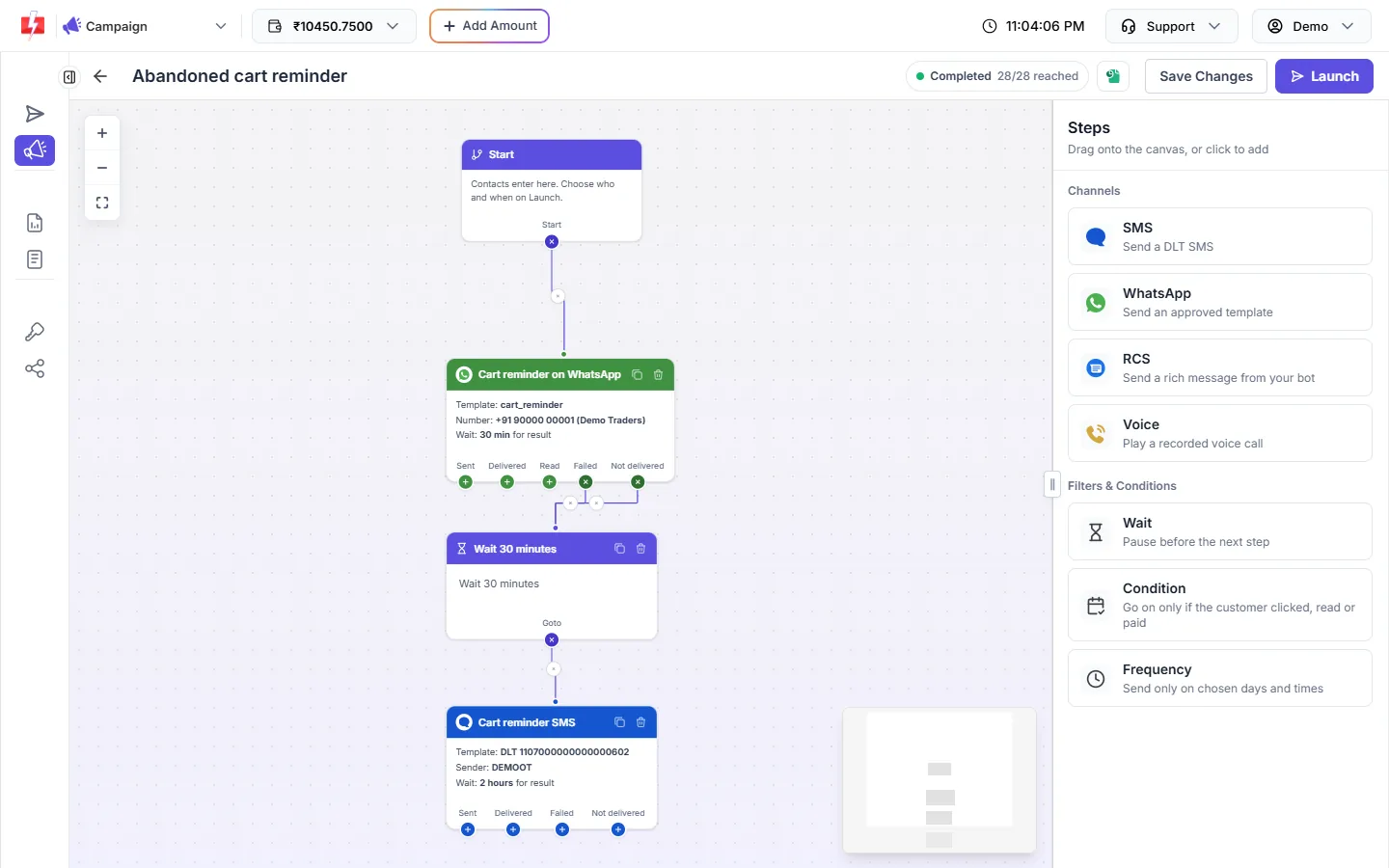
Here is the full journey as it looks in the Fast2SMS journey builder:
| Step | When | Channel | Message | If it fails |
|---|---|---|---|---|
| 1. Cart left | 0 min (your store calls the API) | None | Journey starts for the shopper's number | Not applicable |
| 2. Order check | After a 30-minute Wait | Condition | Has your store posted order_placed in the last 1 hour? | Yes: journey ends. No: go on |
| 3. First reminder | About 30 min | "You left something in your cart" with product name and a View cart button | Failed or not delivered: same reminder by SMS (DLT template) | |
| 4. Order check | After a Wait of about 5 hours 30 minutes | Condition | Still no order_placed? | Yes it was placed: journey ends |
| 5. Offer reminder | About 6 hours | RCS rich card | Product image, coupon code, Complete order button | RCS fails or the phone does not support RCS: coupon by SMS |
| 6. Order check | After an 18-hour Wait | Condition + Frequency | Still no order? Continue only between 9 am and 9 pm | Order placed: journey ends |
| 7. Last reminder | About 24 hours | "Your coupon ends tonight" with the cart link | Not delivered: short SMS with the link |
A few notes on the timing:
- The times are approximate. Each channel step waits for a final delivery result before taking its "not delivered" path. By default that is 30 minutes for WhatsApp and RCS and 120 minutes for SMS, and you can set it anywhere from 1 minute to 24 hours. A shorter wait makes the fallback SMS go sooner.
- Waits count from the step before. A Wait step can be 1 minute up to 30 days, in minutes, hours or days. Use 330 minutes for "about five and a half hours".
- Night-time protection. A cart left at 11 pm would reach its 6-hour reminder at 5 am. A Frequency step before the offer and the last reminder lets the journey continue only between the hours you choose (09:00 to 21:00 by default), so the message waits for the morning.
- One journey per shopper per day. If the same number leaves two carts on the same day, the second API call is skipped because that number is already in today's run. That protects shoppers from double reminders.
How does the abandoned cart journey start from your store?
Your store backend starts it. When a checkout is left unpaid, your server sends one API call to Fast2SMS with the shopper's number, name, product and cart link, and that number enters the journey straight away. When the shopper pays, your server sends an order_placed event, and the next Condition step ends the journey for them.
Campaign does not watch your store by itself. There is no built-in Shopify, WooCommerce or cart trigger inside the journey builder, so the start signal has to come from your website, app, CRM or store backend. In practice this is a small piece of code that a developer adds once. Most platforms already know when a checkout was created and not completed; that is the moment to call the API.
There are two common ways to time the first message:
- Call the API right away and let the journey wait. The journey begins with a 30-minute Wait and then a Condition that checks for
order_placed. Shoppers who pay within 30 minutes get nothing. This is the simplest option. - Call the API after 30 minutes from your own job. Your server checks carts every few minutes and calls the API only for carts still unpaid after 30 minutes. The journey can then start with the WhatsApp step directly.
Because the trigger is a plain API call, the same journey works for a custom-built store, a mobile app, a marketplace seller panel or a D2C site on any platform. The journey design stays in Fast2SMS, so your marketing team can change a message or a wait time without touching the code.
API code: start the journey, then stop it when the order is placed
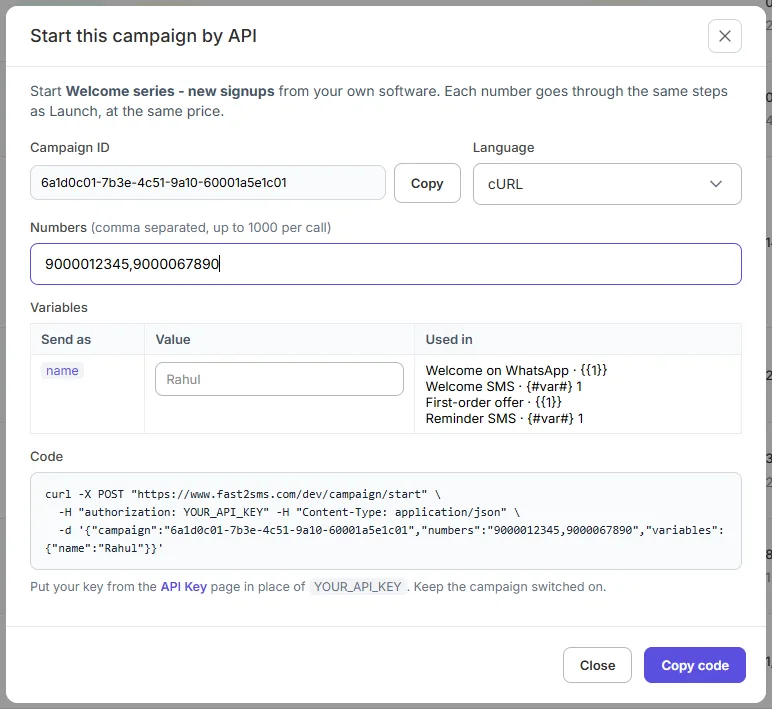
You need two calls. POST /dev/campaign/start puts the shopper into the journey, and POST /dev/campaign/event tells Fast2SMS the shopper has ordered. Both use your Fast2SMS API key in the authorization header.
Copy the campaign ID from Campaign List > ⋮ > Get API code. That screen also shows ready code in cURL, PHP, Node.js and Python for your own campaign, with your variable names filled in.
1. Start the journey when a cart is left (cURL)
curl -X POST https://www.fast2sms.com/dev/campaign/start \
  -H "authorization: YOUR_API_KEY" \
  -H "Content-Type: application/json" \
  -d '{
    "campaign": "YOUR_CAMPAIGN_ID",
    "recipients": [
      {"mobile": "9000012345", "name": "Rahul", "product": "Cotton Kurta", "cart_link": "yourstore.in/c/8F2K"}
    ]
  }'
Every field next to mobile becomes a variable that your WhatsApp, RCS and SMS steps can use. One number can carry up to 50 variables, and one call can carry up to 1,000 numbers. Keep SMS variables short: a DLT variable longer than 30 characters is rejected for that number, so send a short cart link.
2. The same call from Node.js
// Node 18+ (built-in fetch). Keep the key in an environment variable.
async function startCartJourney(cart) {
  const res = await fetch('https://www.fast2sms.com/dev/campaign/start', {
    method: 'POST',
    headers: {
      'authorization': process.env.FAST2SMS_API_KEY,
      'Content-Type': 'application/json'
    },
    body: JSON.stringify({
      campaign: 'YOUR_CAMPAIGN_ID',
      recipients: [{
        mobile: cart.mobile,          // "9000012345"
        name: cart.firstName,         // "Rahul"
        product: cart.firstItemName,  // "Cotton Kurta"
        cart_link: cart.shortLink     // "yourstore.in/c/8F2K"
      }]
    })
  });
  return res.json(); // { "return": true, "added": 1, ... }
}
3. Stop the reminders when the order is placed
curl -X POST https://www.fast2sms.com/dev/campaign/event \
  -H "authorization: YOUR_API_KEY" \
  -H "Content-Type: application/json" \
  -d '{"number": "9000012345", "event": "order_placed", "value": "ORDER-1001"}'
In the journey, each Condition step checks "Your event: order_placed, in the last 1 day, equals 0". If the event was posted, the condition goes the other way and the journey ends for that shopper. Event names use letters, digits and underscores.
A few practical limits for developers: write calls (start and event) are limited to 30 per minute per API key, the IP whitelist and API on/off switch from the Dev API page apply, and numbers sent by API start immediately. If you have many carts at once, batch up to 1,000 numbers per call. The full developer view, including webhooks, is in the event-triggered messaging API guide.
How to set up abandoned cart recovery in Fast2SMS
You build the journey once in the panel, test it on your own phone, switch it on, and then connect your store. It takes about an hour if your WhatsApp templates and DLT templates are already approved.
- Get your channels ready. You need an approved WhatsApp template with a cart button, an approved RCS bot if you want the coupon card, and a DLT sender with an approved SMS template for the fallback. Template approval is the slow part, so start here.
- Open Campaign. In the panel go to Campaign > Launch Campaign, or Campaign List > Create Campaign.
- Start from a ready journey or a blank canvas. Click Start from a ready journey and pick the Promotional goal, "WhatsApp offer, SMS if not delivered", as a base. You can also drag steps onto an empty canvas.
- Add the first Wait and Condition. Drag a Wait step (30 minutes) after Start, then a Condition step set to "Your event", event name
order_placed, count equals 0, in the last 1 hour. - Add the WhatsApp step. Pick your sender number and the cart template, and map its placeholders to the variables your store sends (name, product, cart_link). Connect its failed and not delivered outputs to an SMS step with your DLT reminder template.
- Add the offer step. After the WhatsApp step's sent, delivered and read outputs (and after the SMS fallback), add Wait 330 minutes, another order Condition, a Frequency step (every day, 09:00 to 21:00) and an RCS step with the coupon card. Wire its failed and not delivered outputs to an SMS coupon step.
- Add the last reminder. Wait 18 hours, order Condition, Frequency, then a final WhatsApp step with its own SMS fallback.
- Send a test. Use Send test to run the journey on up to 10 numbers, such as your own and a colleague's. Test sends are charged like normal sends, so keep the list short.
- Switch it on and copy the API code. Save the campaign, make sure it is switched on in Campaign List, and open ⋮ > Get API code. Give the code and the campaign ID to your developer.
- Connect the store. Your developer calls
/dev/campaign/startwhen a checkout is left and/dev/campaign/eventwithorder_placedwhen it is paid.
When you launch from the panel instead of the API, the launch screen also offers Send now, Schedule (up to 90 days ahead) and Repeat. For cart recovery you will normally use the API, because each shopper enters the journey at a different time.
Abandoned cart WhatsApp message templates (copy-ready)
Use these as starting points. WhatsApp templates use numbered placeholders that Meta approves once; SMS templates use the DLT variable format your operator portal uses. Replace "your store" with your brand name.
Reminder 1: WhatsApp at 30 minutes (no offer)
| Style | Template text | Button |
|---|---|---|
| Friendly | Hi {{1}}, you left {{2}} in your cart at your store. It is still saved for you. Tap below to finish your order in one step. | View cart (URL) |
| Helpful | Hi {{1}}, did something go wrong at checkout? Your {{2}} is waiting. If the payment did not go through, you can try again here or choose cash on delivery. | Complete order (URL) |
| Short | {{1}}, your cart is waiting: {{2}}. Finish your order here. | Open cart (URL) |
| Hindi | नमस्ते {{1}}, आपके कार्ट में {{2}} अभी भी रखा है। एक क्लिक में अपना ऑर्डर पूरा करें। | कार्ट देखें (URL) |
Reminder 2: RCS card or SMS at 6 hours (with an offer)
- RCS rich card: image of the product, title "Still thinking about it, {{name}}?", text "Use code COMEBACK10 for 10% off your cart today.", buttons "Complete order" and "Call us". RCS text uses the column name in double braces.
- SMS (DLT): "Hi {#var#}, your cart at your store is waiting. Use code COMEBACK10 for 10% off today: {#var#} - Demo Traders"
- SMS in Hindi (DLT, Unicode): "नमस्ते {#var#}, आपका कार्ट इंतज़ार कर रहा है। आज कोड COMEBACK10 से 10% छूट पाएं: {#var#} - Demo Traders"
Reminder 3: WhatsApp at 24 hours (last call)
- "Hi {{1}}, last reminder: your code {{2}} for {{3}} ends tonight. After that the cart may be cleared. Tap to finish your order."
- "{{1}}, a few people are looking at {{2}} right now. Your cart is still saved, and delivery to your pincode is free today."
- Hindi: "{{1}}, आखिरी याद: आपका कोड {{2}} आज रात तक ही चलेगा। ऑर्डर पूरा करने के लिए नीचे टैप करें।"
Only write "limited stock" or "free delivery" when it is true. Shoppers notice when the same "last chance" message comes every week, and it hurts trust in your brand.
For more sequences in the same style, see the WhatsApp drip campaign examples and the full order lifecycle in ecommerce marketing automation.
How much does abandoned cart recovery cost in India?
There is no campaign fee, no builder fee and no monthly fee on Fast2SMS. Each step is charged at that channel's normal per-message rate from your wallet, and steps that never run because the shopper already ordered cost nothing.
At the time of writing, the rates are: WhatsApp marketing message ₹0.95, RCS message from ₹0.35, and SMS ₹0.25 per SMS on a recharge from ₹100, going down to ₹0.11 on larger recharges. Check the live WhatsApp pricing, RCS pricing and bulk SMS pricing pages before you plan a budget.
Here is an example for a store with 1,000 abandoned carts in a month. The share of shoppers who order between steps is an assumption for the example, not a promise; your own numbers will differ.
| Step | Contacts reaching it (assumed) | Rate at the time of writing | Cost |
|---|---|---|---|
| WhatsApp reminder at 30 min | 1,000 | ₹0.95 (marketing) | ₹950.00 |
| SMS fallback when WhatsApp not delivered | 100 | ₹0.25 | ₹25.00 |
| RCS coupon card at 6 h (after some have ordered) | 800 | ₹0.35 | ₹280.00 |
| SMS coupon when RCS fails or is not supported | 300 | ₹0.25 | ₹75.00 |
| Last WhatsApp reminder at 24 h | 700 | ₹0.95 | ₹665.00 |
| Total for 1,000 carts | ₹1,995.00 |
That is about ₹2 per abandoned cart before any refunds for failed messages, which follow each channel's own policy. If even 20 of those 1,000 shoppers come back and order a ₹800 product, the reminders have paid for themselves several times over. Compare that with the cost of the ad click that brought each shopper to your store in the first place.
To spend less, send the first reminder as SMS instead of WhatsApp, drop the third step for low-value carts, or start the journey only for carts above a minimum value. Your server decides who enters, so that filter is one line of code. Before every launch the panel shows a cost estimate, and a launch is refused if the wallet cannot cover the first step. If the wallet runs low mid-run, the run pauses and resumes by itself after you recharge.
Which channel is best for cart reminders: WhatsApp, RCS or SMS?
WhatsApp is usually best for the first reminder, RCS is a good, lower-cost way to show a rich coupon card on Android, and SMS is the backup that reaches almost every phone. Using them together in one journey covers more shoppers than any one channel alone.
| RCS | SMS | ||
|---|---|---|---|
| What it shows | Product image, text, URL and quick-reply buttons | Rich card or carousel with image and buttons in the phone's messages app | Plain text with a short link |
| Who it reaches | Phones with WhatsApp | Android phones that support RCS | Almost every phone |
| Approval | Meta-approved template | Approved, active RCS bot | DLT sender and template |
| Report outputs in the journey | Sent, delivered, read, failed, not delivered | Sent, delivered, read, failed, not delivered | Sent, delivered, failed, not delivered |
| Price at the time of writing | ₹0.95 per marketing message | From ₹0.35 per message | ₹0.25 down to ₹0.11 per SMS |
| Best step in a cart journey | First and last reminder | Offer card | Fallback and low-cost reminder |
A voice call is possible in the journey too, but it rarely suits cart reminders: the recording cannot say the shopper's name or product, and a phone call about a cart can feel pushy. Keep voice for payment reminders and COD confirmations. For a deeper look at how the channels compare, read SMS vs WhatsApp vs RCS, or see how one journey covers all four in the omnichannel marketing platform guide.
Consent, WhatsApp template category and DLT rules
Cart reminders go to people who gave you their number while shopping, but they still need the right permission, template type and sender. Getting this right keeps your WhatsApp number healthy and your SMS delivered.
- Ask for consent at checkout. Add a clear line such as "Send me order updates and offers on WhatsApp and SMS" near the phone field. The Shopify app has a marketing consent option for this.
- Expect a marketing category on WhatsApp. Meta decides the template category. A reminder to complete a purchase, and any message with a coupon, is normally treated as marketing, which is why the cost example uses the marketing rate.
- Register the SMS template on DLT. A message with an offer is promotional content. Promotional SMS on Fast2SMS go only to Non-DND numbers and are held outside the promotional sending hours. A plain reminder may fit a service template, depending on how it is registered; your DLT portal decides.
- RCS promotional hours. Promotional RCS bots send between 7 AM and 10 PM. The Frequency step in this journey already keeps messages within daytime hours.
- Respect opt-outs. Numbers that blocked you on WhatsApp, unsubscribed on RCS, or are on the voice opt-out list leave the journey. Do not rely on an automatic "STOP" keyword: if a shopper replies asking you to stop, remove them on your side.
- Scam-content check. SMS, WhatsApp and RCS text in a journey goes through Fast2SMS's scam-content check. Write plainly and use your own domain for links.
- India numbers only. Campaign sends to Indian mobile numbers (10 digits starting 6 to 9). A leading 91 or 0 is removed for you.
How do I measure recovered carts?
Fast2SMS shows what each step did; your store shows what was bought. Put the two together and you know exactly how much revenue the journey brought back.
The Campaign Report (Reports > Campaign Report) shows each run's total, reached and unreached contacts, opted out, stopped, in progress, cost, refund and net cost. Per step you see how many entered, were sent, delivered, read, failed or not delivered, the cost, the average time and the top failure reasons. Per number you can open one shopper's full journey. The report refreshes every 15 seconds while a run is live, and you can export it as CSV from Delivery Reports > Export > Campaign.
Note that API calls to the same campaign on one day join one run named "your campaign · API", so each day has one tidy report. To link a recovered order to a reminder, compare the order_placed events you posted with the step each shopper had reached, or set up a webhook on Webhook > Campaign. Fast2SMS then posts every step result (for example campaign.step.delivered) to your server, with the step name, channel, status, reason, cost and next step.
Useful numbers to track each week:
- Recovery rate: orders placed after the journey started, divided by carts that entered.
- Recovery by step: how many ordered after reminder 1, 2 and 3. If step 3 recovers almost nothing, remove it.
- Cost per recovered order: net cost from the report divided by recovered orders.
- Fallback share: how many reminders went by SMS. A high share means many shoppers are not on WhatsApp, which is useful to know.
Mistakes to avoid in abandoned cart reminders
- Not stopping after the order. Without the
order_placedevent and a Condition before each step, paying customers keep getting reminders. This is the fastest way to get blocked. - A discount in the first message. Lead with help. Shoppers who learn that leaving a cart brings a coupon will do it every time.
- Too many reminders. Three in 24 hours is plenty. More than that feels like spam, and blocks hurt your WhatsApp number's quality.
- Messages at night. Use the Frequency step so the 6-hour and 24-hour reminders never land at 3 am.
- Long links in SMS. A DLT variable over 30 characters is rejected for that number. Send a short cart link from your own domain.
- No SMS fallback. Some shoppers are not on WhatsApp and many phones do not support RCS. Wire every failed and not delivered output to SMS.
- Untested variables. A reminder that says "Hi , you left in your cart" looks broken. Always use Send test with real-looking sample data first.
- Fake urgency. Only say "last few left" or "ends tonight" when it is true.
- Forgetting the journey is switched off. An API call to a campaign that is switched off returns an error. Watch your server logs after any change.
Ready to try it? Create a free account, open Campaign on Fast2SMS, build the three-step journey above and test it on your own number with the ₹50 signup credit. Then connect your store with one API call.
Frequently asked questions
What is an abandoned cart WhatsApp message?
It is a reminder sent on WhatsApp to a shopper who added products to the cart but left without paying. It usually has the shopper's name, the product and a button that opens the cart again.
What is abandoned cart recovery?
Abandoned cart recovery is the process of bringing back shoppers who left checkout, usually with a short series of reminders by WhatsApp, RCS or SMS that stops as soon as they order.
What is an abandoned cart SMS?
It is the same reminder sent as a text message. On Fast2SMS it uses an approved DLT sender and template, and it is often the backup step when the WhatsApp reminder is not delivered.
Why do shoppers abandon carts?
Common reasons are distraction, unexpected delivery or COD charges, a failed UPI or card payment, comparing prices, waiting for payday and doubts about size or returns. Many of them still want the product.
Does an abandoned cart reminder really work?
A timely reminder brings back shoppers who simply forgot or had a payment problem. Results differ by store, so measure your own recovery rate in the Campaign Report and your store's orders.
What is the difference between an abandoned cart and an abandoned checkout?
An abandoned cart means products were added but checkout was not started. An abandoned checkout means the shopper started checkout, often entering a phone number, and did not pay. You can only message shoppers whose number you have.
Can I send a cart reminder if the shopper did not enter a phone number?
No. You need the shopper's Indian mobile number and their permission to message them. Ask for the number early in checkout to recover more carts.
When should I send the first abandoned cart message?
About 30 minutes after the cart is left works well. The shopper still remembers the product, and those who were only slow to pay have had time to finish.
How many abandoned cart reminders should I send?
Three in 24 hours is a good limit: a plain reminder at about 30 minutes, an offer at about 6 hours and a last reminder at about 24 hours. More than that often leads to blocks.
Should the first reminder include a discount?
Usually not. Lead with a helpful reminder and keep the coupon for the second step, so regular customers do not learn to leave carts on purpose.
How do I avoid sending cart reminders at night?
Add a Frequency step before the later reminders. It lets the journey continue only on the days and between the hours you choose, 09:00 to 21:00 by default.
Can the wait between reminders be in minutes?
Yes. A Wait step can be set in minutes, hours or days, from 1 minute up to 30 days.
How quickly does the SMS go if WhatsApp is not delivered?
A failed message moves on at once. For "not delivered", each WhatsApp step waits for a final result, 30 minutes by default, and you can set this from 1 minute to 24 hours.
What happens if the same shopper leaves two carts on the same day?
API calls to one campaign on the same day join one run, and a number already in that run is skipped. The shopper gets one journey, not two sets of reminders.
How does Fast2SMS know a cart was abandoned?
Your store backend tells it. When a checkout is left unpaid, your server calls POST https://www.fast2sms.com/dev/campaign/start with the shopper's number and cart details, and the journey starts.
Is there a built-in Shopify or WooCommerce trigger in Campaign?
No. Campaign journeys are started from your website, app, CRM or store backend with one API call. The Fast2SMS store plugins send their own notifications, including a single abandoned checkout reminder, but do not start a Campaign journey.
Can I send Shopify abandoned cart WhatsApp messages with Fast2SMS?
Yes. The free Fast2SMS app for Shopify sends one abandoned checkout reminder with the cart link after a delay you set, and cancels it if the order is completed. For a multi-step journey, add the Campaign API call to your store backend.
Can I send WooCommerce abandoned cart reminders?
Yes. See the WooCommerce SMS and WhatsApp plugin guide for plugin-based reminders. For the full WhatsApp, RCS and SMS journey, your developer calls the Campaign API from the store.
What do I send in the API call?
Your API key in the authorization header and a JSON body with campaign (the campaign ID) and recipients, for example {"mobile": "9000012345", "name": "Rahul", "product": "Cotton Kurta", "cart_link": "yourstore.in/c/8F2K"}.
Where do I find the campaign ID?
In Campaign List > ⋮ > Get API code. The same window shows ready code in cURL, PHP, Node.js and Python.
How do I stop reminders when the shopper pays?
Post an event: POST /dev/campaign/event with {"number": "9000012345", "event": "order_placed", "value": "ORDER-1001"}. A Condition step before each reminder checks this event and ends the journey if it was posted.
Can the journey see clicks on the cart link by itself?
No. There is no automatic click tracking. A "Link clicked" condition works only when your own software posts the click to the event API. For cart recovery, the order event is the more useful signal.
How many numbers can I send in one API call?
Up to 1,000 numbers per call, each with up to 50 variables. Write calls such as start and event are limited to 30 per minute per API key.
Can I schedule an API-started cart journey for later?
Numbers sent by API start immediately. To delay the first message, begin the journey with a Wait step, or call the API later from your own job.
Can I get delivery updates on my server?
Yes. Set up a webhook under Webhook > Campaign. Fast2SMS posts every step result, such as delivered or failed, with the step name, channel, status, reason, cost and next step.
Do I need a developer to set this up?
For the multi-step Campaign journey, yes, for the one-time API connection. Building and changing the journey itself is done in the panel without code.
Which channel is best for abandoned cart reminders?
WhatsApp is usually best for the first and last reminder because it shows the product and a button. RCS suits a rich coupon card on Android, and SMS is the backup that reaches almost every phone.
What should an abandoned cart WhatsApp template say?
Keep it short: the shopper's name, the product, that the cart is saved, and a button to finish the order. For example: "Hi Rahul, you left Cotton Kurta in your cart. It is still saved for you."
Can I send the cart reminder in Hindi?
Yes. Get a Hindi WhatsApp template approved and register a Unicode SMS template on DLT. This guide includes Hindi reminder samples for WhatsApp and SMS.
Is an abandoned cart WhatsApp message marketing or utility?
Meta decides the category. Reminders to complete a purchase and any message with a coupon are normally treated as marketing, so plan with the marketing rate.
Can I add a product image to the WhatsApp reminder?
Yes, if your approved template has an image header. Campaign supports WhatsApp templates with text, image, video or document headers and buttons.
Can I send an RCS carousel of cart items?
Yes. An RCS step can send plain text, a rich card, media or a carousel of two or more cards with suggestion buttons, from your approved, active RCS bot.
What happens if the shopper's phone does not support RCS?
The RCS step reports failed, and the next step you wired to that output sends, usually an SMS with the coupon and a short link.
How long can an SMS variable be?
A DLT variable longer than 30 characters is rejected for that number, so use a short cart link from your own domain.
Can I branch on which WhatsApp button the shopper tapped?
No. A Condition can check whether a reply was received on WhatsApp or RCS, but not which button or word. Use the order event to decide whether to continue.
Should I call shoppers who abandon a cart?
Usually not. A voice step plays the same recording to everyone and cannot say a name or product, and a call about a cart can feel pushy. Voice works better for COD confirmations and payment reminders.
How much does an abandoned cart WhatsApp message cost?
At the time of writing, a WhatsApp marketing message costs ₹0.95 on Fast2SMS. See WhatsApp pricing for the current rates.
How much does an abandoned cart SMS cost?
At the time of writing, ₹0.25 per SMS on a recharge from ₹100, going down to ₹0.11 per SMS on larger recharges. See bulk SMS pricing.
How much does an RCS cart reminder cost?
At the time of writing, RCS starts at ₹0.35 per message, the same for text, media and rich cards. See RCS pricing.
What does a full recovery journey cost per cart?
In this guide's example of 1,000 carts with WhatsApp, RCS and SMS steps, the total is about ₹1,995, roughly ₹2 per cart, before refunds for failed messages. Shoppers who order early skip the later steps and cost less.
Is there a monthly fee for Campaign?
No. There is no campaign fee, no builder fee and no monthly fee. Every step is charged at that channel's normal per-message rate from your wallet.
Am I charged for reminders that never send because the shopper ordered?
No. A step that a shopper never reaches is never sent and never charged.
Are failed messages refunded?
Refunds follow each channel's own rules, for example the WhatsApp and RCS policy for failed messages and SMS refunds only on accounts with On Delivery billing.
What happens if my wallet runs out during the journey?
The run pauses and resumes by itself after you recharge; the balance is checked every 10 minutes. A run that stays on low balance for 3 days is stopped.
Can I try cart recovery for free?
Every new account gets ₹50 free credit, enough to build the journey and test it on your own number with Send test.
How do I build the cart journey in Fast2SMS?
Go to Campaign > Launch Campaign or Campaign List > Create Campaign, pick a base from Start from a ready journey, add Wait, Condition and Frequency steps, wire the failed and not delivered outputs to SMS, test and switch it on.
Which ready journey is closest to cart recovery?
The Promotional journey "WhatsApp offer, SMS if not delivered" is a good base. Add the order Condition, the RCS coupon step and the final reminder on top.
Can I test the journey before connecting my store?
Yes. Send test runs the journey on up to 10 numbers. Test sends are charged like normal sends.
Do I need consent to send cart reminders?
Yes. Ask for permission at checkout, for example a line near the phone field saying you will send order updates and offers on WhatsApp and SMS.
Do I need DLT registration for cart reminder SMS?
Yes. Business SMS in India needs a DLT-registered sender and template. A reminder with an offer is promotional content and follows promotional SMS rules.
How do shoppers opt out?
Numbers that blocked you on WhatsApp, unsubscribed on RCS or are on the voice opt-out list leave the journey. Do not rely on an automatic STOP keyword; remove people who ask you to stop on your side.
Can I send cart reminders to international numbers?
No. Campaign sends to Indian mobile numbers only.
How do I see how many carts the journey recovered?
Use the Campaign Report for sends, deliveries, reads and cost per step, and your store's orders for revenue. Matching your order_placed events to the journey tells you which step brought the shopper back.
Can I export the cart journey report?
Yes. Export it as CSV from Delivery Reports > Export > Campaign.
Can I see one shopper's full journey?
Yes. The per-number view in the Campaign Report shows every step a contact went through, with results and times.
Can I change the messages without changing my store code?
Yes. The store only sends the API call. Messages, waits and steps live in the campaign, so you can edit them in the panel any time.
Can I pause the cart journey?
Yes. You can pause, resume or stop a run, switch the campaign off, or duplicate it to try a different version. These controls are also available by API.
Where can I learn more about multi-channel journeys?
Read the omnichannel marketing platform guide and see the Campaign journey builder.