Ecommerce Marketing Automation: Order Journeys on WhatsApp, SMS and Voice for D2C Brands
No monthly fee · Pay as you go from ₹100 · Free setup help on a call
Ecommerce marketing automation sends the right message at each stage of an order without anyone pressing send: COD confirmation, shipping update, delivery, review request and reorder reminder. On Fast2SMS, your store backend calls one API when an order changes status, and a Campaign journey sends WhatsApp first and SMS or a voice call if it fails. No monthly fee; at the time of writing WhatsApp utility messages cost ₹0.25.
This guide maps the full D2C order lifecycle to ready journeys with timing tables, gives copy-ready order confirmation, COD, shipping, review and reorder templates, shows the API call your developer adds to the store backend (cURL and PHP), and works out the real cost per order in rupees.
What is ecommerce marketing automation?
Ecommerce marketing automation is the set of messages your online store sends by itself when something happens: an order is placed, shipped, delivered, or a customer is due to buy again. You set the rules once; the messages go out for every order, day and night.
For a D2C brand in India, most of these messages go on WhatsApp and SMS, not email. Customers expect to hear about their order on the phone, COD buyers need a quick confirmation before you ship, and delivery partners need the customer to be reachable. Good automation does three things:
- Reduces cost and returns. Confirming COD orders before dispatch means fewer parcels come back unopened.
- Reduces "where is my order" calls. A shipping update with a tracking link answers the question before it is asked.
- Brings customers back. A review request and a reorder reminder at the right time turn a single order into a habit.
The difference between simple notifications and real automation is what happens when a message does not land. A single WhatsApp alert that fails is just lost. A multi-channel journey sends SMS when WhatsApp is not delivered, and a voice call when the customer still has not confirmed. That is the gap this guide fills. For the bigger picture of combining channels, read the omnichannel marketing platform guide.
What messages does a D2C order lifecycle need?
Five journeys cover almost every D2C store: COD confirmation, order and shipping updates, delivery with a review request, and a reorder reminder. Abandoned carts are a sixth, covered in its own guide.
| Stage | Your store event | Journey | Main channel | Type |
|---|---|---|---|---|
| Order placed (COD) | New COD order | Confirm before dispatch; SMS, then a call patch if no answer | WhatsApp utility with buttons | Transactional / utility |
| Order placed (prepaid) | Payment captured | Order confirmation, SMS if WhatsApp fails | WhatsApp utility | Transactional / utility |
| Shipped | Tracking number created | Shipping update with tracking link | WhatsApp utility, SMS fallback | Transactional / utility |
| Out for delivery | Courier status update | "Arriving today", keep the phone on | SMS, voice call if not delivered | Transactional / service |
| Delivered | Delivery confirmed | Thank you, then a review request after 2 days | WhatsApp, SMS link if no reply | Utility or marketing (Meta decides) |
| Due to reorder | Same delivered event, long wait | Reorder reminder with an offer | WhatsApp marketing, SMS fallback | Promotional / marketing |
| Cart left | Checkout started, no order | See the abandoned cart recovery guide | WhatsApp, then RCS or SMS | Marketing |
Each journey is its own campaign in Fast2SMS, started for one order at a time by your store. Keep transactional and marketing journeys separate: order updates use service templates and reach every customer, while reorder offers are marketing and follow promotional rules.
How does your store start a journey?
Your store backend sends one API call to Fast2SMS when an order changes status. The call names the campaign and the customer, with order details as variables, and the journey starts at once.
Fast2SMS Campaign does not connect to Shopify, WooCommerce or a cart plugin by itself, and it does not listen for incoming webhooks from your store. Instead, you trigger it from your website, app, CRM or store backend with one API call. Most developers add it where the order status is saved, or in the handler for their platform's order webhook.
curl -X POST https://www.fast2sms.com/dev/campaign/start \
  -H "authorization: YOUR_API_KEY" \
  -H "Content-Type: application/json" \
  -d '{"campaign": "YOUR_COD_CAMPAIGN_ID",
       "recipients": [
         {"mobile": "9000012345", "name": "Rahul", "order_id": "DT1042", "amount": "1499"}
       ]}'
The same call in PHP, for example inside your "order created" handler:
<?php
$payload = [
    'campaign'   => 'YOUR_COD_CAMPAIGN_ID',
    'recipients' => [
        ['mobile' => '9000012345', 'name' => 'Rahul', 'order_id' => 'DT1042', 'amount' => '1499'],
    ],
];
$ch = curl_init('https://www.fast2sms.com/dev/campaign/start');
curl_setopt_array($ch, [
    CURLOPT_POST           => true,
    CURLOPT_HTTPHEADER     => ['authorization: YOUR_API_KEY', 'Content-Type: application/json'],
    CURLOPT_POSTFIELDS     => json_encode($payload),
    CURLOPT_RETURNTRANSFER => true,
]);
$response = json_decode(curl_exec($ch), true);
curl_close($ch);
Things your developer should know:
- Where to get the code: Campaign List, the ⋮ menu on the campaign, "Get API code". It shows the campaign ID and ready code in cURL, PHP, Node.js and Python.
- Variables: any extra fields in a recipient (order_id, amount, tracking_link) become variables you map in the steps. Up to 50 variables per number.
- Batching: up to 1,000 numbers per call. Write calls are limited to 30 per minute per API key, so a busy store should queue orders and send them in small batches every few seconds instead of one call per order.
- Same-day runs: all API calls for one campaign on the same day join one run named "campaign · API". A number already in that day's run is skipped. If one customer places two orders in a day, the second start for the same campaign is skipped, so send the second confirmation through your normal transactional SMS or WhatsApp API.
- Security: the API key's IP whitelist and API on/off switch apply to these calls.
- Events: to change the path of a running journey (for example, the COD order was confirmed), post an event to POST https://www.fast2sms.com/dev/campaign/event and check it in a Condition step.
Already on Shopify or WooCommerce and only need one simple message per order event? The free Fast2SMS app for Shopify and the WooCommerce plugin handle that. Use Campaign when you need multi-step journeys with waits, fallbacks and calls. The developer view of all of this is in the event-triggered messaging guide.
How do you automate COD confirmation on WhatsApp?
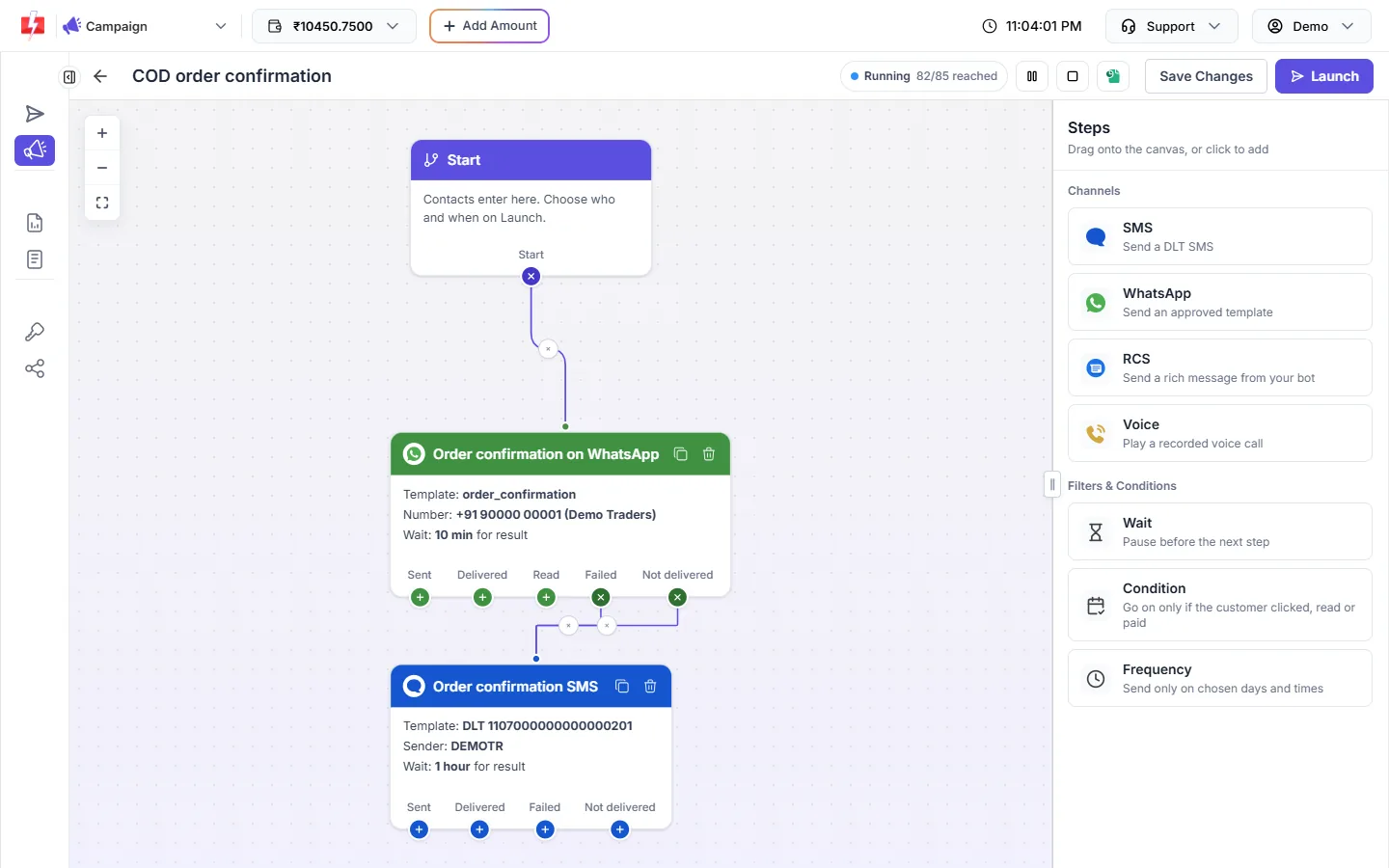
Send a WhatsApp utility message with "Confirm order" and "Cancel" buttons as soon as a COD order is placed, send an SMS if there is no reply within an hour, and connect the customer to your team by a call patch if the order is still not confirmed a few hours later.
The journey cannot tell which button the customer tapped, only whether they replied. So the button reply is read on your side: WhatsApp incoming messages, including button replies, reach your Fast2SMS inbox and your WhatsApp webhook. Your system marks the order confirmed or cancelled and posts an event, and the Condition step uses that event.
| Step | When | Channel | Message | If it fails |
|---|---|---|---|---|
| 1 | Order placed, at once | WhatsApp utility template | "Hi Rahul, please confirm your COD order DT1042 of ₹1,499." Buttons: Confirm order, Cancel | Failed or not delivered (wait set to 10 minutes): go to step 3 |
| 2 | 1 hour later | Condition | Reply received (WhatsApp) in the last 1 hour, or event cod_confirmed / cod_cancelled? | Yes: leave the journey. No: step 3. |
| 3 | About 1 hour after the order | SMS (service DLT template) | "Confirm your COD order DT1042: short link. Unconfirmed orders may not be shipped." | Failed: still go to step 4 |
| 4 | 3 hours after step 3 | Condition | cod_confirmed or cod_cancelled event in the last 4 hours? | Yes: leave. No: step 5. |
| 5 | Next, inside a 10 AM - 7 PM Frequency window | Voice, call patch | "This is Demo Traders about your cash on delivery order. Press 1 to confirm it with our team." | Not answered or failed: your team decides whether to ship |
The confirmation link in step 3 is a page on your own website; when the customer taps confirm there, your system posts the cod_confirmed event. On the call, the customer presses 1 and is connected live to your order team's agent group, on their own phones. Call patch is charged on both legs, the customer's call and your agent's talk time, each in 15-second pulses, so keep the agent conversation short.
Voice calls play a recording, so the call cannot read out the order number or amount. Keep those in the WhatsApp and SMS messages, and let your agent read them from your order screen.
How do you automate order confirmation and shipping updates?
Use the ready journey "WhatsApp update, SMS in 5 minutes if it fails". Start it from your store when a prepaid order is paid, and again (as a separate campaign) when the order ships with a tracking link.
| Step | When | Channel | Message | If it fails |
|---|---|---|---|---|
| 1 | Order shipped, at once | WhatsApp utility | "Your order DT1042 has shipped with Demo Courier. Track it: link. Expected by Friday." | Failed or not delivered within 5 minutes: step 2 |
| 2 | 5 minutes later | SMS (service template) | "Order DT1042 shipped. Track: short link - Demo Traders" | Shown as failed in the report |
| 3 | Out for delivery (new API call to a third campaign) | SMS | "Your order DT1042 arrives today. Please keep your phone reachable." | Not delivered: step 4 |
| 4 | After the SMS wait | Voice, simple message | Short recorded call: "Your Demo Traders order is out for delivery today." | End |
Steps 3 and 4 match the ready journey "SMS, then a voice call if not delivered". It is useful for COD and high-value orders where a missed delivery is expensive. To set the 5-minute fallback, change the WhatsApp step's wait for a final result from the default 30 minutes to 5 minutes; any value from 1 minute to 24 hours works.
Order updates are service messages. On SMS, use a service (transactional) DLT template, which also reaches DND numbers. On WhatsApp, use a utility template, which costs less than a marketing one. Do not add offers to these messages; an offer turns them into marketing.
How do you send a review request after delivery?
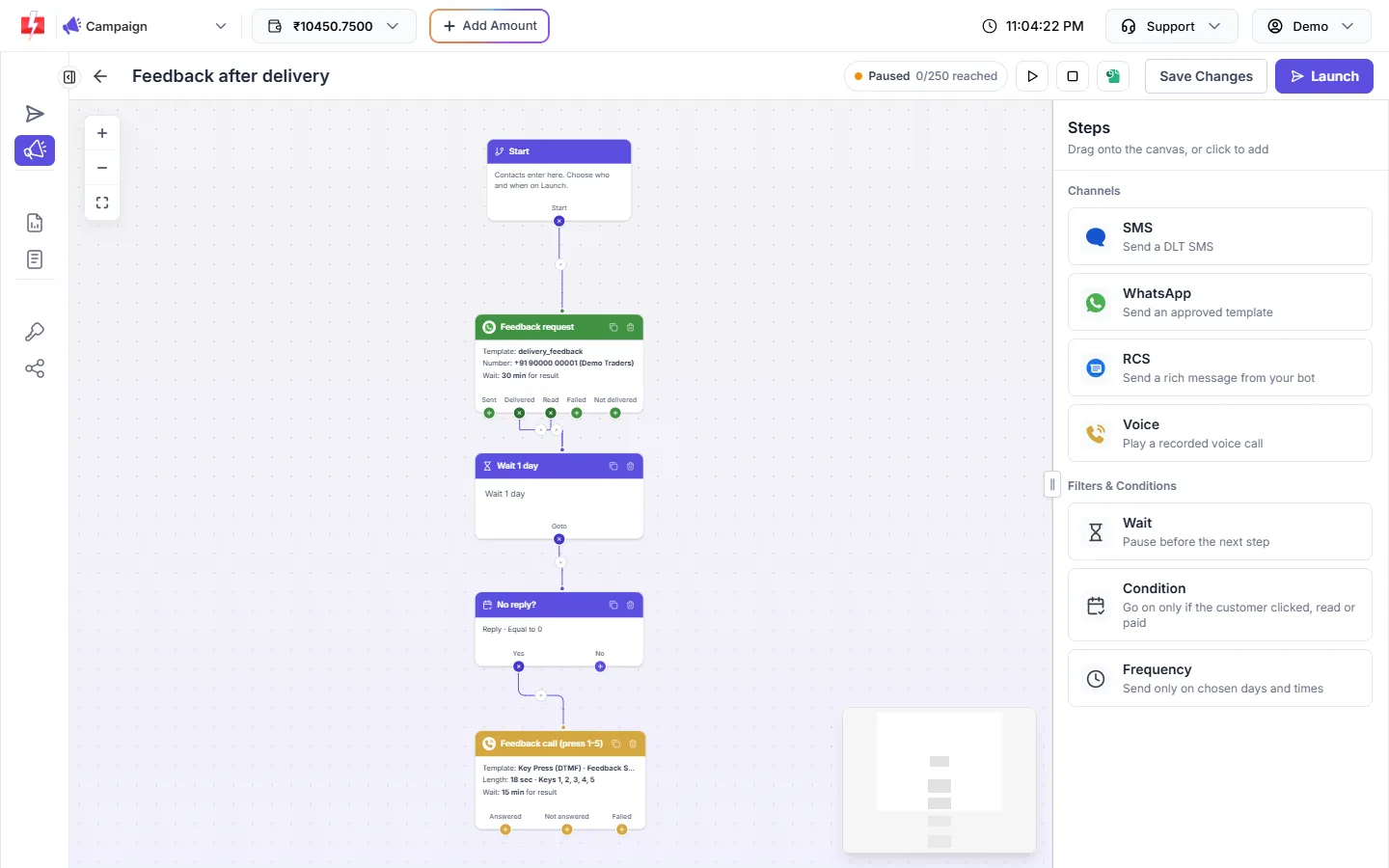
Start a delivery journey from your store when the courier marks the order delivered: a short thank-you, a 2-day wait so the customer has time to use the product, then a review request on WhatsApp with an SMS link if there is no reply.
| Step | When | Channel | Message | If it fails |
|---|---|---|---|---|
| 1 | Delivered, at once | WhatsApp utility | "Your order DT1042 was delivered. Thank you for shopping with Demo Traders!" | Not delivered: SMS thank-you, then step 2 |
| 2 | Day 0 to 2 | Wait | 2 days | - |
| 3 | Day 2, inside a Frequency window | "Hi Rahul, how do you like your new shoes? Rate them in 10 seconds: link" | Not delivered: step 5 | |
| 4 | Day 3 | Condition | Reply received (WhatsApp) in the last 1 day? | Yes: leave this part. No: step 5. |
| 5 | Day 3 | SMS | "Rate your Demo Traders order: short link" | End of the review part |
This mirrors the ready Feedback journey "Feedback on WhatsApp, SMS link if no reply". Meta decides each WhatsApp template's category when it reviews it: a plain request about a specific order may be approved as utility, while a request with a discount for reviewing is marketing. Write it plainly. If your customers prefer calls, the ready "Feedback call, WhatsApp if not answered" journey uses a key-press call ("press 1 if you are happy, press 2 if you had a problem"); for an unhappy customer, a call patch type ("press 2 to speak to our support team") connects them straight to your team. The journey itself branches on answered, not answered or failed, not on which key was pressed.
How do you automate reorder reminders?
Add a long Wait at the end of the delivery journey, sized to how long your product lasts, then send a reorder offer. For a 30-day pack, a reminder around day 25 after delivery works well.
| Step | When | Channel | Message | If it fails |
|---|---|---|---|---|
| 6 | Day 3 to 25 | Wait | 22 days | - |
| 7 | Day 25 | Condition | purchase_made event in the last 20 days? | Yes (already reordered): leave. No: step 8. |
| 8 | Day 25, 10 AM - 8 PM Frequency window | WhatsApp marketing | "Hi Rahul, running low on your face wash? Reorder today and get 10% off with code AGAIN10." | Not delivered: step 9 |
| 9 | Day 25, about 1 hour later | SMS (promotional template) | "Time to restock? 10% off your next order: short link - Demo Traders" | End |
A journey can last up to 30 days for each contact, so a reorder reminder inside the delivery journey must fall before day 30. For products that last 60 or 90 days, have your store call a separate "Reorder" campaign by API on the right day. Fast2SMS waits are fixed; it does not schedule each contact by their own due date. Customers who have not bought for much longer belong in a win back campaign.
The reorder offer is a marketing message, so it follows promotional rules: a WhatsApp marketing template, a promotional SMS template, DND rules for SMS, and daytime sending. Promotional SMS is held outside the promotional window when that rule applies, and promotional RCS bots send between 7 AM and 10 PM.
Ecommerce message templates you can copy
Keep order messages short, factual and easy to act on: the order number, what happened, one link. WhatsApp templates must be approved by Meta, and SMS templates registered on DLT, before you use them. Each DLT variable holds up to 30 characters, so use short links.
Order confirmation SMS templates (service)
- "Hi {#var#}, your order {#var#} of Rs {#var#} is confirmed. We will message you when it ships. - Demo Traders"
- "Order {#var#} received. Pay Rs {#var#} cash on delivery. Confirm here: {#var#} - Demo Traders"
COD confirmation WhatsApp (utility, with buttons)
- "Hi {{1}}, thanks for ordering from {{2}}! Please confirm your cash on delivery order {{3}} of ₹{{4}} so we can ship it today." Buttons: "Confirm order", "Cancel order".
Shipping update templates
- WhatsApp: "Good news, {{1}}! Your order {{2}} has shipped. Track it here: {{3}}. Expected delivery: {{4}}."
- SMS: "Your order {#var#} has shipped. Track: {#var#} - Demo Traders"
- Out for delivery SMS: "Order {#var#} is out for delivery today. Keep Rs {#var#} ready for COD. - Demo Traders"
Review request templates
- WhatsApp: "Hi {{1}}, how are you finding your {{2}}? Your review helps other shoppers. It takes 10 seconds: {{3}}"
- SMS: "Hi {#var#}, rate your Demo Traders order in 10 seconds: {#var#}"
Reorder reminder templates (marketing)
- WhatsApp: "Hi {{1}}, your {{2}} should be running low by now. Reorder in one tap and get {{3}} off with code {{4}}."
- SMS: "Time to restock {#var#}? Get {#var#} off your reorder: {#var#} - Demo Traders"
Hindi versions
- COD confirmation: "नमस्ते {{1}}, आपका कैश ऑन डिलीवरी ऑर्डर {{2}} (₹{{3}}) कन्फर्म करें, ताकि हम आज ही भेज सकें।"
- Shipping SMS: "आपका ऑर्डर {#var#} भेज दिया गया है। ट्रैक करें: {#var#} - Demo Traders"
More message ideas for online stores are on the bulk SMS for ecommerce page.
What does ecommerce automation cost per order?
There is no campaign fee, builder fee or monthly fee. Each message is charged at its channel's normal rate from your wallet, and fallbacks cost money only for the customers who reach them.
At the time of writing: WhatsApp ₹0.25 per utility message and ₹0.95 per marketing message, SMS ₹0.25 per SMS from a ₹100 recharge down to ₹0.11 on bigger recharges, RCS ₹0.35 per message, and voice ₹0.25 per 15-second pulse for answered calls. GST is extra. See WhatsApp pricing and SMS pricing.
Example: a D2C brand with 3,000 orders a month, 1,800 of them COD. The reach numbers are assumptions for the maths, and the review request is costed at the utility rate.
| Message | Messages (assumed) | Rate | Monthly cost |
|---|---|---|---|
| COD confirmation and order confirmation, WhatsApp utility | 3,000 | ₹0.25 | ₹750 |
| COD no-reply SMS | 600 | ₹0.25 | ₹150 |
| COD call patch, answered (customer leg about 4 pulses + agent about 3 pulses) | 300 calls, 7 pulses each | ₹0.25 per pulse | ₹525 |
| Shipping update, WhatsApp utility | 2,900 | ₹0.25 | ₹725 |
| Shipping SMS fallback | 290 | ₹0.25 | ₹72.50 |
| Delivered + review request, WhatsApp | 2,700 | ₹0.25 | ₹675 |
| Reorder offer, WhatsApp marketing | 2,700 | ₹0.95 | ₹2,565 |
| Reorder SMS fallback | 400 | ₹0.25 | ₹100 |
| Total | about ₹5,563 plus GST, or under ₹2 per order |
One returned COD parcel usually costs a store more in two-way shipping than this whole sequence costs for that order. That is the simplest way to judge whether COD confirmation pays for itself.
Billing details to plan for: a cost estimate shows before launch, and API starts need enough wallet balance for the first step of every number. If the balance runs low mid-run, the run pauses and resumes on its own after you recharge (it checks every 10 minutes); it is stopped after 3 days on low balance. For a store, an empty wallet means order messages stop, so keep a buffer. Refunds follow each channel's rules: failed WhatsApp messages under the WhatsApp policy, SMS only on "On Delivery" billing accounts, and voice charges only answered pulses.
How to set up ecommerce journeys in Fast2SMS
- Prepare templates and senders. Register service SMS templates (order, COD, shipping) and a promotional template (reorder) on DLT and link them to your sender. Get WhatsApp utility templates (COD with buttons, shipping, delivery) and a marketing template (reorder) approved. For the COD call, enable voice and upload an approved audio file (MP3 or WAV up to 5 MB), and create the agent group for call patch.
- Create the first campaign. Go to Campaign, Campaign List, Create Campaign.
- Click "Start from a ready journey". For shipping, pick "WhatsApp update, SMS in 5 minutes if it fails" under Transactional / Service. For the COD and delivery journeys, start from "WhatsApp, no reply: call, then an SMS" or "Feedback on WhatsApp, SMS link if no reply" and adjust, or build from blank.
- Fill each step. Pick the sender and template, and map variables such as name, order_id, amount and tracking_link to the fields your store will send.
- Wire outputs and add logic. Connect failed and not delivered (SMS and WhatsApp) or not answered and failed (voice) to the fallback. Add Wait steps, Condition steps for "Reply received (WhatsApp / RCS)" and "Your event", and a Frequency step before calls and marketing messages.
- Send a test to up to 10 numbers from the launch screen, using your own phones. Test sends are charged like normal sends.
- Open "Get API code" from the ⋮ menu in Campaign List and give the code to your developer. They add the start call to the order-placed, shipped and delivered handlers, and the event call where a COD order is confirmed or a repeat order is placed.
- Go live with a few orders, watch the report, then switch it on for all orders. For bulk sends to a list, such as a one-off reorder offer to last quarter's buyers, use Launch Campaign with a sheet or Address Book group and choose Send now, Schedule or Repeat.
How do you track order journeys? Reports and webhooks
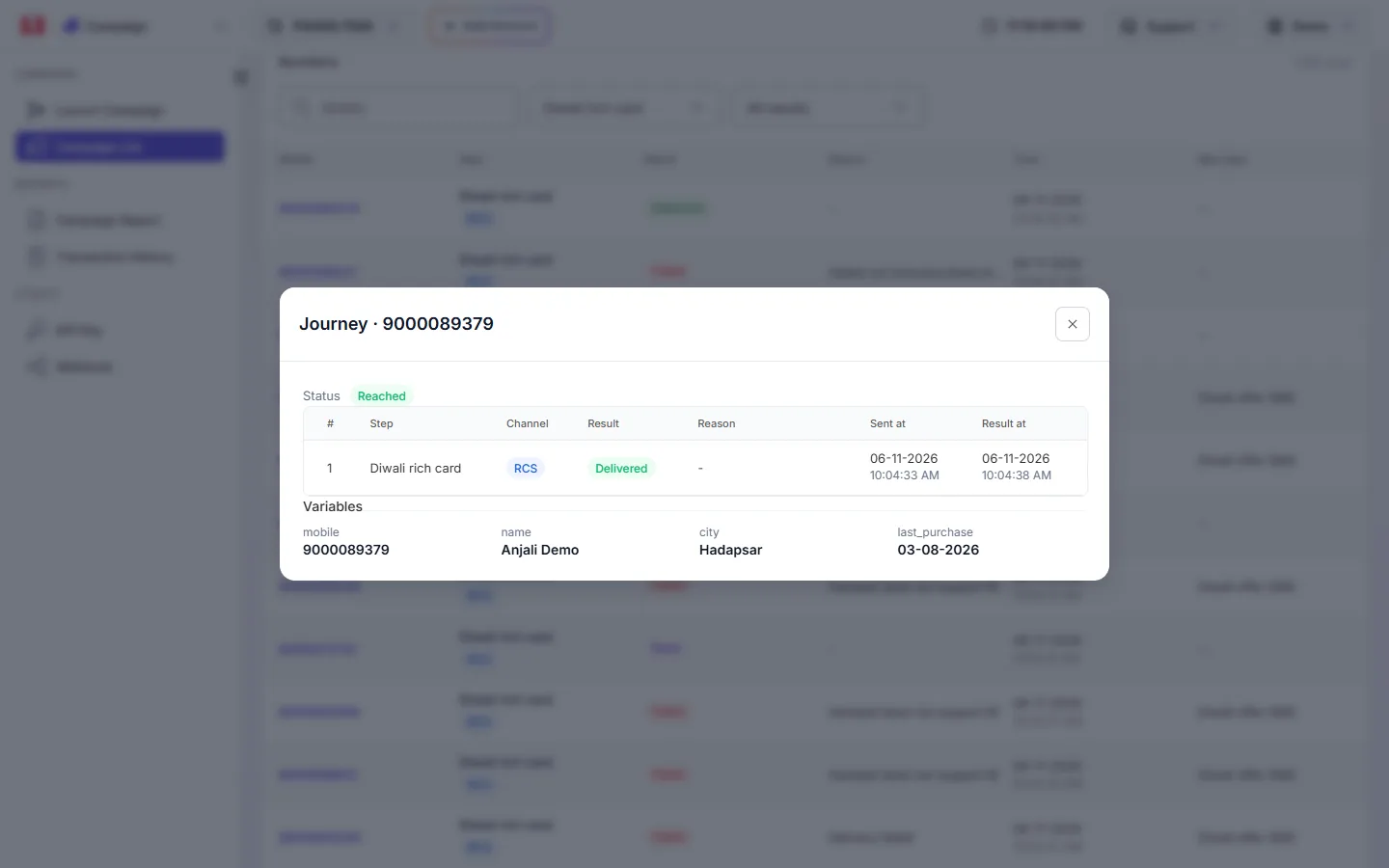
Every API-started run shows in the Campaign Report as "campaign · API" for the day. You see how many customers entered each step, what was sent, delivered, read, answered and failed, with cost, refund, average time and top failure reasons, and each customer's full journey by number. The report refreshes every 15 seconds while running, and you can export it from Delivery Reports, Export, Campaign.
For a store, webhooks are more useful than the report. Set up a Campaign webhook under Webhook, Campaign, and every step result (campaign.step.delivered, campaign.step.failed, campaign.step.answered and so on) and run status is posted to your server with the step name, channel, status, reason, cost and next step. Your order screen can then show "COD confirmation: WhatsApp read 2:14 PM" or "Call: not answered" next to each order.
The API also reads runs, reports, numbers and one contact's journey, and can pause, resume or stop a run. Read calls are limited to 120 per minute per key.
Mistakes to avoid in ecommerce automation
- Mixing offers into order updates. An offer in a shipping message turns it into marketing, with higher WhatsApp cost and promotional SMS rules.
- One API call per order on a busy day. Write calls are limited to 30 per minute per key. Queue orders and batch up to 1,000 numbers per call.
- Expecting button branching. The journey checks whether a WhatsApp reply arrived, not which button. Read the button in your webhook and post an event.
- Calling customers at night about COD. Put a Frequency step before the call patch.
- Long tracking links in SMS. DLT variables are limited to 30 characters; a longer value is rejected for that number. Use a short link.
- Reorder reminders after day 30 inside one journey. A journey lasts up to 30 days per contact. Start a separate campaign by API for longer cycles.
- Assuming a second same-day order gets its own journey. A number already in today's run of that campaign is skipped.
- Letting the wallet run dry. A paused run means order messages stop. Keep a buffer, especially in sale weeks.
- Personalised voice calls. Voice plays one recording; put order numbers and amounts in WhatsApp and SMS.
- Skipping the test. Place a real test order and follow it through every journey before switching on for all orders.
Start with the COD confirmation journey; it is usually the quickest to pay back. Set up your order journeys in Fast2SMS Campaign, get the API code, and run it on a handful of test orders today. When you add marketing on top, the welcome message automation guide and the WhatsApp to SMS fallback guide cover the next steps.
Frequently asked questions
What is ecommerce marketing automation?
It is the set of messages an online store sends by itself when something happens, such as an order being placed, shipped or delivered, or a customer being due to reorder. You set the rules once and they run for every order.
What messages should a D2C brand automate first?
Start with COD confirmation, then order and shipping updates, then a review request after delivery and a reorder reminder. Abandoned cart recovery is the other big one.
Why use WhatsApp and SMS instead of email for order updates in India?
Indian shoppers check WhatsApp and SMS far more than email, delivery partners need customers to be reachable by phone, and COD buyers need a quick confirmation. Fast2SMS Campaign uses SMS, WhatsApp, RCS and voice; it does not send email.
What is D2C WhatsApp marketing?
It is how direct-to-consumer brands use WhatsApp to confirm orders, share shipping updates, ask for reviews and send reorder offers, usually with SMS as a backup for customers WhatsApp does not reach.
What is the difference between notifications and automation journeys?
A notification is one message per event. A journey adds waits, conditions and fallbacks: SMS when WhatsApp is not delivered, a call when a COD order is still unconfirmed, a reminder only if there was no reply.
Is SMS marketing for ecommerce still useful?
Yes. SMS reaches every phone, including those without WhatsApp, which makes it the reliable fallback for order updates and the cheapest way to reach a full list. See bulk SMS for ecommerce.
How does my store start a journey in Fast2SMS?
Your store backend calls POST https://www.fast2sms.com/dev/campaign/start with your API key in the authorization header and a JSON body with the campaign ID and the customer’s mobile number, name and order details. The journey starts at once.
Does Fast2SMS Campaign connect to Shopify or WooCommerce automatically?
No. Campaign has no built-in Shopify, WooCommerce or cart trigger. You trigger it from your website, app, CRM or store backend with one API call. For one simple message per order event, the Shopify app and WooCommerce plugin are enough.
Where do I find the API code for my campaign?
In Campaign List, open the ⋮ menu on the campaign and choose "Get API code". It shows the campaign ID and ready code in cURL, PHP, Node.js and Python.
Can I pass order details like order ID and amount?
Yes. Extra fields in each recipient, such as order_id, amount or tracking_link, become variables you map in the SMS and WhatsApp steps. Each number can carry up to 50 variables.
How many orders can I send in one API call?
Up to 1,000 numbers per call. Write calls are limited to 30 per minute per API key, so queue orders and send small batches every few seconds on busy days.
What happens if the same customer orders twice in one day?
All API calls for one campaign on the same day join one run, and a number already in that run is skipped. Send the second order’s confirmation through your normal transactional SMS or WhatsApp API.
Can I schedule an API-started journey for later?
No. Numbers sent by API start immediately. Scheduling is available for Address Book groups and for campaigns launched from the panel.
How do I change a running journey when an order is confirmed or cancelled?
Post an event, for example cod_confirmed, to POST https://www.fast2sms.com/dev/campaign/event with the number, event name and an optional value. A Condition step that checks "Your event" sends the customer down the right path.
Is the campaign API secure?
Calls need your API key in the header, and the key’s IP whitelist and API on/off switch apply. Developer details are in the event-triggered messaging guide.
How do I automate COD confirmation on WhatsApp?
Start a journey when a COD order is placed: a WhatsApp utility template with Confirm and Cancel buttons, an SMS if there is no reply within an hour, and a call patch to your team if the order is still unconfirmed a few hours later.
Can the journey see whether the customer tapped Confirm or Cancel?
Not directly. A Condition can check whether a WhatsApp reply was received, not which button. Button replies reach your inbox and WhatsApp webhook; your system marks the order and posts an event that the journey checks.
What is a call patch?
A voice call that plays your recording and asks the customer to press a key; when they press it, the call connects live to the agent group you set, on your agents’ own phones.
How is a call patch charged?
Both legs are charged in 15-second pulses at ₹0.25 per pulse at the time of writing: the customer’s call and your agent’s talk time.
Can the COD call read out the order amount?
No. Voice steps play recorded audio, so every customer hears the same message. Keep the order number and amount in WhatsApp and SMS, and let your agent read them from your order screen.
Does COD confirmation reduce returns?
Confirming COD orders before dispatch lets you hold orders the customer did not mean to place, which usually means fewer parcels coming back unopened. Measure it against your own return rate.
What is a good COD confirmation WhatsApp message?
"Hi Rahul, thanks for ordering from Demo Traders! Please confirm your cash on delivery order DT1042 of ₹1,499 so we can ship it today." Add Confirm order and Cancel order buttons.
What is a good order confirmation SMS template?
"Hi {#var#}, your order {#var#} of Rs {#var#} is confirmed. We will message you when it ships. - Demo Traders". Register it on DLT as a service template.
What is a good shipping update SMS?
"Your order {#var#} has shipped. Track: {#var#} - Demo Traders". Use a short tracking link, because each DLT variable can hold up to 30 characters.
Is there a ready journey for shipping updates?
Yes. "WhatsApp update, SMS in 5 minutes if it fails" under Transactional / Service sends the WhatsApp update and an SMS if WhatsApp is not delivered within 5 minutes.
How quickly does the SMS go if WhatsApp fails?
You choose. Each channel step waits for a final result before taking "not delivered": by default 30 minutes for WhatsApp, which you can set from 1 minute to 24 hours. Failed messages go to the fallback straight away.
Can I send an out-for-delivery voice call?
Yes. The ready journey "SMS, then a voice call if not delivered" sends an SMS and places a short recorded call if the SMS is not delivered, useful for COD and high-value orders.
Are order updates promotional or transactional?
Order updates are service messages: use service DLT templates on SMS and utility templates on WhatsApp. Adding an offer turns them into marketing.
Do order update SMS reach DND numbers?
Yes. Service and transactional SMS on approved DLT templates reach DND numbers, because they are information about an order the customer placed. DND rules limit promotional SMS, so never add offers to order updates.
When should I send a review request?
Two to three days after delivery usually works, once the customer has used the product. Add a Wait step of 2 days after the delivered message.
What is a good review request message?
"Hi Rahul, how are you finding your new shoes? Your review helps other shoppers. It takes 10 seconds: [link]". Send an SMS link if there is no WhatsApp reply in a day.
Is a review request a utility or marketing WhatsApp template?
Meta decides the category when it reviews the template. A plain request about a specific order may be approved as utility; a request that offers a discount is marketing.
Can I collect feedback by phone?
Yes. The ready "Feedback call, WhatsApp if not answered" journey uses a key-press call, for example press 1 if happy and 2 if there was a problem. To connect unhappy customers to your team at once, use the call patch type. The journey branches on answered, not answered or failed, not on the key.
How do I automate reorder reminders?
Add a long Wait to the delivery journey sized to your product, such as 22 days after the review step for a 30-day pack, then a Condition for a repeat-purchase event and a WhatsApp offer with SMS fallback.
Can I send a reorder reminder after 60 or 90 days?
Not inside one journey, which lasts up to 30 days per contact. Have your store start a separate reorder campaign by API on the right day.
Can Fast2SMS schedule each customer by their own reorder date?
No. Waits are fixed lengths. For a date that differs per customer, your system calls the API on that day.
What does ecommerce marketing automation cost on Fast2SMS?
There is no monthly or campaign fee. At the time of writing WhatsApp utility messages are ₹0.25, marketing ₹0.95, SMS from ₹0.25 down to ₹0.11, RCS ₹0.35 and voice ₹0.25 per 15-second answered pulse, plus GST. See WhatsApp pricing.
How much does the full order lifecycle cost per order?
In this guide’s example of 3,000 orders a month, COD confirmation, shipping, review and reorder messages with fallbacks and calls cost about ₹5,563 plus GST, under ₹2 per order.
Do I pay for the SMS fallback on every order?
No. A fallback step is charged only for customers who reach it, for example those whose WhatsApp message failed or was not delivered.
What happens if my wallet runs out?
API starts need balance for the first step. A running journey pauses on low balance and resumes by itself after you recharge (it checks every 10 minutes); it is stopped after 3 days on low balance. Keep a buffer so order messages never stop.
Are failed order messages refunded?
Refunds follow each channel’s rules: failed WhatsApp messages under the WhatsApp policy, SMS only on "On Delivery" billing accounts, and voice charges only answered pulses.
Is there free credit to test?
Yes. New accounts get ₹50 free credit, and recharges start at ₹100. Test sends are charged like normal sends.
How do I set up order journeys in Fast2SMS?
Get templates approved, go to Campaign, Campaign List, Create Campaign, click "Start from a ready journey", fill each step, add Wait, Condition and Frequency steps, send a test, then copy the code from "Get API code" into your store backend. Start at fast2sms.com/campaign.
What do I need before I start?
An approved DLT sender and templates for SMS, approved WhatsApp templates, an active RCS bot if you use RCS, and for calls, voice enabled on your account with an approved MP3 or WAV file up to 5 MB.
Can I test a journey before connecting my store?
Yes. Send a test to up to 10 numbers from the launch screen, then place a real test order and follow it through every journey.
Where do I see results for API-started journeys?
In the Campaign Report, under the day’s run named "campaign · API": sent, delivered, read, answered, failed and not delivered per step, cost, refund and each customer’s journey. Export it from Delivery Reports, Export, Campaign.
Can my store get delivery status for each order?
Yes. Set up Campaign webhooks under Webhook, Campaign. Each step result and run status is posted with step name, channel, status, reason, cost and next step.
Can I read a customer’s journey by API?
Yes. The API can read runs, reports, numbers and one contact’s journey, and can pause, resume or stop a run. Read calls are limited to 120 per minute per key.
Can I send a one-off offer to all past buyers?
Yes. Use Launch Campaign with a sheet (CSV, TXT, XLSX or XLS up to 20 MB and 10 lakh rows) or an Address Book group, then Send now, Schedule up to 90 days ahead, or Repeat.
Can I use RCS for ecommerce messages?
Yes, with an approved and active RCS bot. RCS rich cards and carousels suit offers and reorder reminders; if RCS fails or the phone does not support RCS, the next step sends.
Can I message international customers?
No. Campaign sends to Indian mobile numbers only: 10 digits starting with 6 to 9.
Does Fast2SMS track clicks on my tracking or review links?
No. If you want to branch on clicks, your website posts a click event to the event API and a Condition checks it.
How are opt-outs handled in order journeys?
Numbers that blocked you on WhatsApp, unsubscribed on RCS or are on the voice opt-out list leave the journey. A typed "STOP" is not processed automatically, so remove people who ask from your marketing lists.
How many journeys can one store run?
Up to 200 campaigns per account, each with up to 200 steps and 400 connections, so separate journeys for COD, shipping, delivery and reorder fit easily.
What about abandoned carts?
They follow the same API pattern with a WhatsApp reminder, then RCS or SMS with a coupon. The abandoned cart recovery guide has the full journey and templates.