Admission Enquiry Follow Up: Automate Student Leads, Counsellor Calls and Fee Reminders
No monthly fee · Pay as you go from ₹100 · Free setup help on a call
Admission enquiry follow up means replying to every student or parent enquiry within seconds, connecting them to a counsellor, and following up until they enrol. On Fast2SMS, your website or CRM starts a Campaign journey by API: a WhatsApp brochure at once, then a call where pressing 1 connects a counsellor, with SMS when WhatsApp fails. No monthly fee; at the time of writing SMS starts at ₹0.25.
This guide is for schools, colleges, coaching institutes and edtech teams. It covers the admission enquiry journey with a counsellor call patch, demo class and counselling reminders, a nurture sequence for undecided students, fee reminders that stop when a payment arrives, copy-ready messages in English and Hindi, the API call, a cost example and the setup steps.
What is admission enquiry follow up?
Admission enquiry follow up is everything that happens between a student or parent showing interest and the student enrolling: the first reply, the counsellor call, the demo class or campus visit, the reminders and the admission deadline. Automating it means none of those steps depends on someone remembering.
Education leads behave in a particular way. A student fills in forms for several institutes in one evening. A parent compares three schools over a few weeks. A working professional looking at an online course enquires at midnight. The institute that replies first, gets a counsellor on the phone quickly and stays helpful without spamming is the one that gets the admission.
The Fast2SMS journey builder handles this with four channels in one flow:
- WhatsApp for the brochure, fee structure, timetable and results, as PDFs, images or video, with buttons. Replies land in your WhatsApp inbox.
- SMS for everyone WhatsApp does not reach, and for official reminders. It works on every phone, including the basic phones many parents still use.
- RCS for rich course cards and carousels in the Android Messages app.
- Voice for a recorded call where the student or parent presses a key to talk to a counsellor right away.
Why does speed-to-lead decide admissions?
Because interest is highest at the moment of the enquiry, and most students enquire at several places at once. The first institute to reply and talk to them sets the comparison for everyone else.
In admission season, enquiries arrive in bursts: after an ad goes live, after results, on Sunday evenings. A counselling team cannot call 200 leads in ten minutes. Automation solves both halves of the problem. The WhatsApp reply goes out in seconds to everyone, any time. The call goes out a few minutes later to those who did not reply, and a counsellor's phone only rings when a student or parent presses 1, so your team spends its time on people who actually want to talk.
How do admission enquiries reach Fast2SMS?
Your website form, CRM or lead management system calls the Fast2SMS API once for each new enquiry, and the journey starts immediately. Old enquiries can be uploaded from a sheet.
| Enquiry source | How it reaches Fast2SMS | When the journey starts |
|---|---|---|
| Website admission form or landing page | The form handler calls the campaign start API | Instantly |
| Ad lead forms | Leads sync to your CRM; the CRM calls the API | As soon as the CRM has the lead |
| Education portals and fairs | Leads go into your CRM or a sheet; the CRM or a small script calls the API | As soon as your system has the lead |
| Walk-ins and phone enquiries | Front desk adds them in the CRM, which calls the API | When entered |
| Last year's enquiries, alumni, siblings | Upload CSV, TXT, XLSX or XLS up to 20 MB and 10 lakh rows, or an Address Book group | Send now, Schedule or Repeat |
Fast2SMS does not connect to ad platforms, portals or form builders by itself, and it does not receive their webhooks. Your system makes one API call. With cURL:
curl -X POST https://www.fast2sms.com/dev/campaign/start \
  -H "authorization: YOUR_API_KEY" \
  -H "Content-Type: application/json" \
  -d '{"campaign": "YOUR_ENQUIRY_CAMPAIGN_ID",
       "recipients": [
         {"mobile": "9000012345", "name": "Rahul", "course": "NEET 2-year"}
       ]}'
And in Python, for a Django or Flask form view:
import requests

resp = requests.post(
    "https://www.fast2sms.com/dev/campaign/start",
    headers={"authorization": "YOUR_API_KEY"},
    json={
        "campaign": "YOUR_ENQUIRY_CAMPAIGN_ID",
        "recipients": [
            {"mobile": "9000012345", "name": "Rahul", "course": "NEET 2-year"}
        ],
    },
)
print(resp.json())
Get the campaign ID and ready code in cURL, PHP, Node.js and Python from Campaign List, the ⋮ menu, "Get API code". Extra fields such as course or class become template variables (up to 50 per number). Up to 1,000 numbers fit in one call, and write calls are limited to 30 per minute per key, so a busy form should batch. If the same student enquires twice on one day, the second call for that campaign is skipped. The full developer guide is in event-triggered messaging.
What does the admission enquiry journey look like?
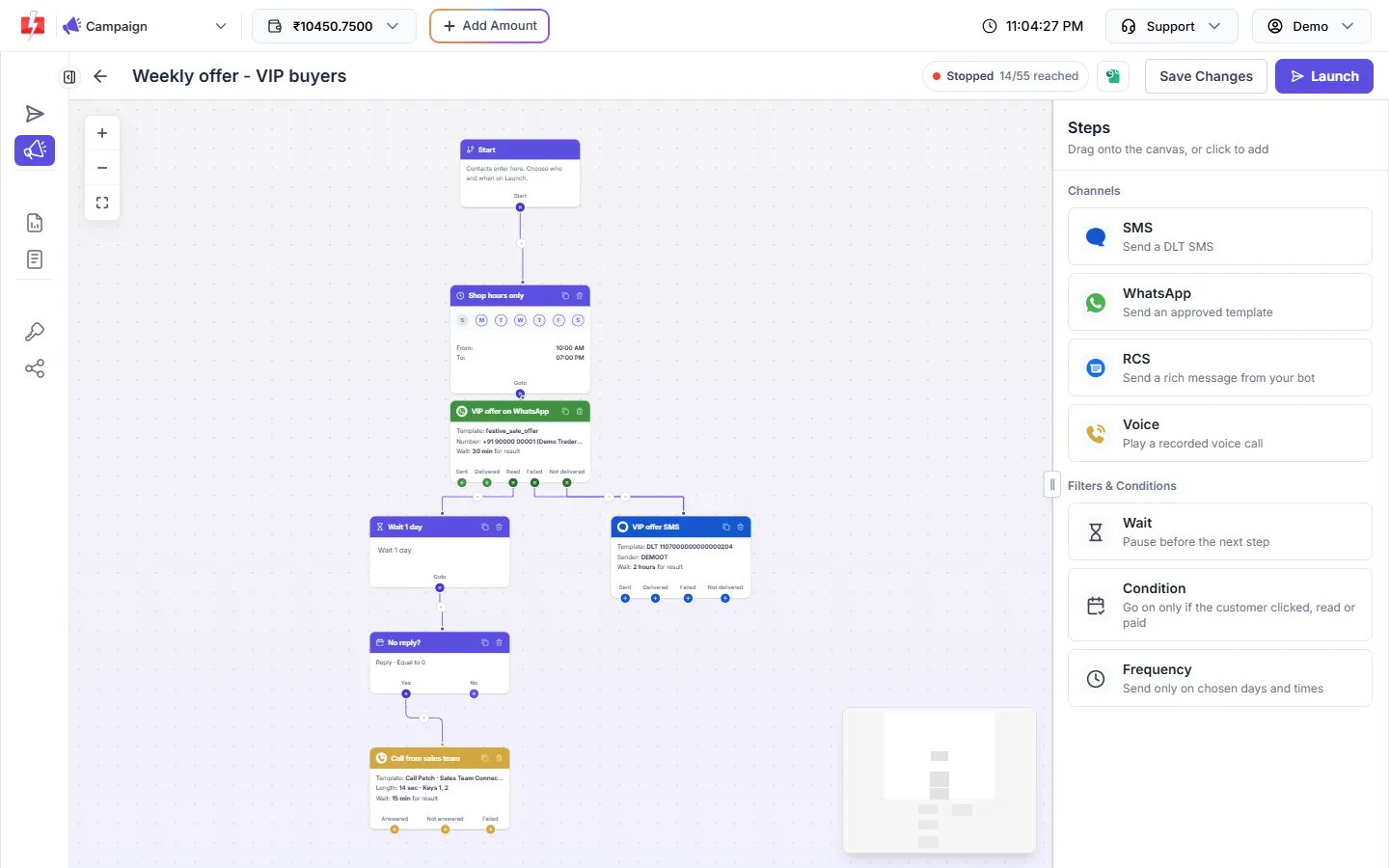
A WhatsApp brochure the moment the enquiry arrives, an SMS if WhatsApp is not delivered, and a call patch about 10 minutes later for anyone who has not replied: "Press 1 to talk to an admissions counsellor."
| Step | When | Channel | Message | If it fails |
|---|---|---|---|---|
| 1 | 0 min, enquiry arrives | WhatsApp template with PDF | "Hi Rahul, thanks for your enquiry about our NEET 2-year programme. Here is the brochure and fee structure." Buttons: "Talk to a counsellor", "Book a demo class" | Failed or not delivered (wait set to 5 minutes): step 2 |
| 2 | About 5 min | SMS | Thanks, brochure link and the admissions helpline | Continue to step 3 |
| 3 | 10 min | Condition | Reply received (WhatsApp) in the last 10 minutes? | Yes: leave, a counsellor answers in the inbox. No: step 4. |
| 4 | 10 min, inside a 9 AM - 8 PM Frequency window | Voice, call patch, with retries | "Thank you for your enquiry. Press 1 to talk to an admissions counsellor now, or press 2 for fee details." | Not answered or failed after retries: step 5 |
| 5 | After the call | SMS | "Sorry we missed you. Call your counsellor on 90000 12399 or book a demo class: link" | End; the student moves to the nurture journey |
On a call patch, each key can connect to its own agent group: 1 to admissions counsellors, 2 to the fees desk, for example. The call rings your counsellors on their own phones and connects them live. The voice step also has retries with a retry interval you choose, so a parent who is busy the first time gets another call later. Call patch calls are charged on both legs, the student's call and the counsellor's talk time, in 15-second pulses at ₹0.25 per pulse at the time of writing; unanswered calls cost nothing.
This journey is close to the ready-made "WhatsApp, no reply: call, then an SMS" under Lead follow-up. For institutes whose students prefer a call first, start from "Call first, WhatsApp if not answered". The Frequency step keeps calls in sensible hours: an 11 PM enquiry gets the WhatsApp brochure at once and the call the next morning.
The call is a recording, so it is the same for everyone; it cannot say the student's name or course. Keep personal details in WhatsApp and SMS.
How do you automate demo class and counselling reminders?
When a student books a demo class, campus visit or counselling session, your system starts a reminder journey 24 hours before it: a WhatsApp reminder, a 23-hour wait, and a "starts in 1 hour" message with the joining link or address, with SMS fallback for both.
| Step | When | Channel | Message | If it fails |
|---|---|---|---|---|
| 1 | T-24h (your system starts the journey) | WhatsApp utility | "Hi Rahul, your free demo class for NEET Physics is tomorrow at 5 PM at our Andheri centre." | Not delivered: SMS |
| 2 | T-24h to T-1h | Wait | 23 hours | - |
| 3 | T-1h | Condition | session_cancelled event in the last 1 day? | Yes: leave. No: step 4. |
| 4 | T-1h | WhatsApp utility | "Your demo class starts in 1 hour. Join link / address: ..." | Not delivered: SMS with the link |
| 5 | T+1 day | "How was the demo class? Reply to talk to a counsellor about admission." | Not delivered: SMS |
Fast2SMS waits are fixed lengths, so the journey cannot read each student's session date and plan around it. Your system starts it at T-24h, for example with a job every 15 minutes that finds sessions due in 24 hours. For sessions booked less than a day ahead, use a second short campaign with only the 1-hour reminder. For webinars and open days with many students, the ready Event journey "WhatsApp invite, SMS if not delivered, call on the day" works well. More reminder patterns are in the appointment reminder guide.
How do you follow up with students who have not decided?
Run a short nurture journey of three or four useful messages over two to three weeks: results and faculty, then a course carousel or campus video, then the scholarship test or admission deadline. Stop it the moment the student pays the admission fee or replies.
| Step | When | Channel | Message | If it fails |
|---|---|---|---|---|
| 1 | Day 2 | WhatsApp (image or PDF) | Last year's results and faculty profiles | Not delivered: SMS with link |
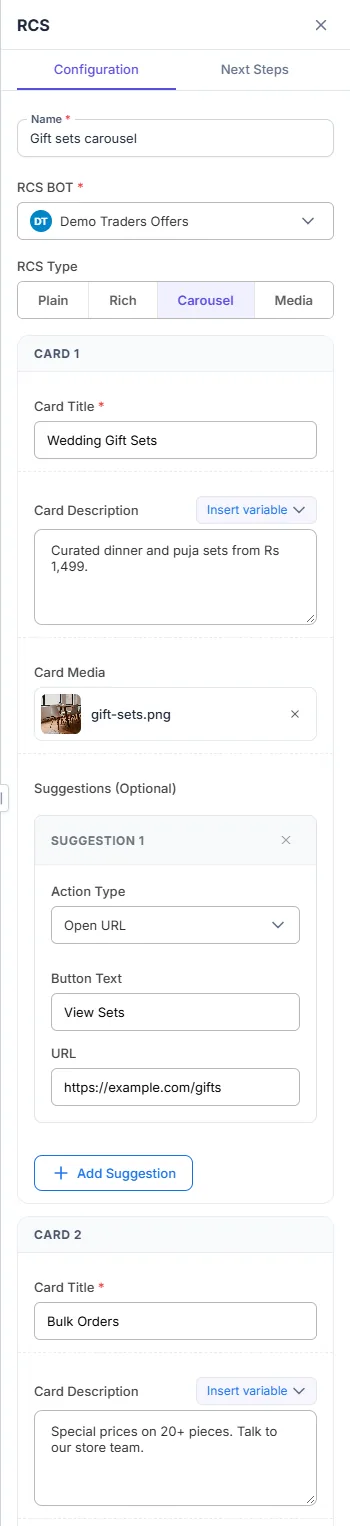
| 2 | Day 5 | Condition, then RCS carousel | If no admission_confirmed event: cards for each batch, timings and a "Book a counselling call" button | Failed or phone without RCS: SMS with link |
| 3 | Day 10 | Condition, then WhatsApp | "Scholarship test this Sunday. Register free." with a button | Not delivered: SMS |
| 4 | Day 18 | Condition, then SMS and a call patch | "Admissions for the April batch close on the 25th." Call: "press 1 to talk to your counsellor" | Not answered: end |
To stop the nurture, your admission system posts an event when the student enrols:
curl -X POST https://www.fast2sms.com/dev/campaign/event \
  -H "authorization: YOUR_API_KEY" \
  -H "Content-Type: application/json" \
  -d '{"number": "9000012345", "event": "admission_confirmed", "value": "NEET-2Y-APR"}'
In each Condition step choose "Your event", admission_confirmed, at least 1, in the last N days. Add a second check for "Reply received (WhatsApp / RCS)" so students who are already talking to a counsellor stop getting automatic messages. A journey lasts up to 30 days per contact, which fits an admission cycle; for longer nurture, use Repeat with an Address Book group of open enquiries. Fast2SMS does not track clicks on its own; to branch on clicks, your website posts a click event the same way. More sequence ideas are in the WhatsApp drip campaign guide and the WhatsApp automation guide.
How do you automate fee reminders?
Start a fee reminder journey from your fee system 3 days before the due date: a WhatsApp reminder with a payment link, an SMS on the due day if still unpaid, and a voice call the day after, with a check for payment before every step.
| Step | When | Channel | Message | If it fails |
|---|---|---|---|---|
| 1 | Day -3 (fee system starts the journey) | WhatsApp utility with pay link | "Dear parent, the term fee of ₹18,500 for Priya (Class 8) is due on 10 April. Pay online: link" | Not delivered: SMS with the same details |
| 2 | Day -3 to 0 | Wait | 3 days | - |
| 3 | Due day, 10 AM window | Condition, then SMS | If no payment_received event: "Fee for Priya is due today. Pay: link" | Shown as failed; continue |
| 4 | Day +1 | Condition, then voice call | If still unpaid: recorded reminder from the school office; call patch "press 1 for the accounts office" | Not answered: SMS with the accounts number |
This follows the ready journey "Payment due: SMS, then WhatsApp, then a call" under Payment reminder, reordered to lead with WhatsApp. Your fee system posts payment_received the moment a payment is made, and the Condition steps stop the reminders. Two limits to know. Waits are fixed, so "3 days before the due date" works only if your system starts the journey on that day; Fast2SMS does not schedule each student by their own due date. And the voice call cannot read out the student's name or amount; it is a general reminder, with the details in the WhatsApp and SMS.
Fee reminders are service messages about a fee the family already owes, so they suit a WhatsApp utility template and a service SMS template. Keep admission offers out of them. For a full set of payment reminder templates and the before-due, due-day and overdue sequence, see the payment reminder automation guide.
Admission and fee message templates
Short, clear and specific works best: the course or class, one fact, one next step. WhatsApp templates need Meta approval and SMS templates need DLT registration. Each DLT variable holds up to 30 characters.
Admission enquiry reply
- WhatsApp: "Hi {{1}}, thank you for your interest in {{2}} at {{3}}. Here is the brochure with batch timings and fees. Tap below to talk to a counsellor or book a free demo class."
- SMS: "Thanks for your enquiry for {#var#}. Brochure: {#var#} Counsellor: {#var#} - Demo Academy"
Admission campaign SMS (promotional)
- "Admissions open for {#var#} at Demo Academy. Scholarship test on {#var#}. Register: {#var#}"
- "Last date for {#var#} admissions is {#var#}. Limited seats. Apply: {#var#} - Demo Academy"
Demo class reminder
- WhatsApp: "Hi {{1}}, your free demo class for {{2}} is on {{3}} at {{4}}. Reply here if you need to change the time."
- SMS: "Reminder: demo class for {#var#} on {#var#}. Venue or link: {#var#} - Demo Academy"
Fee reminder SMS (service)
- "Dear parent, fee of Rs {#var#} for {#var#} is due on {#var#}. Pay online: {#var#} - Demo School"
- "Fee for {#var#} is overdue since {#var#}. Please pay at {#var#} or call the accounts office. - Demo School"
Voice scripts
- Counsellor call patch (about 15 seconds): "Namaste, this is Demo Academy. Thank you for your enquiry. To talk to an admissions counsellor now, press 1. For fee details, press 2."
- Fee reminder (about 15 seconds): "Namaste, this is the accounts office of Demo School. This is a reminder that the term fee is due. Details and the payment link have been sent by SMS. For help, press 1."
Hindi versions
- Enquiry reply: "नमस्ते {{1}}, {{2}} में दाखिले के लिए पूछताछ करने का धन्यवाद। ब्रोशर और फीस की जानकारी यहां है। काउंसलर से बात करने के लिए नीचे बटन दबाएं।"
- Fee reminder SMS: "प्रिय अभिभावक, {#var#} की फीस Rs {#var#} दिनांक {#var#} तक जमा करें। ऑनलाइन भुगतान: {#var#} - Demo School"
- Voice: "नमस्ते, यह Demo Academy है। काउंसलर से अभी बात करने के लिए 1 दबाएं, फीस की जानकारी के लिए 2 दबाएं।"
Hindi SMS is sent as Unicode, which fits fewer characters per SMS part, so keep it short. For school-wide notices, results and holiday SMS, see bulk SMS for schools and bulk SMS for colleges.
What does education marketing automation cost?
There is no campaign fee, builder fee or monthly fee. Every step is charged at its channel's normal rate, and fallback steps only for the students who reach them.
At the time of writing: WhatsApp ₹0.95 per marketing message and ₹0.25 per utility message, SMS ₹0.25 per SMS from a ₹100 recharge down to ₹0.11 on bigger recharges, RCS ₹0.35 per message, and voice ₹0.25 per 15-second pulse for answered calls. GST is extra. See WhatsApp pricing and SMS pricing.
Example 1: a coaching institute with 1,000 admission enquiries in a month. Reach numbers are assumptions, and the enquiry reply is costed at the marketing rate.
| Message | Messages (assumed) | Rate | Cost |
|---|---|---|---|
| Enquiry WhatsApp with brochure | 1,000 | ₹0.95 | ₹950 |
| Enquiry SMS fallback | 100 | ₹0.25 | ₹25 |
| Counsellor call patch, answered (student about 4 pulses + counsellor about 12 pulses) | 400 calls, 16 pulses each | ₹0.25 per pulse | ₹1,600 |
| Missed-call SMS | 200 | ₹0.25 | ₹50 |
| Demo class reminders, WhatsApp utility (2 each) | 600 | ₹0.25 | ₹150 |
| Day 2 WhatsApp follow-up | 800 | ₹0.95 | ₹760 |
| Day 5 RCS carousel | 700 | ₹0.35 | ₹245 |
| Day 5 SMS fallback | 280 | ₹0.25 | ₹70 |
| Day 10 and day 18 SMS | 600 | ₹0.25 | ₹150 |
| Total | about ₹4,000 plus GST, about ₹4 per enquiry |
Example 2: monthly fee reminders for 2,000 students. WhatsApp utility to all 2,000 is ₹500, a due-day SMS to 800 still unpaid is ₹200, and a day-after call answered by 300 parents at 2 pulses each is ₹150: about ₹850 plus GST a month.
The counsellor's talk time is the biggest cost in example 1, and it is also the most valuable part: every one of those minutes is a counsellor talking to a student who pressed 1. You see a cost estimate before launching a list, and every start needs balance for the first step. If the balance runs low mid-run, the run pauses and resumes on its own after you recharge (it checks every 10 minutes), and stops after 3 days on low balance. Refunds follow each channel's rules: failed WhatsApp and RCS under each channel's policy, SMS only on "On Delivery" billing accounts, and voice charges only answered pulses.
How to set up admission and fee journeys in Fast2SMS
- Get your senders and templates ready. A DLT sender with service templates (reminders, fees) and promotional templates (admission campaigns). WhatsApp templates: the enquiry reply with a PDF header, reminders and fee reminders as utility. An approved, active RCS bot for course carousels. Voice enabled on your account, an approved audio file (MP3 or WAV up to 5 MB), and agent groups for counsellors and the fees desk.
- Create the enquiry campaign. Go to Campaign, Campaign List, Create Campaign.
- Click "Start from a ready journey". Under Lead follow-up, choose "WhatsApp, no reply: call, then an SMS". For fees, create a second campaign from "Payment due: SMS, then WhatsApp, then a call".
- Fill each step. Choose your sender and template, map variables such as name, course and fee_amount, and set the voice step type to Call Patch with a key for each agent group, plus retries and a retry interval.
- Add logic. Set the WhatsApp result wait to 5 minutes, add a Condition on "Reply received (WhatsApp / RCS)", Conditions on admission_confirmed or payment_received, Wait steps, and a Frequency step (for example 9 AM to 8 PM) before calls.
- Send a test to up to 10 numbers from Launch Campaign. Press 1 on the test call and check that a counsellor's phone rings. Test sends are charged like normal sends.
- Connect your website and systems. From Campaign List, ⋮, "Get API code", add the start call to your enquiry form or CRM, the reminder start to your session booking, the fee start to your fee system, and the event calls for enrolment and payment.
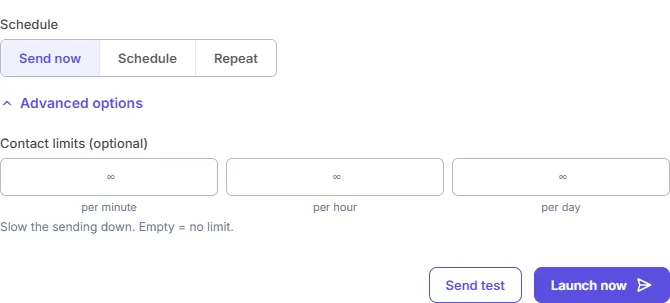
- For lists such as last year's enquiries, use Launch Campaign with a sheet or Address Book group, set a contact limit per hour so counsellors are not flooded, and choose Send now, Schedule (up to 90 days ahead) or Repeat.
What reports does the admissions team get?
The Campaign Report shows each student's journey by number, so a counsellor can see before calling back whether the brochure was read and whether the call was answered.
- Run summary: total, reached, unreached, opted out, stopped, in progress, cost, refund and net cost. Enquiries started by API appear in one run per day named "campaign · API".
- Per step: entered, sent, delivered, read, answered, not answered, failed and not delivered, with cost, average time and top failure reasons. A high "not answered" on the call step may mean the Frequency window is wrong for your students.
- Webhooks: Webhook, Campaign posts every step result and run status to your CRM with step name, channel, status, reason, cost and next step.
- Export: Delivery Reports, Export, Campaign, to match with admissions and fee collections.
Measure the journey by enrolments and fees collected, not by messages delivered. Fast2SMS does not split audiences for testing, so to compare two approaches, run two campaigns and have your CRM alternate new enquiries between them.
Mistakes to avoid in education automation
- Waiting for a counsellor to send the first message. The first reply should be automatic; the counsellor takes over when the student responds or presses 1.
- Calling students and parents late at night. Put a Frequency step before every call.
- Too many follow-ups. Three or four useful messages over two to three weeks are enough. Daily messages feel like pressure.
- Not stopping after admission or payment. Post admission_confirmed and payment_received events and check them before every later step.
- Expecting date-based reminders. Waits are fixed; your system starts each reminder journey on the right day.
- Personal details in voice calls. The recording is the same for everyone; names, courses and amounts go in WhatsApp and SMS.
- Admission offers inside fee reminders. Fee reminders are service messages; offers turn them into marketing.
- Long links or names in SMS variables. Each DLT variable is limited to 30 characters; a longer value is rejected for that number.
- Flooding counsellors. When sending to a big list, set a contact limit per hour so the call patch does not ring more people than your team can answer.
- Ignoring opt-outs. Fast2SMS does not process a typed "STOP" automatically. Remove students and parents who ask to stop.
Start with the enquiry journey and the counsellor call patch, because that is where most admissions are won or lost. Build your admission journeys in Fast2SMS Campaign, test them on your own phone, and connect your enquiry form. For the full multi-channel picture, read the omnichannel marketing platform guide, and for fallback rules, the WhatsApp to SMS fallback guide.
Frequently asked questions
What is admission enquiry follow up?
It is everything between a student or parent showing interest and the student enrolling: the first reply, the counsellor call, the demo class or visit, reminders and the admission deadline. Automating it means no step depends on someone remembering.
What is education marketing automation?
It is the use of automatic, timed messages to reply to enquiries, remind students of sessions, follow up with undecided students and collect fees, across WhatsApp, SMS, RCS and voice calls.
Who can use these journeys?
Schools, colleges, universities, coaching institutes, test-prep centres, skill and language institutes, and edtech companies that get enquiries and collect fees.
Why does speed matter for admission enquiries?
Interest is highest at the moment of the enquiry, and most students enquire at several places at once. The first institute to reply and talk to them often sets the comparison for the rest.
What is edtech lead nurturing?
It is staying helpfully in touch with a course enquiry until the learner is ready: an instant reply, a counsellor call, a demo class, and a few useful follow-ups such as results, batch details and deadlines.
Does Fast2SMS send email follow-ups?
No. Fast2SMS Campaign uses SMS, WhatsApp, RCS and voice calls. Email is not part of it.
How do enquiries from my website reach Fast2SMS?
Your form handler calls POST https://www.fast2sms.com/dev/campaign/start with your API key in the authorization header and the student’s mobile number, name and course. The journey starts immediately.
Can Fast2SMS pull leads from ad forms or education portals automatically?
No. Fast2SMS does not connect to ad platforms or portals by itself. Those leads go into your CRM, and your CRM or a small script calls the Fast2SMS API for each one.
Where do I find the API code?
In Campaign List, open the ⋮ menu on your campaign and choose "Get API code". It shows the campaign ID and ready code in cURL, PHP, Node.js and Python.
Can I pass the course or class to the messages?
Yes. Extra fields in each recipient, such as course, class or batch, become variables you map in the WhatsApp and SMS steps. Each number can carry up to 50 variables.
What if a student fills the form twice in one day?
All API calls for one campaign on the same day join one run, and a number already in that run is skipped, so the student does not get the brochure twice.
How many enquiries can I send in one API call?
Up to 1,000 numbers per call. Write calls are limited to 30 per minute per API key, so batch enquiries on busy days.
Can I upload last year’s enquiries?
Yes. Upload CSV, TXT, XLSX or XLS up to 20 MB and 10 lakh rows, or use an Address Book group, then Send now, Schedule up to 90 days ahead, or Repeat.
Can I send to international students?
No. Campaign accepts Indian mobile numbers only: 10 digits starting with 6 to 9.
What should the first reply to an admission enquiry say?
Thank the student by name, attach the brochure and fee structure for the course they asked about, and give one next step such as "Talk to a counsellor" or "Book a free demo class".
Can I send the course brochure on WhatsApp automatically?
Yes. WhatsApp templates can have a document header, so the brochure PDF goes with the first reply. The template must be approved by Meta.
What is a counsellor call patch?
A voice call that plays your recording, such as "press 1 to talk to an admissions counsellor", and connects the student or parent live to your counsellor agent group when they press the key, on the counsellors’ own phones.
Can different keys connect to different teams?
Yes. In a call patch step you map each key to an agent group, for example 1 for admissions counsellors and 2 for the fees desk.
What is a DTMF call?
DTMF is the tone a phone makes when a key is pressed. A key-press (DTMF) call asks the listener to press a key, such as 1 for yes. Call patch is the type that also connects the caller to your team.
Can the journey branch on which key the student pressed?
No. A voice step’s outputs are answered, not answered and failed. Use a call patch so the key press connects the student to the right team directly.
What if the parent does not answer the first call?
The voice step has retries with a retry interval you choose. If the call is still not answered, wire the not answered output to an SMS with the counsellor’s number.
How is a call patch charged?
Both legs are charged in 15-second pulses, at ₹0.25 per pulse at the time of writing: the student’s call and the counsellor’s talk time. Unanswered calls are not charged.
Can the call say the student’s name or course?
No. Voice steps play recorded audio, so everyone hears the same message. Put names, courses and fees in WhatsApp and SMS.
How do I stop calls going out late at night?
Add a Frequency step before the call. It lets contacts continue only on chosen days between set times, such as 9 AM to 8 PM; a late-night enquiry gets the WhatsApp at once and the call the next morning.
Is there a ready-made journey for student leads?
Yes. Under "Start from a ready journey", Lead follow-up has "WhatsApp, no reply: call, then an SMS" and "Call first, WhatsApp if not answered".
Can the journey stop when the student replies on WhatsApp?
Yes. A Condition step can check "Reply received (WhatsApp / RCS)" and move students who replied out of the automatic steps, so a counsellor answers in the inbox.
How do I send demo class reminders?
Your system starts a reminder journey 24 hours before the session: a WhatsApp reminder, a 23-hour wait and a "starts in 1 hour" message with the link or address, with SMS fallback.
Can Fast2SMS schedule reminders from each student’s session date?
No. Waits are fixed lengths. Your system starts the reminder journey at the right time, for example with a job every 15 minutes that starts it for sessions due in 24 hours.
How do I invite students to an open day or webinar?
Use the ready Event journey "WhatsApp invite, SMS if not delivered, call on the day", or "RCS invite card, WhatsApp if not supported".
How many follow-ups should an undecided student get?
Three or four useful messages over two to three weeks, for example results on day 2, a course carousel on day 5, a scholarship test on day 10 and the admission deadline on day 18.
How do I stop follow-ups when a student enrols?
Your admission system posts an admission_confirmed event to POST https://www.fast2sms.com/dev/campaign/event, and a Condition step that checks "Your event" before each follow-up sends enrolled students out of the journey.
How long can a nurture journey run?
Up to 30 days per contact, with Wait steps from 1 minute to 30 days. For longer nurture, use Repeat with an Address Book group of open enquiries.
Can I show all my batches in one message?
Yes, with an RCS carousel of two or more cards, one per batch, each with a button. If RCS fails or the phone does not support RCS, the next step sends.
Does Fast2SMS track brochure or link clicks?
Not automatically. WhatsApp and RCS steps show "read". To branch on clicks, your website posts a click event to the event API.
How do I automate fee reminders?
Your fee system starts a journey 3 days before the due date: a WhatsApp reminder with a payment link, an SMS on the due day if still unpaid and a voice call the day after, with a check for payment before each step. See payment reminder automation.
What is a good fee reminder SMS?
"Dear parent, fee of Rs {#var#} for {#var#} is due on {#var#}. Pay online: {#var#} - Demo School". Register it on DLT as a service template; each variable holds up to 30 characters.
How do fee reminders stop once a parent pays?
Your fee system posts a payment_received event the moment a payment is made, and the Condition steps before each reminder send paid students out of the journey.
Can Fast2SMS send reminders on each student’s own due date?
Not by itself. Waits are fixed, so your fee system starts the journey on the right day for each student, for example 3 days before their due date.
Can the fee reminder call say the amount due?
No. The call is a general recorded reminder. The amount, student name and payment link go in WhatsApp and SMS.
Are fee reminders promotional or transactional?
They are service messages about a fee already owed, so they suit a WhatsApp utility template and a service SMS template. Keep admission offers out of them.
Is there a ready-made fee reminder journey?
Yes. Under Payment reminder, "Payment due: SMS, then WhatsApp, then a call". You can reorder it to start with WhatsApp.
Do admission SMS need DLT registration?
Yes. You need an approved DLT sender and an approved template linked to it. Use service templates for reminders and fees and promotional templates for admission campaigns; DND rules apply to promotional SMS.
When can I send promotional admission messages?
Each channel has its own rules: promotional SMS is held outside the promotional window when that rule applies, and promotional RCS bots send between 7 AM and 10 PM. A Frequency step keeps every step in daytime hours.
How are opt-outs handled?
Numbers that blocked you on WhatsApp, unsubscribed on RCS or are on the voice opt-out list leave the journey. A typed "STOP" is not processed automatically, so remove students and parents who ask to stop.
Is message content checked before sending?
Yes. SMS, WhatsApp and RCS text goes through a scam-content check, on top of DLT and Meta template approval.
How much does admission follow up cost on Fast2SMS?
There is no monthly or campaign fee. At the time of writing WhatsApp is ₹0.95 per marketing and ₹0.25 per utility message, SMS from ₹0.25 down to ₹0.11, RCS ₹0.35 and voice ₹0.25 per 15-second answered pulse, plus GST. See WhatsApp pricing.
What does the journey cost per enquiry?
In this guide’s example of 1,000 enquiries a month, the instant reply, counsellor call patch, demo reminders and follow-ups come to about ₹4,000 plus GST, about ₹4 per enquiry.
What do monthly fee reminders cost?
In this guide’s example for 2,000 students, WhatsApp to all, SMS to 800 unpaid and a call answered by 300 parents come to about ₹850 plus GST a month.
Do I pay for fallback messages to every student?
No. A fallback step is charged only for students who reach it, such as those whose WhatsApp was not delivered.
Are failed messages refunded?
Refunds follow each channel’s rules: failed WhatsApp and RCS messages under each channel’s policy, SMS only on "On Delivery" billing accounts, and voice charges only answered pulses.
Is there free credit to test?
Yes. New accounts get ₹50 free credit, with recharges from ₹100. Test sends to up to 10 numbers are charged like normal sends.
How do I set up admission journeys in Fast2SMS?
Get templates approved, go to Campaign, Campaign List, Create Campaign, click "Start from a ready journey", pick a Lead follow-up journey, set the voice step to Call Patch, add Condition and Frequency steps, send a test, then connect your form with the code from "Get API code". Start at fast2sms.com/campaign.
What do I need before I start?
An approved DLT sender and templates, approved WhatsApp templates, an active RCS bot if you use RCS, and for calls, voice enabled on your account with an approved MP3 or WAV file up to 5 MB and agent groups for your counsellors.
How do I stop counsellors being flooded with calls?
When sending to a big list, set a contact limit per minute, hour or day, so the call patch rings only as many people as your team can answer.
Can counsellors see each student’s journey?
Yes. The Campaign Report shows each number’s journey: what was sent, delivered and read, whether the call was answered and where the student left.
Can journey results go into my CRM?
Yes. Set up Campaign webhooks under Webhook, Campaign. Each step result and run status is posted with step name, channel, status, reason, cost and next step.
Can I pause the journey during exam or holiday weeks?
Yes. Pause, resume or stop a run from the panel or the API, or use a Frequency step that skips certain weekdays. Contacts still waiting when you stop a run are not charged.