Diwali Marketing Campaign: Festive Sale Messages and Journeys for Every Indian Festival
No monthly fee · Pay as you go from ₹100 · Free setup help on a call
A Diwali marketing campaign works best as three timed messages: a teaser a few days before, the offer on sale day, and a last-hours reminder before it ends. On Fast2SMS you build this once in Campaign: an RCS rich card first, WhatsApp if RCS fails, then SMS, so every customer gets the offer once. No campaign fee; at the time of writing, SMS starts at ₹0.25.
This guide gives you an evergreen festive calendar, the teaser, sale-day and last-hours sequence with exact timings, copy-ready messages for Diwali, Holi, Eid, Raksha Bandhan, Navratri, Christmas, New Year and end-of-season sales (with Hindi versions), the timing rules for promotional messages, a cost example in rupees and the setup steps.
What is a festival marketing campaign?
A festival marketing campaign is a set of offers and greetings you send to your customers around a festival, when people are already planning to shop, gift and celebrate. In India, the festive season drives a large part of the year's sales for many retailers, jewellers, electronics shops, sweet shops, fashion brands and online stores.
The difference between a festival campaign that works and one that gets ignored is rarely the discount. It is timing and channel. Customers receive many offers in festive weeks. The message that arrives at the right moment, looks good on the phone, and is easy to act on is the one that gets the sale.
That is why this guide treats a festive campaign as a short journey, not a single blast. You plan it once, then reuse the same journey for every festival in the year by changing the templates and dates.
What is the festive calendar for Indian businesses?
Most Indian festivals follow the lunar calendar, so their dates move every year. Use the months below as a planning guide and check the exact date for the year before you schedule anything.
| Festival or sale | Usually falls in | What people buy | Start the teaser | Message angle |
|---|---|---|---|---|
| Makar Sankranti, Pongal, Lohri | Mid January | Sweets, clothes, kitchenware, kites | 3-5 days before | Harvest, family, new beginnings |
| Holi | February or March | Colours, sweets, white clothes, snacks | 5-7 days before | Fun, colours, party packs |
| Eid | Moves about 11 days earlier each year | Clothes, attar, sweets, gifts, dry fruits | 7-10 days before | Festive wear, gifting, family feasts |
| Akshaya Tritiya | April or May | Gold, jewellery, property | 5-7 days before | Auspicious buying, making-charge offers |
| Raksha Bandhan | Usually August | Rakhis, gifts for sisters, sweets, delivery to other cities | 7-10 days before (shipping time) | Gifting, last delivery dates |
| Ganesh Chaturthi, Onam | August or September | Decor, sweets, clothes, appliances | 5-7 days before | Regional celebration, home |
| Navratri, Durga Puja, Dussehra | September or October | Ethnic wear, decor, vehicles, electronics | 7 days before | Nine days of offers, new purchases |
| Dhanteras and Diwali | October or November | Gold, electronics, gifts, sweets, home decor, clothes | 10-14 days before | Biggest sale of the year, gifting |
| Christmas | 25 December | Cakes, gifts, decor, party wear | 7 days before | Gifting, year-end treats |
| New Year | 31 December - 1 January | Party wear, restaurants, travel, gadgets | 5-7 days before | Celebrations, fresh start |
| End-of-season sales | Often January and July | Fashion, footwear, home | 2-3 days before | Clearance, biggest price cuts |
Pick the three to five festivals that matter most for your customers and region. A jeweller in Gujarat, a sweet shop in Kolkata and a fashion store in Kerala will each have a different calendar. Mark them, book the templates you will need, and build one journey you can reuse.
Why should a festive campaign have a teaser, a sale-day message and a last-hours reminder?
Because each message does a different job. The teaser builds interest and gets people to plan their shopping with you. The sale-day message gives the offer when they are ready to buy. The last-hours reminder catches people who meant to buy and forgot.
- Teaser (a few days before): "Our Diwali sale starts Friday. Early access for you." No hard sell; the goal is attention and a saved date.
- Sale day (opening morning): the full offer, the code or link, and the end date. This is your main message.
- Last hours (final evening or final day): a short, urgent reminder only to people who have not bought yet.
Three messages spread over a few days feel helpful. Seven messages in two days feel like spam, especially in festive weeks when inboxes are full. If you want more touches, add them for people who showed interest, not for everyone.
What does the festive journey look like step by step?
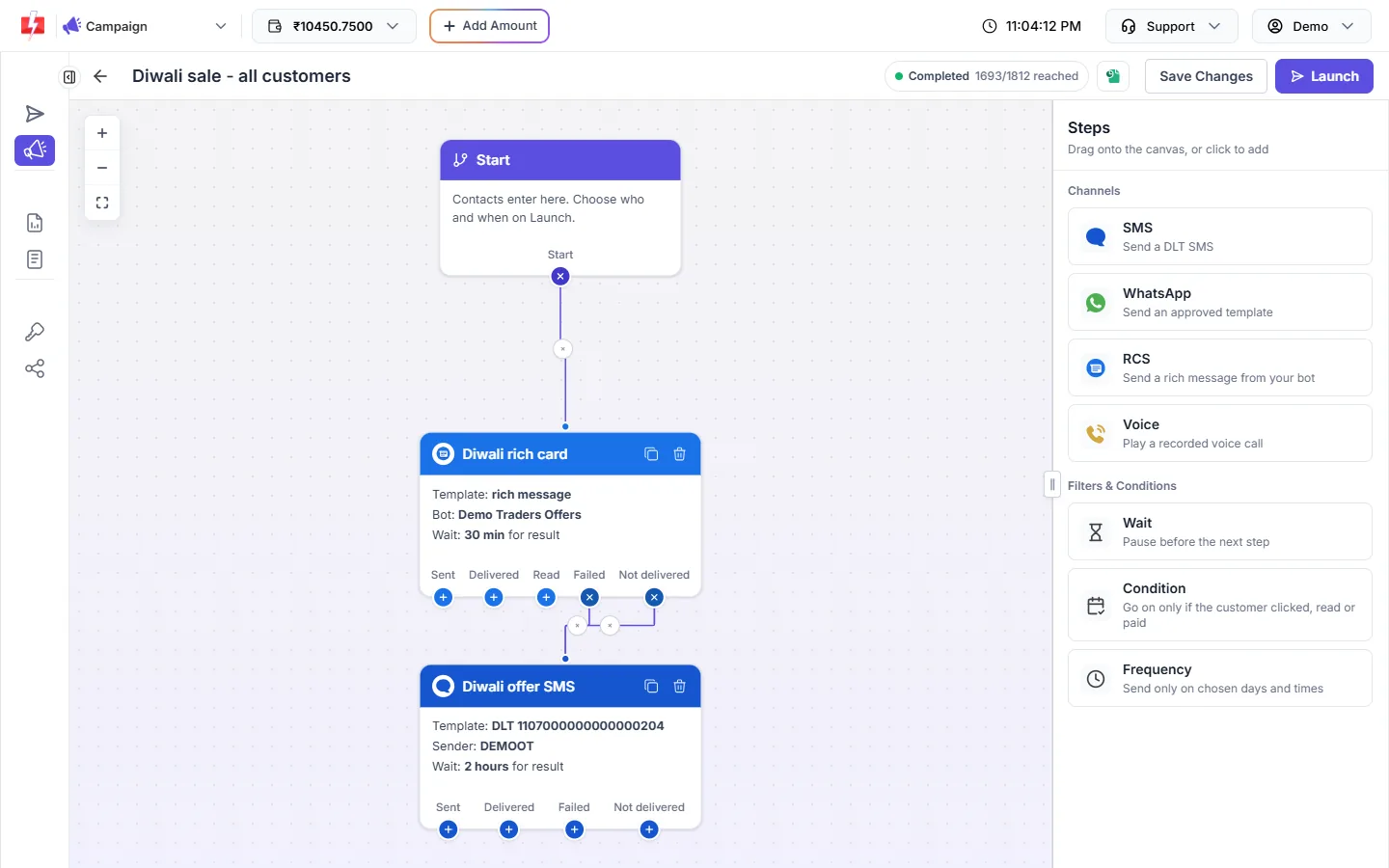
Each of the three moments uses the same pattern: a rich message first, a cheaper or wider-reaching channel for people it missed. Here is how it fits together.
Here is the same journey as a timing table, for a sale that opens on a Friday and ends on Sunday night.
| Step | When | Channel | Message | If it fails |
|---|---|---|---|---|
| 1 | Tuesday 11 AM (Day -3) | RCS rich card | Teaser card: festive image, "Sale starts Friday", "Remind me" or "See preview" button | Failed, phone without RCS, or not delivered in 30 minutes: wait 1 hour, step 2 |
| 2 | Tuesday, about 12:30 PM | WhatsApp marketing template | Same teaser with image header | Not delivered: step 3 |
| 3 | Tuesday afternoon | SMS (promotional DLT template) | "Our Diwali sale starts Friday. Preview: link" | Failed: still go to step 4, so the sale-day message tries again |
| 4 | Tuesday to Friday | Wait, then Frequency | Wait 3 days, then continue only between 10 AM and 8 PM | - |
| 5 | Friday, about 11 AM (Day 0) | RCS rich card | The offer: "Flat 30% off, code DIWALI30, till Sunday", "Shop now" button | Failed or no RCS: step 6 |
| 6 | Friday, around noon | SMS | Offer, code and link | Failed: still go to step 7 |
| 7 | Friday to Sunday | Wait | Wait 54 hours (until about Sunday 6 PM) | - |
| 8 | Sunday, about 6 PM (Day +2) | Condition | Purchase event from your store in the last 3 days? | Yes: leave the journey. No: step 9. |
| 9 | Sunday, early evening | SMS or WhatsApp | "Last few hours: 30% off ends tonight" | End |
One journey with waits, or three scheduled campaigns?
Both work. One journey is simpler to set up and gives you one report for the whole festival. Its catch: waits are counted per contact from the moment each contact reaches the Wait step. A large list starts over several minutes (up to 5,000 contacts per minute; 1 lakh contacts start in about 20 minutes), and fallbacks add an hour or two for some people. So "Wait 3 days" lands on sale day, but not at exactly the same minute for everyone. A Frequency step after the wait keeps everyone inside daytime hours.
If your sale must open at an exact time, for example a flash sale at 12 noon, use three campaigns instead: a teaser campaign, a sale-day campaign and a last-hours campaign, each scheduled for its own date and time (Schedule allows up to 90 days ahead). For the last-hours campaign, upload only the customers who have not bought yet, from your order data.
Purchase events are what make the last-hours step polite. Your store backend posts one small API call when an order is placed, and the Condition step sends buyers out of the journey before the reminder:
curl -X POST https://www.fast2sms.com/dev/campaign/event \
  -H "authorization: YOUR_API_KEY" \
  -H "Content-Type: application/json" \
  -d '{"number": "9000012345", "event": "purchase_made", "value": "DIWALI-ORDER-2291"}'
No store integration? Skip the Condition and send the last-hours message as a separate campaign to a list of non-buyers you export from your orders.
When can you send promotional festive messages?
Each channel has its own rules, and a festive offer is promotional on all of them. The safest plan is to send between mid-morning and early evening and let a Frequency step enforce it.
| Channel | Template or sender | Timing rule | Who it reaches |
|---|---|---|---|
| SMS | Approved DLT sender and approved promotional template | Promotional SMS is held outside the promotional window when that rule applies, and sent when the window opens | DND rules apply to promotional SMS |
| Meta-approved marketing template | Your choice; use a Frequency step for daytime | WhatsApp users who opted in; Meta also limits how many marketing messages one person receives, so some may not be delivered | |
| RCS | Approved, active promotional RCS bot | Promotional RCS bots send between 7 AM and 10 PM | Android phones with RCS; others fail and go to the next step |
| Voice | Approved audio file, voice enabled | See the voice call rules on the bulk voice call guide | DND rules apply to promotional calls |
This is why the last-hours message should go in the early evening, not at 11 PM. A "sale ends at midnight" message sent late at night may be held or may not go at all on some channels. Send it between 5 PM and 8 PM, or send a "last day" message in the morning instead.
The Frequency step lets contacts continue only on chosen weekdays between set From and To times (09:00 to 21:00 by default, with presets for every day, weekdays or weekends). Put one before every channel step that might land late, especially after long waits.
Diwali sale messages you can copy
Diwali messages work best when they are warm, short and clear about the offer. Lead with the festival, then the offer, then the end date and one link or button. Replace the brackets with your own details. WhatsApp templates need Meta approval and SMS templates need DLT registration before you use them.
Diwali WhatsApp templates (marketing)
- Teaser: "Hi {{1}}, Diwali is almost here! Our biggest sale of the year starts on {{2}}. Tap below to see a sneak peek of the offers."
- Sale day: "Happy Diwali, {{1}}! Flat {{2}} off on everything at {{3}} till {{4}}. Use code {{5}} at checkout. Shop now with the button below."
- Gifting: "Hi {{1}}, still looking for Diwali gifts? Our gift boxes start at {{2}}, with free delivery in your city till {{3}}."
- Last hours: "{{1}}, only a few hours left! Your {{2}} Diwali discount ends tonight. Don't miss it."
Diwali RCS rich card
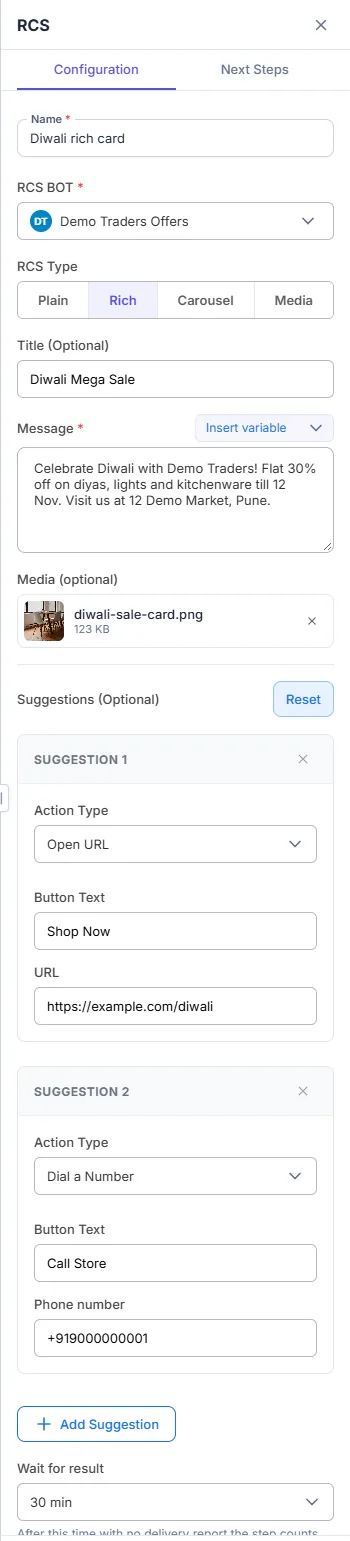
- Image: your festive banner. Title: "Happy Diwali, {{name}}". Description: "Flat 30% off on everything till Sunday. Code DIWALI30." Buttons: "Shop now", "Find a store".
- For many products, use a carousel of two or more cards, one per category: sweets, gifts, decor.
Diwali offer SMS (promotional DLT templates)
- "Diwali Sale starts {#var#}! Up to {#var#} off at Demo Traders. Preview: {#var#}"
- "Happy Diwali {#var#}! Flat {#var#} off till {#var#}. Code {#var#}. Shop: {#var#} - Demo Traders"
- "Last few hours! Diwali offer ends tonight. Use code {#var#} at {#var#} - Demo Traders"
Diwali messages in Hindi
- WhatsApp: "नमस्ते {{1}}, दीपावली की हार्दिक शुभकामनाएं! {{2}} तक हर चीज़ पर {{3}} की छूट। कोड {{4}} इस्तेमाल करें।"
- SMS: "दिवाली सेल शुरू! {#var#} तक {#var#} की छूट। अभी खरीदें: {#var#} - Demo Traders"
- Last hours: "बस कुछ घंटे बाकी! आपकी दिवाली छूट आज रात खत्म। कोड {#var#}"
Hindi SMS is sent as Unicode, which fits fewer characters in each SMS part, so keep Hindi SMS short. Each DLT variable can hold up to 30 characters.
Sale messages for Holi, Eid, Raksha Bandhan, Navratri, Christmas, New Year and end-of-season
The same three-part sequence works for every festival. Only the words, the picture and the lead time change. Here is one sale-day line for each, which you can adapt for WhatsApp, RCS or SMS.
| Festival | Sale-day message | Last-hours line |
|---|---|---|
| Holi | "Happy Holi, Rahul! Colours, gujiya and party packs at 25% off till Sunday. Code HOLI25." | "Holi offer ends tonight. Grab your party pack now." |
| Eid | "Eid Mubarak, Rahul! New festive collection with 20% off till Eid. Code EID20." | "Last day for Eid delivery in your city. Order by 6 PM." |
| Raksha Bandhan | "Send rakhi and gifts to your sibling in any city. Order by Friday for delivery before Rakhi." | "Last day to order for Rakhi delivery. Order before 6 PM." |
| Navratri | "Nine days, nine offers! Today's deal: 30% off ethnic wear. New deal every morning." | "Today's Navratri deal ends at 8 PM." |
| Christmas | "Merry Christmas, Rahul! Plum cakes and gift hampers with free delivery till 25 Dec." | "Last orders for Christmas delivery close today." |
| New Year | "Start the New Year in style. 30% off party wear till 1 January. Code NY30." | "New Year offer ends tonight." |
| End-of-season sale | "End of Season Sale is live: up to 50% off on footwear. Best sizes go first." | "Last day of the sale. Final prices end tonight." |
Hindi lines for the same moments:
- Holi: "होली की शुभकामनाएं! रंग, गुजिया और पार्टी पैक पर 25% छूट, रविवार तक।"
- Eid: "ईद मुबारक! नए त्योहारी कलेक्शन पर 20% छूट, ईद तक।"
- Raksha Bandhan: "राखी और गिफ्ट किसी भी शहर में भेजें। राखी से पहले डिलीवरी के लिए शुक्रवार तक ऑर्डर करें।"
- Navratri: "नवरात्रि के नौ दिन, नौ ऑफर! आज की डील: एथनिक वियर पर 30% छूट।"
Multi-day festivals: one deal every morning
For Navratri or a week-long sale, use Repeat: run the campaign daily (or on chosen weekdays) at a fixed time, such as 10 AM, with from and until dates covering the festival. Keep each daily run short so it finishes the same day, because a campaign can have only one open run at a time. Change the template or the sheet column with the day's deal as you go.
Greetings without an offer
A pure "Happy Diwali from Demo Traders" greeting is still a brand message, so treat it as marketing: a WhatsApp marketing template, a promotional SMS template, and a promotional RCS bot. A greeting with a beautiful RCS card or WhatsApp image, no discount and no hard sell, is a good way to stay in touch with high-value customers who do not like offers.
What does a festive campaign cost on Fast2SMS?
There is no campaign fee, builder fee or monthly fee. Each step is charged at that channel's normal per-message rate from your wallet, and fallback steps are charged only for the contacts who reach them.
At the time of writing: RCS ₹0.35 per message (the same for text, media, rich card or carousel), WhatsApp ₹0.95 per marketing message, SMS ₹0.25 per SMS from a ₹100 recharge going down to ₹0.11 on bigger recharges, and voice ₹0.25 per 15-second pulse for answered calls. GST is extra. See RCS pricing, WhatsApp pricing and bulk SMS pricing.
Example: a Diwali campaign to 20,000 past customers with the journey above, at ₹0.25 per SMS. The reach figures are assumptions for the maths only.
| Step | Contacts (assumed) | Rate | Charged |
|---|---|---|---|
| Teaser RCS card | 20,000 sent, 12,000 delivered | ₹0.35 | ₹7,000 |
| Teaser WhatsApp (RCS fallback) | 8,000 | ₹0.95 | ₹7,600 |
| Teaser SMS (WhatsApp fallback) | 1,000 | ₹0.25 | ₹250 |
| Sale-day RCS card | 20,000 sent, 12,000 delivered | ₹0.35 | ₹7,000 |
| Sale-day SMS (RCS fallback) | 8,000 | ₹0.25 | ₹2,000 |
| Last-hours SMS, non-buyers only | 18,000 | ₹0.25 | ₹4,500 |
| Total charged | ₹28,350 plus GST |
Failed RCS messages are refunded under the RCS refund policy shown on the pricing page, so if the 16,000 failed RCS sends in this example are refunded, the net cost is closer to ₹22,750. Sending one WhatsApp marketing message to all 20,000 customers three times would cost ₹57,000 and still miss customers without WhatsApp.
Before launch you see a cost estimate, and a launch is refused if the wallet cannot cover the first step. If your balance runs low mid-run, the run pauses and resumes on its own after you recharge (it checks every 10 minutes), and is stopped after 3 days on low balance. In festive weeks, recharge early so your sale-day message is never paused.
How to set up a festive campaign in Fast2SMS
- Get templates approved early. Register your promotional SMS templates on DLT and link them to your sender, get WhatsApp marketing templates approved by Meta, and make sure your RCS bot is approved and active. For a voice greeting, enable voice and upload an approved MP3 or WAV file up to 5 MB.
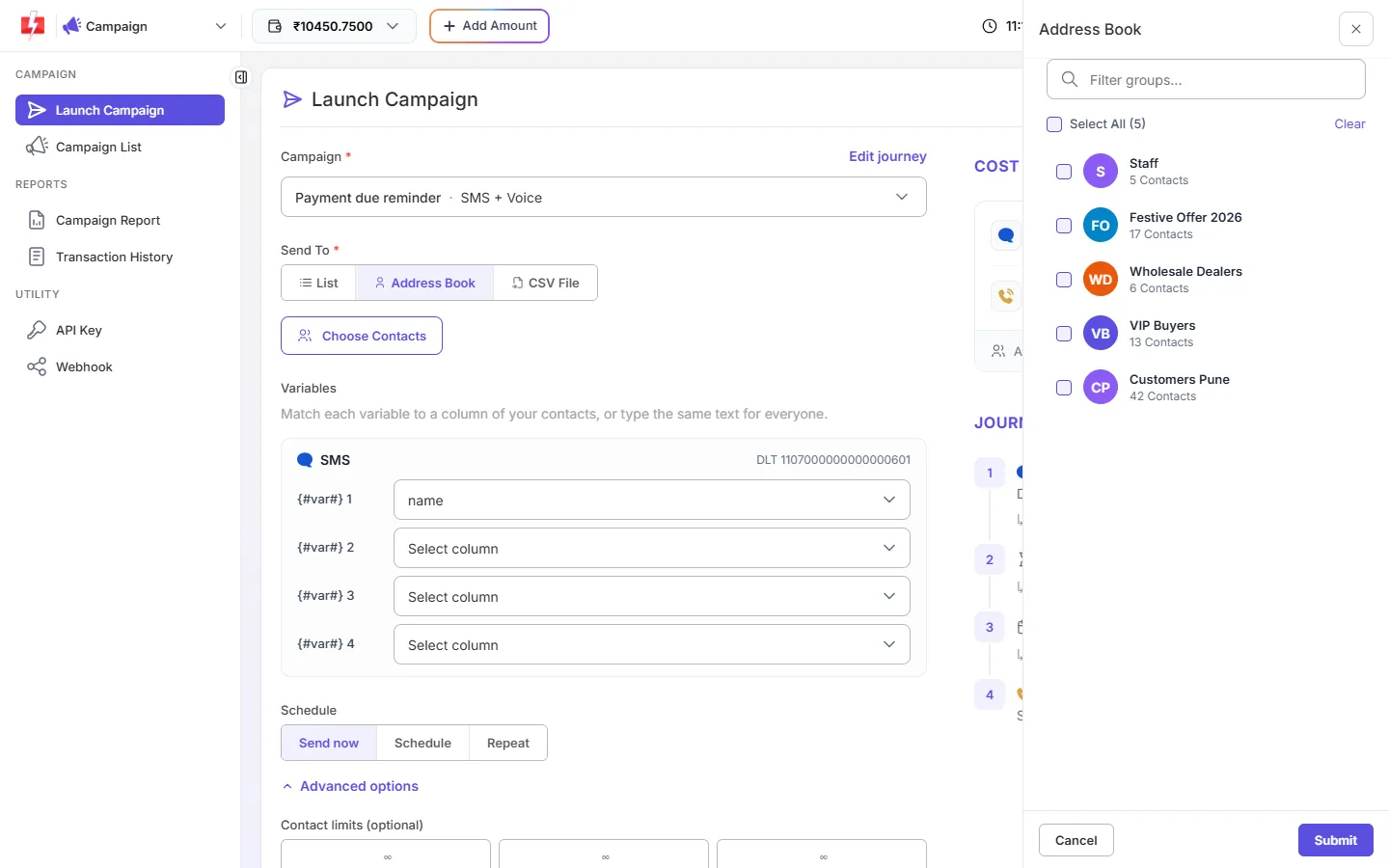
- Prepare your list. Export past customers with columns such as name, city, coupon and link. Upload CSV, TXT, XLSX or XLS up to 20 MB and 10 lakh rows, or keep an Address Book group. Only Indian mobile numbers are accepted; duplicates and invalid numbers are removed and counted.
- Open the builder. Go to Campaign, Campaign List, Create Campaign (or Campaign, Launch Campaign, Create new campaign).
- Click "Start from a ready journey". Under Promotional, pick "Rich RCS card first, then WhatsApp, then SMS" for the teaser, or "WhatsApp offer, SMS if not delivered" if you do not use RCS.
- Choose senders and templates in every channel step and map each variable to a sheet column or fixed text. In RCS text, write {{name}} style column names.
- Wire the outputs. Failed and not delivered go to the next channel. Delivered and read (WhatsApp and RCS) go to the Wait step before the sale-day message.
- Add Wait, Frequency and Condition steps for the sale-day and last-hours messages, as in the timing table. The Condition checks your purchase_made event.
- Save, then go to Launch Campaign. Pick the campaign and add the audience.
- Send a test to up to 10 numbers. Look at the RCS card, the WhatsApp image and the SMS on real phones. Test sends are charged like normal sends.
- Check the cost estimate, then Send now, Schedule or Repeat. For the teaser, schedule it for the morning you chose. You can set contact limits per minute, hour or day if your store or call centre needs to handle the response.
How do you plan for peak festive season?
Plan two to three weeks ahead. Most festive problems come from late approvals, empty wallets and lists that were never cleaned, not from the messages themselves.
- Approvals first. DLT templates, Meta templates and RCS bots all need approval. Submit festive templates well before the teaser date, and keep a plain version of each in case a rich one is rejected.
- Schedule ahead. Campaigns can be scheduled up to 90 days in advance in IST, so set up the whole festive month in one sitting.
- Mind the speed. Campaign starts up to 5,000 contacts per minute per run; 1 lakh contacts start in about 20 minutes. If you want orders spread out, set a per-minute or per-hour contact limit.
- One open run per campaign. If you need overlapping sends, such as a teaser for Dhanteras while the Navratri sale is still running, use separate campaigns. You can duplicate and rename a campaign in seconds, and have up to 200 campaigns per account.
- Keep the wallet topped up so no run pauses for low balance on your biggest day.
- Brief your team. WhatsApp and RCS replies come back to your inbox. Have someone ready to answer during the sale.
For more on choosing channels for each moment, see SMS vs WhatsApp vs RCS, and for RCS creative ideas, the RCS marketing page.
What should you do after the festival?
Use the days after the festival to thank buyers, collect feedback and plan the next one. A festive season is also the best time to spot customers who did not respond at all.
- Thank-you and feedback: the ready Feedback journeys ("Feedback on WhatsApp, SMS link if no reply" and "Feedback call, WhatsApp if not answered") work well a few days after delivery.
- Read the Campaign Report: reached, unreached, opted out, cost, refund and net cost for the run, and sent, delivered, read and failed per step, with the top failure reasons. Export it from Delivery Reports, Export, Campaign and match it against your festive orders.
- Move non-buyers to a win-back list. Customers who received all three festive messages and still did not buy may need a different approach. The win back campaign guide shows how.
- Save the journey. Duplicate the campaign, rename it for the next festival, and only change templates and dates.
Cart drop-offs also rise in festive weeks. If you run an online store, pair your festive journey with the steps in the abandoned cart recovery guide.
Mistakes to avoid in festive campaigns
- Waiting until the week of the festival to submit templates. Approvals take time and everyone submits at once.
- Sending the same offer on every channel to everyone. Use fallback outputs so each person gets one message per moment.
- Late-night "ends at midnight" messages. Promotional rules differ by channel; send last-hours reminders in the early evening.
- Reminding people who already bought. Post purchase events and add a Condition, or upload a fresh non-buyer list for the last message.
- Too many messages. Three well-timed messages beat seven rushed ones.
- Huge images or long text. Festive cards should load fast and read in two seconds.
- Long SMS variables. DLT variables are limited to 30 characters; longer values are rejected for that number. Use short links and codes.
- Assuming a voice call can be personal. Voice plays the same recording to everyone; keep names and codes in text messages.
- Not testing on real phones. Send a test to up to 10 numbers, including an Android phone with RCS and an iPhone or feature phone without it.
- Forgetting the opt-out. Fast2SMS does not process a typed "STOP" automatically. Remove people who ask to stop before the next festival.
Festive season comes every year, and the businesses that win it are the ones who plan the journey once and reuse it. Create your festive journey in Fast2SMS Campaign, test it on your own phone, and schedule your first teaser. For the bigger picture of combining channels, read the omnichannel marketing platform guide, and for longer nurture sequences, the WhatsApp drip campaign guide.
Frequently asked questions
What is a Diwali marketing campaign?
A Diwali marketing campaign is a planned set of offers and greetings sent to your customers before and during Diwali. The most effective ones use three timed messages: a teaser, the sale-day offer and a last-hours reminder.
What is a festival marketing campaign?
It is any campaign built around a festival when people already plan to shop, gift and celebrate, such as Diwali, Holi, Eid, Raksha Bandhan, Navratri, Christmas or New Year. In India it often drives a large share of yearly sales.
When should I start my Diwali campaign?
Plan two to three weeks ahead so templates are approved in time, and send the teaser about 10 to 14 days before Diwali for big-ticket items, or 3 to 5 days before for everyday products.
How many messages should a festive campaign send?
Three is a good number: a teaser, the sale-day offer and a last-hours reminder only for people who have not bought. More messages in festive weeks often feel like spam.
Which channel is best for festive offers in India?
Use them together. An RCS rich card or WhatsApp image looks best, and SMS reaches every phone. In Fast2SMS Campaign the next channel sends only when the first one fails or is not delivered.
What is festive season marketing in India?
It is the planning and sending of offers across the festival months, from Navratri and Durga Puja through Dhanteras, Diwali, Christmas and New Year, plus regional festivals and end-of-season sales.
Are festival dates the same every year?
No. Most Indian festivals follow the lunar calendar and move every year; Eid moves about 11 days earlier each year. Check the exact date for the year before you schedule.
Which festivals should a small business plan for?
Pick the three to five that matter most for your customers and region, such as Diwali, Holi, Eid, Raksha Bandhan, Navratri, Onam, Pongal, Christmas or New Year, plus end-of-season sales if you sell fashion.
What is a good Diwali sale WhatsApp message?
"Happy Diwali, Rahul! Flat 30% off on everything at Demo Traders till Sunday. Use code DIWALI30 at checkout. Shop now with the button below." It must be approved by Meta as a marketing template.
What is a good Diwali offer SMS?
"Happy Diwali {#var#}! Flat {#var#} off till {#var#}. Code {#var#}. Shop: {#var#} - Demo Traders". Register it on DLT as a promotional template; each variable can hold up to 30 characters.
What should a festive teaser message say?
Tell customers the sale is coming and when, and give them a reason to come back: "Our Diwali sale starts Friday. Tap to see a sneak peek." Keep the hard sell for sale day.
What should a last-hours reminder say?
Keep it very short and urgent: "Only a few hours left! Your Diwali discount ends tonight." Send it only to people who have not bought yet.
Can I send Diwali messages in Hindi?
Yes. Register Hindi SMS templates on DLT and get Hindi WhatsApp templates approved. Hindi SMS is sent as Unicode, which fits fewer characters per part, so keep it short.
What is a good Holi sale message?
"Happy Holi, Rahul! Colours, gujiya and party packs at 25% off till Sunday. Code HOLI25." Follow it with "Holi offer ends tonight" for people who have not bought.
What is a good Eid sale message?
"Eid Mubarak, Rahul! New festive collection with 20% off till Eid. Code EID20." Add your last delivery date if customers order online.
What is a good Raksha Bandhan message for an online store?
"Send rakhi and gifts to your sibling in any city. Order by Friday for delivery before Rakhi." Delivery deadlines matter most for Rakhi, so start 7 to 10 days early.
What is a good New Year sale message?
"Start the New Year in style. 30% off party wear till 1 January. Code NY30." Send a short last-day reminder on 31 December in the early evening.
How do I run a Navratri offer every day for nine days?
Use Repeat: run the campaign daily at a fixed time with from and until dates covering Navratri. Keep each daily run short so it finishes the same day, because a campaign can have one open run at a time.
Is a festival greeting without an offer promotional?
Treat it as marketing. A brand greeting is still a promotional message, so use a WhatsApp marketing template, a promotional SMS template and a promotional RCS bot.
Can I send a festive RCS carousel?
Yes. RCS steps support plain text, rich cards, media, carousels of two or more cards and suggestion buttons. A carousel works well for showing several gift categories.
Can I send a festive voice greeting?
Yes, if voice is enabled on your account. Upload an approved MP3 or WAV file up to 5 MB. Every customer hears the same recording; the call cannot say their name.
What time can I send promotional festive messages?
Each channel has its own rules. Promotional SMS is held outside the promotional window when that rule applies, and promotional RCS bots send between 7 AM and 10 PM. Use a Frequency step to keep every step in daytime hours.
Can I send a "sale ends at midnight" message at 11 PM?
It is better not to. Late-night promotional messages may be held or not sent on some channels. Send last-hours reminders between 5 PM and 8 PM, or send a "last day" message in the morning.
Do festive SMS need DLT registration?
Yes. Business SMS needs an approved DLT sender and an approved template linked to it. Festive offers use promotional templates, and DND rules apply.
Do festive WhatsApp messages need template approval?
Yes. Business-initiated WhatsApp messages use templates approved by Meta. Festive offers are marketing templates, charged at the marketing rate.
Why do some festive WhatsApp messages not get delivered?
Common reasons are numbers without WhatsApp and Meta’s limit on how many marketing messages one person receives. That is why the journey sends SMS when WhatsApp is not delivered. See the SMS fallback guide.
What happens if a customer’s phone does not support RCS?
The RCS step counts as failed and the next step, such as WhatsApp or SMS, sends instead. You do not need a separate list of RCS phones.
What does the Frequency step do?
It lets contacts continue only on chosen weekdays between From and To times (09:00 to 21:00 by default), with presets for every day, weekdays or weekends.
Can I schedule my Diwali campaign weeks in advance?
Yes. Campaigns can be scheduled up to 90 days ahead in your account time zone (IST).
Should I use one journey or three separate campaigns?
One journey with Wait steps is simpler and gives one report. Three scheduled campaigns are better when the sale must open at an exact minute, because waits are counted per contact and a large list starts over several minutes.
How do I stop the last-hours reminder for people who already bought?
Your store posts a purchase event to POST https://www.fast2sms.com/dev/campaign/event, and a Condition step that checks "Your event" sends buyers out of the journey. Or upload a fresh list of non-buyers for the last message.
Can the journey check whether a customer clicked my festive link?
Only if your website or app posts click events to the event API. Fast2SMS does not track link clicks automatically.
Can I branch the journey when a customer replies?
Yes, for WhatsApp and RCS. A Condition can check "Reply received (WhatsApp / RCS)". SMS replies and specific button taps cannot be used for branching.
Is there a ready-made festive journey?
Use the Promotional journeys under "Start from a ready journey": "Rich RCS card first, then WhatsApp, then SMS" or "WhatsApp offer, SMS if not delivered". Add Wait, Frequency and Condition steps for sale day and last hours.
How long can a festive journey last?
Up to 30 days for each contact, with Wait steps of 1 minute to 30 days. That easily covers a teaser, a week-long sale and a reminder.
Can I reuse my Diwali journey for other festivals?
Yes. Duplicate the campaign, rename it, and change the templates and dates. You can keep up to 200 campaigns in one account.
How do I upload my festive customer list?
Upload CSV, TXT, XLSX or XLS up to 20 MB and 10 lakh rows, pick an Address Book group or paste numbers. Duplicates and invalid numbers are removed and counted.
Can I personalise festive messages with the customer’s name?
Yes. Sheet columns become variables for SMS and WhatsApp placeholders, and RCS text uses the column name in double curly brackets. Voice calls cannot be personalised.
How fast can a festive campaign reach 1 lakh customers?
Campaign starts up to 5,000 contacts per minute per run, so 1 lakh contacts start in about 20 minutes. You can set lower limits per minute, hour or day.
Can I run two festive campaigns at the same time?
Yes, as two campaigns. Each campaign can have one open run at a time, so overlapping sends need separate campaigns.
Can I send festive offers to customers abroad?
No. Campaign sends to Indian mobile numbers only: 10 digits starting with 6 to 9.
How much does a Diwali campaign cost?
There is no campaign or monthly fee; each message is charged at its normal rate. At the time of writing RCS is ₹0.35, WhatsApp marketing ₹0.95 and SMS from ₹0.25 down to ₹0.11, plus GST. The example on this page for 20,000 customers comes to ₹28,350 charged before RCS refunds.
Is RCS more expensive for rich cards and carousels?
No. At the time of writing RCS is ₹0.35 per message whether it is text, media or a rich card. See RCS pricing.
Do I pay for fallback messages to everyone?
No. A fallback step is charged only for the contacts who reach it, such as those whose RCS or WhatsApp message failed or was not delivered.
Are failed festive messages refunded?
Refunds follow each channel’s rules: failed WhatsApp and RCS messages under each channel’s policy, SMS only on "On Delivery" billing accounts, and voice charges only answered pulses.
What if my wallet runs out on sale day?
The run pauses and resumes by itself after you recharge (it checks every 10 minutes) and is stopped after 3 days on low balance. Recharge before the festival so nothing pauses.
Will I know the cost before I launch?
Yes. You see a cost estimate before launch, and the launch is refused if your wallet cannot cover the first step.
Is there free credit to test a festive journey?
Yes. Every new account gets ₹50 free credit, with recharges from ₹100. Test sends to up to 10 numbers are charged like normal sends.
How do I set up a festive campaign on Fast2SMS?
Go to Campaign, Campaign List, Create Campaign, click "Start from a ready journey", pick a Promotional journey, choose templates, add Wait, Frequency and Condition steps, save, add your list in Launch Campaign, send a test, then Send now, Schedule or Repeat. Start at fast2sms.com/campaign.
Can I test my festive messages before sending?
Yes. Send a test to up to 10 numbers before launch. Use phones with and without RCS and WhatsApp so you see every fallback.
How do I see results of my festive campaign?
The Campaign Report shows reached, unreached, opted out, cost, refund and net cost, plus sent, delivered, read and failed per step. Export it from Delivery Reports, Export, Campaign to match against orders.
Can I get festive campaign results on my server?
Yes. Campaign webhooks, set up under Webhook, Campaign, post every step result and run status with channel, status, reason and cost.
Can I pause my festive campaign if stock runs out?
Yes. Pause, resume or stop a run from the panel or the API. Contacts still waiting when you stop are not charged.
What should I do with customers who did not respond to festive offers?
Move them to a separate, softer journey after the festival. The win back campaign guide shows how.
How do opt-outs work in festive campaigns?
Numbers that blocked you on WhatsApp, unsubscribed on RCS or are on the voice opt-out list leave the journey. A typed "STOP" is not processed automatically, so remove people who ask to stop yourself.