SMS vs WhatsApp vs RCS vs Voice Call: Which Channel Should Your Business Use in India?
No monthly fee · Pay as you go from ₹100 · Free setup help on a call
SMS reaches every mobile in India and costs ₹0.11 to ₹0.25 per message on Fast2SMS. WhatsApp gives images, buttons and replies at ₹0.13 to ₹0.95 by message type. RCS shows branded rich cards in the phone's messaging app at ₹0.35. A voice call gets noticed at ₹0.25 per 15-second pulse, answered calls only. Most businesses get the best result by combining them in one journey. All prices are at the time of writing, from one prepaid wallet, with no setup or monthly fee.
This guide compares the four channels on cost, reach, rich media, rules and reports, answers the common head-to-head questions (SMS vs WhatsApp, RCS vs WhatsApp, voice call vs SMS), shows which channel fits which job, and explains how to join them into one automated journey with fallback.
What is the difference between SMS, WhatsApp, RCS and a voice call?
They differ in where the message lands and what it can carry. SMS is plain text in the phone's inbox, WhatsApp is a chat inside the WhatsApp app, RCS is a rich message inside the phone's own messaging app, and a voice call is a recorded message the customer hears.
- SMS is the oldest and the widest. It works on every mobile phone, including basic feature phones, and needs no internet. In India every business SMS goes through DLT: you register your business, a sender ID (header) and each message template on a telecom operator's DLT portal.
- WhatsApp Business API sends messages from your verified business number into the customer's WhatsApp. Messages can carry an image, video or document, quick-reply and link buttons, and the customer can reply. Every business-started message uses a template approved by Meta.
- RCS (Rich Communication Services) upgrades the normal messaging app on Android phones. Your verified brand name and logo appear at the top, and the message can be a rich card with an image and buttons, or a carousel of cards. It needs an approved, active RCS agent (also called an RCS bot). If a phone does not support RCS, the message fails.
- Voice call (OBD) dials the customer and plays your recorded audio. It reaches any phone that can take a call, works for people who do not read text, and can ask the listener to press a key or connect them to your team.
None of them is "the best" on its own. Each one is strong in one area and weak in another, which is why a good plan uses two or more. The rest of this page shows where each one fits. For the wider picture of planning a journey across channels, see the omnichannel marketing platform guide.
SMS vs WhatsApp vs RCS vs voice call: comparison table
Here is the short answer in one table. Prices are Fast2SMS rates at the time of writing.
| SMS | RCS | Voice call | ||
|---|---|---|---|---|
| Price on Fast2SMS | ₹0.25 per SMS from a ₹100 recharge, down to ₹0.11 on bigger slabs | ₹0.95 marketing, ₹0.25 utility, ₹0.25 authentication, ₹0.13 service reply | ₹0.35 per message, same for text, media and rich card | ₹0.25 per 15-second pulse, answered calls only |
| Which phones | Every mobile, including feature phones | Phones with WhatsApp installed and internet | Android phones with RCS turned on in the messaging app | Any phone that can take a call |
| Rich media | Text and links only | Image, video, document, buttons | Rich card, media, carousel, suggestion buttons | Recorded audio; press-a-key options |
| Sender shown | DLT sender ID (6 letters) | Your business name on your WhatsApp number | Verified brand name and logo | A calling number |
| Rules before sending | DLT entity, sender and template approval | Meta-approved templates, opt-in | Approved, active RCS agent (bot) | Approved voice file; voice enabled on the account |
| DND and time limits | Promotional SMS only to Non-DND numbers, inside the promotional window | No DND; Meta limits how many marketing messages one person receives | Promotional RCS bots send 7 AM to 10 PM | Promotional calls only to Non-DND numbers, in the permitted hours |
| Personal details | Yes, through DLT template variables | Yes, template placeholders | Yes, columns in the text | No, the same audio for everyone |
| Report outputs | Sent, delivered, failed, not delivered | Sent, delivered, read, failed, not delivered | Sent, delivered, read, failed, not delivered | Answered, not answered, failed |
| Two-way | Mainly one-way | Yes, replies in the live chat inbox | Yes, replies and button taps | Press a key, or patch to an agent |
| Best for | OTPs, alerts, reminders, reaching everyone | Offers with images, order updates, conversations | Branded offers and carousels on Android | Urgent reminders, collections, people who do not read SMS |
Two rows matter most when you are choosing. "Which phones" decides your reach: SMS and voice reach everyone, WhatsApp and RCS reach only part of your list. "Price" decides your cost per customer. The trick, covered below, is to send the richer channel first and use SMS or a call only for the people it did not reach.
How much does each channel cost in India?
On Fast2SMS, at the time of writing, an SMS costs ₹0.11 to ₹0.25 depending on your recharge, a WhatsApp message ₹0.13 to ₹0.95 depending on its category, an RCS message ₹0.35, and a voice call ₹0.25 for every 15 seconds of an answered call. There is no setup fee, no monthly fee and no extra charge for using them together.
SMS price by recharge slab
SMS has one rate for promotional, transactional, OTP and API messages. The rate is set by the size of your recharge:
| Recharge amount | Price per SMS |
|---|---|
| ₹100 to ₹3,999 | ₹0.25 |
| ₹4,000 to ₹7,999 | ₹0.21 |
| ₹8,000 to ₹13,999 | ₹0.19 |
| ₹14,000 to ₹59,999 | ₹0.17 |
| ₹60,000 to ₹1,29,999 | ₹0.15 |
| ₹1,30,000 to ₹5,99,999 | ₹0.13 |
| ₹6,00,000 or more | ₹0.11 |
A long SMS that runs into two parts is charged as two SMS, so keep messages short. The full slab table, validity and a calculator are on the bulk SMS pricing page. DLT registration has its own yearly operator fee, explained on that page.
WhatsApp price by message category
Meta puts every WhatsApp template into a category, and the category sets the price. At the time of writing on Fast2SMS: marketing ₹0.95, utility ₹0.25, authentication (OTP) ₹0.25, and a service reply inside an open customer chat ₹0.13. Failed messages are refunded under WhatsApp's own rules. Details and examples of each category are on the WhatsApp pricing page.
RCS price
RCS has one flat price, ₹0.35 per message, whether you send plain text, an image or a rich card with buttons. See RCS pricing.
Voice call price
Voice is billed by time, not per call: ₹0.25 for every 15 seconds from pick-up to hang-up, and only when the call is answered. A 15-second reminder costs ₹0.25 per answered call; a 30-second message costs ₹0.50. Missed, busy and switched-off calls cost nothing. More on the bulk voice call guide.
SMS vs WhatsApp: which costs less?
For updates and reminders, they cost about the same: an SMS is ₹0.25 at the entry slab and a WhatsApp utility message is also ₹0.25. For offers, SMS is far cheaper: ₹0.25 or less per SMS against ₹0.95 for a WhatsApp marketing message.
So the real question is not "which is cheaper" but "what am I sending":
| Message | SMS cost | WhatsApp cost | What you get for the extra |
|---|---|---|---|
| Order shipped, appointment tomorrow, payment received | ₹0.11 to ₹0.25 | ₹0.25 (utility) | A track or pay button, a PDF, read status, a reply |
| OTP | ₹0.11 to ₹0.25 | ₹0.25 (authentication) | Copy-code button, works on Wi-Fi without mobile signal |
| Festival sale, new launch, coupon | ₹0.11 to ₹0.25 | ₹0.95 (marketing) | Product image or video, buttons, conversation |
| Answer to a customer who messaged you | Not used | ₹0.13 (service) | A real two-way chat |
Per 1,000 messages at the time of writing: 1,000 SMS cost ₹250 at the entry rate (₹110 on the top slab), 1,000 WhatsApp utility messages cost ₹250 and 1,000 WhatsApp marketing messages cost ₹950. Remember that SMS can also need a second part if the text is long, and that WhatsApp will not reach customers who do not use it. Counting the cost per customer reached, not per message sent, gives a fairer picture.
SMS vs WhatsApp marketing: which works better?
WhatsApp usually gets more attention for an offer, because it can show the product and a button and it sits next to the customer's personal chats. SMS reaches more people, costs less, and works on every phone. For most Indian businesses the best answer is WhatsApp first and SMS for those WhatsApp did not reach.
Where WhatsApp marketing wins
- It looks like a real ad. A photo of the product, a short video or a catalogue PDF, with "Shop now" or "Call us" buttons.
- Customers reply. Questions come back into your live chat inbox, so an offer can turn into a sale in the same chat.
- You see who read it. WhatsApp reports read status, so you know who saw the message.
Where SMS marketing wins
- Reach. Every customer with a mobile number can receive it, with or without WhatsApp or internet.
- Price. ₹0.11 to ₹0.25 against ₹0.95, so for a large list SMS can cost a fraction of WhatsApp.
- No per-person marketing limit from Meta. WhatsApp limits how many marketing messages one person receives from businesses, so some marketing messages are not delivered. SMS has its own rules (DLT, DND and timing) but not this one.
The rules each one brings
Promotional SMS needs a DLT-approved promotional template and goes only to Non-DND numbers inside the promotional time window; the panel holds messages outside it. WhatsApp marketing needs a Meta-approved marketing template and customers who opted in to hear from you. If too many people block or report your messages, Meta lowers your number's quality rating. Full channel guides: bulk SMS guide and bulk WhatsApp guide.
If you send a series of offers rather than one, the WhatsApp drip campaign guide shows timed sequences with an SMS step when WhatsApp fails.
RCS vs WhatsApp: what is the difference?
Both can send images, cards and buttons, and both report read status. The difference is where they arrive: WhatsApp needs the customer to have the WhatsApp app, while RCS arrives in the phone's built-in messaging app on Android phones with RCS turned on. RCS is also cheaper for offers: ₹0.35 against ₹0.95 for WhatsApp marketing.
| RCS | ||
|---|---|---|
| Where it lands | Default messaging app on Android | WhatsApp app |
| iPhone and feature phones | Message fails where RCS is not supported | Works on any phone with WhatsApp |
| Price for an offer | ₹0.35 | ₹0.95 |
| Price for an update | ₹0.35 | ₹0.25 (utility) |
| What you need | Approved, active RCS agent (bot) | WhatsApp Business API number and approved templates |
| Formats | Text, media, rich card, carousel of 2+ cards, suggestion buttons | Text, image, video, document headers, buttons |
| Sending hours for promotions | Promotional bots send 7 AM to 10 PM | No fixed window from Meta; choose sensible hours |
In practice RCS works well as the first step of a promotional journey: it is cheap and looks good where it is supported. Any customer whose phone does not support RCS simply gets a failed result, and the next step (WhatsApp or SMS) sends instead. For RCS against plain SMS on its own, see the separate RCS SMS page, and for setting up your RCS agent, the RCS business messaging guide.
Voice call vs SMS: when is a call better?
Use SMS for information people need to keep, such as a code, an amount, a link or an address. Use a voice call when the message must be noticed, such as an overdue payment, an appointment tomorrow or an urgent notice, or when your customers are more comfortable listening than reading.
- A ringing phone is hard to ignore. Many people skim past SMS but still pick up a call.
- Any language, any reading level. You record the audio, so Hindi, Marathi, Tamil or any local language works.
- You pay only for answered calls. At ₹0.25 per 15-second pulse, a short reminder costs about the same as an SMS for each person who picks up.
- The listener can act. A press-a-key (DTMF) call can ask "press 1 to confirm", and a call patch connects the customer to your agent group when they press a key.
The limits: a call cannot carry a link or a code to copy, and the audio is the same for everyone, so a call cannot say the customer's name or exact amount. That is why a call works best after an SMS or WhatsApp that carries the details. Promotional calls reach only Non-DND numbers in the permitted hours; reminders about an existing service can reach everyone.
Which is the best channel for business messaging in India?
The best channel depends on the job. Pick the first channel by what the message must do, then add a backup channel for the people the first one misses.
| Business job | Start with | Backup | Why |
|---|---|---|---|
| OTP and login codes | SMS or WhatsApp authentication | Voice call | Fast and on every phone; Voice OTP (part of Smart OTP) reads the code aloud for feature phones and landlines |
| Order, delivery and booking updates | WhatsApp utility | SMS | Same price as SMS with buttons and a document; SMS for people without WhatsApp |
| Festival sale or new launch | RCS rich card | WhatsApp, then SMS | Cheapest rich format first, widest reach last |
| Payment or EMI reminder | SMS or WhatsApp with pay link | Voice call | The link to pay comes first, the call makes sure it is noticed |
| Lead follow-up | Voice call, then SMS | A lead can reply; if they do not, a call reminds them | |
| Event or webinar invite | WhatsApp or RCS invite | SMS, call on the day | Rich invite first, call close to the start time |
| Feedback | SMS with a link | Easy to reply; SMS link for the rest | |
| Notice to every customer (closure, water cut) | SMS | Voice call | Reaches every phone; a call for urgent notices |
These are the same patterns as the ready journeys in Fast2SMS Campaign. A wider explanation of running many channels on one platform is in the CPaaS India guide.
The same message on all four channels
Here is one service reminder written for each channel, so you can see how the style changes. Use them as starting points; SMS needs a matching DLT template and WhatsApp a matching approved template.
| Channel | Copy-ready text |
|---|---|
| SMS | Dear Rahul, your payment of Rs 2,500 for Demo Traders is due on 5 Dec. Pay here: [link] - Demo Traders |
| WhatsApp (utility) | Hi Rahul, this is a reminder that your payment of ₹2,500 to Demo Traders is due on 5 Dec. Tap the button below to pay in under a minute. [Pay now] |
| RCS (rich card) | Card title: Payment due on 5 Dec. Text: Hi Rahul, ₹2,500 is due for your Demo Traders account. Buttons: Pay now / Call us |
| Voice call (15 s) | "Namaste, this is Demo Traders. Your payment is due this week. Please check the message we sent you with the pay link. Thank you." |
Notice the voice script does not say the name or amount: voice audio is the same for every listener. It points the customer back to the text message that does carry the details.
Why not use SMS, WhatsApp, RCS and voice in one journey?
Because each channel misses someone: RCS misses phones without RCS, WhatsApp misses people without WhatsApp or over Meta's marketing limit, and SMS can fail on a switched-off phone. When you join them in a journey, every customer gets the best channel that works for them, and you pay for a second channel only when the first one failed.
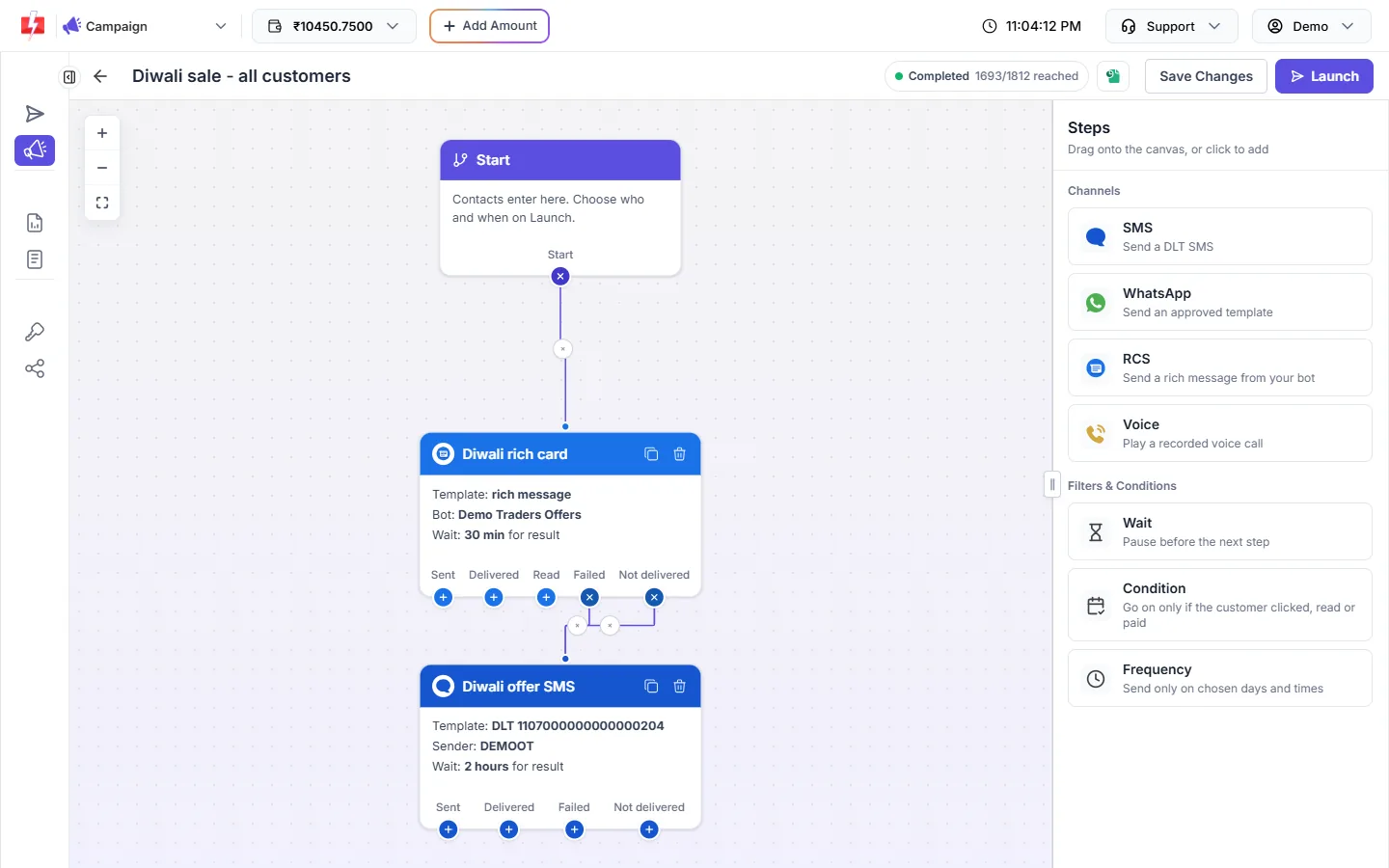
In Fast2SMS this is the Campaign journey builder. You place SMS, WhatsApp, RCS and Voice steps on a canvas and connect each step's outputs to the next step:
- SMS has outputs sent, delivered, failed and not delivered.
- WhatsApp and RCS also have read.
- Voice has answered, not answered and failed.
Wire "failed" or "not delivered" to another channel and you have a fallback. Each channel step waits for a final result before it takes "not delivered": by default 120 minutes for SMS, 30 minutes for WhatsApp and RCS and 15 minutes for voice, and you can set anything from 1 minute to 24 hours. Add a Wait step (1 minute up to 30 days) to space messages out, a Frequency step so the next message goes only on chosen days between set hours (09:00 to 21:00 by default), and a Condition step for yes/no checks such as "reply received on WhatsApp or RCS". The SMS fallback guide goes deeper into fallback for each channel, and omnichannel vs multichannel explains why a connected journey is different from sending the same blast on four channels.
Timing table: a service reminder across all four channels
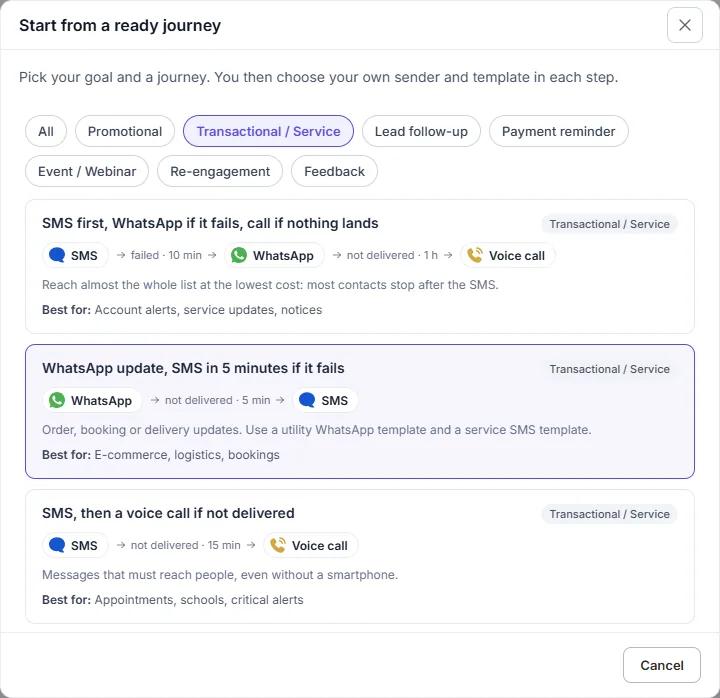
This journey sends a payment or appointment reminder. It starts on WhatsApp because a utility message costs the same as an SMS but can carry a button, and it ends with a call only for the few customers nothing else reached.
| Step | When | Channel | Message | If it fails |
|---|---|---|---|---|
| 1 | At launch (Send now, or scheduled for 10:00) | WhatsApp (utility) | Reminder with amount, due date and a Pay now button | Failed or not delivered within 30 minutes: go to step 2 |
| 2 | Straight after step 1 fails | SMS (DLT template) | Short reminder with amount, date and pay link | Failed or not delivered within 120 minutes: go to step 3 |
| 3 | Frequency check: weekdays 10:00 to 19:00 | Frequency step | Holds the journey until a sensible calling time | Continues at the next allowed time |
| 4 | Inside the allowed hours | Voice call | 15-second recorded reminder, press 1 to talk to the team (call patch) | Not answered: journey ends for that contact; the report lists them |
| 5 | 1 day after step 1 (Wait step), for contacts who were reached | Condition: your event | If your system posted payment_received, stop; if not, send a second WhatsApp | Second reminder follows the same WhatsApp then SMS path |
Step 5 needs your billing software to post a payment_received event to the Fast2SMS event API; Condition steps can only check events your software sends. A journey lasts up to 30 days per contact, and each step runs once per contact.
Cost example: 10,000 contacts through a fallback journey
Here is what the service reminder above might cost, at the entry rates at the time of writing (₹0.25 per SMS on a recharge under ₹4,000; a bigger recharge lowers the SMS rate). The delivery numbers are an example only; your own list will differ.
| Step | Contacts | Rate | Cost |
|---|---|---|---|
| WhatsApp utility, delivered | 8,000 | ₹0.25 | ₹2,000 |
| SMS to the 2,000 WhatsApp did not reach | 2,000 | ₹0.25 | ₹500 |
| Voice call to the 300 SMS did not reach, 180 answered, one pulse each | 180 answered | ₹0.25 per pulse | ₹45 |
| Total for 10,000 contacts | ₹2,545 |
Sending SMS alone to all 10,000 would cost ₹2,500 but carry no button, no read status and no call for the hardest-to-reach. Calling all 10,000 with a 30-second message, if 6,000 answer, would cost ₹3,000. The journey costs almost the same as SMS alone and reaches more people in a richer way, because the extra channels run only where they are needed.
The same 10,000 for a festival offer
| Plan | How it runs (example numbers) | Cost |
|---|---|---|
| WhatsApp marketing only | 8,500 delivered × ₹0.95; 1,500 never reached | ₹8,075 |
| WhatsApp, then SMS | 8,500 × ₹0.95 + 1,500 SMS × ₹0.25 | ₹8,450 |
| RCS, then WhatsApp, then SMS | 4,000 RCS delivered × ₹0.35 + 5,100 WhatsApp × ₹0.95 + 900 SMS × ₹0.25 | ₹6,470 |
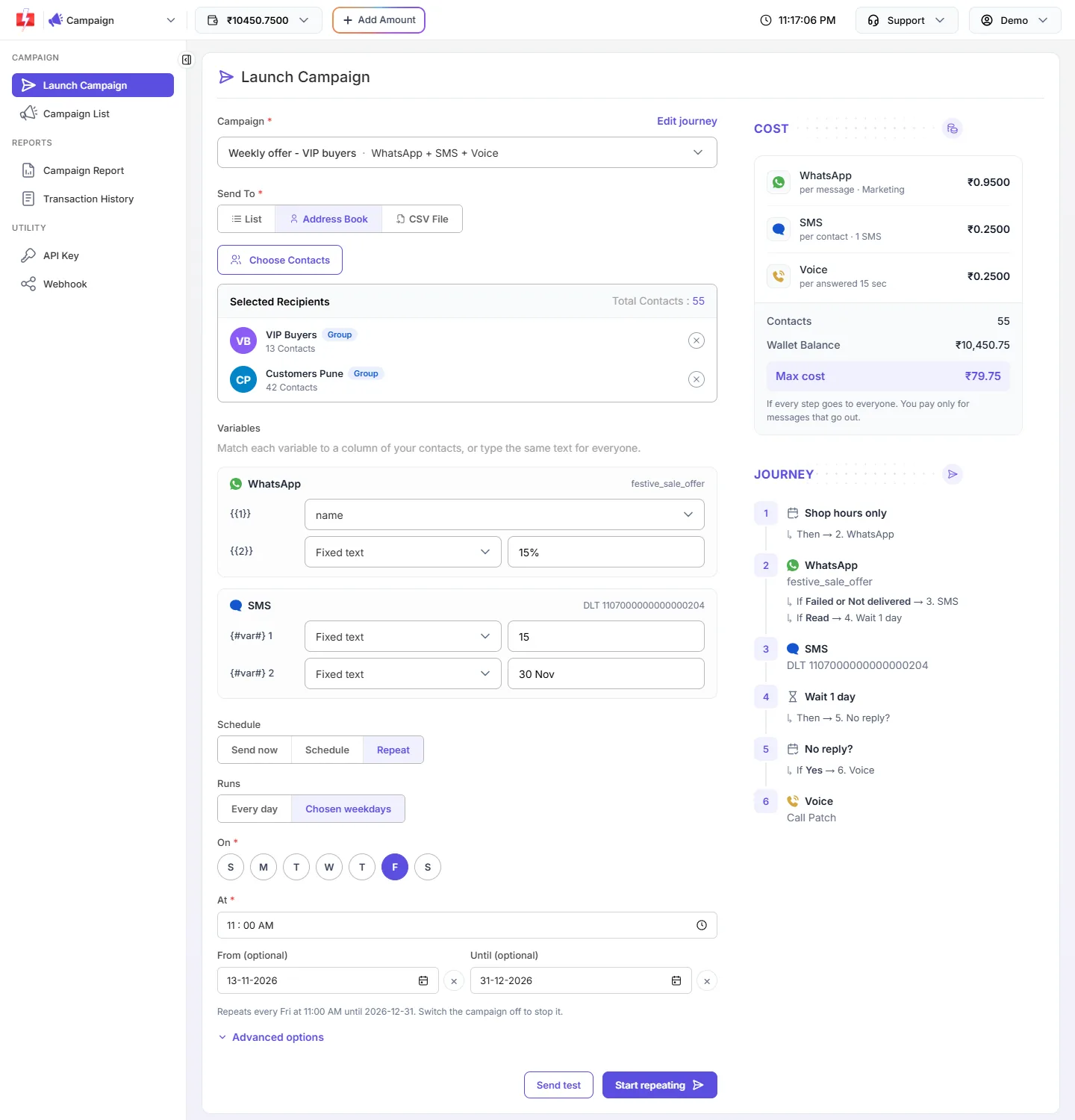
Starting with the cheaper rich channel brings the cost down and still reaches the full list. This example counts RCS and WhatsApp messages that were delivered; failed ones follow each channel's own refund rules. Before you launch, Campaign shows a cost estimate, and the launch is refused if your wallet cannot cover the first step. If the balance runs low mid-run, the run pauses and resumes on its own after you recharge.
How to set it up in Fast2SMS
You need at least one channel ready (an approved DLT sender and template for SMS, an approved WhatsApp template, an active RCS agent, or an approved voice file). Then:
- Open Campaign. In the panel, open the Campaign app ("Automated Journeys") and choose Launch Campaign, or go to Campaign List > Create Campaign.
- Pick a starting point. Click Start from a ready journey and choose a goal, for example Transactional / Service and "SMS first, WhatsApp if it fails, call if nothing lands", or start from a blank canvas.
- Fill each channel step. In the SMS step choose your DLT sender and template; in the WhatsApp step your number and approved template; in the RCS step your agent and message type (text, rich card, media or carousel); in the Voice step your approved audio and the call type (simple message, press a key, or call patch).
- Connect the outputs. Drag a line from a step's failed or not delivered output to the next channel. Use read or delivered outputs for follow-ups that should go only to people who saw the first message.
- Add Wait, Condition and Frequency steps where you need them: a wait of hours or days between messages, a yes/no check, and the days and hours a step is allowed to run.
- Add your audience. Upload a CSV, TXT, XLSX or XLS file (up to 20 MB and 10 lakh rows), pick an Address Book group, or paste numbers. Map sheet columns to SMS and WhatsApp placeholders; RCS text can use columns too. Duplicates and invalid numbers are dropped and counted.
- Send a test. Use Send test to try the journey on up to 10 numbers. Test sends are charged like normal sends.
- Launch. Choose Send now, Schedule (up to 90 days ahead) or Repeat (daily or chosen weekdays). Check the cost estimate and confirm.
- Watch the report. The run summary and each step's sent, delivered, read, answered, failed and not delivered counts update every 15 seconds while the run is live.
If you want the journey to start from your own software (for example when an invoice is created), call POST https://www.fast2sms.com/dev/campaign/start with the campaign ID and the numbers. "Get API code" in Campaign List shows ready code. For timed SMS-only flows, see the SMS automation guide.
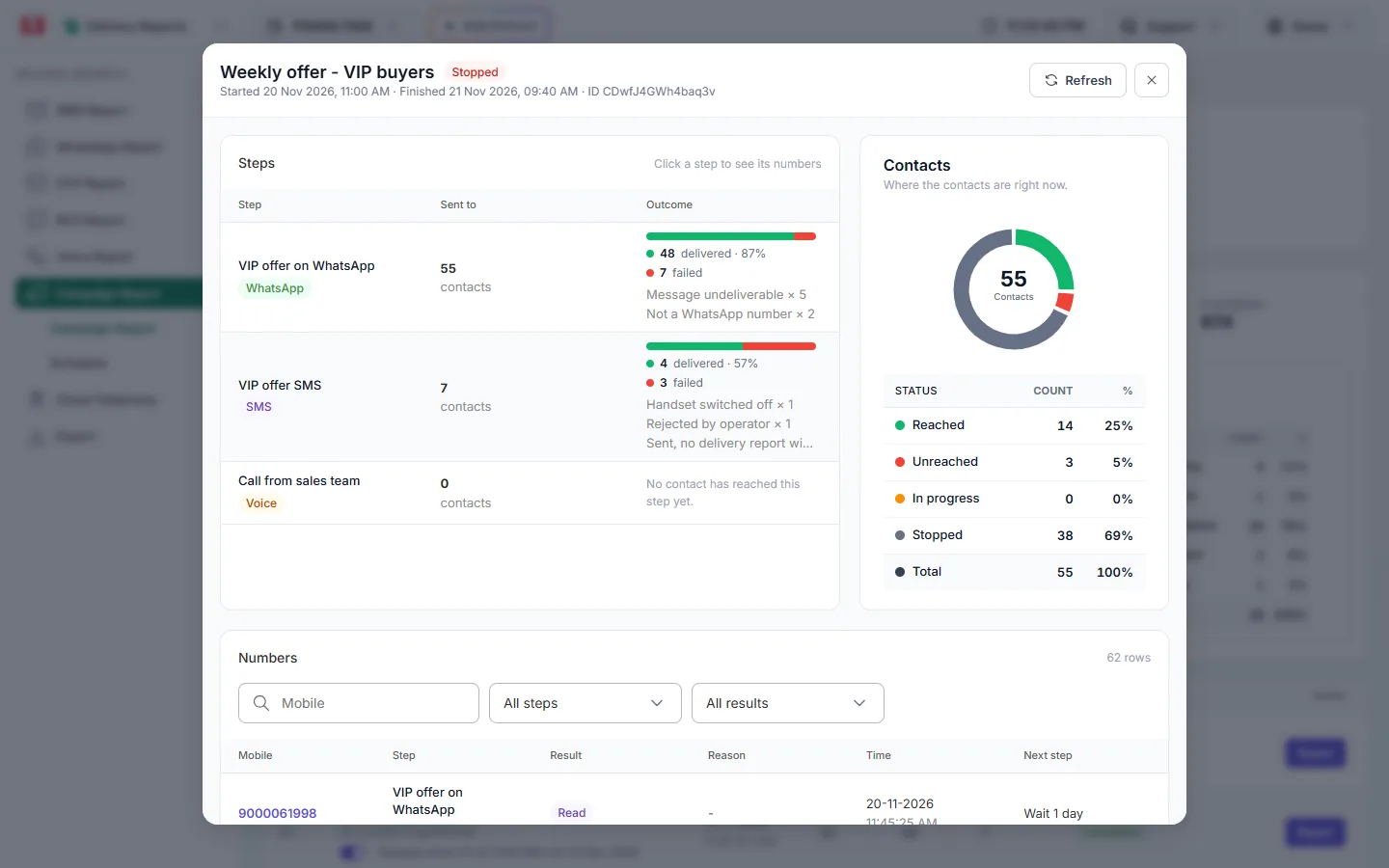
Reading the results by channel
The run report shows total, reached, unreached, opted out and cost, then one row per step with entered, sent, delivered, read, answered, not answered, failed, not delivered, cost and refund, average time and the top failure reasons. Open any number to see that contact's full journey. This is the easiest way to compare channels on your own customers: you can see, for your list, how many were reached by WhatsApp, how many needed SMS, and how many only answered a call. Export it as CSV from Delivery Reports > Export > Campaign.
Mistakes to avoid when choosing a channel
- Choosing on price per message alone. A cheap message that does not reach the customer costs more per result than a dearer one that does. Compare the cost per customer reached.
- Using WhatsApp marketing for updates. An order or payment update fits a utility template at ₹0.25, not a marketing one at ₹0.95. Do not add offers to utility templates either; Meta can change the category.
- Sending RCS with no next step. Phones without RCS get a failed result. Always connect RCS failed to WhatsApp or SMS.
- Sending the same blast on every channel at once. Customers who get the same offer four times feel spammed, and you pay four times. Use fallback so each person gets one message that works.
- Long voice messages. Every 15 seconds is a pulse. Keep reminders to one pulse and put the details in the SMS or WhatsApp.
- Expecting the call to say the name or amount. Voice audio is the same for everyone. Write the script to work for every listener.
- Forgetting the rules of each channel. DLT templates for SMS, approved Meta templates for WhatsApp, an approved RCS agent, and DND and timing for promotional SMS and calls.
- Calling at night. Put a Frequency step before a voice step so calls go only in daytime hours.
- Not testing. Send a test to your own numbers (up to 10) to see how each channel looks before launching to the whole list.
So which one should you use?
Use SMS when you must reach everyone and the message is short. Use WhatsApp when you want images, buttons and replies, at the same price as SMS for updates. Use RCS for branded rich offers on Android at ₹0.35. Use a voice call when the message must be heard. Then stop choosing just one: put them in order in a multi-channel campaign, so each customer gets the channel that works for them and you pay for the extra channel only when it is needed. Signup gives ₹50 free credit to try it, with no setup or monthly fee.
Frequently asked questions
What is the difference between SMS, WhatsApp and RCS?
SMS is plain text that reaches every mobile phone. WhatsApp is a chat in the WhatsApp app with images, buttons and replies. RCS is a rich message with your brand name, logo, cards and buttons inside the default messaging app on Android phones that support it.
Which is better for business: SMS, WhatsApp or RCS?
It depends on the job. SMS is best for reaching everyone with short alerts and OTPs, WhatsApp for rich offers, updates and conversations, and RCS for low-cost branded offers on Android. Most businesses use them together, with SMS as the backup.
Is a voice call a messaging channel too?
Yes. A bulk voice call (OBD) plays your recorded message when the customer picks up. It is the channel to use when a message must be heard, and on Fast2SMS it can be a step in the same journey as SMS, WhatsApp and RCS.
Which channel reaches the most people in India?
SMS and voice calls, because they work on every mobile phone, including feature phones, without internet. WhatsApp reaches people who use WhatsApp, and RCS reaches Android phones with RCS turned on.
What is the best channel for business messaging in India?
There is no single best channel. A good rule: start with the richest channel that suits the message (RCS or WhatsApp), and fall back to SMS and then a voice call for customers the first channel did not reach. The Campaign journey builder does this automatically.
Do I need a different provider for each channel?
No. Fast2SMS gives you SMS, WhatsApp Business API, RCS and voice calls in one account, paid from one wallet.
What is the SMS price on Fast2SMS?
At the time of writing, ₹0.25 per SMS from a ₹100 recharge, falling with bigger recharges to ₹0.21, ₹0.19, ₹0.17, ₹0.15, ₹0.13 and ₹0.11 per SMS. See bulk SMS pricing.
What is the WhatsApp message price on Fast2SMS?
At the time of writing, ₹0.95 per marketing message, ₹0.25 per utility message, ₹0.25 per authentication (OTP) message and ₹0.13 per service reply. See WhatsApp pricing.
What is the RCS message price on Fast2SMS?
At the time of writing, ₹0.35 per message, the same price for plain text, media and rich cards. See RCS pricing.
What is the voice call price on Fast2SMS?
At the time of writing, ₹0.25 per 15-second pulse, charged only for answered calls. Missed, busy and switched-off calls cost nothing. See the bulk voice call guide.
SMS vs WhatsApp cost: which is cheaper?
For updates and reminders they cost about the same: ₹0.25 per SMS at the entry slab and ₹0.25 per WhatsApp utility message. For offers SMS is cheaper: ₹0.11 to ₹0.25 per SMS against ₹0.95 for a WhatsApp marketing message.
How much do 1,000 messages cost on each channel?
At the time of writing: 1,000 SMS cost ₹250 at the entry rate (₹110 on the top slab), 1,000 WhatsApp utility messages ₹250, 1,000 WhatsApp marketing messages ₹950, 1,000 RCS messages ₹350, and 1,000 answered 15-second calls ₹250.
Is RCS cheaper than WhatsApp?
For offers, yes: RCS is ₹0.35 per message and WhatsApp marketing is ₹0.95. For updates, WhatsApp utility at ₹0.25 is cheaper than RCS at ₹0.35.
Is a voice call more expensive than SMS?
Not for short messages. A call up to 15 seconds costs ₹0.25 per answered call, the same as an SMS at the entry slab, and unanswered calls cost nothing. Longer audio costs more, because each 15 seconds is one pulse.
Is there a fee for using several channels together?
No. Fast2SMS Campaign has no campaign fee, builder fee or monthly fee. Every step is charged at that channel’s normal per-message rate from the same wallet.
Does a long SMS cost more?
Yes. An SMS that runs into two or more parts is charged per part, so keep marketing and reminder SMS short.
Are failed messages charged?
Refunds follow each channel’s own rules. Failed WhatsApp and RCS messages are refunded under their channel policy, SMS refunds apply on accounts with On Delivery billing, and voice charges only answered pulses.
Can I try all four channels for free?
Every new Fast2SMS account gets ₹50 free credit, with no setup or monthly fee. You can use it to send tests on the channels you have set up. Recharge from ₹100 when you are ready.
Is WhatsApp better than SMS for marketing?
WhatsApp usually gets more attention for an offer because it shows images and buttons and customers can reply. SMS reaches more people and costs less. The best results come from WhatsApp first and SMS for the people WhatsApp did not reach.
Why do some WhatsApp marketing messages not get delivered?
Meta limits how many marketing messages one person receives from businesses, and some customers do not use WhatsApp at all. Those messages fail, which is why a fallback SMS step is useful. See the SMS fallback guide.
Do I need DLT for WhatsApp messages?
No. DLT is for SMS. WhatsApp business messages instead need templates approved by Meta.
Do I need DLT for SMS?
Yes. Every business SMS in India needs a DLT-registered entity, sender ID and template. The Fast2SMS team helps with DLT registration for free; the operator portal has its own yearly fee.
Can WhatsApp messages reach DND numbers?
DND is a telecom rule for SMS and calls. WhatsApp has its own rules instead: opt-in, approved templates and Meta’s limits on marketing messages.
Should I send order updates on SMS or WhatsApp?
WhatsApp utility costs the same as an SMS at the entry slab and can add a track button or a document, so many businesses send updates on WhatsApp first and use SMS for customers WhatsApp did not reach.
Should OTPs go on SMS or WhatsApp?
Both work. SMS reaches every phone; a WhatsApp authentication message costs ₹0.25 and has a copy-code button. Fast2SMS Smart OTP can send on one and fall back to the other.
RCS vs WhatsApp: what is the main difference?
WhatsApp needs the WhatsApp app. RCS arrives in the built-in messaging app on Android phones with RCS turned on, with your verified brand name and logo. Both support rich media, buttons and read status.
Does RCS work on iPhone?
Treat RCS as a channel for Android phones with RCS turned on. When a phone cannot receive the RCS message, the step fails and the next step in your journey, such as WhatsApp or SMS, sends instead.
What happens if a customer’s phone does not support RCS?
The RCS step gives a failed result for that number. If you connect the failed output to a WhatsApp or SMS step, that customer gets the message on the next channel.
Do RCS messages need template approval?
You need an approved, active RCS agent (also called an RCS bot). Messages are then sent as plain text, rich cards, media or carousels from that agent.
What message types does RCS support?
Plain text, rich cards with an image and buttons, media, carousels of two or more cards, and suggestion buttons.
When can promotional RCS messages be sent?
Promotional RCS bots send between 7 AM and 10 PM.
Is RCS the same as SMS?
No. RCS is a richer messaging standard that shows brand details, cards and buttons and reports read status. It needs a phone that supports RCS, while SMS works everywhere. The RCS SMS page compares the two in detail.
Voice call vs SMS: when should I use a call?
Use a call when a message must be noticed, such as an overdue payment, an appointment tomorrow or an urgent notice, or when customers prefer listening to reading. Use SMS for codes, links and details people need to keep.
Can a voice call say the customer’s name or amount?
No. Voice calls play the same recorded audio to everyone, so put names, amounts and links in the SMS or WhatsApp message and keep the call general.
What types of voice calls can I send?
A simple recorded message, a press-a-key (DTMF) call, and a call patch that connects the customer to your agent group when they press a key. Calls can also retry at a set interval.
Which audio files can I use for voice calls in Campaign?
An approved voice file in MP3 or WAV format, up to 5 MB. Voice must be enabled on your account.
Can promotional voice calls reach DND numbers?
No. Promotional calls go only to Non-DND numbers in the permitted hours. Reminders and alerts about an existing service can reach every number.
How long should a voice reminder be?
Aim for 15 seconds or less, so each answered call is one pulse at ₹0.25. Say who is calling, the one thing they must know, and what to do next.
Can I use SMS, WhatsApp, RCS and voice in one campaign?
Yes. In Fast2SMS Campaign you place SMS, WhatsApp, RCS and Voice steps on one journey and connect them, for example RCS first, WhatsApp if it fails, then SMS, then a call.
What is message fallback?
Fallback means sending the message on another channel when the first one fails or is not delivered. In Campaign you wire a step’s failed or not delivered output to the next channel step.
How long does a step wait before sending the fallback?
Each channel step waits for a final result before it takes not delivered: by default 120 minutes for SMS, 30 minutes for WhatsApp and RCS and 15 minutes for voice. You can set anything from 1 minute to 24 hours.
Which outputs does each channel step have?
SMS: sent, delivered, failed and not delivered. WhatsApp and RCS: the same plus read. Voice: answered, not answered and failed.
Can I stop calling people outside office hours?
Yes. Put a Frequency step before the voice step. It lets the journey continue only on the weekdays and between the times you choose (09:00 to 21:00 by default).
Can the journey check if the customer replied?
Yes, for WhatsApp and RCS. A Condition step can check "Reply received (WhatsApp / RCS)" and send the next message only to people who did not reply.
Can the journey stop when the customer pays?
Yes, if your software tells Fast2SMS. Post an event such as payment_received to the event API and a Condition step can branch on it.
Does Campaign track link clicks automatically?
No. A Condition step can check "Link clicked" only when your own software posts the click as an event to the event API.
Is there a ready-made journey that uses several channels?
Yes. Campaign has 16 ready journeys under "Start from a ready journey", such as "SMS first, WhatsApp if it fails, call if nothing lands" and "Rich RCS card first, then WhatsApp, then SMS".
Is using four channels more expensive than using one?
Usually not by much, because the second and third channels send only to people the first one did not reach. In the example on this page, a WhatsApp, SMS and voice reminder to 10,000 contacts costs ₹2,545, close to ₹2,500 for SMS alone.
Can I start a multi-channel journey from my own software?
Yes. Call POST https://www.fast2sms.com/dev/campaign/start with your API key, the campaign ID and the numbers. The journey starts for those numbers straight away.
Is sending the same message on all channels at once a good idea?
No. Customers get the same message several times and you pay several times. Send one channel first and use the others only as fallback. Omnichannel vs multichannel explains the difference.
How do I set up a multi-channel journey in Fast2SMS?
Open Campaign, choose Launch Campaign or Campaign List > Create Campaign, pick "Start from a ready journey" or a blank canvas, fill each channel step, connect failed or not delivered outputs, add your audience, send a test to up to 10 numbers, then Send now, Schedule or Repeat.
What do I need before using each channel?
SMS: an approved DLT sender and template. WhatsApp: a WhatsApp Business API number and approved templates. RCS: an approved, active RCS agent. Voice: an approved voice file and voice enabled on your account.
How many contacts can I upload?
Up to 10 lakh rows in a CSV, TXT, XLSX or XLS file of up to 20 MB, or an Address Book group, or a pasted list. Only Indian mobile numbers are accepted; duplicates and invalid numbers are dropped and counted.
How do I compare channels on my own customers?
Run one journey and open the Campaign Report. Each step shows entered, sent, delivered, read, answered, failed, not delivered, cost and refund, so you can see how many customers each channel reached.
Does Campaign support email?
No. Campaign covers four channels: SMS, WhatsApp, RCS and voice calls.
Can I send to international numbers?
No. Campaign accepts Indian mobile numbers only (10 digits starting with 6 to 9).
Where can I read more about planning a journey across channels?
Start with the omnichannel marketing platform guide, then the WhatsApp drip campaign and CPaaS India guides.