Win Back Campaign: Bring Inactive Customers Back with WhatsApp, RCS and SMS
No monthly fee · Pay as you go from ₹100 · Free setup help on a call
A win back campaign is a short series of messages that brings back customers who have stopped buying from you. On Fast2SMS you build it once in Campaign: an RCS card or WhatsApp offer first, SMS when that fails, and a last reminder a week later, all timed automatically. There is no campaign or monthly fee; at the time of writing, each message costs its normal rate, from ₹0.25 per SMS.
This guide covers when a customer counts as inactive, five win-back campaign examples with timing tables, copy-ready "we miss you" messages for WhatsApp, RCS, SMS and voice, a real cost example in rupees, and the exact setup steps in the Fast2SMS panel.
What is a win back campaign?
A win back campaign is a planned set of messages sent to customers who bought from you before but have gone quiet. The aim is simple: remind them you exist, give them a reason to return, and stop as soon as they do.
You will also hear it called a re-engagement campaign, a reactivation campaign or a lapsed customer campaign. The words are used loosely, but there is a small difference worth knowing:
| Term | Who it targets | Typical goal |
|---|---|---|
| Re-engagement campaign | Customers who still buy now and then but open fewer messages | Get attention back before they drift away |
| Win back campaign | Customers who have not bought for a long time | One new purchase, booking or renewal |
| Reactivation campaign | Signed-up users who never became active, or paused accounts | First use or first order |
| Renewal campaign | Members or subscribers whose plan has lapsed | Renew the plan |
All four use the same tools. What changes is who is on the list, what you offer, and how long you keep trying. A good win back campaign is short: three or four messages over one to three weeks, across channels the customer actually reads, with a clear end.
Why bother? Because a past customer already knows your brand, already trusted you with money once, and is usually cheaper to bring back than a brand-new customer is to find. Even a small share of returning buyers can pay for the whole campaign many times over, because the cost per message is a few paise.
When is a customer inactive?
A customer is inactive when they have gone noticeably longer than usual without buying. There is no single number; it depends on how often people normally buy from you.
A simple rule: look at the usual gap between two orders for your regular customers, then double it. Anyone past that gap is a win-back candidate. Here are starting points by business type:
| Business | Usual buying gap | Treat as inactive after | Good win-back offer |
|---|---|---|---|
| Grocery, dairy, pharmacy delivery | 1-2 weeks | 30 days | Free delivery or a small flat discount |
| Fashion, footwear, beauty online store | 1-3 months | 90 days | Percentage off the next order, new arrivals |
| Salon, spa, clinic, car service | 3-6 weeks | 60 days | Booking reminder with a slot link |
| Restaurant, cloud kitchen | 1-2 weeks | 30-45 days | Free dessert or a combo price |
| Gym, coaching, subscription box | Monthly plan | 7-15 days after the plan ends | Renewal discount or a free extra week |
| Electronics, furniture | 1-2 years | 12 months | Accessories, service plans, exchange offers |
You do not need fancy software to find these people. Export your orders from your billing system, store backend or CRM, sort by last order date, and keep the customers past your cut-off. Add their name, last product, coupon code and store link as columns. Those columns become the personal details in your messages.
Why WhatsApp, RCS and SMS work better than email alone for win-back in India
Most win-back advice online is written for email. In India, many customers rarely open promotional email, but almost all of them see WhatsApp and SMS on the phone they carry all day. That is why a win-back sequence here works best on phone channels.
- RCS shows a branded rich card with an image, your verified business name and buttons, right inside the normal Messages app on Android phones that support it. It is the most eye-catching option for an offer.
- WhatsApp is where people already chat. An approved marketing template with an image and a "Shop now" button feels familiar, and you can see who read it.
- SMS reaches every phone, including feature phones and phones without RCS or WhatsApp. It is the safety net that makes sure nobody is missed.
- Voice calls suit customers who prefer to listen, such as older or rural customers, and memberships where a human conversation helps. A call patch can connect the customer to your team with one key press.
The real gain comes from using them together. With the Fast2SMS journey builder, the cheapest or richest channel goes first, and the next channel only sends to people the first one did not reach. You stop paying twice for the same person, and you stop missing people who never see one channel. If you are new to this idea, the omnichannel marketing platform guide explains it from the start.
What does a win-back journey look like?
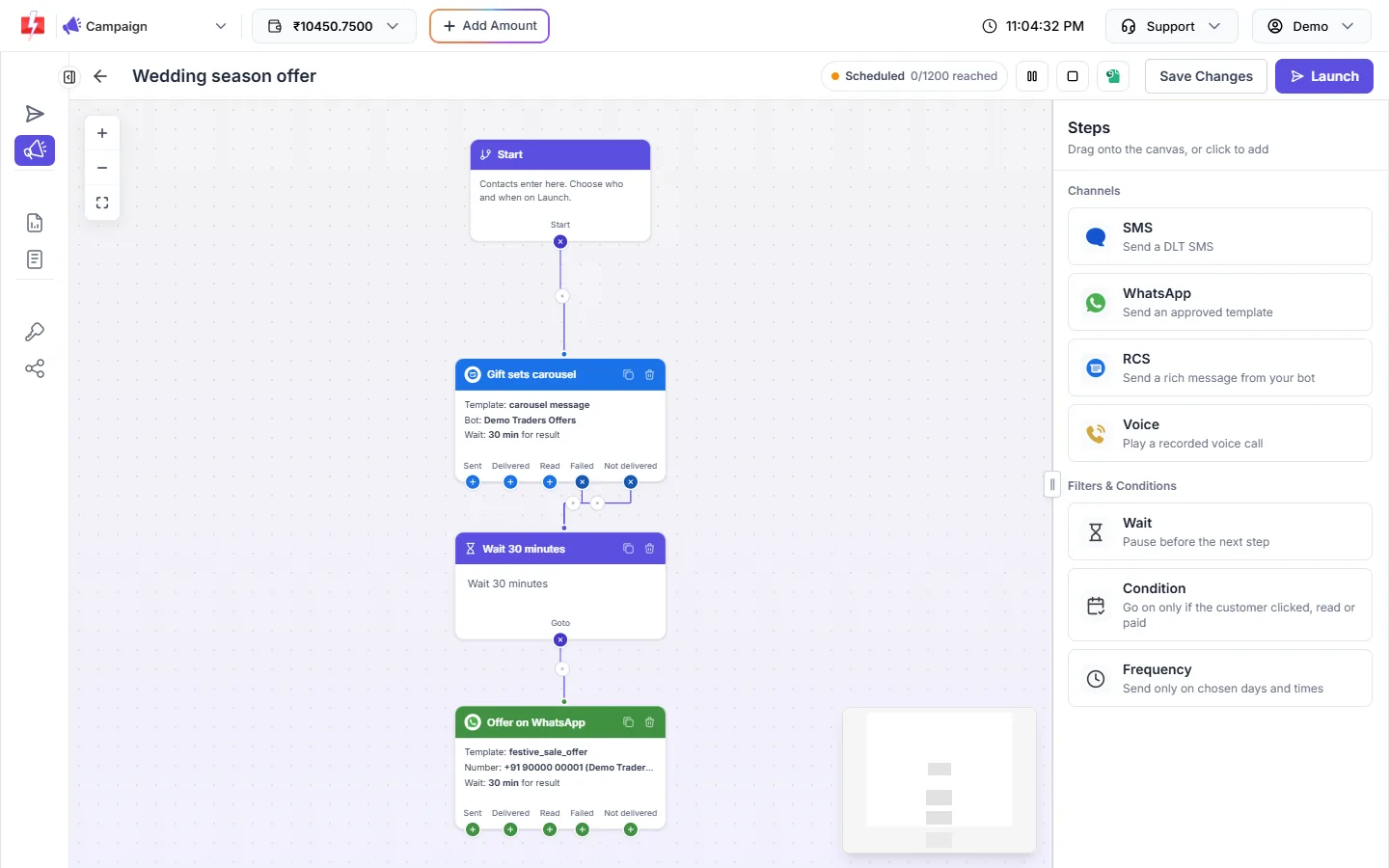
A good win-back journey has one first touch, an automatic fallback for people the first touch misses, a pause, and one last reminder only for people who have not come back. Here is the ready-made Fast2SMS journey with a final reminder added.
The timing below is a sensible default for a store whose customers usually buy every month or two. Change the waits to suit your own buying cycle.
| Step | When | Channel | Message | If it fails |
|---|---|---|---|---|
| 1 | Day 0, 11:00 am | RCS rich card | "We miss you" card with an image, the offer and a "Shop now" button | Failed, or not delivered within the step's wait (30 minutes by default): wait 1 hour, go to step 2. A phone without RCS counts as failed. |
| 2 | Day 0, about 1-2 hours later | WhatsApp marketing template | Same offer with an image header and a button | Failed or not delivered: wait 1 hour, go to step 3 |
| 3 | Day 0, early afternoon | SMS (DLT promotional template) | Short offer with code and link | Shown as failed in the report; nothing more to try that day |
| 4 | Day 7 | Condition | Did your store post a purchase event for this number in the last 7 days? | Yes: the customer leaves the journey. No: go to step 5. |
| 5 | Day 7, inside a Frequency window | SMS or WhatsApp | "Last 2 days for your 15% off" reminder | End of journey. Customers who still do not return go to a later, different campaign. |
Connect the delivered and read outputs of steps 1, 2 and 3 to the same Wait 7 days step, so everyone who received the first offer, on whichever channel, arrives at the check on day 7.
Five win back campaign examples you can copy
These five journeys cover most win-back needs. The first two are ready-made journeys in the Fast2SMS picker under the Re-engagement goal; the others you build from blank in a few minutes.
1. RCS card first, then WhatsApp, then SMS
Best for online stores and brands with many Android customers. The rich card gets attention, WhatsApp catches people whose phone does not support RCS or where RCS failed, and SMS catches everyone else. In the picker this is "Win back with an RCS card, then WhatsApp", with an Offer SMS as the last step. Use it when your offer has a strong picture: a new collection, a product the customer bought before, or a festive look.
2. WhatsApp offer, then an RCS card for people who did not click
Best when you want a second, richer try only for people who ignored the first offer. The ready journey "WhatsApp offer, RCS card if no click in 3 days" sends a WhatsApp offer, waits 3 days, then checks a Condition for "Link clicked". One honest note: Fast2SMS does not track clicks on its own. Your website or app must post a click event for that number to the event API (for example when the customer lands on your offer page with a tracking parameter). Without those events, the condition sees no clicks and everyone gets the RCS card.
| Step | When | Channel | Message | If it fails |
|---|---|---|---|---|
| 1 | Day 0 | Offer with image and "View offer" button | Failed or not delivered: you can add an SMS step here | |
| 2 | Day 0 to 3 | Wait | 3 days | - |
| 3 | Day 3 | Condition | "clicked" event received in the last 3 days? | Clicked: leave. Not clicked: step 4. |
| 4 | Day 3 | RCS rich card | Same offer, different picture, stronger headline | Failed: optional SMS step |
3. Three-touch "we miss you" with a growing offer
Best for shops with thin margins that do not want to open with a big discount. Day 0: a friendly "we miss you" with new arrivals and no discount. Day 5: a small offer such as free delivery. Day 12: the real discount with a deadline. Put a Condition before day 5 and day 12 that checks your purchase event, so anyone who buys early stops receiving messages. Most of your returning customers will come back on the softer messages, which protects your margin.
4. SMS then a voice call, for feature-phone and rural lists
Best for agri-input dealers, local retailers, kirana distributors and service businesses whose customers use basic phones. Send an SMS first; if it is not delivered, place a short recorded call. Voice messages are recorded audio, so the same call goes to everyone; the personal details stay in the SMS. Keep the call under 30 seconds and say who is calling in the first sentence. Promotional SMS and voice follow DND rules, so DND numbers on a promotional route are not reached.
5. Lapsed membership: WhatsApp, then a call patch to your team
Best for gyms, coaching classes, clubs, insurance and subscription services, where a short conversation often closes the renewal. Send a WhatsApp renewal reminder; if there is no reply within a day, use a Condition on "Reply received (WhatsApp / RCS)" and send a voice call of the call patch type: "Press 1 to speak to our membership desk." When the customer presses 1, the call connects to the agent group you set up, on your agents' own phones. This mirrors the ready journey "WhatsApp, no reply: call, then an SMS" under Lead follow-up.
| Step | When | Channel | Message | If it fails |
|---|---|---|---|---|
| 1 | Day 0, 10 am | "Your membership ended on the 1st. Renew this week and get 1 extra week free." | Not delivered: go straight to step 3 | |
| 2 | Day 1 | Condition | Reply received (WhatsApp) in the last 1 day? | Replied: leave, your team answers in the inbox. No reply: step 3. |
| 3 | Day 1, inside 10 am-7 pm Frequency window | Voice (call patch) | Recorded reminder, "press 1 to talk to us" | Not answered or failed: step 4 |
| 4 | Day 1, after the call | SMS | Renewal link and your desk number | End |
We miss you message templates (WhatsApp, RCS, SMS and voice)
Good win-back messages are short, personal and specific. Use the customer's name, mention what they bought or liked, give one clear offer with an end date, and include one link or button. Below are copy-ready texts. Replace the brackets with your own details. WhatsApp templates must be approved by Meta and SMS templates must be registered on DLT before you can use them.
WhatsApp marketing templates
- "Hi {{1}}, it has been a while! We have added new styles since your last visit to {{2}}. Here is 15% off your next order with code {{3}}, valid till {{4}}. Tap below to shop."
- "Hi {{1}}, we miss you at {{2}}. Your favourite {{3}} is back in stock. Order this week and delivery is on us."
- "Hello {{1}}, your last service at {{2}} was 2 months ago. Book your next visit this week and get {{3}} off. Pick a slot with the button below."
- "Hi {{1}}, your {{2}} membership ended on {{3}}. Renew before {{4}} and get 1 extra week free. Reply here if you have any questions."
RCS rich card text
- Title: "We miss you, {{name}}" Description: "Come back for 15% off everything new this season. Code BACK15, valid 7 days." Buttons: "Shop now", "See new arrivals".
- Title: "Your favourites are back" Description: "Hi {{name}}, the items you loved are back in stock at Demo Traders. Free delivery till Sunday." Button: "Order now".
In RCS steps you write the sheet column name inside double curly brackets, such as {{name}}, and each customer sees their own value.
SMS templates (register as promotional on DLT)
- "Hi {#var#}, we miss you at Demo Traders! Get 15% off your next order with code {#var#}. Shop: {#var#} Valid till {#var#}."
- "{#var#}, it's been a while. Your next order ships free this week. Order now: {#var#} - Demo Traders"
- "Last 2 days! Your 15% welcome-back offer ends {#var#}. Use code {#var#} at {#var#} - Demo Traders"
Each DLT variable can hold up to 30 characters, so use short links and short coupon codes.
Voice call script (15-25 seconds)
"Namaste, this is Demo Traders, Station Road. It has been a while since your last visit, and we have a special welcome-back offer for you this week. Please check the SMS we have sent you, or press 1 to speak to our team. Thank you."
Hindi versions
- WhatsApp: "नमस्ते {{1}}, काफ़ी समय हो गया! आपके लिए अगले ऑर्डर पर 15% की छूट, कोड {{2}}, {{3}} तक मान्य। नीचे बटन दबाकर ऑर्डर करें।"
- SMS: "नमस्ते {#var#}, हमें आपकी याद आई! अगले ऑर्डर पर 15% छूट, कोड {#var#}. अभी ऑर्डर करें: {#var#} - Demo Traders"
Hindi and other Indian-language SMS are sent as Unicode, which fits fewer characters per SMS part, so keep them short. More drip-style message ideas are in the WhatsApp drip campaign guide.
How to pick the audience for a win back campaign
Start with a clean list of real past customers, split into a few groups by how long they have been away and how valuable they were. Smaller, well-chosen groups get better results than one giant list.
- Segment by time away. Customers inactive for 60-90 days are much easier to bring back than customers gone for a year. Give them different messages.
- Segment by value. Big past spenders deserve a bigger offer or a phone call; one-time small buyers get a lighter touch.
- Leave out recent complaints. Someone who had a bad delivery last month needs an apology from your team, not a discount blast.
- Use only people who agreed to hear from you. Customers who shared their number to buy from you and did not opt out are your list. Never buy lists.
Getting the list into Fast2SMS is easy:
- Upload a sheet: CSV, TXT, XLSX or XLS, up to 20 MB and up to 10 lakh rows. Duplicates and invalid numbers are removed and counted for you. Only Indian mobile numbers are accepted (10 digits starting with 6-9; a 91 or 0 prefix is removed).
- Address Book groups: keep a group such as "Inactive 60 days" and refresh it from your system.
- Paste numbers for a small test group.
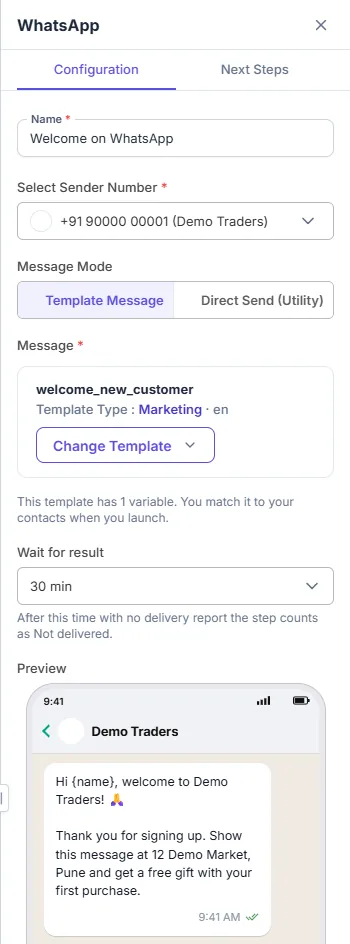
Every column in your sheet becomes a variable. Map the WhatsApp and SMS placeholders to columns such as name, coupon and link, or to fixed text. RCS steps read {{column}} in the text. Voice calls play the same recording to everyone.
Run it every month, or trigger it from your system
You can run a win back campaign as a one-off, on a Repeat schedule (daily or on chosen weekdays at a set time, with optional from and until dates) against an Address Book group you keep up to date, or from your own software. The third option is the most precise: each night your store backend or CRM finds customers who crossed 60 days since their last order today and starts the journey for just those numbers with one API call.
curl -X POST https://www.fast2sms.com/dev/campaign/start \
  -H "authorization: YOUR_API_KEY" \
  -H "Content-Type: application/json" \
  -d '{"campaign": "YOUR_CAMPAIGN_ID",
       "recipients": [
         {"mobile": "9000012345", "name": "Rahul", "coupon": "BACK15"},
         {"mobile": "9000012346", "name": "Priya", "coupon": "BACK15"}
       ]}'
The campaign ID and ready code in cURL, PHP, Node.js and Python are under Campaign List, the ⋮ menu, "Get API code". Up to 1,000 numbers go in one call, and API numbers start straight away. All calls for one campaign on the same day join one run named "your campaign · API", and a number already in that day's run is skipped, so a script that runs twice by mistake does not message anyone twice. The full developer flow is in the event-triggered messaging guide.
How do you stop messaging customers who come back?
Post a purchase event from your store to Fast2SMS, and put a Condition step before every later message that checks for it. Customers who bought leave the journey; the rest continue.
curl -X POST https://www.fast2sms.com/dev/campaign/event \
  -H "authorization: YOUR_API_KEY" \
  -H "Content-Type: application/json" \
  -d '{"number": "9000012345", "event": "purchase_made", "value": "ORDER-1042"}'
In the Condition step choose "Your event", the event name purchase_made, "at least 1", and a time window such as the last 7 days. Other ways to stop or shorten the journey:
- Reply received (WhatsApp / RCS): if the customer replies, move them out of the automatic messages and let your team answer in the inbox.
- Opt-outs: numbers that have blocked you on WhatsApp, unsubscribed on RCS or are on the voice opt-out list leave the journey on their own. Fast2SMS does not process a typed "STOP" automatically, so when someone asks to stop, remove them from your lists yourself.
- Stop the whole run: you can pause, resume or stop a run from the panel or the API. Contacts still waiting when you stop are not charged.
How much does a win back campaign cost in India?
There is no campaign fee, no builder fee and no monthly fee on Fast2SMS. Each step is charged at that channel's normal rate from your one wallet, and a fallback step is paid only for the people who reach it.
At the time of writing, the rates are ₹0.35 per RCS message (the same for text, media or rich card), ₹0.95 per WhatsApp marketing message, ₹0.25 per SMS from a ₹100 recharge going down to ₹0.11 on bigger recharges, and ₹0.25 per 15-second pulse for answered voice calls. GST is extra. Check the RCS pricing, WhatsApp pricing and SMS pricing pages for the latest numbers.
Example: 5,000 customers inactive for 60 days, using the journey above. The reach figures are only assumptions for the maths; your real numbers will differ.
| Step | Contacts reaching it (assumed) | Rate | Cost |
|---|---|---|---|
| RCS rich card | 5,000 sent, 3,000 delivered | ₹0.35 | ₹1,750 charged; failed RCS refunded as per the RCS refund policy, so about ₹1,050 if 2,000 fail |
| WhatsApp offer (fallback) | 2,000 | ₹0.95 | ₹1,900 |
| SMS (fallback) | 300 | ₹0.25 | ₹75 |
| Day 7 last-offer SMS, only non-buyers | 4,400 | ₹0.25 | ₹1,100 |
| Total | about ₹4,125 plus GST |
For comparison, one WhatsApp marketing message to all 5,000 people costs ₹4,750 on its own and still misses everyone without WhatsApp. If only 2% of the list (100 customers) come back with an average order of ₹800, that is ₹80,000 in sales from about ₹4,000 in messages.
A few billing points worth knowing. You see a cost estimate before you launch, and a launch is refused if your wallet cannot cover the first step. If the balance runs low in the middle of a run, the run pauses and resumes by itself after you recharge (it checks every 10 minutes), and it is stopped after 3 days on low balance. SMS refunds for undelivered messages apply only on accounts with "On Delivery" billing, and voice charges only answered pulses. New accounts get ₹50 free credit to test.
How to set up a win back campaign in Fast2SMS
You need a Fast2SMS account and at least one ready sender. The whole setup takes about 15 minutes once your templates are approved.
- Get your senders ready. For SMS, an approved DLT sender ID with an approved promotional template linked to it. For WhatsApp, a connected number with an approved marketing template. For RCS, an approved and active RCS bot. For voice, voice enabled on your account and an approved audio file (MP3 or WAV up to 5 MB).
- Open the builder. In the panel go to Campaign, then Campaign List, then Create Campaign (or Campaign, Launch Campaign, Create new campaign).
- Click "Start from a ready journey". Pick the Re-engagement goal and choose "Win back with an RCS card, then WhatsApp" or "WhatsApp offer, RCS card if no click in 3 days". The steps and lines appear on the canvas.
- Fill each channel step. Choose your sender and template in each SMS, WhatsApp and RCS step, and map the variables to your sheet columns such as name, coupon and link.
- Check the outputs. SMS steps have sent, delivered, failed and not delivered outputs; WhatsApp and RCS also have read. Make sure failed and not delivered lead to the next channel, and delivered or read lead to the Wait step.
- Add Wait, Condition and Frequency steps. Add a Wait of 7 days, then a Condition for your purchase_made event, then the last-offer step. Add a Frequency step before messages so they only go out on chosen days between set times, for example 10 am to 8 pm.
- Save, then open Launch Campaign. Pick the campaign and add your audience: upload the sheet, pick an Address Book group or paste numbers.
- Send a test to up to 10 numbers. Use your own phone and a colleague's. Test sends are charged like normal sends, and they show you exactly what customers will see.
- Check the cost estimate and launch. Choose Send now, Schedule (up to 90 days ahead) or Repeat for a monthly win-back run. You can also set contact limits per minute, hour or day.
- Watch the Campaign Report. It refreshes every 15 seconds while the run is live.
How do you measure a win back campaign?
Measure it by the number of customers who bought again, and the money they spent, against what the messages cost. Delivery and read numbers tell you whether the message arrived; sales tell you whether it worked.
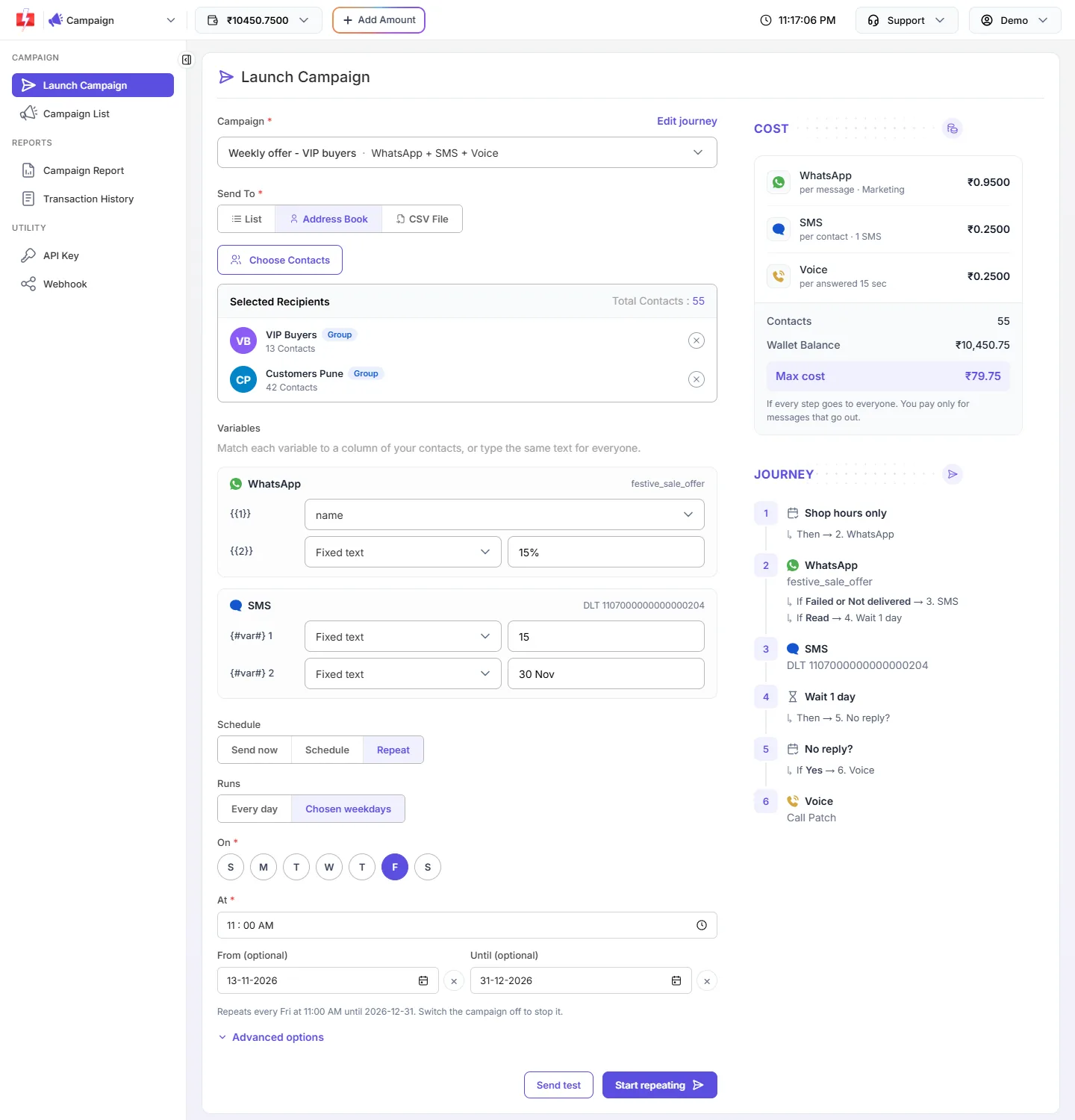
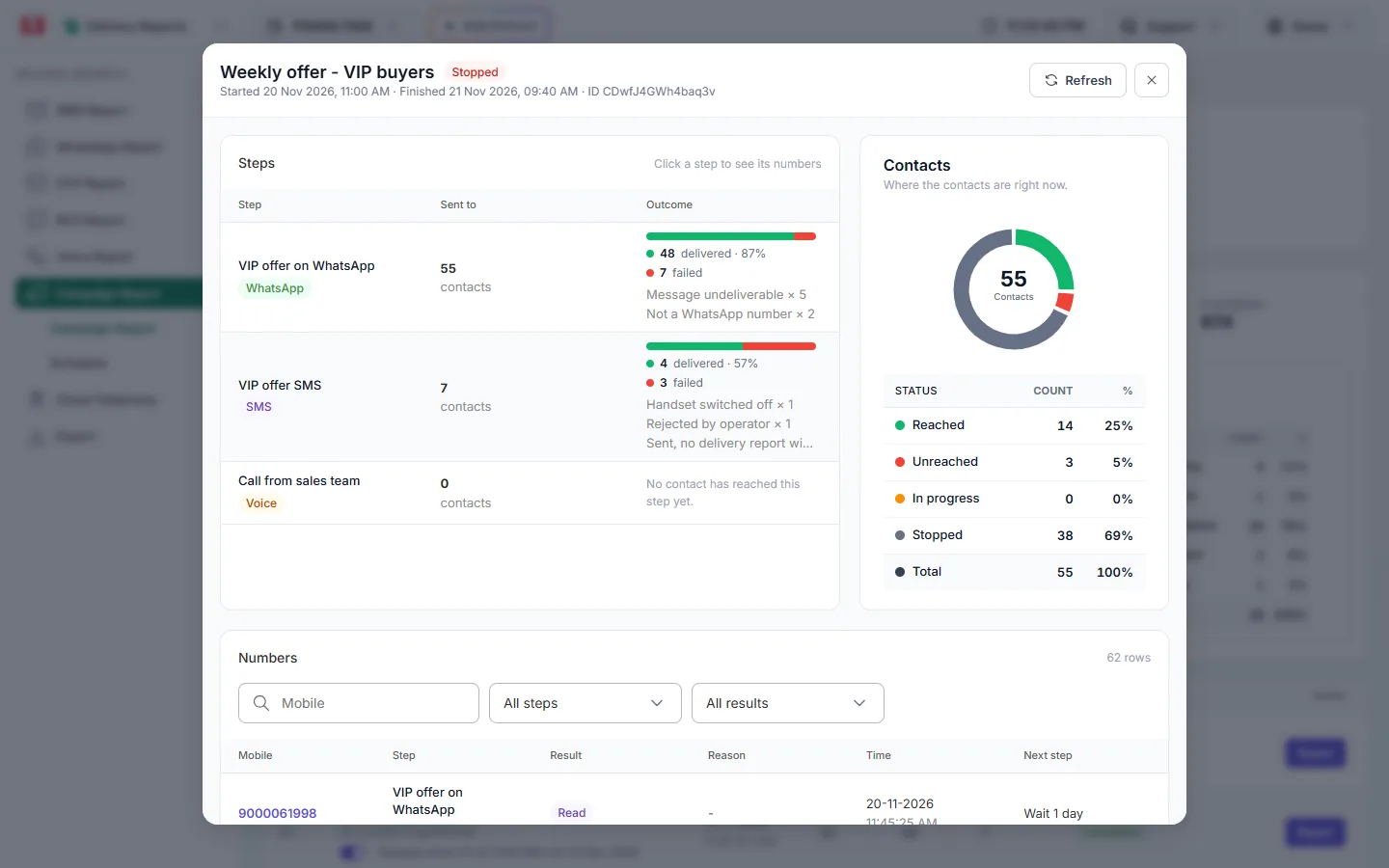
The Fast2SMS Campaign Report gives you the message side:
- Run summary: total, reached, unreached, opted out, stopped, in progress, cost, refund and net cost.
- Per step: entered, sent, delivered, read, answered, not answered, failed and not delivered, with cost, refund, average time and the top failure reasons.
- Per number: each customer's full journey, step by step.
- Export: download the data from Delivery Reports, Export, Campaign, and match it against your orders.
Your sales side comes from your own system. Compare customers who received the campaign with a small group you deliberately left out. Fast2SMS does not split audiences for you, so set aside, say, 10% of the inactive list in your sheet and do not upload them. If the messaged group comes back at 4% and the held-out group at 1%, the campaign earned the 3% difference.
| Metric | Where it comes from | What a good result looks like |
|---|---|---|
| Reached | Campaign Report | Most of the list, thanks to SMS fallback |
| Read (WhatsApp, RCS) | Campaign Report | A healthy share; low reads mean a weak first line or bad timing |
| Win-back rate | Your orders vs the list | Clearly above your held-out group |
| Revenue per ₹1 spent | Your orders vs net cost | Well above 1; many stores see far more |
| Opt-outs and blocks | Campaign Report | Low; a jump means too many messages or the wrong audience |
To feed results back automatically, set up Campaign webhooks under Webhook, Campaign. Every step result and run status is posted to your server with the step name, channel, status, reason, cost and next step.
Mistakes to avoid in win back campaigns
- Sending the same message on every channel to everyone. Wire the next channel to the failed and not delivered outputs, so each person gets one offer, not three.
- Leading with your biggest discount. Start soft. Many customers only needed a reminder.
- No end to the journey. Three or four messages over one to three weeks is enough. After that, move people to a slower list or let them go.
- Forgetting buyers. Without a purchase event and a Condition, someone who came back on day 2 still gets "we miss you" on day 7.
- Promising features you do not have. Fast2SMS has no automatic click tracking; branch on clicks only if your website posts click events.
- Sending at night. Use a Frequency step. Promotional SMS is held outside the promotional window when that rule applies, and promotional RCS bots send only between 7 AM and 10 PM.
- Ignoring opt-outs. Remove people who ask to stop. Fast2SMS does not act on a typed "STOP" by itself.
- Long or vague voice messages. Say who is calling, the one offer, and what to do, in under 30 seconds.
- Unregistered or long SMS variables. SMS must use an approved DLT template, and a variable longer than 30 characters is rejected for that number.
- Not testing. Send a test to your own phones first and read every step as a customer would.
Ready to bring your quiet customers back? Build the win-back journey in Campaign, test it on your own number with the free credit, and launch it to your first inactive segment this week. For a broader starting point, read the marketing automation guide, and for the fallback rules in detail, the WhatsApp to SMS fallback guide.
Frequently asked questions
What is a win back campaign?
A win back campaign is a short series of messages sent to customers who bought before but have stopped buying. It reminds them of your brand, gives a reason to return and stops as soon as they buy again.
What is a re-engagement campaign?
A re-engagement campaign targets customers whose interest is fading, such as people who still buy now and then but read fewer messages. A win back campaign targets customers who have stopped buying altogether. Both use the same tools.
What is the difference between a win back and a reactivation campaign?
Win back is for past buyers who went quiet. Reactivation is usually for users who signed up but never became active, or accounts that were paused. The message and the offer differ, but the journey is built the same way.
Why should I run a win back campaign?
Past customers already know and trusted your brand, so bringing them back is usually cheaper than finding new ones. With messages costing a few paise each, even a small number of returning buyers can pay for the whole campaign.
When is a customer considered inactive?
When they go clearly longer than usual without buying. A simple rule is to take the normal gap between orders for your regular customers and double it. For grocery that may be 30 days; for fashion, 90 days; for electronics, a year.
How many messages should a win back campaign have?
Three or four messages over one to three weeks is usually enough. Add a Condition before each later message so customers who have already bought stop receiving them.
Which channel is best for win back campaigns in India?
Use more than one. RCS and WhatsApp are rich and eye-catching, SMS reaches every phone, and a voice call suits customers who prefer to listen. In Fast2SMS Campaign the next channel sends only to people the first one missed.
Is email needed for a win back campaign?
No. Fast2SMS Campaign uses SMS, WhatsApp, RCS and voice calls; it does not send email. In India, many customers see WhatsApp and SMS far more reliably than promotional email.
What are some win back campaign examples?
RCS card then WhatsApp then SMS; a WhatsApp offer followed by an RCS card for people who did not click; a three-touch "we miss you" with a growing offer; SMS then a voice call for feature-phone lists; and a WhatsApp renewal reminder followed by a call patch to your team.
What should a we miss you message say?
Use the customer’s name, mention what they bought or liked, give one clear offer with an end date and add one link or button. Keep it short and friendly.
Can you give a we miss you WhatsApp message sample?
"Hi Rahul, it has been a while! We have added new styles since your last visit. Here is 15% off your next order with code BACK15, valid till Sunday. Tap below to shop." It must be approved by Meta as a marketing template first.
What is a good inactive customer SMS?
"Hi Rahul, we miss you at Demo Traders! Get 15% off your next order with code BACK15. Shop: [short link]. Valid till Sunday." It must be registered as a promotional template on DLT, and each variable can hold up to 30 characters.
Can I send win back messages in Hindi?
Yes. Register Hindi SMS templates on DLT and get Hindi WhatsApp templates approved by Meta. Hindi SMS is sent as Unicode, which fits fewer characters per part, so keep it short.
Can a voice call say the customer’s name?
No. Voice steps play your recorded audio, so every customer hears the same message. Put personal details such as the name and coupon in the SMS or WhatsApp step.
How long should a win back voice call be?
Under 30 seconds, ideally 15 to 25. Say who is calling, give the one offer and tell the customer what to do next, such as pressing 1 to talk to your team.
Can an RCS message include the customer’s name?
Yes. In RCS steps you write the sheet column name inside double curly brackets in the text, and each customer sees their own value.
Should I offer a discount in the first message?
Not always. Many customers only need a reminder. Start with a friendly note or new arrivals, then add a small offer, and save your best discount for the last message.
Is there a ready-made win back journey in Fast2SMS?
Yes. Under "Start from a ready journey", the Re-engagement goal has "Win back with an RCS card, then WhatsApp" and "WhatsApp offer, RCS card if no click in 3 days".
How does the fallback from RCS to WhatsApp to SMS work?
Each channel step has outputs such as delivered, read, failed and not delivered. You connect failed and not delivered to the next channel. If RCS fails or the phone does not support RCS, the WhatsApp step sends; if WhatsApp is not delivered, the SMS step sends. See the SMS fallback guide.
How long does a step wait before it counts as not delivered?
By default SMS waits 120 minutes, WhatsApp and RCS 30 minutes and voice 15 minutes for a final result. You can set it from 1 minute to 24 hours per step.
Can I wait several days between win back messages?
Yes. A Wait step can be set in minutes, hours or days, from 1 minute up to 30 days. A journey can last up to 30 days for each contact.
Can I stop the journey when a customer buys again?
Yes. Your store or billing system posts a purchase event to POST https://www.fast2sms.com/dev/campaign/event, and a Condition step that checks "Your event" sends buyers out of the journey.
Does Fast2SMS track link clicks automatically?
No. A "Link clicked" condition works only when your website or app posts click events for the number to the event API. Without those events, the condition sees no clicks.
Can the journey react when a customer replies?
Yes, for WhatsApp and RCS. A Condition step can check "Reply received (WhatsApp / RCS)" and move people who replied out of the automatic messages so your team can answer.
Can I branch on SMS replies or on which button was tapped?
No. Conditions can check step results, WhatsApp or RCS replies, and events your own software posts, but not SMS replies or a specific button.
Can I keep messages to daytime only?
Yes. A Frequency step lets contacts continue only on chosen weekdays between set times (09:00 to 21:00 by default), with presets for every day, weekdays or weekends.
Can I connect an interested customer to my team by phone?
Yes. Use a voice step of the call patch type: the customer presses a key and is connected to the agent group you set, on your agents’ own phones.
How many steps can a win back journey have?
Up to 200 steps and 400 connections per journey. Most win back journeys need fewer than ten.
How do I upload my inactive customer list?
Upload a CSV, TXT, XLSX or XLS file up to 20 MB and up to 10 lakh rows, choose an Address Book group, or paste numbers. Duplicates and invalid numbers are dropped and counted.
Can I personalise messages with my own columns?
Yes. Every sheet column becomes a variable. Map SMS and WhatsApp placeholders to columns such as name, coupon and link, or to fixed text.
Can I send win back messages to international numbers?
No. Campaign accepts Indian mobile numbers only: 10 digits starting with 6 to 9. A 91 or 0 prefix is removed automatically.
Can I run a win back campaign every month automatically?
Yes. Use Repeat (daily or chosen weekdays at a set time, with optional from and until dates) with an Address Book group you keep updated, or start the journey from your own system by API.
How do I start a win back journey from my own software?
Your server calls POST https://www.fast2sms.com/dev/campaign/start with your API key in the authorization header and a JSON body with the campaign ID and recipients. The event-triggered messaging guide has the details.
What happens if my script sends the same number twice in a day?
All API calls for one campaign on the same day join one run, and a number already in that run is skipped, so the customer is not messaged twice.
How many numbers can I send in one API call?
Up to 1,000 numbers per call, each with up to 50 variables. Write calls are limited to 30 per minute per API key.
Should I segment my win back list?
Yes. Split by time away (for example 60-90 days vs a year) and by past value. Different groups need different offers, and smaller groups are easier to judge.
How much does a win back campaign cost?
There is no campaign or monthly fee. Each message is charged at its normal rate: at the time of writing ₹0.35 per RCS message, ₹0.95 per WhatsApp marketing message, from ₹0.25 down to ₹0.11 per SMS, and ₹0.25 per 15-second pulse for answered calls, plus GST.
Do I pay for the fallback message if the first one was delivered?
No. A fallback step only sends, and is only charged, for the contacts who reach it, such as those whose first message failed or was not delivered.
What does it cost to win back 5,000 customers?
In the example on this page, an RCS card, WhatsApp and SMS fallback and a day-7 SMS reminder come to about ₹4,125 plus GST. Your real cost depends on how many people each step reaches.
Are failed messages refunded?
Refunds follow each channel’s own rules. Failed WhatsApp and RCS messages are refunded under each channel’s policy, SMS refunds apply only on "On Delivery" billing accounts, and voice charges only answered pulses.
Will I see the cost before I launch?
Yes. Fast2SMS shows a cost estimate before launch, and a launch is refused if your wallet cannot cover the first step.
What happens if my balance runs out during the campaign?
The run pauses and resumes by itself after you recharge; it checks every 10 minutes. It is stopped after 3 days on low balance.
Is there free credit to test a win back journey?
Yes. Every new account gets ₹50 free credit, and you can recharge from ₹100. Test sends to up to 10 numbers are charged like normal sends.
Do win back messages need DLT registration?
SMS messages do: you need an approved DLT sender and an approved template linked to it. WhatsApp messages need Meta-approved templates, and RCS needs an approved, active RCS bot.
Is a win back message promotional or transactional?
An offer to bring someone back is promotional. Use a promotional SMS template, a WhatsApp marketing template and a promotional RCS bot, and expect DND rules to apply to SMS and voice.
At what time can I send promotional win back messages?
Each channel has its own rules. Promotional SMS is held outside the promotional window when that rule applies, and promotional RCS bots send between 7 AM and 10 PM. Add a Frequency step to keep every step in daytime hours.
How are opt-outs handled?
Numbers that blocked you on WhatsApp, unsubscribed on RCS or are on the voice opt-out list leave the journey. A typed "STOP" is not processed automatically, so remove people who ask to stop from your lists yourself.
Is the message content checked?
Yes. SMS, WhatsApp and RCS text goes through a scam-content check, on top of DLT and Meta template approval.
How do I measure a win back campaign?
Count customers who bought again and their spend against the campaign’s net cost. The Campaign Report shows reach, reads, failures and cost; your orders show sales. Keep a small group out of the campaign to compare.
Does Fast2SMS support A/B testing for win back messages?
No. To compare two offers, split your list into two sheets yourself and run two campaigns, or hold back a small group to measure the lift.
What does the Campaign Report show?
Totals for reached, unreached, opted out, stopped and in progress, cost, refund and net cost; per-step sent, delivered, read, failed and not delivered with top failure reasons; and each contact’s full journey. It refreshes every 15 seconds while running.
Can I export win back results?
Yes. Go to Delivery Reports, Export, Campaign to download the data and match it against your orders.
Can I get win back results on my server?
Yes. Set up Campaign webhooks under Webhook, Campaign. Every step result and run status is posted with the step name, channel, status, reason, cost and next step.
How do I set up a win back campaign in Fast2SMS?
Open Campaign, Campaign List, Create Campaign, click "Start from a ready journey", pick a Re-engagement journey, choose your senders and templates, add Wait, Condition and Frequency steps, save, add your list in Launch Campaign, send a test and choose Send now, Schedule or Repeat. Start at fast2sms.com/campaign.
Can I pause or stop a win back campaign?
Yes. You can pause, resume or stop a run from the panel or the API. Contacts still waiting when you stop a run are not charged.
How fast does the campaign go out to a big list?
Up to 5,000 contacts per minute per run, so 1 lakh contacts start in about 20 minutes. You can also set your own limits per minute, hour or day.
Can I schedule a win back campaign for later?
Yes. Schedule it up to 90 days ahead in your account time zone (IST), or use Repeat for regular runs.
Where can I learn more about multi-channel journeys?
Read the omnichannel marketing platform guide and the WhatsApp drip campaign guide.