WhatsApp Campaign: How to Run One, Examples and Cost
No monthly fee · Pay as you go from ₹100 · Free setup help on a call
A WhatsApp campaign is a planned send of approved WhatsApp templates to a list of customers who agreed to hear from you, for an offer, a reminder or an update. On Fast2SMS you run it from Campaign: one message to everyone, or a journey with follow-ups and an SMS backup for anyone WhatsApp misses. There is no campaign or monthly fee; at the time of writing a marketing message costs ₹0.95 and a utility message ₹0.25.
This guide covers the two kinds of WhatsApp campaign, which template category to pick, the Meta limits that decide how many people you can reach, SMS and RCS backup steps, examples by goal, copy-ready templates in English and Hindi, setup in the panel, a cost example and how to read the report.
What is a WhatsApp campaign?
A WhatsApp campaign is a business message, or a short series of messages, sent through the official WhatsApp Business API to many customers at once. Each message uses a template that Meta approved, and it can carry an image, video or PDF header, your text with the customer's name or order details, and buttons such as "Shop now" or "Call us".
People search for it under many names: WhatsApp marketing campaign, WhatsApp bulk campaign, bulk WhatsApp message or WhatsApp broadcast. They all mean the same basic thing, a planned send to a list. What changes is the goal and how many steps the campaign has.
A campaign is different from chatting. In a chat you reply to one customer at a time inside the 24-hour window after their last message. In a campaign you start the conversation, so you must use an approved template, and Meta charges by the template category. The official API also keeps your number safe: unofficial bulk sender tools and modified apps break WhatsApp's terms and get numbers banned. The bulk WhatsApp message guide explains that difference in detail.
A good WhatsApp campaign has five parts:
- A goal you can count: orders, bookings, payments, replies or visits.
- An opted-in audience: customers who gave you their number and agreed to hear from you on WhatsApp.
- An approved template in the right category, with a clear button.
- A plan for the people it does not reach: an SMS or RCS step, or a follow-up later.
- A report that shows delivered and failed with the reasons, so the next campaign is better.
Broadcast or journey: which WhatsApp campaign do you need?
Use a one-off broadcast when one message is enough and everyone gets it at the same time. Use a journey when the campaign needs a follow-up, a reminder or a backup channel for customers WhatsApp cannot reach.
| One-off broadcast | Campaign journey | |
|---|---|---|
| Messages per customer | One | Two or more, spaced by Wait steps |
| Who gets the follow-up | No follow-up | Only people who did not reply, did not read, or were not reached |
| Customers without WhatsApp | Missed | Get an SMS from your DLT template, or an RCS card |
| Error 131049 (Meta's per-user limit) | Missed | Moved to SMS at once |
| Starts when | You press send or at a scheduled time | Send now, Schedule, Repeat, or one API call from your software |
| Best for | Short announcements, a flash sale today | Sales over a few days, reminders, lead follow-up, payments, events |
| Where in Fast2SMS | WhatsApp bulk send, or a one-step Campaign | Campaign journey builder |
Both are built in the same Campaign journey builder: a broadcast is simply a journey with one WhatsApp step. If you only ever need single sends, the WhatsApp broadcast guide covers lists, limits and charges. If you want a longer series over a week or more, see the WhatsApp drip campaign guide. This page is about planning and running the campaign itself.
What do you need before you run a WhatsApp campaign?
You need an official WhatsApp Business API number, approved templates and a list of opted-in customers. For a backup step you also need an approved DLT SMS template, and an RCS bot if you want rich cards.
- A WhatsApp Business API number connected to your Fast2SMS account. Its messaging tier and quality rating decide how many people you can reach each day.
- Approved templates. Submit each campaign message to Meta. Text, image, video or document headers and buttons are all allowed. Meta decides the category.
- An opted-in list of Indian mobile numbers in a CSV, XLSX or XLS file (up to 20 MB and 10 lakh rows), an Address Book group, or a pasted list.
- An SMS backup: a DLT sender and a DLT template with a short version of your message, linked to that sender. DLT variables over 30 characters are rejected for that number, so keep values short.
- Optional RCS: an approved, active RCS bot if you want a rich card step for Android phones.
- Wallet balance for at least the first step. The Launch page shows each step's rate and a Max cost, and refuses to launch if the wallet cannot cover the first step for all contacts.
Every new account gets ₹50 free credit, which is enough to build a journey and send test messages to your own phones.
Which template category should a WhatsApp campaign use?
Use marketing for offers and promotions, and utility for updates about something the customer already did, like an order or a booking. Meta checks every template and sets its category, and the category sets the price.
| Category | Use it in a campaign for | Price at the time of writing | Example |
|---|---|---|---|
| Marketing | Offers, launches, festival sales, event invites, win-back | ₹0.95 per message | "Diwali sale: flat 30% off till Sunday" |
| Utility | Order and delivery updates, payment due, booking reminders | ₹0.25 per message | "Your order #4821 has shipped" |
| Authentication | One-time passwords and login codes (not for campaigns) | ₹0.25 per message | "Your OTP is 482913" |
| Service | Replies inside 24 hours of the customer's last message | ₹0.13 per message | An agent reply from the inbox |
Three practical points:
- Do not dress an offer as utility. Meta reviews the content, and a template with promotional wording is approved as marketing, or changed to marketing later. You are charged by the category at the moment of sending.
- Utility can carry a soft link. A payment reminder with a pay button is utility. A "reminder" that pushes a new product is marketing.
- OTPs do not belong in a campaign. For login codes use the WhatsApp OTP API, which has its own SMS fallback.
The full list of rates is on WhatsApp pricing. How to write templates that get approved is covered in the WhatsApp marketing guide.
How many people can a WhatsApp campaign reach in a day?
Two Meta limits decide it: your number's messaging tier, which caps how many different customers you can start a conversation with in a moving 24 hours, and a per-user limit on marketing messages, which shows up as error 131049.
Messaging tier
| Messaging tier | How you usually get it | Campaign tip |
|---|---|---|
| 250 customers / 24 hours | New business, not yet verified | Test and send to your best customers only |
| 2,000 (2K) / 24 hours | Usually after business verification | Split a big list into daily parts |
| 10,000 / 24 hours | Automatic step up | Set a contact limit per day in the launch settings |
| 100,000 / 24 hours | Automatic step up | Large sales in one or two runs |
| Unlimited | Automatic step up | Watch quality, not the cap |
Meta raises the limit step by step when your quality rating stays high; the WhatsApp broadcast guide explains tiers and quality ratings in full. Campaign respects your number's 24-hour limit by itself: when it is reached, the WhatsApp step waits (it retries every hour) until the window frees up, so a 25,000-row file on a 10K number simply takes about three days. You can also set your own contact limits per minute, per hour or per day to spread the sends evenly.
Error 131049: Meta's per-user marketing limit
Even inside your tier, Meta may hold back a marketing message to a person who has recently received many marketing messages from businesses. The message fails with error 131049. Meta does not publish the exact numbers, and you cannot pay to skip it.
What to do: send that customer an SMS now, or try WhatsApp again a day or more later. In a campaign journey you do this once, by connecting the WhatsApp step's failed output to an SMS step. The WhatsApp to SMS fallback guide has the full explanation and fallback orders.
Why add SMS or RCS backup to a WhatsApp campaign?
Because some of your list will not get the WhatsApp message: numbers not on WhatsApp, phones that are off or offline, and people hit by the 131049 limit. A backup step reaches them on another channel, and you pay only for the backups actually sent.
- SMS reaches every phone, including basic phones with no internet. It uses an approved DLT template, so keep a short text version of every campaign message registered on DLT.
- RCS can go first for Android-heavy lists: a rich card with an image and buttons in the phone's normal messages app, from ₹0.35 at the time of writing. A phone without RCS comes back as Failed, so the step you wired to Failed sends next, which can be WhatsApp and then SMS.
- A voice call can come last for messages that must land, like a payment due today. It plays recorded audio and cannot read out names or amounts.
A WhatsApp campaign with SMS fallback is the most common setup in India: rich media for the people WhatsApp reaches, a plain DLT SMS for the rest. The panel has it ready as "WhatsApp offer, SMS if not delivered".
How does a WhatsApp campaign journey work in Fast2SMS?
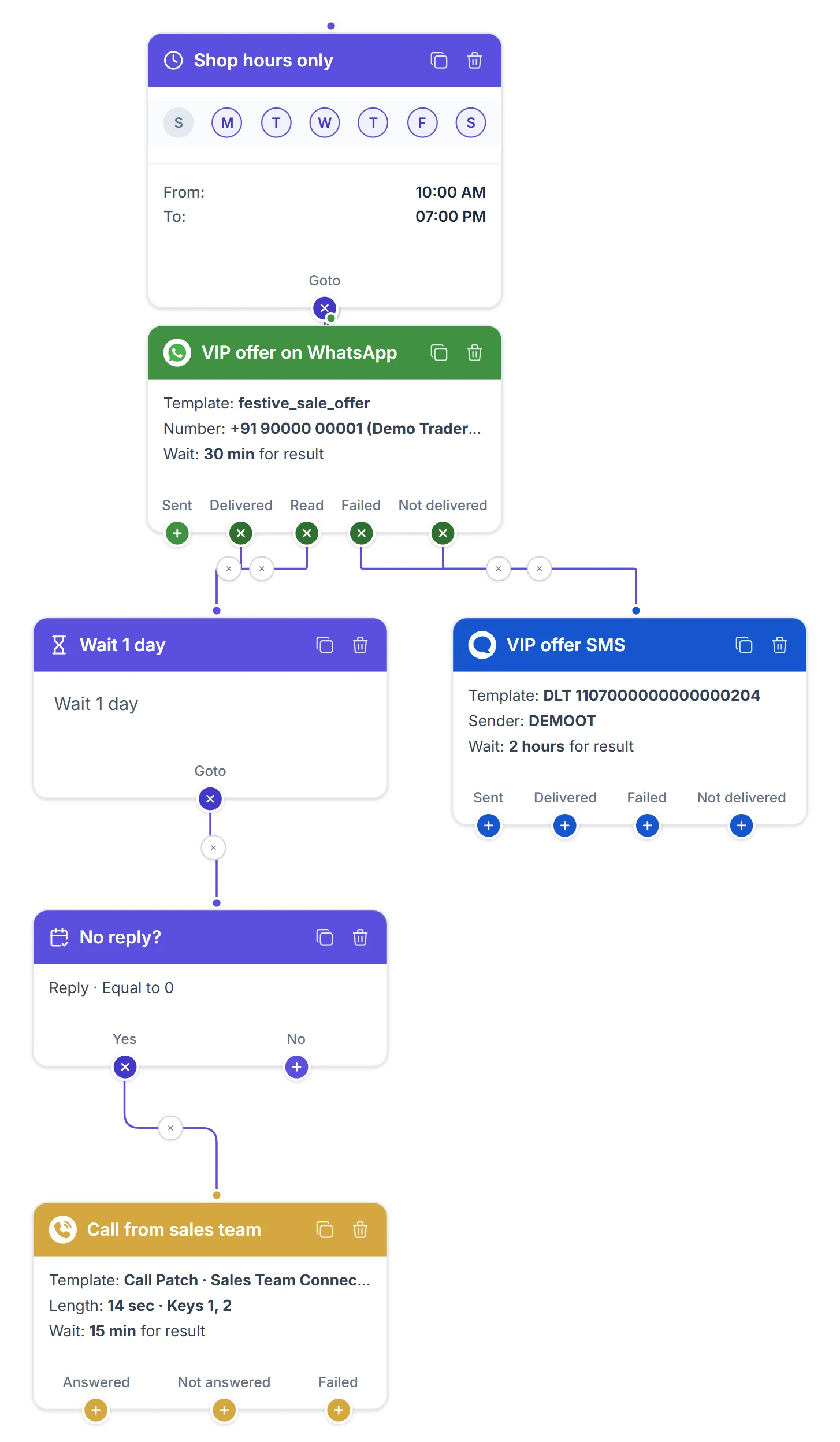
You draw the campaign as steps on a canvas: a Start step with the audience, a WhatsApp step, and lines from each of its results to the next step. Every customer moves through the journey on their own, and each step runs once per customer.
Each WhatsApp step moves a customer on as soon as its result is known; only "not delivered" waits for the step's result wait. The outputs you can connect are:
| Output | What it means | Usual next step |
|---|---|---|
| Sent | WhatsApp accepted the message | Usually left open; delivered and read come next |
| Delivered | The message reached the phone | Wait, then a follow-up or a Condition |
| Read | The customer opened it | Wait, then a Condition on reply |
| Failed | WhatsApp could not deliver: not on WhatsApp, error 131049, a template problem | SMS step, right away |
| Not delivered | No final result within the result wait (default 30 minutes, settable 1 minute to 24 hours) | SMS step |
Three more steps shape the campaign. Wait pauses each customer for 1 minute up to 30 days. Condition splits customers into Yes and No, for example "Reply received (WhatsApp / RCS)" or the result of an earlier step. Frequency lets customers continue only on the days and between the From and To times you choose, so no follow-up lands at midnight. (A number that blocked you on WhatsApp leaves the journey instead of failing.) A journey can have up to 200 steps, and a customer's journey can last up to 30 days.
WhatsApp campaign examples by goal
The best WhatsApp campaigns are built around one goal and one action. These examples follow the ready journeys in the panel, so you can start from one and change the templates.
| Goal | First message | Follow-up | Backup |
|---|---|---|---|
| Sale or offer | WhatsApp offer with an image and "Shop now" (marketing) | Last-day reminder to people who did not reply | SMS with a short link if not delivered |
| Order and delivery update | WhatsApp update (utility) | None | SMS in 5 minutes if it fails |
| Lead follow-up | WhatsApp reply to an enquiry with a brochure | Voice call if no reply, then SMS with your number | Call, then SMS |
| Payment or EMI due | WhatsApp with a pay link (utility) | SMS, then a voice call | SMS and call |
| Event or webinar | WhatsApp invite with date and link | Voice call on the day | SMS if the invite is not delivered |
| Win back inactive customers | RCS card, then WhatsApp offer | RCS card if no click in 3 days (needs click events from your system) | WhatsApp after RCS |
| Feedback after purchase | WhatsApp feedback request (utility or marketing, as Meta decides) | SMS with a feedback link if no reply | SMS |
| Product launch | Rich RCS card | WhatsApp if RCS fails | SMS last |
Notice what the examples have in common: one clear button per message, a follow-up only for people who did not act, and a plain SMS for anyone WhatsApp missed. Industry-wise ideas for offers and promotions are in the WhatsApp marketing guide.
A note on clicks: Campaign does not track link clicks by itself. A "no click" branch works only when your website or app posts a click event for that customer to the event API. Without that, use "Reply received" or the read result instead.
Timing table: a 3-day sale campaign with SMS backup
Here is a complete WhatsApp marketing campaign for a weekend sale, scheduled for Friday morning. It sends two WhatsApp messages at most, skips the reminder for anyone who replied, and sends an SMS only when WhatsApp does not land.
| Step | When | Channel | Message | If it fails |
|---|---|---|---|---|
| 1 | Friday 10:00 (Schedule) | WhatsApp (marketing) with an image and "Shop now" | Weekend sale: up to 40% off, ends Sunday | Failed: step 2 at once. Not delivered after 2 hours: step 2 |
| 2 | Friday, only for step 1 misses | SMS (DLT promotional template) | Weekend sale, up to 40% off, short link | Journey ends for this customer; listed as unreached if the SMS also fails |
| 3 | Wait 2 days, Frequency 10:00 to 20:00 | Condition: Reply received (WhatsApp) | Did the customer reply to step 1? | Yes: journey ends. No: step 4 |
| 4 | Sunday from 10:00 | WhatsApp (marketing) | Last day: sale ends tonight | Failed or not delivered after 1 hour: step 5 |
| 5 | Sunday, only for step 4 misses | SMS (DLT promotional template) | Last day of the sale, short link | Journey ends |
Why a 2-hour result wait on step 1? The offer is good for three days, so there is no rush. A longer wait lets phones that come online later still get the WhatsApp message, and you avoid paying for both a WhatsApp and an SMS to the same person. On the last day, a 1-hour wait is shorter because time matters.
Remember the SMS rules for the backup steps: promotional SMS reach Non-DND numbers only, and where the promotional time block applies to your account a promotional SMS step due outside 10:01 AM to 8:55 PM is held until the window opens. That is why the whole journey above runs in daytime.
Copy-ready WhatsApp campaign templates
Copy these, change the brand and offer, and submit them to Meta. In the text, {{1}}, {{2}} and so on are WhatsApp placeholders; in the WhatsApp step you map each one to a column in your sheet (such as name or amount) or to fixed text. Each template has a short SMS version to register on DLT for the backup step.
1. Sale offer (marketing)
- WhatsApp: Hi {{1}}, our weekend sale is live at Demo Traders. Get up to {{2}} off on your favourite items till Sunday night. Tap Shop now to see the offers.
- SMS backup: Hi Rahul, weekend sale at Demo Traders: up to 40% off till Sunday. Shop: short link
2. Last-day reminder (marketing)
- WhatsApp: Hi {{1}}, today is the last day of our sale. Your favourites are still up to {{2}} off, but only till midnight. Tap Shop now before it ends.
- SMS backup: Last day! Up to 40% off at Demo Traders ends tonight. Shop: short link
3. Welcome message in Hindi (marketing)
- WhatsApp: नमस्ते {{1}}, Demo Traders परिवार में आपका स्वागत है! आपकी पहली खरीद पर {{2}} की छूट है। ऑफ़र देखने के लिए नीचे "Shop now" दबाएं।
- English: Hi {{1}}, welcome to the Demo Traders family! You get {{2}} off your first purchase. Tap "Shop now" below to see the offer.
- SMS backup (Hindi, Unicode): नमस्ते प्रिया, Demo Traders में स्वागत है। पहली खरीद पर छूट: short link
4. Welcome back message in Hindi (marketing)
- WhatsApp: नमस्ते {{1}}, काफ़ी समय से आपसे मुलाक़ात नहीं हुई। आपके लिए एक खास ऑफ़र: {{2}} तक इस्तेमाल करें। जवाब में "हाँ" लिखें, हम पूरी जानकारी भेज देंगे।
- English: Hi {{1}}, we have not seen you in a while. A special offer for you: use it till {{2}}. Reply "yes" and we will send the details.
5. Event invite (marketing)
- WhatsApp: Hi {{1}}, you are invited to our free live session "{{2}}" on {{3}}. Tap Register to save your seat. Seats are limited.
- SMS backup: Hi Priya, join our free live session on Sat 6 pm. Register: short link
6. Payment due (utility)
- WhatsApp: Hi {{1}}, your payment of ₹{{2}} for invoice {{3}} is due on {{4}}. Tap Pay now to pay securely. Ignore this if already paid.
- SMS backup: Dear Rahul, Rs 1,200 for invoice 1045 is due today. Pay: short link. Ignore if paid.
Hindi and other Indian scripts are sent as Unicode SMS, where one SMS part holds 70 characters instead of 160, so keep the Hindi SMS backup short. More templates for each goal are in the drip campaign guide and the payment reminder guide.
How to run a WhatsApp campaign in Fast2SMS
From an approved template to a live campaign takes about ten steps in the panel. The first time takes longer because of template approval; after that, a new campaign takes minutes.
- Prepare the channels. Connect your WhatsApp Business API number and get your campaign templates approved. Add your DLT sender and a DLT template with the short SMS version. Add your RCS bot if you plan an RCS step.
- Open Campaign. In the Campaign app, go to Campaign List → Create Campaign.
- Use a ready journey, for example "WhatsApp offer, SMS if not delivered" under Promotional, or choose Build my own for a blank canvas.
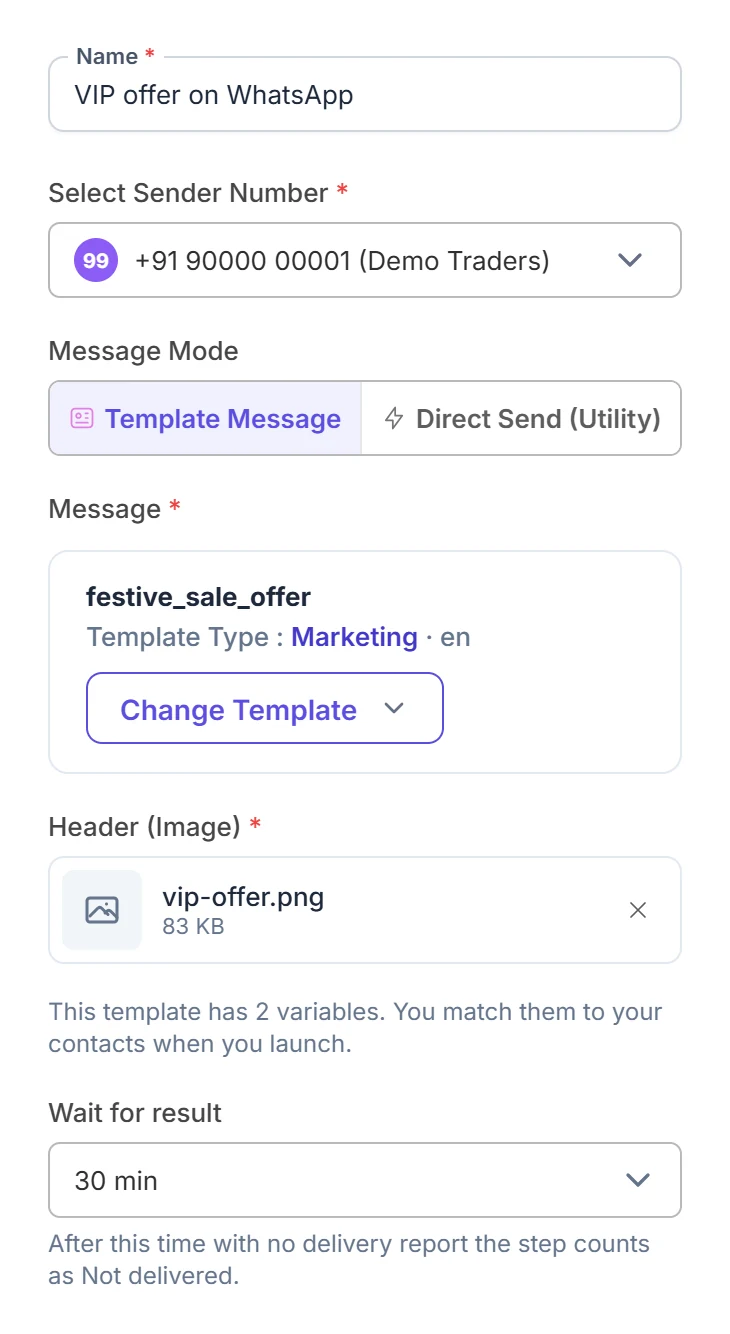
- Configure the WhatsApp step. Choose your number and template, add the header image, video or document if the template has one, and set the Wait for result.
- Connect the backup. Wire the WhatsApp step's failed and not delivered outputs to an SMS step.
- Add follow-ups with a Wait step, a Condition step such as "Reply received (WhatsApp / RCS)", and a Frequency step to keep sends in daytime. Then save.
- Set the audience on Launch Campaign under Send To: upload a CSV, XLSX or XLS file, choose Address Book groups, or paste numbers. Duplicates and invalid numbers are dropped and counted; only Indian mobile numbers are accepted. Match each WhatsApp placeholder and SMS variable to a column or fixed text.
- Send test to up to 10 numbers: your own phone, a colleague's, and one number without WhatsApp to see the SMS backup fire. Test sends are charged like normal sends.
- Choose Send now, Schedule or Repeat. Schedule up to 90 days ahead, or repeat every day or on chosen weekdays. Add contact limits per minute, hour or day under Advanced options if you want to pace the sends, and check the Cost box.
- Launch and watch the report. The run report refreshes every 15 seconds while the run is live. You can pause, resume or stop the run at any time.
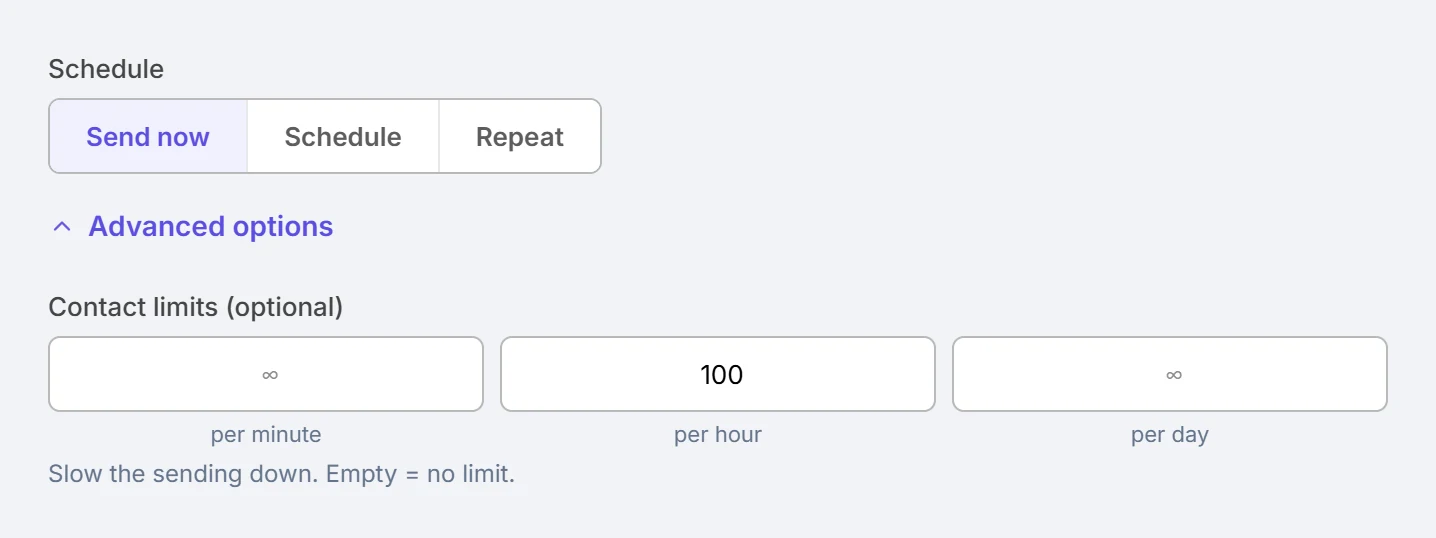
A WhatsApp first step starts up to 4,800 contacts a minute per run unless you set your own limit, so a list of 1 lakh customers starts in about 21 minutes, within your messaging tier. Each campaign has one open run at a time, and you can keep up to 200 campaigns in the account, then duplicate, rename or switch them on and off as you need.
How much does a WhatsApp campaign cost?
A WhatsApp campaign costs the number of messages sent times the template rate, plus any backup messages. On Fast2SMS there is no campaign fee, no builder fee and no monthly fee; every step is charged at its channel's normal rate from one wallet.
Cost example: 10,000 customers, weekend sale
Prices at the time of writing. The delivery and reply shares are examples to show the maths, not measured Fast2SMS figures.
| Step | Customers | Rate | Cost |
|---|---|---|---|
| 1. WhatsApp sale offer (marketing) | 10,000 sent; 500 fail (refunded by the nightly refund job) | ₹0.95 | ₹9,025 |
| 2. SMS backup | 800 (500 failed + 300 not delivered) | ₹0.25 | ₹200 |
| 3. Wait + Condition | 9,200 delivered on WhatsApp | Free | ₹0 |
| 4. Last-day WhatsApp (no reply only) | 7,000 | ₹0.95 | ₹6,650 |
| 5. SMS backup on day 3 | 400 | ₹0.25 | ₹100 |
| Total | ₹15,975 |
Compare the options for the same 10,000 customers:
- One WhatsApp marketing message, no backup: about ₹9,025, and roughly 800 customers missed.
- One WhatsApp message with SMS backup: about ₹9,225. The extra ₹200 reaches the 800 customers WhatsApp missed.
- Utility update with SMS backup (for example an order or payment campaign): 9,500 × ₹0.25 + 800 × ₹0.25 = about ₹2,575.
Three billing rules to know. A "not delivered" message was still sent, so it is charged; the nightly refund job refunds it only if WhatsApp never reports it delivered, and if it arrives later, the customer gets both it and the SMS. SMS refunds apply only on accounts with On Delivery billing. And if your balance runs low mid-run, the run pauses and resumes on its own after you recharge; it is stopped after 3 days on low balance. Customers still waiting when you stop a run are not charged for the steps they never reached. SMS starts at ₹0.25 from a ₹100 recharge and goes down to ₹0.11 on bigger slabs; see SMS pricing and WhatsApp pricing for every rate.
How do you read a WhatsApp campaign report?
Open Campaign Report and pick the run. Its report shows the numbers for every step, where the contacts are, and the full path of every single customer.
- Steps: how many contacts each step was sent to, how many were delivered (with %) or failed, and the top failure reasons.
- Contacts: Reached, Unreached and In progress (and Stopped after a stop).
- Numbers: each number's step, result and reason; filter by result (for example Read) and click a number for its whole journey, such as WhatsApp failed, then SMS delivered.
- Cost: what the run charged and refunded, in Transaction History → Campaign.
- Export: a CSV from Delivery Reports → Export → Campaign.
- Webhooks: every step result and run status posted to your server, set on Webhook → Campaign.
How to use the numbers:
| What you see | What it usually means | What to change |
|---|---|---|
| Many failed with 131049 | Your customers get many marketing messages | Keep the SMS backup; send fewer marketing blasts |
| Many failed as not on WhatsApp | Old or unverified list | Clean the list; let SMS reach these numbers |
| High delivered, low read | Weak first line or bad timing | Put the offer in the first line; try another hour |
| High read, few replies or orders | The button or offer is not clear | One button, one action, a deadline |
| Many opted out or blocked | Cold list or too many messages | Message only opted-in customers; space campaigns out |
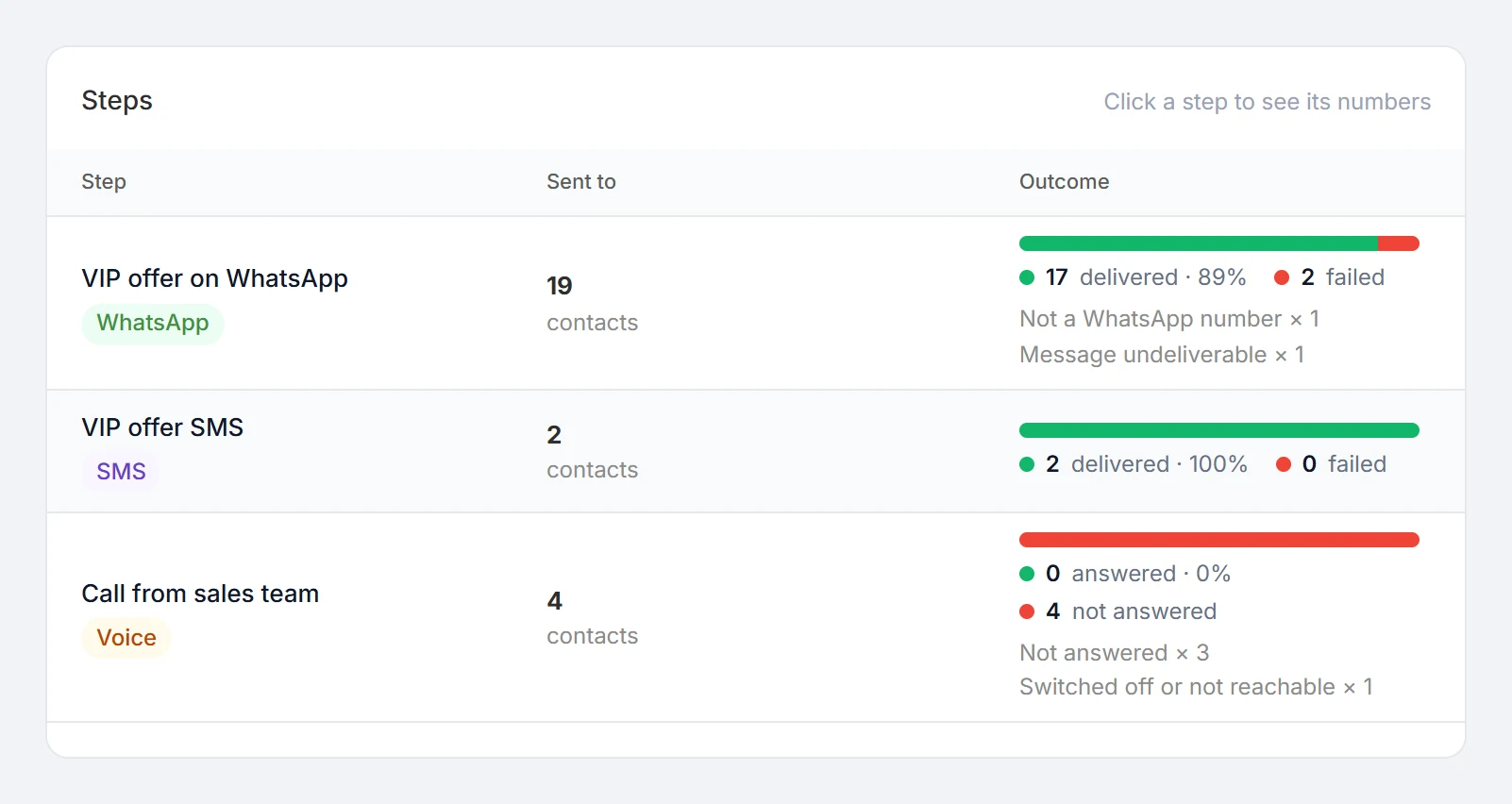
A rising block rate also hurts your quality rating, and a low rating can stop your messaging tier from growing. Read the report after every campaign, not only the big ones.
Can your website or CRM start a WhatsApp campaign?
Yes. Your software can add customers to a campaign with one API call, so the journey starts the moment someone signs up, books or orders. There are no ready-made store or signup triggers; the call comes from your website, app, CRM or store backend.
Find the campaign ID under Campaign List → ⋮ → Get API code, which also shows ready code in cURL, PHP, Node.js and Python. A minimal call looks like this:
curl -X POST "https://www.fast2sms.com/dev/campaign/start" \
  -H "authorization: YOUR_API_KEY" \
  -H "Content-Type: application/json" \
  -d '{"campaign": "YOUR_CAMPAIGN_ID",
       "recipients": [{"mobile": "9000012345", "name": "Rahul"}]}'
Numbers added by API start at once. Calls for one campaign on the same day join one run, and a number already in today's run is skipped, so a customer does not get the same welcome twice. Your system can also post an event, such as payment_received, and a Condition step before the next reminder skips customers who paid. The full developer guide is event-triggered messaging.
What should a WhatsApp campaign manager do?
A WhatsApp campaign manager is the tool where you plan, send and track campaigns. It should handle the whole job, not just the send button.
- Official API only, with approved templates, so your number is not at risk.
- Personalisation from your sheet: names, amounts, dates and links in every message.
- Follow-ups and conditions, so reminders go only to people who did not reply.
- Backup channels in the same journey: SMS, RCS and voice.
- Scheduling and pacing: send now, schedule, repeat, contact limits, daytime-only steps.
- Clear reports per step and per customer, with failure reasons.
- Simple billing: per message, no monthly plan, a cost estimate before launch.
- An API for automatic campaigns from your own software.
Fast2SMS Campaign does all of this from one panel and one wallet. If you also use RCS and voice, the omnichannel marketing platform guide shows how the four channels fit in one journey.
Mistakes to avoid
- Sending to people who never opted in. Blocks and reports lower your quality rating and can restrict your number.
- Blasting the whole file on a small tier. On a 2K number, a 20,000-row file waits at the daily limit and takes about ten days to go out, so offers can arrive late. Split the list or plan the dates, and use a contact limit per day to keep the pace even.
- No backup step. Without SMS, every number not on WhatsApp and every 131049 is a lost customer.
- Connecting only "failed". Offline phones end as "not delivered". Connect both outputs to the SMS step.
- A reminder to everyone. Add a Condition so customers who replied do not get the same offer again.
- Calling an offer "utility". Meta will set it to marketing anyway, and the template may be rejected.
- Long DLT variables. A value over 30 characters is rejected for that number in the SMS step. Use short links.
- Night sends. Use a Frequency step; promotional SMS backups are held outside their window anyway.
- Skipping the test. Send to up to 10 numbers, including one without WhatsApp, before launch.
- Expecting STOP to work by itself. There is no automatic STOP keyword handling. Remove people who ask to stop from your list; numbers that block you on WhatsApp leave the journey on their own.
- Too many campaigns a week. More marketing messages mean more 131049 failures and more blocks. Fewer, better campaigns earn more.
Why run WhatsApp campaigns on Fast2SMS?
- Broadcast and journey in one place: a single message or a multi-step campaign in the same builder.
- SMS, RCS and voice backup without a second tool or a second bill.
- Pay per message: no campaign, builder or monthly fee, and a cost estimate before you launch.
- 16 ready journeys across promotional, service, lead, payment, event, re-engagement and feedback goals.
- Reports down to each customer, with failure reasons and CSV export.
Open Fast2SMS Campaign, start from a ready journey and send your first WhatsApp campaign to your own phone today. For SMS-only campaigns see the SMS campaign guide, and for rich cards the RCS campaign guide.
Frequently asked questions
What is a WhatsApp campaign?
A WhatsApp campaign is a planned send of approved WhatsApp templates to a list of opted-in customers, for an offer, reminder or update. On Fast2SMS you run it in Campaign, as one message or as a journey with follow-ups and an SMS backup.
What is a WhatsApp marketing campaign?
It is a WhatsApp campaign with a promotional goal: a sale, a launch, a festival offer or an event invite. It uses marketing templates, which cost ₹0.95 per message on Fast2SMS at the time of writing.
What is a WhatsApp bulk campaign?
A bulk campaign sends the same approved template, personalised with each customer's details, to a large list in one run. A WhatsApp first step starts up to 4,800 contacts a minute per run (unless you set your own limit), within your Meta messaging tier.
Is a WhatsApp campaign the same as a WhatsApp broadcast?
A broadcast is the simplest WhatsApp campaign: one message to everyone at once. A campaign can also have follow-ups, conditions and backup channels. See the WhatsApp broadcast guide for single sends.
What is the difference between a WhatsApp campaign and a drip campaign?
A campaign is usually one goal over hours or a few days, like a weekend sale. A drip is a longer series spaced over a week or more, such as a lead nurture. The WhatsApp drip campaign guide has six ready drips.
What is a WhatsApp campaign journey?
A journey is a campaign drawn as steps: a WhatsApp message, then Wait, Condition or backup steps based on each customer's result. Each customer moves through it on their own clock.
Is running a WhatsApp campaign legal in India?
Yes, when you use the official WhatsApp Business API, approved templates and customers who agreed to hear from you. Unofficial bulk sender tools break WhatsApp's terms and risk a ban.
Can I run a WhatsApp campaign from the normal WhatsApp Business app?
The app has broadcast lists of up to 256 contacts who saved your number. For larger lists, personalisation, reports and backup steps, you need the WhatsApp Business API, which Fast2SMS provides.
What do I need to start a WhatsApp campaign?
A WhatsApp Business API number connected to Fast2SMS, approved templates, an opted-in list of Indian mobile numbers and wallet balance. For an SMS backup you also need a DLT sender and template.
Do I need template approval for a WhatsApp campaign?
Yes. Every campaign message must be an approved Meta template. Meta reviews it and sets its category: marketing, utility or authentication.
Can a WhatsApp campaign template have images and buttons?
Yes. Templates can have an image, video or document header, personalised text and buttons such as Shop now, Pay now or Call us.
Can I send free text in a WhatsApp campaign?
Normally no; campaigns use approved templates. In Campaign, "Direct Send (Utility)" free text is available only on numbers with the 100K or Unlimited messaging tier.
What file formats can I upload for a WhatsApp campaign?
CSV, XLSX or XLS files up to 20 MB and up to 10 lakh rows. You can also use an Address Book group or paste numbers.
Can I send a WhatsApp campaign to international numbers?
No. Campaign accepts Indian mobile numbers only: 10 digits starting with 6 to 9. A 91 or 0 prefix is removed automatically.
What happens to duplicate numbers in my list?
Duplicates and invalid numbers are dropped and counted before the run starts, so each customer gets one message per step.
How do I personalise a WhatsApp campaign?
Each column in your sheet becomes a variable. In the WhatsApp step you map each template placeholder to a column, such as name, amount or date, or to fixed text.
How much does a WhatsApp campaign cost?
You pay per message by template category. At the time of writing on Fast2SMS: ₹0.95 for marketing, ₹0.25 for utility, ₹0.25 for authentication and ₹0.13 for a service reply. There is no campaign or monthly fee. See WhatsApp pricing.
What does a WhatsApp campaign to 10,000 customers cost?
About ₹9,500 with a marketing template and ₹2,500 with a utility template at the time of writing, before refunds for failed messages. An SMS backup to the customers WhatsApp misses adds ₹0.25 per SMS.
What does a WhatsApp campaign to 1 lakh customers cost?
About ₹95,000 with a marketing template or ₹25,000 with a utility template at the time of writing, and your number needs a messaging tier of 100K or more to send it in one day.
Is there a monthly fee for WhatsApp campaigns on Fast2SMS?
No. There is no campaign fee, builder fee, setup fee or monthly fee. Every step is charged at its channel's normal per-message rate from your wallet.
Which template category should I use for a sale campaign?
Marketing. Offers, discounts, launches, festival sales and invites are marketing, and Meta will set them to marketing even if you choose utility.
When can a campaign use utility templates?
When the message is about something the customer already did or owes: an order update, a delivery, a booking reminder or a payment due. Utility costs ₹0.25 at the time of writing.
Can Meta change my template category?
Yes. Meta reviews templates and can approve or move a template as marketing if it has promotional wording. You are charged by the category at the time of sending.
Are failed WhatsApp campaign messages refunded?
Messages that fail are refunded by the nightly refund job, and the refund shows in Transaction History, Campaign. A message that was sent but is "not delivered" in the journey is charged, and refunded later only if WhatsApp never reports it delivered.
Are Wait, Condition and Frequency steps charged?
No. Only channel steps (WhatsApp, SMS, RCS, voice) are charged, at their normal rates.
What happens if my wallet runs out during a campaign?
The run pauses and resumes on its own after you recharge (it checks every 10 minutes). If the balance stays low for 3 days, the run is stopped.
Can I see the cost before launching a WhatsApp campaign?
Yes. The Cost box on the Launch Campaign page shows each step's rate and a Max cost, and Campaign refuses to launch if your wallet cannot cover the first step for all contacts.
Are test messages free?
No. You can send a test to up to 10 numbers, and test sends are charged like normal sends. New accounts get ₹50 free credit to cover testing.
How many messages can I send in a WhatsApp campaign per day?
It depends on your number's messaging tier: 250, 2,000, 10,000, 100,000 or Unlimited different customers per moving 24 hours. A new unverified business usually starts at 250.
How do I increase my WhatsApp campaign limit?
Meta raises your number's limit step by step, starting with business verification, as long as your quality rating stays high. The WhatsApp broadcast guide explains the tiers.
How do I send a big list on a small messaging tier?
Campaign respects your number's 24-hour limit: when it is reached, the WhatsApp step waits and retries every hour, so a 25,000-row file on a 10K number goes out over about three days. You can also set a contact limit per day under Advanced options, or split the list.
What is WhatsApp error 131049?
It means Meta did not deliver a marketing message because that person recently received many marketing messages from businesses. Meta does not publish the exact limit. Send an SMS now or try WhatsApp a day later. See the SMS fallback guide.
Does error 131049 affect utility messages?
Error 131049 is Meta's per-user limit on marketing messages. Utility updates about an order or payment are the safer category for service campaigns.
How fast does a WhatsApp campaign go out?
A WhatsApp first step starts up to 4,800 contacts a minute per run, so 1 lakh contacts start in about 21 minutes, subject to your messaging tier and any contact limits you set.
Why did my campaign stop after a few thousand messages?
Usually because the number reached its messaging tier for the 24 hours. Campaign does not fail those contacts: it waits and retries every hour until the window frees up, and the run carries on. Use a daily contact limit or split the list if the offer has a deadline.
Can a WhatsApp campaign send SMS when WhatsApp fails?
Yes. Connect the WhatsApp step's failed and not delivered outputs to an SMS step in the journey builder. The SMS uses your approved DLT template.
What is a WhatsApp campaign with SMS fallback?
It is a campaign where customers WhatsApp cannot reach, such as numbers not on WhatsApp or hit by error 131049, get an SMS instead. In Fast2SMS it is the ready journey "WhatsApp offer, SMS if not delivered".
How long does Campaign wait before sending the SMS backup?
A failed result moves the customer to SMS at once. For no result, the WhatsApp step waits 30 minutes by default; you can set 1 minute to 24 hours.
Can RCS be part of a WhatsApp campaign?
Yes. You can send an RCS rich card first and WhatsApp if RCS fails (a phone without RCS counts as failed), or add RCS after WhatsApp. RCS needs an approved, active RCS bot.
Can a WhatsApp campaign end with a voice call?
Yes, a voice step can follow SMS for messages that must land. It plays recorded audio, cannot read names or amounts, and voice must be enabled on your account.
Will a customer get both WhatsApp and SMS?
Only if the WhatsApp message arrives after the result wait ended and the SMS was already sent. A longer result wait for offers reduces this.
How do I run a WhatsApp campaign on Fast2SMS?
In the Campaign app open Campaign List → Create Campaign, use a ready journey or build your own, choose your template, connect an SMS backup and save. Then on Launch Campaign set the audience, map the variables, send a test and choose Send now, Schedule or Repeat.
Are there ready-made WhatsApp campaign journeys?
Yes. "Use a ready journey" opens 16 journeys across 7 goals, such as "WhatsApp offer, SMS if not delivered" and "Feedback on WhatsApp, SMS link if no reply".
Can I schedule a WhatsApp campaign?
Yes, up to 90 days ahead. You can also repeat it every day or on chosen weekdays at a set time, with optional From and Until dates. Times are in your account time zone (IST by default).
Can I send a reminder only to people who did not reply?
Yes. Add a Wait step and a Condition step set to "Reply received (WhatsApp / RCS)". Customers who replied end the journey; the rest get the reminder.
Can I send a follow-up only to people who did not click my link?
Only if your website or app posts a click event to the Fast2SMS event API. Campaign does not track link clicks automatically.
Can I stop WhatsApp campaign messages at night?
Yes. A Frequency step lets customers continue only on the days and between the From and To times you choose; anyone who reaches it at night waits until the window opens.
Can I pause or stop a running WhatsApp campaign?
Yes. You can pause, resume or stop a run. Customers still waiting at a step when you stop are not charged for later steps.
How many WhatsApp campaigns can I create?
Up to 200 campaigns per account, each with one open run at a time. You can duplicate, rename and switch campaigns on or off.
How many steps can a WhatsApp campaign have?
Up to 200 steps and 400 connections per journey. Each step runs once per customer, and one customer's journey can last up to 30 days.
Can my website start a WhatsApp campaign automatically?
Yes. Your website, app, CRM or store backend calls POST https://www.fast2sms.com/dev/campaign/start with your API key and the customer's number. See event-triggered messaging.
Is there a Shopify or WooCommerce trigger for WhatsApp campaigns?
There is no native store trigger in Campaign. Your store backend starts the journey with one API call to the campaign start endpoint.
How do I check WhatsApp campaign results?
Open Campaign Report and click the run. You see how many contacts each step was sent to, delivered and failed with the top reasons, the Reached and Unreached counts, and every customer's full journey.
Can I see who read my WhatsApp campaign message?
Partly. You can filter the run report's Numbers table by the result Read or click a number to see its journey, but a message that is read only after its delivery was recorded keeps the result Delivered, so Read shows the quick readers, not everyone who read it.
Why did my WhatsApp campaign messages fail?
Common reasons are numbers not on WhatsApp ("Message undeliverable") and error 131049. Customers who blocked you leave the journey as opted out, and a reached messaging tier makes the step wait rather than fail. The run report lists the top failure reasons for each step.
Can I download a WhatsApp campaign report?
Yes, as a CSV from Delivery Reports → Export → Campaign. Webhooks can also post every step result to your server.
What does "unreached" mean in the campaign report?
Unreached customers are those no step delivered to, for example WhatsApp failed and the SMS backup also failed.
How do customers opt out of a WhatsApp campaign?
Customers who block your number on WhatsApp leave the journey. There is no automatic STOP keyword handling, so remove people who ask to stop from your list yourself.
How often should I run WhatsApp marketing campaigns?
Fewer, better campaigns work best. Too many marketing messages raise blocks and 131049 failures. Most businesses do well with one or two offers a week to engaged customers.
What is the best time to send a WhatsApp campaign?
Daytime, usually late morning or early evening. Test two times on small parts of your list and compare read rates in the report.
Can I send a WhatsApp campaign in Hindi?
Yes. Templates can be in Hindi or any Indian language. Keep the Hindi SMS backup short, because one Unicode SMS part holds 70 characters.
What is a good WhatsApp campaign manager?
One that uses the official API, personalises from your sheet, adds follow-ups and backup channels, paces sends to your tier and reports per customer. Fast2SMS Campaign does this with no monthly fee.
Can I use WhatsApp, SMS, RCS and voice in one campaign?
Yes, all four channels can sit in one journey in Campaign. See the omnichannel marketing platform guide.