SMS Campaign: How to Plan, Send and Automate One in India
No monthly fee · Pay as you go from ₹100 · Free setup help on a call
An SMS campaign is a planned set of text messages sent to a list of customers for one goal, such as a sale, a reminder or an event. On Fast2SMS you run it from Campaign: one SMS to everyone, or a journey that sends a follow-up SMS, a WhatsApp message or a voice call to people the first SMS missed. At the time of writing an SMS costs ₹0.25, down to ₹0.11 on bigger recharges, with no campaign or monthly fee.
This guide covers the six stages of an SMS campaign (plan, DLT, audience, message, schedule, report), when a single blast is enough and when an automated journey works better, examples by goal, copy-ready templates in English and Hindi, setup in the panel, real costs and the mistakes that waste money.
What is an SMS campaign?
An SMS campaign is a group of text messages sent to many customers with one purpose and a clear end date. "Send a Diwali offer to 20,000 past buyers this Friday" is a campaign. A single OTP or an order alert sent when one customer buys is not; that is a notification.
In India, SMS campaigns fall into two families, and the family decides the rules you follow:
| Type | What it says | DLT category | Who receives it | Example |
|---|---|---|---|---|
| Promotional SMS campaign | Offers, sales, new arrivals, events, anything that sells | Promotional (or Service Explicit with consent) | Non-DND numbers, during promotional hours only | "Diwali sale: flat 20% off till Sunday" |
| Service SMS campaign | Information customers expect: payments, fees, appointments, renewals | Service Implicit | All numbers, any time | "Your fee of Rs 4,500 is due on 10 Dec" |
Most people searching "bulk SMS campaign" or "SMS marketing campaign" mean the first type. The rules for promotional messages are covered in depth on the promotional SMS page, and industry ideas for marketing are on bulk SMS for marketing. This page is about running the campaign itself, from the first idea to the final report.
One SMS blast or an automated SMS journey?
A blast is one message sent to everyone at once. A journey is a few steps per customer, where each step depends on what happened before. Use a blast for simple news; use a journey when a missed message costs you money.
| Single SMS blast | Automated SMS journey | |
|---|---|---|
| Messages per customer | One | Two to five, each after a Wait step |
| If the SMS is not delivered | Nothing happens | A WhatsApp message or voice call goes to that number |
| Follow-up | You send a second blast by hand | A reminder goes out on its own, for example 2 days later |
| Sending hours | You pick the time | A Frequency step keeps every step inside the hours you choose |
| Starts when | You press Send or schedule it | A schedule, a repeat, or your software adding each new customer by API |
| Best for | Store opening, holiday notice, one-day offer | Sales with a deadline, payment reminders, events, win-back |
| Cost | One SMS per number | Only the steps each customer actually reaches |
Both run in the same place. In Fast2SMS Campaign, a blast is simply a journey with one SMS step. You can start with one step and add a reminder or a backup channel later without changing your list or your DLT template. If you only want to send one quick message from the classic Bulk SMS screen, the step-by-step bulk SMS guide walks through that.
How does an SMS campaign work in Fast2SMS?
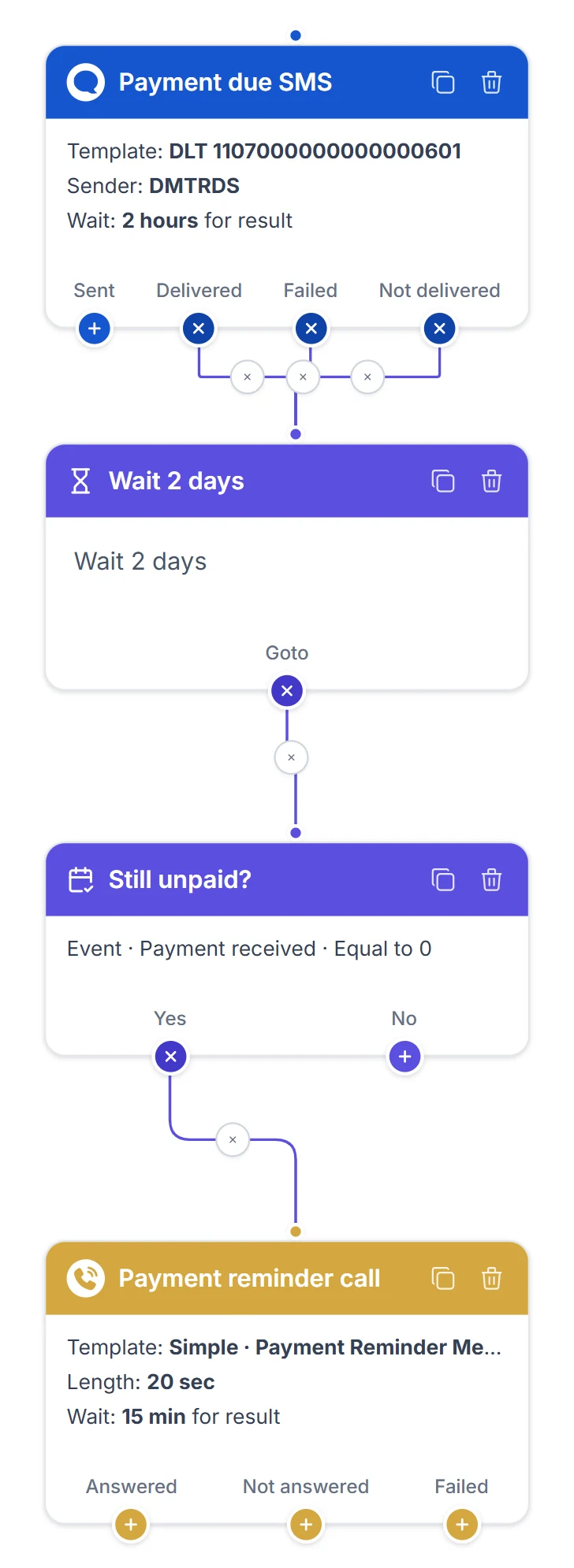
You build the campaign as a journey: a Start step with your audience, then SMS, WhatsApp, RCS or voice steps joined by Wait, Condition and Frequency steps. Every channel step has outputs (sent, delivered, failed, not delivered), and you connect each output to what should happen next.
The parts you will use most in an SMS campaign:
- SMS step: picks your approved DLT sender and an approved DLT template linked to it, and maps each variable to a column of your sheet or to fixed text.
- Wait step: pauses from 1 minute up to 30 days, with presets of 10 minutes, 30 minutes, 1 hour, 1 day and 3 days.
- Frequency step: lets customers continue only on the weekdays and between the times you choose.
- Condition step: a Yes/No check on an earlier step's result, a WhatsApp or RCS reply, or an event your own software posts (such as "link clicked" or "paid").
- Backup steps: WhatsApp, RCS or a recorded voice call on the SMS step's failed or not delivered output.
A failed SMS takes the "failed" output at once. Otherwise the SMS step waits up to 120 minutes by default for a final delivery report (you can set anything from 1 minute to 24 hours); if no report arrives in that time, the customer leaves by the "not delivered" output.
Stage 1: How do you plan an SMS campaign?
Write down four things before you touch the panel: the goal, the offer, the deadline and the number you will judge it by. A campaign without a deadline is just noise, and a campaign without a number cannot be improved.
- Goal. One action per campaign: buy, visit, pay, book, attend or reply. Two goals in one SMS halve the response to each.
- Offer. What makes the message worth reading: a discount, a code, early access, a free item, or simply useful news.
- Deadline. "Till Sunday" or "today only". A deadline gives you a reason to send a reminder later.
- Measure. Sales with the code, bookings, payments or store visits. Delivered SMS tell you reach; only your own sales data tells you results.
- Steps. Decide now if you want a reminder, a WhatsApp backup or a call. It changes which templates you need to register.
- Budget. Multiply your list by the number of SMS parts and the rate of your recharge slab (see cost below).
A simple plan for a clothing store: "Goal: buy in the weekend sale. Offer: 20% off with code WKND20. Deadline: Sunday 9 pm. Measure: orders with WKND20. Steps: offer SMS Friday 11 am, WhatsApp to anyone the SMS missed, last-day SMS Sunday 11 am."
Stage 2: What DLT approvals do you need?
Every commercial SMS in India must match a DLT registration. You need a registered entity, a sender ID (header) and a content template for each message, all approved before the campaign goes out.
- Entity: your business, registered once on a DLT portal. The operator charges ₹5,900 per year including GST at the time of writing; help from the Fast2SMS team costs nothing.
- Header (sender ID): a short brand header such as DEMOTR for service SMS; promotional SMS have their own header rules, explained on the promotional SMS page.
- Content template: the exact text, with {#var#} where the name, code or link changes. Register it in the right category: Promotional for offers, Service Implicit for reminders.
- Link to the sender: in the Fast2SMS panel the template must be linked to the sender you will use. The SMS step only lists approved templates linked to the chosen sender.
Register every message of the journey before launch: the offer, the reminder and a short SMS version of any WhatsApp step, in case you later reverse the order. A template cannot be edited after approval, so check the spelling and the variables first. Each DLT variable value must be 30 characters or fewer; a longer value is rejected for that number. The full process, with screens, is in the DLT registration guide.
Stage 3: How do you build the audience?
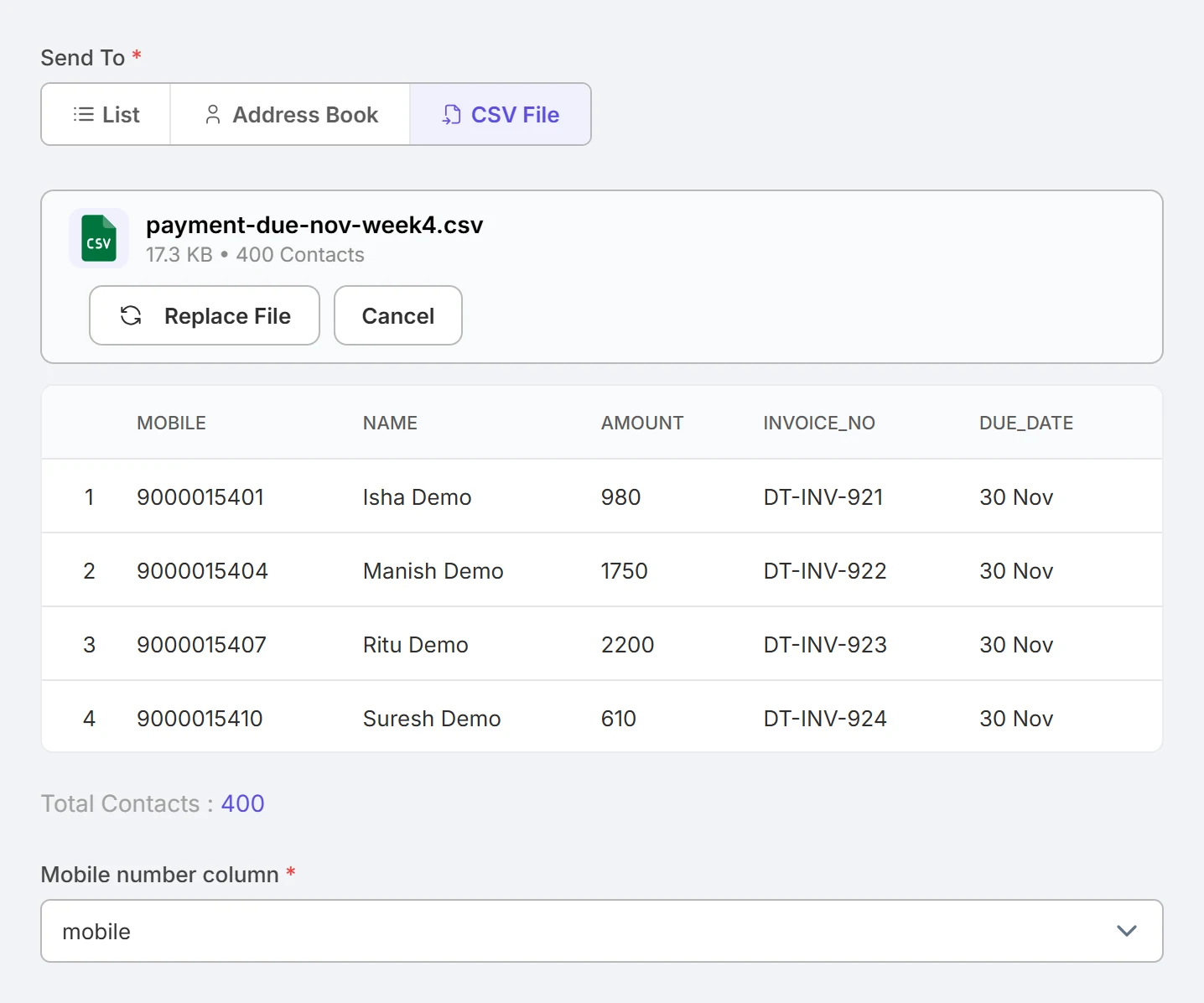
On the Launch Campaign page, under Send To, upload a sheet (CSV File), pick Address Book groups or paste numbers (List). Campaign cleans the list for you and turns every column into a variable you can use in the message.
- File upload: CSV, XLSX or XLS, up to 20 MB and up to 10 lakh (1,000,000) rows.
- Address Book groups: saved lists such as "Past buyers 2026" or "Mumbai customers".
- Paste: type or paste a list of numbers, up to 1,00,000 lines.
- Cleaning: numbers must be Indian mobiles (10 digits starting with 6 to 9). A 91 or 0 prefix is removed. Duplicates and invalid numbers are dropped and counted, so you see how many were removed.
- Columns become variables: a sheet with mobile, name, city and code columns lets you map {#var#} to name in one message and to code in another.
Who you send to matters more than what you send. A list of 5,000 people who bought from you in the last year beats 50,000 numbers from an unknown source, both in response and in complaints. Remove numbers that asked you to stop: there is no automatic STOP keyword handling, so keep your own opt-out list and clean every upload against it. For promotional campaigns, DND numbers do not receive the SMS, so a list heavy with DND numbers will show low reach. A WhatsApp step for customers who opted in on WhatsApp is often the better way to reach them.
Stage 4: How do you write the message?
Put the offer and the deadline in the first line, keep it inside one SMS part, and end with one clear action. Customers read the preview, not the whole message.
| Message | Characters per SMS part | What it means for cost |
|---|---|---|
| English, up to 160 characters | 160 | 1 SMS per number |
| English, longer than 160 characters | Split into parts | Each part is charged as one SMS |
| Hindi or any regional script (Unicode) | 70 | A 120-character Hindi message is 2 SMS |
| English with a ₹ sign or emoji | 70 (becomes Unicode) | Write "Rs" to stay at 160 |
- Lead with the value: "Flat 20% off till Sunday" beats "Greetings from Demo Traders".
- Personalise lightly: the first name and a code are enough. Every variable must fit in 30 characters.
- One link or one number: a single action gets more response than three.
- Sign off with your brand at the end, the same way as in your DLT template.
- Check the parts count: the Cost box on the Launch page shows the SMS parts per contact (for example "per contact · 1 SMS"). Ten extra characters can double the bill on a large list.
When the offer needs a photo, a button or a catalogue, SMS is the wrong first step. Lead with WhatsApp or RCS and keep SMS as the backup; the WhatsApp campaign guide and the RCS campaign guide explain those journeys.
Stage 5: When should you send it?
Send promotional SMS in the late morning or early evening on the days your customers shop, and leave the timing rules to the panel. Promotional SMS reach Non-DND numbers only; where the promotional time block applies to your account, a promotional SMS step due outside 10:01 AM to 8:55 PM is held (and not charged) until the window opens. Service SMS can go at any time.
- Send now for urgent news.
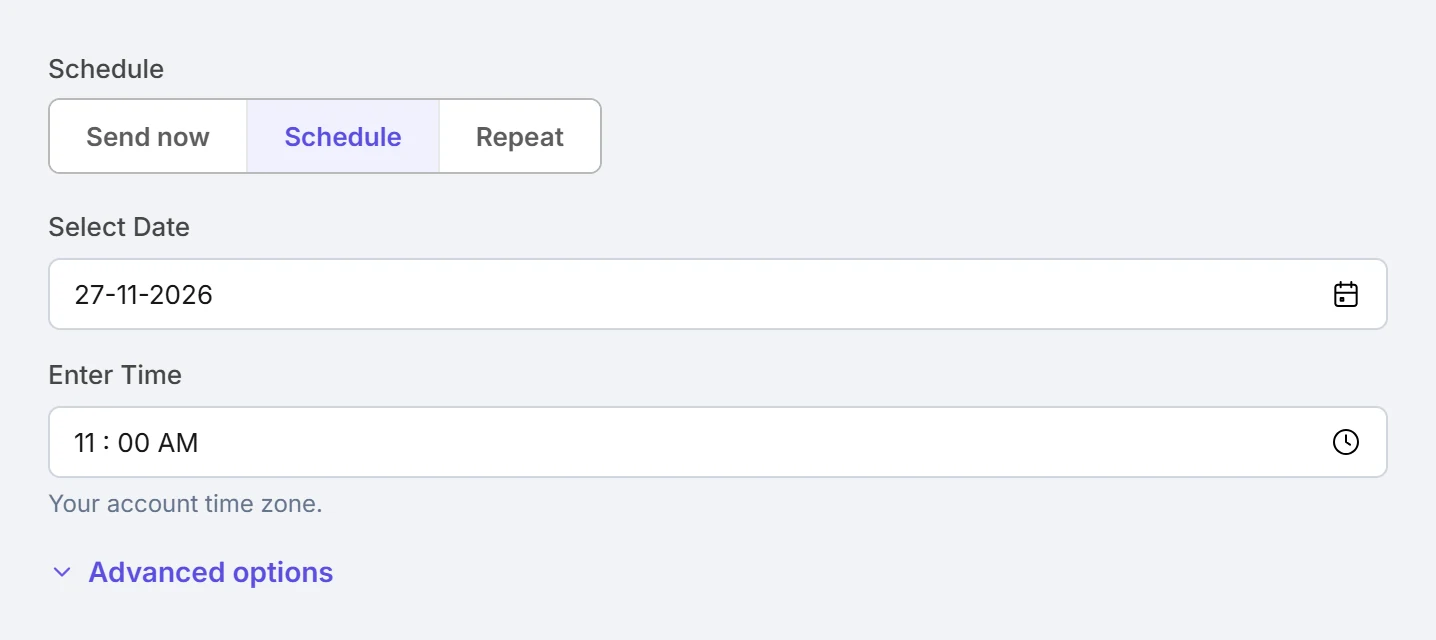
- Schedule a date and time up to 90 days ahead, in your account time zone (IST by default).
- Repeat every day or on chosen weekdays at a set time, with optional From and Until dates. Useful for a weekly offer or a daily reminder list. (There is no monthly option.)
- Frequency step: keeps each step on the weekdays and hours you pick, so a reminder that falls due at 6 am waits for your window.
- Contact limits: optional caps per minute, hour or day, so your call centre or store is not flooded at once.
Speed: a run starts up to 5,000 contacts per minute, so a 1 lakh list starts in about 20 minutes. If you have a sale starting at 11 am sharp, schedule it a little early or split the list. Each campaign has one open run at a time, and you can pause, resume or stop a run while it is going.
The rule of thumb for timing: offers between 11 am and 1 pm or 6 pm and 8 pm, payment reminders in the morning so people can pay the same day, and event reminders the day before and the morning of. Test your own list, because a B2B audience and a college crowd keep very different hours.
Stage 6: How do you read the report?
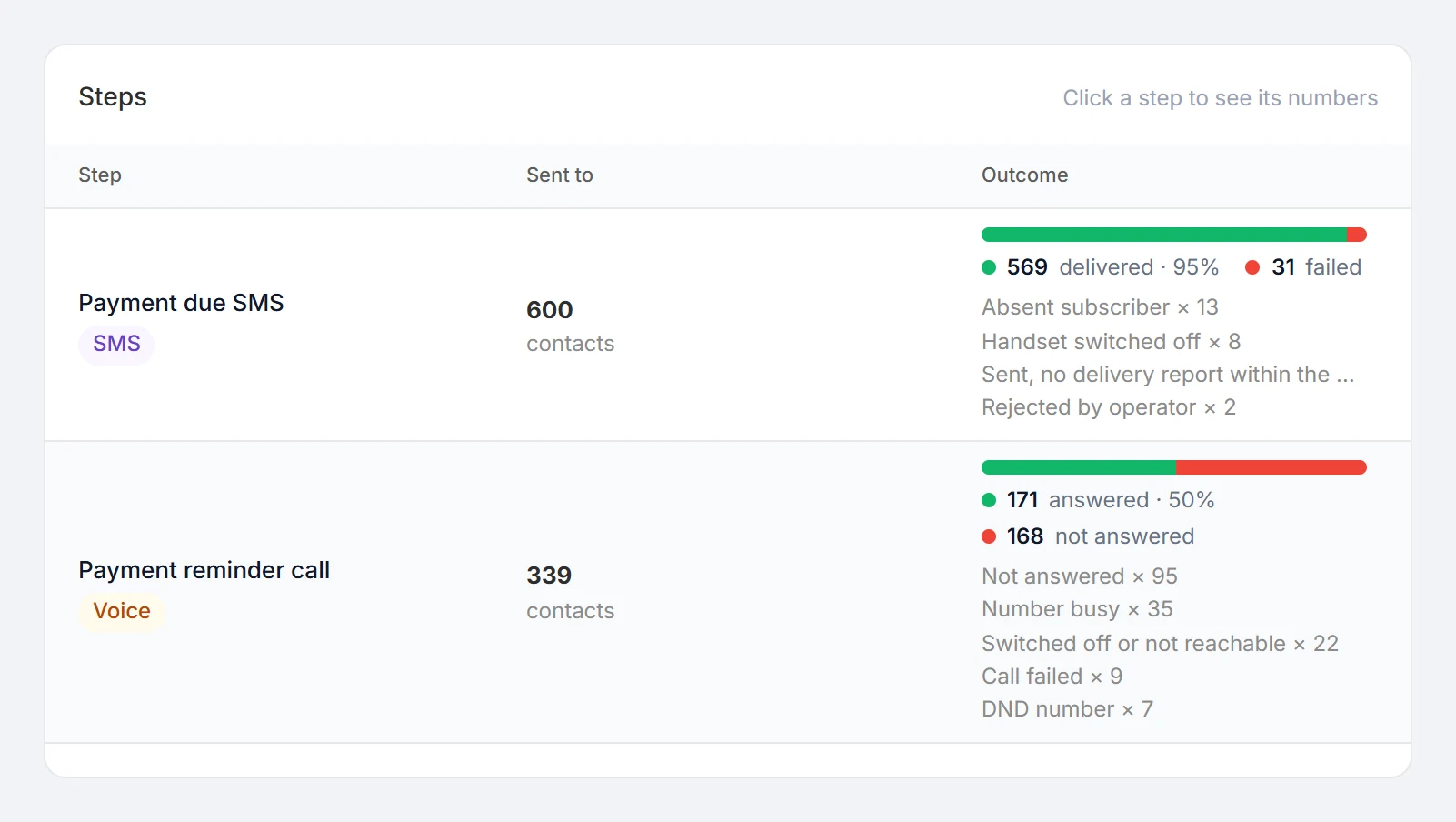
Open Campaign Report and click the run. Its report shows each step, where the contacts are and the full path of every customer, refreshing every 15 seconds while the run is live.
| Where | What you see | What to do with it |
|---|---|---|
| Contacts | Reached, Unreached, In progress (and Stopped after a stop) | Reach of the campaign |
| Steps | Sent to, delivered (with %), failed and the top failure reasons for each step | Find the step that loses people |
| Numbers | Each number's step, result, reason and time; click a number for its journey, such as SMS not delivered, then WhatsApp delivered | Answer a customer who says "I never got it" |
| Transaction History → Campaign | What the run charged and refunded | Real spend for the campaign |
| Export | CSV from Delivery Reports → Export → Campaign | Match delivered numbers with your sales or code use |
| Webhook | Every step result and run status posted to your server | Update your CRM in real time (Webhook → Campaign) |
Delivered counts measure reach, not results. Compare orders with your code, payments received or bookings against delivered numbers, and you have the real response rate. Run the same offer next month with a different first line and compare again.
SMS campaign examples by goal
Most SMS campaigns are one of seven goals. Campaign has 16 ready journeys across these goals (choose Use a ready journey when you create a campaign); the ones below use SMS as a main or backup step.
| Goal | Example campaign | Suggested journey |
|---|---|---|
| Promotional | Weekend sale for past buyers | Offer SMS → WhatsApp if not delivered → Wait 2 days → last-day SMS |
| Promotional with images | New collection launch | Ready journey "Rich RCS card first, then WhatsApp, then SMS" |
| Service | Booking or delivery update for existing customers | Ready journey "SMS, then a voice call if not delivered" |
| Service, must land | Policy renewal due this week | Ready journey "SMS first, WhatsApp if it fails, call if nothing lands" |
| Payment reminder | Monthly fee or invoice due | Ready journey "Payment due: SMS, then WhatsApp, then a call"; your billing system posts payment_received so the "Still unpaid?" checks skip the rest |
| Event or webinar | Workshop on Saturday | WhatsApp invite → SMS if not delivered → call on the day |
| Lead follow-up | New enquiry from your website | Your website starts the journey by API: SMS with your number now → WhatsApp brochure → call if no reply |
| Re-engagement | Customers who have not bought in 6 months | SMS "we miss you" with a code → Wait 3 days → WhatsApp with an image |
| Feedback | Review after a visit | Ready journey "Feedback on WhatsApp, SMS link if no reply" |
For multi-message series over a week or more, see the drip campaign guide, which has six full drips with SMS steps. For reminders tied to due dates, the payment reminder automation guide has before-due, due-day and overdue journeys.
Timing table: a 3-day sale with SMS and WhatsApp
Here is the weekend sale from the plan above as a full journey. It starts on a schedule for Friday 11 am and reaches every customer at least once, with one reminder before the offer ends.
| Step | When | Channel | Message | If it fails |
|---|---|---|---|---|
| 0 | Before each step | Frequency: Fri to Sun, 10:00 to 21:00 | (no message) | Customers wait for the next allowed time |
| 1 | Friday 11:00 (scheduled) | SMS, DLT Promotional template | Hi Rahul, weekend sale: 20% off with code WKND20 till Sunday 9 pm | Failed, or not delivered within 120 minutes: step 2 |
| 2 | Friday, by about 13:00 | WhatsApp, marketing template with image and button | Same offer with a product photo and a Shop now button | Failed or not delivered: customer listed as unreached |
| 3 | After steps 1 or 2 deliver | Wait 2 days | (no message) | None |
| 4 | Sunday about 11:00 | SMS, DLT Promotional template | Last day, Rahul: WKND20 ends tonight at 9 pm | Not delivered: journey ends |
If your online store can post an event such as "ordered" to Fast2SMS by API, add a Condition step before step 4 so buyers do not get the reminder. Without that event, everyone reached gets step 4, which is fine for a short sale. Note there is no automatic link-click tracking; a "Link clicked" condition works only when your own website posts the click.
Copy-ready SMS campaign templates
Each template below is written to fit DLT registration: fixed text with {#var#} where the value changes, and the brand at the end. Register them in the category shown, then map each {#var#} to a sheet column on the SMS step.
| Use | DLT category | Template |
|---|---|---|
| Sale launch | Promotional | Hi {#var#}, our weekend sale is live! Flat 20% off with code {#var#} till Sunday 9 pm. Shop now: {#var#} - Demo Traders |
| Last-day reminder | Promotional | Last day, {#var#}! Your code {#var#} for 20% off ends tonight at 9 pm. Shop: {#var#} - Demo Traders |
| New arrivals | Promotional | New arrivals at Demo Traders! Fresh winter range now in store and online. First 100 buyers get a free gift. Visit {#var#} - Demo Traders |
| Event invite | Promotional | Hi {#var#}, join our free workshop on {#var#} at {#var#}. Seats are limited. Book: {#var#} - Demo Traders |
| Win-back | Promotional | We miss you, {#var#}! Here is Rs {#var#} off your next order with code {#var#}, valid for 7 days. {#var#} - Demo Traders |
| Payment reminder | Service Implicit | Dear {#var#}, your payment of Rs {#var#} for invoice {#var#} is due on {#var#}. Please ignore if already paid. - Demo Traders |
| Event reminder | Service Implicit | Dear {#var#}, reminder: your workshop starts tomorrow at {#var#}, {#var#}. Please carry this SMS. - Demo Traders |
| Feedback | Service Implicit | Thank you for visiting Demo Traders, {#var#}. Please rate your experience here: {#var#} - Demo Traders |
SMS campaign templates in Hindi
Hindi SMS are Unicode, so one part holds 70 characters. These run to two parts each; check the preview before you send.
- Sale launch (Promotional): नमस्ते {#var#}, Demo Traders पर वीकेंड सेल शुरू! कोड {#var#} से 20% छूट, रविवार रात 9 बजे तक। {#var#}
- Last day (Promotional): {#var#} जी, आपका कोड {#var#} आज रात 9 बजे खत्म हो रहा है। अभी खरीदें: {#var#} - Demo Traders
- Payment reminder (Service Implicit): प्रिय {#var#}, बिल {#var#} की राशि Rs {#var#} दिनांक {#var#} तक देय है। भुगतान हो चुका हो तो कृपया ध्यान न दें। - Demo Traders
- Event reminder (Service Implicit): प्रिय {#var#}, आपकी वर्कशॉप कल {#var#} बजे {#var#} पर है। कृपया समय पर पहुंचें। - Demo Traders
More ready text for offers, festivals and industries is on the promotional SMS page; festival sequences are in the festival marketing campaigns guide.
How to set it up in Fast2SMS
Once your DLT templates are approved, building the campaign itself is quick. These steps follow the panel as it is today.
- Get DLT ready. Add your approved DLT sender and the approved templates for every SMS step, linked to that sender. Connect WhatsApp and get templates approved if you will use a WhatsApp backup.
- Open Campaign. In the Campaign app go to Campaign List → Create Campaign.
- Use a ready journey such as "SMS, then a voice call if not delivered", or choose Build my own and add one SMS step for a simple blast.
- Add a Frequency step with your days and hours, for example every day from 10:00 to 21:00 for promotional SMS.
- Configure the SMS step. Pick the sender and the DLT template linked to it.
- Connect the outputs. Wire failed and not delivered to a WhatsApp or voice step if you want a backup; wire delivered to a Wait step and a reminder SMS if you want a follow-up.
- Save, then open Launch Campaign. Under Send To, upload the sheet, pick Address Book groups or paste numbers, and map each {#var#} to a column or fixed text.
- Send test to up to 10 numbers, including your own phone. Test sends are charged like normal sends.
- Choose Send now, Schedule or Repeat, set optional contact limits under Advanced options, and review the Cost box. Launch is refused if your wallet cannot cover the first step for all contacts.
- Watch the run in Campaign Report, and pause or stop the run if something looks wrong.
Want the campaign to start for each new customer automatically, for example when someone signs up on your website? Your server calls the Campaign API with the customer's number and the journey starts at once. The event-triggered messaging guide has the request with code in cURL, PHP, Node.js and Python, and Campaign List → ⋮ → Get API code shows ready code for your own campaign.
How much does an SMS campaign cost in India?
You pay only for the SMS that are sent, at your recharge slab rate. At the time of writing that is ₹0.25 per SMS from a ₹100 recharge, falling to ₹0.11 on the largest slab. There is no campaign fee, builder fee or monthly fee on Fast2SMS.
| Recharge amount | Price per SMS | Rate validity |
|---|---|---|
| ₹100 to ₹3,999 | ₹0.25 | Unlimited |
| ₹4,000 to ₹7,999 | ₹0.21 | 6 months |
| ₹8,000 to ₹13,999 | ₹0.19 | 6 months |
| ₹14,000 to ₹59,999 | ₹0.17 | 12 months |
| ₹60,000 to ₹1,29,999 | ₹0.15 | 12 months |
| ₹1,30,000 to ₹5,99,999 | ₹0.13 | 12 months |
| ₹6,00,000 or more | ₹0.11 | 24 months |
18% GST applies on the recharge amount, and every new account gets ₹50 free credit to test. Live slabs are always on the bulk SMS pricing page.
Cost examples for single-part SMS campaigns
| Campaign size | Recharge | Rate | Cost of the SMS |
|---|---|---|---|
| 1,000 customers | ₹250 | ₹0.25 | ₹250 |
| 10,000 customers | ₹4,000 | ₹0.21 | ₹2,100 (₹1,900 stays in the wallet) |
| 1 lakh customers | ₹17,000 | ₹0.17 | ₹17,000 |
| 10 lakh customers | ₹1,30,000 | ₹0.13 | ₹1,30,000 |
Cost example: the 3-day sale journey for 10,000 customers
Using the timing table above, on the ₹0.21 slab and ₹0.95 per WhatsApp marketing message at the time of writing. The delivery shares are examples only, not measured Fast2SMS figures.
- Step 1, offer SMS: 10,000 × ₹0.21 = ₹2,100.
- Step 2, WhatsApp backup: say 600 SMS fail or are not delivered; 600 × ₹0.95 = ₹570 at most (failed WhatsApp messages are refunded by the nightly refund job).
- Step 4, last-day SMS: say 9,800 customers were reached; 9,800 × ₹0.21 = ₹2,058.
- Total: about ₹4,728 for two messages to almost everyone, compared with ₹2,100 for one blast that leaves 600 people unreached and gets no reminder.
Two things change the bill most. A message that runs to two parts doubles the SMS cost, and Hindi SMS reach two parts quickly. And SMS refunds for undelivered messages apply only on accounts with On Delivery billing; on other accounts, every SMS sent is charged. If a run hits low balance, it pauses and resumes on its own after you recharge (it is stopped after 3 days on low balance). Customers still waiting when you stop a run are not charged for the steps they never reached.
A voice step costs ₹0.25 per 15-second pulse, only for answered calls, at the time of writing (see voice call pricing). WhatsApp prices by category are on WhatsApp pricing.
What should SMS campaign software do?
Good SMS campaign software handles DLT, cleans your list, sends at the right hours, catches failures and shows you exactly where every rupee went. Use this checklist when you compare tools:
- DLT built in: picks approved templates linked to your sender and maps variables from your sheet.
- List cleaning: removes duplicates and invalid numbers and tells you how many.
- Timing rules: holds promotional SMS outside the allowed window and lets you set your own hours.
- Follow-ups without manual work: Wait steps for reminders, so you do not rebuild the list for every send.
- Backup channels: WhatsApp, RCS or a voice call for numbers the SMS misses.
- Per-number report: not just totals, but each customer's path and the failure reason.
- An API: so your website, app or CRM can start a journey for one customer.
- Plain pricing: per message, no monthly or campaign fee, with a cost estimate before launch.
Fast2SMS Campaign covers this list across SMS, WhatsApp, RCS and voice in one journey and one wallet. The full picture of running all four channels together is in the omnichannel marketing platform guide, and the backup patterns are in the SMS fallback guide.
Mistakes to avoid
- Sending without a deadline. "Sale on now" gets less response than "Sale ends Sunday 9 pm", and gives you no reason for a reminder.
- Registering only the first message. If the reminder template is not approved, the journey cannot use it. Register every step's text before launch.
- Wrong DLT category. An offer registered as Service Implicit is a compliance problem; a reminder registered as Promotional misses DND numbers and night hours.
- Variables longer than 30 characters. A long link or full address in a variable gets that number rejected.
- Using ₹ or emoji in English SMS. They switch the SMS to Unicode, 70 characters per part, and can double the cost.
- Buying lists. Unknown numbers bring complaints, DND failures and low response. Send to people who know you.
- Ignoring stop requests. There is no automatic STOP handling; remove opted-out numbers from every upload yourself.
- Sending a reminder to people who already bought. If your store can post an "ordered" event, add a Condition step; if not, keep reminders short and few.
- Launching at the start of the sale on a big list. 1 lakh contacts take about 20 minutes to start; schedule early.
- Skipping the test send. Send to up to 10 numbers first and read the message on a real phone.
- Judging the campaign by "delivered". Delivered is reach. Count codes used, payments or bookings.
Why run SMS campaigns with Fast2SMS?
- Blast or journey from one screen: start with one SMS and add reminders and backups when you need them.
- Four channels, one wallet: SMS, WhatsApp, RCS and voice steps in the same journey.
- No campaign or monthly fee: every step is charged at its normal per-message rate, with an estimate before launch.
- Clear reports: per-step numbers, reached and unreached counts and each customer's full path, plus CSV export and webhooks.
- Up to 10 lakh rows per upload and up to 200 campaigns per account.
Open Campaign, the SMS campaign builder, pick a ready journey and send a test to your own phone. If you mainly need automated reminders and alerts rather than marketing, read the automated SMS service guide.
Frequently asked questions
What is an SMS campaign?
An SMS campaign is a planned set of text messages sent to a list of customers for one goal, such as a sale, a reminder or an event, with a clear end date. On Fast2SMS you run it from Campaign, as one SMS or as a journey with follow-ups.
What is a bulk SMS campaign?
A bulk SMS campaign sends the same message, with optional personal details such as the name, to hundreds or lakhs of numbers at once. Campaign accepts up to 10 lakh rows per upload.
What is an SMS marketing campaign?
It is an SMS campaign that sells: an offer, a launch, a sale or an event invite. In India it uses a DLT Promotional template and reaches Non-DND numbers only, during promotional hours.
What is a promotional SMS campaign?
A campaign of offers and sales sent with promotional DLT templates. The rules for promotional SMS are on the promotional SMS page.
What is the difference between an SMS campaign and a notification?
A campaign goes to a list for one goal at a planned time. A notification goes to one customer when something happens, such as an order or a payment.
What is the difference between an SMS blast and an SMS journey?
A blast is one message to everyone. A journey is a few steps per customer: for example the offer, a WhatsApp message if the SMS is not delivered, and a reminder two days later.
Can a service message be sent as an SMS campaign?
Yes. Payment, fee, renewal and appointment reminders sent to a list are service SMS campaigns. Register them as Service Implicit on DLT; they reach all numbers at any time.
How do I run an SMS campaign?
Plan the goal, offer and deadline, get your DLT sender and templates approved, upload your list, write the message, schedule it and read the report. In the panel: Campaign List → Create Campaign, add an SMS step and save, then on Launch Campaign set the audience and send.
How do I start an SMS campaign on Fast2SMS?
Signup, add your approved DLT sender and templates, then open Campaign List → Create Campaign and choose "Use a ready journey" or "Build my own". Launch it from Launch Campaign.
Do I need DLT registration to run an SMS campaign?
Yes. Every commercial SMS in India needs a registered entity, an approved header and an approved content template. See the DLT registration guide.
How much does DLT registration cost?
At the time of writing the operator charges ₹5,900 per year including GST for entity registration. Help from the Fast2SMS team costs nothing.
Can I send free text in an SMS campaign?
No. Each SMS must match an approved DLT template. You can change only the {#var#} parts, such as the name, code or link.
How many templates do I need for one campaign?
One per message. A sale with an offer and a last-day reminder needs two approved templates, linked to the sender you use.
What is the maximum length of a DLT variable?
30 characters. A longer value is rejected for that number, so keep links and names short.
Can I use a ready-made journey?
Yes. Choose Use a ready journey when you create a campaign: there are 16 journeys in 7 goals, such as "SMS, then a voice call if not delivered" and "Payment due: SMS, then WhatsApp, then a call".
Can I test an SMS campaign before sending?
Yes. Send a test to up to 10 numbers before launch. Test sends are charged like normal sends.
Can I pause or stop an SMS campaign?
Yes. You can pause, resume or stop a run, and duplicate, rename or switch a campaign on or off. Contacts still waiting when you stop are not charged.
How many campaigns can I create?
Up to 200 campaigns per account, with one open run per campaign at a time.
How do I upload numbers for an SMS campaign?
Upload a CSV, XLSX or XLS file up to 20 MB and 10 lakh rows, pick Address Book groups, or paste numbers, under Send To on the Launch Campaign page.
Are duplicate numbers removed?
Yes. Duplicates and invalid numbers are dropped and counted, so you can see how many were removed.
Can I send an SMS campaign to international numbers?
No. Campaign accepts Indian mobile numbers only: 10 digits starting with 6 to 9. A 91 or 0 prefix is removed.
How do I personalise an SMS campaign?
Add columns such as name and code to your sheet. On the SMS step, map each {#var#} in the template to a column or to fixed text.
Do DND numbers receive a promotional SMS campaign?
No. Promotional SMS reach Non-DND numbers only. Service Implicit messages, such as reminders, reach all numbers.
How do I handle customers who say stop?
Remove them from your list. There is no automatic STOP keyword handling, so keep your own opt-out list and clean every upload against it.
Can I buy a database for an SMS campaign?
It is a bad idea. Bought lists bring complaints, DND failures and low response. Send to people who bought from you or asked to hear from you.
How many characters can an SMS campaign message have?
One English SMS part holds 160 characters. Longer messages are split into parts and each part is charged as one SMS.
Can I run an SMS campaign in Hindi?
Yes. Hindi and regional scripts are sent as Unicode SMS, where one part holds 70 characters. The guide above has Hindi templates.
Why did my SMS become 2 parts?
It is longer than 160 characters, or it contains a ₹ sign, emoji or a regional script, which makes it Unicode with 70 characters per part. Write "Rs" instead of ₹ in English SMS.
What should an SMS campaign message say first?
The offer and the deadline, for example "Flat 20% off till Sunday". Customers read the first line in the preview; the brand name can go at the end.
Can I add a link to an SMS campaign?
Yes, as part of your DLT template, usually as a {#var#}. Keep it under 30 characters if it is a variable. Clicks are not tracked automatically.
What are good SMS campaign examples?
A weekend sale with a last-day reminder, a new arrivals message, an event invite, a win-back offer, a payment reminder and a feedback request. Copy-ready templates for each are in this guide.
What is the best time to send an SMS campaign?
For offers, late morning (11 am to 1 pm) or early evening (6 pm to 8 pm). For payment reminders, the morning, so people can pay the same day. Test with your own list.
What are the promotional SMS sending hours?
Promotional SMS reach Non-DND numbers only. Where the promotional time block applies to your account, a promotional SMS step due outside 10:01 AM to 8:55 PM is held, without being charged, until the window opens. Service SMS can be sent at any time.
Can I schedule an SMS campaign?
Yes. Schedule a date and time up to 90 days ahead in your account time zone (IST by default), or set it to repeat every day or on chosen weekdays.
Can I run a recurring SMS campaign?
Yes. Choose Repeat: every day or on chosen weekdays at a set time, with optional From and Until dates. There is no monthly option.
How fast does an SMS campaign send?
A run moves at most 5,000 contacts a minute, so 1 lakh contacts start in about 20 minutes on an SMS first step. You can also set lower limits per minute, hour or day.
What does the Frequency step do?
It lets customers continue only on the weekdays and between the times you choose. Use it so reminders and backup steps go out in daytime.
Can I send a reminder SMS a few days after the first one?
Yes. Add a Wait step (1 minute up to 30 days) after the first SMS and then a second SMS step with the reminder template.
Can a reminder go a set number of days before each customer's due date?
Not from a date column. Waits are fixed. For "3 days before the due date", your system calls the Campaign API for those customers on that day.
What happens if an SMS is not delivered?
In a journey, the SMS step's failed or not delivered output can lead to a WhatsApp message, an RCS message or a voice call. In a simple blast, nothing more is sent.
How long does the SMS step wait for a delivery report?
120 minutes by default, settable from 1 minute to 24 hours. After that the customer leaves by the "not delivered" output; a failed SMS leaves by "failed" at once.
Can I add WhatsApp to an SMS campaign?
Yes. Add a WhatsApp step with an approved template, either as a backup for numbers the SMS missed or as the first step with SMS as backup. See the SMS fallback guide.
Can an SMS campaign end with a voice call?
Yes. Add a voice step with your recorded audio on the SMS step's failed or not delivered output. Voice must be enabled on your account, and the call cannot read out names or amounts.
Can I stop reminders for customers who already bought or paid?
Yes, if your software posts an event such as "paid" or "ordered" to the Campaign event API. A Condition step then skips the reminder for them.
Does Campaign track link clicks in SMS?
Not automatically. A "Link clicked" condition works only when your own website or app posts the click as an event by API.
Can I branch on an SMS reply?
No. Reply conditions work for WhatsApp and RCS only. SMS steps branch on sent, delivered, failed and not delivered.
Can my website start an SMS campaign for each new signup?
Yes. Your server calls the Campaign API with the customer's number and the journey starts at once. Code is in the event-triggered messaging guide.
Is there an A/B test option for SMS campaigns?
No A/B split step is available. Run the same offer with a different first line in two campaigns and compare the results.
Can I send email in the same campaign?
No. Campaign covers SMS, WhatsApp, RCS and voice. Email is not available.
Where do I see the SMS campaign report?
In Campaign Report: click a run to see each step's numbers, where the contacts are and each customer's journey, refreshing every 15 seconds while running.
What does the run report show?
For each step: how many contacts it was sent to, delivered (with %) and failed, with the top failure reasons. For the contacts: Reached, Unreached, In progress (and Stopped). A Numbers table lists each number's result. What the run cost is in Transaction History, Campaign.
Can I export the SMS campaign report?
Yes, as CSV from Delivery Reports → Export → Campaign.
Can I get SMS campaign results on my server?
Yes. Set up Webhook → Campaign and every step result and run status is posted with the step name, channel, status, reason, cost and next step.
How do I measure if my SMS campaign worked?
Delivered shows reach. Count orders with your code, payments, bookings or store visits, and divide by delivered SMS for the real response rate.
What is the SMS campaign cost in India?
At the time of writing ₹0.25 per SMS from a ₹100 recharge, down to ₹0.11 on the largest slab. There is no campaign or monthly fee. See bulk SMS pricing.
How much does it cost to send 10,000 SMS?
With a ₹4,000 recharge the rate is ₹0.21 at the time of writing, so 10,000 single-part SMS cost ₹2,100 and the rest stays in your wallet.
How much does it cost to send 1 lakh SMS?
About ₹17,000 at the ₹0.17 rate for recharges from ₹14,000 to ₹59,999, at the time of writing, for single-part SMS.
Is there a fee for using Campaign?
No. There is no campaign fee, builder fee or monthly fee. Each step is charged at its channel's normal per-message rate; Wait, Condition and Frequency steps cost nothing.
Is GST added to SMS prices?
Yes. 18% GST applies on the recharge amount, and a GST invoice is generated for every payment.
Do I get a refund for undelivered SMS?
Only on accounts with On Delivery billing. On other accounts every SMS sent is charged. Failed WhatsApp and RCS messages are refunded by the nightly refund job, and voice charges only answered pulses.
What happens if my balance runs out during a campaign?
The run pauses and resumes on its own after you recharge (it checks every 10 minutes). After 3 days on low balance the run is stopped.
Can I see the cost before launching?
Yes. The Cost box on the Launch Campaign page shows each step's rate, the SMS parts and a Max cost, and the launch is refused if the wallet cannot cover the first step for all contacts.
Is there free credit to try an SMS campaign?
Yes. Every new account gets ₹50 free credit, with no setup or monthly fee. Recharges start from ₹100.
What is the best SMS campaign software in India?
Look for DLT templates built in, list cleaning, timing rules, reminders, backup channels, per-number reports, an API and per-message pricing with no monthly fee. Fast2SMS Campaign covers all of these.
Can I run SMS, WhatsApp and RCS campaigns from one place?
Yes. Campaign puts SMS, WhatsApp, RCS and voice steps in one journey with one wallet. See the omnichannel marketing platform guide.
Where can I learn to send a simple bulk SMS without a journey?
The bulk SMS guide covers a single send step by step, and bulk SMS for marketing has industry ideas.