Voice Campaign in India: Recorded Calls, Press 1 IVR and Call Patch
No monthly fee · Pay as you go from ₹100 · Free setup help on a call
A voice campaign is a set of automated phone calls that play your recorded message to a list of customers, ask them to press a key, or connect them to your team. On Fast2SMS you add a voice call as a step in Campaign, usually after an SMS or WhatsApp message that did not land. At the time of writing you pay ₹0.25 per 15-second pulse, for answered calls only.
This guide covers the three kinds of voice call a campaign can make, when voice should be the first step and when it should be the last, eight ready journeys that already include a call, a timing table, press 1 menu planning, copy-ready scripts in English and Hindi, real costs, setup steps, the report, and the mistakes that waste pulses.
What is a voice campaign?
A voice campaign is a planned round of automated calls with a clear goal: remind, confirm, collect a key press, or put an interested customer through to a person. It is the voice part of your marketing or service communication, run like any other campaign with an audience, a schedule and a report.
People search for it under many names. Voice broadcasting, robo call campaign, outbound IVR campaign, press 1 call campaign and voice call campaign all describe the same idea: the platform dials the numbers, plays recorded audio and records what happened on each call. On Fast2SMS the difference is where the call sits. You can send a one-off bulk call from the voice panel, or you can make the call one step of a longer journey in Campaign, the multi-channel journey builder, so it only rings the customers who did not respond to cheaper messages first.
| Term you may search | What it usually means | Where it lives on Fast2SMS |
|---|---|---|
| Bulk voice call / OBD | One recorded message to a whole list at once | The voice panel; full guide on bulk voice call (OBD) |
| Voice broadcasting service | Same message, many people, recorded audio | Voice panel or a voice step in Campaign |
| Robo call campaign | Automated recorded calls with no live caller | Simple voice call type |
| Outbound IVR / press 1 campaign | The call plays a menu and asks the customer to press a key | Press a key (DTMF) or Call Patch type |
| Voice campaign in a journey | A call that rings only when earlier SMS or WhatsApp steps did not work | Voice step in Campaign |
| Incoming IVR, cloud number | Customers call your business number and hear a menu | Cloud telephony, explained on the voice call page |
This page is about the campaign side: planning the call, choosing its type, and wiring it into a journey. For the basics of bulk calling, audio recording and Voice OTP, read the bulk voice call guide linked above.
Which kinds of call can a voice campaign make?
Three. A simple recorded message, a press-a-key call (DTMF), and a call patch that connects the customer to one of your agent groups when they press a key. All three use recorded audio files that are approved before use.
| Call type | What the customer hears | Voice files you need | What you learn | Best for |
|---|---|---|---|---|
| Simple (recorded message) | Your message, start to end | One welcome or message file | Answered, not answered or failed | Reminders, notices, alerts, offers |
| Press a key (DTMF) | A message that ends with a menu, such as "press 1 to confirm" | A menu file, with optional no-input, wrong-input and thank-you files | The call result, plus the key each person pressed | Confirmations, quick yes/no answers, interest checks |
| Call Patch | A menu; pressing a key connects them live to your team | A menu file and a "no agent free" file, with keys mapped to agent groups | The call result, the key, the agent and talk time | Lead follow-up, collections, sales callbacks |
Some things are the same for all three types:
- The audio is the same for everyone. A voice step cannot read out a customer's name, amount or date. Keep the call general ("your payment is due") and put personal details in the SMS or WhatsApp step.
- Files are MP3 or WAV, up to 5 MB. Each file is approved before it can be used, so upload it a day before the campaign.
- Retries are built in. On each voice step you set how many times to retry a call that was not answered, and the gap between tries.
- Voice must be switched on for your account. If the builder says bulk voice call is not enabled, ask support to turn it on.
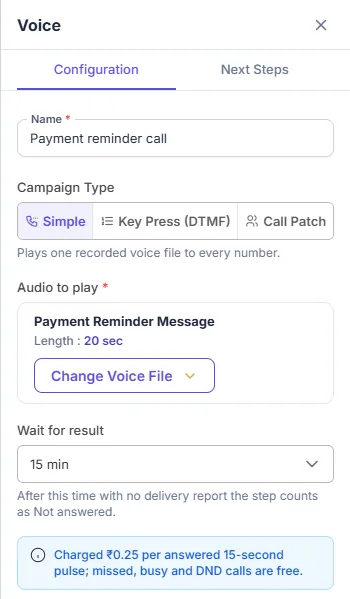
A Call Patch call has two legs, the customer's call and your agent's talk time, and both are counted in pulses. The voice call pricing page has worked examples for each type.
How does a voice step work inside a journey?
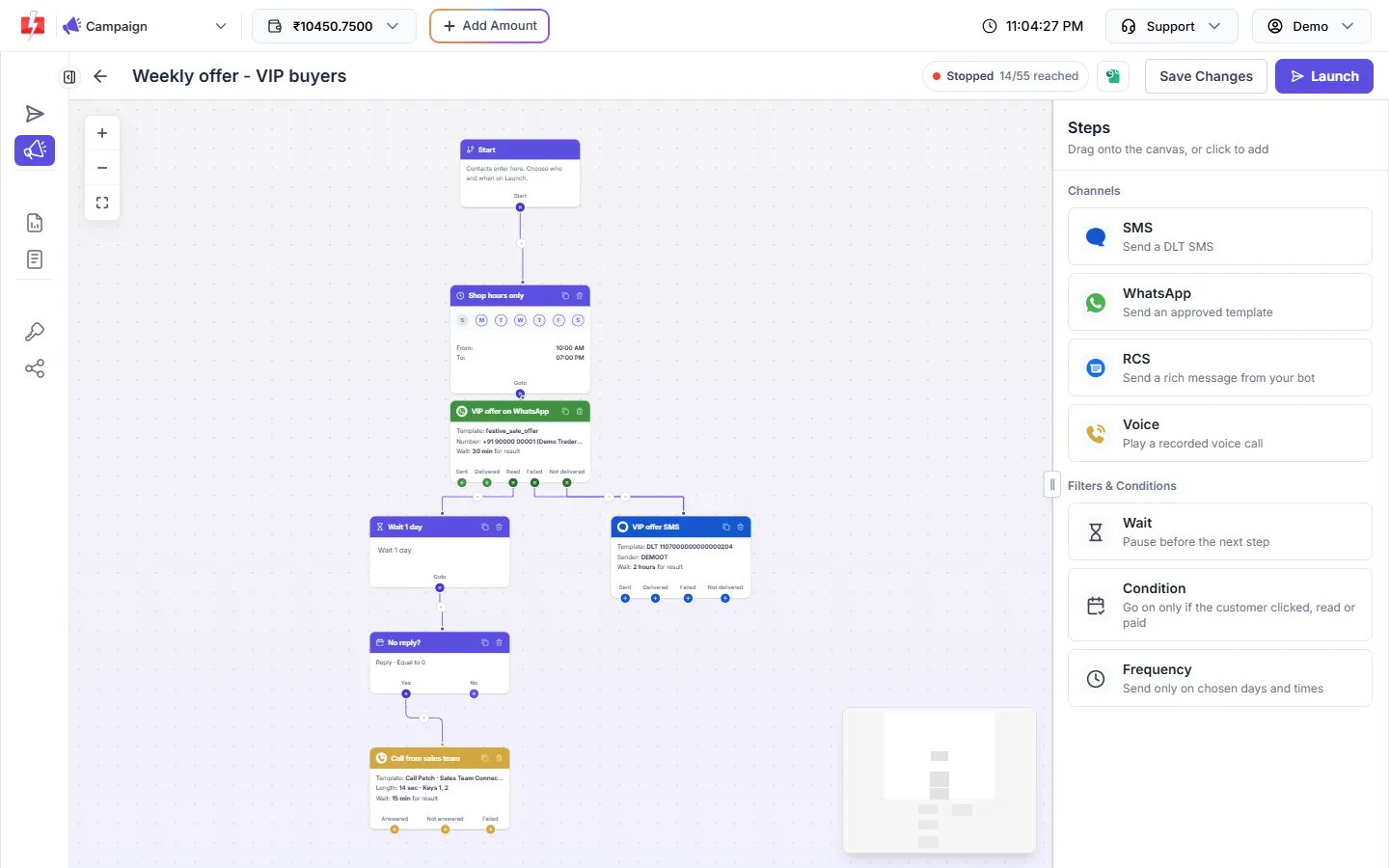
A voice step is one box in a Campaign journey, next to SMS, WhatsApp and RCS boxes. When a customer reaches it, the call is placed, and the step waits for the final result before it sends the customer down one of three outputs: answered, not answered or failed.
What happens on the voice step, in order:
- The call is placed with the type, audio files and retries you chose for that step.
- The step waits for a final result. The default result wait for voice is 15 minutes, and you can set it from 1 minute to 24 hours. Set it longer if you use several retries with long gaps.
- Answered means the customer picked up and heard the audio. This is the only result you pay for.
- Not answered covers calls that rang out or were busy after all retries.
- Failed covers calls that could not be placed at all, for example an invalid or unreachable number.
You decide where each output goes. A common pattern: answered ends the journey, not answered goes to a Wait step and a second voice step later in the day, and failed goes to an SMS with your callback number. Each step runs once per customer, so a second call is either a retry setting on the same step or a separate voice step after a Wait.
Should voice be the first or the last step?
For most reminders and updates, last. A call costs more per answered customer than an SMS or WhatsApp message and interrupts the customer, so it should ring only for people the cheaper messages did not reach. For hot leads and feedback, a call can go first.
| Goal | Put voice | Why |
|---|---|---|
| Payment or EMI reminder | Last, after WhatsApp and SMS | Most people pay from the text link; the call is for those who never saw it |
| Appointment or class reminder | Last, a few hours before the slot | A short call cuts no-shows from people who do not read messages |
| Delivery or service update | Last, only if SMS is not delivered | Text carries the details; the call makes sure the customer knows |
| New lead from a form or ad | First, with WhatsApp if not answered | Speed matters; a press 1 call patch puts the lead through to sales at once |
| Feedback after a visit | First, with WhatsApp if not answered | A short call with "press 1 if you were happy" gets quick answers |
| Festival or sale offer | Usually not at all, or last for loyal customers | Images and links work better in WhatsApp and RCS; calls suit announcements |
A simple test helps: if you would ask a staff member to phone the customer when the message was not seen, add a voice step. If you would not, leave it out. For the full picture of mixing all four channels, read the omnichannel marketing platform guide, and for the SMS side of a backup ladder, the SMS fallback guide.
Which ready journeys include a voice call?
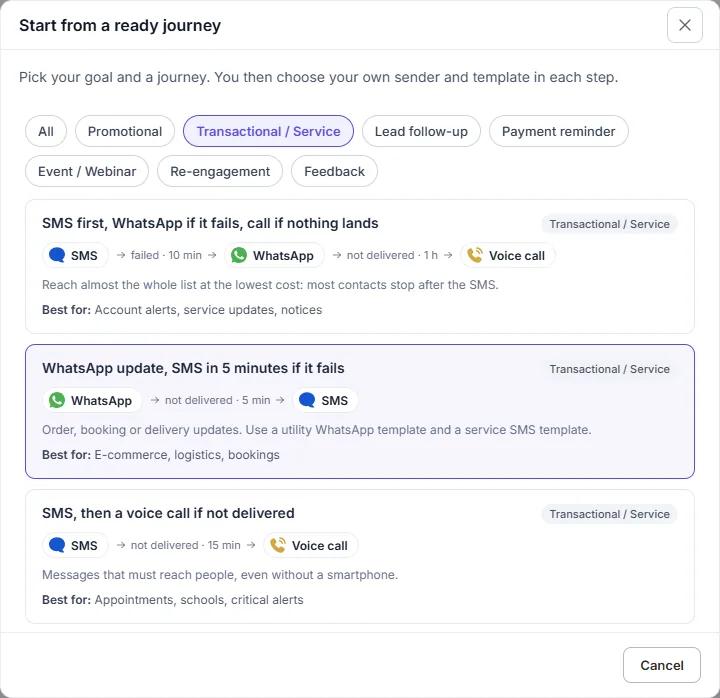
Eight of the 16 ready journeys in Campaign already have a voice step. Pick one under Start from a ready journey, swap in your templates and audio, and launch.
| Goal in the picker | Ready journey | Where the call sits |
|---|---|---|
| Transactional / Service | SMS, WhatsApp if it fails, call if nothing lands | Last step |
| Transactional / Service | SMS then voice call if not delivered | Second step |
| Lead follow-up | WhatsApp, no reply: call, then SMS | Middle, after a "reply received" check |
| Lead follow-up | Call first, WhatsApp if not answered | First step |
| Payment reminder | SMS, then WhatsApp, then call | Last step |
| Payment reminder | EMI due: WhatsApp pay link, SMS, then call | Last step |
| Event / Webinar | WhatsApp invite, SMS if not delivered, call on the day | On the event day |
| Feedback | Feedback call, WhatsApp if not answered | First step |
The other ready journeys are message-only. You can add a voice step to any of them by dragging a Voice box onto the canvas and connecting a failed or not delivered output to it. All 16 journeys are listed on the Campaign product page.
Timing table: WhatsApp, SMS, then a press 1 call
Here is a full journey for a payment due today, with a call patch at the end so a customer can talk to your collections team. Your billing system starts it on the due date, or you upload the day's list in the morning.
| Step | When | Channel | Message | If it fails |
|---|---|---|---|---|
| 1 | Day 0, 10:00 | WhatsApp (utility template, pay button) | Hi Rahul, ₹2,400 is due today for invoice 1045. Tap to pay. | Failed: step 2 at once. Not delivered after 30 minutes: step 2 |
| 2 | 10:00 to 10:30 | SMS (DLT service template) | Dear Rahul, Rs 2400 is due today. Pay: short link. Demo Traders | Failed or not delivered after 120 minutes: step 3 |
| 3 | Frequency: Mon to Sat, 10:00 to 19:00 | None (free step) | Holds the customer until calling hours | Inside hours: step 4 |
| 4 | About 12:30 | Voice, Call Patch (1 retry after 30 minutes, result wait 1 hour) | "Namaste, this is Demo Traders. A payment on your account is due today. Press 1 to talk to our team." | Not answered: step 5. Failed: journey ends, listed as unreached |
| 5 | Wait 4 hours | None (free step) | Gives the customer time to call back | Then step 6 |
| 6 | About 17:30, inside the Frequency hours | Voice, Simple | "Your payment is due today. Please check the SMS we sent you. Thank you." | Journey ends |
Most customers stop at step 1. Only those WhatsApp missed get the SMS, and only those the SMS missed get a call. If your system posts a payment_received event, add a Condition step before step 4 so customers who paid in the meantime are not called. Full before-due and overdue journeys are in the payment reminder automation guide, and the lender version is in the EMI reminder guide.
How much does a voice campaign cost?
At the time of writing a voice call on Fast2SMS costs ₹0.25 per 15-second pulse, and only answered calls are charged. There is no campaign fee, no builder fee and no monthly fee; each step in a journey is charged at its channel's normal rate from the same wallet.
| Answered call | Pulses | Charge at ₹0.25 |
|---|---|---|
| Simple message, 14 seconds | 1 | ₹0.25 |
| Press a key, 25 seconds including the key press | 2 | ₹0.50 |
| Call Patch, customer answers but presses no key (25 seconds) | 2 | ₹0.50 |
| Call Patch, 30 seconds talking to your agent | Customer leg + agent leg (4 + 2 = 6) | ₹1.50 |
| Missed, busy, switched off, DND skipped | 0 | ₹0.00 |
The Call Patch rows follow the worked examples on the voice call pricing page. When a voice step starts, the estimated cost is held from your wallet, and the part for calls nobody answered comes back automatically after the calls finish.
Cost example: voice for everyone vs voice as the last step
Take 10,000 customers with a payment due. The delivery and answer shares below are examples to show the maths, not measured Fast2SMS figures. Prices are at the time of writing: SMS ₹0.25 per message from a ₹100 recharge (down to ₹0.11 on bigger slabs), WhatsApp utility ₹0.25, voice ₹0.25 per pulse.
| Plan | What is sent | Cost |
|---|---|---|
| Voice only | 10,000 calls; 6,000 answered at 2 pulses each | ₹3,000 |
| SMS, then voice | 10,000 SMS (₹2,500); 800 not delivered get a call, 480 answered at 2 pulses (₹240) | ₹2,740 |
| WhatsApp, SMS, then voice | 9,300 WhatsApp delivered (₹2,325); 700 SMS (₹175); 150 get a call, 90 answered at 2 pulses (₹45) | ₹2,545 |
| Same, with a 14-second audio | As above, but each answered call is 1 pulse (₹22.50) | ₹2,522.50 |
Two lessons. First, voice as a last step costs very little, because only a small share of customers ever reach it. Second, audio length matters more than list size: a message under 15 seconds halves the cost of every answered call. Failed WhatsApp messages are refunded under the WhatsApp policy, so they are counted at ₹0 here. See SMS pricing and WhatsApp pricing for live rates.
If your wallet runs low in the middle of a run, the run pauses and resumes on its own after you recharge. Customers still waiting when you stop a run are not charged.
How do you plan a press 1 IVR campaign?
Keep the menu to one or two keys, say the key twice, and decide in advance what each key does. A press 1 campaign is an outbound IVR: your call plays a short menu and the customer answers with the keypad.
Press a key or Call Patch?
- Press a key (DTMF) saves the key each customer pressed. Use it when you want an answer, such as "press 1 to confirm your visit, press 2 if you cannot come". Your team reads the keys in the voice report afterwards.
- Call Patch connects the customer to a live agent group when they press a key. Use it when the next step is a conversation, such as a sales callback or a payment plan. You can map different keys to different agent groups, for example 1 for sales and 2 for support.
The journey itself moves on the call result (answered, not answered or failed), not on which key was pressed. Use the key data in your reports, or have your own software read it and post an event that a later Condition step checks.
The audio files in a press 1 call
| File | When it plays | Needed for |
|---|---|---|
| Menu | When the customer answers: the message and the key options | Press a key and Call Patch |
| No input | If no key is pressed in the wait time | Optional |
| Wrong input | If a key that is not in the menu is pressed | Optional |
| Thank you | After a valid key press | Optional |
| No agent free | If every agent in the group is busy | Call Patch |
| Welcome / message | The whole message, no menu | Simple |
You also set the allowed keys, how long the call waits for a key press, and whether the menu is repeated once if nobody presses anything. Keep the wait short, around 5 seconds, so the call does not sit silent.
Rules for a menu people follow
- Say who is calling first. "Namaste, this is Demo Traders" in the first three seconds.
- One reason for the call. A reminder, a confirmation or an offer. Not all three.
- Action before key. "To talk to our team, press 1" is easier to follow than "press 1 to talk to our team".
- Repeat the key once. People reach for the keypad after the first mention.
- Agents ready during the campaign. For Call Patch, keep the agent group staffed in the hours your Frequency step allows.
Voice campaign scripts you can record today
Each script fits in one or two pulses. Record your own voice or a clear text-to-speech file, and make one file per language.
| Use | Type | English script | Hindi script |
|---|---|---|---|
| Payment due | Simple | "Namaste, this is Demo Traders. A payment on your account is due today. Please pay from the link in our SMS. Thank you." | "नमस्ते, Demo Traders से बात हो रही है। आपके खाते का भुगतान आज देय है। कृपया हमारे SMS में दिए लिंक से भुगतान करें। धन्यवाद।" |
| Appointment confirm | Press a key | "Namaste, this is Demo Clinic. You have an appointment tomorrow. To confirm, press 1. If you cannot come, press 2." | "नमस्ते, Demo Clinic से कॉल है। कल आपकी अपॉइंटमेंट है। कन्फ़र्म करने के लिए 1 दबाएँ। अगर नहीं आ पाएँगे तो 2 दबाएँ।" |
| New enquiry | Call Patch | "Hello, thank you for your enquiry with Demo Homes. To talk to our property advisor now, press 1." | "नमस्ते, Demo Homes में पूछताछ के लिए धन्यवाद। अभी हमारे सलाहकार से बात करने के लिए 1 दबाएँ।" |
| Admission follow-up | Call Patch | "Namaste, this is Demo Academy. Admissions for the new batch are open. To speak to a counsellor, press 1. For fee details on WhatsApp, press 2." | "नमस्ते, Demo Academy से कॉल है। नए बैच के एडमिशन शुरू हैं। काउंसलर से बात करने के लिए 1 दबाएँ। फ़ीस की जानकारी WhatsApp पर पाने के लिए 2 दबाएँ।" |
| Feedback | Press a key | "Thank you for visiting Demo Store. If you were happy with our service, press 1. If something went wrong, press 2 and we will call you back." | "Demo Store आने के लिए धन्यवाद। अगर आप हमारी सेवा से खुश हैं तो 1 दबाएँ। अगर कोई परेशानी हुई तो 2 दबाएँ, हम आपको वापस कॉल करेंगे।" |
| Event on the day | Simple | "Namaste, this is Demo Events. Today's workshop starts at 5 pm. The joining link is in your WhatsApp and SMS. See you there." | "नमस्ते, Demo Events से कॉल है। आज की वर्कशॉप शाम 5 बजे शुरू होगी। जॉइन करने का लिंक आपके WhatsApp और SMS में है।" |
For a "press 2 for WhatsApp" option, your team or software sends the WhatsApp details to customers who pressed 2; the key itself does not send a message. More recording tips are in the bulk voice call guide.
Which DND and calling-hour rules apply?
A voice step follows the same rules as a normal bulk voice campaign on Fast2SMS. As stated on the bulk voice call guide: promotional calls reach Non-DND numbers only, between 10 am and 9 pm, and DND numbers are skipped and never charged; reminders, alerts and other transactional calls reach every number at any time.
- Calls outside the window are held. A promotional call that reaches the voice step outside the permitted hours is held and dialled from the next permitted time.
- Add a Frequency step anyway. Even transactional calls annoy people early in the morning or late at night. A Frequency step before the voice step lets customers through only on the days and hours you pick (the default is 09:00 to 21:00; many businesses use 10:00 to 19:00 for calls).
- No DLT for voice. According to the bulk voice call guide, voice calls do not need DLT registration. SMS steps in the same journey still need your DLT sender and template.
- Opt-outs are final. Numbers on your voice opt-out list leave the journey. There is no automatic STOP keyword handling, so remove people who ask not to be called.
- India only. Campaign accepts Indian mobile numbers, 10 digits starting with 6 to 9.
The full rule table, with examples of promotional and transactional calls, is on the bulk voice call page, and DND basics are on the DND page.
How to set it up in Fast2SMS
- Get voice ready. Make sure bulk voice is enabled on your account, then upload your audio files (MP3 or WAV, up to 5 MB) and wait for approval. For Call Patch, create an agent group with your team's numbers.
- Get the other channels ready. If the call follows a message, keep an approved WhatsApp template and a DLT SMS template with the same information.
- Open Campaign. Go to Campaign → Launch Campaign, or Campaign List → Create Campaign.
- Start from a ready journey, such as "SMS then voice call if not delivered", or start blank.
- Set the audience on the Start step: upload a CSV, TXT, XLSX or XLS sheet (up to 20 MB and 10 lakh rows), pick an Address Book group, or paste numbers. Duplicates and invalid numbers are removed and counted.
- Configure the message steps and map variables such as name and amount to your sheet's columns. The voice step has no variables.
- Add a Frequency step before the voice step with your calling days and hours.
- Configure the voice step. Choose Simple, Press a key or Call Patch, pick the approved files, the keys and agent groups, retries, the retry gap and the result wait.
- Wire the outputs. Connect the earlier steps' failed and not delivered outputs to the voice path, and the voice step's not answered output to a Wait and second call, or to an SMS.
- Send test to up to 10 numbers, including your own phone, and listen to the call. Test sends are charged like normal sends.
- Choose Send now, Schedule or Repeat. Schedule up to 90 days ahead, or repeat daily or on chosen weekdays. Check the cost estimate and launch.
How do you read the report?
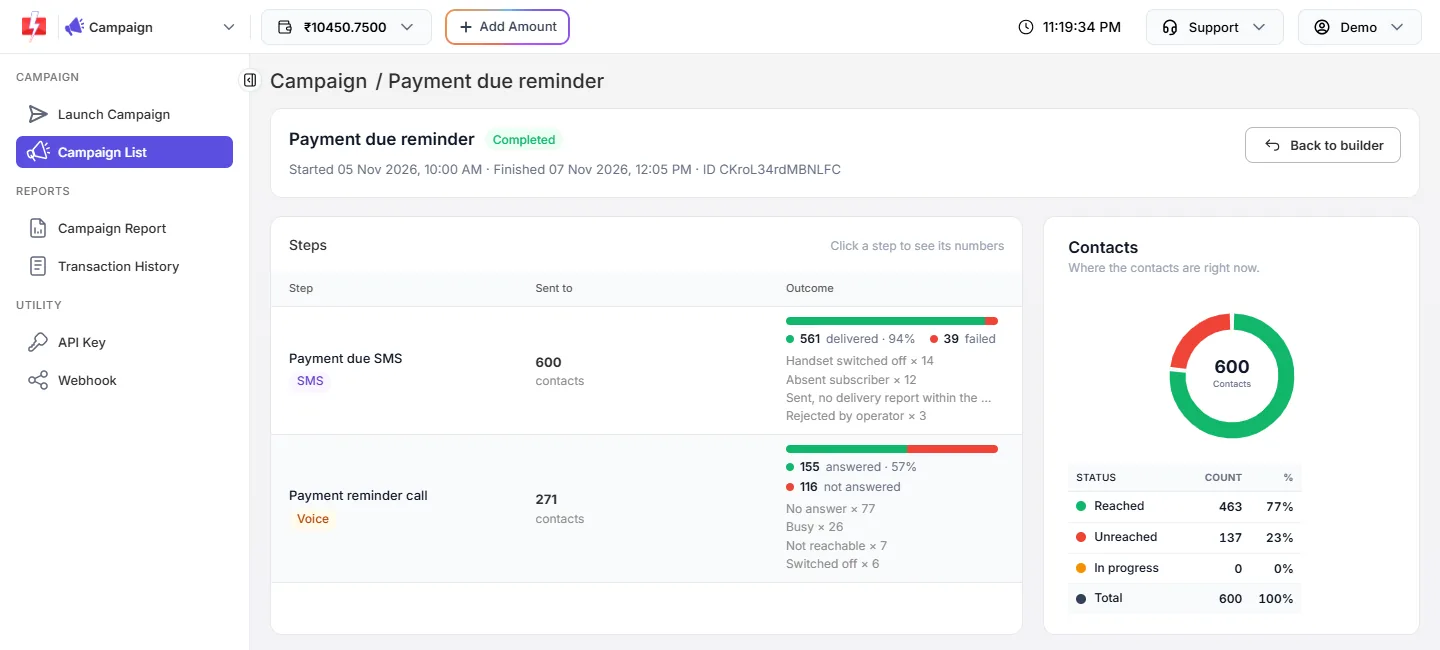
Open Reports → Campaign Report and the voice step shows how many customers entered it, how many answered, how many did not answer and how many failed, with the cost, the average time and the top failure reasons.
- Entered on the voice step equals the customers the earlier messages missed. If it is high, check those steps first.
- Answered vs not answered tells you whether your calling hours suit the audience. A low answer rate often improves by moving the Frequency window.
- Per number you see each customer's full path, such as "WhatsApp failed → SMS not delivered → call answered".
- Run totals show reached, unreached, opted out, cost, refund and net cost. The report refreshes every 15 seconds while the run is live.
- Export from Delivery Reports → Export → Campaign.
- Webhooks post every step result to your server, with the step name, channel, status, reason, cost and next step. Set them on Webhook → Campaign.
Key presses and agent talk time are saved per call in the voice call report, as described on the voice call pricing page.
Can your software start a voice journey?
Yes. One API call starts the whole journey, voice step included, for the numbers you send. Your billing system, CRM or LMS calls POST https://www.fast2sms.com/dev/campaign/start with your API key, the campaign ID and up to 1,000 numbers per call, and the journey starts at once.
This is how you handle dates that differ per customer. Campaign has fixed waits, not "three days before each customer's due date". So your system sends the API call on the right day for each customer, and the journey takes care of WhatsApp, SMS and the call. Your system can also post an event such as payment_received, and a Condition step skips the call for anyone who paid. Ready code in cURL, PHP, Node.js and Python is under Campaign List → ⋮ → Get API code. The developer guide is event-triggered messaging.
Which businesses use voice campaigns?
Any business whose customers include people who do not read messages, or whose message is worth a call: lenders, clinics, schools, coaching institutes, property developers and service businesses.
| Business | Voice campaign | Call type | Journey |
|---|---|---|---|
| Lenders, NBFCs | EMI due today | Call Patch to collections | WhatsApp pay link → SMS → call |
| Clinics, labs | Confirm tomorrow's appointment | Press a key | WhatsApp → SMS if not delivered → call 2 hours before |
| Schools | Fee due, holiday notice | Simple | SMS → call if not delivered |
| Coaching institutes | New admission enquiry | Call Patch to counsellors | Call first → WhatsApp if not answered |
| Real estate | Site visit reminder | Press a key | WhatsApp day before → call on the morning |
| Online stores | Confirm a cash-on-delivery order | Press a key | WhatsApp → call if not delivered |
| Events, webinars | Reminder on the day | Simple | WhatsApp invite → SMS → call on the day |
| Service businesses | Feedback after a visit | Press a key | Call → WhatsApp if not answered |
Sector journeys with timings are in the guides for appointment reminders, admission enquiry follow-up and real estate.
Mistakes to avoid
- Calling everyone first. Voice before cheaper messages costs more and annoys people who would have read the SMS. Put it last for reminders.
- Long audio. Every extra 15 seconds is another pulse on every answered call. Aim for under 15 seconds for reminders.
- Expecting the call to say the name or amount. Voice audio is the same for everyone. Put personal details in the SMS or WhatsApp step.
- No Frequency step. A customer can reach the voice step at night if the earlier steps took hours. Hold them for calling hours.
- Call Patch with nobody to answer. Staff the agent group during the campaign hours and record a "no agent free" file people can live with.
- Too many keys. More than two options and most people press nothing.
- A result wait shorter than the retries. If retries are 30 minutes apart, a 15-minute result wait moves the customer on before the retry. Make the wait cover all tries.
- Calling customers who already paid. Post a payment event from your system and check it with a Condition step before the call.
- Uploading audio on launch day. Files are approved before use. Upload them the day before.
- Not listening to the test call. Send a test to your own phone and hear exactly what customers will hear.
Why run voice campaigns on Fast2SMS?
- Voice inside the same journey as SMS, WhatsApp and RCS, from one panel and one wallet.
- Answered calls only, ₹0.25 per 15-second pulse at the time of writing, with no campaign or monthly fee.
- Three call types: recorded message, press a key and call patch to your agent groups.
- Calls only for those who need them, because the voice step sits on the failed and not delivered outputs of cheaper messages.
- Clear reports per step and per number, with webhooks and export.
- Start free: ₹50 credit on signup and recharge from ₹100.
Open the Campaign voice journey builder, start from "SMS then voice call if not delivered", and test it on your own phone today.
Frequently asked questions
What is a voice campaign?
A voice campaign is a planned set of automated calls that play your recorded message to a list of customers, ask them to press a key, or connect them to your team. On Fast2SMS it can run on its own or as a step inside a Campaign journey with SMS, WhatsApp and RCS.
What is a voice call campaign used for?
Payment and EMI reminders, appointment confirmations, notices, event reminders, lead follow-up, feedback and announcements. It works best for messages that must be noticed, or for customers who do not read SMS or WhatsApp.
What is the difference between a voice campaign and a bulk voice call?
A bulk voice call sends one recorded message to a whole list at once. A voice campaign on Fast2SMS can also be one step of a journey, so the call rings only for customers that earlier messages did not reach. The basics of bulk calling are in the bulk voice call guide.
Is a voice campaign the same as voice broadcasting?
Mostly. Voice broadcasting means one recorded message to many people. A voice campaign can be a broadcast, but it can also include a key-press menu or a call patch to your agents, and it can be part of a multi-channel journey.
What is a robo call campaign?
A robo call campaign is a set of automated calls with recorded audio and no live caller. On Fast2SMS this is the Simple voice call type.
What is an outbound IVR campaign?
An outbound IVR campaign calls your customers and plays a short menu, such as "press 1 to confirm". On Fast2SMS you choose the Press a key (DTMF) type, or Call Patch if pressing a key should connect the customer to your team.
What is a press 1 call campaign?
It is an automated call that ends with an instruction like "press 1 to talk to our team" or "press 1 to confirm". The key each customer pressed is saved, and with Call Patch the customer is connected live to an agent group.
What is an IVR campaign?
An IVR campaign is a round of automated calls that use a keypad menu. Outgoing IVR campaigns call the customer; incoming IVR answers customers who call your business number, which is part of cloud telephony on the voice call page.
Which call types can a Fast2SMS voice campaign use?
Three: Simple (a recorded message), Press a key (DTMF, the key is saved) and Call Patch (pressing a key connects the customer to one of your agent groups).
Is voice broadcasting service available across India?
Yes. Fast2SMS voice calls and Campaign work for Indian mobile numbers across the country. Campaign accepts 10-digit Indian mobile numbers starting with 6 to 9.
Can I call international numbers in a voice campaign?
No. Campaign accepts Indian mobile numbers only.
What is the voice campaign cost on Fast2SMS?
At the time of writing, ₹0.25 per 15-second pulse, charged only for answered calls. There is no campaign fee, builder fee or monthly fee. See voice call pricing.
Do I pay for calls that are not answered?
No. Missed, busy, switched-off and DND-skipped calls cost nothing. The estimated cost is held when the voice step starts, and the part for unanswered calls comes back to your wallet automatically after the calls finish.
How is a pulse counted?
The answered call time is rounded up to the next 15 seconds. 1 to 15 seconds is one pulse (₹0.25), 16 to 30 seconds is two pulses (₹0.50), and so on, at the time of writing.
How is a Call Patch call charged?
A Call Patch call has two legs, the customer's call and your agent's talk time, and both are counted in 15-second pulses at the same rate. The voice call pricing page has worked examples.
Is pressing a key charged extra?
No. A Press a key call is charged by its call time only. The key pressed is saved at no extra cost.
Is there a fee for using voice inside Campaign?
No. Every step is charged at its channel's normal rate from the same wallet. Wait, Condition and Frequency steps are free.
How do I estimate the cost of a voice campaign?
Multiply the expected answered calls by the pulses per call by ₹0.25. For 1,000 answered calls of up to 15 seconds, that is ₹250 at the time of writing. If voice is the last step of a journey, only the customers earlier messages missed reach it, so the number of calls is much smaller.
Why is voice cheaper as the last step?
Because only a small share of customers reach it. If WhatsApp and SMS reach most people, the call rings only for the rest, and you pay only for those who answer.
What happens if my wallet runs low during a voice campaign?
The run pauses and resumes on its own after you recharge. It is stopped after 3 days on low balance. Customers still waiting when a run is stopped are not charged.
Is there free credit to test a voice campaign?
Every new Fast2SMS account gets ₹50 free credit, and you can recharge from ₹100. Bulk voice must be enabled on your account before you can use a voice step.
How do I add a voice call to a Campaign journey?
Drag a Voice step onto the journey canvas and connect an earlier step's output to it, usually SMS or WhatsApp "failed" and "not delivered". Then pick the call type, approved audio files, retries and the result wait.
What results does a voice step give?
Answered, not answered and failed. You connect each output to the next step you want, or let it end the journey.
What is the difference between "not answered" and "failed"?
Not answered means the call rang out or was busy after all retries. Failed means the call could not be placed, for example an invalid or unreachable number.
How long does a voice step wait for a result?
The default result wait for voice is 15 minutes, and you can set it from 1 minute to 24 hours. If you use retries with long gaps, set the wait long enough to cover all the tries.
Can a voice campaign retry unanswered calls?
Yes. Each voice step has a retries setting and a retry interval. For a later call in the day, add a Wait step and a second voice step on the not answered output.
Can the same customer get two calls in one journey?
Yes, with two voice steps or with retries. Each step runs once per customer, so a second call needs its own step, often after a Wait step.
Can the call read out the customer's name or amount?
No. Voice uses recorded audio that is the same for everyone; there are no voice variables. Put names, amounts and dates in the SMS or WhatsApp step.
Which audio formats can I use?
MP3 or WAV files up to 5 MB. Each file is approved before it can be used in a campaign.
How long does voice file approval take?
Upload your files well before the campaign. The bulk voice call guide notes that new voice messages are checked by the team and approval can take 12 to 24 hours.
Which audio files does a press 1 call need?
A menu file. You can add optional no-input, wrong-input and thank-you files. Call Patch also needs a "no agent free" file, played if all your agents are busy.
Can different keys go to different teams?
Yes, with Call Patch. You map each key to an agent group, for example 1 for sales and 2 for support.
Does the journey branch on which key the customer pressed?
No. The journey moves on the call result: answered, not answered or failed. The key pressed is saved with the call; your software can read it and post an event that a later Condition step checks.
Can a voice call be the first step?
Yes. The ready journeys "Call first, WhatsApp if not answered" (lead follow-up) and "Feedback call, WhatsApp if not answered" start with a call.
Which ready journeys include a voice call?
Eight of the 16: SMS, WhatsApp if it fails, call if nothing lands; SMS then voice call if not delivered; WhatsApp, no reply: call, then SMS; Call first, WhatsApp if not answered; SMS, then WhatsApp, then call; EMI due: WhatsApp pay link, SMS, then call; WhatsApp invite, SMS if not delivered, call on the day; Feedback call, WhatsApp if not answered.
How do I stop calling customers who already paid?
Have your billing system post a payment_received event to the Campaign event API, and put a Condition step before the voice step that checks it. Customers who paid skip the call.
Can voice follow an RCS message?
Yes. Any channel step's failed or not delivered output can lead to a voice step, so RCS → WhatsApp → SMS → call works.
How many steps can a journey have?
Up to 200 steps and 400 connections per journey, and one customer's journey lasts at most 30 days.
How do I test a voice campaign before launch?
Use Send test for up to 10 numbers, including your own phone, and listen to the call. Test sends are charged like normal sends.
How do I upload numbers for a voice campaign?
Upload a CSV, TXT, XLSX or XLS file up to 20 MB and 10 lakh rows, pick an Address Book group, or paste a list. Duplicates and invalid numbers are removed and counted.
Can I schedule a voice campaign?
Yes. Choose Send now, Schedule (up to 90 days ahead) or Repeat (daily or on chosen weekdays at a set time). The account time zone is IST.
How fast does a voice campaign start?
A run can start up to 5,000 contacts per minute, so 1 lakh contacts start in about 20 minutes. You can also set per-minute, per-hour or per-day limits, which helps when Call Patch agents need a steady flow.
Why should I limit contacts per minute for Call Patch?
If too many customers press 1 at once, your agents are busy and callers hear the "no agent free" message. A per-minute limit spreads the calls to match your team size.
Can my software start a voice journey for one customer?
Yes. Call POST https://www.fast2sms.com/dev/campaign/start with your API key, the campaign ID and the numbers (up to 1,000 per call). The journey starts at once. See event-triggered messaging.
Can I call customers three days before their own due date?
Campaign uses fixed waits, not per-customer dates. Have your system send the API call on the right day for each customer, and the journey handles the messages and the call.
Do voice campaigns need DLT registration?
According to the bulk voice call guide, voice calls do not need DLT registration. SMS steps in the same journey still need your DLT sender and template.
Can promotional voice calls reach DND numbers?
No. As stated on the bulk voice call guide, promotional calls reach Non-DND numbers only, and DND numbers are skipped and never charged.
What are the calling hours for a voice campaign?
Promotional calls go out between 10 am and 9 pm, as stated on the bulk voice call guide; a call outside that window is held until the next permitted time. Reminders, alerts and other transactional calls can go at any time, but a Frequency step keeps them to sensible hours.
What does the Frequency step do for calls?
It lets customers continue only on the weekdays and between the times you choose (default 09:00 to 21:00). Put it before a voice step so nobody is called late at night.
Can a reminder call include an offer?
Keep them apart. Offers belong on the promotional route with its DND and time rules; reminders and alerts should stay informative.
Does Fast2SMS handle opt-outs for calls?
Numbers on your voice opt-out list leave the journey. There is no automatic STOP keyword handling, so remove people who ask not to be called.
What caller ID do customers see?
The operator assigns the caller ID for bulk calls, so customers may not be able to call that number back. Say your callback number in the audio or put it in the SMS.
Where do I see voice campaign results?
In Reports → Campaign Report. The voice step shows entered, answered, not answered and failed, with cost, average time and top failure reasons. Each number shows its full path through the journey.
Can I export the voice campaign report?
Yes, from Delivery Reports → Export → Campaign, as CSV.
Can I get voice results on my server?
Yes. Campaign webhooks post every step result with the step name, channel, status, reason, cost and next step. Set them up on Webhook → Campaign.
Where can I see which key a customer pressed?
Key presses and agent talk time are saved per call in the voice call report, as described on the voice call pricing page.
What is a good answer rate for a voice campaign?
It depends on your list and timing. Compare answered and not answered across runs, and move your Frequency window if many calls go unanswered at a certain time.
Is a voice campaign good for EMI and payment reminders?
Yes, usually as the last step after WhatsApp and SMS, with Call Patch to your collections team. See the EMI reminder guide and the payment reminder guide.
Can clinics use a press 1 call to confirm appointments?
Yes. Use Press a key with "press 1 to confirm, press 2 if you cannot come", a couple of hours before the slot. The appointment reminder guide has the full journey.
Can coaching institutes use call patch for admission leads?
Yes. "Call first, WhatsApp if not answered" with Call Patch to your counsellors works well for new enquiries. See the admission enquiry follow-up guide.
Should I use voice for festival offers?
Usually not as the main channel. Images and links work better on WhatsApp and RCS. A short promotional call can work for loyal customers or local announcements, within promotional hours.
Can a voice campaign confirm cash-on-delivery orders?
Yes. A Press a key call ("press 1 to confirm your order") saves each customer's key, which your team or software can act on.
Why run voice campaigns on Fast2SMS?
Voice runs in the same journey as SMS, WhatsApp and RCS, from one wallet, with answered-only billing at ₹0.25 per 15-second pulse at the time of writing, three call types and per-number reports. Start on the Campaign page or read the omnichannel marketing platform guide.