
Vi DLT registration is done on Vilpower (vilpower.in), the DLT portal of Vodafone Idea. You sign up once as an enterprise (Principal Entity), pay the fee, and then register headers, content templates and your telemarketer. This guide follows the process Vi describes in its own FAQ, lists the fee and approval times Vi publishes, and shows how to add your Vilpower IDs in Fast2SMS.
What is Vilpower?
Vilpower is Vodafone Idea’s platform for TRAI’s DLT rules on commercial SMS and voice. Businesses and telemarketers register on it, and headers, content templates and consent templates are recorded before any commercial message is sent. The site also publishes the list of registered Principal Entities and their headers.
Vi’s FAQ is clear on one point many people ask about: a business does not have to register separately with each operator. It registers once, with any one access provider, and its Entity ID is unique across all of them. A Vilpower registration works for SMS to Jio, Airtel and BSNL numbers as well.
Who should use Vilpower
- Businesses registering on DLT for the first time that choose Vi.
- Businesses already registered on Vilpower. Keep all headers and templates under that one entity.
- If you are already registered on another portal, you do not need Vilpower.
Vi DLT registration fee, validity and approval time
At the time of writing (approval times from Vi’s DLT FAQ). Check the portal for current terms before you pay.
| Portal | vilpower.in |
|---|---|
| Principal Entity registration fee | ₹5,900 per year including GST (at the time of writing), the same on every DLT portal. The fee is non-refundable. |
| Validity | 1 year, renewable with a grace period of 30 days. Check the portal for renewal terms. |
| Entity approval | The registrar verifies your details within 72 working hours. |
| Header, content and consent templates | The registrar verifies each within 60 minutes. |
| Missing documents | If you do not send the requested documents or answer the registrar’s queries within 15 working days, the account is deleted and you have to sign up again. |
| CTA whitelisting | No extra fee for registering or updating links and call-back numbers (CTAs). |
| Support | +91-9619 500 900 (10 AM to 6 PM, Monday to Friday), [email protected]. User manuals are under “LET US HELP YOU” on the site. |
Sending in bulk? For high SMS volumes our team offers discounted rates. Talk to our team or see SMS pricing.
Documents for Vi DLT registration
Vi’s FAQ lists:
- A valid business PAN.
- Details of the authorised person: mobile number and email.
- Business proofs, uploaded during sign-up.
- Proof of identity of the authorised person.
- Government bodies: letter of intent or agreement issued by the central or state government.
- SEBI-registered businesses: certificate of registration from SEBI, plus validation on the SEBI portal.
- Letter of Authorisation (LoA) addressed to the telemarketer, when a telemarketer acts on your behalf. Vi says it must be signed by your authorised signatory and name the business, the signatory, the purpose and the telemarketer.
How to register on Vilpower: step by step
These steps follow Vi’s FAQ. We do not show Vilpower screens here.
-
Sign up as an Enterprise
Open vilpower.in and sign up as an Enterprise (Principal Entity). Choose your line of business from the list. This matters: Vi’s rules say you cannot send messages about a different line of business.
-
Upload documents and pay the fee
Enter your business PAN and authorised person’s details, upload the business proofs and pay the registration fee online. Vi’s FAQ also lists NEFT for payments.
-
Wait for verification and get your Entity ID
The registrar checks your details within 72 working hours. If something is missing, Vi tells you on your registered email and mobile number. Reply within 15 working days. Once approved, your Entity ID is active and you can log in.
-
Register your headers
Add each Sender ID and its details. The header must relate to your business, and restricted headers (celebrity and politician names, trademarks, other registered brands, government or SEBI style headers) are refused. Vi’s FAQ also says a header inactive for more than 90 days goes back to the header pool, so use your headers regularly.
-
Register your content templates
Choose the template type (promotional, transactional or service), select the content category and an approved header, and mark the variable parts. Vi asks for your brand name (business name, brand or trademark) in every template, and templates without it can be rejected. Templates in any Unicode language are allowed. More help: content template approval at Vilpower.
-
Register consent templates (only if needed)
You need these only to collect customer consent for promotional or service explicit messages. On Vi, consent templates are English only and each one is tied to a single header.
-
Add Fast2SMS as your telemarketer
Vi’s FAQ says every entity must select at least one telemarketer, from the Telemarketer section of the portal. Select ours using the TM ID below, take a screenshot, and approve the chain again when asked. Detailed steps: add a telemarketer in Vilpower.
Telemarketer (TM) name SID GROUPS PRIVATE LIMITED TM ID 1702178720558766591
Add your Vilpower DLT details in Fast2SMS
Once Vilpower has approved your entity, headers and templates, copy the IDs into Fast2SMS. Everything is in the SMS app under DLT Manager. Only approved items can be used for sending.
-
Add your Entity ID
Go to DLT Manager > Entity ID and click Add New Entity. Enter the Entity ID exactly as Vilpower shows it and your entity name. If Fast2SMS finds the ID on the DLT platform, the name fills in and the entity is approved straight away. If not, you are asked to upload a screenshot of the approved entity from Vilpower, and our team checks it.
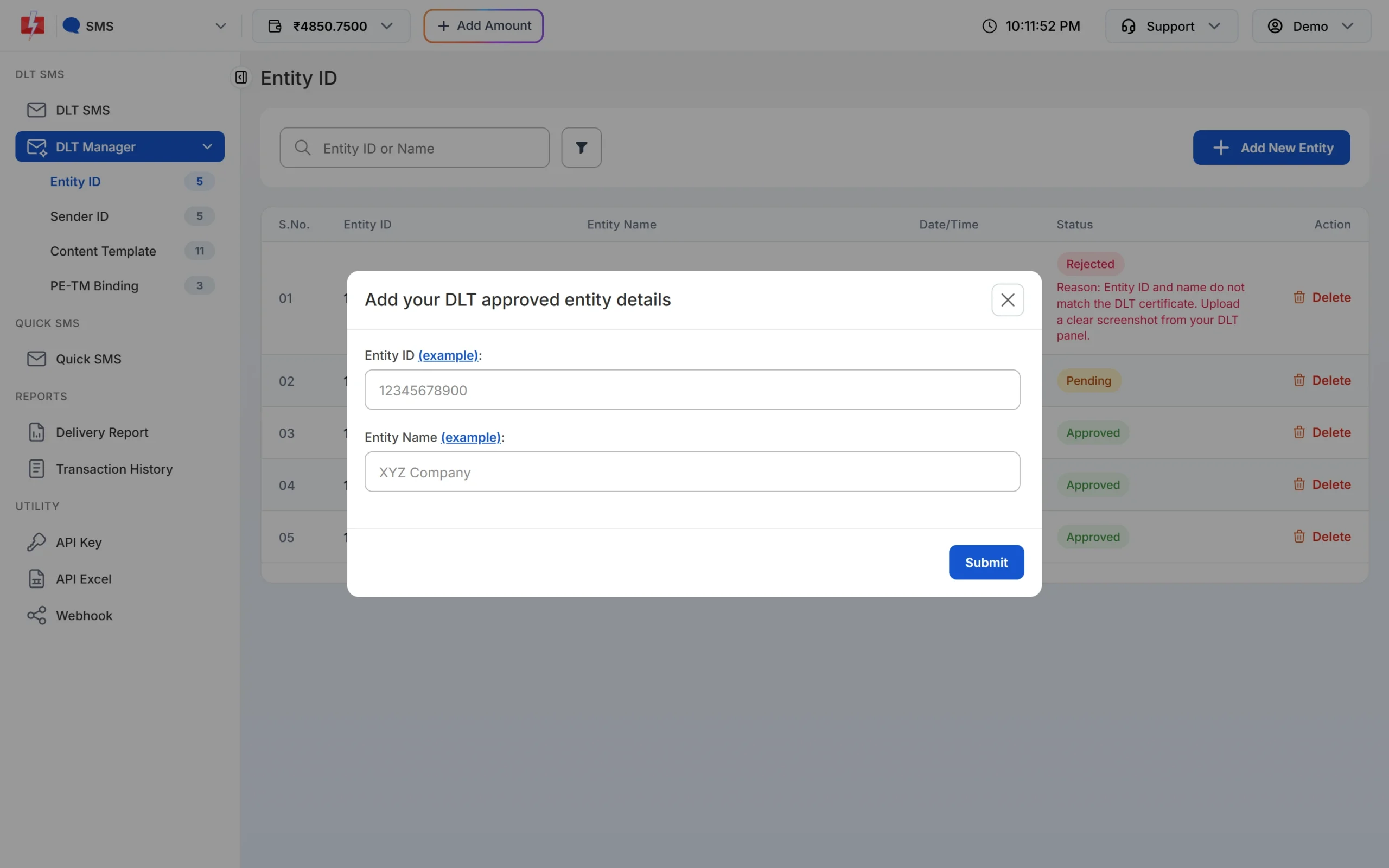
Adding the Entity ID you got from Vilpower. -
Add your Sender IDs (headers)
Open Sender ID and click Add New Sender ID. Select your entity, keep Type Manually, enter the approved header (3 to 6 characters) and upload a screenshot that shows it approved on Vilpower.
There is also an Upload Excel option for header lists exported from DLT portals (.xlsx or .csv). If your Vilpower export is not accepted, type the headers manually.
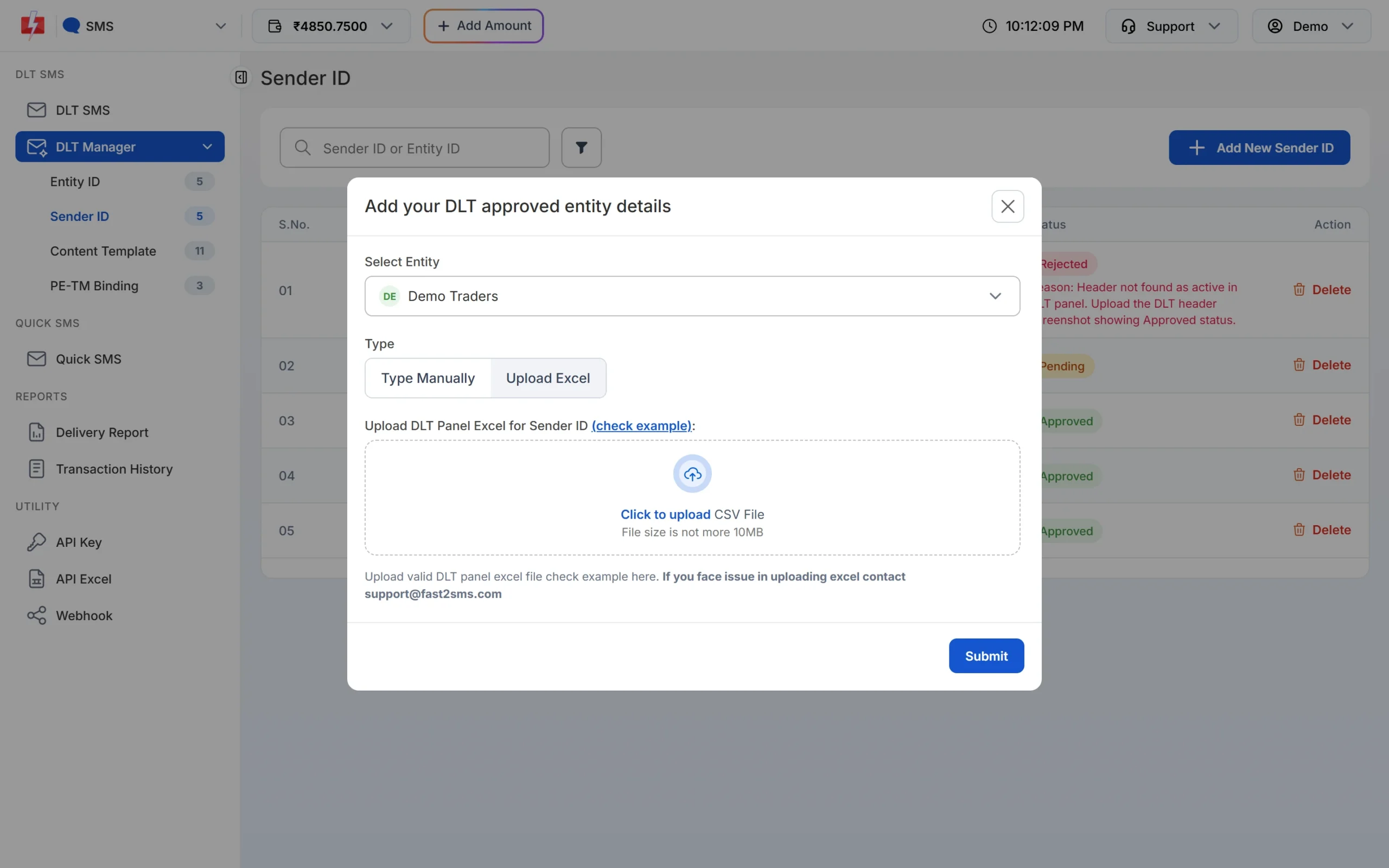
Headers can be typed one by one or uploaded from the DLT panel export. -
Add your content templates
Open Content Template and click Add Content Template. Select the entity, tick the Sender IDs the template is linked to, enter the Content Template ID, choose Service Implicit or Service Explicit or Promotional, paste the approved text exactly as registered (with every {#var#}) and upload the approval screenshot.
Have many templates? Choose Upload Excel and upload the template export you download from Vilpower. Fast2SMS reads the common export formats of the DLT portals and imports only the rows marked approved or active. If a Sender ID in the file is not in your account yet, it is added as Pending.
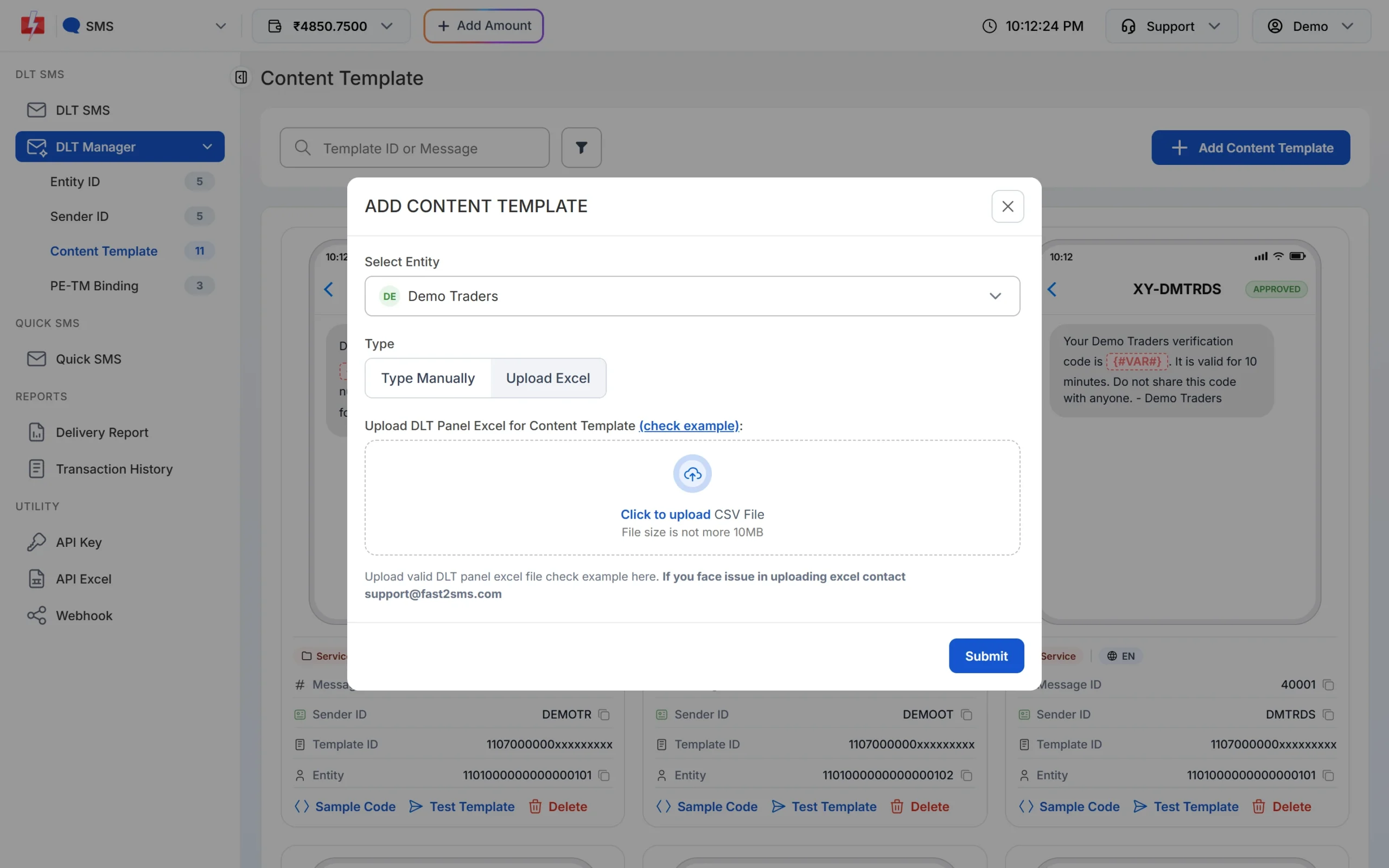
Templates can be added by hand or from the DLT export. -
Submit your PE-TM binding
Open PE-TM Binding. After you have sent the chain request to TM ID 1702178720558766591 on Vilpower, tick I’ve sent the request to TM ID 1702178720558766591 from DLT Panel. Select the entity, upload the screenshot of the request, choose a company document type, upload the document and click Submit Request. The authorised person’s name, PAN card and Aadhaar or Voter ID are asked for after the company document. Each file can be up to 10 MB.
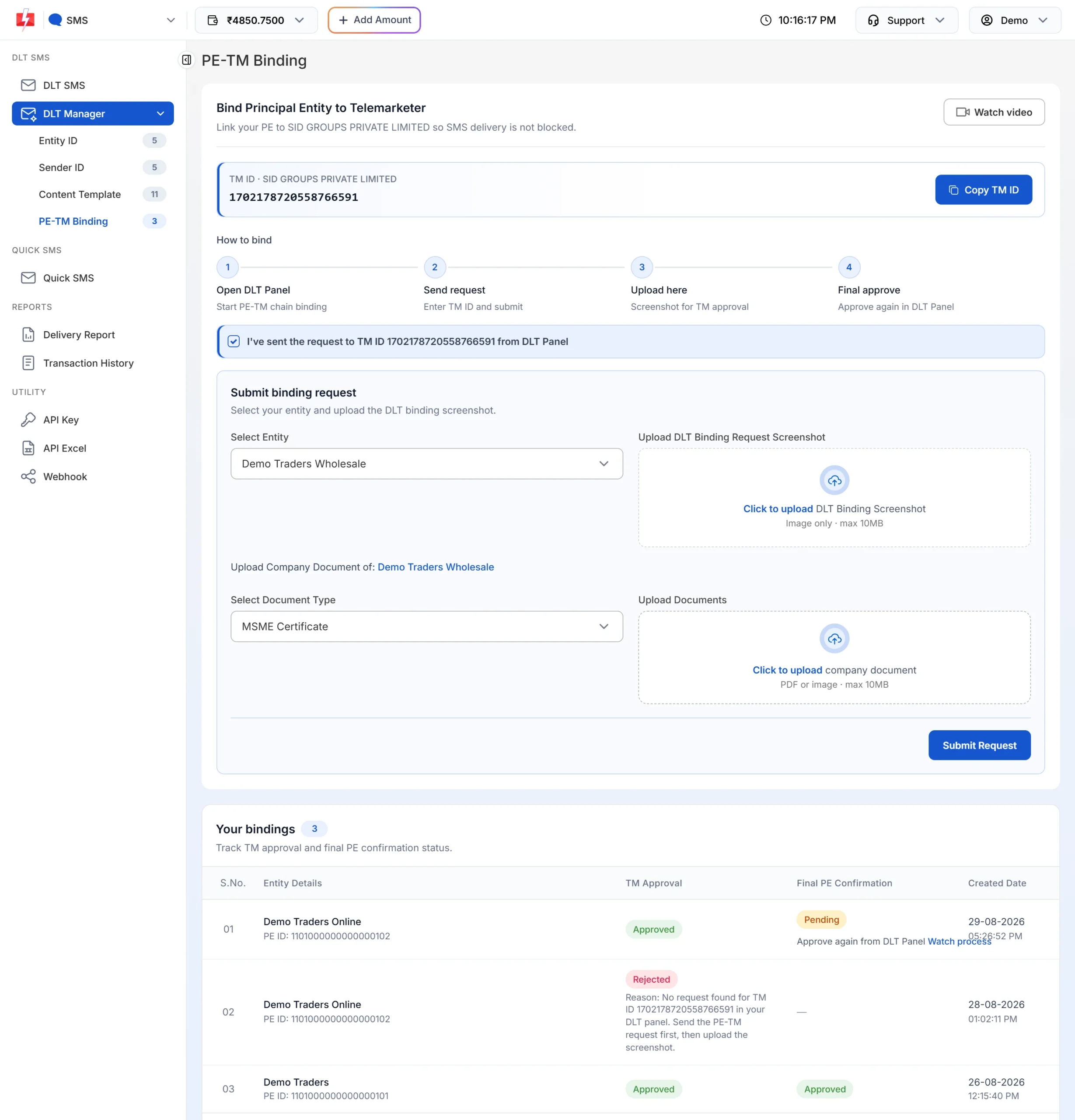
The binding form opens after you tick the confirmation box. -
Give the final approval on Vilpower
When Fast2SMS accepts the chain, TM Approval turns Approved. If Final PE Confirmation still says Pending with “Approve again from DLT Panel”, log in to Vilpower and approve the request once more. Use the Watch process link if you are not sure where to do it. When both columns say Approved, your chain is complete and you can send DLT SMS.
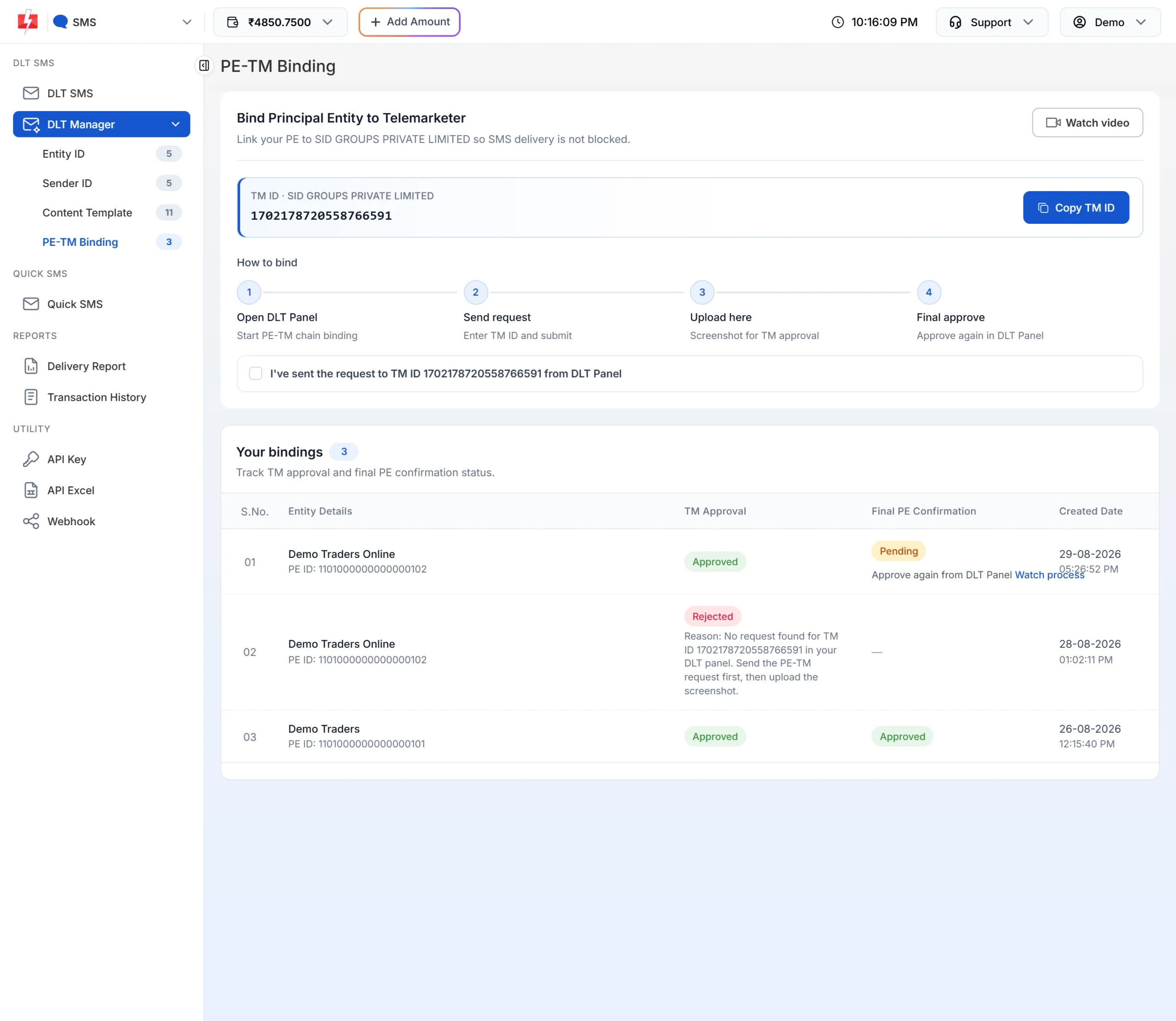
Both columns must show Approved.
For more detail on each screen, see DLT Manager in Fast2SMS and PE-TM binding in Fast2SMS.
Common Vi DLT rejection reasons and fixes
| Problem | Why it happens | Fix |
|---|---|---|
| Entity application deleted | Documents or replies to the registrar did not reach Vi within 15 working days. | Sign up again and answer registrar emails quickly. |
| Entity sent back | Missing document or incorrect details. | Upload the missing proof and correct the details named in Vi’s email. |
| Header refused | Restricted header, or no link to your business name or brand. | Apply for a header based on your own name or brand. |
| Header lost | It was not used for more than 90 days and went back to the pool. | Register it again, or use another approved header. |
| Template rejected | No brand name, wrong type, or content outside your line of business. | Add the brand name, choose the right type and keep to your business. |
| Entity rejected in Fast2SMS | The ID or name typed in Fast2SMS is different from the DLT record, or the screenshot is unclear. | Copy the ID and name exactly from the portal and upload a clear screenshot of the approved entity. |
| Sender ID rejected in Fast2SMS | The header is not approved or not active on the portal yet. | Wait for approval on the portal, then add it again with a screenshot that shows the approved status. |
| PE-TM binding rejected in Fast2SMS | The chain request was not sent on the portal, or it went to a different TM ID. | Send the request to TM ID 1702178720558766591 first, then submit the binding again with the screenshot. |
Frequently asked questions
What is Vilpower?
Vilpower (vilpower.in) is Vodafone Idea’s DLT portal, where businesses register their entity, headers and templates for commercial SMS.
What is the Vi DLT registration fee?
₹5,900 per year including GST for a Principal Entity at the time of writing, the same as on every other DLT portal. It is non-refundable. Check the portal for the current amount.
How long is Vilpower registration valid?
1 year, with a 30-day grace period to renew. Check the portal for renewal terms.
How long does Vi DLT approval take?
Vi’s FAQ says entity details are verified within 72 working hours and headers and templates within 60 minutes.
Do I need to register with Jio and Airtel too?
No. Vi’s FAQ says a business registers only once with any operator, and its Entity ID is unique across all of them.
Can I change a template after Vi approves it?
Only the variable parts. To change the fixed text, register a new template.
Can a consent template be used with several headers on Vi?
No. A consent template is linked to one header. Content templates can be used with several headers.
What TM ID do I add on Vilpower for Fast2SMS?
1702178720558766591, under the name SID GROUPS PRIVATE LIMITED.