
An SMS operator error code is the number an operator sends back when your SMS is not delivered. Codes in the 600s and 700s (and some 4-digit codes) usually mean the SMS failed a DLT check, so the fix is in your entity, header, template or links. Low numbers usually mean a problem with the customer’s phone or the network, which you cannot fix from your side.
This page explains how operator error codes work for Airtel, Jio and SmartPing, gives the meaning of the most searched codes (630, 633, 642, 650, 651, 652, 701, 5101), and links to the full code list for each operator.
Full error code lists by operator
Each page below has every code we have on record for that operator, rewritten in plain English with the likely fix. Codes that mean the same thing are grouped together.
- Airtel SMS error codes: meaning and fix
- Jio SMS error codes: meaning and fix
- SmartPing SMS error codes: meaning and fix
How to read an SMS error code
| Type of code | What it usually means | Who can fix it |
|---|---|---|
| DLT entity codes | Your Entity ID is wrong, inactive, blacklisted, or not linked to the telemarketer (PE-TM binding) | You, on your DLT portal and in DLT Manager |
| DLT header codes | Your Sender ID is not found, inactive, suspended, blacklisted, or the wrong type for the message | You, on your DLT portal |
| DLT template codes | The Template ID is wrong, or the text does not match the approved template | You, by sending the exact approved text |
| Preference and consent codes | The number is on DND, a promotional SMS was sent outside 10 AM to 9 PM, or no consent is recorded | You, by sending the right message type at the right time |
| CTA codes | A link, phone number or email in the SMS is not whitelisted on DLT | You, by whitelisting it on your DLT portal |
| Phone codes | Phone switched off, number not in use, inbox full, SMS barred on the number | Usually no one. Send later or use another channel |
| Network codes | A temporary technical problem in the mobile network | Usually clears on its own. Contact support if many numbers show it |
Most searched SMS error codes
| Code | Meaning by operator | What to do |
|---|---|---|
| 630 | Jio and SmartPing: Template ID not found on DLT | Copy the Template ID from your DLT portal again. Guide |
| 633 | Jio and SmartPing: SMS text does not match the registered template (Airtel uses 666 for this) | Send the approved text exactly. Guide |
| 634 | Jio and SmartPing: Sender ID not linked to this template (Airtel uses 614) | Send from the linked header, or link it on DLT |
| 635 | Airtel, Jio and SmartPing: a variable value is too long | Shorten the values in your variables |
| 642 | Jio: template type does not match the type of SMS. SmartPing: CTA (link, phone or email) error | Guide |
| 650 | Airtel, Jio and SmartPing: number is on DND, promotional SMS blocked | Do not send offers by SMS to this number. Guide |
| 651 | Airtel, Jio and SmartPing: promotional SMS sent outside 10 AM to 9 PM | Send promotional SMS inside that window. Guide |
| 652 | SmartPing: Service Explicit SMS blocked, number on DND and no consent. Jio: reserved, no separate meaning | Guide |
| 700 | Airtel and SmartPing: no link or CTA whitelisted for this message | Whitelist the link on your DLT portal. Guide |
| 701 | Airtel and SmartPing: the link in the SMS does not match your whitelisted links | Use the exact whitelisted link. Guide |
| 5101 | SmartPing: message blocked by DLT scrubbing because the number is on DND | Same as 650. Guide |
How to find the failure reason in Fast2SMS
You do not have to look up codes for each failed SMS. Fast2SMS turns the operator’s code into a short reason in words. Here is where to see it.
-
Filter your SMS report for failed numbers
Open Delivery Reports > SMS Report and click the filter button. In Delivery Status, tick Failed (and Blocked, DND or Invalid if you want them too), then click Apply Filters.
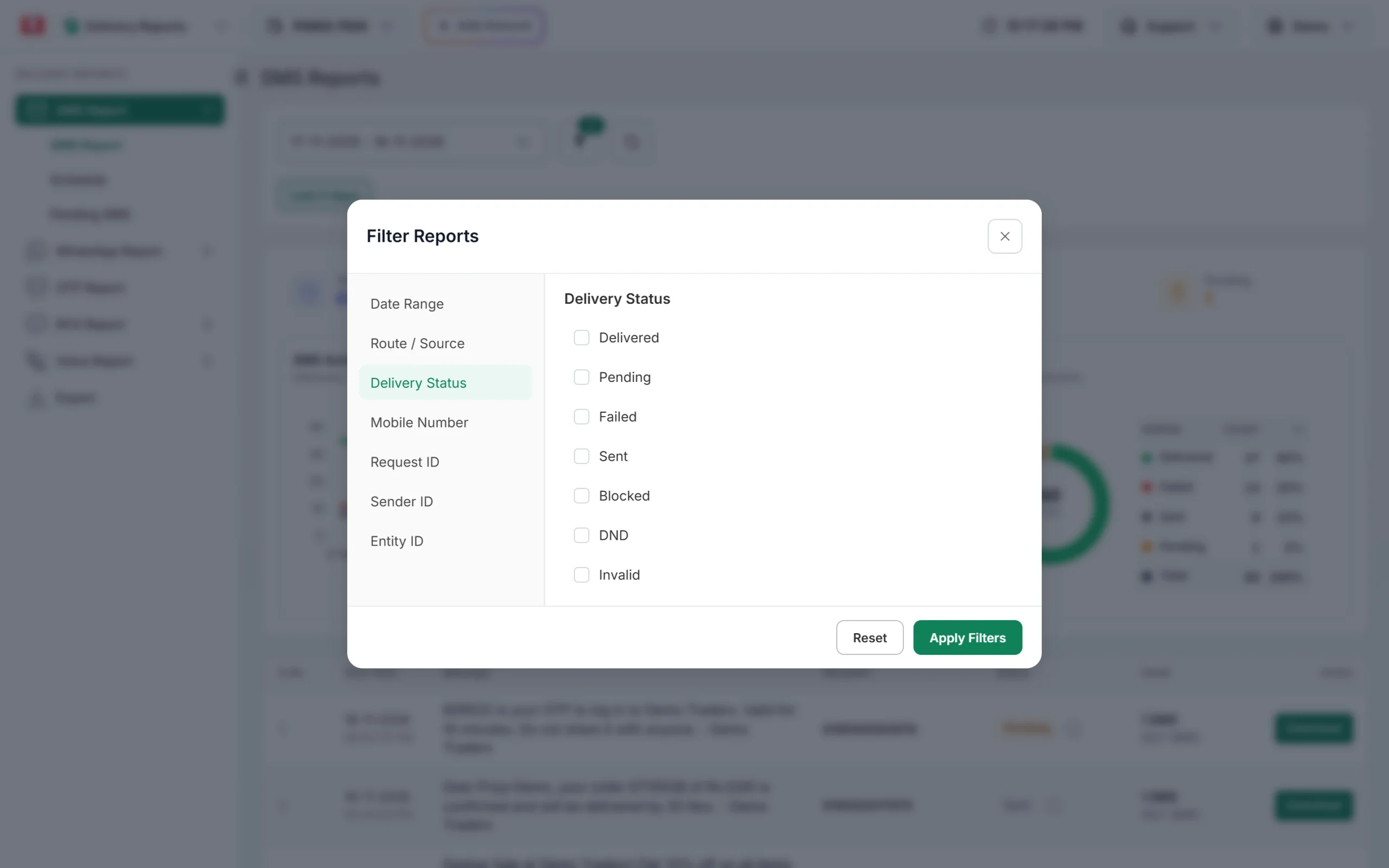
Show only the sends that have failed numbers. -
Open Delivery Details and read the Description
Click the message text in the list. The Delivery Details window shows the Request ID, a count of Delivered, Failed, Sent and Pending numbers, and the Receivers table. The Description column gives the reason for each number.
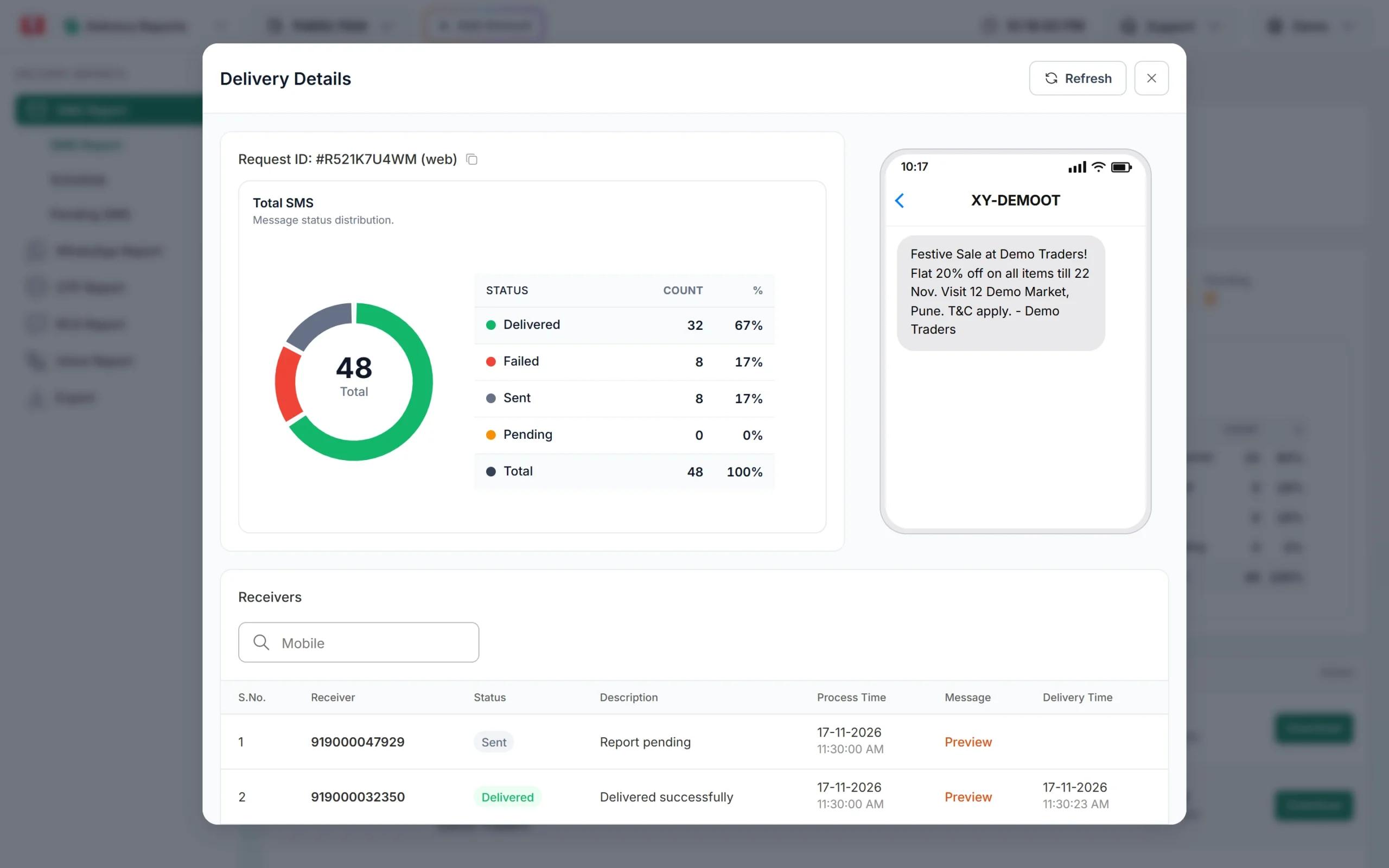
The Description column shows the reason for each number. -
Download the full list for a large campaign
For many numbers, click Download on the campaign row, or use Export to build one file for a date range. The file has the status and description for every number. Export files stay available for 48 hours.
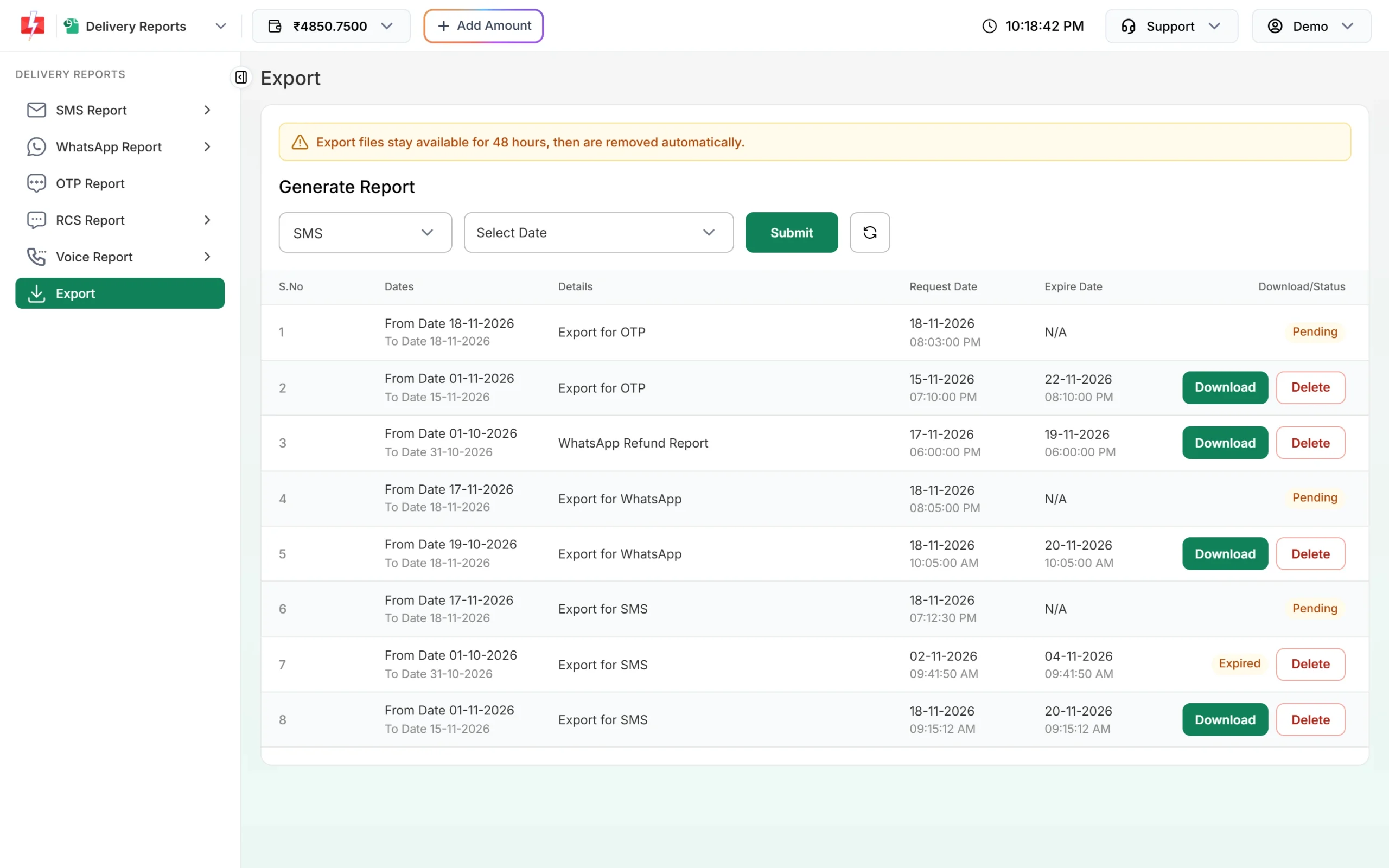
Export a date range when you need every failed number in one file.
If you get delivery reports on your own URL through webhooks, each failed number also comes with a description. When you need the exact operator code for a send, share the Request ID with Fast2SMS support.
All numbers failed or only a few?
If only a few numbers failed, the cause is usually the customer’s phone or number: switched off, not in use, or on DND. That happens in every campaign.
If all or most numbers failed with the same reason, the cause is almost always your DLT setup. Fix the record named by the error (entity, header, template, PE-TM binding or link), send one test SMS to your own phone with Test Template in DLT Manager, and only then send to your full list.
DLT SMS are charged when the campaign is created, for every valid number and SMS part. Numbers that later fail at the operator are not refunded automatically, so test new templates first.
Frequently asked questions
What is an SMS error code?
It is the number an operator returns when it does not deliver an SMS. It tells you which check failed or what went wrong with the phone or network.
What is a DLT error code?
It is an error code for an SMS that failed DLT scrubbing: the check of your entity, header, template, links, the customer’s DND preference and consent. Most of these are in the 600 to 700 range.
What does error code 633 mean in SMS?
At Jio and SmartPing, 633 means the SMS text did not match the approved template. Use the exact approved text and change only the variables.
What does error code 650 mean?
At Airtel, Jio and SmartPing, 650 means the number is on DND and blocked your promotional SMS.
Are SMS error codes the same for every operator?
No. Many DLT codes are the same, such as 633 and 650, but others differ. Check the code on the page for the operator it came from.
Am I charged for SMS that fail with an error code?
Yes. DLT SMS are charged when the campaign is created, and numbers that fail at the operator are not refunded automatically.
Where do I see the error for my SMS in Fast2SMS?
Open the message in SMS Report and read the Description column in Delivery Details, or download the campaign report. Support can give you the exact operator code for a Request ID.
Related guides
- DLT error 633 and 630: template not matched or not found
- SMS error 650, 651, 652 and 5101: DND, promo time and consent
- What is DLT scrubbing and how does it decide delivery?
- Why did my SMS fail? Every failure reason in the Fast2SMS report
- PE-TM binding in Fast2SMS
- SMS not delivered? Every DLT and delivery error explained