
Airtel DLT registration is done on Airtel’s commercial communication portal, where a business registers once as a Principal Entity and then adds its headers (Sender IDs), content templates and telemarketer. This guide covers the steps on Airtel DLT, the fee Airtel shows, the documents to keep ready, and how to add your Airtel DLT IDs in Fast2SMS so your SMS can go out.
What is Airtel DLT?
Airtel DLT is Bharti Airtel’s platform for TRAI’s rules on commercial SMS and calls, found at airtel.in/business/commercial-communication. Businesses and telemarketers register there, and your headers, content templates and consent templates are recorded on the DLT ledger. Before delivery, operators check every SMS against these records.
One registration is enough. Operator DLT FAQs state that an Entity ID is unique across all access providers and that a business registers only once, with any one operator. An entity registered on Airtel can send to Jio, Vi and BSNL numbers too.
Who should use Airtel DLT
- Businesses that have not registered on any DLT portal yet and choose Airtel.
- Businesses already registered on Airtel. Add all new headers and templates there, under the same entity.
- If your business is already registered on another portal, you do not need Airtel DLT. Registering again creates a second Entity ID and confusion later.
Airtel DLT registration fee, validity and approval time
| Portal | airtel.in/business/commercial-communication |
|---|---|
| Registration fee | ₹5,900 per year including GST (at the time of writing), the same on every DLT portal. Airtel asks for it after your KYC (registration) is approved. |
| When you pay | After your KYC registration, as stated on the same page. |
| Validity and renewal | The fee is charged per year. Check the renewal terms in your account after login. |
| Approval time | Not published on Airtel’s public pages. You are told about approval or missing documents on your registered email. |
Sending in bulk? For high SMS volumes our team offers discounted rates. Talk to our team or see SMS pricing.
Documents for Airtel DLT registration
Airtel asks for KYC documents of the business and of the person who will manage the account. Keep these ready:
- Business PAN.
- Proof of business and address, such as a GST certificate, certificate of incorporation, trade licence or other registration certificate.
- Name, mobile number, email and identity proof of the authorised person.
- Government bodies: letter of intent or agreement from the government. SEBI-registered businesses: SEBI registration certificate.
- A Letter of Authorisation (LoA), only when a telemarketer registers on your behalf. See what LOA and CLI mean for Airtel DLT.
How to register on Airtel DLT: step by step
We describe the steps in words only. Use the labels you see on the Airtel portal.
-
Start entity registration as an enterprise
Open the Airtel commercial communication portal and start a new entity registration. Airtel asks who you are: choose to register for your own organisation. The other option, on behalf of another organisation, is for telemarketers.
-
Fill in business details and upload KYC
Enter your business name, organisation type, address and authorised person, and upload the documents. Make sure the name matches your PAN and certificates exactly.
-
Pay the registration charges after KYC
Once your KYC registration is approved, pay the registration charges shown on the portal so you can use headers, templates and other services. Note your Entity ID (PE ID), because you will add it in Fast2SMS.
-
Register your headers
Register each Sender ID. Pick a header that relates to your business or brand name, and the type that matches your messages: promotional, or transactional and service.
-
Register your content templates
Add each message as a content template, choose its category, link it to an approved header and mark the changing parts as {#var#}. Include your brand name. After registration only the variable parts can change, so check the fixed text carefully.
-
Register a consent template (only for consent-based messages)
A consent template is needed only for messages that require recorded customer consent, that is promotional and service explicit messages. OTPs and transaction alerts do not need one.
-
Add Fast2SMS as telemarketer and approve the chain
Send the PE-TM chain request on Airtel DLT to our TM ID and take a screenshot. After Fast2SMS accepts it, Airtel asks you to approve the chain once more. These two guides show where: add a telemarketer in Airtel DLT and complete the Airtel DLT PE-TM chain.
Telemarketer (TM) name SID GROUPS PRIVATE LIMITED TM ID 1702178720558766591
Add your Airtel DLT DLT details in Fast2SMS
Once Airtel DLT has approved your entity, headers and templates, copy the IDs into Fast2SMS. Everything is in the SMS app under DLT Manager. Only approved items can be used for sending.
-
Add your Entity ID
Go to DLT Manager > Entity ID and click Add New Entity. Enter the Entity ID exactly as Airtel DLT shows it and your entity name. If Fast2SMS finds the ID on the DLT platform, the name fills in and the entity is approved straight away. If not, you are asked to upload a screenshot of the approved entity from Airtel DLT, and our team checks it.
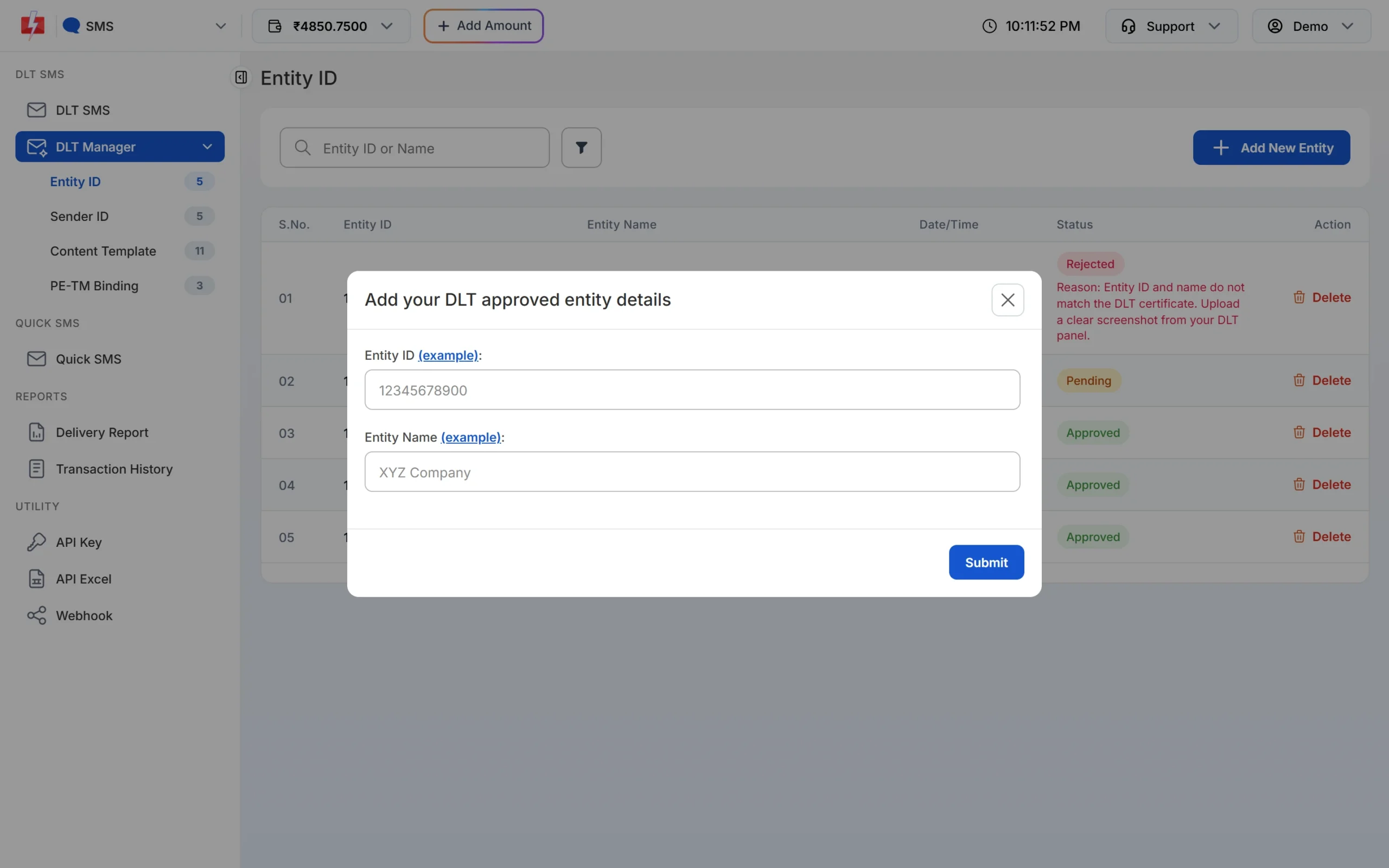
Adding the Entity ID you got from Airtel DLT. -
Add your Sender IDs (headers)
Open Sender ID and click Add New Sender ID. Select your entity, keep Type Manually, enter the approved header (3 to 6 characters) and upload a screenshot that shows it approved on Airtel DLT.
There is also an Upload Excel option for header lists exported from DLT portals (.xlsx or .csv). If your Airtel DLT export is not accepted, type the headers manually.
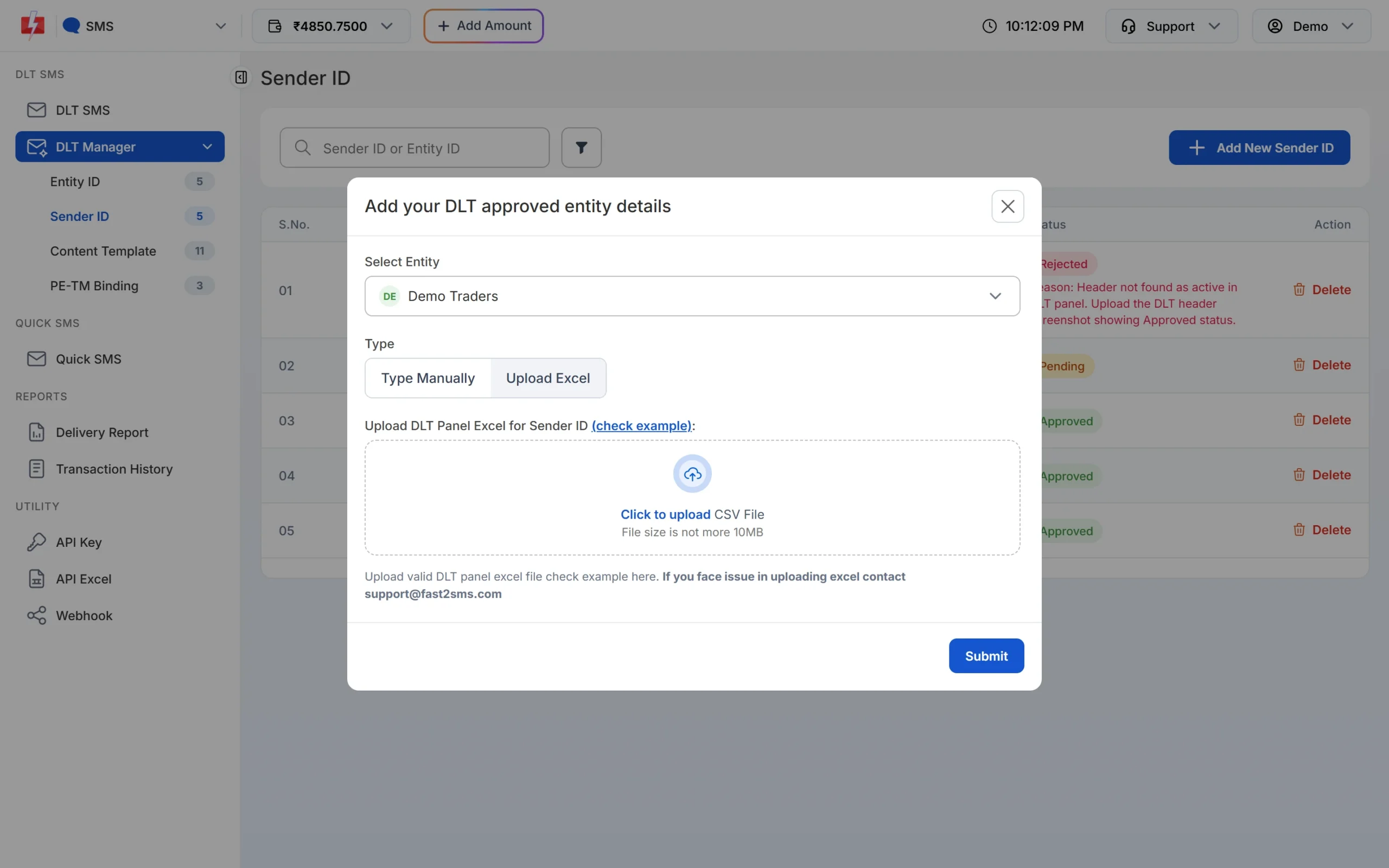
Headers can be typed one by one or uploaded from the DLT panel export. -
Add your content templates
Open Content Template and click Add Content Template. Select the entity, tick the Sender IDs the template is linked to, enter the Content Template ID, choose Service Implicit or Service Explicit or Promotional, paste the approved text exactly as registered (with every {#var#}) and upload the approval screenshot.
Have many templates? Choose Upload Excel and upload the template export you download from Airtel DLT. Fast2SMS reads the common export formats of the DLT portals and imports only the rows marked approved or active. If a Sender ID in the file is not in your account yet, it is added as Pending.
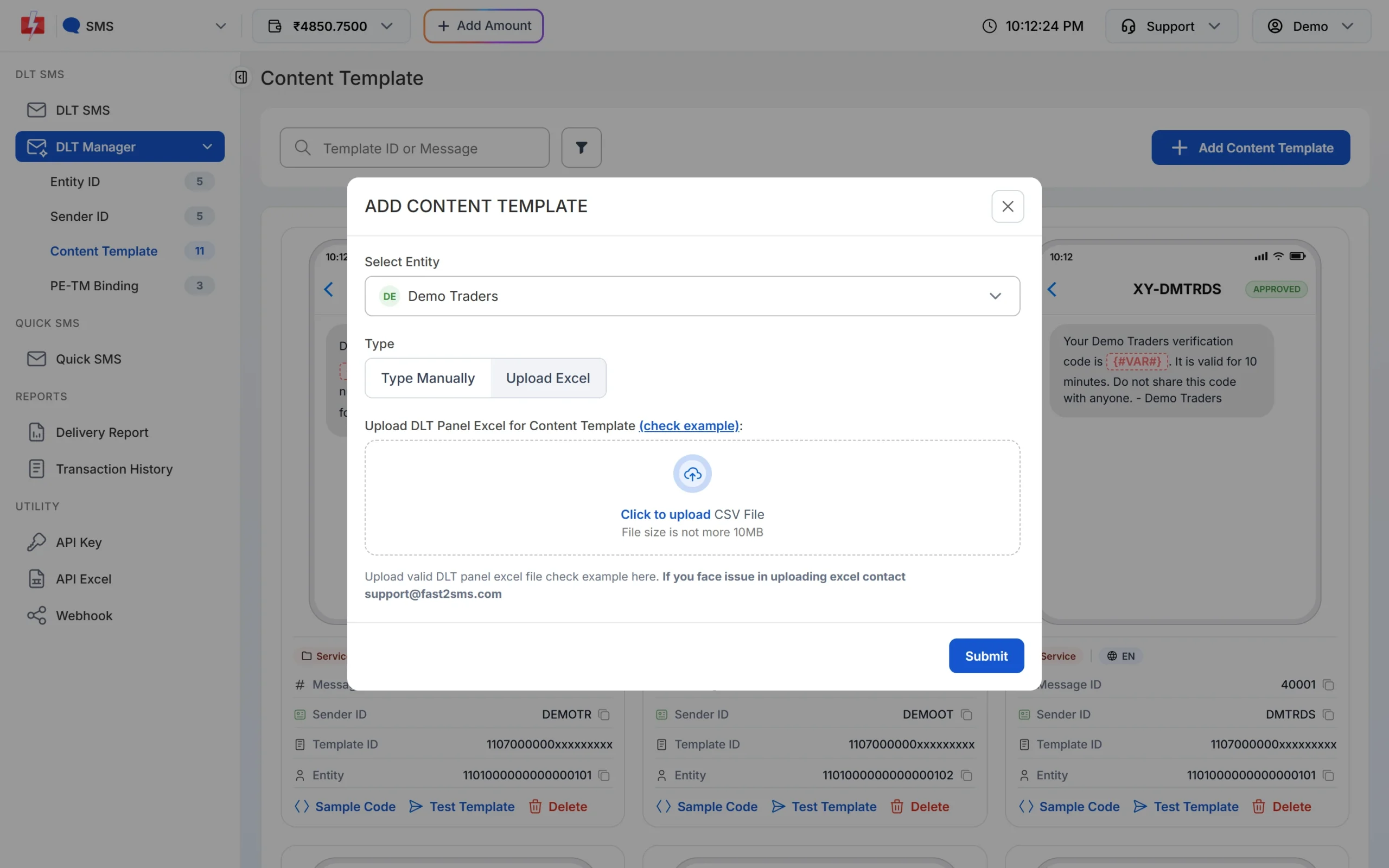
Templates can be added by hand or from the DLT export. -
Submit your PE-TM binding
Open PE-TM Binding. After you have sent the chain request to TM ID 1702178720558766591 on Airtel DLT, tick I’ve sent the request to TM ID 1702178720558766591 from DLT Panel. Select the entity, upload the screenshot of the request, choose a company document type, upload the document and click Submit Request. The authorised person’s name, PAN card and Aadhaar or Voter ID are asked for after the company document. Each file can be up to 10 MB.
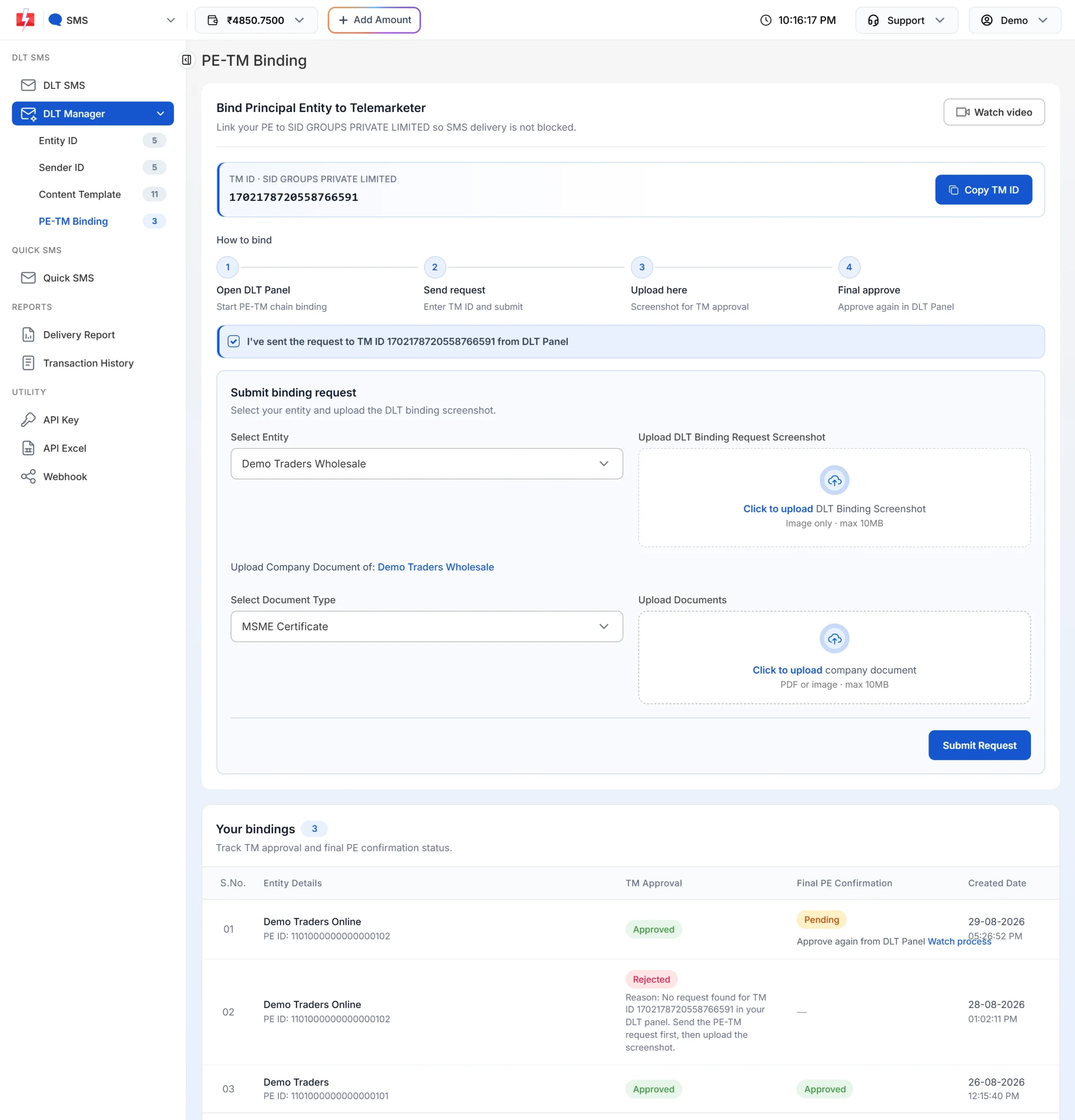
The binding form opens after you tick the confirmation box. -
Give the final approval on Airtel DLT
When Fast2SMS accepts the chain, TM Approval turns Approved. If Final PE Confirmation still says Pending with “Approve again from DLT Panel”, log in to Airtel DLT and approve the request once more. Use the Watch process link if you are not sure where to do it. When both columns say Approved, your chain is complete and you can send DLT SMS.
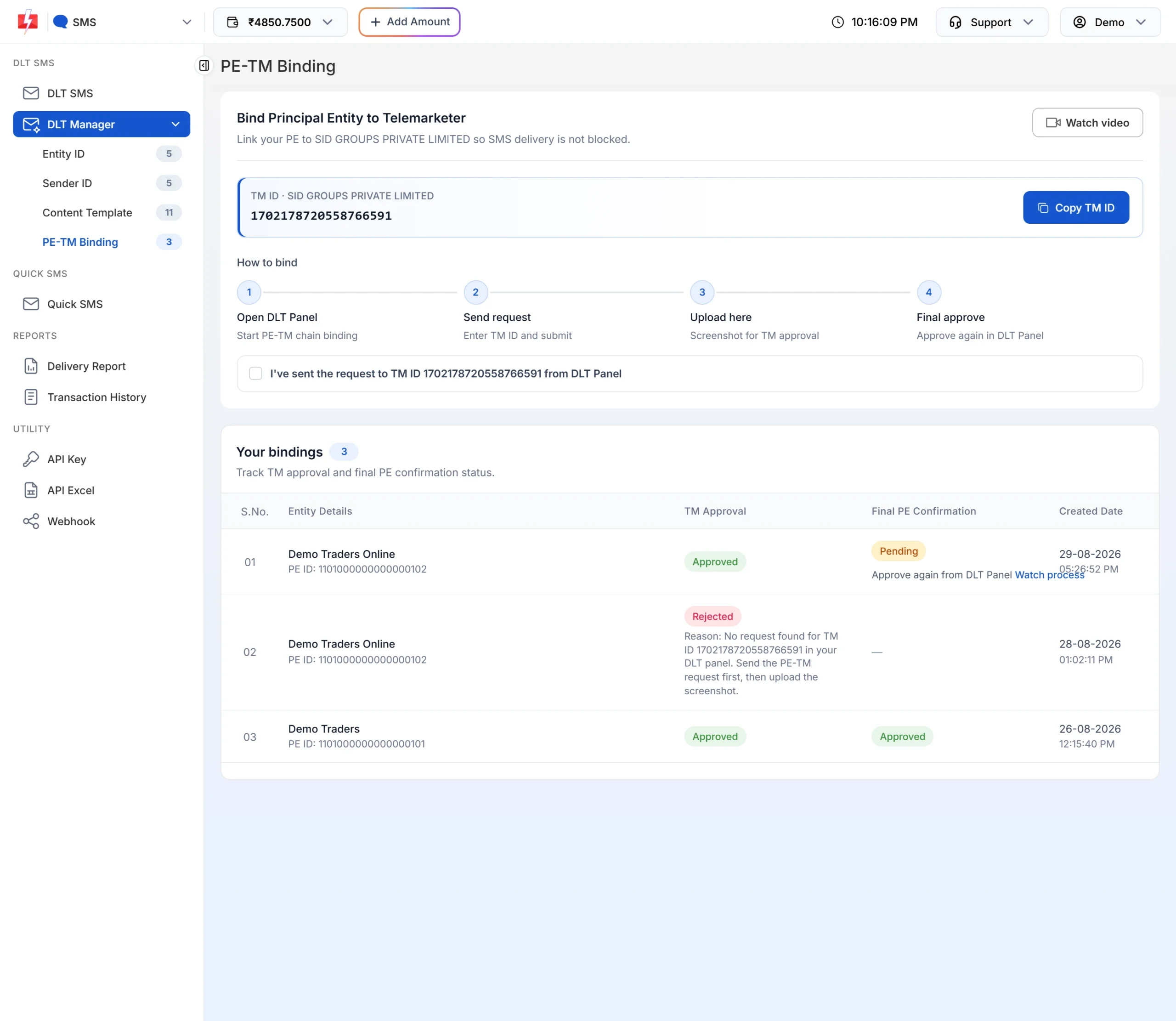
Both columns must show Approved.
For more detail on each screen, see DLT Manager in Fast2SMS and PE-TM binding in Fast2SMS.
Common Airtel DLT rejection reasons and fixes
| Problem | Why it happens | Fix |
|---|---|---|
| KYC sent back or rejected | A document is missing, unclear, or does not match the business name. | Re-upload clear copies with the same business name as on your PAN. |
| Header rejected | The header does not relate to your business, or it falls in a restricted group such as celebrity or politician names, other companies’ brands or trademarks, generic words or government-style headers. | Apply for a header based on your own business or brand name. |
| Template rejected | Brand name missing, wrong category, or the content is outside your registered line of business. | Add your brand name, choose the right category and keep the message about your own business. |
| Chain pending with you | Fast2SMS approved the chain but your final approval on Airtel is not done. | Approve the chain on Airtel DLT. See the guide linked in the last step above. |
| Entity rejected in Fast2SMS | The ID or name typed in Fast2SMS is different from the DLT record, or the screenshot is unclear. | Copy the ID and name exactly from the portal and upload a clear screenshot of the approved entity. |
| Sender ID rejected in Fast2SMS | The header is not approved or not active on the portal yet. | Wait for approval on the portal, then add it again with a screenshot that shows the approved status. |
| PE-TM binding rejected in Fast2SMS | The chain request was not sent on the portal, or it went to a different TM ID. | Send the request to TM ID 1702178720558766591 first, then submit the binding again with the screenshot. |
Frequently asked questions
What is Airtel DLT?
It is Airtel’s portal for TRAI’s DLT rules, where businesses register their entity, headers and SMS templates before sending commercial SMS.
How much is the Airtel DLT registration fee?
₹5,900 per year including GST at the time of writing, the same as on every other DLT portal. You pay it after KYC. Check the portal for the current amount before you pay.
When do I pay the Airtel DLT fee?
After your KYC registration, according to Airtel’s registration page.
How long does Airtel DLT approval take?
Airtel does not publish a fixed time on its public pages. Keep an eye on your registered email for approval or document requests.
I am registered on Jio. Do I need Airtel DLT?
No. One registration on any portal is enough, because the Entity ID is unique across all operators.
What TM ID do I add on Airtel DLT for Fast2SMS?
1702178720558766591, under the name SID GROUPS PRIVATE LIMITED.
Why is my Airtel chain still pending after Fast2SMS approved it?
Airtel needs your final approval on the portal. Follow how to complete the Airtel DLT PE-TM chain.
Can I upload my Airtel template export into Fast2SMS?
Yes. Use Upload Excel under DLT Manager > Content Template. Fast2SMS reads the Airtel export format and imports the approved rows.